SAP Fiori tools are the extensions in SAP Business Application Studio (BAS) and VS Code that generate, shape, preview and deploy Fiori apps. The flexible programming model (FPM) is how a SAP Fiori elements for OData V4 app takes your own UI parts – building blocks, custom pages, sections, columns, actions and controller extensions – without leaving the framework. This page uses the Sales Order Approval apps on the RAP service ZUI_SalesOrder_O4. Floorplans and annotations are on SAP Fiori › 03 · SAP Fiori Elements; build, deploy and the proxy in detail on SAPUI5 › 04 · Data, Binding & Navigation; UI5 Tooling itself on SAPUI5 › 05 · UI5 Tooling, TypeScript & Custom Controls.
Part 1 – Why SAP Fiori tools and the flexible programming model
An ABAP developer who finished the RAP service still needs a UI: a list report and object page for the sales reps, an approver app for managers, maybe a dashboard. Writing that by hand in UI5 takes weeks. Fiori tools turn it into a guided flow: generate the project from the service, model the pages visually, preview with real or mock data, deploy to the ABAP system or SAP BTP. Where the floorplans stop, the flexible programming model lets you add exactly the missing part in UI5 – and the rest stays generated and upgrade-safe.
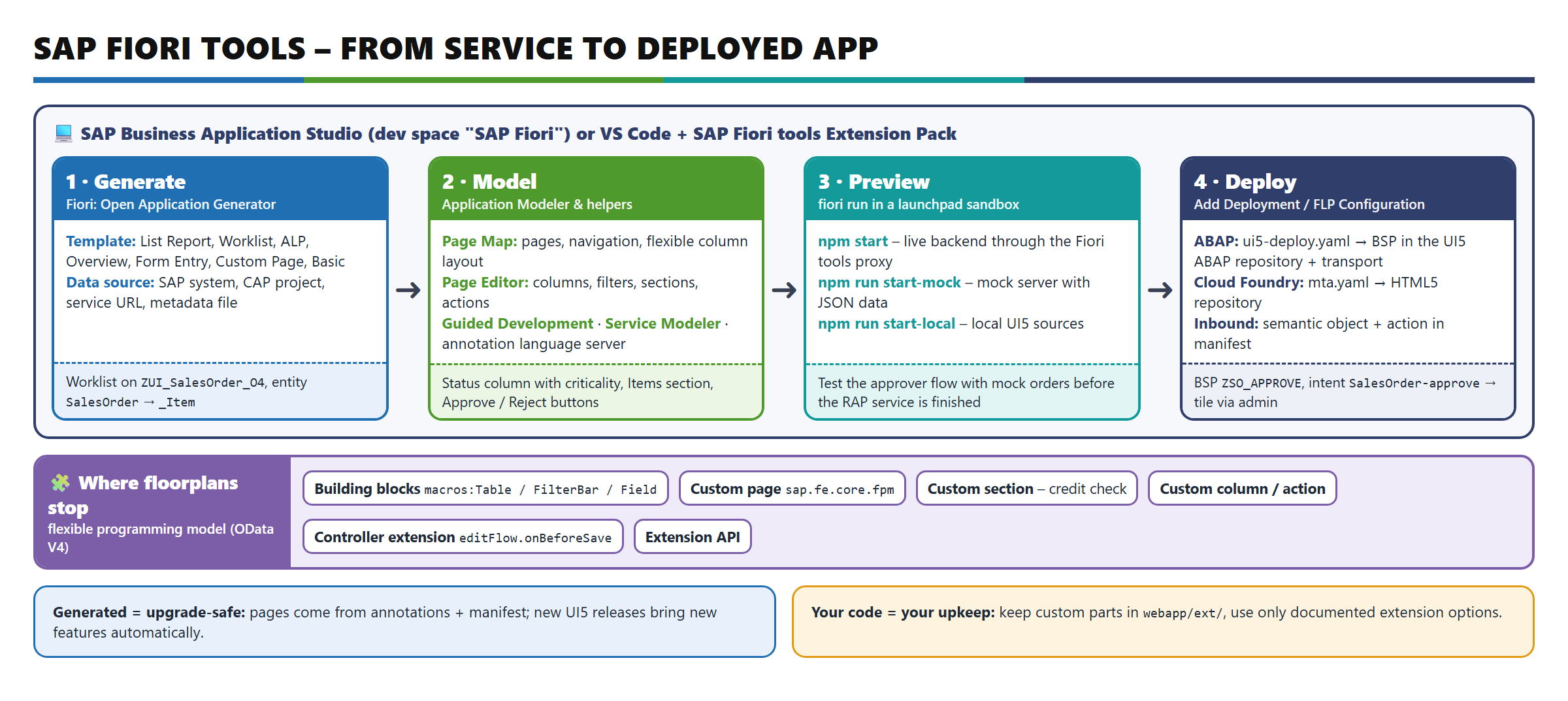
Phase | Fiori tools feature | Sales Order example |
|---|---|---|
Generate | Application Generator (template wizard) | List Report Page on |
Model | Page Map, Page Editor, Guided Development, Service Modeler, annotation language server | Add the Status column with criticality, an Items section, Approve / Reject buttons |
Preview |
| Test the approver flow before the backend is finished |
Deploy | Deployment and launchpad configuration ( | BSP application in the ABAP repository, tile for intent |
Extend | Flexible programming model: building blocks, custom page, custom section/column/action, controller extensions | Credit-check section on the object page; approval cockpit as a custom page |
Part 2 – Setting up: BAS or VS Code
SAP Business Application Studio | VS Code + SAP Fiori tools Extension Pack | |
|---|---|---|
Where | Browser IDE on SAP BTP (subscription in a subaccount) | Local editor on your laptop |
Set-up | Create a dev space of type SAP Fiori (or Full-Stack Cloud Application for CAP + Fiori) – Fiori tools pre-installed | Install Node.js LTS and the SAP Fiori tools – Extension Pack from the marketplace |
Reaching a backend | Destinations in the BTP subaccount (on-premise through the Cloud Connector) | Saved SAP systems (URL + client + credentials in the OS secure store), corporate network or VPN |
Good for | Teams on BTP, no local install, CAP projects | Offline work, fast local tooling |
2.1 What the extension pack contains
Extension / feature | What it does |
|---|---|
Application Wizard (SAP Fiori application generator) | Creates a Fiori elements or basic (freestyle) UI5 project from a service; the Adaptation Project generator (page 05) plugs into the same wizard |
Application Modeler | Page Map (pages and navigation) and Page Editor (content of one page) |
Guided Development | Step-by-step guides that insert annotations, manifest settings and extension code |
Service Modeler | Graphical view of entities, navigation properties and annotations of the service |
XML Annotation Language Server | Code completion, validation and i18n help in local annotation files |
XML Toolkit | Base XML language support used by the annotation language server |
Environment Check (command) | Checks destinations (BAS) and collects environment details into a report for SAP support |
Fiori tools CLI ( |
|
- All features are reached through the Command Palette (Ctrl+Shift+P, type "Fiori:") or the right-click menu on the project folder; Fiori: Open Application Info lists every command that fits the project.
- UI5 Language Assistant (completion and stable-ID checks in XML views) is included in the BAS SAP Fiori dev space and an optional install in VS Code. For CAP, SAP CDS Language Support is a separate extension; the SAP Fiori dev space does not contain it.
- AI support: the Project Accelerator (SAP Fiori tools AI) generates a CAP or RAP project with a Fiori elements app from text or images; SAP plans to deprecate it at the end of 2026 in favour of the MCP server for SAP Fiori (
@sap-ux/fiori-mcp-server) plus Fiori skills, built into the Application Modeler for GitHub Copilot in VS Code and pre-installed in BAS SAP Fiori dev spaces.
Part 3 – Application Generator
Command Palette → Fiori: Open Application Generator (in BAS also *Start from template*). Wizard pages: template, data source and service, entity selection, project attributes (with optional deployment and launchpad configuration). Fiori tools support projects with a minimum SAPUI5 version of 1.65.
3.1 Templates
Template | OData | Use in the Sales Order scenario |
|---|---|---|
List Report Page | V4 / V2 | Reps' app: search orders, open the object page, create with draft |
Worklist Page | V4 (UI5 1.99+) / V2 | Approver's to-do list of orders with status N |
Analytical List Page | V4 (UI5 1.90+) / V2 | Order value by customer and month – needs an aggregating service |
Overview Page | V4 / V2 | Manager dashboard of cards; the floorplan's design and documentation stay closest to V2 |
Form Entry Object Page | V4 | Quick create of one order |
Custom Page (flexible programming model) | V4 | Approval cockpit built from building blocks (Part 9) |
Basic | V4 / V2 / none | Freestyle UI5 skeleton – the sales dashboard (SAPUI5 › 03) |
3.2 Data sources
- Connect to an SAP system – ABAP on-premise (destination or saved system) or SAP Business AI Platform, ABAP environment; then pick the service from the catalog (V2 and V4 services are listed).
- Use a local CAP project – the generator reads the CDS model and writes the app into
app/. - Connect to an OData service URL, SAP Business Accelerator Hub, or upload a metadata file to work without any backend.
3.3 What is generated
|
- File and folder names follow the current generator and change slightly between versions; the roles stay the same.
- For a RAP service the quickest first look is still Preview in the ADT service binding (SAP Fiori › 03 · SAP Fiori Elements); generate a project when you need your own app ID, tile and extensions.
Part 4 – Application Modeler: Page Map and Page Editor
4.1 Page Map
Fiori: Show Page Map (or the Application Modeler view in the side bar) shows all pages of the app and how they navigate.
- Add pages: an object page for a navigation (
_Item→ item object page) or a custom page. - Switch on the flexible column layout (list, object and sub-object side by side) and choose the default column split.
- Application Settings: title, description and Flex Enabled (UI adaptation on or off). The minimum SAPUI5 version is changed with the command Fiori: Change Minimum SAPUI5 Version.
- Each page tile has a pencil icon that opens the Page Editor for that page.
4.2 Page Editor
A property tree of one page: filter fields, table columns, actions, header, sections, form fields. Each change is written to the right place automatically:
You change | Page Editor writes to | Example |
|---|---|---|
Columns, filter fields, sections, labels | Annotations – local | Add |
Table type, selection mode, variant management, initial load | manifest.json page settings | Grid table with multi-select for mass approval |
Custom column, section, action | manifest.json entry + generated fragment / handler in | Credit-check section on the object page |
- Tip for RAP developers: labels, criticality, facets and line items that every app on the service needs belong in the backend metadata extension. Use the Page Editor's local annotations only for app-specific layout – otherwise the UI logic is split between ADT and the app and drifts apart.
- The Page Editor cannot change backend CDS; for an ABAP service it writes local annotations, which override the backend ones for the same term and qualifier.
Part 5 – Guided Development, Service Modeler and the annotation language server
5.1 Guided Development
Fiori: Open Guided Development lists guides such as "Add custom columns to the table using extensions", "Add a custom section to an object page using extensions", "Add a header facet to an object page using data points", "Add status colors and icons to a column in a table" or "Add a value help to a field in the filter bar"; *Project Guides* shows only those that fit the project. Each guide asks for parameters (entity, page, label, fragment name), shows the code it will insert and writes it with Insert Snippet – annotation, manifest entry and extension skeleton in one go.
- Good for learning: the guide shows exactly which annotation or manifest key produces a feature.
- Check the inserted code into Git and review it like hand-written code.
5.2 Service Modeler
- Fiori: Open Service Modeler draws the entity types (SalesOrder, SalesOrderItem) with their navigation properties and lists the annotations per entity, including where they come from (backend or local).
- Use it to find the right entity and navigation before you add a section, and to check that a backend annotation actually arrives in the metadata.
5.3 XML annotation language server
- Code completion for vocabularies, terms, property paths and enum values in
annotation.xml; micro-snippets for targets, terms, records (only mandatory or all properties) and property values. - Diagnostics for wrong paths and missing terms; i18n quick fix that moves a hard-coded label into
i18n.properties; navigation from a path to its definition. - CAP projects get the same help in
.cdsfiles through the CDS OData Language Server, part of SAP CDS Language Support.
|
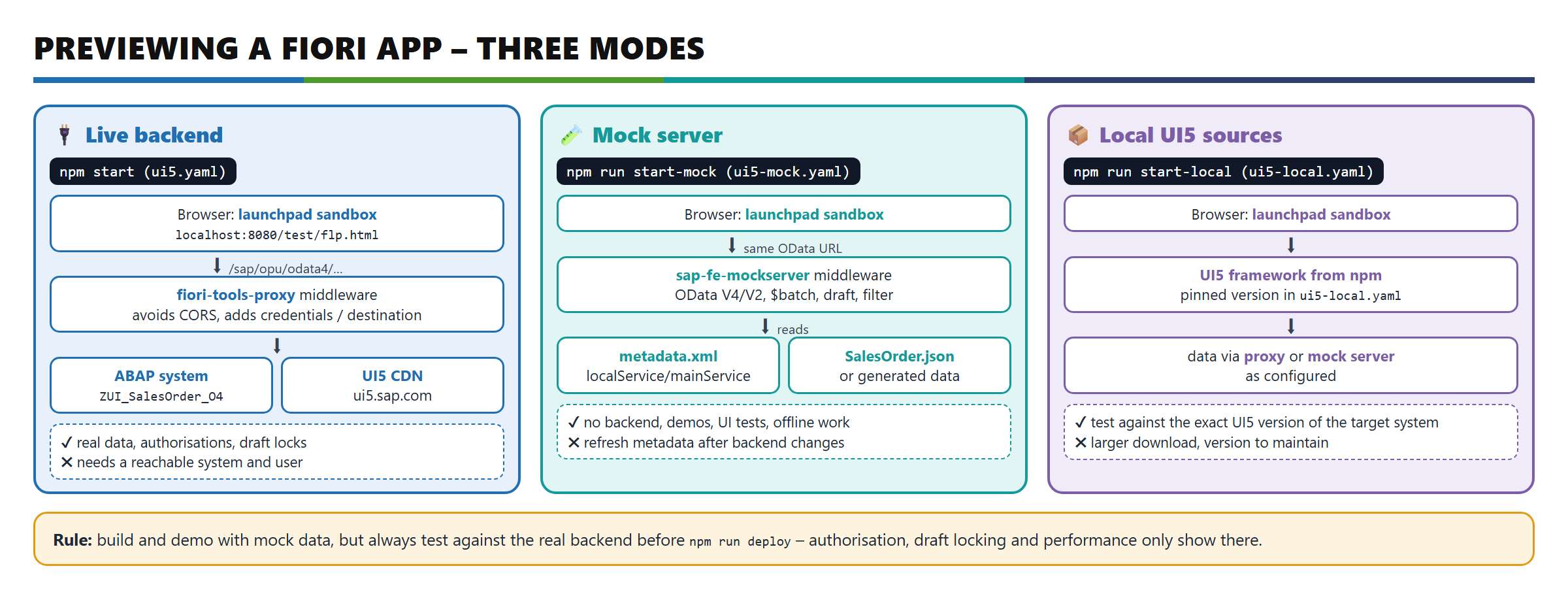
Part 6 – Preview: live backend, mock server and mock data
|
- The generator writes the
start*andbuildscripts;deploy,undeployanddeploy-testare added by the deployment configuration. Older projects open a physicaltest/flpSandbox.html; current ones use the virtualtest/flp.htmlof the preview middleware. The preview runs the app inside a launchpad sandbox, so intents, the shell bar and personalisation behave as in the real launchpad. npm start– thefiori-tools-proxymiddleware inui5.yamlforwards/sapcalls to the backend (no CORS problem) and loads UI5 from the CDN. Proxy details: SAPUI5 › 04 · Data, Binding & Navigation.npm run start-mock– the SAP Fiori elements mock server (@sap-ux/ui5-middleware-fe-mockserver) answers OData requests frommetadata.xmland JSON files. It supports draft,$batch, filtering and navigation; without JSON files it generates random data.
6.1 Mock server configuration
|
|
- Draft-enabled entities need
IsActiveEntity(and the mock server manages the draft copies). - Custom behaviour such as what the
approveaction does goes into a JavaScript file named after the entity set (SalesOrder.js) in themockdataPathfolder, unbound actions intoEntityContainer.js– the API is documented in the mock server repository on GitHub (SAP/open-ux-odata). - New projects from the generator already contain the mock config. Add it to an existing project with
npx @sap-ux/create add mockserver-config(or Application Info → Add Mockserver Config);npx @sap-ux/create remove mockserver-configremoves it. - Legacy:
sap/ui/core/util/MockServerinside the app (V2 only) – replaced by the middleware above.
6.2 Common mistakes
- Metadata in
localServiceis outdated after a backend change → columns missing in mock mode. Refreshmetadata.xml(download$metadataagain or regenerate). - Testing only with mock data → authorisation, draft locking and real performance stay untested. Always test against the backend before deployment.
Part 7 – Deployment and launchpad configuration
- Fiori: Add Deployment Configuration (or
npx fiori add deploy-config) asks for the target – ABAP (system, BSP name, package, transport) or Cloud Foundry (destination, managed approuter) – and createsui5-deploy.yaml(plusmta.yamlandxs-app.jsonfor Cloud Foundry). npm run deploybuilds and uploads;npm run deploy-testruns the same in test mode without uploading;npm run undeployremoves the app again. Full walk-through for ABAP and BTP: SAPUI5 › 04 · Data, Binding & Navigation (Part 15).- Fiori: Add Fiori Launchpad Configuration (
npx fiori add flp-config, ornpx @sap-ux/create add inbound-navigation) adds the inbound – semantic object, action, title, optional subtitle – tomanifest.json, which the launchpad uses for the target mapping:
|
- The administrator then creates catalog, target mapping, tile, space/page and role – SAP Fiori › 02 · SAP Fiori Launchpad & Security (Part 6).
Part 8 – The flexible programming model and building blocks
The flexible programming model (FPM) is available for SAP Fiori elements for OData V4 only. Its idea: you do not choose between "fully generated" and "fully freestyle". You keep the generated pages and add UI5 code exactly where the floorplan stops, using public, documented extension options. The framework still handles routing, draft, messages, side effects and the flexibility layers.
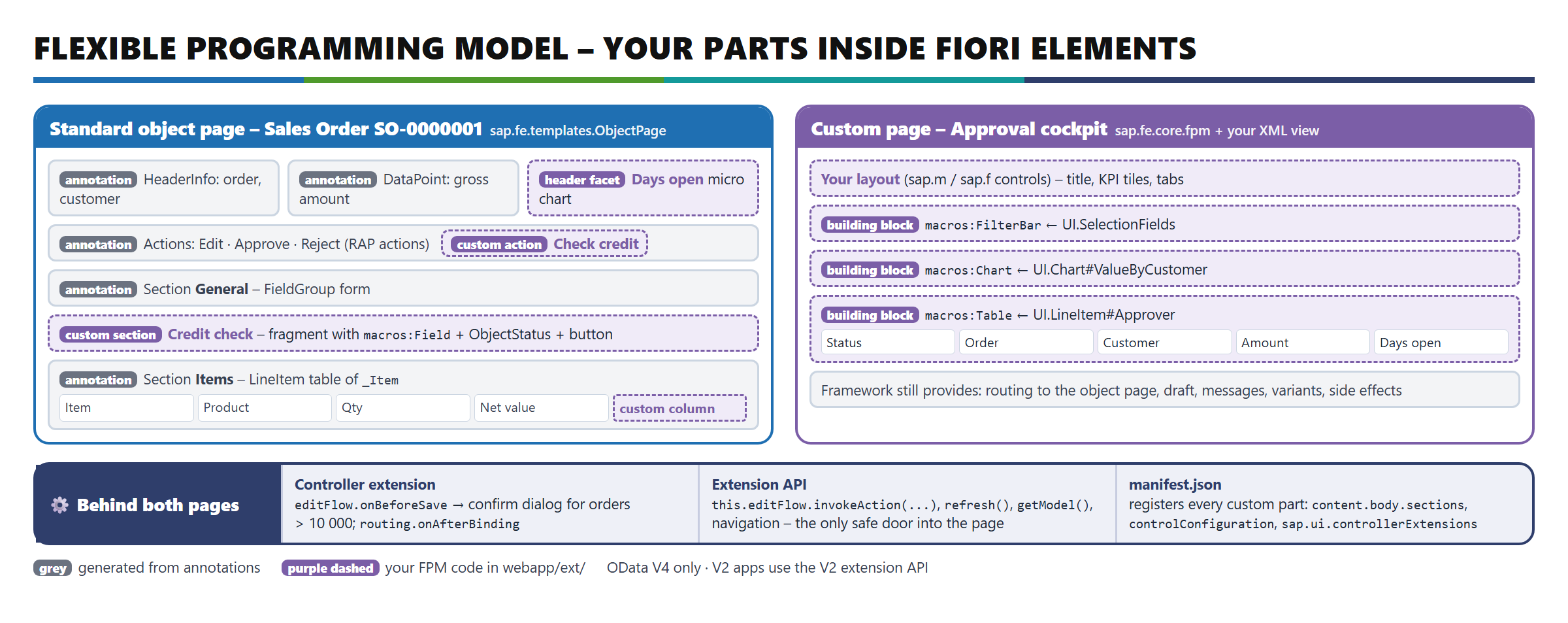
FPM element | What it is | Sales Order example |
|---|---|---|
Building blocks ( | Fiori elements controls you place in your own XML; they read annotations like the generated pages do |
|
Custom page | Own XML view + controller as a page of the FE app (component | Approval cockpit with KPI header, filter bar and table |
Custom section / header facet | Own fragment inside a standard object page | Credit-check panel |
Custom column / action / filter field | Own fragment or handler inside a standard table or filter bar | Traffic-light column "Days open"; "Check credit" button |
Controller extension | Override hooks of the standard page controllers ( | Confirm dialog before saving a high-value order |
Extension API |
| Refresh the list after approving from a custom action |
8.1 Common building blocks
Building block | Purpose | Key attributes |
|---|---|---|
macros:Table | Table driven by |
|
macros:FilterBar | Filter bar from |
|
macros:Field | One field with label, formatting, value help, edit mode |
|
macros:Form | A form from a |
|
macros:Chart | Chart from |
|
macros:MicroChart | Small KPI chart (bullet, radial …) from a | metaPath |
| Share menu (e-mail, tile, Teams), next/previous object | – |
- The full list, attributes and runnable samples are in the SAP Fiori development portal (formerly the Flexible Programming Model Explorer) at ui5.sap.com/test-resources/sap/fe/core/fpmExplorer/index.html. The API reference (
sap.fe.macros) shows since when each block exists, e.g.MicroChartandSharefrom SAPUI5 1.93,Paginatorfrom 1.94. metaPathpoints to an annotation (@com.sap.vocabularies.UI.v1.LineItem#Approver) or a property;contextPathto the entity set or navigation (/SalesOrder,_Item).
Part 9 – Custom pages, sections, columns and actions
9.1 Custom page: the approval cockpit
Routing target in manifest.json – the component is sap.fe.core.fpm, the view is yours:
|
|
|
PageControllergives the custom page the same controller extensions as standard pages (routing,editFlow,intentBasedNavigation…) andgetExtensionAPI().- Add the page in the Page Map (Add New Page → *CustomPage*, new or existing view), or generate an FPM-only app with the Custom Page template, which can start from the
macros:Pagebuilding block as layout.
9.2 Custom section on the object page
|
|
- The section is bound to the current order, so
{GrossAmount}and the building block work without extra binding code.anchoruses the ID of an existing section (the facet ID from the annotation).
9.3 Custom column and custom action with the extension API
|
|
- Take the action's full name (namespace + name) from
$metadata. Prefer a backend action withUI.DataFieldForActionin annotations – a custom action is for UI-side logic around it. - Other manifest extension points of the same kind: custom header facet (
content.header.facets), custom filter field (@…SelectionFields›filterFields), custom views (several tables in tabs in a list report), custom actions in the object page header and footer.
Part 10 – Controller extensions and the extension API
A controller extension overrides documented hooks of the standard page controllers. Register it for one page in manifest.json:
|
|
Controller extension | Typical hooks | Use |
|---|---|---|
editFlow |
| Confirm, block or follow up a draft step; a rejected Promise stops it |
routing |
| React when an object is loaded or navigation starts |
intentBasedNavigation | adaptNavigationContext | Change parameters passed to another app |
messageHandler | beforeShowMessageButton | Decide which bound messages the message button shows |
viewState |
| Control variant / app state handling |
- Each hook has a "since" version in the API reference (
sap.fe.core.controllerextensions):onBeforeSavefrom SAPUI5 1.90, the otheronBefore…hooks from 1.98, theonAfter…hooks from 1.116,onBeforeExecuteActiononly in recent releases (1.153). - Rules: use only
this.base.getExtensionAPI()and documented hooks; never reach into generated control IDs or privatesap.femodules – they change between UI5 versions and break upgrades. - Validation belongs in the backend (RAP validation), not in
onBeforeSave– UI checks are convenience, the backend check is the guarantee.
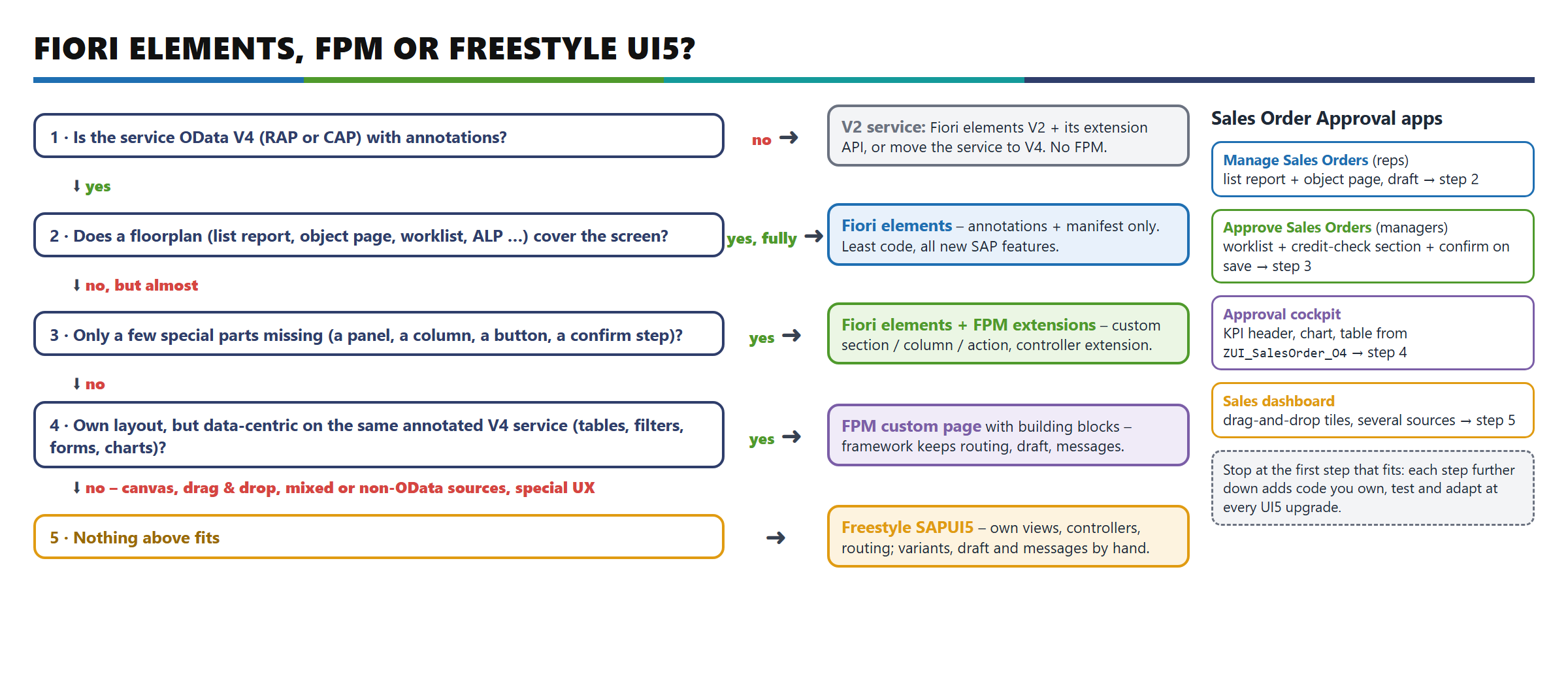
Part 11 – Fiori elements, FPM or freestyle UI5?
App | Choice | Why |
|---|---|---|
Reps' Manage Sales Orders | Fiori elements list report + object page | Standard CRUD with draft; everything from annotations |
Managers' Approve Sales Orders | Fiori elements + FPM | Worklist with Approve / Reject from the backend; one custom credit-check section and a confirm dialog |
Approval cockpit | FPM custom page with building blocks | Own layout, but data and annotations come from the same V4 service |
Sales dashboard | Freestyle SAPUI5 | Drag-and-drop tiles, mixed data sources, custom charts – no floorplan or building block fits (SAPUI5 › 03–05) |
- Choose the lowest step that meets the requirement: annotations → manifest → FPM extensions → custom page → freestyle. Every step up adds code you own and test at each upgrade.
- OData V2 services have no FPM: use Fiori elements V2 with its extension API, or migrate the service to V4 (RAP V4 service binding).
- Freestyle apps can still reuse Fiori design and
sap.mcontrols, but variant management, draft handling and message handling must be built by hand.
Part 12 – Interview questions
Q1. What are SAP Fiori tools and which features do you use most?
A set of extensions for BAS and VS Code: Application Generator, Application Modeler (Page Map and Page Editor), Guided Development, Service Modeler, XML annotation language server, Environment Check, plus the Fiori tools CLI for preview and deployment. Typical flow: generate from the service, refine in the Page Editor, preview with npm start or the mock server, deploy with npm run deploy.
Q2. Where does the Page Editor store a change?
Annotation-type changes (columns, filter fields, sections) go to the local annotation file for ABAP services or the app's .cds file for CAP; page settings go to manifest.json; custom extensions add a manifest entry plus a fragment or handler in webapp/ext/.
Q3. How do you test a Fiori elements app without a backend?
Run npm run start-mock: the SAP Fiori elements mock server middleware serves the service from metadata.xml and JSON files per entity set (or generated data), including draft and $batch. Behaviour such as actions can be scripted in JS files. Always test against the real backend before deployment.
Q4. What is the flexible programming model?
The OData V4 Fiori elements way to mix generated pages with own UI5 parts: building blocks, custom pages (sap.fe.core.fpm), custom sections, columns, actions, header facets and filter fields, controller extensions and the extension API – all through documented options, so the app stays upgrade-safe.
Q5. What is a building block?
A Fiori elements control from sap.fe.macros (Table, FilterBar, Field, Form, Chart …) that you place in your own XML. It reads the same annotations as the generated pages through metaPath and contextPath, so you get personalisation, value helps and draft handling for free.
Q6. How do you add a custom section to an object page?
Add an entry under content.body.sections of the object page settings in manifest.json with template (fragment name), title and position (anchor section and placement), and write the fragment in webapp/ext/. Guided Development or the Page Editor can generate both.
Q7. Which hooks do V4 controller extensions offer?
Overrides on the controller extensions of the page, for example editFlow.onBeforeSave / onBeforeEdit / onBeforeDiscard, routing.onAfterBinding / onBeforeNavigation, intentBasedNavigation.adaptNavigationContext. Returning a rejected Promise from an onBefore… hook stops the step. Register the extension under sap.ui.controllerExtensions for the page controller.
Q8. Fiori elements, FPM or freestyle – how do you decide?
Fiori elements when a floorplan covers the screen; add FPM extensions for a few special parts; an FPM custom page when the layout is special but the data is an annotated V4 service; freestyle only for a UX no floorplan or building block can give (planning boards, drag and drop, mixed sources).
Q9. Scenario: the managers want a "Check credit" button and a warning panel in the approver app. What do you build?
If the check is business logic, a RAP action shown through UI.DataFieldForAction – no UI code. The panel is a custom section with a fragment (building block macros:Field plus an ObjectStatus) registered in the object page settings. Only if the UI must orchestrate several steps add a custom action handler that calls editFlow.invokeAction through the extension API.
Q10. Scenario: after a UI5 upgrade a custom extension broke while the generated pages work. Why, and how do you prevent it?
The extension probably used private sap.fe modules or generated control IDs (byId on internal IDs) instead of the extension API and documented hooks. Fix it by using getExtensionAPI(), building blocks and manifest extension points only, keep extensions small, and add OPA tests that run before each upgrade.
Q11. How do you make a generated app available in the launchpad?
Add the deployment configuration and deploy (BSP application on ABAP or HTML5 repository on BTP), add the launchpad configuration so manifest.json has an inbound (semantic object + action), then the administrator creates catalog, target mapping, tile, space/page and role (SAP Fiori › 02).
🏠 Start Here · ◀ 03 · Fiori Elements · 05 · Adaptation & Extensibility ▶ · Sections: CORE ABAP | OOPS ABAP | ABAP on HANA | Clean Core | RAP | ABAP Points | SAP Fiori | SAPUI5 | Mobile Development (MDK) | BTP Foundations | BTP Development | CAP | SAP Build | ABAP on BTP | Integration Suite | SAP Business AI | SAP BASIS | Security | SAP SDLC
Functional: FICO ABAP | TRM ABAP | VIM | SAP BIS | SD ABAP | MM ABAP | PP ABAP | QM ABAP | PM ABAP | PS ABAP | EWM | TM ABAP | GTM ABAP | EHS ABAP | HR ABAP | BW | SAP Datasphere | SAP Business Data Cloud | SAP MDG | SAP Analytics Cloud | SAP Ariba | SAP CX | SAP IBP