IBP is only as good as its data: master data, sales history, open orders and stock come from the execution systems, and the plan must go back to them. This page explains the integration technologies (SAP Cloud Integration for data services, SAP Cloud Integration in SAP Integration Suite, real-time integration and the OData APIs), which data flows in which direction, what is installed and built on the S/4HANA side (the part an ABAP developer owns), how non-SAP systems and data lakes connect, and how identity and security work. The planning model itself: page 02; building custom integrations and API calls: page 04; choosing the integration technology as an architect: page 05. General CPI concepts: Integration Suite › 02 SAP Cloud Integration (CPI).
Part 1 – The integration landscape at a glance
IBP is a separate cloud system, not a module inside the ERP. Data moves through one of four channels, chosen by data type (time-series key figures vs orders vs master data) and by latency (nightly batch vs near real time). Most projects use two of them side by side.
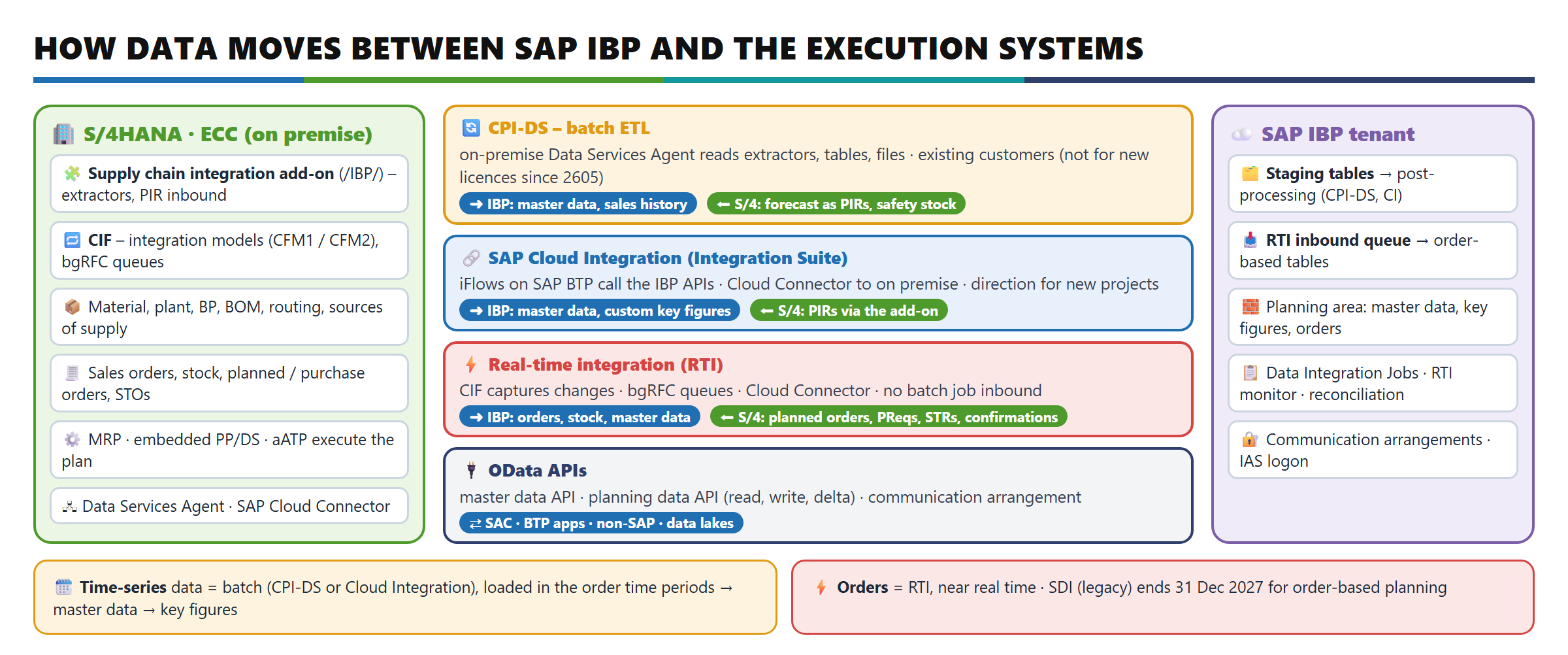
Channel | What it moves | How | Typical use |
|---|---|---|---|
SAP Cloud Integration for data services (CPI-DS, also CI-DS) | Master data, time-series key figures (history, forecast), in both directions | Batch ETL: an on-premise Data Services Agent reads the source and writes to IBP staging tables | Classic time-series integration with ERP, BW and non-SAP; existing customers only – not offered with new IBP licences since 2605 |
SAP Cloud Integration (SAP Integration Suite) | Master data, key figures, PIRs; any SAP or non-SAP system | Integration flows (iFlows) on SAP BTP calling the IBP APIs; Cloud Connector to on-premise | SAP's direction for new implementations (with the Harmonized Planning Area) |
Real-time integration (RTI) | Master data, orders and stock from S/4HANA or ECC; order proposals and confirmations back | Changes captured by CIF, sent asynchronously via bgRFC queues and the Cloud Connector | Order-based planning, synchronized planning with PP/DS; order data for the Harmonized Planning Area |
OData APIs | Master data and key figure data (read and write) | REST/OData calls through a communication arrangement | SAP Analytics Cloud, BTP apps, Cloud Integration flows, external tools |
- Manual channel: the Data Integration app in the IBP web UI also imports CSV files (time periods, master data, key figures) – used for initial tests and small one-off loads, not for production interfaces.
- Legacy – SAP HANA smart data integration (SDI): the older batch channel for order-based planning (via the ERP add-on). SAP announced its end with IBP release 2505 (2025); support for order-based planning ends 31 December 2027, and RTI is the successor (Part 5).
Part 2 – Data flows: what comes in, what goes back
Data | Direction | Typical channel | Source / target object in S/4HANA |
|---|---|---|---|
Products, locations, customers, location products | S/4HANA → IBP | CPI-DS or CI (time-series); RTI (order-based) | Material master (MARA, MARC), plants, business partners |
Sources of supply, BOMs, routings / production data structures, resources | S/4HANA → IBP | RTI (order-based) or add-on extractors (time-series) | Purchasing info records, scheduling agreements, BOM, routing, work centers |
Sales history | S/4HANA / BW → IBP | CPI-DS or CI, nightly or weekly | Billing or delivery items, often via BW or a custom extractor |
Open sales orders, stock, receipts | S/4HANA → IBP | RTI (order-based) or batch as key figures | Sales orders, stock, planned / production orders, purchase requisitions and orders, STOs |
Consensus demand / forecast | IBP → S/4HANA | CPI-DS or CI via the integration add-on | Planned independent requirements (PIRs) consumed by MRP |
Safety stock / inventory targets | IBP → S/4HANA | Batch | Safety stock in the material master or time-dependent safety stock |
Planned orders, purchase requisitions, stock transport requisitions | IBP → S/4HANA | RTI outbound (order-based) | Order proposals created or changed in S/4HANA |
Sales order confirmations | IBP → S/4HANA | RTI outbound | Confirmed schedule lines |
DDMRP buffers | IBP → S/4HANA | Batch | Buffer levels for demand-driven MRP |
- Load sequence for time-series data: time periods → master data → key figures. A key figure record is rejected if its master data (e.g. the product-location) does not exist yet.
- Only stored key figures can be load targets; calculated key figures are recomputed in IBP.
- Granularity: data is loaded at (or aggregated to) the base planning level of the target key figure – e.g. daily invoice lines are summed to week × product × location × customer in the integration flow, not in IBP.
- Delta vs full: master data and history are usually delta loads after the initial load; RTI is delta by design (initial load once, then change pointers).
Part 3 – SAP Cloud Integration for data services (CPI-DS)
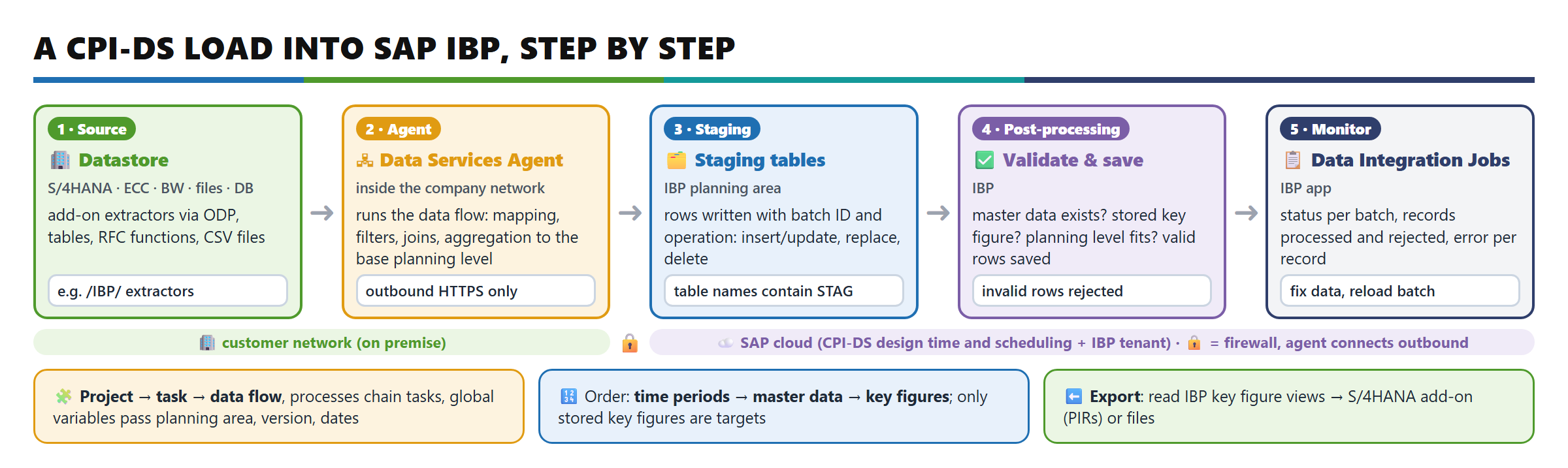
CPI-DS is SAP's cloud ETL tool for IBP and still runs most existing time-series interfaces. Its design time and job scheduling run in the cloud; the actual data access in the customer's network is done by the SAP Data Services Agent, installed on a server inside the firewall. The agent opens an outbound HTTPS connection to the cloud, so no inbound port has to be opened.
3.1 Building blocks
Object | What it is |
|---|---|
Datastore | A connection: to S/4HANA / ECC (RFC, reads extractors, tables and functions), to IBP (the planning area's staging tables and key figure views), to files or databases |
Project → task → data flow | A task holds one or more data flows from source to target with mappings, filters, joins and transforms; tasks are grouped in projects and moved from the test to the production environment |
Process | A sequence of tasks (e.g. load all master data types in dependency order) |
Global variables, scripts | Parameters such as planning area, version, date range and load operation; pre- and post-load scripts |
Schedule | Runs tasks and processes periodically; IBP application jobs can also trigger them |
Templates | SAP delivers template tasks for typical IBP objects to start from |
3.2 How a load into IBP works
- The data flow writes rows into staging tables of the planning area (their names in the datastore contain STAG) together with a batch ID and the load operation (insert/update, replace or delete).
- When all rows of the batch are staged, IBP post-processing validates them (master data exists, key figure is stored, planning level fits) and writes the valid records into the planning area.
- The Data Integration Jobs app in IBP shows each batch: status, number of records processed and rejected, and the error per record. A partially rejected load is the most common support case.
- Export: CPI-DS reads key figures from IBP (the IBP datastore exposes them as views) and writes them to S/4HANA through the functions of the integration add-on (e.g. as PIRs) or to files and databases.
3.3 Positioning
- CPI-DS was licensed together with IBP for IBP integration. Since release 2605 it is no longer available for new IBP licences; SAP recommends SAP Cloud Integration for everything RTI does not cover (Part 4).
- Existing customers keep using it: SAP continues bug fixes and security updates, so stable CPI-DS interfaces do not have to be rebuilt. Its drawback is the on-premise agent (not cloud-native).
Part 4 – SAP Cloud Integration (SAP Integration Suite)
SAP Cloud Integration is the iFlow-based integration service of SAP Integration Suite on SAP BTP (see Integration Suite › 02). For IBP it calls the IBP OData APIs on one side and S/4HANA (through the SAP Cloud Connector) or any other system on the other side. It needs a BTP subaccount; development, quality and production subaccounts can be separated with transports.
SAP-delivered content | Purpose |
|---|---|
SAP IBP Add-On – Reusable Integration Flows package | Master data and key figure integration between IBP and the supply chain integration add-on in S/4HANA or ERP; available as of IBP 2508 |
Integrate Key Figures from SAP IBP to Add-On as Planned Independent Requirements | Sends a demand key figure (e.g. final demand plan quantity) to S/4HANA, S/4HANA Cloud Private Edition or ERP as PIRs through the supply chain integration add-on (plant or MRP area level) |
Package for SAP S/4HANA Cloud Public Edition | IBP → S/4HANA Cloud Public Edition via its released OData APIs (no add-on in public cloud); available with IBP 2402 and higher |
Supply chain collaboration content | IBP ↔ SAP Business Network (forecast / commit, purchase order collaboration) |
- Pairing with RTI: SAP and partners recommend RTI for standard master data, orders and stock, and Cloud Integration for custom key figures, custom master data attributes and non-SAP systems.
- Mapping in the PIR flow: material → product (PRDID), plant / MRP area → location; the planned quantity comes from the chosen IBP key figure – the attribute mapping is part of the iFlow configuration.
- Monitoring: message processing monitor in Cloud Integration plus the Data Integration Jobs app in IBP.
Part 5 – Real-time integration (RTI) for order-based planning
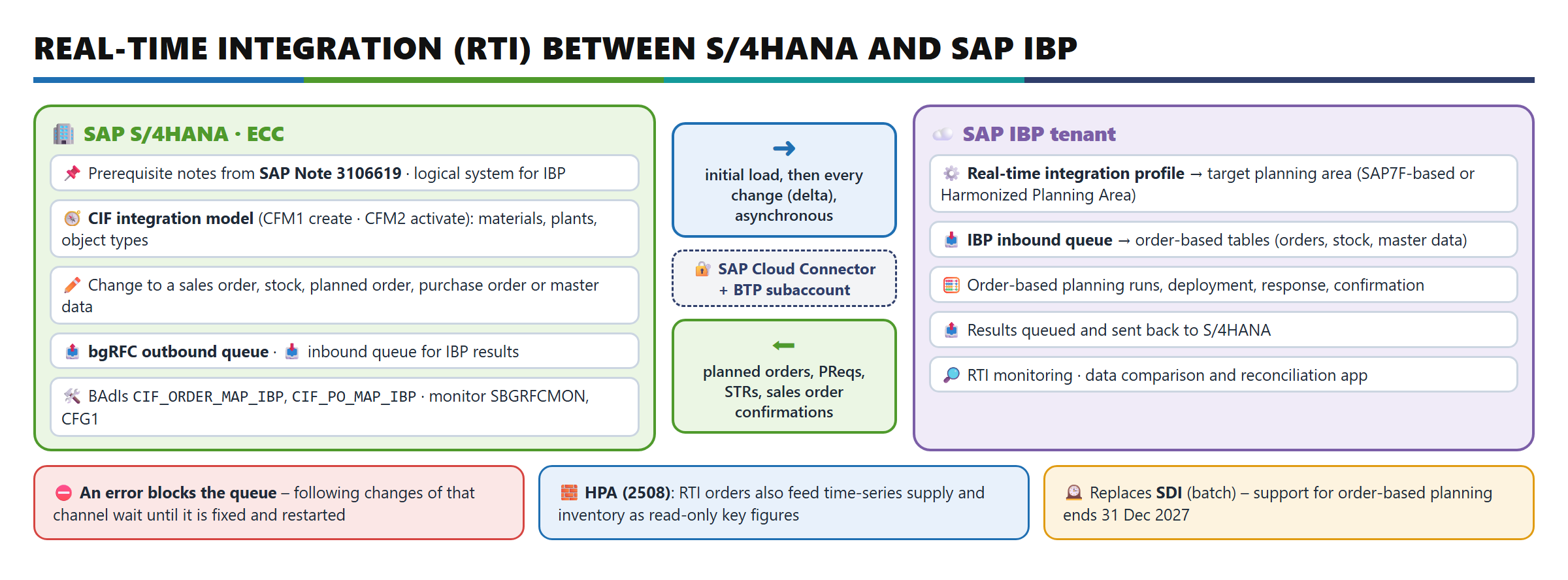
Order-based planning and response need the current orders, not last night's. RTI reuses the Core Interface (CIF) that already connected ERP to APO: CIF captures changes to planning-relevant master and transactional data in S/4HANA, and RTI pushes them to IBP through bgRFC queues (transactionally consistent, asynchronous) and the SAP Cloud Connector. No periodic batch job is needed for the inbound direction.
5.1 Set-up
Side | Object | Purpose |
|---|---|---|
S/4HANA / ECC | Notes listed in SAP Note 3106619 | Prerequisite corrections for RTI on on-premise ERP and S/4HANA |
S/4HANA / ECC | Logical system for IBP, RFC destination via Cloud Connector | The target of the CIF data |
S/4HANA / ECC | CIF integration models (create CFM1, activate CFM2) | Select which materials, plants and object types (master data, sales orders, stock, planned orders, purchase orders …) are sent to IBP |
IBP | Communication arrangements, Cloud Connector connection | Technical connection between the BTP subaccount, the Cloud Connector and the IBP tenant |
IBP | Real-time integration profile, planning area | Links the logical system and integration model to the target planning area (SAP7F-based flexible order-based area or the Harmonized Planning Area) |
5.2 Behaviour
- Initial load once (activating the integration model), then delta transfers whenever a relevant object changes.
- Outbound: planned supply (planned orders, purchase requisitions, stock transport requisitions) and sales order confirmations created or changed in IBP are sent to the S/4HANA inbound queue and created there; deployment stock transport requisitions can then be converted into stock transport orders in S/4HANA.
- Queues block on error: a failed queue entry stops the following entries of that channel – monitoring and error handling are part of daily operations (Part 6.4).
- Reconciliation: a data comparison and reconciliation app in IBP finds and corrects differences between S/4HANA and IBP.
- Licensing and platform: RTI is used with IBP for response and supply and needs SAP BTP and the Cloud Connector (page 05). RTI is SAP's strategic channel for order data: its scope grows with each release.
- Time-series: SAP has no plans for RTI of time-series key figures. In the Harmonized Planning Area (2508) RTI is decoupled from order-based planning: orders and stock replicated by RTI are also available as read-only key figures for time-series supply and inventory planning, so product master data does not have to be integrated twice.
- Synchronized planning between IBP and embedded PP/DS in S/4HANA (rough-cut plan in IBP, detailed plan in PP/DS, order by order) requires RTI.
Part 6 – The S/4HANA side: add-on, extractors, CIF and monitoring
IBP itself is configured, not programmed – but the S/4HANA side of every IBP interface is ABAP territory: installing and configuring add-ons, providing extractors, adjusting CIF and RTI with BAdIs, authorizations for technical users and monitoring.
6.1 The supply chain integration add-on
- SAP delivers the SAP S/4HANA Supply Chain Integration Add-On for SAP Integrated Business Planning (and an SAP ERP variant) in the
/IBP/namespace. It provides extractors and functions for IBP-specific data and the inbound side for plan results such as PIRs. - Examples of its extractors:
/IBP/INV_SLT_TRANSPORTATION_KF,/IBP/INV_SLT_PRODUCTION_KF(lead-time key figures for inventory optimization), /IBP/ORDER_KF. The available set depends on the add-on version and support package. - The add-on is the RFC target of both CPI-DS and the Cloud Integration flows; the RFC user needs the authorizations for the extractors and inbound functions.
6.2 Extraction techniques
Technique | When | Notes |
|---|---|---|
Add-on extractors | Standard IBP master data and key figures | Released by SAP; test in the source system before mapping |
ODP sources: DataSources and CDS views | Sales history, own data | CPI-DS reads extractors (context SAPI) and CDS views with |
Direct table / view reads | Simple master data | Possible via the RFC datastore; clean core prefers released views and extractors |
Custom RFC function module | Complex logic (e.g. derived customer hierarchy) | Called from CPI-DS or Cloud Integration |
BW / SAP Datasphere | History already harmonised there | Load from the warehouse instead of ERP |
6.3 CIF and RTI enhancements
- RTI runs through CIF, so the CIF integration models and the RTI BAdIs for IBP apply – e.g.
CIF_ORDER_MAP_IBP(orders),CIF_PO_MAP_IBP(purchasing documents),CIF_RESERVATION_MAP_IBP(reservations) to adjust the mapping of data sent to IBP. - Use them sparingly: SAP KBAs describe side effects of custom BAdI code (e.g. BAdIs called for CIF integration models that are not relevant for IBP). Check the model type and logical system first in every implementation.
- Fields that are not in the RTI standard (custom key figures, custom attributes) are usually sent through Cloud Integration rather than by extending CIF (Part 4).
6.4 Monitoring
Where | Tool | What you check |
|---|---|---|
S/4HANA | bgRFC monitor (SBGRFCMON) | Failed or blocked RTI queues |
S/4HANA | CIF application log (CFG1), integration models (CFM1 / CFM2) | Errors while CIF selects or posts data; whether the integration model is active |
S/4HANA | Application log (SLG1), ST22, SM37 | Add-on functions, PIR posting, background jobs |
IBP | Data Integration Jobs | CPI-DS and Cloud Integration batches, rejected records |
IBP | RTI monitoring and data comparison and reconciliation apps | Inbound queue errors, differences between S/4HANA and IBP |
Cloud | CPI-DS dashboards, Cloud Integration message monitor, Cloud Connector monitor | Task runs, iFlow messages, connectivity |
Part 7 – Non-SAP systems, data lakes, analytics and collaboration
System | Integration | Notes |
|---|---|---|
Non-SAP ERP | CPI-DS (database, file or web-service datastores) or Cloud Integration adapters | Same staging and post-processing in IBP; no RTI – order-based data from non-SAP needs batch integration |
SAP BW / BW/4HANA | CPI-DS or Cloud Integration | Common source for cleansed sales history |
SAP Datasphere, data lakes | Direct SAP Datasphere integration for master and transactional data (generally available with 2605); otherwise Cloud Integration with the IBP APIs | External signals (POS, weather, market data) as key figures or for demand sensing; IBP data for enterprise reporting |
SAP Analytics Cloud | SAC import connection type "SAP Integrated Business Planning" (OData, no agent); SAC can also export model data back to IBP | Financial and executive reporting; extended planning and analysis (see the SAP Analytics Cloud section) |
SAP Business Network | SAP-delivered integration content | Supplier collaboration – forecasts, commits, purchase orders (page 01 Part 2) |
External job schedulers | Job scheduling APIs of IBP | Enterprise schedulers start IBP application jobs in a cross-system chain |
- Key figure delta extraction: the planning data API can return only the changes since the last extraction (page 04) – useful for feeding a data lake without full extracts.
Part 8 – Identity, connectivity and security
Topic | How it works in IBP |
|---|---|
User logon | IBP uses SAP Cloud Identity Services – Identity Authentication (IAS); IAS is connected to the corporate identity provider (e.g. Microsoft Entra ID) for single sign-on with SAML 2.0 / OpenID Connect |
User provisioning | Business users can be created and assigned to business roles automatically with SAP Cloud Identity Services – Identity Provisioning (IPS) |
Authorizations | Business roles, restrictions and permission filters in IBP (page 01 Part 7) |
Technical users | Each API caller (Cloud Integration, SAC, BTP app) gets a communication user and a communication arrangement (communication scenario + communication system) – user and password or client certificate |
On-premise connectivity | SAP Cloud Connector (RTI, Cloud Integration) and the Data Services Agent (CPI-DS) open outbound connections – no inbound firewall ports; the Cloud Connector exposes only the mapped hosts and RFC function modules |
S/4HANA side | RFC / technical users with minimal authorizations for the add-on functions, extractors and CIF; secure network communication (SNC) for RFC |
Data protection | Customer and price data leave ERP – agree which attributes are really needed for planning and mask or omit personal data |
Part 9 – Interview questions
Q1. Which integration technologies does IBP offer?
SAP Cloud Integration for data services (batch ETL with an on-premise agent, mainly time-series; existing customers only since 2605), SAP Cloud Integration in SAP Integration Suite (iFlows calling the IBP APIs), real-time integration (CIF-based, for orders and master data of order-based planning) and the OData APIs for master data and key figures. CSV upload exists for tests; SDI is the legacy order-based channel.
Q2. How does a CPI-DS load into IBP work technically?
The Data Services Agent inside the network reads the source (extractors, tables, files), the data flow maps and aggregates the data and writes it into the planning area's staging tables with a batch ID. IBP post-processing validates the records and saves the valid ones; the Data Integration Jobs app shows processed and rejected records.
Q3. Why must time periods and master data be loaded before key figures?
A key figure value belongs to a planning object (e.g. product × location × customer) and a period. If the master data combination or the period does not exist, post-processing rejects the record.
Q4. What is real-time integration and what does it reuse from APO times?
RTI replicates planning-relevant master data, orders and stock from S/4HANA or ECC to IBP order-based planning as they change. It reuses the Core Interface: CIF integration models select the data, bgRFC queues and the Cloud Connector transport it, and planned orders, requisitions and confirmations come back the same way.
Q5. What happens to SDI?
SDI, the older batch integration for order-based planning, was announced as discontinued with release 2505; support for order-based planning ends on 31 December 2027. Customers move to RTI, either directly or together with the move to the Harmonized Planning Area.
Q6. How does the consensus forecast get into MRP?
A batch interface (CPI-DS or the Cloud Integration flow to the supply chain integration add-on) reads the demand key figure at product-location-week level and creates planned independent requirements in S/4HANA. MRP then plans against those PIRs.
Q7. What does an ABAP developer do in an IBP project?
The S/4HANA side: installing and configuring the supply chain integration add-on, building or ODP-enabling extractors and RFC functions for custom data, CIF integration models and RTI BAdIs, authorizations for technical users, PIR and safety stock posting checks, and monitoring with SBGRFCMON, CFG1 and the application log.
Q8. An RTI queue is blocked. What do you do?
Find the failed entry in the bgRFC monitor (or the IBP-side monitor), read the error (missing master data, mapping, authorization), fix the cause, restart the queue, and use the data comparison and reconciliation app to check that IBP and S/4HANA match again. Blocked queues stop all following changes of that channel, so they are monitored daily.
Q9. When would you choose Cloud Integration over CPI-DS?
For every new implementation: since 2605 CPI-DS is no longer available for new IBP licences, and SAP recommends Cloud Integration (with SAP's IBP packages) for everything RTI does not cover. It also fits API-based and non-SAP cloud scenarios and avoids an on-premise agent. Existing customers can keep stable CPI-DS interfaces, which SAP still supports, and move when they adopt the Harmonized Planning Area.
Q10. How do IBP users log on, and how do systems authenticate?
Users authenticate through SAP Cloud Identity Services – Identity Authentication with SSO to the corporate identity provider; Identity Provisioning can create users and role assignments. Systems use communication users in communication arrangements, with password or certificate; on-premise systems are reached through the Cloud Connector or the Data Services Agent.
Q11. How does IBP exchange data with SAP Analytics Cloud?
SAC has an import connection type for SAP Integrated Business Planning that reads IBP data through OData, configured with a communication arrangement in IBP; SAC can also export model data back to IBP once or on a schedule (new planning objects must exist in IBP first).
Q12. How is sales history from a non-SAP ERP loaded?
With CPI-DS (database or file datastore) or Cloud Integration: extract, map product and customer IDs to the IBP master data, aggregate to the base planning level of the history key figure and load into the staging tables, after the master data has been loaded. RTI is not available for non-SAP sources.
🏠 Start Here · ◀ 02 · Capabilities & Data · 04 · Extensibility ▶ · Sections: CORE ABAP | OOPS ABAP | ABAP on HANA | Clean Core | RAP | ABAP Points | SAP Fiori | SAPUI5 | Mobile Development (MDK) | BTP Foundations | BTP Development | CAP | SAP Build | ABAP on BTP | Integration Suite | SAP Business AI | SAP BASIS | Security | SAP SDLC
Functional: FICO ABAP | TRM ABAP | VIM | SAP BIS | SD ABAP | MM ABAP | PP ABAP | QM ABAP | PM ABAP | PS ABAP | EWM | TM ABAP | GTM ABAP | EHS ABAP | HR ABAP | BW | SAP Datasphere | SAP Business Data Cloud | SAP MDG | SAP Analytics Cloud | SAP Ariba | SAP CX | SAP IBP