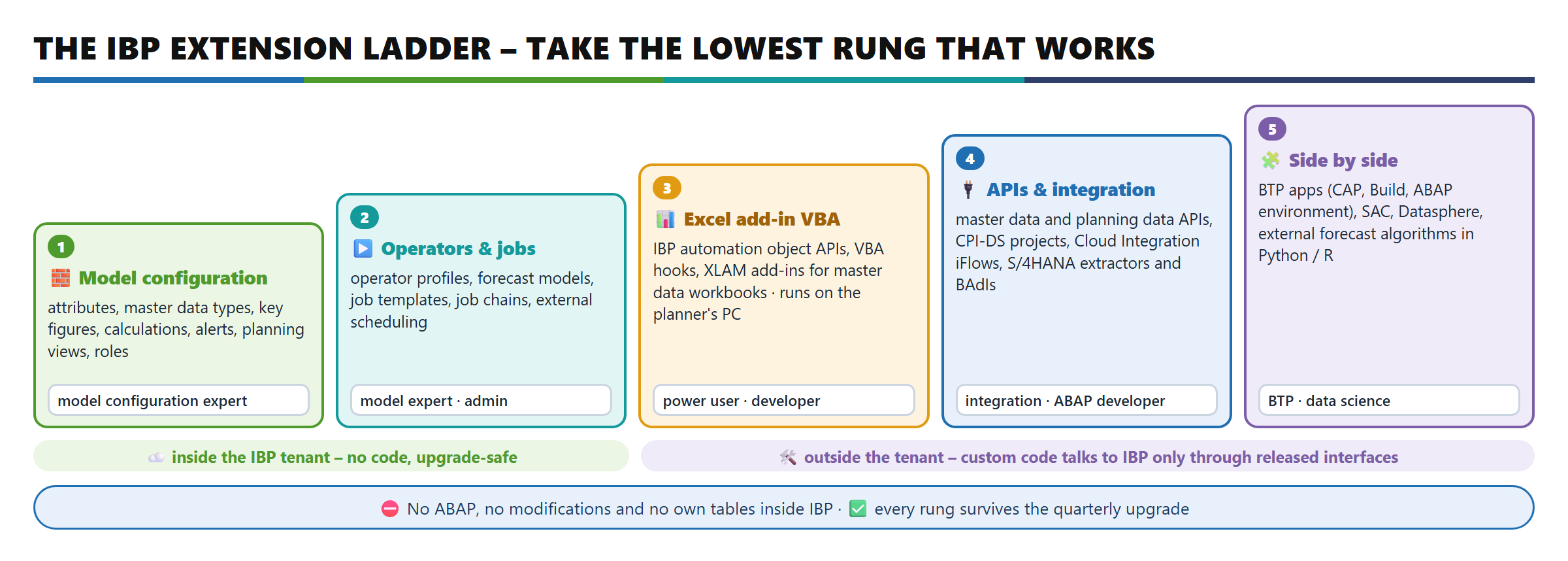
IBP is SaaS: there is no ABAP editor, no modification and no customer code inside the tenant. "Development" in an IBP project therefore means four things: configuring the planning model (which is far more powerful than customizing in ERP), automating it with planning operators and application jobs, integrating it through APIs and integration projects, and extending it side by side on SAP BTP, in the Excel add-in or with external forecast algorithms. This page shows what is possible at each level and what the typical custom developments are. The planning model objects themselves: page 02; integration technologies: page 03; SAP BTP in general: SAP BTP BTP Foundations › 03 (BTP services, security) and 07 (CPI); CDS and RAP: ABAP on HANA › 05 CDS Views and the RAP** section.
Part 1 – Configuration vs extension: the extension ladder
The clean-core rule applies to IBP by design: the tenant is upgraded by SAP four times a year, so everything a customer adds must be configuration or must live outside and talk to IBP through released interfaces. Take the lowest rung that solves the requirement.
Requirement | Solution | Rung |
|---|---|---|
New measure, e.g. revenue at risk | Calculated key figure in the planning area | Configuration |
New grouping, e.g. product segment for filters | Custom attribute on a master data type | Configuration |
Warn when projected stock < safety stock | Custom alert definition and subscription | Configuration |
Copy statistical forecast to consensus every Monday | Copy operator + application job template, scheduled | Automation |
Planners need a button that refreshes and saves several sheets | VBA with the IBP automation object in a workbook or XLAM add-in | Excel extension |
Load a key figure from a data lake | Cloud Integration or CPI-DS flow using the planning data API or staging tables | Integration |
Approval app for forecast overrides | Side-by-side app on SAP BTP calling the IBP APIs | Side by side |
Own forecasting model in Python | External algorithm in the forecast model | Side by side |
- Not possible: code inside IBP, changing SAP planning engines, own database tables in the tenant, modifying SAP apps. A requirement that seems to need this usually needs a different model design or an external step.
Part 2 – Model configuration as development
The model configuration expert is the IBP equivalent of a developer. The objects are explained on page 02; here the development view – what you build, how you test and how it is transported.
Object | What you build | Watch out for |
|---|---|---|
Attributes and master data types | Custom attributes (customer prefix), custom simple or compound MDTs, reference MDTs | Changing keys of an active MDT is restricted; plan the model before the first data load |
Key figures and calculations | Stored, calculated and helper key figures, calculation graphs (KEYFIGURE@LEVEL = expression) | Long calculation chains and REQUEST-level calculations cost performance; cycles fail activation |
Planning levels | Base planning levels per key figure | Each extra root attribute multiplies the number of planning objects |
Versions and scenarios | Versions with selected key figures | Every version duplicates data volume for its key figures |
Custom alerts | Alert definitions on key figures with thresholds, severity, filters | Calculated by jobs; too many subscriptions overload users |
Planning views and dashboards | Excel templates, favourites, Planner Workspaces, analytics, dashboards | Templates are the planners' UI – treat them as deliverables with tests |
Business roles and filters | Roles from templates, restrictions, permission filters | Filters only work on key figures whose planning level contains the attribute |
2.1 Life cycle of model changes
- Build in the test tenant, activate the planning area, test with representative data, then move the changed model entities to production with the IBP export / import (transport) functions.
- Use a customer prefix for all objects and the Lock Master Data Type Prefix setting (page 02) so that copies and comparisons stay consistent.
- Re-activation after structural changes can take time and may require data adjustments – schedule it outside planning windows and never during the upgrade transport freeze (page 01).
- Document the model (key figure catalogue, calculation graph, planning levels) – it replaces the technical specification of an ABAP object.
Part 3 – Planning operators, profiles and application jobs
Batch logic in IBP is configured as planning operators with profiles (the parameter sets) and executed by application jobs. This is where IBP's "programs" live.
Object | Purpose | Examples |
|---|---|---|
Operator profile / model | Parameter set of an operator | Forecast model (Manage Forecast Models), copy operator profile (source → target key figure, version), supply planning profile, inventory optimization profile, snapshot profile |
Planning operator | Executable function assigned to the planning area | Statistical forecast, copy, disaggregation, snapshot, purge, supply heuristic, optimizer, alert calculation |
Application job template | Operator + profile + selection (planning area, version, filter) | "Weekly forecast EU", "Copy stat. forecast to consensus" |
Job chain / scheduling | Sequence of steps with schedule and dependencies | Data load → forecast → copy → supply heuristic → alerts, every Sunday night |
- Filters and parallelization: run operators per segment (region, product group) to shorten runtimes and isolate failures.
- External scheduling: IBP offers job scheduling APIs (with their own communication scenarios) so that an enterprise scheduler can start and monitor IBP jobs in a cross-system chain, e.g. after the S/4HANA billing run has finished.
- Job monitoring: the Application Jobs app shows status and log of every run; failed jobs in a chain stop the following steps.
Part 4 – OData APIs of IBP
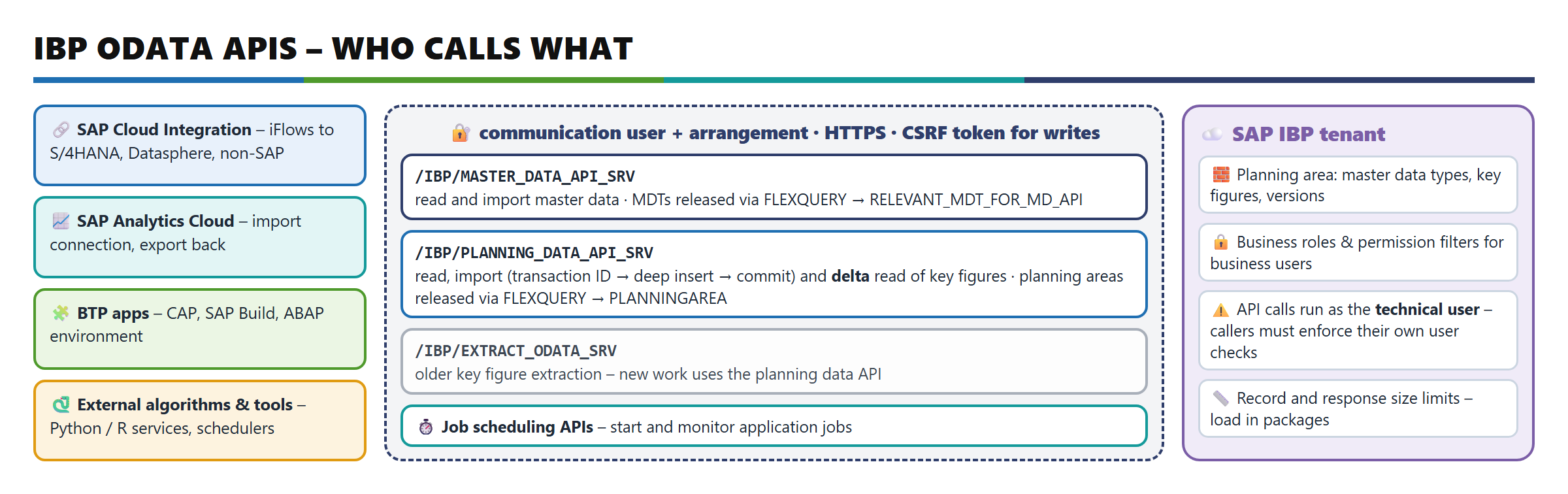
IBP exposes its data through OData services. A caller needs a communication user and a communication arrangement for the relevant communication scenario (page 03 Part 8); the URL pattern is https://<tenant>-api.<domain>/sap/opu/odata/IBP/<SERVICE>.
Service | Purpose | Notes |
|---|---|---|
/IBP/MASTER_DATA_API_SRV | Read and import master data of master data types | MDTs must be released for the API in the global configuration (FLEXQUERY → RELEVANT_MDT_FOR_MD_API) |
/IBP/PLANNING_DATA_API_SRV | Read and import key figure data; delta read of key figure changes since the last extraction | Planning areas must be released in the global configuration (FLEXQUERY → PLANNINGAREA); entity names are generated per planning area |
/IBP/EXTRACT_ODATA_SRV | Read key figure data (extraction) | Service for SAP Analytics Cloud (SAP_COM_0143); other tools use the planning data API |
Job scheduling APIs | Start and monitor application jobs | For external schedulers (Part 3) |
4.1 How a key figure import works
- The planning data API writes in a transaction: get a transaction ID (function import
getTransactionID), post the data rows (possibly in several packages), then commit. Processing is asynchronous – check the result and the messages of the transaction afterwards. - All key figures in one import transaction must be on the same planning level; without VersionID the import writes the base version; scenarios are imported via VersionID + ScenarioID (needs MAX_RECORD_IN_SIM_TABLE); one version per transaction.
- Rows are posted as a deep insert: a header entity for the planning area with the transaction ID, the list of attributes and key figures and the commit flag, and a navigation property holding the data rows.
- Observe the record and response size limits of the service (SAP KBAs describe them) – large loads are split into packages.
Outline of the calls for a planning area ZIBP1. The entity names are generated from the planning area ID (ZIBP1Trans, NavZIBP1); the field names are its attributes, period field and key figures:
|
VersionIDempty = base version;PERIODID3_TSTAMPis the start of the period at time profile level 3 (the period field matches the time level of the planning level used).- From ABAP (e.g. an S/4HANA report that pushes data to IBP) the same calls are made with
CL_WEB_HTTP_CLIENT_MANAGERand an SM59 destination of type G (or a communication arrangement in ABAP Cloud); in most projects the call is placed in Cloud Integration instead, so that mapping, retries and monitoring are central (see Integration Suite › 02).
Part 5 – Data integration projects (CPI-DS and Cloud Integration)
Most build effort in an IBP project is integration. The objects are introduced on page 03; this is the developer's view.
Tool | You develop | Good practice |
|---|---|---|
CPI-DS (existing customers) | Projects, tasks and data flows (source → transforms → IBP staging), processes, global variables, pre- and post-load scripts | Start from SAP templates; one task per master data type or key figure group; parameterise planning area and version; promote test → production |
SAP Cloud Integration | iFlows that call the IBP APIs and S/4HANA (via the add-on or released APIs), mappings, exception subprocesses | Copy SAP's IBP packages instead of building from scratch; externalise parameters; use the message monitor and alerting |
- Mapping rules (product and location IDs, units of measure, customer hierarchy, date to period) are the main design work – write them down as a mapping specification per interface.
- Error handling: rejected records in the Data Integration Jobs app need an owner; build reports or alerts so master data errors are fixed at the source.
- Performance: aggregate in the source or in the flow, load deltas, avoid full reloads of history every night.
Part 6 – Custom development on the S/4HANA side
This is where the ABAP developer works. The integration add-on, CIF and monitoring are on page 03 Part 6; typical custom objects are:
Object | Purpose | Technique |
|---|---|---|
Custom extractor for sales history | Invoiced or delivered quantities per product, location, customer and day | DataSource on a function module or CDS view, released for ODP so CPI-DS can read it; delta via timestamp |
Custom master data extraction | Derived attributes (customer group, product segment, ABC class) that are not in the standard extractors | RFC function module or released CDS view; value mapping tables (Z tables) maintained by the business |
PIR and safety stock post-processing | Checks after IBP results are posted (versions, requirement types, deletion of old PIRs) | Background report with released APIs / BAPIs, application log (BAL) for errors |
RTI adjustments | Mapping changes for orders sent to IBP | CIF / RTI BAdIs such as |
Reconciliation reports | Compare ERP quantities with IBP extracts | ABAP report or CDS-based analytical query |
- CDS views as extraction source: a CDS view annotated with
@Analytics.dataExtraction.enabled: trueis exposed through ODP (context ABAP_CDS), and CPI-DS can read it as a source. CDS views with parameters allow only full extraction (no delta) in CPI-DS – for delta wrap such logic in a view without parameters, a DataSource or an RFC function. - Prefer released S/4HANA objects (I_ CDS views, released APIs) – the extraction code then survives S/4HANA upgrades (Clean Core › 01 Clean Core).
Part 7 – Excel add-in extensibility
- VBA with the IBP automation object: VBA code first gets the SAP IBP automation object and then calls its APIs for basic add-in functions (log on, refresh, save, open templates). APIs were added with add-in versions 2202.2.0 and 2205.2.0 and extended since.
- VBA hooks: predefined points (e.g. before / after refresh or save) where custom VBA runs; hooks must be activated, and for master data workbooks the code is packaged as an XLAM add-in.
- SAP publishes VBA samples (SAP-samples on GitHub). Keep VBA small: business logic belongs in key figure calculations, not in Excel.
- Every IBP upgrade can bring a new add-in version – regression-test VBA together with the planning views.
Part 8 – Side-by-side extensions on SAP BTP and analytics
Scenario | Technology | Notes |
|---|---|---|
Custom app (approvals, data entry for a small user group, master data requests) | SAP Build Apps, SAPUI5 / Fiori elements on CAP, or the SAP Business AI Platform, ABAP environment; destination to the IBP APIs | Read and write via the planning data and master data APIs; IBP authorizations apply to the communication user, so the app must enforce its own user checks |
Workflow around the plan | SAP Build Process Automation | E.g. approval of a forecast change before it is posted to IBP |
Financial and executive analytics | SAP Analytics Cloud (import connection to IBP, export back) | Combine IBP plans with finance data (extended planning and analysis); see the SAP Analytics Cloud section |
Data platform | SAP Datasphere with SAP Integration Suite | External signals in, IBP data out for enterprise reporting |
Machine learning | SAP AI Core, SAP Data Intelligence (older samples), hyperscaler ML services | Typically through the external forecast algorithm interface (Part 9) |
- The communication user acts for the whole app: design the app's own authorization model and log who changed what (IBP sees only the technical user).
Part 9 – External forecast algorithms (Python, R)
IBP for demand can call a customer-provided forecast algorithm as part of a standard forecast model. The algorithm runs outside IBP – on SAP BTP, a hyperscaler or any server – and is written in Python, R or another language. IBP still handles preprocessing, life-cycle settings, disaggregation and storage of the result.
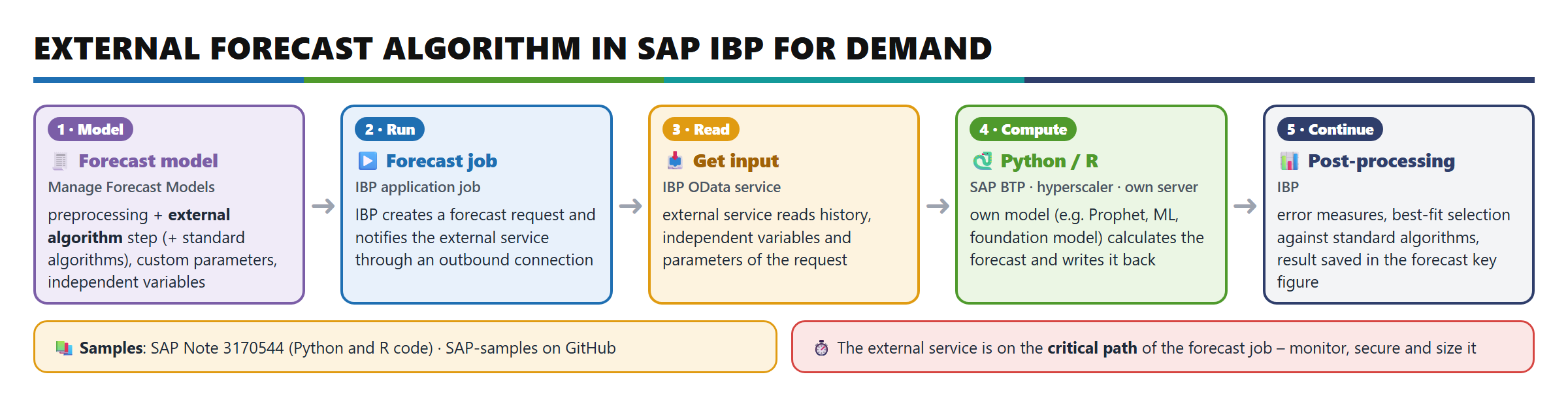
- Set-up: in Manage Forecast Models choose an external algorithm step; optional custom parameters (e.g. the error measure for optimization) and independent variables are passed to the algorithm.
- Data exchange: IBP notifies the external service that a forecast request is waiting; the service reads the forecast input (history, independent variables, parameters) and writes the forecast back through an IBP OData service (communication scenario SAP_COM_0830). The algorithm is called only when a forecast runs – interactively or in a job.
- Best fit: the external algorithm can run next to standard algorithms in one model, and post-processing picks the best by error measure.
- Samples: SAP Note 3170544 contains basic Python and R code (learning samples, not production code); SAP-samples on GitHub show Python examples (e.g. with Prophet). Partner offerings register pretrained foundation models as external algorithms.
- Operations: the external service is part of the forecast job's critical path – monitor it, secure it (communication user, TLS) and size it for the full product range.
Part 10 – Typical custom developments (RICEFW view)
Type | In an IBP project | Built with |
|---|---|---|
R – Reports | Planning views and dashboards; reconciliation ERP vs IBP; forecast accuracy reports in SAC | IBP configuration, SAC, ABAP / CDS on S/4HANA |
I – Interfaces | Master data, sales history, open orders, PIRs, safety stock, DDMRP buffers, Business Network | CPI-DS, Cloud Integration, RTI, add-on extractors, OData |
C – Conversions | Initial load of history (often from APO or BW), master data, time periods | CPI-DS, Cloud Integration, CSV upload for tests |
E – Enhancements | Calculated key figures, custom attributes, alerts, operator profiles; CIF / RTI BAdIs; external algorithms | IBP configuration, ABAP BAdIs in S/4HANA, BTP |
F – Forms | Rare – S&OP meeting packs come from dashboards or SAC stories | SAC, Excel |
W – Workflow | S&OP process management tasks; approvals around the plan | IBP process management, Microsoft Teams / SAP Build Work Zone, SAP Build Process Automation |
Part 11 – Interview questions
Q1. What can be configured in IBP and what must be built outside?
Inside: attributes, master data types, key figures and calculations, planning levels, versions, alerts, planning views, operator profiles, application jobs and roles. Outside: any custom code – integration flows (CPI-DS, Cloud Integration), S/4HANA-side ABAP (extractors, BAdIs), BTP apps, VBA in the Excel add-in and external forecast algorithms.
Q2. Which OData services does IBP provide?
/IBP/MASTER_DATA_API_SRV for master data, /IBP/PLANNING_DATA_API_SRV for key figure data (read, import and delta read of changes), /IBP/EXTRACT_ODATA_SRV for SAP Analytics Cloud, and job scheduling APIs. Access is through communication users and communication arrangements; planning areas and master data types must be released for the APIs.
Q3. How does a key figure import through the planning data API work?
Fetch a CSRF token and a transaction ID, post the rows as a deep insert on the planning area's transaction entity (attribute and key figure list, data rows, commit flag), then check the processing result and messages of the transaction. Large volumes are split into packages.
Q4. What is a planning operator profile and an application job template?
A profile is the parameter set of an operator (e.g. a forecast model, or source and target key figure for copy). A job template combines operator, profile and selection; jobs run it on demand or on a schedule, often chained (load → forecast → copy → supply → alerts).
Q5. Can you run your own forecast algorithm in IBP?
Yes, as an external algorithm step in a forecast model. IBP sends the request, the external Python or R service reads the input via an IBP OData service, writes the forecast back, and IBP continues with post-processing; the algorithm can compete with standard algorithms in best-fit selection.
Q6. As an ABAP developer, what custom objects would you build for IBP?
Custom extractors or RFC functions for sales history and derived master data (ODP-enabled for CPI-DS), value mapping tables, PIR and safety stock post-processing and reconciliation reports, CIF / RTI BAdI implementations, and occasionally ABAP HTTP clients calling the IBP APIs.
Q7. How do you move model changes from test to production?
Build and activate in the test tenant, test with data, then export the changed model entities and import them into production with IBP's transport functions, outside the upgrade freeze. Integration projects are promoted separately in CPI-DS or transported between Cloud Integration tenants.
Q8. What is the risk of a BTP app writing to IBP with a communication user?
IBP authorizations and change logs only see the technical user, so the app must authenticate its own users, enforce which products or regions each may change, and log changes. Otherwise permission filters in IBP are bypassed.
Q9. How can planners automate work in the Excel add-in?
With VBA: the SAP IBP automation object exposes APIs for refresh, save and other add-in functions, and VBA hooks run custom code at defined events; master data workbooks need the code in an XLAM. Business logic still belongs in key figure calculations.
Q10. How would you deliver a new KPI, e.g. revenue at risk from unmet demand?
As a calculated key figure: unmet demand quantity × price at the base planning level, aggregated by sum; add it to planning views and dashboards and, if needed, a custom alert on a threshold. No code is needed.
Q11. How do you get IBP data into a data lake incrementally?
Use the delta read of the planning data API, which returns only key figure changes since the last extraction, orchestrated by Cloud Integration (or a BTP service) and written to SAP Datasphere or the lake; master data through the master data API.
Q12. Where would you use CDS views in an IBP landscape?
On the S/4HANA side as a clean, released-object-based source for extraction (exposed via ODP with @Analytics.dataExtraction.enabled, which CPI-DS reads – views with parameters full extraction only, no delta – or behind an RFC or OData service) and for reconciliation reports. IBP itself has no CDS views for customers.
🏠 Start Here · ◀ 03 · Integration · 05 · Architect View ▶ · Sections: CORE ABAP | OOPS ABAP | ABAP on HANA | Clean Core | RAP | ABAP Points | SAP Fiori | SAPUI5 | Mobile Development (MDK) | BTP Foundations | BTP Development | CAP | SAP Build | ABAP on BTP | Integration Suite | SAP Business AI | SAP BASIS | Security | SAP SDLC
Functional: FICO ABAP | TRM ABAP | VIM | SAP BIS | SD ABAP | MM ABAP | PP ABAP | QM ABAP | PM ABAP | PS ABAP | EWM | TM ABAP | GTM ABAP | EHS ABAP | HR ABAP | BW | SAP Datasphere | SAP Business Data Cloud | SAP MDG | SAP Analytics Cloud | SAP Ariba | SAP CX | SAP IBP