This page looks at IBP the way a solution architect and a project lead do: how an implementation runs with SAP Activate, how planning area design and data cleansing decide success, how licensing is structured at a conceptual level, how customers move from SAP APO, how IBP coexists with embedded PP/DS and aATP in S/4HANA, which architecture decisions must be taken early, which AI features IBP offers, and how to present yourself in an interview. Product and model: pages 01 – 02; integration and extensibility: pages 03 – 04.
Part 1 – Implementation approach with SAP Activate
IBP projects follow SAP Activate, SAP's methodology for cloud and S/4HANA projects: start from SAP's preconfigured content (sample planning areas, planning views, SAP Best Practices for SAP IBP), show it to the business in fit-to-standard workshops, and build only the deltas. Projects are usually phased by application – e.g. demand and S&OP first, then inventory, then supply and response.
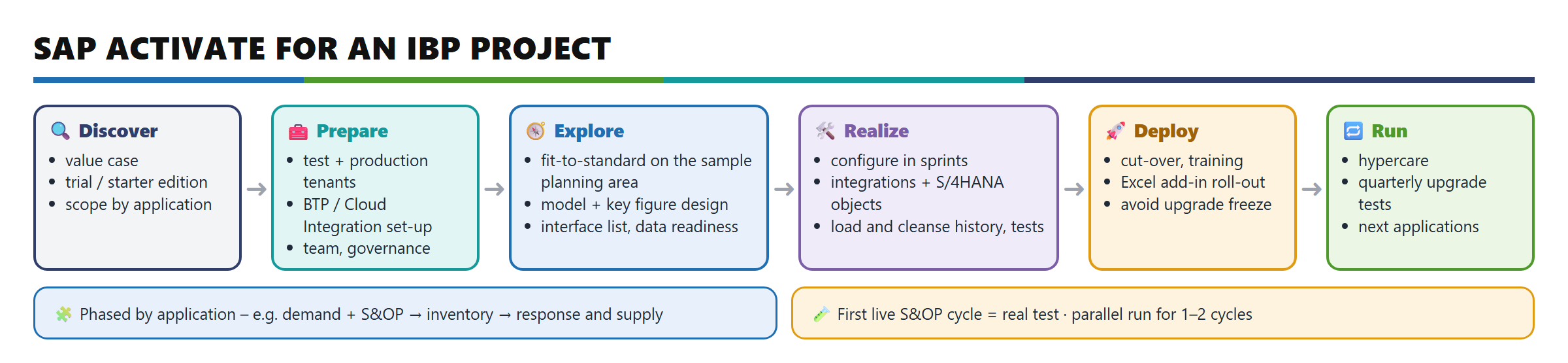
Phase | IBP-specific activities | Deliverables |
|---|---|---|
Discover | Value case (forecast accuracy, inventory, service level), trial or starter edition, scope by application | Business case, roadmap |
Prepare | Test and production tenants provisioned, BTP subaccounts for Cloud Integration, team and governance, sample content activated | Project plan, system landscape |
Explore | Fit-to-standard with the sample planning area and planning views; planning area design (Part 2); integration design per interface; data readiness assessment | Model design, key figure catalogue, interface list, backlog of deltas |
Realize | Configure model, operators and alerts in sprints; build integrations and S/4HANA-side objects; load and cleanse history; unit, integration and user acceptance tests | Configured tenant, tested interfaces, cleansed data |
Deploy | Cut-over (master data, history, open orders), Excel add-in roll-out, training, go-live timed outside the quarterly upgrade freeze | Productive planning cycle |
Run | Hypercare, quarterly upgrade regression tests, forecast accuracy tracking, next applications | Stable operations, improvement backlog |
- First cycle is the real test: the go-live of S&OP or demand planning is a live monthly cycle with real decisions – plan a parallel run against the old tool for one or two cycles.
- Organisational change (S&OP process, roles, meeting rhythm) usually takes longer than the configuration.
Part 2 – Planning area design workshops and data readiness
2.1 Design workshops
Topic | Questions to answer |
|---|---|
Planning objects | Which products, locations and customers are planned? At which level – SKU, product family, customer group? |
Time | Daily, weekly or monthly buckets? How many periods of history and horizon? Technical weeks? |
Key figures | Which measures per process step (history, statistical forecast, sales input, consensus, supply, inventory)? Units and value? Which are stored, which calculated? |
Versions and scenarios | Which long-living alternatives (budget, upside) are really needed? |
Processes | S&OP steps, owners, approval rules, frequency of forecast runs |
Roles and authorizations | Who edits which key figures for which products or regions? |
Template | Which sample planning area to start from – the Harmonized Planning Area for new projects, SAPIBP1 or SAP7F-based areas for existing ones (page 02 Part 4.4) |
2.2 Data readiness
- Master data quality decides the result: missing or wrong lead times, lot sizes, sources of supply, product hierarchies and customer assignments produce wrong plans regardless of the algorithm.
- Sales history cleansing: usually 2–3 years of history; correct product successions (old → new material), one-off orders, stock-outs, returns and promotions before the first forecast.
- Harmonised IDs: products, locations and customers must be identical across all sources (ERP, BW, non-SAP) – define mapping tables early.
- Data ownership: every master data object needs a business owner who fixes rejected records from the Data Integration Jobs app.
Part 3 – Licensing and subscriptions (conceptual)
IBP is sold as a subscription. No prices here – only the structure an architect must know when scoping a solution.
Element | What to know |
|---|---|
Applications | Subscribed separately: IBP for sales and operations, for demand, for inventory, for response and supply, for demand-driven replenishment, and SAP Supply Chain Control Tower (page 01 Part 2). A customer can start with one and add others on the same tenant. |
Starter edition | Non-productive edition for evaluation and proof of concept |
Tenants | Normally a test and a production tenant (page 01 Part 5); further tenants, e.g. for training or a separate development line, are a contract question |
CPI-DS | Licensed with IBP for existing customers; since 2605 no longer available for new IBP licences |
SAP Integration Suite / SAP BTP | Cloud Integration, the Cloud Connector set-up and BTP subaccounts belong to SAP BTP and are scoped in the contract together with IBP |
Real-time integration | Used with IBP for response and supply; needs SAP BTP and the SAP Cloud Connector |
Adjacent products | SAP Business Network (supplier collaboration), SAP Analytics Cloud, SAP Datasphere are separate subscriptions |
- Bundles, metrics and names change – the order form and SAP's current product pages are the authority; in an interview, speak about the structure, not numbers.
Part 4 – Moving from SAP APO to IBP
There is no technical conversion from APO to IBP – unlike ECC to S/4HANA, where a system conversion exists. IBP is a different product with a different data model, so an APO customer re-implements planning; partners offer assessment and migration services, not an SAP conversion tool. The APO deadline (mainstream maintenance of SAP SCM 7.0 until the end of 2027, optional extended maintenance until the end of 2030 – page 01 Part 3) drives the timing.
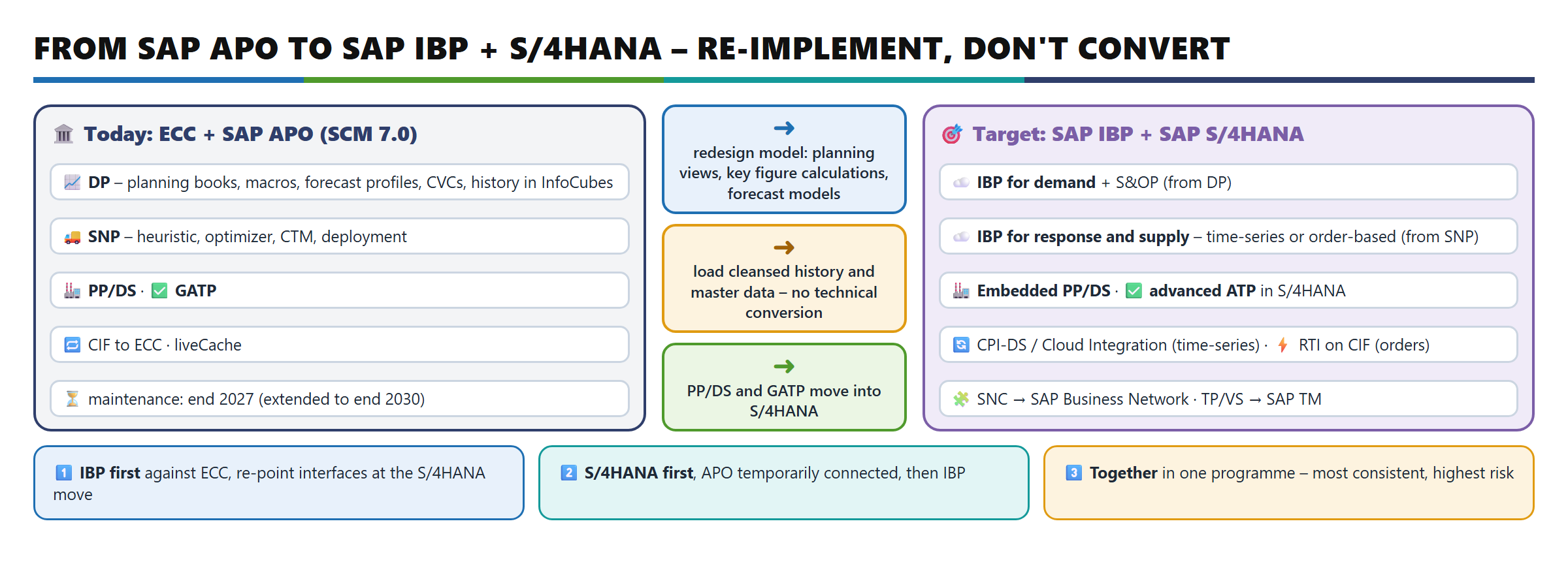
APO object | IBP approach |
|---|---|
Planning area, planning book, data views | Planning area (from a sample) and planning views / Planner Workspaces – redesigned, not copied |
Macros | Key figure calculations, alerts or planning operators – many APO macros become unnecessary |
Forecast profiles, univariate / MLR models | Forecast models with preprocessing, algorithms and post-processing; ML algorithms added |
Characteristic value combinations (CVCs) | Planning objects created from master data and history loads |
DP history in InfoCubes / time series | Loaded once as key figures (from ERP, BW or extracted from APO via BW / CPI-DS) after cleansing |
SNP heuristic, optimizer, CTM, deployment | Time-series heuristics / optimizer, or order-based planning and deployment (page 02 Part 7) |
CIF to ECC | CPI-DS or Cloud Integration for time-series; RTI (CIF-based) for order-based |
4.1 Sequencing options
- IBP first, S/4HANA later: IBP connects to ECC (Cloud Integration with the ERP add-on, RTI from supported ECC releases); APO planning is switched off application by application; later the S/4HANA move re-points the interfaces.
- S/4HANA first, IBP later: APO keeps running against S/4HANA for a while (CIF to S/4HANA is possible but adds a temporary interface), then IBP replaces it.
- Together: one programme with S/4HANA greenfield, embedded PP/DS, aATP and IBP – most consistent but highest risk and workload.
- In all options, PP/DS and GATP move to S/4HANA (embedded PP/DS, aATP), not to IBP.
Part 5 – Coexistence with S/4HANA: MRP, PP/DS and aATP
Topic | IBP side | S/4HANA side | Design question |
|---|---|---|---|
Demand | Consensus demand, demand sensing | PIRs consumed by MRP; forecast consumption by sales orders | At which level and horizon are PIRs released? Requirement type and consumption strategy? |
Supply | Time-series supply plan or order-based plan | MRP / MRP Live, embedded PP/DS | Does IBP send order proposals (order-based) or only aggregated targets (time-series)? Who owns the short-term horizon? |
Synchronized planning | Rough-cut plan in IBP order-based planning | Detailed scheduling in embedded PP/DS, order by order | Requires RTI; where is the frozen zone between the two? |
Availability and allocation | Allocations, order confirmation in response planning | aATP at order entry (product availability check, product allocation, backorder processing) | Which system confirms which orders, and when? Avoid two engines confirming the same order |
Inventory | Safety stock targets from inventory optimization | Safety stock in the material master / time-dependent | How often are targets updated and approved? |
DDMRP | Buffer positioning and sizing | Demand-driven MRP execution | Which materials are buffered? |
- Rule of thumb: one system is the master for each decision in each horizon. Typical split: IBP for months to years and network-wide decisions; S/4HANA for days to weeks inside the plant and for order entry.
- MRP, MRP Live and embedded PP/DS on the S/4HANA side are taught in the PP ABAP section.
Part 6 – Architect decisions
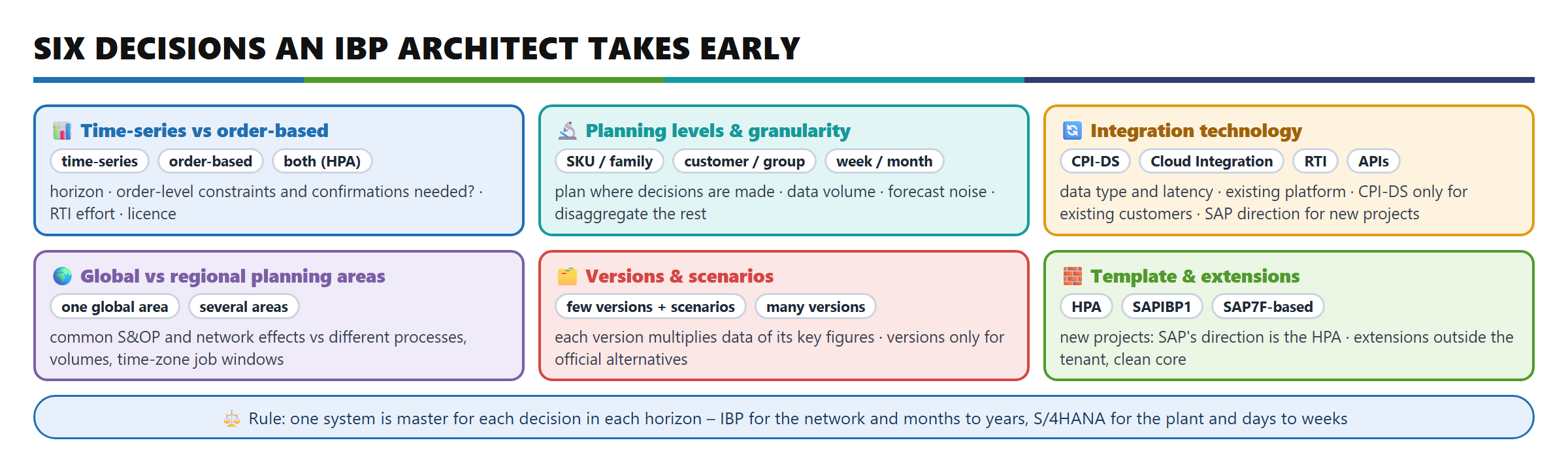
Decision | Options | Criteria |
|---|---|---|
Time-series vs order-based | Time-series only; order-based for response and supply; both (Harmonized Planning Area) | Planning horizon, need for order-level constraints and confirmations, integration effort (RTI), licence |
Planning levels and granularity | SKU vs product family; customer vs customer group; week vs month | Decision quality vs data volume and forecast noise; plan at the level where decisions are made, disaggregate the rest |
Integration technology | CPI-DS, Cloud Integration, RTI, APIs (page 03) | Data type and latency, existing integration platform, CPI-DS only for existing customers (since 2605), SAP direction (Cloud Integration + RTI), non-SAP sources |
Global vs regional planning areas | One global planning area; several regional or business-unit areas | Common S&OP and network effects favour one area; very different processes, data volumes or job windows in different time zones favour several |
Versions and scenarios | Few versions + user scenarios; many versions | Every version multiplies data for its key figures – keep versions for official alternatives only |
Template | Harmonized Planning Area; SAPIBP1; SAP7F-based | New projects: SAP's direction is the HPA; existing customers weigh migration effort |
Extension placement | Configuration, integration, BTP, S/4HANA ABAP (page 04) | Clean core, upgrade safety, who maintains it |
Part 7 – Data volumes and performance
IBP runs in memory, but every design decision multiplies data. The drivers are the number of planning objects (combinations of root attribute values per planning level), the number of stored key figures, the periods in history and horizon, and the number of versions.
Area | Good practice |
|---|---|
Planning levels | Avoid unnecessary root attributes (e.g. customer on supply key figures); each extra attribute can multiply planning objects |
Calculations | Short calculation chains, helper key figures, REQUEST-level calculations only where needed (ratios) |
Horizon and buckets | Daily buckets only for the short term; weeks or months further out |
Housekeeping | Purge obsolete key figure data, limit snapshots to the lags really analysed, delete old scenarios |
Jobs | Segment operators (by region or product group), schedule heavy runs at night, chain jobs instead of overlapping them |
Planning views | Filters and sensible levels in templates – a planning view that loads every SKU × customer × week is slow for any system |
Integration | Delta loads, aggregation before loading, load in packages within API limits |
Part 8 – AI and machine learning in IBP
Feature | What it does | Status |
|---|---|---|
Machine-learning forecasting | Gradient boosting of decision trees with independent variables; auto-ARIMA / SARIMAX (page 02 Part 6) | Available in IBP for demand |
Demand sensing | Short-term forecast correction from recent orders and shipments, including a gradient-boosting variant | Available in IBP for demand |
External algorithms | Customer or partner models (Python, R, foundation models) inside standard forecast models (page 04 Part 9) | Available |
Joule in IBP | SAP's generative AI copilot, activated per tenant: natural-language help and navigation; since 2508 planners list, schedule and check application jobs in Joule; Joule also summarises planning run logs | Available; scope grows with each release |
- Interview tip: separate predictive ML (forecasting, demand sensing – mature, measurable by forecast accuracy) from generative AI (Joule – navigation, job handling, explanations).
Part 9 – Talking points for an ABAP developer
- Position yourself on the S/4HANA side of IBP: integration add-on, extractors and ODP, CIF / RTI BAdIs, PIR and safety stock posting, monitoring (SBGRFCMON, CFG1, SLG1), reconciliation reports – and the ABAP HTTP client for the IBP APIs (pages 03 – 04).
- Show you understand the planning model: planning area, planning levels, stored vs calculated key figures, time-series vs order-based – enough to discuss data mappings with a model configuration expert (page 02).
- Speak clean core: no code in IBP; side-by-side on SAP BTP; released S/4HANA objects for extraction.
- Know the current direction: Harmonized Planning Area (2508), RTI replacing SDI (end 2027), Cloud Integration instead of CPI-DS for new licences (2605), APO end of maintenance (2027 / 2030).
- Bring one story: e.g. an interface you built, the mapping problems you solved, and how you monitored it in production.
Part 10 – Interview questions
Q1. How do you run an IBP implementation?
With SAP Activate: discover and prepare the tenants and team, explore with fit-to-standard workshops on the sample planning area and design the model and interfaces, realize in sprints (configuration, integration, data cleansing, tests), deploy with cut-over and training outside the upgrade freeze, then run with quarterly upgrade regression tests. Usually phased by application.
Q2. What do you decide in planning area design workshops?
Planning objects and levels (SKU or family, customer or group), time buckets and horizons, the key figure catalogue (stored vs calculated, units and value), versions, process steps and owners, roles and authorizations, and which sample planning area to start from.
Q3. How is IBP licensed?
As a subscription with separately subscribed applications (S&OP, demand, inventory, response and supply, demand-driven replenishment, control tower), test and production tenants, a non-productive starter edition, and SAP BTP for Cloud Integration and RTI (CPI-DS only for existing customers since 2605). Adjacent products such as Business Network and SAC are separate.
Q4. Can APO be converted to IBP?
No. There is no technical conversion; IBP is re-implemented. Planning books, macros and forecast profiles are redesigned as planning views, key figure calculations and forecast models; history and master data are loaded after cleansing. PP/DS and GATP move to embedded PP/DS and aATP in S/4HANA.
Q5. In which order would you move from ECC + APO to S/4HANA + IBP?
It depends on risk and deadlines: IBP first against ECC (fast benefit, interfaces re-pointed later), S/4HANA first with APO temporarily connected, or both together in one programme. In every case DP and SNP go to IBP and PP/DS and GATP to S/4HANA; the APO maintenance end (2027, extended 2030) sets the latest date.
Q6. How do IBP and embedded PP/DS work together?
IBP plans the network and the medium term; PP/DS schedules the plant in detail. With synchronized planning, IBP order-based planning and PP/DS exchange orders one by one through RTI, with a defined frozen zone; without it, IBP sends PIRs or order proposals and MRP / PP/DS plan from them.
Q7. IBP response planning confirms orders, and so does aATP. How do you design this?
Make one system the master per order type and moment: aATP confirms at order entry with product allocations; IBP response re-plans the network in batch, recalculates allocations and can update confirmations. Document which engine owns which confirmation to avoid conflicting dates.
Q8. Time-series or order-based planning – how do you decide?
Time-series for S&OP and tactical planning on aggregated buckets with batch integration; order-based when the business needs constrained planning on real orders, deployment, allocations and confirmations in the short to medium term, which also requires RTI and the response and supply licence. The Harmonized Planning Area allows both in one area.
Q9. One global planning area or several regional ones?
One global area supports a common S&OP process, network-wide supply and consistent KPIs. Several areas make sense when processes or data models differ strongly, data volumes are very large, or job windows in different time zones conflict. The cost is duplicated configuration and harder global consolidation.
Q10. A planning view is slow. Where do you look?
At the number of planning objects shown (levels and filters of the template), long calculation chains or REQUEST-level calculations behind the key figures, the number of versions and periods, and concurrent heavy jobs. Fixes: filters, coarser levels, simpler calculations, helper key figures, housekeeping.
Q11. Which AI features does IBP offer?
Predictive: gradient-boosting and ARIMA-based forecasting, demand sensing, external algorithms (including partner foundation models). Generative: Joule – natural-language help, listing, scheduling and checking application jobs (since 2508) and summaries of planning run logs.
Q12. As an ABAP developer, what would you contribute to an IBP project?
The S/4HANA side of every interface: add-on installation and configuration, custom extractors and RFC functions, ODP enablement, CIF integration models and RTI BAdIs, PIR and safety stock posting checks, reconciliation reports, technical users and monitoring – plus an understanding of the planning model to define mappings with the model configuration expert.
🏠 Start Here · ◀ 04 · Extensibility · 06 · Interview Questions ▶ · Sections: CORE ABAP | OOPS ABAP | ABAP on HANA | Clean Core | RAP | ABAP Points | SAP Fiori | SAPUI5 | Mobile Development (MDK) | BTP Foundations | BTP Development | CAP | SAP Build | ABAP on BTP | Integration Suite | SAP Business AI | SAP BASIS | Security | SAP SDLC
Functional: FICO ABAP | TRM ABAP | VIM | SAP BIS | SD ABAP | MM ABAP | PP ABAP | QM ABAP | PM ABAP | PS ABAP | EWM | TM ABAP | GTM ABAP | EHS ABAP | HR ABAP | BW | SAP Datasphere | SAP Business Data Cloud | SAP MDG | SAP Analytics Cloud | SAP Ariba | SAP CX | SAP IBP