SAP Master Data Governance (MDG) is SAP's master data management solution. It comes with out-of-the-box applications – predefined data models, user interfaces, workflows and business rules – so that each master data domain (business partner, material, financials …) is created, changed, checked and distributed centrally and under control instead of separately in every system. This page explains what MDG does, its capabilities and domains, the architecture, the deployment options and how MDG is switched on. Data models and UIs: page 02; change request processes and configuration: page 03; replication: page 04; development: page 05; S/4HANA, cloud and the architect view: page 06.
Part 1 – What master data governance is
Master data describes the long-lived business objects that every transaction refers to: customers, suppliers, materials and products, G/L accounts, cost centers, assets, locations. A sales order, a purchase order or a maintenance order copies its partner, material, account and organizational data from these records – so one wrong or duplicate record breaks every process that touches it.
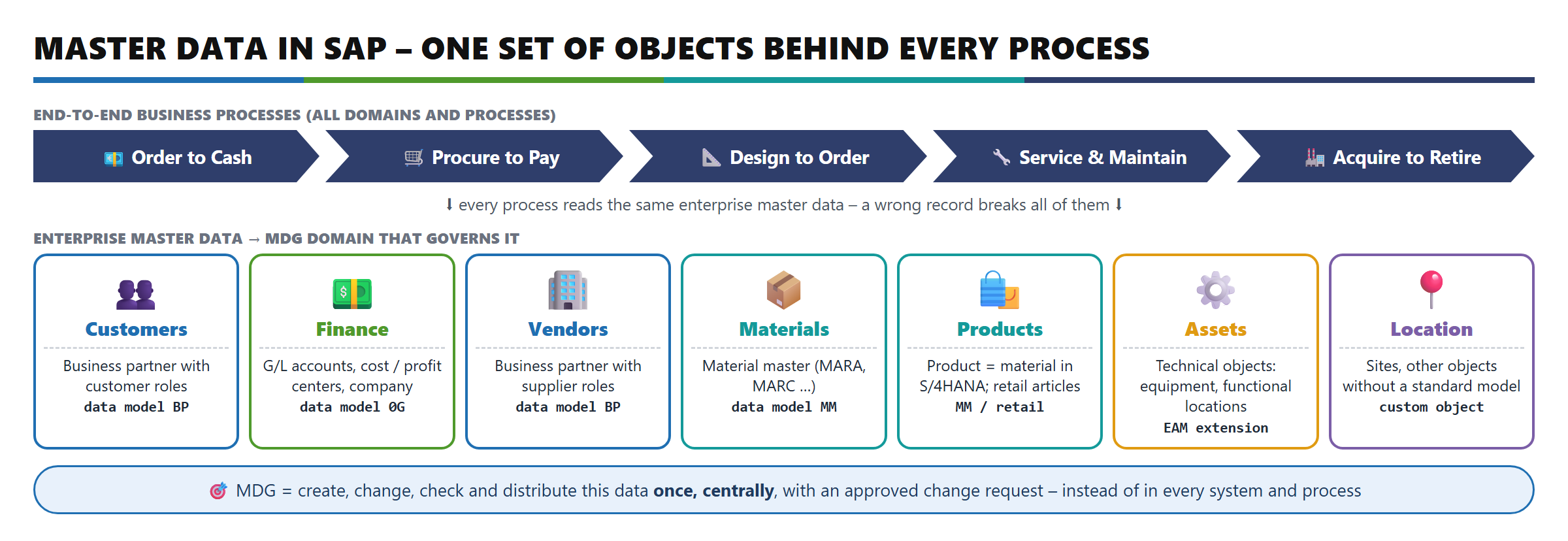
Master data governance means agreeing who may create or change which data, which rules the data must meet and how it reaches the systems that use it – and having a system enforce that. SAP MDG provides domain-specific governance: it lets you centrally create, change, distribute or consolidate master data across the entire enterprise system landscape.
Without governance | With SAP MDG |
|---|---|
Every system and department maintains its own copy of a customer or material | One central place creates and changes the record; client systems receive it |
Duplicates, missing fields, inconsistent values (units, tax numbers, addresses) | Duplicate check, validations and derivations run before the data is released |
Anyone with a transaction can change critical fields (bank details, payment terms) | Every change goes through a change request with workflow approval and an audit trail |
Data is keyed again in each system or loaded with ad-hoc interfaces | Approved data is replicated automatically with the Data Replication Framework (DRF) |
- Two kinds of data you must not mix up: master data (stable objects, governed by MDG) and transactional data (orders, invoices, postings, created by the business processes). MDG also governs some customizing-like reference data through custom objects, but its focus is master data.
- MDG runs on SAP S/4HANA (or SAP ERP 6.0 for older releases) and reuses the ERP data models, checks and customizing – that is the main difference to stand-alone MDM tools.
Part 2 – MDG capabilities
SAP groups MDG functions into a few capabilities. In an interview, name them and say in one sentence what each solves.
Capability | What it does | Typical use | Page |
|---|---|---|---|
Central governance | Create and change single objects (or small sets) with a change request, workflow, rules and staging; data is activated only after approval | New supplier, change of a customer's bank details, new material | 02, 03 |
Consolidation | Load records from several sources, standardise, match duplicates, calculate a best record and activate it | Merging after an acquisition, initial load, cleansing before migration | 03 |
Mass processing | Change many active records at once (fields, extensions), validated and activated in one process | New sales area for 5,000 customers, new plant for all materials | 03 |
Data quality management (DQM) | Define data quality rules, evaluate existing data, calculate scores, mine rules from data and use rules in processes | Monitor completeness of product data, rule-based remediation | 03 |
MDG analytics | Process analytics on change requests (duration, SLA, open / overdue), change analysis, data quality dashboards | Steward workload, compliance reports on bank detail changes | 03, 04 |
Federation (newer) | Splits governance between a core data owner (enterprise-wide attributes) and application data owners (application-specific data) | Global core BP attributes in one system, local customer / supplier views in others | 06 |
- Central governance and consolidation complement each other: consolidation cleans data that already exists in many places; central governance keeps it clean when it is created or changed later. Both share the same data model, rules and replication.
- Mass processing and consolidation run in the same framework (consolidation and mass processing, sometimes called MDC) with process templates and steps – page 03 Part 5 and 6.
Part 3 – Master data domains
A domain is one master data area with its own SAP-delivered content: data model, UIs, change request types, workflow, validations and replication. SAP delivers out of the box:
Domain | Objects | Data model | Notes |
|---|---|---|---|
Business partner / customer / supplier (MDG-C, MDG-S, MDG-BP) | Business partner with roles, customer (general, company code, sales area data), supplier (general, company code, purchasing org data), addresses, bank details, relationships | BP | In S/4HANA customer and supplier are always business partners (CVI, see SD ABAP › 01) |
Material / product (MDG-M) | Material master: basic data, plant, storage location, sales, purchasing, MRP, valuation, classification, units of measure, texts | MM | "Product" is the S/4HANA name of the material |
Financials (MDG-F) | G/L accounts, company, profit centers, cost centers, cost elements, consolidation units and their hierarchies | 0G | Time-dependent; uses editions (page 02 Part 4) |
Enterprise asset management (MDG-EAM) | Technical objects such as equipment and functional locations | Partner content | SAP solution extension by Utopia (resold by SAP) |
Retail and fashion | Articles and retail / fashion-specific data | Partner content | SAP solution extension by Utopia for SAP S/4HANA retail and fashion |
Custom objects | Any object without standard content (locations, reference data, own Z objects) | Own data model (Z…) | Usually flex mode (page 02 Part 3) |
- The domains in mda01 map as follows: customers and vendors → BP; materials and products → MM (and retail articles); finance → 0G; assets → EAM extension; location and other objects → custom objects.
- Each domain is licensed and activated separately (Part 6). MDG activation requires an SAP MDG licence even when the code is already in S/4HANA.
Part 4 – Architecture
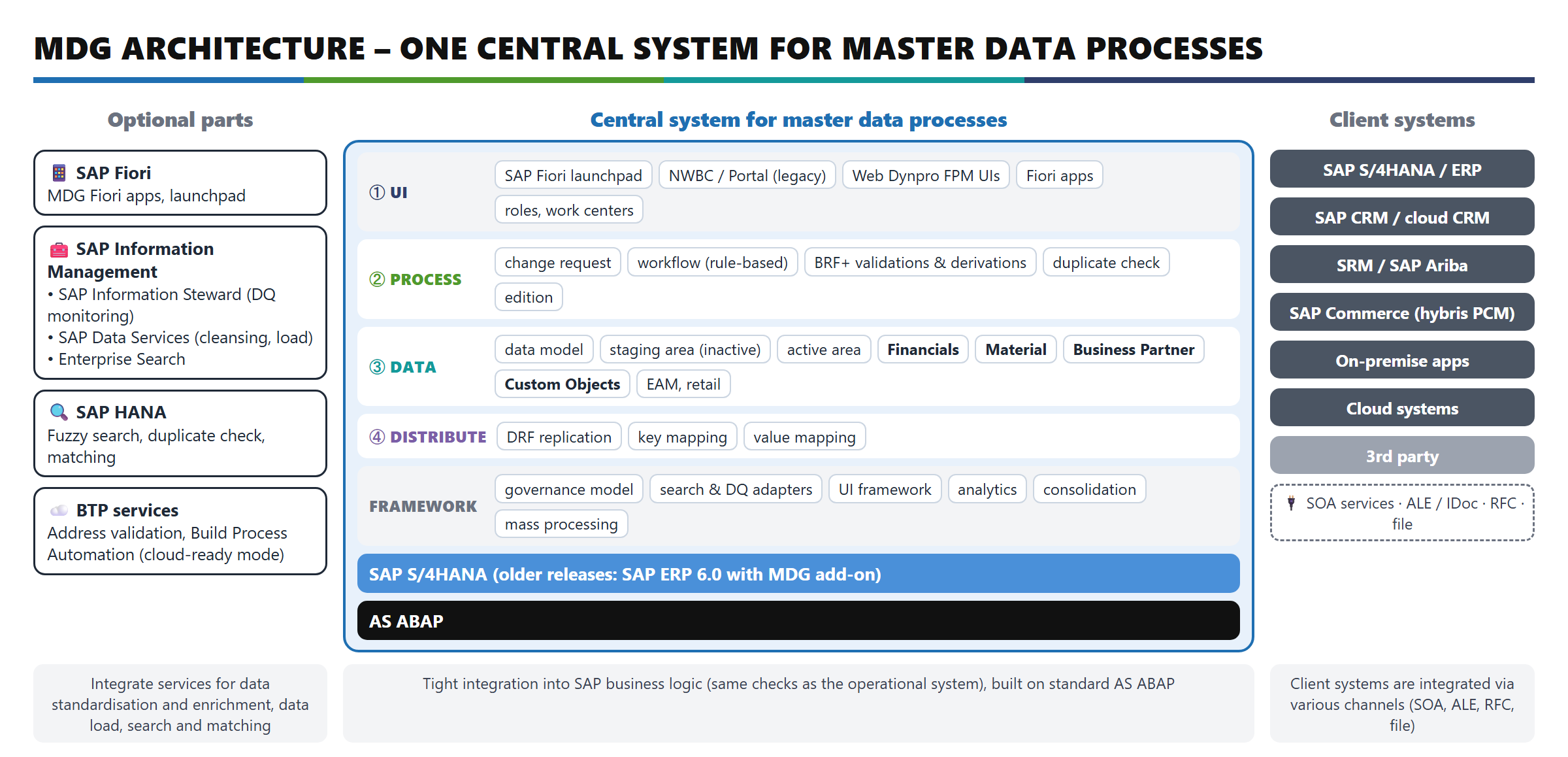
MDG is one central system for master data processes. It sits in an ABAP system (SAP S/4HANA, older: SAP ERP 6.0) and reuses its business logic; optional components add data quality and search services; client systems receive the governed data.
4.1 The layers inside MDG
Layer | Components | Explained on |
|---|---|---|
① User interface | SAP Fiori launchpad with Fiori apps and Web Dynpro / FPM UIs; roles; older: Portal / NetWeaver Business Client (NWBC) work centers | page 02 Part 6 |
② Process | Change request, workflow (rule-based with BRF+), validations and derivations, duplicate check, editions | page 03 |
③ Data | Data model with entity types; staging area (inactive, in-process data) and active area (released data); domain content: Financials, Material, Business Partner, Custom Objects | page 02 |
④ Distribution | Data Replication Framework (DRF), key mapping, value mapping | page 04 |
Framework | Governance model, search and data quality adapters, UI framework, analytics, consolidation and mass processing | pages 02–04 |
Platform | SAP S/4HANA (or SAP ERP 6.0) on AS ABAP: MDG uses the same tables, checks and customizing as the operational ERP | – |
4.2 Optional parts and client systems
- SAP HANA – fuzzy search, duplicate check and matching (page 03 Part 4).
- SAP Information Management products integrate services for data standardisation and enrichment, data load, search and matching: SAP Information Steward (data quality monitoring), SAP Data Services (cleansing, address standardisation, load), Enterprise Search. In current S/4HANA releases MDG's own DQM covers rule management for product and BP data without Information Steward.
- SAP Fiori – the current UI technology; Fiori apps for MDG run on the launchpad.
- Client systems – SAP S/4HANA / ERP, CRM, SRM, product content systems (originally SAP hybris PCM), other on-premise apps, cloud systems and third-party systems. They are integrated via various channels: SOA web services, ALE / IDoc, RFC and files (page 04).
- Tight integration into SAP business logic means MDG validates data with the same checks the ERP would run (e.g. a material type or plant must exist in customizing), built on standard AS ABAP.
Part 5 – Deployment options: co-deployment vs hub
5.1 The two options
Co-deployment | Hub deployment | |
|---|---|---|
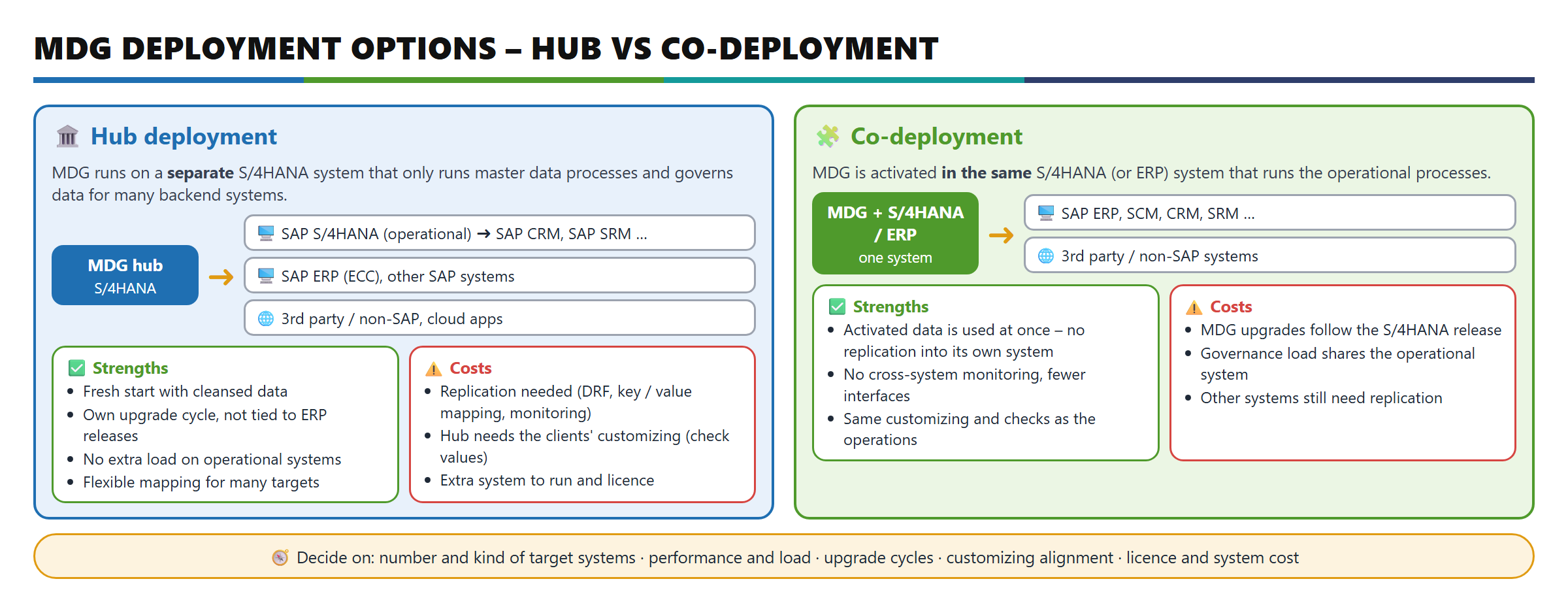
Where MDG runs | In the same SAP S/4HANA or ERP system that runs the operational processes | On a separate system that only runs master data processes and governs data for multiple backend systems |
Active data | Written directly into the operational tables – usable at once, no replication into this system | Written into the hub's own tables, then replicated to S/4HANA, ERP, CRM, SRM, third party |
Integration effort | Low for the own system; other systems still need replication | Replication, key and value mapping and monitoring for every target |
Customizing | Identical by definition – MDG uses the operational customizing | Check-table customizing (plants, material types, account groups …) must be kept in line with the clients |
Upgrade cycle | Bound to the S/4HANA release of the operational system | Independent – the hub can be upgraded without touching ERP |
Load / performance | Governance runs on the operational system | No additional load on existing systems |
Typical choice | One central S/4HANA, few other targets, smaller landscapes | Many heterogeneous targets (SAP and non-SAP), several ERPs, transformation programmes |
5.2 Decision criteria an architect weighs
- Number and kind of target systems – one S/4HANA favours co-deployment; many ERPs, CRM and non-SAP systems favour a hub.
- Performance – mass processing, consolidation and matching create load; a hub isolates it.
- Upgrade cycles – a hub can take new MDG features without upgrading every ERP.
- Data model fit – the hub needs every field the targets need; co-deployment gets them for free.
- Cost – a hub is one more system to run and license; co-deployment saves that but couples MDG to the ERP.
- Migration path – a hub can start before the S/4HANA migration and deliver clean data for it; Central Finance can use MDG's central master data and key mapping (page 06).
5.3 MDG on S/4HANA vs MDG on ECC
MDG on SAP ERP (ECC) | MDG on SAP S/4HANA | |
|---|---|---|
Releases | Add-on / part of ERP 6.0 enhancement packages; last release MDG 9.2 | Part of every S/4HANA release; S/4HANA 1809 corresponds to MDG 9.2, later releases have no ERP equivalent |
Business partner | MDG for customer / supplier already uses the BP data model with CVI, while the rest of ECC can still use the classic customer / vendor transactions | BP is mandatory for every customer and supplier (CVI) |
Innovation | Maintenance only (mainstream maintenance of MDG 9.2 until end of 2027) | All new functions: Fiori apps, DQM, consolidation and mass processing, cloud-ready mode, federation |
Legacy – know it for interviews: MDG on ECC. For new projects MDG runs on S/4HANA (co-deployed or as a hub) or in the cloud (Part 7).
Part 6 – Activation: SFW5 business functions and MDGIMG
MDG code is delivered with the system but switched off. You activate it in four steps; the MDG configuration guide of your release lists the exact business functions.
Step | What | Where |
|---|---|---|
1 | Activate the business functions (Switch Framework) | SFW5 |
2 | Activate the data model of the domain (BP, MM, 0G …) | MDGIMG › Data Modeling › Edit Data Model |
3 | Activate the SAP-delivered BC sets (change request types, workflow steps, UI settings) | SCPR20 |
4 | Activate the Web Dynpro / OData services, assign roles (admin role SAP_MDG_ADMIN as a template), set up general workflow customizing | SICF, /IWFND/MAINT_SERVICE, PFCG, SWU3 |
6.1 MDG business functions
The business functions come in two groups that match MDG's two software components: the foundation (software component MDG_FND – generic functions needed by every domain; activate all foundation functions up to your release) and the application-specific functions per domain (software component MDG_APPL).
Group | Business function (technical name) | Notes |
|---|---|---|
Foundation (MDG_FND) | Master Data Governance, Generic Functions: MDG_FOUNDATION, MDG_FOUNDATION_2 … MDG_FOUNDATION_7 – one new function per MDG release (e.g. MDG_FOUNDATION_6 came with MDG 8.0) | Prerequisite for all domains |
Material | Master Data Governance for Material (MDG_MATERIAL) and its successors MDG_MATERIAL_2 … MDG_MATERIAL_5 | Activates data model MM |
Customer | Master Data Governance for Customer (MDG_ERP_CUSTOMER_1 … _5, MDG_ERP_CUSTOMER_HD highlight deletions) | Client side: MDG_CUST_ERPCLIENT_1 |
Supplier | Master Data Governance for Supplier (MDG_ERP_SUPPLIER, MDG_ERP_SUPPLIER_2 …) | Shares data model BP |
Financials | Master Data Governance for Financials (MDG_FINANCIALS_3, _4, _5), Organizational Units (FIN_MDM_ORG) | Data model 0G |
SOA replication (optional) | Business Foundation: Services for Business Partner (CA_BP_SOA), Services for Supplier (CA_SUPPLIER_SOA) | On hub and client systems |
- Remember the pattern rather than every number: foundation first (MDG_FOUNDATION…), then the domain function (MDG_MATERIAL…, MDG_ERP_CUSTOMER…, MDG_ERP_SUPPLIER…, MDG_FINANCIALS…).
- Most business functions cannot be switched off again once active – test in a sandbox first. In MDG on S/4HANA the configuration guide of the release states which functions still need SFW5 and which are already always active.
6.2 MDGIMG – the MDG Customizing
MDGIMG is to MDG what SPRO is to the rest of SAP: one transaction that opens only the MDG Customizing (the same nodes are also inside SPRO under Cross-Application Components › Processes and Tools for Enterprise Applications › Master Data Governance, Central Governance).
Area in MDGIMG | What you configure |
|---|---|
Central Governance › General Settings | Technical settings, data modeling, UI modeling, process modeling (change request types, steps, workflow), data quality and search, value and key mapping, data replication, analytics |
Central Governance › domain nodes | Domain settings for business partner, material, financials, custom objects |
Consolidation and Mass Processing | Process templates, standardisation, matching, best record rules, mass processing (page 03) |
Part 7 – Product versions and editions
Version | Runs on | Scope |
|---|---|---|
MDG on SAP S/4HANA (on-premise) | Customer's S/4HANA – co-deployed or hub | Full scope: all domains, custom objects, central governance, consolidation, mass processing, DQM, analytics; classic and cloud-ready mode |
SAP S/4HANA Cloud Private Edition, master data governance | S/4HANA private cloud (RISE) | Same functional scope as on-premise; often used as the enterprise hub |
SAP S/4HANA Cloud Public Edition, master data governance | S/4HANA public cloud | Subset: business partner (customer, supplier) and product – consolidation, mass processing, DQM |
SAP Master Data Governance, cloud edition | SaaS on SAP BTP | Business partner core attributes (organisation, person, group) on the SAP One Domain Model: central governance, consolidation, DQM; core data owner in federation; further domains on the roadmap |
MDG on SAP ERP (legacy) | ECC 6.0 | Up to MDG 9.2, maintenance only |
7.1 Classic mode vs cloud-ready mode
- Classic mode – the long-standing delivery: Web Dynpro / FPM UIs, data models with generated tables, BRF+ rule-based workflow, MDGIMG configuration (pages 02 and 03).
- Cloud-ready mode (S/4HANA, since 2023) – built on the ABAP Cloud model: CDS for the data model, RAP for the business logic, SAP Fiori apps (e.g. Manage Business Partners – Governance, F7204); follows clean core. Currently for the business partner domain only (incl. customer and supplier); other domains stay classic.
- SAP recommends cloud-ready mode as the default for new BP projects; existing customers can keep classic mode and both modes can coexist for a transition. Cloud edition and public edition use only cloud-ready concepts. Details and design choices: page 06.
Part 8 – Interview questions
Q1. What is SAP MDG?
SAP's master data management solution with out-of-the-box applications – predefined data models, UIs, workflows and business rules. It enables domain-specific governance: centrally create, change, distribute or consolidate master data across the whole system landscape.
Q2. Which master data domains does MDG cover out of the box?
Business partner with customer and supplier (data model BP), material / product (MM), financials (0G: accounts, cost and profit centers, company …) and custom objects for anything else. Enterprise asset management and retail / fashion are covered by SAP solution extensions by Utopia.
Q3. Name the main MDG capabilities.
Central governance (change requests), consolidation (match and best record), mass processing, data quality management (rules, evaluation, rule mining), MDG analytics and, newer, federated governance.
Q4. Describe the MDG architecture.
A central ABAP system (S/4HANA or ERP 6.0) with UI layer (Fiori, Web Dynpro FPM), process layer (change request, rule-based workflow, BRF+ validations), data layer (data model, staging and active area) and distribution (DRF, key and value mapping). Optional parts: HANA search, Information Steward, Data Services. Client systems are connected via SOA, ALE, RFC or files.
Q5. Co-deployment vs hub – what is the difference?
Co-deployed MDG shares the S/4HANA or ERP system with the operational processes; active data is used immediately. A hub is a separate system that only runs master data processes and replicates to many backends; it decouples upgrades and load but needs replication, mapping and aligned customizing.
Q6. When would you recommend a hub?
With many heterogeneous targets (several ERPs, CRM, non-SAP), when MDG must start before or independently of the S/4HANA migration, when governance load should not hit the ERP, or when MDG needs its own upgrade cycle.
Q7. How do you activate MDG?
Activate the business functions in SFW5 (foundation MDG_FOUNDATION… first, then the domain functions such as MDG_MATERIAL or MDG_ERP_CUSTOMER_1), activate the data model in MDGIMG, activate the BC sets (SCPR20), activate the UI services and assign roles.
Q8. What is MDGIMG?
The MDG Customizing transaction – like SPRO but limited to MDG: data modeling, UI modeling, process modeling (change request types, workflow), data quality and search, mapping, replication, consolidation and mass processing.
Q9. What is the difference between MDG on ECC and MDG on S/4HANA?
MDG on ECC ends with MDG 9.2 (maintenance only); S/4HANA 1809 corresponds to 9.2 and every later innovation – Fiori apps, DQM, consolidation and mass processing, cloud-ready mode, federation – is S/4HANA-only. On ECC, MDG-C / MDG-S already use the BP with CVI, but the rest of ECC can still maintain customers and vendors with XD01 / XK01; on S/4HANA customer and supplier are always business partners (XD01 / XK01 redirect to BP).
Q10. What is cloud-ready mode?
An alternative to classic mode introduced with S/4HANA 2023 for the business partner domain: CDS data model, RAP business logic, Fiori UIs, clean-core compliant. It can coexist with classic mode and is the recommended start for new BP implementations.
Q11. Which MDG editions exist in the cloud?
MDG in S/4HANA Cloud Private Edition (full scope), in S/4HANA Cloud Public Edition (BP and product subset) and SAP Master Data Governance, cloud edition – a SaaS on BTP for business partner core attributes that can act as core data owner in federated governance.
Q12. Why is master data governance important for an S/4HANA greenfield project?
Every process reads master data, and a greenfield project migrates it only once: consolidating and cleansing before go-live and governing it afterwards keeps duplicates and wrong values out of the new system and gives a single source for all connected systems.
🏠 Start Here · 02 · Data Model & UI ▶ · Sections: CORE ABAP | OOPS ABAP | ABAP on HANA | Clean Core | RAP | ABAP Points | SAP Fiori | SAPUI5 | Mobile Development (MDK) | BTP Foundations | BTP Development | CAP | SAP Build | ABAP on BTP | Integration Suite | SAP Business AI | SAP BASIS | Security | SAP SDLC
Functional: FICO ABAP | TRM ABAP | VIM | SAP BIS | SD ABAP | MM ABAP | PP ABAP | QM ABAP | PM ABAP | PS ABAP | EWM | TM ABAP | GTM ABAP | EHS ABAP | HR ABAP | BW | SAP Datasphere | SAP Business Data Cloud | SAP MDG | SAP Analytics Cloud | SAP Ariba | SAP CX | SAP IBP