Everything in MDG starts with the data model: it defines which objects and fields are governed, and activating it generates the staging tables where changes wait for approval. Around it sit editions (time-dependent financial data), change request types (what a request may contain and how it is processed) and the user interfaces. This page covers these building blocks in classic mode; the processes that run on them are on page 03, extending a data model or a UI is on page 05, cloud-ready mode (CDS / RAP) on page 06.
Part 1 – Data model concepts
An MDG data model (two-character ID, e.g. BP, MM, 0G) describes one domain in MDG terms. It is maintained in MDGIMG › Data Modeling › Edit Data Model and must be activated; activation generates the database tables of the staging area.
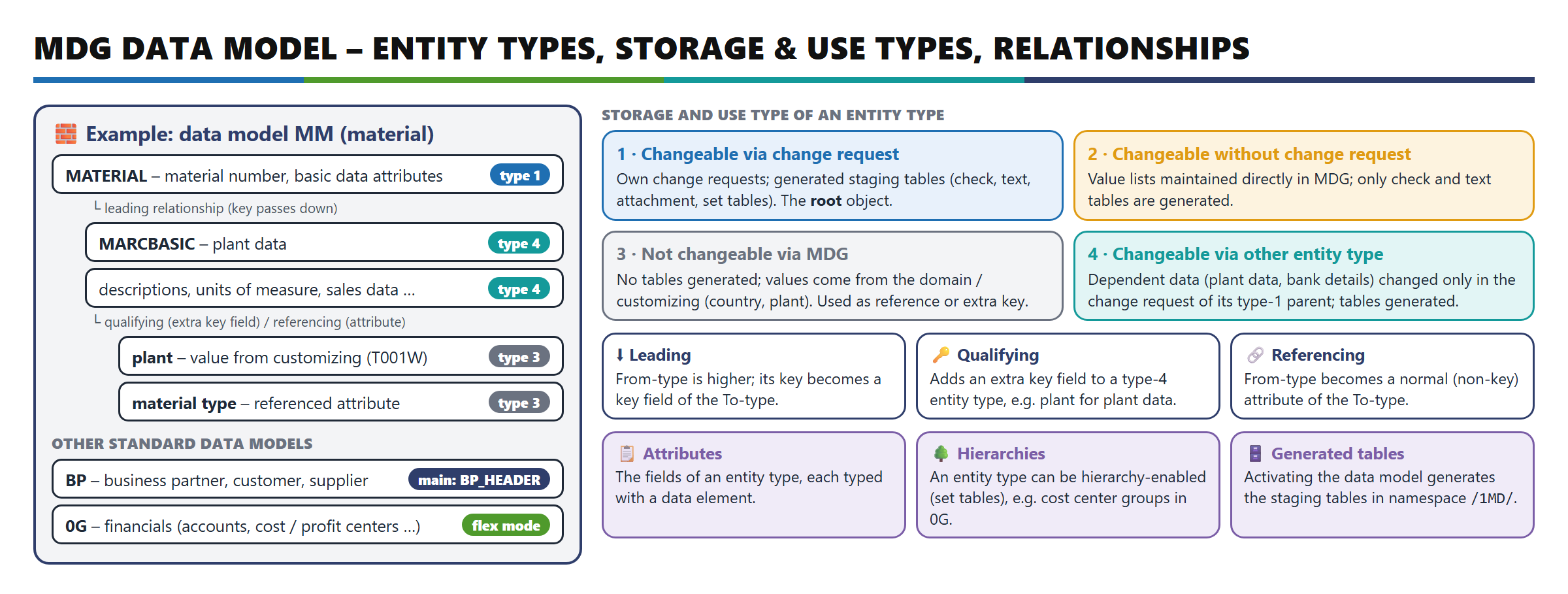
Element | Meaning | Example |
|---|---|---|
Data model | Container for one domain: entity types, relationships, hierarchies, reuse area | MM, BP, 0G, ZC (custom) |
Entity type | One object or sub-object of the domain; its key is a data element | MATERIAL, MARCBASIC (plant data), BP_HEADER |
Attribute | A field of an entity type, typed with a data element | Material type, base unit, industry sector |
Relationship | Link between two entity types: leading, qualifying or referencing | MATERIAL leads MARCBASIC; plant qualifies plant data |
Hierarchy | An entity type can be hierarchy-enabled (set tables); hierarchies can be edition-dependent | Cost center groups, profit center hierarchy, account hierarchy in 0G |
Storage and use type | Says if and how the entity type is changed in MDG and which tables are generated (table below) | 1 for MATERIAL, 4 for plant data, 3 for plant |
1.1 Storage and use types
Type | Text | Changed via | Generated tables |
|---|---|---|---|
1 | Changeable via change request; generated database tables | Its own change request – the root object of a CR type | Check, text, attachment and set tables |
2 | Changeable without change request; generated check / text tables | Directly in MDG, no change request (value lists) | Check and text tables only |
3 | Not changeable via MDG; no generated tables | Not at all – values come from the domain or customizing (country, plant) | None; used as reference or extra key |
4 | Changeable via other entity type; generated database tables | Only in a change request of its type-1 parent (plant data, bank details) | Generated tables for its data (staged with the parent's change request) |
1.2 Relationship types
Relationship | Effect | Rules |
|---|---|---|
Leading | The From-entity type is at a higher level; its key becomes a key field of the To-entity type's tables | No data element can be specified |
Qualifying | Defines additional key fields – e.g. plant as second key of plant data | Only 1:N cardinality; used for type-4 entity types |
Referencing | The From-entity type is used as a normal (non-key) attribute of the To-entity type | Cardinality 1:N or 0:N |
Part 2 – Standard data models: BP, MM, 0G and custom
Data model | Domain | Main entity type | Active data stored in |
|---|---|---|---|
BP | Business partner, customer, supplier (MDG-BP / C / S) | BP_HEADER | Reuse mode: BUT000 …, via CVI also KNA1 / KNB1 / KNVV and LFA1 / LFB1 / LFM1 |
MM | Material / product (MDG-M) | MATERIAL | Reuse mode: MARA, MARC, MARD, MVKE, MBEW … |
0G | Financials (MDG-F): account, company, profit center, cost center, cost element, consolidation unit, hierarchies | per object | Flex mode: MDG tables; replicated to the ERP tables (SKA1 / SKB1, CSKS, CEPC …) |
Custom (Z…) | Own objects, reference data, locations | own type-1 entity | Usually flex mode; reuse mode if a Z table with own logic exists |
- 0F was the predecessor of 0G and must not be used any more.
- The BP model covers several CR types: business partner (e.g. BP1P1 create BP), customer, supplier (e.g. SUPPL1P1 create supplier) – all with main entity type BP_HEADER.
- Extending a standard model (new field, new entity type, reuse or flex option) is a developer task – page 05.
Part 3 – Staging area vs active area, reuse and flex mode
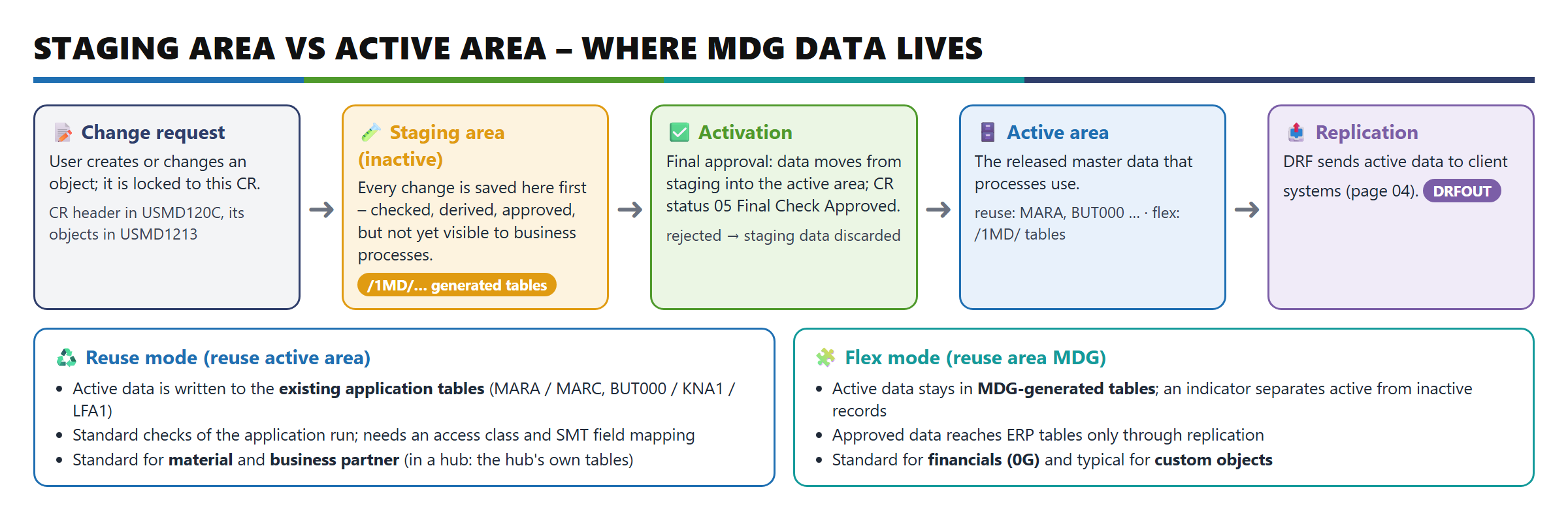
MDG never changes released data directly. Every change first lands in the staging area (inactive data that belongs to a change request); only activation at the end of the approval copies it into the active area, which the business processes and replication read.
Staging area | Active area | |
|---|---|---|
Content | Inactive data of open change requests | Released, approved master data |
Tables | Always MDG-generated tables in namespace /1MD/ | Reuse mode: application tables; flex mode: the same /1MD/ tables, flagged active |
Visible to processes | No – only inside the change request | Yes – orders, postings, replication use it |
Lifetime | Until activation or rejection | Permanent |
3.1 Reuse mode vs flex mode
The reuse area of the data model or entity type decides where active data is stored.
Reuse mode | Flex mode | |
|---|---|---|
Reuse area | A reuse active area of the application (e.g. material, BP) | MDG |
Active data | Existing application tables (MARA, BUT000 …) | MDG-generated tables with an active / inactive indicator |
Generated from the data model | Only the staging area | Staging and active area |
Needs | An access class that reads / writes the application tables and SMT mapping (Service Mapping Tool) between staging and application structures | No SMT mapping; data reaches operational tables only through replication |
Standard for | MM, BP | 0G, most custom objects |
Choose when | The application tables and their business logic must be reused | There is no suitable application table, or the object lives only in MDG |
- In a hub, reuse mode writes into the hub's own application tables; replication then copies the data to the clients. Replication always sends active data – from application tables (reuse) or from the generated tables (flex).
- The generated tables of an active data model are listed in the data model maintenance; treat them as MDG-internal – read and write through the MDG APIs (page 05), never directly.
Part 4 – Editions
An edition is a container with a valid-from date for changes to time-dependent master data – mainly financials (0G). Cost centers, profit centers, cost elements and their hierarchies are time-dependent in SAP; in MDG their validity comes from the edition, not from fields on the screen.
- Every 0G change request is assigned to an edition; the edition's valid-from date becomes the start of the new time slice. A previous edition stays valid until the valid-from date of the next one.
- The edition type defines which entity types an edition may contain and how validity is handled; the delivered financial CR types are assigned to edition type 0G_ALL by default.
- Changing an object in a later edition creates a new time slice; replication sends time-dependent objects with all their slices.
- Hierarchies can be defined as edition-dependent in the data model settings.
- Applications: USMD_EDITION (editions), USMD_EDITION_COMPARE, USMD_EDITION_HISTORY2, USMD_EDITION_CREQUEST (display change requests of an edition). BP and MM do not use editions.
Part 5 – Change request types, business activities and statuses
A change request (CR) is the document that carries one governed change: the objects, the changed data in staging, the workflow, notes and attachments. Its behaviour comes from the change request type.
Setting of a CR type | Meaning | Example |
|---|---|---|
Data model, main entity type | Which domain and root object | MAT01: MM, MATERIAL |
Business activity | What is done (create, change, mark for deletion …); controls UI mode and authorisation; linked to logical actions | MAT1 Create Material, MAT2 Process Material |
Single or multiple objects | One object per CR or a list of objects | One material per CR, or a list of objects in one CR |
Workflow template | Static workflow or the generic rule-based workflow (page 03) | WS60800086 (rule-based) |
Edition type | For edition-based models only | 0G_ALL |
Entity types / UI | Which entity types may be changed, which UI application is used | MDG_BS_MAT_OVP |
Priorities, reasons, rejection reasons, SLA | Classification and service-level times of the request | – |
CR steps are numbered stages of the process (00 request, approval and processing steps, 90 final check, 91 activation, 92 roll back, 99 complete in the SAP example processes); at each step the step type and the available actions (approve, reject, send back, finalize) decide what the agent can do. The CR status tells which processing is allowed:
Status | Text | Permitted processing |
|---|---|---|
00 | To Be Evaluated | Change of object list |
01 | To Be Considered and Approved | Change of object list |
02 | Changes to Be Executed | Execution of changes |
03 | To Be Revised | Change of object list |
04 | Final Check to Be Performed | No processing |
05 | Final Check Approved | No processing – CR finished, data active |
06 | Final Check Rejected | No processing – CR finished, nothing activated |
07 | Activation Failed | No processing |
08 | Approved, to Be Replicated | No processing |
09 / 10 / 11 | Dependent Data to Be Processed/Approved / To Revise: Perform Changes / Process Errors After Activation | Execution of changes |
12 | Approved, Contact Person to be Processed | No processing |
30 | To Be Revised with Changes | Execution of changes |
99 | No Status Set | No processing |
- An object in an open CR is locked for other CRs; this protects against parallel conflicting changes (parallel CRs for different parts of an object need explicit configuration).
Part 6 – User interfaces
UI technology | Used for | Notes |
|---|---|---|
Web Dynpro ABAP with Floorplan Manager (FPM) | Single-object processing in classic mode (overview page per domain), search, CR processing | Built on BOL / genIL (business object layer, generic interaction layer); SAP delivers a genIL component per standard data model |
SAP Fiori apps (UI5 / Fiori elements) | Business user apps (manage BP / product, my change requests, inbox), consolidation, mass processing, DQM, analytics | Run in the SAP Fiori launchpad; need activated OData services |
Cloud-ready mode apps (S/4HANA 2023+) | Business partner central governance (single and mass), consolidation | Fiori on RAP; e.g. Manage Business Partners – Governance (F7204) (page 06) |
SAP Fiori launchpad / NWBC | Entry point with roles; Web Dynpro apps appear as tiles | Legacy: Portal and NetWeaver Business Client (NWBC) work centers |
6.1 Classic UI building blocks
- USMD_OVP_GEN – generic Web Dynpro application wrapping an adaptable FPM overview page (FPM_ADAPTABLE_OVP); its configurations use parameter USMD_OTC for the object type code. Used for flex-mode and custom objects.
- MDG_BS_MAT – material entry point; MDG_BS_MAT_OVP – process-oriented material overview page with application configurations BS_MAT_OVP_06 and BS_MAT_OVP_06H (hierarchical).
- BS_OVP_BP – Web Dynpro component for the BP overview page (customer, supplier).
- The UI shown depends on the Web Dynpro application and configuration in the PFCG role plus the Customizing (CR type → UI). UI changes are done by configuration and context-based adaptations (CBA) in UI Modeling – page 05.
- Web Dynpro services are delivered inactive and must be activated in SICF; Fiori apps need their OData services (/IWFND/MAINT_SERVICE).
6.2 Standard Web Dynpro applications (classic MDG menu)
Application | Purpose |
|---|---|
IBO_WDA_INBOX | Change request work list (inbox) |
USMD_CREQUEST_CREATE | Create change request |
USMD_EDITION_CREQUEST | Display change requests of an edition |
USMD_SEARCH | Search for object |
USMD_ENTITY | Hierarchy processing and collective processing of an entity |
USMD_CREQUEST_PROCESS | Processing of a change request |
USMD_CREQUEST_PROTOCOL2 | Workflow log |
USMD_MASS_CHANGE | Mass change |
USMD_CHANGE_DOCUMENT, USMD_WHERE_USED, USMD_APPLICATION_LOG | Change documents, where-used list, log |
Part 7 – Key transactions, applications and tables
Object | Type | Purpose |
|---|---|---|
MDGIMG | Transaction | MDG Customizing (page 01 Part 6) |
SFW5 | Transaction | Activate MDG business functions |
USMD_EDITION | Transaction / application | Editions |
USMD_RULE | Transaction | BRF+ rules for validations and derivations (page 03) |
USMD_SSW_RULE | Transaction | BRF+ decision tables of the rule-based workflow (page 03) |
MDG_ANALYSE_IDM | Transaction | Display / analyse key mapping (page 04) |
DRFIMG / DRFOUT | Transaction | Replication Customizing / manual replication (page 04) |
USMD120C | Table | Change request header: number, type, status, edition |
USMD1213 | Table | Change request objects: CR number → object key |
/1MD/… | Generated tables | Staging (and in flex mode active) data of an entity type |
SAP_MDG_ADMIN | Role | Administration template role (authorisation object USMD_DM for data models; USMD_CREQ for change requests) |
- Read CR data in custom code through the MDG APIs or the released CDS views of your release, not by joining the USMD tables – page 05.
- In the workflow, the CR number is part of each work item's container: SWIA / SWI6 show stuck CR workflows.
Part 8 – Interview questions
Q1. What is an MDG data model?
The definition of a domain in MDG: entity types with attributes, relationships, hierarchies and a reuse area. Activating it generates the staging tables (/1MD/…). Standard models are BP, MM and 0G; custom objects get their own model.
Q2. Explain the storage and use types.
1 = changeable via change request with generated tables (root objects); 2 = changeable without change request, only check and text tables (value lists); 3 = not changeable in MDG, no tables (reference values like country or plant); 4 = changeable only via the CR of its type-1 parent (dependent data such as plant data or bank details).
Q3. What are leading, qualifying and referencing relationships?
Leading: the higher entity type's key becomes a key of the lower one. Qualifying: adds an extra key field, e.g. plant for plant data. Referencing: the entity type becomes a normal attribute of the other entity type.
Q4. What is the difference between staging area and active area?
The staging area holds inactive data of open change requests in MDG-generated tables; the active area holds released data used by processes and replication. Data moves from staging to active only when the change request is activated.
Q5. Reuse mode vs flex mode?
Reuse mode stores active data in the existing application tables (MARA, BUT000) through an access class and SMT mapping – standard for MM and BP. Flex mode keeps active data in MDG-generated tables (reuse area MDG) and reaches the ERP only through replication – standard for 0G and custom objects.
Q6. Which data model is used for financials and why are editions needed?
Data model 0G (0F is obsolete). Financial objects like cost centers and profit centers are time-dependent; the edition supplies the valid-from date of the change and groups changes that become valid together, so time slices are created correctly.
Q7. What does a change request type control?
Data model and main entity type, business activity (create / change …), single or multiple objects, the workflow template (often the rule-based workflow WS60800086), edition type, allowed entity types and UI, priorities and SLAs.
Q8. Name some change request statuses.
00 To Be Evaluated, 01 To Be Considered and Approved, 02 Changes to Be Executed, 03 To Be Revised, 04 Final Check to Be Performed, 05 Final Check Approved, 06 Final Check Rejected, 07 Activation Failed, 08 Approved, to Be Replicated.
Q9. Which UI technologies does MDG use?
Classic mode: Web Dynpro ABAP with Floorplan Manager on BOL / genIL, e.g. MDG_BS_MAT_OVP, BS_OVP_BP or the generic USMD_OVP_GEN, started from the Fiori launchpad (formerly NWBC / Portal). Fiori apps for business users, consolidation, mass processing, DQM and analytics; cloud-ready mode uses Fiori on RAP.
Q10. Where is a change request stored?
Header in USMD120C (type, status, edition), object list in USMD1213, changed data in the /1MD/ staging tables, workflow in the work item container. Access them through the MDG APIs rather than directly.
Q11. Why may an object not be changed while it is in another change request?
MDG locks objects in open change requests so that two requests cannot change the same data in parallel and overwrite each other at activation.
🏠 Start Here · ◀ 01 · Overview & Architecture · 03 · Processes & Config ▶ · Sections: CORE ABAP | OOPS ABAP | ABAP on HANA | Clean Core | RAP | ABAP Points | SAP Fiori | SAPUI5 | Mobile Development (MDK) | BTP Foundations | BTP Development | CAP | SAP Build | ABAP on BTP | Integration Suite | SAP Business AI | SAP BASIS | Security | SAP SDLC
Functional: FICO ABAP | TRM ABAP | VIM | SAP BIS | SD ABAP | MM ABAP | PP ABAP | QM ABAP | PM ABAP | PS ABAP | EWM | TM ABAP | GTM ABAP | EHS ABAP | HR ABAP | BW | SAP Datasphere | SAP Business Data Cloud | SAP MDG | SAP Analytics Cloud | SAP Ariba | SAP CX | SAP IBP