Every SAP project, big or small, follows a software development life cycle (SDLC): someone describes a need, someone designs a solution, developers build it, testers prove it, and the result goes live and is supported. What changes from project to project is the delivery model – one long sequence (waterfall), short repeated cycles (agile), or a mix. SAP's own method for S/4HANA projects, SAP Activate, is such a mix. This page explains the models, the Activate phases, the documents you will receive and write, and the people you will work with. Scrum itself is on page 02.
Part 1 – The SDLC and its phases
The SDLC is the sequence of activities that turns a business need into running, supported software. The names differ between companies, but the six phases are always there:
Phase | Question it answers | Typical output | Developer's part |
|---|---|---|---|
1 Requirements | What does the business need? | Requirement list, process list, user stories | Ask questions, flag what standard SAP already does |
2 Design | How will we solve it? | Functional specification, technical specification, architecture | Write the technical specification, estimate |
3 Build | Make it | Code, configuration, transports | Develop, unit test, code review, ATC |
4 Test | Does it work, end to end? | Test results, defects, sign-off | Fix defects, support SIT and UAT |
5 Deploy | Put it into production | Cutover plan, transports imported, go-live | Release transports, run cutover steps, watch the first runs |
6 Maintain | Keep it running and improve it | Incidents, change requests, enhancements | Production support, bug fixes, small changes |
- Requirements → design is where most expensive mistakes start: a misunderstood requirement found in UAT costs far more than a question asked in the design workshop.
- The phases do not disappear in agile – they are just done in small slices, again and again, inside each sprint.
Part 2 – Delivery models: waterfall, V-model, agile, hybrid
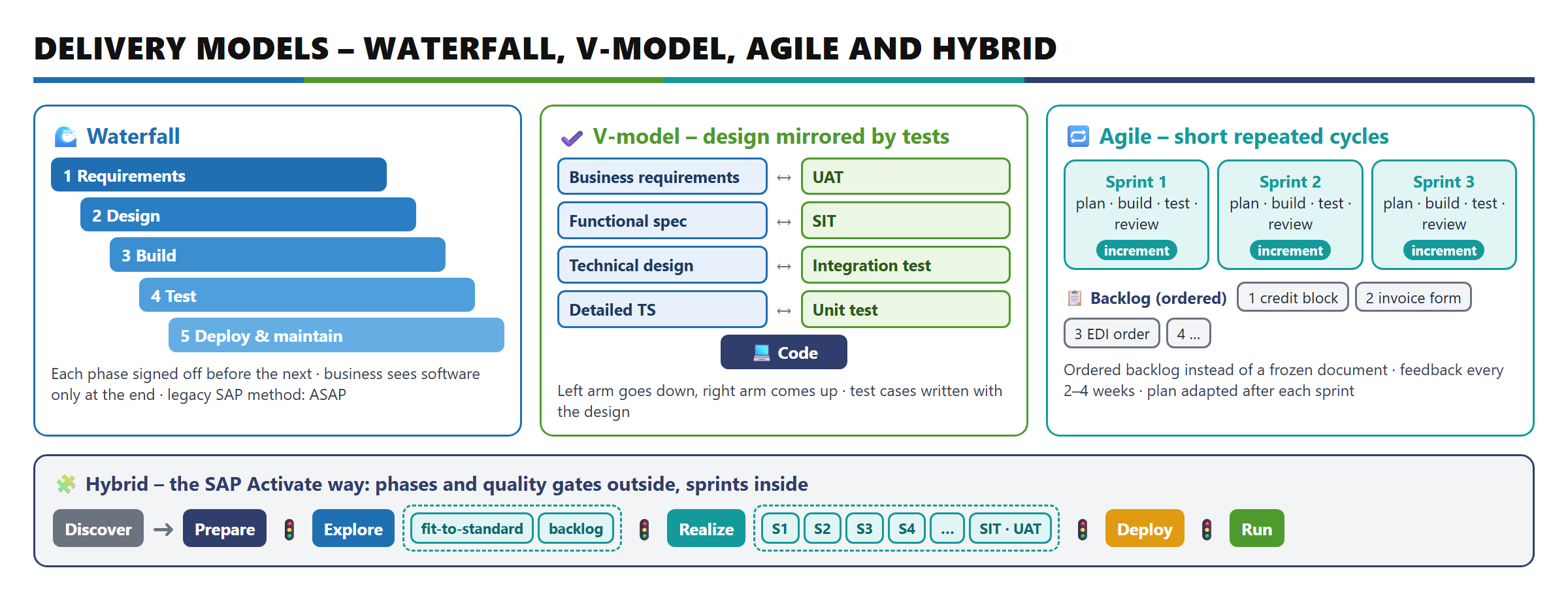
2.1 Waterfall
Each phase is finished and signed off before the next starts: all requirements first, then the complete design, then all development, then all testing, then go-live. Classic SAP projects used ASAP (Accelerated SAP: project preparation, business blueprint, realization, final preparation, go-live and support) – legacy, replaced by SAP Activate.
- Strengths: clear scope, fixed budget and dates, full documentation, easy to govern and audit.
- Weaknesses: the business sees working software only at the end; late changes are expensive; risks surface late (in testing).
2.2 V-model
A waterfall variant that pairs every design level with the test level that proves it. The left arm goes down from requirements to code, the right arm goes up through the tests. Test cases are written while the matching design is written, not after the build.
Design level (left) | Proved by (right) | Who tests |
|---|---|---|
Business requirements | User acceptance testing (UAT) | Key users / business |
Functional specification / solution design | System integration testing (SIT) – end-to-end processes across modules and interfaces | Functional consultants, testers |
Technical design / architecture | Integration testing – objects work together | Developers, testers |
Detailed technical specification | Unit testing – one object in isolation | Developer |
Code (the bottom of the V) | – | – |
2.3 Iterative and agile
Work is split into short, fixed cycles (iterations, in Scrum called sprints, usually 2–4 weeks). Each cycle delivers a small working piece that the business can see and comment on, and the plan is adjusted after every cycle. Requirements live in an ordered backlog instead of a frozen document. The Agile Manifesto (2001) values individuals and interactions, working software, customer collaboration and responding to change – over processes and tools, comprehensive documentation, contract negotiation and following a plan.
- Strengths: early feedback, priorities can change, risk found early, business stays involved.
- Weaknesses: needs an available, decisive business; harder to fix scope and price up front; documentation can be neglected.
2.4 Hybrid – what most SAP projects do
SAP programmes have hard dependencies (data migration, cutover weekends, interfaces to many systems, audits), so the overall frame stays phased with formal sign-offs, while design and build run in agile sprints. That is exactly the SAP Activate model: phases and quality gates outside, fit-to-standard backlog in Explore, sprints in Realize.
Aspect | Waterfall | Agile | Hybrid (SAP Activate) |
|---|---|---|---|
Requirements | Fixed up front in a blueprint | Evolving backlog | Fit-to-standard, then a prioritised backlog of gaps |
Delivery | One big go-live | Increment every sprint | Sprints build; one or few go-lives |
Change | Formal change request | Re-order the backlog | Backlog in sprints, change request for scope |
Testing | Phase after build | Inside every sprint | Unit tests in sprints, then SIT and UAT |
Governance | Phase sign-off | Sprint Review | Sprint Reviews plus quality gates |
Part 3 – SAP Activate
SAP Activate is SAP's implementation framework for S/4HANA and its other cloud products. It combines SAP Best Practices (ready-made, documented business processes called scope items), the methodology (phases, workstreams, deliverables, quality gates) and tools for guided configuration and project management – today mainly SAP Cloud ALM, where the roadmap tasks, processes, requirements, user stories and tests are tracked. The roadmaps are also published in the SAP Activate Roadmap Viewer.
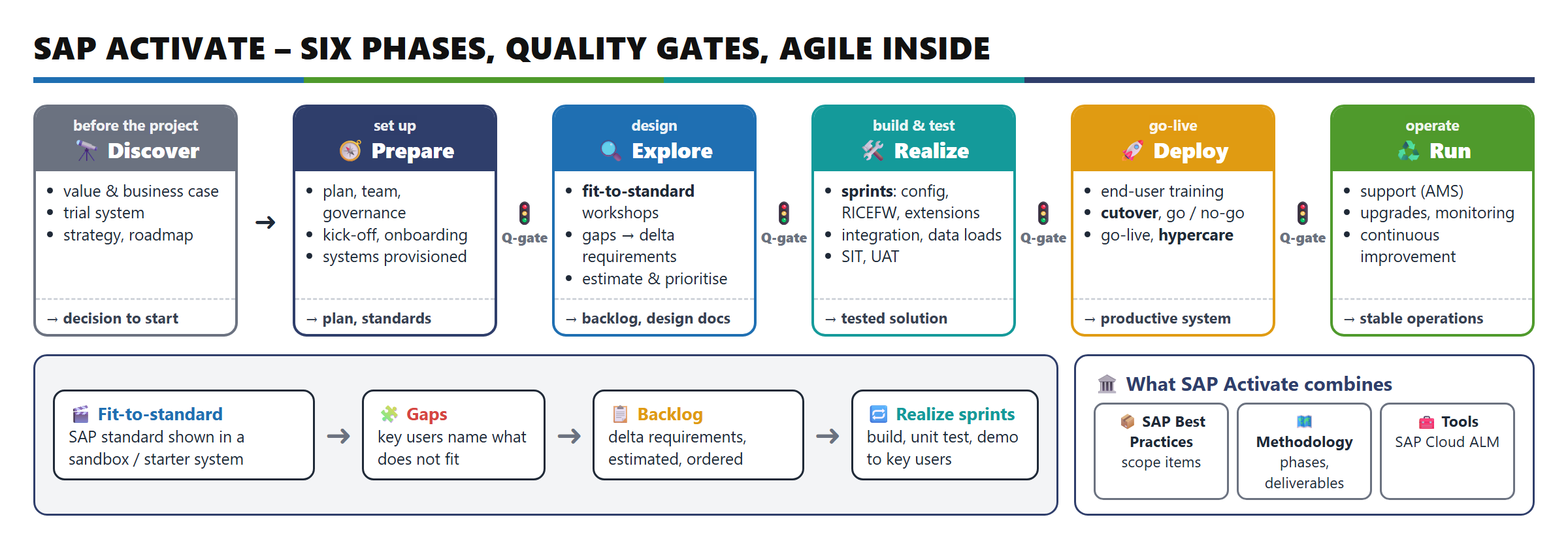
3.1 The six phases
Phase | What happens | Main results |
|---|---|---|
Discover | Before the project: understand the solution's value, try a trial system, build the business case and the transformation strategy. | Strategy, roadmap, decision to start |
Prepare | Project start: plan, team, governance, kick-off, onboarding; system access (in the public cloud the first systems are provisioned). | Project plan, team set up, standards agreed |
Explore | Fit-to-standard workshops: consultants show the SAP standard process in a sandbox or starter system, key users confirm the fit or name gaps. Gaps become delta requirements, estimated and prioritised. | Confirmed scope, backlog of delta requirements, design documents |
Realize | Build in sprints: configuration, developments (RICEFW, extensions), integration, data migration loads; then integration testing and UAT. | Configured and tested system, migration rehearsed |
Deploy | Final preparation: end-user training, cutover (transports, data migration, go/no-go), go-live, then hypercare support. | Productive system, hand-over to support |
Run | Operate and improve: support, monitoring, new releases (in the cloud: regular upgrades), continuous improvement. | Stable operations, improvement backlog |
- Quality gates (Q-gates): formal checkpoints at the end of the phases. The deliverables of the phase are reviewed and signed off before the project moves on – the waterfall-style governance that frames the agile work.
- Workstreams run across the phases, e.g. project management, application design and configuration, extensibility, integration, data management, testing, technical architecture and organisational change management. ABAP developers mostly sit in extensibility and integration.
3.2 From fit-to-standard to sprints
- Fit-to-standard starts from SAP's standard process, not from the old system: "show us why the standard does not work" instead of "rebuild what we had". This keeps the core clean (see Clean Core › 01 Clean Core).
- Each gap is written down as a delta requirement (often as a user story), estimated and ordered. Together they form the backlog that feeds Realize.
- In Realize the team takes backlog items into sprints (typically 2 weeks), builds and unit tests them, and shows them to the key users in a sprint review. Explore builds the backlog; the sprints run in Realize.
- A gap does not automatically mean code: the options are a different standard process, configuration, key-user extensibility, developer extensibility, or a side-by-side app on SAP BTP.
3.3 Public cloud vs private cloud / on-premise
Topic | S/4HANA Cloud Public Edition | Private Edition / on-premise |
|---|---|---|
Roadmap | Activate roadmap for the public cloud | Activate roadmap for private cloud / on-premise (also covers system conversion) |
Fit-to-standard | Mandatory scope items, workshops on SAP-provided systems | More extensive; scope items optional; the team works with the IMG (SPRO) |
Configuration | Central Business Configuration (no SPRO) | SPRO / IMG |
Development | Only released APIs and ABAP Cloud (key-user and developer extensibility, BTP) | ABAP Cloud recommended; classic ABAP still possible (clean core rules apply) |
Upgrades | SAP upgrades on a fixed schedule | Customer plans upgrades |
Part 4 – Greenfield, brownfield, bluefield
Approach | Meaning | Typical reason |
|---|---|---|
Greenfield (new implementation) | Build a new S/4HANA system from scratch with SAP Best Practices; migrate master data and open items only. | Re-design processes, leave old custom code behind |
Brownfield (system conversion) | Convert the existing ECC system to S/4HANA in place, keeping history, configuration and custom code. | Protect past investment, fastest technical move |
Bluefield (selective data transition) | A mix: a new or shell system that takes over selected configuration, data and code from the old one. | Keep some history, re-design some areas, merge or split systems |
For a greenfield project, the developer's work is mostly new objects built the clean core way, plus migration objects. Details: CORE ABAP › 01 SAP & ABAP Basics; ABAP on HANA › 02 Migration to S/4HANA & Performance Tools.
Part 5 – Documents and deliverables a developer meets
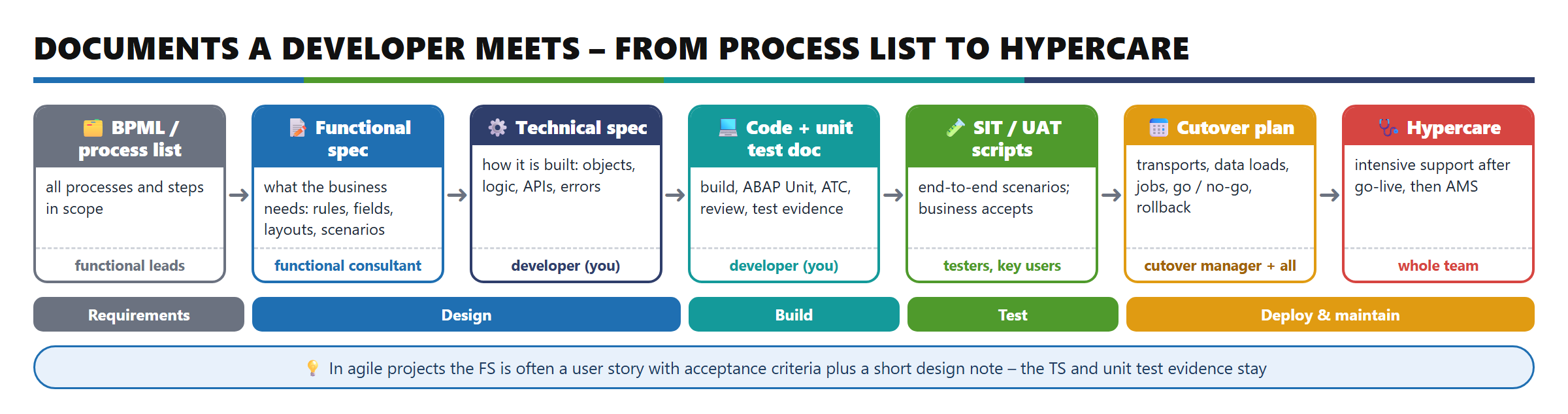
Document | What it contains | Written by | Developer's use |
|---|---|---|---|
BPML / process list | Business Process Master List: every process and step in scope (in Activate: scope items and solution processes). | Functional leads | Find which process an object belongs to |
Functional specification (FS) | The business requirement for one object: purpose, rules, fields, layouts, examples, test scenarios. | Functional consultant | Your input – read it, clarify gaps before you build |
Technical specification (TS) | How it is built: objects, tables, CDS views, classes, BAdIs, APIs, error handling, performance, authorisations. | Developer | Your design; reviewed by the technical lead |
Unit test document (UTD) | Test cases you ran on your object with data and results (screenshots), ABAP Unit results. | Developer | Proof the object works before handover |
SIT / UAT test scripts | End-to-end scenarios across objects and modules; UAT = business confirms it is fit for use. | Testers, functional consultants, key users | Fix defects raised against your objects |
Cutover plan | Minute-by-minute steps for go-live: transports, data loads, jobs, checks, go/no-go points, rollback. | Cutover manager with all teams | Execute and verify your steps |
Hypercare | Period of intensified support right after go-live (often several weeks), then hand-over to support (AMS). | Whole project team | Fix production issues fast |
- Other names you will hear: RICEFW list (all custom objects with their IDs – see CORE ABAP › 01 SAP & ABAP Basics, Part 5), estimation sheet, design / delta design document, code review checklist, transport list, run book.
- In agile projects, the FS is often lighter: a user story with acceptance criteria plus a short design note. Tickets, transports and change requests: page 03.
Part 6 – The people in an SAP project
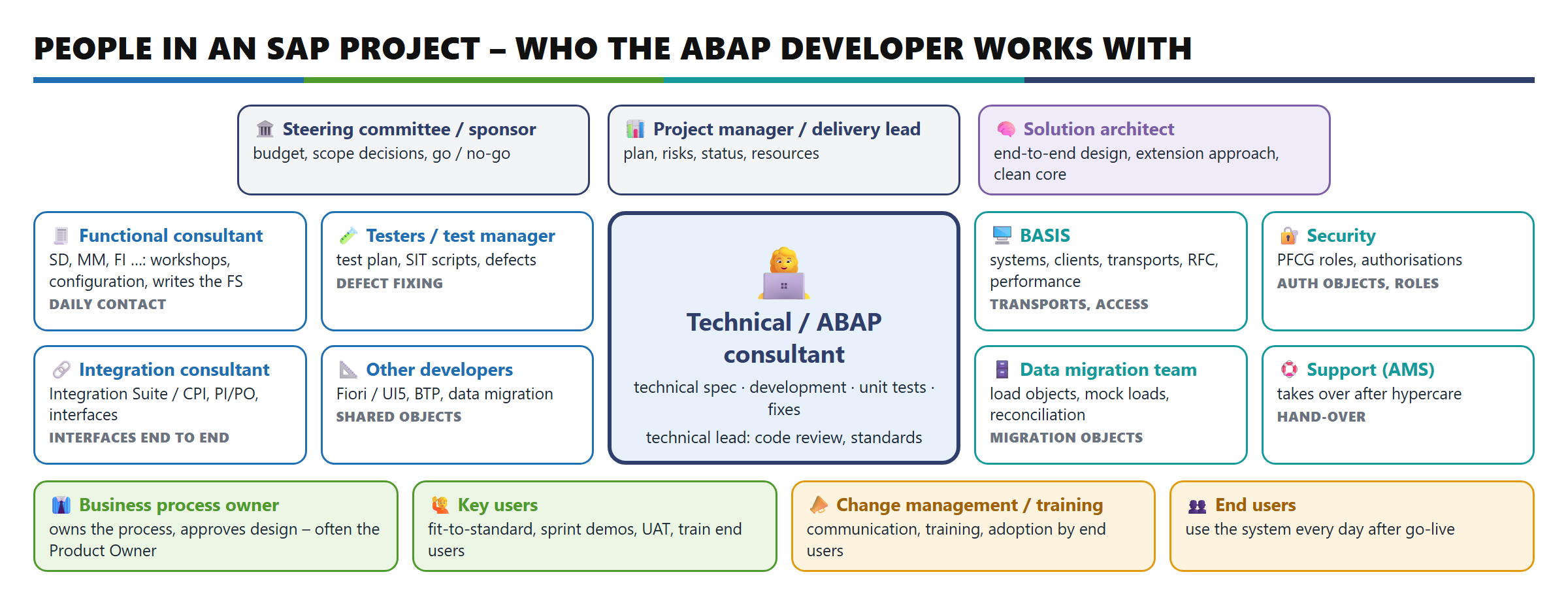
Role | Responsible for | You work with them when |
|---|---|---|
Steering committee / sponsor | Budget, scope decisions, go/no-go | Rarely directly |
Project manager / delivery lead | Plan, budget, risks, status, resources | Reporting status, estimates, escalating blockers |
Solution architect | Overall design across modules, integration and extensibility; clean core decisions | Choosing the extension approach for a gap |
Functional consultant (SD, MM, FI …) | Configures the module, runs workshops, writes the FS | Every day: clarifying requirements, testing together |
Technical / ABAP consultant | TS, development, unit tests, technical fixes; the technical lead reviews code and sets standards | You are this role |
BASIS | Systems, clients, transports, performance, connections (RFC, certificates) | Transport issues, system access, RFC destinations |
Security | Roles and authorisations (PFCG), user access | Authorisation objects for your app, missing roles |
Integration consultant | Middleware (SAP Integration Suite / CPI, PI/PO), interfaces | Building interfaces end to end |
Testers / test manager | Test plan, scripts, defect management | Fixing defects in SIT |
Business process owner / key users | Own the business process, approve design, test in UAT, train end users | Demos, UAT, clarifying business rules |
Change management / training | Communication, training, adoption by end users | Providing input for training material |
In Scrum terms (page 02), the business process owner often acts as Product Owner, and the functional and technical consultants together are the Developers of one Scrum Team.
Part 7 – Interview questions
Q1. What is the SDLC and what are its phases?
The software development life cycle: the activities that turn a need into running software – requirements, design, build, test, deploy and maintain. Waterfall runs them once in sequence; agile runs small slices of them in every sprint.
Q2. Waterfall vs agile – when would you choose which?
Waterfall suits stable, well-known requirements with fixed scope and strong audit needs. Agile suits changing or unclear requirements where early feedback matters. SAP projects usually combine them: phases and quality gates outside, sprints inside.
Q3. What is the V-model?
A waterfall variant where each design level has a matching test level: requirements ↔ UAT, functional design ↔ SIT, technical design ↔ integration test, detailed design ↔ unit test. Test cases are prepared together with the design.
Q4. Name the phases of SAP Activate.
Discover, Prepare, Explore, Realize, Deploy, Run. Quality gates close the phases; fit-to-standard happens in Explore, sprints in Realize, cutover, go-live and hypercare in Deploy.
Q5. What is a fit-to-standard workshop?
An Explore-phase workshop where consultants demonstrate the SAP standard process (Best Practices scope items) and key users confirm it fits or name the gaps. The gaps become delta requirements in the backlog for Realize.
Q6. What is the difference between fit-to-standard and the old blueprint approach?
The ASAP business blueprint documented the customer's processes first and then designed SAP to match, often leading to heavy customising and custom code. Fit-to-standard starts from SAP's standard and only accepts justified gaps – which supports a clean core.
Q7. Greenfield, brownfield, bluefield?
Greenfield: new implementation from scratch. Brownfield: system conversion of the existing ECC system. Bluefield: selective data transition – a mix of new design and selected data and settings from the old system.
Q8. What is the difference between a functional and a technical specification?
The FS describes what the business needs (rules, fields, layouts, scenarios) and is written by the functional consultant. The TS describes how the developer builds it (objects, logic, tables, APIs, error handling) and is written by the developer.
Q9. What are SIT and UAT?
System integration testing checks end-to-end processes across modules and interfaces, run by the project testers. User acceptance testing is the business confirming the solution is fit for use before go-live.
Q10. What is cutover and what is hypercare?
Cutover is the planned sequence of steps that moves the solution into production: transports, data migration, jobs, checks and go/no-go decisions. Hypercare is the period of intensified support right after go-live before hand-over to normal support.
Q11. Who do you work with most as an ABAP developer?
The functional consultant (requirements, FS, testing), the technical lead (design and code review), BASIS (transports, systems), security (authorisations), testers (defects) and, in demos and UAT, the key users.
Q12. How does SAP Activate differ for the public cloud?
The public cloud roadmap uses mandatory scope items, Central Business Configuration instead of SPRO, only released APIs and ABAP Cloud for extensions, and SAP-scheduled upgrades. Private cloud and on-premise allow SPRO and classic ABAP, with clean core recommended.
🏠 Start Here · 02 · Scrum Framework ▶ · Sections: CORE ABAP | OOPS ABAP | ABAP on HANA | Clean Core | RAP | ABAP Points | SAP Fiori | SAPUI5 | Mobile Development (MDK) | BTP Foundations | BTP Development | CAP | SAP Build | ABAP on BTP | Integration Suite | SAP Business AI | SAP BASIS | Security | SAP SDLC
Functional: FICO ABAP | TRM ABAP | VIM | SAP BIS | SD ABAP | MM ABAP | PP ABAP | QM ABAP | PM ABAP | PS ABAP | EWM | TM ABAP | GTM ABAP | EHS ABAP | HR ABAP | BW | SAP Datasphere | SAP Business Data Cloud | SAP MDG | SAP Analytics Cloud | SAP Ariba | SAP CX | SAP IBP