Scrum is a lightweight framework for delivering a product in short, fixed cycles called Sprints. It is defined in the Scrum Guide (Ken Schwaber and Jeff Sutherland, current version 2020, scrumguides.org): three accountabilities, five events and three artifacts, each artifact with a commitment. Everything else – user stories, story points, burndown charts, the Definition of Ready – is common practice around Scrum, not part of the guide. This page covers the guide first, then the practices, Kanban, scaling and how SAP projects use Scrum. Work items in tools (Azure DevOps, Jira) are on page 03.
Part 1 – Empiricism, the Sprint cycle and Scrum values
Scrum is based on empiricism (knowledge comes from experience and decisions are made on what is observed) and lean thinking (reduce waste, focus on essentials). Empiricism has three pillars:
Pillar | Meaning | Where it shows |
|---|---|---|
Transparency | The work and the process are visible to those doing it and those receiving it. | Product Backlog, Sprint Backlog, Increment, Definition of Done |
Inspection | Artifacts and progress are checked often to detect problems early. | Every event, above all Daily Scrum and Sprint Review |
Adaptation | When something is off, the process or the product is adjusted as soon as possible. | Re-planning in the Daily Scrum, backlog changes after the Review, improvements from the Retrospective |
Every Sprint (fixed length, one month or less – in practice usually 2–4 weeks, most often 2) runs the same loop: plan → produce → inspect → adapt. Plan in Sprint Planning, produce the Increment during the Sprint, inspect it in the Sprint Review and the way of working in the Retrospective, adapt the backlog and the process – then the next Sprint starts immediately.
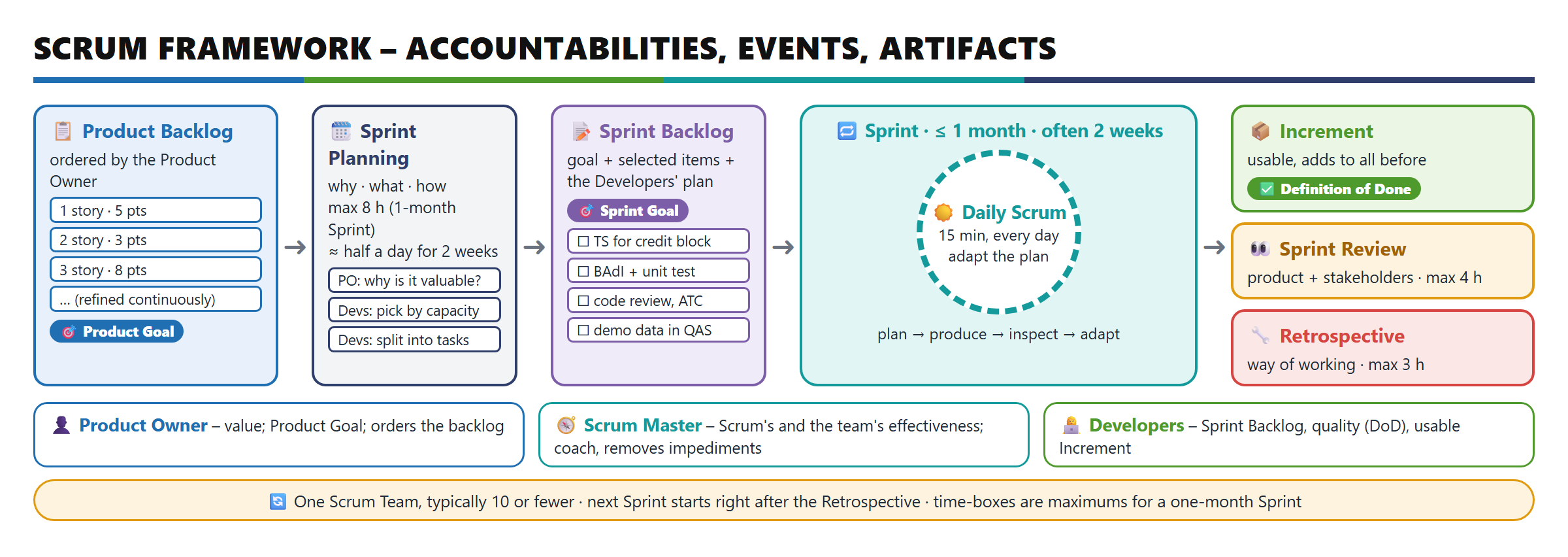
The five Scrum values
- Commitment – to the goals and to supporting each other.
- Focus – on the work of the Sprint and the Sprint Goal.
- Openness – about the work and the challenges.
- Respect – for each other as capable, independent people.
- Courage – to do the right thing and work on tough problems.
Part 2 – The Scrum Team: Product Owner, Scrum Master, Developers
A Scrum Team is one Product Owner, one Scrum Master and the Developers – no sub-teams, no hierarchy, typically 10 or fewer people. It is cross-functional (has all skills needed to create value each Sprint) and self-managing (decides internally who does what, when and how). Larger products use several Scrum Teams with the same Product Goal, Product Backlog and Product Owner.
Accountability | Accountable for | Does | Is not |
|---|---|---|---|
Product Owner | Maximising the value of the product | Develops and communicates the Product Goal; creates, explains and orders Product Backlog items; keeps the backlog transparent, visible and understood | A committee – one person, though they may delegate work and represent many stakeholders |
Scrum Master | Establishing Scrum as defined in the guide and the Scrum Team's effectiveness | Coaches the team in self-management; removes impediments; makes sure events happen, are positive and stay in the time-box; helps the PO with backlog techniques; helps the organisation adopt Scrum | A project manager who assigns tasks – a true leader who serves the team and the organisation |
Developers | Creating a usable Increment every Sprint | Create the Sprint Backlog; instil quality by following the Definition of Done; adapt their plan daily toward the Sprint Goal; hold each other accountable | Only programmers – anyone doing the work: consultants, developers, testers, analysts |
- Product Owner in practice: usually a person from the customer side – a business representative or process owner. A business analyst can support the PO with writing items, but the ordering decisions stay with the one PO.
- Developers in SAP projects: functional consultants, ABAP developers, integration and test people of one area working toward one Sprint Goal.
- Scrum Master in practice: reviews how the team works and coordinates with other teams and managers to clear blockers – but does not plan or assign the work; the Developers do that.
Part 3 – Stakeholders
Stakeholders are everyone with an interest in the product outside the Scrum Team's own accountabilities. They give input to the Product Owner and inspect the Increment in the Sprint Review. Typical stakeholders:
- Project sponsors – the people funding the project.
- Product owners and core business stakeholders from the client's side (process owners, key users).
- Project managers.
- Business managers and business architects.
- Account and sales managers (on the supplier side).
- The wider delivery team – engineers, designers, business analysts working with the Scrum Team.
- End users – the people who will use the product every day.
Part 4 – Scrum events
The guide defines five events. Each is a formal chance to inspect and adapt; holding them at the same time and place reduces extra meetings. Time-boxes are maximums for a one-month Sprint – for shorter Sprints the events are usually shorter (for a 2-week Sprint roughly half).
Event | Purpose | Who | Time-box (1-month Sprint) | Usual in a 2-week Sprint |
|---|---|---|---|---|
The Sprint | Container for all other events; produces a usable Increment toward the Product Goal | Scrum Team | 1 month or less, fixed length | 2 weeks |
Sprint Planning | Why is this Sprint valuable (Sprint Goal), what can be done, how will it be done | Scrum Team (may invite others) | max 8 hours | about half a day (up to 4 h) |
Daily Scrum | Inspect progress toward the Sprint Goal, adapt the plan for the next day | Developers (PO / SM join as Developers if they work on items) | 15 minutes, same time and place | 15 minutes |
Sprint Review | Inspect the Increment with stakeholders, adapt the Product Backlog – a working session, not just a demo | Scrum Team + stakeholders | max 4 hours | about 1–2 hours |
Sprint Retrospective | Inspect how the last Sprint went (people, interactions, process, tools, Definition of Done) and plan improvements | Scrum Team | max 3 hours | about 1–1.5 hours |
Sprint Planning
Held at the beginning of the Sprint. The Product Owner proposes how the Sprint can increase value; the team crafts a Sprint Goal, the Developers select items from the Product Backlog (using their past performance and capacity) and plan the work, often by splitting items into tasks of a day or less. Result: the Sprint Backlog.
Daily Scrum (stand-up)
A 15-minute event for the Developers, at the same time and place every working day. The Developers choose the structure; a classic option is that everyone answers three questions:
- What did I do yesterday toward the Sprint Goal?
- What am I going to do today?
- What is blocking me?
Detailed discussions happen right after the stand-up with the people concerned. Blockers that the team cannot solve go to the Scrum Master.
Sprint Review
Near the end of the Sprint. The team shows what was achieved and stakeholders give feedback; together they discuss what changed and what to do next, and the Product Backlog may be adjusted.
Sprint Retrospective
The last event of the Sprint, after the Review – a separate event. The team shares experiences, what went well, what problems it had and how they were (or were not) solved, and picks the most helpful improvements, which can be added to the next Sprint Backlog.
Product Backlog refinement – an ongoing activity, not an event
Refinement (formerly called backlog grooming) breaks Product Backlog items into smaller, more precise items and adds detail such as description, order and size. It looks ahead – preparing items for the next one or two Sprints so that Sprint Planning goes fast. The Developers who will do the work size the items. Many teams plan a fixed slot, for example half a day per two-week Sprint (older guides suggested not more than about 10% of the Developers' capacity).
Part 5 – Artifacts and commitments
Artifacts represent work or value and are designed for transparency. Each has a commitment that gives a target to measure progress against.
Artifact | What it is | Owned / managed by | Commitment |
|---|---|---|---|
Product Backlog | The emergent, ordered list of what is needed to improve the product; the single source of work for the Scrum Team | Product Owner | Product Goal – the long-term objective of the product |
Sprint Backlog | Sprint Goal (why) + selected Product Backlog items (what) + plan to deliver them (how); updated throughout the Sprint | Developers | Sprint Goal – the single objective of the Sprint |
Increment | A concrete, usable step toward the Product Goal; adds to all previous Increments; several can be created in one Sprint and released at any time | Developers | Definition of Done – the quality standard work must meet to become part of the Increment |
- Older Scrum texts call the Increment the potentially shippable increment: it must be usable and meet the Definition of Done, whether or not the business decides to release it.
- Work that does not meet the Definition of Done is not part of the Increment and is not shown in the Review – it goes back to the Product Backlog.
Example Definition of Done for an ABAP backlog item
- Code follows the naming and clean core guidelines; ATC check clean; peer code review done.
- ABAP Unit tests written and green; unit test document filled in.
- Technical specification updated; transport released and imported into the quality system.
- Acceptance criteria demonstrated to the functional consultant / Product Owner.
Definition of Ready (common practice, not in the Scrum Guide)
A checklist an item must satisfy before the team takes it into a Sprint, for example: clear user story and acceptance criteria, functional specification available, test data known, dependencies resolved, estimated. Useful in SAP projects where a developer cannot start without a signed-off FS.
Part 6 – User stories, story points and velocity
None of these are in the Scrum Guide, but almost every Scrum team uses them. The full work-item hierarchy (epic, feature, backlog item, task) and tools are on page 03.
User story
A Product Backlog item written from the user's view: As a <role> I want <goal> so that <benefit>, plus acceptance criteria that make it testable. Good stories are INVEST: independent, negotiable, valuable, estimable, small, testable. Given – When – Then acceptance criteria and the INVEST table with SAP examples: page 03 Part 2.
|
Story points
- A relative size of an item – effort, complexity and uncertainty together – compared with a reference item, not hours. Common scale: modified Fibonacci 1, 2, 3, 5, 8, 13, 20 …
- Estimated by the Developers, often with planning poker: everyone shows a card at once, the highest and lowest explain, the team re-votes until it agrees.
- Items too big for one Sprint (for example 20+) are split during refinement.
Velocity
- The story points of items Done in a Sprint. The average of the last three or so Sprints helps forecast how much the team can take into the next Sprint and when a release may be ready.
- Velocity belongs to one team – it is a planning aid, not a performance measure, and must not be compared between teams (their point scales differ).
Part 7 – Burndown and burnup charts
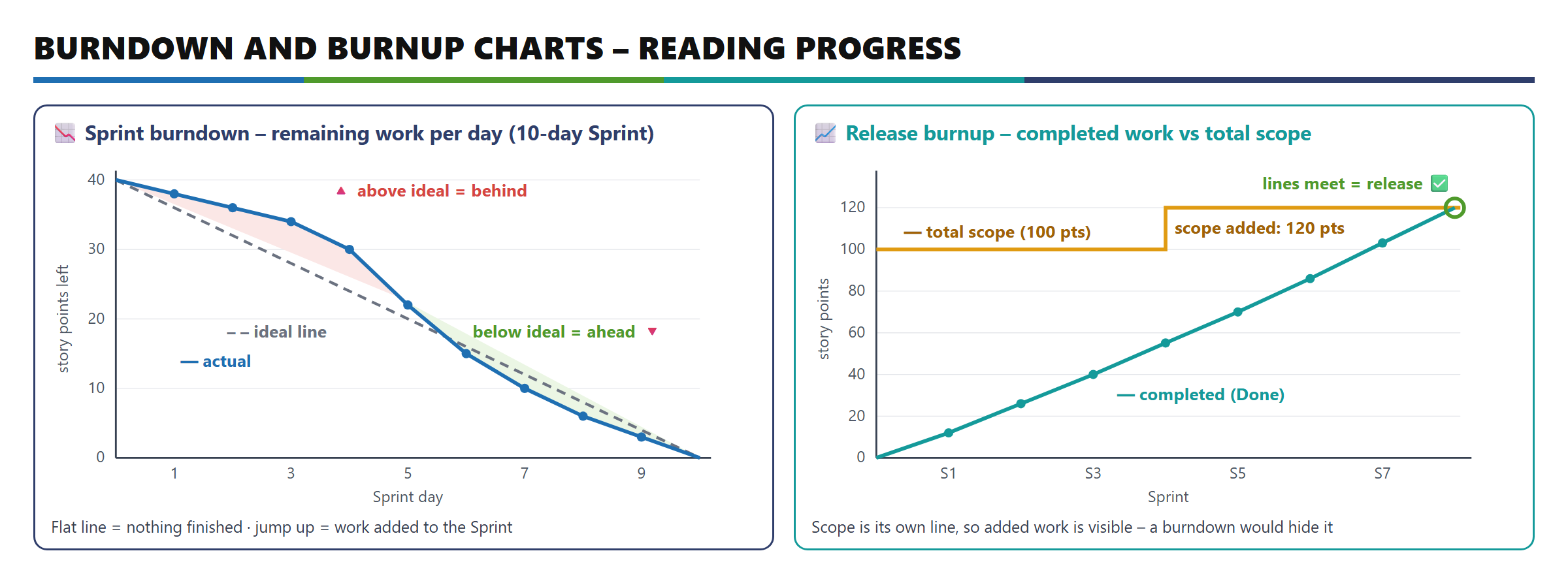
Sprint burndown chart
Shows the remaining work (story points, tasks or hours) on the vertical axis against the days of the Sprint on the horizontal axis. The ideal line runs straight from the total at day 1 to zero on the last day.
- Actual line above the ideal line → more work left than planned → the team is behind (lagging).
- Actual line below the ideal line → less work left than planned → the team is ahead (leading).
- A flat line means nothing is being finished (items stuck in progress); a jump up means work was added to the Sprint.
Burnup chart
Shows completed work rising toward a total scope line, usually across Sprints for a release. Because scope is a separate line, it shows when work was added – which a burndown hides. The release is reached where the two lines meet.
The Scrum Guide does not prescribe these charts; it only says progress toward the goals should be made transparent. Burndowns, burnups and cumulative flow diagrams are common ways to do that.
Part 8 – Kanban, Scrumban and SAFe
8.1 Kanban
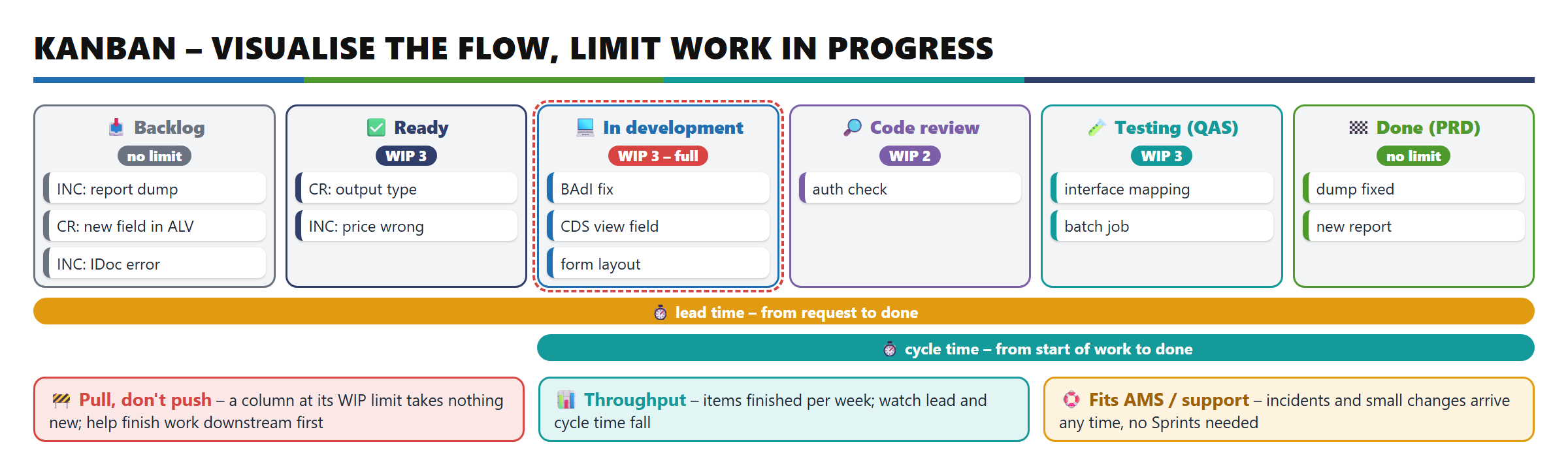
A flow method instead of a cycle method: no Sprints and no fixed roles. Work items move across a board whose columns are the steps of the workflow.
- Visualise the workflow – every item is a card in a column (To do, In development, Code review, Testing, Done).
- Limit work in progress (WIP) – each column has a maximum number of cards; a new item is pulled only when one leaves. This exposes bottlenecks and finishes work faster.
- Manage flow – measure lead time (request to done), cycle time (start of work to done) and throughput (items finished per week), and improve continuously.
- Fits production support / AMS in SAP well: incidents and small changes arrive unpredictably and are prioritised continuously.
8.2 Scrumban
A mix: Scrum's roles and events (often Planning and Retrospective) with a Kanban board and WIP limits, and items pulled on demand. Common when a team does project work and support at the same time.
Aspect | Scrum | Kanban | Scrumban |
|---|---|---|---|
Cadence | Fixed Sprints | Continuous flow | Sprints or regular planning + flow |
Roles | PO, SM, Developers | None required | Usually Scrum roles |
Change during cycle | Sprint Goal stays fixed; scope negotiated | Any time | Any time, by priority |
Key metric | Velocity, burndown | Lead / cycle time, throughput | Both |
Best for | Product development, projects | Support, operations | Mixed project and support |
8.3 Scaling with SAFe
When many teams work on one large solution (common in big SAP programmes), frameworks such as SAFe (Scaled Agile Framework) coordinate them. Others are LeSS and Nexus.
- Agile Release Train (ART): a long-lived team of agile teams (typically 50–125 people) that plans, builds and delivers together.
- PI (Planning Interval, earlier called Program Increment): a time-box of usually 8–12 weeks (several iterations). PI planning is a big-room event at its start where all teams of the ART plan together, align on objectives and make dependencies visible.
- Each team inside the ART still works with Scrum or Kanban in iterations of usually 2 weeks.
Part 9 – Scrum in SAP projects
Scrum element | How it looks in an SAP S/4HANA project |
|---|---|
Product Backlog | Delta requirements from the fit-to-standard workshops (Explore), plus RICEFW objects and configuration items, kept in SAP Cloud ALM, Jira or Azure DevOps |
Sprints | Realize phase, usually 2 weeks; often one Scrum Team per area (for example order to cash, procure to pay, finance) |
Product Owner | Business process owner or a lead from the customer side |
Developers | Functional consultants, ABAP / integration developers and testers of that area |
Sprint Review | Demo to key users in the development or quality system; feedback becomes new or changed backlog items |
Definition of Done | Configured / coded, unit tested, ATC clean, code reviewed, transport in the quality system, documents updated |
Outside the Sprints | Quality gates, SIT, UAT, data migration rehearsals and cutover stay phased (page 01) |
- Dependencies are the hard part: a form needs the output configuration, an interface needs the middleware and the partner system. Raise them in refinement and Sprint Planning, not in the Daily Scrum on day 9.
- Transports follow the Sprint: finished items are released and imported into the quality system so they can be shown in the Review; transport and ticket handling are on page 03, the developer's daily routine on page 04.
Part 10 – Interview questions
Q1. What is Scrum?
A lightweight framework, defined in the Scrum Guide, for delivering value in fixed Sprints of one month or less. It is built on empiricism (transparency, inspection, adaptation) and has three accountabilities, five events and three artifacts with their commitments.
Q2. What are the Scrum accountabilities and who is the Scrum Master?
Product Owner (value, orders the Product Backlog), Scrum Master (Scrum's and the team's effectiveness) and Developers (a usable Increment every Sprint). The Scrum Master is a true leader who serves (Scrum Guide 2020; earlier “servant leader”), coaches and removes impediments – not a project manager who assigns tasks.
Q3. How big is a Scrum Team?
Typically 10 or fewer people, including the Product Owner and the Scrum Master. Larger efforts are split into several teams sharing one Product Goal, Product Backlog and Product Owner.
Q4. Name the Scrum events and their time-boxes.
The Sprint (one month or less), Sprint Planning (max 8 hours), Daily Scrum (15 minutes), Sprint Review (max 4 hours) and Sprint Retrospective (max 3 hours) – maximums for a one-month Sprint, shorter for shorter Sprints.
Q5. Is backlog refinement a Scrum event?
No. It is an ongoing activity in which the team splits and details upcoming Product Backlog items and sizes them, so they are ready for Sprint Planning.
Q6. What is the difference between the Sprint Review and the Retrospective?
The Review inspects the product – the Increment – with stakeholders and adapts the Product Backlog. The Retrospective inspects the way of working – people, process, tools, Definition of Done – and plans improvements. They are two separate events, Review first.
Q7. What are the artifacts and their commitments?
Product Backlog → Product Goal; Sprint Backlog → Sprint Goal; Increment → Definition of Done.
Q8. Definition of Done vs Definition of Ready?
The Definition of Done is in the Scrum Guide: the quality standard every Increment must meet. The Definition of Ready is a common team practice: the conditions an item must meet before it is taken into a Sprint, such as clear acceptance criteria and a signed-off specification.
Q9. What are story points and velocity?
Story points are a relative size of a backlog item (effort, complexity, uncertainty), usually on a Fibonacci-like scale, estimated with planning poker. Velocity is the points Done per Sprint, used to forecast – never to compare teams.
Q10. How do you read a Sprint burndown chart?
It plots remaining work against Sprint days with an ideal line to zero. Above the ideal line the team is behind, below it the team is ahead; a flat line means nothing is being finished.
Q11. Scrum vs Kanban?
Scrum works in fixed Sprints with defined accountabilities and events. Kanban is continuous flow with a board, WIP limits and flow metrics such as lead and cycle time. Kanban suits support work, Scrum suits project delivery; Scrumban mixes both.
Q12. How is Scrum used in an SAP S/4HANA project?
Within SAP Activate: fit-to-standard in Explore fills the backlog, Realize runs 2-week Sprints that build configuration and developments and demo them to key users, while quality gates, SIT, UAT and cutover remain phased. Large programmes may coordinate teams with SAFe PI planning.
🏠 Start Here · ◀ 01 · SDLC & SAP Activate · 03 · Tools & Change Mgmt ▶ · Sections: CORE ABAP | OOPS ABAP | ABAP on HANA | Clean Core | RAP | ABAP Points | SAP Fiori | SAPUI5 | Mobile Development (MDK) | BTP Foundations | BTP Development | CAP | SAP Build | ABAP on BTP | Integration Suite | SAP Business AI | SAP BASIS | Security | SAP SDLC
Functional: FICO ABAP | TRM ABAP | VIM | SAP BIS | SD ABAP | MM ABAP | PP ABAP | QM ABAP | PM ABAP | PS ABAP | EWM | TM ABAP | GTM ABAP | EHS ABAP | HR ABAP | BW | SAP Datasphere | SAP Business Data Cloud | SAP MDG | SAP Analytics Cloud | SAP Ariba | SAP CX | SAP IBP