SAPUI5 is a JavaScript framework, so every controller, formatter and helper you write is JavaScript. This page covers the language as a UI5 developer needs it – variables, functions, this, objects, arrays, promises, modules and debugging – then jQuery (legacy in UI5) and Node.js, the runtime behind the UI5 Tooling, SAP Fiori tools and CAP. HTML and CSS are on SAPUI5 › 01 · HTML5 & CSS3.
Part 1 – What JavaScript is and how a page loads it
JavaScript (JS) is the programming language of the web. HTML gives structure, CSS gives the look, JavaScript gives behaviour. The language standard is ECMAScript (ES2015 = "ES6" brought let/const, classes, arrow functions, promises and modules; since then a new edition comes every year). Java and JavaScript are unrelated languages with different design, purpose and usage.
- What JS does in the browser: validate input, show output and messages, change HTML and CSS at runtime (the DOM), react to events, call servers (AJAX) and run business and processing logic on the client.
- Engines compile JS just in time: V8 (Chrome, Edge, Node.js), SpiderMonkey (Firefox), JavaScriptCore (Safari).
Client-side JavaScript | Server-side JavaScript | |
|---|---|---|
Runs in | The browser | A server runtime – Node.js |
Typical work | UI logic, validation, DOM, calling OData services | Read the database, business logic, send mail, call external APIs, serve OData |
SAP example | SAPUI5 / Fiori apps | SAP CAP services, UI5 Tooling dev server |
Test it | Browser console (F12 › Console) |
|
Three ways to include JavaScript
|
Way | Reuse | Notes |
|---|---|---|
Inline | None – bound to one element | Mixes logic into HTML; blocked by a Content Security Policy (CSP). Use |
Internal | Within the page | Code inside functions in a |
External | Whole app, cached |
|
- UI5 apps are CSP-compliant: no inline scripts or handlers. Events are attached in XML views (
press=".onSave"), and the code lives in modules (Part 13).
Part 2 – Single-threaded with an event loop
JavaScript runs your code on one thread, one statement after the other – it is synchronous by default. It still stays responsive because slow work (timers, HTTP calls, file access) is handed to the runtime (browser Web APIs or Node.js), which does the waiting outside the JS thread. When the work is done, a callback is put into a queue, and the event loop runs it as soon as the call stack is empty. This gives non-blocking I/O and concurrency, not parallelism.
- Synchronous call: the caller waits until the answer comes back – the UI is blocked.
- Asynchronous call: the caller continues at once; the result arrives later through a callback function or a promise (Part 12).
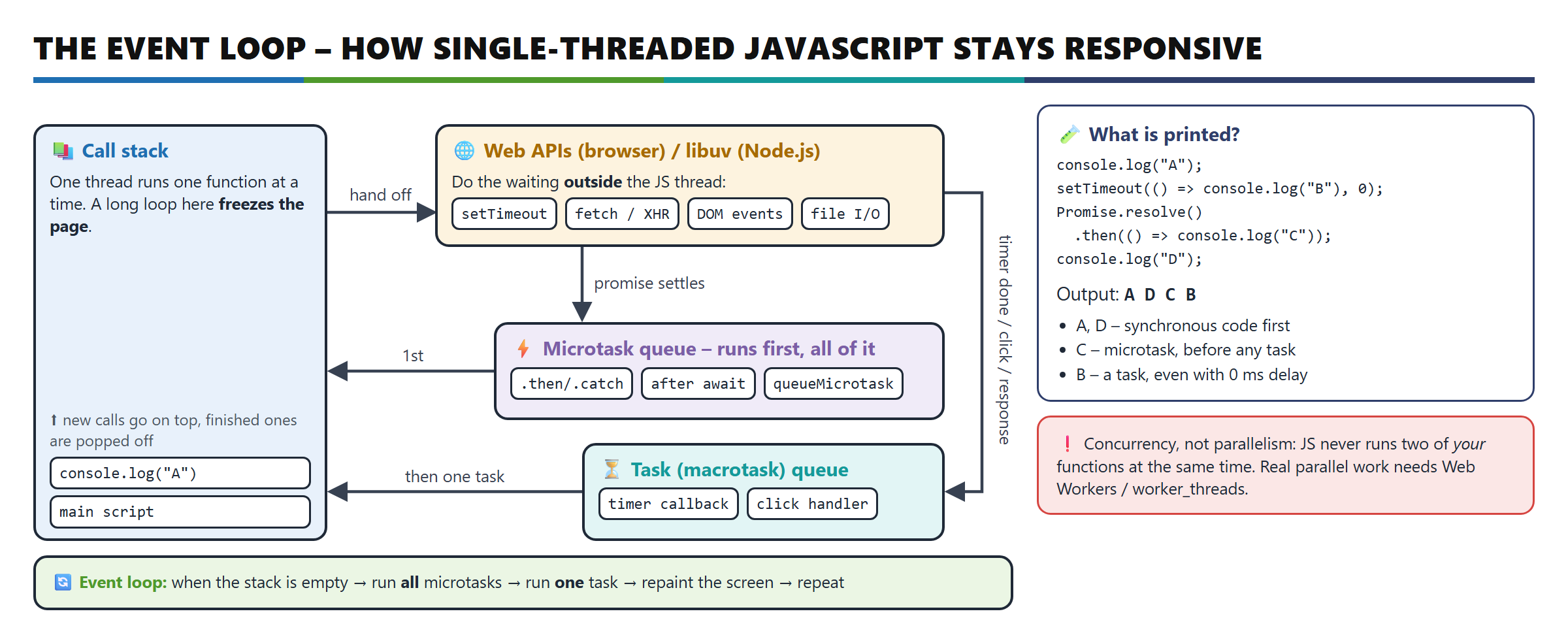
- Microtasks (promise
.then, code afterawait) all run before the next task (timer, click, network event). That is whysetTimeout(fn, 0)runs after already-resolved promises. - A long synchronous loop freezes the page (no clicks, no repaint). Heavy computing belongs on the server or in a Web Worker (true parallel thread;
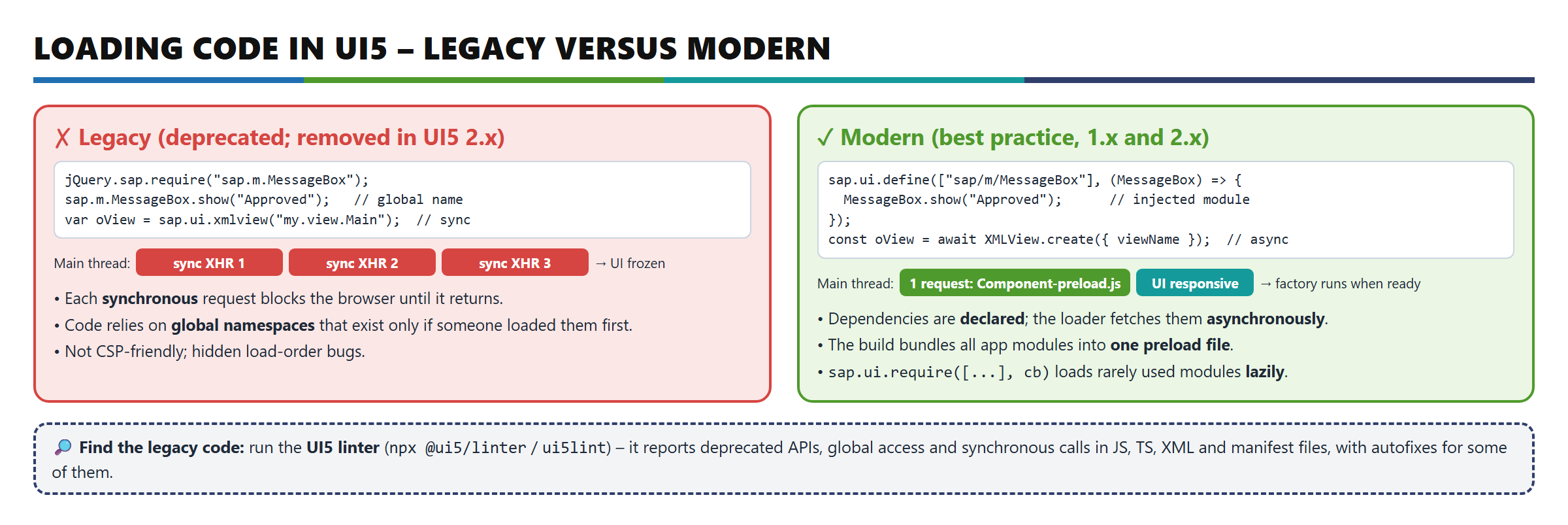
worker_threadsin Node.js). - Old UI5 code used synchronous XHR to load modules and data – it blocks the UI and is deprecated. Modern UI5 loads everything asynchronously (
data-sap-ui-async="true").
Part 3 – Syntax rules, naming and strict mode
- Case-sensitive:
orderId,OrderIdandORDERIDare three different names. - Statements end with
;. JavaScript inserts missing semicolons automatically (ASI), but write them – UI5's ESLint rules expect them. - Dynamic typing: no type in the declaration; the value decides the type and it can change.
- Identifiers start with a letter,
$or_; digits are allowed after the first character; reserved keywords cannot be used as names. - Brackets matter:
( )parentheses for calls and conditions,{ }curly braces for blocks and objects,[ ]square brackets for arrays and index access. - Whitespace and line breaks are ignored – indent for readability and keep lines short (about 80–100 characters).
- Comments:
// one lineand/* several lines */; JSDoc/** … */documents functions (UI5 uses it everywhere).
Naming conventions
Convention | Used for | Example |
|---|---|---|
camelCase | Variables and functions |
|
PascalCase | Classes and constructors; UI5 modules |
|
UPPER_SNAKE_CASE | Real constants | MAX_ITEMS |
Leading | Private members (convention only) | _onRouteMatched |
UI5 code adds a type prefix (Hungarian notation) to variable names:
Prefix | Type | Example |
|---|---|---|
s | string | sName |
| integer / float |
|
b | boolean | bVisible |
o | object |
|
a | array | aItems |
m | map (object used as key/value store) | mParameters |
fn | function | fnCallback |
$ | jQuery object (legacy) | $Element |
Keywords
Group | Keywords |
|---|---|
Declarations |
|
Control flow |
|
Errors |
|
Objects and types |
|
Async and generators |
|
Literal values |
|
Strict mode
|
- Strict mode turns silent mistakes into errors: no undeclared variables,
thisisundefinedin plain function calls, no duplicate parameter names. - ES modules and classes are always strict. UI5 files usually start the
sap.ui.definefactory with"use strict";.
Part 4 – Variables, scope and hoisting
|
- Rule of thumb:
constby default,letwhen the value must change, nevervarin new code.varappears in older UI5 samples (var that = this;).
Scope
Scope decides where a variable can be used. JavaScript uses lexical scope: what counts is where the code is written, and lookup goes from the inside outwards.
Scope | Created by | Contains |
|---|---|---|
Global | Top level of a classic script |
|
Module | Each ES module file (and each | Top-level variables of that file only |
Function | Every function | Parameters, |
Block | Every | Only |
|
Hoisting and the Temporal Dead Zone
Before a scope runs, the engine registers all declarations in it – this is called hoisting ("declarations move to the top" is only a mental picture). What you can do before the declaration line depends on the kind of declaration:
|
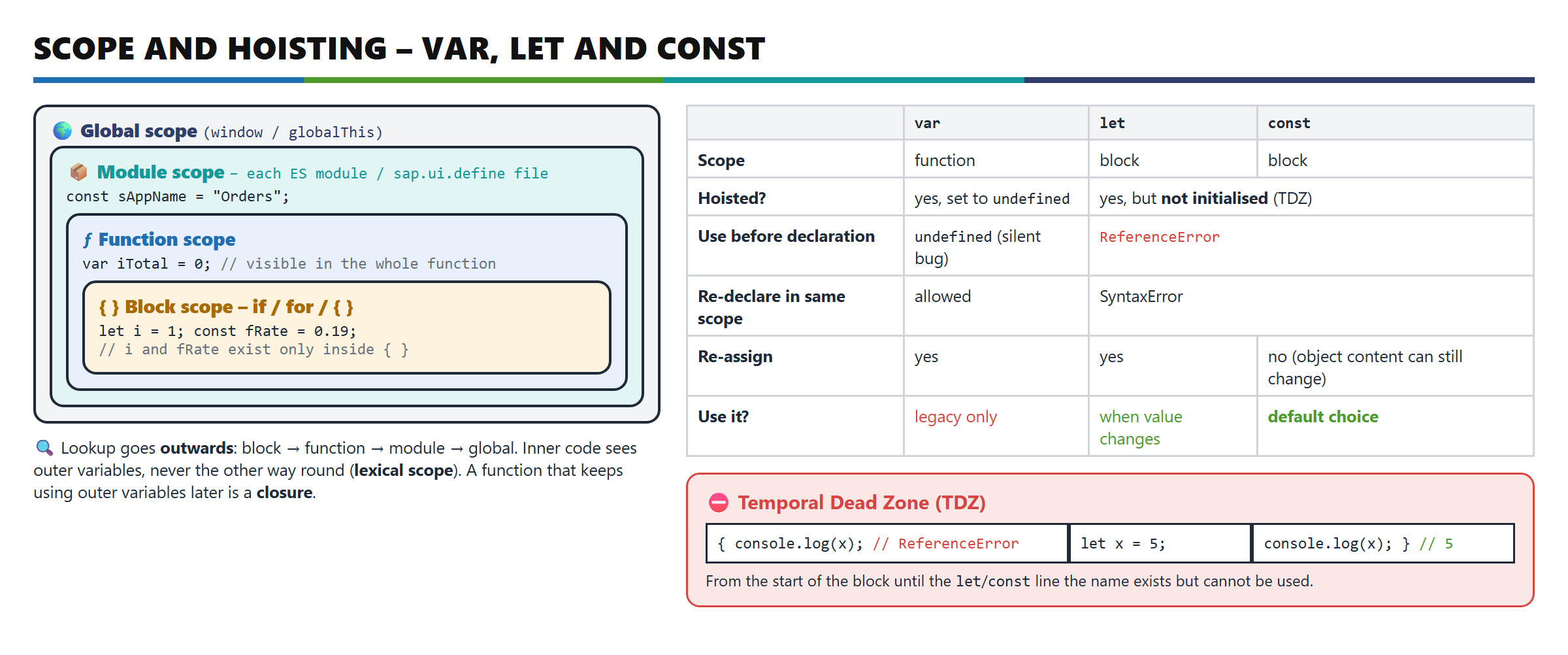
let,constandclassare hoisted to the top of their block but not initialised: from the start of the block to the declaration line they are in the Temporal Dead Zone (TDZ), and any access throws a ReferenceError.- Strict mode does not stop hoisting; it stops accidental globals. Best practice: declare variables at the top of their scope, before use.
Part 5 – Data types, operators and equality
Type | Example |
|
|---|---|---|
string |
| "string" |
number (integer and decimal, 64-bit float) |
| "number" |
bigint (very large integers) | 9007199254740993n | "bigint" |
boolean |
| "boolean" |
undefined – declared but no value | let x; | "undefined" |
null – intentionally empty | null |
|
symbol – unique key | Symbol("id") | "symbol" |
object (incl. arrays, dates, functions) |
|
|
- The first seven are primitives (immutable values, copied by value); everything else is an object (copied by reference).
typeof [] === "object"– useArray.isArray(a)to test for arrays.- Decimal numbers are binary floats:
0.1 + 0.2is0.30000000000000004. Amounts from OData (Edm.Decimal) arrive as strings – format them with UI5 types instead of calculating with floats. - Literals are fixed values written in code: numbers, strings,
true/false,null, template literals, object{…}and array[…]literals, regular expressions/^\d+$/, BigInt10n.
|
Operators
Group | Operators | Notes |
|---|---|---|
Arithmetic |
|
|
Assignment |
|
|
Comparison |
| Always use |
Logical |
| Return one of the operands: |
Nullish coalescing | ?? | Default only for |
Optional chaining | ?. |
|
Conditional (ternary) | cond ? a : b | bOk ? "Success" : "Error" |
Spread / rest | ... | Copy or collect elements (Part 9) |
Type |
| oCtrl instanceof Controller |
== vs ===
Expression |
|
|
|---|---|---|
| true | false |
| true | false |
| true | false |
| true | false |
| false |
|
- Falsy values:
false,0,-0,0n,"",null,undefined,NaN. Everything else is truthy – including"0",[]and{}.
Part 6 – Control flow and error handling
|
|
breakleaves a loop orswitch;continuejumps to the next iteration.throwany value, but prefernew Error("…")(hasmessageand a stack trace).finallyruns whether or not an error happened.
Part 7 – Functions
A function is a reusable block of code. It takes parameters, and return stops it and hands a value back to the caller (without return the result is undefined).
|
Kind | Hoisted? | Own | Typical use |
|---|---|---|---|
Declaration | Yes, fully | Yes (depends on the call) | Named helper functions |
Expression | No (variable only) | Yes | Functions as values, callbacks |
Arrow | No | No – uses the outer | Callbacks inside methods, short helpers |
Method | – | Yes – the object | Controller methods, object methods |
- An anonymous
function (a, b) {}alone as a statement is a syntax error: anonymous functions are always used as expressions – assigned, passed as callbacks or called immediately. - Arrow functions have no own
thisand noarguments, and cannot be called withnew. Do not use them as object or controller methods that needthis; do use them for callbacks inside methods. - Other forms: class methods and constructors,
async function(Part 12), generatorfunction*.
Callbacks, closures and IIFE
|
- Every
sap.ui.definefactory function is a closure over its module; formatters and event handlers close over controller variables.
Part 8 – The this keyword
this is decided by how a function is called, not where it is written – except in arrow functions, which take this from the surrounding code.
How the function is called |
|
|---|---|
As a method: | The object before the dot ( |
Plain call | The global object ( |
Plain call | undefined |
Top level of a classic script / of an ES module |
|
With | The new instance |
Arrow function | The |
DOM event handler ( | The element the handler is attached to |
|
|
UI5 event handler from an XML view ( | The controller |
globalThisis the standard name for the global object in every environment (browser and Node.js).
|
- Old code used
var that = this;or.bind(this); arrow functions make both unnecessary. Note that the controller methods themselves are normal methods (onRefresh() {}), not arrows.
Part 9 – Objects, arrays, destructuring and JSON
Kind of value | Holds | ABAP analogy |
|---|---|---|
Primitive (scalar) | One value: | Elementary variable |
Object | Named properties of any type | Structure |
Array | Ordered list of items, index from 0, any types mixed | Standard table of values |
Array of objects | List of records | Internal table – the shape OData and JSON models use |
|
Object.keys(o),Object.values(o),Object.entries(o)list properties;"id" in ochecks one.- Objects and arrays are references:
const oCopy = oEmployee;points to the same object. Copy with spread (shallow) orstructuredClone(o)(deep).
Destructuring and spread
|
Classes
|
- Classes are syntax on top of JavaScript's prototypes. Classic UI5 uses its own inheritance:
Controller.extend("my.Ctrl", { … }),BaseObject.extend(…); UI5 with TypeScript uses real classes.
JSON
JSON (JavaScript Object Notation) is a text format for data exchange, based on JS literal syntax but stricter. OData services, manifest.json, package.json and JSONModel all use it.
|
JSON rule | JS object literal allows |
|---|---|
Keys must be in double quotes: | Unquoted keys: |
Strings only in double quotes | Single quotes and template literals |
Values: string, number, | Also |
No comments, no trailing commas | Comments and trailing commas |
|
- In UI5:
new JSONModel({ employees: aEmployees })and bind{/employees}– see SAPUI5 › 04 · Data, Binding & Navigation.
Part 10 – Array methods (map, filter, reduce …)
|
Group | Methods |
|---|---|
Change the array (mutating) |
|
Return a new array |
|
Search |
|
Test and aggregate |
|
Loop and convert |
|
Static |
|
Property | length |
sort()sorts in place and compares as strings by default:[10, 9, 1].sort()gives[1, 10, 9]. Pass a compare function:aNums.sort((a, b) => a - b); for text usea.localeCompare(b).toSorted()returns a sorted copy.- Useful string methods:
includes,startsWith,endsWith,split,trim,padStart,replaceAll,toUpperCase,slice.
Part 11 – The DOM, output and events
The browser gives JavaScript two main objects: window – the browser window and global object (location, history, localStorage, setTimeout, alert) – and document (window.document) – the DOM of the page (SAPUI5 › 01, Part 2).
|
Output
Way | Use |
|---|---|
element.textContent = … | Write text into an element – safe |
element.innerHTML = … | Write HTML – never with user input (XSS risk: injected scripts) |
| Debug output in DevTools › Console |
window.alert() | Blocking message box – only for quick tests |
document.write() | Obsolete – overwrites the page, do not use |
Events
|
- Common events:
click,dblclick,input,change,submit,keydown,focus,blur,mouseover,load,DOMContentLoaded. - Events bubble from the target up to
document;stopPropagation()stops that. Listeners can also run in the capturing phase (top-down) with{ capture: true }.
Plain DOM | SAPUI5 |
|---|---|
document.getElementById("x") |
|
addEventListener("click", fn) |
|
|
|
element.textContent = … | Data binding |
|
|
- UI5 apps should not change the DOM directly – the next re-rendering would overwrite it. Use control APIs, binding and models.
oControl.getDomRef()exists for rare cases (custom controls).
Part 12 – Asynchronous JavaScript: callbacks, promises, async/await, fetch
Callbacks
A callback is a function passed as an argument to another function, which calls it later – for example when a timer ends or data arrives. Nested callbacks quickly become unreadable ("callback hell"), which is why promises were introduced.
|
Promises
A Promise is an object that stands for the future result of an asynchronous operation. The producing code (which takes time) creates it and later resolves or rejects it; the consuming code registers what should happen with the result.
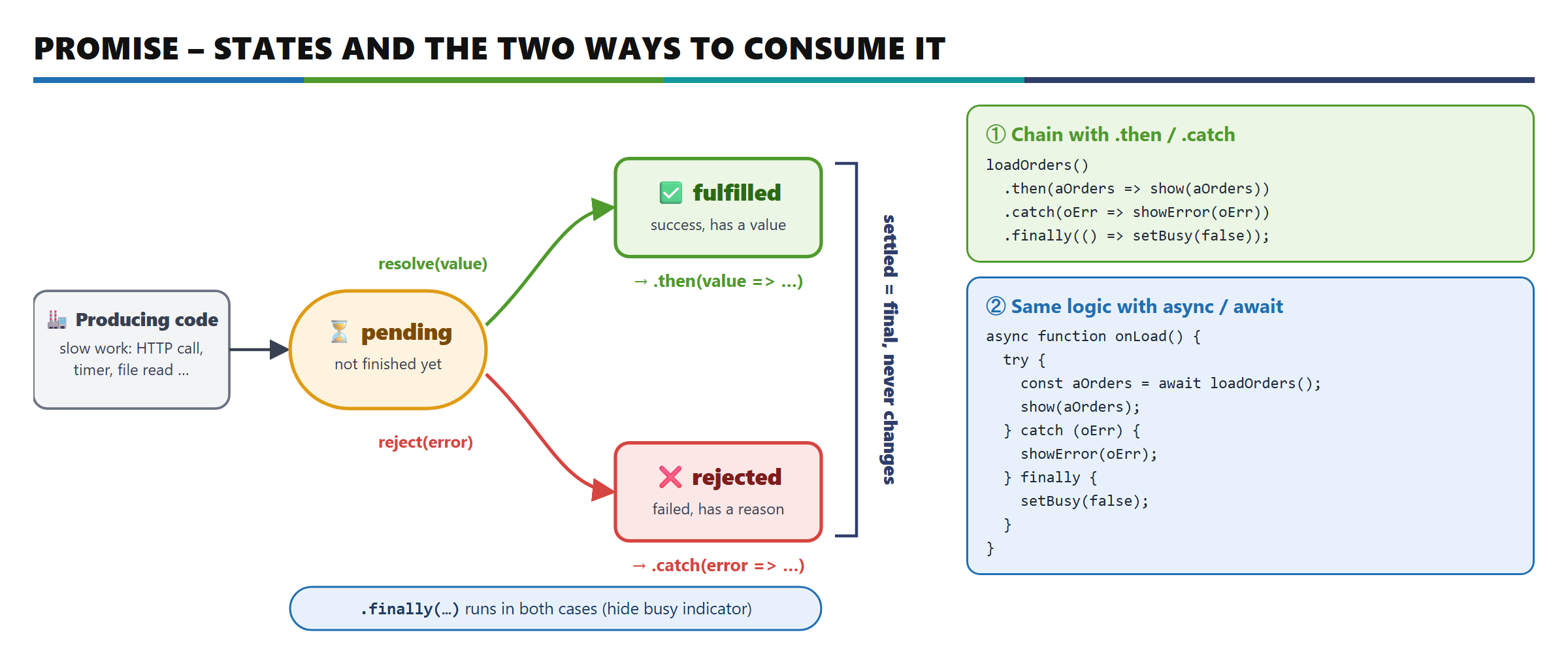
State | Meaning |
|---|---|
pending | Initial state – still running |
fulfilled | Completed successfully – has a value ( |
rejected | Failed – has a reason, usually an |
settled | Fulfilled or rejected – final, never changes again |
|
Method | Result |
|---|---|
p.then(onFulfilled, onRejected) | Runs on success (second function optional, runs on failure); returns a new promise |
p.catch(onRejected) | Runs on failure anywhere earlier in the chain |
p.finally(fn) | Runs in both cases (hide the busy indicator) |
Promise.all([p1, p2]) | Fulfils with all values when all fulfil; rejects as soon as one rejects |
Promise.allSettled([…]) | Waits until all are settled; gives the status and value/reason of each |
Promise.any([…]) | Fulfils with the first fulfilled one; rejects only if all reject |
Promise.race([…]) | Settles like the first one to settle (e.g. timeout races) |
| An already fulfilled / rejected promise |
async / await
async and await make promise code read like synchronous code. An async function always returns a promise; await pauses that function (not the whole page) until a promise settles and returns its value – or throws its error.
|
awaitworks insideasyncfunctions and at the top level of ES modules.- Two
awaits in a row run one after the other; usePromise.allwhen the calls are independent. - Promises in UI5:
Fragment.load()andthis.loadFragment(),sap.ui.requirewrapped in a promise, OData V4oContext.requestObject(),oModel.submitBatch(),oBinding.create(…).created().
fetch and AJAX
AJAX (Asynchronous JavaScript and XML) means calling the server from JavaScript without reloading the page – today mostly with JSON. The modern API is fetch(), which returns a promise; the older API is XMLHttpRequest.
|
- In UI5 you rarely call
fetchyourself:ODataModel(V2/V4) handles URLs,$batch, CSRF tokens and errors, andJSONModel.loadData(url)loads JSON files.jQuery.ajaxis legacy.
Part 13 – Modules: ES modules, CommonJS and sap.ui.define
A module is one file with its own scope that exports what others may use and imports what it needs. Three module systems matter for a UI5 developer:
|
|
|
ES modules | CommonJS | UI5 modules | |
|---|---|---|---|
Define | export | module.exports | sap.ui.define([deps], factory) |
Use | import … from | require() | dependency list / |
Loading | Asynchronous | Synchronous | Asynchronous (AMD-like) |
Where | Browsers, modern Node.js ( | Node.js | SAPUI5 / OpenUI5 apps |
- Module names are paths relative to a namespace:
my/orders/model/formattermaps towebapp/model/formatter.jsthrough the resource roots. - Legacy:
jQuery.sap.declare/jQuery.sap.requireand access through globals such assap.m.MessageBox.show()are replaced bysap.ui.define/sap.ui.require. With the UI5 Tooling you can also write ES classes or TypeScript, which is transpiled intosap.ui.definemodules.
- Never load synchronously:
jQuery.sap.requireandsap.ui.requireSyncfetch the file with a synchronous request that freezes the browser. They are deprecated and removed in UI5 2.x. Declare the dependency insap.ui.define, or load it later with the asynchronoussap.ui.require([...], callback). sap.ui.require("sap/m/MessageBox")with a single string (no array) loads nothing: it only returns the module if it is already loaded, otherwiseundefined. Use it to probe, never to load.- The old synchronous factories have promise-based successors:
XMLView.create,Fragment.load/loadFragment,Component.create,Lib.load. Full list → see SAPUI5 › 03 · SAPUI5 Fundamentals, Part 10.
Part 14 – Debugging in the browser DevTools
- F12 › Sources: open the file (Ctrl+P), click a line number to set a breakpoint, run the action, then step through and inspect variables (Scope panel, hover, Watch).
- Write
debugger;in the code to stop there when DevTools is open (remove it before commit). - Right-click a breakpoint for a conditional breakpoint or a logpoint (logs without stopping).
- Network tab: every request with status, headers and payload – the first place to look when an OData call fails (
$batchshows the inner responses). Console: errors,console.table(aItems).
Action | ABAP debugger | Chrome / Edge DevTools |
|---|---|---|
Step into (go into the called function) | F5 | F11 |
Step over (run the line, stay here) | F6 | F10 |
Step out / return to the caller | F7 | Shift+F11 |
Continue to the next breakpoint | F8 | F8 |
UI5-specific tools
Tool | What it does |
|---|---|
URL parameter | Loads the non-minified (readable) UI5 sources – slower, for debugging only |
Ctrl+Alt+Shift+P | Technical Information dialog: UI5 version, loaded libraries, debug sources, starts the Support Assistant |
Ctrl+Alt+Shift+S | Diagnostics window: control tree, properties, bindings |
UI5 Inspector (browser extension) | Control tree, properties and bindings of the selected control |
Support Assistant | Checks the app against best-practice rules (performance, deprecated APIs, accessibility) |
sap/base/Log | UI5 logging API ( |
- Static checks before running: ESLint, and the UI5 linter (
@ui5/linter) for deprecated APIs and global access.
Part 15 – jQuery
jQuery is a small open-source JavaScript library ("write less, do more") that wraps common multi-line tasks – finding elements, changing them, events, animations and AJAX – into one-line methods. It was created when browsers behaved very differently. Today the same is possible with native APIs (querySelector, classList, fetch), and new projects rarely add jQuery. You load it from a local file or a CDN.
- Features: HTML/DOM manipulation, CSS manipulation, event methods, effects and animations, AJAX, utilities.
Syntax and selectors
Basic syntax: $(selector).action() – $ accesses jQuery, (selector) finds elements with CSS selector syntax (plus some jQuery-only selectors), action() does something with all of them.
|
jQuery | Native JavaScript |
|---|---|
$("#x") | document.getElementById("x") |
$(".card") | document.querySelectorAll(".card") |
|
|
|
|
|
|
|
|
|
|
|
|
|
|
| fetch() |
jQuery and UI5
- SAPUI5 historically shipped with jQuery and its core used it internally; old apps used the
jQuery.sap.*helpers (jQuery.sap.require,jQuery.sap.log,jQuery.sap.delayedCall…). - Legacy: the
jQuery.sap.*APIs are deprecated since UI5 1.58 and removed in UI5 2.x. Replacements live insap/base/*(e.g.sap/base/Log,sap/base/util/deepClone),sap/ui/dom/*andsap/ui/util/*. - Modern UI5 code does not use jQuery – the global
jQueryis not a public API for apps, and the UI5 linter reports its use. Old code such asoControl.$()(jQuery-wrapped DOM) becomesgetDomRef().
Part 16 – Node.js, npm and the UI5 Tooling
Node.js is a JavaScript runtime environment – not a framework. It takes Chrome's V8 engine out of the browser and adds an event loop with non-blocking I/O and APIs for files, network and processes, so JavaScript can run on servers and developer machines. It can check user input, validate data, send e-mail, look up databases, run business logic and call external APIs. Frameworks run on Node.js: Express, and SAP CAP (@sap/cds).
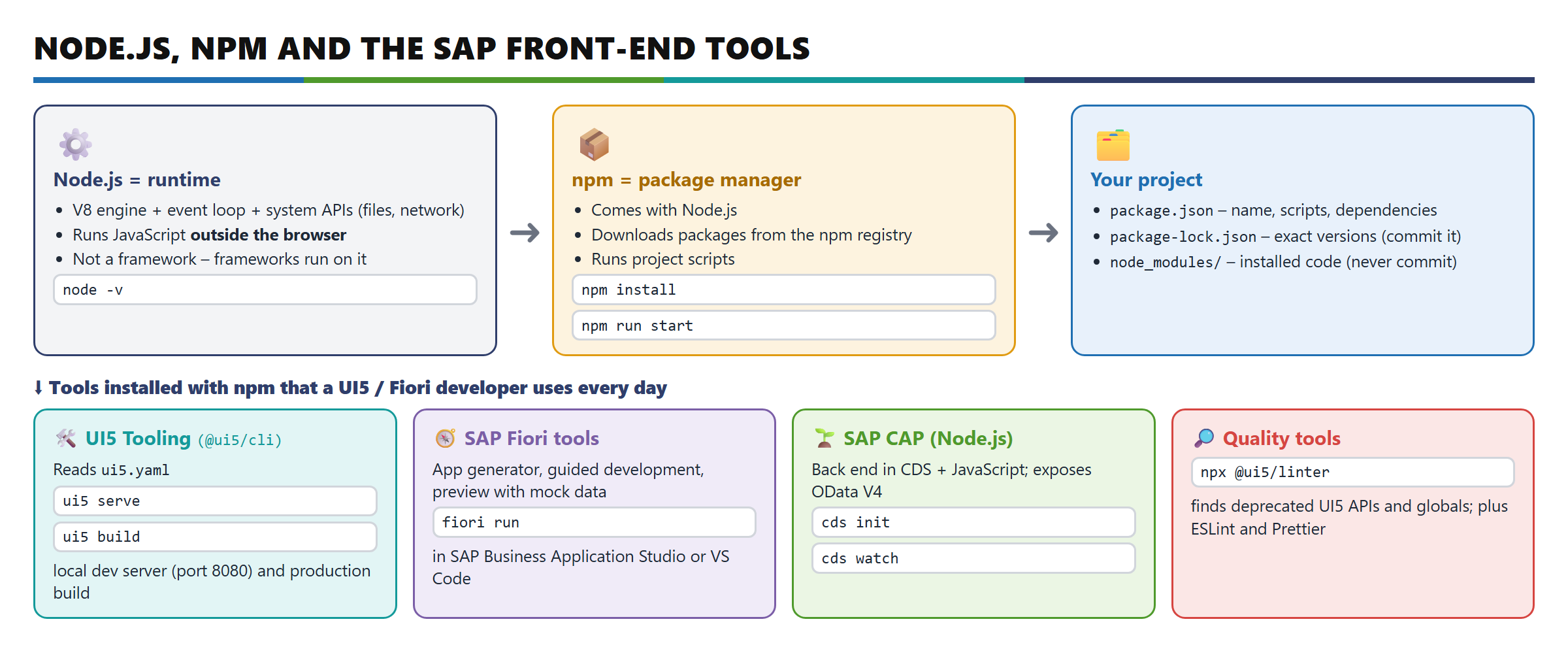
- Install the LTS (long-term support) version – up to Node.js 26 even major numbers become LTS and odd ones are short-lived; from Node.js 27 every major becomes LTS. Check the version each tool requires (
enginesin its package.json). - Node.js includes npm, the package manager. Check both with
node -vandnpm -v.
npm basics
Command | Effect |
|---|---|
npm init -y | Creates a |
| Installs everything listed in |
npm install <pkg> | Adds a runtime dependency ( |
npm install -D <pkg> | Adds a development-only tool ( |
npm install -g <pkg> | Installs a command globally (prefer local devDependencies + scripts) |
npm ci | Clean, exact install from |
| Runs a script defined in |
npx <command> | Runs a package's command without installing it globally |
| Shows / installs newer allowed versions |
|
- Version ranges (semantic versioning MAJOR.MINOR.PATCH):
^4.0.0allows 4.x.x,~4.0.0allows 4.0.x,4.0.0exactly that version. - Commit
package.jsonandpackage-lock.json(exact versions for everyone); never commitnode_modules/– list it in.gitignore. "type": "module"in package.json makes.jsfiles ES modules; otherwise Node.js treats them as CommonJS.
|
UI5 Tooling
The UI5 Tooling (@ui5/cli) is the official Node.js-based command-line tool for UI5 projects: a local development server, the production build (bundling Component-preload.js, minifying) and project configuration in ui5.yaml.
|
Command | Effect |
|---|---|
ui5 init | Creates a |
ui5 use SAPUI5@<version> | Sets the framework and version |
ui5 add sap.m sap.f | Adds UI5 libraries to |
ui5 serve | Starts the local development server (default port 8080) |
ui5 build | Builds the app into |
- Extensions (custom middleware) add live reload or proxies to back-end systems for
ui5 serve. - SAP now calls the tool UI5 CLI (same npm package
@ui5/cli, documentation athttps://ui5.github.io/cli); many projects and blogs still say UI5 Tooling. In depth –ui5.yaml, middlewares, custom tasks, TypeScript → see SAPUI5 › 05 · UI5 Tooling, TypeScript & Custom Controls.
SAP Fiori tools and CAP
- SAP Fiori tools – extensions for SAP Business Application Studio and VS Code: the application generator (Fiori elements and freestyle templates), guided development, page editor and preview with mock data. Their npm package
@sap/ux-ui5-toolingprovidesfiori runandfiori deploy. Details: SAP Fiori › 04 · SAP Fiori Tools & Flexible Programming Model and SAP Fiori › 03 · SAP Fiori Elements. - SAP CAP (Cloud Application Programming Model) on Node.js:
npm i -g @sap/cds-dk,cds init,cds watch(starts the service, default port 4004). CDS models become OData V4 services that UI5 and Fiori elements apps consume. SAP npm packages are on the public npm registry. - Legacy: SAP Web IDE was the former browser IDE – replaced by SAP Business Application Studio.
Part 17 – Interview questions
1. JavaScript is single-threaded – how can it do asynchronous work?
Your code runs on one thread, but slow operations (timers, HTTP, I/O) are handed to the runtime. When they finish, their callbacks go into a queue, and the event loop runs them when the call stack is empty – all microtasks (promise callbacks) first, then one task. That is concurrency through non-blocking I/O, not parallel execution.
2. What is the difference between var, let and const? What is the Temporal Dead Zone?
var is function-scoped, hoisted with the value undefined and can be re-declared. let and const are block-scoped and cannot be re-declared; const also cannot be re-assigned (object content can still change). All declarations are hoisted, but let/const/class stay uninitialised until their line – access before it throws a ReferenceError; that region is the TDZ. Use const by default, let if needed.
3. What is the difference between == and ===?
== converts types before comparing ("1" == 1 is true); === compares value and type without conversion. Always use === / !==.
4. How is this determined? What changes with arrow functions?
By the call: method call → the object; plain call → undefined in strict code (global object in sloppy code); new → the new instance; call/apply/bind → the given object. Arrow functions have no own this and use the surrounding one – ideal for callbacks inside UI5 controller methods, replacing var that = this and .bind(this).
5. What is a closure? Give a UI5 example.
A function that keeps access to variables of the scope it was created in, even after that scope has finished. Every sap.ui.define factory is one: helper variables defined in the factory are private to the module but usable by all its methods.
6. What is a Promise, and how do async/await relate to it?
A Promise represents the future result of an async operation: pending, then fulfilled (with a value) or rejected (with a reason); once settled it never changes. Consume it with then/catch/finally. An async function always returns a promise, and await pauses only that function until the promise settles – a rejection becomes an exception for try/catch. Run independent calls together with await Promise.all([...]); allSettled, any and race cover the other combinations.
7. What is the difference between a JavaScript object and JSON?
An object is a live value in memory and can contain functions, undefined and unquoted keys. JSON is a text format: keys and strings in double quotes, only strings, numbers, booleans, null, objects and arrays, no comments. Convert with JSON.stringify and JSON.parse.
8. Explain map, filter and reduce.
All three loop over an array without changing it. map returns a new array with each element transformed, filter returns the elements that pass a test, reduce combines all elements into one value (sum, object, grouped result).
9. What is the difference between ES modules and sap.ui.define?
ES modules are the language standard (import/export). sap.ui.define is UI5's asynchronous AMD-like module system: a dependency array of UI5 module paths and a factory function whose return value is the module. sap.ui.require loads modules on demand. UI5 TypeScript/ES class code is transpiled into sap.ui.define.
10. Is UI5 built on jQuery? Should you use jQuery in UI5 apps?
UI5 historically shipped with and used jQuery, but the jQuery.sap.* APIs are deprecated (since 1.58) and removed in UI5 2.x. Modern apps use UI5 modules (sap/base/*, sap/ui/dom/*), control APIs and native JavaScript – not jQuery.
11. What is Node.js and why does a UI5 developer need it?
Node.js is a JavaScript runtime (V8 + event loop + system APIs), not a framework. UI5 developers need it for npm and the tools built on it: UI5 Tooling (ui5 serve, ui5 build, ui5.yaml), SAP Fiori tools (fiori run, generator), the UI5 linter, and SAP CAP back ends (cds watch).
12. How do you debug a UI5 app?
F12 › Sources with breakpoints (F10 over, F11 into, Shift+F11 out, F8 continue) or a debugger; statement; the Network tab for OData calls; sap-ui-debug=true for readable UI5 sources; Ctrl+Alt+Shift+P (technical information, Support Assistant) and Ctrl+Alt+Shift+S (diagnostics); the UI5 Inspector extension.
13. Why must UI5 code load asynchronously, and how do you find old synchronous code?
A synchronous request blocks the only JavaScript thread, so the page freezes until the file arrives; browsers also deprecate synchronous XHR on the main thread. UI5 therefore loads modules asynchronously (sap.ui.define, sap.ui.require([...], cb), promise-based factories, data-sap-ui-async="true") and bundles the app into Component-preload.js. The UI5 linter (ui5lint) finds deprecated synchronous APIs, jQuery.sap.* and global access; the Support Assistant reports synchronous loading at runtime.
🏠 Start Here · ◀ 01 · HTML5 & CSS3 · 03 · UI5 Fundamentals ▶ · Sections: CORE ABAP | OOPS ABAP | ABAP on HANA | Clean Core | RAP | ABAP Points | SAP Fiori | SAPUI5 | Mobile Development (MDK) | BTP Foundations | BTP Development | CAP | SAP Build | ABAP on BTP | Integration Suite | SAP Business AI | SAP BASIS | Security | SAP SDLC
Functional: FICO ABAP | TRM ABAP | VIM | SAP BIS | SD ABAP | MM ABAP | PP ABAP | QM ABAP | PM ABAP | PS ABAP | EWM | TM ABAP | GTM ABAP | EHS ABAP | HR ABAP | BW | SAP Datasphere | SAP Business Data Cloud | SAP MDG | SAP Analytics Cloud | SAP Ariba | SAP CX | SAP IBP