How a SAPUI5 app is built: what the framework is, its libraries, the tools, the project structure, how an app starts (bootstrap, Component.js, manifest.json), MVC with XML views and controllers, the controls you use every day, events and debugging. Two examples are used: a small Products app (namespace my.products) for the basics, and the Sales Order Approval dashboard, a freestyle app on the OData V4 service ZUI_SalesOrder_O4, that puts everything together (Part 11). Data, binding, OData, routing and deployment follow on SAPUI5 › 04 · Data, Binding & Navigation.
Part 1 – What SAPUI5 is
SAPUI5 is SAP's JavaScript UI framework for building responsive enterprise web apps that run in the browser on desktop, tablet and phone. It is based on HTML5, CSS3 and JavaScript and implements the SAP Fiori design, so apps built with it look and behave like SAP's own Fiori apps.
- OpenUI5 is the open-source core of SAPUI5 (Apache 2.0 licence): the runtime and most control libraries.
- SAPUI5 = OpenUI5 + extra libraries (charts, smart controls, SAP Fiori elements). It is delivered with SAP products: the ABAP platform (S/4HANA, SAP Gateway) and SAP BTP.
- UI5 Tooling is not the framework itself: it is the Node.js command-line tool (
@ui5/cli, now called UI5 CLI) used to serve, build and test UI5 projects (Part 3). - SAP Fiori is the design system and UX; SAPUI5 is the main technology that implements it (→ see SAP Fiori › 01 · SAP Fiori Design & Architecture). SAP Fiori elements generates complete UI5 apps from OData annotations (SAP Fiori › 03 · SAP Fiori Elements). Hand-written UI5 apps are called freestyle apps; this page and SAPUI5 › 04 teach freestyle development.
Framework, library, class
Level | What it is | Example |
|---|---|---|
Framework | A collection of libraries plus the runtime that loads and renders them | SAPUI5 |
Library | A collection of related classes (controls, types, helpers), named in lower case |
|
Class | One control or helper, named in UpperCamelCase; has properties, aggregations, associations, events and methods |
|
UI5 apps vs classic ABAP (Dynpro) apps
Aspect | Classic ABAP / SAP GUI (Dynpro) | SAPUI5 / Fiori app |
|---|---|---|
Where the UI runs | On the application server; SAP GUI only displays the screen | In the browser; controls are rendered on the client |
State | Stateful: the user session keeps memory on the server between dialog steps | UI state in the browser; the OData service is stateless (each request stands alone) |
Round trips | Every user action (Enter, button) goes to the server (PAI / PBO) | UI events are handled in the browser; only data requests go to the server |
Devices | Desktop with SAP GUI installed (or SAP GUI for HTML) | Any modern browser; responsive layouts for desktop, tablet and phone |
Access | Mostly inside the company network | Intranet and internet (launchpad, Web Dispatcher, BTP) |
Controls | A limited set of screen elements | Hundreds of controls across the libraries |
Languages | ABAP | JavaScript and XML for the UI; ABAP (RAP, SEGW) or CAP for the service |
Part 2 – Architecture and libraries
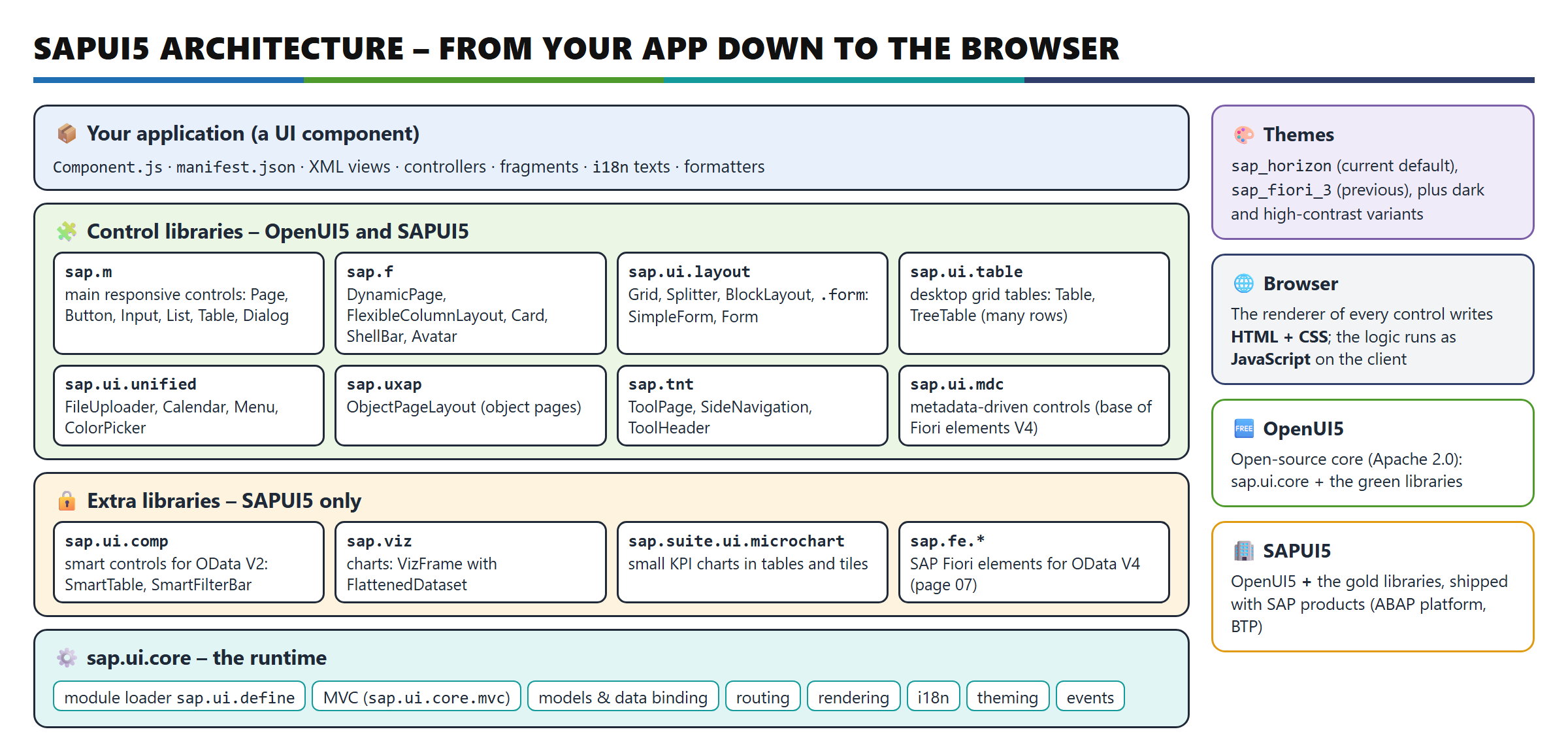
Library | What you find in it | OpenUI5? |
|---|---|---|
sap.ui.core | Runtime: module loader, MVC ( | Yes |
sap.m | Main responsive control set: App, Page, Button, Input, Select, List, Table, Dialog, MessageBox | Yes |
sap.f | Fiori layouts: DynamicPage, FlexibleColumnLayout, Card, ShellBar, Avatar | Yes |
sap.ui.layout | Grid, Splitter, BlockLayout; sub-namespace | Yes |
sap.ui.table | Desktop grid tables for large data: Table, TreeTable | Yes |
sap.ui.unified | FileUploader, Calendar, Menu, ColorPicker | Yes |
sap.uxap | ObjectPageLayout (header + sections) | Yes |
sap.tnt | ToolPage, SideNavigation, ToolHeader (admin-style apps) | Yes |
sap.ui.comp | Smart controls for OData V2: SmartTable, SmartFilterBar, SmartField | No (SAPUI5) |
sap.viz | Charts: VizFrame + FlattenedDataset | No (SAPUI5) |
sap.suite.ui.microchart | Micro charts (small KPI charts in tables, tiles) | No (SAPUI5) |
| Metadata-driven controls and SAP Fiori elements for OData V4 (SAP Fiori › 03) |
|
- Themes:
sap_horizonis the current default;sap_fiori_3(Quartz) is the previous one;sap_belizewas removed in 1.136; dark and high-contrast variants exist (sap_horizon_dark,sap_horizon_hcb). Content density: cozy (touch) is the default; add the CSS classsapUiSizeCompactfor mouse-driven desktop screens. - Versions: UI5 1.x is released continuously, with selected long-term maintenance releases; from 1.136 a new maintenance strategy applies (see
https://ui5.sap.com/versionoverview.html). UI5 2.x is the announced next major version: it removes all APIs deprecated with or before 1.136 – global names likesap.m.Button,jQuery.sap.*, synchronous loading, thesap.ui.getCore()facade, JS/JSON/HTML views, old themes. SAP's advice is to write best-practice 1.x code now so the app runs on 2.x without migration; check the current documentation for the 2.x release status. Replacements: Part 10.
Control class hierarchy
sap.ui.base.Object→EventProvider(events) →ManagedObject(properties, aggregations, associations, binding) →sap.ui.core.Element→sap.ui.core.Control(can render itself) → Button, List, Table. A view is also a control.- If you cannot find a property, method, event or aggregation in a control's API reference, look in its parent class: everything is inherited.
Part 3 – Tools and creating a project
Tool | What it is | When to use |
|---|---|---|
SAP Business Application Studio (BAS) | SAP's cloud IDE on SAP BTP, built on Code-OSS (the open-source base of VS Code). Dev spaces such as "SAP Fiori" come pre-configured with all Fiori tools; nothing to install, needs internet and a BTP subscription (trial / free tier for learning) | Company projects on BTP, CAP, when the backend is reached through BTP destinations |
VS Code + SAP Fiori tools | Microsoft's free local editor plus the SAP Fiori tools Extension Pack (Application Generator, Application Modeler / Page Map, Guided Development, Service Modeler, XML annotation language server) and the UI5 Language Assistant (code completion in XML views) | Local development, works offline; reaches on-premise systems through the company network or VPN |
UI5 CLI ( | Node.js CLI: | Every project (generated apps already include it) |
SAP Fiori tools CLI ( |
| Local testing against a backend, deployment |
- Code completion: in an XML view, type
<and pressCtrl+Spaceto list controls, or<Button+Ctrl+Spaceto list its properties, aggregations and events (UI5 Language Assistant). - Legacy – know it for interviews: SAP Web IDE (the former cloud IDE, no longer actively supported or distributed; replaced by BAS) and Eclipse with the UI5 plug-in. Its App Descriptor Editor is replaced by editing
manifest.jsonor the Fiori tools Application Modeler.
Generate a project (normal way)
Use the SAP Fiori application generator: in BAS or VS Code run the command "Fiori: Open Application Generator" and choose a template (Basic for freestyle UI5, or a Fiori elements floorplan), the data source (a system, a service URL or none) and the namespace. It creates the full structure of Part 4, including package.json scripts: npm start (local run), npm run build, npm run deploy.
Create a project by hand (to understand the pieces)
- Prerequisites: Node.js (a current LTS version) and an editor.
|
webapp/is the standard folder for all productive files; UI5 Tooling recognises an application only ifwebapp/manifest.jsonexists and has an app ID.npm install --global @ui5/clialso works (thenui5 --help), but a project-local devDependency keeps every developer on the same version.
|
- Tooling in depth (
ui5.yaml, middlewares, custom tasks, TypeScript, the UI5 linter) → see SAPUI5 › 05 · UI5 Tooling, TypeScript & Custom Controls.
Part 4 – Project structure
|
- Root view + container:
App.view.xmlholds a container control,sap.m.App(one page at a time) orsap.m.SplitApp(master list on the left, detail on the right, aggregationsmasterPagesanddetailPages). The router places the other views into it (SAPUI5 › 04). - BaseController: a shared parent controller with helpers (
getRouter(),getModel(name),getResourceBundle(),onNavBack()); every view controller extends it instead ofController. - Legacy:
neo-app.json(SAP BTP Neo environment, end of life – SAP Note 3351844) andGruntfile.js(old build) are replaced byui5.yaml/xs-app.jsonand UI5 Tooling.
Part 5 – Bootstrap and how an app starts
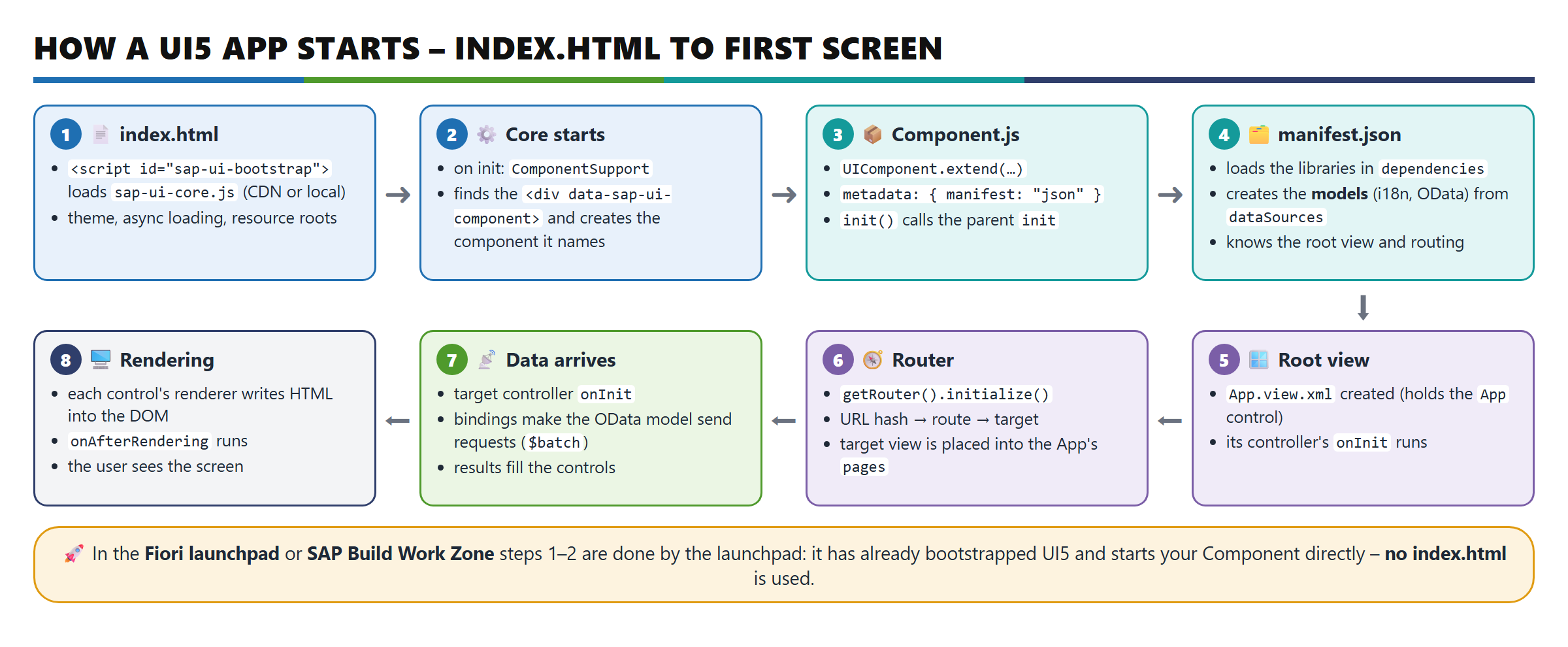
Bootstrapping is loading and initialising the UI5 runtime. A <script> tag with the ID sap-ui-bootstrap loads sap-ui-core.js; its data-sap-ui-* attributes configure the runtime. The core initialises as soon as the browser has loaded and executed this script.
|
Attribute | Meaning |
|---|---|
src | Where UI5 comes from: the SAP CDN ( |
data-sap-ui-theme | Theme to load, e.g. |
data-sap-ui-resource-roots | Maps your namespace to a folder: modules |
data-sap-ui-on-init | What to run when the core is ready; |
data-sap-ui-async | Load libraries and modules asynchronously (always |
data-sap-ui-compat-version | Must be |
data-sap-ui-libs | Optional list of libraries to preload; with a component, the manifest's |
- Standalone vs launchpad:
index.htmlis only for running the app on its own (local testing). In the SAP Fiori launchpad or SAP Build Work Zone the launchpad has already bootstrapped UI5 and starts yourComponent.jsdirectly. That is why all app logic must start in the component, never inindex.html. - Core ready: code that must wait for the core uses
Core.ready()(modulesap/ui/core/Core, returns a promise) or anon-initmodule;sap.ui.getCore().attachInit(...)is deprecated. Options are written in kebab-case (data-sap-ui-on-init); camelCase forms come from samples older than UI5 1.120.
- Legacy: apps that create views directly in
index.html(sap.ui.xmlview(...).placeAt("content")), JS views withcreateContent/getControllerName, and asap.m.Shellwrapper are old patterns.
Part 6 – Component.js and manifest.json
Component.js
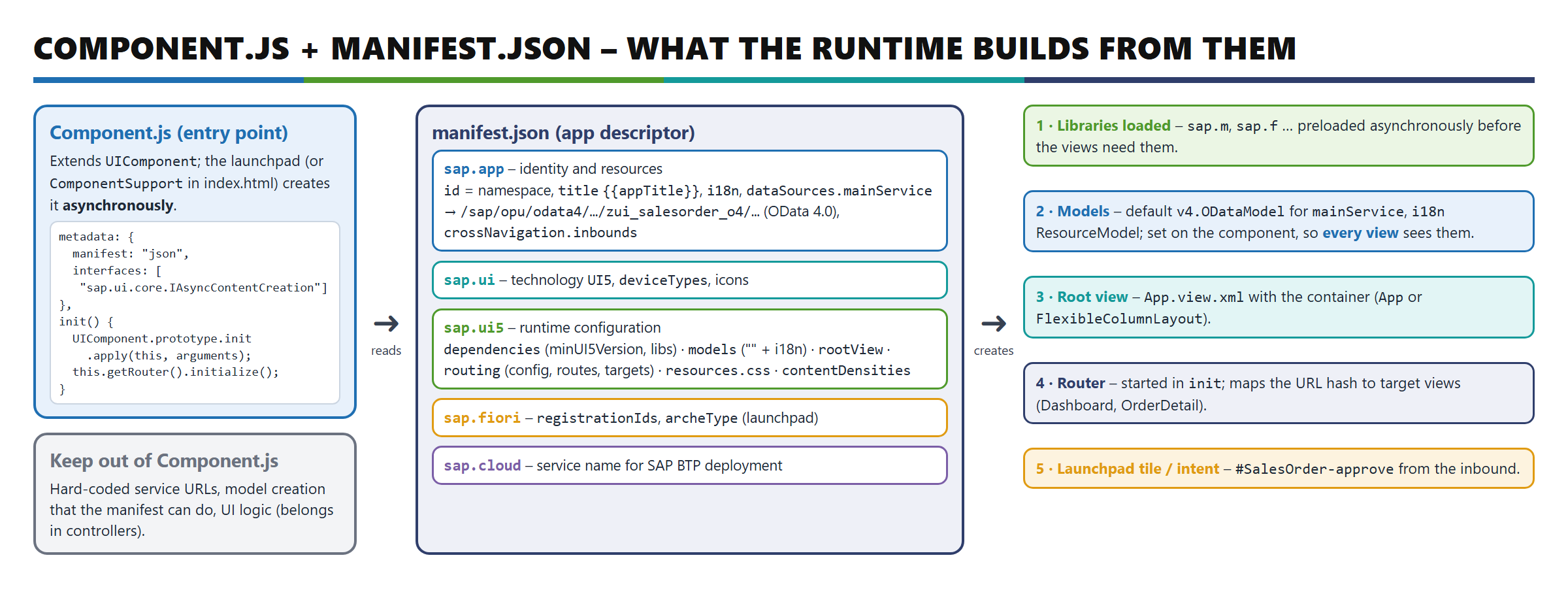
The component is the app's entry point and the unit the launchpad starts. There is one root component per app (reuse components can be embedded in addition). It extends sap/ui/core/UIComponent, which provides the router and creates the root view and the models from the manifest.
|
- Always call the parent
initfirst; without it there are no manifest models and no router. - Asynchronous creation: the launchpad and
ComponentSupportcreate the component asynchronously. In code useawait Component.create({ name: "my.products", manifest: true })or asap.ui.core.ComponentContainerwithasync: true;sap.ui.component(...)is deprecated.IAsyncContentCreationalso makes the root view and its nested views load asynchronously. - Overriding
createContent(to build the root view in code) anddestroyis possible but rarely needed: the root view comes fromsap.ui5/rootViewin the manifest. - The component instance lives as long as the app: shared models and the router belong to it. In a controller you reach it with
this.getOwnerComponent().
manifest.json (app descriptor)
The app descriptor describes the app in one declarative JSON file: identity, data sources, models, libraries, root view, routing, launchpad integration. A new team member can read it to understand the app; the framework reads it to create models and routing automatically (manifest-first), so no hand-written model code is needed.
|
Section | Holds |
|---|---|
sap.app | App identity and resources: |
sap.ui | UI technology and supported |
sap.ui5 | UI5-specific runtime config: |
sap.fiori | Launchpad info: |
| Deployment info for SAP BTP (service name) and other platforms |
_version | Descriptor format version; written by the generator |
- The
dataSourcesURI is always relative (/sap/opu/...); never hard-code a host. During local development a proxy forwards it to the backend (SAPUI5 › 04). {{appTitle}}is replaced by the text with keyappTitlefrom thei18nfile named insap.app/i18n.
Part 7 – MVC: XML views and controllers
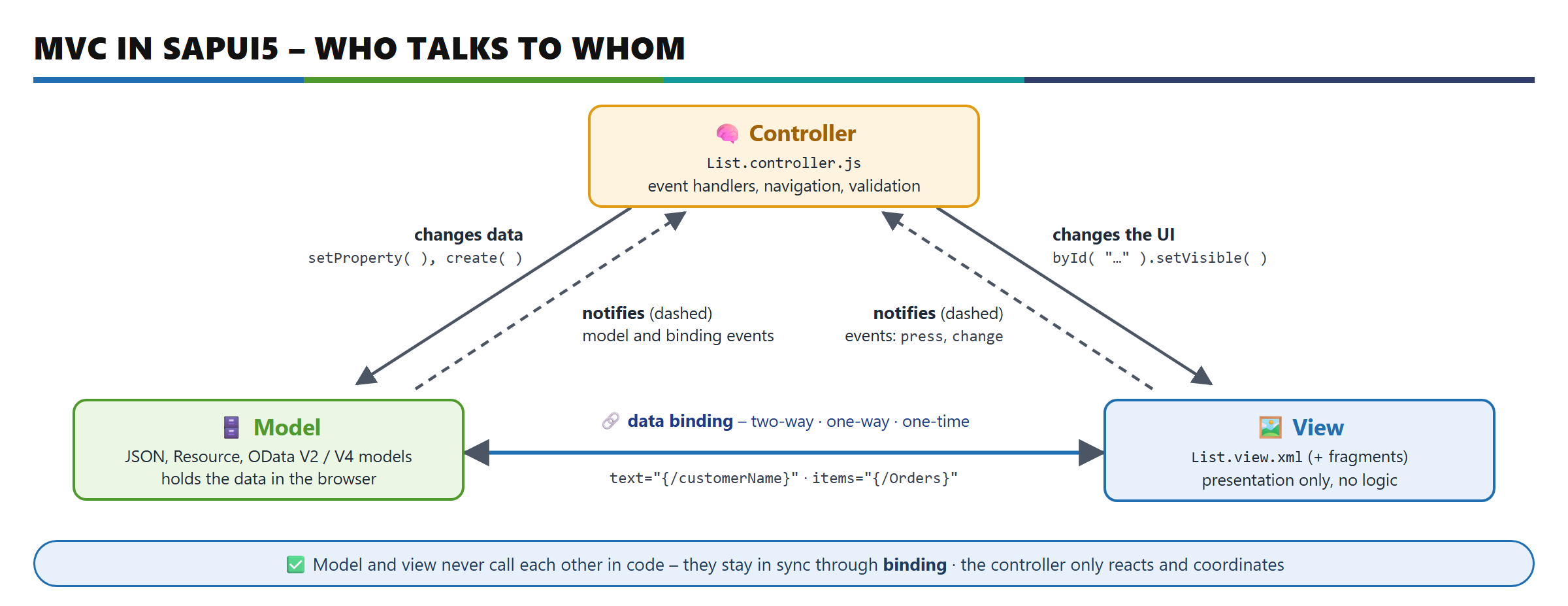
Part | Role | In UI5 |
|---|---|---|
Model | Holds the application data and offers methods to read and change it |
|
View | Defines and renders the UI (presentation only) |
|
Controller | Reacts to view events and user input; changes the view and the model; mediates between them |
|
- Advantages: UI and logic are separated, so each is easier to read, test and change; several views can show the same data; views and controllers are reusable units that different developers can work on in parallel.
- A view and its controller are usually 1:1 and share a name (
List.view.xml+List.controller.js). A view has at most one controller; a controller class can be reused by several views; views without a controller are allowed, and a controller can also exist without a view (e.g. aBaseControllerthat only holds shared helpers for the other controllers to extend). Technically a view is a control and can have or inherit models.
View types
Type | Status |
|---|---|
XML view ( | Recommended. Declarative, enforces separation of UI and logic, best tool support; the only type that supports SAPUI5 flexibility (key user adaptation), extension points and XML templating used by Fiori elements |
Typed view (class extending | Allowed when the UI must be built in code |
JS view ( | Deprecated – know them for old apps only |
A minimal XML view
|
controllerNamelinks the controller;.onSave(leading dot) means a method of that controller.- XML basics: one root element, properly nested and closed tags, attribute values in quotes. A tag name is a control class (UpperCamelCase) or an aggregation (lowerCamelCase).
XML namespaces
An xmlns declaration maps a prefix to a namespace so element names are unique. In UI5 views the namespace is the library or package name: <t:Table> means class sap.ui.table.Table. The default namespace (no prefix, usually sap.m) is used for tags without a prefix.
Declaration | Library / package | Typical tags |
|---|---|---|
xmlns="sap.m" | sap.m (default) |
|
xmlns:mvc="sap.ui.core.mvc" | MVC classes |
|
xmlns:core="sap.ui.core" | core |
|
xmlns:f="sap.f" | sap.f |
|
xmlns:form="sap.ui.layout.form" | forms |
|
xmlns:layout="sap.ui.layout" | layouts |
|
xmlns:t="sap.ui.table" | grid tables |
|
xmlns:unified="sap.ui.unified" | unified |
|
xmlns:microchart="sap.suite.ui.microchart" | micro charts (SAPUI5 only) | microchart:BulletMicroChart |
Controllers and sap.ui.define
Every JavaScript file in a UI5 app (Component.js, controllers, formatters, custom controls) is an AMD module (Asynchronous Module Definition): sap.ui.define lists the dependencies by module name, UI5 loads them asynchronously and passes them to the factory function, whose return value is the module.
|
- Module name = class name with dots replaced by slashes:
sap.m.MessageToast→"sap/m/MessageToast"; your own modules use your namespace:"my/products/model/formatter"(or relative:"../model/formatter"). Controller.extend("<fully qualified name>", { methods })creates a subclass (JavaScript inheritance in UI5 usesextend). The name must match the file location andcontrollerNamein the view.sap.ui.require([...], callback)loads modules on demand inside code, without defining a module.- Never use globals such as
new sap.m.Button()orjQuery.sap.*; always require the module. Modern JavaScript (arrow functions,const, template literals, async/await) is fine; TypeScript is supported through the UI5 TypeScript tooling.
Useful controller methods
Method | Returns |
|---|---|
this.getView() | The view of this controller |
this.byId("nameInput") | A control of this view by its view-local ID (same as |
this.getOwnerComponent() | The component: |
this.getView().getModel(name) | A model visible to the view (own or inherited from the component) |
Control IDs
- In an XML view the DOM ID of a control is prefixed with the view ID:
<viewId>--<controlId>(e.g.application-products-component---main--nameInput). Usethis.byId("nameInput"); never build the full ID yourself. - Never access UI5 controls through
document.getElementByIdor jQuery: you get the DOM node, not the control object, and the DOM can be re-rendered at any time. - Global lookup of any control by its full ID:
Element.getElementById(sId)(modulesap/ui/core/Element). Legacy:sap.ui.getCore().byId(sId)(deprecated).
Lifecycle hooks
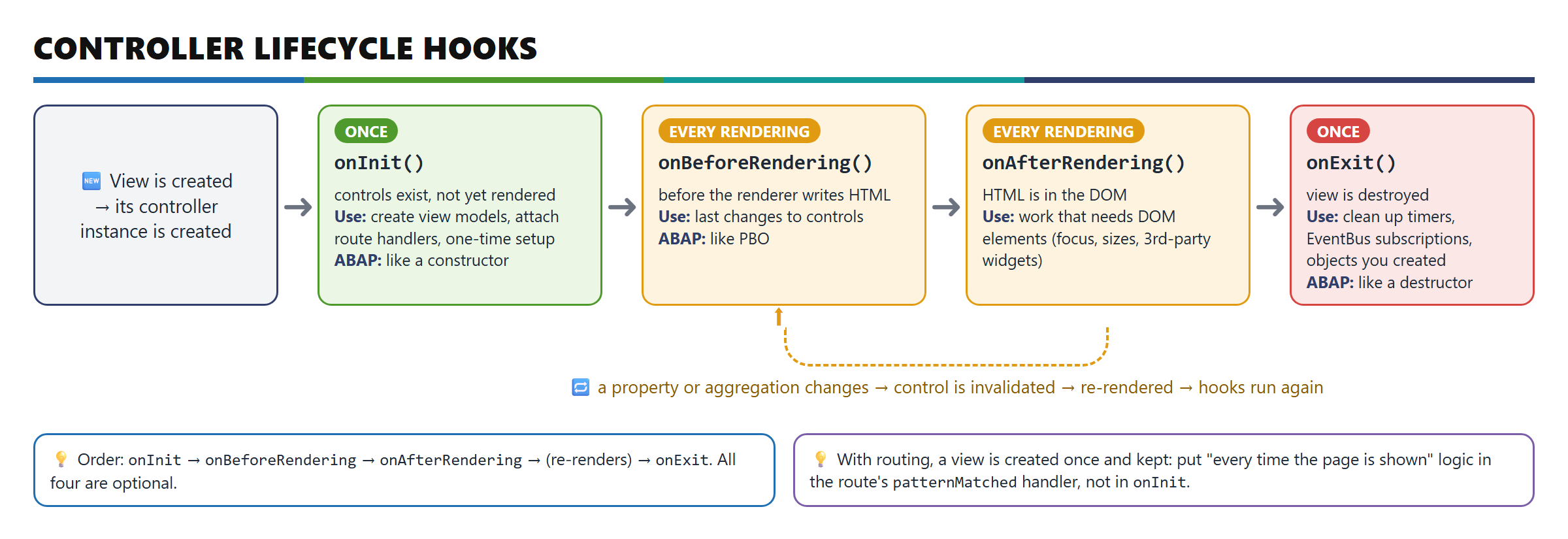
Hook | When | How often | ABAP analogy | Typical use |
|---|---|---|---|---|
onInit | View instantiated, controls created, not yet rendered | Once per view instance | Constructor | Create view models, attach route |
onBeforeRendering | Before the renderer writes the HTML | Every (re-)rendering | PBO | Last-minute changes to controls |
onAfterRendering | HTML is in the DOM | Every (re-)rendering | – | Work that needs DOM elements: focus, sizes, third-party widgets |
onExit | View is destroyed | Once | Destructor | Clean up: timers, EventBus subscriptions, objects you created yourself |
- A re-rendering happens when a control is invalidated (a property or aggregation changes), not each time the user looks at the screen. Modern UI5 often updates the DOM without a full re-rendering, so don't rely on the rendering hooks for business logic.
- With routing a view is created once and then reused: logic that must run every time the page is shown belongs in the route's
patternMatchedhandler (SAPUI5 › 04).
Part 8 – Controls
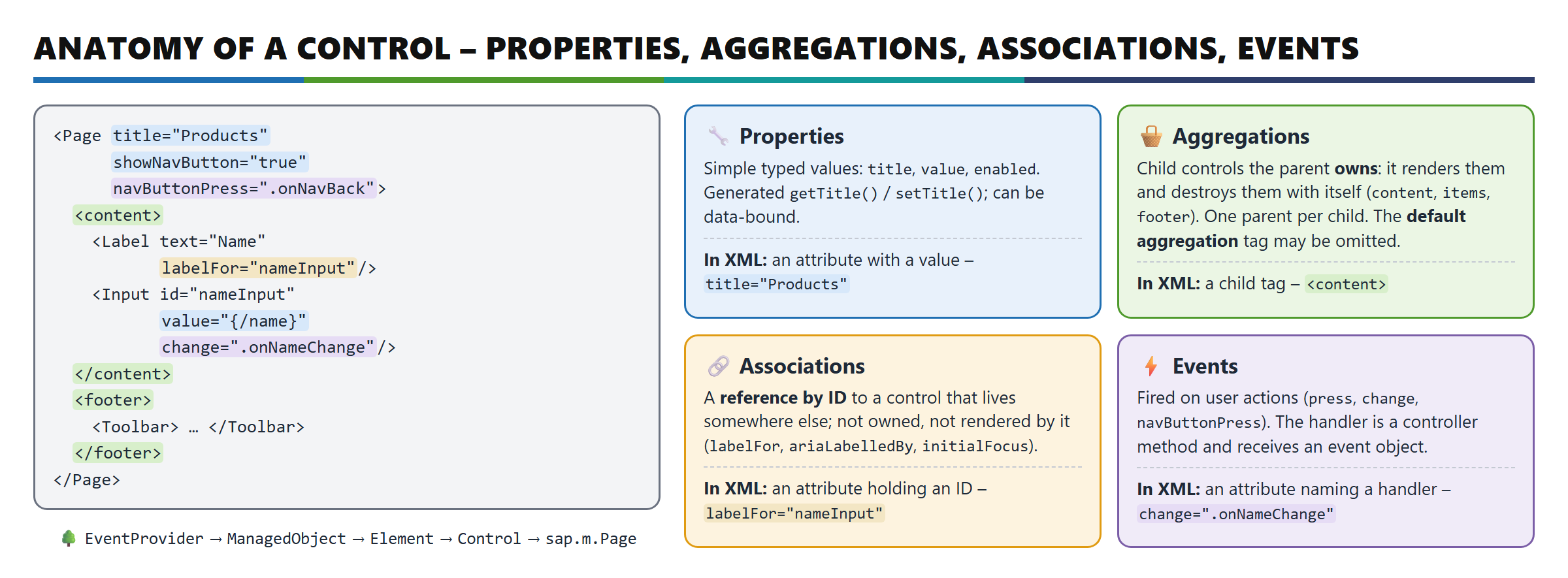
Member | What it is | Example |
|---|---|---|
Property | A simple typed value (string, boolean, int, enum). UI5 generates |
|
Aggregation | Child controls that the parent owns: it renders them and destroys them with itself; a child has only one parent. Cardinality 0..1 or 0..n |
|
Association | A loose reference by ID to a control that lives elsewhere; not owned, not rendered by the referencing control |
|
Event | Something the control fires; you attach a handler |
|
In general object-oriented modelling (UML) the words mean something else: an association is any relationship between classes, aggregation is a loose "has a" (parts can live alone) and composition a strong "owns" (parts die with the whole). A UI5 aggregation behaves like UML composition.
Rules for aggregations in XML
- An aggregation tag starts in lower case and uses the prefix of its parent control:
<t:Table>→<t:columns>,<t:template>. - If an aggregation is typed with a base class (
sap.ui.core.Control,Element), any subclass can go into it:Page.contentaccepts any control. - Each control has at most one default aggregation whose tag may be omitted (
contentof Page,itemsof List and Select). Writing it explicitly is clearer. - Some aggregations accept an alternative type (
altTypes):tooltiptakes either a string or a tooltip control.
Simple controls and their key properties
Control (sap.m) | Key properties | Note |
|---|---|---|
Label |
| Always link it to its field with |
Text |
| Read-only text |
Input |
|
|
TextArea |
| Multi-line input |
CheckBox |
| – |
Switch |
| Yes/no toggle |
Link |
|
|
Image |
| – |
RatingIndicator |
| e.g. 4 of 5 stars |
Slider |
| – |
ProgressIndicator |
| e.g. 40 % |
DatePicker / TimePicker / DateTimePicker |
| Legacy: |
StepInput |
| Number with +/- buttons |
Controls with items (aggregation + inner element)
Control | Aggregation | Inner element | Inner properties | Selected value |
|---|---|---|---|---|
Select (drop-down) | items | core:Item |
| selectedKey |
ComboBox | items | core:Item |
|
|
MultiComboBox | items | core:Item |
| selectedKeys |
MultiInput |
|
|
| tokens |
RadioButtonGroup | buttons | RadioButton | text | selectedIndex |
Tokenizer | tokens | Token |
| – |
Breadcrumbs | links | Link |
| currentLocationText |
List | items |
|
|
|
Table (sap.m) |
|
| – | mode |
Generic shape: <Control><aggregation><InnerElement property="value"/>…</aggregation></Control>. Items can be static (written in the view, as below) or dynamic through aggregation binding to a model or an OData entity set (SAPUI5 › 04).
|
Control | Behaviour |
|---|---|
Select | Pick exactly one value from the list; no typing |
ComboBox | Pick from the list or type; typing filters the list. A typed value that is not in the list leaves |
MultiComboBox | Pick several values from a list (check boxes) |
MultiInput | Type and pick several values shown as tokens; suggestions pop up while typing. To turn free text into tokens add a |
RadioButtonGroup | Exactly one of a few visible options; read |
Breadcrumbs | Navigation trail showing where the user is: links to the parent levels plus |
|
List item types
sap.m.List (extends ListBase) shows rows of list items in one column; its items aggregation takes any subclass of ListItemBase:
StandardListItem(title, description, icon, info) ·ObjectListItem(title, number, attributes, statuses) ·DisplayListItem(label + value) ·InputListItem(label + an input control) ·CustomListItem(any content) ·ActionListItem(a button-like action) ·FeedListItem(social feed entry) ·ColumnListItem(a row ofsap.m.Table).- List properties:
mode(None, SingleSelectMaster, MultiSelect, Delete),growing+growingThreshold(load more rows on scroll),itemPressevent with items oftype="Navigation"or"Active".
sap.m.Table vs sap.ui.table.Table
sap.m.Table (responsive table) | sap.ui.table.Table (grid table) | |
|---|---|---|
Idea | A multi-column list; rows are | Desktop grid with fixed rows and virtual scrolling |
Aggregation for rows |
|
|
Devices | Fully responsive: columns can pop in below the row on small screens ( | Desktop-oriented; horizontal scrolling |
Data volume | Small to medium; use | Large data sets: renders only the visible rows |
Columns without data | Column headers are shown even before data is bound | – |
Typical use | Most Fiori apps, phone and tablet | Data-heavy desktop apps, TreeTable for hierarchies |
Layout and page controls
Control | Use |
|---|---|
| Root container that shows one page at a time and animates navigation |
sap.m.SplitApp | Master-detail container: list on the left ( |
sap.f.FlexibleColumnLayout | Modern list-detail-detail layout with up to three columns |
| A screen with header, content and footer; DynamicPage has a collapsible header with filters |
| Stack controls vertically or horizontally |
sap.ui.layout.form.SimpleForm | Label + field pairs in a responsive grid: the standard way to show or edit one record |
sap.m.IconTabBar | Tabs within a page |
| Show a business object's title, status (with colour) and amounts |
| Search, inline messages, button bars |
|
- Custom controls (your own control class with its renderer) → see SAPUI5 › 05 · UI5 Tooling, TypeScript & Custom Controls.
Part 9 – Events
Attach a handler in XML with the event name as attribute and a controller method as value: press=".onSave". UI5 calls the method with an event object (sap.ui.base.Event).
Method on the event object | Returns |
|---|---|
oEvent.getSource() | The control that fired the event |
oEvent.getParameter("name") | One event parameter, e.g. |
oEvent.getParameters() | All parameters as an object; each event documents its parameters in the API reference |
|
- Attach in code:
oButton.attachPress(this.onSave, this); detach withdetachPress. Custom controls fire their own events withfireEvent/ generatedfireXmethods. - EventBus for loose communication between controllers:
this.getOwnerComponent().getEventBus()withsubscribe(channel, event, handler, this)andpublish(channel, event, data); unsubscribe inonExit. - Routing events (
patternMatched) are on SAPUI5 › 04 · Data, Binding & Navigation.
Part 10 – Modern UI5: asynchronous APIs and the UI5 2.x path
UI5 has grown for more than ten years, so the API reference still contains many old APIs. Most of them are synchronous (they block the browser while a file loads) or rely on globals. They are deprecated in 1.x and removed in UI5 2.x. Every new line of code should use the modern replacement, and interviewers like to ask for it. Why synchronous loading hurts is shown on SAPUI5 › 02, Part 13.
Legacy (deprecated) | Modern replacement | Module |
|---|---|---|
|
| – |
sap.ui.requireSync(...) | Declare the dependency, or | – |
sap.ui.xmlview(...) | await XMLView.create({ viewName }) | sap/ui/core/mvc/XMLView |
sap.ui.xmlfragment(...) |
| sap/ui/core/Fragment |
sap.ui.component(...) | await Component.create({ name, manifest: true }) | sap/ui/core/Component |
sap.ui.getCore().byId(id) |
| sap/ui/core/Element |
sap.ui.getCore().attachInit(fn) |
| sap/ui/core/Core |
sap.ui.getCore().getMessageManager() |
| sap/ui/core/Messaging |
sap.ui.getCore().applyTheme(t) | Theming.setTheme(t) | sap/ui/core/Theming |
sap.ui.getCore().loadLibrary(l) | await Lib.load({ name: l }) | sap/ui/core/Lib |
sap.ui.getCore().getConfiguration().getLanguage() | Localization.getLanguage() | sap/base/i18n/Localization |
sap.ui.getCore().getEventBus() |
| sap/ui/core/EventBus |
sap.ui.getCore().setModel(m) | Models in the manifest or on the component | – |
JS, JSON and HTML views | XML views (or typed views) | – |
|
| sap/base/Log |
Settings that make an app asynchronous
- Bootstrap:
data-sap-ui-async="true",data-sap-ui-compat-version="edge", and the app started throughComponentSupport(no inline script). - Component: the interface
sap.ui.core.IAsyncContentCreation(or"async": trueinsap.ui5/rootViewandsap.ui5/routing/config). In UI5 2.x asynchronous root view and routing are implied and the synchronous variants are errors. - Libraries: list them in
sap.ui5/dependencies/libsso they are preloaded asynchronously; mark rarely used ones"lazy": trueand load them withLib.loadwhen needed. - Themes:
sap_horizon(orsap_fiori_3); Belize and Blue Crystal are no longer delivered.
How to find and fix legacy code
- Run the UI5 linter (
npx @ui5/linter, commandui5lint): it reports deprecated APIs, global access, synchronous loading and deprecated manifest entries in JS, TS, XML, HTML and JSON files, and can fix part of them automatically (ui5lint --fix). - The Support Assistant (Part 12) finds runtime problems, such as synchronous requests, that a static check cannot see. Each deprecated API in the API reference names its replacement.
- Linter setup, performance rules and the full best-practice checklist → see SAPUI5 › 05 · UI5 Tooling, TypeScript & Custom Controls and SAPUI5 › 06 · Testing, Performance & Best Practices.
Part 11 – Putting it together: the Sales Order Approval dashboard
The Sales Order Approval business from the RAP and CAP sections already has a Fiori elements list report for the reps and an approver app. Managers also want a dashboard on one screen: KPI numbers, the orders waiting for approval, quick Approve/Reject buttons and a detail page. That layout is not a standard floorplan, so it is built as a freestyle UI5 app on the same OData V4 service ZUI_SalesOrder_O4 (RAP) or /odata/v4/manager (CAP). Check first whether Fiori elements with the flexible programming model covers the need (→ see SAP Fiori › 04 · SAP Fiori Tools & Flexible Programming Model).
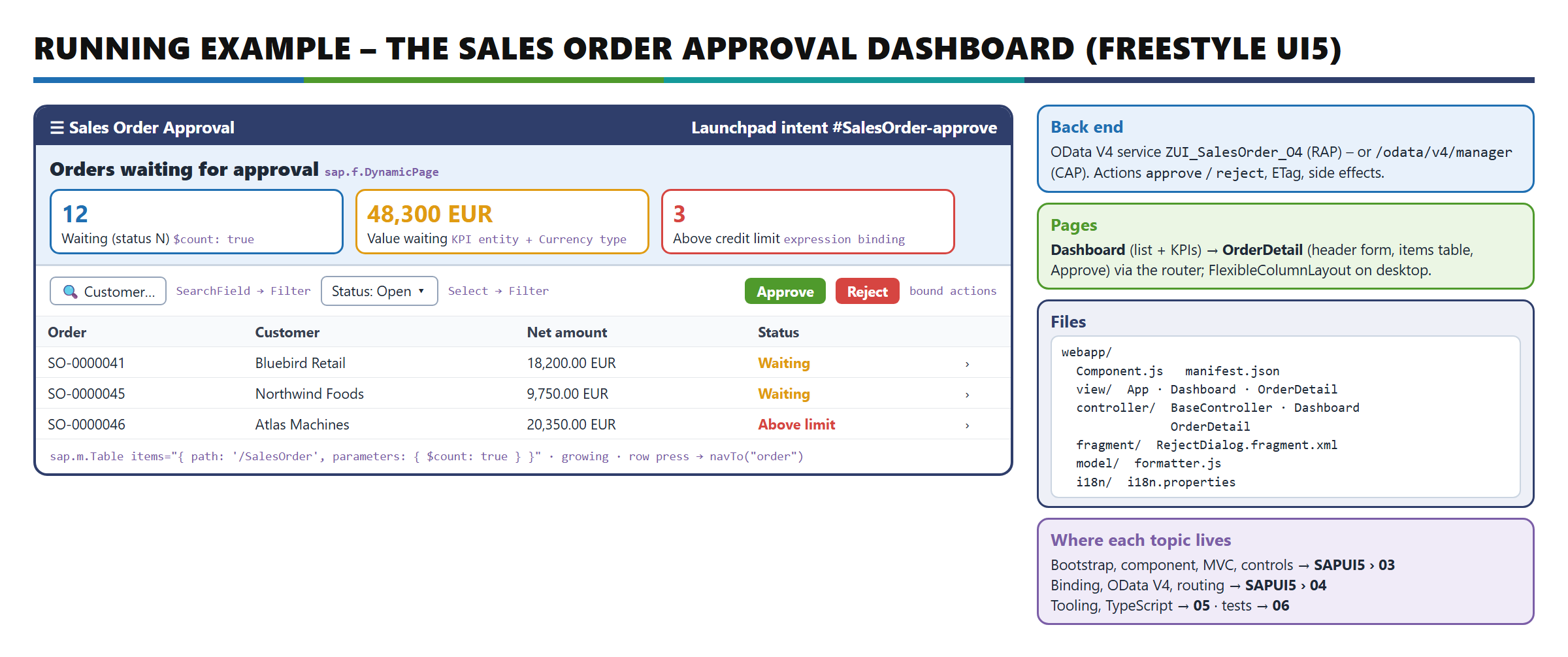
Piece | In the dashboard | Explained in |
|---|---|---|
Start | Launchpad intent | Part 5 |
Component + manifest |
| Part 6 |
Root view |
| Parts 7–8 |
Dashboard view |
| Part 8 |
Controller |
| Parts 7 and 9 |
Formatter, i18n | status | SAPUI5 › 04, Parts 5–6 |
Approve / Reject | bound actions, side effects, Reject dialog fragment | SAPUI5 › 04, Parts 10 and 13 |
|
|
- Filters written in the binding info of the view are application filters;
filter(aFilters)from the controller sets control filters, and the model combines both with AND – so the search never shows approved orders. getResourceBundle()andgetRouter()are helpers of theBaseController(Part 4).- Approve and Reject (bound actions), the detail page binding and side effects → see SAPUI5 › 04 · Data, Binding & Navigation, Part 10. Tests for the dashboard → SAPUI5 › 06.
Part 12 – Debugging and useful links
Tool | How | What it shows |
|---|---|---|
Diagnostics window | Ctrl+Alt+Shift+S | Control tree with properties and bindings, debugging options, performance |
Technical Information | Ctrl+Alt+Shift+P | UI5 version, loaded libraries, app info; switch to debug sources; start the Support Assistant |
Support Assistant | From Technical Information, or URL parameter | Rule-based check of the app: deprecated APIs, performance, accessibility, binding errors |
UI5 Inspector | Browser extension for Chrome / Edge | Control tree, properties, bindings and models of the running app |
Debug sources | URL parameter | Loads the non-minified sources so breakpoints are readable |
Browser DevTools ( | Console, Sources, Network | Errors and logs; the Network tab shows OData requests and |
- Typical first checks: console errors (missing module, wrong
controllerName), the Network tab (404 on a file, OData error responses), and the Diagnostics binding info when a field stays empty. - Backend errors of OData services are analysed on the server (e.g.
/IWFND/ERROR_LOG,/IWFND/GW_CLIENT); see CORE ABAP › 08 OData.
Useful public links
Site | URL | Use |
|---|---|---|
SAPUI5 SDK (Demo Kit) | https://ui5.sap.com (older address: sapui5.hana.ondemand.com) | API reference, Samples, Developer Guide, Walkthrough tutorial |
OpenUI5 SDK | Same for the open-source edition | |
SAP Fiori apps reference library | All standard SAP Fiori apps: app ID, technical details, required components, roles | |
SAP Fiori design guidelines | https://www.sap.com/design-system/fiori-design-web/ (formerly experience.sap.com/fiori-design-web) | Floorplans, controls, UX patterns |
UI5 CLI documentation (formerly UI5 Tooling) | https://ui5.github.io/cli (old address: sap.github.io/ui5-tooling) | CLI commands, ui5.yaml, middlewares |
- Prerequisites for learning UI5: HTML, CSS and JavaScript (SAPUI5 › 01 and 02), plus basic REST/OData knowledge. ABAP helps for the backend side; CAP (Node.js or Java) is the BTP alternative.
Part 13 – Interview questions
Q1. What is SAPUI5, and how does it differ from OpenUI5 and UI5 Tooling?
SAPUI5 is SAP's HTML5/JavaScript UI framework for responsive enterprise web apps that follow the SAP Fiori design. OpenUI5 is its open-source core (Apache 2.0); SAPUI5 adds licensed libraries such as charts, smart controls and Fiori elements. UI5 Tooling is the Node.js CLI (ui5 serve, ui5 build) for developing UI5 projects.
Q2. What is bootstrapping, and which attributes matter?
Loading and initialising the UI5 core through the sap-ui-bootstrap script tag that loads sap-ui-core.js. Key attributes: src (CDN or local), theme, resource-roots (namespace → folder), async="true", on-init (e.g. ComponentSupport) and compat-version. In the launchpad there is no index.html: the launchpad bootstraps UI5 and starts the component.
Q3. Why does every app need Component.js and manifest.json?
The component is the app's entry point and the unit the Fiori launchpad starts; it extends UIComponent and provides the router. The manifest declares the app's ID, data sources, models, libraries, root view and routing, so the framework creates them automatically (manifest-first). Without a component an app cannot be embedded in the launchpad.
Q4. Name the main sections of manifest.json.
sap.app (ID, title, i18n, dataSources, crossNavigation), sap.ui (technology, device types), sap.ui5 (rootView, dependencies, models, routing, resources), sap.fiori (registration IDs, archetype) and platform sections such as sap.cloud for BTP.
Q5. Explain MVC in UI5. Can one view have two controllers?
The model holds data, the view renders the UI, and the controller handles events and changes model and view; binding keeps model and view in sync. A view has at most one controller; one controller class can be reused by several views, and views without a controller are allowed. Best practice: one controller per view, same name.
Q6. Why are XML views recommended? Which view types are deprecated?
XML views are declarative and enforce the separation of UI and logic; they have the best tool support and are required for key user adaptation, extension points and XML templating (Fiori elements). JS, JSON and HTML views are deprecated; typed views are the programmatic alternative.
Q7. What are the controller lifecycle hooks, and in which order do they run?
onInit (once, controls exist), onBeforeRendering and onAfterRendering (on every rendering), onExit (once, on destroy). Create models and attach route handlers in onInit; clean up in onExit; per-display logic goes into the route's patternMatched handler.
Q8. What is the difference between an aggregation and an association?
An aggregation is a parent-child relationship: the parent owns, renders and destroys its children (Page.content, List.items). An association is only a reference by ID to a control that lives elsewhere (Label.labelFor, ariaLabelledBy).
Q9. How do you get a control in a controller? What is its DOM ID?
this.byId("localId") (or this.getView().byId). In XML views the DOM ID is <viewId>--<localId>. Never use document.getElementById; for a global lookup by full ID use Element.getElementById (sap.ui.getCore().byId is deprecated).
Q10. What does sap.ui.define do, and how is it different from sap.ui.require?
sap.ui.define defines an AMD module: it declares dependencies, loads them asynchronously and returns the module (controller, component, formatter). sap.ui.require only loads modules on demand inside code without defining a module. Module names are class names with slashes: sap/m/Button.
Q11. Select vs ComboBox vs MultiComboBox vs MultiInput?
Select: choose one value, no typing. ComboBox: choose or type one value (validate free text). MultiComboBox: choose several values from a list. MultiInput: type with suggestions and collect several values as tokens. All use items (MultiInput: suggestionItems) with core:Item key/text.
Q12. How do you find the UI5 version of a running app and debug it?
Ctrl+Alt+Shift+P opens Technical Information (version, libraries, debug sources, Support Assistant); Ctrl+Alt+Shift+S opens the Diagnostics window. Add sap-ui-debug=true for readable sources, use the UI5 Inspector extension and the browser's Network tab for OData calls.
Q13. Name five deprecated UI5 APIs and their modern replacements.
jQuery.sap.require → sap.ui.define / sap.ui.require([...], cb); sap.ui.getCore().byId → this.byId or Element.getElementById; sap.ui.xmlview → XMLView.create; sap.ui.xmlfragment → loadFragment / Fragment.load; sap.ui.getCore().attachInit → Core.ready(); getMessageManager → Messaging; sap.ui.component → Component.create. All modern variants are asynchronous and return promises; the old ones are removed in UI5 2.x.
Q14. Scenario: an old app uses jQuery.sap.require, sap.ui.getCore().byId and a JS view. How do you prepare it for UI5 2.x?
Run the UI5 linter to list every finding and apply its autofixes. Convert modules to sap.ui.define with declared dependencies, replace getCore() calls with the dedicated modules (Element, Core.ready, Messaging, Theming, Lib), rewrite the JS view as an XML view, and make the bootstrap and manifest asynchronous (async="true", IAsyncContentCreation, async routing). Switch Belize to Horizon. Then test with the Support Assistant and the app's QUnit/OPA tests.
Q15. Scenario: why build the Sales Order Approval dashboard as a freestyle app, and how is it structured?
Fiori elements covers list report, object page and worklist floorplans; a one-screen dashboard with KPIs, quick actions and a free layout is not a standard floorplan (check the flexible programming model first). Structure: Component.js + manifest (V4 data source, i18n, routing), an App root view with a FlexibleColumnLayout, a Dashboard view (DynamicPage + table bound to /SalesOrder with a status filter), an OrderDetail view, a BaseController, a formatter for status text and colour, and a Reject dialog fragment. Approve/Reject call the service's bound actions.
🏠 Start Here · ◀ 02 · JavaScript & Node.js · 04 · Data & Navigation ▶ · Sections: CORE ABAP | OOPS ABAP | ABAP on HANA | Clean Core | RAP | ABAP Points | SAP Fiori | SAPUI5 | Mobile Development (MDK) | BTP Foundations | BTP Development | CAP | SAP Build | ABAP on BTP | Integration Suite | SAP Business AI | SAP BASIS | Security | SAP SDLC
Functional: FICO ABAP | TRM ABAP | VIM | SAP BIS | SD ABAP | MM ABAP | PP ABAP | QM ABAP | PM ABAP | PS ABAP | EWM | TM ABAP | GTM ABAP | EHS ABAP | HR ABAP | BW | SAP Datasphere | SAP Business Data Cloud | SAP MDG | SAP Analytics Cloud | SAP Ariba | SAP CX | SAP IBP