What makes a UI5 app production-ready: automated tests at every level (QUnit, OPA5, wdi5), static checks with the UI5 linter, the Support Assistant, performance, security (CSP, XSS, sanitising), accessibility, the choice between OpenUI5, SAPUI5 and UI5 Web Components, and the mistakes reviewers see most often. The running example is the Sales Order Approval dashboard (sales.dashboard) from SAPUI5 › 05 · UI5 Tooling, TypeScript & Custom Controls: managers see open orders from ZUI_SalesOrder_O4, an AmountBadge flags amounts above their approval limit, and they approve or reject. The short testing overview on SAPUI5 › 04 · Data, Binding & Navigation is deepened here.
Part 1 – Why quality work pays off in UI5
A UI5 app runs in thousands of browsers you do not control, against a backend that changes, on a framework that SAP updates several times a year. Manual testing cannot keep up. The answer is a test pyramid: many fast checks at the bottom, a few slow realistic ones at the top, all run automatically in CI.
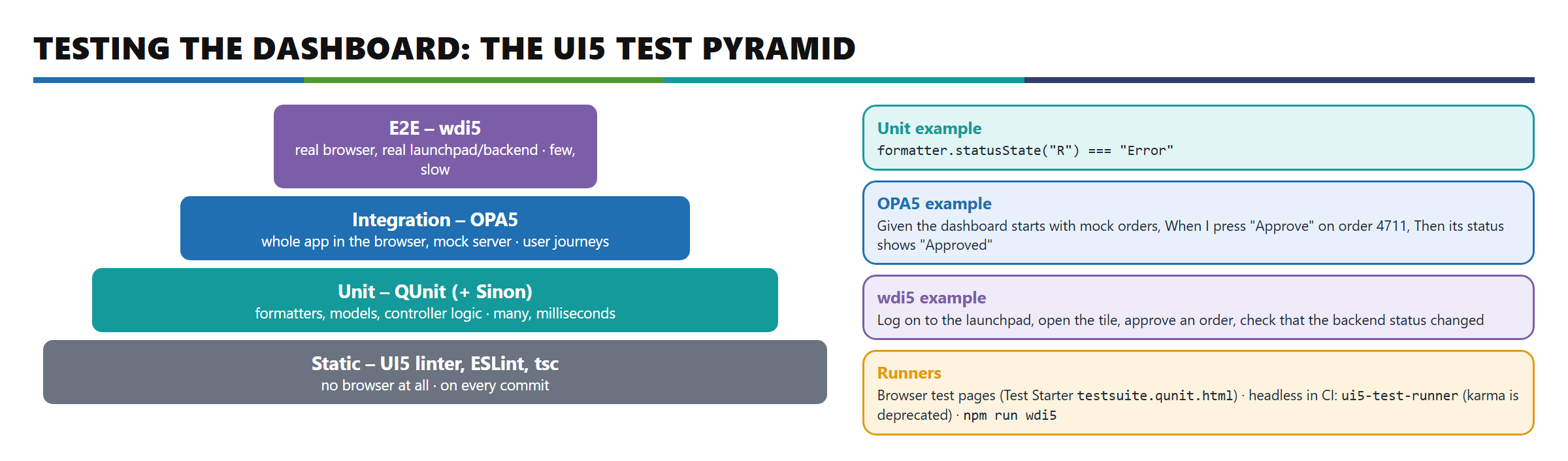
Level | Tool | Runs against | Speed | Finds |
|---|---|---|---|---|
Static | UI5 linter, ESLint, | Source files | seconds | Deprecated APIs, globals, CSP issues, type errors |
Unit | QUnit + Sinon | Single modules in the browser | ms per test | Wrong formatter or logic |
Integration | OPA5 | The whole app with mock data | seconds | Broken navigation, bindings, button logic |
End-to-end | wdi5 (WebdriverIO) | Deployed app, launchpad, real backend | minutes | Configuration, authorisation, integration errors |
- Generated apps (Fiori application generator, Easy UI5) already contain
webapp/test/with unit and OPA5 skeletons – keep them and grow them instead of deleting them.
Part 2 – Unit tests with QUnit
QUnit is the JavaScript unit test framework bundled with UI5 (sap/ui/thirdparty/qunit-2); Sinon provides stubs, spies and fake timers. Unit tests target pure logic: formatters, validation, helper modules, small controller methods.
|
|
Test Starter: one configuration for all test pages
Current UI5 projects use the Test Starter: testsuite.qunit.html + testsuite.qunit.js describe all test modules and their defaults; the generic Test.qunit.html runs each one. This replaces hand-written HTML pages per test (the UI5 linter rule prefer-test-starter reports the old style).
|
Stubbing with Sinon
|
- Design for testability: move logic out of event handlers into small methods or modules that take plain values. A 200-line
onApprovethat reads controls, calls the backend and opens dialogs cannot be unit-tested. - Always
restore()stubs (or use a Sinon sandbox inbeforeEach/afterEach); a leaked stub makes later tests fail for no visible reason.
Part 3 – Integration tests with OPA5
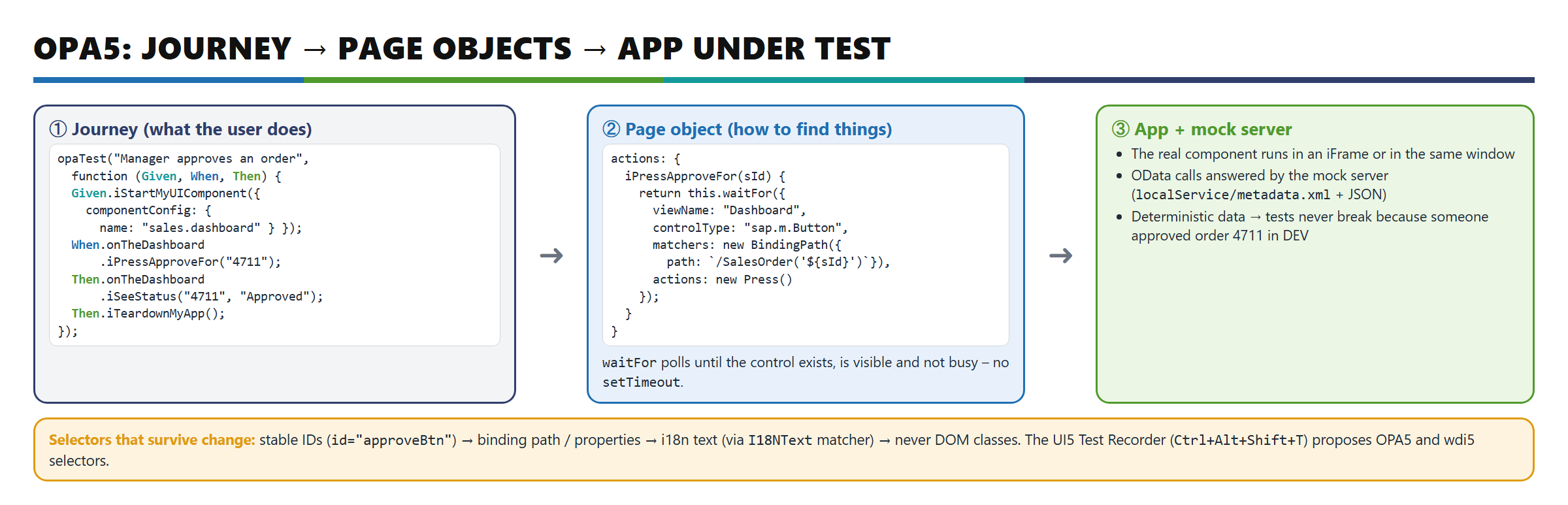
OPA5 (One Page Acceptance tests) drives the real app inside the browser like a user: it waits for controls, presses buttons, enters text and checks the result. Tests are written as journeys (Given / When / Then) that call page objects, which hide how controls are found. Data comes from a mock server, so the tests are deterministic.
|
|
Building block | Examples | Purpose |
|---|---|---|
|
| Find controls; retries until found, visible, enabled and not busy |
Matchers ( |
| Narrow down which control |
Actions ( |
| Simulate real user events |
Arrangements |
| Start and stop the app |
Config | Opa5.extendConfig({ viewNamespace, autoWait: true, timeout }) | Shared defaults |
- Mock data for V4: the Fiori tools mock server middleware (
@sap-ux/ui5-middleware-fe-mockserver,npm run start-mock) serveslocalService/metadata.xmland JSON files and also works for freestyle apps; the classic in-browsersap/ui/core/util/MockServersupports OData V2 only. - Never use
setTimeoutor fixed waits in OPA5 –waitForalready polls. Flaky tests usually come from selectors based on generated IDs or texts that change with the language. - The UI5 Test Recorder (
Ctrl+Alt+Shift+Tin a running app) shows the control under the mouse and proposes OPA5 or wdi5 selector code.
Part 4 – End-to-end tests with wdi5 and running tests in CI
wdi5 is a WebdriverIO service from the UI5 community (open source, Apache 2.0) that gives WebdriverIO tests access to UI5 controls through UI5's own test API (RecordReplay, UI5 1.60+). It tests the deployed app in a real browser, including launchpad login and the real backend.
|
|
OPA5 | wdi5 | |
|---|---|---|
Runs | Inside the app's browser window (same JavaScript context) | Outside, through WebDriver (separate Node.js process) |
Data | Mock server, deterministic | Real or test backend |
Scope | One app | Launchpad, several apps, login, cross-app navigation |
Language | UI5 modules, QUnit | WebdriverIO (JS/TS), async/await |
Typical number | Dozens per app | A few critical journeys |
Headless runs in CI
- ui5-test-runner (community, Node.js) runs the Test Starter suite headless (Puppeteer, Playwright, Selenium) with coverage reports; it replaces karma-ui5, which is deprecated together with Karma. With
ui5 serveuse its remote mode:ui5-test-runner --start start --urlhttp://localhost:8080/test/testsuite.qunit.html--coverage --ci(--startruns the npm script that serves the app;--ciforces non-interactive output). - A typical pipeline:
npm ci→ui5lint→tsc --noEmit→ unit + OPA5 headless →ui5 build→ deploy to DEV → wdi5 smoke tests. SAP's CI/CD service and Project "Piper" can run the same steps (BTP Development › DevOps, Operations & Observability).
Part 5 – Static checks: UI5 linter, ESLint and the Support Assistant
UI5 linter
The UI5 linter (@ui5/linter, command ui5lint, open source from SAP in the UI5 GitHub organisation) checks JavaScript, TypeScript, XML views, manifest.json and HTML for things that block UI5 2.x: deprecated APIs and libraries, global access such as sap.m.Button, possible CSP violations and deprecated component or manifest settings. It targets a 1.136+ runtime and needs Node.js 20.11+ or 22+.
|
|
Example finding (rule) | Code that triggers it | Fix |
|---|---|---|
no-globals | sap.m.MessageToast.show("…") | Import |
no-deprecated-api |
|
|
async-component-flags | Component without | Add the interface and |
csp-unsafe-inline-script | Inline | Move code to a module |
prefer-test-starter | Hand-written QUnit HTML pages | Use the Test Starter (Part 2) |
- The full rule list is in
docs/Rules.mdof the UI5/linter repository. The linter does not prove 2.x compatibility – the app still has to be tested on 2.x. - ESLint complements it for general JavaScript quality (unused variables,
===), andtscfor types.
Support Assistant (runtime checks)
The Support Assistant analyses the running app against rules in categories such as performance, accessibility, memory, bindings, Fiori guidelines and usability. Start it with Ctrl+Alt+Shift+P → "Activate Support Assistant" or the URL parameter sap-ui-support=true, choose rule sets and the scope (whole app or a subtree), and read the issues with a severity and a fix hint.
- Typical findings for the dashboard: synchronous XHR, a
LabelwithoutlabelFor, an icon-only button without a tooltip, binding errors (path not found), unused models,sap.m.Tablewith too many rows withoutgrowing. - It can also run inside OPA5: add
extensions: ["sap/ui/core/support/RuleEngineOpaExtension"]to the OPA config and callOpa5.assert.noRuleFailures({ failOnHighIssues: true })in a test, so rule violations break the build. Other options:failOnAnyIssues,rules(libName+ruleId) andexecutionScope(global,subtree,components); the app runs withsap-ui-support=true,silent.
Part 6 – Performance
Managers open the dashboard many times a day, often on a laptop over VPN. Start-up time is mostly spent on four things: loading UI5, loading the app, loading data and rendering. Each has known levers.
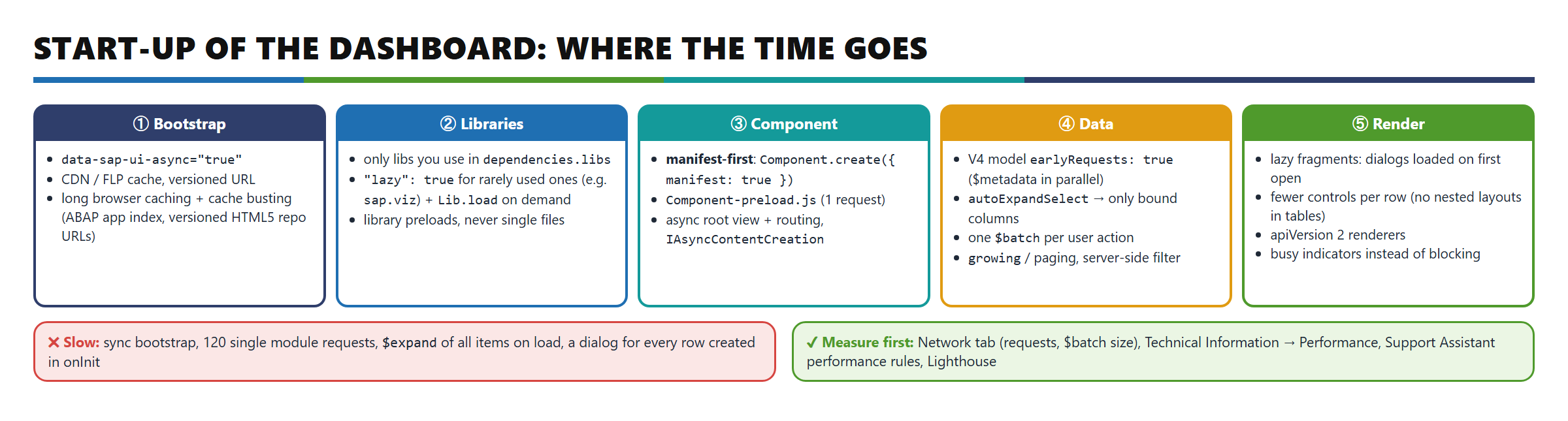
Lever | How | Effect |
|---|---|---|
Asynchronous loading |
| Browser never blocks; required for CSP and UI5 2.x |
Manifest-first |
| Dependencies are known before code runs |
Preload bundles | Deploy | One request instead of dozens |
Lazy loading |
| Smaller start-up payload |
Lean data | V4: | Fewer bytes, faster first rows |
OData batch | One | Fewer round trips |
Rendering | Fewer controls per table row, | Less DOM, faster scrolling |
Caching | CDN / FLP caching, versioned URLs, cache buster info | Repeat visits load from cache |
|
|
- Measure first: browser Network tab (number of requests, size of
$batch), the Performance tab, Technical Information (Ctrl+Alt+Shift+P) → performance measurement, Support Assistant performance rules, Lighthouse. Slow OData responses are fixed in the backend (CDS, RAP), not in UI5. - Classic slow patterns: synchronous bootstrap,
$expandof all items for a list that shows headers only, a dialog created for every table row, client-side filtering of thousands of rows in a JSONModel,setTimeoutpolling instead of events.
Part 7 – Security: CSP, XSS and sanitising
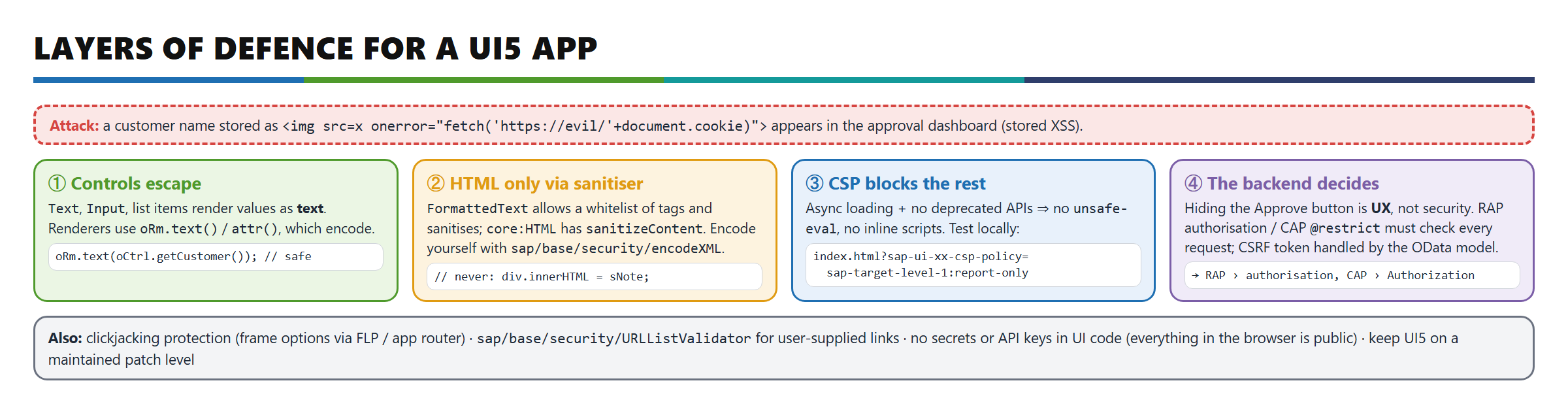
A UI5 app is code delivered to the user's browser: anything in it is public, and anything it displays could be an attack. Security in the UI is about not executing data (XSS), restricting what the page may load (CSP), and remembering that the backend makes every authorisation decision.
Cross-site scripting (XSS)
- Standard controls render property values as text:
<Text text="{CustomerName}"/>is safe even if the name contains<script>. Custom renderers stay safe by usingoRm.text()andoRm.attr(), which encode. - When HTML is really needed (an order note with bold text), use
sap.m.FormattedText(whitelisted tags, sanitised) orsap.ui.core.HTMLwithsanitizeContent="true"; encode values yourself withsap/base/security/encodeXMLorencodeURL. - Never write data into the DOM with
innerHTML, jQuery.html()or string-concatenated renderers; never useeval,new FunctionorsetTimeout("string"). - Links from data: validate with
sap/base/security/URLListValidatorso thatjavascript:URLs cannot be injected.
Content Security Policy (CSP)
CSP is an HTTP response header that tells the browser which sources of scripts, styles and connections are allowed. A strict policy without unsafe-eval and unsafe-inline in script-src blocks most injected code. UI5 needs unsafe-eval only for synchronous loading and some deprecated APIs and libraries (sap.ui.commons, sap.ui.ux3) – so an async, linter-clean app can run under a strict CSP. The SAP Fiori launchpad sends such a header when asynchronous module loading is active.
|
- Read violations in the browser console, fix them (move inline code into modules, replace deprecated APIs; the linter flags many), then test without
:report-only.
What the UI must not be trusted with
- Hiding the Approve button for clerks is user experience, not security: the RAP behaviour (authorisation and feature control) or CAP
@restrictmust reject the request (RAP section, CAP › Authorization & Security). - The OData models fetch and send the CSRF token automatically; do not switch the check off in the backend to "fix" errors.
- No secrets in UI code or
manifest.json(API keys, passwords, technical users): put them in BTP destinations or the backend. Clickjacking protection comes from the launchpad / app router frame options. Keep UI5 on a maintained patch level to receive security fixes.
Part 8 – Accessibility
Accessibility (a11y) means the app works with a keyboard only, with a screen reader, with zoom and with high-contrast themes. It is a legal requirement in many countries and part of SAP's product standards. UI5 controls bring roles, keyboard handling and ARIA attributes; the app must use them correctly.
Topic | Do | Dashboard example |
|---|---|---|
Labels |
| Approval note |
Icon-only buttons | Set | Approve / Reject icon buttons in each row |
Invisible texts |
| "Amount exceeds your approval limit" for the AmountBadge |
Colour | Never colour alone: | Red badge also shows a warning icon |
Keyboard | Every action reachable with Tab, Enter, Space, F6 (groups); custom controls handle | AmountBadge (SAPUI5 › 05, Part 8) |
Titles and landmarks |
| "Open sales orders" table header |
Themes and zoom | Test with | Custom CSS uses |
Messages | Show errors with value states and the message popover ( | Failed approval shows a persistent message |
- Check with the Support Assistant accessibility rules, a keyboard-only walkthrough and a screen reader (JAWS or NVDA on Windows, VoiceOver on macOS). The SAP Fiori design guidelines describe the expected keyboard behaviour for each control.
Part 9 – OpenUI5 vs SAPUI5, and UI5 Web Components
OpenUI5 vs SAPUI5
OpenUI5 | SAPUI5 | |
|---|---|---|
Licence | Open source, Apache 2.0 | SAP licence; included with SAP products (ABAP platform, BTP) |
Content | Core and most libraries ( | OpenUI5 plus |
SDK / CDN | sdk.openui5.org | ui5.sap.com |
npm / ui5.yaml |
|
|
Source | github.com/UI5/openui5 | Not public beyond OpenUI5 |
Typical use | Open-source projects, non-SAP backends, learning | Every app for S/4HANA, Fiori launchpad, Work Zone, Fiori elements |
- The programming model is identical; an OpenUI5 app runs on SAPUI5 unchanged, but not the other way round if it uses SAPUI5-only libraries.
UI5 Web Components
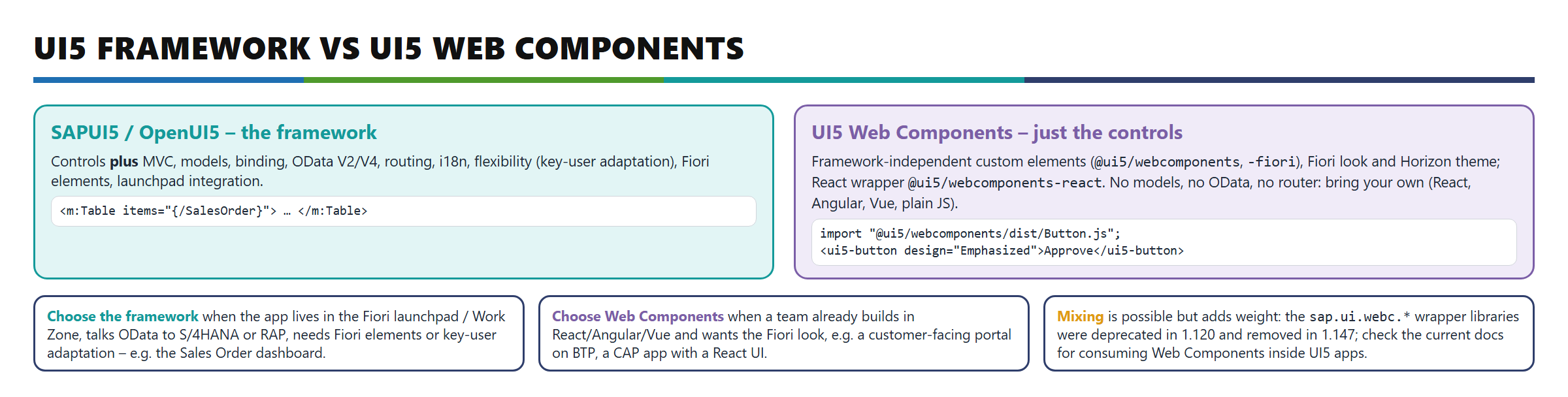
UI5 Web Components (@ui5/webcomponents, @ui5/webcomponents-fiori, version 2.x; React wrapper @ui5/webcomponents-react) are framework-independent HTML custom elements with the Fiori design and Horizon theme. They are only the controls: no models, binding, OData, routing or flexibility.
|
Situation | Choose |
|---|---|
Freestyle app in the Fiori launchpad / Work Zone with OData V4 from RAP or CAP (the dashboard) | SAPUI5 framework |
List report / object page with little custom code | SAP Fiori elements (on top of SAPUI5) |
Team builds in React, Angular or Vue and wants the Fiori look (portal, CAP app with a React UI) | UI5 Web Components |
A single control missing in a non-UI5 web page | UI5 Web Components |
- The UI5 wrapper libraries
sap.ui.webc.main/sap.ui.webc.fioriwere deprecated in 1.120 and removed in 1.147. To use UI5 Web Components inside a UI5 app, installui5-tooling-modules(registersui5-tooling-modules-taskand-middlewarein everyui5*.yaml, includingui5-deploy.yaml) and the@ui5/webcomponents*packages asdependencies; the components are then required like UI5 controls.
Part 10 – Best practices and common mistakes
Mistake | Why it hurts | Do instead |
|---|---|---|
Globals ( | Sync loading, breaks in UI5 2.x | Module imports; run the UI5 linter in CI |
Logic in | Not executed in the launchpad | Everything starts in |
| DOM is re-rendered; IDs are generated |
|
Hard-coded hosts in | Breaks in every other system | Relative URIs, proxy locally, destinations on BTP |
Hard-coded texts | No translation | i18n with |
Business rules only in the UI | Bypassed by any OData client | Validate and authorise in RAP / CAP; UI rules are for convenience |
One request per row, | Slow over VPN |
|
Creating dialogs in | Memory and start-up time |
|
Not destroying what you create | Memory leaks in long launchpad sessions |
|
Deploying | No preload, test files shipped |
|
Custom CSS with fixed colours and | Breaks dark / high-contrast themes and upgrades | Theme parameters, standard control properties |
Tests deleted from generated projects | Regressions reach users | Keep QUnit / OPA5, add wdi5 smoke tests |
- Review checklist for the dashboard: linter clean · async everywhere · manifest-first models · no hard-coded URLs or texts · preload build · tests green in CI · Support Assistant without high issues · keyboard and screen reader walkthrough · CSP report-only clean · authorisation checked in the backend.
Part 11 – Interview questions
Q1. Which test levels exist for UI5 apps, and which tool belongs to each?
Static checks (UI5 linter, ESLint, tsc), unit tests with QUnit and Sinon for formatters and logic, integration tests with OPA5 that drive the whole app against mock data, and end-to-end tests with wdi5 (WebdriverIO) against the deployed app and real backend. Many fast tests at the bottom, few slow ones at the top.
Q2. How is an OPA5 test structured?
Journeys written as opaTest with Given (arrangements such as iStartMyUIComponent), When (actions) and Then (assertions, iTeardownMyApp). Journeys call page objects created with Opa5.createPageObjects, whose waitFor calls find controls by view, type, ID and matchers (BindingPath, PropertyStrictEquals, I18NText) and apply actions (Press, EnterText). waitFor polls, so no timeouts are needed.
Q3. OPA5 vs wdi5?
OPA5 runs inside the app's browser context, usually with a mock server, and tests one app quickly and deterministically. wdi5 runs outside through WebDriver, can log on to the launchpad, cross apps and use the real backend, but is slower and needs test data management. Use both: many OPA5 journeys, a few wdi5 smoke tests.
Q4. What does the UI5 linter check, and how do you use it?
It statically checks JS, TS, XML, manifest and HTML files for deprecated APIs and libraries, global access, possible CSP violations and deprecated manifest or component settings – the blockers for UI5 2.x. Run npx ui5lint locally and in CI, --details for hints, --fix for automatic fixes, and configure ignores in ui5lint.config.mjs.
Q5. What is the Support Assistant?
A runtime rule engine started with Ctrl+Alt+Shift+P or sap-ui-support=true. It checks the running app for performance, accessibility, binding, memory and Fiori guideline issues and gives a severity and fix hint per issue; it can also run inside OPA5 tests.
Q6. Name the most important performance measures for a UI5 app.
Asynchronous loading everywhere, manifest-first component creation, deploying the preload build, lazy loading of rarely used libraries and dialogs, lean OData requests (autoExpandSelect, earlyRequests, paging, server-side filtering), one $batch per user action, fewer controls per row, and caching. Measure with the Network tab and the Support Assistant before optimising.
Q7. How does UI5 protect against XSS, and where can you still introduce it?
Controls render values as text and renderers encode through oRm.text() and oRm.attr(). You introduce XSS with innerHTML, jQuery .html(), string-based renderers, sap.ui.core.HTML without sanitising, or unvalidated URLs. Use FormattedText, encodeXML and URLListValidator.
Q8. What is CSP, and what does a UI5 app need to run under a strict policy?
Content Security Policy is a response header that restricts script, style and connection sources. A strict policy forbids unsafe-eval and inline scripts. UI5 needs unsafe-eval only for synchronous loading and some deprecated APIs and libraries, so an async app without inline scripts and deprecated APIs works. Test locally under ui5 serve with sap-ui-xx-csp-policy=sap-target-level-1:report-only.
Q9. OpenUI5 vs SAPUI5 vs UI5 Web Components?
OpenUI5 is the Apache-2.0 core of the framework; SAPUI5 adds SAP-licensed libraries such as charts, smart controls and Fiori elements and is what SAP products ship. UI5 Web Components are framework-independent Fiori-styled custom elements for React, Angular, Vue or plain JS, without models, OData or routing.
Q10. How do you make a UI5 app accessible?
Use standard controls, connect labels (labelFor, ariaLabelledBy), give icon-only buttons tooltips, add InvisibleText for context, never rely on colour alone, make custom controls keyboard-operable, use theme parameters so high-contrast themes work, and verify with the Support Assistant, keyboard-only use and a screen reader.
Q11. Scenario: the dashboard takes 9 seconds to open in the launchpad. How do you analyse it?
Open the Network tab: count requests (single module files mean no preload – check that dist/ was deployed), look for synchronous requests and large $batch responses or slow $metadata. Check the manifest for async routing, autoExpandSelect and lazy libraries; run the Support Assistant performance rules. If the OData response itself is slow, analyse the backend (CDS view, RAP determinations). Fix the biggest item, measure again.
Q12. Scenario: after the launchpad switched on asynchronous module loading, the dashboard shows a blank page.
The launchpad now sends a strict CSP and bootstraps UI5 asynchronously; the app still uses synchronous or deprecated APIs (jQuery.sap.require, sap.ui.xmlview, globals) or inline scripts, which are blocked. Read the console CSP and loader errors, run ui5lint to find the APIs, replace them with async module APIs, and test locally with the CSP report-only parameter before redeploying.
🏠 Start Here · ◀ 05 · Tooling & TypeScript · 07 · Interview Questions ▶ · Sections: CORE ABAP | OOPS ABAP | ABAP on HANA | Clean Core | RAP | ABAP Points | SAP Fiori | SAPUI5 | Mobile Development (MDK) | BTP Foundations | BTP Development | CAP | SAP Build | ABAP on BTP | Integration Suite | SAP Business AI | SAP BASIS | Security | SAP SDLC
Functional: FICO ABAP | TRM ABAP | VIM | SAP BIS | SD ABAP | MM ABAP | PP ABAP | QM ABAP | PM ABAP | PS ABAP | EWM | TM ABAP | GTM ABAP | EHS ABAP | HR ABAP | BW | SAP Datasphere | SAP Business Data Cloud | SAP MDG | SAP Analytics Cloud | SAP Ariba | SAP CX | SAP IBP