How a professional freestyle UI5 project is set up, built and shipped: the UI5 CLI and ui5.yaml, the development server and its middleware, custom build tasks, build variants, deployment to the ABAP repository and to the SAP BTP HTML5 Application Repository, TypeScript, custom controls in depth, reuse through fragments, components and libraries, and UI5 versions including what UI5 2.x changes. The running example is the Sales Order Approval dashboard (sales.dashboard), a freestyle app for managers that reads the RAP service ZUI_SalesOrder_O4 (orders with SalesOrderID, CustomerID, NetAmount, Status N / A / R and the action approve). Basics such as the project structure, index.html, MVC and a first custom control are on SAPUI5 › 03 · SAPUI5 Fundamentals and 04 · Data, Binding & Navigation; the Fiori tools wizards are on SAP Fiori › 04 · SAP Fiori Tools & Flexible Programming Model.
Part 1 – Why the UI5 CLI matters
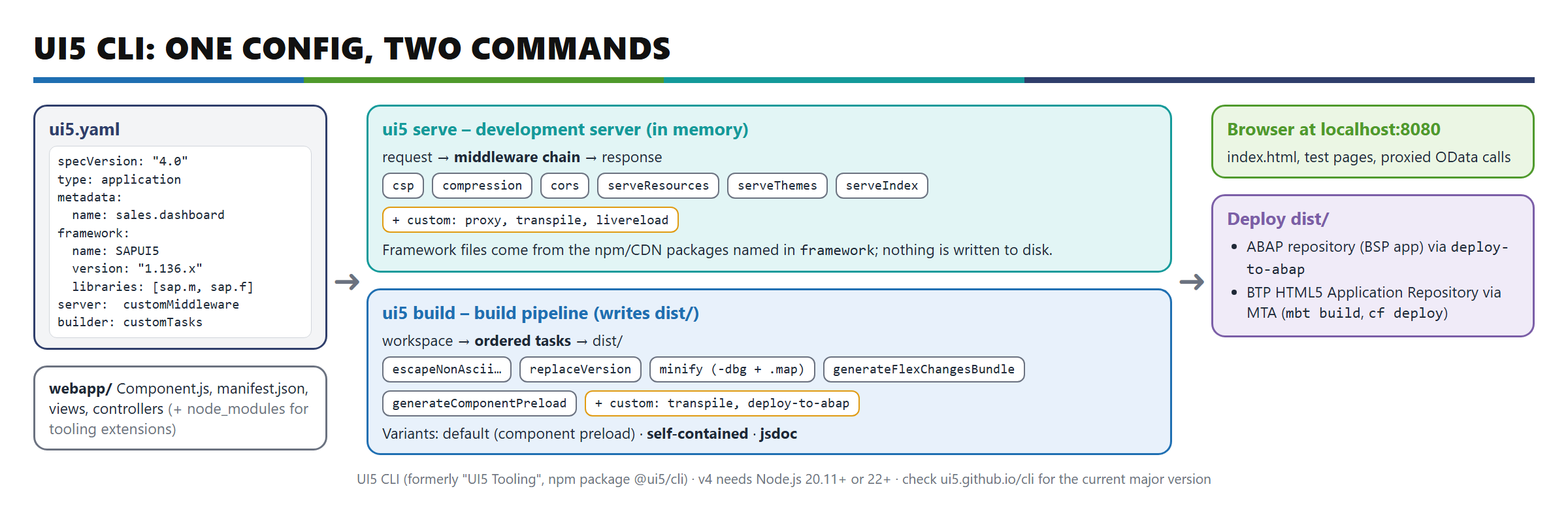
A UI5 app is just files in webapp/, but the browser cannot use TypeScript, a production system should not load 150 single files, and the local machine cannot call the S/4HANA system directly because of CORS. The UI5 CLI (npm package @ui5/cli, called UI5 Tooling until 2025; command ui5) solves this: it serves the project locally through a configurable middleware chain and builds an optimised dist/ folder through a configurable task pipeline. Both are driven by one file, ui5.yaml.
Command | What it does | Typical use |
|---|---|---|
ui5 init | Creates | Once, for a hand-made project |
ui5 serve [--open index.html] | Starts the development server (default port 8080), everything in memory | Daily development; generated apps call it through |
ui5 build [self-contained | jsdoc] | Runs the build tasks and writes | Before every deployment |
ui5 use [email protected] | Sets | Switch the UI5 version |
ui5 add sap.f sap.ui.table | Adds framework libraries to | When the app needs a new library |
| Shows the dependency tree / CLI settings | Troubleshooting |
- Versions: UI5 CLI v4 (July 2024) is the stable line – npm
latestis 4.1.0 in November 2026; it needs Node.js 20.11+ or 22+ and introducedspecVersion: "4.0". v5 is published under the npm tagnextas an alpha (5.0.0-alpha.x; Node.js 22.22.3+ / 24.15+ / 26+,specVersion: "5.0", a newcomponentproject type, build caching) – not for production builds yet. - UI5 CLI vs Fiori tools:
@sap/ux-ui5-tooling(Fiori tools) builds on the UI5 CLI and adds thefioricommand, thefiori-tools-proxyandfiori-tools-previewmiddlewares and thedeploy-to-abaptask. Generated apps use both; the concepts on this page are the same either way. - Install the CLI as a devDependency (
npm i -D @ui5/cli) so that every developer and the CI pipeline use the same version; a global installation is only a convenience.
Part 2 – ui5.yaml in depth
ui5.yaml describes one project (application, library, theme-library or module) and optionally extensions (custom tasks, custom middleware, project shims), separated by ---. Generated apps often have three variants: ui5.yaml (development with proxy), ui5-local.yaml (local UI5 sources, mock data) and ui5-deploy.yaml (build and deployment); select one with --config ui5-deploy.yaml.
|
Section | Purpose | Interview point |
|---|---|---|
specVersion | Version of the configuration format, not of UI5 | 4.0 is required to build UI5 2.x libraries |
type | Project type; decides the default folder layout and build tasks | application = |
framework | UI5 distribution, version and libraries the CLI downloads (npm packages | Replaces a CDN bootstrap during development |
builder | Excludes, component preload settings, custom bundles, | Where build behaviour is changed |
server | Ports and | Proxy, live reload, TypeScript transpiling |
kind: extension | Defines a task, middleware or project shim inside the same file or an npm package | Separated by |
- Workspace:
ui5-workspace.yaml(UI5 CLI v3+) lets an app use a library from a sibling folder during development instead of the npm or deployed version – useful when the dashboard and a reuse library are developed together (Part 9). - Common mistake: a
framework.versionthat does not exist in the chosen distribution, orOpenUI5while the app uses SAPUI5-only libraries such assap.vizorsap.ui.comp– the server then fails with "library not found".
Part 3 – Development server and middleware
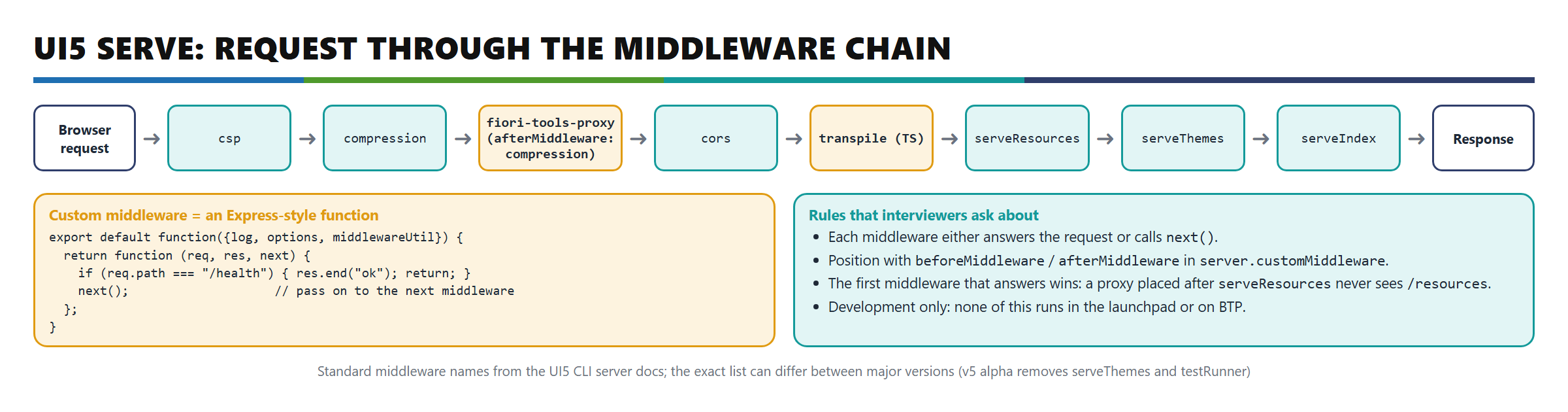
ui5 serve is an Express-based server. Every request runs through an ordered list of middleware functions; each one either answers the request or calls next(). Standard middleware serves your files, the UI5 framework and themes; custom middleware is inserted with beforeMiddleware or afterMiddleware.
Middleware | Source | Why the dashboard needs it |
|---|---|---|
fiori-tools-proxy | @sap/ux-ui5-tooling | Forwards |
| @sap/ux-ui5-tooling | FLP sandbox preview and reload on save; the package also has |
ui5-tooling-transpile-middleware | community (ui5-community) | Transpiles TypeScript on the fly (Part 7) |
sap-fe-mockserver | @sap-ux/ui5-middleware-fe-mockserver | Answers OData V2/V4 requests from |
ui5-middleware-livereload | community | Reloads the browser when a file changes |
Writing your own middleware
Example: during development the dashboard should show a banner "DEV – mock approvals". A tiny middleware adds a response header that the app reads; in production the header is absent.
|
|
- Order matters: a middleware placed after
serveResourcesnever sees requests thatserveResourcesalready answered. Put proxies early (aftercompression). - Middleware runs only on the developer's machine. The production equivalents are the Fiori launchpad / ICF on ABAP and the app router on BTP.
Part 4 – Custom build tasks
The build is a sequence of tasks that read and write resources in a virtual workspace. A custom task is a JavaScript function registered in builder.customTasks and positioned with beforeTask or afterTask. Typical uses: transpiling TypeScript, zipping dist/ for the HTML5 repository (ui5-task-zipper), uploading to ABAP (deploy-to-abap), or writing build information into the app.
Example: the dashboard's About dialog shows the Git commit of the build. A custom task writes buildInfo.json into the workspace.
|
|
- The task receives
workspace(the project's resources), optionallydependencies(only if it exportsdetermineRequiredDependencies, specVersion 3.0+),taskUtil,options.configurationandlog. - Task order: standard tasks run in a fixed order (Part 5); a custom task must reference an existing task name or an earlier custom task, otherwise the build stops with an error.
- Community tasks and middleware are third-party npm packages: check their licence and maintenance before a productive project depends on them.
Part 5 – Build: preload, self-contained and what ends up in dist
Task (application, in order) | Default | What it does |
|---|---|---|
escapeNonAsciiCharacters | on | Escapes non-ASCII characters in |
| on | Fills |
minify | on | Minifies JS, keeps |
generateFlexChangesBundle | on | Bundles key-user / developer adaptation changes into |
enhanceManifest | on | Adds information to |
generateComponentPreload | on | Writes |
| self-contained only | Bundles the needed framework modules into |
generateBundle | with config | Custom bundles from |
generateCachebusterInfo | off | Writes |
| jsdoc only | Version and API index data |
|
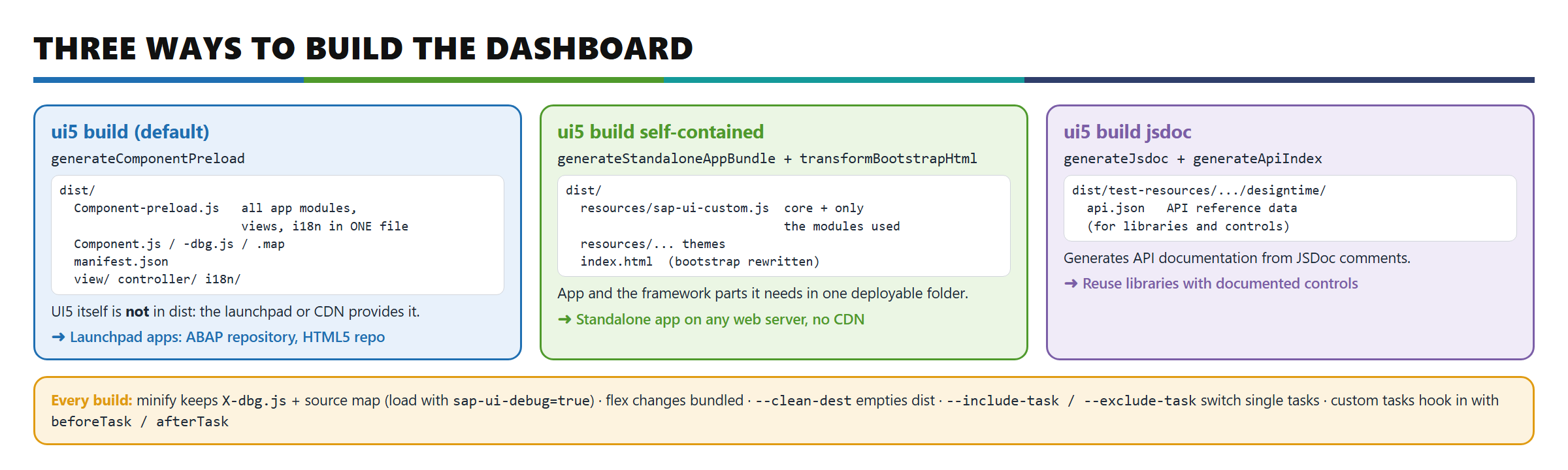
- Why the preload matters: without it the browser requests every controller, view and i18n file separately – often 50–150 requests. With
Component-preload.jsit is one request, cached by the browser (more on SAPUI5 › 06 · Testing, Performance & Best Practices). - Debugging a built app:
sap-ui-debug=true(orsap-ui-debug=sales/dashboard/for just your modules) makes UI5 load the-dbg.jsfiles; source maps also let the browser show readable code without it. - Common mistake: deploying
webapp/instead ofdist/. The app works but is slow, and test and mock files are shipped to production.
Part 6 – Deployment: ABAP repository and HTML5 Application Repository
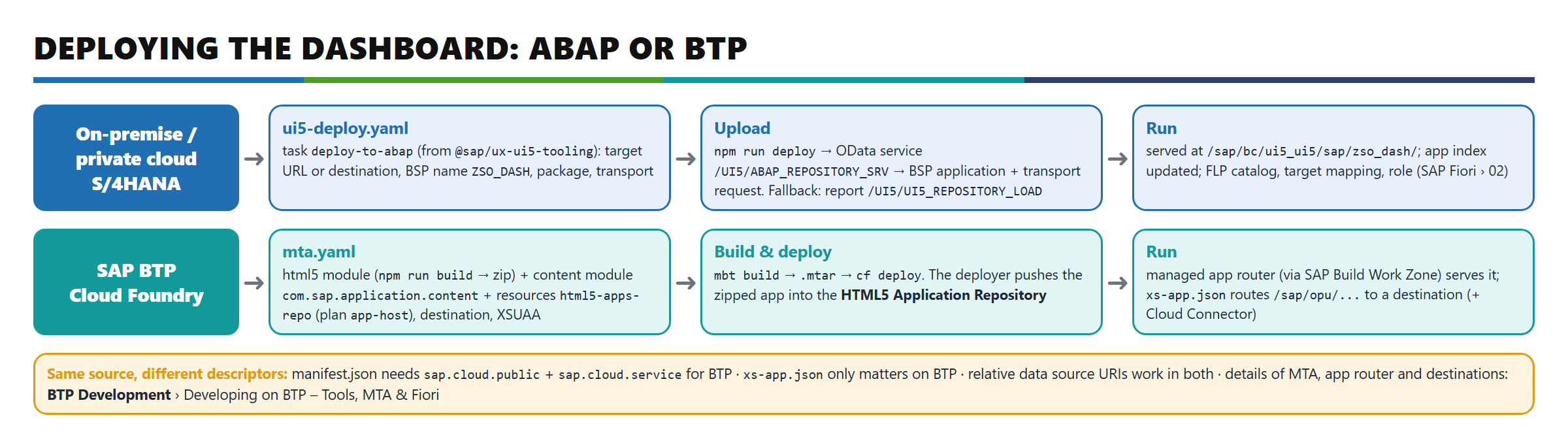
The same dist/ can go to two kinds of target. Which one is decided by where the users' launchpad runs: the dashboard for S/4HANA on-premise or private cloud goes into the ABAP repository; an app that runs in SAP Build Work Zone on SAP BTP goes into the HTML5 Application Repository. The basic commands are on SAPUI5 › 04 · Data, Binding & Navigation; here is what happens underneath.
ABAP repository
|
Step | Happens where | Note |
|---|---|---|
Build | Local / CI ( | Runs the normal tasks, then |
Upload | OData service | Must be active (SICF / service activation); user needs S_DEVELOP for the package and a transport |
Store | BSP application | Recorded in the transport request Dev → QA → Prod |
Index | SAPUI5 application index | Updated automatically; after manual uploads run |
Serve | ICF node | Launchpad tile + target mapping + role (SAP Fiori › 02 · SAP Fiori Launchpad & Security) |
- Fallback: report
/UI5/UI5_REPOSITORY_LOAD(SE38) uploads a zippeddist/, and can download or delete an app. Use it when the deploy service cannot be reached; prefer the CLI because it is repeatable in CI. - Undeploy:
fiori undeploy --config ui5-deploy.yamlor the report's delete function.
HTML5 Application Repository via MTA
On SAP BTP Cloud Foundry, UI5 apps are not deployed as running applications. They are zipped and stored in the HTML5 Application Repository (service html5-apps-repo, plan app-host for upload, app-runtime for reading) and served by the managed app router of SAP Build Work Zone. The multi-target application (MTA) describes the zip module and the content deployer.
|
|
|
- The destination
S4H_SALES(plus the Cloud Connector for on-premise systems) is created in the BTP cockpit, not in the app. MTA, app router, XSUAA and destinations are explained on BTP Development › Developing on BTP – Tools, MTA & Fiori and BTP Foundations › BTP Security Deep Dive; adding the app to a site on SAP Build › SAP Build Work Zone & SAP Build Code. - Interview trap: "Is the UI5 app a Cloud Foundry application?" – No. Only the deployer task runs briefly; the app is static content in the HTML5 repository. A standalone app router is needed only if you do not use Work Zone's managed one.
Part 7 – TypeScript with UI5
TypeScript adds static types to JavaScript. For UI5 this means code completion for every control and API, typed event parameters and errors at build time instead of in the manager's browser. UI5 itself still only loads AMD modules (sap.ui.define), so TypeScript is transpiled during ui5 serve and ui5 build. SAP publishes the official type definitions and samples; the Fiori application generator can create TypeScript projects.
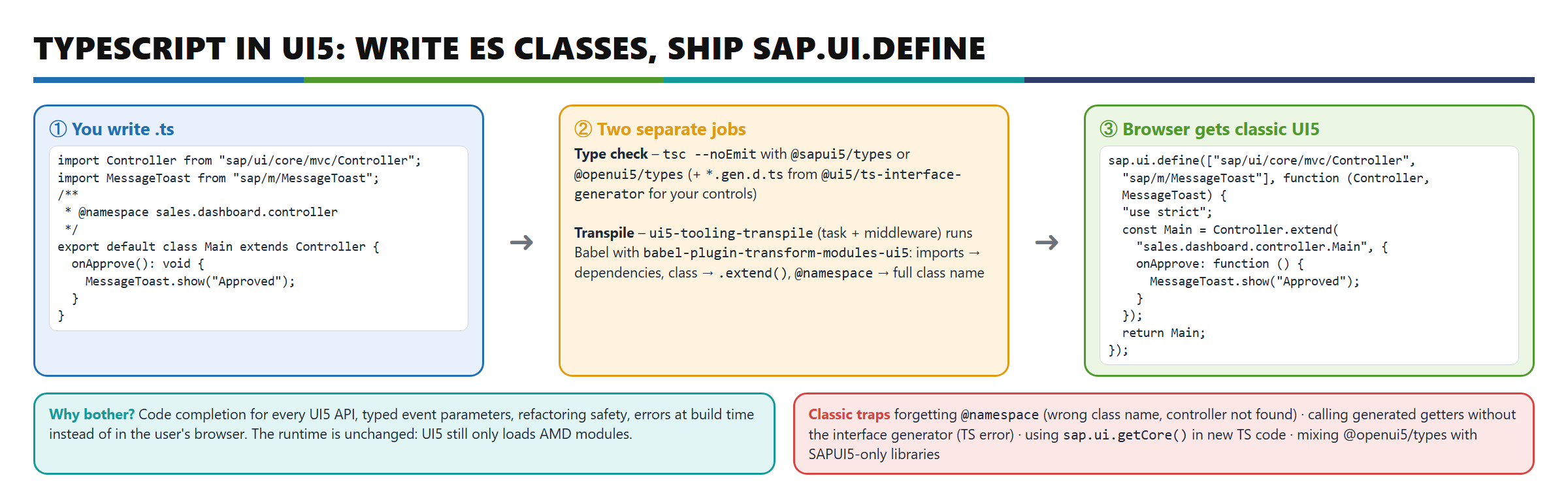
Piece | Package | Role |
|---|---|---|
Type definitions |
| Describe every UI5 module, class and event; referenced in |
Transpiler |
| ES |
Control interfaces | @ui5/ts-interface-generator | Generates |
Type check |
| Run in CI; transpiling alone does not check types |
|
|
A typed controller for the dashboard
|
@namespaceis mandatory for classes that UI5 instantiates by name (component, controllers, controls): the Babel plugin builds the full class namesales.dashboard.controller.Dashboardfrom it. Without it the view cannot find its controller.- Use
export default classwith one class per file and ESimports only; never globals orsap.ui.getCore(). - Typed events such as
Button$PressEventandTable$SelectionChangeEventexist in recent type versions; older code castsgetSource(). The action path (…v0001.approve(...)) is the bound action's qualified name in your service metadata (see$metadata).ODataContextBinding#invoke()exists since UI5 1.123 and replacesexecute(), which is deprecated since 1.123. - Migrating an existing JS app: rename files one at a time to
.ts; JS and TS can coexist because everything is transpiled to the same module format.
Part 8 – Custom controls in depth
A custom control is worth it when no standard control, composition of controls or fragment does the job and the behaviour is reused. The dashboard needs an AmountBadge: the net amount in red with a warning icon when it exceeds the manager's approval limit, green otherwise, clickable and accessible. The minimal pattern is on SAPUI5 › 04 · Data, Binding & Navigation; here is the full anatomy.
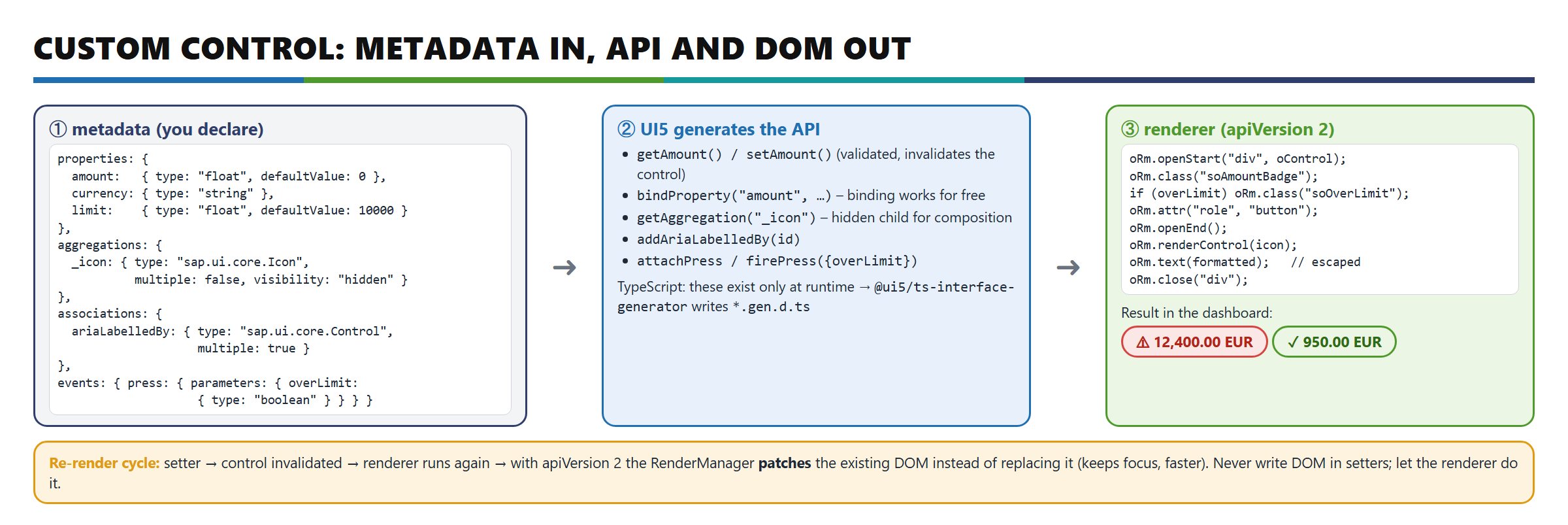
Metadata entry | Declares | Generated for you |
|---|---|---|
properties | Typed values ( |
|
aggregations | Owned children; |
|
associations | References by ID (e.g. |
|
events | Events with typed parameters; |
|
defaultAggregation | Aggregation used when XML children have no aggregation tag | – |
| Implemented interfaces, owning library | – |
|
|
Renderer rules (apiVersion 2)
- Use only the semantic API:
openStart/voidStart,openEnd/voidEnd,close,attr,class,style,text,renderControl,accessibilityState,icon. The old string API (write,writeEscaped,writeControlData) is deprecated and must not be mixed in. - The renderer must be a pure function of the control's state: no DOM access, no data loading, no side effects. With apiVersion 2 the RenderManager reuses and patches existing DOM elements, so the root element must always be the same tag with the control's ID.
apiVersion: 4adds a further promise: the control's output does not depend on its parent, so the RenderManager can skip re-rendering it when only the parent re-renders. It requires the apiVersion 2 contract and noonBeforeRendering/onAfterRenderingdelegates (see thesap.ui.core.RenderManagerAPI reference).
Other kinds of custom control
Kind | How | When |
|---|---|---|
Extend an existing control | Button.extend("sales.dashboard.control.ApproveButton", { metadata: {…}, renderer: "sap.m.ButtonRenderer" }) | Small change of behaviour; reuse the parent renderer |
Composite control | Hidden aggregations hold standard controls (like | Combine standard controls into one reusable unit |
Notepad control | Defined inline in a controller | Avoid: not reusable, hard to test |
The same control in TypeScript
|
getAmount()does not exist for the TypeScript compiler untilnpx @ui5/ts-interface-generator --watchhas writtenAmountBadge.gen.d.tsnext to the control; commit or regenerate it in CI.- Styling: put the CSS in
css/style.css(declared insap.ui5/resources/css) and use theme parameters (CSS variables such asvar(--sapNegativeColor)) instead of fixed colours, so the badge works in Horizon dark and high-contrast themes.
Part 9 – Fragments, reuse components and libraries
Three reuse levels exist above a single control. Fragments (basic loading on SAPUI5 › 04) share a piece of UI inside one app; reuse components share a complete UI part with its own logic, models and texts; libraries share controls and components across many apps.
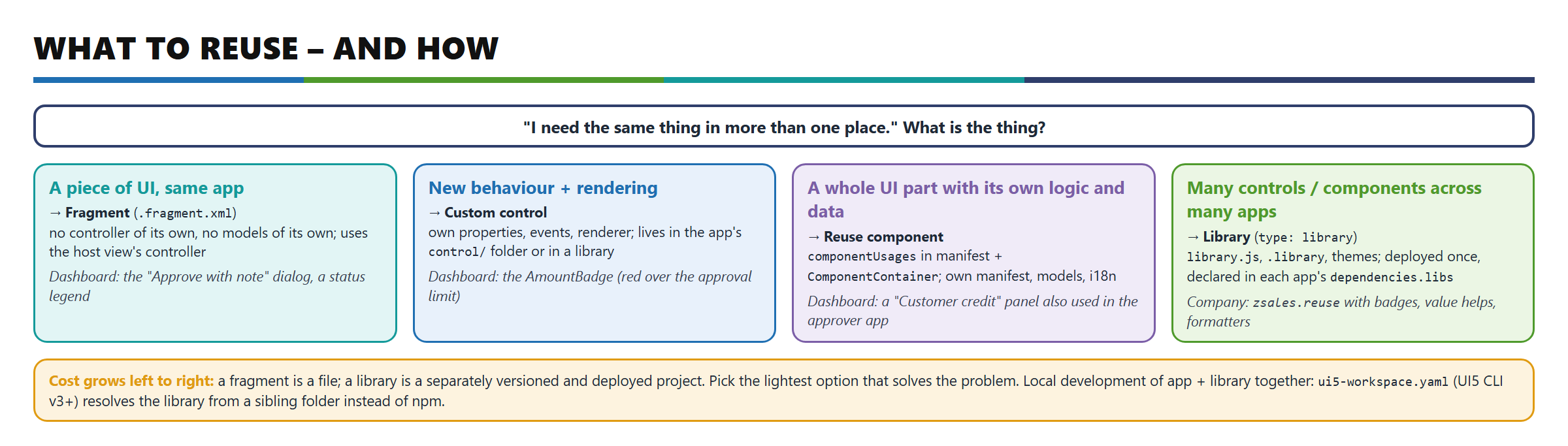
Fragments beyond the basics
- Controller choice:
this.loadFragment({ name, controller })– pass a small handler object instead ofthiswhen the same dialog is used from several views (e.g. an "Approve with note" dialog). - Static fragments with a prefix:
<core:Fragment id="approvalFrag" fragmentName="…" type="XML"/>→ IDs becomeview--approvalFrag--noteInput; read them withthis.byId(Fragment.createId("approvalFrag", "noteInput")). - Extension points (
<core:ExtensionPoint name="…"/>) in a view let customers or adaptation projects insert fragments without changing the original app (SAP Fiori › 05 · Adaptation & Extensibility of SAP Fiori Apps).
Reuse component
|
|
- A reuse component has
"type": "component"insap.app, its own manifest, i18n and models, and is deployed like an app (its own BSP application or HTML5 repo entry). The launchpad finds it through the application index, so no hard-coded URL is needed. - Keep the interface small: pass data in through
settings/componentDataor properties, and send results back through events of the component, not through shared global models.
UI5 library
|
- Project
type: libraryinui5.yaml, sources undersrc/, tests undertest/, plus a.librarydescriptor (andmanifest.json, required for libraries from UI5 CLI v5). The build createslibrary-preload.jsand compiles the library's themes. - Apps declare it in
sap.ui5/dependencies/libs("zsales.reuse": { "lazy": true }if not needed at start). On ABAP it is deployed like an app; on BTP the library must be deployed to the HTML5 repository and referenced by the app, so it is resolved from there at runtime. - Cost: a library has its own versioning and release cycle. For two apps a reuse component or a shared folder copied by a build step may be enough.
Part 10 – UI5 versions, long-term maintenance and UI5 2.x
SAPUI5 is versioned as major.minor.patch (e.g. 1.136.4). New minor versions bring features; patches bring fixes. The version overview (ui5.sap.com/versionoverview.html) gives every minor version a maintenance category and dates. In November 2026: 1.136 has long-term maintenance until Q4/2032, 1.120 long-term support until Q4/2030, 1.148 long-term support until Q3/2027; the newest version, 1.154, has mid-term support until Q3/2027; most other versions get standard support for a short time only. About a year after its end of maintenance a version reaches its end of cloud provisioning and is removed from the CDN.
Where the app runs | Who decides the UI5 version | What you control |
|---|---|---|
S/4HANA / ABAP launchpad | The SAP_UI software component of the front-end server |
|
SAP Build Work Zone | The site's UI5 version (SAP-managed, regularly updated) | Test against the version the site uses; some settings allow a fixed version |
Standalone ( | The bootstrap URL, e.g. | Pin a maintained version instead of the unversioned "latest" URL |
Local development |
| Keep it equal to production |
UI5 2.x migration essentials
UI5 2.x is the next major version. It removes all APIs deprecated with or before 1.136, so the work is done in 1.x: an app that runs on the latest 1.x without deprecated APIs is ready. SAP's guidance is to target 1.136 or later and use the UI5 linter to find the remaining issues (details of the linter on SAPUI5 › 06). In November 2026 the version overview still lists only 1.x versions for SAPUI5, so 2.x readiness is preparation work, not yet a migration date.
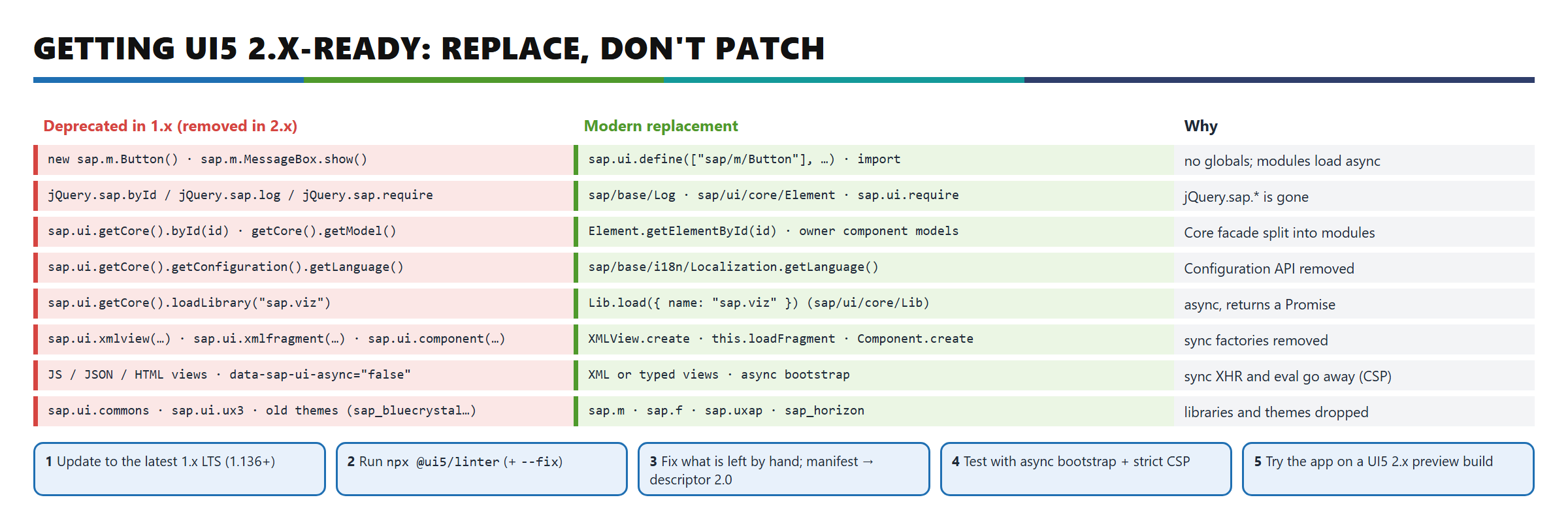
Area | Remove | Use instead |
|---|---|---|
Loading |
| async bootstrap, |
Globals |
| module imports, |
Factories |
|
|
Views | JS, JSON, HTML views | XML views, typed views |
Messages | sap.ui.getCore().getMessageManager() | sap/ui/core/Messaging |
Manifest | descriptor 1.x routing names | descriptor 2.0 (UI5 1.136+): |
Libraries / themes |
|
|
Tooling | UI5 CLI < v4 | UI5 CLI v4+ ( |
- Component flags: declare
"sap.ui.core.IAsyncContentCreation"in the component and use"async": truerouting; the linter ruleasync-component-flagschecks this. - Interview line: "We prepare for UI5 2 by staying on the latest long-term maintenance 1.x, running the UI5 linter in CI with zero findings, testing with async loading and a strict CSP, and replacing deprecated APIs as part of normal work, not as a big-bang project."
Part 11 – Interview questions
Q1. What is the UI5 CLI, and what is ui5.yaml for?
The UI5 CLI (@ui5/cli, formerly UI5 Tooling) is the Node.js tool to serve, build and configure UI5 projects. ui5.yaml declares the project type and name, the UI5 framework (OpenUI5 or SAPUI5, version, libraries), build settings and custom tasks, server settings and custom middleware. ui5 serve runs a middleware chain in memory; ui5 build runs a task pipeline into dist/.
Q2. What is the difference between middleware and a build task?
Middleware handles HTTP requests of the development server (proxy, transpile, mock data) and exists only locally. A task transforms resources during the build (minify, preload, transpile, zip, deploy) and its result is shipped. Both can be custom extensions positioned with before… / after….
Q3. What does Component-preload.js contain, and why is it important?
All modules, XML views, fragments and i18n files of the component in one file, created by generateComponentPreload. It turns dozens of requests into one cacheable request. Missing preloads (for example deploying webapp/ instead of dist/) are a classic cause of slow apps.
Q4. Default build vs self-contained build?
The default build contains only the app; UI5 comes from the launchpad or CDN – right for ABAP and Work Zone apps. ui5 build self-contained also bundles the needed framework modules into resources/sap-ui-custom.js and rewrites index.html, so the app runs on any static web server without a CDN.
Q5. Walk through deploying a UI5 app to S/4HANA.
fiori add deploy-config creates ui5-deploy.yaml with the deploy-to-abap task (system, BSP name, package, transport; credentials from environment variables). npm run deploy builds and uploads through /UI5/ABAP_REPOSITORY_SRV; the BSP application is recorded in the transport and the app index is updated. Then catalog, target mapping and role make it visible. Fallback: /UI5/UI5_REPOSITORY_LOAD.
Q6. How does a UI5 app get to SAP BTP, and where does it run?
An MTA contains an html5 module (built and zipped) and a com.sap.application.content deployer bound to html5-apps-repo (app-host). mbt build and cf deploy store the zip in the HTML5 Application Repository. The managed app router of SAP Build Work Zone serves it; xs-app.json routes OData calls to a destination. The app is static content, not a running CF application.
Q7. How does TypeScript work with UI5 if the runtime only understands sap.ui.define?
You write ES classes with imports against @sapui5/types; ui5-tooling-transpile (Babel with the UI5 transform plugin) converts imports to sap.ui.define and classes to .extend() calls, using the @namespace JSDoc for the full class name. tsc --noEmit checks types separately. For custom controls @ui5/ts-interface-generator creates the declarations of the runtime-generated methods.
Q8. Explain the parts of a custom control and the apiVersion 2 renderer.
metadata declares properties, aggregations (also hidden ones for composite controls), associations and events; UI5 generates getters, setters, binding and fireX methods. init creates internal children. The renderer uses the semantic RenderManager API (openStart, class, attr, text, close); with apiVersion: 2 the framework patches the existing DOM instead of replacing HTML strings, which is faster and keeps focus. Event handlers such as onclick and onsapenter handle mouse and keyboard.
Q9. Fragment, reuse component or library – how do you decide?
A fragment for a piece of UI inside one app (it has no controller or models of its own). A reuse component for a UI part with its own logic, models and texts used by several apps (componentUsages + ComponentContainer). A library for many controls or components shared across many apps, with its own release cycle. Choose the lightest option.
Q10. What changes with UI5 2.x, and how do you prepare an app?
UI5 2.x removes APIs deprecated with or before 1.136: globals, jQuery.sap.*, sap.ui.getCore() helpers, synchronous loading and factories, JS/JSON/HTML views, old libraries and themes. Preparation: move to the latest long-term maintenance 1.x (1.136+), run the UI5 linter (with --fix), switch the manifest to descriptor 2.0, use UI5 CLI v4, test with async loading and strict CSP.
Q11. Scenario: the dashboard works locally but in the launchpad the OData calls fail with 404.
Locally the fiori-tools-proxy forwarded /sap/...; in production there is no proxy. Check that the dataSources URI is relative and correct for the target system, that the service is published (/IWFND/V4_ADMIN for V4) and, on BTP, that xs-app.json has a route to the right destination. Use the browser Network tab and the gateway error log.
Q12. Scenario: after a deployment users still see the old version of the dashboard.
Browser or server caching. On ABAP, check that the app index was recalculated (/UI5/APP_INDEX_CALCULATE after manual uploads) and that the cache buster info was generated; ask users for a hard reload only as a workaround. On BTP, check that the new .mtar really deployed (cf html5-list) and that applicationVersion was increased.
🏠 Start Here · ◀ 04 · Data & Navigation · 06 · Testing & Performance ▶ · Sections: CORE ABAP | OOPS ABAP | ABAP on HANA | Clean Core | RAP | ABAP Points | SAP Fiori | SAPUI5 | Mobile Development (MDK) | BTP Foundations | BTP Development | CAP | SAP Build | ABAP on BTP | Integration Suite | SAP Business AI | SAP BASIS | Security | SAP SDLC
Functional: FICO ABAP | TRM ABAP | VIM | SAP BIS | SD ABAP | MM ABAP | PP ABAP | QM ABAP | PM ABAP | PS ABAP | EWM | TM ABAP | GTM ABAP | EHS ABAP | HR ABAP | BW | SAP Datasphere | SAP Business Data Cloud | SAP MDG | SAP Analytics Cloud | SAP Ariba | SAP CX | SAP IBP