SD (Sales and Distribution) is the SAP module that runs the selling side of a company: from the first customer inquiry, through the sales order and the delivery, to the invoice that FI turns into a receivable. As an ABAP developer you do not configure SD, but you read and extend its data every day – so you must know its organization units (they are key fields everywhere) and its master data (customer, material, customer-material info record, partners, prices). The process itself is on page 02 Order-to-Cash.
Part 1 – What SD does and how it integrates
SD covers pre-sales, sales order processing, shipping, billing and the SD side of credit management. Each area has its own area menu (VC00, VA00, VL00, VT00, VF00 – full list on page 05).
SD area | What happens there | Key documents / tables |
|---|---|---|
Master data | Customers, sales views of materials, CMIR, prices | KNA1, KNVV, MVKE, KNMT, KONP |
Sales support (pre-sales) | Inquiries and quotations, sales activities (sales activities: ECC only – Sales Support SD-CAS is not available in S/4HANA) | VBAK / VBAP |
Sales | Sales orders, contracts, scheduling agreements, returns, credit / debit memo requests | VBAK, VBAP, VBEP, VBKD, VBPA |
Shipping | Outbound deliveries, picking, packing, goods issue | LIKP, LIPS, VEKP / VEPO |
Transportation | Shipments that group deliveries for one truck or route | VTTK / VTTP |
Billing | Invoices, credit and debit memos, cancellations, transfer to FI | VBRK, VBRP |
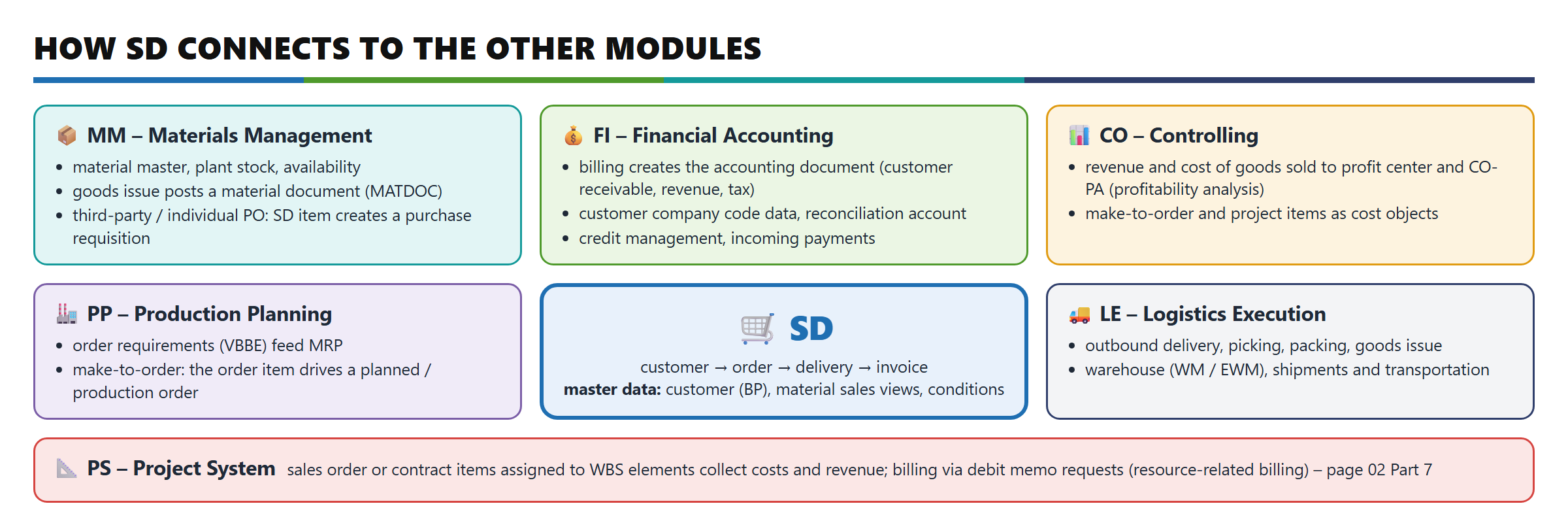
The integration points you meet in code
- SD → MM: goods issue for a delivery posts a material document (movement type 601); in S/4HANA it lands in MATDOC. Third-party items create purchase requisitions.
- SD → FI: releasing a billing document creates an accounting document (BKPF / BSEG, in S/4HANA ACDOCA): customer receivable against revenue and tax. Accounts come from account determination (page 03).
- SD → PP: order requirements are stored in VBBE and read by MRP and the availability check.
- SD → CO: revenue and cost of goods sold flow to the profit center and to profitability analysis.
- SD ↔ PS: order or contract items can be assigned to WBS elements (page 02 Part 7).
Part 2 – Organization structure
The organization units model the company in the system. They are defined and assigned once in Customizing (SPRO → Enterprise Structure → Definition / Assignment) and then appear as key fields in master data and documents. Customer sales data, prices and every sales document are created for one sales area.
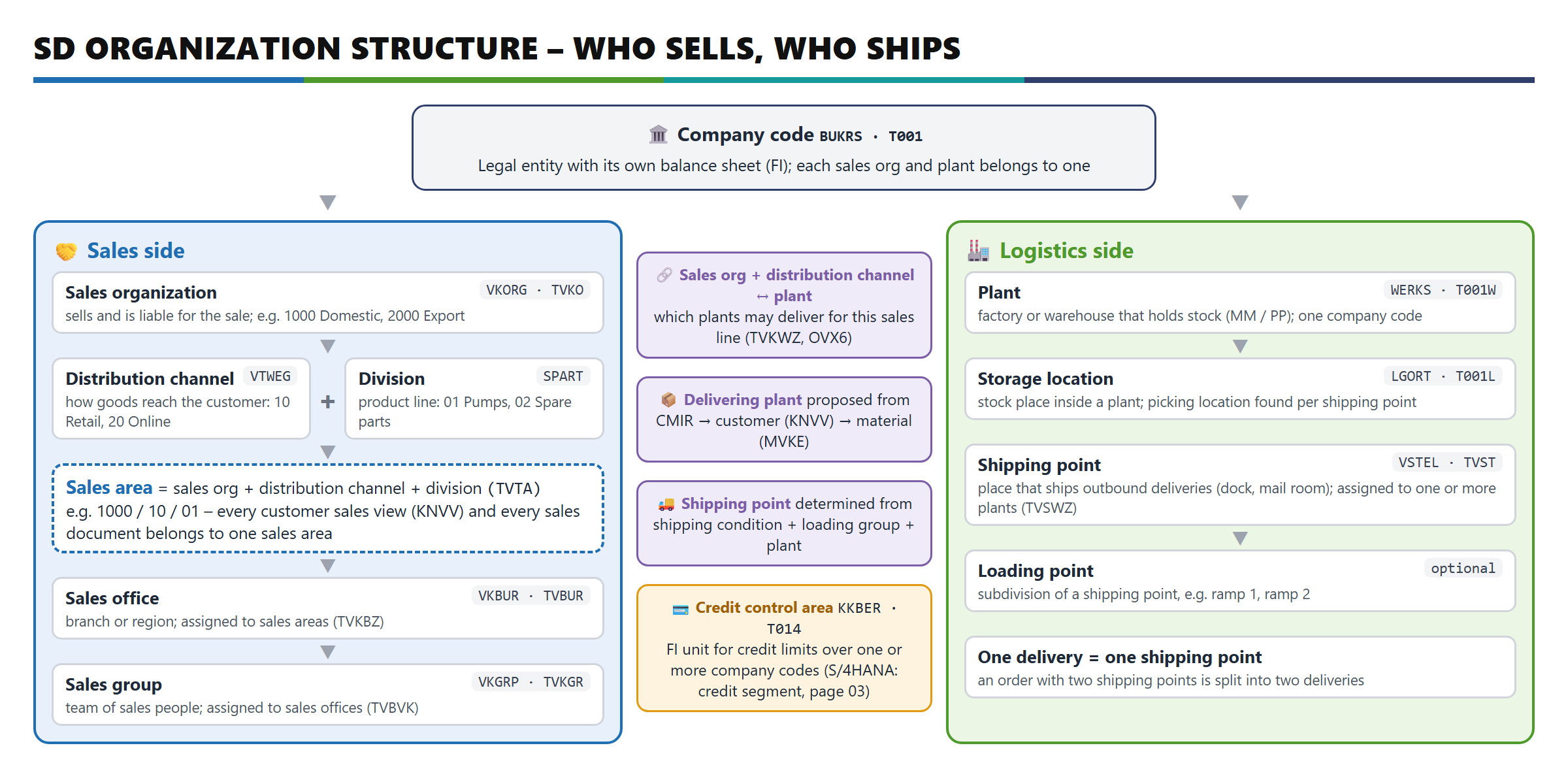
2.1 The units
Unit | Meaning | Field | Table |
|---|---|---|---|
Company code | Legal entity with its own balance sheet (FI). All other units hang below one company code. | BUKRS | T001 |
Sales organization | Sells the goods, is legally responsible for the sale and for customer claims. Highest SD unit. | VKORG | TVKO |
Distribution channel | The way goods reach the customer: retail, wholesale, online. Lets prices and data differ per channel. | VTWEG | TVTW |
Division | A product line, e.g. pumps or spare parts. Lets agreements and prices differ per product group. | SPART | TSPA |
Sales area | Combination sales org + distribution channel + division. Not a separate unit but the level at which customer sales data (KNVV) and documents live. | VKORG / VTWEG / SPART | TVTA |
Sales office | A branch or regional office; optional, for reporting and authorizations. | VKBUR | TVBUR |
Sales group | A team of sales people inside a sales office; optional. | VKGRP | TVKGR |
Plant | Factory or warehouse that holds stock (MM / PP). Delivers the goods. | WERKS | T001W |
Storage location | Stock place inside a plant; the picking location is determined per shipping point. | LGORT | T001L |
Shipping point | The place that processes outbound deliveries (loading dock, mail room). Every delivery belongs to exactly one shipping point. | VSTEL | TVST |
Loading point | Optional subdivision of a shipping point (ramp). | LSTEL | TVLA |
Credit control area | FI unit in which credit limits are managed; covers one or more company codes (page 03). | KKBER | T014 |
2.2 Assignment rules
Assignment | Rule | Transaction / table |
|---|---|---|
Sales organization → company code | Each sales org belongs to exactly one company code; a company code can have many sales orgs. | OVX3 · TVKO-BUKRS |
Distribution channel → sales organization | Many-to-many: one channel can serve several sales orgs. | OVXK · TVKOV |
Division → sales organization | Many-to-many. | OVXA · TVKOS |
Sales area | Only the combinations you set up are allowed. | OVXG · TVTA |
Sales office → sales area | One office can work for several sales areas. | TVKBZ |
Sales group → sales office | One group can belong to several offices. | OVXJ · TVBVK |
Plant → sales org + distribution channel | Which plants may deliver for this sales line; a plant can serve several sales orgs, also of other company codes (intercompany, page 02). | OVX6 · TVKWZ |
Plant → company code | Each plant belongs to exactly one company code (via its valuation area). | T001K |
Shipping point → plant | One shipping point can serve several plants and one plant can use several shipping points. | TVSWZ |
Determination in documents
- Delivering plant of an order item: proposed from the CMIR, else from the customer (KNVV-VWERK), else from the material (MVKE-DWERK).
- Shipping point of an order item: from shipping condition (customer, KNVV-VSBED) + loading group (material, MARC-LADGR) + delivering plant (table TVSTZ).
- Developer rule: organization units are the first fields of almost every authorization check in SD (e.g. object V_VBAK_VKO checks sales org, distribution channel, division).
Part 3 – Master data overview
Master data is created once and reused by every document: when you create a sales order, SD copies partner, pricing, shipping and payment data from the masters into the order. So master data has to exist before the first transaction, in this order:
Step | Master data | Transaction | Main tables |
|---|---|---|---|
1 | Customer (business partner with customer roles) | BP (ECC: XD01 central, VD01 sales, FD01 accounting) | KNA1, KNB1, KNVV |
2 | Material with sales views | MM01 create / MM02 change / MM03 display | MARA, MVKE, MARC |
3 | CMIR – customer-material info record (optional) | VD51 create / VD52 change / VD53 display | KNMT |
4 | Condition records – prices, discounts, freight, taxes | VK11 / VK12 / VK13 (page 03) | KONH, KONP, Axxx |
- Display of a customer: BP in S/4HANA (XD03, VD03 and FD03 redirect there); in ECC XD03 (central), VD03 (sales view), FD03 (accounting view – general and company code data, no sales data).
- Do not confuse this "set up once" master data with the one-time customer (CPD account group): a single customer master used for many occasional buyers, whose name and address are entered in each document (stored in the document's partner address).
Part 4 – Customer master: the business partner in S/4HANA
In S/4HANA every customer is a business partner (BP). You maintain it only in transaction BP; the old customer transactions XD01, VD01 and FD01 redirect there. CVI (Customer/Vendor Integration) writes the classic customer tables in the background, so KNA1, KNB1 and KNVV still exist and are filled. Vendors work the same way (they are MM / FI master data, page 05).
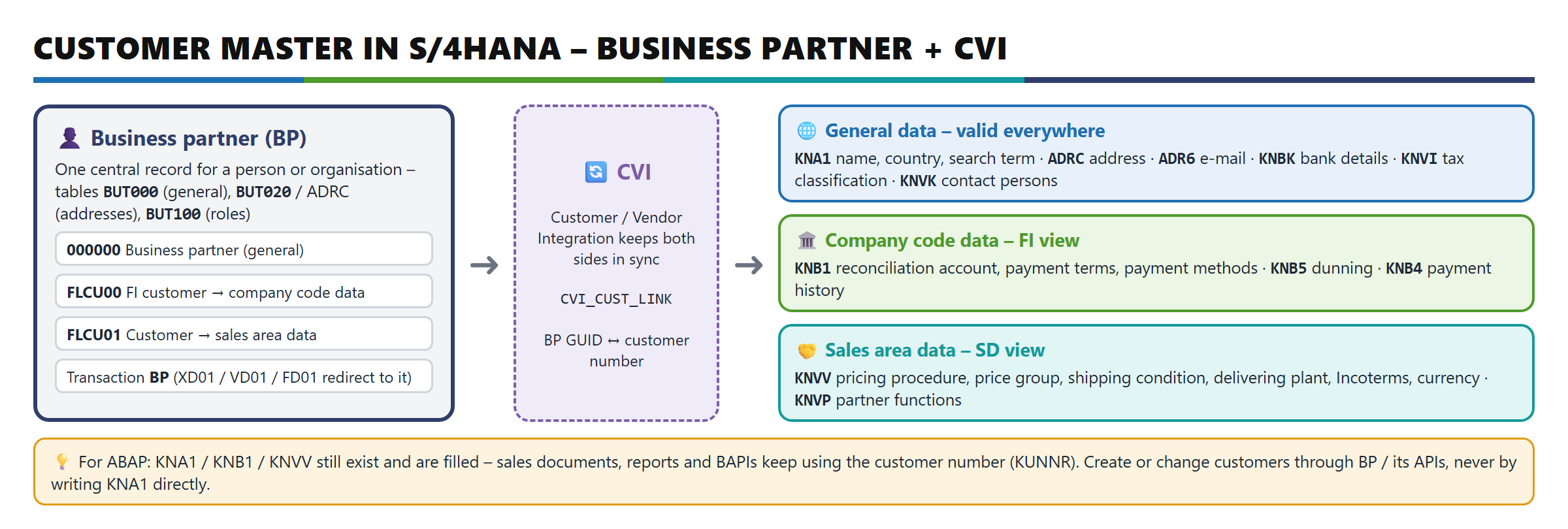
4.1 BP roles and data levels
BP role | Creates | Customer data level | Key |
|---|---|---|---|
000000 Business partner (general) | Name, address, communication, bank details | General data | KUNNR |
FLCU00 FI customer | Reconciliation account, payment terms, dunning | Company code data | KUNNR + BUKRS |
FLCU01 Customer | Pricing, shipping, billing data, partner functions | Sales area data | KUNNR + VKORG + VTWEG + SPART |
- The BP grouping controls the number range; it is mapped to a customer account group (KNA1-KTOKD), which still controls the customer number and the screen fields.
- Link tables: CVI_CUST_LINK (BP GUID ↔ customer number), BP data in BUT000, roles in BUT100.
4.2 Customer tables
Table | Content | Key fields | Typical fields |
|---|---|---|---|
KNA1 | General data | KUNNR | NAME1, LAND1, ORT01, KTOKD, ADRNR (address number) |
KNB1 | Company code data | KUNNR, BUKRS | AKONT reconciliation account, ZTERM payment terms, ZWELS payment methods |
KNB4 | Payment history (payment behaviour per company code) | KUNNR, BUKRS | Days in arrears, payment amounts |
KNB5 | Dunning data | KUNNR, BUKRS, MABER | MAHNA dunning procedure, MAHNS dunning level |
KNBK | Bank details | KUNNR, BANKS, BANKL, BANKN | Bank country, bank key, account |
KNVV | Sales area data | KUNNR, VKORG, VTWEG, SPART | KALKS pricing procedure, KONDA price group, VSBED shipping condition, VWERK delivering plant, INCO1 Incoterms, WAERS currency |
KNVP | Partner functions per sales area | KUNNR, VKORG, VTWEG, SPART, PARVW, PARZA | KUNN2 partner customer, PERNR, PARNR |
KNVI | Tax classification per country and tax category | KUNNR, ALAND, TATYP | TAXKD tax class |
KNVK | Contact persons | PARNR | KUNNR, NAMEV, NAME1 |
ADRC | Address (central address management) | ADDRNUMBER (= KNA1-ADRNR) | NAME1, STREET, CITY1, POST_CODE1, COUNTRY |
ADR6 | E-mail addresses | ADDRNUMBER, PERSNUMBER, DATE_FROM, CONSNUMBER | SMTP_ADDR |
Example – customer with sales area data and e-mail
|
Reading these tables is fine. To create or change customers use BP, the BP APIs or released CDS views such as I_Customer / I_CustomerSalesArea – never UPDATE KNA1 directly, or BP and customer get out of sync.
Part 5 – Material master: the sales views
The material master is MM data, but SD needs its sales views: Sales: Sales Org. Data 1 and 2 (per sales org + distribution channel) and Sales: General/Plant Data. Create with MM01, change with MM02, display with MM03.
Table | Content | Key fields | Fields SD uses |
|---|---|---|---|
MARA | General data | MATNR | MTART material type, MEINS base unit, SPART division, MTPOS_MARA general item category group, TRAGR transportation group |
MAKT | Material descriptions | MATNR, SPRAS | MAKTX |
MARC | Plant data | MATNR, WERKS | LADGR loading group, DISMM MRP type, MTVFP availability check group |
MVKE | Sales data | MATNR, VKORG, VTWEG | MTPOS item category group, DWERK delivering plant, KONDM material price group, VRKME sales unit |
MBEW | Valuation (accounting) data | MATNR, BWKEY (= plant), BWTAR | Price control, standard / moving price |
MARD | Storage location data and stock | MATNR, WERKS, LGORT | Unrestricted stock (in S/4HANA calculated from MATDOC behind the same name) |
MARM | Units of measure and conversion factors | MATNR, MEINH | UMREZ / UMREN numerator / denominator |
- The item category group (MVKE-MTPOS, e.g. NORM standard, BANS third-party) decides the item category in the sales order; the MRP type (MARC-DISMM) decides the schedule line category – both explained on page 02 Part 3.
- The loading group (MARC-LADGR) feeds shipping point determination (Part 2).
- In S/4HANA the material number can be 40 characters long (MATNR extension) – never assume CHAR 18 in custom code.
Part 6 – CMIR, partner functions and condition records
6.1 Customer-material info record (CMIR)
A CMIR stores how one customer refers to one of your materials: the customer's own material number and description, and optional defaults such as delivering plant, delivery tolerances and minimum quantity. The customer can then order with his own number; the sales order finds your material and shows his number in the item (VBAP-KDMAT).
- Transactions VD51 create, VD52 change, VD53 display; table KNMT (key: sales org, distribution channel, customer, material).
- Not to be confused with material determination (VB11), which swaps one material for another for all customers (e.g. promotion packs).
6.2 Partner functions
A customer can play several roles in one sale. The partner functions say who orders, who receives the goods, who gets the invoice and who pays. They default from KNVP and are stored per document in VBPA.
Function (English) | Internal key in VBPA-PARVW | Role |
|---|---|---|
SP Sold-to party | AG | Places the order; mandatory; decides pricing and sales area data |
SH Ship-to party | WE | Receives the goods; decides shipping point, route, delivery address |
BP Bill-to party | RE | Receives the invoice |
PY Payer | RG | Pays the invoice; credit check runs on the payer |
- Further functions exist for contact persons and employees (sales employee, employee responsible); they point to a contact person (PARNR) or personnel number (PERNR) instead of a customer.
- Developer trap: the database stores the German internal keys (AG, WE, RE, RG); the screen shows SP, SH, BP, PY through conversion exit PARVW. In a SELECT on VBPA or KNVP use
parvw = 'WE'for the ship-to party, not 'SH'. - Header partners have item number POSNR = 000000 in VBPA; an item only has its own VBPA row when its partner differs from the header.
6.3 Condition records (pricing master data)
Prices, discounts, surcharges, freight and taxes are also master data: condition records created with VK11 (change VK12, display VK13), stored in condition tables Axxx (key) with header KONH and item KONP (amounts, scales). How SD finds them – the condition technique – is on page 03.
Part 7 – Interview questions
Q1. What is SD and which modules does it integrate with?
Sales and Distribution handles pre-sales, sales orders, shipping, billing and credit checks. It integrates with MM (stock, goods issue, purchase requisitions), FI (accounting document, receivables), CO (profit center, CO-PA), PP (requirements to MRP), LE (delivery, warehouse) and PS (WBS billing).
Q2. What is a sales area?
The combination of sales organization, distribution channel and division (table TVTA). Customer sales data (KNVV), prices and every sales document belong to exactly one sales area.
Q3. Can a sales organization belong to more than one company code?
No. A sales organization is assigned to exactly one company code; a company code can have several sales organizations. A plant also belongs to one company code, but it can deliver for sales orgs of other company codes (intercompany sales).
Q4. What is the difference between a plant and a shipping point?
The plant holds the stock (MM). The shipping point is the place that processes the outbound delivery; it is assigned to plants and determined from shipping condition, loading group and plant. One delivery has one shipping point.
Q5. How is the customer master handled in S/4HANA?
As a business partner in transaction BP with roles (FLCU00 company code data, FLCU01 sales data). CVI synchronises it with KNA1, KNB1 and KNVV, linked through CVI_CUST_LINK. XD01/VD01 redirect to BP.
Q6. Which tables hold customer data at the three levels?
General: KNA1 (address in ADRC, e-mail in ADR6, bank KNBK, tax KNVI). Company code: KNB1 (dunning KNB5, payment history KNB4). Sales area: KNVV (partner functions KNVP).
Q7. Which material master tables does SD read?
MARA general, MAKT descriptions, MVKE sales data per sales org and distribution channel, MARC plant data, MARD storage location stock, MBEW valuation, MARM units of measure.
Q8. What is a CMIR?
Customer-material info record (VD51–VD53, table KNMT): the customer's own material number and description plus defaults like delivering plant for one customer and material. It has priority when the delivering plant is proposed.
Q9. Name the four main partner functions and their internal keys.
Sold-to SP (AG), ship-to SH (WE), bill-to BP (RE), payer PY (RG). VBPA and KNVP store the internal keys, so SELECTs must use AG / WE / RE / RG.
Q10. How is the delivering plant determined in a sales order?
From the CMIR first, then the customer master (KNVV-VWERK), then the material master (MVKE-DWERK). The plant must be allowed for the sales org and distribution channel (TVKWZ).
Q11. What is a one-time customer?
A customer master of a one-time account group (CPD) shared by many occasional buyers; their name and address are entered in each document instead of creating a new master record.
🏠 Start Here · 02 · Order-to-Cash ▶ · Sections: CORE ABAP | OOPS ABAP | ABAP on HANA | Clean Core | RAP | ABAP Points | SAP Fiori | SAPUI5 | Mobile Development (MDK) | BTP Foundations | BTP Development | CAP | SAP Build | ABAP on BTP | Integration Suite | SAP Business AI | SAP BASIS | Security | SAP SDLC
Functional: FICO ABAP | TRM ABAP | VIM | SAP BIS | SD ABAP | MM ABAP | PP ABAP | QM ABAP | PM ABAP | PS ABAP | EWM | TM ABAP | GTM ABAP | EHS ABAP | HR ABAP | BW | SAP Datasphere | SAP Business Data Cloud | SAP MDG | SAP Analytics Cloud | SAP Ariba | SAP CX | SAP IBP