Order-to-cash (O2C) is the end-to-end SD process: the customer asks, we offer, the customer orders, we deliver, we invoice and the customer pays. Every step creates a document that is copied from the one before and linked to it in the document flow. This page explains the steps, the sales document structure and its tables, how item and schedule line categories are found, copy control, incompletion and the special processes (returns, consignment, third-party, intercompany, contracts). Organization units and master data are on page 01; pricing, output and credit on page 03.
Part 1 – The order-to-cash process
The standard flow is Inquiry → Quotation → (Contract) → Sales order → Delivery → Picking / Packing / Goods issue → Billing → FI posting and payment. Inquiry, quotation and contract are optional: many orders start directly in VA01.
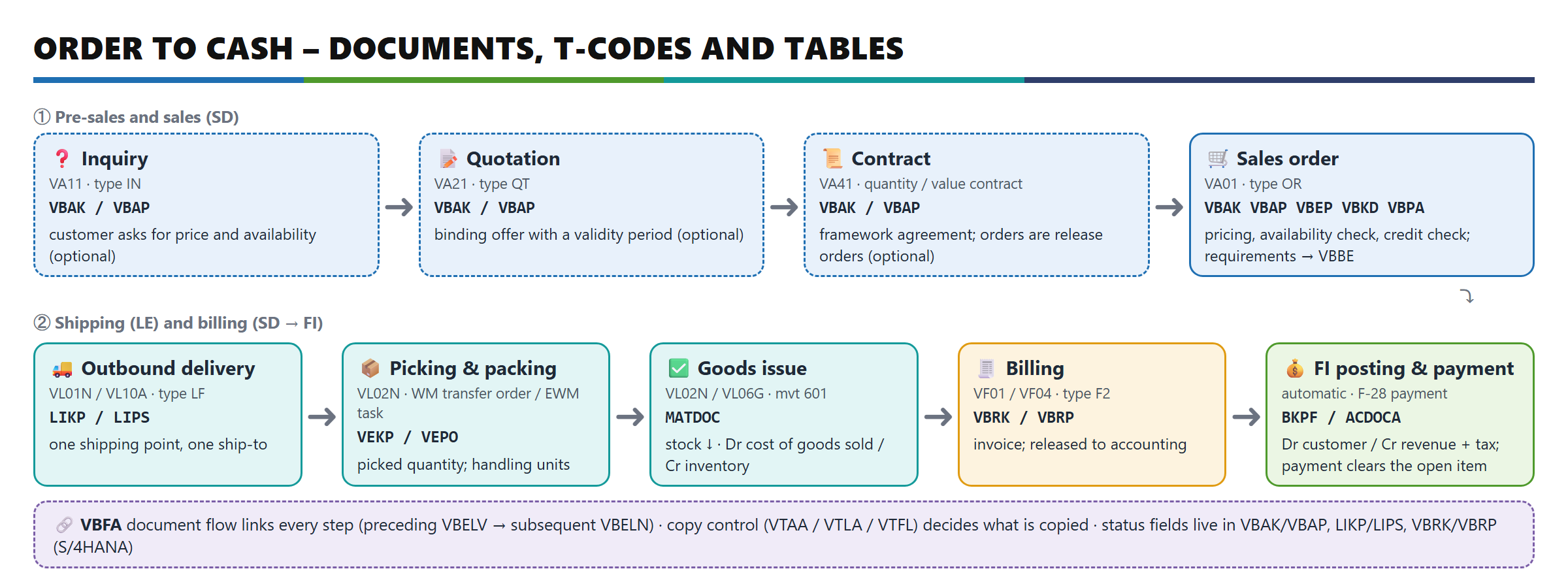
Step | Document (type) | Create / change / display | What happens |
|---|---|---|---|
1 Inquiry | Inquiry (IN) | VA11 / VA12 / VA13 | Customer asks for price and availability; no obligation |
2 Quotation | Quotation (QT) | VA21 / VA22 / VA23 | Binding offer, valid from–to; can be copied into an order |
3 Contract | Quantity / value contract | VA41 / VA42 / VA43 | Long-term agreement; orders are created as release orders against it (Part 6) |
4 Sales order | Standard order (OR) | VA01 / VA02 / VA03 | Pricing, availability check, credit check, delivery dates; requirements passed to MRP (VBBE) |
5 Delivery | Outbound delivery (LF) | VL01N / VL02N / VL03N; collective VL10A | Created when the material is due; one shipping point, one ship-to per delivery |
6 Picking | Delivery (picked quantity) | VL02N; WM transfer order (ECC; in S/4HANA LE-WM is compatibility scope only) or EWM warehouse task | Goods taken from the storage location; picking status |
7 Packing | Handling units | VL02N → Pack | Goods packed into cartons / pallets (handling units, page 03) |
8 Goods issue | Material document | VL02N → Post goods issue; VL06G | Stock reduced (movement type 601); FI: Dr cost of goods sold, Cr inventory. Reverse with VL09 (602) |
9 Billing | Invoice (F2) | VF01 / VF02 / VF03; billing due list VF04 | Prices copied from the order, quantity from the delivery; released to accounting |
10 FI posting and payment | Accounting document | automatic; FBL5N customer line items; F-28 incoming payment | Dr customer receivable, Cr revenue and tax; payment clears the open item |
- Transfer of requirements: the confirmed order quantities are written to VBBE so that MRP and the availability check see them.
- Billing can be delivery-related (normal goods, F2 after goods issue) or order-related (services, credit / debit memos, third-party: billing directly from the order).
Part 2 – The sales document and its tables
Inquiries, quotations, contracts, orders, returns and credit / debit memo requests are all sales documents, stored in the same tables. A sales document has three levels: header (one per document), items (materials) and schedule lines (dates and quantities per item). Business data and partners exist at header level and can differ per item.
Table | Content | Key | Important fields |
|---|---|---|---|
VBAK | Header data | VBELN | AUART doc type, VBTYP doc category, VKORG / VTWEG / SPART, KUNNR sold-to, ERDAT, NETWR, WAERK, KNUMV (link to pricing, page 03) |
VBAP | Item data | VBELN, POSNR | MATNR, PSTYV item category, KWMENG order quantity, WERKS plant, ABGRU reason for rejection, KDMAT customer material, VGBEL / VGPOS reference document |
VBEP | Schedule lines | VBELN, POSNR, ETENR | ETTYP schedule line category, EDATU delivery date, WMENG ordered quantity, BMENG confirmed quantity |
VBKD | Business data | VBELN, POSNR (000000 = header) | BSTKD customer PO number, ZTERM payment terms, INCO1 Incoterms, KONDA price group |
VBPA | Partners | VBELN, POSNR (000000 = header), PARVW | KUNNR, PERNR, ADRNR (PARVW keys AG / WE / RE / RG, page 01) |
VBFA | Document flow | VBELV, POSNV, VBELN, POSNN, VBTYP_N | Preceding → subsequent document (Part 4) |
VBUK | Header status – ECC only | VBELN | Removed in S/4HANA: fields moved into VBAK (and LIKP, VBRK) |
VBUP | Item status – ECC only | VBELN, POSNR | Removed in S/4HANA: fields moved into VBAP (and LIPS, VBRP) |
VBBE | Sales requirements (individual records) | MATNR, WERKS, VBELN, POSNR, ETENR | Open requirement quantity per schedule line, read by MRP / ATP |
VEDA | Contract data | VBELN, VPOSN | Validity start / end, cancellation rules |
VBUV | Incompletion log | VBELN, POSNR, ETENR, TBNAM, FDNAM | Missing fields (Part 4) |
2.1 Status in S/4HANA
In ECC the status of every SD document sat in two extra tables, VBUK (header) and VBUP (item) – for sales orders, deliveries and billing documents alike. S/4HANA removed both tables and moved the status fields into the document tables themselves: VBAK / VBAP for sales documents, LIKP / LIPS for deliveries and VBRK / VBRP for billing documents (simplification item, SAP Note 2267306). One SELECT less, and no joins on VBUK.
Status | Header field | Item field | Values |
|---|---|---|---|
Overall processing status | GBSTK | GBSTA | A not processed · B partially · C completely |
Delivery status | LFSTK | LFSTA | A / B / C (' ' = not relevant) |
Billing status (delivery- / order-related) | FKSTK / FKSAK | FKSTA / FKSAA | A / B / C |
Credit status | CMGST | – | A checked OK · B not OK (blocked) · D released |
Incompletion (header data) | UVALL | UVALL | A incomplete · C complete |
Rejection status | ABSTK | ABSTA | A nothing rejected · C all rejected |
Goods movement status (delivery) | WBSTK (LIKP) | WBSTA (LIPS) | C = goods issue posted |
Picking status (delivery) | KOSTK (LIKP) | KOSTA (LIPS) | A / B / C |
Example – open sales orders: ECC versus S/4HANA
|
- Custom code that reads VBUK / VBUP must be adapted during the S/4HANA conversion (ATC finds it). For new development prefer released CDS views such as
I_SalesOrderandI_SalesOrderItem(page 04).
Part 3 – Document types, item categories and schedule lines
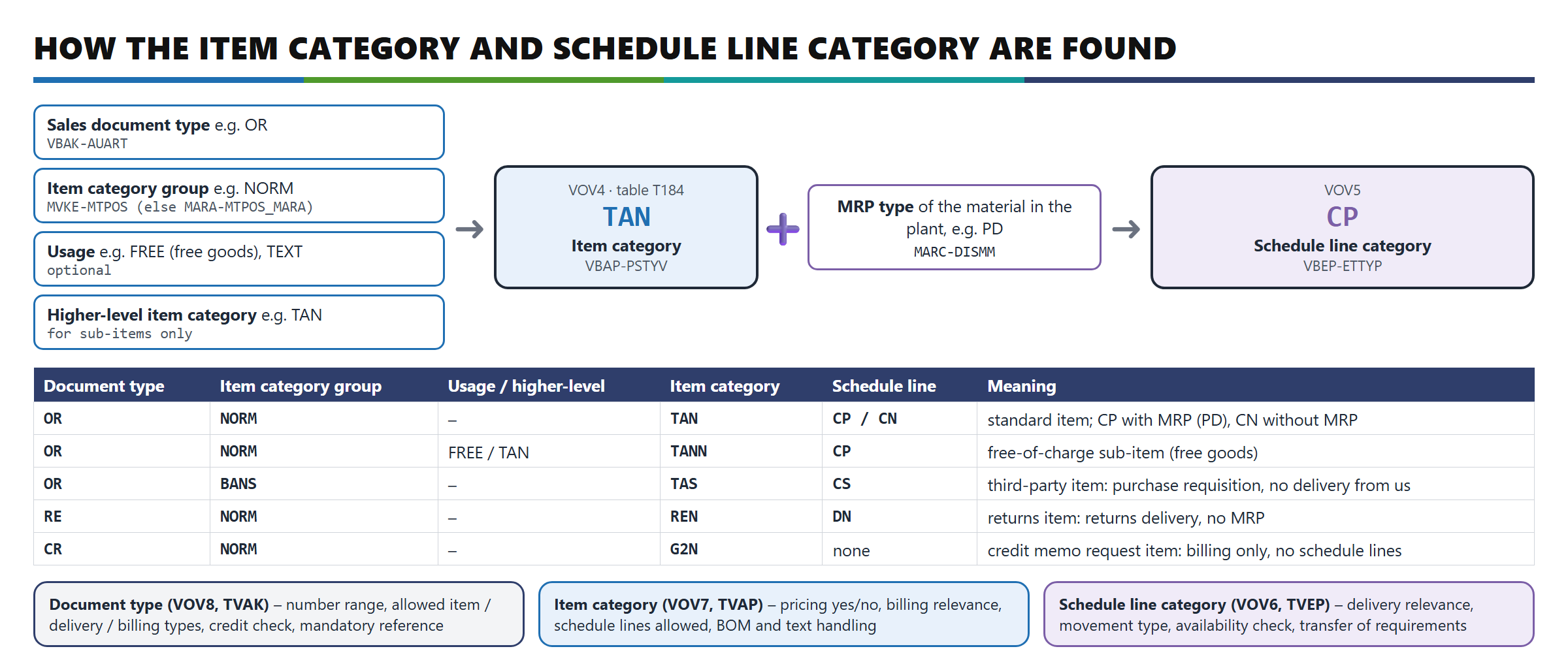
Three Customizing keys control how a sales document behaves: the sales document type (header), the item category (each item) and the schedule line category (each schedule line). The item category and schedule line category are determined automatically from the document type and the material master.
3.1 Sales document types
Maintained in VOV8 (table TVAK). The database stores the internal (German) key; the screen shows the language-dependent key through conversion exit AUART – e.g. OR on the screen is TA in VBAK-AUART.
Type (internal) | Name | Document category VBTYP | Typical follow-on |
|---|---|---|---|
IN (AF) | Inquiry | A | Quotation |
QT (AG) | Quotation | B | Sales order |
OR (TA) | Standard order | C | Delivery LF → invoice F2 |
RO (SO) | Rush order – delivery created when the order is saved | C | Invoice F2 |
CS (BV) | Cash sale – delivery at once, cash invoice printed at once | C | Order-related cash invoice BV |
FD (KL) | Free-of-charge delivery | I | Delivery, no invoice |
RE (RE) | Returns | H | Returns delivery LR → credit memo RE |
CR (G2) | Credit memo request | K | Credit memo G2 |
DR (L2) | Debit memo request | L | Debit memo L2 |
KB / KE / KA / KR | Consignment fill-up / issue / pick-up / returns | C / C / C / H | Part 6 |
CQ (MK) / WK1, WK2 | Quantity contract / value contracts | G | Release orders |
DS (LP) | Scheduling agreement | E | Deliveries per schedule |
3.2 Item categories
Maintained in VOV7 (table TVAP); determined in VOV4 (table T184) from sales document type + item category group of the material (MVKE-MTPOS) + usage + higher-level item category.
Item category | Use | Controls |
|---|---|---|
TAN | Standard item | Priced, delivery-relevant, delivery-related billing |
TANN | Free-of-charge item (e.g. free goods sub-item) | Not priced (100 % discount) |
AFN / AGN | Inquiry / quotation item | Not delivery- or billing-relevant |
REN | Returns item | Returns delivery, credit memo |
G2N / L2N | Credit / debit memo request item | Order-related billing, no schedule lines |
TAS | Third-party item | Purchase requisition, order-related billing |
TAB | Individual purchase order item | PO to vendor, vendor delivers to us |
TAX | Non-stock item (material type NLAG) | No inventory management |
TAQ / TAE | Sales BOM (item category group ERLA): header priced / components not priced; with LUMF the header is TAP and the components TAN are priced | BOM explosion in the order |
KBN / KEN / KAN / KRN | Consignment fill-up / issue / pick-up / returns | Special stock movements (Part 6) |
3.3 Schedule line categories
Maintained in VOV6 (table TVEP); determined in VOV5 from item category + MRP type (MARC-DISMM). The schedule line category decides whether the line is relevant for delivery, which movement type goods issue uses, and whether availability check and transfer of requirements run.
Category | Meaning |
|---|---|
CP | Deterministic MRP (MRP type PD): availability check, requirements to MRP, delivery-relevant, movement 601 |
CN | No MRP: delivery-relevant but no requirements |
CS | Third party: creates a purchase requisition, not delivery-relevant |
CB | Individual purchase order |
DN | Returns, no MRP (goods receipt from the customer) |
BN / AT | Quotation / inquiry schedule lines – not delivery-relevant |
Part 4 – Copy control, document flow and incompletion
4.1 Copy control
Copy control defines which document can be created from which, and what is copied. It is set per source + target type at header, item and (for sales documents) schedule line level, using copy requirements (conditions that must be true) and data transfer routines (what is copied) – both are VOFM routines (page 04).
Transaction | From → to | Example | Table |
|---|---|---|---|
VTAA | Sales document → sales document | QT → OR, OR → RE, contract → release order | TVCPA |
VTLA | Sales document → delivery | OR → LF | TVCPL |
VTFL | Delivery → billing document | LF → F2 | TVCPF |
VTFA | Sales document → billing document (order-related) | CR → G2, DR → L2, CS → BV | TVCPF |
VTFF | Billing document → billing document | F2 → cancellation or invoice correction | TVCPF |
- In billing copy control the pricing type decides what happens to prices: B carry out new pricing, C copy manual price elements and redetermine the others, D copy prices unchanged, G copy unchanged but redetermine taxes.
4.2 Document flow – VBFA
Each time a document is created with reference, a row is written to VBFA: preceding document VBELV / POSNV, subsequent document VBELN / POSNN, categories VBTYP_V / VBTYP_N, plus the copied quantity. In the GUI: VA03 / VL03N / VF03 → Environment → Display document flow.
VBTYP | Document category | VBTYP | Document category |
|---|---|---|---|
A | Inquiry | J | Delivery |
B | Quotation | T | Returns delivery |
C | Order | R | Goods movement |
G / E | Contract / scheduling agreement | M | Invoice |
H | Returns | N | Invoice cancellation |
K / L | Credit / debit memo request | O / P | Credit memo / debit memo |
|
- Always read VBFA from the preceding document (VBELV is the leading key field). For the complete multi-level flow use FM
RV_ORDER_FLOW_INFORMATION.
4.3 Incompletion
An incompletion procedure lists the fields that must be filled (e.g. PO number, payment terms, shipping point). Procedures are defined in OVA2 and assigned to sales document types, item categories, schedule line categories, delivery types and partner functions. Missing fields are written to VBUV; the status group decides what is blocked (save, delivery, billing).
- In the order: Edit → Incompletion log. List of incomplete documents: V.02.
- Status fields: UVALL / UVVLK / UVFAK (incomplete general / for delivery / for billing) in VBAK (ECC: VBUK).
Part 5 – Delivery and billing documents
5.1 Outbound delivery
The outbound delivery is created from the order when the material availability date is reached – single with VL01N or collectively from the delivery due list VL10A (in background as a job). Picking, packing and goods issue are all done on the delivery (VL02N); the delivery monitor VL06O lists deliveries per step (full list of VL06 monitors on page 05).
Table | Content | Key | Important fields |
|---|---|---|---|
LIKP | Delivery header | VBELN | LFART delivery type, VSTEL shipping point, KUNNR ship-to, WADAT planned / WADAT_IST actual goods issue date, ROUTE |
LIPS | Delivery item | VBELN, POSNR | MATNR, LFIMG delivery quantity, WERKS, LGORT, CHARG batch, VGBEL / VGPOS sales order reference |
VBUK / VBUP | Delivery header / item status – ECC only | VBELN (, POSNR) | S/4HANA: in LIKP / LIPS (WBSTK, KOSTK, FKSTK …) |
VBBE | Sales requirements | MATNR, WERKS … | Reduced when the delivery is created |
- Delivery types: LF outbound delivery, LR returns delivery, NL replenishment delivery (stock transport order), LO delivery without order reference.
5.2 Billing document
Billing documents are created with VF01 (single) or the billing due list VF04 (collective; in background with VF06). One billing run can combine several deliveries into one invoice if the header data agree (payer, billing date, billing type …), otherwise it splits. Saving the billing document releases it to accounting – if that fails (e.g. missing G/L account) it is blocked; repair it and release with VF02 or VFX3. Cancel with VF11 (cancellation document S1 / S2).
Table | Content | Key | Important fields |
|---|---|---|---|
VBRK | Billing header | VBELN | FKART billing type, FKDAT billing date, KUNRG payer, NETWR, RFBSK posting status to accounting, KNUMV pricing |
VBRP | Billing item | VBELN, POSNR | MATNR, FKIMG billed quantity, NETWR, VGBEL / VGPOS delivery reference, AUBEL / AUPOS sales order reference |
VBUK / VBUP | Billing header / item status – ECC only | VBELN (, POSNR) | S/4HANA: in VBRK |
Billing type | Meaning |
|---|---|
F2 | Invoice (delivery- or order-related) |
F1 / F8 / F5 | Order-related invoice / pro forma for delivery / pro forma for order |
G2 / L2 | Credit memo / debit memo |
RE | Credit memo for returns |
BV | Cash sale invoice |
IV | Intercompany invoice |
S1 / S2 | Cancellation of an invoice / of a credit memo |
LR / LG | Invoice list / credit memo list |
- The accounting document is found from the billing document via the FI document's reference (BKPF-AWKEY = billing number) or the document flow; customer line items: FBL5N.
Part 6 – Special sales processes
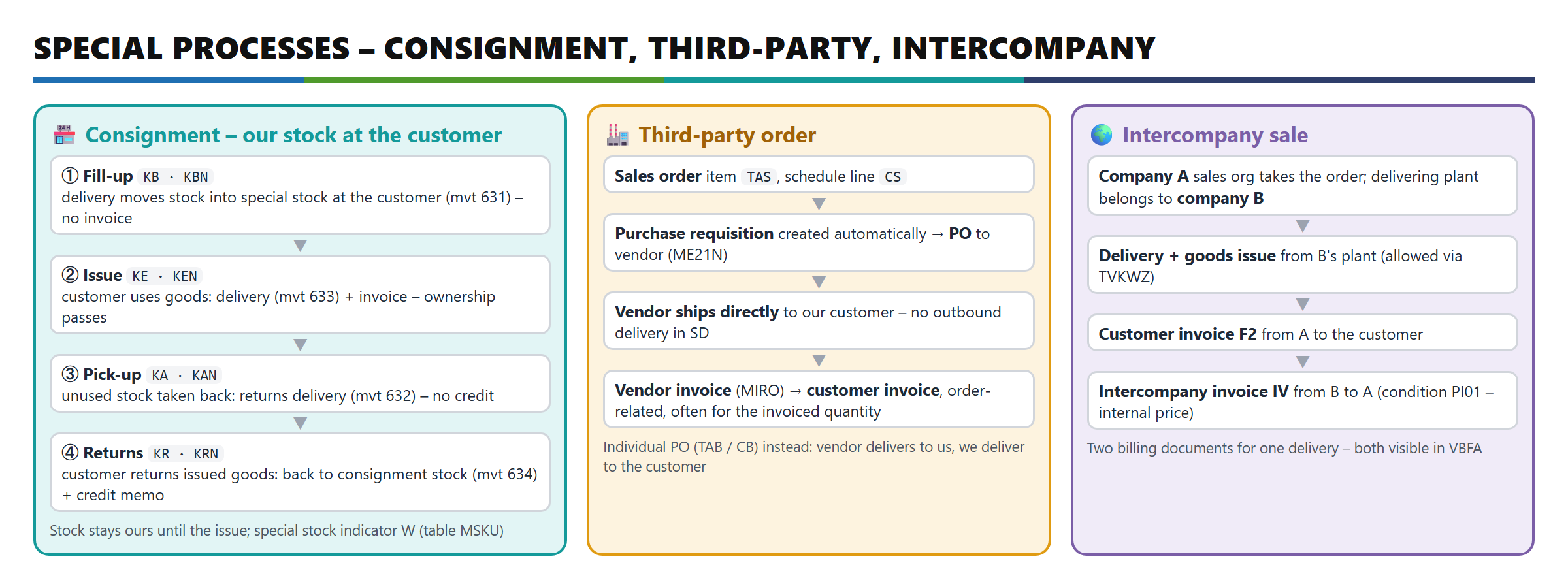
Process | Documents | What is special |
|---|---|---|
Returns | RE (with reference to the invoice) → returns delivery LR → post goods receipt → credit memo RE | Goods go to returns blocked stock (movement 651); billing block until the goods are checked |
Credit memo request | CR → credit memo G2 | No delivery; usually a billing block until approved (e.g. price too high) |
Debit memo request | DR → debit memo L2 | Charge the customer more (e.g. price too low, extra freight) |
Cash sale | CS → delivery at once → cash invoice BV | Customer pays and takes the goods immediately; posts to a cash account, not a receivable |
Rush order | RO → delivery at once → invoice F2 later | Same-day pick-up or shipment; billing follows normally |
Free of charge | FD → delivery; subsequent free delivery SDF | Samples or replacements; no billing |
Consignment | KB fill-up, KE issue, KA pick-up, KR returns | Our stock at the customer's site (special stock W); only the issue is billed |
Third-party | OR with item TAS → PR → PO → vendor ships → vendor invoice → customer invoice | No outbound delivery; billing order-related |
Intercompany | Order in company A, delivery from plant of company B, invoice F2 (A → customer), invoice IV (B → A) | Plant assigned to A's sales org + distribution channel |
Scheduling agreement | DS (LP) with delivery schedules (VA31 / VA32 / VA33) | Fixed quantities over time, forecast and JIT schedules (common in automotive) |
Contracts | Quantity contract CQ, value contracts WK1 / WK2, service contract; release orders (VA41 / VA42 / VA43) | Releases update the contract; master contracts group lower-level contracts (VA42W workflow) |
- Contracts are also sales documents (VBAK / VBAP) with contract data in VEDA; a release order is an OR created with reference to the contract, so VBFA links them.
Part 7 – Service contracts with projects (SD and PS)
In project and service business, SD sells and bills while PS (Project System) plans and collects costs. The flow is: Service contract → several WBS elements → for each WBS element a service order → debit memo request → debit memo, and when the customer must be credited credit memo request → credit memo. On the PS side each WBS element has several networks, each with several activities.
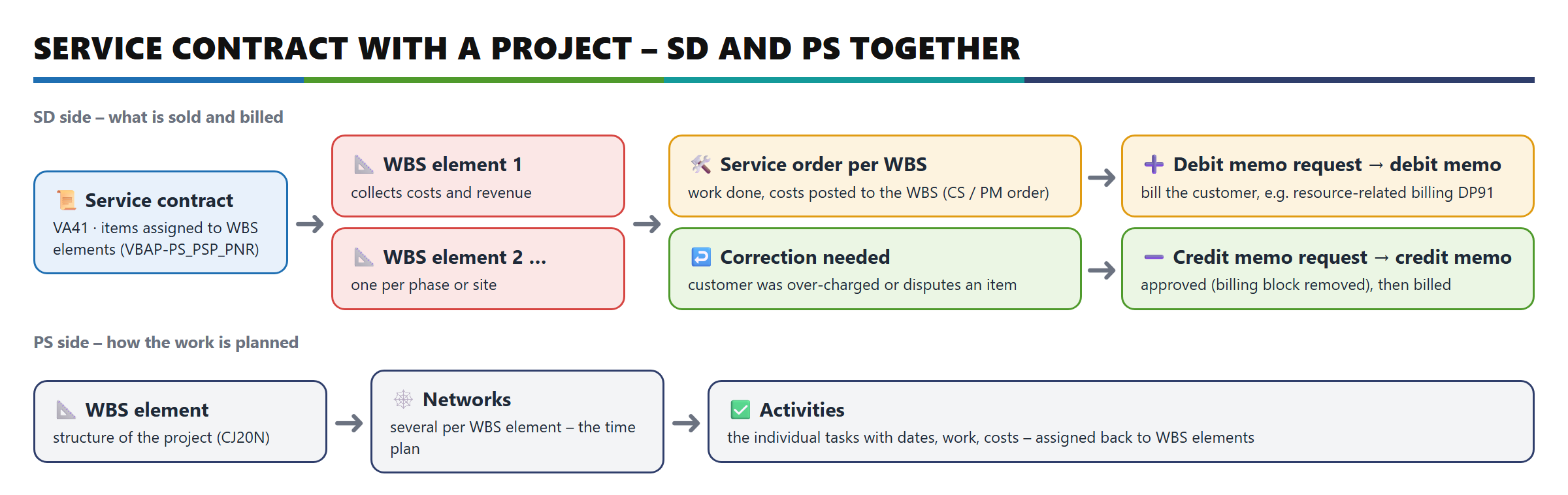
- WBS element (work breakdown structure): a node of the project that collects costs and revenue. Contract or order items are assigned to it (VBAP-PS_PSP_PNR); maintained in CJ20N.
- Service order: the work order (Customer Service / Plant Maintenance) whose costs are posted to the WBS.
- Debit memo request: billing for work done – often created by resource-related billing (DP91) from the actual costs on the WBS or service order; billed into a debit memo.
- Credit memo request: corrects over-billing; after approval it is billed into a credit memo.
- Network and activities: the time and resource plan of the project (dates, work, materials); activity costs roll up to the WBS element.
Part 8 – Interview questions
Q1. Explain the order-to-cash cycle with t-codes.
Inquiry VA11 → quotation VA21 → (contract VA41) → sales order VA01 → delivery VL01N → picking, packing and goods issue VL02N (movement 601) → billing VF01 / VF04 → accounting document and payment (F-28). VBFA links all documents.
Q2. Which tables store a sales order?
VBAK header, VBAP items, VBEP schedule lines, VBKD business data, VBPA partners, VBFA document flow; prices in PRCD_ELEMENTS (ECC: KONV) via VBAK-KNUMV. Delivery LIKP / LIPS, billing VBRK / VBRP.
Q3. What happened to VBUK and VBUP in S/4HANA?
They were removed. The status fields (GBSTK, LFSTK, FKSTK, CMGST …) moved into the header and item tables of each document: VBAK / VBAP, LIKP / LIPS, VBRK. Custom code reading VBUK / VBUP must be adapted.
Q4. How is the item category determined?
In VOV4 from sales document type + item category group of the material (MVKE-MTPOS) + usage + higher-level item category, e.g. OR + NORM → TAN, OR + BANS → TAS.
Q5. How is the schedule line category determined and what does it control?
In VOV5 from item category + MRP type (e.g. TAN + PD → CP). It controls delivery relevance, movement type, availability check and transfer of requirements.
Q6. What is copy control? Name the transactions.
Rules for creating a document with reference and what is copied: VTAA sales → sales, VTLA sales → delivery, VTFL delivery → billing, VTFA sales → billing, VTFF billing → billing. Copy requirements and data transfer routines are VOFM routines.
Q7. How do you find all deliveries and invoices for a sales order?
Read VBFA with VBELV = order number and VBTYP_N = 'J' (deliveries) or 'M' (invoices); or FM RV_ORDER_FLOW_INFORMATION; in the GUI the document flow in VA03.
Q8. What is the incompletion log?
A list of mandatory fields still missing in a document, from the incompletion procedure (OVA2). Stored in VBUV; incomplete documents listed with V.02; can block delivery or billing.
Q9. Explain the consignment process.
Fill-up KB moves our stock to the customer (special stock, not billed); issue KE bills what the customer used; pick-up KA brings unused stock back; returns KR takes issued goods back into consignment stock and credits the customer.
Q10. What is the difference between a third-party order and an intercompany sale?
Third-party: an external vendor ships directly to our customer (item TAS, purchase requisition, no outbound delivery). Intercompany: a plant of another company code of the same group delivers; the selling company invoices the customer (F2) and is invoiced internally (IV).
Q11. Difference between a cash sale and a rush order?
Both create the delivery immediately. A cash sale also prints the invoice immediately (order-related BV, paid in cash); a rush order is billed later from the delivery (F2).
Q12. How do SD and PS work together in a service contract?
Contract items are assigned to WBS elements that collect costs (service orders, networks, activities). Billing runs through debit memo requests (e.g. resource-related billing DP91) and corrections through credit memo requests.
🏠 Start Here · ◀ 01 · Organization & Master Data · 03 · Pricing, Output & Credit ▶ · Sections: CORE ABAP | OOPS ABAP | ABAP on HANA | Clean Core | RAP | ABAP Points | SAP Fiori | SAPUI5 | Mobile Development (MDK) | BTP Foundations | BTP Development | CAP | SAP Build | ABAP on BTP | Integration Suite | SAP Business AI | SAP BASIS | Security | SAP SDLC
Functional: FICO ABAP | TRM ABAP | VIM | SAP BIS | SD ABAP | MM ABAP | PP ABAP | QM ABAP | PM ABAP | PS ABAP | EWM | TM ABAP | GTM ABAP | EHS ABAP | HR ABAP | BW | SAP Datasphere | SAP Business Data Cloud | SAP MDG | SAP Analytics Cloud | SAP Ariba | SAP CX | SAP IBP