What an ABAP developer actually builds in SD: logic in the sales order, delivery, billing and pricing user exits, VOFM routines, BAdIs, programs that create documents with BAPIs, IDoc interfaces, output programs and custom reports – and how all of this changes in S/4HANA (simplified tables, released CDS views, APIs and clean-core extensibility). The general techniques are taught in CORE ABAP › 10 Enhancements, 07 Interfaces and 11 Forms; this page shows where they are used in SD. Business background: pages 01 – 03.
Part 1 – Where to enhance SD: choosing the technique
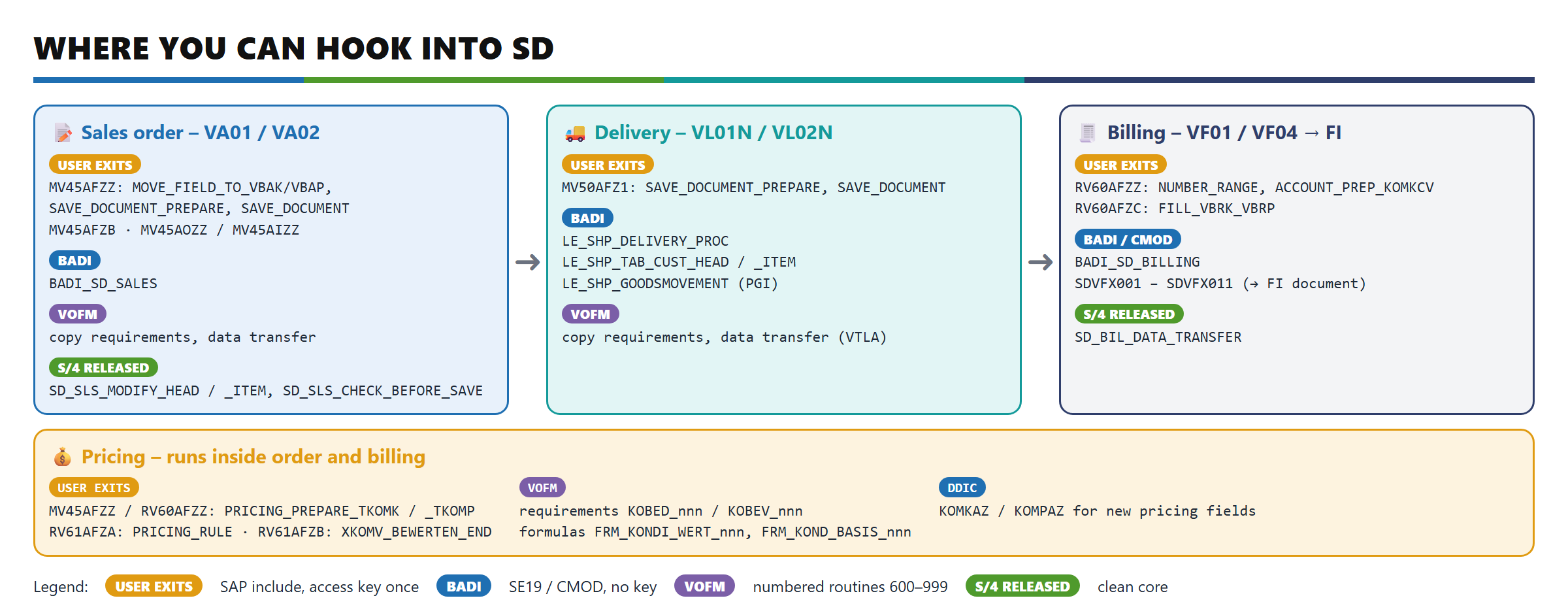
Requirement | Technique | Where |
|---|---|---|
Check or default fields in VA01/VA02 before saving | User exit MV45AFZZ (or BAdI) | Part 2 |
New field on the sales order screen | Append on VBAK/VBAP + screen 8309 / 8459 (Additional data B) | Part 2.2 |
New field used in pricing | KOMKAZ / KOMPAZ + USEREXIT_PRICING_PREPARE_TKOMK/TKOMP + field catalog | Part 2.4 |
Condition only in special cases / own calculation | VOFM requirement or formula | Part 3 |
Copy extra fields order → delivery → invoice | VOFM data transfer routine in copy control | Part 3, page 02 |
Delivery checks and field changes | BAdI LE_SHP_DELIVERY_PROC / MV50AFZ1 | Part 2.3, 4 |
Change the accounting document from billing | Customer exits SDVFX001 – SDVFX011, RV60AFZZ | Part 2.3, 4 |
Create documents from a program or interface | BAPIs | Part 5 |
EDI with customers | IDocs ORDERS, ORDRSP, DESADV, INVOIC | Part 6 |
S/4HANA, clean core | Released BAdIs (SD_SLS_…), Custom Fields, released CDS views and APIs | Part 9 |
Part 2 – User exits in sales, delivery, billing and pricing
SD's user exits are empty FORM routines in SAP includes of the module pools (SAPMV45A sales, SAPMV50A delivery, SAPLV60A billing, SAPLV61A pricing). The first change needs an access key (SSCR) because the include belongs to SAP; afterwards they behave like your own code and survive upgrades. How user exits differ from customer exits and BAdIs: CORE ABAP › 10 Enhancements.
2.1 Sales order (SAPMV45A)
Include / FORM | When it runs | Typical use |
|---|---|---|
MV45AFZZ | ||
USEREXIT_FIELD_MODIFICATION | PBO, for every screen field | Make fields display-only or hidden (SCREEN-INPUT, SCREEN-ACTIVE) |
USEREXIT_MOVE_FIELD_TO_VBAK | Header data is set (e.g. after entering the sold-to party) | Default header fields, fill custom ZZ fields |
| Item / schedule line / business data is set | Default item fields |
| Before pricing | Fill custom fields of the pricing communication structures |
USEREXIT_NUMBER_RANGE | Number assignment | Choose a different number range interval |
USEREXIT_READ_DOCUMENT | An existing order is read (VA02/VA03) | Read own data for the order |
USEREXIT_SAVE_DOCUMENT_PREPARE | Save pressed, before final checks | Last validations (error message stops the save), last field changes |
USEREXIT_SAVE_DOCUMENT | During save, document number known | Write own Z tables (they are committed with the order) |
USEREXIT_DELETE_DOCUMENT | Order deleted | Delete own data |
MV45AFZB: | Checks of header / item, sub-items | Validations per header or item |
MV45ATZZ | – | Own global data declarations |
MV45AOZZ / MV45AIZZ | PBO / PAI of the order screens | Own PBO and PAI modules for custom screen fields |
A validation example with USEREXIT_SAVE_DOCUMENT_PREPARE is on CORE ABAP › 10 Enhancements. Here: defaulting a custom header field.
|
2.2 Custom fields on the sales order
- Add an append structure with ZZ fields to VBAK (header) or VBAP (item).
- Place the fields on the Additional data B subscreens of SAPMV45A: 8309 header, 8459 item (modification with access key); PBO/PAI logic in MV45AOZZ / MV45AIZZ.
- For BAPIs: also add the fields to BAPE_VBAK / BAPE_VBAKX (BAPE_VBAP / BAPE_VBAPX) and VBAKKOZ / VBAKKOZX (VBAPKOZ / VBAPKOZX), then pass them in EXTENSIONIN (example in CORE ABAP › 07 Interfaces).
- S/4HANA alternative without modification: Custom Fields app (business context Sales Document header / item) – the field appears in VA01, Fiori apps and the APIs (Part 9).
2.3 Delivery and billing
Include / FORM | Area | Typical use |
|---|---|---|
MV50AFZ1: | Delivery (VL01N / VL02N) | Checks before save, own tables, number ranges – today mostly replaced by BAdI LE_SHP_DELIVERY_PROC |
RV60AFZZ: | Billing (VF01 / VF04) | Number range, extra fields for account determination, extra pricing fields |
RV60AFZC: | Billing – only when the document is created | Fill or change VBRK / VBRP fields of the new billing document |
2.4 Pricing
Include / FORM | Typical use |
|---|---|
RV61AFZA: | Own pricing types; change copied conditions |
RV61AFZB: | Change condition values after the standard calculation of the price elements |
MV45AFZZ / RV60AFZZ: | Fill custom fields of KOMK / KOMP for condition access |
A new field in pricing (e.g. price by product hierarchy level 1): add it to KOMKAZ (header) or KOMPAZ (item), add it to the field catalog, create a condition table with it (V/03), fill it in USEREXIT_PRICING_PREPARE_TKOMP – in the order (MV45AFZZ) and in billing (RV60AFZZ).
|
Part 3 – VOFM routines: requirements, formulas, data transfer
VOFM is the transaction for small ABAP routines that the SD configuration calls by number. The consultant enters the number in the pricing procedure, copy control or output procedure; the developer writes the routine. SAP delivers numbers 1 – 599; customer routines use 600 – 999.
VOFM menu | Examples | Assigned in |
|---|---|---|
Requirements → Pricing | Use a condition only for an order type, only if the item is pricing-relevant (standard 2) | Pricing procedure, column Requirement |
Requirements → Output control | Send the order confirmation only if a PO number exists | Output procedure |
Requirements → Copy requirements | Allow order → delivery only if not credit-blocked | Copy control VTLA / VTFA / VTAA (page 02) |
Formulas → Condition value | Own calculation of a price element (FORM FRM_KONDI_WERT_nnn) | Pricing procedure, AltCTy |
Formulas → Condition base value | Own base for the calculation (FORM FRM_KOND_BASIS_nnn) | Pricing procedure, AltCBV |
Data transfer | Copy extra fields from the order into the delivery or billing document | Copy control, data transfer routine |
- Customer routines live in SAP includes (for pricing e.g. RV61Annn requirements, RV63Annn base values, RV64Annn value formulas), so creating one needs an access key.
- After creating a routine: activate it (Edit → Activate). After transporting routines, run RV80HGEN in the target system so that the routines are generated and called.
- Pricing requirements have two FORMs: KOBED_nnn (checked during document processing) and KOBEV_nnn (pre-check before the access, for performance). Return sy-subrc = 0 to use the condition.
|
In S/4HANA on-premise VOFM routines work as before. In ABAP Cloud / S/4HANA Cloud they are not available; released BAdIs take their place (e.g. SD_BIL_DATA_TRANSFER for data transfer to billing).
Part 4 – BAdIs and customer exits in SD
BAdI / exit | Area | Use |
|---|---|---|
BADI_SD_SALES | Sales document (classic BAdI) | Additional logic in sales document processing |
LE_SHP_DELIVERY_PROC | Delivery | Methods such as CHANGE_DELIVERY_HEADER, CHANGE_DELIVERY_ITEM, FILL_DELIVERY_ITEM, SAVE_DOCUMENT_PREPARE, SAVE_AND_PUBLISH_DOCUMENT, DELIVERY_FINAL_CHECK |
LE_SHP_TAB_CUST_HEAD / _ITEM | Delivery | Own tab with custom fields in VL01N / VL02N |
LE_SHP_GOODSMOVEMENT | Delivery | Change data of the goods movement at post goods issue |
BADI_SD_BILLING | Billing (classic BAdI) | Additional logic in billing |
SDVFX001 – SDVFX011 (CMOD, EXIT_SAPLV60B_nnn) | Billing → FI | Change header and line items of the accounting document created from billing |
VEDA0001 (CMOD, EXIT_SAPLVEDA_nnn) | Inbound EDI orders | Read custom IDoc segments into the sales order (Part 6) |
SD_SLS_MODIFY_HEAD / SD_SLS_MODIFY_ITEM, SD_SLS_CHECK_BEFORE_SAVE, SD_SLS_CHECK_ITEM | Sales document – S/4HANA released BAdIs | Clean-core Custom Logic: set custom fields, check before save |
SD_BIL_DATA_TRANSFER | Billing – S/4HANA released BAdI | Copy data from the preceding document into the billing document |
- BADI_SD_SALES and BADI_SD_BILLING (and their sub-BAdIs) are flagged for SAP internal use in many releases – check the flag in SE18 first; otherwise use the user exits or, in S/4HANA, the released BAdIs.
- Finding the right BAdI: SE84 / SE18 by package or application component (e.g. package VA for sales), a breakpoint on
CL_EXITHANDLER=>GET_INSTANCE(classic BAdIs) or on the statementGET BADI(new BAdIs) while running the transaction, or SPRO → System Modifications / User Exits per area. - Implement classic and new BAdIs in SE19, customer exits in CMOD (project) after looking at the enhancement in SMOD. Details: CORE ABAP › 10 Enhancements.
- Rule of thumb: prefer a BAdI over a user exit when one exists for the same point – no access key, multiple implementations, and in S/4HANA the released ones are clean-core.
Part 5 – BAPIs: creating orders, deliveries and invoices
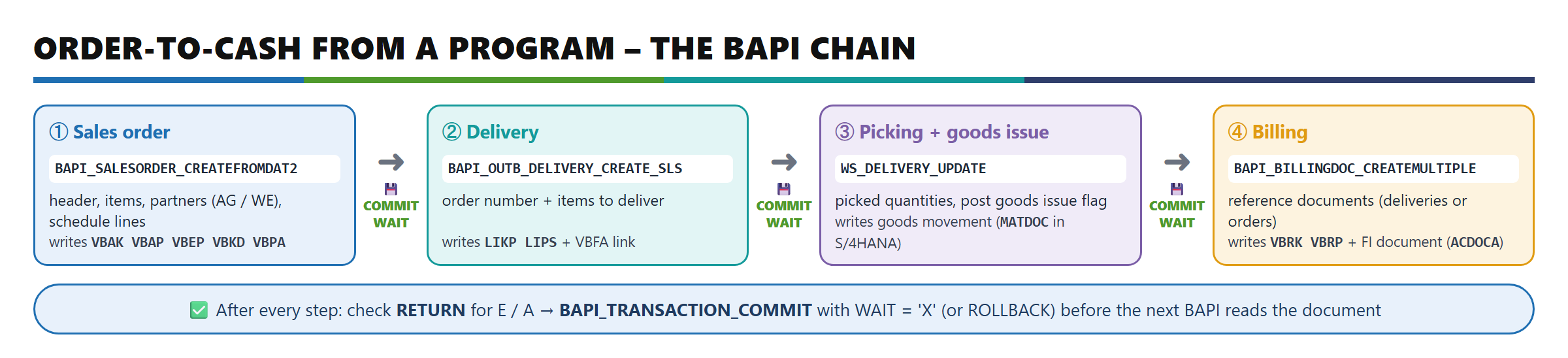
BAPI / FM | Purpose |
|---|---|
BAPI_SALESORDER_CREATEFROMDAT2 | Create a sales order (VA01) |
BAPI_SALESORDER_CHANGE | Change an order: header, items, schedule lines, partners, conditions (update flags in the …X structures) |
BAPI_SALESORDER_GETLIST / BAPISDORDER_GETDETAILEDLIST | Orders of a customer / full details of given orders |
SD_SALESDOCUMENT_CREATE | Generic FM behind the sales BAPIs – also for other sales document types (inquiry, quotation, credit memo request) |
BAPI_CUSTOMERRETURN_CREATE | Create a returns order |
BAPI_OUTB_DELIVERY_CREATE_SLS | Create outbound deliveries for sales order items (VL01N) |
BAPI_OUTB_DELIVERY_CHANGE | Change a delivery (quantities, dates) |
WS_DELIVERY_UPDATE | Picking quantities and post goods issue (widely used FM, not a BAPI) |
BAPI_BILLINGDOC_CREATEMULTIPLE | Create billing documents for orders or deliveries (VF01) |
BAPI_BILLINGDOC_CANCEL1 | Cancel a billing document (VF11) |
BAPI_TRANSACTION_COMMIT / _ROLLBACK | End the LUW – BAPIs never commit themselves |
5.1 Example: create a sales order
- BAPIs expect internal values: order type TA (= OR on the screen), partner roles AG sold-to (SP) and WE ship-to (SH), customer numbers with leading zeros. No conversion exits run.
- Every …IN structure has an …INX partner:
Xmarks the fields you filled, UPDATEFLAG says I / U / D. - The quantity goes into the schedule lines (REQ_QTY); the BAPI runs the full VA01 logic – pricing, ATP, user exits – but no screen.
|
- S/4HANA: the material number has 40 characters; the BAPI structures have additional
…_LONGfields (e.g. MATERIAL_LONG) for long material numbers. - BAPI_SALESORDER_CHANGE: pass SALESDOCUMENT, ORDER_HEADER_INX-UPDATEFLAG = 'U' (mandatory) and, per changed item, ITM_NUMBER + UPDATEFLAG 'U' (or 'I' new item, 'D' delete) with X flags for the changed fields.
- Chaining documents (order → delivery → billing): commit with WAIT after each step; the next BAPI reads the previous document from the database.
Part 6 – IDocs in SD
EDI with customers uses these message types. ALE / IDoc basics (partner profiles WE20, ports, process codes, WE19 testing, BD87 reprocessing): CORE ABAP › 07 Interfaces.
Message type | Basic type | Direction | Meaning | Processing |
|---|---|---|---|---|
ORDERS | ORDERS05 | Inbound | Customer purchase order → sales order | Process code ORDE, FM IDOC_INPUT_ORDERS; enhancement VEDA0001 |
ORDCHG | ORDERS05 | Inbound | Change of a customer order | Process code ORDC, FM IDOC_INPUT_ORDCHG |
ORDRSP | ORDERS05 | Outbound | Order confirmation / response to the customer | Output type BA00 with medium 6 (EDI) |
DESADV | DELVRY03 (or a later version) | Outbound | Shipping notification (ASN) from the delivery | Output type LAVA, medium 6 |
INVOIC | INVOIC02 | Outbound | Invoice to the customer | Output type RD00 with medium 6; enhancement LVEDF001 |
DEBMAS / MATMAS | DEBMAS07 / MATMAS05 | Both | Customer / material master distribution (ALE) | – |
- Outbound SD IDocs are triggered by output determination (page 03 Part 4): ECC / NAST: output type with medium 6 (EDI), partner profile with the message type and process code; S/4HANA output management: channel IDoc in the output parameter determination (OPD).
- Custom data: extend the basic type with a Z segment (WE31 / WE30 extension), fill or read it in the customer exit of the IDoc FM (VEDA0001 inbound orders, LVEDF001 outbound invoice).
- S/4HANA also offers SOAP / OData APIs and SAP Cloud Integration (CPI) for B2B – see Integration Suite › 02 SAP Cloud Integration.
Part 7 – Output programs and forms
Document | Output type | Print program | Standard form |
|---|---|---|---|
Order confirmation | BA00 | RVADOR01 | SAPscript RVORDER01 |
Delivery note | LD00 | RVADDN01 (Smart Form: RLE_DELNOTE) | RVDELNOTE (Smart Form LE_SHP_DELNOTE) |
Invoice | RD00 | RVADIN01 (Smart Form: RLB_INVOICE) | RVINVOICE01 (Smart Form LB_BIL_INVOICE) |
- Custom form (ECC / NACE): copy the standard program and form, change the layout and data retrieval, and enter your program, FORM routine and form in NACE → processing routines (TNAPR).
- The print program is called with the output record in NAST; NAST-OBJKY holds the document number.
|
- S/4HANA output management: no print program – Adobe form templates with a form data provider (OData-based), determined via BRF+ (page 03 Part 4.2). Forms in detail: CORE ABAP › 11 Forms.
Part 8 – Common custom reports
Report | Main tables / views | Standard alternative |
|---|---|---|
Open sales orders (not yet delivered / billed) | VBAK + VBAP status fields (S/4HANA) or VBUP (ECC); I_SalesOrderItem | VA05, VL10A |
Document flow of an order | VBFA (preceding VBELV / POSNV → subsequent VBELN / POSNN, categories VBTYP_V / VBTYP_N); FM SD_DOCUMENT_FLOW_GET | Document flow in VA03 |
Billing due list / not billed deliveries | VKDFS (billing index), LIKP / LIPS with billing status | VF04 |
Sales register / revenue | VBRK + VBRP (+ S/4HANA PRCD_ELEMENTS, ACDOCA · ECC KONV, BSEG) | VF05, Fiori analytics |
Deliveries for picking / goods issue | LIKP + LIPS with status fields | VL06O, VL06G |
|
Status values: A not processed, B partially processed, C completely processed (GBSTA overall, LFSTA delivery, FKSTA billing status).
Part 9 – S/4HANA for SD developers
9.1 Simplifications that change your code
Area | ECC | S/4HANA | What to do in code |
|---|---|---|---|
Document status | VBUK / VBUP | Status fields in VBAK / VBAP, LIKP / LIPS, VBRK | Read the status from the document table; no join with VBUK / VBUP |
Pricing results | KONV | PRCD_ELEMENTS | Replace SELECTs on KONV |
Sales index tables | VAKPA, VAPMA, VLKPA, VLPMA, VRKPA, VRPMA | Removed | Select VBAK / VBAP / LIKP / VBRK directly or use CDS views |
Customer master | XD01 / VD01, KNA1 … | Business partner (BP, CVI); KNA1, KNB1, KNVV still filled | Create / change customers via BP APIs (page 01) |
Credit management | KNKK / KNKA, FD32 | SAP Credit Management (UKM tables) | page 03 Part 5 |
Output | NACE / NAST | BRF+ output management (APOC tables) | Forms as Adobe templates; page 03 Part 4 |
Rebates | KONA, VBOX | Condition contracts | page 03 Part 7 |
Field lengths | MATNR 18, VBTYP 1 | MATNR 40; document category VBTYP 4 characters; SD document numbers (VBELN) stay 10; amount fields can be extended | Use |
Document flow | VBFA | VBFA kept, with a simplified data model | Read via SD_DOCUMENT_FLOW_GET or document flow CDS views (e.g. I_SDDocumentMultiLevelProcFlow) instead of own multi-level logic |
- Find affected custom code with the Custom Code Migration app / ATC with the S/4HANA readiness checks (ABAP on HANA › 02 Migration to S/4HANA).
9.2 Released CDS views and APIs
Released CDS view (VDM) | Content |
|---|---|
I_SalesOrder / I_SalesOrderItem / I_SalesOrderScheduleLine | Sales order header, items, schedule lines |
I_SalesDocument / I_SalesDocumentItem | All sales document categories |
I_OutboundDelivery / I_OutboundDeliveryItem | Deliveries |
I_BillingDocument / I_BillingDocumentItem | Billing documents |
I_Customer, I_Product, I_BusinessPartner | Master data |
|
API | Protocol | Use |
|---|---|---|
API_SALES_ORDER_SRV | OData V2 | Create, read, change sales orders (entities A_SalesOrder, A_SalesOrderItem …) |
Sales Order (A2X) OData V4 (CE_SALESORDER_0001) | OData V4, RAP-based | Newer sales order API |
API_SALES_ORDER_SIMULATION_SRV | OData V2 | Simulate an order (price, availability) without saving |
API_OUTBOUND_DELIVERY_SRV | OData V2 | Deliveries, including picking and goods issue actions |
API_BILLING_DOCUMENT_SRV | OData V2 | Read billing documents, get the invoice PDF |
API_BUSINESS_PARTNER | OData V2 | Customers as business partners |
All released APIs are listed on the SAP Business Accelerator Hub (api.sap.com). OData and CDS basics: CORE ABAP › 08 OData and ABAP on HANA › 05 CDS Views.
9.3 Clean-core extensibility for SD
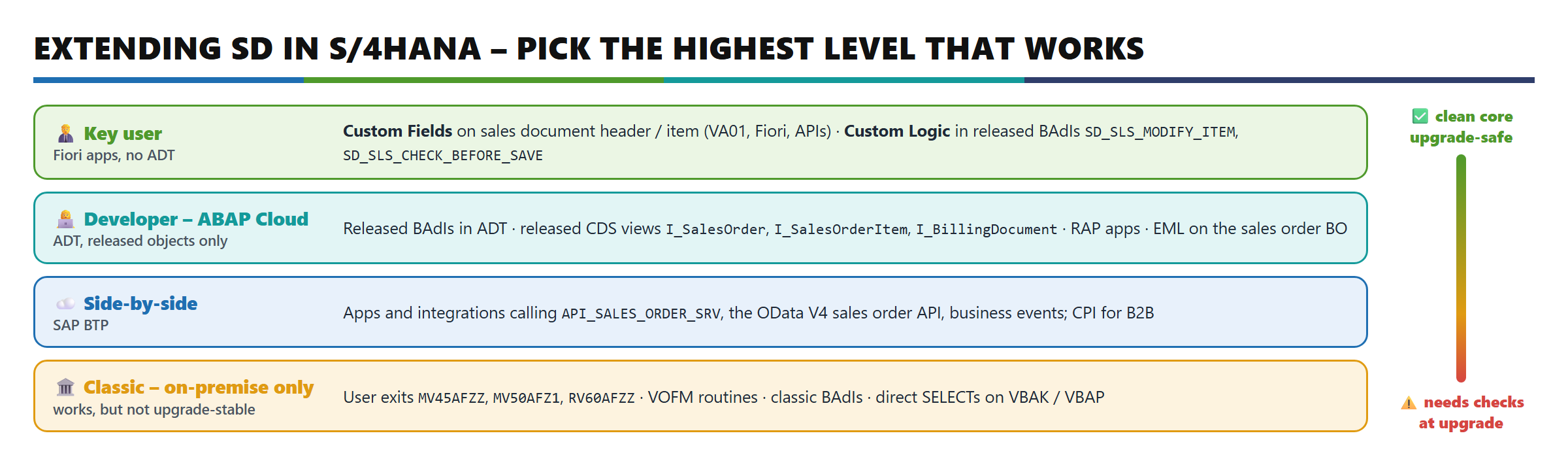
- Key user: Custom Fields (sales document header / item) and Custom Logic in released BAdIs such as SD_SLS_MODIFY_ITEM or SD_SLS_CHECK_BEFORE_SAVE.
- Developer extensibility (ABAP Cloud): implement the same released BAdIs in ADT, read released CDS views, build own RAP apps; the sales order is also available as a RAP business object interface (I_SalesOrderTP) for EML – see RAP › 11 · Files, Custom Entities & Integration.
- Classic extensibility (on-premise only): user exits (MV45AFZZ …), VOFM, classic BAdIs, direct table reads – allowed, but not upgrade-stable. Choose the highest level that solves the requirement (Clean Core › 01 Clean Core).
Part 10 – Interview questions
Q1. Which user exits have you used in the sales order?
MV45AFZZ: USEREXIT_MOVE_FIELD_TO_VBAK / VBAP to default fields, USEREXIT_SAVE_DOCUMENT_PREPARE for checks before saving, USEREXIT_SAVE_DOCUMENT to write own tables, USEREXIT_PRICING_PREPARE_TKOMP for custom pricing fields, USEREXIT_FIELD_MODIFICATION for screen attributes.
Q2. Difference between USEREXIT_SAVE_DOCUMENT_PREPARE and USEREXIT_SAVE_DOCUMENT?
SAVE_DOCUMENT_PREPARE runs before the final checks – you can still change data or stop the save with an error. SAVE_DOCUMENT runs during saving when the document number is known – used to update own tables, no more messages to the user.
Q3. How do you add a custom field to the sales order?
Append the field to VBAK or VBAP, place it on screen 8309 / 8459 (Additional data B), handle it in MV45AOZZ / MV45AIZZ; for BAPIs add it to BAPE_VBAK(X) / VBAKKOZ(X). In S/4HANA prefer the Custom Fields app.
Q4. What is VOFM and why does it need an access key?
VOFM maintains numbered routines (requirements, formulas, data transfer) used by pricing, output and copy control. Customer routines (600 – 999) are stored in SAP includes, so the first change needs an access key. After transport, RV80HGEN generates them.
Q5. How do you add a new field to pricing?
Add it to KOMKAZ / KOMPAZ, add it to the field catalog, create a condition table and access sequence step, and fill it in USEREXIT_PRICING_PREPARE_TKOMK / TKOMP (order and billing).
Q6. Which BAdI do you use for deliveries?
LE_SHP_DELIVERY_PROC (change header / item, checks, save), LE_SHP_TAB_CUST_HEAD / ITEM for own tabs, LE_SHP_GOODSMOVEMENT for goods issue data.
Q7. Why is the order type 'TA' in BAPI_SALESORDER_CREATEFROMDAT2 and not 'OR'?
BAPIs work with internal values and do not run conversion exits. OR is the external (English) value of internal TA; the same applies to partner roles AG / WE (SP / SH).
Q8. What must you do after calling a sales BAPI?
Check RETURN for E or A messages; then BAPI_TRANSACTION_COMMIT with WAIT = 'X' or BAPI_TRANSACTION_ROLLBACK. Without a commit nothing is saved.
Q9. Which IDocs are used in SD?
ORDERS (inbound order, ORDERS05, FM IDOC_INPUT_ORDERS), ORDCHG, ORDRSP (order confirmation), DESADV (shipping notification, DELVRY), INVOIC (invoice, INVOIC02). Outbound ones are triggered by output types with medium 6 (ECC / NAST) or by the IDoc channel of S/4HANA output management.
Q10. Your old report reads VBUK and KONV. What changes in S/4HANA?
VBUK / VBUP are not filled: read the status fields from VBAK / VBAP (LIKP / LIPS, VBRK). KONV is replaced by PRCD_ELEMENTS. Even better: use released CDS views such as I_SalesOrderItem.
Q11. How would you extend the sales order in a clean-core way?
Custom Fields for new fields, Custom Logic or ADT implementations of released BAdIs (SD_SLS_…) for logic, released CDS views and APIs (API_SALES_ORDER_SRV, OData V4) for reading and integration – user exits and VOFM only when no released option exists (on-premise).
Q12. How do you find the document flow of an order in code?
Read VBFA with VBELV = order number for direct successors, or use SD_DOCUMENT_FLOW_GET for the whole chain; in S/4HANA also CDS views for the document flow.
🏠 Start Here · ◀ 03 · Pricing, Output & Credit · 05 · T-Codes & Tables ▶ · Sections: CORE ABAP | OOPS ABAP | ABAP on HANA | Clean Core | RAP | ABAP Points | SAP Fiori | SAPUI5 | Mobile Development (MDK) | BTP Foundations | BTP Development | CAP | SAP Build | ABAP on BTP | Integration Suite | SAP Business AI | SAP BASIS | Security | SAP SDLC
Functional: FICO ABAP | TRM ABAP | VIM | SAP BIS | SD ABAP | MM ABAP | PP ABAP | QM ABAP | PM ABAP | PS ABAP | EWM | TM ABAP | GTM ABAP | EHS ABAP | HR ABAP | BW | SAP Datasphere | SAP Business Data Cloud | SAP MDG | SAP Analytics Cloud | SAP Ariba | SAP CX | SAP IBP