The SD functions that run inside every sales document: pricing with the condition technique, account determination for the FI posting, output determination, credit management, the availability check, rebates, and handling units and shipments. Each part shows the ECC way and what changed in S/4HANA, with the key t-codes and tables inline. The developer hooks for these functions (pricing exits, VOFM routines, output programs) are on page 04; every t-code and table in one list is on page 05.
Part 1 – The condition technique
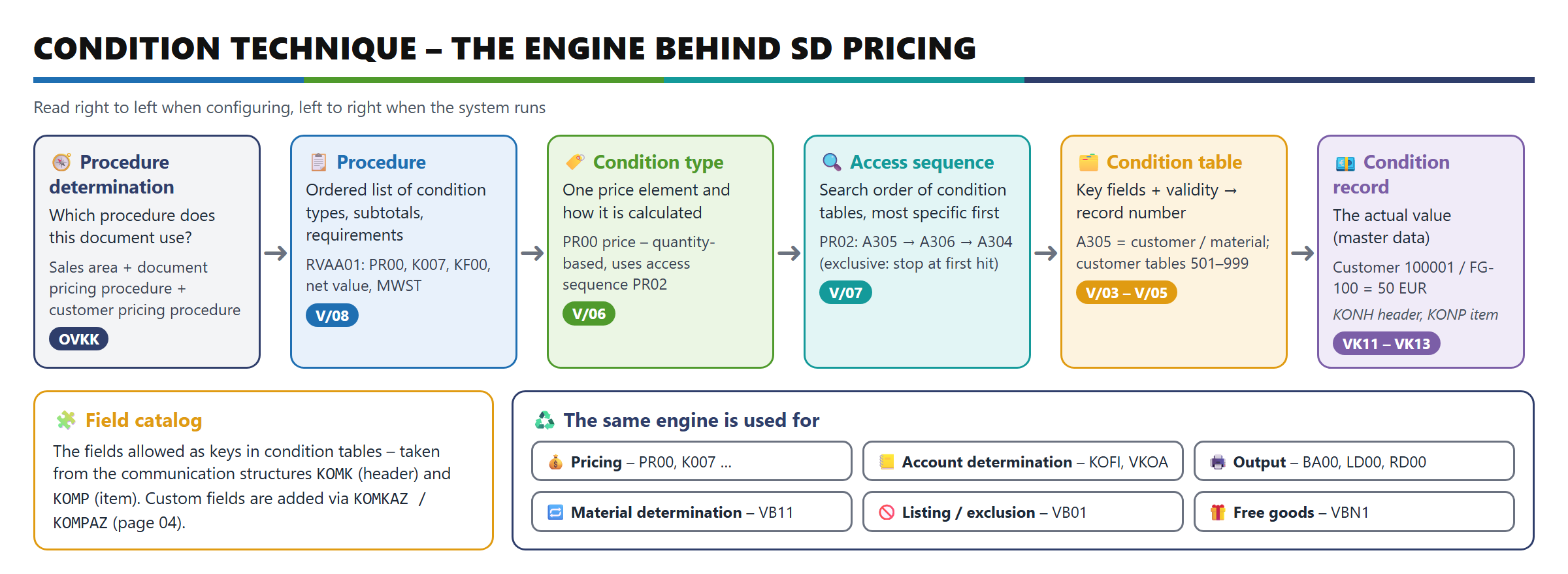
The condition technique is SAP's generic engine for "find the right value for this combination of fields". SD uses it for pricing, account determination, output determination, material determination, listing / exclusion and free goods. Learn it once for pricing and you understand all of them.
Element | What it is | Pricing example | T-code |
|---|---|---|---|
Field catalog | All fields allowed as keys in condition tables (from the communication structures KOMK header / KOMP item, summarised in KOMG) | Customer, material, sales org, price list | SPRO |
Condition table (Annn) | A key combination plus validity dates; each row points to a condition record | A305 customer/material, A304 material | V/03 – V/05 |
Access sequence | Search strategy: an ordered list of condition tables, most specific first; the exclusive flag stops the search at the first hit | PR02: A305 → A306 → A304 | V/07 |
Condition type | One kind of price element and how it is calculated | PR00 price, K007 customer discount, KF00 freight | V/06 |
Procedure | The ordered list of condition types with subtotals and controls | Pricing procedure RVAA01 | V/08 |
Procedure determination | Which procedure a document uses | Sales area + document and customer pricing procedure | OVKK |
Condition records | The master data: the actual prices and discounts | PR00 for customer 100001 / material FG-100 = 50 EUR | VK11 – VK13 |
Configuration is done by the SD consultant in SPRO (Sales and Distribution → Basic Functions → Pricing); condition records are master data maintained by the business. As a developer you must be able to read this chain to find out why a document got a certain price.
Part 2 – Pricing: procedure, condition records and pricing tables
2.1 How the system finds a price
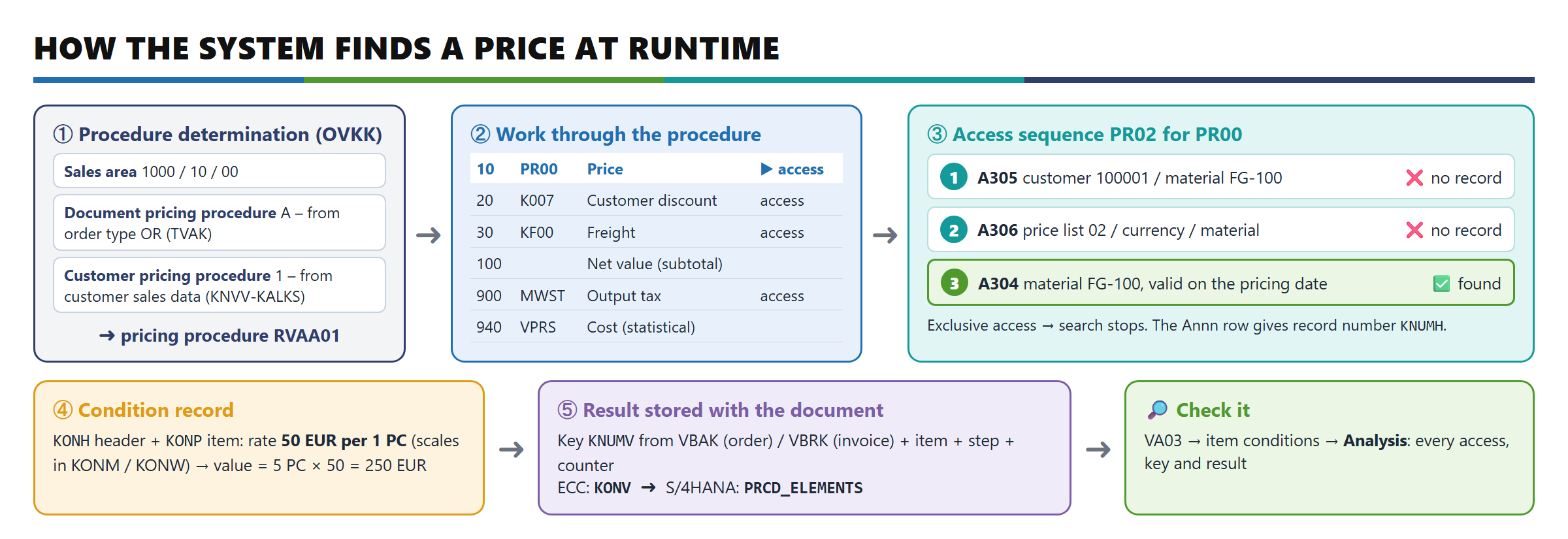
- Step 1 – procedure determination (OVKK, table T683V): sales organization + distribution channel + division + document pricing procedure (from the sales document type, TVAK-KALVG) + customer pricing procedure (customer sales area data, KNVV-KALKS) → pricing procedure, e.g. RVAA01.
- Step 2 – condition types: the system works through the procedure step by step. For each condition type with an access sequence it searches the condition tables in order.
- Step 3 – access: for each table it builds the key from the document (KOMK/KOMP) and looks for a valid record (validity date = pricing date). Exclusive + found → stop.
- Step 4 – record: the Annn row gives the record number KNUMH; the amount and unit come from KONP (with scales in KONM / KONW).
- Step 5 – result: every condition line of the document is stored under the document condition number KNUMV (VBAK-KNUMV for the order, VBRK-KNUMV for the invoice).
To see what happened: in VA02/VA03 open item conditions → Analysis (pricing analysis log). It shows every access, which key was tried, and why a condition was or was not found.
2.2 The pricing procedure
Column | Meaning |
|---|---|
Step / counter | Order of the lines; subtotals refer to steps (From / To) |
Condition type | PR00, K004, K007, KF00, MWST … or empty for a subtotal line |
Manual / Mandatory / Statistical | Only entered by hand / must exist or the document is incomplete / shown but does not change the net value (e.g. VPRS cost) |
Subtotal | Stores the value in a KOMP field (KZWI1–KZWI6) for reports and formulas |
Requirement | VOFM routine: the line is only used if the routine returns sy-subrc = 0 (e.g. 2 = item relevant for pricing) |
Alt. calculation type / alt. base value | VOFM formulas that replace the standard calculation (page 04 Part 3) |
Account key / accrual key | Passes the value to account determination: ERL revenue, ERS sales deductions, ERF freight (Part 3) |
2.3 Condition types and condition records
Condition type | Meaning | Typical setting |
|---|---|---|
PR00 | Price | Condition class B (prices), calculation type C (quantity) |
K004 / K005 / K007 | Material / customer–material / customer discount | Class A (discount or surcharge) |
RA01 | Percentage discount from gross | Calculation type A (percentage) |
KF00 | Freight | Account key ERF |
VPRS | Cost (from the material valuation, MBEW) | Statistical, used for the profit margin |
SKTO | Cash discount | Statistical |
MWST | Output tax | Condition class D (taxes); account from FI tax configuration |
HM00 / PN00 | Manual order value / manual net price | Manual only |
- VK11 / VK12 / VK13 – create / change / display condition records (for one condition type and key combination). In S/4HANA the Fiori app Manage Prices – Sales does the same.
- Scales (quantity or value) and validity periods are part of the record; records can be created with reference (VK14) and changed in mass with condition maintenance (VK32).
2.4 Pricing tables (ECC → S/4HANA)
Table | Content | S/4HANA |
|---|---|---|
Annn (e.g. A304, A305, A352) | Condition table: key fields + validity (DATAB, DATBI) → record number KNUMH. SAP tables are numbered up to 500; customer tables 501–999 | Unchanged |
KONH | Condition record header (condition type, created by, validity of the record) | Unchanged |
KONP | Condition record item: rate KBETR, currency / unit, pricing unit, scale type | Unchanged |
KONM / KONW | Quantity scales / value scales | Unchanged |
KONV | Document conditions of orders and billing documents (key KNUMV, KPOSN item, STUNR step, ZAEHK counter) | Replaced by PRCD_ELEMENTS (same key, longer fields); KONV is no longer filled |
|
Repricing: in VA02 Update pricing with pricing type B (carry out new pricing) or C (copy manual conditions, redetermine the rest). Pricing types are also set in copy control (page 02) and can be influenced by USEREXIT_PRICING_RULE (page 04).
Part 3 – Account determination (SD → FI)
When a billing document is released to accounting, SD must know which G/L accounts to post revenue, discounts and freight to. Revenue account determination uses the condition technique with condition type KOFI (KOFK when a CO account assignment such as a cost center is required).
Element | Account determination | T-code |
|---|---|---|
Condition types | KOFI (KOFK) | V/09 |
Access sequences | KOFI: e.g. customer acct group / material acct group / account key | V/10 |
Procedure | KOFI00, assigned to the billing type | V/11 |
Condition tables | 001 – 005 (database tables C001 – C005), e.g. 001 customer group / material group / account key | V/12 – V/14 |
Records = G/L account assignment | Application V, chart of accounts, sales org, customer account assignment group (KNVV-KTGRD), material account assignment group (MVKE-KTGRM), account key (ERL, ERS, ERF …) → G/L account | VKOA |
- The account key comes from the pricing procedure line (Part 2.2): PR00 → ERL, discounts → ERS, freight → ERF. Output tax (MWS) is determined by the FI tax configuration, not by VKOA.
- Billing documents with an account determination error are not posted; fix the VKOA entry, then release them with VFX3. In VF02: Environment → Account determination analysis.
- The customer line uses the reconciliation account from the company-code data (KNB1-AKONT).
Part 4 – Output determination and S/4HANA output management
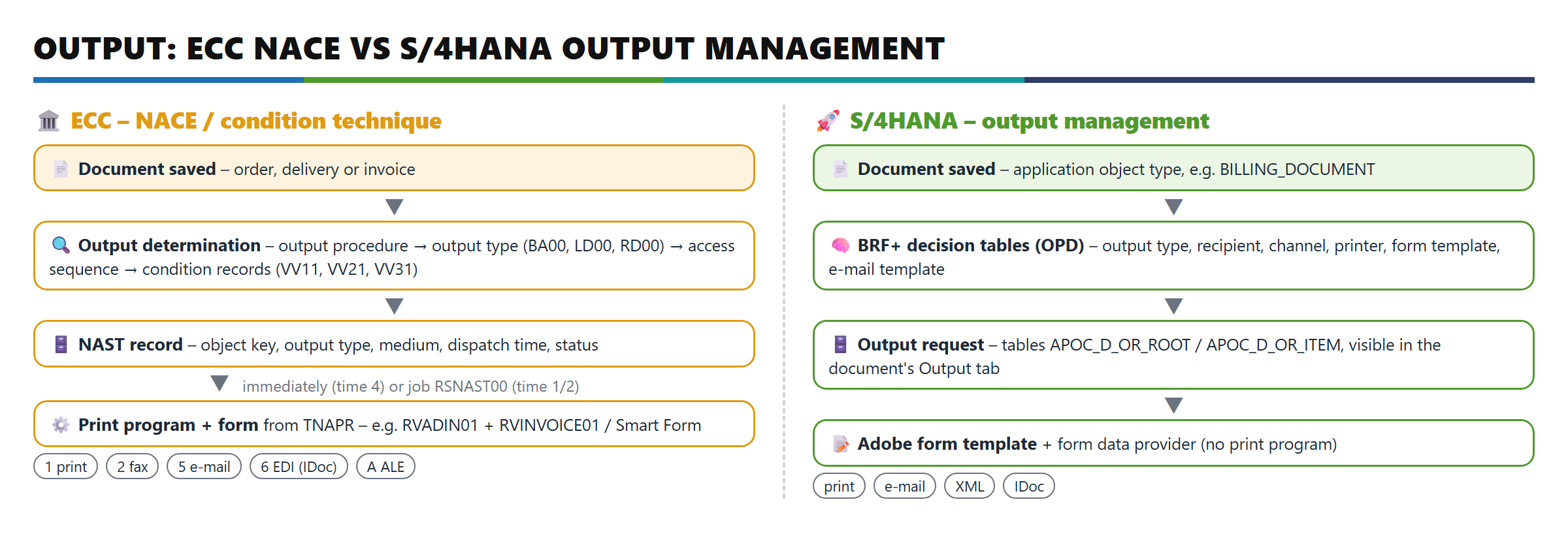
Output means order confirmations, delivery notes, invoices and EDI messages sent from SD documents. ECC determines them with the condition technique (NACE); S/4HANA brings a new BRF+-based output management. Forms and print programs: CORE ABAP › 11 Forms and page 04 Part 7.
4.1 ECC: NACE and table NAST
Item | Sales (V1) | Shipping (V2) | Billing (V3) |
|---|---|---|---|
Typical output type | BA00 order confirmation | LD00 delivery note | RD00 invoice |
Condition records | VV11 / VV12 / VV13 | VV21 / VV22 / VV23 | VV31 / VV32 / VV33 |
Standard print program | RVADOR01 | RVADDN01 | RVADIN01 |
- NACE – one entry point for output: application → output types (with access sequence) → procedures → processing routines (print program, FORM routine, form, stored in table TNAPR).
- Transmission medium: 1 print, 2 fax, 5 external send (e-mail), 6 EDI (IDoc), A distribution (ALE), 8 special function.
- Dispatch time: 1 with a periodically scheduled job, 2 job with time, 3 with the application's own transaction, 4 immediately when the document is saved. Times 1 and 2 are processed by program RSNAST00.
- Table NAST (ECC) holds one record per output: application KAPPL, object key OBJKY (the document number), output type KSCHL, medium NACHA, dispatch time VSZTP, status VSTAT (0 not processed, 1 processed, 2 error). Reprocess outputs with VF31 (billing), VL71 (deliveries), VT70 (shipments).
4.2 S/4HANA output management
ECC (NACE) | S/4HANA output management | |
|---|---|---|
Determination | Condition technique, output condition records | BRF+ decision tables, maintained in OPD / Fiori app Output Parameter Determination |
What is determined | Output type, partner, medium, time | Output type, recipient, channel (print, e-mail, XML, IDoc), printer, form template, e-mail template |
Stored in | NAST | Output request tables APOC_D_OR_ROOT / APOC_D_OR_ITEM |
Forms | SAPscript, Smart Forms, Adobe with a print program | Adobe Forms with a form data provider; templates in the app Maintain Form Templates |
Scope | All applications | Sales documents, deliveries, billing documents and more, chosen per application object type in Customizing |
- In S/4HANA on-premise you can still switch an application back to NAST-based output in Customizing; for new (greenfield) implementations output management is the strategic choice.
Part 5 – Credit management: classic and SAP Credit Management
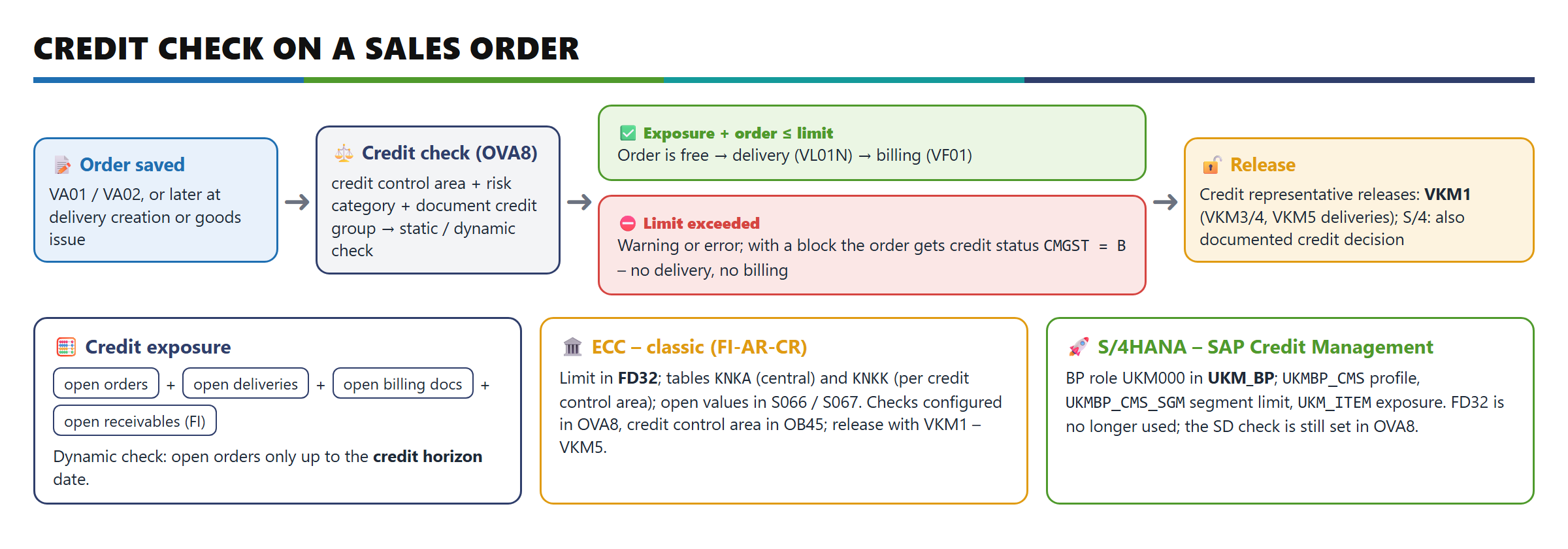
Credit management stops sales to customers whose credit exposure (open orders + deliveries + billing documents + open receivables) would exceed their credit limit. A blocked document cannot be delivered or billed until someone in credit control releases it.
5.1 Classic credit management (ECC, FI-AR-CR)
- Credit control area (OB45) – the unit that controls credit limits, assigned to company codes.
- FD32 – maintain a customer's credit limit, risk category and credit representative group; FD33 display.
- Tables (ECC): KNKA – customer master central credit data (total limit across areas); KNKK – customer master credit data per credit control area (limit KLIMK, risk category CTLPC).
- OVA8 – automatic credit control: credit control area + risk category + document credit group → checks: static (open orders + deliveries + billing + receivables), dynamic (open items within a credit horizon), maximum document value, critical fields, oldest open item. Reaction: warning, error, and/or a credit block (overall credit status CMGST – VBUK in ECC, VBAK in S/4HANA).
- Release: VKM1 blocked SD documents, VKM2 released SD documents, VKM3 sales documents, VKM4 SD documents, VKM5 deliveries (ECC). S/4HANA: VKM1 – VKM5 not available – UKM_MY_DCDS replaces VKM1.
5.2 SAP Credit Management (S/4HANA, FIN-FSCM-CR)
Topic | Classic (ECC) | SAP Credit Management (S/4HANA) |
|---|---|---|
Master data | FD32, KNKA / KNKK | Business partner role UKM000, transaction UKM_BP: credit profile (score, risk class, check rule) and credit segments with limits |
Tables | KNKA, KNKK, S066 / S067 (open values) | UKMBP_CMS (credit profile), UKMBP_CMS_SGM (credit segment data, limit), UKM_ITEM (credit exposure items) |
Credit check in SD | OVA8 | OVA8, with the check type for SAP Credit Management |
Release | VKM1 – VKM5 | VKM1 – VKM5 not available (UKM_MY_DCDS replaces VKM1); release via documented credit decisions (UKM_CASE, UKM_MY_DCDS, Fiori app Manage Documented Credit Decisions) |
Scoring / workflow | – | Credit rules and scoring, credit limit requests, workflow |
Part 6 – Availability check (ATP and aATP)
When an order item is entered, the system checks whether the quantity can be delivered on the requested date: ATP (available to promise) = stock + planned receipts − existing requirements. The result is written into the schedule lines: requested quantity and confirmed quantity (VBEP-BMENG).
Control | Where it comes from |
|---|---|
Checking group | Material master, plant view (MARC-MTVFP), e.g. 01 daily / 02 individual requirements |
Checking rule | Transaction: A for the sales order, B for the delivery |
Scope of check (OVZ9) | Checking group + checking rule → which stocks, receipts and issues count, with or without replenishment lead time |
Schedule line category | Switches the check and the transfer of requirements on or off (page 02) |
Delivery scheduling | Backward / forward scheduling with transportation planning, pick/pack, loading and transit times → material availability date, loading date, goods issue date, delivery date |
- Transfer of requirements: the order's demand is passed to MRP as sales requirements – table VBBE (individual requirement records). CO09 shows the availability overview.
- S/4HANA – advanced ATP (aATP): the product availability check runs on HANA, plus Backorder Processing (BOP, Fiori apps replace the old rescheduling V_V2), Product Allocation, Alternative-Based Confirmation (other plants) and Release for Delivery.
Part 7 – Rebates and condition contracts
A rebate is a discount paid after the sales, based on the customer's sales volume in a period ("2 % back if you buy more than 100,000 EUR this year").
ECC: SD rebate processing | S/4HANA: Settlement Management | |
|---|---|---|
Object | Rebate agreement (VBO1 / VBO2 / VBO3), agreement header table KONA; rebate condition types BO01 – BO05 | Condition contract (transaction WCOCO, Fiori app Manage Condition Contracts) |
During billing | Accruals posted with each invoice; volume stored in the rebate index VBOX | Accruals via condition contract conditions; business volume read directly from the documents (no VBOX) |
Settlement | Credit memo request from the agreement, retroactive update with VBOF | Settlement run WB2R_SC (check run, then live run) |
Status | Available only for existing agreements in converted systems | Strategic solution, also covers purchasing rebates |
Prerequisites in ECC: the sales organization, the billing type and the customer (KNVV-BOKRE) are rebate-relevant.
Part 8 – Handling units and transportation
8.1 Handling units (shipping units)
A handling unit (HU) is a physical unit of packaging material (pallet, box) plus the goods packed in it, with its own identification number. You pack delivery items into HUs in VL02N (Pack); HUs can be nested (boxes on a pallet).
Table | Content |
|---|---|
VEKP | Handling unit header: internal number VENUM, external HU ID EXIDV, packaging material VHILM, weights and volume, reference to the delivery or shipment |
VEPO | Handling unit item (content): delivery item (VBELN / POSNR), material, packed quantity – or a lower-level HU |
- T-codes: HU02 create / change HU, HU03 display, HUMO HU monitor, POP1 packing instructions.
8.2 Transportation (shipments)
- A shipment groups deliveries that travel together (one truck): VT01N create, VT02N change, VT03N display, VT04 collective processing, VT70 shipment output.
- Tables: VTTK shipment header, VTTP shipment items (the assigned deliveries), VTTS stages; shipment costs VI01 (VFKK / VFKP).
- S/4HANA: LE-TRA shipments are a compatibility-scope function; the strategic successor is SAP Transportation Management (TM), embedded in S/4HANA.
Part 9 – Other functions built on the condition technique
Function | What it does | Condition records |
|---|---|---|
Material determination | Replaces the entered material (e.g. a customer's own code or a promotion pack) by another one | VB11 / VB12 / VB13 |
Listing / exclusion | Allows only listed materials for a customer, or blocks excluded ones | VB01 / VB02 / VB03 |
Free goods | Adds free quantities (buy 10, get 1 free) as a separate item | VBN1 / VBN2 / VBN3 |
Output determination | Part 4 | VV11 … |
Account determination | Part 3 | VKOA |
Partner determination, text determination and incompletion use their own procedures instead (page 01 and page 02).
Part 10 – Interview questions
Q1. Explain the condition technique.
Fields from the field catalog form condition tables; an access sequence searches these tables in order; a condition type uses an access sequence; condition types are listed in a procedure; procedure determination picks the procedure for the document. The values themselves are condition records (VK11).
Q2. How is the pricing procedure determined?
In OVKK by sales organization, distribution channel, division, the document pricing procedure of the sales document type and the customer pricing procedure from the customer's sales area data (KNVV).
Q3. Where are the prices of a sales order stored, in ECC and in S/4HANA?
Under VBAK-KNUMV: in ECC in table KONV, in S/4HANA in PRCD_ELEMENTS. Condition records (master data) are in Annn → KONH / KONP.
Q4. What is the exclusive indicator in an access sequence?
When a valid record is found in one access, the search stops – later (less specific) tables are not read. Without it, the system continues and may find several records.
Q5. What are V/06, V/07 and V/08?
V/06 condition types, V/07 access sequences, V/08 pricing procedures (V/03 – V/05 condition tables). For account determination the same objects are V/09 – V/14.
Q6. How does SD find the revenue G/L account?
Account determination with condition type KOFI: the records in VKOA combine chart of accounts, sales organization, customer and material account assignment groups and the account key of the pricing line (ERL, ERS …). Blocked billing documents are released with VFX3.
Q7. What is NAST and what replaces it in S/4HANA?
NAST stores the output records (output type, medium, status) of ECC output determination configured in NACE. S/4HANA output management uses BRF+ decision tables (OPD) and stores output requests in the APOC tables.
Q8. Static vs dynamic credit check?
Static: exposure = open orders + open deliveries + open billing documents + open receivables against the limit. Dynamic: open order values are only counted up to a credit horizon date.
Q9. What changes in credit management in S/4HANA?
Classic FI-AR-CR (FD32, KNKA, KNKK) is replaced by SAP Credit Management: credit data on the business partner (UKM_BP, role UKM000), tables UKMBP_CMS and UKMBP_CMS_SGM, credit exposure UKM_ITEM and documented credit decisions. The SD check is still configured in OVA8.
Q10. What decides whether an availability check is done?
The checking group (material master), checking rule (transaction), scope of check (OVZ9) and the schedule line category. The confirmed quantity is in VBEP; requirements go to VBBE for MRP. S/4HANA adds aATP (backorder processing, product allocation).
Q11. What replaced SD rebate processing in S/4HANA?
Condition contracts in Settlement Management (WCOCO, settlement WB2R_SC). The rebate index VBOX is no longer needed; agreement table KONA belongs to the ECC solution.
Q12. VEKP vs VEPO?
VEKP is the handling unit header (HU number, packaging material, weight); VEPO is the handling unit item – what is packed in it (delivery item, material, quantity or a lower-level HU).
🏠 Start Here · ◀ 02 · Order-to-Cash · 04 · SD for Developers ▶ · Sections: CORE ABAP | OOPS ABAP | ABAP on HANA | Clean Core | RAP | ABAP Points | SAP Fiori | SAPUI5 | Mobile Development (MDK) | BTP Foundations | BTP Development | CAP | SAP Build | ABAP on BTP | Integration Suite | SAP Business AI | SAP BASIS | Security | SAP SDLC
Functional: FICO ABAP | TRM ABAP | VIM | SAP BIS | SD ABAP | MM ABAP | PP ABAP | QM ABAP | PM ABAP | PS ABAP | EWM | TM ABAP | GTM ABAP | EHS ABAP | HR ABAP | BW | SAP Datasphere | SAP Business Data Cloud | SAP MDG | SAP Analytics Cloud | SAP Ariba | SAP CX | SAP IBP