How SAP decides what a user may do: the building blocks (field, object, authorization, profile, role, user), how roles are built in PFCG, the standard checks every developer meets, and how to find a missing authorization. How to check authorizations in your own code is on page 02.
Part 1 – Why authorizations
Authentication proves who you are (password, SSO, certificate). Authorization decides what you may do once you are logged on. SAP's authorization concept answers questions such as: may this user start VA01? May they change orders of sales organization 1000, or only display them?
- Need-to-know / least privilege – every user gets only the rights their job needs.
- Segregation of duties (SoD) – no single user can do both sides of a risky process (create a vendor and pay it). See page 03.
- Audit and compliance – auditors (SOX, GDPR) ask who can see or change what; roles make that answerable.
- Authorizations are positive only: you grant rights, you never deny them. No role = no access.
Part 2 – The building blocks
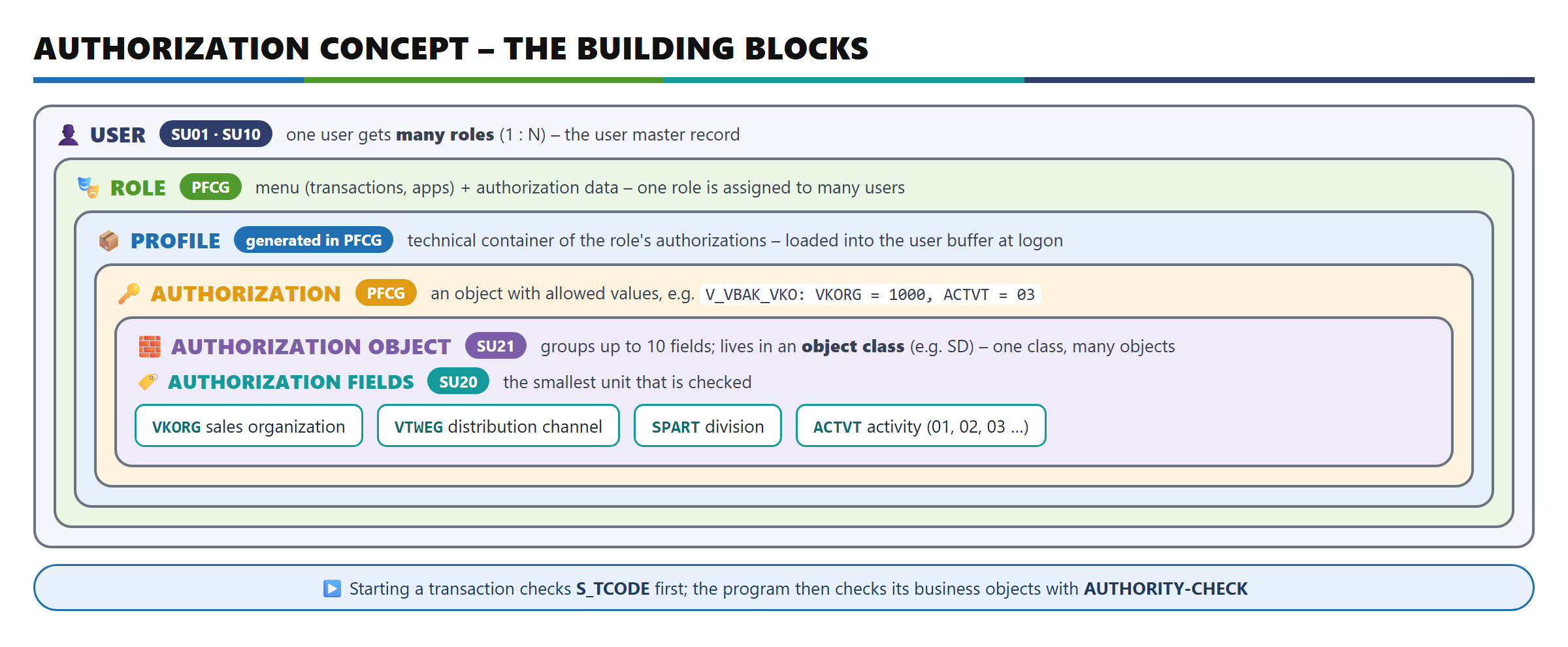
Building block | What it is | Example | Maintained in |
|---|---|---|---|
Authorization field | The smallest unit that is checked – usually based on a data element |
| SU20 |
Authorization object | Groups up to 10 fields that are checked together |
| SU21 |
Object class | Logical group of authorization objects (by application area) |
| SU21 |
Authorization | An authorization object with allowed values for each field |
| PFCG (Authorizations tab) |
Profile | Technical container of authorizations; generated from a role |
| PFCG (Generate) |
Role | What a user does at work: menu (transactions, apps) + authorizations + profile | Z_SD_CLERK | PFCG |
User | User master record; holds the assigned roles and profiles | a sales clerk's user ID | SU01, SU10 |
Read it bottom-up: fields are grouped into an object (inside an object class); an object with values is an authorization; authorizations are collected in a profile; PFCG generates the profile from a role; roles are assigned to users (1 : N on every level).
The activity field ACTVT
Most objects have the field ACTVT (activity) – what the user may do with the data. The allowed activities of each object are defined in SU21; all activity codes are in table TACT.
ACTVT | Meaning | ACTVT | Meaning |
|---|---|---|---|
01 | Create or generate | 06 | Delete |
02 | Change | 08 | Display change documents |
03 | Display | 16 | Execute |
How roles add up
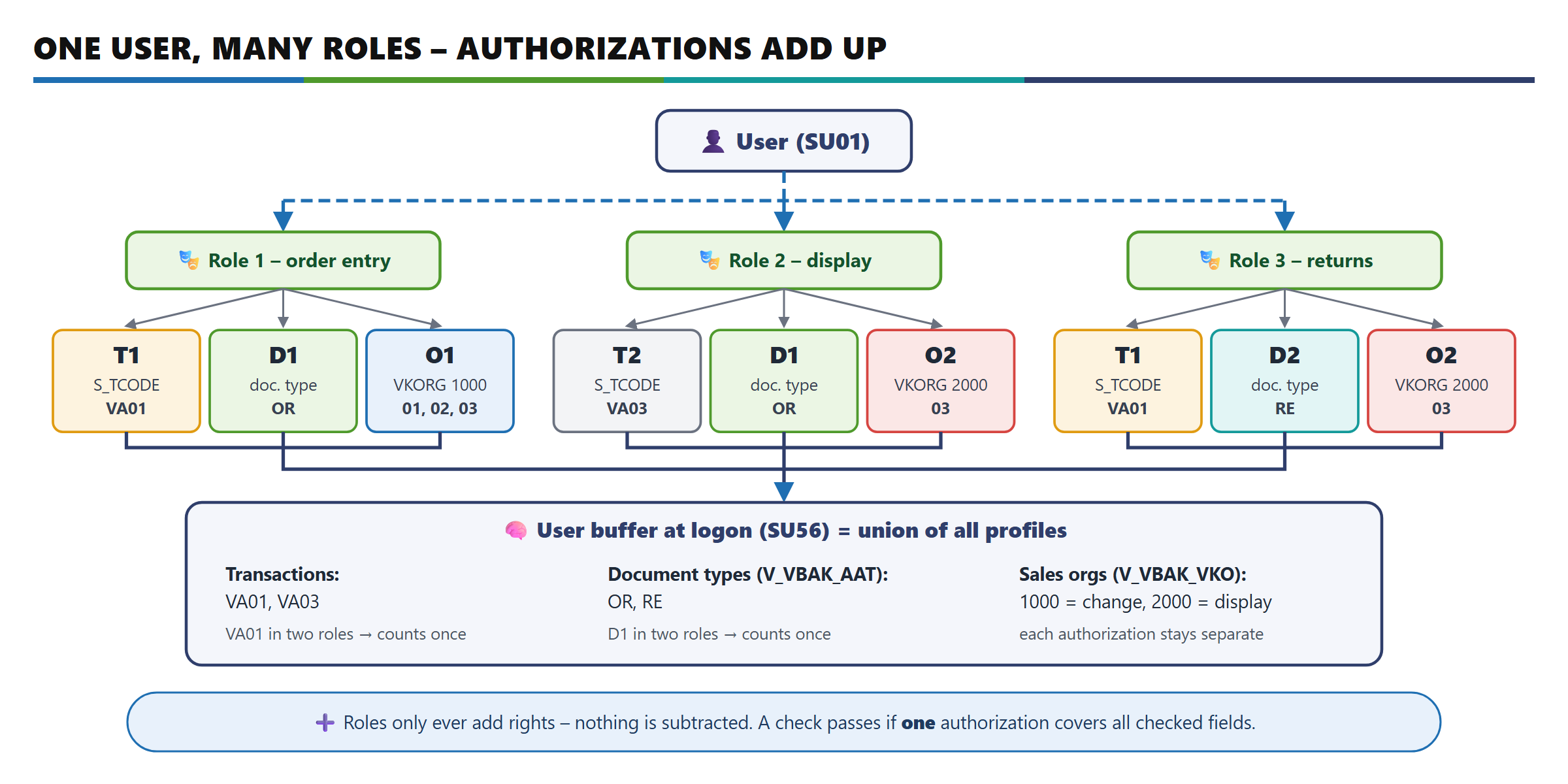
- At logon the authorizations of all assigned profiles are loaded into the user buffer (display it with SU56). Roles only add rights.
- A check passes if one single authorization contains all checked values. Values from two different authorizations of the same object are not combined: VKORG 1000 with ACTVT 02 in one authorization and VKORG 2000 with ACTVT 03 in another does not allow changing in 2000.
Part 3 – Roles: single, composite, derived and organizational levels
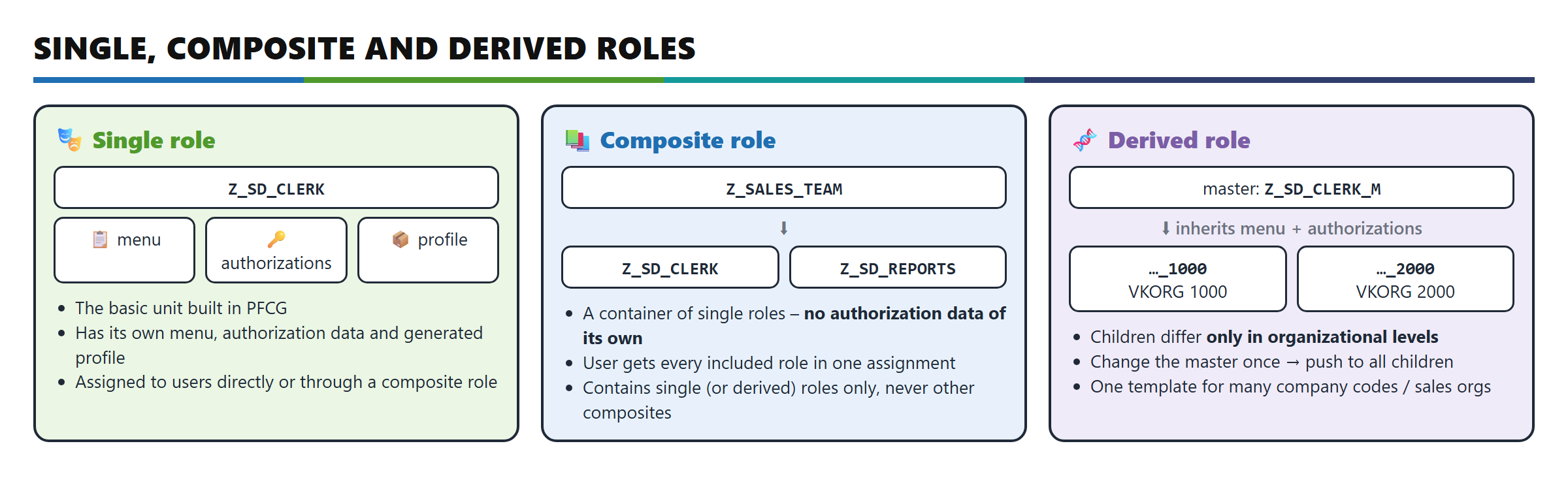
Role type | What it contains | Typical use |
|---|---|---|
Single role | Menu, authorization data, generated profile | One job function, e.g. order entry |
Composite role | Only a list of single roles – no authorization data of its own | Bundle the roles of a job ("sales team") for one assignment |
Derived role (child) | Inherits menu and authorizations from a master (parent) role; only the organizational levels differ | Same job in many company codes or sales organizations |
Organizational levels
Fields such as company code (BUKRS), plant (WERKS), sales organization (VKORG) or purchasing organization (EKORG) are organizational levels. PFCG asks for them once per role (button Org. levels) and fills every object that contains them. This is what makes derived roles work: the master has the activities and transactions, each child sets only its own org levels.
- Changes in the master role are passed on to the children (Generate derived roles / inherit from parent) – never edit authorizations in a child directly.
- Org levels are defined by SAP; customers can add more only with report
PFCG_ORGFIELD_CREATE.
Part 4 – Building a role in PFCG
Step | PFCG tab | What you do |
|---|---|---|
1 | Description | Name (customer namespace |
2 | Menu | Add transactions, reports, Fiori catalogs / spaces, web links – this is what the user can start |
3 | Authorizations | Change authorization data: PFCG proposes objects from the SU24 data of the menu entries; set org levels and fill the open (yellow) fields |
4 | Generate | Generate the profile – without it the role grants nothing |
5 | User | Assign users (with validity dates); can also be done in SU01 |
6 | User comparison | Writes the generated profile into the user master records; scheduled daily as report |
7 | Transport | Roles are transported from PFCG; user assignments are normally maintained per system |
Traffic lights in the authorization tree: green = fully maintained, yellow = a field has no value, red = an organizational level is missing. Status texts tell how a value came in: Standard (from SU24, untouched), Maintained, Changed, Manual (added by hand).
- Fiori roles: a PFCG role can also carry business catalogs and spaces / pages; the catalog decides which apps may be launched, S_SERVICE allows the OData service. Details: SAP Fiori › 02 Fiori Launchpad Configuration & Security.
Part 5 – SU24 check indicators and proposals
When a transaction or service is added to a role menu, PFCG needs to know which objects it checks. That knowledge is maintained per transaction / service / Web Dynpro app in SU24:
Setting | Meaning |
|---|---|
Check indicator: Check | The object is checked when the transaction runs (the normal case) |
Check indicator: Do not check | The check is switched off for this transaction (not possible for S_TCODE and for Basis and HR objects) |
Proposal: Yes | PFCG adds the object to the role automatically, with the proposed field values |
Proposal: No | The object is checked but not proposed – the role builder adds it if needed |
- SU22 holds SAP's own proposals (tables USOBT / USOBX). SU24 holds the customer copy (USOBT_C / USOBX_C) that PFCG actually reads. Developers maintain SU24 for every custom transaction.
- SU25 – after an upgrade, compares the new SAP proposals (SU22) with the customer data (SU24) and marks the roles that need adjustment. Also used once to fill SU24 initially.
Part 6 – User types
Type | Name | Dialog logon | Password | Used for |
|---|---|---|---|---|
A | Dialog | Yes | Expires, must be changed | Normal end users |
B | System | No | No expiry | Background jobs, internal RFC, ALE; technical users |
C | Communication | No | Expiry rules apply | External RFC / HTTP callers from other systems |
S | Service | Yes, many users at once | No expiry | Anonymous shared access (e.g. public web service) – keep its rights minimal |
L | Reference | No | None | Holds extra authorizations that are referenced by other users (SU01 tab Roles → reference user) |
The user type is stored in USR02 field USTYP. Background jobs run with the authorizations of the step user in SM36 – usually a system user.
Part 7 – Standard checks every developer meets
Object | Checked when | Key fields |
|---|---|---|
S_TCODE | Every transaction start (the start check) – before the program runs | TCD |
S_TABU_DIS | Table maintenance (SM30, SM31, SE16 changes) by authorization group of the table | DICBERCLS, ACTVT (02, 03) |
S_TABU_NAM | Same, but by table name – finer than the group | TABLE, ACTVT |
S_PROGRAM | Starting a report in SA38 / SE38, scheduling it in background or maintaining its variants – if the program has an authorization group | P_GROUP, P_ACTION (SUBMIT, BTCSUBMIT, VARIANT) |
S_DEVELOP | ABAP Workbench: display, change, debug (object type | DEVCLASS, OBJTYPE, OBJNAME, P_GROUP, ACTVT |
S_RFC | Calling a remote-enabled function module from outside | RFC_TYPE (FUGR / FUNC), RFC_NAME, ACTVT 16 |
S_SERVICE | Starting an external service, e.g. OData services of Fiori apps (Web Dynpro apps: S_START as of 7.40) | SRV_NAME (hash), SRV_TYPE |
S_USER_GRP / S_USER_AGR | Maintaining users / roles (admin side) | CLASS, ACT_GROUP, ACTVT |
- Business objects then follow per application:
F_BKPF_BUK(FI company code),M_BEST_EKO(purchasing org),V_VBAK_VKO(sales org) … HR has its own concept: see HR ABAP › 04 (P_ORGIN, structural authorizations). - Inside a program the developer must check business data with
AUTHORITY-CHECK(page 02). S_TCODE only says the user may start the transaction – not which data they may touch.
Part 8 – Troubleshooting: SU53, STAUTHTRACE, SUIM
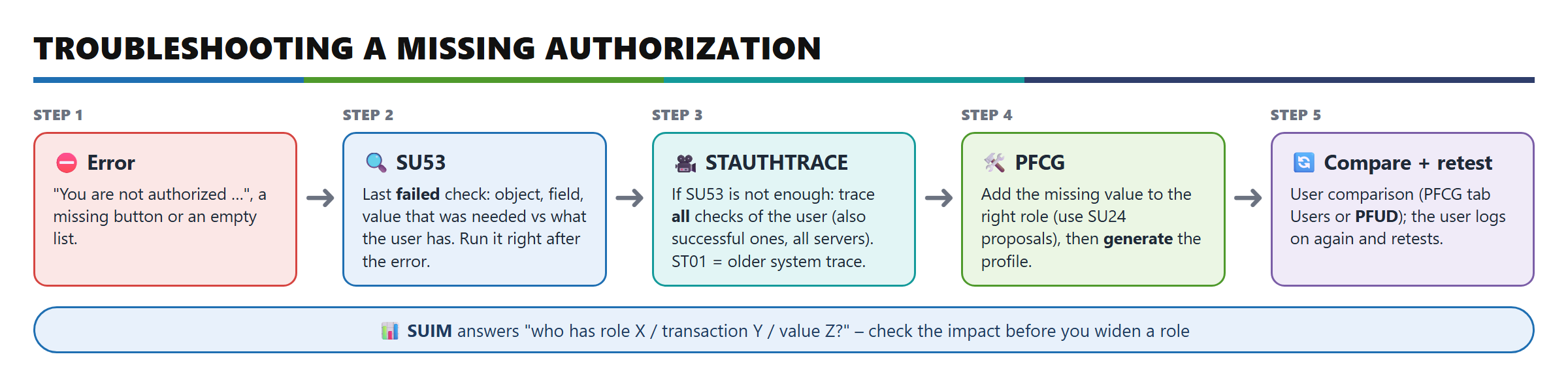
Tool | Shows | Tip |
|---|---|---|
SU53 | The last failed authorization check of a user: object, fields, required value vs the user's values | Run right after the error; it can also show another user's last failure |
STAUTHTRACE | Authorization trace: every check (successful and failed) of a user, on all application servers | Best for apps that check many objects, and for building new roles |
ST01 | System trace – authorization, kernel, RFC, table buffer … | Older, one server only |
SUIM | User Information System – reports on users, roles, profiles, authorizations, objects and change documents | "Who can run VA01?", "Which roles contain object X with value Y?" |
SU56 | The current user's authorization buffer | Check what was really loaded at logon |
Common causes: profile not generated, user comparison not run, value missing in an org level, or the user needs to log on again so the buffer is reloaded.
Part 9 – Key transactions and tables
T-code | Purpose |
|---|---|
SU01 | Maintain users – logon data, roles, profiles, defaults; assign roles to a user (SU01D display only) |
SU10 | Mass user maintenance – assign or remove roles for many users |
PFCG | Role maintenance – menu, authorization values, profile generation, user assignment, user comparison |
SU20 | Maintain authorization fields |
SU21 | Maintain object classes and authorization objects |
SU22 | SAP's check indicators and proposals (SAP use) |
SU24 | Customer check indicators and proposals per transaction / service |
SU25 | Upgrade tool – adjust SU24 data and roles after an upgrade |
SU53 | Display the last failed authorization check |
SUIM | User Information System – reports on users, roles, authorizations and objects |
STAUTHTRACE | System-wide authorization trace |
SU56 | Display the user's authorization buffer |
PFUD | User master data reconciliation (user comparison for many roles) |
The same list in the t-code reference: ABAP Points › T-Codes (Part 12 Authorizations).
Table | Content |
|---|---|
USR02 | Logon data: user type (USTYP), lock status (UFLAG), validity, last logon |
AGR_DEFINE | Role definitions |
AGR_USERS | Role-to-user assignments with validity dates |
AGR_TCODES | Transactions in a role menu |
AGR_1251 | Authorization data of roles: object, field, values |
AGR_AGRS | Single roles inside composite roles |
TOBJ | Authorization objects and their fields |
AUTHX | Authorization fields |
TACT / TACTZ | Activities / allowed activities per object |
USOBT / USOBX | SAP proposals and check indicators (SU22); customer copies USOBT_C / USOBX_C (SU24) |
Part 10 – Interview questions
Q1. Explain the SAP authorization concept in one minute.
Fields are grouped in authorization objects (SU21). An object with values is an authorization. Authorizations sit in profiles, which PFCG generates from roles. Roles are assigned to users. At logon the user buffer is filled; S_TCODE is checked at transaction start and the program checks business objects with AUTHORITY-CHECK.
Q2. Role vs profile?
A role (PFCG) is the business view: menu plus authorization data. The profile is the technical container generated from it, which the kernel reads. Today you maintain roles, never profiles directly.
Q3. Single, composite and derived roles?
Single = own menu and authorizations. Composite = a bundle of single roles with no authorization data. Derived = child of a master role that inherits menu and authorizations and differs only in org levels.
Q4. What are organizational levels?
Fields like company code, plant or sales organization that PFCG maintains once per role for all objects. They are the only thing that differs between derived roles.
Q5. What is SU24 and why should a developer care?
SU24 tells PFCG which objects a transaction checks (check indicator) and which to propose with which values. For a custom transaction the developer maintains it, so role builders get the right objects automatically.
Q6. A user gets "not authorized". How do you analyse it?
SU53 right after the error shows the failed object and values. If that is not enough, STAUTHTRACE records all checks. Fix the role in PFCG, generate the profile, run the user comparison, user logs on again. SUIM shows who else is affected.
Q7. What is the activity field?
ACTVT in most objects says what may be done: 01 create, 02 change, 03 display, 06 delete, 16 execute. Allowed activities per object are defined in SU21.
Q8. Which user types exist?
Dialog (A), System (B), Communication (C), Service (S) and Reference (L). Background and RFC users should be system or communication users, never dialog users.
Q9. Why is S_TCODE alone not enough?
It only controls the start of a transaction. Inside, the program must check which data the user may see or change – otherwise anyone who can start the transaction sees all company codes.
Q10. S_TABU_DIS vs S_TABU_NAM?
S_TABU_DIS protects table maintenance by authorization group (SE54); S_TABU_NAM by individual table name – used when a group would grant too much.
Q11. A user has VKORG 1000 change in one role and VKORG 2000 display in another. Can they change orders in 2000?
No. A check passes only if one single authorization contains all checked values; values from different authorizations are not mixed.
Q12. What does user comparison (PFUD) do?
It writes the generated profiles of assigned roles into the user master and removes profiles whose role assignment has expired. Without it new role changes do not reach the user.
🏠 Start Here · 02 · Checks in ABAP ▶ · Sections: CORE ABAP | OOPS ABAP | ABAP on HANA | Clean Core | RAP | ABAP Points | SAP Fiori | SAPUI5 | Mobile Development (MDK) | BTP Foundations | BTP Development | CAP | SAP Build | ABAP on BTP | Integration Suite | SAP Business AI | SAP BASIS | Security | SAP SDLC
Functional: FICO ABAP | TRM ABAP | VIM | SAP BIS | SD ABAP | MM ABAP | PP ABAP | QM ABAP | PM ABAP | PS ABAP | EWM | TM ABAP | GTM ABAP | EHS ABAP | HR ABAP | BW | SAP Datasphere | SAP Business Data Cloud | SAP MDG | SAP Analytics Cloud | SAP Ariba | SAP CX | SAP IBP