How a developer protects data in code: the AUTHORITY-CHECK statement, a custom authorization object from SU20 to the program, checking many values at once with CL_AUTH_OBJECTS_TO_SQL, transaction, table and RFC checks, and the modern way – CDS access control for reading and RAP authorization for changing. The concept behind it (objects, roles, PFCG) is on page 01.
Part 1 – The AUTHORITY-CHECK statement
AUTHORITY-CHECK asks the kernel whether the current user's buffer contains an authorization for an object with the given field values. It only sets sy-subrc – the program decides what to do.
Syntax
|
Part | Meaning |
|---|---|
OBJECT auth_obj | Name of the authorization object (SU21), in upper case – e.g. |
ID id FIELD val | Authorization field and the value to check, e.g. |
ID id DUMMY | This field is not checked – any value is accepted. Write it for every field you skip, so the reader sees it was deliberate. Fields that are not listed at all are not checked either |
FOR USER user | Checks another user's authorizations instead of the current user (type |
sy-subrc values
sy-subrc | Meaning |
|---|---|
0 | Authorized – or no check was done because the check indicator is switched off |
4 | Not authorized: the user has authorizations for the object, but none covers the checked values (also set for a wrong or extra field name) |
12 | Not authorized: the user has no authorization for this object at all |
40 | An invalid user name was given in |
In practice: IF sy-subrc <> 0 = not allowed. Return code 24 is no longer set in current releases.
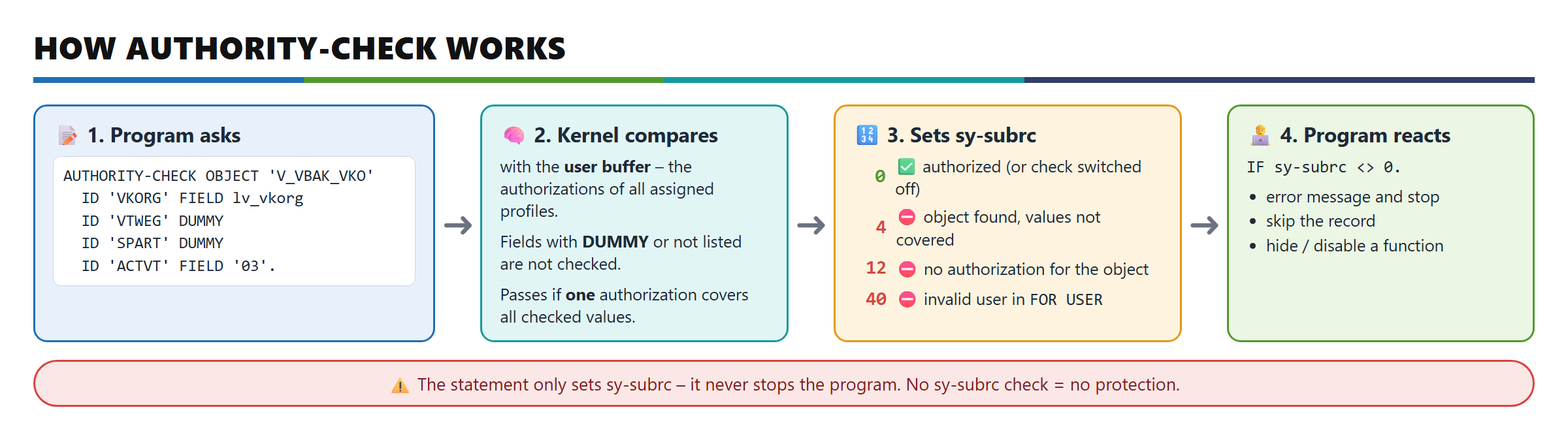
Example – one sales organization
Checking a single value is easy. Is the user allowed to display orders of one sales organization? Object V_VBAK_VKO has the fields VKORG, VTWEG, SPART and ACTVT; distribution channel and division do not matter here, so they are DUMMY:
|
Checking the right activity
- Check the activity that matches the operation:
03before showing data,02before saving a change,01before creating,06before deleting. - Check with the values the user entered or the data you read (the record's VKORG), not with a constant – and check before the data is shown or written.
- Check early, once: in
AT SELECTION-SCREENfor selection parameters, or right after reading data. - Never replace an authorization check by
IF sy-uname = '…'– see page 03.
Part 2 – Custom authorization object, end to end
When no standard object fits (e.g. a custom sales report that needs its own on/off switch per sales organization), create your own object.
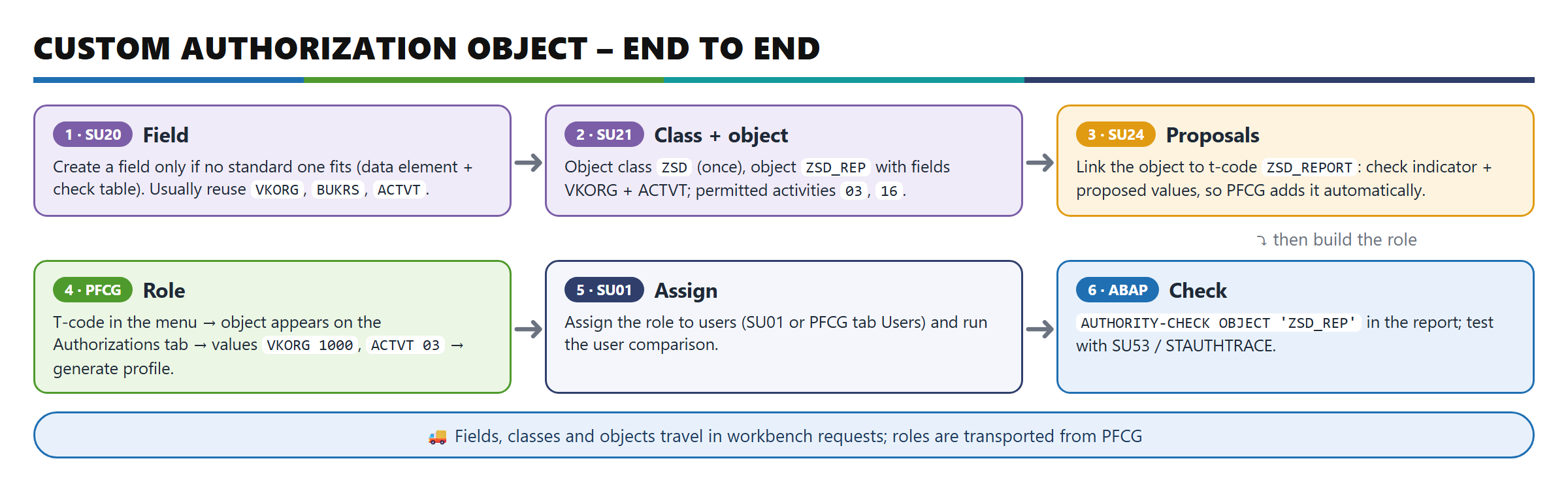
Step | T-code | What you do |
|---|---|---|
1 | SU20 | Create an authorization field only if no standard field fits (based on a data element, ideally with a check table). Usually you reuse VKORG, BUKRS, WERKS, ACTVT |
2 | SU21 | Create an object class ( |
3 | SU24 | Assign the object to the custom transaction |
4 | PFCG | Put the transaction in the role menu; the object is proposed on the Authorizations tab; maintain values (VKORG 1000, ACTVT 03); generate the profile |
5 | SU01 / PFCG | Assign the role to users; run the user comparison |
6 | SE38 / ADT | Check the object in the program; test with SU53 / STAUTHTRACE |
|
- Fields, object classes and objects are transported with workbench requests; the role is transported from PFCG.
Part 3 – Checking many values: loop vs CL_AUTH_OBJECTS_TO_SQL
If there are several sales organizations to check (a select-option), there are usually two options:
- Option 1 – loop: fetch the candidate values, check the authorization for each one in a loop and collect the allowed values in a range.
- Option 2 – class
CL_AUTH_OBJECTS_TO_SQL: turns the user's authorizations into a dynamic WHERE condition – the same result with less code, and the database does the filtering.
Option 1 – loop and build a range
|
Option 2 – CL_AUTH_OBJECTS_TO_SQL
First call the factory method CREATE_FOR_OPEN_SQL to get a new instance of CL_AUTH_OBJECTS_TO_SQL. Then add the authorization objects to be checked with ADD_AUTHORIZATION_OBJECT: the object, the activities, a field mapping (which authorization field corresponds to which table field) and an optional filter that limits the check to the values on the selection screen. Finally GET_SQL_CONDITION returns the WHERE condition as a string (s_vkorg is the select-option from Option 1).
|
- If the current user has no authorization for the object, exception
CX_AUTH_NOT_AUTHORIZEDis raised. - If there is no restriction (full authorization
*), the result is empty – an empty dynamic WHERE selects all rows, which is correct. - Example: the user is authorized for sales organizations S000 and S001. Then
wherecontains:
|
Dynamic WHERE in the SQL statement
The method result is used directly as a dynamic WHERE condition:
|
The condition is built by SAP from authorization values, not from user input, so it is safe to use dynamically. In S/4HANA the cleaner alternative for reads is CDS access control (Part 5), which applies the same restriction automatically.
Part 4 – Transaction, table and RFC checks
Transactions
- S_TCODE is checked automatically when a user starts a transaction from the menu or command field.
- SE93 – a transaction can carry an extra authorization object with values (stored in table TSTCA) that is checked at start, in addition to S_TCODE. Use it for custom report transactions.
CALL TRANSACTION…WITH AUTHORITY-CHECKchecks S_TCODE and the SE93 object of the called transaction. Without the addition the check depends on SE97 (table TCDCOUPLES) – always writeWITH AUTHORITY-CHECK(orWITHOUT AUTHORITY-CHECKwhen skipping it is deliberate).LEAVE TO TRANSACTIONalways checks.AUTHORITY_CHECK_TCODE (older FM-based check, also depends on TCDCOUPLES – replaced by WITH AUTHORITY-CHECK) checks whether the user may start a transaction without starting it.It raises the exception OK when the user is authorized and NOT_OK when not:
|
Tables – authorization groups
- SE54 creates table authorization groups and assigns tables / maintenance views to them (also possible from the table maintenance generator).
- SM30 / SM31 then check S_TABU_DIS (field DICBERCLS = authorization group, ACTVT 02 or 03) or S_TABU_NAM (by table name). Give every custom table a group – not
&NC&("not classified"). - A program that changes table entries itself can call FM
VIEW_AUTHORITY_CHECKto perform the same check as SM30.
RFC function modules
- When a remote-enabled FM is called from outside, the RFC framework checks S_RFC for its function group or the single FM (fields: page 01 Part 7).
- S_RFC only lets the caller in – inside the FM the developer still checks the business objects with AUTHORITY-CHECK, exactly as in a dialog program. More on RFC security on page 03.
Part 5 – CDS access control (DCL)
Access control (Data Control Language, DCL) restricts which rows a CDS entity returns, based on the user's authorizations. You define it once on the view; every ABAP SQL SELECT on that view, every Fiori list and every OData read is filtered automatically – no AUTHORITY-CHECK in the code.
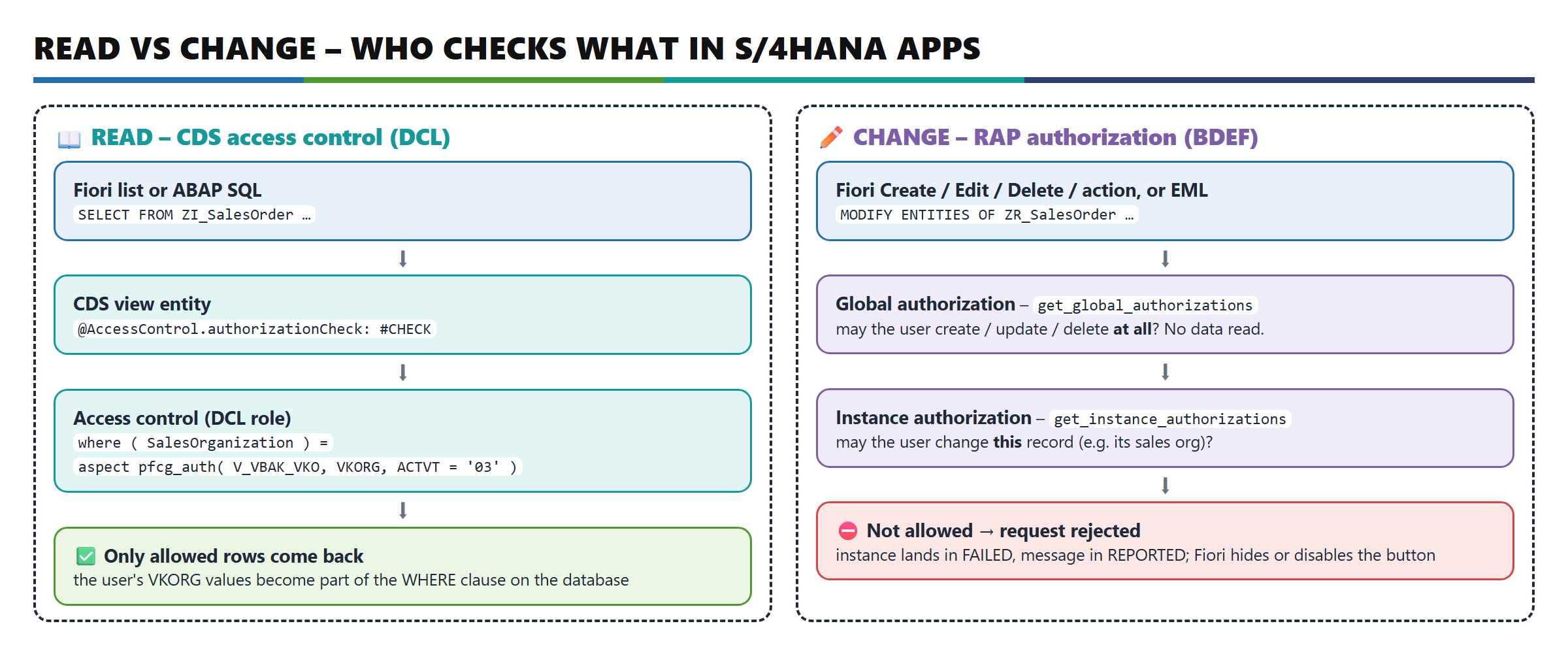
1. The view asks for a check
|
@AccessControl.authorizationCheck | Effect |
|---|---|
#CHECK | Apply the access control if one exists; syntax warning if none exists |
#MANDATORY | Like |
#NOT_REQUIRED | No warning without access control; one is still applied if it exists (the default if the annotation is missing) |
#NOT_ALLOWED | No access control is applied, even if one exists (technical or helper views) |
2. The access control (role)
Created in ADT (New → Other → Access Control). aspect pfcg_auth reads the user's PFCG authorizations for an object and turns them into a condition:
|
Element | Meaning |
|---|---|
define role … { grant select on … } | Which entity is protected; only reading (select) is controlled |
where ( SalesOrganization ) = | CDS element(s) to restrict; several elements map to several fields in the same order |
aspect pfcg_auth( V_VBAK_VKO, VKORG, ACTVT = '03' ) | Object, field(s) to map, fixed field values (here: display activity) |
| Combine with other conditions, e.g. |
aspect user | Current user name, e.g. |
inheriting conditions from entity … | Reuse the conditions of the underlying view (typical for projection / consumption views) |
Two fields at once: where ( SalesOrganization, DistributionChannel ) = aspect pfcg_auth( V_VBAK_VKO, VKORG, VTWEG, ACTVT = '03' ).
3. How ABAP SQL applies it
SELECT … FROM zi_salesorder– the framework adds the user's allowed values to the WHERE clause; the database returns only allowed rows. No authorization at all = no rows (no exception, just an empty result).- Full authorization (
*) = no extra condition. - Access control works only when reading through the CDS entity. A
SELECTon table VBAK itself is not restricted. SELECT … FROM zi_salesorder WITH PRIVILEGED ACCESSswitches access control off for that statement – only for technical reads that do their own checks.
More on CDS views and access control: ABAP on HANA › 05 CDS Views.
Part 6 – RAP authorization
Access control protects reading. For changing (create, update, delete, actions) a RAP business object declares authorization in its behavior definition and implements it in the handler class.
Kind | Question | Method |
|---|---|---|
Global | May the user do this operation at all, independent of data? (create, or update in general) | get_global_authorizations |
Instance | May the user change this instance, based on its data? (sales org of this order) | get_instance_authorizations |
authorization master ( global, instance )– this entity is checked itself;( global )or( instance )alone is also possible. Create can only be checked globally (there is no instance yet).- Child entities use
authorization dependent by _SalesOrder– they follow the root. - Fiori elements calls these methods to hide or disable buttons; on a forbidden request the framework rejects it and the instance appears in FAILED with a message in REPORTED.
IN LOCAL MODE(inside the BO) andPRIVILEGEDEML skip authorization checks – use them only for internal or technical calls.- Reads of a RAP BO are protected by the CDS access control of its views (Part 5).
Full RAP context with code (BDEF, handler, authorization contexts, privileged mode): RAP › 06 · Feature Control, Authorization & Numbering.
Part 7 – ABAP Cloud: IAM apps and business catalogs
In the SAP Business AI Platform, ABAP environment and S/4HANA Cloud Public Edition there is no PFCG for developers. Authorizations are modelled in ADT and assigned through business roles:
Artifact | Created in | Purpose |
|---|---|---|
Authorization field / object | ADT | Same idea as SU20 / SU21; checked with |
IAM app (Identity and Access Management) | ADT | Bundles the app's service (start authorization) with the authorization objects and their values |
Business catalog | ADT | Groups one or more IAM apps – the unit that is assigned |
Business role | Fiori app Maintain Business Roles | Contains business catalogs, sets value restrictions (read / write, e.g. per company code), assigned to business users |
- S/4HANA on-premise and Private Cloud still use PFCG roles; ABAP Cloud code there checks objects the same way.
- BTP platform security (XSUAA, role collections): BTP Foundations › 03 BTP Services, Security & Connectivity.
Part 8 – Interview questions
Q1. What does AUTHORITY-CHECK return and what does it do on failure?
It only sets sy-subrc: 0 authorized, 4 values not covered, 12 no authorization for the object, 40 invalid user in FOR USER. It never stops the program – the code must react to sy-subrc.
Q2. What is DUMMY?
ID 'field' DUMMY tells the kernel not to check that field – any value is fine. Fields left out are not checked either, but DUMMY documents the intent.
Q3. What is FOR USER used for?
To check another user's authorizations, e.g. in a background or workflow step that acts for someone. It is a security risk if the user name comes from input.
Q4. How do you create and use a custom authorization object?
Field in SU20 (or reuse a standard one), object class and object in SU21 with permitted activities, SU24 proposal for the custom transaction, values in a PFCG role, assign the role, then AUTHORITY-CHECK in the program.
Q5. How do you check authorization for many values efficiently?
Either loop with AUTHORITY-CHECK and build a range, or use CL_AUTH_OBJECTS_TO_SQL: create_for_open_sql, add_authorization_object, get_sql_condition – it returns a dynamic WHERE built from the user's authorizations; CX_AUTH_NOT_AUTHORIZED if none. With CDS views (S/4HANA, and also on ECC systems from AS ABAP 7.40 SP10): CDS access control.
Q6. How does CDS access control work?
The view has @AccessControl.authorizationCheck: #CHECK; a DCL role with grant select and aspect pfcg_auth maps view elements to object fields. ABAP SQL adds the user's values to the WHERE clause automatically, so only allowed rows come back.
Q7. Can access control be bypassed?
Yes: selecting the underlying table directly, WITH PRIVILEGED ACCESS, or a view with #NOT_ALLOWED. That is why business reads should go through CDS entities with access control.
Q8. Global vs instance authorization in RAP?
Global answers "may the user do this at all" without data (create, update in general). Instance answers "may the user change this record" based on its data. Declared with authorization master ( global, instance ) and implemented in get_global_authorizations / get_instance_authorizations.
Q9. How do you make sure a called transaction is checked?
Use CALL TRANSACTION … WITH AUTHORITY-CHECK, or (older approach) AUTHORITY_CHECK_TCODE before calling. The SE93 authorization object of the transaction is checked too.
Q10. How are custom tables protected in SM30?
Assign an authorization group in SE54; SM30 checks S_TABU_DIS for the group or S_TABU_NAM for the table name.
Q11. Is S_RFC enough to secure an RFC function module?
No. S_RFC only allows calling the function group. Inside, the FM must check the business objects like any other program.
Q12. How are authorizations modelled in ABAP Cloud?
Authorization objects, IAM apps and business catalogs are created in ADT; administrators put catalogs into business roles with value restrictions and assign them to business users.
🏠 Start Here · ◀ 01 · Authorization Concept · 03 · Secure Coding ▶ · Sections: CORE ABAP | OOPS ABAP | ABAP on HANA | Clean Core | RAP | ABAP Points | SAP Fiori | SAPUI5 | Mobile Development (MDK) | BTP Foundations | BTP Development | CAP | SAP Build | ABAP on BTP | Integration Suite | SAP Business AI | SAP BASIS | Security | SAP SDLC
Functional: FICO ABAP | TRM ABAP | VIM | SAP BIS | SD ABAP | MM ABAP | PP ABAP | QM ABAP | PM ABAP | PS ABAP | EWM | TM ABAP | GTM ABAP | EHS ABAP | HR ABAP | BW | SAP Datasphere | SAP Business Data Cloud | SAP MDG | SAP Analytics Cloud | SAP Ariba | SAP CX | SAP IBP