Authorizations (pages 01 and 02) only protect a system if the code around them is safe and the system itself is hardened. This page covers the typical vulnerabilities in custom ABAP code and how to avoid them, the tools that find them, and the system-level topics an ABAP developer must know: RFC, OData and communication security, logging, patching and segregation of duties.
Part 1 – Why secure coding matters
An SAP system holds a company's most sensitive data: salaries, bank details, prices, customers. An attacker rarely breaks the authorization concept itself – they use a gap in custom code (a report that forgets AUTHORITY-CHECK, a dynamic WHERE built from user input) or a weak system setting (default passwords, an open RFC destination). Security therefore works in layers (defense in depth): if one layer fails, the next one still stops the attack.
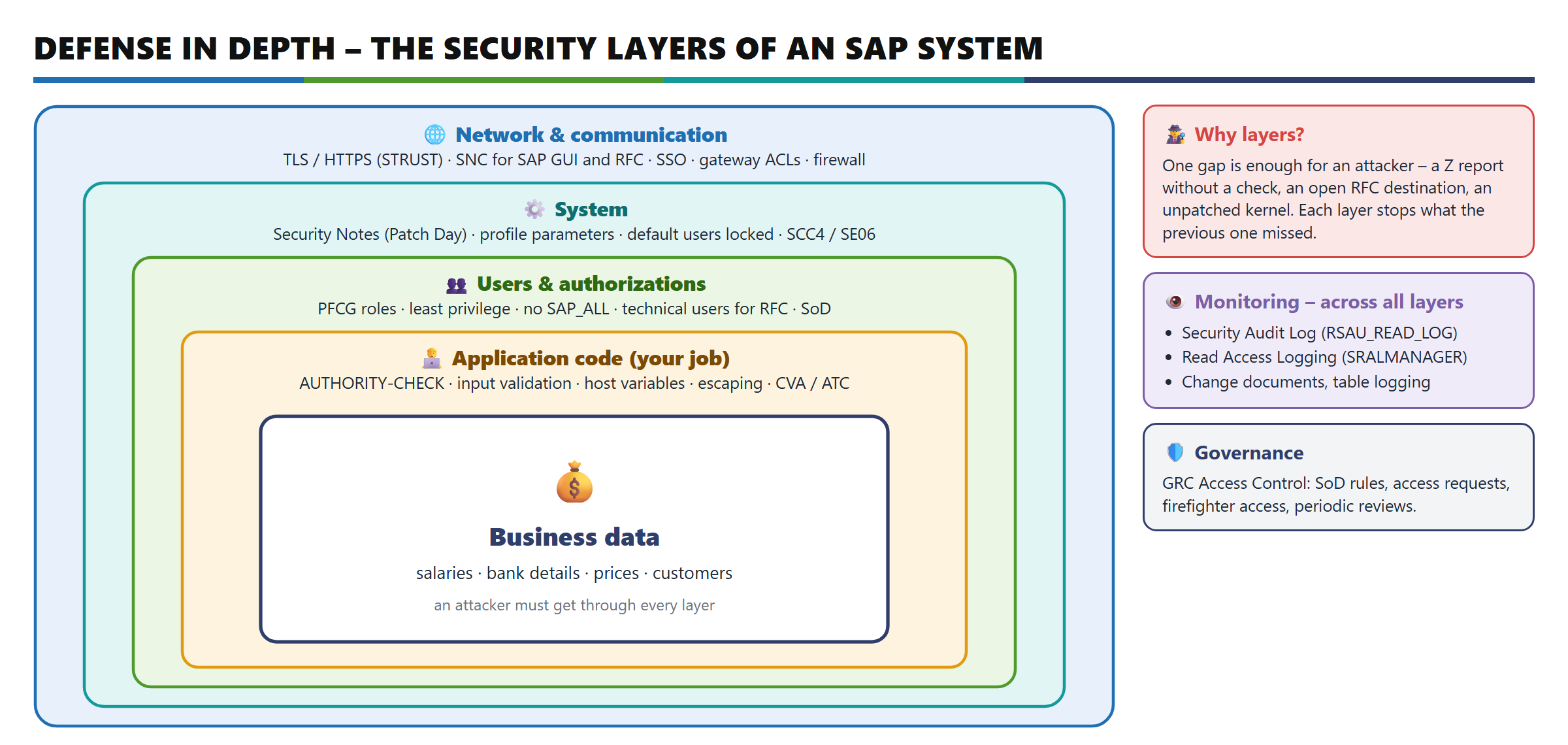
Layer | What protects it | Where on this page |
|---|---|---|
Network & communication | TLS (HTTPS), SNC for SAP GUI / RFC, SSO, firewalls, gateway ACLs | Parts 7, 9 |
System | Patching (Security Notes), profile parameters, default users locked, client settings | Part 11 |
Users & authorizations | Roles in PFCG, least privilege, SoD (GRC) | Pages 01/02, Part 12 |
Application code | AUTHORITY-CHECK, input validation, escaping, CVA / ATC scans | Parts 2–6 |
Monitoring | Security Audit Log, change documents, Read Access Logging | Part 10 |
1.1 The golden rules of secure ABAP
- Never trust input – selection screen, URL parameter, OData payload, RFC parameter, file content. Validate it (type, length, allowlist) before it reaches SQL, a file name, an OS command or HTML.
- Prefer static over dynamic – static ABAP SQL with host variables, fixed file names, fixed programs. Dynamic tokens are where injections happen.
- Check authorization explicitly – the system checks transaction start (S_TCODE) and some kernel operations, but data-level checks in custom code are your job (page 02).
- Least privilege – technical users, RFC users and roles get only what they need; never SAP_ALL.
- No backdoors – no hard-coded user names, no hidden debug switches, no test code in production.
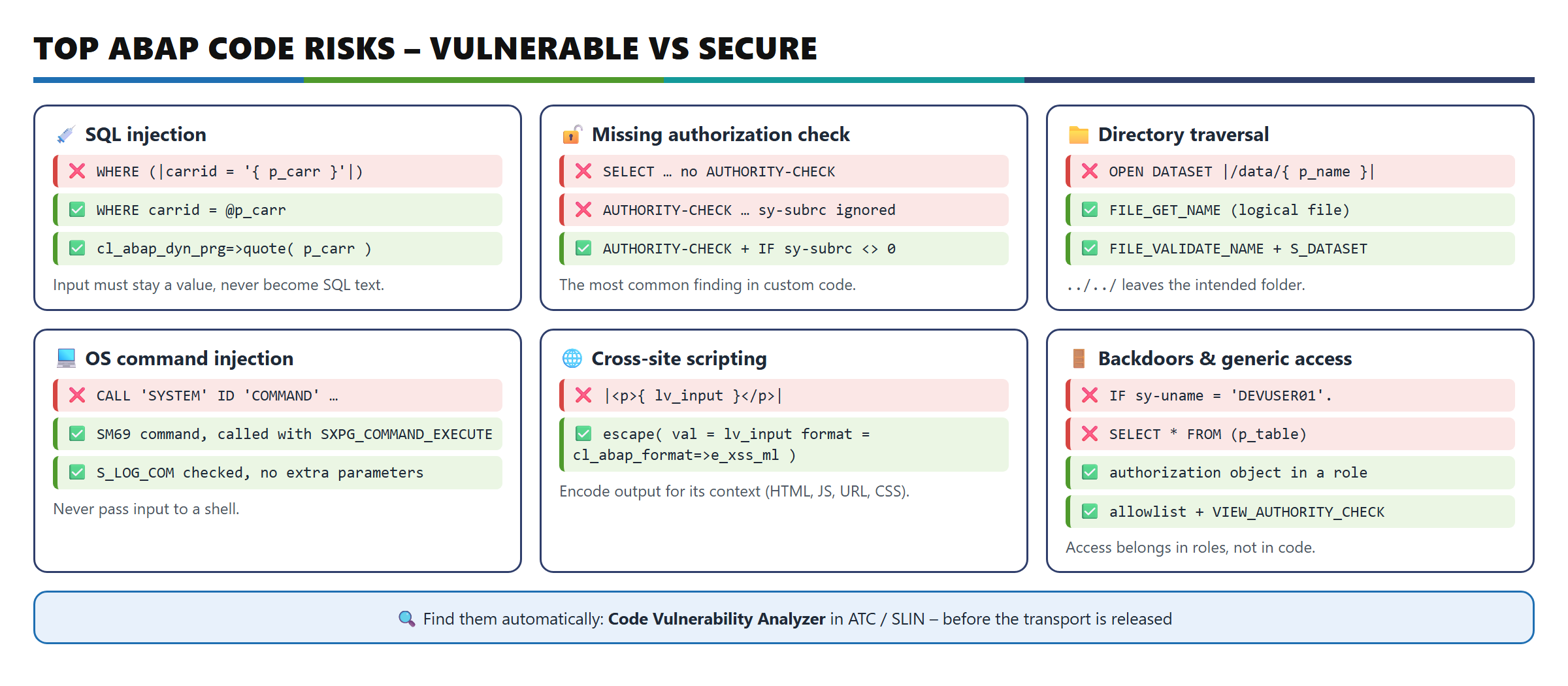
Part 2 – SQL injection
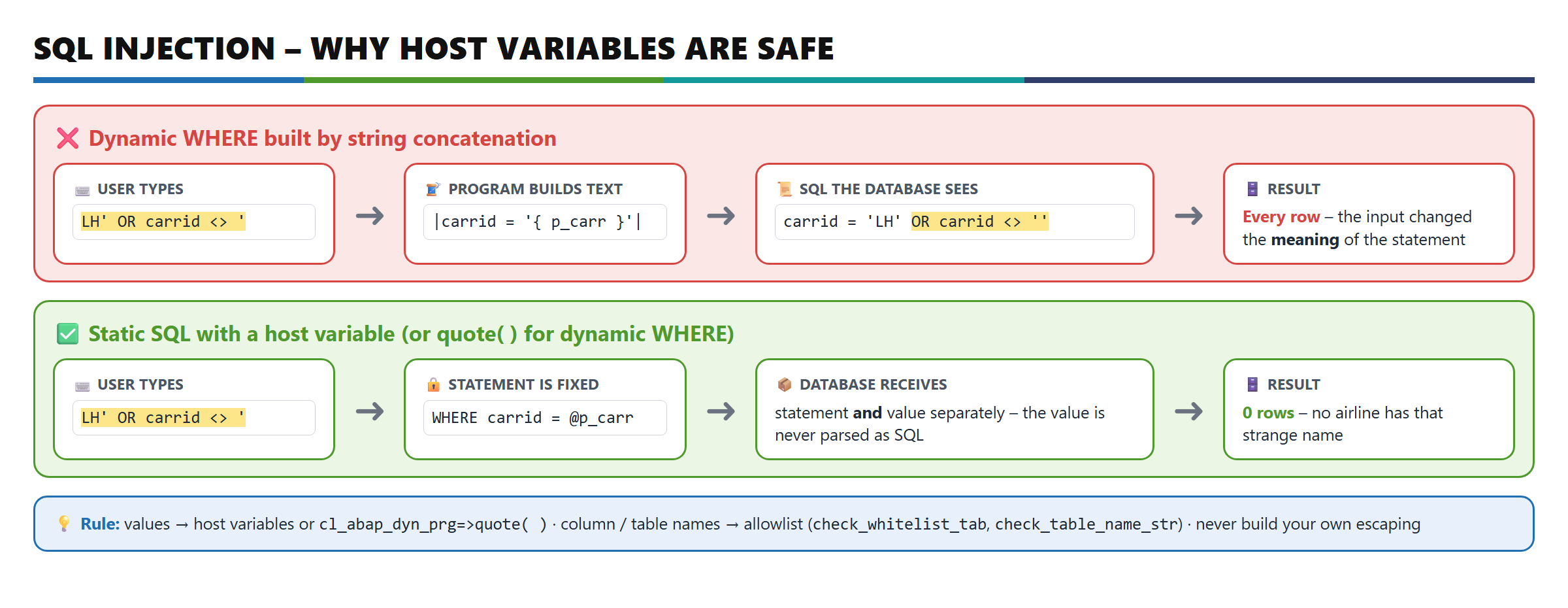
SQL injection happens when user input becomes part of the SQL statement text instead of a value. In ABAP this is possible only with dynamic tokens: WHERE (lv_where), ORDER BY (lv_order), FROM (lv_table), SELECT (lv_fields) – and in native SQL (ADBC, EXEC SQL). Static ABAP SQL with host variables (@lv_value) is always safe, because the value is passed to the database separately.
|
2.1 How to prevent it
|
Column and table names cannot be quoted – check them against an allowlist instead:
|
2.2 Class CL_ABAP_DYN_PRG
Method | Use it for |
|---|---|
| Wrap a value in single quotes ( |
| Only double the quotes (you add the surrounding quotes yourself) |
CHECK_COLUMN_NAME | Value is a syntactically valid column name |
| Value is an existing table (view), optionally in given packages |
CHECK_ALLOWLIST (older releases: CHECK_WHITELIST_STR / CHECK_WHITELIST_TAB) | Value is in an allowlist (comma-separated string / hashed table) |
| Value is a correctly quoted literal / an integer |
- The check methods raise exceptions such as
CX_ABAP_INVALID_NAME,CX_ABAP_NOT_A_TABLE,CX_ABAP_NOT_IN_PACKAGE,CX_ABAP_NOT_IN_ALLOWLIST (older releases: CX_ABAP_NOT_IN_WHITELIST) – catchthem and stop. - Never write your own escaping (e.g.
REPLACE ALL OCCURRENCES OF '''') – use the class. - The dynamic WHERE built by
CL_AUTH_OBJECTS_TO_SQL(page 02) is generated from the user's authorization values by SAP – that is safe to use. - Native SQL / ADBC: use
?parameter markers (set_param) instead of concatenating values.
Part 3 – Missing and broken authorization checks
The most common finding in custom code is not an exotic injection – it is a missing or ignored authorization check. Every custom transaction, report, RFC module and service that reads or changes business data must check the relevant authorization object with AUTHORITY-CHECK (syntax, DUMMY, FOR USER, custom objects: page 02).
Vulnerable pattern | Why it is dangerous | Secure pattern |
|---|---|---|
No | Anyone who can start it sees all data | Check the business object (e.g. V_VBAK_VKO, F_BKPF_BUK) before reading |
| The check runs but nothing stops the user |
|
Check before the loop with one value only | Records from other org units slip through | Check per record or use |
| Called transaction's S_TCODE check may be skipped | CALL TRANSACTION … WITH AUTHORITY-CHECK |
IF sy-uname = 'DEVUSER01'. | Backdoor; breaks when users change; invisible to SUIM | Authorization object + role |
| User can start any program or module | Allowlist (CHECK_ALLOWLIST; older releases: CHECK_WHITELIST_STR) + authorization check |
| Generic data browser around SE16 restrictions | Check table name + |
| Reads or changes data of other clients | Only with a strong reason, never driven by input |
The secure pattern – check, evaluate sy-subrc, stop – is shown with V_VBAK_VKO on page 02 Part 1.
3.1 Generic table access done safely
|
3.2 Debugging and test code in production
- Debug with replace (changing variables in the debugger) = authorization object
S_DEVELOPwith object typeDEBUGand activity02. Never in a production role – it bypasses every check in the code. The Security Audit Log records it. - No
BREAK-POINT/BREAK <user>statements, test switches or "skip check if parameter X is set" logic in transported code (ATC finds hard-coded break-points).
Part 4 – File, OS command and dynamic code risks
4.1 Directory traversal
If a file name comes from input, ../ sequences can leave the intended folder and read or overwrite any file the SAP OS user can reach (profiles, logs, transport files).
|
Secure approach: define a logical path and logical file name in transaction FILE (client-independent; SF01 for client-specific), resolve it with FILE_GET_NAME, and validate any externally supplied physical name with FILE_VALIDATE_NAME (to keep files inside one folder, define the logical file name with data format DIR).
|
OPEN DATASETperforms an automaticS_DATASETcheck (fields PROGRAM, ACTVT, FILENAME; activities 33 read, 34 write, 06 delete) and checks tableSPTH; failing it raises an exception.AUTHORITY_CHECK_DATASETlets you check first and react gracefully.- Front-end files (
cl_gui_frontend_services=>gui_upload) run with the user's own PC rights – still validate the content you read.
4.2 OS command injection
Running operating-system commands from ABAP is powerful and dangerous. The only accepted way is a predefined external command: an administrator defines it in SM69 (SM49 runs it manually), and code calls it with SXPG_COMMAND_EXECUTE, which checks authorization object S_LOG_COM (command, OS, host).
|
- Kernel call
CALL 'SYSTEM'can be disabled with profile parameterrdisp/call_system = 0. - In SM69, untick "Additional parameters allowed" unless really needed – then the caller cannot append anything.
4.3 Dynamic code and dynamic calls
- Code injection:
GENERATE SUBROUTINE POOLorINSERT REPORTwith source built from input lets a user run any ABAP. Avoid it; if unavoidable, build the code only from fixed templates. - Dynamic calls:
CALL FUNCTION lv_fm,SUBMIT (lv_prog),CALL TRANSACTION lv_tcode,CALL METHOD (lv_class)=>(lv_meth)with names from input → validate against an allowlist (cl_abap_dyn_prg=>check_allowlist; older releases: check_whitelist_str) and check authorization. - ABAP Cloud removes most of these risks by design: no
OPEN DATASET, noCALL 'SYSTEM', noGENERATE SUBROUTINE POOL– only released APIs (Clean Core › 01 Clean Core).
Part 5 – Web risks: XSS, CSRF, clickjacking
5.1 Cross-site scripting (XSS)
XSS: untrusted data is written into an HTML page without encoding, so a value like <script>…</script> runs in another user's browser – with that user's session. Relevant wherever ABAP produces HTML or JavaScript: BSP pages, ICF HTTP handlers, HTML in emails or cl_gui_html_viewer.
|
Output context | Format constant ( |
|---|---|
HTML / XML content | cl_abap_format=>e_xss_ml |
JavaScript string | cl_abap_format=>e_xss_js |
URL / URL parameter | cl_abap_format=>e_xss_url |
CSS value | cl_abap_format=>e_xss_css |
- BSP: <htmlb:content forceEncode="ENABLED"> (or
<%html= … %>) encodes output automatically. - Web Dynpro ABAP: UI elements encode values automatically – risk only with HTML-capable elements (FormattedTextView, HTML islands).
- SAPUI5 / Fiori: data binding encodes by default; danger is
sap.ui.core.HTMLorinnerHTMLwith untrusted data – encode withsap/base/security/encodeXML.
5.2 CSRF and clickjacking
- Cross-site request forgery (CSRF): a malicious page makes the logged-on user's browser send a changing request. SAP Gateway protects OData with the CSRF token (Part 8); your own ICF handlers that change data must also verify a token.
- Clickjacking: the SAP page is loaded invisibly in a frame on an attacker's site. Activate the SAP clickjacking framing protection and maintain the allowlist of trusted framing hosts (table HTTP_WHITELIST / UCON HTTP allowlist).
Part 6 – Tools: Code Vulnerability Analyzer, SLIN and ATC
Tool | What it does |
|---|---|
Code Vulnerability Analyzer (CVA) | SAP's static security scanner for ABAP: data-flow analysis from input to dangerous statements (SQL injection, directory traversal, OS commands, missing checks, backdoors). Licensed separately for customer code on-premise. |
Extended program check (SLIN) | Once CVA is activated, SLIN gets an extra "Security checks" section (run from SE38 / SE80: Program → Check → Extended Check). |
ABAP Test Cockpit (ATC) | Central tool: run the CVA security checks with a check variant that includes them, together with performance and S/4HANA readiness checks; results, exemptions and transport release checks (block release on priority 1 findings). |
Code Inspector (SCI) | Defines check variants used by ATC; still usable stand-alone. |
6.1 Typical CVA findings
Finding | Fix |
|---|---|
Potential SQL injection (dynamic WHERE / ORDER BY / FROM) | Host variables, |
Missing authorization check (e.g. before |
|
| Evaluate and stop |
Hard-coded user name / | Authorization object |
Directory traversal ( | Logical file names, |
OS command injection ( | SM69 command + |
Dynamic program / module call with input | Allowlist check |
Cross-client database access | Remove |
XSS in BSP / HTML output |
|
- False positive after a proper check? Document it with an ATC exemption or the pseudo-comment the finding names – never just ignore it.
- In the SAP Business AI Platform, ABAP environment and S/4HANA Cloud the ATC (with security checks) runs in ADT.
Part 7 – RFC security
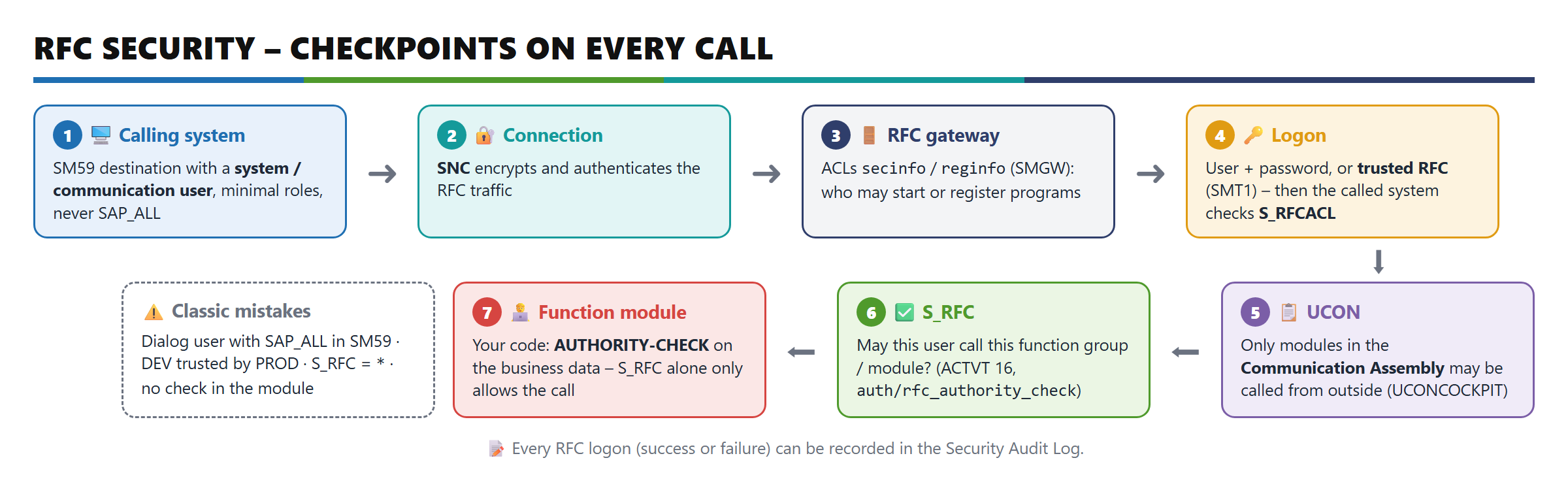
RFC is the classic door between SAP systems – and a favourite attack path, because RFC users are often over-authorized and RFC modules often skip checks. Protect it at every hop:
Control | Details |
|---|---|
S_RFC | Checked when an RFC-enabled function module is called (fields: page 01 Part 7). Profile parameter |
SM59 destinations | Use a system or communication user with minimal roles, never a dialog user with SAP_ALL. Enable SNC on the destination. Restrict who may maintain/use destinations (S_RFC_ADM, S_ICF). |
Trusted RFC | Trust relationship in SMT1: the calling user logs on to the trusting system without password. The called system checks S_RFCACL for that user. Never let a lower system (DEV) be trusted by a higher one (PROD). |
Unified Connectivity (UCON) | Allowlist of RFC modules callable from outside (Communication Assembly). Cockpit |
RFC gateway | ACL files |
Inside the module | S_RFC only says "may call"; the module itself must check business authorizations (page 02). |
Part 8 – OData and Fiori security
A Fiori app calls an OData service over HTTP. Two authorization layers apply (full setup: SAP Fiori › 02 Fiori Launchpad Configuration & Security):
Layer | Front-end role (launchpad) | Back-end role (business data) |
|---|---|---|
Content | Business catalogs / spaces and pages, tiles | Business authorization objects of the app |
Service start | S_SERVICE – permission to call the OData service on the front-end (hub) server | S_SERVICE for the back-end service as well (embedded deployment: one system holds both) |
Data | – |
|
- CSRF token: before a changing request (POST/PUT/PATCH/DELETE) the client sends a GET with header
X-CSRF-Token: Fetch; the server returns a token bound to the session; every changing request must send it back, else HTTP 403 "CSRF token validation failed". The UI5 OData model does this automatically. - Activate only the services you use (
/IWFND/MAINT_SERVICE, SICF nodes) – every active service is attack surface. - Never return more fields than the UI needs; sensitive fields must be protected in the back end, not only hidden in the UI.
Part 9 – Communication security and single sign-on
Topic | What it is | Where configured |
|---|---|---|
SNC (Secure Network Communications) | Encrypts and authenticates SAP GUI and RFC connections (DIAG / RFC protocol), using SAP CommonCryptoLib with Kerberos or X.509 | Profile parameters |
TLS / HTTPS | Encrypts HTTP traffic (Fiori, OData, web services) | STRUST (PSEs and certificates), ICM HTTPS port |
SAML 2.0 SSO | Browser SSO with an identity provider (e.g. SAP Cloud Identity Services, Microsoft Entra ID) | Transaction SAML2 |
Kerberos / SPNego | Windows domain logon passed to SAP GUI (via SNC) or browser | SNC, transaction SPNEGO |
X.509 client certificates | User logs on with a certificate mapped to the SAP user | STRUST, mapping with |
Logon tickets | Older SAP SSO cookie ( | Profile parameters |
- Passwords: profile parameters
login/min_password_lng,login/fails_to_user_lock,login/password_downwards_compatibility = 0(only strong password hashes). - BTP side (XSUAA, IAS, destinations, Cloud Connector): BTP Foundations › 03 BTP Services, Security & Connectivity.
Part 10 – Logging and monitoring
Tool | Logs | Transactions |
|---|---|---|
Security Audit Log (SAL) | Security events: logons (success / failure), RFC logons, transaction and report starts, user master changes, debugger changes, audit configuration changes | RSAU_CONFIG (configure), RSAU_READ_LOG (evaluate); legacy SM19 / SM20; profile parameter |
Change documents | Who changed which business field, old and new value (material, customer, order) | Object in SCDO → generated |
Table logging | Changes to customizing tables | "Log data changes" in technical settings + parameter |
Read Access Logging (RAL) | Who read sensitive data (e.g. bank data) via Dynpro, Web Dynpro, RFC, OData, web services | SRALMANAGER |
System log | Technical errors and events | SM21 |
- SAP UI Data Protection Masking – an optional SAP product that masks sensitive field values in SAP GUI and Fiori based on roles or attributes.
- For custom business data you own: call the change document FM in your update logic, and register sensitive fields in RAL.
Part 11 – System hardening and SAP Security Notes
11.1 Hardening checklist
Area | Action |
|---|---|
Standard users | SAP*, DDIC, EARLYWATCH, TMSADM, SAPCPIC: change default passwords, lock where possible (report RSUSR003); |
Critical authorizations | No SAP_ALL / SAP_NEW in production; review with SUIM (critical authorizations / combinations) |
Production client | SCC4: no changes, no cross-client customizing; SE06: system not modifiable |
Debugging | No debug-with-replace (S_DEVELOP DEBUG 02) in production roles |
Services | Deactivate unused SICF services and OData services |
Gateway / ICM | Maintain |
11.2 SAP Security Notes and Patch Day
- SAP publishes Security Notes on Security Patch Day – the second Tuesday of each month (priority: Hot News, High, Medium, Low; with CVSS score).
- Implement ABAP corrections with SNOTE (downloads the note and applies correction instructions; large ones arrive as TCI); kernel fixes need a kernel patch; some notes need manual configuration.
- System Recommendations (SAP Solution Manager / Focused Run) lists the notes relevant for each system based on its release and patch level. EarlyWatch Alert and the Security Optimization Service give a security health check.
Part 12 – GRC Access Control and segregation of duties
Segregation of duties (SoD) means no single person can complete a sensitive process alone – e.g. create a vendor and pay that vendor, or create and approve a purchase order. An SoD risk is a combination of two conflicting functions (each a set of transactions + authorizations).
SAP GRC Access Control component | Purpose |
|---|---|
Access Risk Analysis (ARA) | Rule set of SoD and critical-access risks; simulates and reports conflicts for users and roles; mitigating controls |
Access Request Management (ARM) | Workflow-based user and role requests with risk analysis before approval |
Emergency Access Management (EAM) | Firefighter IDs for temporary elevated access, fully logged and reviewed |
Business Role Management (BRM) | Role design and approval process |
- Cloud counterpart: SAP Cloud Identity Access Governance (IAG).
- Developer impact: design custom authorization objects and roles so that conflicting functions can be separated (e.g. separate activities for create and approve).
Part 13 – Interview questions
Q1. How can SQL injection happen in ABAP, and how do you prevent it?
Only through dynamic tokens (WHERE (lv_where), ORDER BY, FROM, field list) or native SQL when user input is concatenated into the statement. Prevent it with static ABAP SQL and host variables; if dynamic SQL is necessary, quote literals with cl_abap_dyn_prg=>quote and check names with check_allowlist (older releases: check_whitelist_*) / check_table_name_str.
Q2. What is CL_ABAP_DYN_PRG?
A standard class with methods to escape values (QUOTE, ESCAPE_QUOTES) and to validate dynamic names (CHECK_COLUMN_NAME, CHECK_TABLE_NAME_STR, CHECK_ALLOWLIST – older releases CHECK_WHITELIST_STR/TAB) before they are used in dynamic ABAP SQL or dynamic calls.
Q3. What is the Code Vulnerability Analyzer?
SAP's static security scanner for ABAP. It traces input through the code to dangerous statements and reports SQL injection, directory traversal, OS command injection, missing authorization checks, hard-coded user names and more. It runs in ATC (and SLIN) and is licensed separately for customer code.
Q4. Why is IF sy-uname = '…' a security finding?
It is a hidden backdoor: access is granted by a hard-coded name instead of an authorization object, it is invisible in role reports (SUIM), cannot be audited and breaks when users change.
Q5. How do you protect file access in ABAP?
Use logical file names and paths (transaction FILE, FILE_GET_NAME), validate externally supplied names with FILE_VALIDATE_NAME to stop ../ traversal, and rely on S_DATASET (check early with AUTHORITY_CHECK_DATASET).
Q6. How should ABAP run an operating-system command?
Only as an external command defined in SM69, called with SXPG_COMMAND_EXECUTE, which checks S_LOG_COM. Never CALL 'SYSTEM' with a command built from input.
Q7. What is S_RFC, and what is trusted RFC?
S_RFC authorizes calling RFC-enabled function modules (by function group or module, activity 16). Trusted RFC (SMT1) lets a user of a trusted system log on without a password; the called system checks S_RFCACL for that user.
Q8. What is UCON?
Unified Connectivity: an allowlist (Communication Assembly) of RFC function modules that may be called from outside. After a logging and evaluation phase, everything not in the assembly is blocked (UCONCOCKPIT).
Q9. What is the CSRF token in SAP Gateway?
A protection against cross-site request forgery: the client fetches a token with X-CSRF-Token: Fetch and must send it with every changing request; without a valid token the server answers 403.
Q10. How do you prevent XSS when ABAP generates HTML?
Encode every output value for its context with escape( val = … format = cl_abap_format=>e_xss_ml ) (or e_xss_js, e_xss_url, e_xss_css); in BSP use forceEncode; in UI5 rely on data binding.
Q11. Which tools log security-relevant activity?
Security Audit Log (RSAU_CONFIG / RSAU_READ_LOG), change documents (CDHDR / CDPOS), table logging (SCU3), Read Access Logging (SRALMANAGER) and the system log (SM21).
Q12. What is segregation of duties?
No single user may hold two conflicting functions, such as creating a vendor and paying it. SAP GRC Access Control (Access Risk Analysis) defines such risks and checks users and roles against them.
🏠 Start Here · ◀ 02 · Checks in ABAP · 04 · Interview Questions ▶ · Sections: CORE ABAP | OOPS ABAP | ABAP on HANA | Clean Core | RAP | ABAP Points | SAP Fiori | SAPUI5 | Mobile Development (MDK) | BTP Foundations | BTP Development | CAP | SAP Build | ABAP on BTP | Integration Suite | SAP Business AI | SAP BASIS | Security | SAP SDLC
Functional: FICO ABAP | TRM ABAP | VIM | SAP BIS | SD ABAP | MM ABAP | PP ABAP | QM ABAP | PM ABAP | PS ABAP | EWM | TM ABAP | GTM ABAP | EHS ABAP | HR ABAP | BW | SAP Datasphere | SAP Business Data Cloud | SAP MDG | SAP Analytics Cloud | SAP Ariba | SAP CX | SAP IBP