SAP Transportation Management (TM) plans, buys, executes and settles the transport of goods. In SAP S/4HANA it is part of the core (software component S4CORE): a sales order, purchase order or delivery becomes a freight unit, freight units are planned onto freight orders or freight bookings, a carrier is selected, the transport is executed and tracked, and the carrier is paid through a freight settlement document that MM and FI post. This page explains the scenarios, the product history, embedded vs decentralised TM, the licence split, the system architecture and the organization units. Master data and the document model: page 02; processes and customizing: page 03.
Part 1 – What TM does: scenarios and key terms
TM serves two kinds of companies. A shipper (manufacturer, retailer) moves its own goods and buys transport from carriers. A logistics service provider (LSP) – freight forwarder, 3PL, carrier – sells transport to its customers and buys it from subcontractors. Most S/4HANA greenfield projects are shipper projects; the LSP scenario is part of Advanced TM (Part 3).
Scenario | Trigger in S/4HANA | What TM does |
|---|---|---|
Shipper outbound | Sales order, sales scheduling agreement, outbound delivery | Plans the transport to the customer, selects the carrier, proposes deliveries, pays the carrier |
Shipper inbound | Purchase order, MM scheduling agreement, inbound delivery | Plans pick-up at the supplier when the buyer pays the freight (Incoterms decide who is responsible) |
Stock transfer | Stock transport order (also returns STO), outbound / inbound delivery | Plant-to-plant or plant-to-DC transport, often with own fleet |
Customer returns | Customer returns order, returns delivery | Plans the pick-up of returned goods |
LSP (forwarding) | Forwarding order or forwarding quotation (manual, EDI, portal) | Sells the service (forwarding settlement → SD billing) and buys it from carriers (freight settlement) |
1.1 Key terms
Term | Meaning |
|---|---|
Transportation requirement | The demand to move goods: a sales order, PO, STO or delivery item (embedded TM) or an OTR / DTR / forwarding order document (decentralised TM, LSP) |
Freight unit (FU) | Smallest set of goods that is transported together through the whole chain; built from requirement items by a freight unit building rule |
Freight order (FO) | Planned transport of one or more FUs by road or rail with a carrier or own vehicle: stops, stages, items, carrier, charges |
Freight booking (FB) | Capacity booked on a scheduled sea or air departure (vessel voyage, flight) |
Transportation unit (TU) | Trailer, railcar or container that groups FUs across stages |
Stop / stage | A stop is a location the vehicle visits; a stage is the leg between two stops |
Carrier | The company that physically moves the goods (business partner role CRM010, page 02) |
Shipper / consignee | Sender / receiver of the goods; ordering party for LSP orders |
Freight agreement | Contract with a carrier: calculation sheets and rate tables (page 02) |
Freight settlement document (FSD) | Request to pay the carrier; posts a service PO and service entry sheet in MM (page 03) |
Transportation mode | Road, rail, sea, air, inland waterway, postal / parcel |
Part 2 – History: LE-TRA, SAP TM standalone, TM in S/4HANA
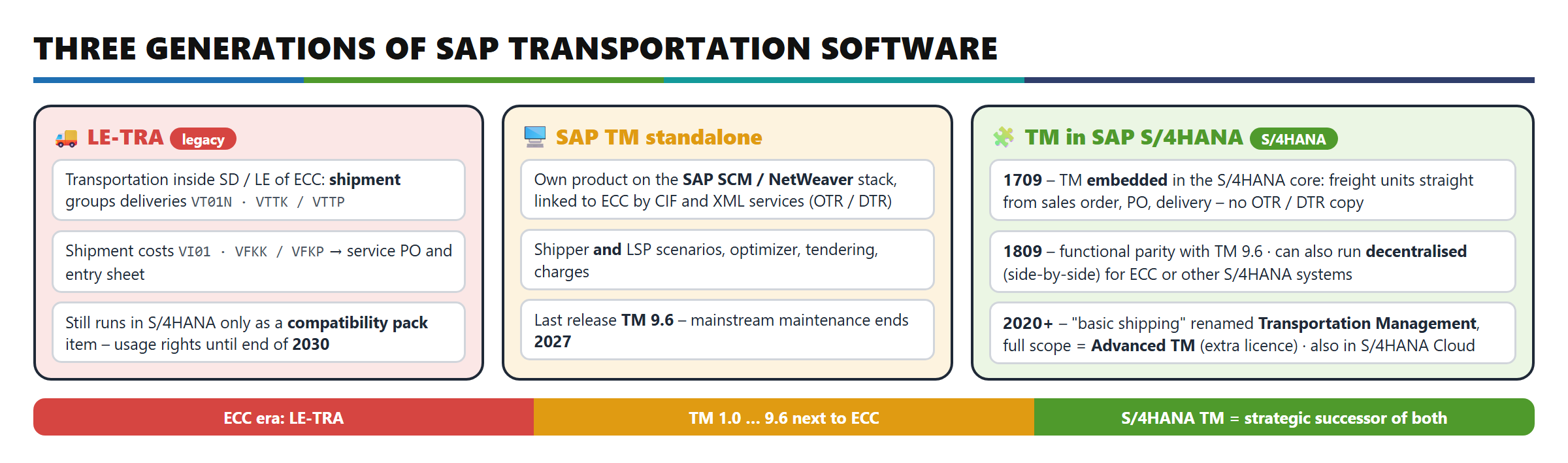
Generation | Key facts | Status |
|---|---|---|
LE-TRA (Logistics Execution – Transportation) | Part of SD/LE in ECC. Shipment documents group deliveries (VT01N, tables VTTK / VTTP / VTTS), shipment cost documents (VI01, VFKK / VFKP) create a service PO and entry sheet. No optimizer, simple planning. | Legacy. In S/4HANA only as a compatibility pack item (simplification item S4TWL – Transportation (LE-TRA), SAP Note 2270199; usage rights per the compatibility scope matrix, SAP Note 2269324) – they end with the end of 2030 (page 06 Part 2). Successor: TM. |
SAP TM standalone (TM 1.0 … 9.6) | Separate product on the SAP SCM / NetWeaver stack, integrated with ECC through CIF (master data) and XML services: orders and deliveries became OTR / DTR documents in TM. Full shipper and LSP scope. | Legacy. Last release TM 9.6; mainstream maintenance ends 2027. |
TM in S/4HANA | Since 1709 embedded in the S/4HANA core; 1809 reached functional parity with TM 9.6. Also offered as a separate (decentralised) S/4HANA system. | S/4HANA – strategic successor of LE-TRA and of TM 9.6. |
- There is no technical migration from LE-TRA shipments to TM freight orders: TM is a new implementation (new master data, new documents, new settlement). Open shipments are closed in LE-TRA before the cut-over (page 06).
- Interview angle: "Why not keep LE-TRA in S/4HANA?" – it is only licensed until the end of the compatibility scope, receives no innovation, and basic TM covers its functions without extra licence.
Part 3 – Deployment options and the basic / advanced licence split
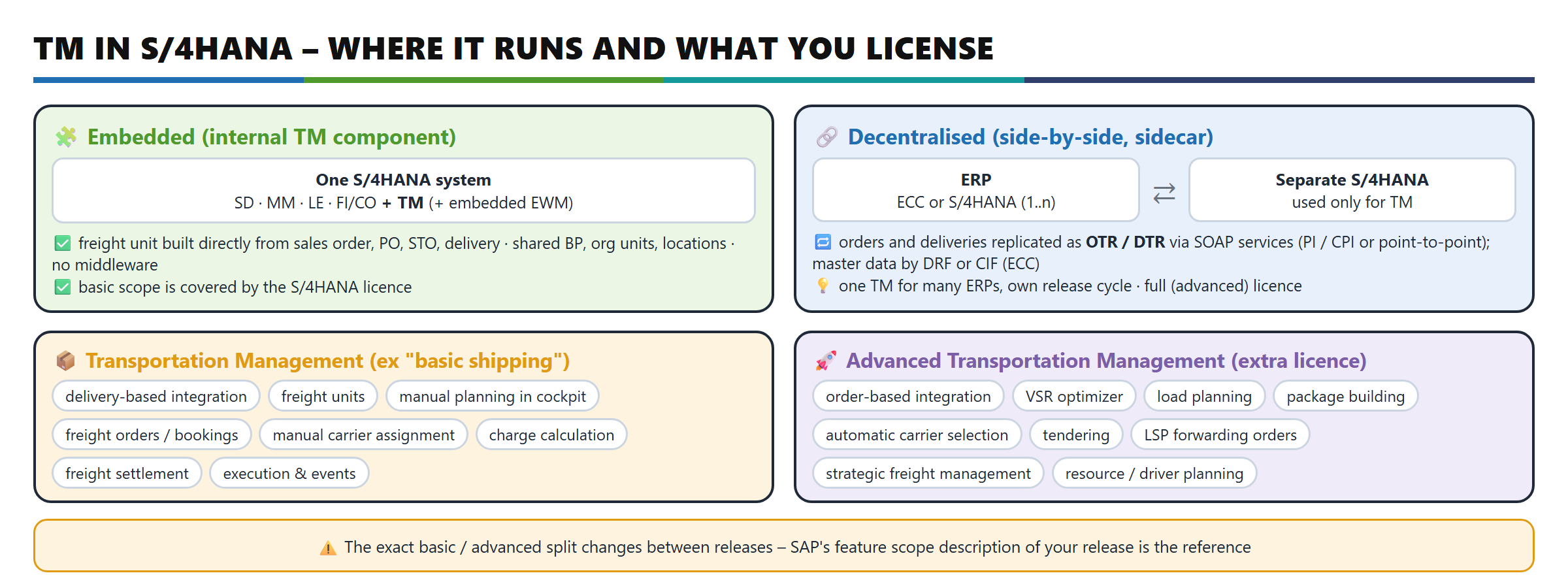
3.1 Embedded vs decentralised
Aspect | Embedded (internal TM component) | Decentralised (side-by-side) |
|---|---|---|
System | TM runs in the same S/4HANA system as SD, MM, FI | Separate S/4HANA system used for TM; connected to one or more ERP systems (ECC or S/4HANA) |
Requirement document | None – the freight unit is created directly from the sales order, PO, STO or delivery | Orders and deliveries are replicated as OTR / DTR documents |
Integration | Internal calls, shared master data and org units | SOAP services via middleware (SAP PI / CPI) or point-to-point; master data by DRF (S/4HANA) or CIF (ECC) |
When chosen | Shipper with one S/4HANA system – the default for greenfield | Several ERPs (also ECC), central transport organisation, own release cycle, very high volumes, LSP business |
Licence | Basic scope included in S/4HANA; advanced features need the extra licence | Always needs the full-scope (advanced) licence |
3.2 Basic vs advanced scope
Basic TM is a limited scope with LE-TRA-equivalent functions, included in the S/4HANA Enterprise Management licence. The full scope is Advanced Transportation Management (product name SAP S/4HANA Supply Chain for Transportation Management) and needs an additional licence. Both share the same customizing nodes, master data and business objects – advanced simply unlocks more functions.
Area | Transportation Management (basic) | Advanced TM (extra licence) |
|---|---|---|
Requirements | Delivery-based integration: freight units from outbound and inbound deliveries | Order-based integration (freight units from sales orders, POs, STOs – planning before deliveries exist), LSP forwarding orders and quotations |
Planning | Manual and rule-based planning in the transportation cockpit | VSR optimizer, load planning, package building, resource and driver planning |
Subcontracting | Manual carrier assignment | Automatic carrier selection, tendering, transportation allocations, business shares |
Charges and settlement | Charge calculation, freight agreements, freight settlement | Strategic freight management (freight procurement), advanced settlement scenarios |
Execution | Execution tracking and events | Delivery proposals from order-based planning, multi-stage and multimodal scenarios |
- The split changes between releases; SAP's feature scope description of the release is the reference. Decentralised TM always needs the advanced licence.
- Editions: on-premise and SAP S/4HANA Cloud Private Edition offer the full embedded and decentralised scope; SAP S/4HANA Cloud Public Edition contains a standardized TM for shippers with its own release cycle. Details and the architect's decision: page 06.
Part 4 – System architecture of TM in S/4HANA
TM was built on the SCM / NetWeaver stack and kept its framework when it moved into S/4HANA. A developer meets very different technology than in SD or MM:
Layer | Technology | What it means for you |
|---|---|---|
Business objects | BOPF business objects in namespace | Data in GUID-keyed node tables ( |
User interface | Floorplan Manager (FPM) Web Dynpro applications, started as tiles in the SAP Fiori launchpad (NWBC in older releases); worklists (POWL); a growing set of SAPUI5 Fiori apps | Most TM documents have no classic SAP GUI transaction; UI changes are FPM configurations |
Rules | Conditions (BRF+ based), e.g. | Many determinations (FUB rule, document type, charges profile) are configurable conditions |
Process control | Strategies and the change controller decide how TM reacts to creation, saving and changes of documents | Custom steps are plugged in as strategy methods or BAdIs (page 05) |
Output | Post Processing Framework (PPF) output profiles on TM documents | Forms and B2B messages to carriers are PPF actions |
Asynchronous work | bgRFC queues (monitor SBGRFCMON), background reports | Settlement postings and integration steps run asynchronously |
Optimizer | VSR optimizer, load optimizer and carrier selection run on the separately installed SCM Optimizer engine | Called by RFC; needed only for advanced planning |
Shared master data | SCM Basis objects used by TM and EWM: locations, transportation zones and lanes, resources | Locations are generated from plants, shipping points and business partners (page 02) |
- Integration inside S/4HANA: SD, MM and LE call TM when a transportation-relevant document is saved (controlled by the logistics integration profile, page 03); TM calls back to create deliveries and to post settlement in MM.
- Released technology for new code: CDS views and RAP-based APIs (e.g. the Freight Order OData API) on top of the BOPF objects – page 05.
Part 5 – Organization structure
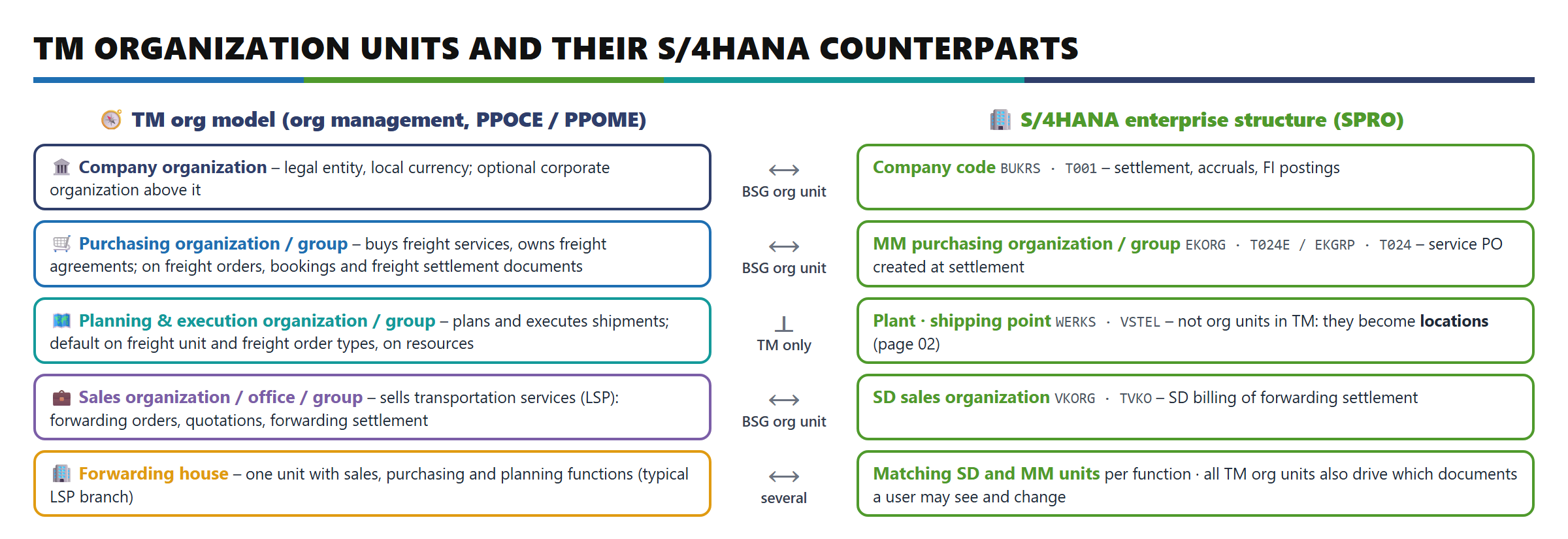
TM has its own organizational model, maintained with the HR organizational management transactions (PPOCE create, PPOME change, PPOSE display). Each org unit gets an organizational unit function (company, sales, purchasing, planning and execution) and roles; report /SCMTMS/ORG_INT transfers the S/4HANA org units into the TM org model, and the business system group (BSG) decides internal vs external posting. Plants and shipping points are not TM org units – they become locations.
5.1 The units
TM org unit | Purpose | Used in | S/4HANA counterpart |
|---|---|---|---|
Corporate organization (optional) | Group level, single entry point into the structure | Reporting | – |
Company organization | Legal entity with local currency | Settlement, accruals | Company code (T001) |
Purchasing organization | Buys transportation services, negotiates freight agreements | Freight orders, freight bookings, freight agreements, freight settlement documents | MM purchasing organization (T024E) |
Purchasing group | Team of buyers inside a purchasing organization | Same documents | MM purchasing group (T024) |
Planning and execution organization / group | Plans and executes shipments (dispatching office) | Freight units, freight orders, resources; defaults from document types | No direct counterpart |
Sales organization / office / group | Sells transportation services (LSP) | Forwarding orders, forwarding quotations, forwarding settlement | SD sales organization (TVKO) |
Forwarding house | Generic unit with sales, purchasing and planning functions | All of the above | Matching SD / MM units |
5.2 Assignments and why they matter
- The purchasing organization must correspond to the MM purchasing organization (org model in PPOME, transfer with /SCMTMS/ORG_INT): the service PO created by freight settlement is created for it (page 03 Part 8).
- Profiles hang on org units: the charges profile (calculation profile + cost distribution profile) is assigned to the purchasing organization in PPOME or found by a condition; the settlement profile is assigned per organization (or organization + business partner).
- Document types carry default org units (freight unit type, freight order type: execution and purchasing organization / group) or determine them by condition; the creating user's org unit can be taken over.
- The company organization above the purchasing organization (mapped to the company code) decides where accruals and freight costs are posted.
- Org units are the basis of authorizations and of worklists: a dispatcher sees the freight orders of his planning and execution group.
- Business partners for org units: each org unit is also represented as a business partner (used in documents and output); if it is not created automatically it can be generated afterwards.
Part 6 – Integration map and business networks
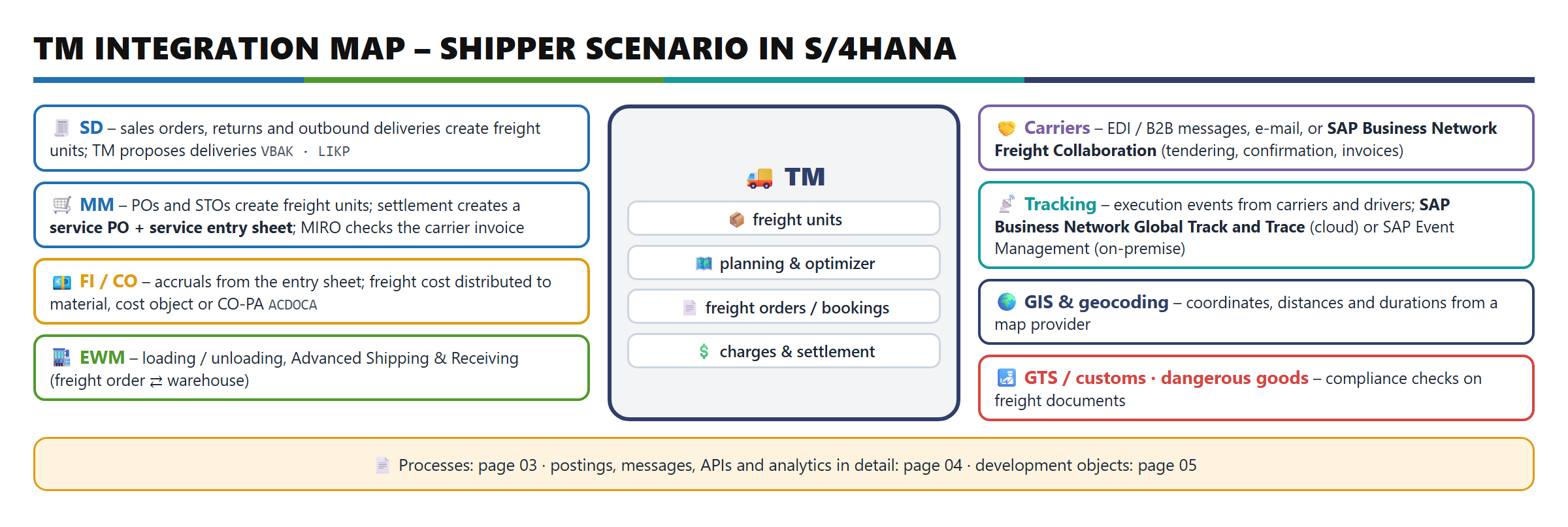
Partner | Direction | What flows |
|---|---|---|
SD | SD → TM → SD | Sales orders, returns and deliveries create freight units; TM proposes outbound deliveries; freight order status visible in the sales document flow |
MM | MM → TM → MM | POs, STOs and inbound deliveries create freight units; freight settlement creates a service PO + service entry sheet; carrier invoice checked in MIRO |
FI / CO | TM → FI / CO | Accruals from the service entry sheet; distributed freight costs to material valuation, cost objects or CO-PA (via settlement management) |
EWM | TM ⇄ EWM | Freight orders drive loading and unloading; Advanced Shipping and Receiving links freight orders with warehouse execution |
Carriers | TM ⇄ carrier | Freight orders and tender requests, confirmations, status events, invoices – by EDI / B2B services, e-mail or a business network |
GIS / geocoding | TM → map provider | Geo-coordinates of locations, distances and durations |
GTS, dangerous goods | TM → compliance | Export / customs and dangerous goods checks on freight documents |
6.1 SAP Business Network for Logistics
SAP Business Network for Logistics (formerly SAP Logistics Business Network) is SAP's cloud network between shippers, carriers and LSPs on SAP BTP. The shipper integrates its TM once with the network instead of with every carrier.
Solution | What it does | Replaces / complements |
|---|---|---|
SAP Business Network Freight Collaboration | Carriers receive freight orders and tender requests, confirm or reject, report events, create invoices and handle disputes in a web portal or by API | Point-to-point EDI with each carrier; the old TM collaboration portal |
SAP Business Network Global Track and Trace | Tracks shipments and processes across companies and modes, compares planned and actual events, notifies exceptions | SAP's cloud tracking solution; SAP Event Management remains the on-premise option |
- Network use is subscription-based and separate from the S/4HANA licence; the TM side needs the integration configured (page 04).
Part 7 – Interview questions
Q1. What is SAP TM and which scenarios does it support?
TM plans, subcontracts, executes and settles transport. Shippers use it for outbound, inbound, stock transfer and returns transport triggered by SD and MM documents; logistics service providers use forwarding orders to sell transport and freight orders / bookings to buy it.
Q2. How did SAP's transportation software evolve?
LE-TRA shipments in ECC (legacy, compatibility pack only), then SAP TM standalone on SCM up to TM 9.6 (maintenance until 2027), then TM embedded in S/4HANA since 1709, with parity to TM 9.6 in 1809.
Q3. Can a customer keep LE-TRA after moving to S/4HANA?
Only temporarily: LE-TRA is a compatibility pack item whose usage rights end with the compatibility scope (end of 2030). There is no migration of shipments to freight orders – TM is implemented new; basic TM needs no extra licence.
Q4. What is the difference between embedded and decentralised TM?
Embedded runs inside the same S/4HANA system and builds freight units directly from sales orders, POs and deliveries. Decentralised is a separate S/4HANA system that receives orders and deliveries as OTR / DTR via SOAP services and can serve several ERPs, also ECC.
Q5. What is in basic TM and what needs the advanced licence?
Basic: delivery-based integration, freight units, manual planning, freight orders and bookings, manual carrier assignment, charges and settlement. Advanced: order-based integration, VSR optimizer, load planning, package building, automatic carrier selection and tendering, LSP forwarding orders, strategic freight management. Decentralised TM always needs the advanced licence; the split is release-dependent.
Q6. Why do OTR and DTR documents not exist in embedded TM?
Because TM sits in the same system, the sales order, PO or delivery itself is the transportation requirement; the freight unit references it directly. Copies were only needed to cross a system boundary (standalone or decentralised TM).
Q7. Which organization units does TM use and where are they maintained?
Company organization, purchasing organization / group, planning and execution organization / group, sales organization / office / group and forwarding house – created with PPOCE / PPOME as HR organizational units with an org unit function, S/4HANA org units transferred with /SCMTMS/ORG_INT.
Q8. Why must the TM purchasing organization be mapped to an MM purchasing organization?
Freight settlement creates a service purchase order and service entry sheet in MM; they need a real MM purchasing organization. The mapping also determines the company code for accruals.
Q9. Are plants and shipping points TM organization units?
No. They become locations (types 1001 production plant, 1003 shipping point) in the transportation network; org units are only the commercial and planning units.
Q10. What is technically different about TM compared to SD or MM?
TM data lives in BOPF business objects (/SCMTMS/TOR, /SCMTMS/TRQ) with GUID-keyed node tables, the UIs are FPM Web Dynpro apps in the Fiori launchpad, rules are conditions, output is PPF and the optimizer runs on a separate engine. You change data through BOPF or APIs, not by table updates.
Q11. What is SAP Business Network for Logistics?
SAP's cloud network for logistics collaboration: Freight Collaboration (tendering, order confirmation, events, invoicing with carriers) and Global Track and Trace (end-to-end tracking in the cloud; SAP Event Management is the on-premise alternative). The shipper connects TM once to the network.
Q12. As an architect, when would you propose decentralised TM?
When one transport organisation must serve several ERP systems (including ECC during a long migration), when TM needs its own release cycle or scaling, or for LSP business. Otherwise embedded TM is simpler: no replication, shared master data, basic scope in the S/4HANA licence.
🏠 Start Here · 02 · Master Data ▶ · Sections: CORE ABAP | OOPS ABAP | ABAP on HANA | Clean Core | RAP | ABAP Points | SAP Fiori | SAPUI5 | Mobile Development (MDK) | BTP Foundations | BTP Development | CAP | SAP Build | ABAP on BTP | Integration Suite | SAP Business AI | SAP BASIS | Security | SAP SDLC
Functional: FICO ABAP | TRM ABAP | VIM | SAP BIS | SD ABAP | MM ABAP | PP ABAP | QM ABAP | PM ABAP | PS ABAP | EWM | TM ABAP | GTM ABAP | EHS ABAP | HR ABAP | BW | SAP Datasphere | SAP Business Data Cloud | SAP MDG | SAP Analytics Cloud | SAP Ariba | SAP CX | SAP IBP