TM needs more master data than SD or MM: every place becomes a location, places are grouped into transportation zones and connected by lanes and schedules, vehicles are described by means of transport and resources, carriers are business partners, and prices live in freight agreements, calculation sheets and rate tables. The documents themselves – freight units, freight orders, bookings, settlement documents – are BOPF business objects with GUID-keyed tables. This page covers both. Org units: page 01; how the processes use the data: page 03; BOPF programming and APIs: page 05.
Part 1 – Master data overview
Some TM master data is shared with the rest of S/4HANA, some is TM-specific. In embedded TM nothing is replicated – TM reads the S/4HANA objects directly or generates its own objects (locations) from them.
Object | Origin | Used for |
|---|---|---|
Business partner (carrier, customer, supplier) | S/4HANA BP (transaction BP) | Carrier on freight orders, shipper / consignee, invoicing party in settlement |
Product (material) | S/4HANA material master (MM01) | Weight, volume, packaging, transportation group, dangerous goods data for freight unit building |
Location | Generated from plant, shipping point, BP address; or created manually (hub, port) | Source, destination and stops of every TM document |
Transportation zone, lane, schedule | TM master data | Network for planning, carrier selection and charges |
Means of transport, resource, equipment | Customizing (means of transport) + master data (resources) | Capacity, speed, cost, vehicle and container assignment |
Freight agreement, calculation sheet, rate table | TM master data | Charge calculation and freight settlement |
Freight unit building rule, planning / selection profiles | TM application settings | Process control (page 03) |
Part 2 – Business partners: carriers, shippers, consignees
All partners are S/4HANA business partners (ECC LE-TRA: the carrier is a vendor master record, e.g. forwarding agent VTTK-TDLNR · S/4HANA: BP with CVI mandatory, Note 2265093; BP tables BUT000, BUT100 – see SD ABAP › 01 and MM ABAP › 01 for the BP model). TM adds the carrier role.
BP role | Data level | Needed for |
|---|---|---|
CRM010 Carrier | Vendor data per purchasing organization plus SCAC, airline / IATA and service codes | Carrier selection, tendering, freight orders and bookings |
FLVN01 Supplier | Purchasing organization | Service purchase order created by freight settlement |
FLVN00 FI Supplier | Company code (reconciliation account, payment terms) | Carrier invoice and payment in FI |
FLCU00 / FLCU01 Customer | Company code / sales area | Ship-to and sold-to of sales orders; ordering party of forwarding orders (LSP) |
- A carrier needs all three roles CRM010, FLVN00 and FLVN01; a BP missing one of them is not found in the carrier search of freight orders and bookings.
- Transport Data of the carrier role holds the SCAC (Standard Carrier Alpha Code, 2–4 characters), airline codes, IATA agent code, service level codes; SCACs are defined in Customizing (Define Standard Carrier Alpha Codes) and assigned to the carrier.
- Shipper, consignee, ordering party are the partner functions on TM documents; in the shipper scenario they come from the sales order / PO partners and the plant's company.
- Drivers can be modelled as business partners (employees) and assigned to vehicle resources in driver planning (advanced).
Part 3 – Locations
A location is any place goods are picked up, delivered or transshipped. Locations are SCM Basis master data (table /SAPAPO/LOC, shared with EWM) with address, time zone and geo-coordinates. TM never uses a plant or customer number directly – it always uses the location generated for it.
3.1 How locations are created
Method | How | Typical use |
|---|---|---|
Report /SAPAPO/CREATE_LOCATION | Select plants, shipping points and business partners (standard address or also delivery addresses); creates missing locations, calculates geocodes, assigns them to transportation zones | Initial load at go-live, mass creation |
Automatically from documents | When a TM-relevant sales order, PO, STO or delivery is created or changed, missing plant, shipping point and BP locations are generated | New customers between loads |
When a BP is saved | Implement BAdI /SAPAPO/LOC_CREATE to decide which BPs get a location; address changes then update the location | Keep BP and location in sync |
Manually | App Define Location (master data area) | Hubs, ports, airports, terminals |
One-time location | Created from a one-time address in a document, not stored as permanent master data (own number range possible) | Forwarding orders with ad-hoc addresses |
3.2 Location types
The location type classifies a location; it does not control the process.
Type | Meaning | Type | Meaning |
|---|---|---|---|
1001 | Production plant | 1110 | Airport |
1002 | Distribution center | 1120 | Railway station |
1003 | Shipping point | 1130 | Container freight station |
1005 | Transportation zone | 1140 | Hub |
1021 | Business partner (customer, supplier, carrier address) | 1150 | Gateway |
1030 | Terminal | 1160 | Container yard |
1040 | Store | 1170 | Warehouse |
1100 | Port | 1180 / 1200 | Carrier warehouse / loading point |
- Older integrations created customers as type 1010 and suppliers as 1011; in S/4HANA all BP locations are type 1021 and use the BP's address number. A BP with several addresses can have one location per address – the address validity decides which one a document uses.
- Naming: location IDs are derived from the object (often with a prefix per type, configurable) – never hard-code location IDs in custom code; derive them from plant, shipping point or BP.
- Incoterm location: the Incoterms part 2 on deliveries can be mapped to a TM location (app Assign Location to Incoterm Location) so TM can split the transport into stages at the point of transfer.
- Geocoding: standard geocoding (country / region level) is included; full address geocoding, distances and drive times need SAP HANA spatial services or another GIS integration.
Part 4 – Transportation network: zones, lanes, schedules
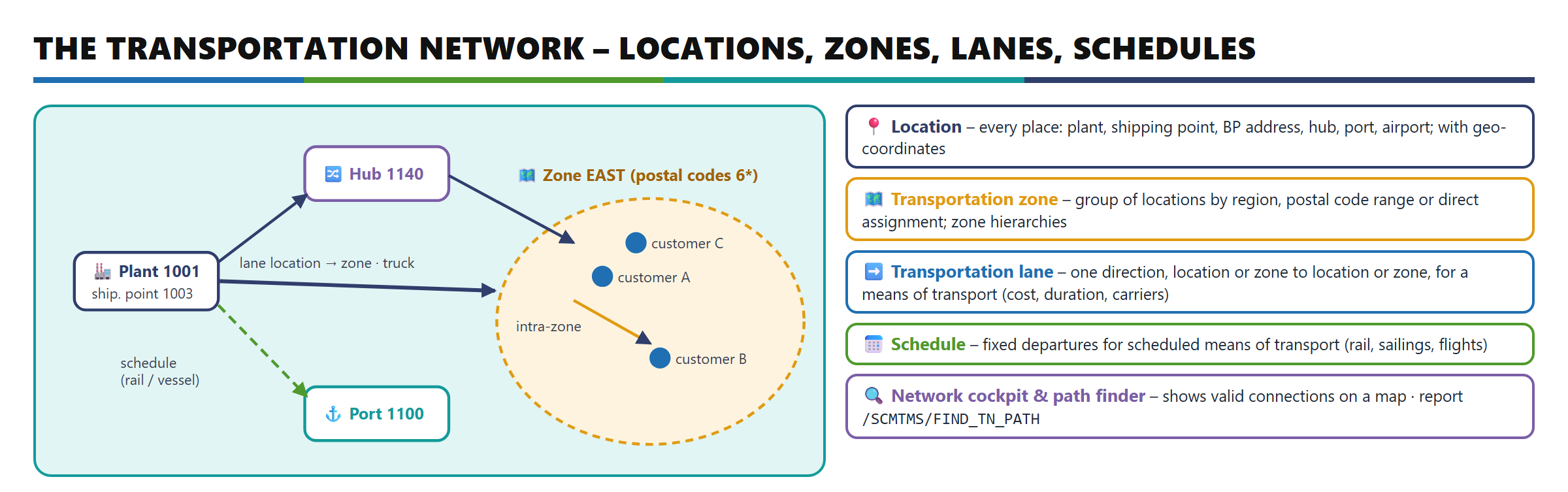
Object | Purpose | Key settings |
|---|---|---|
Transportation zone | Groups locations so lanes, rates and carriers need not be kept per location | Type region (country / region), postal code (ranges, e.g. the 3-digit ranges in carrier rate tables), direct (locations assigned one by one) or mixed; zones can contain sub-zones and form zone hierarchies (properties inherited downwards) |
Transportation lane | Says that a means of transport can go from A to B | Source and destination = location or zone; means of transport; validity; carriers on the lane with priority and costs; one-directional – the return direction is a second lane; intra-zone lanes inside one zone |
Schedule | Fixed timetable of a scheduled means of transport | Departures and arrivals per stop (sailing, rail service, flight); basis for freight bookings |
Trade lane | Abstract classification (inbound, outbound, from, to, within, along a region) | Used in agreements, analytics, strategic freight management – not linked to transportation lanes |
Default route | Predefined sequence of stops for recurring tours | Used by planning as a template |
4.1 Checking the network
- Transportation network cockpit: shows locations, zones, lanes and schedules on a map; right-click a location → Find Path To Location shows all connections and whether a valid lane or schedule exists.
- Path finder in the Transportation Network Cockpit (no transaction code): start and destination location → lanes, schedules, bookings and transshipment locations found. It does not filter by time window, mode or means of transport and ignores incompatibilities.
- Distances and durations: with a GIS provider (flag GIS Quality on the means of transport) real road distances and speeds; without GIS: straight-line distance × distance factor, duration from the average speed of the means of transport.
- Typical planning error "no lane found": the destination location is not in any zone of the lane, or the lane exists only in the other direction.
Part 5 – Means of transport, modes, resources and equipment
Object | Where | Meaning |
|---|---|---|
Transportation mode | Customizing | Highest grouping: road, rail, sea, air, inland waterway, postal service; decides freight order (road, rail) vs freight booking (sea, air) |
Means of transport (MTr) | Customizing: Transportation Management › Master Data › Resources › Define Means of Transport and Compartment | Vehicle class, e.g. 40-t truck, reefer truck; exactly one mode; UN/EDIFACT code (031 truck, 011 ship, 006 aircraft); flags scheduled, own means of transport, multi-resource, GIS quality; average speed; hierarchy of MTr |
Vehicle resource | Master data (app Define Resource) | A concrete truck or trailer of an MTr with capacity (weight, volume, pallets), availability, calendar, temperature control, owner; used for own fleet planning and capacity checks |
Compartment | Customizing | Chambers of a vehicle (e.g. temperature zones in a reefer) |
Equipment group / type | Customizing | Containers, trailers, railcars (e.g. 20-ft, 40-ft container) with tare weight and capacity – used by transportation units and freight bookings |
Driver | BP + resource assignment | Driver planning (advanced) |
- Dangerous goods: means of transport and resources can carry ADR limits; VSR optimization respects ADR points (advanced).
- Capacity used in planning comes from the resource, or – for carriers' trucks without resources – from the means of transport (multi-resource with a number of resources, blank = unlimited).
Part 6 – Charge master data: agreements, calculation sheets, rate tables
Transportation Charge Management (TCM) calculates what the carrier must be paid (and, for LSPs, what the customer is charged). Its master data is a four-level hierarchy:
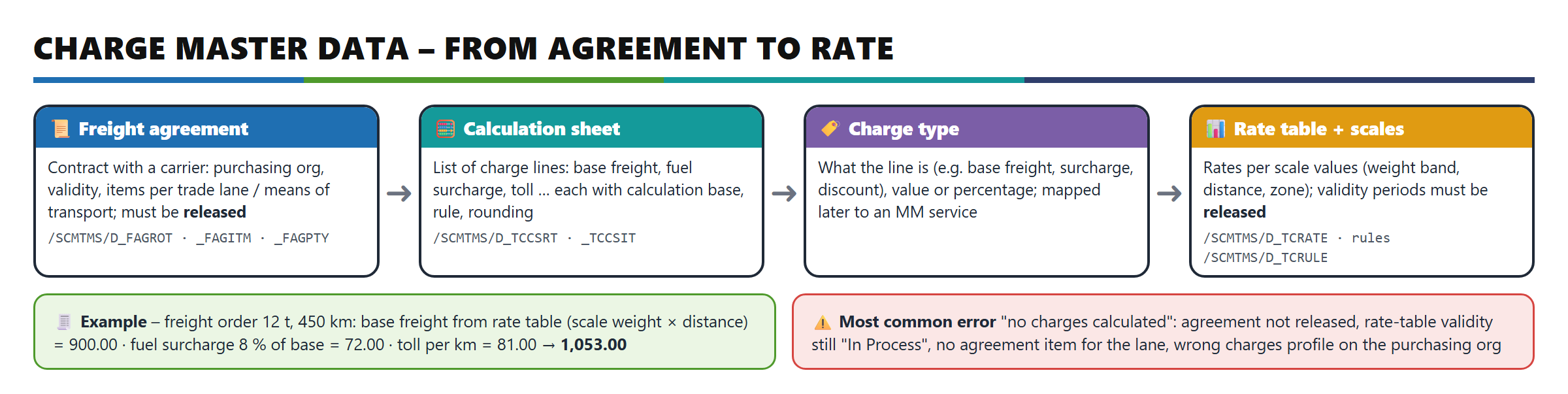
Object | Content | Tables |
|---|---|---|
Freight agreement | Contract with a carrier for a purchasing organization: validity, items (e.g. per trade lane or means of transport) each with a calculation sheet; status must be released. LSP selling side: forwarding agreement | /SCMTMS/D_FAGROT (root), /SCMTMS/D_FAGITM (item), /SCMTMS/D_FAGPTY (party) |
Calculation sheet | Lines with charge type, calculation base (gross weight, distance, chargeable weight …), calculation rule (multiplier), rate table determination rule, rounding and adjustment profiles; can be a template | /SCMTMS/D_TCCSRT (root), /SCMTMS/D_TCCSIT (item) |
Charge type | What a line represents: base freight, fuel surcharge, toll, discount; value or percentage; later mapped to an MM service for posting | Customizing |
Rate table | Rates by one or more scales (dimensions: weight bands, distance, zones); validity periods with status – only released validities are used | /SCMTMS/D_TCRATE (rates); calculation rules /SCMTMS/D_TCRULE |
Scale | One dimension of a rate table (e.g. weight 0–1,000 kg, 1,000–5,000 kg …) | Master data |
6.1 How charges are found
- The charges profile (assigned to the purchasing organization in PPOME or found by condition) contains the calculation profile (calculation level, date basis, agreement determination) and the cost distribution profile.
- Agreement determination: purchasing organization + carrier + validity + item criteria (trade lane, means of transport …) → freight agreement item → calculation sheet.
- Per sheet line: calculation base from the document → rate table (by rule, condition or BAdI) → rate record for the scale values → calculation rule → rounding → charge item.
- Charges are calculated on the freight order / booking (header, stage or item level per calculation profile) and copied to the freight settlement document (page 03).
Part 7 – TM business documents
Document | Category / BO | Created from | Purpose |
|---|---|---|---|
Freight unit (FU) | TOR, category FU | Sales order, PO, STO, delivery (embedded); OTR / DTR or forwarding order | Unit of planning; carries quantities, dates, source and destination, stages |
Freight order (FO) | TOR, category TO | Planning (cockpit, optimizer) or manually | Road / rail transport: stops, stages, items (FUs), carrier or own vehicle, charges, execution |
Freight booking (FB) | TOR, category BO | Manually or from schedules | Capacity on a vessel voyage or flight (ocean / air booking) |
Transportation unit (TU) | TOR, category TU | Planning | Trailer, railcar or container carrying FUs across several stages |
Service order | TOR | Manually | Services without transport (e.g. cleaning, customs) |
OTR / DTR | TRQ | Replicated orders / deliveries (decentralised TM only) | Transportation requirement documents in the TM system |
Forwarding order / quotation | TRQ | Manually, EDI, portal (LSP) | Customer order for a transport service; priced with forwarding agreements |
Freight settlement document (FSD) | SFIR | Freight order / booking with charges | Pay the carrier: posts service PO + service entry sheet in MM |
Forwarding settlement document (FWSD) | CFIR | Forwarding order (LSP) | Bill the customer through SD billing |
- Freight units and freight orders appear in the sales order document flow (sales order → delivery → freight unit → freight order) since S/4HANA 1909.
- Number ranges are assigned per document type in TM customizing (freight unit types, freight order types, FSD types each reference a number range interval).
- Document types (freight unit type, freight order type, booking type, FSD type) carry most of the control: change controller, default org units, output profile, settlement relevance (page 03).
Part 8 – Persistence: BOPF objects, tables and keys
TM documents are BOPF business objects. A BO is a tree of nodes (ROOT, ITEM_TR, STOP, …); each node is stored in its own database table. Rows are identified by a 16-byte GUID DB_KEY; child rows point to their parent with PARENT_KEY (and to the root with ROOT_KEY). The readable number (TOR_ID) is only an attribute.
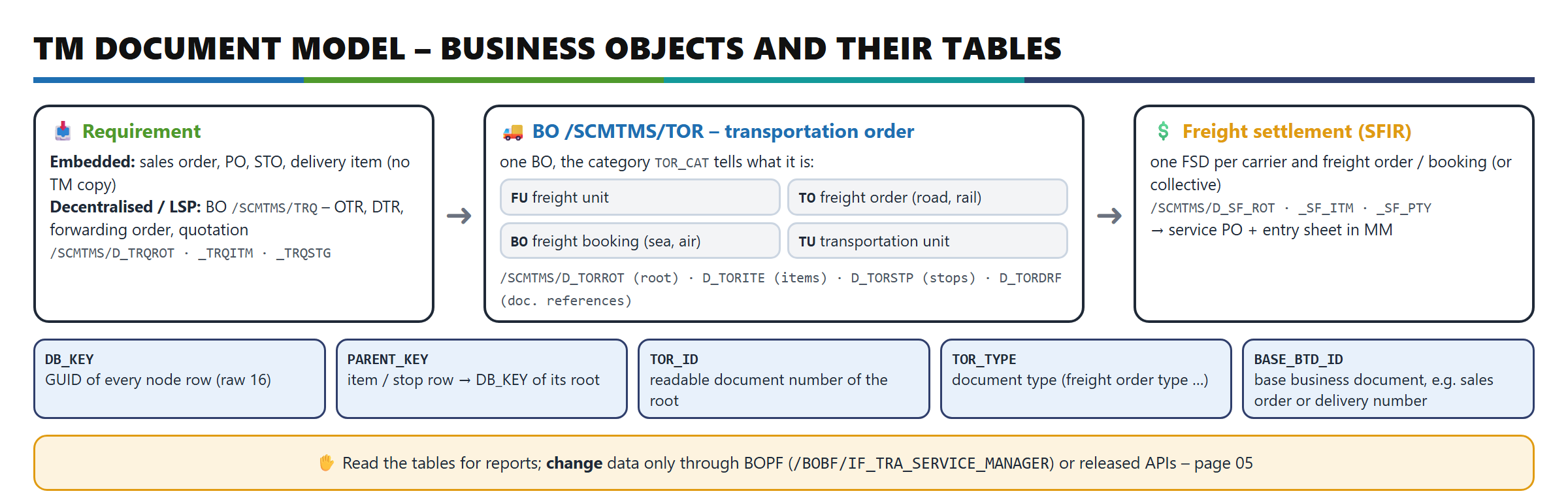
Table | Node / content | Important fields |
|---|---|---|
/SCMTMS/D_TORROT | TOR root: header of freight units, freight orders, bookings, TUs | DB_KEY, TOR_ID, TOR_TYPE, TOR_CAT, LIFECYCLE (status), BASE_BTD_ID / BASE_BTD_TCO |
/SCMTMS/D_TORITE | TOR items: products, packages, vehicle and FU items | DB_KEY, PARENT_KEY, BASE_BTD_ID / BASE_BTD_TCO (base document and its type code) |
/SCMTMS/D_TORSTP | TOR stops (locations visited, with dates) | DB_KEY, PARENT_KEY, location |
/SCMTMS/D_TORDRF | TOR document references (sales order, delivery, PO …) | PARENT_KEY, BTD_ID |
/SCMTMS/D_TRQROT / D_TRQITM / D_TRQSTG | TRQ root, items, stages (forwarding order, OTR, DTR) | DB_KEY, PARENT_KEY |
/SCMTMS/D_SF_ROT / D_SF_ITM / D_SF_PTY | Freight settlement document root, items, parties | DB_KEY, PARENT_KEY |
/SCMTMS/D_FAGROT / D_TCCSRT / D_TCRATE | Freight agreement, calculation sheet, rates (Part 6) | DB_KEY, PARENT_KEY |
- Explore the model with the BOPF configuration UI (/BOBF/CONF_UI, BO /SCMTMS/TOR) and the test UI; list the tables in SE11 with
/SCMTMS/D_*and F4. - The base document type code (BASE_BTD_TCO) says what BASE_BTD_ID is (sales order, delivery …). Codes can change between releases – with S/4HANA 2022 return deliveries moved from 73 to 700 – so do not hard-code them.
Example – freight units of one sales order (read-only report)
|
For the step freight unit → freight order (assignment of FU items to FO items) use BOPF associations or released CDS views instead of joining node tables by hand; creating or changing TM documents is only allowed through the BOPF service manager or APIs – BOPF determinations, validations and the change controller would otherwise be skipped (page 05).
Part 9 – Released CDS views and APIs
On top of the BOPF tables SAP delivers CDS views named after the transportation order (the TOR object) and RAP-based transactional views for the freight order. Availability and release state differ by release and edition; the ADT Released Objects tree, SAP's released-objects list on GitHub and SAP Business Accelerator Hub show what your system offers.
Object | Kind | Note |
|---|---|---|
I_TransportationOrderItem_2, I_TransportationOrderStop_2 (+ I_TransportationOrder_2) | Interface CDS views on TOR items and stops | Since S/4HANA 2023 some TM views cannot be extended any more; newer |
I_FreightOrderTP, I_FreightOrderStopTP | Released RAP BO interface of the freight order, with child entities | Basis of the Freight Order OData API |
I_FreightBookingDocRefTP | Transactional view of freight booking document references | Projection-view restrictions apply in developer extensibility |
API_FREIGHTORDER | OData V4 API (A2X) to create, read, update and cancel freight orders | Cloud: API_FREIGHTORDER · on-premise 2025: API_FREIGHTORDER_2 |
SOAP services | Order / delivery integration (OTR / DTR), carrier messages, settlement | Decentralised TM and B2B – page 04 |
- Rule for new code (clean core): read through released CDS views, change through released APIs or BOPF – never by SQL on
/SCMTMS/D_*tables in cloud-ready code (ABAP on HANA › 05 CDS Views, Clean Core › 01 Clean Core).
Part 10 – Interview questions
Q1. What is a location in TM and how is it created?
Any place in the transport chain (SCM Basis table /SAPAPO/LOC) with address and geo-coordinates. Plants (type 1001), shipping points (1003) and business partners (1021) get locations through report /SAPAPO/CREATE_LOCATION, automatically from TM-relevant documents, or on BP save via BAdI /SAPAPO/LOC_CREATE; hubs and ports are created manually.
Q2. Which business partner roles does a carrier need?
CRM010 Carrier (with TM transport data such as SCAC) plus FLVN01 Supplier for the service PO and FLVN00 FI Supplier for invoice and payment. Without all three it is not found in freight order and booking carrier searches.
Q3. What is a transportation zone and which types exist?
A group of locations used to reduce lanes, rates and carrier assignments: region zones, postal code zones, direct zones and mixed zones; zones can be nested in hierarchies.
Q4. What is a transportation lane? Is it bidirectional?
A connection from a location or zone to a location or zone for a means of transport, with carriers, costs and validity. It is one-directional – the return needs its own lane.
Q5. Means of transport vs resource?
The means of transport is a vehicle class in customizing (mode, speed, scheduled, own fleet, GIS); a resource is a concrete vehicle or trailer of that class with capacity and availability.
Q6. Explain the charge master data hierarchy.
Freight agreement (carrier contract, released) → calculation sheet (charge lines with calculation base and rule) → charge type → rate table with scales and released validity periods. The charges profile on the purchasing organization controls calculation and cost distribution.
Q7. Why are charges sometimes not calculated?
Typical reasons: agreement not released, rate table validity still In Process, no agreement item for the lane or means of transport, or no charges profile for the purchasing organization.
Q8. How are freight units, freight orders and bookings stored?
All are instances of the BOPF object /SCMTMS/TOR, distinguished by TOR_CAT (FU, TO, BO, TU). Root in /SCMTMS/D_TORROT, items in /SCMTMS/D_TORITE, stops in /SCMTMS/D_TORSTP, references in /SCMTMS/D_TORDRF – linked by DB_KEY / PARENT_KEY GUIDs.
Q9. How do you find the freight units of a sales order?
In the sales order document flow, or technically via TOR items whose BASE_BTD_ID is the order number, joined to the root with TOR_CAT = 'FU'. In new code use released CDS views or BOPF associations.
Q10. Why must you not update /SCMTMS/ tables directly?
BOPF determinations, validations, actions, status handling, the change controller and integration (e.g. delivery or settlement updates) run only through the BOPF service manager or APIs. Direct updates corrupt the object.
Q11. Which tables hold the freight settlement document and the freight agreement?
Freight settlement: /SCMTMS/D_SF_ROT, D_SF_ITM, D_SF_PTY (SFIR object). Freight agreement: /SCMTMS/D_FAGROT, D_FAGITM, D_FAGPTY; calculation sheets /SCMTMS/D_TCCSRT / D_TCCSIT.
Q12. Which CDS views or APIs would you use for freight orders?
The transportation order views (released: I_TransportationOrderItem_2 / _Stop_2) for reading, I_FreightOrderTP (RAP, with EML and business events) and the Freight Order OData API (cloud API_FREIGHTORDER, on-premise 2025 API_FREIGHTORDER_2).
🏠 Start Here · ◀ 01 · Overview & Org · 03 · Processes & Config ▶ · Sections: CORE ABAP | OOPS ABAP | ABAP on HANA | Clean Core | RAP | ABAP Points | SAP Fiori | SAPUI5 | Mobile Development (MDK) | BTP Foundations | BTP Development | CAP | SAP Build | ABAP on BTP | Integration Suite | SAP Business AI | SAP BASIS | Security | SAP SDLC
Functional: FICO ABAP | TRM ABAP | VIM | SAP BIS | SD ABAP | MM ABAP | PP ABAP | QM ABAP | PM ABAP | PS ABAP | EWM | TM ABAP | GTM ABAP | EHS ABAP | HR ABAP | BW | SAP Datasphere | SAP Business Data Cloud | SAP MDG | SAP Analytics Cloud | SAP Ariba | SAP CX | SAP IBP