This page walks through the treasury processes an S/4HANA project implements: the daily cash operations of the cash manager, liquidity forecast and planning, the life cycle of a financial transaction from trading to accounting and maturity, FX exposure and hedging, and the risk controls around them. For each step it names the customizing that drives it and the t-codes and Fiori apps you will be asked about. Objects and tables: page 02; postings, bank communication and reports in detail: page 04; BAdIs and APIs: page 05.
Part 1 – Daily cash operations
The cash manager's day follows a fixed rhythm: see yesterday's closing balances, add today's known flows, decide where cash must move, execute and approve the transfers, and check that the banks executed them.
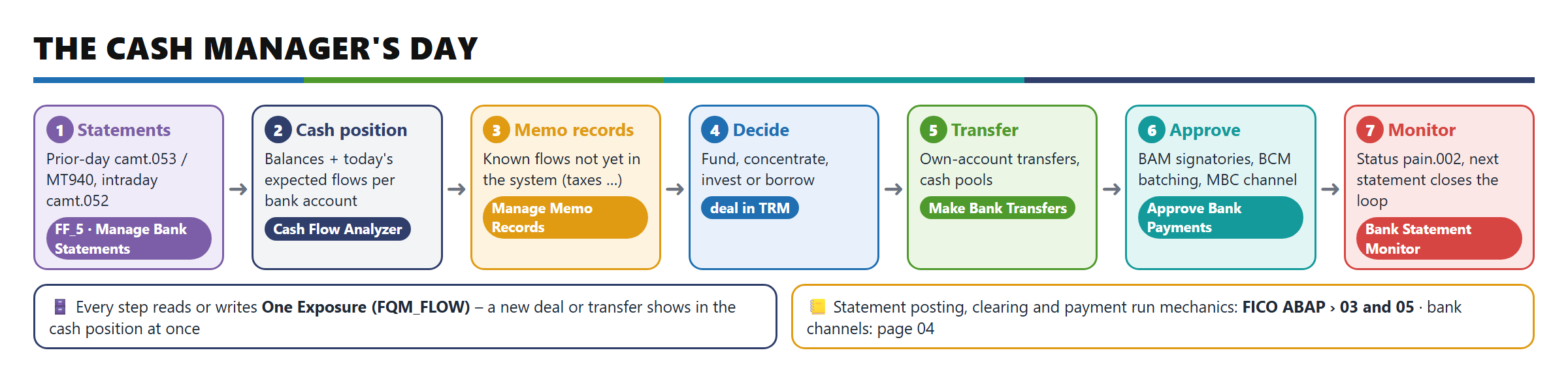
Step | What happens | T-code / app |
|---|---|---|
1 Import statements | Prior-day statements (camt.053 / MT940) give actual closing balances; intraday statements (camt.052 / MT942) update during the day. Posting and clearing logic: FICO ABAP › 03 and 05 | FF_5, Manage Bank Statements, Bank Statement Monitor (with BCM) |
2 Check the cash position | Opening balance per bank account plus today's and the next days' expected flows (released payments, incoming payments, treasury deal flows) | Cash Flow Analyzer, Cash Position, Check Cash Flow Items |
3 Add known flows | Expected flows not yet in the system as memo records (taxes, dividends, large customer receipts) | Manage Memo Records (classic FF63) |
4 Decide | Move surplus to the concentration account, fund accounts below target, invest the group surplus (deal in TRM) or borrow | Cash Flow Analyzer, Transaction Manager |
5 Execute transfers | Bank-to-bank transfers between own accounts; created as payment requests and sent to the bank | Make Bank Transfers, cash concentration |
6 Approve and send | Payment approval according to BAM signatories and approval rules; batching and transmission through BCM / Multi-Bank Connectivity | Approve Bank Payments, BCM monitor |
7 Monitor | Payment status messages (pain.002) and the next statement close the loop | Bank Statement Monitor, payment status apps |
- Treasury deals created in step 4 appear in the cash position immediately, because their flows are written to One Exposure (page 02 Part 8).
Part 2 – Cash pooling and cash concentration
- Physical cash pooling (cash concentration): balances of participant accounts are moved to a header (concentration) account every day, to target balances or zero (zero balancing); the intercompany positions that result are tracked (e.g. in In-House Banking or as intercompany loans).
- Notional pooling is done by the bank only (balances are netted for interest without moving money); S/4HANA just reports the accounts.
- In S/4HANA: cash pools are defined in Manage Cash Pools on top of BAM bank accounts (header and sub accounts, target balances, min. transfer amounts); the cash concentration proposal uses the cash position and creates the transfers as payments. Released views: I_CashPool_2.
- Classic cash concentration in the old cash management screens is legacy – use the cash pool apps.
Part 3 – Liquidity forecast, liquidity items and planning
The liquidity forecast looks weeks to months ahead: open AR / AP items by due date, sales and purchase orders, treasury flows and imported forecasts – all from One Exposure – grouped by liquidity item. The actual cash flow report shows what really happened, by the same liquidity items, and liquidity planning in SAP Analytics Cloud compares plan, forecast and actual.
3.1 How a flow gets its liquidity item
Origin | Source of the flow | How the liquidity item is found |
|---|---|---|
C – AR / AP open items | Customer and supplier items | Query and query sequence on the document (e.g. reconciliation account, customer group); derivation function module possible |
D – G/L items | Bank and other G/L postings | Default liquidity item of the G/L account (FLQINFACC) or queries; offsetting line of a bank posting decides the reason |
X – One Exposure sources | Flows of financial transactions (also purchase orders and other One Exposure flows) | Queries on the flow attributes (for treasury: product type, flow type, update type) assigned to the company code |
- Order for origins C and D: derivation function (exit) first, then the query sequence, then the default of the G/L account (FLQINFACC). Newer releases add origin B for bank statement items.
- Customizing: liquidity items (FLQC1), queries and query sequences, assignment of query sequences to company codes per origin. For special logic SAP gives derivation function modules (FCLM_LQF_DERIVE_LQITEM_SAMPLE as template) – page 05.
- Flow types in Cash Management decide whether a flow counts as cash or as accrual; flow types of G/L accounts are maintained with FQM_MANAGE_FLOW_TYPE. Bank G/L accounts must be marked Relevant to Cash Flow in the G/L account master, otherwise their postings are missing in the cash position.
- Certainty levels separate actuals, memo records, orders and forecasts, so that the forecast can be filtered (e.g. show only confirmed flows).
3.2 Liquidity planning
- S/4HANA delivers the actuals and forecasts per liquidity item; SAP Analytics Cloud holds the planning model (rolling monthly plan, yearly plan), the planning workflow and the plan / actual comparison.
- Typical cycle: monthly rolling forecast by subsidiaries → review by central treasury → variance analysis against actual cash flows → funding decisions (deals, cash pool targets).
- The classic Liquidity Planner (ECC) is legacy; its liquidity calculation (actual cash flows traced from bank postings to the offsetting items) is done by the Flow Builder, which writes into One Exposure.
Part 4 – Deal life cycle in the Transaction Manager
Every financial transaction goes through the same stations, split between front office (trading), middle office (control) and back office (settlement and accounting). Each change is recorded as a new activity of the deal (VTBFHAZU), so the full history stays visible.
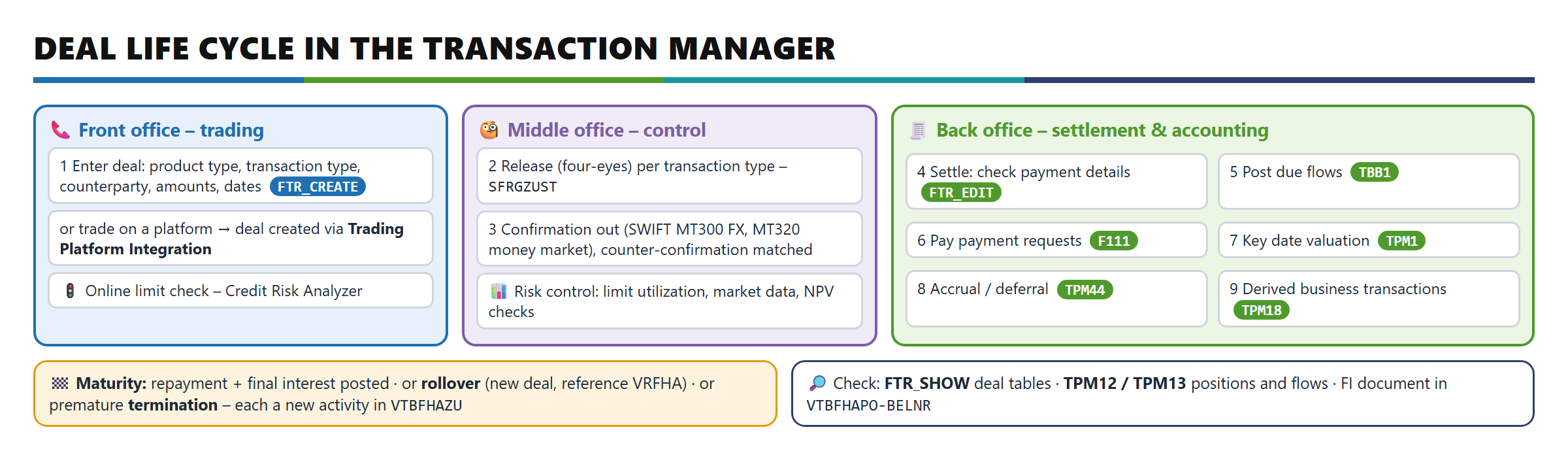
Station | What happens | T-code / tool |
|---|---|---|
1 Trading (front office) | Deal entered as contract (or order first): product type, transaction type, counterparty, amount, dates, conditions; flows are generated. Credit Risk Analyzer checks the limit online | FTR_CREATE; trades from platforms via SAP Trading Platform Integration |
2 Release | Optional release procedure (four-eyes principle) per transaction type; release status in VTBFHA-SFRGZUST | Release workflow |
3 Correspondence | Confirmations sent to the counterparty (e.g. SWIFT MT300 for FX, MT320 for money market) and incoming counter-confirmations matched automatically | Correspondence framework and monitor |
4 Settlement (back office) | Back office checks the deal and the payment details (standing instructions) and sets the settlement activity; only settled deals are posted | FTR_EDIT (settle), collective processing |
5 Payment | Flows with payment request flag (VTBFHAPO-SPAYRQ) create payment requests when posted; the payment program for payment requests pays them | F111, BCM approval |
6 Posting | Due flows are posted to FI on their value date – nominal, interest, fees | TBB1 post flows |
7 Period end | Key date valuation (FX and market value), accrual / deferral of interest, amortization; results are derived business transactions posted to FI | TPM1 valuation, TPM44 accrual / deferral (TBB4 legacy), TPM18 fix and post derived business transactions |
8 Maturity | Final repayment flows posted; or rollover (new deal referencing the old one, VTBFHA-VRFHA) or premature termination | FTR_EDIT activities |
- Change vs reverse: a deal is changed by a new activity or reversed (reversal reason); flows that are already posted must have their postings reversed first, then the deal can be reversed.
- Securities follow the same idea with security purchases / sales, coupons, redemptions and corporate actions on a security account; positions are kept per security account.
Part 5 – Treasury accounting and account determination
TRM does not let users enter G/L accounts. Each flow type (deal flows) and each update type (position changes, valuations, accruals) is linked to a posting specification, which says which account symbols are debited and credited; account symbols are mapped to G/L accounts, optionally depending on an account assignment reference derived from the deal.
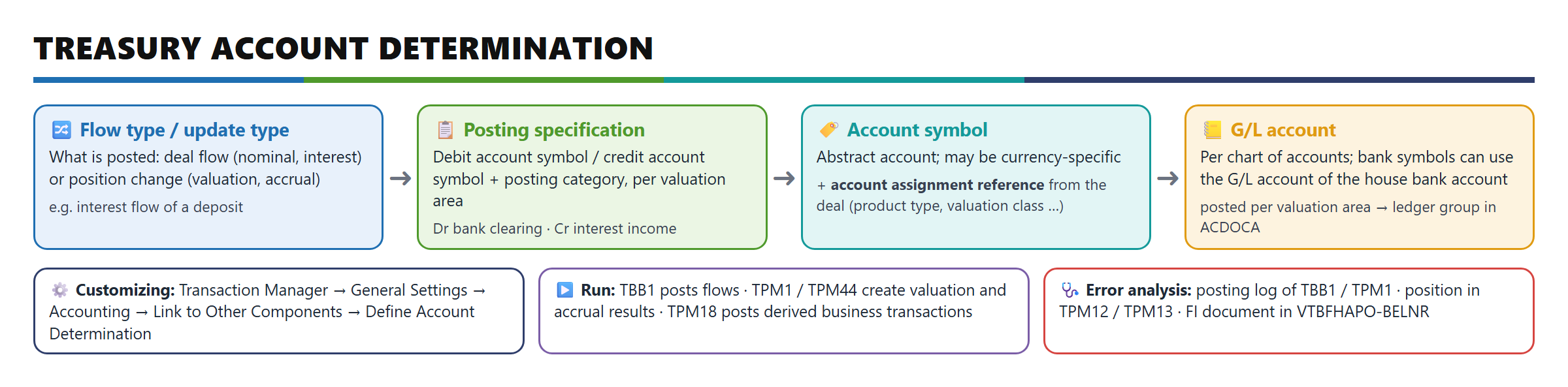
Customizing object | What it controls |
|---|---|
Account symbol | Abstract account, e.g. "money market investment", "interest income", "bank clearing"; can be currency-specific |
Assign G/L accounts to account symbols | Account symbol (+ account assignment reference) → G/L account per chart of accounts; for bank accounts the house bank account's G/L account can be used |
Account assignment reference | Groups deals / positions that need different balance sheet accounts (e.g. per product type and valuation class); derived from the deal attributes by allocation rules in customizing |
Posting specification | Debit and credit account symbol, posting category; assigned to flow types and update types per valuation area |
Valuation area / accounting principle | Each valuation area posts with its accounting principle to its ledger group in ACDOCA (parallel accounting) |
- Customizing path: Transaction Manager → General Settings → Accounting → Link to Other Components → Define Account Determination (account symbols, G/L assignment, posting specifications, assignment to flow and update types).
- Error analysis: TPM12 / TPM13 for the position, VTBFHAPO-BELNR for the FI document, then the posting log of TBB1 or TPM1.
Part 6 – FX exposure, hedge management and hedge accounting
A company with foreign currency sales or purchases is exposed to FX risk. The treasury records the exposures, decides how much to hedge according to its hedge policy, trades the hedges and – if it wants to avoid P&L volatility – designates them in hedge accounting.
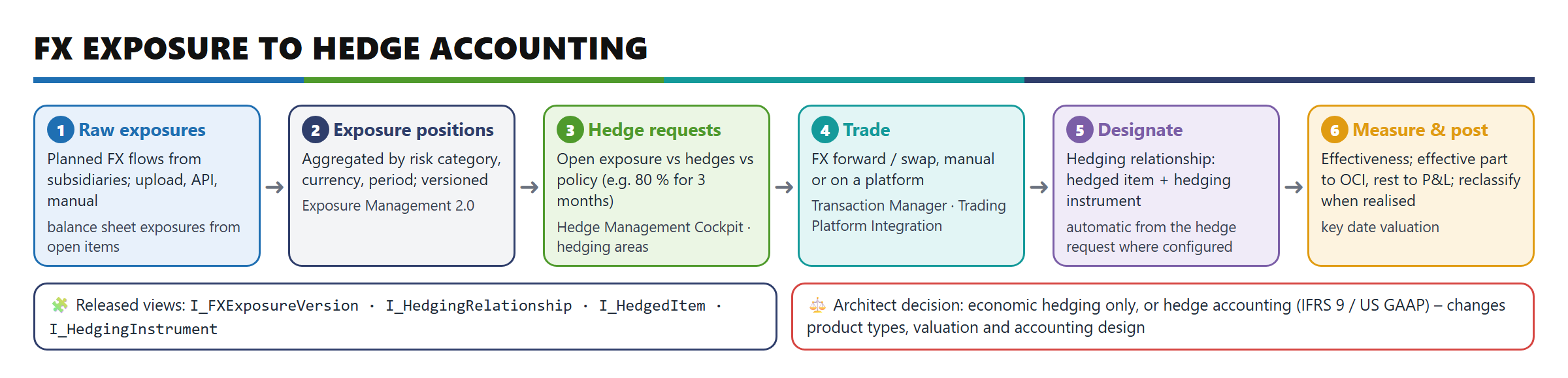
Step | What happens | Tool |
|---|---|---|
1 Capture exposures | Subsidiaries or systems enter raw exposures (planned FX cash flows by currency, date, company code); balance sheet exposures come from open items | Exposure Management 2.0 (manual, upload, API) |
2 Aggregate | Raw exposures are aggregated into exposure positions by risk category and attributes, versioned over time | Exposure Management 2.0 |
3 Plan the hedge | Open exposure vs existing hedges vs hedge policy (e.g. hedge 80 % of the next 3 months); the difference becomes hedge requests | Hedge Management Cockpit, hedging areas |
4 Trade | Hedge requests are executed as FX forwards / swaps, manually or via a trading platform; deals come back as financial transactions | Transaction Manager, Trading Platform Integration |
5 Designate | Hedging relationship between exposure (hedged item) and deal (hedging instrument) is documented, automatically from the hedge request where configured | Hedge accounting (Hedge Accounting for Exposures) |
6 Measure and post | Effectiveness assessment; the effective part of the fair value change goes to OCI (cash flow hedge), the rest to P&L; reclassified when the hedged flow occurs | Key date valuation, hedge accounting functions |
- Released views for reporting: I_HedgingRelationship, I_HedgedItem, I_HedgingInstrument, I_FXExposureVersion.
- Architect view: hedge accounting is optional – many companies hedge economically and accept P&L effects. Decide early, because it changes product types (hedge accounting variants), valuation and accounting design.
Part 7 – Market risk and credit risk limits
Area | Purpose | Key elements |
|---|---|---|
Credit Risk Analyzer | Limit the risk that a counterparty or issuer defaults | Limit types (dimensions such as counterparty, product group, country), limit amounts and validity, attributable amounts and utilization, online limit check at deal entry, limit reports |
Market Risk Analyzer | Measure how market changes affect the value of positions | NPV calculation (I_FinancialTransactionNPV), sensitivities, key figure sets, value at risk, scenarios and stress tests, gap analysis |
- Both analyzers need complete market data (Part 7 of page 02): missing yield curves or rates are the most common reason for wrong NPVs.
- Limit breaches can block a deal or only warn, depending on customizing – a typical interview question on segregation of duties.
Part 8 – Key customizing
Treasury customizing lives under SPRO → Financial Supply Chain Management → Cash and Liquidity Management and → Treasury and Risk Management.
Area | Customizing (IMG / t-code) | What it controls |
|---|---|---|
Cash management – activation | Activity Activate Individual Source Applications (One Exposure); load with FQM_INITIALIZE | Which applications write into FQM_FLOW per company code |
Cash management – keys | Planning levels, planning groups, certainty levels, flow types (FQM_MANAGE_FLOW_TYPE for G/L accounts) | Grouping and meaning of flows |
Liquidity items | Liquidity items (FLQC1), queries, query sequences, assignment to company code, default per G/L account (FLQINFACC) | Liquidity forecast and actual cash flow |
Bank Account Management | Bank account types, workflow and approval settings, signatory groups, payment approval rules | Bank account life cycle and approvals |
Transaction Manager – per area | Money Market / Foreign Exchange / Derivatives / Securities → Transaction Management: product types, transaction types, flow types and their assignment to transaction types, number ranges | What can be traded and how deals behave |
Organization and valuation | Valuation areas and accounting codes, valuation classes, position management procedures, update types | Parallel valuation and position management |
Accounting | Account symbols, G/L assignment, account assignment references, posting specifications, assignment to flow and update types | G/L accounts of every treasury posting |
Correspondence and release | Correspondence types and channels, release procedures per transaction type | Confirmations and four-eyes principle |
Risk | Limit types, limit characteristics, market data definitions, key figure sets | Credit and market risk analysis |
Hedging | Hedging areas, hedge policies, hedging relationship profiles / scenarios | Hedge Management Cockpit and hedge accounting |
Part 9 – T-codes and Fiori apps
Area | SAP GUI t-codes | Fiori apps |
|---|---|---|
Bank accounts | FI12_HBANK (house banks; ECC: FI12 for house banks and accounts), FCLM_BAM_ACCLINK, FCLM_BAM_MIGRATION | Manage Bank Accounts, Manage Banks |
Cash operations | FF_5 (bank statements), FF63 / FF65 memo records (classic) | Cash Flow Analyzer, Cash Position, Check Cash Flow Items, Make Bank Transfers, Manage Memo Records, Manage Cash Pools, Bank Statement Monitor |
Liquidity | FQM_INITIALIZE, FQM_MANAGE_FLOW_TYPE, FLQC1 | Liquidity Forecast, Cash Flow Analyzer; SAP Analytics Cloud planning |
Deals | FTR_CREATE create, FTR_EDIT change / settle / reverse, FTR_SHOW display tables | Apps for trade entry per product area (vary by release) |
Accounting | TBB1 post flows, F111 payment requests, TPM1 valuation, TPM44 accrual / deferral, TPM18 fix and post derived business transactions | Treasury posting and position apps |
Positions and analysis | TPM12 position list, TPM13 flow list | Analytical apps on the released views |
Market data | TBD4 datafeed, FW17 security prices, OB08 exchange rates | Currency Exchange Rates |
Hedging | – | Hedge Management Cockpit |
- Classic cash management reports FF7A (cash position) and FF7B (liquidity forecast) are legacy – replaced by the Cash Flow Analyzer and Liquidity Forecast apps.
Part 10 – Interview questions
Q1. Walk me through a cash manager's day in S/4HANA.
Import prior-day statements, check the cash position per bank account in the Cash Flow Analyzer, add memo records, decide on transfers, investments or borrowings, execute Make Bank Transfers or cash concentration, approve per BAM signatories and send via BCM / MBC, then monitor status and the next statement.
Q2. How does a flow get its liquidity item?
By origin: C for AR / AP items and D for G/L items through queries and query sequences or the G/L account default (FLQINFACC), X for treasury flows through queries on product, flow and update type. Special logic goes into a derivation function module.
Q3. Why is a bank posting missing in the cash position?
Typical causes: the source application is not activated, the bank G/L account is not marked Relevant to Cash Flow or has the wrong flow type (FQM_MANAGE_FLOW_TYPE), the bank account / house bank account is missing on the line, or the initial load (FQM_INITIALIZE) was not run. Check Cash Flow Items shows what reached FQM_FLOW.
Q4. Describe the life cycle of a fixed-term deposit.
FTR_CREATE with product type 51A, transaction type investment; limit check; release; confirmation; settlement in FTR_EDIT; TBB1 posts the outgoing nominal and the payment request is paid by F111; TPM44 accrues interest at month-end; at maturity TBB1 posts repayment and interest, or the deal is rolled over.
Q5. What does TBB1 do and what does TPM1 do?
TBB1 posts due flows of financial transactions to FI (nominal, interest, fees). TPM1 runs the key date valuation of positions per valuation area (FX and market value changes) and creates derived business transactions that are posted.
Q6. How are G/L accounts found for treasury postings?
Flow type or update type → posting specification (debit / credit account symbol) → account symbol, optionally with an account assignment reference from the deal → G/L account per chart of accounts. Each valuation area posts to its ledger group.
Q7. What is the difference between a flow type and an update type?
A flow type describes a cash flow of a deal (nominal, interest, fees). An update type describes a position change or valuation result in position management (valuation gain, accrual). Both are linked to posting specifications.
Q8. How are payments of treasury deals executed?
Flows with the payment request indicator create payment requests when TBB1 posts them; F111 pays the requests and creates the payment medium, which goes through BCM approval and the bank channel.
Q9. Explain the hedge management process for FX exposures.
Raw exposures are captured and aggregated into exposure positions (Exposure Management 2.0); the Hedge Management Cockpit compares them with the hedge policy and creates hedge requests; these are traded (manually or via Trading Platform Integration); hedging relationships are designated and effectiveness and OCI postings follow in hedge accounting.
Q10. What does the Credit Risk Analyzer check?
Counterparty and issuer limits by limit type (e.g. counterparty and product group). Each deal's attributable amount is checked online at entry and updates the utilization; breaches warn or block.
Q11. What is cash concentration and how is it set up in S/4HANA?
Daily movement of participant account balances to a header account to reach target balances. Cash pools are defined in Manage Cash Pools on BAM bank accounts; the concentration proposal uses the cash position and creates the transfers.
Q12. Which customizing objects define a new treasury instrument?
Product type (in the right product category), transaction types with allowed activities, release and number range, flow types assigned to the transaction types, update types, position management and valuation settings, and account determination (posting specifications and account symbols).
🏠 Start Here · ◀ 02 · Master Data · 04 · Integration & Reporting ▶ · Sections: CORE ABAP | OOPS ABAP | ABAP on HANA | Clean Core | RAP | ABAP Points | SAP Fiori | SAPUI5 | Mobile Development (MDK) | BTP Foundations | BTP Development | CAP | SAP Build | ABAP on BTP | Integration Suite | SAP Business AI | SAP BASIS | Security | SAP SDLC
Functional: FICO ABAP | TRM ABAP | VIM | SAP BIS | SD ABAP | MM ABAP | PP ABAP | QM ABAP | PM ABAP | PS ABAP | EWM | TM ABAP | GTM ABAP | EHS ABAP | HR ABAP | BW | SAP Datasphere | SAP Business Data Cloud | SAP MDG | SAP Analytics Cloud | SAP Ariba | SAP CX | SAP IBP