Treasury sits between the company's books, its banks and the financial markets. This page shows what happens at each of those borders: how treasury postings reach the Universal Journal, how payments of deals leave the system, how FI, MM, SD and TRM feed the cash position, how S/4HANA talks to banks, trading platforms and market data providers, which SAP BTP services and SAP Analytics Cloud add, and which reports and CDS views answer the treasurer's questions. Account determination and the deal life cycle: page 03; tables and released views: page 02; enhancements and APIs: page 05. Bank statement processing, the payment run and payment formats are taught in FICO ABAP › 03, 05 and 06 – here they are only linked.
Part 1 – The integration picture
A financial transaction touches four other areas during its life: the general ledger (every due flow, valuation and accrual is a journal entry), payments (flows with a payment request are paid by a payment program and sent to the bank), Cash Management (the deal's future flows appear in the liquidity forecast the moment it is saved) and the outside world (trading platform, counterparty confirmation, market data for valuation).
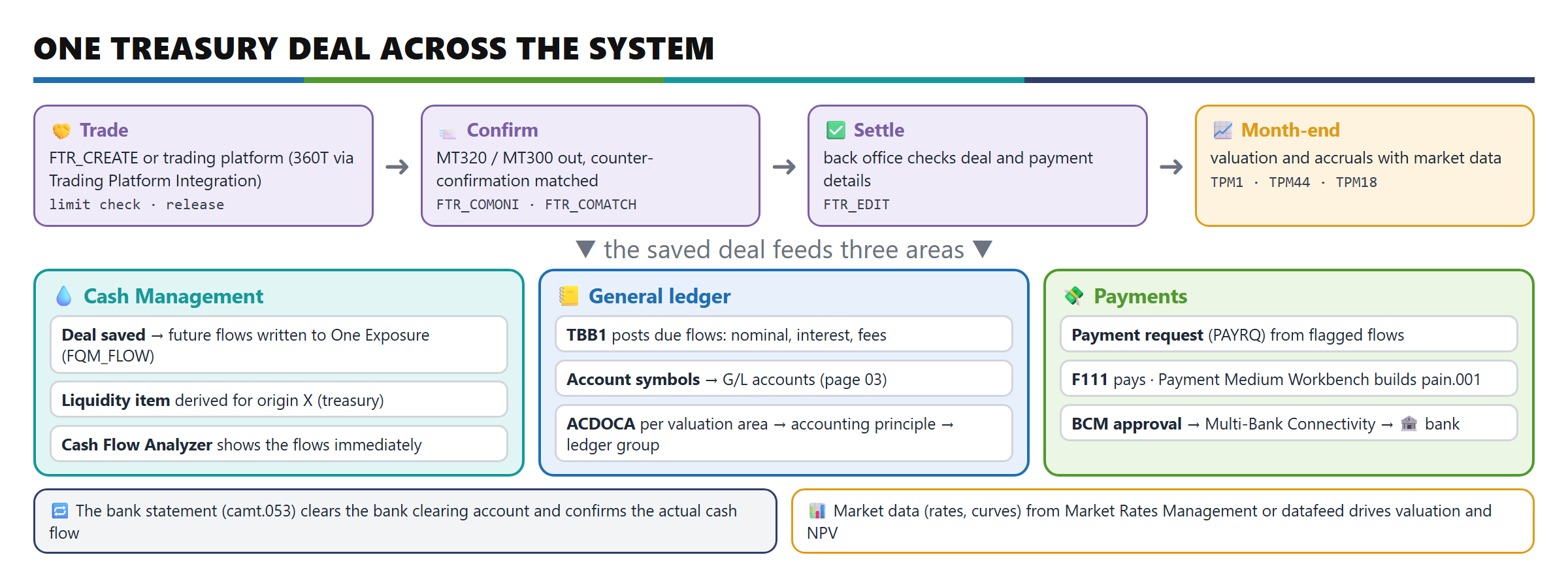
Border | Into treasury | Out of treasury | Part |
|---|---|---|---|
FI / Universal Journal | G/L accounts, house bank accounts, posting periods | Journal entries for flows, valuations, accruals, hedge accounting | 2 |
Payments | Payment status, bank statement clears the bank clearing account | Payment requests → F111 → payment file | 3 |
Cash Management | Flows from FI, MM, SD, bank statements, memo records, remote systems | Deal flows (origin X) into One Exposure | 4 |
Banks | Statements (camt.053 / camt.052), payment status, fee reports | Payments, bank transfers, confirmations | 5 |
Trading platforms / counterparties | Executed trades, counter-confirmations | Trade requests, confirmations (MT300, MT320) | 6 |
Market data providers | FX rates, interest rates, prices, volatilities | – | 7 |
Part 2 – FI integration: treasury postings in the Universal Journal
TRM is a subledger: the deal, its flows and its positions live in the Transaction Manager and the treasury ledger (position management per valuation area), and only the accounting result is passed to FI. Users never enter G/L accounts – the posting specification and account symbols find them (page 03 Part 5). The resulting journal entry is a normal entry in BKPF / ACDOCA; its number is stored on the flow (VTBFHAPO-BELNR).
Treasury step | T-code | What reaches the general ledger |
|---|---|---|
Post flows | TBB1 | Nominal (investment / repayment), interest, fees on their due date – typically against the bank clearing account; a payment request if the flow is flagged (Part 3) |
Key date valuation | TPM1 | Unrealised FX and market value gains / losses per valuation area, posted with update types; reversed or carried forward according to the valuation rules |
Accrual / deferral | TPM44 | Interest accrued up to the key date, reversed at the start of the next period |
Derived business transactions | TPM18 | Position changes calculated by position management (e.g. amortization, realised results) – fixed and posted |
Hedge accounting | Key date valuation, hedge accounting functions | Effective part of a cash flow hedge to the OCI reserve, ineffective part to P&L; reclassification when the hedged flow occurs |
Reversal | FTR_EDIT (reverse) + posting | Reversal journal entries – posted documents are reversed, never deleted |
2.1 Parallel accounting
- Each valuation area is assigned to an accounting principle, which points to a ledger group. The operative valuation area posts the common flows; parallel valuation areas post only their own valuation and accrual results to their ledgers – so IFRS and local GAAP values of the same deal end up in different ledgers of ACDOCA (organization: page 01 Part 6).
- Architect point: decide the valuation areas together with the ledger design of FI (leading ledger, extension ledgers) – see FICO ABAP › 02 and 07.
2.2 Reconciliation and error analysis
- Treasury ledger vs G/L: position values (released view I_TrsyLdgrPositionWithValues) should match the G/L balances of the accounts behind the account symbols. Differences usually come from manual G/L postings on treasury accounts or unposted flows – block treasury accounts for manual posting.
- Posting journal: every treasury posting is logged in the treasury posting journal; it can also be read through the OData API Line Item of Treasury Posting Journal Entry – Read (page 05).
- Typical errors: no G/L account found for an account symbol (account determination incomplete for an account assignment reference), FI messages raised by the accounting interface (closed posting period, missing special G/L indicator, field status) – the long text names the cause; fix it and post again.
- Bank clearing: treasury posts to a bank clearing account; the bank statement (camt.053) posts bank against clearing and clears it – the same principle as for vendor payments (FICO ABAP › 05 Part 8).
Part 3 – Payments of treasury flows: payment requests, F111, BCM and APM
Treasury flows are not open items of a supplier, so the normal payment run F110 does not pay them. Instead, flows with the payment request indicator (VTBFHAPO-SPAYRQ) create a payment request (table PAYRQ, key on the flow in VTBFHAPO-PRKEY) when TBB1 posts them, and the payment program for payment requests (F111) pays them.
Step | What happens | Where |
|---|---|---|
1 Payment request | Created by the posting of a flow: amount, value date, house bank account, payment method, counterparty's bank details (standing instructions) | TBB1, table PAYRQ |
2 Release | Only released payment requests are paid; release can be part of the back-office approval | Payment request release |
3 Payment run | F111 selects due requests by paying company code, payment method and date; posts the payment (bank clearing → bank sub-account) | F111 |
4 Payment medium | Payment Medium Workbench builds the file from the DMEE / DMEEX format tree (pain.001) | FICO ABAP › 06 Part 6 |
5 Approval | Bank Communication Management batches the payments and routes them for approval, e.g. by BAM signatories | BNK_APP / Approve Bank Payments, monitor BNK_MONI |
6 Transmission | File sent through Multi-Bank Connectivity or another channel; pain.002 status messages update the batch | Part 5 |
- Grouping: flows of the same counterparty, currency and value date can be grouped into one payment (treasury payment request grouping), which saves bank fees and matches the counterparty's confirmation.
- Payment factory: in a group with Advanced Payment Management (APM), payments from treasury, AP and remote ERPs are routed through one central payment hub; In-House Banking settles intercompany flows on in-house accounts (components: page 01 Part 5).
- Security: treasury payments are large – the approval rules (BCM, BAM signatories), segregation between front and back office and protected payment files are typical audit topics.
Part 4 – Cash Management fed by FI, MM, SD, TRM and remote systems
The data model of One Exposure from Operations (table FQM_FLOW, flow attributes, memo records) is on page 02 Part 8; the liquidity item derivation on page 03 Part 3. Here: which application sends what, and how other systems get their flows in.
Source | Flows written to One Exposure | How |
|---|---|---|
FI – AR / AP | Open customer and supplier items by due date; cleared items become actual flows | Flow Builder (FCLM_FLOW_BUILDER) – real time after activation |
FI – G/L | Postings on bank accounts (actual cash) and on cash-relevant G/L accounts | Flow Builder; G/L account flow type (FQM_MANAGE_FLOW_TYPE) decides cash vs accrual |
MM | Purchase requisitions, purchase orders, scheduling agreements – expected outflows | Flow Builder |
SD | Sales orders – expected inflows | Source application SD |
TRM | Flows of financial transactions (origin X for the liquidity item) | Written when the deal is saved or changed |
Bank statements | Prior-day and intraday statement items, balances | Bank statement integration |
Memo records | Manual expected flows (FQM_FLOW since 1809; classic FDES) | Manage Memo Records |
Remote systems | Flows from other ERPs (e.g. subsidiaries on ECC or non-SAP) | Classic cash management in a remote system (source CMDSR) or the SOAP API Cash Flow (CASHFLOW_IN) |
- Initial load and activation: each source application is activated per company code and loaded once (FQM_INITIALIZE); for FI and MM SAP recommends the Flow Builder run. Missing activation is the most common reason for gaps in the cash position (page 03 Q3).
- Outbound: the SOAP service Finance – Cash Management Outbound Integration sends cash flows from S/4HANA to another cash system – used when a central treasury system collects flows from several S/4HANA systems.
- Design rule: the cash position is only as good as the bank account on each flow. Make sure house bank accounts are linked in BAM and that open items carry a house bank or payment method, otherwise flows land on the company code without a bank account.
Part 5 – Bank communication: channels and message formats
The mechanics of payment files and statement import are on FICO ABAP › 05 Part 8 (bank integration diagram, FEBKO / FEBEP, posting rules) and 06 Part 6 (DMEE / DMEEX). Treasury adds the choice of channel, intraday data and the bank-related analytics.
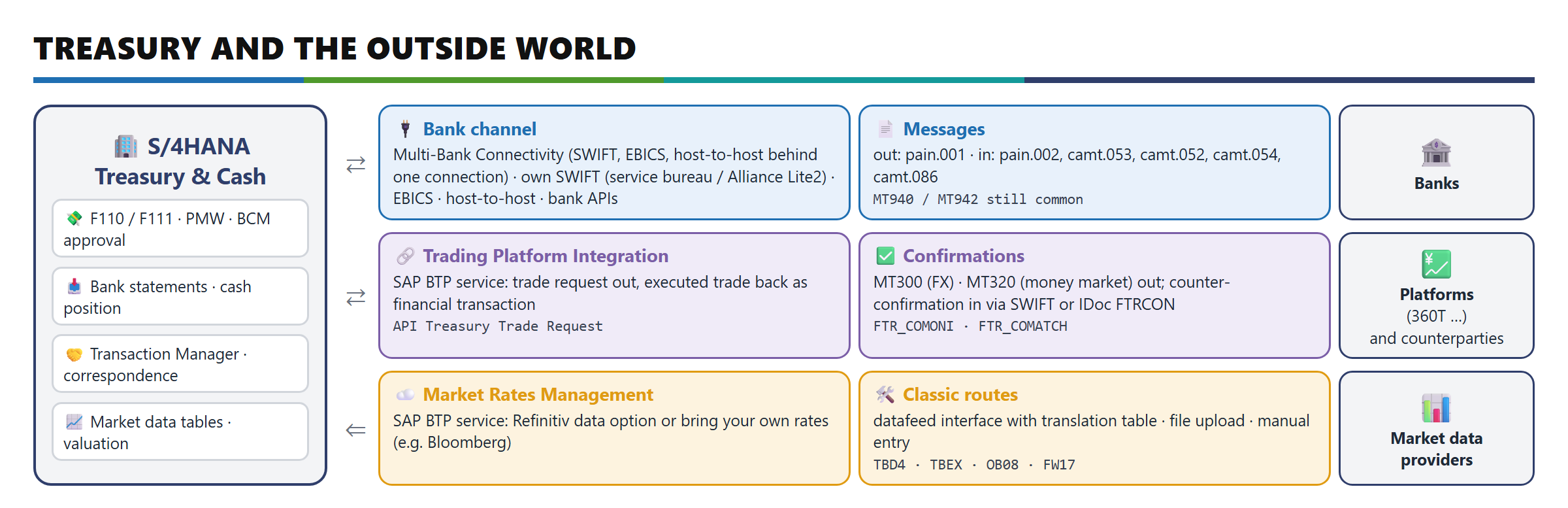
Channel | How it works | Typical fit |
|---|---|---|
SAP Multi-Bank Connectivity (MBC) | SaaS network owned and run by SAP on SAP BTP; one connection from S/4HANA, SAP onboards the banks; supports SWIFT (certified for SWIFT gpi), EBICS and host-to-host connections to banks | Groups with many banks that do not want to run own connectivity |
SWIFT (own) | Through a SWIFT service bureau or Swift Alliance (Alliance Lite2 sunsets December 2027 – move to Alliance Cloud), integrated via SAP Integration Suite / PI | Global banks, high volumes, existing SWIFT membership |
EBICS | Bank-client protocol used mainly in Germany, France and Switzerland | Companies with banks in these countries |
Host-to-host | Direct, bank-specific file connection (e.g. SFTP) per bank | Few banks; costly to maintain for many banks |
Bank APIs | Real-time APIs of individual banks (balances, payment status) | Complement for intraday visibility |
Message | Direction | Treasury use |
|---|---|---|
pain.001 / pain.002 | Out / in | Payments and bank transfers; status of each payment |
camt.053 (MT940) | In | End-of-day statement – actual balances for the cash position |
camt.052 (MT942) | In | Intraday statement – today's movements in the cash position |
camt.054 | In | Debit / credit notifications for single movements |
camt.086 | In | Bank services billing – input for bank fee analysis |
MT300 / MT320 | Out / in | Confirmations of FX and money market deals (Part 6) |
- Bank statements also enter through the SOAP API Bank Statement – Post (BANKSTATEMENTPOST_IN) or the FINSTA IDoc (page 05).
- The connectivity of each house bank account (which channel, which formats) is master data around BAM; Bank Communication Management adds batching, approval and the bank statement monitor.
Part 6 – Trading platforms and deal confirmations
6.1 SAP Trading Platform Integration
SAP Trading Platform Integration (TPI) connects S/4HANA Treasury and Risk Management to external trading platforms through a service on SAP BTP. It is the link between the treasury system and the platform – it is not a trading platform itself.
Step | What happens |
|---|---|
1 Trade request | Created in S/4HANA: from the Hedge Management Cockpit (hedge request), from cash management (e.g. funding need) or manually; API Treasury Trade Request – Read, Create for FX and money market instruments |
2 Send to the platform | The request goes through the BTP service to the trading platform (e.g. 360T, the established out-of-the-box connection) |
3 Execute | The dealer requests quotes from several banks and executes the best one on the platform |
4 Return | The executed trade comes back and creates the financial transaction automatically, with the competing quotes stored for audit |
- 360T is the standard connection; other platforms (e.g. FXall) are connected through partner solutions or own integration.
- Benefit for the architect: no re-keying of deals, straight-through processing from exposure to hedge, and the trade-request trail documents why a deal was made.
6.2 Correspondence: confirmations and matching
After trading, both parties confirm the deal. The correspondence framework creates outgoing confirmations and matches incoming counter-confirmations against the deal.
Element | Content |
|---|---|
Message types | SWIFT MT300 (FX confirmation), MT320 (fixed loan / deposit confirmation) and further MT3xx / MT5xx messages; also print, e-mail or other channels per correspondence type |
Correspondence Monitor | FTR_COMONI – status of all outgoing and incoming correspondence, manual matching, resend |
Automatic matching | Part of the Correspondence Monitor FTR_COMONI – compares the counter-confirmation fields with the deal and sets the confirmation status |
Inbound route | SWIFT files through the bank channel or the IDoc message type FTRCON for inbound confirmations |
Deal status | Confirmation and counter-confirmation status on the deal (released views I_FinTransConfStatus, I_FinTransCntrConfStatus); settlement usually requires a matched counter-confirmation |
- Enhancement points (SWIFT field exits, inbound BAdI, format BAdI): page 05 Part 2.
Part 7 – Market data feeds
Valuation (TPM1), NPVs, the Market Risk Analyzer and hedge effectiveness all need complete market data. Where it is stored and which views read it: page 02 Part 7. The integration question is how it gets in.
Route | How it works | Notes |
|---|---|---|
SAP Market Rates Management | Service on SAP BTP that delivers rates into S/4HANA; data option with Refinitiv content (no separate Refinitiv contract for that option) or Bring Your Own Rates with an own provider licence (e.g. Bloomberg) | Scheduled and automated; the cloud route for on-premise and cloud systems |
Datafeed interface | TBD4 requests current market data from a provider adapter; translation tables map provider instrument codes to SAP keys | Classic route; connection and translation table are a customer / provider task |
File upload | Market data from a spreadsheet or file, e.g. TBEX | Bulk loads, interfaces without a provider adapter |
Manual entry | OB08 exchange rates, FW17 security prices | Fallback and small volumes |
- Exchange rates for FI (TCURR) and treasury market data come from the same feed – agree one source and one rate type strategy with FI (e.g. M for average, own rate types for bid / ask).
- A typical custom development is a market data loader for a provider without a standard adapter (page 05 Part 9).
Part 8 – Treasury services on SAP BTP and SAP Analytics Cloud
Service | Role in the treasury landscape |
|---|---|
SAP Multi-Bank Connectivity | Managed bank channel (Part 5) |
SAP Trading Platform Integration | Link to FX and money market trading platforms (Part 6) |
SAP Market Rates Management | Market data delivery (Part 7) |
SAP Analytics Cloud (SAC) | Liquidity planning: rolling and yearly plans per liquidity item, plan / actual comparison; actuals and forecasts come from One Exposure. Requires an SAC licence |
SAP Cash Application | Machine-learning matching of incoming payments to open items (AR side – FICO ABAP › 03) |
SAP Integration Suite | Own bank, host-to-host or platform interfaces, mapping of bank formats (Integration Suite › 02) |
- Cash Flow Analyzer is not a BTP service: it is the S/4HANA Fiori app on One Exposure (page 01 Part 3.2). SAC planning complements it, it does not replace it.
- Liquidity planning flow: S/4HANA delivers actuals and forecasts per liquidity item → SAC planning model (SAP delivers planning content for liquidity planning) → subsidiaries plan, central treasury reviews → variance analysis. The earlier ECC Liquidity Planner on BW / BPC is legacy. SAC models, stories and planning functions in depth: SAP Analytics Cloud section.
Part 9 – Reporting and embedded analytics
Treasury reporting in S/4HANA reads live data: Cash Management apps on One Exposure, treasury apps on the transaction and position tables – through CDS cubes and queries of the virtual data model.
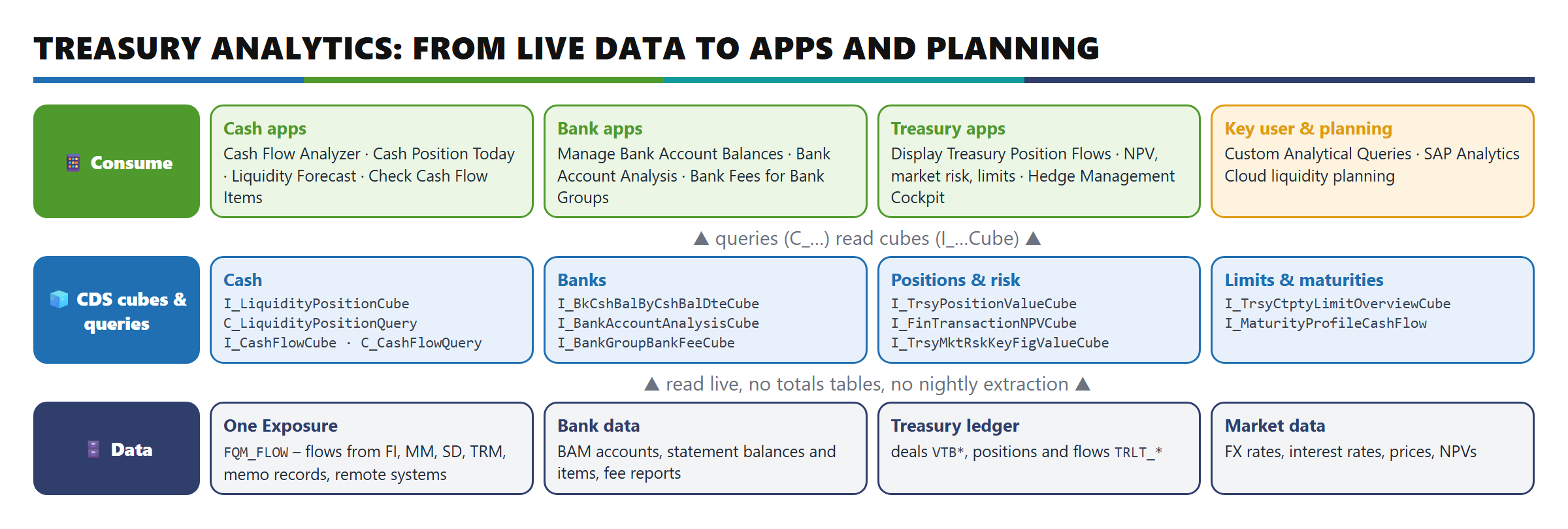
Question | Fiori app / SAP GUI | CDS view behind it |
|---|---|---|
Cash today and next days per bank account | Cash Flow Analyzer (cash position), Cash Position Today, Check Cash Flow Items | C_LiquidityPositionQuery, I_LiquidityPositionCube |
Liquidity forecast and actual cash flows | Cash Flow Analyzer, Liquidity Forecast | C_CashFlowQuery, I_CashFlowCube |
Bank balances over time | Manage Bank Account Balances, Bank Account Balances | I_BkCshBalByCshBalDteCube |
Bank relationship, fees | Bank Account Analysis, Bank Fees for Bank Groups | I_BankAccountAnalysisCube, I_BankGroupBankFeeCube |
Treasury positions and flows | Display Treasury Position Flows; TPM12 / TPM13 | I_TrsyPositionValueCube, I_TrsyLedgerTransactionFlow |
Market values of deals | Financial transaction NPV analysis | C_FinTransactionNPVQuery, I_FinTransactionNPVCube |
Market risk, value at risk | Market risk key figure and value at risk analyses | I_TrsyMktRskKeyFigValueCube |
Counterparty limits | Counterparty limit overview | I_TrsyCtptyLimitOverviewCube |
Maturity profile | Maturity profile analysis | I_MaturityProfileCashFlow |
Hedging | Hedge Management Cockpit | I_HedgingRelationship, I_FXExposureVersion |
- The views are published for S/4HANA Cloud on the SAP Business Accelerator Hub (private edition copies with prefix PCE_). Only some are released for ABAP Cloud code (e.g. I_FinTransactionNPVCube, C_FinTransactionNPVQuery, I_TrsyLedgerTransactionFlow); the cash cubes and queries serve the Fiori apps, Custom Analytical Queries and SAC. I_CashFlowActualItem is deprecated.
- Custom Analytical Queries (key user) build own reports on these cubes; developers build own CDS views on the released interface views listed on page 02 Part 9 (ABAP on HANA › 05 CDS Views).
- Cross-system and historical treasury reporting (several ERPs, long history) is done in SAC or a data warehouse; the released extraction views (e.g. I_FinancialTransactionDEX, I_BankAccountDEX, I_CashFlowDeltaData) feed it.
Part 10 – Interview questions
Q1. Which treasury activities create journal entries?
Posting of due flows (TBB1: nominal, interest, fees), key date valuation (TPM1), accrual / deferral (TPM44), derived business transactions (TPM18), hedge accounting results (OCI and reclassification) and reversals. Each posts through account symbols to BKPF / ACDOCA; the document number is stored on the flow.
Q2. How does TRM support parallel accounting?
Every valuation area belongs to an accounting principle and therefore to a ledger group. Common flows are posted once, valuation and accrual results per valuation area into their own ledgers, so IFRS and local GAAP values of the same deal sit in different ledgers of ACDOCA.
Q3. Why are treasury payments not paid by F110?
Treasury flows are not open items of a supplier. Flows with the payment request indicator create payment requests (PAYRQ) when posted; F111, the payment program for payment requests, pays them and the Payment Medium Workbench creates the file, which goes through BCM approval to the bank.
Q4. How does a treasury deal appear in the liquidity forecast?
TRM is a source application of One Exposure: when the deal is saved, its future flows are written to FQM_FLOW with company code, bank account and a liquidity item derived for origin X, so the Cash Flow Analyzer shows them immediately.
Q5. How do flows from a subsidiary on another ERP get into the central cash position?
From an ECC system with classic cash management through the remote source CMDSR, from other systems through the SOAP API Cash Flow (CASHFLOW_IN), usually via SAP Integration Suite; bank statements of the subsidiary's accounts can be imported centrally as well.
Q6. What bank connectivity options exist and how do you choose?
SAP Multi-Bank Connectivity (managed by SAP, SWIFT / EBICS / host-to-host behind one connection), own SWIFT via service bureau or Swift Alliance (Lite2 until December 2027, then Alliance Cloud), EBICS for German, French and Swiss banks, host-to-host per bank, bank APIs. The choice depends on number of banks and countries, volumes, existing SWIFT membership and how much connectivity the company wants to operate itself.
Q7. Which bank messages matter for treasury beyond payments?
camt.053 for end-of-day balances, camt.052 for intraday movements in the cash position, camt.054 notifications, camt.086 for bank fee analysis, pain.002 payment status and MT300 / MT320 deal confirmations.
Q8. How does SAP Trading Platform Integration work?
A trade request is created in S/4HANA (from hedge management, cash management or manually), sent through the BTP service to a platform such as 360T, executed by the dealer against bank quotes, and the executed trade comes back and creates the financial transaction automatically, with the quotes kept for audit.
Q9. How are FX deals confirmed and matched?
The correspondence framework sends an MT300 (MT320 for money market) to the counterparty, receives the counter-confirmation via SWIFT or IDoc FTRCON and matches it automatically or manually in the Correspondence Monitor FTR_COMONI. The matched status is the basis for settlement.
Q10. How does market data get into S/4HANA?
Through SAP Market Rates Management on BTP (Refinitiv data option or bring your own rates such as Bloomberg), the classic datafeed interface (TBD4 with translation tables), file upload (TBEX) or manual entry (OB08, FW17).
Q11. What does SAP Analytics Cloud add to S/4HANA Cash Management?
Liquidity planning: planning models per liquidity item, the planning workflow with subsidiaries and plan / forecast / actual comparison. S/4HANA supplies the actuals and forecasts from One Exposure; the Cash Flow Analyzer stays the operational analysis app.
Q12. Which CDS views would you use for a treasury dashboard?
I_LiquidityPositionCube / C_LiquidityPositionQuery for cash position and forecast, I_CashFlowCube for cash flows, I_TrsyPositionValueCube for positions, I_FinTransactionNPVCube for market values, I_TrsyCtptyLimitOverviewCube for limits – consumed through Custom Analytical Queries, Fiori apps or SAC.
🏠 Start Here · ◀ 03 · Processes & Config · 05 · Development ▶ · Sections: CORE ABAP | OOPS ABAP | ABAP on HANA | Clean Core | RAP | ABAP Points | SAP Fiori | SAPUI5 | Mobile Development (MDK) | BTP Foundations | BTP Development | CAP | SAP Build | ABAP on BTP | Integration Suite | SAP Business AI | SAP BASIS | Security | SAP SDLC
Functional: FICO ABAP | TRM ABAP | VIM | SAP BIS | SD ABAP | MM ABAP | PP ABAP | QM ABAP | PM ABAP | PS ABAP | EWM | TM ABAP | GTM ABAP | EHS ABAP | HR ABAP | BW | SAP Datasphere | SAP Business Data Cloud | SAP MDG | SAP Analytics Cloud | SAP Ariba | SAP CX | SAP IBP