VIM (Vendor Invoice Management) is the OpenText add-on that automates accounts payable invoice processing inside SAP ECC and SAP S/4HANA: invoices arrive on paper, by e-mail or electronically, are archived and read by OCR, checked against SAP master data and purchase orders by business rules, routed to the right person when something is wrong, approved, and finally posted through the standard SAP invoice verification. This page explains the business problem, the product and its names, the architecture, the end-to-end document flow and the roles. Exceptions, approval and posting are on page 02, customizing and integration on page 03, development on page 04, the S/4HANA and architect view on page 05.
Part 1 – The business problem: accounts payable invoice processing
Accounts payable (AP) receives thousands of supplier invoices a month. Without automation a clerk types every invoice into MIRO (invoice with purchase order reference) or FB60 (invoice without reference), chases buyers and receivers by e-mail when prices or quantities do not match, files the paper, and releases blocked invoices one by one. The result is high cost per invoice, late payments, lost cash discounts, duplicate payments and weak audit trails.
Pain point in plain SAP | What VIM adds |
|---|---|
Manual data entry in MIRO / FB60 | OCR / AI capture fills the invoice data; a person only validates fields the engine is unsure about |
Errors found only at posting time | Business rules check vendor, PO, duplicates, tax and amounts before an SAP document exists |
Exceptions handled by e-mail | Each exception becomes a workflow work item for the responsible role (buyer, receiver, AP processor …) with a full log |
Approval of non-PO invoices on paper | Multi-level approval from a chart of authority with limits per approver, on SAP GUI, Fiori or mobile |
Blocked and parked invoices pile up | Dedicated workflows for parked and payment-blocked invoices route them to the person who can fix the cause |
Paper archive, no link to SAP | The invoice image is stored in an archive and linked to the SAP document through ArchiveLink |
No overview of the AP process | Workplace, dashboards and reports: open invoices, liability, ageing, exceptions, automation rate, productivity |
The KPIs an AP project is measured by
- Touchless rate (no-touch rate): share of invoices that go from receipt to posted SAP document without any human step – the headline number of every VIM business case.
- First-pass yield / exception rate: share of invoices without exceptions, and the exceptions by type (price, quantity, missing goods receipt, vendor, duplicate).
- Cycle time: days from receipt to posting and to payment; cost per invoice; on-time payment and cash discount captured; touches per invoice and productivity per clerk.
Targets depend on the invoice mix: electronic PO invoices with goods receipts can post touchless, paper non-PO invoices always need coding and approval. The architect's job is to raise the share of electronic and PO-based invoices, not only to tune OCR.
Part 2 – Product, names and licensing
VIM is developed and maintained by OpenText. SAP resells it as an SAP Solution Extension, so the same software is known under several names. In interviews use "OpenText VIM" and know the SAP name.
Name | What it is |
|---|---|
OpenText Vendor Invoice Management for SAP Solutions (VIM) | The product name used by OpenText; sold directly by OpenText and its partners |
SAP Invoice Management by OpenText | The same product sold by SAP as a solution extension (SAP contract and SAP support channel); SAP knowledge base articles use it as the component name |
SAP S/4HANA Cloud for invoice management by OpenText, private edition | SAP's offering of the same add-on for SAP S/4HANA Cloud Private Edition (RISE with SAP); it runs inside the private cloud system |
OpenText Business Center for SAP Solutions | Inbound and process framework on which current VIM builds (registration, channels, document handlers) |
OpenText Core Capture for SAP Solutions | SaaS capture (OCR, classification, extraction with AI and machine learning); validation happens in the SAP UI |
OpenText Intelligent Capture for SAP Solutions | On-premise capture alternative to Core Capture |
OpenText Archiving and Document Access for SAP Solutions (SAP: SAP Archiving and Document Access by OpenText) | On-premise archive based on OpenText Archive Center, connected through ArchiveLink |
OpenText Core Archive for SAP Solutions | Cloud (SaaS) archive for SAP documents and data |
OpenText Business Network (Trading Grid) | B2B / EDI network with e-invoicing services and a PEPPOL access point; delivers electronic invoices to VIM |
Versions you hear about
- VIM 7.x (7.0, 7.5, 7.6): the long-running ECC releases; 7.5 also ran on early S/4HANA on-premise releases. Support for 7.5 ended in January 2024, so remaining 7.x systems are upgrade candidates.
- VIM 16.x (16.3): first release line built only for S/4HANA (1610 and later), with Business Center inbound, Fiori apps and two operating modes – Classic Mode (the full VIM framework: DP documents, process types, roles, VIM Workplace) and Simple Mode (a lighter, preconfigured invoice process with Fiori apps and fewer options).
- Year.quarter releases since OpenText's Cloud Editions: VIM 20.4, 23.4, 25.x and 26.2 (2026). Recent releases add AI features (smart coding of non-PO line items, fuzzy line-item matching) and bring the Fiori apps to parity with the SAP GUI transactions.
Licensing in practice
- The customer buys either from SAP (solution extension, one contract and one support channel for SAP and VIM) or directly from OpenText. The installed ABAP add-on is the same.
- Capture, archive and e-invoicing are separate products with their own licences – VIM alone does no OCR and stores no images.
- SAP and OpenText have a reseller partnership since 2007 (it started with archiving and document access and grew to more products). Alternatives include SAP's own SAP Ariba Central Invoice Management (BTP-based, aimed at S/4HANA Cloud Public Edition) and other partner products (page 05).
Part 3 – Architecture and components
The core of VIM is an ABAP add-on installed in the SAP ERP or S/4HANA system itself – no separate application server. It uses SAP Business Workflow, ArchiveLink, the invoice verification of MM and the FI posting logic. Around it sit the capture service, the archive and the input channels.
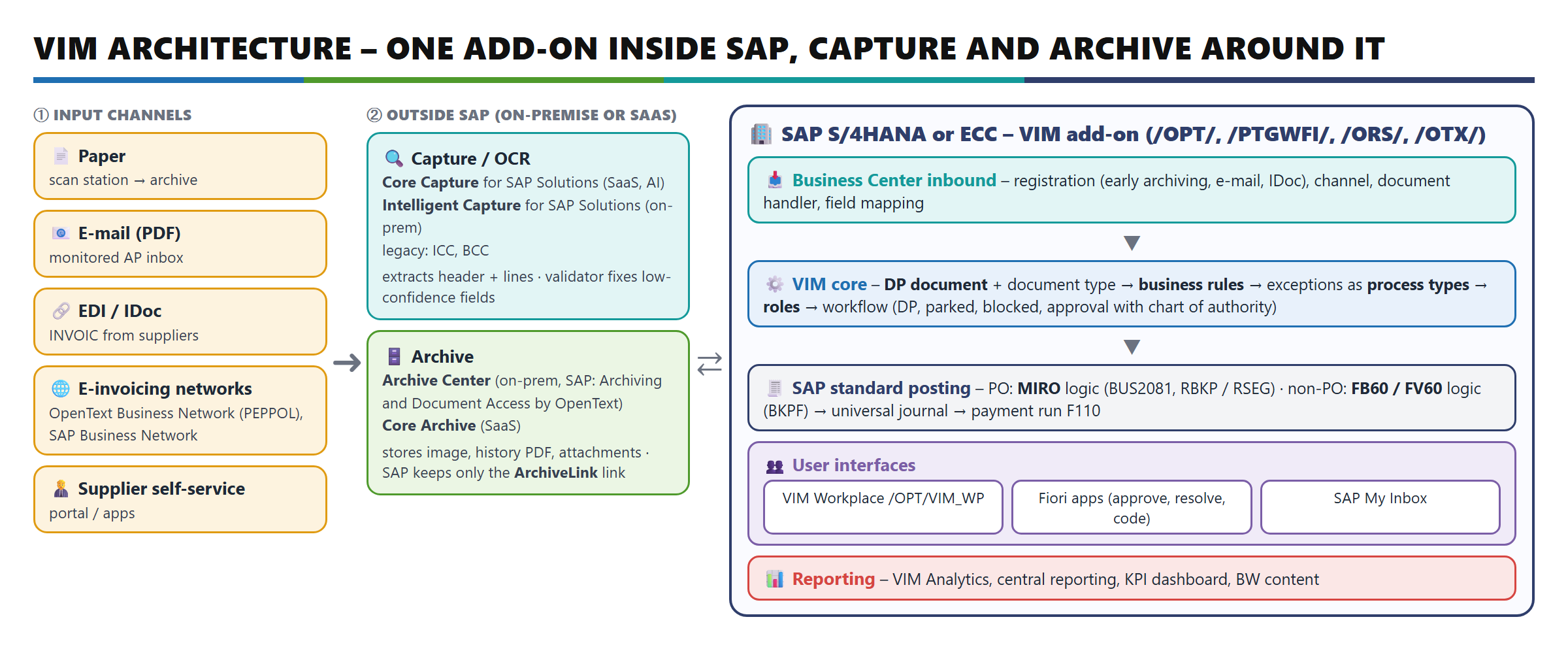
Layer | Component | Job |
|---|---|---|
Input channels | Scan of paper, e-mail inbox, EDI / IDoc, e-invoicing networks, SAP Business Network (Ariba), supplier self-service portal | Bring the invoice and its image into the process |
Capture | Core Capture for SAP Solutions (SaaS) or Intelligent Capture for SAP Solutions (on-premise). Legacy: Invoice Capture Center (ICC) with its Validation Client, Business Center Capture (BCC), Information Extraction Service (IES) | OCR, classification, extraction of header and line items, confidence per field, human validation |
Archive | OpenText Archive Center (on-premise) or Core Archive (SaaS) as an ArchiveLink content repository | Stores the image, the history PDF and attachments; SAP keeps only the link |
Inbound framework | Business Center inbound (namespace /OTX/) | Registers each incoming document, assigns channel and document handler, starts processing |
VIM core | DP document, document types, business rules, process types, roles, workflow templates, posting logic | Validates, routes exceptions, approves, parks and posts |
SAP standard | MM invoice verification (MIRO, business object BUS2081), FI posting (FB60, BKPF), SAP Business Workflow, payment run | Creates the real accounting documents |
User interfaces | VIM Workplace (/OPT/VIM_WP), DP indexing dashboard, Fiori apps, SAP My Inbox | Work on exceptions, approvals and searches |
Reporting | VIM Analytics, central reporting, KPI dashboard, BW content | Monitor liability, ageing, automation and productivity (page 03) |
3.1 Namespaces in the SAP system
VIM is delivered in reserved namespaces, so its objects never clash with customer Z objects. Knowing them helps you find code and customizing quickly (details on page 04).
Namespace | Contains | Examples |
|---|---|---|
/OPT/ | Core VIM: transactions, tables, classes, function modules, workflow objects | /OPT/SPRO (VIM customizing), /OPT/VIM_WP (VIM Workplace), /OPT/VIM_1HEAD (DP header table), business object /OPT/V1001 |
/PTGWFI/ | Workflow foundation layer used by VIM | Constants table /PTGWFI/Z_CONST, role function module templates |
/ORS/ | Invoice approval (IAP) and related objects | Business object /ORS/INVAP (approver notifications), user mapping /ORS/USERMAP |
/OTX/ | Business Center and the newer VIM components | /OTX/PF00_IMG (Business Center customizing), /OTX/PF01_UTIL_IDOC_INPUT (IDoc inbound) |
- Development in VIM therefore means implementing OpenText's enhancement points (BAdIs, user exits, custom function modules in the configuration) – never modifying /OPT/ objects. See page 04.
Part 4 – End-to-end document flow
Follow one invoice from the mailroom to payment. Each step names the component that does the work.
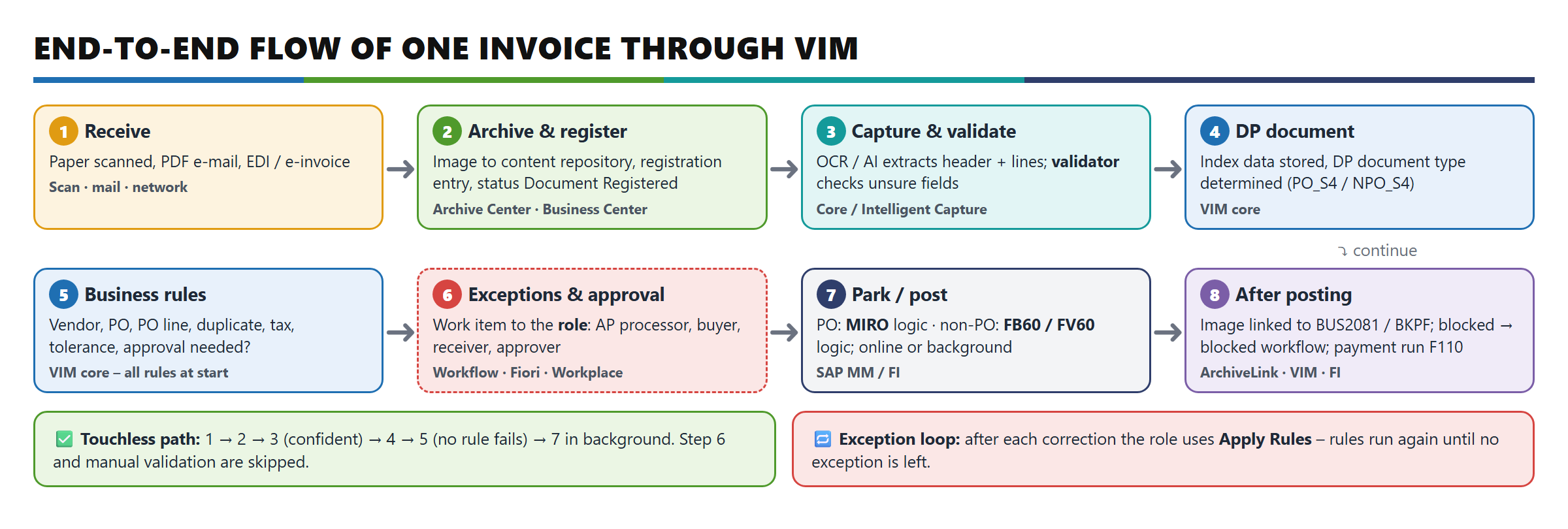
Step | What happens | Component |
|---|---|---|
1 Receive | Paper is scanned, PDF e-mails arrive in a monitored inbox, EDI / e-invoices arrive as IDocs or files | Scan station, mail server, Business Network |
2 Archive and register | The image is stored in the content repository ("early archiving") and a registration entry is created; the document gets status Document Registered | Archive Center, Business Center inbound |
3 Capture and validate | OCR / AI extracts vendor, invoice number, dates, amounts, tax, PO number and line items; low-confidence fields go to a validator | Core Capture / Intelligent Capture |
4 DP document | VIM creates the DP (document processing) document with the index data and determines the DP document type (PO or non-PO) | VIM core |
5 Business rules | All rules run: vendor valid, PO valid, PO line found, duplicate, tax, tolerances, approval needed. Each failed rule raises an exception (process type) | VIM core |
6 Exceptions and approval | Workflow sends a work item to the role responsible for the exception; non-PO invoices go through approval | VIM workflow, Fiori, VIM Workplace |
7 Posting | VIM parks or posts the invoice through standard MIRO logic (PO) or FB60 / FV60 logic (non-PO), online or in the background | SAP MM / FI |
8 After posting | The image is linked to the SAP document (BUS2081 / BKPF); blocked or parked invoices get their own VIM workflow; the payment run (F110) pays the invoice | ArchiveLink, VIM, FI |
Touchless processing = steps 1–5 and 7 run without a person: the capture engine is confident, no rule fails and the document type allows automatic posting in the background.
Part 5 – PO and non-PO invoices
The first decision for every invoice is whether it refers to a purchase order. VIM uses a different DP document type, different business rules and a different posting path for each.
Aspect | PO invoice | Non-PO invoice |
|---|---|---|
Reference | Purchase order (and goods receipt / service entry) | None – rent, utilities, services, fees, one-off purchases |
Check | 2-way match (PO) or 3-way match (PO + GR), price and quantity tolerances as in MIRO | Vendor, amounts, tax, accounting data (coding) |
Who fixes problems | Buyer (price), receiver (goods receipt, quantity), AP processor | Requester / coder (G/L account, cost center), AP processor |
Approval | Usually none – the PO was approved; optional one-step approval | Multi-level approval by amount from the chart of authority |
Typical exceptions | Invalid PO, PO line not found, price / quantity mismatch, GR missing, tolerance exceeded | Invalid vendor, suspected duplicate, approval required, missing data |
SAP posting | Logistics invoice verification (MIRO logic) – business object BUS2081, tables RBKP / RSEG | FI vendor invoice (FB60 logic, parked via FV60) – business object BKPF |
Touchless potential | High (electronic invoice + GR + exact match) | Low – needs coding and approval unless recurring and pre-coded |
- Credit memos follow the same split: a PO credit memo refers to the original PO invoice, a non-PO credit memo is an FI credit memo. VIM handles them as invoice type "credit memo" within the document type (page 02).
- Invoice verification itself (MIRO, tolerances, GR/IR, blocking reasons) is taught in MM ABAP › 03; the FI vendor invoice and payment run in FICO ABAP › 03.
Part 6 – Roles and user interfaces
In VIM a role is a process agent – a business responsibility such as "buyer" that VIM resolves to a user or position at run time. It is not an SAP authorization role (PFCG) and not a technical workflow rule. How roles are determined is on page 02.
VIM role | Responsibility |
|---|---|
Indexer / Validator | Checks and completes captured data (validation of OCR results) |
AP Processor (AP clerk) | Owns the invoice in AP: resolves data exceptions, refers to other roles, posts, handles duplicates and vendor issues |
AP Supervisor | Monitors the AP team, reassigns work, handles escalations |
Buyer | Resolves price exceptions and PO problems (changes the PO or confirms the price) |
Receiver | Posts the missing goods receipt or confirms the received quantity |
Requester / requisitioner | Person who ordered the goods or service; confirms the invoice; for non-PO invoices usually the first approver |
Coder | Enters accounting data (G/L account, cost center, order) for non-PO invoices |
Approver | Approves invoices up to their own limit in the chart of authority |
Tax expert / auditor | Handles tax audit and vendor audit exceptions |
Workflow administrator | Monitors workflows, restarts errors, maintains configuration |
User interface | Who uses it | Notes |
|---|---|---|
VIM Workplace (/OPT/VIM_WP) | AP processors, power users | Personal inbox of VIM work items plus search over DP documents and SAP invoices; SAP GUI or SAP GUI for HTML |
DP indexing dashboard | AP processors, exception roles | Shows the image next to the index data, the exceptions, the log and the allowed process options |
Fiori apps | Approvers, buyers, receivers, occasional users | E.g. Approve Invoices, Resolve Invoice Exceptions, Confirm Quantity and Price, Enter Cost Assignment (page 03) |
SAP My Inbox | Approvers | VIM approval tasks next to other SAP workflow tasks |
Approval Portal (legacy) | Approvers | Older Java web portal for approvals; replaced by the Fiori Approve Invoices app |
Part 7 – Interview questions
Q1. What is OpenText VIM and what problem does it solve?
An ABAP add-on for SAP ECC and S/4HANA that automates accounts payable invoice processing: capture, validation by business rules, exception workflow with roles, approval, posting through standard invoice verification and archive linking. It cuts manual entry, speeds up cycle time and raises the touchless rate.
Q2. What is the relationship between OpenText and SAP for VIM?
OpenText develops VIM; SAP resells it as a solution extension under the name SAP Invoice Management by OpenText. The software is the same – the difference is the contract and support channel.
Q3. Which components does a complete VIM solution have?
Input channels (scan, e-mail, EDI / e-invoicing), a capture product (Core Capture or Intelligent Capture), an archive (Archive Center or Core Archive via ArchiveLink), the Business Center inbound framework and the VIM add-on in SAP, plus the user interfaces (VIM Workplace, Fiori) and reporting.
Q4. Where does VIM run – does it need its own server?
The VIM core runs inside the SAP ERP / S/4HANA system as an add-on in its own namespaces (/OPT/, /PTGWFI/, /ORS/, /OTX/). Only capture and archive run outside – on-premise servers or OpenText SaaS.
Q5. What is a DP document?
The VIM document processing document: VIM's own staging object that holds the captured index data, the image link, status and log of an incoming invoice before an SAP invoice exists. Business rules, exceptions and approval work on it; posting turns it into an SAP invoice document.
Q6. Walk me through the end-to-end flow of an invoice in VIM.
Receive, archive and register, capture and validate, create the DP document and determine its type, run business rules, route exceptions and approvals by workflow, park or post through MIRO / FB60 logic, link the image to the SAP document and pay in the payment run.
Q7. How do PO and non-PO invoices differ in VIM?
PO invoices are matched against PO and goods receipt and posted by MIRO logic (BUS2081); exceptions go to buyer and receiver. Non-PO invoices need coding and multi-level approval from the chart of authority and are posted by FB60 logic (BKPF).
Q8. What is the touchless rate and how do you improve it?
The share of invoices posted without any human step. Improve it with more electronic invoices, better capture training, clean vendor and PO master data, goods receipts posted on time, sensible tolerances, and activating background posting for document types that qualify.
Q9. What is a role in VIM, compared with an SAP role?
A VIM role is a process agent (buyer, receiver, approver) resolved to users or positions at run time to receive work items. An SAP PFCG role grants authorizations. A user needs both: a VIM role to get the work and PFCG authorizations to do it.
Q10. Which capture products work with VIM today, and what was ICC?
OpenText Core Capture for SAP Solutions (SaaS, AI-based) and Intelligent Capture for SAP Solutions (on-premise). Invoice Capture Center (ICC) was the classic OCR product with its own Validation Client; it and Business Center Capture are legacy.
Q11. How is the invoice image stored and displayed?
In an ArchiveLink content repository on OpenText Archive Center or Core Archive. SAP stores only the link (link table such as TOA01) between the archive ID and the DP document, later the SAP invoice (BUS2081 or BKPF), so users open the image from the document.
Q12. Which user interfaces does VIM offer?
VIM Workplace and the DP indexing dashboard in SAP GUI (also as SAP GUI for HTML), Fiori apps for approvers and exception roles, integration into SAP My Inbox; the old Java Approval Portal is legacy.
🏠 Start Here · 02 · Processing ▶ · Sections: CORE ABAP | OOPS ABAP | ABAP on HANA | Clean Core | RAP | ABAP Points | SAP Fiori | SAPUI5 | Mobile Development (MDK) | BTP Foundations | BTP Development | CAP | SAP Build | ABAP on BTP | Integration Suite | SAP Business AI | SAP BASIS | Security | SAP SDLC
Functional: FICO ABAP | TRM ABAP | VIM | SAP BIS | SD ABAP | MM ABAP | PP ABAP | QM ABAP | PM ABAP | PS ABAP | EWM | TM ABAP | GTM ABAP | EHS ABAP | HR ABAP | BW | SAP Datasphere | SAP Business Data Cloud | SAP MDG | SAP Analytics Cloud | SAP Ariba | SAP CX | SAP IBP