This page explains how VIM works on an invoice once it is in SAP: the DP document and its lifecycle, document types, business rules that raise exceptions as process types, the roles that receive the work, non-PO approval with the chart of authority, posting (park, post, touchless), the workflows for parked and blocked invoices, and the KPIs used to steer AP. The customizing transactions behind each concept are on page 03; the architecture and roles overview on page 01.
Part 1 – The DP document and its lifecycle
The DP (document processing) document is VIM's own object for an incoming invoice. It exists before any SAP invoice and holds everything VIM knows about it: the index data (header: vendor, company code, invoice number and date, amounts, tax, currency, PO number; items: PO lines or G/L lines), the link to the archived image, the DP document type, the current exceptions, the status and a complete log of who did what. Its header table is /OPT/VIM_1HEAD; the identifier is the DP document ID.
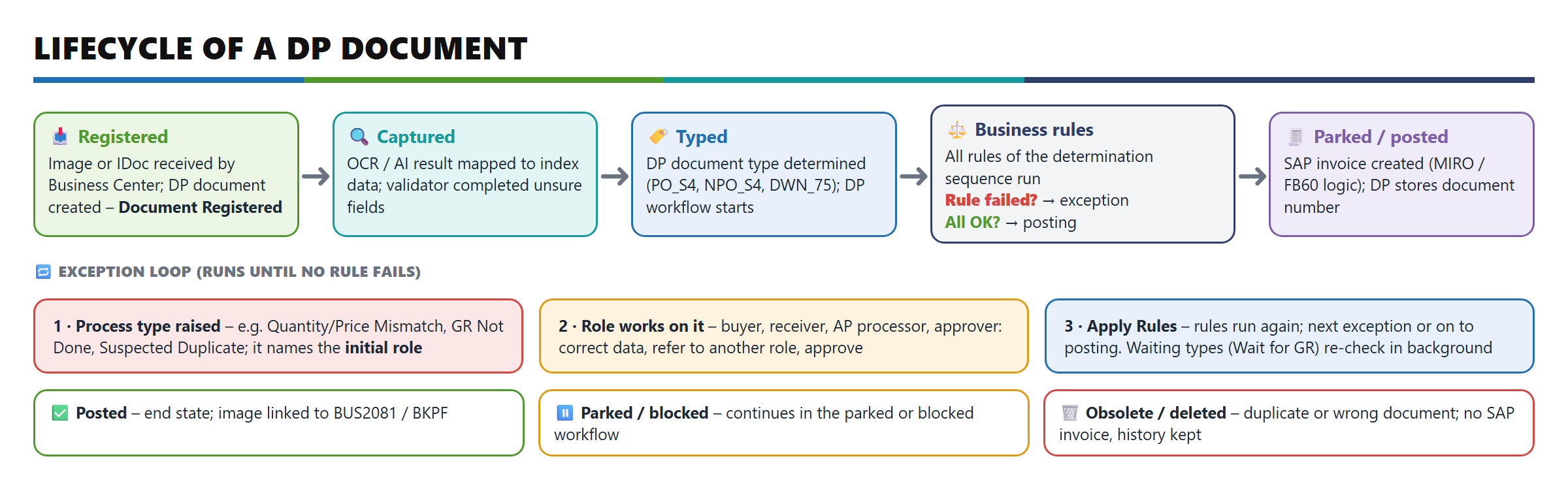
Stage | What happens |
|---|---|
Registered | The Business Center inbound has received the image or IDoc and created the DP document (status Document Registered) |
Captured / validated | Capture results are mapped into index data; with ICC the status changed to Validation Complete after the Validation Client |
Rules applied | The DP workflow (baseline template WS00275269) runs all business rules at the start; each failed rule makes the document wait in an exception |
In exception | A work item is with the role of the current process type (AP processor, buyer …) |
Approval | Optional approval step, usually for non-PO invoices |
Parked / posted | An SAP invoice exists; the DP document stores its number and year |
Obsolete / deleted | Invoice rejected (duplicate, not for this company, wrong document) – the DP document is closed without an SAP invoice, but its history stays |
- The DP document is the audit trail: the VIM log shows each rule result, each forward between roles, comments and the posting; the log can also be archived as a history PDF.
- Invoices parked or posted directly in SAP (MIRO, FV60) without a DP document can still get a VIM process – the parked and blocked workflows of Part 7.
Part 2 – DP document types
The DP document type classifies the invoice and controls almost everything VIM does with it: which index fields are shown and required, how the data is entered, which business rules run, which roles may post or rescan, how duplicates are checked and which SAP FI document types are used. It is maintained in transaction /OPT/VIM_1CX1 (page 03).
Baseline type | Meaning |
|---|---|
PO_S4 | PO-based invoice (S/4HANA baseline; older releases used PO_75 and similar) |
NPO_S4 | Non-PO invoice (older releases NPO_75) |
DWN_75 | Down payment request / down payment invoice |
Document type setting | What it controls |
|---|---|
Document index type | How index data is entered: indexing using OCR, online indexing (manual), or no indexing |
Invoice type | Invoice or credit memo handling |
Default archive document type | ArchiveLink document type of the image (e.g. /OPT/ICC) |
SAP FI document type | FI document types for invoice and credit memo (two values separated by a comma), or a function module that determines them |
Default process type | Process type used when no other one is determined |
Rescan role, posting role | Who may request a rescan and who posts manually |
Duplicate check group / role | Which fields define a duplicate and who decides on suspected duplicates |
Display options | Show index data, show image automatically, skip the dashboard |
How the document type is found
- From the capture result (the capture engine classifies PO vs non-PO and sends a type), from the archive document type's default, or from VIM's determination rules (e.g. a PO number on the invoice or a vendor-based table that decides the type).
- An AP processor can change it later with the process option Change Document Type – then rules run again for the new type.
- Credit memos are not a separate DP type in the baseline: the invoice type / credit memo flag and the second SAP FI document type handle them, and PO credit memos have their own rule (original invoice number and date must exist).
Part 3 – Business rules and process types (exceptions)
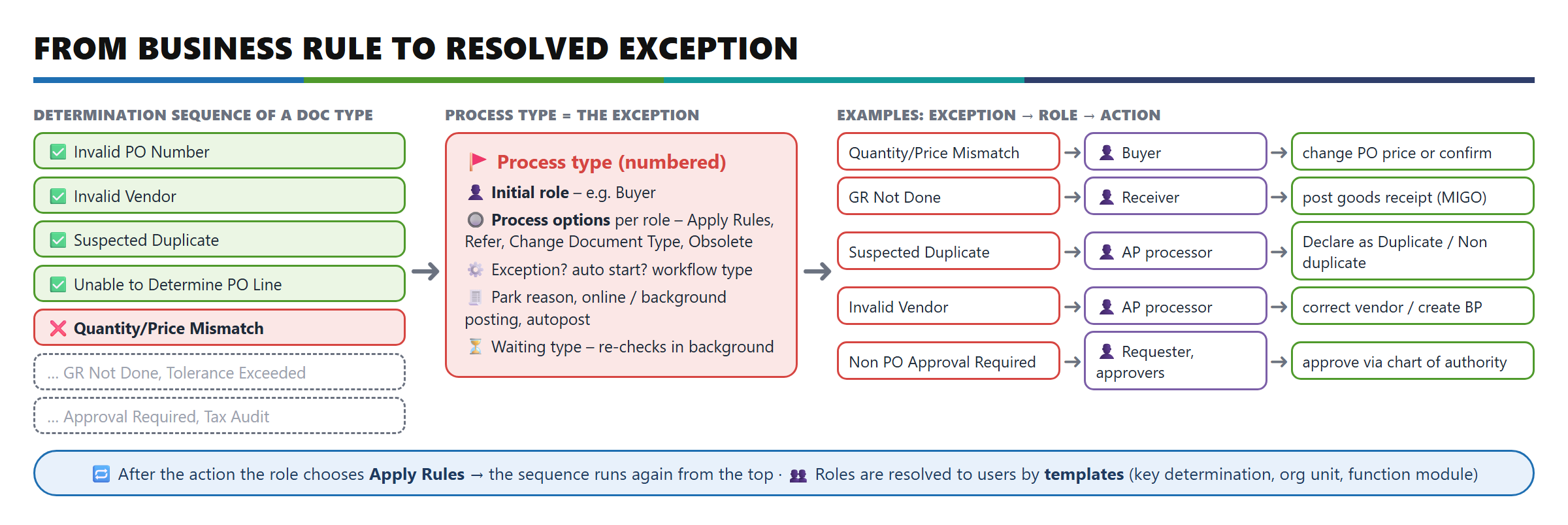
A business rule is a validation that runs on the DP document. When a rule fails, VIM raises an exception, and each exception is a numbered process type that says who gets the work item, what that role may do and whether the document waits or can be posted. The same process type mechanism also drives non-exception steps such as approval or automatic posting.
3.1 Typical baseline business rules
OpenText ships a large rule library; PO rules mostly sit in the 100 range of process type numbers (e.g. 101 Invalid PO Number) and non-PO rules in the 200 range, plus country-specific rules. The names below follow the OpenText reference guide.
Business rule (exception) | PO / NPO | Typical role | Resolution |
|---|---|---|---|
Invalid PO Number | PO | AP processor | Correct the PO number or change to non-PO |
Invalid Vendor | PO, NPO | AP processor | Correct vendor; create vendor if new (ECC: XK01 / FK01 · S/4HANA: business partner in BP) |
Suspected Duplicate | PO, NPO | AP processor / duplicate role | Declare as duplicate (obsolete) or confirm not duplicate |
PO Not Released or Incomplete | PO | Buyer | Release or complete the PO |
Unable to Determine PO Line Number | PO | AP processor | Assign the invoice line to a PO item |
Quantity/Price Mismatch | PO | Buyer / AP | Buyer changes PO price or confirms; quantity via receiver |
Tolerance Exceeded | PO | Buyer | Same tolerance logic as MIRO: correct PO or accept and let the invoice block |
GR Not Done / Wait for GR | PO | Receiver (or waiting) | Post the goods receipt; a waiting process type re-checks automatically |
Service Entry Required | PO | Requester / receiver | Enter and accept the service entry sheet |
Approval Required (PO) / Approval Required (NPO) | PO / NPO | Requester, approvers | Approval workflow (Part 5) |
Vendor Audit / Tax Audit Required | PO, NPO | Auditor / tax expert | Check and release |
Invalid Vendor VAT Number | PO | AP / tax expert | Correct VAT ID or vendor master |
Incomplete Credit Memo | PO | AP processor | Add original invoice number and date |
Validate Bank Details / Invoice Older than Allowed | NPO | AP processor | Fix bank data / decide on old invoice |
3.2 How rules are configured
- Process type determination sequence per document type: an ordered list of steps (rules). Each step has a check (table field, check function module, constant value or required field), an exclusive flag, and flags for bypass and background execution.
- Process type settings: initial role (actor), "is exception", auto start, workflow type (OpenText approval or external), park reason, posting transaction IDs for online and background posting, the autopost flag, retry counter and e-mail settings.
- Waiting process types (e.g. Wait for GR) do not need a person: a background job re-runs the rules until the goods receipt arrives.
- Duplicate check groups define the comparison: either a check function module or a set of index fields (e.g. vendor, invoice reference, date, amount). The user sees the candidates and chooses Non duplicate or Declare as Duplicate.
3.3 The VIM Business Rule Framework
On top of the rules, the Business Rule Framework (BRF) of VIM decides when a rule is applied or bypassed – useful for compliance and for trusted suppliers. It is VIM's own framework, not SAP BRFplus.
- Vendor groups (baseline WHITE, GREY, BLACK) classify suppliers by risk.
- Check types per rule and group: e.g. RANDOM (check a random share), CONDITION, COUNT, PERIODIC, ONCE (per vendor), BLIND, OFF.
- Example: a duplicate check always runs for BLACK vendors, a tax audit runs randomly for GREY vendors, and is off for WHITE vendors. The BRF test tool simulates the outcome for a document.
Part 4 – Roles, role determination and process options
Every process type has an initial role. VIM resolves the role to concrete agents (users or positions) with role templates; the agents then see the work item in VIM Workplace, the DP dashboard, Fiori or My Inbox.
Template type | How the agent is found | Example |
|---|---|---|
Key determination | A table of key fields → agent (user ID or position) | Company code + vendor → AP processor; plant + purchasing group → buyer |
Organizational unit | Agents of an org unit / position in the org model | AP team of a shared service centre |
Function module | Custom logic returns the agents | Buyer = creator of the PO; receiver = person in the GR or requisition |
- Roles belong to a product code: 005 document processing, LIX PO parking and blocking, PIR non-PO parking, IAP invoice approval. Only one template per product code and role is active.
- Typical determination: the buyer from the PO's purchasing group or creator, the receiver from the goods recipient or requisitioner, the AP processor by company code and vendor.
4.1 Process options – what an agent may do
Process options are the buttons a role sees for a process type (maintained per process type and actor). Each option has an ID and an action.
Process option | Effect |
|---|---|
Apply Rules (2012) | Re-run all business rules after a correction |
Change Document Type (2000) | Switch e.g. from PO to non-PO; rules run for the new type |
Post Invoice (2100) | Baseline dialog posting: open the SAP invoice (MIR4) pre-filled with the VIM data, check and post |
Refer / forward | Send the work item to another role (e.g. AP processor → buyer) with a comment; it comes back after the action |
Obsolete / delete | Close the DP document without posting (e.g. declared duplicate) |
Rescan | Request a new scan when the image is unreadable |
Submit for approval | Start the approval workflow |
Part 5 – Non-PO approval and the chart of authority
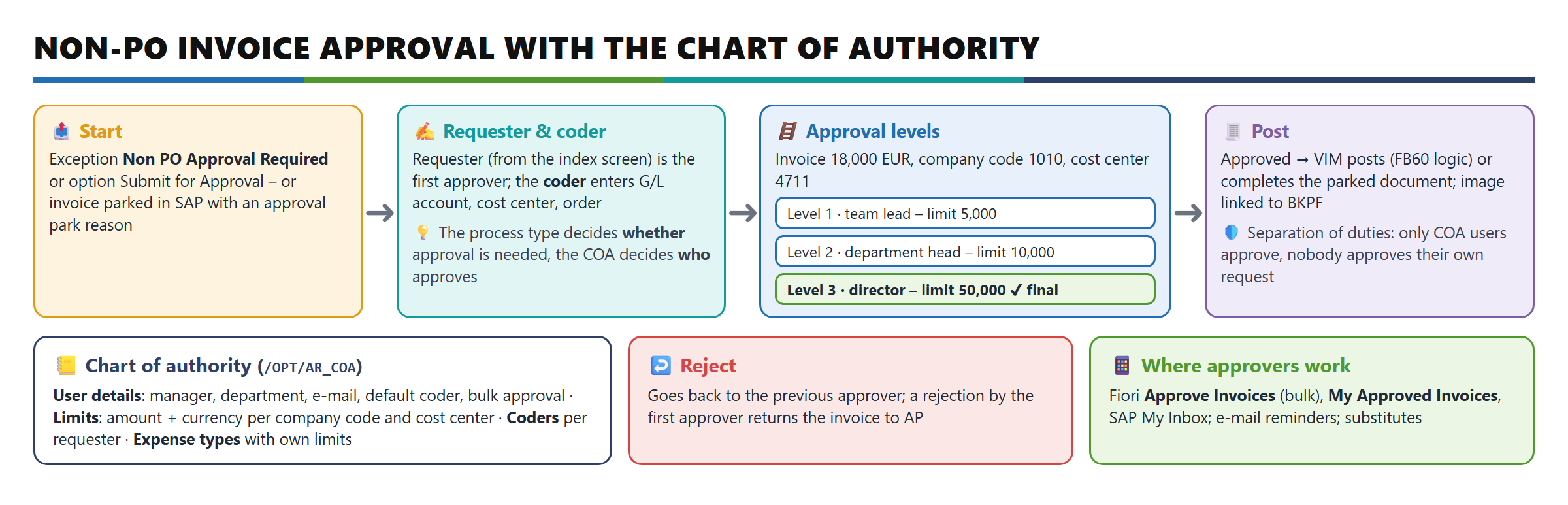
Non-PO invoices have no approved PO behind them, so someone with budget authority must approve. VIM's Invoice Approval (product code IAP) runs a multi-level workflow whose approvers come from the chart of authority (COA).
The chart of authority
- User details: user, manager, department, e-mail, default coder, bulk approval allowed.
- Approval limits (COA details): approval amount and currency per company code and cost center (or other cost object) – an approver can approve only up to their own limit.
- Coder details: which coders enter the accounting data for which requesters.
- Expense types can have their own limits and decide whether approval is required at all.
- Maintained with /OPT/AR_COA (baseline approval COA). The "old COA" of VIM 7.0 and earlier is legacy; current releases use the new COA.
How approval runs
Step | Detail |
|---|---|
Start | From the DP process (exception Approval Required (NPO) or option Submit for Approval) or for an invoice parked in SAP with an approval parking reason |
First approver | The requester entered on the index screen (often by e-mail ID); the coder adds G/L account and cost center |
Next levels | The workflow climbs the hierarchy (manager chain / COA levels) until an approver's limit covers the invoice amount |
Reject | Back to the previous approver; the first approver's rejection goes back to AP |
End | Approved and posted (or parked), deleted, or rejected |
PO invoices | Approval is one step by the requester by default; multi-level PO approval needs an extension |
- Approvers work in the Fiori app Approve Invoices (also bulk approval), see their history in My Approved Invoices, or approve from SAP My Inbox. E-mail notifications tell approvers about waiting invoices; substitutes can be maintained for absences.
- Separation of duties: an approver should not approve their own request, and only users in the COA can approve – auditors check this first.
Part 6 – Posting: park, post and touchless processing
VIM never writes accounting tables itself. It creates SAP invoices through the standard SAP logic: PO invoices through logistics invoice verification (MIRO logic, documents in RBKP / RSEG, business object BUS2081) and non-PO invoices through FI posting (FB60 logic, parking like FV60, business object BKPF). So every SAP check – tolerances, tax, account determination, validations, substitutions – still applies.
Mode | How it works | When |
|---|---|---|
Online posting | A process option opens the SAP invoice transaction (MIRO / MIR4 for PO, FB60 / FV60 for non-PO) pre-filled with the index data through a configured posting procedure; the user checks and saves | Complex cases, first go-live phase |
Background posting | The background transaction ID of the process type posts without a screen; for PO invoices the baseline uses the standard incoming-invoice BAPI (BAPI_INCOMINGINVOICE_CREATE) | Clean invoices: touchless |
Park | VIM creates a parked (or completely parked / held) document in the background | Approval or checks after the SAP document exists; parked document workflow |
- Automatic posting is decided by the autopost flag of the process type or by a function module (baseline: /OPT/VIM_DETERMINE_AUTOPOST). Baseline document types are not auto-posted until you activate it – a deliberate go-live decision.
- If background posting fails (e.g. period closed, missing tax code), the document falls back into an exception for the AP processor with the SAP error message.
- After posting, the DP document stores the SAP document number, the image link moves to the SAP invoice, and posted invoices that SAP blocks for payment continue in the blocked workflow (Part 7).
- VIM also reacts to invoices created directly in MIRO or FB60 / FV60: a VIM BAdI in invoice verification and FI business transaction events (BTEs) start the right VIM process (page 04).
Part 7 – Parked and blocked invoice workflows
Besides the DP workflow, VIM has two workflows that start from an existing SAP invoice. They are the original VIM processes and are still used when invoices are entered in SAP directly or when a posted invoice is blocked.
Workflow | Starts when | Product code | Who works on it |
|---|---|---|---|
Parked invoice workflow | An invoice is parked in SAP (by VIM or a user in MIRO / FV60) with a VIM parking reason | PIR non-PO, LIX PO | Role assigned to the parking reason (approver, buyer, AP) |
Blocked invoice workflow | A PO invoice is posted but blocked for payment because price, quantity, date or amount variances exceed tolerances | LIX | Buyer for price blocks, receiver for quantity / missing GR, AP for the rest |
Blocked invoices – what the roles do
- MIRO sets payment block R (invoice verification) in the invoice header (RBKP-ZLSPR) and the blocking reasons per item in RSEG (e.g. SPGRP price, SPGRM quantity). The vendor line in FI carries the block, so the payment run does not pay it.
- The buyer corrects the PO price or confirms the invoice price; the receiver posts the missing goods receipt; then the block is released – the same function as transaction MRBR (release blocked invoices), started from the VIM workflow.
- Rollout criteria (company codes, plants, document types) decide for which invoices these workflows start, so VIM can be introduced company by company (page 03).
Example – blocked PO invoices with their blocking reasons
|
Use such a query for a custom monitor or to cross-check VIM reports; releasing the block is done by the VIM workflow or MRBR, never by updating RBKP. The released CDS views for supplier invoices are covered in MM ABAP › 03.
Part 8 – KPIs, dashboards and analytics
VIM is sold on numbers, so AP managers live in its dashboards. The KPIs come from the DP documents, the workflow logs and the SAP invoices.
KPI | Question it answers |
|---|---|
Touchless / automation rate | How many invoices were posted with no human step? |
Exceptions by type and role | Which exception costs the most time – price, GR, vendor, duplicate? |
Cycle time and ageing | How long from receipt to posting; how many invoices are older than N days? |
Current liability | How much do we owe that is not yet posted (invoices still in VIM)? |
Productivity / touches | How many invoices and actions per agent; how many touches per invoice? |
Cash discount and on-time payment | Did we pay within discount terms? |
- VIM Workplace is the operational view (my work items, team items, search); the KPI dashboard and VIM Analytics give management views; Central Reporting provides the summary, audit, key process analytics, exception analysis, productivity and ageing reports. Transactions and setup: page 03.
- Current releases add Fiori analytics and an invoice cockpit, and AI features such as smart coding that proposes cost objects for non-PO lines above a confidence threshold.
Part 9 – Interview questions
Q1. What does a DP document contain and when does it exist?
It is created when the invoice is registered and lives until the invoice is posted or made obsolete. It holds the index data (header and lines), the image link, the DP document type, current exceptions, status and the full processing log; header table /OPT/VIM_1HEAD.
Q2. What does the DP document type control?
Index screen fields and how data is entered (OCR, online, none), the business rules (determination sequence), default process type, posting and rescan roles, duplicate check group, archive document type and the SAP FI document types for invoice and credit memo. Baseline types are PO_S4, NPO_S4 and DWN_75.
Q3. What is the difference between a business rule and a process type?
The business rule is the check (e.g. suspected duplicate); the process type is the numbered outcome that defines the initial role, the process options, whether it is an exception, and posting settings. A failed rule raises its process type.
Q4. Name typical VIM exceptions for PO invoices and who resolves them.
Invalid PO number and PO line not found (AP processor), quantity / price mismatch and tolerance exceeded (buyer), GR not done (receiver, or a waiting process type), PO not released (buyer), suspected duplicate (AP processor).
Q5. How does VIM detect duplicates?
With duplicate check groups assigned to the document type: a check function module or a set of index fields such as vendor, reference, date and amount are compared with existing DP documents and SAP invoices. A suspected duplicate goes to a role who declares it duplicate or not.
Q6. How is the agent for an exception determined?
The process type names an initial role; role templates resolve it – key determination tables (e.g. company code + vendor), org units, or a function module (e.g. PO creator as buyer). Roles belong to product codes such as 005, LIX, PIR and IAP.
Q7. Explain non-PO approval in VIM.
The requester (first approver) and coder add cost assignment; the workflow then takes approvers from the chart of authority level by level until an approver's limit for the company code and cost center covers the amount. Rejection goes back a level or to AP; after final approval the invoice is posted.
Q8. How does VIM post invoices – does it write to BKPF directly?
No. It uses the standard SAP posting logic: MIRO logic / incoming invoice BAPI for PO invoices and FB60 logic for non-PO invoices, online with a pre-filled screen or in the background. All SAP checks still apply; errors fall back to an exception.
Q9. What is needed for touchless processing?
A confident capture result (or an electronic invoice), no failed business rule, a document type and process type with background posting and autopost activated, and clean master data and goods receipts.
Q10. What are the parked and blocked invoice workflows?
Workflows that start from an existing SAP invoice: the parked workflow when an invoice is parked with a VIM parking reason (PIR non-PO, LIX PO), the blocked workflow when a posted PO invoice is blocked for payment; buyer and receiver resolve price or quantity causes and the block is released like MRBR.
Q11. What is the Business Rule Framework in VIM?
VIM's own framework (not BRFplus) that decides when a business rule is checked or bypassed, using vendor groups (WHITE, GREY, BLACK) and check types such as RANDOM, PERIODIC, COUNT, ONCE or OFF.
Q12. Which KPIs would you report for an AP department using VIM?
Touchless rate, exceptions by type and role, cycle time and ageing, current liability in VIM, productivity and touches per invoice, cash discount captured and on-time payment.
🏠 Start Here · ◀ 01 · Overview & Architecture · 03 · Config & Integration ▶ · Sections: CORE ABAP | OOPS ABAP | ABAP on HANA | Clean Core | RAP | ABAP Points | SAP Fiori | SAPUI5 | Mobile Development (MDK) | BTP Foundations | BTP Development | CAP | SAP Build | ABAP on BTP | Integration Suite | SAP Business AI | SAP BASIS | Security | SAP SDLC
Functional: FICO ABAP | TRM ABAP | VIM | SAP BIS | SD ABAP | MM ABAP | PP ABAP | QM ABAP | PM ABAP | PS ABAP | EWM | TM ABAP | GTM ABAP | EHS ABAP | HR ABAP | BW | SAP Datasphere | SAP Business Data Cloud | SAP MDG | SAP Analytics Cloud | SAP Ariba | SAP CX | SAP IBP