The view of a solution architect: which VIM releases run on SAP S/4HANA and what changes compared with ECC, how an existing VIM moves into S/4HANA, where VIM can run (on-premise, RISE with SAP private cloud, not in the public cloud), the SAP alternatives and how they coexist, the design decisions of a VIM project, what VIM means for a clean core, and how to present all of it in an interview. Product names and versions: page 01; processes: page 02; configuration: page 03; technical objects and extensions: page 04.
Part 1 – VIM on S/4HANA: releases and operating modes
OpenText states that VIM supports everything from SAP ECC 6.0 up to the latest SAP S/4HANA releases, on-premise and in SAP S/4HANA Cloud Private Edition (RISE with SAP). Which VIM release fits which S/4HANA release is defined per release in the OpenText release notes and the SAP Product Availability Matrix (PAM) – both are inputs to every upgrade plan.
Release line | Platform | What it means for you |
|---|---|---|
VIM 7.x (7.0, 7.5, 7.6) | SAP ECC 6.0; 7.5 also early S/4HANA on-premise | The classic SAP GUI-centred VIM; most brownfield customers start here. Support for 7.5 ended in January 2024 |
VIM 16.3 | S/4HANA 1610 and later only | First S/4HANA-only release: Business Center inbound, Fiori apps, choice between Classic Mode and a first, basic Simple Mode (invoices and credit memos) |
VIM 20.4, 23.4 | S/4HANA | Year.quarter releases: Fiori apps closer to the SAP GUI functions, more analytics, more document types |
VIM 25.x, 26.2 | Current S/4HANA releases, RISE | AI features (smart coding, AI-assisted processing), modernised Fiori UI for large volumes – the target for new projects |
1.1 Classic Mode or Simple Mode
Aspect | Classic Mode | Simple Mode |
|---|---|---|
Scope | The full VIM framework: DP document types, process types, roles, parked and blocked workflows, approval with chart of authority | A lighter, preconfigured invoice process with fewer options |
User interface | VIM Workplace, DP dashboard, Fiori apps | Fiori apps (e.g. Validate Invoices, Process Invoices) |
Typical customer | Complex AP, many countries and exceptions, existing VIM 7.x know-how and configuration | Greenfield with standard processes and a Fiori-first approach |
Flexibility | Highest – every exit of page 04 | Lower – more standard, less to configure and test |
- The mode is an early, hard-to-reverse decision: configuration, training and extensions differ. Decide it in the design phase together with the business (page 02 explains the Classic objects).
Part 2 – What changes from ECC to S/4HANA
The VIM concepts stay the same – DP document, rules, roles, workflow, posting through MIRO and FB60 logic. What changes is the SAP platform underneath and the VIM release on top.
Area | ECC with VIM 7.x | S/4HANA with current VIM | Impact |
|---|---|---|---|
Vendor master | Vendor (XK01, LFA1 / LFB1) | Business partner with supplier role (BP, CVI); LFA1 / LFB1 still filled | Vendor rules read the same data; "create vendor" in an exception means BP |
Accounting | BKPF / BSEG, index tables | Universal journal ACDOCA; BSIK / BSAK as compatibility views | Z reports and checks in VIM exits need the S/4HANA readiness check |
Material number | 18 characters | 40 characters | Field mapping, Z structures, interfaces |
Inbound and capture | ICC with Validation Client, older inbound paths | Business Center inbound, Core Capture / Intelligent Capture | Capture migration is a sub-project of its own |
User interface | SAP GUI: VIM Workplace, Approval Portal (Java) | Fiori apps, SAP GUI for HTML tiles, My Inbox | Approval Portal is legacy; plan Fiori roles and launchpad content |
Baseline configuration | Document types such as PO_75 / NPO_75 | S/4HANA baseline types such as PO_S4 / NPO_S4 | Re-check copies of old baseline entries |
Workflow | SAP Business Workflow | Still SAP Business Workflow (not flexible workflow) | Workflow skills stay relevant; SWU3, event linkage as before |
Archive and image | ArchiveLink, Archive Center | ArchiveLink, Archive Center or Core Archive | Unchanged principle; cloud archive becomes an option |
- Business partner and CVI in detail: FICO ABAP › 03; universal journal: FICO ABAP › 02; custom code checks: ABAP on HANA › 02 Migration to S/4HANA.
Part 3 – Moving VIM from ECC to S/4HANA
VIM follows the S/4HANA transition approach of the whole program. In every approach the ECC VIM release itself does not move unchanged: the target is an S/4HANA-compatible VIM release.
Approach | What happens with VIM | Watch out |
|---|---|---|
System conversion (brownfield) | The conversion tools only convert a system whose add-ons are released for the target; VIM is upgraded to an S/4HANA-compatible release in the same project and the configuration is carried over and adjusted | Open DP documents and workflows, Z exits on changed SAP tables, changed baseline entries |
New implementation (greenfield) | Fresh VIM installation from the current baseline; only proven customer rules and exits are rebuilt | Open invoices: finish them in ECC before cut-over or enter them again; history stays in ECC or the archive |
Selective data transition | Like greenfield for VIM configuration; historical documents per the transition scope | Image links of moved SAP documents (ArchiveLink link tables) |
Checklist for a brownfield VIM move
- 1. Clean up: close or archive old DP documents (archiving object /OPT/DOC) and finish or document open workflows – fewer open items, smaller risk.
- 2. Custom code: run the S/4HANA ATC checks on every Z object registered in VIM (Z constants, check functions, role FMs, BAdI implementations) – page 04 lists where they hide.
- 3. Upgrade and adjust: install the compatible VIM release, compare customer configuration with the new baseline, re-activate BAdI switches, BTE products and event linkages.
- 4. Capture: plan the move from ICC to Core Capture or Intelligent Capture, including training data and validation users.
- 5. Test end to end: PO and non-PO invoices, every custom rule, approval levels, parked and blocked workflows, background posting, reports – with real sample invoices.
Part 4 – Deployment and cloud options
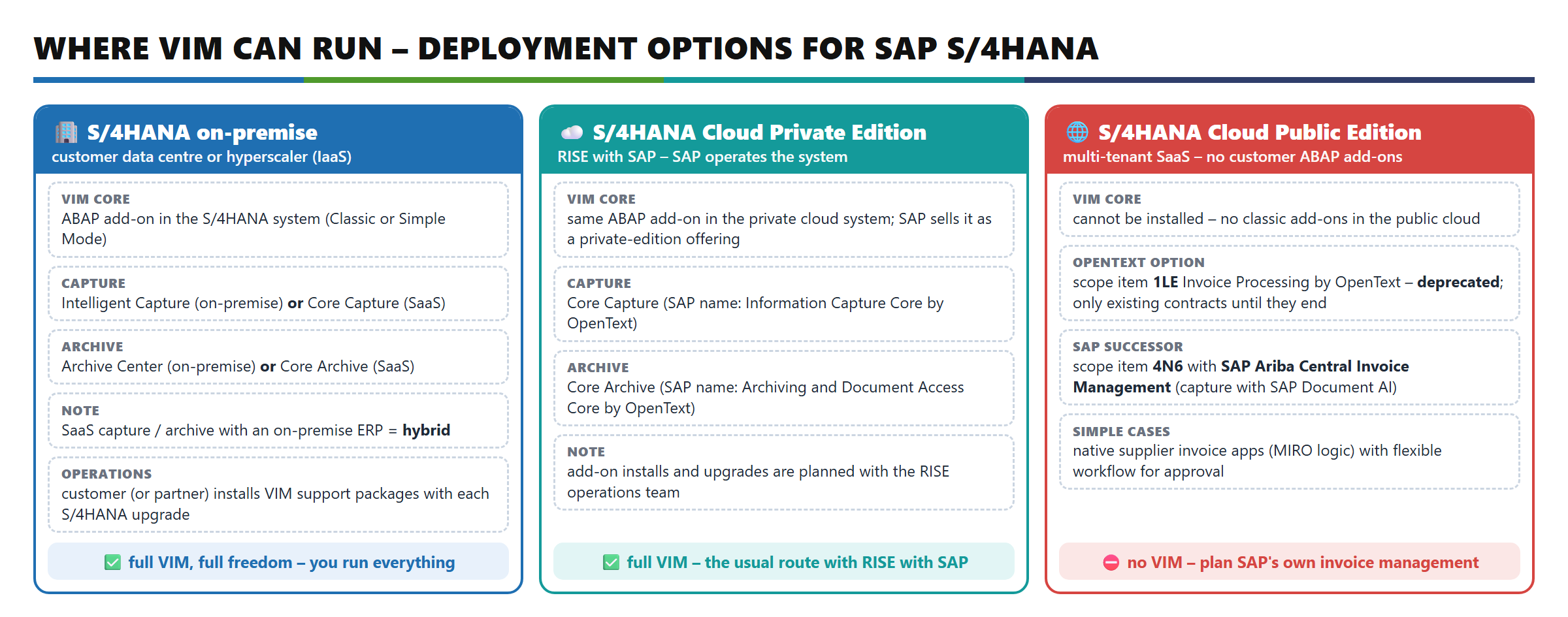
Option | VIM core | Capture and archive | Notes |
|---|---|---|---|
On-premise S/4HANA | Add-on in the customer system | On-premise (Intelligent Capture, Archive Center) or SaaS | SaaS capture / archive with an on-premise ERP = hybrid |
S/4HANA Cloud Private Edition (RISE) | Same add-on in the private cloud system; sold by SAP as SAP S/4HANA Cloud for invoice management by OpenText, private edition | Typically SaaS: SAP Information Capture Core by OpenText, SAP Archiving and Document Access Core by OpenText | Installation and upgrades planned with SAP's RISE operations |
S/4HANA Cloud Public Edition | Not possible – no classic ABAP add-ons | – | Scope item 1LE Invoice Processing by OpenText is deprecated: existing contracts run until they end; SAP points to 4N6 (SAP Ariba Central Invoice Management) |
- The OpenText SaaS services (Core Capture, Core Archive) run multi-tenant on the OpenText cloud; capture is stateless, so it is usually the first component moved to the cloud. Check data residency (region of the tenant) with security and works council early.
- On-premise capture can keep its learning model in SAP tables; in the SaaS service the model stays in the cloud – relevant when you compare training effort and data protection.
Part 5 – Alternatives and coexistence
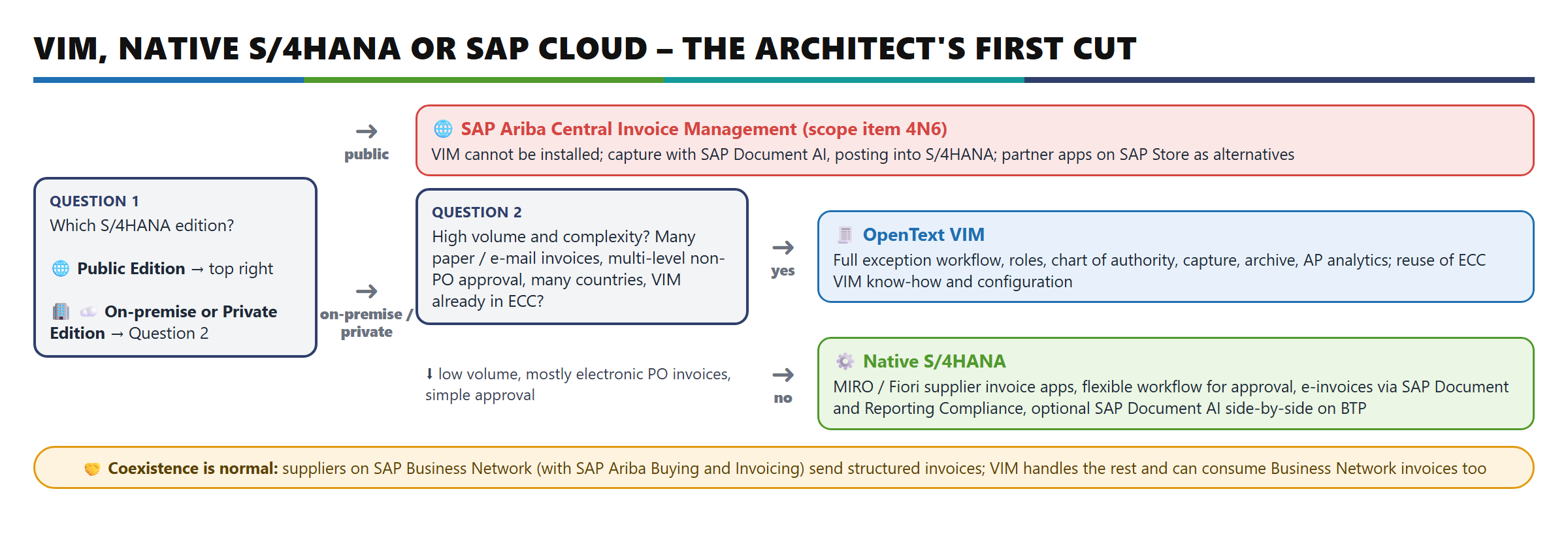
VIM is not the only way to process supplier invoices in S/4HANA. An architect compares at least these options and often combines them. The SAP Ariba products are taught in the SAP Ariba section.
Option | What it is | Strong when | Limits |
|---|---|---|---|
Native S/4HANA | MIRO and the Fiori supplier invoice apps (e.g. Create Supplier Invoice, Manage Supplier Invoices), flexible workflow for invoice approval, blocking and release | Low volume, mostly PO invoices, simple approval, strict clean core | No capture, no rich exception routing by role, no AP workplace |
SAP Document AI (formerly Document Information Extraction, SAP BTP) | AI service that extracts header and line data from invoices and other documents | Side-by-side automation: extract on BTP, post through released APIs (e.g. API_SUPPLIERINVOICE_PROCESS_SRV) | You build and run the process around it (e.g. with SAP Build Process Automation) |
SAP Ariba Central Invoice Management | SAP's cloud invoice management: channels e-mail, upload, SAP Business Network and API; extraction with SAP Document AI; scope item 4N6 | S/4HANA Cloud Public Edition (currently optimised for it) | Other ERPs planned, not the main target today |
SAP Ariba Buying and Invoicing + SAP Business Network | Suppliers submit structured invoices against POs on the network; exceptions handled in Ariba, then posted to the ERP | Procurement already runs in Ariba; suppliers are on the network | Paper and e-mail invoices from small suppliers still need capture |
SAP Document and Reporting Compliance | SAP's e-document and e-invoicing compliance (country formats, PEPPOL) | Legal e-invoicing mandates | Compliance channel, not an exception workflow |
OpenText VIM | Add-on in S/4HANA (pages 01 – 04) | High volume, many channels and countries, complex exceptions and approvals | Add-on in the core, licence, not in public cloud |
Coexistence patterns
- Ariba + VIM: Business Network invoices for strategic suppliers, VIM for everything else; VIM can also receive invoices from the Business Network through its own document handler (page 03).
- Compliance + VIM: the country e-invoicing mandate is met by SAP Document and Reporting Compliance or the OpenText network; VIM consumes the structured invoice and applies its rules.
- Central Finance + VIM: invoices of several source systems processed centrally (OpenText documents this scenario) – decide early where the posting system is.
- BTP side-by-side: extra analytics, supplier portals or AI checks built outside the core, reading VIM and SAP data through APIs – keeps the add-on vanilla.
Part 6 – Architect decisions
Decision | Options | Guidance |
|---|---|---|
Invoice platform | VIM, native S/4HANA, SAP Ariba, SAP Ariba Central Invoice Management | Edition first (public cloud excludes VIM), then volume, channels, exception rate and existing know-how (Part 5) |
Operating mode | Classic or Simple Mode | Classic for complex AP and ECC migrations; Simple for standard greenfield processes |
Capture | Core Capture (SaaS), Intelligent Capture (on-premise), electronic invoices only | Push electronic channels first; SaaS for speed and AI; on-premise when data may not leave the company |
Approval design | Chart of authority, org model, function module logic | Few levels, amount limits per company code and cost object, separation of duties, substitutes, mobile / Fiori approval; PO invoices approved only by exception |
Roles and routing | Key determination, org units, function modules | Small number of roles, determination by company code and purchasing group, a fallback agent for every role |
Touchless target | Autopost per document type and channel | Set targets per channel and invoice type, not one global percentage; start with clean electronic PO invoices with goods receipt |
Archiving | Images in an ArchiveLink repository; data archiving of VIM tables | Retention rules for images; archive DP documents with /OPT/DOC, workflow with WORKITEM, central reporting with /OPT/REP only after DP documents of all connected systems |
Landscape | One ERP, several ERPs, Central Finance | Central reporting and remote VAN for several systems; one posting system per invoice |
Extensions | Configuration, OpenText exits, side-by-side | Configuration first; every Z exit has a business owner and a regression test (Part 7) |
Upgrade cadence | VIM support packages and releases with S/4HANA upgrades | Plan VIM into every S/4HANA upgrade: compatibility, exit tests, switches, event linkages, Fiori app versions |
- Business case logic: cost per invoice, cycle time, discount capture and audit findings before and after; the touchless rate is the lever, the invoice mix decides how far it can go (page 01 Part 1).
- Data protection: invoices contain personal data (sole traders, employees on expense-like invoices); define retention, deletion and access in the archive and in VIM reports.
Part 7 – Clean core view
Clean core means keeping SAP standard unmodified and extending only through stable, released interfaces (Clean Core › 01 Clean Core). VIM is a partner add-on that lives inside the core, so an architect has to explain where it fits.
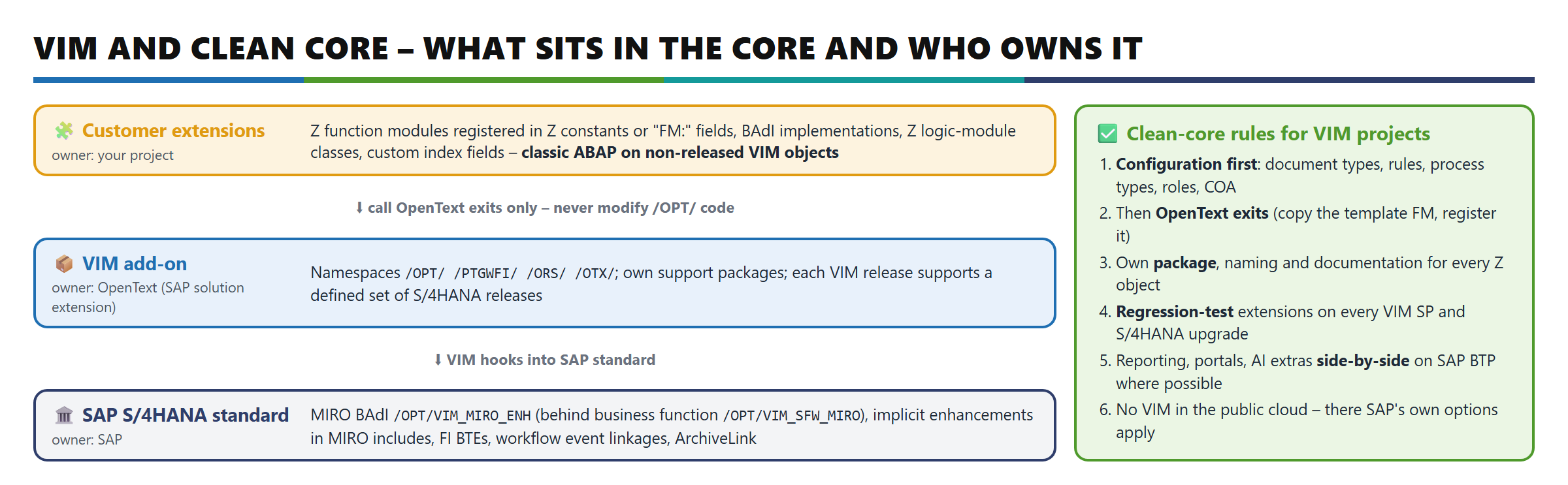
- VIM itself: an SAP solution extension maintained by OpenText. It enhances SAP standard with classic techniques (MIRO BAdI, implicit enhancements, BTEs, events – page 04 Part 7), but these are the vendor's responsibility and are delivered for each supported S/4HANA release.
- Your extensions: Z function modules and classes registered in VIM run on non-released OpenText and SAP objects – in clean-core terms they are classic extensions. They are allowed on-premise and in private cloud, but each one adds upgrade test effort.
- Public cloud: no classic add-ons, so no VIM – the clean-core rules of the public edition lead to SAP's own invoice management or partner apps.
- How to argue it: "VIM adds a supported vendor layer to the core; we keep that layer vanilla, use configuration before code, register only a few documented exits, and build reporting and portals side-by-side on BTP."
Part 8 – Presenting VIM: pitch, story, questions to ask
A 30-second pitch
"VIM is OpenText's AP automation add-on for S/4HANA. Invoices arrive by scan, e-mail or e-invoicing, capture extracts the data, VIM creates a DP document, runs business rules, routes exceptions to roles by workflow, handles non-PO approval through a chart of authority and posts through standard MIRO or FB60 logic. As a developer I extended it through OpenText exits – custom rules, role determination, posting exits – and supported the workflows."
Show architect thinking
- Start from the invoice mix and the KPIs (touchless rate, cycle time), not from transactions.
- Name the edition question early: VIM only on-premise and private cloud; public cloud means SAP Ariba Central Invoice Management.
- Explain one trade-off you made: e.g. configuration instead of a custom rule, or a BTP report instead of a Z report in the core.
Describing a development story (STAR)
Step | Example content |
|---|---|
Situation | Duplicate payments because suppliers typed invoice numbers differently |
Task | Detect these duplicates before posting without slowing down clean invoices |
Action | Duplicate check group of type Function Module with a normalised reference comparison (page 04 Part 9); tested with /OPT/VIM_CP_TEST and real samples |
Result | Duplicates stopped in the Suspected Duplicate exception; no change to OpenText code; exit documented for upgrades |
Good questions to ask the interviewer
- Which VIM release and mode do you run or plan, and which capture product?
- What is today's touchless rate and the main exception types?
- How many custom exits exist, and how are they tested on upgrades?
Part 9 – Interview questions
Q1. Can VIM run on SAP S/4HANA, and which release do you need?
Yes, on-premise and in S/4HANA Cloud Private Edition. VIM 7.5 already ran on early S/4HANA releases; VIM 16.3 was the first release built only for S/4HANA (1610 and later); current projects use the year.quarter releases such as 23.4 or 25.x. The exact pairing of VIM and S/4HANA releases comes from the OpenText release notes and the SAP PAM.
Q2. What is the difference between Classic Mode and Simple Mode?
Classic Mode is the full VIM framework with DP document types, process types, roles, parked and blocked workflows and chart-of-authority approval. Simple Mode is a lighter, preconfigured, Fiori-based process with fewer options – faster to implement, less flexible.
Q3. What changes for VIM when you move from ECC to S/4HANA?
Vendors become business partners, accounting runs on the universal journal, material numbers grow to 40 characters, inbound moves to Business Center with Core or Intelligent Capture, the UI moves to Fiori, and VIM must be upgraded to an S/4HANA-compatible release. The VIM concepts and SAP Business Workflow stay.
Q4. How do you move an existing VIM in a system conversion?
Clean up and archive old DP documents, finish open workflows, check all Z exits with the S/4HANA ATC checks, upgrade VIM to a compatible release together with the conversion, adjust configuration against the new baseline, re-activate switches, BTEs and event linkages, and test end to end.
Q5. Can a customer on S/4HANA Cloud Public Edition use VIM?
No – the public edition allows no classic ABAP add-ons. The OpenText offering that SAP integrated into the public edition, scope item 1LE Invoice Processing by OpenText, is deprecated (existing contracts only, until they end); SAP points to scope item 4N6 with SAP Ariba Central Invoice Management.
Q6. How does VIM run in RISE with SAP?
The add-on is installed in the S/4HANA Cloud Private Edition system, operated with SAP; capture and archive are usually the OpenText SaaS services (Core Capture and Core Archive, sold by SAP as Information Capture Core and Archiving and Document Access Core by OpenText).
Q7. When would you not recommend VIM?
In the public edition, for low volumes of mostly electronic PO invoices with simple approval where native S/4HANA is enough, or when procurement and supplier invoicing already run end to end in SAP Ariba with the suppliers on SAP Business Network.
Q8. What is SAP Document AI and how does it relate to VIM?
SAP's AI extraction service on BTP, formerly Document Information Extraction. It is SAP's own capture technology – used in SAP Ariba Central Invoice Management and in side-by-side scenarios that post via released APIs. In a VIM landscape the capture role is played by OpenText Core or Intelligent Capture.
Q9. How do SAP Ariba and VIM coexist?
Strategic suppliers send structured invoices through SAP Business Network, often with SAP Ariba Buying and Invoicing; the remaining paper and e-mail invoices go through VIM, which can also receive Business Network invoices through its own handler and apply the same rules.
Q10. How do you define realistic touchless targets?
Per channel and invoice type: electronic PO invoices with goods receipt and exact match can post touchless; non-PO paper invoices need coding and approval. Measure the baseline, remove the top exception causes (master data, late goods receipts, tolerances), enable autopost step by step.
Q11. What is your archiving strategy for VIM?
Images stay in an ArchiveLink repository with legal retention. VIM data is archived with /OPT/DOC (DP documents), workflows with WORKITEM and central reporting with /OPT/REP – the last only after the DP documents of all connected systems; run the licence report first.
Q12. Is VIM compatible with a clean core strategy?
VIM is a supported vendor add-on in the core; the vendor maintains its enhancements of SAP standard. Customer extensions on top are classic, non-released code, so keep VIM vanilla: configuration first, few documented OpenText exits with regression tests, extra functions side-by-side on BTP. In the public cloud VIM is not an option at all.
🏠 Start Here · ◀ 04 · Development · 06 · Interview Questions ▶ · Sections: CORE ABAP | OOPS ABAP | ABAP on HANA | Clean Core | RAP | ABAP Points | SAP Fiori | SAPUI5 | Mobile Development (MDK) | BTP Foundations | BTP Development | CAP | SAP Build | ABAP on BTP | Integration Suite | SAP Business AI | SAP BASIS | Security | SAP SDLC
Functional: FICO ABAP | TRM ABAP | VIM | SAP BIS | SD ABAP | MM ABAP | PP ABAP | QM ABAP | PM ABAP | PS ABAP | EWM | TM ABAP | GTM ABAP | EHS ABAP | HR ABAP | BW | SAP Datasphere | SAP Business Data Cloud | SAP MDG | SAP Analytics Cloud | SAP Ariba | SAP CX | SAP IBP