What an ABAP developer meets in a VIM project: the namespaces and tables behind DP documents, the transactions used for support and debugging, the ways OpenText lets you plug in custom logic (exit function modules registered in Z constants or customizing, BAdIs and enhancement spots, classes), the SAP Business Workflow templates and events underneath, how VIM hooks into MIRO and FI, Fiori extension, and the typical RICEFW objects. Product and namespaces: page 01; the business concepts (DP document, rules, roles, approval): page 02; customizing transactions: page 03; S/4HANA and clean core: page 05. Object names follow the OpenText VIM 7.5 configuration and administration guides; most of them survive in the S/4HANA releases.
Part 1 – The technical landscape: where VIM objects live
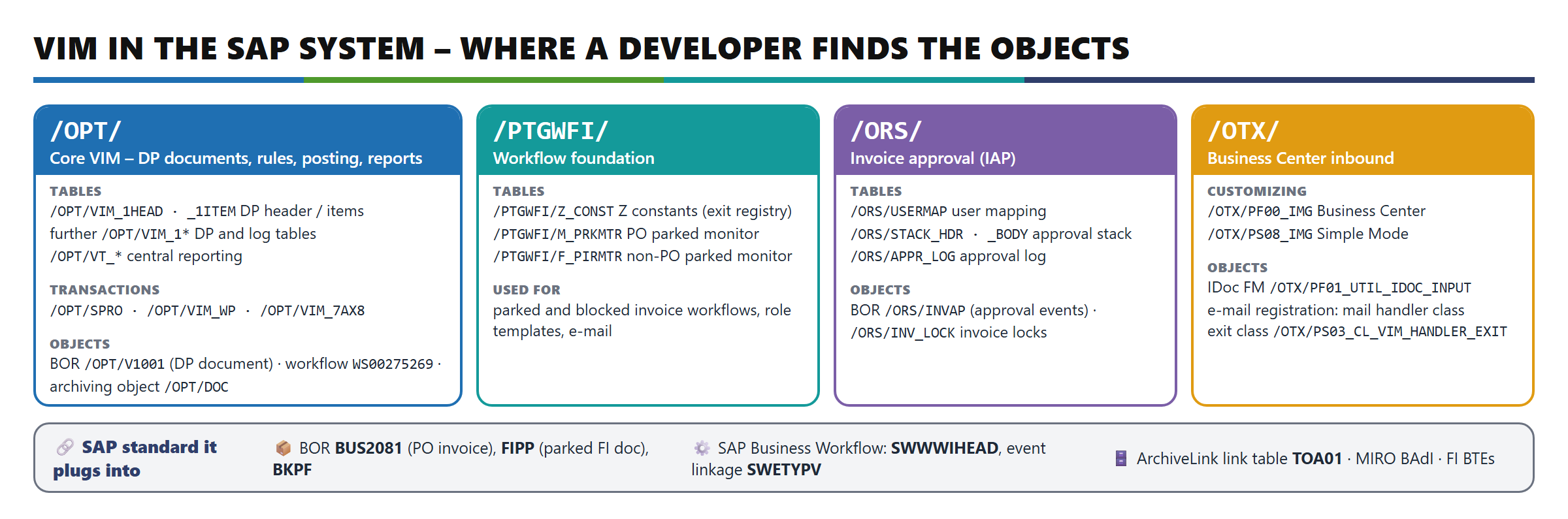
VIM is an ABAP add-on, so everything is in the SAP system and readable in SE80: OpenText code in reserved namespaces, customer code in Z objects that the VIM configuration calls by name.
Object kind | VIM examples | How you use it |
|---|---|---|
Tables | /OPT/VIM_1HEAD, /ORS/USERMAP, /PTGWFI/Z_CONST | Read in custom reports and checks; never update directly – use VIM functions or transactions |
Function modules | Template FMs such as /OPT/BL_IF_DETERMINE_AUTOPOST | Copy the template into a Z function group, keep the interface, register the copy |
Classes | /OPT/CL_D_LM_SUPER (logic modules), approver class /OPT/CL_A_LEVEL_BASED_APPROVAL (user map class /OPT/CL_IAP_USERMAP_BL: obsolete since VIM 7.5) | Inherit and redefine where the guide says so |
BOR object types | /OPT/V1001 (DP document), /ORS/INVAP, /OPT/B2081, /OPT/FIPP | Events and methods used by the VIM workflows (SWO1 to display) |
Workflow templates | WS00275269, WS00275260, WS00275254, WS00275264 | Display in SWDD; never change – configure or copy (Part 6) |
BAdIs / enhancement spots | /OPT/VIM_MIRO_ENH, /OPT/ES_VIM_FG1A3 | Implement in SE19 (Part 4) |
Archiving objects | /OPT/DOC (DP documents), /OPT/REP (central reporting) | Data archiving in SARA (page 05) |
- Tip for finding code: the IMG activity in /OPT/SPRO usually names the table or Z constant behind it; the template FM names end in _TEMPLATE, _TEMP or start with /OPT/BL_IF_ – search them in SE37.
Part 2 – Key tables
The tables you will read most. The DP tables are VIM's own copy of the invoice before it becomes an SAP document; after posting, RBKP / RSEG (PO) or BKPF / BSEG in ECC, BKPF / ACDOCA in S/4HANA (non-PO) hold the accounting truth.
Area | Tables | Content |
|---|---|---|
DP document | /OPT/VIM_1HEAD, /OPT/VIM_1ITEM | Header (key: document ID DOCID) and line items of the DP document – the index data |
DP logs and process data | Further /OPT/VIM_1* tables, e.g. /OPT/VIM_1LOG, /OPT/VIM_1PROC, /OPT/VIM_1WI_AGT, /OPT/VIM_1OCRLOG, /OPT/VIM_1BDCLOG | Log, process steps, agents, capture and posting logs; archived together with the DP document (archiving object /OPT/DOC) |
Capture staging | /OPT/VIM_STG_LIF, /OPT/VIM_STG_POH, /OPT/VIM_STG_POI; /OPT/VIM_1EXT_H | Vendor and PO data prepared for the capture engine; capture result table |
VIM Analytics (VAN) | /OPT/VIM_HD_DP, /OPT/VIM_HD_PO, /OPT/VIM_HD_NPO, /OPT/VIM_PO_WIH, /OPT/VIM_NPO_WIH | Report tables filled by the sync job /OPT/VAN_SYNC_JOB |
Central reporting | /OPT/VT_* (e.g. /OPT/VT_DOC_H, /OPT/VT_WI, /OPT/VT_KPI_SRC) | Collected data for the summary, audit, ageing and KPI reports (archiving object /OPT/REP) |
Approval (IAP) | /OPT/AT_APPR_HIS, /ORS/STACK_HDR, /ORS/STACK_BODY, /ORS/APPR_LOG, /ORS/INV_LOCK | Approval history, approver stack, approval log, invoice locks |
Chart of authority | /OPT/BL_APPCOA, /ORS/USERMAP, /OPT/AT_LEVEL | Approval limits, user mapping, approval levels |
Parked and blocked monitors | /PTGWFI/M_PRKMTR (PO parked), /PTGWFI/F_PIRMTR (non-PO parked), /PTGWFI/F_BIRMTR | Tables with the parking data of PO / non-PO invoices that exist in SAP (extendable) |
Parking reasons | /PTGWFI/M_PRKRSN (PO), /PTGWFI/F_PRKRSN (non-PO) | Parking reasons that start the parked workflows |
Settings | /PTGWFI/Z_CONST, /OPT/VIM_TAX_CFG, /OPT/VT_DOC_DET | Z constants, tax code configuration, vendor-based document type determination |
SAP workflow | SWWWIHEAD, SWW_CONTOB, SWELOG | Work items, object container, event log |
- Linking DP and SAP documents: the DP header stores the document number and fiscal year of the parked or posted SAP invoice. For a PO invoice the object key of BUS2081 is invoice number + fiscal year (RBKP-BELNR + GJAHR) – the same value as BKPF-AWKEY of its FI document; for a non-PO invoice the key of BKPF is company code + document number + fiscal year.
- Licence data (/OPT/VIM_LIC_VD): run the licence report (/OPT/LIC_COUNT) before archiving DP documents.
- SAP-side tables and released CDS views for supplier invoices: MM ABAP › 03; FI documents: FICO ABAP › 02.
Part 3 – Transactions and tools for developers and support
Customizing transactions are listed on page 03. These are the ones you use to test, debug and support VIM.
Transaction / program | Use |
|---|---|
/OPT/VIM_7AX8 | IDH admin tool: monitor incoming documents and their processing status |
/OPT/VIM_7AX8_DIS, /OPT/VIM_VA2 | Read-only display of logs and the VAN report – safe for support users |
/OPT/VIM_CP_TEST | Business Rule Framework test tool – simulate rule outcome for a group or a document |
/OPT/VIM_RULERUN (report /OPT/DR_BR_WAIT) | Re-run waiting process types (normally a background job) |
/OPT/DP_POST_DT_UPD | Bulk change of the posting date of DP documents (period end) |
/OPT/VIM_PDF_LOG (program /OPT/CR_PDF_LOG) | Create the PDF history log of a document |
/OPT/VIM_LOG_CFG, /OPT/IT_LOG_PNTV; SLG1 | Log levels and log points; VIM writes to the application log (FM /OPT/VIM_APPLICATION_LOG) |
Maintain Number Ranges step in /OPT/SPRO | Number range of DP documents (object /OPT/DOCID, Z constant NUMBER_RANGE_OBJECT) |
/ORS/UMREASSIGNED, /ORS/RELEASE_LOCK | Reassign approval items; release approval locks |
Program /ORS/000007_SUBMIT_INV | Start the approval workflow for an invoice without a work item |
/OPT/VIM_YEND_PO, /OPT/VIM_MEND_PO (and _NPO) | Year-end and month-end reports of open invoices |
SWI1, SWI5, SWIA, SWPR, SWEL, SWETYPV | Work items, workload, admin execution, restart after error, event trace, event linkage |
- Debugging a rule: run /OPT/VIM_CP_TEST or the process option Apply Rules with a breakpoint in your check function; for background steps use the workflow log (SWI1 → workflow log) and SLG1.
- Debugging background posting: the error message is copied into the DP log and the document falls back to an exception; reproduce with the online posting option (MIRO / FB60 pre-filled) in dialog.
Part 4 – How VIM is extended: the four mechanisms
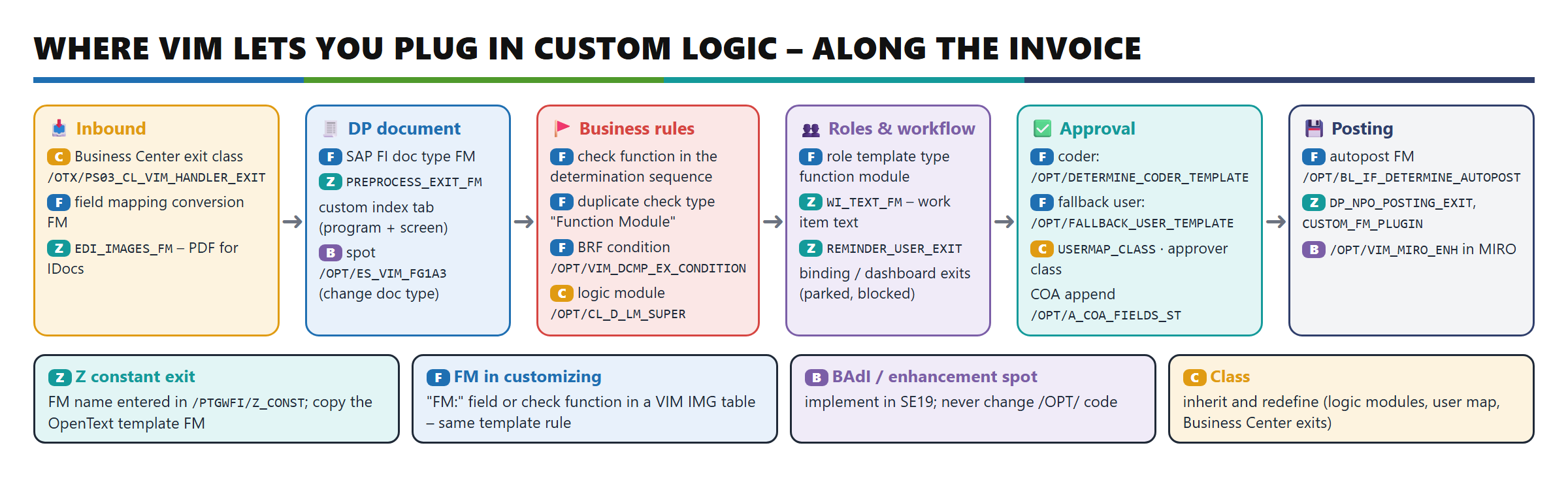
VIM is built to be extended without modification. Almost every exit follows one rule: OpenText ships a template, you copy it, keep its interface, and register your copy in configuration. VIM then calls your object dynamically.
Mechanism | How it works | Examples |
|---|---|---|
Z constant exit | Table /PTGWFI/Z_CONST: per product code (005 DP, IAP approval, PIR non-PO parking, LIX PO parking / blocking …) a constant holds the name of your FM or class | WI_TEXT_FM, REMINDER_USER_EXIT, DP_NPO_POSTING_EXIT, CUSTOM_FM_PLUGIN, EDI_IMAGES_FM, USERMAP_CLASS (obsolete since 7.5) |
FM in customizing | A field in a VIM IMG table takes a function module – as check function, role template, or with prefix "FM:" instead of a fixed value | Check function in the determination sequence, duplicate check type Function Module, autopost flag "FM:…", SAP FI document type "FM:…" |
BAdI / enhancement spot | OpenText enhancement spots and BAdIs, implemented in SE19 | /OPT/VIM_MIRO_ENH (MIRO), /OPT/ES_VIM_R1AX1 (archive document type on document type change), /OPT/ES_VIM_FG1A3 (extra filters on change of document type) |
Class | Inherit from an OpenText class and redefine a method; register the class | Logic modules (/OPT/CL_D_LM_SUPER), approver class (user map class obsolete since 7.5), Business Center exit class /OTX/PS03_CL_VIM_HANDLER_EXIT |
Rules that keep extensions upgrade-safe
- Copy the template FM in SE37 into your own Z function group – same parameter names and types. VIM calls it dynamically, so a wrong interface fails only at run time (CALL_FUNCTION_PARM_UNKNOWN).
- Never call the framework from inside its own exit (the guide warns, for example, that the mapping interface /OPT/DO_MAPPING must not be called directly from a custom mapping FM – recursion).
- Exits run inside workflow steps and background jobs: no COMMIT WORK, no pop-ups, no user-specific assumptions (the agent may be WF-BATCH); return messages instead of raising MESSAGE TYPE 'E'.
- Z constants and IMG entries are customizing – transport them together with the Z code that they reference.
- Prefer the baseline: many requirements are already a baseline business rule (baseline rules and Customer library in the Reference Guide) that only needs activation.
Part 5 – Extension points by process step
Step | Extension point | Template / object |
|---|---|---|
Inbound | Exit at the end of Business Center inbound processing | Class /OTX/PS03_CL_VIM_HANDLER_EXIT |
Inbound | Conversion in field mapping (/OPT/VIM_MAPV) | Interface like CONVERSION_EXIT_ALPHA_INPUT |
Inbound (IDoc) | PDF image for an electronic invoice | Z constant EDI_IMAGES_FM (product 005), template /OPT/EDI_IMAGES_EXIT_TEMP |
DP document | Pre-processing before the rules | Z constant PREPROCESS_EXIT_FM (older releases – marked obsolete in the Reference Guide) |
DP document | Determine the SAP FI document type | "FM:" in the document type, template /OPT/BL_IF_DETERMINE_SAP_DTYPE |
DP document | Custom fields on the index screen | Custom tab: own program + screen in the document type (sample /OPT/SAPLVIM_IDX_UI, screen 1900) |
Business rules | Own rule (check) | Check function in the determination sequence; BRF condition template /OPT/VIM_DCMP_EX_CONDITION |
Business rules | Own duplicate logic | Duplicate check type Function Module (/OPT/VIM_1CX5) |
Business rules | Own determination logic (PO mapping, auto coding) | Logic module class inheriting /OPT/CL_D_LM_SUPER, method /OPT/IF_D_BP_MODULE~PROCESSING |
Business rules | PO line matching, tax code | Field Matching Exit; customer tax determination compatible with /OPT/VIM_TAX_CODE_DETERMINE |
Roles | Agent determination by logic | Role template of type function module; interface template /PTGWFI/COA_W_ADKY_GET |
Workflow | Work item text, reminders | WI_TEXT_FM (/OPT/BL_IF_DETERMINE_WI_TEXT), REMINDER_USER_EXIT (/OPT/VIM_NOTIF_USER_EXIT_TEMP) |
Workflow (parked / blocked) | Binding, dashboard and autopost exits | IMG activities /OPT/VIM_IMG2xx and /OPT/VIM_IMG3xx, defaults in /PTGWFI/ |
Approval | Coder, fallback approver, approval flow | /OPT/DETERMINE_CODER_TEMPLATE, /OPT/FALLBACK_USER_TEMPLATE, /OPT/DETERMINE_AFS_TEMPLATE |
Approval | New COA field | Append to /OPT/A_COA_FIELDS_ST (+ /OPT/BL_4RCOA_DATA) |
Approval | Approver logic, user mapping | Approver class (default /OPT/CL_A_LEVEL_BASED_APPROVAL); Z constant USERMAP_CLASS (default /OPT/CL_IAP_USERMAP_BL) – obsolete since VIM 7.5 |
Posting | Decide touchless posting | Autopost "FM:", template /OPT/BL_IF_DETERMINE_AUTOPOST (baseline /OPT/VIM_DETERMINE_AUTOPOST) |
Posting | Change data before the SAP document is created | Z constant CUSTOM_FM_PLUGIN; DP_NPO_POSTING_EXIT (interface /OPT/DNONPO_INVOICE_BAPI_EXIT, around BAPI_ACC_DOCUMENT_POST) |
Details per exit (parameters, when it is called) are in the OpenText configuration guide of your release; the exit names above are stable anchors to search for.
Part 6 – SAP Business Workflow under VIM
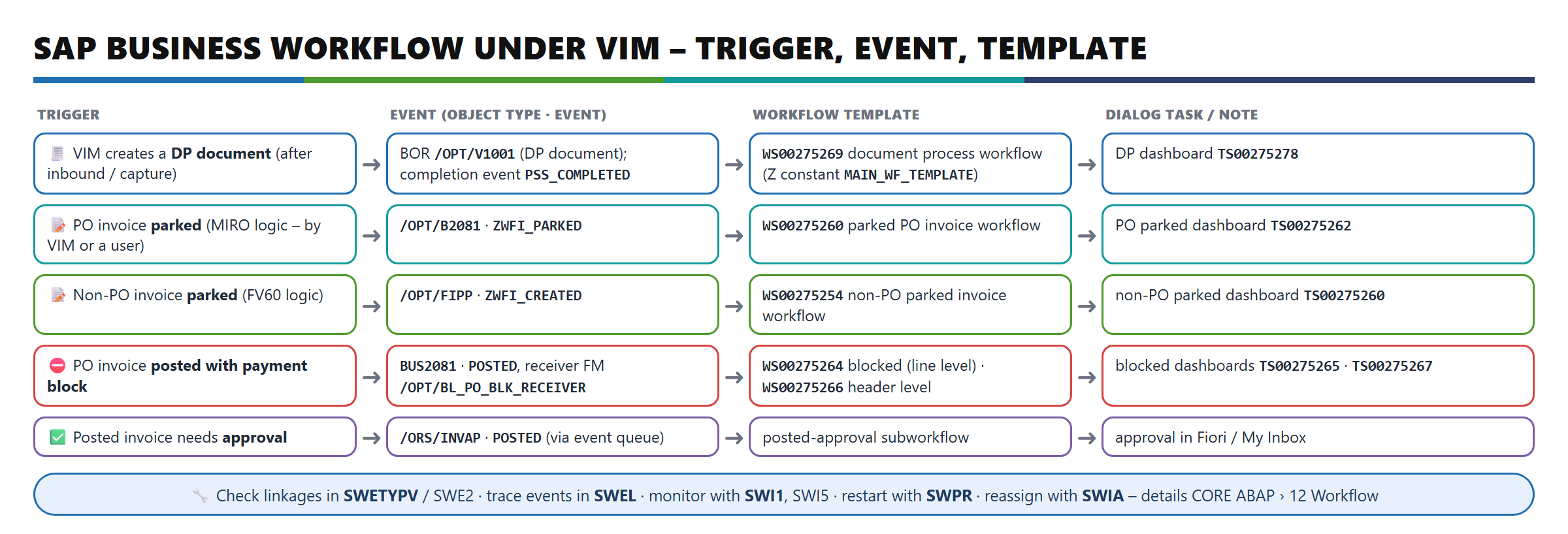
Every VIM process is a classic SAP Business Workflow. VIM's own logic decides who and what; the workflow engine delivers the work items, deadlines and logs. Workflow basics (BOR, events, binding, agents): CORE ABAP › 12 Workflow.
Template | Process |
|---|---|
WS00275269 | Document process (DP) workflow – one per DP document; Z constant MAIN_WF_TEMPLATE |
WS00275260 | Parked PO invoice workflow |
WS00275254 | Non-PO parked invoice workflow |
WS00275264 / WS00275266 | Blocked PO invoice workflow (line level) / header level |
WS00275252 | Web approval of a parked invoice |
- Events must be linked: /OPT/B2081 ZWFI_PARKED and /OPT/FIPP ZWFI_CREATED for parked invoices, BUS2081 POSTED with receiver FM /OPT/BL_PO_BLK_RECEIVER for blocked invoices, /ORS/INVAP POSTED through the event queue for posted approval. Of the alternative BUS2081 POSTED linkages, keep only the recommended one active in SWETYPV.
- Dashboards are dialog tasks (e.g. TS00275278 DP dashboard): the user executes the work item and VIM shows the dashboard with image, index data and process options.
- Custom workflow for a process type: set the process type's workflow type to an external workflow and bind it with a function module built from the template /OPT/VIM_DASHBOARD_BINDING; when your workflow ends, the DP process continues on event /OPT/V1001 PSS_COMPLETED.
- Work item texts and dynamic columns in the inbox: Z constant WI_TEXT_FM and /OPT/BL_IF_SET_DYNAMIC_COLUMN.
- Never edit the delivered templates in SWDD: copy them if you must, or better extend through the exits above – OpenText support packages overwrite the originals.
Part 7 – How VIM hooks into SAP standard
VIM must react to invoices created outside VIM (MIRO, FV60) and enrich MIRO when it posts. It does this with SAP's own enhancement techniques – useful to know when you debug MIRO or plan an upgrade.
Hook | Object | Purpose |
|---|---|---|
BAdI in invoice verification | /OPT/VIM_MIRO_ENH, or alternative /OPT/VIM_ENH_SPOT_MIRO behind switch /OPT/VIM_SWITCH, business function /OPT/VIM_SFW_MIRO (set /OPT/VIM_BFS) | VIM logic in MIRO; activate exactly one of the two (SFW5) |
Implicit enhancements in MIRO | /OPT/VIM_BUILD_REFERENCE_DOCS (include LMR1MF3S), /OPT/VIM_CHANGE_PROPOSAL_MIRO (LMR1MF3U) | Pre-fill MIRO from VIM data in online posting |
FI business transaction events | BTEs 1020, 1140, 2213; FMs such as /OPT/BTE_IF_00001030, /OPT/BTE_IF_00001050, /OPT/BTE_IF_00002213_47 | Non-PO parking, approval and posting hooks (activate product in FIBF) |
Workflow events | BUS2081 POSTED, parked document events | Start parked / blocked workflows (Part 6) |
Posting wrappers | /OPT/VIM_52_BAPI_DOCLINES_PO, /OPT/VIM_52_BAPI_PO_PARK | Can be replaced by a compatible custom FM if posting must change |
ArchiveLink | Business objects /OPT/V1001, BUS2081, BKPF | Link the image to DP and SAP documents (page 03) |
- Before go-live: check existing implementations of the SAP BAdI INVOICE_UPDATE and your own MIRO / FI enhancements for conflicts – the guide asks for this explicitly.
- After a support package: re-check BAdI and switch activation (SFW5), BTE products (FIBF) and event linkages (SWETYPV); missing activation is a common cause of "parked workflow does not start".
Part 8 – Fiori apps: what you can extend
The VIM Fiori apps (Approve Invoices, Resolve Invoice Exceptions, Enter Cost Assignment …, page 03) are OpenText SAPUI5 apps with OData services shipped in the add-on. They are not SAP standard apps, so SAP's extensibility guides for its own invoice apps do not apply to them.
Requirement | First choice | Avoid |
|---|---|---|
Show an extra field to approvers | VIM field configuration for approval (custom fields, table /OPT/FIELDS_V; RFCs /OPT/OAP_GET_INVOICE_DETAIL and /OPT/OAP_INVOICE_ACTION for dynamic custom fields) | Copying the app |
Change list, detail or action logic of approval | Z constants EXIT_INVOICE_LIST, EXIT_INVOICE_DETAIL, EXIT_INVOICE_ACTION (defaults /OPT/OAP_EXIT_LIST, /OPT/OAP_EXIT_DETAIL, /OPT/OAP_EXIT_ACTION) | Redefining OpenText OData classes |
Hide or rearrange UI elements | SAPUI5 flexibility (key-user adaptation, adaptation project) where the app version supports it | Modifying the app's BSP repository |
New field on index data | Custom index fields + mapping (Part 9) – the field then flows to the exception apps through OpenText's configuration | A separate Z table read only by the UI |
Completely new user group | A small own Fiori elements / RAP app on released S/4HANA objects plus VIM reads, or a BTP side-by-side app | Mixing it into the OpenText app |
- Supported adaptation features differ between VIM app versions, and app updates arrive with VIM support packages – an adaptation is retested after every VIM upgrade.
- Own Fiori elements apps on RAP: the RAP section; OData service activation for the VIM apps: page 03.
Part 9 – Typical RICEFW objects and examples
Type | Typical VIM requirement | How it is built |
|---|---|---|
R Report | Open invoices per role with ageing and liability, KPI extract for a data warehouse | First extend VAN / central reporting; otherwise a report or CDS view on /OPT/VIM_1HEAD + workflow tables + RBKP / BKPF |
I Interface | E-invoices from a network or a country platform into VIM | INVOIC IDoc into the Business Center IDoc registration (/OTX/PF01_UTIL_IDOC_INPUT), custom mapping FM, EDI_IMAGES_FM for the PDF; mandate handled by SAP Document and Reporting Compliance or the OpenText network (page 03) |
C Conversion | Chart of authority load; open invoices at go-live | COA upload (/OPT/VIM_COAUPLOAD, report /OPT/COA_UPLOAD_REPORT, exits COA_UPLOAD_EXIT_UP / _DW with template /OPT/COA_UPLOAD_EXIT); open items processed before cut-over, not migrated as DP documents |
E Enhancement | Custom duplicate check | Duplicate check type Function Module in a duplicate check group assigned to the document type |
E Enhancement | Custom business rule (e.g. invoice date in the future, vendor blocked for company code) | Check function in the determination sequence + own process type with initial role and process options |
E Enhancement | Custom approval routing (e.g. by profit center or project) | COA append field, approval flow determination template, approver class |
E Enhancement | OCR field mapped to a custom field (e.g. contract number) | Field extracted by capture → mapping in /OPT/VIM_MAPV → custom index field → custom index tab → used in a rule or posted via CUSTOM_FM_PLUGIN |
F Form | Reminder and notification e-mails, history PDF | SO10 texts, REM_MAIL_FORMAT_FM, REMINDER_USER_EXIT; PDF log program /OPT/CR_PDF_LOG |
W Workflow | Special approval or review step | Process type with external workflow and binding FM; continue on /OPT/V1001 PSS_COMPLETED |
9.1 Building a custom business rule – outline
The exact interface of a check function differs by release, so the steps are given as an outline. The interface is taken over from a baseline check function of a similar rule (baseline check functions follow the pattern /OPT/VIM_DETERMINE_PROC_nnn).
- 1. Create a Z function group; copy a baseline check function into it (SE37 → Copy) – the interface is copied with it.
- 2. Replace the body with your logic: read the index data passed in, decide whether the rule fails, return the result the way the baseline does.
- 3. Create a process type (/OPT/VIM_8CX1) for the exception: initial role, process options (/OPT/VIM_8CX2), "is exception", whether background posting is blocked.
- 4. Add a step to the determination sequence of the document type with check type Check Function and your FM; set exclusive / bypass flags.
- 5. Test with /OPT/VIM_CP_TEST and Apply Rules on a test document; transport FM, process type and document type together.
9.2 Example: reusable logic for a custom duplicate check
A frequent requirement: the same supplier invoice arrives twice with a reference typed differently ("INV-0042", "inv 0042", or "000123" and "123"). The class below holds the logic; the function module you register as duplicate check (interface copied from the baseline /OPT/VIM_CHK_INVOICE_DUPLICATE) only maps its parameters and calls it. It reads posted and parked PO invoices in RBKP; non-PO invoices can be checked the same way on the FI side.
|
- The normalisation removes separators and the leading zeros of the whole reference (zeros inside, as in INV0042, stay); adapt it to your suppliers (e.g. also strip a prefix like INV) – and keep it identical in every place that compares references.
- Performance: the SELECT is restricted by company code, vendor and amount; add a date window if the vendor has many invoices of the same amount.
9.3 Skeleton: a custom logic module
Logic modules (Business Process Framework of the DP document) are classes that inherit from /OPT/CL_D_LM_SUPER and redefine the interface method /OPT/IF_D_BP_MODULE~PROCESSING; its parameters come from that interface. The baseline class /OPT/CL_D_LM_DETERM_PO_MAP (PO mapping) is the model to follow.
|
Part 10 – Interview questions
Q1. Which namespaces does VIM use and what is in them?
/OPT/ for the VIM core (DP documents, rules, posting, reports), /PTGWFI/ for the workflow foundation (Z constants, parked and blocked monitors), /ORS/ for invoice approval (user map, approval stack), /OTX/ for Business Center inbound. Customer code stays in Z objects.
Q2. Which tables hold a DP document?
/OPT/VIM_1HEAD (header, key DOCID) and /OPT/VIM_1ITEM (items), plus further /OPT/VIM_1* tables for logs and process data; they are archived together with archiving object /OPT/DOC. After posting, RBKP / RSEG or BKPF / BSEG (ECC) · BKPF / ACDOCA (S/4HANA) hold the SAP invoice.
Q3. How do you add custom logic to VIM without modifying it?
Copy the OpenText template function module, keep the interface and register the copy – in a Z constant of /PTGWFI/Z_CONST or a function module field of the VIM customizing. Further options are OpenText BAdIs and enhancement spots (SE19) and classes such as logic modules that you inherit and redefine.
Q4. What is /PTGWFI/Z_CONST?
VIM's constants table: switches and exit registrations per product code (005 DP, IAP approval, PIR non-PO parking, LIX PO parking and blocking). Exits such as WI_TEXT_FM or DP_NPO_POSTING_EXIT hold the name of the customer function module.
Q5. How would you implement a custom business rule?
Write a check function by copying a baseline one, create a process type with initial role and process options for the exception, add a step with check type Check Function to the document type's determination sequence, then test with /OPT/VIM_CP_TEST and Apply Rules.
Q6. How do you customise duplicate detection?
With a duplicate check group of type Function Module assigned to the document type; the FM calls your logic, for example a normalised comparison of the invoice reference for the same vendor, company code and amount.
Q7. Which workflow templates does VIM use?
WS00275269 for the DP document, WS00275260 for parked PO invoices, WS00275254 for parked non-PO invoices and WS00275264 / WS00275266 for blocked PO invoices; dashboards are dialog tasks such as TS00275278.
Q8. The parked invoice workflow does not start. What do you check?
The event linkages (/OPT/B2081 ZWFI_PARKED, /OPT/FIPP ZWFI_CREATED) in SWETYPV, the event trace in SWEL, rollout criteria and parking reasons, the BTE product in FIBF and the MIRO BAdI switch; then the workflow log in SWI1.
Q9. How does VIM hook into MIRO?
Through its BAdI /OPT/VIM_MIRO_ENH (or the switchable /OPT/VIM_ENH_SPOT_MIRO behind business function /OPT/VIM_SFW_MIRO), implicit enhancements in MIRO includes for online pre-fill, and the BUS2081 POSTED event with receiver /OPT/BL_PO_BLK_RECEIVER for blocked invoices. Existing INVOICE_UPDATE implementations must be checked for conflicts.
Q10. How do you route approval by a field that is not in the chart of authority?
Append the field to the COA structure (/OPT/A_COA_FIELDS_ST), fill it in the index or coding data, and adapt the approval flow or approver determination through the OpenText templates and the approver class – no change to the delivered approval workflow.
Q11. How do you get an OCR field into VIM and use it?
Configure the field in the capture product, map it in /OPT/VIM_MAPV to a custom index field, show it on a custom index tab, then use it in a check function or pass it to the posting through CUSTOM_FM_PLUGIN.
Q12. Can you extend the VIM Fiori apps like SAP standard apps?
Only within what OpenText supports: approval field configuration and exits (EXIT_INVOICE_DETAIL …), and SAPUI5 flexibility where the app version allows it. They are OpenText apps, so SAP's BAdIs for its own supplier invoice apps do not apply, and copies would miss VIM updates.
🏠 Start Here · ◀ 03 · Config & Integration · 05 · Architect View ▶ · Sections: CORE ABAP | OOPS ABAP | ABAP on HANA | Clean Core | RAP | ABAP Points | SAP Fiori | SAPUI5 | Mobile Development (MDK) | BTP Foundations | BTP Development | CAP | SAP Build | ABAP on BTP | Integration Suite | SAP Business AI | SAP BASIS | Security | SAP SDLC
Functional: FICO ABAP | TRM ABAP | VIM | SAP BIS | SD ABAP | MM ABAP | PP ABAP | QM ABAP | PM ABAP | PS ABAP | EWM | TM ABAP | GTM ABAP | EHS ABAP | HR ABAP | BW | SAP Datasphere | SAP Business Data Cloud | SAP MDG | SAP Analytics Cloud | SAP Ariba | SAP CX | SAP IBP