Modern ABAP (7.40 and later) is expression-based: you declare variables where you need them and build values, tables and decisions in one statement. Less code, fewer helper variables, easier to read. These are language features – they work on every database. The SQL side (ABAP SQL, window functions, joins) is on page 04.
Part 1 – Release overview: what came when
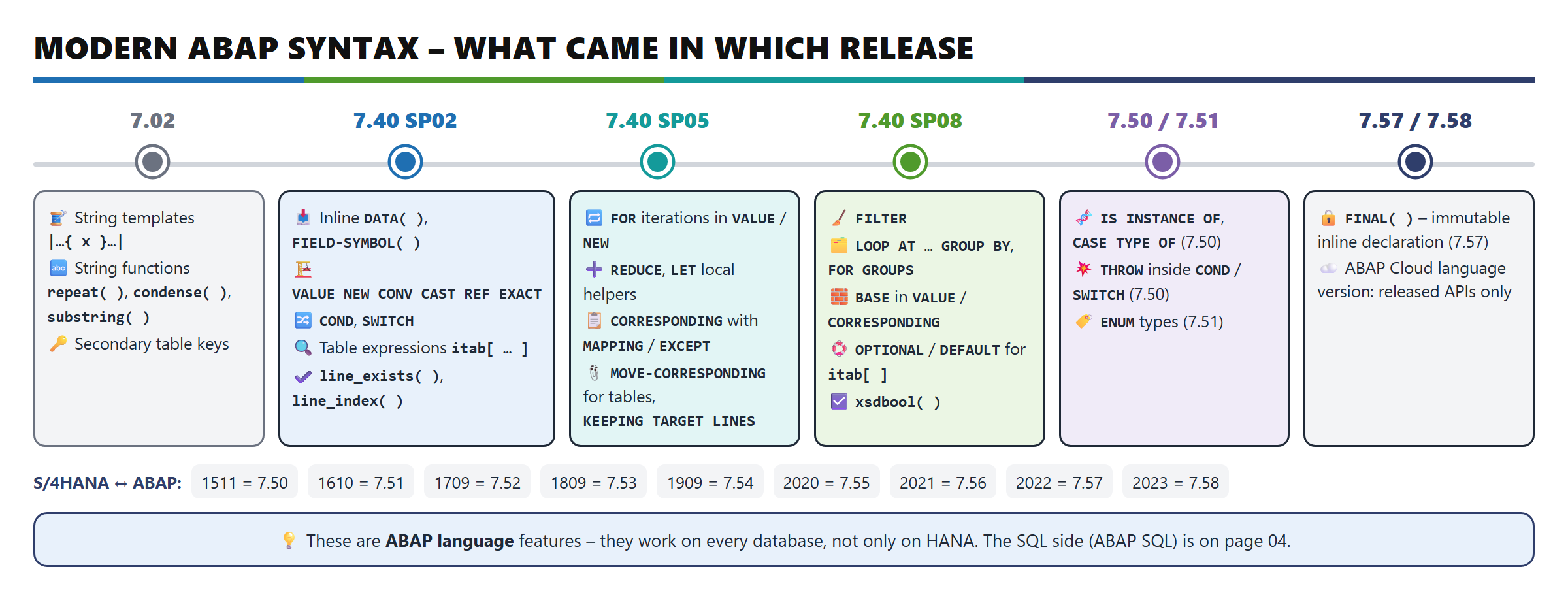
Although often labelled "ABAP HANA 7.51", almost all of these features came with ABAP 7.40 (SP02 to SP08), and none of them needs HANA.
Declare a variable at the place where it is first written. The type comes from the right-hand side.
Use case
Before 7.40
From 7.40
Assignment
DATA lv_text TYPE char5. lv_text = 'ABC'.
DATA(lv_text) = 'ABC'.
SELECT result
DATA ls_wa TYPE … + SELECT SINGLE … INTO ls_wa
SELECT SINGLE … INTO @DATA(ls_wa).
LOOP / READ work area
DATA ls_wa LIKE LINE OF itab.
LOOP AT itab INTO DATA(ls_wa).
Field symbol
FIELD-SYMBOLS <ls> LIKE LINE OF itab.
LOOP AT itab ASSIGNING FIELD-SYMBOL(<ls>).
Copy a table
DATA lt_copy LIKE itab. lt_copy[] = itab[].
DATA(lt_copy) = itab.
Method result
DATA lo_alv TYPE REF TO … before the call
IMPORTING r_salv_table = DATA(lo_alv)
SELECT SINGLE carrid, connid, fldate
FROM sflight
WHERE carrid = @lv_carrid AND connid = @lv_connid
INTO @DATA(ls_flight).  " INTO at the end, after WHERE

READ TABLE lt_flights INTO DATA(ls_first) WITH KEY carrid = 'LH'.
READ TABLE lt_flights ASSIGNING FIELD-SYMBOL(<ls_lh>) WITH KEY carrid = 'LH'.
LOOP AT lt_flights ASSIGNING FIELD-SYMBOL(<ls_flight>).
<ls_flight>-price = <ls_flight>-price * '1.1'.
ENDLOOP.

FINAL(lv_max) = 100.  " 7.57: cannot be changed later
Type trap: DATA(lv_text) = 'ABC'. gives type c LENGTH 3; DATA(lv_n) = 5. gives i. Use CONV or a typed variable when you need a specific type (e.g. DATA(lv_s) = CONV string( 'ABC' ).).
Scope: an inline variable is valid from its declaration to the end of the method – not only inside the LOOP or IF where it was written.
Part 3 – String templates and string functions
3.1 String templates
Text goes between | and |; any expression goes inside { }. Any data type is allowed – old CONCATENATE only took character-like types (C, N, D, T, STRING).
DATA(lv_msg)  = |The order { lv_order } is created successfully|.
DATA(lv_info) = |Order { lv_order } created on { sy-datum DATE = USER }|
&& | at { sy-uzeit TIME = USER } by { sy-uname }|.    " && joins strings
MESSAGE |The user ID is { sy-uname }| TYPE 'I'.
MESSAGE |Order { lv_order } not found| TYPE 'S' DISPLAY LIKE 'E'.  " status msg, error style

lv_matnr = |{ lv_matnr ALPHA = IN }|.   " add zeros (old: CONVERSION_EXIT_ALPHA_INPUT)
lv_matnr = |{ lv_matnr ALPHA = OUT }|.  " remove zeros (old: CONVERSION_EXIT_ALPHA_OUTPUT)
DATA(lv_stamp) = |{ sy-datum DATE = ISO }:{ sy-uzeit TIME = ISO }|.  " 2026-11-15:10:30:00
&& is the chaining operator (works at runtime on any strings). A single & only joins literals at compile time – do not use it for variables.
Escape the special characters with a backslash: \|, \{, \}, \\. \n = new line, \t = tab.
Format option
Example
Effect
ALPHA = IN / OUT
|{ lv_kunnr ALPHA = OUT }|
Add / remove leading zeros
DATE = USER / ISO
|{ sy-datum DATE = ISO }|
User format or 2026-11-15
TIME = USER / ISO
|{ sy-uzeit TIME = ISO }|
User format or 10:30:00
NUMBER = USER, DECIMALS = n
|{ lv_amount NUMBER = USER DECIMALS = 2 }|
Thousands separator, decimals
CURRENCY = cuky
|{ lv_netwr CURRENCY = lv_waers }|
Decimals of the currency
WIDTH, ALIGN, PAD
|{ lv_id WIDTH = 10 ALIGN = RIGHT PAD = '0' }|
Fixed width, padding
CASE = UPPER / LOWER
|{ lv_name CASE = UPPER }|
Change case
SIGN = LEFT / RIGHT
|{ lv_value SIGN = LEFT }|
Position of the minus sign
3.2 Built-in string functions
Function
Example → result
strlen( ), numofchar( )
strlen( 'ABAP' ) → 4
to_upper( ), to_lower( )
to_upper( 'abap' ) → ABAP
condense( )
condense( ' a b ' ) → 'a b'
substring( val off len )
substring( val = 'ABCDEF' off = 2 len = 3 ) → CDE
segment( val sep index )
segment( val = 'A;B;C' sep = ';' index = 2 ) → B
replace( val sub with occ )
replace( val = 'a-b-c' sub = '-' with = '/' occ = 0 ) → a/b/c (occ = 0 = all)
shift_left( ), shift_right( )
shift_left( val = '0012' sub = '0' ) → 12
contains( ), matches( )
contains( val = lv_text sub = 'ERR' ) → true/false (use in IF)
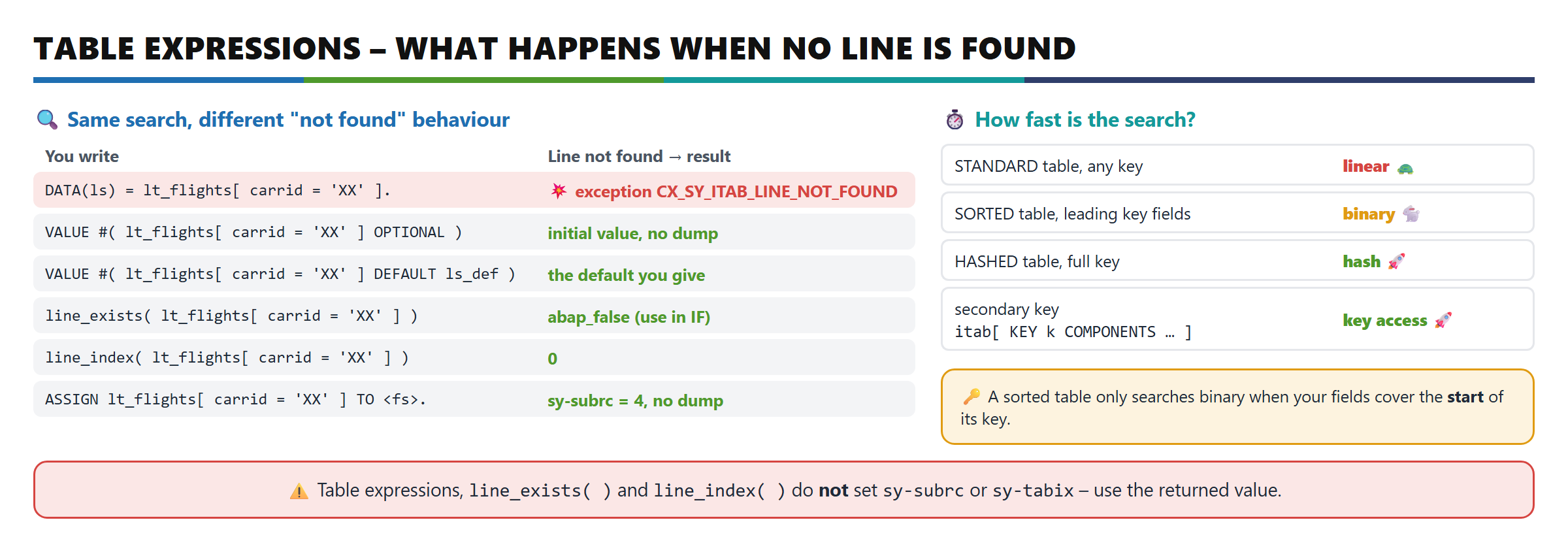
No line found → exception CX_SY_ITAB_LINE_NOT_FOUND (a short dump if not caught). Use TRY/CATCH, VALUE #( itab[ … ] OPTIONAL ), VALUE #( itab[ … ] DEFAULT x ), or check with line_exists( ) first.
Table expressions do not set sy-subrc or sy-tabix. Neither do line_exists( ) and line_index( ).
Speed depends on the table kind. Standard table with a free key = linear search. Sorted table = binary search only when the fields cover the leading part of the table key. Hashed table = hash access with the full key. For other fields use a secondary key.
Need the line and the existence check? ASSIGN itab[ … ] TO <fs>. sets sy-subrc (4 = not found) and searches only once – better than line_exists( ) followed by itab[ ].
DATA it_flights TYPE SORTED TABLE OF sflight WITH UNIQUE KEY carrid connid fldate.
SELECT * FROM sflight INTO TABLE @it_flights.

" binary search: carrid + connid are the leading key fields
DATA(ls_flight) = VALUE sflight( it_flights[ carrid = 'SQ' connid = '0026' ] OPTIONAL ).

TRY.
DATA(lv_price) = it_flights[ carrid = 'XX' connid = '0001' ]-price.
CATCH cx_sy_itab_line_not_found.
lv_price = 0.
ENDTRY.

ASSIGN it_flights[ carrid = 'LH' connid = '0400' ] TO FIELD-SYMBOL(<ls_lh>).
IF sy-subrc = 0.
<ls_lh>-price = <ls_lh>-price * '0.9'.
ENDIF.
Predicate (true/false) – only usable in a condition (IF, WHEN, xsdbool)
READ TABLE … TRANSPORTING NO FIELDS WITH KEY … + IF sy-subrc = 0
line_index( itab[ … ] )
Index of the first matching line, 0 if none
READ TABLE … + sy-tabix
lines( itab )
Number of lines
DESCRIBE TABLE itab LINES lv_count.
" Existence check – three ways
READ TABLE it_sbook TRANSPORTING NO FIELDS WITH KEY carrid = 'AA'.  " old
IF sy-subrc = 0. ... ENDIF.

TRY.  " works, but heavy
DATA(ls_sbook) = it_sbook[ carrid = 'AA' ].
CATCH cx_sy_itab_line_not_found.
ENDTRY.

IF line_exists( it_sbook[ carrid = 'AA' ] ).  " best
...
ENDIF.

DATA(lv_index) = line_index( it_sbook[ carrid = 'AA' connid = '0017' ] ).  " 0 = not found
DATA(lv_count) = lines( it_sbook ).
Part 5 – Constructor operators
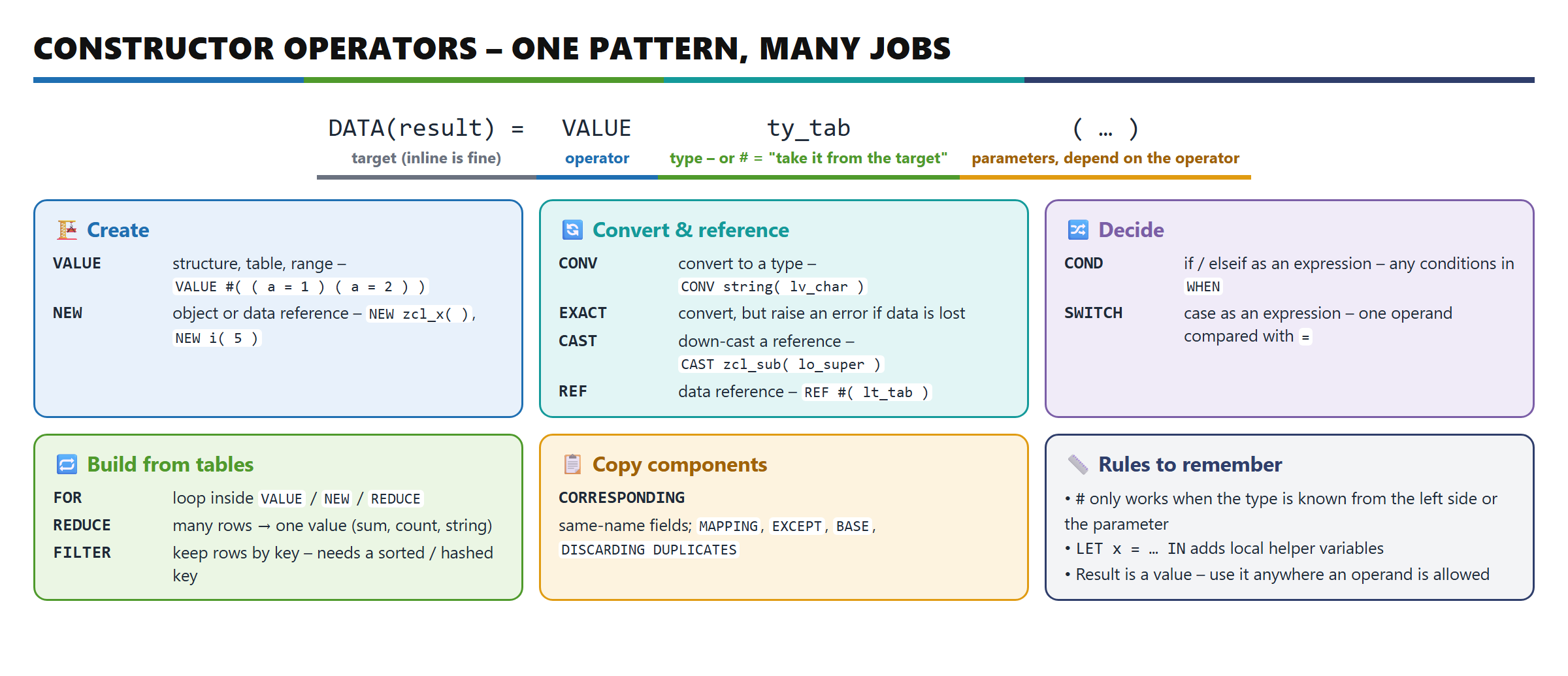
All constructor operators have the same shape: OPERATOR type( parameters ). Instead of the type you can write # when the type is clear from the target (left side, method parameter).
5.1 VALUE – build structures and tables
TYPES: BEGIN OF ty_line,
field1 TYPE i,
field2 TYPE i,
END OF ty_line,
ty_tab TYPE STANDARD TABLE OF ty_line WITH EMPTY KEY.  " a TABLE type, not a structure

DATA(ls_line) = VALUE ty_line( field1 = 1 field2 = 2 ).  " structure
DATA(lt_tab)  = VALUE ty_tab( ( field1 = 1 field2 = 2 )  " table: one ( ) per row
( field1 = 3 field2 = 4 ) ).

" Every pair of inner parentheses is a NEW row:
DATA(lt_four) = VALUE ty_tab( ( field1 = 1 ) ( field2 = 2 ) ( field1 = 3 ) ( field2 = 4 ) ).
" Output (4 rows):  1 0 / 0 2 / 3 0 / 0 4

" Values written before the rows are shared by the following rows (range table):
DATA lt_range TYPE RANGE OF i.
lt_range = VALUE #( sign = 'I' option = 'EQ' ( low = 1 ) ( low = 2 )
option = 'BT' ( low = 5 high = 10 ) ).
" Output:  I EQ 1 0 / I EQ 2 0 / I BT 5 10

" BASE keeps the existing rows and appends new ones (7.40 SP08):
lt_tab = VALUE #( BASE lt_tab ( field1 = 5 field2 = 6 ) ).  " now 3 rows

" DEFAULT / OPTIONAL when a table expression inside VALUE finds no line:
DATA(lt_values) = VALUE ty_tab( ( field1 = 1 field2 = 2 )
( field1 = 3 )
( field1 = 4 field2 = 5 ) ).
DATA lv_value TYPE i.
DO 5 TIMES.
lv_value = VALUE #( lt_values[ sy-index ]-field2 DEFAULT -1 ).
WRITE / lv_value.  " 2, 0, 5, -1, -1
ENDDO.
Example from a real report – split BKPF-AWKEY into document number and year without LOOP + APPEND:
TYPES: BEGIN OF ty_rseg,
belnr TYPE belnr_d,
gjahr TYPE gjahr,
END OF ty_rseg,
tt_rseg TYPE STANDARD TABLE OF ty_rseg WITH EMPTY KEY.

DATA(lt_awkey) = VALUE tt_rseg( FOR ls_bkpf IN lt_bkpf
( belnr = ls_bkpf-awkey+0(10)
gjahr = ls_bkpf-awkey+10(4) ) ).
Statements that use VALUE directly: APPEND VALUE #( … ) TO itab., INSERT VALUE #( … ) INTO TABLE itab.
5.2 NEW, functional calls and method chaining
" Object creation
DATA lo_old TYPE REF TO zcl_order.               " old
CREATE OBJECT lo_old EXPORTING iv_id = '4711'.
DATA(lo_new) = NEW zcl_order( iv_id = '4711' ).  " new
lo_old = NEW #( iv_id = '4712' ).                " NEW #: class from the declared type
DATA(lr_int) = NEW i( 5 ).                       " data reference with value 5

" Functional method call instead of CALL METHOD … RECEIVING
CALL METHOD cl_bcs_convert=>xstring_to_solix                             " old
EXPORTING iv_xstring = lv_content
RECEIVING et_solix   = lt_solix.
lt_solix = cl_bcs_convert=>xstring_to_solix( iv_xstring = lv_content ).  " new
Method chaining – use the reference returned by one method directly to call the next one (not the same as a colon chain statement). Factory ALV in a few lines:
SELECT * FROM sbook INTO TABLE @DATA(lt_bookings) UP TO 100 ROWS.
TRY.
cl_salv_table=>factory( IMPORTING r_salv_table = DATA(lo_table)
CHANGING  t_table      = lt_bookings ).
lo_table->get_functions( )->set_all( ).
lo_table->get_columns( )->set_optimize( ).
lo_table->get_display_settings( )->set_striped_pattern( abap_true ).
lo_table->display( ).
CATCH cx_salv_msg INTO DATA(lx_salv).
MESSAGE lx_salv TYPE 'I'.
ENDTRY.
5.3 CONV and EXACT – conversions
" CONV: no helper variable just to match a parameter type
DATA lv_text TYPE c LENGTH 255.
DATA(lv_xstr) = cl_abap_codepage=>convert_to( source = CONV #( lv_text ) ).  " source is STRING

DATA lv_int TYPE i.
lv_int = sqrt( 5 ) + sqrt( 6 ).                      " 2.236 + 2.449 = 4.685 → 5
lv_int = CONV i( sqrt( 5 ) ) + CONV i( sqrt( 6 ) ).  " 2 + 2 → 4

" EXACT: conversion must be lossless, otherwise an exception
TYPES ty_numtext TYPE n LENGTH 255.
TRY.
DATA(lv_number) = EXACT ty_numtext( '4 Apples + 2 Oranges' ).
CATCH cx_sy_conversion_error.
MESSAGE 'Text is not a number' TYPE 'I'.
ENDTRY.
TRY.
DATA(lv_exact) = EXACT #( 3 * ( 1 / 3 ) ).  " rounding would lose data
CATCH cx_sy_conversion_rounding INTO DATA(lx_round).
DATA(lv_rounded) = lx_round->value.         " the rounded value
ENDTRY.
5.4 CAST and REF – references
" CAST: down-cast without a helper variable (raises CX_SY_MOVE_CAST_ERROR if it does not fit)
DATA(lo_struct) = CAST cl_abap_structdescr( cl_abap_typedescr=>describe_by_data( ls_flight ) ).
DATA(lt_components) = lo_struct->components.

" REF: data reference (replaces GET REFERENCE OF)
SELECT * FROM sflight INTO TABLE @DATA(lt_flights) UP TO 10 ROWS.
DATA(lr_flights) = REF #( lt_flights ).  " old: GET REFERENCE OF lt_flights INTO lr
5.5 COND and SWITCH – decisions as expressions
COND
SWITCH
Works like
IF / ELSEIF / ELSE
CASE
Conditions
Any logical expression in each WHEN
One operand, compared with = in each WHEN
Needs
At least one WHEN
At least one WHEN
No match, no ELSE
Initial value of the type
Initial value of the type
DATA(lv_result) = COND string( WHEN sy-msgty = 'S' THEN 'Success'
WHEN sy-msgty = 'W' THEN 'Warning'
WHEN sy-msgty = 'E' OR sy-msgty = 'A' THEN 'Error'
ELSE 'Undefined' ).

DATA(lv_result2) = SWITCH string( sy-msgty WHEN 'S' THEN 'Success'
WHEN 'W' THEN 'Warning'
WHEN 'I' THEN 'Information'
WHEN 'A' THEN 'Abort'
ELSE 'Undefined' ).

DO 4 TIMES.
WRITE / COND string( WHEN sy-index = 1 THEN |One|
WHEN sy-index = 2 THEN |Two|
ELSE |Greater than 2!| ).
ENDDO.
" Output: One / Two / Greater than 2! / Greater than 2!

" 7.50: raise an exception instead of returning a value
DATA(lv_factor) = COND i( WHEN lv_qty > 0 THEN 100 / lv_qty
ELSE THROW zcx_invalid_quantity( ) ).
5.6 CORRESPONDING – copy fields with the same name
Copies components with the same name between structures or tables of different types. Replaces MOVE-CORRESPONDING – but with one big difference: components that are not copied are initialised unless you use BASE.
TYPES: BEGIN OF ty_base, a1 TYPE i, a2 TYPE i, a3 TYPE char2, a4 TYPE char10, END OF ty_base,
BEGIN OF ty_new,  a1 TYPE i, a2 TYPE i, b3 TYPE char2, b4 TYPE i,      END OF ty_new.
DATA: ls_base TYPE ty_base,
ls_new  TYPE ty_new,
lt_base TYPE STANDARD TABLE OF ty_base WITH EMPTY KEY,
lt_new  TYPE STANDARD TABLE OF ty_new WITH EMPTY KEY,
lt_dup  TYPE STANDARD TABLE OF ty_base WITH UNIQUE SORTED KEY key1 COMPONENTS a1.

lt_base = VALUE #( ( a1 = 1 a2 = 1  a3 = 'AA' a4 = 'One' )
( a1 = 2 a2 = 4  a3 = 'BB' a4 = 'Two' )
( a1 = 3 a2 = 9  a3 = 'CC' a4 = 'Three' )
( a1 = 4 a2 = 16 a3 = 'DD' a4 = 'Four' )
( a1 = 4 a2 = 16 a3 = 'DD' a4 = 'Four' ) ).  " duplicate row

ls_new = CORRESPONDING #( ls_base ).                            " structure
lt_new = CORRESPONDING #( lt_base ).                            " table: a1, a2 copied
lt_new = CORRESPONDING #( lt_base MAPPING b4 = a1 EXCEPT a2 ).  " b4 gets a1, a2 skipped
lt_dup = CORRESPONDING #( lt_base DISCARDING DUPLICATES ).      " no dump on the unique key
BASE, MOVE-CORRESPONDING and EXCEPT – with outputs. Types: ty1 (field1), ty2 (field1, field2), ty3 (field1, field3), ty4 (field1, field2, field3), all integers; tables lt_type1 … lt_type4.
Variant
Statement
Result
1 BASE in VALUE (append)
lt_type1 = (1),(2); lt_type1 = VALUE #( BASE lt_type1 ( field1 = 3 ) ).
1 / 2 / 3
2 Structures
ls2 = (2,3), ls1 = (1); MOVE-CORRESPONDING ls1 TO ls2.
1 3 (field2 kept)
ls2 = CORRESPONDING #( ls1 ).
1 0 (field2 initialised)
ls2 = CORRESPONDING #( BASE ( ls2 ) ls1 ).
1 3
3 Tables
lt_type2 = (3,4),(5,6),(7,8); MOVE-CORRESPONDING lt_type1 TO lt_type2.
1 0 / 2 0 (target replaced)
MOVE-CORRESPONDING lt_type1 TO lt_type2 KEEPING TARGET LINES.
3 4 / 5 6 / 7 8 / 1 0 / 2 0
lt_type2 = CORRESPONDING #( BASE ( lt_type2 ) lt_type1 ).
MAPPING and EXCEPT can be used alone or together; EXCEPT comes after MAPPING. EXCEPT * = copy only the mapped fields.
Also available: CORRESPONDING #( DEEP … ) for nested tables, and the class CL_ABAP_CORRESPONDING for mappings decided at runtime.
5.7 FILTER – a WHERE for internal tables
Returns the lines that match (WHERE) or do not match (EXCEPT WHERE). Rule: the source table needs a sorted or hashed key (primary or secondary) that covers the WHERE fields, and WHERE allows only conditions joined with AND (hashed key: only =, all key fields; sorted key: the leading key fields). Otherwise: syntax error.
DATA lt_messages TYPE SORTED TABLE OF t100 WITH NON-UNIQUE KEY sprsl.
SELECT * FROM t100 WHERE arbgb = 'SABAPDEMOS' INTO TABLE @lt_messages.

DATA(lt_en)     = FILTER #( lt_messages WHERE sprsl = 'E' ).         " English only
DATA(lt_not_en) = FILTER #( lt_messages EXCEPT WHERE sprsl = 'E' ).  " all others

" Standard table? Add a secondary key and name it with USING KEY
DATA lt_flights TYPE STANDARD TABLE OF sflight WITH EMPTY KEY
WITH NON-UNIQUE SORTED KEY by_carr COMPONENTS carrid.
DATA(lt_lh) = FILTER #( lt_flights USING KEY by_carr WHERE carrid = 'LH' ).

" Filter table: keep flights whose carrier is in lt_carriers (needs a sorted/hashed key)
DATA lt_carriers TYPE SORTED TABLE OF s_carr_id WITH UNIQUE KEY table_line.
lt_carriers = VALUE #( ( 'AA' ) ( 'LH' ) ).
DATA(lt_sel) = FILTER #( lt_flights IN lt_carriers WHERE carrid = table_line ).
Part 6 – Iteration expressions: FOR, REDUCE, LET
6.1 FOR – a loop inside VALUE / NEW / REDUCE
Form
Meaning
FOR wa IN itab [INDEX INTO idx] [WHERE ( … )]
One pass per table line (like LOOP AT … WHERE)
FOR i = 1 [THEN expr] UNTIL | WHILE cond
Counter loop (like DO / WHILE)
FOR … FOR …
Nested loops (like LOOP inside LOOP)
FOR GROUPS g OF wa IN itab GROUP BY …
One pass per group (see Part 7)
FOR is about readable code, not speed – it is about as fast as LOOP, and building a very large table in one expression can need more memory.
TYPES: BEGIN OF ty_flight,
seq_num TYPE i,
carrier TYPE s_carrname,
connect TYPE s_conn_id,
fldate  TYPE s_date,
END OF ty_flight,
tt_flight TYPE STANDARD TABLE OF ty_flight WITH EMPTY KEY.
SELECT * FROM sflight INTO TABLE @DATA(lt_flights).
SELECT * FROM scarr   INTO TABLE @DATA(lt_scarr).

" FOR + INDEX INTO + WHERE + LET
DATA(lt_new_flights) = VALUE tt_flight(
FOR ls_flight IN lt_flights INDEX INTO lv_index
WHERE ( carrid = 'AA' AND connid = '0017' )
LET lv_carrname = VALUE s_carrname( lt_scarr[ carrid = ls_flight-carrid ]-carrname OPTIONAL )
IN  carrier = lv_carrname  " value outside ( ) applies to every row
( seq_num = lv_index connect = ls_flight-connid fldate = ls_flight-fldate ) ).

" The same with LOOP – note the WHERE and the CLEAR to make it really equivalent
CLEAR lt_new_flights.
LOOP AT lt_flights INTO DATA(ls_fl) WHERE carrid = 'AA' AND connid = '0017'.
APPEND VALUE #( seq_num = sy-tabix
carrier = VALUE #( lt_scarr[ carrid = ls_fl-carrid ]-carrname OPTIONAL )
connect = ls_fl-connid
fldate  = ls_fl-fldate ) TO lt_new_flights.
ENDLOOP.

" Nested FOR: one row per flight, carrier name from the outer loop
lt_new_flights = VALUE #(
FOR ls_carr IN lt_scarr
FOR ls_fl2 IN lt_flights WHERE ( carrid = ls_carr-carrid )
( carrier = ls_carr-carrname connect = ls_fl2-connid fldate = ls_fl2-fldate ) ).
6.2 LET – local helper variables inside an expression
LET x = … IN defines helper variables (or field symbols) that exist only inside the expression. Works in VALUE, FOR, COND, SWITCH, REDUCE, NEW, CONV.
DATA lt_data TYPE ty_tab.  " ty_tab from 5.1 (field1, field2)
DO 3 TIMES.
APPEND VALUE ty_line( LET x = sy-index y = x + 1 IN field1 = x field2 = y ) TO lt_data.
ENDDO.
" Output:  1 2 / 2 3 / 3 4
A LET variable gets its value once: it cannot be redefined or changed later in the expression, and its name must not clash with another variable of the method.
6.3 REDUCE – many rows to one result
REDUCE type( INIT … FOR … NEXT … ): INIT sets the start value, FOR iterates, NEXT updates the result on each pass. The first INIT variable is the result.
DATA(lv_sum) = REDUCE i( INIT s = 0 FOR i = 1 UNTIL i > 100 NEXT s = s + i ).  " 5050

DATA(lv_total) = REDUCE sflight-price( INIT t = 0
FOR ls IN lt_flights WHERE ( carrid = 'LH' )
NEXT t = t + ls-price ).

" Several INIT variables: count and text together
TYPES: BEGIN OF ty_stat, count TYPE i, text TYPE string, END OF ty_stat.
DATA(ls_stat) = REDUCE ty_stat( INIT res = VALUE ty_stat( ) sep = ``
FOR ls_c IN lt_scarr
NEXT res-count = res-count + 1
res-text  = res-text && sep && ls_c-carrid
sep = `, ` ).
" e.g. count = 18, text = 'AA, AB, AC, ...'
Part 7 – LOOP AT … GROUP BY (7.40 SP08)
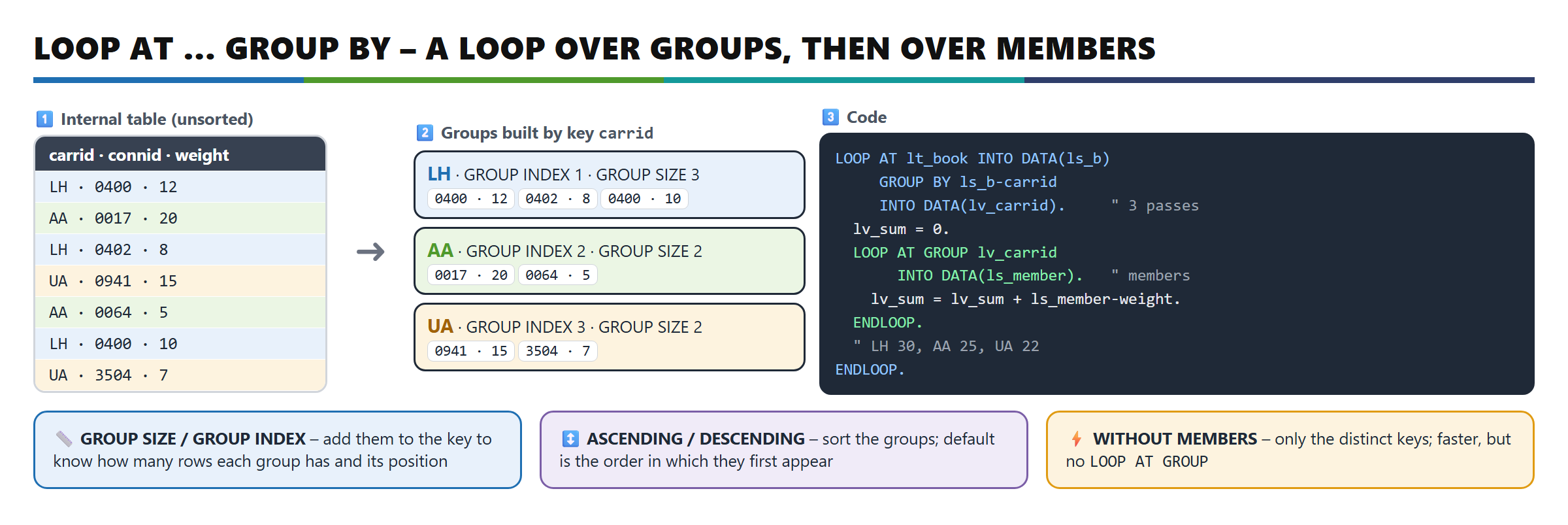
Groups the lines of an internal table by a key – no SORT and no AT NEW needed. The outer loop runs once per group; LOOP AT GROUP runs over the members of the current group.
DATA lt_bookings TYPE STANDARD TABLE OF sbook WITH EMPTY KEY.
SELECT * FROM sbook WHERE carrid = 'LH' INTO TABLE @lt_bookings UP TO 500 ROWS.

" Total luggage weight per flight
LOOP AT lt_bookings INTO DATA(ls_booking)
GROUP BY ( carrid = ls_booking-carrid
connid = ls_booking-connid
fldate = ls_booking-fldate )
INTO DATA(ls_group).
DATA(lv_weight) = CONV sbook-luggweight( 0 ).
LOOP AT GROUP ls_group ASSIGNING FIELD-SYMBOL(<ls_member>).
lv_weight = lv_weight + <ls_member>-luggweight.
ENDLOOP.
WRITE / |{ ls_group-carrid } { ls_group-connid } { ls_group-fldate DATE = USER }|
&& |: { lv_weight }|.
ENDLOOP.

" Only the distinct keys, with size and position, groups sorted
LOOP AT lt_bookings INTO DATA(ls_b)
GROUP BY ( carrid = ls_b-carrid  size = GROUP SIZE  index = GROUP INDEX )
ASCENDING
WITHOUT MEMBERS
REFERENCE INTO DATA(lr_group).
WRITE: / lr_group->index, lr_group->carrid, lr_group->size.
ENDLOOP.
7.1 Full example with all additions (IDoc segments)
DATA: lt_idoc TYPE edidd_tt,
lt_seg  TYPE RANGE OF edidd-segnam.
lt_seg  = VALUE #( sign = 'I' option = 'EQ' ( low = 'E1EDK01' ) ( low = 'E1EDP01' ) ).
lt_idoc = VALUE #( docnum = 1
( segnam = 'E1EDK01' sdata = '1' )  ( segnam = 'E1EDK14' sdata = '2' )
( segnam = 'E1EDK14' sdata = '2' )  ( segnam = 'E1EDP01' sdata = '02' )
( segnam = 'E1EDP01' sdata = '01' ) ( segnam = 'E1EDP01' sdata = '03' )
( segnam = 'E1EDP01' sdata = '04' ) ( segnam = 'E1EDS01' sdata = '5' ) ).

LOOP AT lt_idoc ASSIGNING FIELD-SYMBOL(<ls_edidd>)  " 1 work area of the outer loop
WHERE segnam IN lt_seg                 " 2 filter before grouping
GROUP BY ( segnam = <ls_edidd>-segnam  " 3 group key
size   = GROUP SIZE         " 4 number of rows in the group
index  = GROUP INDEX )      " 5 number of the group
ASCENDING AS TEXT                      " 6 sort the groups (or DESCENDING)
"WITHOUT MEMBERS                       " 7 faster, but no LOOP AT GROUP
ASSIGNING FIELD-SYMBOL(<ls_group>).    " 8 group variable
WRITE / |Group { <ls_group>-segnam } index { <ls_group>-index } size { <ls_group>-size }|.
LOOP AT GROUP <ls_group> ASSIGNING FIELD-SYMBOL(<ls_member>).
WRITE / |   { <ls_member>-segnam } { <ls_member>-sdata }|.
ENDLOOP.
ENDLOOP.
" Output:
" Group E1EDK01 index 1 size 1
"    E1EDK01 1
" Group E1EDP01 index 2 size 4
"    E1EDP01 02 / E1EDP01 01 / E1EDP01 03 / E1EDP01 04   (one line each)
Addition
Meaning
GROUP BY ( k1 = … k2 = … )
Group key; one field can also be written without parentheses: GROUP BY wa-carrid
GROUP SIZE, GROUP INDEX
Extra key components: rows in the group, number of the group
ASCENDING / DESCENDING [AS TEXT]
Sort the groups (AS TEXT = text sort by language). Default: order of first appearance
WITHOUT MEMBERS
Only the group keys; faster, but LOOP AT GROUP is then a syntax error
INTO / ASSIGNING / REFERENCE INTO
Group variable used by LOOP AT GROUP and to read the key
7.2 Grouping inside an expression: FOR GROUPS
TYPES: BEGIN OF ty_weight,
carrid TYPE s_carr_id,
weight TYPE sbook-luggweight,
END OF ty_weight,
tt_weight TYPE STANDARD TABLE OF ty_weight WITH EMPTY KEY.

DATA(lt_weight) = VALUE tt_weight(
FOR GROUPS grp OF ls_bk IN lt_bookings GROUP BY ls_bk-carrid
( carrid = grp
weight = REDUCE #( INIT w TYPE sbook-luggweight
FOR ls_m IN GROUP grp NEXT w = w + ls_m-luggweight ) ) ).
Part 8 – Other modern statements (quick reference)
Statement
Example
Since
Append / insert a constructed line
APPEND VALUE #( carrid = 'LH' ) TO lt_carr. / INSERT VALUE #( … ) INTO TABLE lt_hash.
7.40
Predicative method call
IF lo_order->is_released( ). (true when the result is not initial)
7.40
Boolean result
rv_ok = xsdbool( lv_qty > 0 AND lv_price > 0 ).
7.40 SP08
Type test
IF lo_obj IS INSTANCE OF zcl_sales_order.
7.50
Case by type
CASE TYPE OF lo_obj. WHEN TYPE zcl_a INTO DATA(lo_a). … ENDCASE.
7.50
Enumeration
TYPES: BEGIN OF ENUM ty_status, open, released, closed, END OF ENUM ty_status.
7.51
Calculation assignment
lv_count += 1. lv_total *= 2.
7.54
Immutable variable
FINAL(lv_rate) = get_rate( ).
7.57
Clean Core / ABAP Cloud uses exactly this syntax; see ABAP on BTP › 02 · ABAP for Cloud Development for the language-version rules.
Part 9 – Interview questions
Q1. What is an inline declaration and what type does the variable get?
DATA( ) / FIELD-SYMBOL( ) declare a variable where it is first written (7.40). The type comes from the right side – DATA(x) = 'ABC' is c LENGTH 3, DATA(n) = 5 is i. The variable is valid until the end of the method.
Q2. What happens when a table expression finds no line?
It raises CX_SY_ITAB_LINE_NOT_FOUND. Avoid it with OPTIONAL / DEFAULT in a VALUE expression, TRY/CATCH, line_exists( ) first, or ASSIGN itab[ … ] TO <fs> + sy-subrc.
Q3. Do line_exists( ) and line_index( ) set sy-subrc or sy-tabix?
No. line_exists is a predicate used only in conditions; line_index returns the index as its value (0 = not found). Table expressions do not set sy-subrc / sy-tabix either.
Q4. Is a table expression on a sorted table always a binary search?
Only when the given fields cover the leading part of the table key. On a standard table with a free key it is a linear search; use a sorted/hashed table or a secondary key (itab[ KEY k COMPONENTS … ]).
Q5. COND vs SWITCH?
COND = IF/ELSEIF with any condition in each WHEN. SWITCH = CASE: one operand compared for equality. Both return the initial value if nothing matches and there is no ELSE; both can THROW (7.40).
Q6. CORRESPONDING vs MOVE-CORRESPONDING?
MOVE-CORRESPONDING keeps target fields that are not copied. The CORRESPONDING operator builds a new value, so non-copied fields become initial – unless you add BASE ( target ). CORRESPONDING also has MAPPING, EXCEPT and DISCARDING DUPLICATES.
Q7. What does FILTER need?
A sorted or hashed key (primary or secondary via USING KEY) covering the WHERE fields, and conditions joined with AND (only = for a hashed key). Variants: EXCEPT WHERE, and IN ftab with a filter table.
Q8. Is FOR faster than LOOP?
Not in general. FOR/VALUE/REDUCE make code shorter and clearer; performance is about the same. Choose the right table kind and keys for speed.
Q9. How does LOOP AT … GROUP BY replace AT NEW?
It groups by any key without sorting first and without the AT NEW pitfalls (fields left of the key). The outer loop runs per group; LOOP AT GROUP reads the members; GROUP SIZE / GROUP INDEX and WITHOUT MEMBERS are optional.
Q10. Which release brought these features – and are they HANA-only?
Mostly 7.40 (SP02: inline, VALUE/NEW/CONV/COND/SWITCH, table expressions; SP05: FOR, REDUCE, CORRESPONDING; SP08: FILTER, GROUP BY, BASE). String templates are 7.02. They are ABAP language features and run on any database.
Q11. What is the difference between & and && in strings?
&& joins strings at runtime (variables, templates). & only joins literals at compile time.