How ABAP programs read and write the database: the architecture (DB interface, table buffer), ABAP SQL (called Open SQL until 7.53) with all its modern features, native SQL / ADBC, the ALV with IDA and a guide for choosing ABAP SQL, CDS, AMDP or ADBC. Pushing work into SQL is the first and easiest step of code push-down on HANA. CDS views and AMDP have their own pages.
Part 1 – How ABAP talks to the database
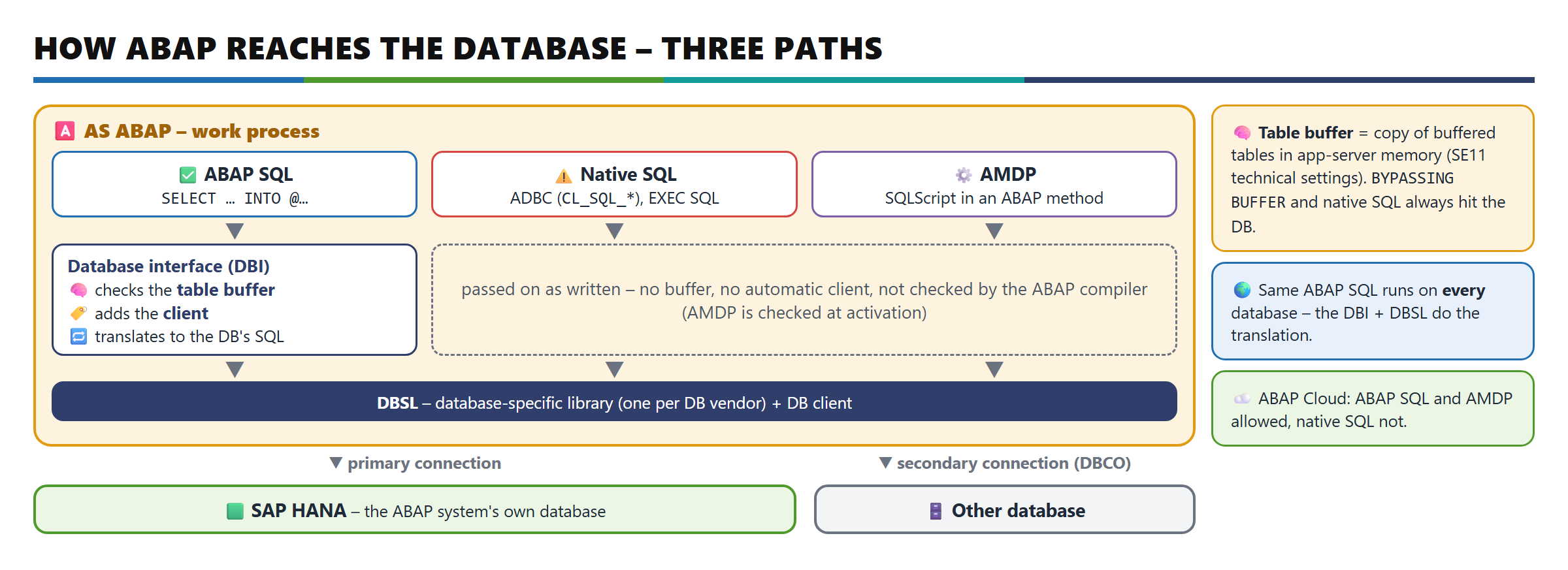
- An ABAP program never talks to the database directly. ABAP SQL goes to the Database Interface (DBI) of the work process. The DBI checks the table buffer, adds the client, and translates the statement into the native SQL of the database.
- The Database-Specific Library (DBSL) – one per database vendor (HANA, Oracle, MSSQL …) – sends it through the DB client to the database. That is why the same ABAP SQL runs on every database.
- Native SQL (EXEC SQL, ADBC) skips the DBI translation and the buffer and goes straight through the DBSL – to the ABAP database or, with a secondary connection (DBCO), to another database.
- Table buffer = copy of buffered tables in the application server memory (SE11 technical settings: single record, generic or full buffering). Reads can be served without a DB access. Native SQL and
BYPASSING BUFFERalways go to the database.
ABAP SQL | Native SQL (EXEC SQL / ADBC) | AMDP | |
|---|---|---|---|
Language | ABAP statements | SQL of the database, as text | SQLScript in an ABAP method |
Database-independent | Yes | No | No (HANA) |
Checked at compile time | Yes | No – errors at runtime | Yes (by the DB at activation) |
Client handling | Automatic | Manual ( | Manual (or |
Table buffer | Used | Bypassed | Bypassed |
Objects | DDIC tables, views, CDS | Any DB object, also non-DDIC | DDIC tables, CDS (USING) |
ABAP Cloud | Yes | No | Yes |
SQL (Structured Query Language) is the declarative language of relational databases: you say WHAT data you want, and the database decides HOW to get it. ABAP has two forms of it: ABAP SQL (Open SQL), part of the ABAP language, and native SQL (EXEC SQL / ADBC), passed to the database unchanged.
SQL statement categories – and who does them in ABAP
Category | Statements | In the ABAP world |
|---|---|---|
DDL – definition | CREATE, ALTER, DROP | ABAP Dictionary (SE11) and CDS DDL – not from ABAP SQL |
DQL – query | SELECT | ABAP SQL |
DML – manipulation | INSERT, UPDATE, DELETE, UPSERT | ABAP SQL |
DCL – control | GRANT, REVOKE | None: the DB knows one technical user. ABAP uses AUTHORITY-CHECK and CDS access control (DCL roles) |
TCL – transaction | COMMIT, ROLLBACK |
|
ABAP SQL statement | Purpose |
|---|---|
SELECT | Read rows |
INSERT | Add rows (single or array: |
UPDATE | Change existing rows |
MODIFY | Insert or update (upsert) |
DELETE | Delete rows |
| Read big results in packages |
Classic Open SQL supported only the common subset of SQL that every database understands (the "lowest common denominator"): no expressions, no outer joins beyond LEFT, no UNION. Since 7.40 SP05 it has grown step by step – this is the "enhanced / advanced Open SQL" of the HANA era.
Part 2 – ABAP SQL: the new syntax rules
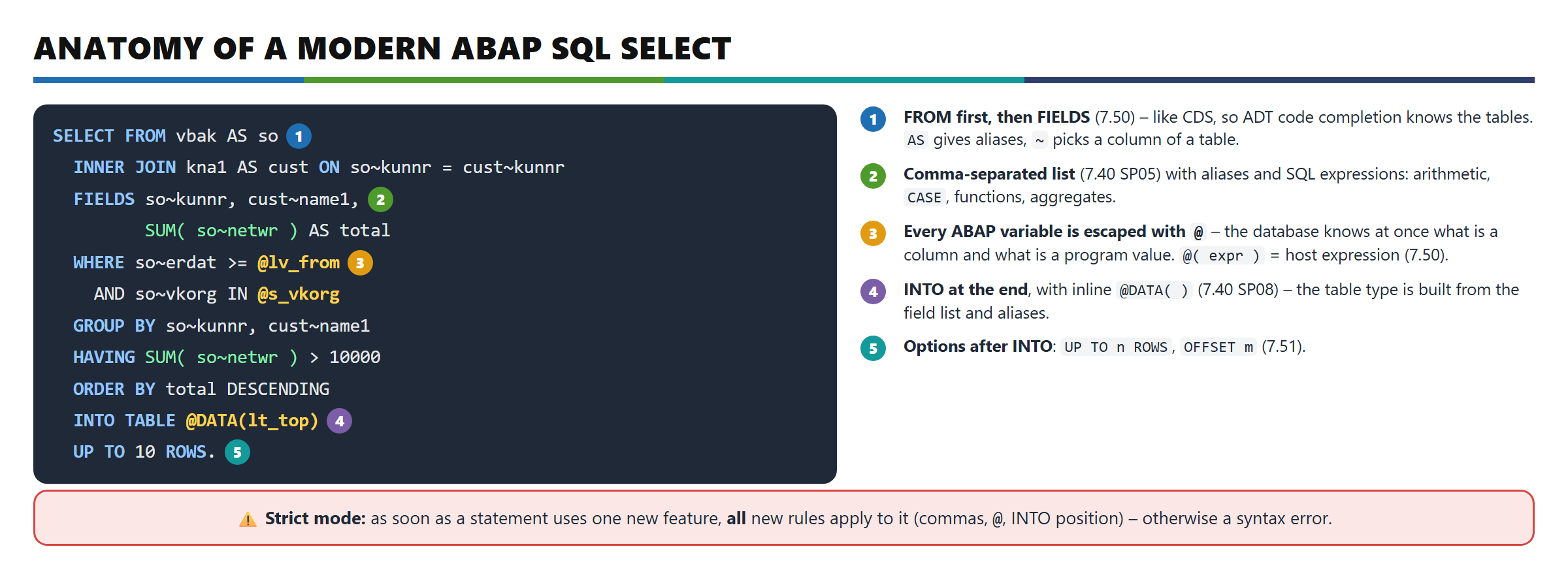
Open SQL was renamed ABAP SQL in 7.53 (S/4HANA 1809). Same thing, new name – say "ABAP SQL" in interviews.
|
Rule / feature | Syntax | Since |
|---|---|---|
Comma-separated field list | SELECT carrid, connid, fldate | 7.40 SP05 |
Host variables escaped with @ | WHERE carrid IN @s_carrid | 7.40 SP05 |
INTO at the end, inline declaration | INTO TABLE @DATA(lt_result) | 7.40 SP08 |
FROM first + FIELDS | SELECT FROM sflight FIELDS carrid, connid … | 7.50 |
Column alias | carrid AS carrier | always; needed for expressions |
Literal as a column | 'Extra column' AS new_column | 7.40 SP08 |
All columns of one table in a join | FIELDS spfli~*, sflight~fldate | 7.40 SP08 |
Host expression | WHERE carrid = @( to_upper( lv_carrid ) ) | 7.50 |
Options after INTO | INTO … UP TO 10 ROWS OFFSET 20 | OFFSET 7.51 |
- Strict mode: once a statement uses any new feature, all new rules apply to that statement (commas, @, INTO position). Mixing old and new in one statement is a syntax error.
Build a range table directly from the database (literals as columns)
|
Part 3 – SQL expressions in the field list
Calculations now run in the database – only the result travels to the application server.
3.1 Arithmetic and numeric functions
|
Function | Meaning |
|---|---|
+ - * | Normal arithmetic |
/ | Only in floating-point expressions (FLTP or decimal floating point) – for integers and decimals use the functions below |
| Integer division and remainder |
division( a, b, dec ) | Decimal division rounded to |
| Round up, round down, absolute value, round to n places |
CAST( x AS type ) | Convert, e.g. |
3.2 String functions
|
Function | Result for char1 = ' 0123', char2 = 'aAaA' |
|---|---|
| ' 0123aAaA' / ' 0123 aAaA' |
| 5 |
| 3 |
| ' 01' / '123' |
| 'XXXXX 0123' / ' 0123XXXXX' |
| '0123' / ' 012' |
replace( char2, 'Aa', '--' ) | 'a--A' |
| 'aaaa' / 'AAAA' |
| 'Aa' |
3.3 Date functions (7.50)
Function | Result |
|---|---|
dats_is_valid( dats1 ) | 1 if the date is valid, else 0 |
dats_days_between( dats1, dats2 ) | Number of days between two dates |
dats_add_days( dats1, 100 ) | Date + 100 days |
dats_add_months( dats1, -1 ) | Date one month earlier |
3.4 CASE – simple and searched
|
- In S/4HANA VBAK-VBTYP is longer (data element VBTYPL, CHAR 4) – the old one-letter values still work.
3.5 NULL and COALESCE
NULL means "no value" – it is not the initial value. NULL appears e.g. in the right-hand columns of a LEFT OUTER JOIN when no partner row exists. ABAP has no NULL: when the row arrives in ABAP, NULL becomes the initial value of the type, so you can no longer see the difference. Handle NULL in SQL with IS [NOT] NULL and coalesce( ).
|
coalesce( a1, a2, …, an )returns the first argument that is not NULL =CASE WHEN a1 IS NOT NULL THEN a1 WHEN a2 IS NOT NULL THEN a2 … ELSE an END.- Default for a missing outer-join partner:
coalesce( p~connid, '9999' ) AS connid.
3.6 Case-insensitive search
|
Part 4 – WHERE clause features
Feature | Example | Since |
|---|---|---|
Range / select-option | WHERE carrid IN @s_carrid | always |
Host expression | WHERE carrid = @( to_upper( lv_carrid ) ) | 7.50 |
Method call as host expression | WHERE movie = @( get_hulk_movie( ) ) | 7.50 |
Arithmetic | WHERE ( grosscol - openingcol ) > 10000000 | 7.50 |
Initial check | WHERE grosscol IS NOT INITIAL | 7.53 (S/4HANA 1809) |
NULL check | WHERE inv~netwr IS NULL | always |
Pattern |
| always |
Subquery |
| always (expressions later) |
|
- Host expressions
@( method( ) )/@( expr )are allowed not only in WHERE but also in the field list and in ON conditions (7.50).
Part 5 – Aggregates, GROUP BY, HAVING
Aggregate function | Returns |
|---|---|
SUM( col ) | Total |
AVG( col ) | Average (FLTP by default; |
| Smallest / largest value |
| Number of rows / of different values |
string_agg( col, ', ' ) | Values of the group joined into one string (7.54) |
- Every column in the field list that is not inside an aggregate must be in GROUP BY.
- WHERE filters rows before grouping; HAVING filters groups after grouping (can use aggregates).
|
Part 6 – Joins, FOR ALL ENTRIES, UNION, CTE, SELECT FROM @itab
6.1 Joins
On old databases developers avoided joins and used FOR ALL ENTRIES. On HANA, joins are fast and are the preferred way – one statement, the database does the work.
Join | Result | Since |
|---|---|---|
INNER JOIN | Only rows that have a partner on both sides | always |
LEFT OUTER JOIN | All left rows; right columns NULL (→ initial in ABAP) when no partner | always |
RIGHT OUTER JOIN | All right rows; left columns NULL when no partner | 7.40 SP05 |
CROSS JOIN | Every left row with every right row (no ON condition) | 7.51 |
|
6.2 FOR ALL ENTRIES – rules and the modern alternative
- Empty driver table = the WHERE condition on it is ignored → ALL rows are read. Always check
IF lt_driver IS NOT INITIALfirst. - Duplicate result rows are removed (like SELECT DISTINCT) – select all key fields or rows get lost.
- No aggregates (except COUNT( * )), and you cannot see detail rows next to the aggregate.
Modern alternative (7.52): join the internal table directly as @itab with an alias – one statement, aggregates allowed:
|
6.3 UNION (7.50)
Adds the rows of a second SELECT to the first – replaces several SELECTs with APPENDING TABLE.
- All SELECTs need the same number of columns with compatible types; column names come from the first SELECT.
- UNION = UNION DISTINCT (duplicates removed, extra work). Use UNION ALL when duplicates are impossible or wanted – it is faster.
- ORDER BY and INTO come once, at the very end. FOR ALL ENTRIES is not allowed; aggregates are.
|
6.4 Common table expressions – WITH (7.51)
A CTE is a named subquery that exists only while the statement runs – like a temporary view. Names start with +, the column list is optional, a later CTE and the main query can read earlier CTEs. Use it instead of several statements or a global temporary table, e.g. for subtotals.
|
|
6.5 SELECT FROM an internal table (7.52)
An internal table can be a data source with @itab AS alias. If the statement reads only internal tables the ABAP SQL engine runs it on the application server if possible (otherwise it is passed to the database); joined with DB tables the itab is sent to the database – keep it small.
|
Part 7 – Window expressions (7.54+)
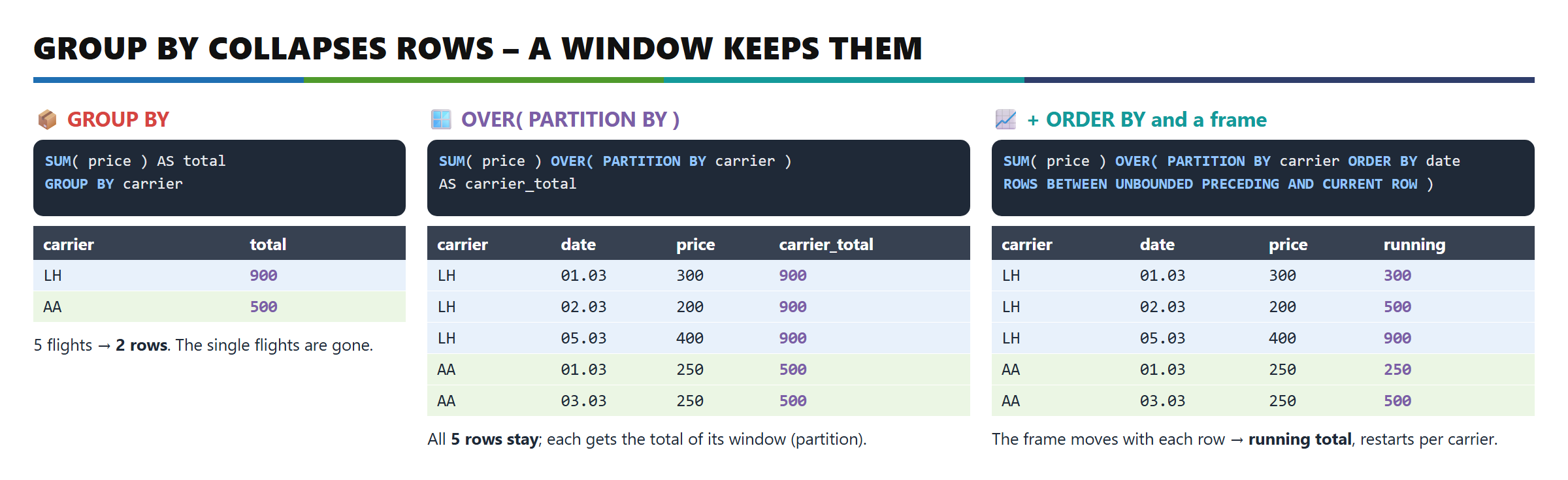
A window expression function OVER( … ) calculates over a set of rows (the window) but keeps every row – unlike GROUP BY, which collapses them. PARTITION BY splits the result into windows, ORDER BY sorts inside the window, a frame (ROWS BETWEEN …) limits it to a moving range. Window expressions came with 7.54; frames and some functions in later releases – they are not part of a "7.4/7.5" system.
|
Kind | Functions | Notes |
|---|---|---|
Aggregate | SUM, AVG, MIN, MAX, COUNT, MEDIAN, STDDEV, VAR, CORR | Over the window or the frame |
Ranking (need ORDER BY) | ROW_NUMBER( ), RANK( ), DENSE_RANK( ), NTILE( n ) | ROW_NUMBER 1,2,3,4 · RANK with gaps 1,1,3 · DENSE_RANK no gaps 1,1,2 · NTILE splits into n groups (negative n → runtime error CX_SY_OPEN_SQL_DB) |
Value (need ORDER BY) | FIRST_VALUE, LAST_VALUE, LEAD, LAG | First / last value in the window order; LEAD = next row, LAG = previous row |
Frame boundary | Meaning |
|---|---|
UNBOUNDED PRECEDING | First row of the window (start only) |
| n rows before / after the current row |
CURRENT ROW | The current row |
UNBOUNDED FOLLOWING | Last row of the window (end only) |
- LAST_VALUE trap: with ORDER BY the default frame ends at the CURRENT ROW, so LAST_VALUE returns the current row. Add
ROWS BETWEEN UNBOUNDED PRECEDING AND UNBOUNDED FOLLOWING.
|
- NTILE use case:
NTILE( 4 ) OVER( ORDER BY month )over twelve monthly totals assigns each month its quarter 1–4.
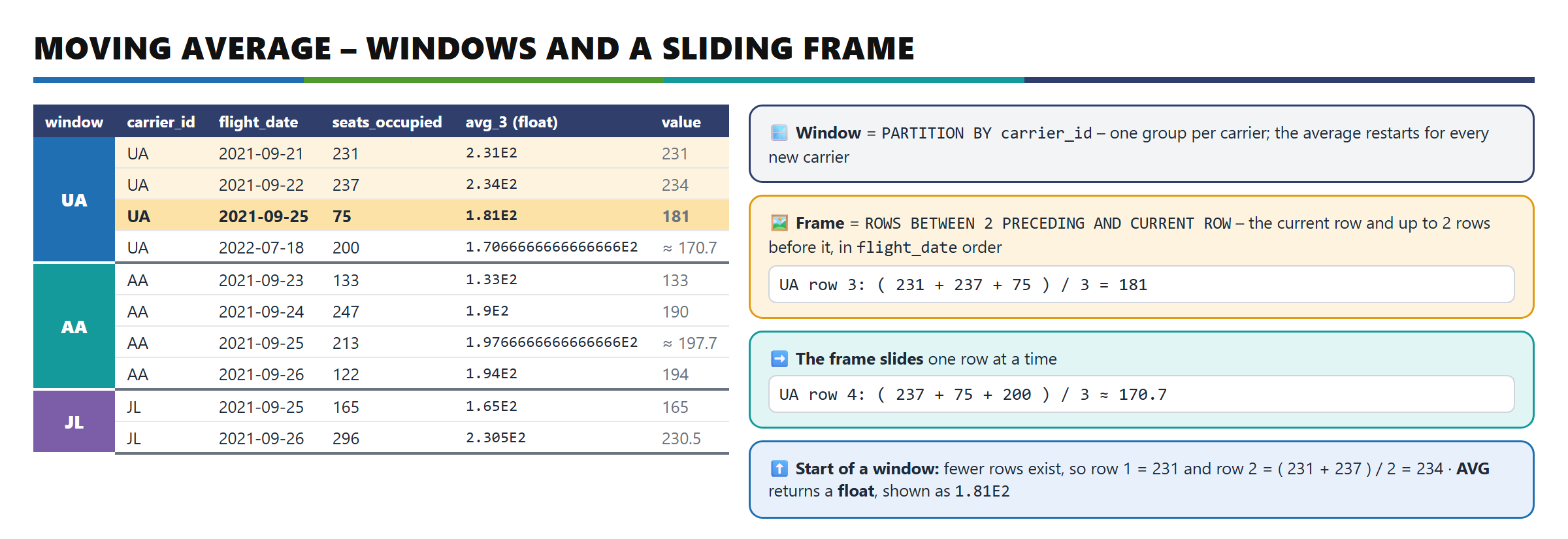
Above: each carrier is one window; for the third UA row the frame holds rows 1–3, so the average is (231 + 237 + 75) / 3 = 181 (shown as 1.81E2 because AVG returns a float).
Real-life example: order value, customer value and item counter per sales-order item
|
Part 8 – More ABAP SQL features (quick reference)
Feature | Example | Since |
|---|---|---|
Other client |
| 7.40 SP05 |
Paging | … ORDER BY carrid, connid INTO TABLE @lt UP TO 20 ROWS OFFSET 40 | 7.51 |
Sort by key | ORDER BY PRIMARY KEY | always |
Fill by name | INTO CORRESPONDING FIELDS OF TABLE @lt_target | always |
Array insert |
| always |
Insert from a subquery | INSERT ztarget FROM ( SELECT … FROM zsource WHERE … ). | 7.50 |
Update with an expression | UPDATE zstock SET quantity = quantity - @lv_qty WHERE matnr = @lv_matnr. | always |
Skip the table buffer | SELECT … FROM t001 BYPASSING BUFFER … | always |
Read big data in packages | SELECT … INTO TABLE @lt PACKAGE SIZE 10000. … ENDSELECT. | always |
Part 9 – Performance rules for ABAP SQL
Rule | How |
|---|---|
Keep the result set small | Good WHERE conditions; |
Transfer little data | Only the columns you need (no |
Few round trips | No SELECT inside LOOP; joins, subqueries, CTEs, |
Search efficiently | Use index / key fields in WHERE (on HANA column store most secondary indexes are not needed) |
Avoid repeated reads | Table buffer for small, rarely changed tables; read once into an internal table (sorted / hashed) and reuse it |
Push logic down | Calculations, CASE, string functions in SQL; reusable logic in CDS; complex logic in AMDP |
Logical databases (LDB) from old guidelines are obsolete – do not use them. Performance tools (ST05, SAT, SQLM, SWLT, ATC) are on the migration and performance page.
Part 10 – Native SQL and ADBC
Native SQL is SQL written in the database's own dialect and passed through unchanged. Use it only when ABAP SQL, CDS and AMDP cannot do the job: a secondary database connection (DBCO), DB objects that are not in the ABAP Dictionary, or DB-specific DDL. Two ways: the old static EXEC SQL … ENDEXEC and the class-based ADBC (ABAP Database Connectivity). The ADBC API is database-independent, but the SQL text you pass is database-specific.
Legacy – EXEC SQL (know it for interviews)
|
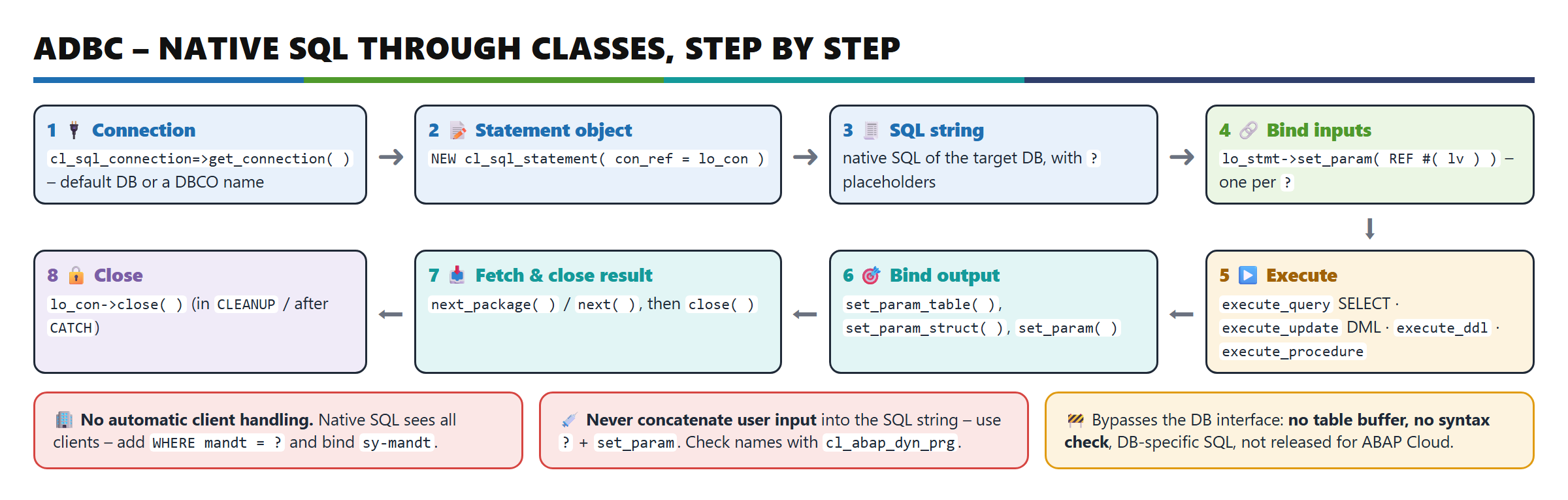
Class | Role |
|---|---|
CL_SQL_CONNECTION | Connection: |
CL_SQL_STATEMENT | Executes SQL: |
CL_SQL_PREPARED_STATEMENT | Statement parsed once, executed many times with different bound values |
CL_SQL_RESULT_SET | Result of a query: |
CX_SQL_EXCEPTION | Error from the DB (SQL code and message); also |
Example 1 – SELECT with bound parameters and client handling
|
Example 2 – DML and a DB procedure with IN / OUT parameters
|
- SQL injection: never build the SQL string by concatenating user input into it. Bind values with
?+ set_param. Table or column names cannot be bound – check them against an allow-list (cl_abap_dyn_prgmethods) before use. - Client: native SQL reads all clients unless you add
mandt = ?bound to sy-mandt. close( )on the connection matters for secondary connections; the default connection stays open.- Creating tables or procedures directly in the ABAP schema with native DDL bypasses the ABAP Dictionary and transports – demo only. Use DDIC / CDS for tables and AMDP for procedures.
Disadvantages of ADBC
- No syntax check by the ABAP compiler – errors only at runtime; SQL inside the string cannot be debugged and shows no intermediate results, so errors are hard to analyse. Long SQL strings are hard to read.
- No automatic client handling, no table buffer, database-specific SQL.
- Not released for ABAP Cloud / clean core – use ABAP SQL, CDS or AMDP there.
Legacy – know it for interviews: before CDS and AMDP (7.40 < SP05, HANA as side-car), ADBC was used to call HANA repository procedures (CALL "_SYS_BIC"."pkg/proc"( null ) WITH OVERVIEW, which returns the name of a temporary result table) and to read HANA views. Replaced by AMDP and CDS (see the AMDP page).
Part 11 – ALV with IDA (Integrated Data Access)
CL_SALV_GUI_TABLE_IDA (7.40 SP05) shows a database table, DDIC view or CDS view in an SAP GUI ALV without reading the data into an internal table. The ALV asks the database only for the visible rows; sorting, filtering and totals become new SQL queries. Optimised for HANA, but works on any database.
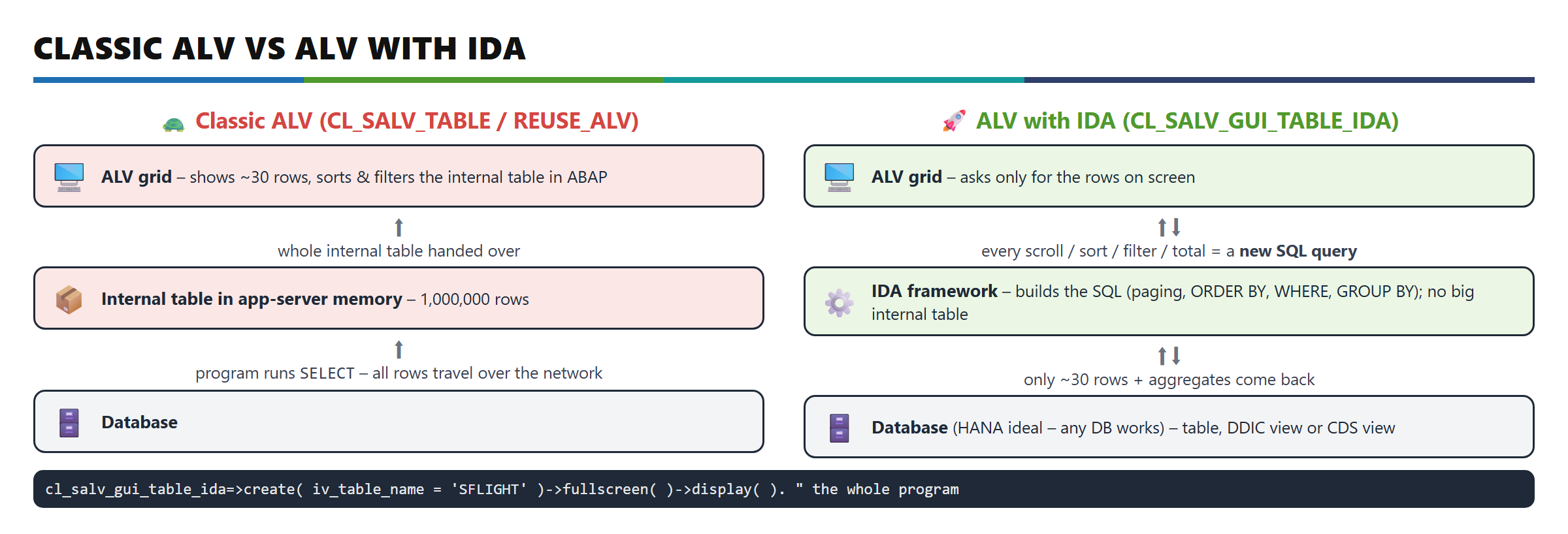
Classic ALV | ALV with IDA | |
|---|---|---|
Data retrieval | Program SELECTs everything into an internal table | Only the table / view name is passed; IDA reads |
Rows read | All rows | Only the visible rows (paging) |
Scroll, sort, filter, totals | In the application server, on the internal table | New SQL query each time, in the DB |
Memory | Size of the whole internal table | Size of the visible area |
Speed with millions of rows | Slow start, may dump (memory) | Fast |
|
Full example – selection conditions, field catalog, toolbar, double click
|
Object | Get it with | Used for |
|---|---|---|
IF_SALV_GUI_TABLE_IDA |
| Main ALV object |
IF_SALV_GUI_FIELD_CATALOG_IDA | lo_alv->field_catalog( ) | Header texts, sort/filter, visible fields |
IF_SALV_GUI_STD_FUNCTIONS_IDA | lo_alv->standard_functions( ) | Toolbar functions (print, export …) |
IF_SALV_IDA_CONDITION_FACTORY | lo_alv->condition_factory( ) | Conditions: equals, between, and, or … |
CL_SALV_RANGE_TAB_COLLECTOR | NEW cl_salv_range_tab_collector( ) | Turn select-options into named ranges |
IF_SALV_GUI_TABLE_DISPLAY_OPT | lo_alv->display_options( ) | Double click, zebra, title |
Restrictions
- Data is read again on every interaction: rows changed or deleted meanwhile are not handled (deleted rows show as empty lines).
- Totals of amounts / quantities only for one currency / unit; avoid STRING fields; at most about 2 billion cells.
- No editable cells, no background (batch) processing for in-container display – SAP GUI only.
- Modern Fiori world: the equivalent is a Fiori elements list report on a CDS / RAP service (see the RAP section).
Part 12 – ABAP SQL vs CDS vs AMDP vs ADBC: which one when?
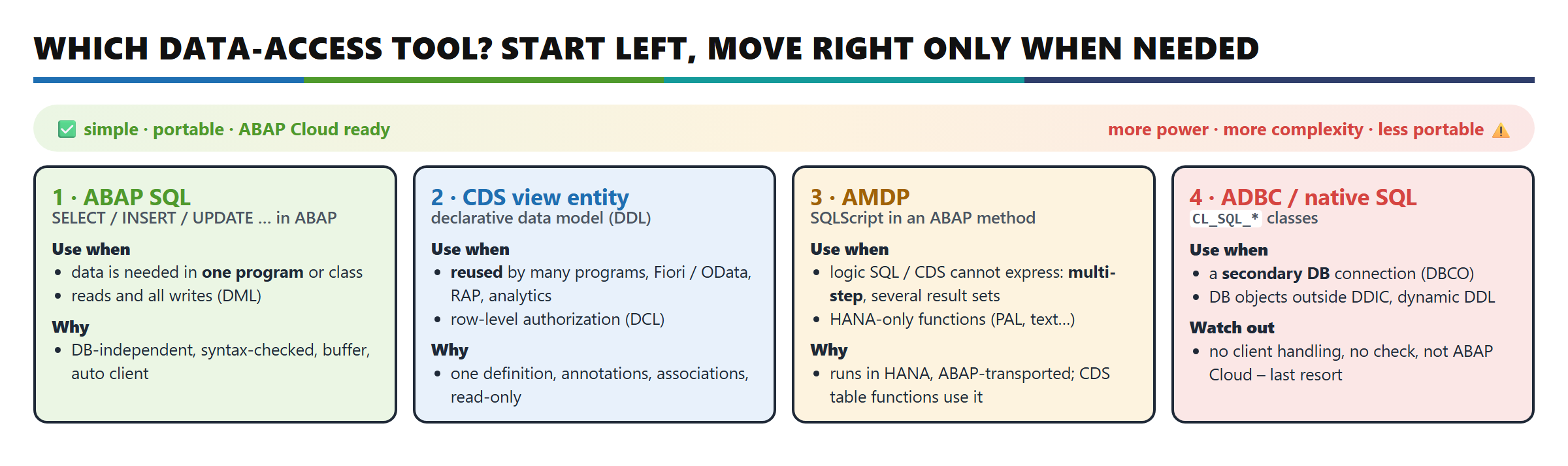
ABAP SQL | CDS view entity | AMDP | ADBC | |
|---|---|---|---|---|
What | SQL statements in ABAP code | Declarative data model (DDL) + annotations | SQLScript procedure / function in an ABAP class | Native SQL text via classes |
Reuse | Inside one program | Everywhere: ABAP SQL, OData, RAP, analytics | Via class / CDS table function | Inside one program |
DB independent | Yes | Yes | No (HANA) | No |
Writes data | Yes (DML) | No (read-only; CUD via RAP behaviour) | Yes, but avoid | Yes |
Authorization | AUTHORITY-CHECK in code | CDS access control (DCL), automatic | Manual | Manual |
ABAP Cloud | Yes | Yes | Yes | No |
Typical use | Program-specific reads, all updates | VDM, Fiori / RAP, reports used by many | Multi-step logic, several result sets, HANA functions | Secondary DB, non-DDIC objects |
Rule of thumb (SAP Press): need data only in one development object → ABAP SQL; needed across objects with one result set → CDS view; several result sets or procedural logic → AMDP. ADBC only when none of these can reach the data.
Part 13 – Interview questions
Q1. Open SQL (ABAP SQL) vs native SQL?
ABAP SQL is part of ABAP: checked at compile time, database-independent, automatic client handling, uses the table buffer, translated by the DB interface. Native SQL (EXEC SQL / ADBC) is passed unchanged to the database: DB-specific, no compile-time check, no buffer, manual client handling.
Q2. Why the @ in front of variables, and what is strict mode?
@ marks host (ABAP) variables so the parser can tell them from column names. Using any new feature puts the statement in strict mode: comma lists, @ and INTO at the end become mandatory.
Q3. When was Open SQL renamed?
In 7.53 (S/4HANA 1809) it became ABAP SQL.
Q4. FOR ALL ENTRIES or JOIN on HANA?
Prefer a JOIN (or a join with @itab, 7.52): one statement, aggregates possible. FAE pitfalls: empty driver table reads everything, duplicates are removed, no aggregates.
Q5. UNION vs UNION ALL?
UNION (= DISTINCT) removes duplicates, which costs extra work. UNION ALL keeps all rows and is faster. Both need the same number of compatible columns; names come from the first SELECT.
Q6. What is NULL and how do you handle it?
NULL = no value (e.g. outer-join columns without partner); it is not the initial value. In ABAP it arrives as initial. Handle it in SQL with IS [NOT] NULL and coalesce( ).
Q7. WHERE vs HAVING?
WHERE filters single rows before grouping; HAVING filters groups after GROUP BY and can use aggregates.
Q8. Window expression vs GROUP BY?
GROUP BY collapses rows into one row per group. OVER( PARTITION BY … ) computes the aggregate per window but keeps every row – e.g. item value next to order total, ranks, running totals (7.54+).
Q9. What is a CTE?
A named subquery (WITH +name AS ( SELECT … ), 7.51) that lives only for one statement – used for subtotals and multi-step queries without temporary tables.
Q10. What are the risks of ADBC?
SQL injection if strings are concatenated (bind with ?), missing client filter, no syntax check, no buffer, DB-specific SQL, not ABAP Cloud. Use it only for secondary DB connections or non-DDIC objects.
Q11. ALV with IDA vs classic ALV?
Classic ALV needs all data in an internal table. IDA reads only the visible rows and runs sorting, filtering and totals as SQL in the database – fast and memory-friendly for millions of rows. SAP GUI only.
Q12. When ABAP SQL, CDS, AMDP?
ABAP SQL for program-specific access and all updates; CDS for reusable, semantically rich read models (Fiori, RAP, analytics, DCL); AMDP for logic SQL/CDS cannot express or several result sets.
Q13. USING CLIENT vs CLIENT SPECIFIED?
Both read another client. USING CLIENT '100' (7.40 SP05) is the modern form and keeps automatic client handling for that one client; CLIENT SPECIFIED is obsolete.
🏠 Start Here · ◀ 03 · ABAP New Syntax · 05 · CDS Views ▶ · Sections: CORE ABAP | OOPS ABAP | ABAP on HANA | Clean Core | RAP | ABAP Points | SAP Fiori | SAPUI5 | Mobile Development (MDK) | BTP Foundations | BTP Development | CAP | SAP Build | ABAP on BTP | Integration Suite | SAP Business AI | SAP BASIS | Security | SAP SDLC
Functional: FICO ABAP | TRM ABAP | VIM | SAP BIS | SD ABAP | MM ABAP | PP ABAP | QM ABAP | PM ABAP | PS ABAP | EWM | TM ABAP | GTM ABAP | EHS ABAP | HR ABAP | BW | SAP Datasphere | SAP Business Data Cloud | SAP MDG | SAP Analytics Cloud | SAP Ariba | SAP CX | SAP IBP