How an administrator builds and runs the account structure of SAP BTP: what the global account administrator controls in the global account settings, how directories with the features Entitlements and Authorizations delegate quota and administration, how subaccounts are created, flagged, moved and deleted, how entitlements and quota flow from the contract down to a service instance, and which default role collections each level brings. Running example: one global account with a directory SALES and the subaccounts SALES-DEV, SALES-TEST and SALES-PROD that host the sales order app on BTP. The concepts themselves (global account, directory, subaccount, region, entitlement, quota) are taught in BTP Foundations › 02 – this page is the hands-on admin view. Cloud Foundry, Kyma and ABAP administration: page 02; scripting everything with the btp CLI and Terraform: page 03; account strategy and cost: page 05; trust, IdPs and role design: BTP Security › 01–02.
Part 1 – The admin levels at a glance
Every administrative task in BTP belongs to exactly one level. The global account is the contract and the source of all entitlements; it is region- and environment-independent. Directories are optional folders that can additionally reserve quota and have their own administrators. Subaccounts live in exactly one region and are fully independent of each other – members, authorizations, trust, data and service instances never cross a subaccount boundary. Below them sit the environment instances (Cloud Foundry org, Kyma cluster, ABAP system), which use their own role concepts rather than BTP role collections.
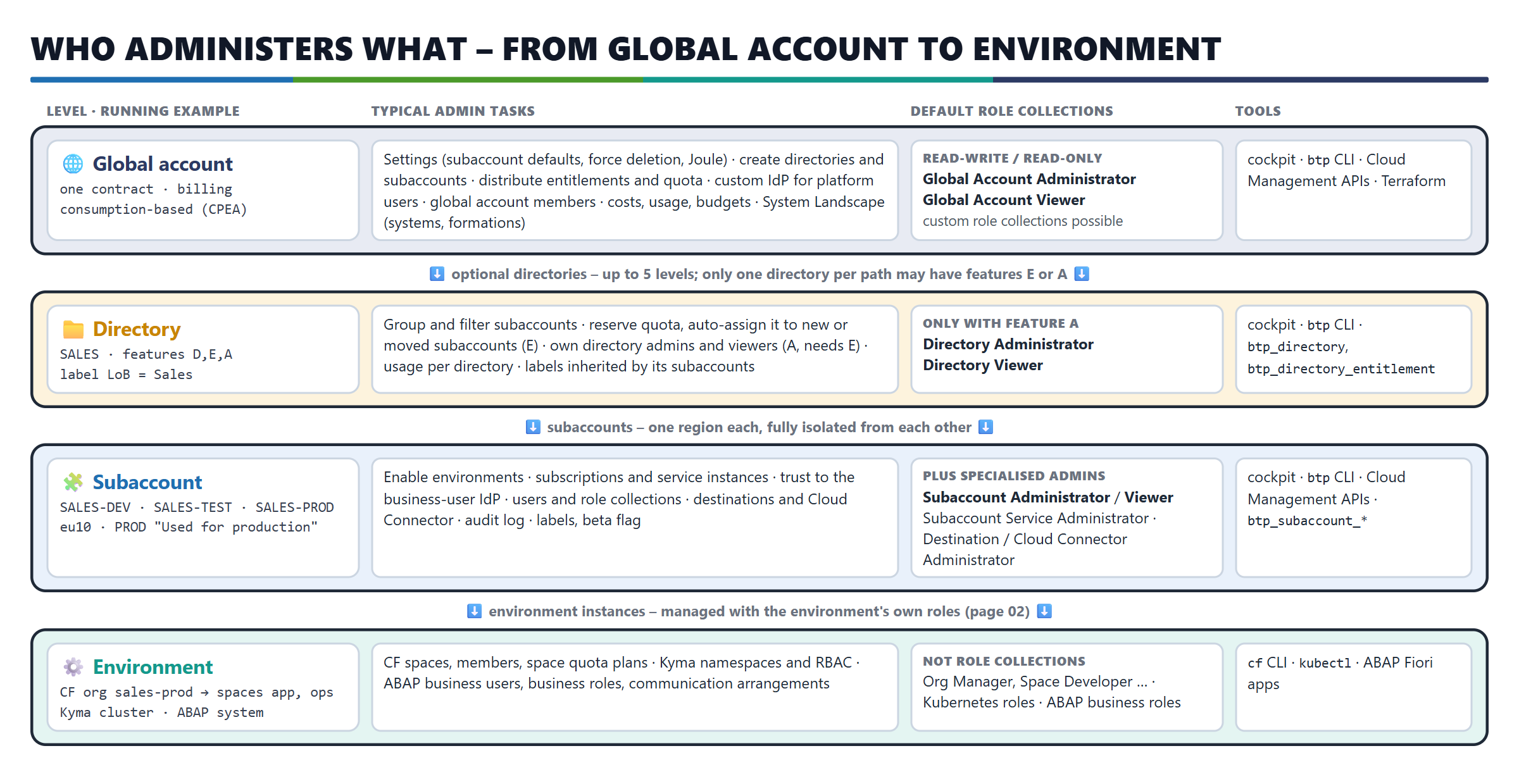
Level | Running example | Who administers it |
|---|---|---|
Global account | One consumption-based contract (CPEA) for the whole company | Global Account Administrator (read-write), Global Account Viewer (read-only) |
Directory | SALES with features D, E, A and the label LoB = Sales | Global account admins; with feature A also Directory Administrator / Directory Viewer |
Subaccounts | SALES-DEV, SALES-TEST, SALES-PROD in region eu10; PROD flagged Used for production | Subaccount Administrator / Subaccount Viewer plus specialised collections (Part 7) |
Environment | CF org per subaccount with spaces for the app; Kyma or ABAP where needed | Org Manager, Space Developer …, Kubernetes RBAC, ABAP business roles (page 02) |
- Tools on every level: the SAP BTP cockpit, the btp CLI, the REST APIs of the SAP Cloud Management service (technical name
cis) and the Terraform provider for SAP BTP – the automation side is page 03. The cockpit also offers Joule for administration tasks (Part 2). - Platform users (administrators, developers, operators) are members of these levels; business users only consume applications in subaccounts. Both live in an identity provider – SAP recommends SAP Cloud Identity Services as custom IdP instead of the default SAP ID service (BTP Security › 01).
Part 2 – Global account administration
2.1 Getting in
- After the purchase SAP sends a provisioning e-mail and an access e-mail with the URL and login ID – only the person who receives the access e-mail has initial access. Further admins are added as users of the global account with a role collection (Security › Users in the cockpit or
btp assign security/role-collection). - A user who already works in a subaccount and logs on to the cockpit is added to the global account automatically – but without any role collection.
- No global account administrator left (e.g. the only admin left the company)? SAP Note 2669325 describes how to add one through SAP for Me.
2.2 Global account settings (gear icon in the cockpit)
Tab | What you see / set | Admin notes |
|---|---|---|
General | Global account ID and name, account type, payment models, contract status, global account subdomain, geographic access restrictions, creation date | Read-only; only the display name can be changed – in the Account Explorer (Actions › Edit) or with |
Subaccounts | Defaults for new subaccounts: supported providers, default provider, default region; the option to enable force deletion of subaccounts | Force deletion is off unless you turn it on – decide it consciously (Part 4.5) |
Joule | Accept the terms for generative AI and switch Enable Joule | Joule in the cockpit is free in non-trial global accounts and limited to BTP administration; the Joule icon then appears for all global account users |
2.3 Other global-account-level pages
Cockpit page | Use |
|---|---|
Account Explorer | The hierarchy of directories and subaccounts: create, edit, move (drag and drop or Actions › Move), delete, filter by label, Export to Excel (name, ID, path, region, provider, used-for-production and beta flags, directory features) |
Entitlements › Entity Assignments / Service Assignments | Distribute and review service plans and quota (Part 5) |
Costs and Usage (tabs incl. Budgets) | Monthly usage and costs per directory and subaccount, budget thresholds with e-mail alerts – page 05 |
System Landscape (Systems, Formations) | Register SAP systems (S/4HANA Cloud, SuccessFactors …) and group them in formations for integration and extension scenarios; needs the global account admin or the System Landscape Administrator role |
Security (Users, Role Collections, Trust Configuration) | Platform users of the global account and the custom IdP for platform users – BTP Security › 01–02 |
Part 3 – Directories: features D, E and A
A directory groups subaccounts and other directories. The hierarchy can be 7 levels deep – global account on top, subaccount at the bottom – so at most 5 levels of directories fit in between. What a directory can do depends on its features, which the btp CLI and Terraform name with a letter.
Feature | Cockpit option | What it adds |
|---|---|---|
DEFAULT (D) | always on | Group and filter subaccounts, usage and costs per directory (costs only for consumption-based contracts), labels |
ENTITLEMENTS (E) | Enable entitlement management | Directory receives plans and quota from the global account, reserves them and distributes them to its subaccounts; optional auto-assignment (Part 5.3) |
AUTHORIZATIONS (A) | Enable user management | Own Directory Administrator / Directory Viewer users; the directory gets its own subdomain for its authorization tenant. Only together with E |
- One managed directory per path – only a single directory in any path from global account to subaccount may have feature E or A. If SALES has them, a parent "EMEA" or a child "SALES-CRM" directory can only be DEFAULT.
- Without feature A every user who can see the directory in the hierarchy can view and work in it; with A the creator becomes Directory Administrator and adds further admins.
- Turning on E for a directory that already contains subaccounts moves their current assignments and quota into the directory automatically. Turning E off returns the directory's quota to the global account.
- Features can be enabled later: cockpit (edit the directory, or its Entitlements / Users page) or
btp enable accounts/directory– features omitted in that command are disabled. - Delete a directory only when it is empty (no subaccounts, no subdirectories). Labels on a directory are inherited by every subaccount in its path.
|
Part 4 – Subaccounts: create, change, move, delete
4.1 Creating a subaccount
Account Explorer › Create › Subaccount (or Actions › Create Subaccount on the global account or a directory). You need the Global Account Administrator role collection, or Directory Administrator in a directory with features E/A. The creator is assigned as subaccount administrator automatically.
Field | Rule | Admin advice |
|---|---|---|
Display name, description | Free text, changeable | Use a naming pattern (LoB-STAGE), see page 05 |
Subdomain | Up to 63 characters: letters, digits, hyphens (not first or last); unique per region; case does not distinguish; cannot be changed | It ends up in token endpoints and app URLs – prefix it with the company, e.g. |
Region | Exactly one, fixed for the life of the subaccount | Data residency, latency, service availability (Discovery Center) |
Parent | Global account or a directory; changeable | Put stage subaccounts under their LoB directory |
Used for production | Flag only – changes no configuration; SAP operations use it when handling incidents; such subaccounts cannot be force-deleted | Set it on every PROD subaccount, never on DEV / TEST / demo |
Enable beta features | Allows beta services and plans; cannot be switched off again | Never in productive enterprise accounts; only in a sandbox subaccount |
Labels | Up to 10 per entity (Part 8) | Stage, cost object, owner |
- Create from Existing Subaccount copies properties, labels and (optionally) all service plan assignments of a template subaccount – handy for TEST from DEV (AWS, Azure and Google Cloud regions).
- At creation the platform auto-assigns some base entitlements; the btp CLI and Terraform can skip them (
--skip-auto-assign-plans,skip_auto_entitlement). - Next steps after creation: enable an environment, entitle services, set up trust and members (Part 6, BTP Security › 01).
4.2 Changing a subaccount
Editable later: display name, description, parent, Used for production, labels, and turning beta features on (one way). The subaccount ID and the subdomain are fixed. CLI: btp update accounts/subaccount (it also offers --add-me-as-admin).
4.3 Moving a subaccount
- Move between directories or back to the global account root (Account Explorer, or
btp move accounts/subaccount <id> --to-directory <id>/--to-global-account). - The subaccount takes its plans and quota with it; source and target directory quota are adjusted, and auto-assign rules of the target directory apply if it has enough quota. There is no notification when an automatic assignment fails – check with
btp list accounts/entitlementafterwards.
4.4 Deleting a subaccount
- Account Explorer › Actions › Delete (global account admin). The cockpit first checks for content – subscriptions, service instances, brokers, platforms, spaces, members.
- Clean deletion: the subaccount administrator removes the content on Instances and Subscriptions, then the subaccount is deleted. Deprovisioning can take up to 12 hours; related services may take a few more days, but are not charged during that cleanup.
4.5 Force deletion
- Possible only if force deletion of subaccounts is enabled in the global account settings and the subaccount is not marked Used for production. Works in the cockpit, with
btp delete accounts/subaccount <id> --force-deleteand through the Cloud Management APIs. - The subaccount becomes Pending Deletion for seven days (access partly blocked); you can still cancel in the Account Explorer. After that, all data – applications, instances, spaces, subscriptions, members – is gone without recovery.
- Governance rule: keep force deletion off by default, and always flag productive subaccounts – the flag is the safety catch.
Part 5 – Entitlements and quotas in practice
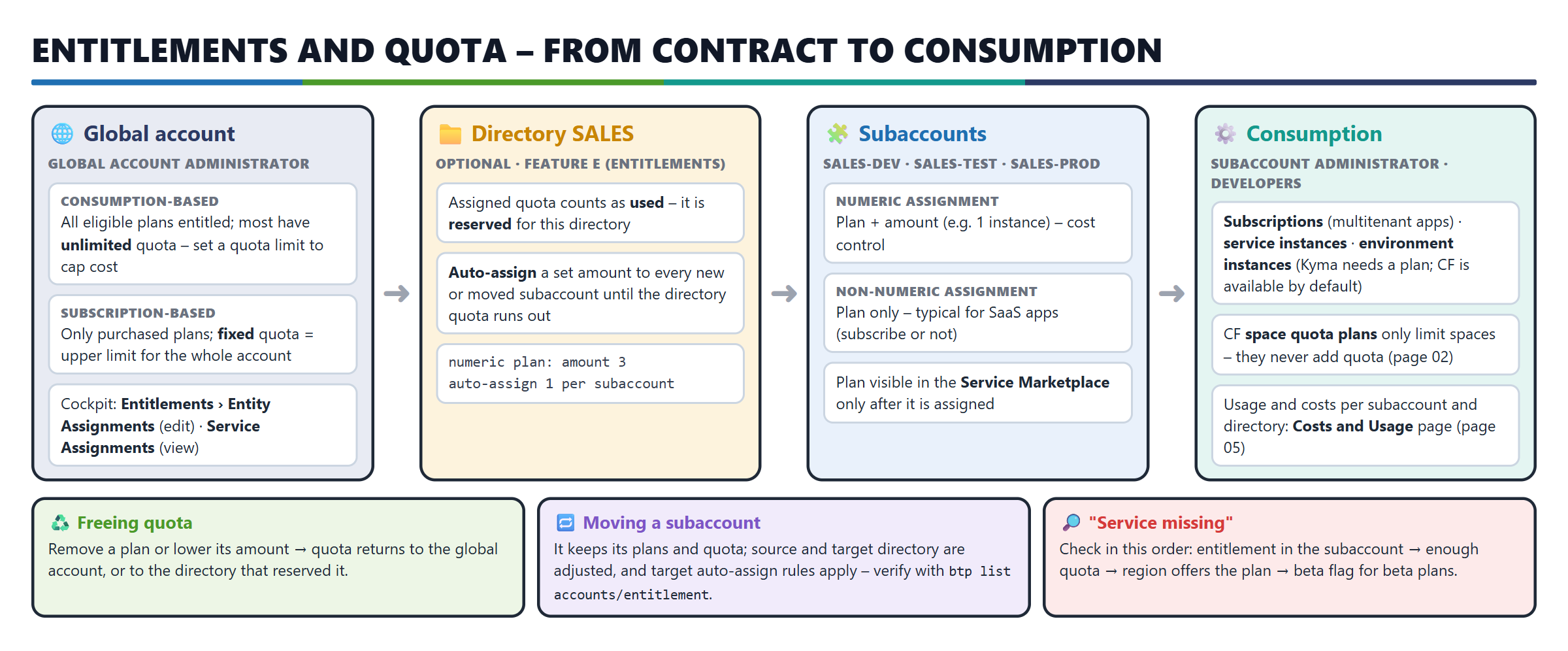
An entitlement is the right to use a service plan; quota is how much of it. Both are bought and held by the global account and only consumed in subaccounts – a directory can hold and reserve quota but never consume it. Only global account administrators (and directory administrators of a directory with E+A) change assignments.
5.1 Where you manage it in the cockpit
Page | Level | Who |
|---|---|---|
Entitlements › Entity Assignments – views Manage Assignments and View Commercial Information | Global account (and managed directory) | Edit: global account admins (directory admins for E+A directories) |
Entitlements › Service Assignments – All Services, Assignments by Service, Show commercial info | Global account | View only – where is each plan assigned, how did it get into the contract |
Entitlements of a subaccount | Subaccount | Visible to all subaccount members; editable only by global account admins who are also members |
- Edit one subaccount or directory at a time: Manage Assignments › select it › Edit › Add Service Plans › set the amount with + / − › Save.
5.2 Fixed and unlimited quota, numeric and non-numeric plans
Aspect | Variants | Consequence for the admin |
|---|---|---|
Global quota | Fixed (typical for subscription-based contracts) or unlimited (typical for most plans in consumption-based CPEA / BTPEA and Pay-As-You-Go) | With unlimited plans, tick Set Quota Limit per subaccount or directory to cap consumption |
Assignment | Numeric – plan plus amount (often = number of instances); non-numeric – plan only, e.g. SaaS applications | Non-numeric plans usually have no instance limit; control them by not assigning them |
Plan category (API / Terraform) | Numeric: SERVICE, QUOTA_BASED_APPLICATION, PLATFORM, ENVIRONMENT; non-numeric: ELASTIC_SERVICE, ELASTIC_LIMITED, APPLICATION | In automation, pass |
5.3 Directory reservation and auto-assignment
- Quota assigned to a directory with feature E shows as used at global account level even before a subaccount consumes it – it is reserved for that directory.
- Auto-Assign to Subaccounts gives each subaccount that is created in or moved into the directory a set amount, until the directory quota runs out. It does not touch subaccounts already there (unless you also distribute), and it does not work for beta services.
- Quota freed in a subaccount goes back to the global account – or, in a managed directory, back to that directory.
|
5.4 Special cases
- Environments as entitlements – quota-based environments such as Kyma must be entitled to the subaccount before they can be enabled; Cloud Foundry is available to every subaccount and is no entitlement.
- Multitenant applications – the subaccount needs the application entitlement before it can subscribe; removing the entitlement stops existing subscriptions.
- Beta plans appear only in subaccounts with Enable beta features (non-production).
- Resource providers – a global account can register your own AWS or Azure account and offer Amazon RDS for PostgreSQL or Azure Database for PostgreSQL as entitlements next to SAP services.
- Troubleshooting "service not in the marketplace": entitlement in this subaccount → quota left → plan offered in this region → beta flag for beta plans → for a directory child, does the managed directory hold the plan?
Part 6 – Environments, subscriptions and service instances
Inside the subaccount the Subaccount Administrator turns entitlements into running resources. The cockpit groups them on Services › Service Marketplace (everything entitled) and Services › Instances and Subscriptions (everything created).
Resource | How to create | Notes |
|---|---|---|
Environment instance | Subaccount Overview › Enable (Cloud Foundry, Kyma) or | Needs Subaccount Administrator and free quota for quota-based environments; one CF org per subaccount, one or more Kyma clusters (page 02) |
Subscription (multitenant app) | Service Marketplace › app › Create, choose a plan of type subscription; or | Status on Instances and Subscriptions; Go to Application gives the URL; update the plan via the row menu |
Service instance | Service Marketplace or Instances and Subscriptions › Create; in an environment (CF space, Kyma namespace) or at subaccount level (environment Other); or | Consumed through bindings or service keys; labels possible |
|
- Who creates what: Subaccount Service Administrator grants administrative access to service brokers and environments (SAP Service Manager) without full subaccount admin rights; developers in CF / Kyma create instances with their environment roles.
- Before you delete or hand over a subaccount, review Instances and Subscriptions – it is also the checklist for the clean deletion in Part 4.4.
Part 7 – Administrators and default role collections
Administration rights on the account levels are granted with role collections. They are account-specific: a role collection of the global account does not exist in a subaccount and vice versa. The default ones cannot be changed or deleted, but you can build your own from their roles.
Role collection | Level | What it grants (main roles) |
|---|---|---|
Global Account Administrator | Global account | Global Account Admin (update account, set entitlements, create / delete subaccounts), usage reporting, User and Role Administrator, audit log, System Landscape Administrator |
Global Account Viewer | Global account | Read-only view of subaccounts, entitlements, regions, usage, users and trust |
Directory Administrator / Directory Viewer | Directory (feature A) | Directory Admin (entitlements, subaccounts of the directory) / read-only; no custom role collections on directories |
Subaccount Administrator | Subaccount | Subaccount Admin, Subaccount Service Administrator, User and Role Administrator, Destination and Cloud Connector administration, audit log viewer |
Subaccount Viewer | Subaccount | Read-only incl. destinations, Cloud Connector, service brokers; not service binding credentials |
Subaccount Service Administrator | Subaccount | SAP Service Manager: administrative access to service brokers and environments |
Destination Administrator, Destination Fragment Administrator, Cloud Connector Administrator, Connectivity and Destination Administrator | Subaccount | Specialised connectivity administration – BTP Security › 03 |
- A global account administrator is not automatically admin of every subaccount, but can grant himself access with Add Me as Admin (Account Explorer › Actions). SAP lets customers opt out of this feature via a support case on component BC-NEO-CIS-OPS – an option for strict separation of duties.
- Read-only support users who must see service keys need a custom role collection: Subaccount Viewer roles plus Service Credentials Viewer.
- Assign collections to IdP groups rather than single users where possible; role design, trust and access reviews are BTP Security › 02 and › 05.
|
Part 8 – Labels, limits and a setup checklist
8.1 Labels
- Labels replace the deprecated custom properties and can be set on directories, subaccounts, multitenant subscriptions, service instances and environment instances (cockpit, btp CLI, REST APIs).
- A label is a name plus up to 10 values, or a name only (a tag – not allowed for service instances). Single-value examples: Landscape = Dev / Test / Production, Cost Object = an order or cost centre; multi-value: Contacts.
- Names and values are case-sensitive – agree on a fixed vocabulary (page 05), otherwise "Stage" and "stage" coexist. Subaccounts show the labels of their parent directories (inherited labels); filter by label in the Account Explorer and on Instances and Subscriptions.
- When updating labels with the btp CLI, pass all labels you want to keep – omitted ones are removed.
8.2 Account-level limits to know
Item | Limit (as of November 2026) |
|---|---|
Hierarchy depth | 7 levels: global account + up to 5 directory levels + subaccount |
Directories with feature E or A | One per path |
Subaccount / directory subdomain | Max. 63 characters, letters, digits, hyphens; unique per region; not changeable |
Labels | Up to 10 per entity, up to 10 values each; key and value max. 63 characters (btp CLI) |
Custom identity providers for platform users | Up to 3 per global account |
Role collections created by admins | Up to 5,000 per subaccount (more limits: BTP Security › 02) |
Subaccount deletion | Up to 12 hours; force deletion after a 7-day Pending Deletion period |
Cloud Management service APIs | Rate limit per endpoint and caller; excess calls get HTTP 429 (error code 11006), no rate-limit headers – build retries into scripts (page 03) |
8.3 Checklist – SALES landscape from scratch
- 1. Global account settings: default region, decide on force deletion (off), enable Joule if wanted; at least two Global Account Administrators.
- 2. Directory SALES with D, E, A, label LoB = Sales; add the LoB's directory administrators.
- 3. Entitle SALES with the plans of the sales order app (amounts, quota limits for unlimited plans, auto-assign where every stage needs the same).
- 4. Create SALES-DEV, SALES-TEST, SALES-PROD in the same region with company-prefixed subdomains and a Stage label; flag PROD Used for production; no beta features.
- 5. Check each subaccount's entitlements, enable Cloud Foundry (page 02), subscribe the required apps.
- 6. Trust to the corporate IdP and role collections per group (BTP Security › 01–02).
- 7. Export the account structure, put the same setup into Terraform (page 03), watch Costs and Usage (page 05).
Part 9 – Interview questions
Q1. Walk me through setting up dev, test and prod for a new line of business.
Create a directory for the LoB (features E and A if it should own quota and admins), entitle it with the needed plans, create one subaccount per stage in the same region with fixed, company-prefixed subdomains and stage labels, flag PROD as used for production, enable the environment, subscribe the apps, set up trust and role collections – and script it all with the btp CLI or Terraform.
Q2. When do you enable entitlement management on a directory, and what is the catch?
When an LoB or project should get a fixed budget of plans and quota that nobody else can take, optionally with automatic assignment to new subaccounts. Only one directory per path may have feature E or A, the reserved quota counts as used, and user management (A) only works together with E.
Q3. Is a global account administrator automatically administrator of every subaccount?
No. Global account admins create subaccounts and manage entitlements, but subaccount content needs the Subaccount Administrator role collection in that subaccount. They can grant it to themselves with Add Me as Admin unless the global account has opted out of that feature.
Q4. What does the Used for production flag do?
It changes no configuration. SAP operations use it to prioritise incidents for mission-critical subaccounts, and such subaccounts cannot be force-deleted. Set it on every productive subaccount and never on development or test.
Q5. A developer cannot find a service in the marketplace. What do you check?
Whether the subaccount is entitled to a plan of it, whether quota is left, whether the plan is offered in the subaccount's region, whether it is a beta plan needing the beta flag, and – for subaccounts in a managed directory – whether the directory holds the plan.
Q6. Explain numeric and non-numeric entitlements.
Numeric plans are assigned with an amount (often the number of instances) and are the tool for cost control; non-numeric plans, typically SaaS applications, are simply assigned or not. In consumption contracts most plans are unlimited globally, so admins set quota limits per subaccount or directory.
Q7. How do you delete a subaccount that still contains instances and subscriptions?
Preferably remove the content on Instances and Subscriptions and then delete; this can take up to 12 hours. Force deletion is only possible if it is enabled in the global account settings and the subaccount is not flagged for production; it starts a seven-day Pending Deletion period that can still be cancelled, then deletes everything irreversibly.
Q8. What happens to entitlements when you move a subaccount to another directory?
The subaccount keeps its plans and quota; the quota of source and target directory is adjusted, and auto-assign rules of the target directory apply if quota is available. Failures are not notified, so verify with btp list accounts/entitlement.
Q9. Directories or labels – which do you use for what?
Directories are the structure that can carry quota and administrators – use them for the boundaries that need delegation (LoB, project). Labels are metadata for filtering and reporting – stage, cost object, owner – and can cut across directories. Labels on a directory are inherited by its subaccounts.
Q10. Why is the subaccount subdomain an important decision?
It cannot be changed, must be unique per region and becomes part of the authentication and application URLs that trust configurations, destinations and integrations depend on. Renaming means a new subaccount, so agree a naming convention before the first subaccount is created.
Q11. Which default role collections exist for account administration?
Global Account Administrator / Viewer, Directory Administrator / Viewer (directories with user management), Subaccount Administrator / Viewer, plus specialised subaccount collections such as Subaccount Service Administrator, Destination Administrator, Cloud Connector Administrator and Connectivity and Destination Administrator. They cannot be changed, but their roles can be reused in custom collections.
Q12. The only global account administrator has left the company. What now?
SAP Note 2669325 describes how to get a new global account administrator added through SAP for Me. Prevent it by always having at least two administrators, ideally assigned through an IdP group.
🏠 Start Here · 02 · Environments ▶ · Sections: CORE ABAP | OOPS ABAP | ABAP on HANA | Clean Core | RAP | ABAP Points | SAP Fiori | SAPUI5 | Mobile Development (MDK) | BTP Foundations | BTP Admin | BTP Development | CAP | SAP Build | ABAP on BTP | Integration Suite | SAP Business AI | SAP BASIS | Security | SAP SDLC
Functional: FICO ABAP | TRM ABAP | VIM | SAP BIS | SD ABAP | MM ABAP | PP ABAP | QM ABAP | PM ABAP | PS ABAP | EWM | TM ABAP | GTM ABAP | EHS ABAP | HR ABAP | BW | SAP Datasphere | SAP Business Data Cloud | SAP MDG | SAP Analytics Cloud | SAP Ariba | SAP CX | SAP IBP