Once a subaccount exists (page 01), the real work happens inside its environments. Each of the three runtimes has its own administration model: Cloud Foundry has orgs, spaces, member roles and space quotas; Kyma has clusters, namespaces and Kubernetes RBAC; the ABAP environment is a whole ABAP system with business users, business roles and communication arrangements. This page is the administrator's view – how to enable each environment, size it, let people and systems in, and keep it running – with cockpit paths and cf, kubectl, kyma and btp commands. Running example: a global account with the subaccounts sales-dev, sales-test and sales-prod hosting the sales order app on BTP – the CAP service on Cloud Foundry, event handlers on Kyma and the RAP part in an ABAP system. How developers deploy to the runtimes (cf push, manifests, Helm, APIRules) is on BTP Development › 03; ABAP environment development, gCTS and the Landscape Portal on ABAP on BTP › 01; role collections, trust and IdP setup on BTP Security › 01–02. Plans, limits and defaults are as of November 2026.
Part 1 – Environments from the administrator's chair
Why it matters: the BTP role collections from page 01 stop at the subaccount. Inside an environment, access is controlled by the environment's own roles – Cloud Foundry org and space roles, Kubernetes RBAC, ABAP business roles. A Subaccount Administrator who has never been added to the Cloud Foundry org cannot see its apps; a Kyma developer with no RoleBinding cannot see a namespace. Knowing the three models is the core of environment administration.
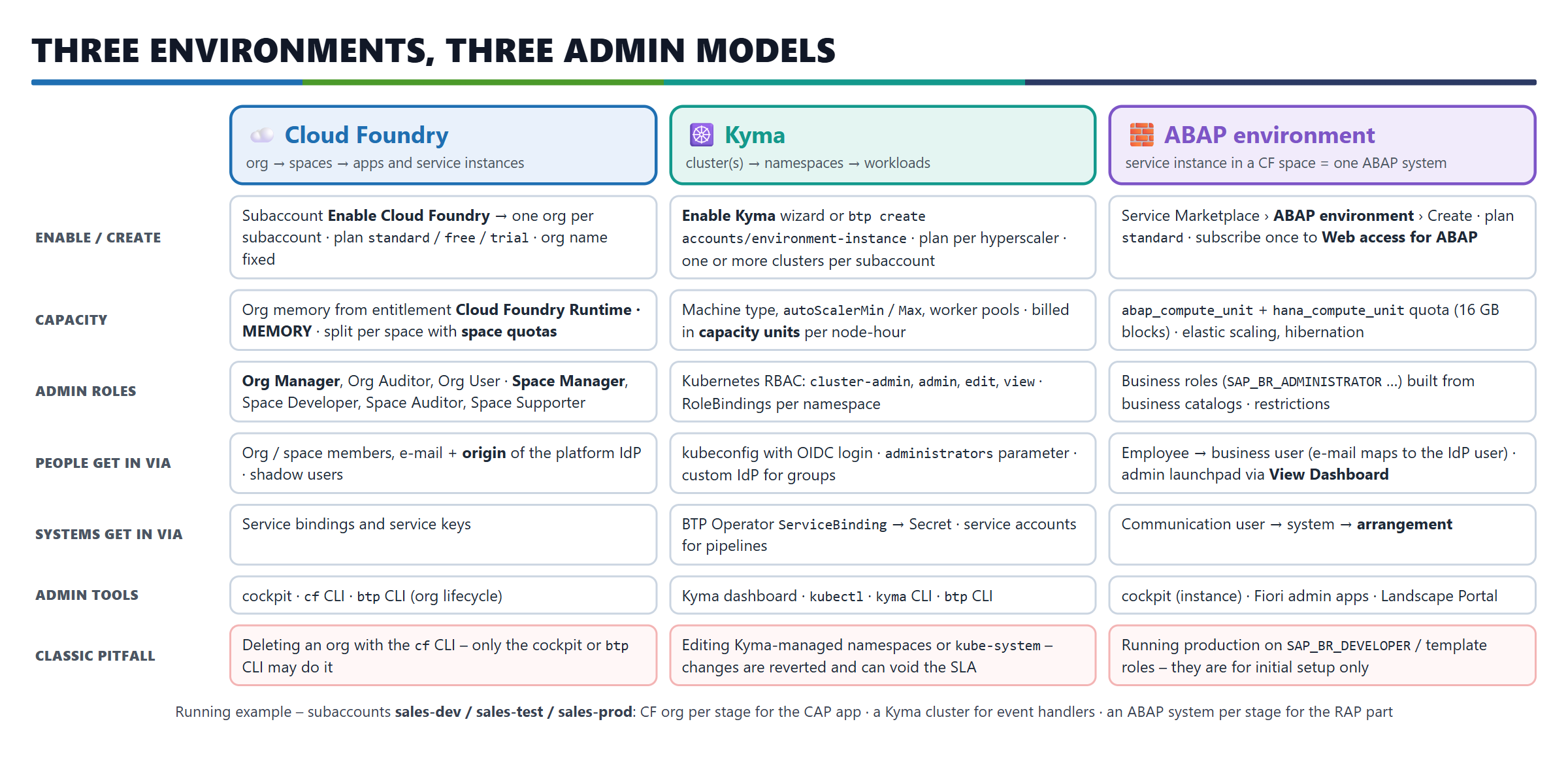
1.1 Enabling an environment
- Environments are anchored at subaccount level. Enabling one creates an environment instance: in the cockpit with Enable on the subaccount Overview, from the Service Marketplace, or with
btp create accounts/environment-instance. Prerequisites: a multi-environment subaccount, the Subaccount Administrator role collection and free quota assigned to the subaccount (page 01). - Several environments can share one subaccount – users, trust and entitlements are then managed once. SAP's security guidance recommends a staged landscape (dev / test / prod) in separate subaccounts or spaces; separate subaccounts also isolate trust, entitlements and service instances.
- The ABAP environment is not enabled like Cloud Foundry or Kyma: it is a service instance created in a Cloud Foundry space, so the subaccount needs a Cloud Foundry org first (Part 7).
1.2 Who is responsible for what
SAP's operating model for the Cloud Foundry and Kyma runtimes splits the work. SAP applies platform increments, patches the Cloud Foundry stack (and restarts apps to pick it up), keeps platform assets free of vulnerabilities and isolates workloads between customers. The customer owns everything below:
Area | Customer task (admin view) | Note |
|---|---|---|
Account and environment management | Create subaccounts and runtime environments per stage, set permissions and resource quotas for each | Parts 2–8 of this page |
Authorization and identity | Manage users and permissions in the subaccount and in the runtimes (CF spaces, Kyma clusters) | BTP Security › 01–02 for trust and role collections |
Change management | Restage CF apps to pick up new system buildpacks; patch your own container images on Kyma; keep custom module configuration in line with platform changes | SAP announces required actions in What's New |
Observability | Monitor apps, set up alerting, analyse logs and metrics | BTP Admin › 04 |
Security and compliance | Keep your code and images malware-free, fix vulnerabilities; on Cloud Foundry ask SAP before penetration or performance tests | BTP Security › 04–05 |
Backup (Kyma) | Back up any storage or database you run yourself inside the cluster | Part 6 |
Part 2 – Cloud Foundry: orgs, spaces and members
Enabling Cloud Foundry in a subaccount creates exactly one Cloud Foundry org. Inside it the Org Manager creates spaces; apps and service instances always live in a space. The developer's view of orgs and spaces is on BTP Development › 03 Part 2 – here is how you set them up and control who gets in.
2.1 Creating the org: plans and the btp CLI
Plan (service Cloud Foundry Runtime) | Use | Memory for apps |
|---|---|---|
standard | Enterprise org for real workloads | None by default – assign the entitlement Cloud Foundry Runtime, plan |
free | Try Cloud Foundry at no extra charge (free tier) | Fixed runtime quota; the |
trial | Trial subaccounts only | Trial quota; a first space |
|
- The org name may not contain spaces and cannot be changed after creation – agree a naming convention first (page 05). If the region has several Cloud Foundry landscapes, pass
--landscape. usersToRemoveremoves the Org Manager role but does not remove the user from the org.- Delete an org only in the cockpit or with the btp CLI (
btp delete accounts/environment-instance), never with the cf CLI – the org and all its data are lost.
2.2 Spaces
- Cockpit: subaccount › Cloud Foundry › Spaces › Create Space (or the Spaces table on the subaccount Overview). Enter the name and the space roles you want for yourself. Needs Org Manager.
- cf CLI:
cf create-space SPACE [-o ORG] [-q SPACE_QUOTA]– optionally with a space quota (Part 3). - Layouts: one subaccount per stage with one or a few spaces each (recommended for production), or one subaccount with
dev/testspaces for small teams. Spaces separate apps, service instances and members, but share the org's trust, entitlements and memory. - Deleting a space (cockpit trash icon or
cf delete-space) removes everything in it. Caution: if an SAP HANA database system is assigned to the org, deleting its space makes the database inaccessible.
2.3 Org and space roles
Level | Role | What it allows |
|---|---|---|
Org | Org Manager | Manages the org: spaces, space quotas, org members. The user who enables Cloud Foundry gets it automatically |
Org | Org Auditor | Read-only access to user information and org quota usage |
Org | Org User | Read-only list of org users and their roles; every org member implicitly has it |
Space | Space Manager | Manages a space, including its members |
Space | Space Developer | Manages apps, service instances, bindings and space-scoped brokers – and can read the credentials in bindings and service keys |
Space | Space Auditor | Read-only access to the space |
Space | Space Supporter | Troubleshoot and debug apps and service bindings (setting it with the CLI needs cf CLI v8) |
- Space Developer is a powerful role: it exposes every credential in the space. In test and production spaces give developers Space Auditor or Space Supporter, and deploy through a pipeline user (BTP Admin › 03).
- Org and space roles are Cloud Foundry roles, not BTP role collections. Who may approve a sales order in the app is decided by role collections (BTP Security › 02).
2.4 Adding members – and the shadow-user trap
Cloud Foundry keeps its own copy of each user (a shadow user) and checks only the e-mail and the origin – the key of the platform identity provider. When you add a member, nobody checks that the user really exists in that IdP, so a typo in the e-mail or origin creates a member who can never log on.
- Cockpit: subaccount › Cloud Foundry › Org Members › Add Members – e-mails separated by commas, spaces, semicolons or line breaks; Origin (default
sap.ids, the SAP ID service; the origin selector appears only when two or more IdPs exist); roles. Space members: open the space › Space Members. - Only an Org Manager can add org members. A Space Manager can add only users already known to the org; when an Org Manager adds a space member, the user joins the org automatically.
- Adding a user in the cockpit also creates the user at subaccount level. Deleting a user at Cloud Foundry level does not delete that subaccount user – and if you delete only the subaccount user, it is re-created as long as a Cloud Foundry role remains. Offboarding = remove both.
- With SAP Cloud Identity Services – Identity Provisioning you can provision Cloud Foundry org users automatically; with that provisioning active the limit is 1,000 platform users.
|
- Users created through the cf CLI or API get no Cloud Foundry role by default; the shadow user at subaccount level appears as soon as a role is assigned.
- Platform users from a custom IdP (an SAP Cloud Identity Services tenant) log on with
--originor with browser-based SSO; trust setup: BTP Security › 01.
Part 3 – Cloud Foundry: quotas, security groups and space events
3.1 Org quota and space quotas
The org quota comes from the entitlements of the subaccount – mainly the memory from Cloud Foundry Runtime MEMORY (page 01). Without a space quota every space may consume the whole org quota, so one runaway dev app can starve production in the same org. Space quotas cap each space.
Space quota field (cockpit) | cf CLI option | Meaning |
|---|---|---|
Space Memory (MB) | -m | Total memory of all app instances in the space |
Memory per Instance (MB) | -i | Maximum memory of one app instance |
Routes | -r | Total number of routes |
Service Instances | -s | Total number of service instances |
App Instances | – | Total number of app instances |
Allow Paid Service |
| Whether paid service plans may be provisioned in the space |
- Cockpit: subaccount › Cloud Foundry › Space Quotas › Create Space Quota, then assign it to spaces. Needs Org Manager.
-1means unlimited; if a space limit is higher than the org limit, the org limit applies.
|
3.2 Application security groups
- Application security groups (ASGs) list the protocols, ports and IP ranges that apps and tasks may send traffic to. On SAP BTP they are space-scoped, dynamic and read-only for customers; the default groups are
dnsandpublic_networks. - Cockpit: subaccount › Cloud Foundry › Spaces › a space › Security Groups (Rules table) – check it when an app cannot reach an endpoint. Outbound traffic to on-premise systems goes through the Connectivity service and the Cloud Connector, not through ASGs (BTP Security › 03).
3.3 Space events
- Space › Space Events lists every action in the space in order, with actor and target – for example
audit.route.create. Use it to troubleshoot a failed action, trace the history of an app or route, and as evidence for audits. Search by actor or target; Load More adds up to 200 events. - For long-term, tamper-proof evidence use the SAP Audit Log service (BTP Security › 04).
Part 4 – Kyma: provisioning and sizing a cluster
A Kyma environment is one or more Kubernetes clusters (built with project Gardener on the hyperscaler and region you choose) plus the Kyma modules you select. SAP operates the cluster and the modules; you decide its size, network, administrators and identity provider – several of these cannot be changed later, so plan before you click Create.
4.1 Plans
Plan (technical name) | For | Notes |
|---|---|---|
| Standard enterprise clusters | High-availability zones; can be switched to the matching build-runtime plan, not back |
sap-converged-cloud | Clusters on SAP Cloud Infrastructure | Enterprise plan |
| Kyma used within SAP Build | Update from |
azure_lite | Partners: test, demo and development ("Kyma Runtime Partner TDD") | No high availability; smaller autoscaler range |
free | Trying Kyma | One-node cluster on AWS, 30 days, once per global account, community support, no upgrade to paid |
trial | Trial accounts | On request only |
- Kyma is billed only consumption-based: capacity units (CU) per hour for worker nodes (by vCPU size) and for extra storage (persistent volumes in 32 GB blocks). 32 GB of operational storage is included. Cost control: BTP Admin › 05.
4.2 Creating the cluster
- Prerequisite: a Kyma runtime entitlement in the subaccount (page 01). Cockpit: subaccount Overview › Kyma Environment › Enable Kyma (for a second or further cluster: Create) – choose plan, instance and cluster name and region, then the Additional Parameters as form or JSON. Provisioning takes several minutes; the section then shows the instance ID, plan, Kyma dashboard link, kubeconfig link and cluster name.
- A subaccount can hold one or more Kyma clusters. Each Kyma instance gets its own SAP Service Manager instance, whose display name equals the Kyma instance ID – if that instance cannot be created, provisioning does not start.
- Mark production subaccounts as Used for production in the subaccount details – Kyma operators then prioritise their incidents.
|
4.3 Provisioning parameters
Parameter (JSON name) | Default / rule | Can change later? |
|---|---|---|
Cluster name ( | Defaults to the subaccount subdomain; also the context and user name in the kubeconfig | Optional on update |
Region ( | Hyperscaler region; list depends on plan and subaccount region | No |
Machine type ( | Provider-specific, e.g. | Yes, within general-purpose types |
Autoscaler ( | 3 / 20 nodes; min ≥ 3, max ≤ 300 ( | Yes – autoscaling itself is not covered by the SLA |
Administrators ( | E-mails bound to | Yes – overwrites the list |
OIDC ( | Default: shared SAP Cloud Identity Services tenant; set your own tenant's issuer URL, client ID, groups claim and prefix | Yes |
Networking ( | CIDR ranges for nodes (default | No – immutable |
Access control list ( | IP ranges allowed to reach the Kubernetes API; off by default | Yes – but it blocks Kyma dashboard |
Additional worker node pools | Own machine type, HA zones, autoscaler, taints, labels; name ≤ 15 characters | Yes – HA setting of a pool is permanent |
Modules ( | Default module list or your own list with channel | Yes (Part 6) |
Colocate control plane | Keep the control plane in the worker nodes' region (data residency) | – |
Audit log access ( | Credentials for the Audit Log Retrieval API in a Secret | Enabling is irreversible |
|
- Plan the networking ranges with your network team before provisioning: they cannot overlap with each other or with ranges reserved by the platform, and they cannot be changed afterwards.
Part 5 – Kyma: access, namespaces and RBAC
Kyma does not use BTP role collections for cluster access. Authentication is OpenID Connect against an identity provider; authorization is plain Kubernetes RBAC managed in Kyma dashboard or with kubectl.
5.1 Logging on
- Download the kubeconfig from subaccount Overview › Kyma Environment › KubeconfigURL. It contains no password: it calls the kubelogin plugin (
kubectl oidc-login), which opens the browser for the OIDC logon. Install kubelogin once (krew, Homebrew or Chocolatey). - The default IdP is a shared SAP Cloud Identity Services tenant – fine for development. For production SAP recommends your own SAP Cloud Identity Services tenant in the
oidcparameter: your users, MFA and risk-based rules, corporate IdP federation, and groups – the shared default tenant sends no group claims, so RoleBindings to groups need a custom IdP. - Pipelines do not log on interactively: create a Kyma service binding (provisioning service API) or a Kubernetes service account to get a kubeconfig for automation (BTP Admin › 03).
5.2 Roles and bindings
ClusterRole | Scope when bound | Typical holder |
|---|---|---|
cluster-admin | Everything in the cluster | The users in |
admin | Full control in a namespace incl. RoleBindings | Developers in their DEV / TEST namespace |
edit | Read and write most objects in a namespace, no RBAC changes | CI pipeline service account |
view | Read-only, no Secrets | Developers in PROD, auditors |
- Kyma modules extend
view,editandadminautomatically through ClusterRole aggregation, so a new module's resources (for example APIRules) are covered without editing the roles. - Kyma dashboard: select or create the namespace › Configuration › Role Bindings › Create – Role Type ClusterRole, the role, Kind User (or Group with a custom IdP), user name = e-mail.
|
5.3 SAP's recommended role setup
Who | DEV / TEST cluster | PROD cluster |
|---|---|---|
Operators | View on the whole cluster; impersonate a virtual user bound to | Same – no permanent |
Developers |
| View-only in their namespace; impersonate a virtual |
- Impersonation (Kubernetes user impersonation) avoids standing admin rights: the operator's group may only act as the virtual admin user when a task needs it. SAP publishes manifest templates for these bindings (RBAC Manifest Templates for Kyma).
- Lost access (all admins left): a Subaccount Administrator updates the Kyma instance and sets a new
administratorslist. This overwrites the existing admins – an emergency procedure, not the way to add colleagues (use RoleBindings for that). - Never change Kyma-managed namespaces (label
operator.kyma-project.io/managed-by: kyma),kube-systemor resources marked Do Not Edit – Kyma reverts unexpected changes and they can put you outside the SLA. Cluster-wide security policies must exclude these namespaces.
Part 6 – Kyma: modules and day-2 operations
6.1 Modules and release channels
- Modules are added and removed per cluster. Default (removable): Istio, API Gateway, SAP BTP Operator. Optional: Application Connector, Cloud Manager, Eventing, Keda, NATS, Registry Cache, Serverless, Telemetry; SAP modules Connectivity Proxy and Transparent Proxy; community modules have no SLA and no automatic updates. What each module does: BTP Development › 03 Part 7.
- Every module uses cluster CPU and memory – remove what you do not use.
- Channels:
regular(default) orfast. A new major or minor module version reaches the fast channel first and the regular channel about two weeks later; hotfixes can come earlier. One channel per module; versions can be upgraded but not downgraded – to return from fast to regular, wait until regular catches up or delete and re-add the module. Use fast in DEV to see changes early. - SAP announces changes that need customer action at least three months ahead in What's New for SAP BTP – subscribe to the Kyma Runtime component there.
|
- Kyma dashboard alternative: Cluster Overview › Modify Modules › Add; the module is ready when its status is READY.
6.2 Backup, scaling and plan changes
- Backup: Gardener snapshots the cluster's etcd (Kubernetes objects) – a full snapshot daily, delta snapshots every 5 minutes – for automatic recovery only, not for point-in-time restore of your configuration. Volumes are not backed up: use Kubernetes VolumeSnapshots (AWS, Azure, Google Cloud) and keep all manifests in Git (GitOps) so you can re-apply them to any cluster.
- Scaling: worker nodes scale between
autoScalerMinandautoScalerMax; for steady production load set a realistic minimum rather than relying on fast scale-out, because cluster autoscaling is not part of the SLA. - Plan change: subaccount › Instances and Subscriptions › Environments › Kyma row › Update – only standard → build-runtime within the same provider.
- Logs and monitoring: without the Telemetry module you only have short-lived
kubectl logs; ship logs, traces and metrics to SAP Cloud Logging (BTP Admin › 04).
Part 7 – ABAP environment: provisioning, sizing and updates
An ABAP environment instance is a complete ABAP system with its own SAP HANA Cloud database, run by SAP. The BTP administrator creates and sizes it in the cockpit; from then on most administration happens in Fiori apps inside the system. Concepts, gCTS, the Landscape Portal and system hibernation are on ABAP on BTP › 01 Part 3 – this part adds the admin detail.
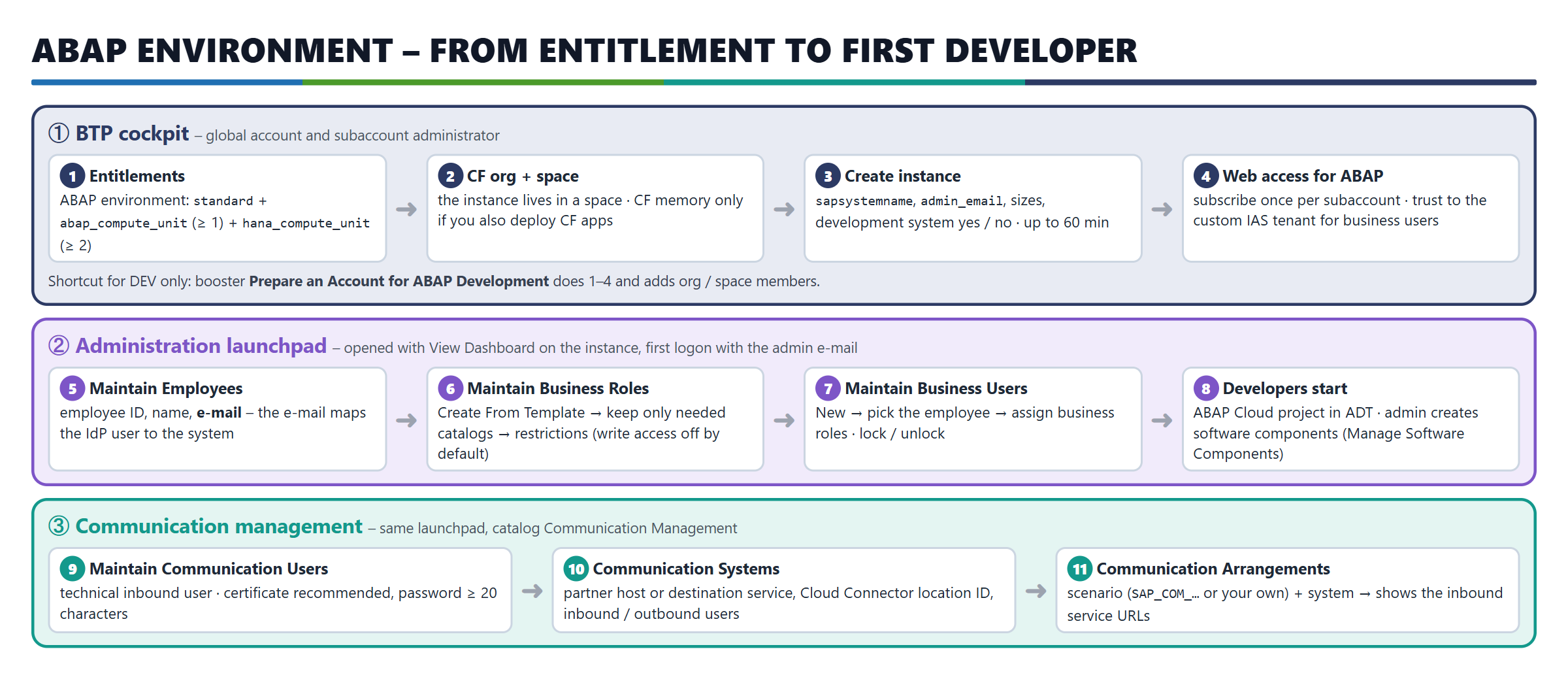
7.1 Before the instance
- Entitlements (global account › Entitlements › Entity Assignments › Configure Entitlements › Add Service Plans): service ABAP environment with the plans
standard,abap_compute_unitandhana_compute_unit. Assign at least 1 ABAP compute unit and 2 HANA compute units – the usual minimum for one system. One unit = 16 GB. - Cloud Foundry org and space – the instance is created in a space. Memory quota for Cloud Foundry Runtime is only needed if developers also deploy Cloud Foundry apps.
- Web access for ABAP (Service Marketplace, SaaS subscription) – once per subaccount, for browser access to the administration launchpad and to Fiori apps of all systems in that subaccount.
- Booster *Prepare an Account for ABAP Development* (global account › Boosters) creates subaccount, org, space, entitlements, instance and the Web access subscription and adds admins and developers as org / space members. SAP intends it for development systems only – set up TEST and PROD manually or with Terraform.
7.2 Creating the instance
Subaccount › Services › Service Marketplace › ABAP environment › Create: plan standard, runtime environment Cloud Foundry, the space, a CLI-friendly instance name, then the parameters (form or JSON). Setup can take up to 60 minutes; an e-mail goes to the admin address.
Parameter | Meaning and rules | Change later? |
|---|---|---|
ABAP System ID ( | Exactly 3 characters, uppercase letters and digits, first a letter; need not be unique | No |
Admin Email Address ( | Creates the first user with the administrator role; only this user can log on at first | Change admin via Maintain Employees |
Login Attribute ( | E-mail (default) or | Only at creation (else SAP ticket) |
Development System ( | Checked = objects can be changed in ADT. Uncheck for TEST and PROD – import only | No |
Total ABAP Runtime Size ( | ACUs: 0.5, 1, 1.5, 2, 3, 4, 4.5, 6, 8, 16, 24, 32 or 64; at most 2 × HANA memory size | Yes |
ABAP Runtime Size per Application Server | 0.5, 2 or auto; a system has 2–32 equal servers. 0.5 ACU in total = one server – not for production | Yes |
Elastic Scaling ( | Servers added and removed with load; you pay what is allocated, the configured maximum is reserved from quota | Yes |
HANA Cloud Memory Size ( | HCUs: 2, 4, 8, 16, 32 or 64 | Yes – down only to a safe minimum |
HANA Cloud Disk Size | auto = 40 × memory HCUs + 40 GB; each GB above the minimum costs 0.002 HCU | Increase only |
Multi-Availability Zones ( | Servers across zones plus a second, synchronously replicated HANA Cloud instance; doubles HCU consumption | Yes |
Customer-Managed Keys | Database encryption keys in SAP Key Management Service | Enable only – irreversible |
7.3 Updating and changing the plan
- Subaccount › space › Services › Instances › ABAP instance › Update (or View Parameters first). You need Space Developer in that space – a Subaccount Administrator alone is not enough.
- Updates run with zero downtime; HANA resizing with near-zero downtime (a few seconds). Memory and disk can be resized only once every 24 hours, memory cannot be decreased while the system is stopped (hibernated), and disk can only grow.
- Plan changes: free → standard, free → build-runtime, standard → build-runtime – never from paid to free. Assign the paid entitlements (at least 1 ACU and 2 HCU) first.
- Service key on the instance (Service Keys › Create) gives the system URL and OAuth client data, for example for a destination from SAP Business Application Studio.
- Stop / start schedules, pre-upgrade and tenant operations: Landscape Portal (ABAP on BTP › 01); release upgrades are run by SAP.
Part 8 – ABAP environment: users, business roles and catalogs
Inside the ABAP system the identity and access model is the same as in SAP S/4HANA Cloud: employees, business users, business roles built from business catalogs, and restrictions. Two layers of identity meet here: the IdP authenticates the person, the ABAP system authorizes the business user.
8.1 Getting in as the first administrator
- Cockpit: subaccount › space › Services › instance › View Dashboard opens the administration launchpad. Log on with the
admin_emailuser (with a custom Identity Authentication tenant, choose its link instead of entering a password). - Platform users (cockpit, Cloud Foundry) use SAP ID service by default. Business users of the ABAP system need a custom identity service – trust from the subaccount to an SAP Cloud Identity Services tenant, optionally as proxy to the corporate IdP (BTP Security › 01).
8.2 Employee → business user → business role
- Maintain Employees – create the employee (ID, name, e-mail), one by one or by CSV import. The e-mail is what maps the IdP user to the ABAP user, so it must match exactly.
- Maintain Business Users (F1303) – New, pick the employee, set time zone and language, add business roles, lock / unlock, download the user list.
- Maintain Business Roles (F1492) – Create From Template, keep only the catalogs the job needs, Maintain Restrictions, assign users, save (unsaved roles stay as drafts). Roles from templates start with unrestricted read and value help and no write access.
- Business Role Templates (F2820) shows what changed in SAP's templates after an upgrade and which of your roles are affected.
- Move roles from TEST to PROD by download / upload as XML in Maintain Business Roles (or by transport) – do not rebuild them by hand.
- Schedule the job in Schedule Lock for Unused Business Users to lock users who have not logged on for N days (option: also lock users without any role).
8.3 Predefined roles and key catalogs
Business role template | Purpose | Example catalogs / apps |
|---|---|---|
SAP_BR_ADMINISTRATOR | System administrator |
|
SAP_BR_DEVELOPER | ABAP developer in ADT | Development catalogs – only in development systems |
SAP_BR_ADMINISTRATOR_SW_DEV | Administrator – software development | Configure ABAP Test Cockpit, Manage API Snapshots |
SAP_BR_BPC_EXPERT | Business process configuration expert | Custom Business Configurations, Export Customizing Transports, number ranges |
SAP_BR_EXTENSIBILITY_SPEC | Key-user extensibility | Custom fields, custom logic, key user adaptation |
SAP_BR_DEVELOPERis predefined only for the initial setup; SAP's templates are intentionally broad and meant for testing. For production build company roles from the templates and restrict them – least privilege (BTP Security › 02).- Which business catalog grants an app: Business Catalogs app, or SAP's table "Business Catalogs and Business Roles" in the ABAP environment documentation.
Part 9 – ABAP environment: communication management
Every technical connection to or from the system is configured by the administrator with three apps (catalog SAP_CORE_BC_COM). The concepts – scenario, system, arrangement – are on ABAP on BTP › 01 Part 6; here is what the administrator fills in.
App | Admin decisions | Watch out |
|---|---|---|
Maintain Communication Users | User name, description; password or X.509 client certificate | Certificates are recommended. Passwords: at least 20 characters with a special character; 3 failed logons lock the user |
Communication Systems | Partner host or destination service instance and destination name, Cloud Connector switch with location ID, inbound users, outbound users and authentication, Inbound Only flag, OAuth 2.0 / SAML bearer IdP trust | One system per partner; changes are logged in change documents |
Communication Arrangements | Communication scenario ( | Always give partners the service URLs shown in the arrangement – they differ per user type |
- Order: communication user → communication system (assign the user) → communication arrangement.
- Cloud Connector setup and principal propagation: BTP Security › 03.
Part 10 – Running example and environment admin checklist
10.1 The sales order landscape
Stage | Cloud Foundry | Kyma | ABAP environment |
|---|---|---|---|
sales-dev | Org | Cluster | System |
sales-test | Org | Cluster | System |
sales-prod | Org | Cluster | System |
10.2 Checklist and pitfalls
- Naming first – org names, cluster names and ABAP system IDs are hard or impossible to change.
- Two identities per environment – platform users (cockpit, cf, kubectl) and business users (apps, ABAP launchpad) – both with a custom SAP Cloud Identity Services tenant in production.
- Least privilege inside the runtime – Space Developer,
cluster-adminandSAP_BR_DEVELOPERare development-time roles. - Quota per space, autoscaler limits per cluster, ACU / HCU per system – every environment has its own cost knob (BTP Admin › 05).
- Offboarding – remove the user from org and spaces *and* the subaccount, delete Kyma RoleBindings, lock the ABAP business user.
- Irreversible switches – Kyma networking, Kyma audit log access, ABAP login attribute, ABAP customer-managed keys, Kyma HA of a worker pool.
- Automate repeatable setup – orgs, spaces, members, Kyma instances and ABAP instances with the btp CLI or Terraform (BTP Admin › 03).
Part 11 – Interview questions
Q1. A Subaccount Administrator cannot see the apps in a Cloud Foundry space. Why?
Subaccount role collections do not grant Cloud Foundry rights. Org and space access come from Cloud Foundry roles: an Org Manager must add the user to the org and the space (for example as Space Auditor or Space Developer) with the right origin.
Q2. Which Cloud Foundry roles exist on SAP BTP and which is the risky one?
Org Manager, Org Auditor, Org User; Space Manager, Space Developer, Space Auditor, Space Supporter. Space Developer is risky because it can read every credential in service bindings and keys – keep it for development spaces and deploy to production through a pipeline.
Q3. How do you stop one space from consuming the whole org's memory?
Create a space quota (Cloud Foundry › Space Quotas or cf create-space-quota) with limits for total memory, memory per instance, routes, service instances and app instances, and assign it to the space (cf set-space-quota). The org quota always caps a space quota.
Q4. What is a shadow user and why does it matter for offboarding?
Cloud Foundry keeps its own copy of each member (e-mail plus origin) and BTP creates a matching subaccount user. Deleting the Cloud Foundry user does not delete the subaccount user, and a remaining Cloud Foundry role re-creates a deleted subaccount user – so remove both.
Q5. Which Kyma settings must you decide before provisioning?
Plan and region, networking CIDR ranges (immutable), the identity provider (OIDC) if you want groups, the administrators, the machine type and autoscaler range, and HA for extra worker pools (permanent). Audit log access cannot be switched off once enabled.
Q6. How is access to a Kyma cluster controlled?
Authentication by OIDC through the kubeconfig and kubelogin (default shared SAP Cloud Identity Services tenant or your own). Authorization by Kubernetes RBAC – ClusterRoles view, edit, admin, cluster-admin bound with RoleBindings or ClusterRoleBindings – not by BTP role collections. Groups need a custom IdP.
Q7. All Kyma administrators have left the company. What do you do?
A Subaccount Administrator updates the Kyma instance with a new administrators list. It overwrites the existing admins, so it is an emergency procedure; normal onboarding uses RoleBindings created by a cluster admin.
Q8. Does SAP back up a Kyma cluster?
Only the Kubernetes objects in etcd, for automatic recovery (daily full and 5-minute delta snapshots). Volumes and point-in-time restore are the customer's job: VolumeSnapshots for data and GitOps for configuration.
Q9. Walk through setting up an ABAP environment system for production.
Entitle standard, abap_compute_unit and hana_compute_unit; have a CF org and space; create the instance with system ID, admin e-mail, login attribute, development system unchecked, runtime and HANA sizes, multi-AZ; subscribe to Web access for ABAP; set up trust to a custom IAS tenant; in the administration launchpad create employees, company business roles and business users; configure communication users, systems and arrangements. The booster is for DEV only.
Q10. Which ABAP environment parameters cannot be changed later?
System ID, the development-system setting and the login attribute (change only via SAP ticket); customer-managed keys can be enabled but not disabled; disk size can only grow. Runtime size, HANA memory, elastic scaling and multi-AZ can be updated, HANA at most once every 24 hours.
Q11. Why should production not use SAP_BR_DEVELOPER or unchanged business role templates?
SAP delivers them broad, for initial setup and testing. Least privilege requires company roles that contain only the needed catalogs with restrictions; templates also change with upgrades (Business Role Templates app).
Q12. Scenario: S/4HANA must call a RAP service in your ABAP environment system. What does the administrator configure?
A communication user (certificate preferred), a communication system for S/4HANA with that inbound user, and a communication arrangement for the scenario that contains the service; then give S/4HANA the inbound service URL from the arrangement.
🏠 Start Here · ◀ 01 · Account administration · 03 · Automation ▶ · Sections: CORE ABAP | OOPS ABAP | ABAP on HANA | Clean Core | RAP | ABAP Points | SAP Fiori | SAPUI5 | Mobile Development (MDK) | BTP Foundations | BTP Admin | BTP Development | CAP | SAP Build | ABAP on BTP | Integration Suite | SAP Business AI | SAP BASIS | Security | SAP SDLC
Functional: FICO ABAP | TRM ABAP | VIM | SAP BIS | SD ABAP | MM ABAP | PP ABAP | QM ABAP | PM ABAP | PS ABAP | EWM | TM ABAP | GTM ABAP | EHS ABAP | HR ABAP | BW | SAP Datasphere | SAP Business Data Cloud | SAP MDG | SAP Analytics Cloud | SAP Ariba | SAP CX | SAP IBP