Pages 01–04 show how to administer, automate and operate SAP BTP. This page is the architect and governance view on top: who owns which part of the platform, how many global accounts you need, how to design directories, subaccounts and shared services for DEV / TEST / PROD, which naming and label standards make the landscape readable, which commercial model you are on (SAP BTPEA, CPEA, Pay-As-You-Go, subscription) and how to watch, budget and cross-charge cost. The main source is SAP's SAP BTP Administrator's Guide (Set Up and Plan) plus the help-portal chapters on commercial models, Costs and Usage and budgets. Running example: the global account mycompany with a Sales directory whose Dev, Test and Prod subaccounts host the sales order app on BTP. Commercial and cockpit facts are as of November 2026. Account basics (global account, directory, subaccount, entitlement) are taught in BTP Foundations › 02 and not repeated here.
Part 1 – Governance model: teams, owners and responsibilities
Why it matters: BTP is self-service – anyone with the right role collection can create a subaccount, subscribe to an application or create a service instance that costs money every month. Without clear owners the landscape grows into silos, nobody can say what a subaccount is for, and the bill arrives before anyone looks at it. SAP calls the organisational setup and governance model "one of the first and most important steps" of the journey to the cloud.
1.1 Shared responsibility between you and SAP
Party | Responsible for (Multi-Cloud Foundation) |
|---|---|
You | Account and environment management (account strategy, directories, subaccounts, resource allocation), authorisation and identity management, application development and integration, change management and operations of your apps, your data and content (incl. data privacy) |
Joint | Observability (SAP monitors its services; you monitor your components and open incidents), security and compliance (you follow the security recommendations for your solutions), high availability and disaster recovery (for example, run custom apps with several instances) |
SAP | Creating the global account and provisioning the purchased entitlements (SAP grants the first global account administrator), delivering, operating and updating runtimes and services |
Infrastructure provider | Data centres – SAP or a hyperscaler; SAP manages the hyperscaler relationship, you never contract it directly |
1.2 Teams
Team | Owns | Typical access |
|---|---|---|
Platform Engineering Team / Center of Expertise (CoE) | Account operations, account model and standards, build infrastructure (CI/CD, transports), governance and compliance guidelines, onboarding document, security document, services catalog; drives cloud adoption | Administrators of global account, directories and the TEST / PROD subaccounts |
Cloud Development Teams (DevOps) | Build and operate their applications, keep them maintained after go-live | DEV subaccounts and spaces / namespaces; read access in TEST / PROD if needed |
Cost controller / finance | Monthly cost review, balance statement check, cross-charging, budgets | Global Account Viewer (read only) |
Security / IAM team | Identity provider, role concept, audits | See BTP Security › 01–05 |
SAP recommends that the Platform Engineering Team does not own the lifecycle of individual applications – that stays with the development team – and that developers do not get broad rights in production. The Space Developer Cloud Foundry role can read service-binding credentials and data, so in PROD only CoE members who are allowed to see the data get it; deployments into TEST and PROD run through a pipeline with a technical user, and firefighter access is granted temporarily.
1.3 Owners per level
Level | Owner tasks | Default role collection(s) |
|---|---|---|
Global account | Create directories and subaccounts, distribute entitlements, add members, own the contract view and budgets | Global Account Administrator; read-only Global Account Viewer |
Directory | Members and entitlements of its subaccounts (only if user management / entitlement management is enabled for the directory) | Directory Administrator, Directory Viewer |
Subaccount | Members, trust, role collections, service instances and subscriptions | Subaccount Administrator, Subaccount Viewer |
CF org / space, Kyma cluster / namespace | Spaces, quotas, deployments | Org Manager, Space Manager, Space Developer; Kubernetes RBAC in Kyma (page 02) |
- Appoint at least one administrator per level and at least one substitute – SAP's own recommendation, so a leaver or holiday never blocks the landscape.
- A Global Account Administrator does not automatically get administrator rights in every subaccount, but can grant them to themselves (this can be switched off) – treat the role as highly privileged.
- Role collection design, trust and IdP groups: BTP Security › 02; adding members: page 01.
1.4 Governance checklist
- Team setup with IT support roles and responsibilities; who answers business users.
- An onboarding process for development projects (how a project enrols, gets a subaccount or space, which services it may use) and a knowledge-transfer process.
- Support processes, operations documentation, help desk, incident and change management (page 04).
- Account standards: hierarchy, naming, labels, directory template (Part 4).
- Cost process: who reviews Costs and Usage monthly, who owns budgets, how costs are cross-charged (Parts 6–7).
- Not everything is configured centrally in the cockpit: services such as SAP Build (Control Tower), SAP HANA Cloud or SAP Integration Suite have their own administration tools – agree per service whether the CoE or the project team owns that configuration.
Part 2 – Account strategy: how many global accounts?
A global account is the realisation of one contract with SAP and the only billable entity – directories and subaccounts are structure inside it. SAP's recommendation is clear: consolidate into as few global accounts as possible. One global account means one pool of entitlements and credits, one cost view, no silos and a lower total cost of ownership.
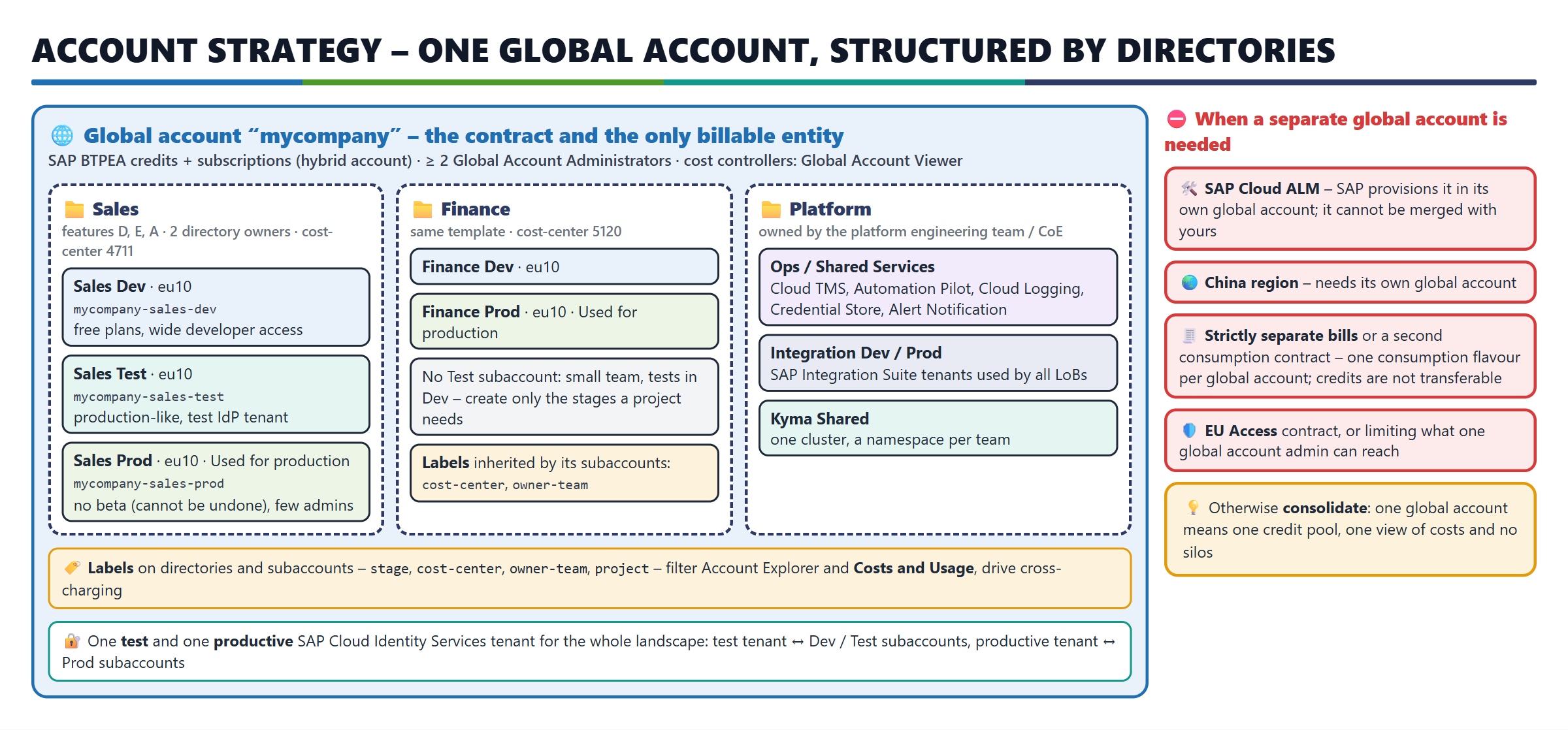
2.1 When a separate global account is justified
Reason | Why it forces a new global account |
|---|---|
SAP Cloud ALM | SAP provisions it in its own global account with a dedicated subaccount; you cannot subscribe to other apps there or consolidate it with your accounts |
Strictly separate bills | Billing happens per global account; different legal entities that need their own invoice need their own global account |
A second consumption-based contract | Multiple consumption-based contracts cannot be provisioned into the same global account, and only one consumption flavour (BTPEA, CPEA or Pay-As-You-Go) is allowed per global account; credits cannot be transferred between global accounts |
EU Access contract | Named by SAP as an exception to consolidation |
China region (for example in an HA setup) | A China region needs a separate global account |
Restricting the global account admin | When even the top administrator must not reach certain subaccounts |
Legal or compliance isolation | Usually separate subaccounts are enough; in some cases separate global accounts are required |
- Moving existing subaccounts from one global account to another is a support process – see SAP Note 3246456.
- SAP partners building ABAP add-ons separate development and production into different global accounts because they run on different partner licences – a licensing reason, not a technical one.
2.2 Contracts and the global account (hybrid account)
Situation | Result |
|---|---|
Several subscription contracts | Can all be provisioned into the same global account – recommended |
New consumption contract into a global account with subscriptions | A hybrid account: usage within the prepaid subscription quota is free of extra charge, everything beyond it is charged under the consumption terms – review active subscriptions and usage first to avoid unintended overage |
Second consumption contract | Needs its own global account (2.1) |
Ask before signing: into which global account will this contract be provisioned? SAP application packages can also bring BTP entitlements with them (for example SAP Build, see SAP Build › 01); check the order form for the target global account.
2.3 Drafting the account model – SAP's checklist
Step | Question | Design consequence |
|---|---|---|
1 | How many global accounts exist, which commercial models, any legal constraints? | Consolidate except for the cases in 2.1 |
2 | Legal entities that need local separation? | Separate subaccount sets per legal entity, grouped by directories |
3 | Which services can be shared (HANA Cloud, Integration Suite, Work Zone, Task Center, Kyma)? | Reserve central shared-services subaccounts (Part 3) |
4 | Which criteria structure the organisation (location, subsidiary, functional area, internal vs partner, project)? | Most stable criterion = top directory level; development stages always as separate subaccounts |
5 | Do cost reports follow another cut than the directories? | Labels (Part 4) |
6 | Which regions, which HA setup? | One subaccount per region; failover in another region = another subaccount; China = another global account |
7 | Cloud Foundry, Kyma or both? | Runtime layout (Part 3) |
8 | Activity logging needed? | Audit log set-up (BTP Security › 04) |
9 | Standards? | Owners per level, naming, labels, directory template; pilot with a few teams and refine |
Stakeholders from legal, finance and governance belong in the design workshop. SAP provides account-model templates in the BTP Solution Diagram repository for drawing the draft. Create only the subaccounts and runtimes you really need – more can be added later.
Part 3 – Landscape design: stages, shared services, runtimes and regions
3.1 How the model grows
Stage | Structure | Trigger |
|---|---|---|
Start with the basics | One global account, one subaccount each for DEV, TEST and PROD | First project |
Grow per project | One DEV / TEST / PROD set per project or team, grouped with directories and labels, plus one or more shared-services subaccounts | Second team or project |
Adapt to the organisation | Extra directory layers per location or subsidiary above the project directories; administration automated, for example with Terraform (page 03) | Several locations or subsidiaries |
- DEV – development and testing of increments. TEST – integration testing in a production-like setup. PROD – production. In strongly DevOps-driven companies TEST can also serve production while all testing happens in DEV.
- Hierarchy limit: up to 7 levels from global account to subaccount, i.e. up to 5 directory levels.
3.2 Subaccounts or spaces / namespaces?
SAP's rule of thumb: subaccounts are for isolation, spaces and namespaces are for structuring. Use at least separate subaccounts per stage; inside a subaccount, structure by project with CF spaces or Kyma namespaces.
Feature | Subaccount | CF space | Kyma namespace |
|---|---|---|---|
Segregation of data access, network connectivity, ingress | Yes | No | No |
Dedicated data management in elastic services (e.g. SAP HANA Cloud) | Yes | No | No |
Own trust configuration / identity provider | Yes | No | No |
Grant access and authorisations | Yes | Yes | Yes |
Destinations, formations, Cloud Connector | Yes | No | No |
Cost and usage monitoring in cockpit / APIs | Yes | Usage per space (export) | No |
Limit resources | BTP quotas (mandatory) | Space quotas | Kubernetes resource quotas |
- To see the cost of one project or department exactly, give it its own subaccount – costs are not reported per application or per Kyma namespace.
- Integration follows the stage: DEV subaccount ↔ DEV on-premise system through its own Cloud Connector tunnel, PROD ↔ PROD (BTP Security › 03).
3.3 Shared services
Sharing services cuts cost, centralises governance and avoids duplicate data. SAP's learning content recommends grouping them in a Shared Services directory, with an Ops subaccount for services that act on other subaccounts.
Pattern | Examples | How consumers reach it |
|---|---|---|
Central service in an Ops subaccount | SAP Cloud Transport Management, SAP Automation Pilot | Works on other subaccounts through destinations / APIs |
Shared per stage (DEV / TEST / PROD) | SAP Integration Suite, SAP Build Work Zone advanced edition, SAP HANA Cloud | Teams use the tenant of their stage; HANA Cloud is mapped to other environments with its own sharing method |
Instance sharing | SAP Cloud Logging, Object Store (plans that support sharing) | Reference instance (SAP Service Manager), |
Per team, never shared | SAP Business Application Studio in each DEV subaccount | Own subscription |
Manual credentials (fallback) | Across regions, global accounts or to non-BTP targets | Service key → user-provided service / Kubernetes Secret; you own rotation – one key per consumer |
3.4 Runtimes
- Cloud Foundry: one org per subaccount (1:1) – three subaccounts for DEV, TEST, PROD.
- Kyma: one subaccount can have several clusters (1:n); SAP recommends at least two subaccounts – one cluster for DEV + TEST separated by namespaces (
sales-dev,sales-test) and one for PROD (sales). A cluster is not free: use separate clusters for segregation, not for structure. - Both: the same subaccount can run CF and Kyma to share services such as HANA Cloud; in larger landscapes SAP recommends dedicated, shared Kyma subaccounts. Cost optimisation is easier with one runtime per subaccount.
- ABAP environment: systems are service instances inside the stage subaccounts; administration on page 02.
3.5 Regions and identity
- Each subaccount runs in exactly one region; choose it for data residency, latency and service availability (SAP Discovery Center). Production close to users and back ends.
- SAP Cloud Identity Services comes with a productive and a test tenant. Common pattern: test tenant ↔ DEV / TEST subaccounts, productive tenant ↔ PROD; never run production on a test tenant. Details: BTP Security › 01.
3.6 Running example: the sales order app landscape
Subaccount | Region / runtime | Holds | Who administers |
|---|---|---|---|
Sales Dev ( | eu10, CF space | App development, free plans where possible, Business Application Studio | Sales dev team |
Sales Test ( | eu10, same space name | Integration test against the S/4HANA QA system | CoE; developers read-only |
Sales Prod ( | eu10, same space name, Used for production | Productive app, PROD Cloud Connector tunnel | CoE via pipeline |
Ops (Platform directory) | eu10 | Cloud Transport Management, Automation Pilot, Alert Notification | CoE |
Shared Logging (Platform directory) | eu10 | One Cloud Logging instance shared with the Sales subaccounts | CoE |
Part 4 – Naming conventions, labels and directory templates
4.1 SAP's naming recommendations
- Use one pattern for subaccount, subdomain and CF org / Kyma cluster – for example lower-case the subaccount name and replace spaces with hyphens: subaccount
Sales Prod→ subdomain and orgmycompany-sales-prod. - Include the company name or an abbreviation in subdomains and CF org names (they appear in URLs); subaccount names don't need it because they are always shown inside the global account.
- Lower-case letters and hyphens; no spaces or underscores. Exception: subaccount display names may contain capitals and blanks.
- Reuse identical space and namespace names across DEV, TEST and PROD so corresponding resources are easy to find. In a shared Kyma cluster add a stage suffix (
sales-dev,sales-test); in a dedicated PROD cluster none (sales). - Keep names short: a DNS label is limited to 63 characters and CF routes combine org, space and app (
{CF_ORG}-{CF_SPACE}-{APPNAME}) – "prod", not "production". - The subdomain cannot be changed after the subaccount is created. Never put personal data into names, descriptions or labels.
4.2 Labels
Labels are user-defined key / value tags on directories, subaccounts, multitenant application subscriptions, service instances and environment instances. They replace the older single-value custom properties (deprecated in the btp CLI and APIs).
Rule | Detail |
|---|---|
Size | Up to 10 labels per entity; each label has a key and up to 10 values; key and value up to 63 characters each (btp CLI) |
Value optional | A label without value works like a tag ( |
Case-sensitive |
|
Inheritance | A subaccount shows the labels of its parent directories; filtering by a directory label also lists its subaccounts |
Where used | Account Explorer and Instances and Subscriptions filters; Costs and Usage search; label columns in the Excel export |
Updating via CLI |
|
A practical label set: stage (dev / test / prod), cost-center, owner-team, project, plus flagged-for-deletion for clean-up campaigns. Use directories for the stable organisational cut and labels for reports that cut across it.
4.3 Directory features and the directory template
Feature | Code | What it enables |
|---|---|---|
DEFAULT | D | Always on: group and filter subaccounts, usage and cost per directory (costs only with consumption-based contracts), labels |
ENTITLEMENTS | E | Assign entitlements and maximum quota to the directory, then distribute them to its subaccounts; optional auto-assignment to new or moved subaccounts |
AUTHORIZATIONS | A | Directory administrators and viewers (user management); only together with E; needed for the directory's own Usage Analytics page and for a directory-level usage API instance |
- Only one directory in a path may have E or A enabled; all others in that path keep only D. Enable them on the LoB directory, not on both a location and a project directory below it.
- SAP's template for a new directory: name (per naming guideline), at least two owners, description (target developers, application types, runtimes, subscriptions), cost center and an enrolment rule for how projects join.
|
- Used for production helps SAP operations treat incidents on mission-critical subaccounts correctly – set it on PROD only.
- Beta features cannot be switched off again once enabled – never enable them in PROD.
Part 5 – Commercial models: SAP BTPEA, CPEA, Pay-As-You-Go and subscription
As of November 2026, SAP BTP enterprise accounts use two commercial models. Consumption-based: you get access to all current and future services eligible for the model and switch services on and off as needed – in three flavours. Subscription-based: you subscribe to named services for a fixed price and period. Prices, minimums and discounts are never in the documentation – they are in the SAP price list, the SAP Discovery Center estimator and your order form.
Model (as of Nov 2026) | How you pay | Key terms | Fits |
|---|---|---|---|
SAP BTPEA (SAP BTP Enterprise Agreement) – consumption | Prepaid cloud credits for the contract, annual commitment, billed annually in advance | Minimum investment, volume discounts; monthly balance statement deducted from credits; overage billed in arrears at list price; top up credits any time; new consumption services added to the catalog are included | Planned use cases, many services, flexibility to switch |
CPEA (Cloud Platform Enterprise Agreement) – consumption | Same credit mechanism as BTPEA | BTPEA is its evolution; existing CPEA customers may continue and renew; not all CPEA services are in BTPEA and vice versa; certain restrictions apply (SAP pricing FAQ) | Existing CPEA customers – evaluate BTPEA at renewal |
Pay-As-You-Go – consumption | Nothing upfront, billed monthly in arrears | No minimum, no commitment; same services as BTPEA; charges not discountable; transition to CPEA possible if you have no other CPEA global account | Unclear use cases, a PoC in a productive account, starting small |
Subscription | Fixed fee, paid in advance, typically 1–3 years | Only the subscribed services (also bundles); user or resource metrics; more volume or services via a contract change; renewable | Established use cases with known quantities |
5.1 Rules that shape the landscape
- Only one consumption flavour per global account; BTPEA and CPEA can coexist only in separate global accounts.
- Consumption and subscription can be combined in one global account (hybrid account) or kept in separate ones.
- A consumption contract can be changed to a subscription licence (and not every consumption service exists as a subscription) – discuss with the SAP account executive.
- Consumption-based global accounts give every subaccount a default Cloud Foundry runtime memory quota of 200 GB (standard plan), billed on actual use; the global account administrator can change it.
- Free tier plans (no time limit, monthly capacity limits, upgrade to a paid plan without migration) are available in BTPEA, CPEA and Pay-As-You-Go global accounts; the trial is a separate, non-commercial 90-day account. Details: BTP Foundations › 02.
- Partners: BTPEA for partners and test, demo and development licences via the SAP Partner Portal, including a Pay-As-You-Go variant for test, demo and development.
- Naming: SAP presents BTP as part of the SAP Business AI Platform since 2026; help pages already say "on SAP Platform" for some services, while contracts and the cockpit still use SAP BTPEA, CPEA and Pay-As-You-Go (as of November 2026).
5.2 Contract transparency in the cockpit
Global account › Entitlements › Service Assignments › switch on Show commercial info: the column Entitlement Source shows how each plan came into the global account (a product or bundle subscription, the consumption contract, free services), and the commercial type shows Free Tier, Always free or Consumption. Filter on All Subscription Based to list everything your subscriptions include. The (i) button next to a service links to its documentation and Discovery Center entry.
5.3 Choosing the model – architect's view
Situation | Recommendation |
|---|---|
Pilot, unclear volumes, several services | Consumption (Pay-As-You-Go to start, BTPEA once usage is predictable) |
Stable workload with known users or capacity | Subscription – usually cheaper than paying per use |
Mature landscape with both | Hybrid account: subscriptions for the steady base, consumption for new and variable services – and budgets on the consumption part |
Entities that must be billed separately | Separate global accounts – accept that credits are not shared |
Part 6 – Usage and cost analytics
Global account › Costs and Usage is the central cost page (consumption-based or hybrid accounts). A global account with only subscription contracts sees a Usage page instead – usage, no costs. You need Global Account Administrator or Global Account Viewer.
Tab | Shows | Use it to |
|---|---|---|
Overview | Monthly Cost Summary (estimate so far, forecast for the month, last month, average), a BTPEA / CPEA / Pay-As-You-Go card with credit consumption, Cost and Usage Recommendations, Last Month's Prepaid Quota Consumption (hybrid), Cost Breakdown and Distribution | See the credit position and spikes at a glance |
Billing | Monthly charges per plan (View by Service) or per directory / subaccount (View by Account), last 12 months; prepaid quota vs charged usage in hybrid accounts | Verify the balance statement, prepare cross-charges |
Usage | Raw, non-aggregated monthly usage per plan, incl. free plans and subscription usage | Find who uses what, also in subscription accounts |
Budgets | Budgets and thresholds (Part 7) | Get warned before the money is gone |
6.1 Rules for reading the numbers
- The monthly balance statement (SAP for Me) is legally binding; the cockpit is for information. Costs are shown in the contract currency.
- Only the global account is billed. Subaccount and directory costs are estimates – the global bill is distributed proportionally to usage, which can produce fractional users or API calls per subaccount.
- Data between the last balance statement and today is an estimate (striped bars), not a forecast.
- The BTPEA / CPEA card can show a forecast for the next 6 months (or to the end of the contract period); it needs about 9 months of consistent history and is not available in the last month of a credit period. The contract is split into credit periods, typically one year each.
- Services that report at global-account level appear under the technical entity
REPORTED-AT-GLOBAL-ACCOUNT-LEVEL(IDDEFAULT_SA). Deleted subaccounts with charges in the last 12 months stay listed as "(deleted)". - Search and filters work on service, plan, subaccount, directory, label, product ID (SKU) and metric; bookmark a filtered view and share the link with a project owner.
6.2 Usage Analytics, export and APIs
Tool | What you get |
|---|---|
Subaccount › Usage Analytics | Actual usage of the subaccount's services and subscriptions, filter by CF space |
Directory › Usage Analytics | Actual usage per service or per subdirectory / subaccount; only for directories with user management (feature A) and for directory admins; updated every 24 hours |
Export (Costs and Usage header) | Excel with sheets Global Account Info, Global Account Costs, Subaccount Costs by Service, Actual Usage, Labels; label keys as extra columns; 12, 24 or 36 months; optional CF Space Costs by Service (beta, proportional split) |
SAP Usage Data Management service (technical name | Resource Consumption APIs on the SAP Business Accelerator Hub: |
SAP sample BTP Resource Consumption Monitor | Open-source example (SAP-samples on GitHub) combining the usage APIs with SAP Alert Notification for automatic cost alerts |
Part 7 – Budgets, alerts, cross-charging and cost optimisation
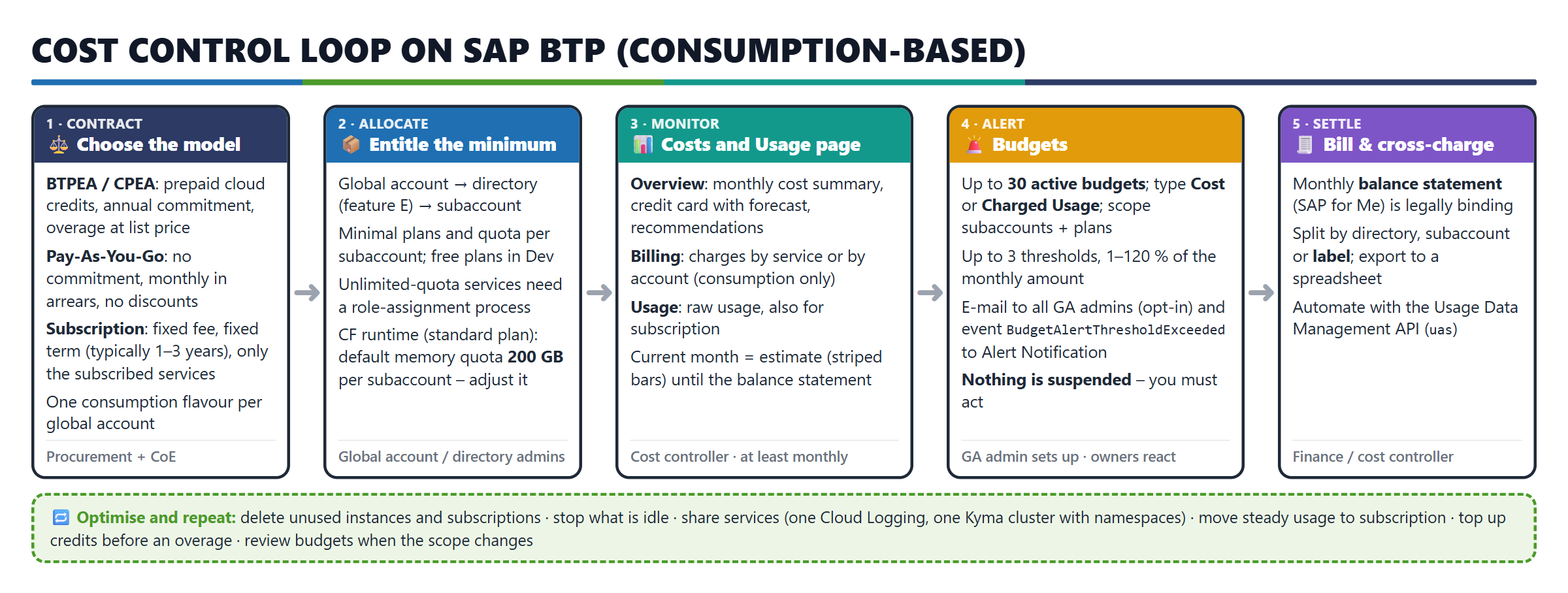
7.1 Budgets
Global account › Costs and Usage › Budgets › Create. Available for BTPEA, CPEA and Pay-As-You-Go global accounts (also hybrid) to global account administrators and viewers, subject to country availability (as of November 2026).
Setting | Options |
|---|---|
Type | Cost (list-price data, contract currency) or Charged Usage (one service plan and metric, for example API calls); type and start date cannot be changed later |
Scope | All or selected subaccounts; all or selected plans (Cost) – only services that already have usage can be chosen |
Amount and period | Monthly amount; start date from today, optional end date (no end date = never expires) |
Thresholds | Up to 3, each 1–120 % of the monthly amount (e.g. 70 / 90 / 100 %) |
Alerts | Opt-in e-mail to all global account administrators (not customisable) and, always, the event |
Limit | Up to 30 active budgets per global account; expired budgets stay visible; deleted budgets cannot be restored |
- Nothing is suspended when a budget is exceeded – owners must reduce usage, switch off services, adjust the budget or buy more credits.
- Alerts are based on estimates, can arrive late and are sent once per threshold crossing; without a 100 % threshold you get no notice that the budget itself was exceeded.
- In a hybrid account, usage inside the prepaid subscription quota is not evaluated by budgets.
- Example: budget "Sales Prod – monthly", type Cost, scope
mycompany-sales-prod, thresholds 70 / 90 / 100 %, e-mail on, plus an Alert Notification subscription that posts to the Sales team channel (page 04).
7.2 Cross-charging
- Split costs by directory or subaccount (Billing › View by Account) or by label (cost center, project) in the search or the Excel export.
- For shared services use either a fixed rate (per user, per employee) or a service-specific metric per consumer (API calls, page views, storage) – SAP names both options.
- Automate monthly cross-charging with the
uasAPIs instead of copying numbers by hand.
7.3 Cost optimisation levers
Lever | How |
|---|---|
Entitle the minimum | Only the plans and quota a subaccount needs; directory entitlements (E) cap what a LoB can distribute; free plans in DEV |
Unlimited-quota services | Usage can exceed the plan – govern who gets the application roles that drive it |
Default CF memory quota | Lower the 200 GB default where a subaccount needs less |
Share instead of duplicate | One Cloud Logging, one Kyma cluster with namespaces, shared HANA Cloud, central Integration Suite tenant |
Clean up | Delete unused instances, subscriptions and subaccounts; stop idle apps; label candidates |
Right model | Move steady usage to a subscription; top up BTPEA credits before an overage at list price |
Review cadence | Costs and Usage at least monthly; check credit balance, prepaid quota and recommendations; review budgets whenever the scope changes |
Part 8 – Interview questions
Q1. How many global accounts should a company have on SAP BTP?
As few as possible – ideally one. The global account is the contract and the only billable entity; consolidation gives one pool of entitlements and credits, one cost view and no silos. Exceptions: SAP Cloud ALM (always its own global account), strictly separate bills, a second consumption-based contract, an EU Access contract, a China region, or the need to restrict the global account administrator.
Q2. Subaccount or Cloud Foundry space – how do you decide?
Subaccounts are for isolation, spaces and namespaces for structuring. Only subaccounts separate data access, network and ingress, have their own trust, destinations and Cloud Connector, and appear in cost reports. So stages (DEV / TEST / PROD) and anything that must be billed or secured separately get subaccounts; projects inside a stage get spaces or namespaces.
Q3. Describe SAP's recommended account model evolution.
Start with one global account and DEV, TEST and PROD subaccounts. With a second project, create a subaccount set per project, group them with directories and labels and add shared-services subaccounts. With several locations or subsidiaries, add a directory layer per location on top and automate administration with Terraform.
Q4. Explain the consumption-based flavours SAP BTPEA, CPEA and Pay-As-You-Go.
BTPEA and CPEA: prepaid cloud credits with an annual commitment, billed annually in advance, volume discounts, monthly balance statement, overage in arrears at list price, credits can be topped up; BTPEA is the evolution of CPEA and gets new consumption services. Pay-As-You-Go: no upfront payment or commitment, billed monthly in arrears, not discountable. Only one flavour per global account.
Q5. When do you prefer a subscription over consumption?
For established use cases with a fixed set of services and known quantities – a fixed price for a fixed term (typically 1–3 years), independent of usage, often cheaper than consumption. Consumption fits pilots and changing requirements. Both can be combined in a hybrid account where usage beyond the prepaid quota is charged under the consumption terms.
Q6. A customer signs a second BTPEA contract for a subsidiary. What happens to the account model?
Multiple consumption-based contracts cannot be provisioned into the same global account, so the new contract needs its own global account – with its own bill and credits that cannot be transferred. If separate billing is not required, extend the existing contract instead and model the subsidiary as a directory.
Q7. Where do you see BTP costs, and how reliable are subaccount numbers?
In the cockpit on the global account's Costs and Usage page (Overview, Billing, Usage, Budgets) and via the SAP Usage Data Management service APIs. Only the global account is billed; subaccount and directory costs are proportional estimates, the current month is an estimate until the balance statement, and the monthly balance statement in SAP for Me is legally binding.
Q8. How do budgets work on SAP BTP and what do they not do?
A global account can have up to 30 active budgets of type Cost or Charged Usage, scoped to subaccounts and plans, with up to three thresholds between 1 and 120 % of the monthly amount. Exceeding a threshold sends an optional e-mail to all global account admins and an event to SAP Alert Notification. Budgets never stop or suspend usage – people have to act.
Q9. How do you cross-charge BTP costs to departments?
Structure directories and subaccounts by department or project and add labels such as cost center; split costs in Billing › View by Account or by label, or export to Excel with label columns, or automate with the usage APIs. Shared services are charged with a fixed rate or a service-specific usage metric per consumer.
Q10. Which naming conventions and labels would you introduce?
One pattern for subaccount, subdomain and org (Sales Prod → mycompany-sales-prod), company abbreviation in subdomains and orgs, lower case with hyphens, short names because DNS labels and routes are limited to 63 characters, identical space names across stages, no personal data. Labels for stage, cost center, owner team and project, documented as a fixed, case-consistent list.
Q11. Who should have access to PROD subaccounts, and why?
Only the Platform Engineering Team / CoE, with deployments through a pipeline and a technical user; developers get DEV access and at most read access in TEST and PROD. Space Developer can read credentials and data, and small changes such as a destination affect all apps in the subaccount. Each level has an owner plus a substitute; firefighter access is temporary.
Q12. Scenario: BTP costs jumped 40 % last month. What do you do?
Open Costs and Usage: check Cost and Usage Recommendations and Cost Breakdown, then Billing › View by Service to find the plan and View by Account to find the subaccount (filter by label to reach the owner). Compare with raw usage on the Usage tab, ask the owner, reduce or switch off the usage, and create a budget with 70 / 90 / 100 % thresholds plus Alert Notification so the next spike is caught early. If the growth is permanent, top up credits or move it to a subscription.
🏠 Start Here · ◀ 04 · Operations · 06 · Interview Questions ▶ · Sections: CORE ABAP | OOPS ABAP | ABAP on HANA | Clean Core | RAP | ABAP Points | SAP Fiori | SAPUI5 | Mobile Development (MDK) | BTP Foundations | BTP Admin | BTP Development | CAP | SAP Build | ABAP on BTP | Integration Suite | SAP Business AI | SAP BASIS | Security | SAP SDLC
Functional: FICO ABAP | TRM ABAP | VIM | SAP BIS | SD ABAP | MM ABAP | PP ABAP | QM ABAP | PM ABAP | PS ABAP | EWM | TM ABAP | GTM ABAP | EHS ABAP | HR ABAP | BW | SAP Datasphere | SAP Business Data Cloud | SAP MDG | SAP Analytics Cloud | SAP Ariba | SAP CX | SAP IBP