Once the global account, subaccounts and environments exist (pages 01–02) and are scripted (page 03), somebody has to run them: notice problems before users do, route alerts to the right people, keep logs long enough to analyse an incident, move releases into production in a controlled way, follow SAP's platform updates and open a support case when the platform itself is the problem. This page is the administrator's view of that work: SAP Cloud ALM for operations, SAP Alert Notification service, SAP Cloud Logging, SAP Cloud Transport Management, platform updates and maintenance, service status and support. Running example: the global account with SALES-DEV, SALES-TEST and SALES-PROD subaccounts hosting the sales order app on BTP (CAP service, App Router, SAP HANA Cloud), plus a central administrative subaccount for shared tools. The developer side – CI/CD pipelines, logging inside a CAP app, the Job Scheduling service – is on BTP Development › 05 · DevOps, Operations & Observability; this page links to it instead of repeating it. Facts on plans and limits are as of November 2026.
Part 1 – Operations on SAP BTP: responsibilities and the tool map
Why it matters: in an on-premise landscape Basis owns the servers, the kernel and the monitoring in Solution Manager. On BTP SAP operates the infrastructure and the platform services, but you operate everything you put on it. If nobody in your team owns monitoring, alerting and transports, nobody does – SAP will not tell you that your app crashed at 3 a.m.
1.1 The operating model – who does what
SAP publishes an operating model for the Cloud Foundry and Kyma runtimes that splits operational tasks between SAP and the customer (the contract always takes precedence). The administrator-relevant lines:
Area | SAP | Customer (you) |
|---|---|---|
Platform changes | Applies product increments and corrections to infrastructure, systems and services; patches the Cloud Foundry stack and restarts buildpack apps to consume it | Restage apps to pick up new system buildpacks; update custom buildpacks; build and patch container images in Kyma; keep custom Kyma module configuration correct |
Applications | Provides tools and APIs for lifecycle management; isolates workloads between customers (Cloud Foundry) | Design, deploy, configure and operate the apps in the subaccount, incl. availability, performance, scaling and health / readiness reporting; adopt current tool versions |
Accounts and access | Provisions the ordered packages, initial quotas, subscriptions and trust | Create subaccounts and environments per stage, quotas, users and permissions (pages 01–02; BTP Security › 01–02) |
Observability | Platform monitoring (not your apps) | Monitor resources and performance of your apps, set up monitoring and alerting for business-critical apps, analyse logs and metrics |
Security and compliance | Keeps the platform free of vulnerabilities and malware | Keep your code, packages and images free of malware and vulnerabilities; in Cloud Foundry ask SAP for approval before penetration or performance tests |
Network | Platform network operations | Own custom domains (recommended for production) |
1.2 Which tool answers which question
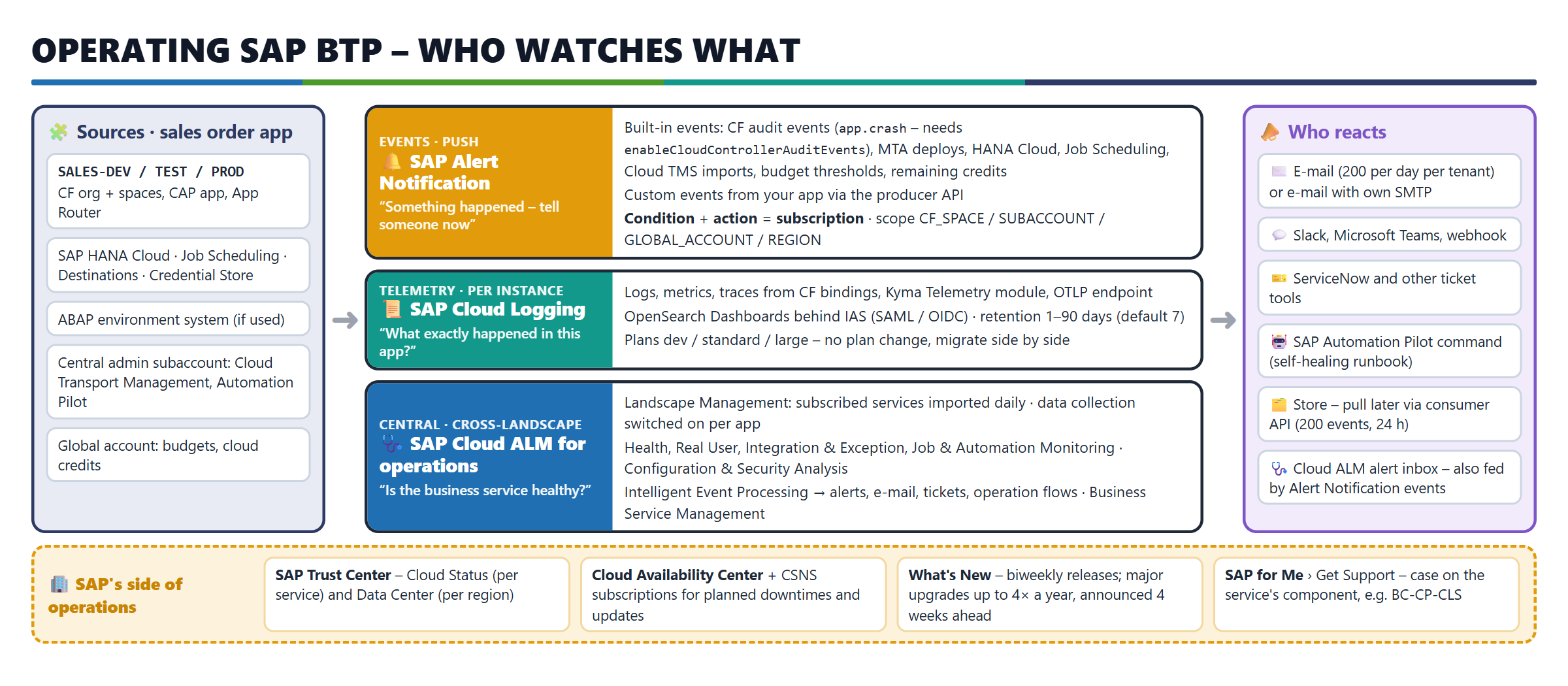
Question | Tool | Owner in the sales order landscape | Part |
|---|---|---|---|
Is the business service healthy across all systems? Who is affected? | SAP Cloud ALM for operations | Application management / operations team | 2 |
Something just happened – who must know now? | SAP Alert Notification service | BTP administrator configures, on-call team receives | 3 |
What exactly happened inside the app? | SAP Cloud Logging (OpenSearch Dashboards) | Developers, on-call engineers | 4 |
How does a release get into SALES-PROD? | SAP Cloud Transport Management (alone or inside Cloud ALM) | Release manager / operations | 5 |
Is the platform itself down? What will SAP change next? | SAP Trust Center, Cloud Availability Center, What's New | BTP administrator | 6 |
Can the reaction be automated? | SAP Automation Pilot triggered by an alert | Platform team (BTP Admin › 03) | 3, 7 |
Who changed what, and is the account configured securely? | SAP Audit Log service, Cloud ALM Configuration & Security Analysis | Security officer (BTP Security › 04–05) | 2 |
Are we within budget? | Costs and Usage, budgets with Alert Notification events | Cost controller (page 05) | 3 |
- Short-term views stay useful for a first look: the cockpit Logs and Application Events pages of a Cloud Foundry app (events follow the
audit.app.*pattern),cf logs <app> --recent, andkubectl logsor the Kyma dashboard for pods. None of them keeps history – that is the job of SAP Cloud Logging. - Interview tip: "Cloud ALM tells me that a business service is degraded, Alert Notification tells the right person now, Cloud Logging tells me why, Cloud TMS controls what reaches production."
Part 2 – SAP Cloud ALM for operations
SAP Cloud ALM is SAP's cloud-based application lifecycle management for cloud and hybrid landscapes (implementation and operations). It is included in cloud subscriptions with SAP Enterprise Support within fair-use limits, so most BTP customers are entitled to it. The developer's view – instrumenting a CAP app with the data collection libraries and the CALM_datacollector destination – is on BTP Development › 05; here is what the administrator sets up.
2.1 Provisioning the tenant
Step | What happens / what to decide |
|---|---|
Request | On SAP for Me › Systems & Provisioning, find the SAP Cloud ALM entitlement under Systems to be Provisioned and choose Start Provisioning. Needs an S-user assigned to the customer number with the authorisation Edit Cloud Data |
Region | Data-centre location of the tenant – cannot be changed later; choose it close to the systems you will monitor. EU Access regions are offered if the contract allows it (then pick a European IAS tenant) |
Subdomain | Used for the SAP Cloud ALM subaccount and the URL – cannot be changed later; lowercase letters, digits and hyphens, at most 56 characters; SAP recommends the suffix |
Identity Authentication | Select an existing productive IAS tenant or let SAP create one; reuse the tenant that governs your other SAP cloud products (BTP Security › 01) |
Main IT Contact | The requester by default; receives the welcome e-mail and the authorisations for initial setup |
Result | SAP creates a separate global account named “SAP Cloud ALM” plus the customer number, with a subaccount “SAP Cloud ALM” holding the Cloud ALM subscription and the Cloud Integration Automation service. Keep this global account apart from your own landscape – do not deploy workloads there |
- Fair use (included by default): 24 GB SAP HANA memory and 24 GB outbound API data transfer per month, plus cloud operations by SAP. Check consumption in the Self-Monitoring app; reduce memory with the housekeeping settings of the operations apps. SAP Cloud ALM, tenant extension adds another 24 GB memory and 24 GB monthly transfer (on the same or an additional tenant).
- Required setup after provisioning: (1) onboard users in Identity Authentication, (2) assign Cloud ALM roles, (3) set up Landscape Management.
2.2 Roles for operations
Each Cloud ALM application role corresponds to a role collection in the Cloud ALM subaccount and is ready to use. Roles are business-task oriented and span several apps. Examples relevant for BTP operations:
Role (as of November 2026) | Purpose |
|---|---|
Global Administrator (role collection Cross Global Administrator) | Create and manage all Cloud ALM objects except personal or sensitive data – keep to very few people |
Global Auditor | Read all objects except personal or sensitive data – for audits |
User Administrator / User Viewer | Manage users and approve authorisation requests / view them |
Landscape Security Administrator | Manage certificates and service keys of landscape objects |
Health Monitoring Administrator / Viewer | Configure / view health monitoring |
Job Monitoring Administrator / Processor | Configure job and automation monitoring / process its alerts |
Integration Monitoring Administrator / Viewer / Sensitive Data Viewer | Integration and exception monitoring |
Configuration Security Analysis Administrator / Viewer | Configuration and security analysis |
- SAP harmonised the operations roles; the earlier roles are labelled [Deprecated] and remain active only for a transition period – assign the new ones. The new operations role collections do not include access to the Landscape Management app.
- Access control in Landscape Management restricts specific services, systems and business services to specific users – for example, only the sales team's operators see SALES-PROD.
2.3 Landscape Management – getting BTP into Cloud ALM
Every Cloud ALM app works on the landscape objects in Landscape Management: services (subscribed cloud services) and systems (on-premise or private-cloud systems). How a service gets there depends on its type:
Case | How | Examples |
|---|---|---|
Automatic import | Subscribed services assigned to the same customer number are imported daily by the System Landscape Information service; Import My Subscribed SAP Services triggers an on-demand import. For several customer numbers, link them in a corporate group and register an S-user that can read all of them | Most BTP services: Cloud Foundry subaccounts, SAP HANA Cloud, Cloud Logging, Credential Store, Automation Pilot |
Registration | Push-enabled services register themselves via a communication arrangement or registration | SAP S/4HANA Cloud, SAP SuccessFactors |
Manual creation | Add the service by hand | Unspecific Cloud Service (HTTP), some gateway services |
Nothing is collected automatically. Cloud ALM follows a central configuration approach: after the import you switch on data collection per service in each monitoring app – which also gives consent for the data exchange. Many SAP cloud services use SAP-managed connectivity (SAP's OpenTelemetry-based infrastructure), so activation in the app is enough; others need a service key or destination. Allow up to 24 hours after subscribing before a new service appears.
BTP component | Cloud ALM apps supported | Setup (summary) |
|---|---|---|
Cloud Foundry – custom apps (the sales order app) | Health, Real User, Integration & Exception, Job & Automation, Business Process Monitoring | Instrument the app (BTP Development › 05); add the subaccount to the scope of Health Monitoring and switch it on |
Kyma runtime – custom apps | Same set as Cloud Foundry | Same libraries and setup pages as Cloud Foundry |
ABAP environment | Health, Real User, Integration & Exception, Job & Automation Monitoring | Communication system and arrangement in the ABAP system with the Cloud ALM service key |
SAP HANA Cloud | Health Monitoring, Configuration & Security Analysis | Service key on the HANA Cloud instance (needs Space Developer) for health monitoring |
SAP Integration Suite – Cloud Integration | Integration & Exception, Health Monitoring | Process Integration Runtime instance with plan |
SAP Cloud Logging, SAP Credential Store | Configuration & Security Analysis | SAP-managed connectivity – activate in the app |
SAP Automation Pilot | Configuration & Security Analysis, Job & Automation Monitoring; trigger commands from Cloud ALM (Operations Automation) | Service account with read / execute permissions and an endpoint in Landscape Management |
SAP Job Scheduling service | Job & Automation Monitoring | Switch Cloud ALM monitoring on per job (BTP Development › 05) |
SAP Cloud Transport Management | Change & Deployment Management (Features) | Destination and service key – Part 5.6 |
2.4 The operations apps an administrator uses
App | What it does for BTP |
|---|---|
Health Monitoring | Key metrics of monitored services, availability, resource use and reported errors. For Cloud Foundry custom apps: CPU, disk, HTTP response time, DB connections, Java / Node.js memory; Alert Notification events such as application crash or HANA Cloud service restart can be activated per subaccount (Configuration for Cloud Services › Alert Notification Service tab) and appear as alerts |
Job & Automation Monitoring | Status of background jobs and automations, e.g. Job Scheduling jobs, Automation Pilot executions, ABAP application jobs |
Integration & Exception Monitoring | Messages and exceptions across Cloud Integration, ABAP, custom apps; follow a message from sender to receivers |
Real User / Synthetic User Monitoring | Response times of real user requests; scripted Selenium IDE checks run on a schedule to catch outages before users do |
Intelligent Event Processing | Rules that turn events into alerts, e-mail notifications, tickets or automatic operation flows |
Notification Management | Recipients of operations e-mail notifications |
Business Service Management | Groups services and systems into business services (“Sales order processing” = SALES-PROD + HANA Cloud + S/4HANA) and imports maintenance, disruption, degradation and communication events from the Cloud Availability Center; own events, service levels |
Configuration & Security Analysis | Central view of configuration and security settings; checks against the SAP BTP Security Recommendations (for example SAP Cloud Logging reports daily whether SAML with Identity Authentication is configured) – BTP Security › 05 |
Workflow automation / Operations Automation | Start registered workflows (SAP Build Process Automation) or SAP Automation Pilot commands as the reaction to an event |
ABAP environment health metrics worth alerting on (Health Monitoring): ABAP runtime errors in the last 5 minutes, locked business and communication users, ABAP compute unit usage, and the expiry of client, communication-system and trust-list certificates – red within 7 days, yellow within 30 days. Certificate expiry is one of the most common causes of silent integration failures.
- Cloud ALM or SAP Focused Run? Cloud ALM targets cloud-centric customers; SAP Focused Run is designed for high-volume system and application monitoring of hybrid landscapes with many on-premise systems. Both can monitor the ABAP environment.
Part 3 – SAP Alert Notification service administration
The SAP Alert Notification service for SAP BTP receives events from BTP services and from your own applications and delivers them to people or systems. It is instance-based: one service instance is one customer (tenant) of the service with its own configuration of conditions, actions and subscriptions.
3.1 Plans and setup
Plan (cockpit) | Use |
|---|---|
free | Explore the features in a test environment; community support only, no SLA |
standard | Full feature set for production; metered in API calls (blocks of 1,000) |
build-code / build-runtime | Dedicated plans when the service is used as part of SAP Build Code / the SAP Build Runtime services (billed in SAP Build capacity units) |
- Prerequisites: entitlement and quota for the service in the subaccount (BTP Admin › 01); Cloud Foundry enabled with a space, or a Kyma cluster. Creating, deleting and configuring the instance and its service keys needs the Space Developer role in that space.
- Upgrade from free to standard by updating the existing instance (Services › Instances and Subscriptions › … › Update, choose the plan) – the configuration is kept.
- Recommended layout for the example: one instance in a dedicated
opsspace of each subaccount (SALES-DEV, SALES-TEST, SALES-PROD), with different recipients – DEV alerts go to the developers' channel, PROD alerts to on-call. Events with scope SUBACCOUNT or GLOBAL_ACCOUNT need only one matching instance.
3.2 Concepts
Term | Meaning |
|---|---|
Event | Something that happened on BTP, with properties such as |
Condition | A filter on one event property, e.g. |
Action | Where a matched event is delivered (e-mail, chat, webhook, ticket, Automation Pilot, store) |
Subscription | Combines conditions with actions; can be switched on and off |
Event scope ( | Visibility of a built-in event: CF_SPACE (only an instance in the same space can match it), SUBACCOUNT, GLOBAL_ACCOUNT or REGION |
Custom event | An event your own application sends to its instance through the producer API |
Undelivered event | Matched, but delivery failed (e.g. the webhook was unreachable) |
3.3 Built-in events an administrator subscribes to
Source | Examples | Note |
|---|---|---|
Cloud Foundry audit events |
| Only after the instance is updated with |
Multitarget application (MTA) events | Deployment and undeployment succeeded or failed | Out of the box for an instance in the space where the MTA is deployed |
SAP Cloud Transport Management |
| Part 5.5 |
SAP Cloud Management service |
| Budgets set up in the cockpit; page 05 |
Usage Data Management | Remaining cloud credits – sent twice a day | Consumption-based contracts |
Service-specific | SAP HANA Cloud (e.g. out of memory), Job Scheduling, Credential Store, Destination service, Integration Suite, Custom Domain service, Mobile Services … | See each service's event catalog |
3.4 Actions and their limits
Action type | Limit or rule (as of November 2026) |
|---|---|
One recipient per action (use a distribution list or several actions); 200 deliveries per 24 h per tenant; needs confirmation with a token sent to the address; not EU-access compliant in cf-eu11, cf-eu01, cf-eu02 and cf-ch20 – use Email with custom SMTP server there or for higher volumes | |
Slack, Microsoft Teams, Webhook | Chat channels and any HTTP endpoint (webhooks support several authentication types) |
ServiceNow (case and incident) and other ticket / on-call tools | Create cases or incidents automatically; ServiceNow actions allow 1,000 deliveries per 60 minutes per tenant |
SAP Automation Pilot | Triggers a command through an event trigger URL with a service account; 10,000 deliveries per 60 minutes per tenant |
Store | Keeps up to 200 events, each for up to 24 hours (the 201st overwrites the oldest); pull them with the consumer API |
- Each action can have a fallback action (executed after n seconds if delivery fails) or a Discard After time – not both. When a quota is exceeded the event goes to the fallback, is discarded, or is kept 24 hours as an undelivered event.
- Enable Delivery Status makes the service emit a delivery-status event you can subscribe to – useful to alert on failed alert deliveries. Configuration changes can take up to 5 minutes to become effective.
3.5 Configuration as code
Clicking subscriptions together in three subaccounts drifts quickly. The service supports export / import of the whole configuration (conditions, actions, subscriptions) as JSON, the same JSON as a create-service parameter (wrapped in configuration), and MTA resource parameters. Passwords of actions are not exported and must be added after import; an import overwrites the existing configuration and is transactional.
|
- Other integrations: SAP Cloud Logging monitors (OpenSearch Alerting) can post to Alert Notification through a service key with only the
ALERT_WRITEpermission; Cloud ALM Health Monitoring can consume Alert Notification events; hyperscaler monitors (e.g. Amazon CloudWatch, Azure Monitor) can forward alerts too. - Common mistakes: e-mail actions never confirmed; one big e-mail list for DEV and PROD (alert fatigue); expecting CF crash events without
enableCloudControllerAuditEvents; relying on Store as an archive (24 hours only).
Part 4 – SAP Cloud Logging administration
SAP Cloud Logging is an instance-based observability service built on OpenSearch for logs, metrics and traces from Cloud Foundry, Kyma and other runtimes. Developers bind apps to it (BTP Development › 05); the administrator decides plan, sizing, retention, sign-on, sharing and cost.
4.1 Prerequisites and plans
- Entitlement for SAP Cloud Logging in the subaccount, then the service appears in the Service Marketplace.
- Single sign-on to OpenSearch Dashboards through SAP Cloud Identity Services – Identity Authentication with SAML 2.0 or OpenID Connect. Without it the instance falls back to basic authentication – SAP security recommendation BTP-CLS-0001 (critical) asks for SAML with IAS in production.
Plan | Net storage | Use |
|---|---|---|
dev | 7.5 GiB, no auto-scaling, no replication, limited ingestion | Evaluation only – never production |
standard | 75–375 GiB, auto-scaling, replicated | Production; SAP's example: ~100 logs of 2 KiB per second are kept for roughly 7–34 days |
large | 750 GiB–3.75 TiB, auto-scaling, replicated | High-volume production (~1,000 logs of 2 KiB per second for 7–34 days) |
- Plans cannot be upgraded or downgraded: create a new instance, send data to both, switch dashboards and alerts, delete the old one. Prices: SAP Discovery Center and the SAP Cloud Logging Capacity Unit Estimator.
- When the disk watermark is exceeded and the instance is at its maximum size, the oldest indices are deleted – size-based curation can cut retention short. Watch the [UsageMetrics] Dashboard.
4.2 Instance parameters an administrator sets
Parameter | Range / default | Why it matters |
|---|---|---|
retention_period | 1–90 days, default 7 | Applies only to newly created indices; re-apply the ISM policy in Index Management to change existing ones |
| 2–10, defaults 2 / 10 (no effect on dev) | Floor and ceiling of storage scaling – the ceiling caps cost |
| 2–10, defaults 2 / 2 | Ingestion throughput and buffering; scale-out above 80 % CPU |
ingest_otlp.enabled | default false | OpenTelemetry endpoint (traces, metrics) – mTLS client certificates |
|
| Sign-on and the IdP group that becomes OpenSearch administrator |
dashboards.custom_label | max. 20 characters | Shows e.g. |
rotate_root_ca | default false | Rotates the ingestion root CA – can invalidate bindings permanently, plan it |
|
4.3 Sharing one instance and deleting it
Scope | How | Credentials |
|---|---|---|
Spaces in one org, or orgs on the same CF API endpoint | cf share-service | Managed automatically |
Across subaccounts, regions or environments | User-provided service built from a service key | Manual – you rotate them |
Environments in the same subaccount (CF, Kyma …) | SAP BTP instance sharing (cockpit or | Managed automatically |
Kyma namespace | Secret with endpoints and service-key credentials in the target namespace; the Kyma Telemetry module ships data | Manual |
- A shared instance saves cost (one dev instance for SALES-DEV and SALES-TEST), but PROD should have its own instance – different retention, access group and data-protection rules.
- Deleting: remove all bindings and service keys first, and delete with the same tool used to create it (cockpit, cf CLI, btp CLI or the SAP BTP service operator in Kyma).
- Data protection: logs often contain personal data – restrict the IAS group, keep retention as short as the business allows, and never log tokens or passwords (BTP Security › 04).
Part 5 – SAP Cloud Transport Management administration
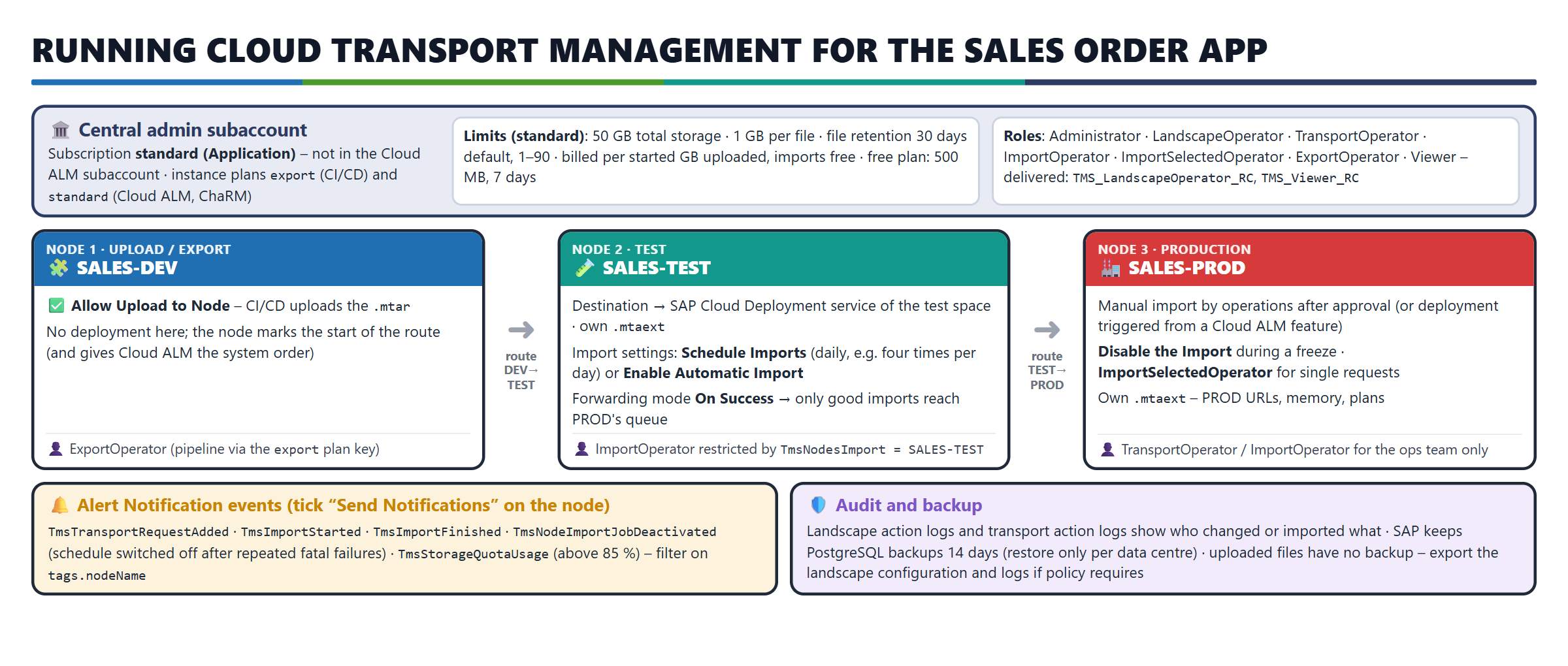
Concepts of SAP Cloud Transport Management (nodes, routes, requests, import queues, MTA extension descriptors) and its CI/CD integration are taught on BTP Development › 05. The administrator owns the subscription, the roles, the landscape, the import settings, notifications and storage.
5.1 Subscription and plans
- SAP recommends running Cloud TMS as a shared service in a central administrative subaccount – easier role management and strict access control. If you integrate it with Cloud ALM, do not use the Cloud ALM subaccount.
- Entitle the application plan, then Service Marketplace › Cloud Transport Management › Create. For programmatic access (CI/CD, Cloud ALM, SAP Solution Manager) create a service instance and key with an instance plan.
Plan | Type | Scope (as of November 2026) |
|---|---|---|
standard | Application | Unlimited landscape; 50 GB total storage; 1 GB per file; file retention 30 days by default, configurable 1–90; billed per started GB uploaded (metered once at upload – imports are free) |
build-runtime | Application | Same features, billed in SAP Build capacity units |
free | Application | 500 MB storage; 500 MB per file; 7 days retention (1–7); community support, no SLA |
standard | Instance | Full API access – integrations from SAP Cloud ALM and ChaRM / Quality Gate Management |
export | Instance | Upload and node upload / export only – for CI/CD pipelines with least privilege |
transport_operator | Instance | Import, reset, forward and delete only |
- Cloud TMS is also included (for Integration Suite artifacts, up to a cap) in the Enhanced and Premium editions of SAP Integration Suite.
5.2 Roles and node restrictions
Role template | Allows |
|---|---|
Administrator | Everything, plus adding / removing files in import queues, resetting statuses, manual forwarding |
LandscapeOperator | Create, change and delete nodes and routes; view landscape action logs |
TransportOperator | Queue tasks: remove, forward, reset, upload MTA extension descriptors, schedule imports, disable / enable import, release modifiable requests; includes ImportOperator and ImportSelectedOperator, but no export |
ImportOperator | Import all requests of a queue; test modifiable requests |
ImportSelectedOperator | Import selected requests only |
ExportOperator | Add files to queues, create modifiable requests |
Viewer | Display only |
- Delivered role collections: only TMS_LandscapeOperator_RC and TMS_Viewer_RC. Create your own role collections for the other roles – SAP recommends doing it from the subscription's Manage Roles view (Instances and Subscriptions › Cloud Transport Management › Manage Roles) – and assign them to IdP groups.
- Node-specific attributes restrict a role to named nodes:
TmsNodesImport(ImportOperator),TmsNodesImportSelected,TmsNodesExport,TmsNodesTransportOperator. Example: developers may import into SALES-TEST, only the operations group into SALES-PROD. Node names are not validated – update roles when you rename or delete nodes. A role without attributes allows all nodes; if a user has both, the restricted role wins.
5.3 Building the landscape
- Create transport destinations first (for MTAs usually the SAP Cloud Deployment service of the target space), then nodes and routes – manually or with the Transport Landscape Wizard (two- or three-node templates; needs Administrator or LandscapeOperator).
- Forwarding mode per node: Pre-Import (default – forward before importing here), Post-Import (forward after import, whatever the result), On Success (forward only if the status is Succeeded, Warning or Skipped) or Manual (a Forward button in the queue).
- Node flags: Allow Upload to Node (required for CI/CD uploads and local files), Send Notifications (Alert Notification events), Controlled By SAP Solution Manager (no manual imports – ChaRM decides).
- An upload-based landscape (BAS / CI/CD) still needs a first DEV node, even if nothing is deployed there – Cloud ALM uses it to know the order of the systems.
5.4 Import settings
Setting | Behaviour | Watch out |
|---|---|---|
Schedule Imports | Daily (e.g. every hour, four times per day) or weekly patterns; needs TransportOperator; inactive until Active is ticked | Deactivated automatically after at least three fatal failures in a row over at least three weeks – shown on the home screen |
Enable Automatic Import | Every new request triggers an Import All in the background | Immediately imports everything importable (Initial, Fatal, Repeatable) and retries failed requests; manual import is no longer possible; an existing schedule is deactivated |
Disable the Import | No imports into the node | Use for a production freeze |
- Typical setup for the example: SALES-TEST on automatic or scheduled import, SALES-PROD manual import by operations after the test sign-off (or deployment orchestrated from a Cloud ALM feature).
5.5 Notifications, storage, audit and backup
- Cloud TMS uses Alert Notification as a trusted internal service – no destination needed (the older
ALERT_NOTIFICATION_SERVICEdestination setup still works but is obsolete). Create an Alert Notification instance in a CF space of the subaccount and subscribe toTmsTransportRequestAdded,TmsImportStarted,TmsImportFinished,TmsNodeImportJobDeactivatedandTmsStorageQuotaUsage(above 85 % of storage); filter withtags.nodeNameortags.nodeId. - Retention: Settings (gear) › File Retention Time; files still in an import queue are not deleted. Large or frequent MTAs plus long retention fill the 50 GB – alert on the quota event.
- Audit: Landscape Action Logs (who changed nodes, routes, settings) and Transport Action Logs (who imported what); archiving of transport action logs is configurable.
- Backup: SAP keeps PostgreSQL backups (landscape, requests, logs) for 14 days, restorable only for the whole data centre; uploaded files in the Object Store have no backup. If policy demands, export the landscape configuration and download logs and MTA extension descriptors.
5.6 Connecting Cloud TMS to SAP Cloud ALM
- Prerequisites: Cloud TMS subscription, instance and service key in the central admin subaccount; nodes configured; the Cloud ALM user has the transport management roles.
- In the Cloud ALM subaccount create an HTTP destination named with the prefix
CALM_FTR_CTMS_plus a suffix; never rename it later (transport assignments break). - Connect only the productive Cloud TMS to the productive Cloud ALM tenant; demo and sandbox Cloud TMS to a test tenant. Several Cloud TMS subscriptions can connect to one Cloud ALM tenant.
- In Cloud ALM, Features bundle transports with requirements and trigger the deployment to the next nodes. For content type BTP ABAP use ImportUpTo (assign all transports of the queue to the feature) – Import Selected is not possible; nodes controlled by SAP Solution Manager cannot be imported from Cloud ALM.
Part 6 – Platform updates, maintenance, service status and support
6.1 How SAP updates the platform
Update type | When | Impact |
|---|---|---|
Biweekly updates | Standard release cadence, aligned with the contract | Usually no impact on productive apps – most services support zero-downtime maintenance |
Immediate updates | Fixes for bugs that affect productive operations or urgent security fixes | Can cause downtime or app restarts; notifications are sent |
Major upgrades | Rarely, in a larger maintenance window, up to four times per year | Announced 4 weeks in advance; time frames in the Service Level Agreement for SAP Cloud Services |
- Release calendars: SAP Notes 3430170 (Consolidated Release Schedules for SAP BTP), 2888562 (harmonised release calendar for SAP cloud products), 3435435 (cross and foundational services of the Cloud Foundry environment) and 3459911 (Kyma runtime).
- Your side of the update: the CF stack is patched and apps are restarted by SAP, but new buildpacks reach your app only when you restage it; Kyma images are your job (Part 1.1). The ABAP environment has its own upgrade and hotfix process – BTP Admin › 02.
6.2 Where to see status and get notified
Channel | What you get | Set up by |
|---|---|---|
SAP Trust Center – Cloud Status | Availability per service (Cloud Status tab) and per region (Data Center tab) | Bookmark; check first in any incident |
Cloud Availability Center (CAC) in SAP for Me | Personalised view of your cloud products, availability and maintenance status | S-user with access to the customer number |
Cloud System Notification Subscriptions (CSNS) | E-mail for updates and downtimes per cloud product, cloud service and notification type. Subscribe to SAP Extension Suite – Development Efficiency › Foundational Services for SAP BTP for region IP-range changes and for which app processes to restart after security patches | BTP administrator for the operations distribution list |
What's New for SAP BTP | Subscription to the release notes of every release | Every admin |
China (Shanghai) region | Own status page with subscription | — |
Government Cloud (US) region | Planned downtime and outage e-mails to the initial global account administrator | Keep that contact current |
SAP Cloud ALM – Business Service Management | Imports CAC maintenance and disruption events into your business services | Cloud ALM administrator |
- IP-range change notifications matter for the example: the S/4HANA firewall and the Cloud Connector allow lists must follow the region's egress IPs (BTP Security › 03).
6.3 Getting support
Step | Action |
|---|---|
1 – Rule out the platform | Check SAP Trust Center (or the region status page) and the service's documentation and FAQ; make sure your tools (btp CLI, cf CLI, plug-ins) are on supported versions |
2 – Built-In Support | In the cockpit, as an S-user, use Built-In Support for help in context |
3 – Search | SAP for Me › Services & Support › Knowledge Search (SAP Notes, KBAs, SAP Community, documentation) |
4 – Open a case | SAP for Me › Get Support with the right support component, region, global account and subaccount IDs, the time in UTC, the correlation ID and what changed |
5 – Give access if needed | Create a support user following SAP Note 3543065 (best practices for support users in BTP); remove it afterwards |
Area | Support component |
|---|---|
Cloud Foundry runtime / infrastructure | BC-CP-CF |
Kyma runtime | BC-CP-XF-KYMA |
SAP BTP cockpit (CF environment UI: BC-CP-CF-CPT) | BC-CP-CPT |
SAP BTP command line interface | BC-CP-TOOLS-CLI |
SAP Alert Notification service | BC-CP-LCM-ANS |
SAP Cloud Transport Management | BC-CP-LCM-TMS |
SAP Cloud Logging | BC-CP-CLS |
SAP Job Scheduling service | BC-CP-CF-JBS |
SAP Continuous Integration and Delivery | BC-CP-CF-CICD |
SAP Audit Log service (CF) | BC-CP-CF-SEC-AUDITLG |
SAP Cloud Management service / Usage Data Management service | BC-NEO-CIS / BC-NEO-MET-REP |
SAP Cloud Identity Services – Identity Authentication | BC-IAM-IDS |
- Trial accounts get community support only (SAP Community); free plans have no SLA.
Part 7 – Runbook: operating the sales order app
7.1 Recurring tasks
Frequency | Task | Tool |
|---|---|---|
Continuous | Crash, deployment-failure, HANA Cloud and transport events to on-call (PROD) and the dev channel (DEV / TEST) | Alert Notification |
Daily | Health and job monitoring overview of the business service “Sales order processing”; failed imports in the TEST queue | Cloud ALM, Cloud TMS |
Weekly | Certificate expiry (ABAP environment metrics, destinations, Cloud Logging OTLP client certificates – 90 days by default), Cloud Logging disk usage, Cloud TMS storage | Cloud ALM, OpenSearch [UsageMetrics] |
Each SAP release | Read What's New; restage apps for new buildpacks; check deprecations | What's New, cf CLI |
Monthly | Costs, budgets, unused instances (page 05); Cloud ALM fair-use consumption (Self-Monitoring) | Costs and Usage, Cloud ALM |
Quarterly | Review role collections for Cloud TMS, Cloud ALM and Cloud Logging admins; test the alert chain end to end; export Alert Notification and Cloud TMS configuration | Cockpit, BTP Security › 05 |
7.2 Incident walk-through
Saturday 02:10 UTC, the sales order CAP service in SALES-PROD crashes repeatedly after a new release.
- Alert Notification (instance in the
opsspace, CF audit events on) matchesapp.crashand posts to the on-call webhook; Cloud ALM Health Monitoring shows the crash as an alert on the business service. - On-call checks SAP Trust Center – Cloud Foundry in the region is green, so the cause is on our side.
- In OpenSearch Dashboards of the SALES-PROD Cloud Logging instance the logs filtered by the correlation ID show an out-of-memory error since the release.
- Immediate fix: scale memory with
cf scale(approved emergency change); Automation Pilot could do this automatically from the alert (BTP Admin › 03). - Permanent fix: corrected
.mtaextmemory value for the PROD node, transported DEV → TEST → PROD through Cloud TMS; Cloud TMSTmsImportFinishedconfirms the import. - If the platform had been red: open a case on BC-CP-CF with region, subaccount ID, times in UTC and the request IDs, and subscribe to the CSNS updates for the incident.
Post-incident checklist: was the alert routed correctly and fast? Did the log retention cover the period? Could a health metric or synthetic check have caught it earlier? Update the runbook.
Part 8 – Interview questions
Q1. What does SAP operate on BTP and what remains the customer's job?
SAP runs the infrastructure and platform services, applies platform updates and patches the Cloud Foundry stack (restarting buildpack apps). The customer operates its subaccounts and applications: deployment, scaling, health reporting, restaging for new buildpacks, container image patching in Kyma, users and permissions, and the monitoring and alerting of business-critical apps.
Q2. How do SAP Cloud ALM, Alert Notification and Cloud Logging differ?
Cloud ALM is the central, cross-landscape view for operations teams (health, jobs, integration, real-user monitoring, business services, event processing). Alert Notification pushes individual events to people or systems through subscriptions. Cloud Logging stores and analyses the detailed logs, metrics and traces of one workload. Production setups use all three.
Q3. How is SAP Cloud ALM provisioned and what should you decide carefully?
Through SAP for Me › Systems & Provisioning by an S-user with Edit Cloud Data. Region and subdomain cannot be changed afterwards; choose the productive IAS tenant to use. SAP creates a separate global account and subaccount for Cloud ALM. It is included with SAP Enterprise Support within fair use (24 GB HANA memory, 24 GB outbound API data per month).
Q4. You subscribed to Cloud ALM but see no monitoring data from BTP. Why?
Services are imported into Landscape Management daily (wait up to 24 hours), and Cloud ALM never collects data automatically – data collection must be activated per service in each app. Custom CF or Kyma apps must also be instrumented; some services need a service key or communication arrangement.
Q5. Explain conditions, actions and subscriptions in SAP Alert Notification.
A condition filters events on a property such as eventType or severity; an action defines the delivery channel (e-mail, Slack, Teams, webhook, ServiceNow, Automation Pilot, store); a subscription links conditions to actions and can be switched on or off. Events have scopes (CF space, subaccount, global account, region) that decide which instance may match them.
Q6. Your Alert Notification subscription for application crashes never fires. What do you check?
That the instance was updated with enableCloudControllerAuditEvents set to true, that it runs in the right space (CF_SPACE-scoped events only match there), that the condition uses the correct eventType (app.crash), that the action is confirmed and enabled, and that the e-mail quota of 200 per day was not exceeded.
Q7. Which SAP Cloud Logging settings does an administrator own?
Plan (dev only for evaluation; standard or large for production, no in-place plan change), retention (1–90 days, default 7, only for new indices), scaling limits for data nodes and ingest instances, the OTLP endpoint, SAML or OIDC sign-on with an admin group, a custom label, instance sharing and cost.
Q8. How do you make sure developers cannot import into production with Cloud TMS?
Create own role collections from the role templates and restrict them with node attributes – for example ImportOperator with TmsNodesImport = SALES-TEST for developers, and import roles for SALES-PROD only for operations. CI/CD uses a key of the export instance plan. Optionally govern PROD deployments through Cloud ALM features or disable imports during a freeze.
Q9. What are the forwarding modes and import settings of a transport node?
Forwarding: Pre-Import (default), Post-Import, On Success and Manual. Import settings: scheduled imports (daily or weekly, deactivated after repeated fatal failures), automatic import of every new request (Import All, no manual import possible) and disabling imports altogether.
Q10. How do you learn about BTP maintenance and outages?
SAP Trust Center Cloud Status and Data Center tabs, the Cloud Availability Center and CSNS e-mail subscriptions (e.g. Foundational Services for SAP BTP for IP-range changes and restarts), What's New subscriptions and the release-schedule SAP Notes. Biweekly updates are usually zero-downtime; major upgrades happen up to four times a year with four weeks' notice. Cloud ALM can import CAC events into business services.
Q11. Walk through opening a support case for a BTP service.
Rule out a platform incident in SAP Trust Center, use Built-In Support and Knowledge Search, then open a case in SAP for Me › Get Support on the service's component (for example BC-CP-CLS for Cloud Logging) with region, subaccount ID, UTC times, correlation IDs and recent changes; create a support user only if needed (SAP Note 3543065) and remove it afterwards.
Q12. Design the operations setup for a new production subaccount.
Register it in Cloud ALM and activate health, job and integration monitoring inside a business service; one Alert Notification instance with configuration-as-code subscriptions for crashes, deployments and HANA Cloud; a dedicated standard Cloud Logging instance with SAML, a PROD label and agreed retention; a Cloud TMS node with manual, restricted imports and notifications; CSNS subscriptions; and a runbook with Automation Pilot for repeatable fixes.
🏠 Start Here · ◀ 03 · Automation · 05 · Governance & cost ▶ · Sections: CORE ABAP | OOPS ABAP | ABAP on HANA | Clean Core | RAP | ABAP Points | SAP Fiori | SAPUI5 | Mobile Development (MDK) | BTP Foundations | BTP Admin | BTP Development | CAP | SAP Build | ABAP on BTP | Integration Suite | SAP Business AI | SAP BASIS | Security | SAP SDLC
Functional: FICO ABAP | TRM ABAP | VIM | SAP BIS | SD ABAP | MM ABAP | PP ABAP | QM ABAP | PM ABAP | PS ABAP | EWM | TM ABAP | GTM ABAP | EHS ABAP | HR ABAP | BW | SAP Datasphere | SAP Business Data Cloud | SAP MDG | SAP Analytics Cloud | SAP Ariba | SAP CX | SAP IBP