Where does your BTP code actually run? This page is the home of the runtime details: the Cloud Foundry environment (orgs and spaces, cf push, buildpacks, manifest.yml, routes, service bindings, scaling, health checks, logs, zero-downtime deployment) and the Kyma environment (Kubernetes from an ABAP developer's point of view, the Kyma modules, deploying a CAP app with Helm, kubectl). It ends with a decision path between Cloud Foundry, Kyma and the ABAP environment, and the cost basics. The running example is the Sales Order Approval side-by-side CAP extension (approval-srv + app router + HANA Cloud). The short comparison is on BTP Development › 01 · Developing on BTP Part 4; MTA descriptors are explained on BTP Development › 06 · BTP Developer Hands-On Part 5 and are only referenced here.
Part 1 – Why runtimes matter: three ways to run code
As an ABAP developer you never chose a runtime: the code ran on the application server, and Basis looked after it. On BTP you choose, and the choice decides what you deploy, how it scales, what you must operate and what it costs. Interviewers like this topic because it shows whether you understand the platform or only the framework.
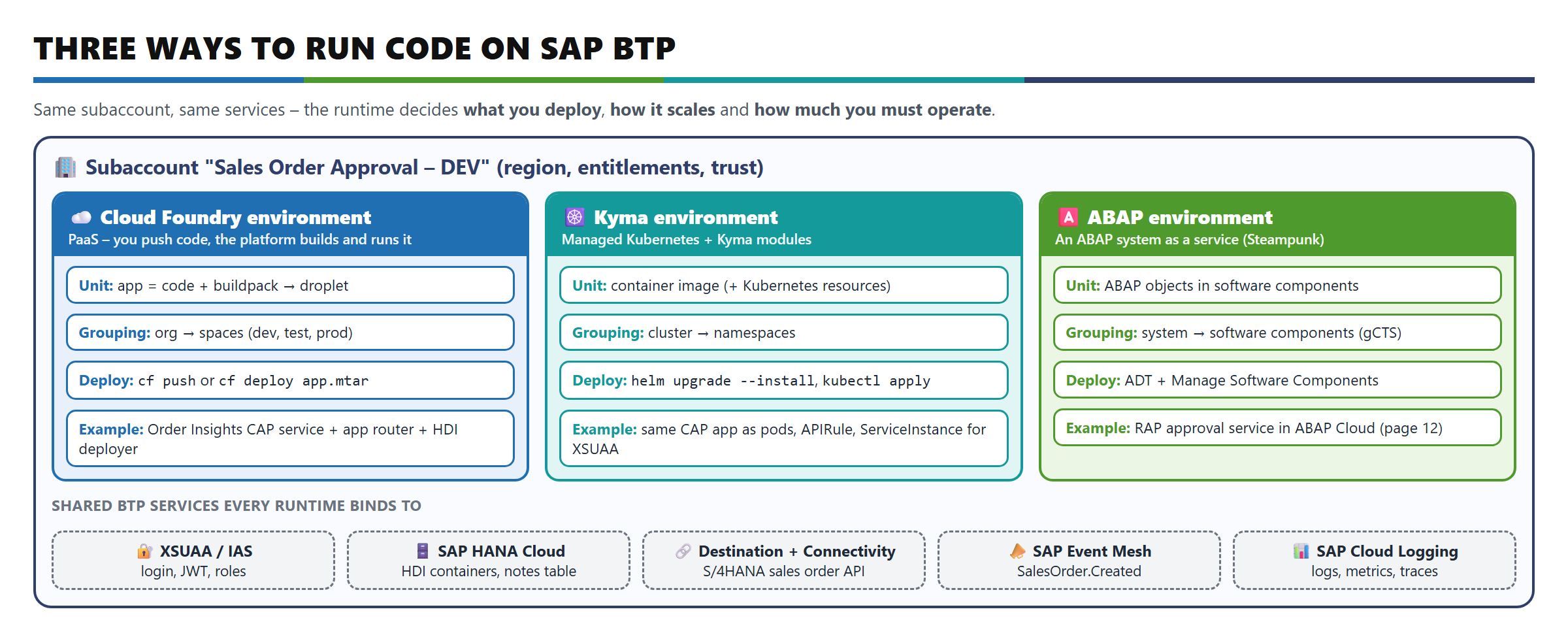
Cloud Foundry | Kyma | ABAP environment | |
|---|---|---|---|
What it is | Open-source PaaS run by SAP | SAP-managed Kubernetes (Gardener) + Kyma modules | An ABAP system offered as a service |
You deploy | Code; a buildpack builds it | Container images + Kubernetes resources | ABAP objects (ABAP Cloud only) |
Grouping | Org → spaces | Cluster → namespaces | System → software components |
Main tools |
|
| ADT, gCTS, Manage Software Components |
Typical content | CAP services, app router, Fiori back ends | Microservices, containers, event handlers, Functions | RAP services, ABAP extensions (ABAP on BTP › 01) |
- All three consume the same BTP services (XSUAA / Identity Authentication, HANA Cloud, Destination, Connectivity, Event Mesh). Only the way an app gets its credentials differs:
VCAP_SERVICESon Cloud Foundry, Kubernetes Secrets on Kyma, communication arrangements in ABAP. - CAP code runs unchanged on Cloud Foundry and Kyma; only the deployment artefacts differ (
cds add mtaversuscds add kyma). - The account model (global account, subaccount, entitlements, environments) is on BTP Foundations › 02 · SAP BTP – Overview & Account Model.
Part 2 – Cloud Foundry building blocks: orgs, spaces and the cf CLI
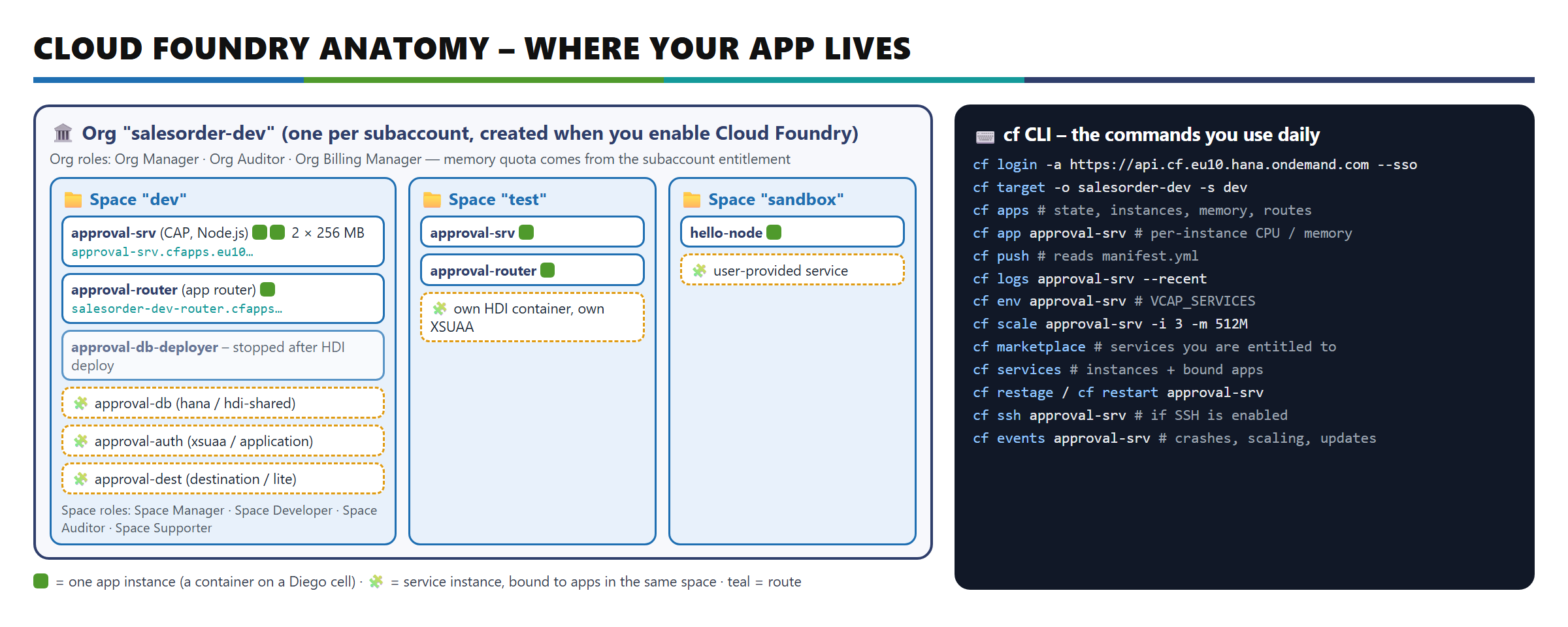
When you enable Cloud Foundry in a subaccount, BTP creates one Cloud Foundry org for it. Inside the org you create spaces; apps and service instances always live in a space. A space is the closest thing to a system in your ABAP landscape: separate apps, separate service instances, separate members.
Level | Contains | Roles (assigned in the cockpit) |
|---|---|---|
Org | Spaces, members, memory quota of the subaccount | Org Manager, Org Auditor, Org User |
Space | Apps, service instances, routes | Space Manager, Space Developer, Space Auditor, Space Supporter |
App | One or more instances (containers) of the same droplet | Deploying needs Space Developer |
- Space roles are Cloud Foundry roles, not business roles. Who may approve a sales order is decided by XSUAA role collections (BTP Foundations › 04 · BTP Security Deep Dive).
- Common layouts: one subaccount per stage (dev / test / prod) with one space each, or one subaccount with several spaces. Separate subaccounts give separate trust, entitlements and service instances.
2.1 cf CLI essentials
|
cftalks to the Cloud Foundry API of your region;btp(the BTP CLI) manages global accounts, subaccounts and entitlements. Different tools, different levels.- The MTA plugin adds
cf deploy,cf mtas,cf mta-ops,cf undeploy; the Application Autoscaler plugin adds thecf autoscaling-*commands (Part 5).
Part 3 – From cf push to a running app: buildpacks, manifest.yml and the app lifecycle
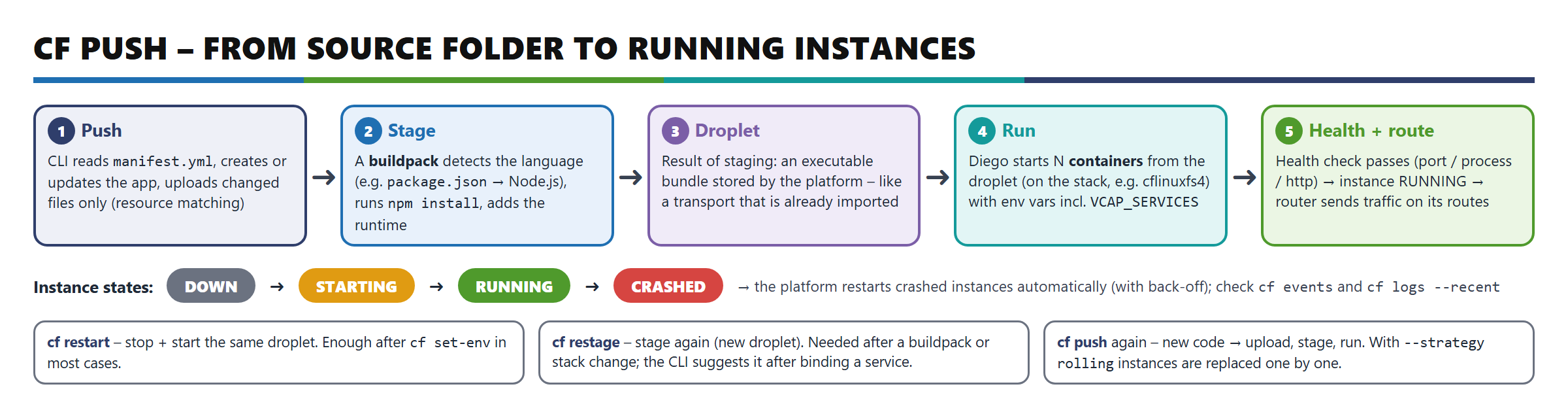
Cloud Foundry's promise is "here is my code, run it for me". The platform finds out which language it is, builds a runnable package, starts as many containers as you asked for and keeps them alive. Knowing the steps tells you where to look when a deployment fails.
3.1 Buildpacks
- A buildpack detects the app type and prepares it during staging: Node.js (
package.json), Java (JAR / WAR), Python, Go, static files and more. The result is the droplet, which is stored and started on a stack (the base operating system image, e.g.cflinuxfs4). - Name the buildpack explicitly (
nodejs_buildpack,sap_java_buildpack_jakarta, …) instead of relying on auto-detection – faster staging and no surprises.cf buildpackslists what the landscape offers. - For Java, SAP offers the SAP Java Buildpack (
sap_java_buildpack_jakarta, SAP-managed; Java 17, 21 and 25, Tomcat 10 and 11, TomEE 10) next to the community Java buildpack (java_buildpack). - Instead of a buildpack you can push a Docker image (
cf push app --docker-image …) if it is enabled for the landscape – then you own the operating system patches.
3.2 manifest.yml – the app's deployment description
|
cf pushwithout arguments reads./manifest.yml;cf push -f other.ymluses another file. Command line options override manifest values.- Use
--vars-file(or((placeholders))in the manifest) to keep stage-specific values such as routes out of the file – similar to MTA extension descriptors. - For a CAP app with HANA, XSUAA and an app router, SAP recommends an MTA instead of several manifests: one archive, services created automatically, a defined deployment order.
cf pushstays useful for single apps and quick tests.
3.3 App lifecycle and instance states
Command / event | What happens | Use it when |
|---|---|---|
cf push | Upload changed files, stage, start | New code |
cf restart | Stop and start the same droplet | Changed env variables ( |
cf restage | Stage again → new droplet, then start | Buildpack or stack update; the CLI suggests it after binding a service |
| Instances down / up; routes stay | Save memory quota in dev |
Instance CRASHED | Platform restarts it automatically with back-off | Check |
- Instances are disposable: the file system is lost on restart and an instance can be moved to another host at any time. Keep state in HANA Cloud or another backing service, never in local files – the same rule as "no data in the application server's memory" in ABAP.
Part 4 – Routes, domains and service bindings (VCAP_SERVICES)
4.1 Routes and domains
A route is the URL that leads to an app: host.domain/path. The Cloud Foundry router spreads requests across all running instances of the apps mapped to that route.
Concept | Example | Notes |
|---|---|---|
Shared domain | cfapps.eu10.hana.ondemand.com | Provided by SAP per region; host names must be unique in the region |
Route | approval-srv-dev.cfapps.eu10… | cf map-route approval-srv cfapps.eu10.hana.ondemand.com --hostname approval-srv-dev |
Custom domain | approvals.example.com | Own domain + TLS certificate via the Custom Domain service ( |
Internal route | approval-srv.apps.internal | Container-to-container traffic only; needs |
Several routes, one app | old + new host name | Useful for migrations; blue-green swaps routes (Part 5) |
- In an MTA, prefer the
routesparameter and set host names explicitly: the default route is built from org, space and module name and can exceed the 63-character host limit. - Users should open the app router route, not the CAP service route: the app router handles login and forwards the JWT (BTP Foundations › 04 · BTP Security Deep Dive).
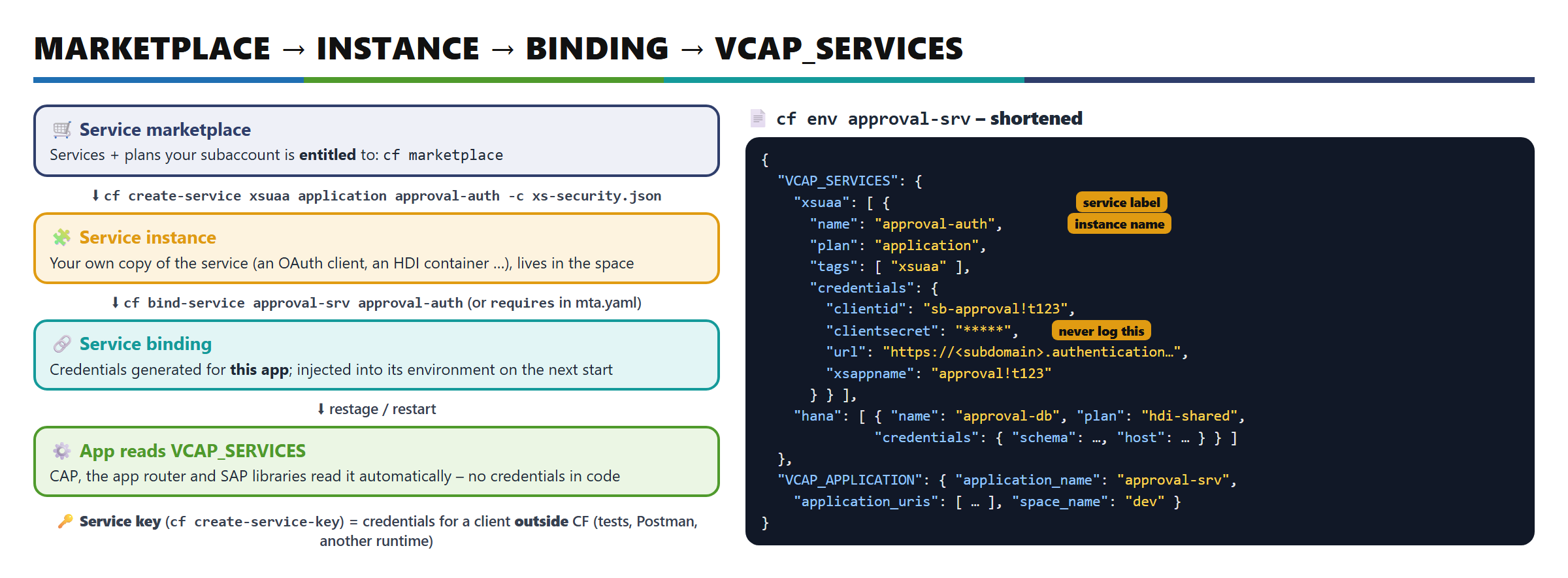
4.2 Marketplace, service instances, bindings and keys
|
Term | What it is | Lifetime |
|---|---|---|
Service instance | Your provisioned resource (OAuth client, HDI container, destination store …) | Until deleted – survives app deletion |
Service binding | Credentials for exactly one app, injected into | Until unbound or the app is deleted |
Service key | Credentials for a client outside Cloud Foundry (tests, another runtime, a CI job) | Until deleted; rotate regularly |
User-provided service | Your own credentials (e.g. a non-SAP API) presented like a service | Until deleted |
- VCAP_SERVICES is a JSON environment variable: one key per service label (
xsuaa,hana, …), each with an array of bound instances (name,plan,tags,credentials). VCAP_APPLICATION describes the app itself (name, URIs, space). - CAP finds its services automatically by matching labels, tags or instance names against
cds.requires; the app router and SAP Cloud SDK do the same. You never copy credentials into code orpackage.json. - For local tests,
cds bindconnects your laptop to real Cloud Foundry service instances via service keys (the CAP section).
Part 5 – Scaling, health checks, logs and zero-downtime deployment
5.1 Scaling
- Horizontal: more instances (
cf scale approval-srv -i 4). No restart; this is the normal way to handle load. Requires a stateless app. - Vertical: more memory or disk per instance (
cf scale approval-srv -m 1G). Restarts the instances. - Every instance counts against the memory quota of the org (from the Cloud Foundry Runtime entitlement). Two idle instances of 1 GB cost the same as two busy ones.
5.2 Application Autoscaler
The Application Autoscaler service adds or removes instances automatically, by metrics or by schedule. You create an instance, bind it to the app with a scaling policy, and use the cf CLI plugin to check it.
|
|
- Policies can also contain schedules (recurring or specific dates), for example more instances during month-end order peaks.
- During an incremental blue-green deployment the autoscaler pauses for the live and the new app; scaling resumes when the deployment finishes.
5.3 Health checks
health-check-type | The platform checks | Good for |
|---|---|---|
| The app accepts TCP connections on its port | Simple web apps |
process | The process is still running | Workers without an HTTP port |
http |
| CAP services ( |
- A failing health check makes the platform restart the instance. The start timeout (
timeoutin the manifest,health-check-timeoutin mta.yaml) must be long enough for the app to start. - Kubernetes separates liveness (restart) and readiness (no traffic yet). Cloud Foundry supports readiness checks in its core, but capire notes that the cf CLI and the Cloud MTA Build Tool (MBT) do not yet support them, so on CF you rely on the health check above.
5.4 Logs
cf logs approval-srv --recentshows a small recent buffer;cf logs approval-srvtails live. Lines are tagged:[STG]staging,[APP/PROC/WEB/0]instance 0,[RTR]router access log,[API]/[CELL]platform events.- The buffer is short-lived. For production use SAP Cloud Logging (search, dashboards, alerts, OpenTelemetry). Older apps may still use the deprecated SAP Application Logging service; SAP Cloud Logging is its successor (migration in BTP Development › 05 · DevOps, Operations & Observability).
- Log to stdout / stderr, in JSON if possible; CAP's logger does this. Never log tokens or
VCAP_SERVICES. Observability in depth: BTP Development › 05 · DevOps, Operations & Observability.
5.5 Zero-downtime deployment
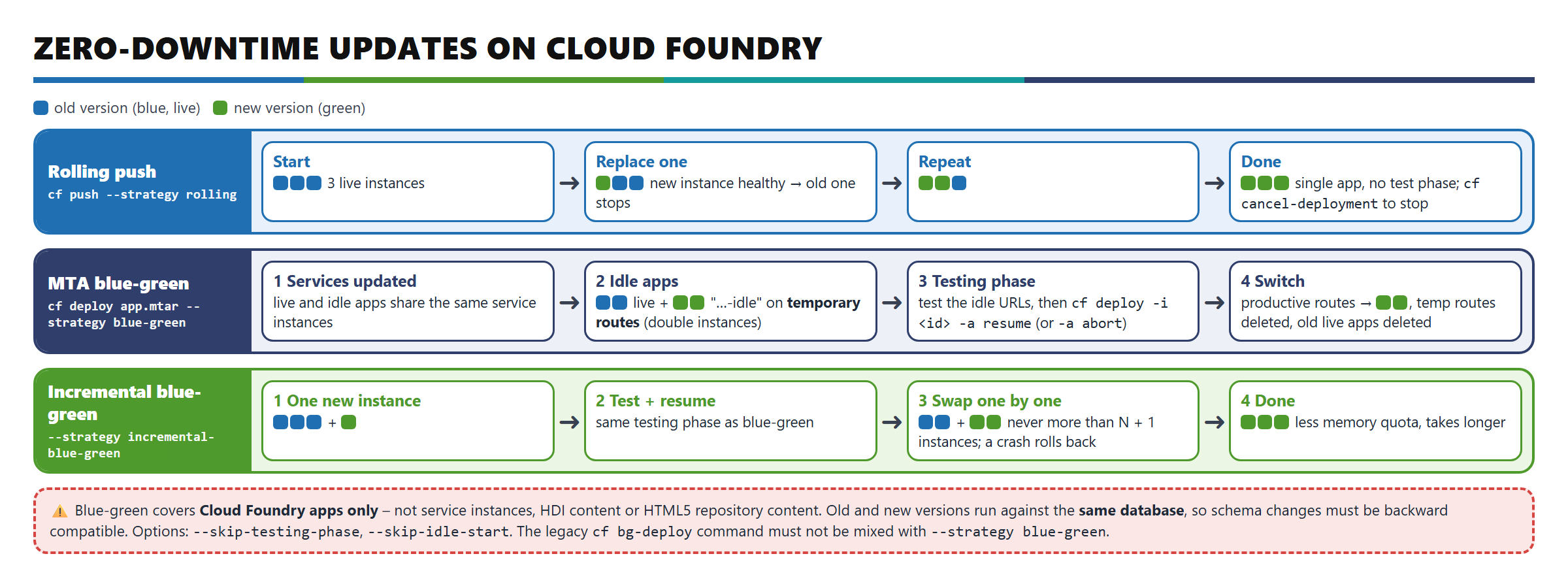
Strategy | Command | Behaviour |
|---|---|---|
Rolling (single app) | cf push approval-srv --strategy rolling | Replaces instances one by one ( |
MTA blue-green | cf deploy app.mtar --strategy blue-green | New "idle" apps on temporary routes → testing phase → |
Incremental blue-green | cf deploy app.mtar --strategy incremental-blue-green | Like blue-green but swaps one instance at a time: at most N + 1 instances, less quota, takes longer |
Legacy | cf bg-deploy app.mtar | Older blue-green command – do not mix with |
- Options:
--skip-testing-phase(switch at once),--skip-idle-start,--backup-previous-version(keeps the old version for the experimental MTA rollback). - Blue-green covers Cloud Foundry apps only: service instances, HDI content and HTML5 repository content are updated once and shared by old and new apps. A database change must therefore work with the old and the new code (add a column first, remove it in a later release).
- mta.yaml details (deployment order, extension descriptors,
cf deploy -i <id> -a retry): BTP Development › 06 · BTP Developer Hands-On Part 5.
Part 6 – Kubernetes basics for ABAP developers
Kyma is Kubernetes, so you need a small Kubernetes vocabulary before the Kyma modules make sense. The core idea is desired state: you describe in YAML what should exist ("two replicas of image X, reachable on port 8080"), apply it, and controllers keep reality equal to it – restarting crashed pods, replacing deleted ones, rolling out new versions.
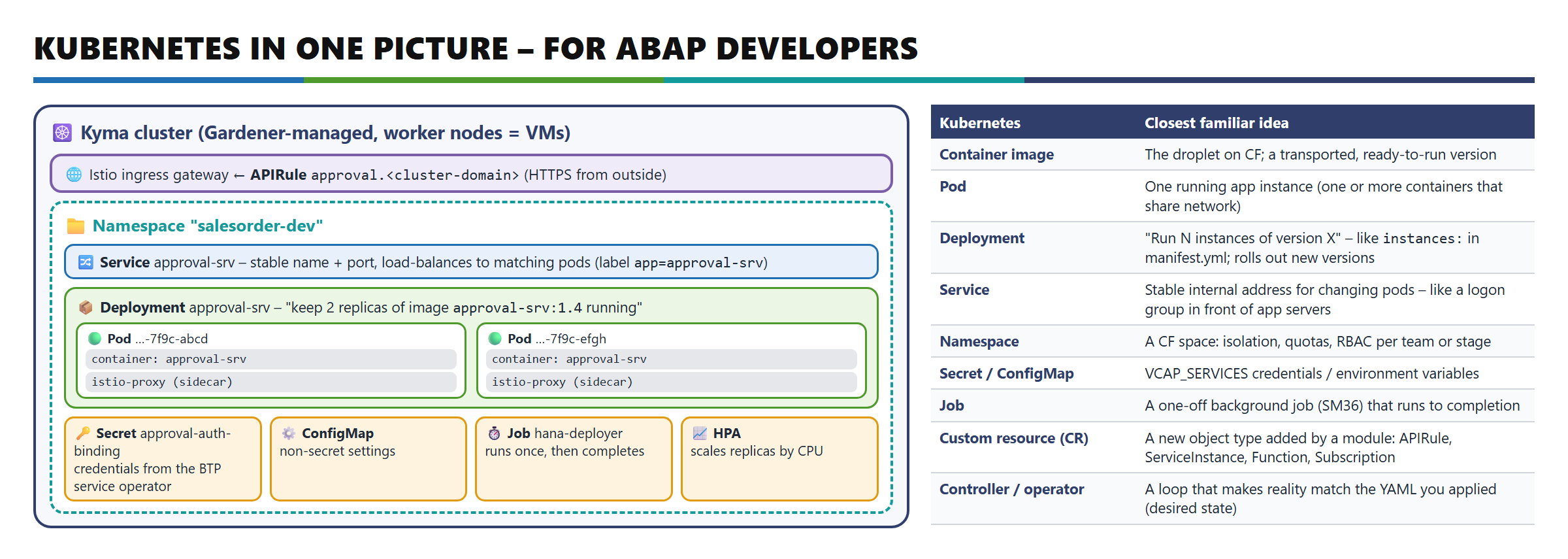
Object | Purpose | Cloud Foundry / ABAP analogy |
|---|---|---|
Cluster / node | The Kubernetes installation / its worker VMs | The CF landscape / its cells |
Namespace | Isolation for a team or stage; RBAC and quotas | A CF space |
Pod | Smallest unit: one or more containers sharing network and storage | One app instance |
Deployment | Keeps N pod replicas of an image; rolling updates, rollback |
|
Service | Stable DNS name + port in front of changing pods | Internal route / logon group |
Secret / ConfigMap | Credentials / plain configuration for pods |
|
Job | Runs a pod to completion (e.g. the HDI deployer) | A one-off background job |
HorizontalPodAutoscaler | Scales replicas by CPU, memory or custom metrics | Application Autoscaler |
Custom resource (CR) | Object type added by an extension (APIRule, ServiceInstance, Function) | A new object type in the repository |
6.1 A minimal Deployment and Service
|
- In practice CAP generates this for you (Part 8). You still need to read it to debug a pod that does not start.
- Labels and selectors are the glue: a Service with the wrong selector has no endpoints, and every request fails although the pods are healthy.
Part 7 – Kyma modules: API Gateway, Istio, BTP Operator, Eventing, Serverless, Telemetry
Plain Kubernetes is only a container scheduler. Kyma adds modules, each installed and updated by SAP. Since the modular Kyma you add only the modules you need – each one uses CPU and memory of your cluster, so it also costs money.
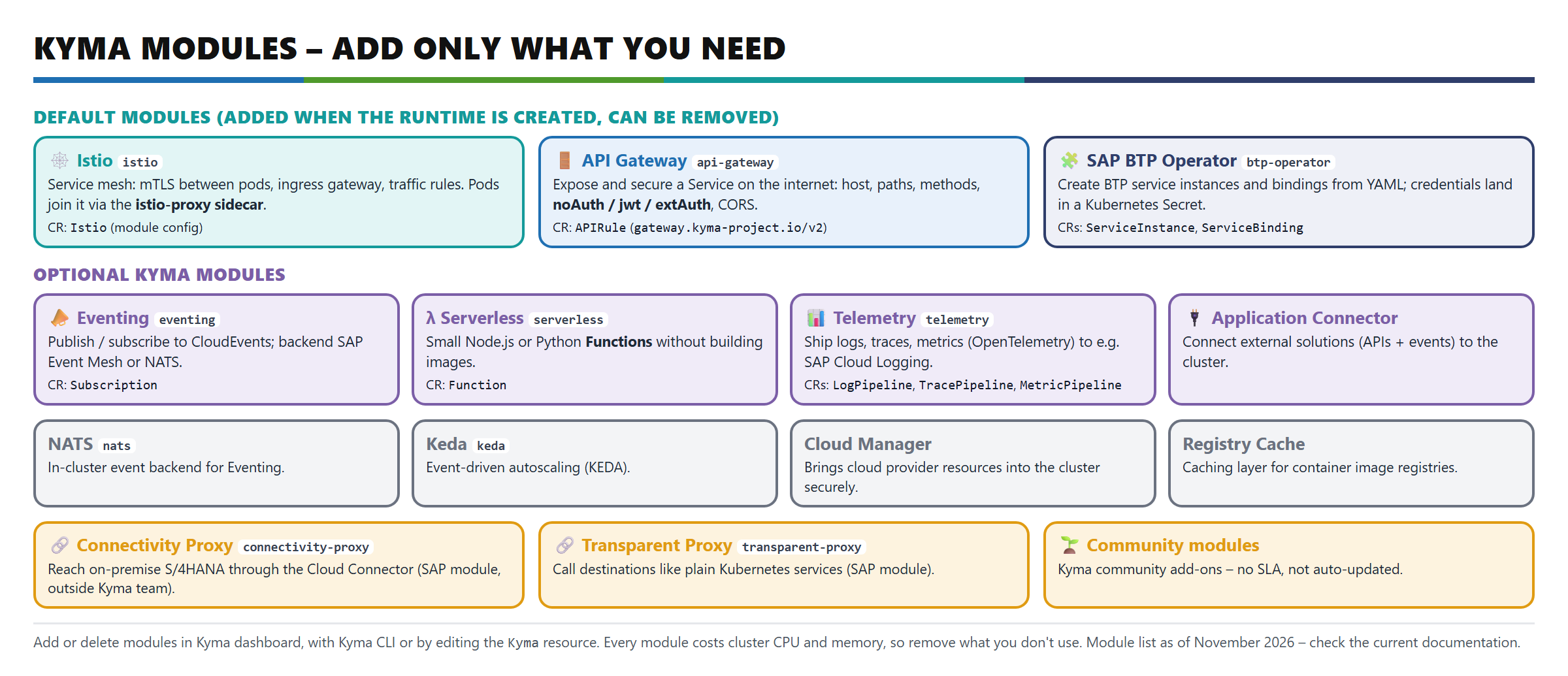
Module (technical name) | Default? | What it gives you |
|---|---|---|
Istio ( | Yes | Service mesh: mTLS between pods, ingress gateway, traffic management |
API Gateway ( | Yes |
|
SAP BTP Operator ( | Yes |
|
Eventing ( | Optional | CloudEvents publish / subscribe; backend SAP Event Mesh or NATS |
NATS ( | Optional | In-cluster NATS as Eventing backend |
Serverless ( | Optional |
|
Telemetry ( | Optional | Log, trace and metric pipelines to backends such as SAP Cloud Logging |
Application Connector, Keda, Cloud Manager, Registry Cache | Optional | External system connection, event-driven autoscaling, cloud provider resources, image cache |
Connectivity Proxy, Transparent Proxy | SAP modules | On-premise access via Cloud Connector; destinations as Kubernetes services |
- The default modules can be removed; optional ones are added in Kyma dashboard, with Kyma CLI, or by editing the
Kymaresource (kubectl edit kyma default -n kyma-system). New module versions reach the fast channel first and the regular channel about two weeks later. Community modules can be added too, but SAP does not update them and they have no SLA.
7.1 API Gateway: exposing a service with an APIRule
|
- APIRule v2 (current): the workload must be in the Istio mesh (sidecar injection), internal traffic is blocked by default, no CORS policy unless you set
corsPolicy, paths use{*}/{**}instead of regular expressions, andjwtneeds an explicitissuer. Rules are matched in order – most specific first. - Access strategies:
noAuth,jwtorextAuth(external authorizer). The older Oathkeeper handlers ofv1beta1are gone – migrating old APIRules is a common real-world task. - For a CAP app with users, the browser normally goes to the app router, exposed by an APIRule, and the app router talks to
approval-srvinside the cluster.
7.2 SAP BTP Operator: service instances and bindings as YAML
|
- The Secret is mounted into the pod as files (or env variables). CAP reads bindings in this Kubernetes format, so the same code works on Cloud Foundry (
VCAP_SERVICES) and Kyma. - Only services offered for the Kyma / Kubernetes environment can be created this way – filter the Service Marketplace in the cockpit by environment.
7.3 Eventing, Serverless and Telemetry
- Eventing: a
Subscriptionresource tells Kyma to deliver CloudEvents of given types (e.g. aSalesOrder.Createdevent from S/4HANA via SAP Event Mesh) to a sink (a Service URL in the cluster). CAP apps can also talk to SAP Event Mesh directly through CAP messaging (CAP › 07 · CAP Advanced). - Serverless: a
Functionholds a small code snippet; Kyma builds and runs it as pods, with scaling. Good for glue code such as "OrderApproved → send a mail". Runtimes follow the Node.js / Python LTS cycle: in November 2026nodejs24andpython312are supported,nodejs22is deprecated (end of life planned for November 2026), andnodejs26/python314bring a simpler handler API that receives the raw HTTP request and response. Kyma publishes a runtime deprecation schedule in the Serverless docs.
|
- Telemetry:
LogPipeline,TracePipelineandMetricPipelineresources ship OpenTelemetry data to a backend; SAP's recommended one is SAP Cloud Logging (instance created via the BTP Operator). Without it you only have short-termkubectl logs.
Part 8 – Deploying the Sales Order Approval CAP app to Kyma
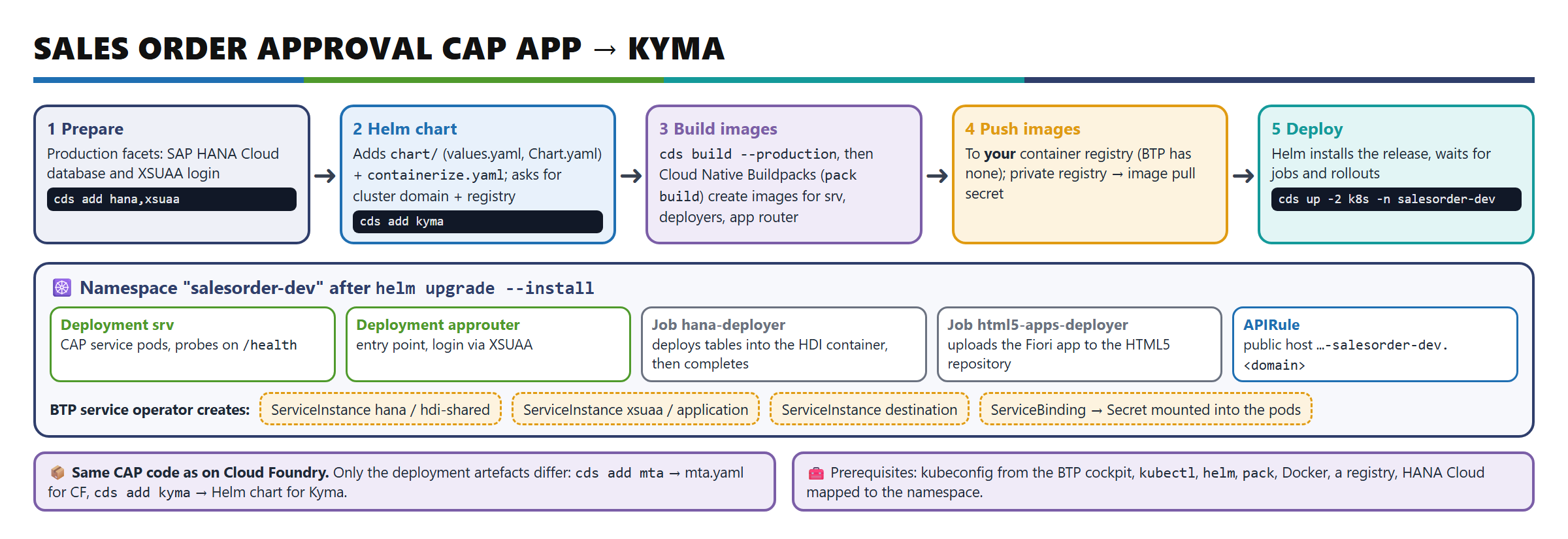
Deploying to Kyma means two artefact types: container images (your code) and Kubernetes resources (how to run it). CAP generates both. The CAP project itself is the same one you deploy to Cloud Foundry.
8.1 Prerequisites
- A Kyma runtime (trial, free plan or paid) and its kubeconfig, downloaded from the subaccount overview in the cockpit. It uses OpenID Connect login, so install the kubectl plugin that the Kyma documentation names.
kubectl,helm,pack(Cloud Native Buildpacks) and Docker on your machine.- A container registry – SAP BTP does not provide one. For a private registry create an image pull secret with a read-only technical user.
- SAP HANA Cloud mapped to the namespace (or the cluster) and its allowed IPs configured, so the pods may connect.
8.2 Steps
|
cds up -2 k8s automates the individual steps, which you should be able to explain:
|
File | Role |
|---|---|
chart/values.yaml | Your configuration: domain, image registry, pull secret, per-workload |
chart/Chart.yaml | Chart metadata and sub-chart dependencies (e.g. extra |
containerize.yaml | Which images to build and the target |
gen/chart/ | Generated by |
- Stage-specific settings go into extra values files (
helm … -f values-prod.yaml) – the Kyma equivalent of an MTA extension descriptor. - Re-running
cds add kymakeeps your edits invalues.yaml/Chart.yamland adds only new properties. To change generated templates, copy them fromgen/chartintochart, or post-process with Kustomize. - Tag images with a version (CAP's checksum tags do this) –
latestmakes rollbacks and debugging guesswork.
8.3 kubectl essentials
|
Symptom | Usual cause | Where to look |
|---|---|---|
ImagePullBackOff | Wrong image name / tag, missing pull secret, registry not reachable | kubectl describe pod |
CrashLoopBackOff | App fails at start: missing binding, DB not reachable, wrong start command | kubectl logs --previous |
Pod Running but 404 / 503 outside | APIRule host or path wrong, Service selector or port wrong, no sidecar |
|
ServiceInstance not Ready | Plan not entitled / not available for Kyma, wrong parameters | kubectl describe serviceinstance |
OOMKilled | Memory limit too low |
|
Part 9 – Choosing Cloud Foundry, Kyma or the ABAP environment, and the cost basics
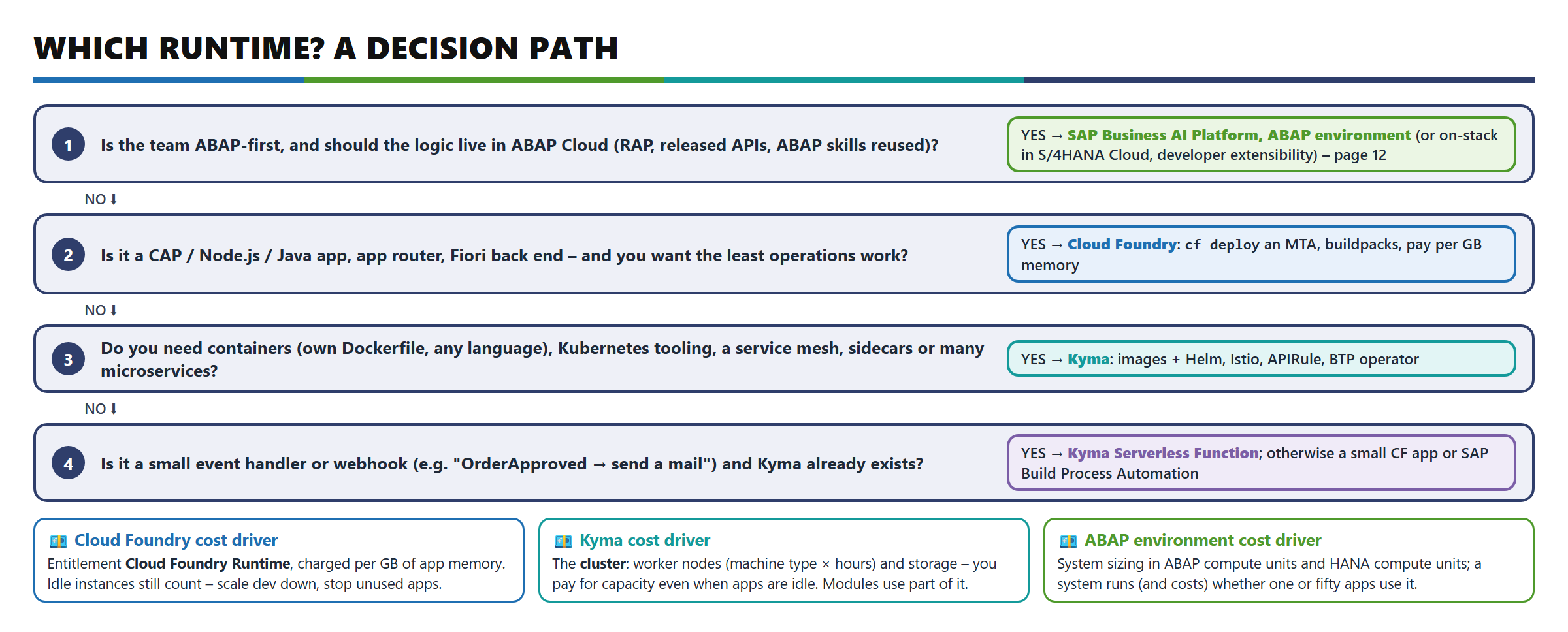
Criterion | Cloud Foundry | Kyma | ABAP environment |
|---|---|---|---|
Team skills | Node.js / Java, little ops | Containers, Kubernetes, Helm | ABAP Cloud, RAP |
Operations effort | Lowest | Highest (you own images, charts, cluster sizing) | Low (SAP runs the system) |
Flexibility | Buildpack languages | Any container, sidecars, mesh, operators | ABAP Cloud language only |
Fits the example | Approval Portal (CAP + app router) | Same app + event Functions, many services | Approval logic as RAP close to S/4HANA |
Cost model | Per GB app memory | Per cluster capacity (nodes × time) | System size (ACU / HCU) |
9.1 Entitlements and costs
- An entitlement is the right to use a service plan; a quota is how much of it. Both are bought at global account level and distributed to subaccounts (or directories). Without an entitlement a service is not in the marketplace – the first thing to check when
cf create-servicesays the plan does not exist. - Consumption-based contracts (CPEA, Pay-As-You-Go) allow most services with unlimited global quota and bill what you use; subscription-based contracts give fixed quotas for what you subscribed to.
- Cloud Foundry: assign *Cloud Foundry Runtime* memory to the subaccount; every running instance uses it. Stop dev apps at night, use 1 instance in dev, mind that blue-green temporarily doubles instances.
- Kyma: you pay for the cluster's capacity (worker nodes, storage, traffic), even when the apps are idle, and modules take part of that capacity. Many small apps share one cluster well; one tiny app rarely justifies a cluster. The Kyma free plan (AWS, 4 CPU / 16 GB cluster) is available once per global account for up to 30 days and cannot be upgraded to a paid plan.
- ABAP environment: sized in ABAP compute units and HANA compute units – a fixed system cost however many apps run on it (ABAP on BTP › 01 · ABAP on BTP).
- Free tier plans and the trial account let you learn without cost; trial accounts are for personal exploration only. Prices are not published in the docs – estimate them with the SAP Discovery Center estimator for your contract type.
Part 10 – Interview questions
Q1. What happens between cf push and a running app?
The CLI uploads changed files, the platform stages the app with a buildpack (detects the language, installs dependencies) and stores the result as a droplet. Diego then starts the requested number of containers from the droplet with the environment (incl. VCAP_SERVICES); when the health check passes the instance is RUNNING and the router sends traffic on its routes.
Q2. Difference between cf restart and cf restage?
Restart stops and starts the same droplet – enough for changed environment variables. Restage runs staging again and creates a new droplet – needed after buildpack or stack changes; the CLI suggests it after binding a service.
Q3. Explain service instance, binding and service key.
The instance is the provisioned resource in a space (an HDI container, an XSUAA OAuth client). A binding generates credentials for one app and injects them into VCAP_SERVICES. A service key generates credentials for a consumer outside Cloud Foundry, e.g. tests or another runtime. On Kyma the BTP Operator's ServiceInstance and ServiceBinding play the same roles, and the credentials land in a Secret.
Q4. Which health check types does Cloud Foundry have, and which do you use for CAP?
port (default), process and http. For CAP use http with /health (Node.js) or the actuator endpoints (Java), and a start timeout long enough for the app to start. Kubernetes additionally separates liveness and readiness probes.
Q5. How do you scale a CF app, and what does the Application Autoscaler add?
Horizontally with cf scale -i (no restart) or vertically with -m / -k (restart). The autoscaler changes the instance count automatically from a policy: min / max instances, rules on cpu, memory, response time, throughput or custom metrics, and schedules. Check it with cf autoscaling-history.
Q6. How does MTA blue-green deployment work and what are its limits?
cf deploy --strategy blue-green updates services, starts the new apps as "idle" on temporary routes and pauses for testing; -a resume maps the productive routes to them and deletes the old apps. It covers Cloud Foundry apps only – services, HDI and HTML5 content are shared – so database changes must be backward compatible. Incremental blue-green saves quota by swapping one instance at a time.
Q7. Explain pod, Deployment, Service and namespace to an ABAP colleague.
A pod is one running instance of the app; a Deployment keeps N pods of a given image version running and rolls out new versions; a Service is a stable internal address that load-balances to the pods; a namespace isolates a team or stage like a CF space.
Q8. Which Kyma modules do you need for a CAP app with login, HANA and on-premise access?
Istio and API Gateway (expose the app router with an APIRule), SAP BTP Operator (HANA HDI, XSUAA, destination instances and bindings) – these three are default modules – plus Connectivity Proxy (and usually Transparent Proxy) for on-premise access via Cloud Connector; Telemetry for logs to SAP Cloud Logging.
Q9. How do you deploy a CAP app to Kyma?
cds add hana,xsuaa, then cds add kyma for the Helm chart and containerize.yaml. cds up -2 k8s builds with cds build --production, creates images with Cloud Native Buildpacks, pushes them to your registry and runs helm upgrade --install, which creates the Deployments, the HDI deployer Job, the APIRule and the BTP service instances. Prerequisites: kubeconfig, a registry, HANA Cloud mapped to the cluster.
Q10. Scenario: after a Kyma deployment the srv pod is in CrashLoopBackOff. How do you proceed?
kubectl describe pod for events, then kubectl logs <pod> -c <container> --previous for the last crash. Typical causes: binding Secret missing because the ServiceInstance is not Ready (check kubectl get serviceinstances), HANA not reachable (instance mapping, allowed IPs), HDI deployer Job failed (its logs), or a memory limit too low (OOMKilled). Fix values.yaml, redeploy with Helm, or helm rollback to the last good revision.
Q11. Scenario: the customer wants the Sales Order Approval extension. CF, Kyma or ABAP environment?
Ask about skills and landscape. A full-stack team building a CAP Approval Portal with app router and HANA Cloud: Cloud Foundry – least operations, MTA deployment, pay per GB. If the company already runs a Kyma cluster with other microservices, or needs containers and event Functions: Kyma. If the team is ABAP-first and the logic belongs next to S/4HANA: the ABAP environment or on-stack RAP. Mention costs (memory versus cluster versus system) and that CAP keeps the CF / Kyma choice open.
Q12. cf create-service says the plan does not exist. What do you check?
The entitlement: is the service plan assigned to this subaccount with enough quota? cf marketplace shows only entitled plans. Then the plan name and region availability, and on Kyma whether the plan is offered for the Kubernetes environment.
🏠 Start Here · ◀ 02 · HANA Cloud · 04 · Data & AI ▶ · Sections: CORE ABAP | OOPS ABAP | ABAP on HANA | Clean Core | RAP | ABAP Points | SAP Fiori | SAPUI5 | Mobile Development (MDK) | BTP Foundations | BTP Development | CAP | SAP Build | ABAP on BTP | Integration Suite | SAP Business AI | SAP BASIS | Security | SAP SDLC
Functional: FICO ABAP | TRM ABAP | VIM | SAP BIS | SD ABAP | MM ABAP | PP ABAP | QM ABAP | PM ABAP | PS ABAP | EWM | TM ABAP | GTM ABAP | EHS ABAP | HR ABAP | BW | SAP Datasphere | SAP Business Data Cloud | SAP MDG | SAP Analytics Cloud | SAP Ariba | SAP CX | SAP IBP