The data and AI side of SAP BTP, written as the BTP developer's map: where business data lives and is analysed (SAP HANA Cloud, SAP Datasphere, SAP Analytics Cloud, SAP Business Data Cloud), which AI services you can call from an app (SAP Document AI, SAP Translation Hub), how the generative AI hub and its orchestration service fit into a CAP or ABAP extension, how to choose between embedded AI, Joule, AI services, the generative AI hub and your own models, and what it costs. Product names change fast in this area – this page uses the names valid in November 2026 and marks renamed and retired services.
The deep dives live in the SAP Business AI section (Joule, Joule Studio, AI for developers, SAP AI Core hands-on, the generative AI hub SDK, RAG and knowledge graphs, AI apps). This page gives short summaries with pointers to those pages and fills the gaps between them, using the Sales Order Approval extension as the running example.
Part 1 – Data & AI on SAP BTP at a glance
Why it matters: in a BTP role you are rarely asked to train a model. You are asked to put AI into a business process safely: pick the right service, feed it the right business data, keep authorizations and personal data under control, and know what it costs. Of the BTP solution areas (→ see BTP Foundations › 02 · SAP BTP – Overview & Account Model) this page covers the last two: data and analytics and artificial intelligence.
Area | Main products | One-line purpose |
|---|---|---|
Data & analytics | SAP HANA Cloud | In-memory multi-model database as a service (incl. vector engine, PAL / APL machine learning) |
SAP Datasphere | Business data fabric: combine SAP and non-SAP data, keep business meaning | |
SAP Analytics Cloud | BI dashboards, planning and predictive analytics in one SaaS tool | |
SAP Business Data Cloud | SaaS that bundles Datasphere, Analytics Cloud, SAP-managed data products and SAP Databricks | |
SAP Master Data Governance | Central creation and quality of master data (cloud edition on BTP) | |
AI | Joule | Generative AI copilot, assistants and agents across SAP applications |
SAP AI Core / SAP AI Launchpad | Runtime and UI to run AI models; home of the generative AI hub | |
AI services: SAP Document AI, SAP Translation Hub | Ready AI functions such as extracting data from purchase orders or translating UI texts (Part 5) |
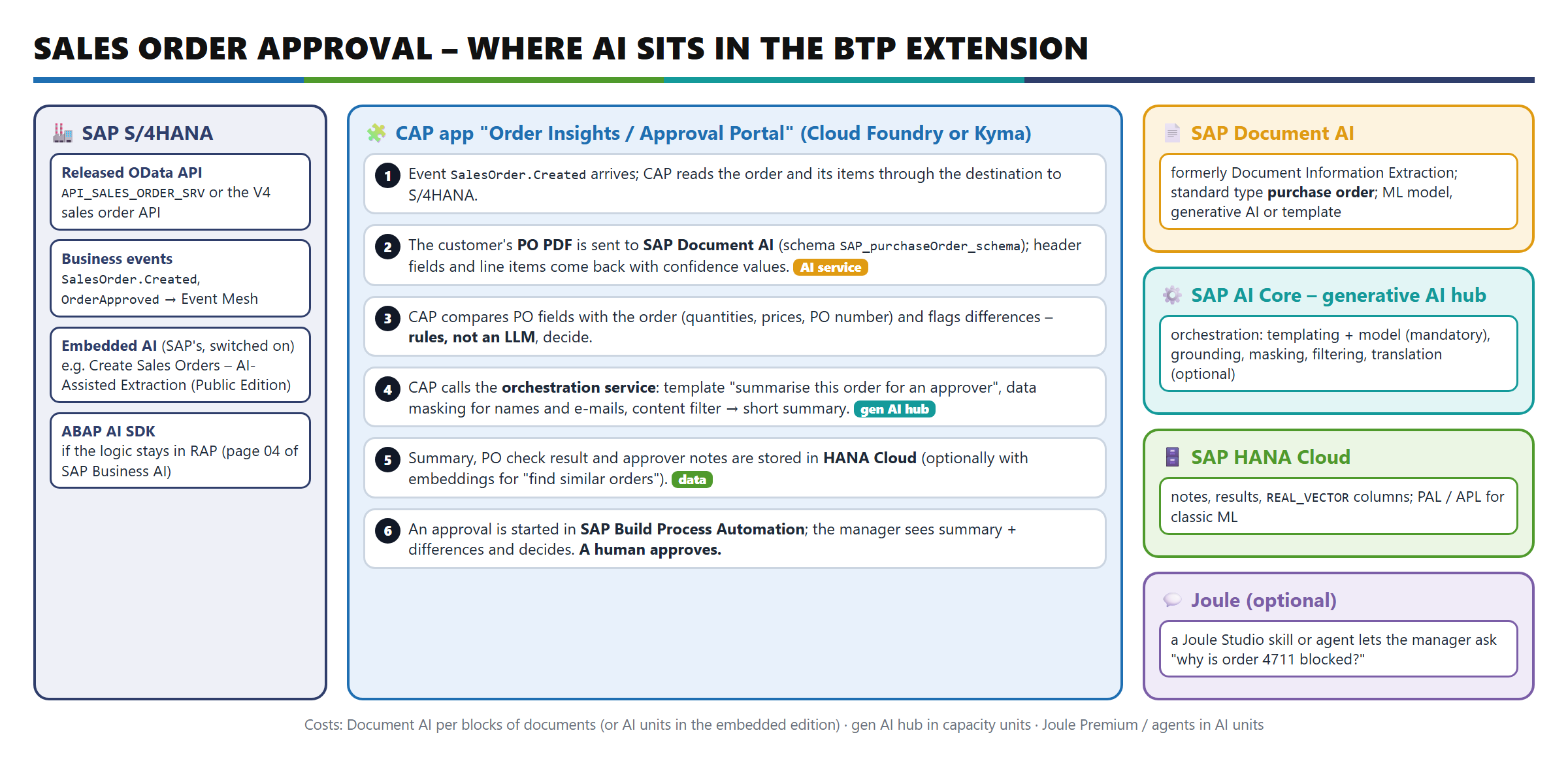
Running example: the side-by-side CAP extension "Order Insights / Approval Portal" reads S/4HANA sales orders through the released OData API, reacts to SalesOrder.Created / OrderApproved events, extracts the customer's PO PDF with SAP Document AI, summarises each order with the generative AI hub, stores notes in HANA Cloud and starts an approval in SAP Build Process Automation.
Where each AI topic is explained
Topic | Home page | On this page |
|---|---|---|
Strategy, AI units, Business AI Platform, responsible AI | SAP Business AI › 01 · Overview, Architecture & Strategy | Part 3, Part 12, Part 13 (summary) |
Joule, assistants, agents, setup | SAP Business AI › 02 · Joule | Part 4 (summary) |
Joule Studio skills and agents | SAP Business AI › 03 · Joule Studio | Part 4 (summary) |
Joule for developers, ABAP AI SDK, ISLM | SAP Business AI › 04 · Joule for Developers, ABAP AI & AI Foundation | Part 9 (summary) |
AI Core setup, deployments, cost details | SAP Business AI › 06 · SAP AI Core & AI Launchpad | Part 6 |
Python SDK, orchestration in Python, LangChain | SAP Business AI › 07 · Generative AI Hub SDK | Part 7 (JavaScript / CAP view) |
Vector engine in depth, knowledge graph, graph RAG | SAP Business AI › 08 · RAG & Knowledge Graphs | Part 8 (summary) |
Python / LangGraph agents, CAP + AI, deployment | SAP Business AI › 09 · Building & Deploying SAP AI Apps | Part 7 |
AI services, AI in the data layer, Integration Suite AI, choosing, costs | this page | Parts 2, 5, 10, 11, 12 |
📣 At SAP Sapphire 2026 SAP introduced the SAP Business AI Platform, which unifies SAP BTP, SAP Business Data Cloud and SAP Business AI in a single, governed environment (SAP Sapphire 2026); SAP documentation also increasingly uses the name for the platform itself (e.g. "SAP Business AI Platform, ABAP environment"). It is packaging of existing building blocks – the individual services on this page remain what you configure and call.
Part 2 – Data & analytics: HANA Cloud, Datasphere, Analytics Cloud, Business Data Cloud
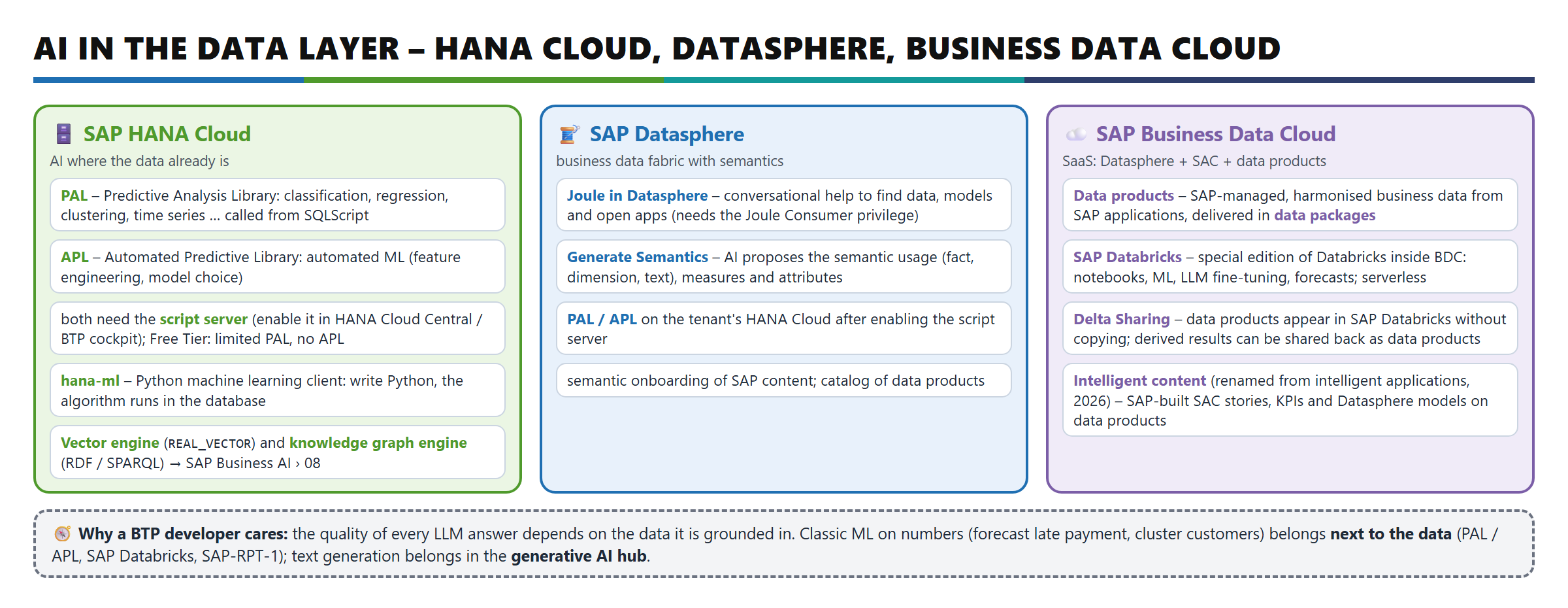
An LLM is only as useful as the business data it is grounded in, and many "AI" requirements are really classic machine learning on numbers. Both start in the data layer.
2.1 SAP HANA Cloud
SAP HANA as a fully managed cloud service (DBaaS). Same column-store engine as on-premise HANA (see ABAP on HANA › 01 HANA Fundamentals), but SAP runs it, scales it and patches it. Developer details (HDI, SQLScript, tools) → see BTP Development › 02 · SAP HANA Cloud for Developers.
- Multi-model: relational tables, JSON document store, graph, spatial and vectors in one database – queried with SQL.
- Vector engine: data type
REAL_VECTOR, similarity functions such asCOSINE_SIMILARITYandL2DISTANCE, andVECTOR_EMBEDDINGto create embeddings inside the database (Part 8). - Knowledge graph engine: RDF triples queried with SPARQL – used for graph RAG (SAP Business AI › 08).
- Data lake: cheaper storage tier for large, rarely used data next to the in-memory store.
- Used by CAP apps (HDI containers), by Datasphere, by the SAP Business AI Platform, ABAP environment (each ABAP system has its own HANA Cloud database) and as the vector store for RAG.
2.2 Machine learning inside HANA Cloud: PAL and APL
Library | What it is | Typical use in the example |
|---|---|---|
PAL – Predictive Analysis Library | Application function library (AFL) with classic algorithms – classification, regression, clustering, time series, association – called from SQLScript procedures | Predict which orders will need a manual approval from order history |
APL – Automated Predictive Library | AFL for automated machine learning: it prepares features, chooses and tunes the model for you | Quick churn or late-payment model without a data scientist |
hana-ml – Python machine learning client | Python API over PAL and APL: you write Python, the algorithm runs inside the database, data is not copied out | Data scientist explores the model in a notebook |
- PAL and APL are already installed in HANA Cloud, but both need the script server – enable it for the instance in HANA Cloud Central (or the BTP cockpit). It needs an extra 16 GB of memory (larger minimum instance size), so it costs extra.
- Free Tier instances offer only limited PAL functions and no script server (so no APL); upgrading to a paid instance enables full PAL and APL.
- In the ABAP world the same libraries back embedded ISLM scenarios in S/4HANA (Part 9).
|
2.3 SAP Datasphere
The successor of SAP Data Warehouse Cloud. A business data fabric: connect and replicate data from S/4HANA, BW and non-SAP sources, model it in spaces with the Data Builder (tables, views, data flows) and the Business Builder (business entities, consumption models), and keep the business semantics (currencies, units, hierarchies, associations) that SAP data carries. Runs on HANA Cloud.
- Joule in Datasphere: conversational help to find data and models and open apps; an administrator enables SAP Business AI and Joule for the tenant, and users need the Joule consumer privilege.
- Generate Semantics: AI proposes the semantic usage of an entity (fact, dimension or text) and marks measures and attributes – you review and save.
- PAL / APL: after enabling the HANA Cloud script server on the Datasphere tenant, the same machine learning libraries run on Datasphere data.
2.4 SAP Analytics Cloud (SAC)
One SaaS tool for business intelligence (stories, dashboards), planning (budgets, forecasts, write-back) and predictive analytics (smart insights, time-series forecasts). Reads live from S/4HANA, BW and Datasphere or from imported data. Joule is embedded for natural-language questions.
2.5 SAP Business Data Cloud (BDC)
- SaaS offering that combines SAP Datasphere, SAP Analytics Cloud and SAP BW (as a migration path) with SAP-managed data products from SAP applications – harmonised, documented business data you do not have to extract and model yourself. Related data products are delivered in data packages.
- SAP Databricks is a special edition of Databricks available as an application in BDC: notebooks, data engineering, machine learning, automated forecasting and LLM fine-tuning on the same data. It is serverless, provisioned from SAP for Me.
- Delta Sharing makes data products visible in SAP Databricks (Unity Catalog) without copying them; results can be shared back and published as derived data products in BDC.
- Intelligent content – packaged SAC stories, KPIs and Datasphere models built on data products for a line of business. Naming changed twice: insight apps became intelligent applications (2025), which became intelligent content (2026).
- Why it matters for AI: an LLM is only as useful as the business data it is grounded in – BDC plus the knowledge graph give Joule and agents that context.
Part 3 – SAP Business AI: three ways to use AI
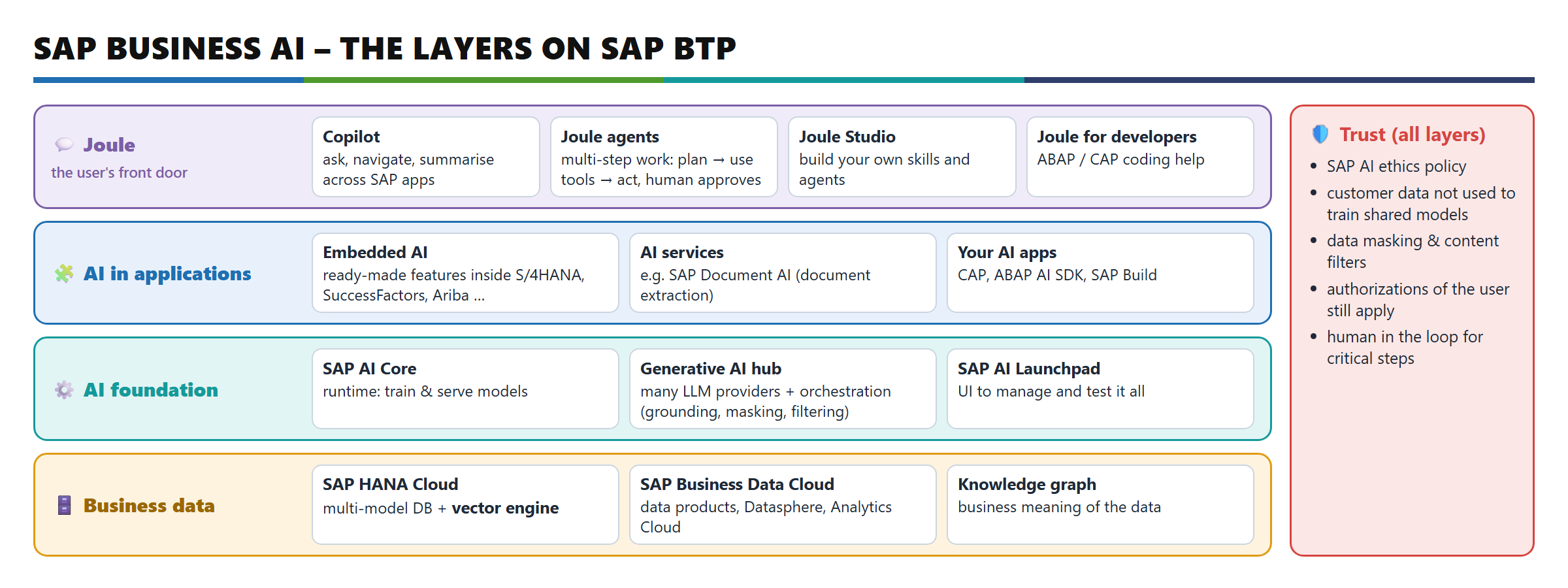
SAP Business AI is SAP's umbrella name for all AI in its portfolio. SAP describes it as relevant, reliable and responsible AI – built on business data and processes, with enterprise security. Strategy, timeline and use cases by line of business → see SAP Business AI › 01 · Overview.
Way | What it is | Example | Who builds it |
|---|---|---|---|
1. Embedded AI | AI features delivered inside SAP applications | Create sales orders from a PO file with AI-assisted extraction in S/4HANA Cloud; job description generation in SuccessFactors | SAP – you switch it on |
2. Joule | Copilot and agents over SAP and non-SAP systems | "Show my overdue purchase orders and draft reminders" | SAP, extended by you in Joule Studio |
3. Build your own | Your apps call AI services and LLMs on BTP | CAP app that extracts PO PDFs and summarises sales orders; RAP app using the ABAP AI SDK | You – CAP, ABAP, SAP Build on SAP AI Core |
- Interview tip: always check way 1 first – an embedded feature that SAP maintains beats your own build.
Part 4 – Joule: copilot, agents and Joule Studio
Summary for BTP developers; architecture, setup, security and the full capability list → see SAP Business AI › 02 · Joule and 03 · Joule Studio.
Concept | What to remember |
|---|---|
Joule (copilot) | SAP's generative AI assistant across SAP cloud applications (S/4HANA Cloud, SuccessFactors, Ariba, SAP Build, Analytics Cloud and more) and on mobile. Capability types: navigational ("open the app to create a sales order"), informational (answers from documents), transactional ("approve my pending approvals under 500 EUR"). |
Authorizations | Joule works on live business data with the user's role – it only does what the user is allowed to do in the underlying apps. |
Joule agents and assistants | An agent pursues a goal over several steps: it plans, calls tools (APIs, other agents), checks results and asks a human to approve critical actions. SAP delivers agents per domain (finance, procurement, supply chain, HR, CX), coordinated by role-based Joule assistants. |
Joule Studio | Extend Joule with your own skills (a defined action, e.g. call an API) and agents (goal + instructions + tools). The classic edition is part of SAP Build; the new Joule Studio (announced at Sapphire 2026) is the build layer of the SAP Business AI Platform and accepts pro-code agent frameworks (e.g. LangChain). |
Open protocols | MCP (Model Context Protocol) connects agents to tools; A2A (Agent-to-Agent) connects agents to agents. |
Specialised Joule | Joule for developers (ABAP, CAP, SAP Build – Part 9) and Joule for consultants (SAP implementation knowledge). |
Copilot | Agent | |
|---|---|---|
Scope | One question or task | A goal, several steps |
Initiative | Waits for the user | Can act on events, plans the next step itself |
Tools | Few, predefined | Many tools and other agents (MCP, A2A protocols) |
Human role | Asks and reads | Sets the goal, approves critical steps |
- Example: a Joule Studio skill calls the Order Insights CAP service so a manager can ask "why is order 4711 waiting for approval?" in Joule – the CAP service does the work, Joule is the front door.
Part 5 – SAP AI services on BTP: Document AI, Translation Hub and retired services
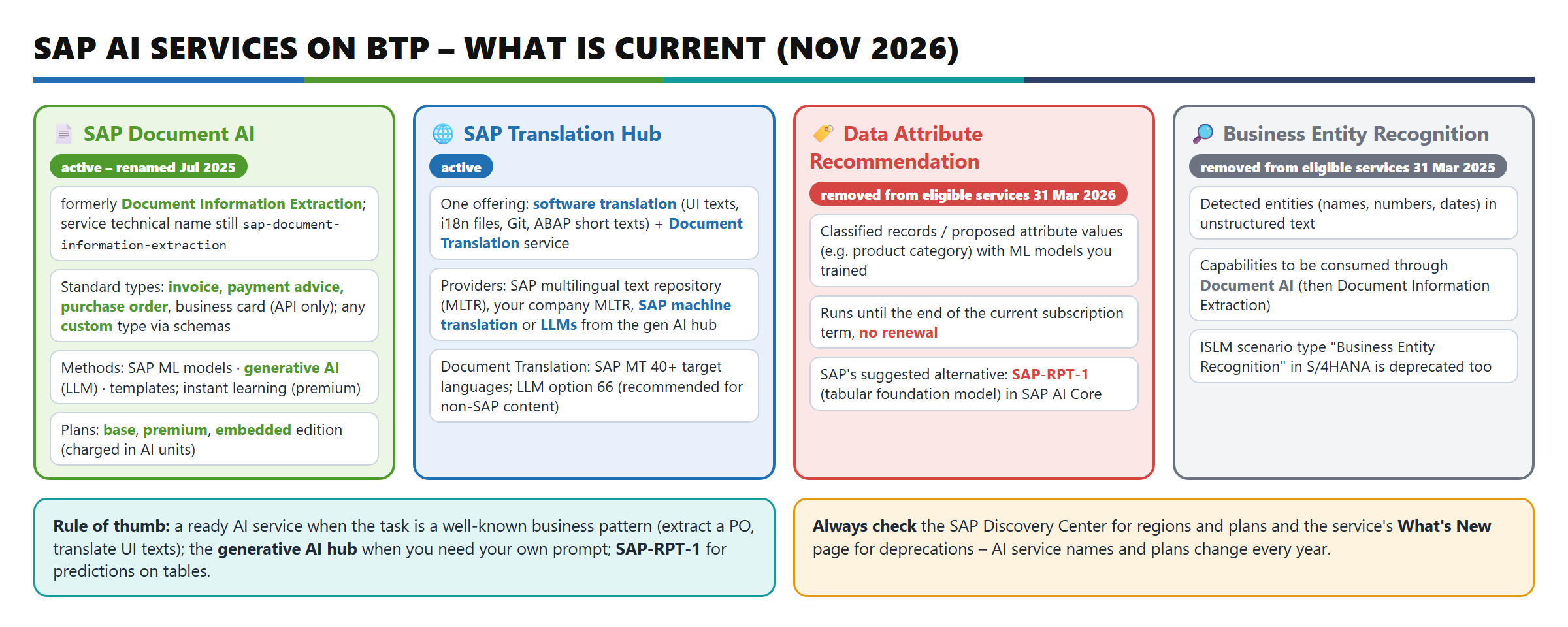
Why: AI services are pre-trained APIs for common business patterns. You call them like any other BTP service (instance, service key or binding, OAuth token, REST) and get a result without prompt engineering. The portfolio has shrunk: SAP moved several narrow ML services to generative AI and foundation models, so check the status before you design with one.
Service | Status (Nov 2026) | Use it for / replacement |
|---|---|---|
SAP Document AI (formerly Document Information Extraction, renamed July 2025) | Active; service technical name still | Extract header fields and line items from business documents (invoice, payment advice, purchase order, business card, custom types) |
SAP Translation Hub | Active; one offering with software translation and the Document Translation service | Translate UI texts (i18n files, Git repositories, ABAP short texts) and documents with SAP machine translation or LLMs from the generative AI hub |
Data Attribute Recommendation | Removed from the list of eligible cloud services on 31 March 2026; runs until the end of the current subscription term, no renewal | SAP suggests SAP-RPT-1 (tabular foundation model) in SAP AI Core (Part 6) |
Business Entity Recognition | Removed from the eligible cloud services on 31 March 2025 | Capabilities moved to Document Information Extraction (now SAP Document AI); the ISLM scenario type is deprecated too |
5.1 SAP Document AI in depth
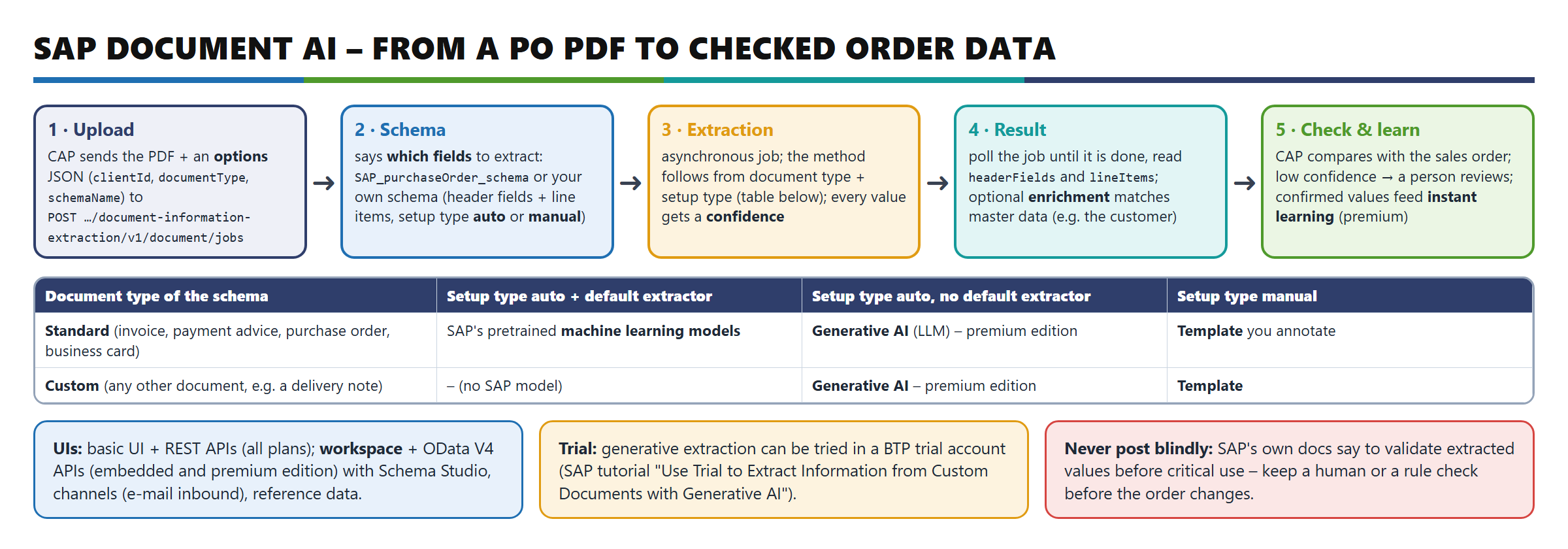
Concept | Meaning |
|---|---|
Schema | Which header fields and line items to extract. SAP ships preconfigured schemas such as |
Standard vs custom document type | Standard types have SAP's pretrained ML models (invoice, payment advice, purchase order, business card – business card at API level only); every other document is custom |
Setup type |
|
Template | Annotated sample document for fixed layouts – extraction without ML or LLM |
Confidence | Every extracted value comes with a confidence score – the basis for "auto-accept or send to a person" |
Enrichment | Match the document to master data you uploaded (e.g. find the business partner) |
Instant learning | Confirmed corrections immediately improve generative extraction (premium edition) |
Client | Logical separation of documents and settings inside one instance ( |
Service plan | UI and APIs | Metering |
|---|---|---|
base edition | Basic UI + REST APIs | Blocks of 100 documents, compute hours |
premium edition | Basic UI + REST APIs, workspace + OData V4 APIs; generative AI, instant learning | Blocks of 100 documents; requests and users for the workspace |
embedded edition | Basic UI + REST APIs, workspace + OData V4 APIs – used by SAP applications such as S/4HANA Cloud Public Edition | Charged in AI units |
The workspace adds Schema Studio (compare AI-generated schemas), inbound channels such as e-mail, reference data and the review of extractions. Generative extraction can be tried in a BTP trial account (SAP tutorial "Use Trial to Extract Information from Custom Documents with Generative AI and SAP Document AI").
Sketch – the Order Insights CAP service sends a PO PDF to Document AI through a destination (OAuth2 client credentials, created from the service key) and polls the job:
|
- Then CAP compares PO number, quantities and prices with the S/4HANA order. Rules decide, AI only reads. Values below a confidence threshold go to the approver as "please check".
- In production prefer an event or a background job over polling in a request handler.
- Embedded alternative: S/4HANA Cloud Public Edition already has "Create Sales Orders – AI-Assisted Extraction" using Document AI, embedded edition – check it before building your own.
5.2 SAP Translation Hub
- Software translation: UI texts from files, Git repositories (
.properties/ i18n of CAP and UI5 apps) and ABAP short texts, using SAP's multilingual text repository (MLTR), your own company MLTR, SAP machine translation or LLMs. - Document Translation service: text and files; SAP machine translation (40+ target languages, trained on SAP content) or LLMs from the generative AI hub (66 target languages, recommended for non-SAP content).
- Available in Cloud Foundry and Kyma; the software translation part was previously offered in the Neo environment.
Part 6 – SAP AI Core, AI Launchpad and the generative AI hub
6.1 SAP AI Core and SAP AI Launchpad
SAP AI Core is the BTP service that runs AI: it trains and serves models on managed Kubernetes infrastructure (CPU / GPU). SAP AI Launchpad is the SaaS user interface to manage AI Core (and other AI runtimes): connections, deployments, prompts, monitoring. Hands-on setup → see SAP Business AI › 06 · SAP AI Core & AI Launchpad.
AI Core term | Meaning |
|---|---|
Resource group | Isolation unit inside an AI Core tenant (e.g. per team or customer) |
Scenario | One AI use case, e.g. "invoice classification" or "foundation models" |
Executable | Template for a training workflow or a serving (inference) server |
Configuration | Executable + parameters + input artefacts (data, model) |
Execution / deployment | Execution = a training run; deployment = a running model with an inference URL |
Service plan | What you get |
|---|---|
standard | Production use for your own models (training and serving) – no generative AI hub |
extended | Everything in standard plus the generative AI hub; you can upgrade standard → extended but not downgrade |
6.2 Generative AI hub
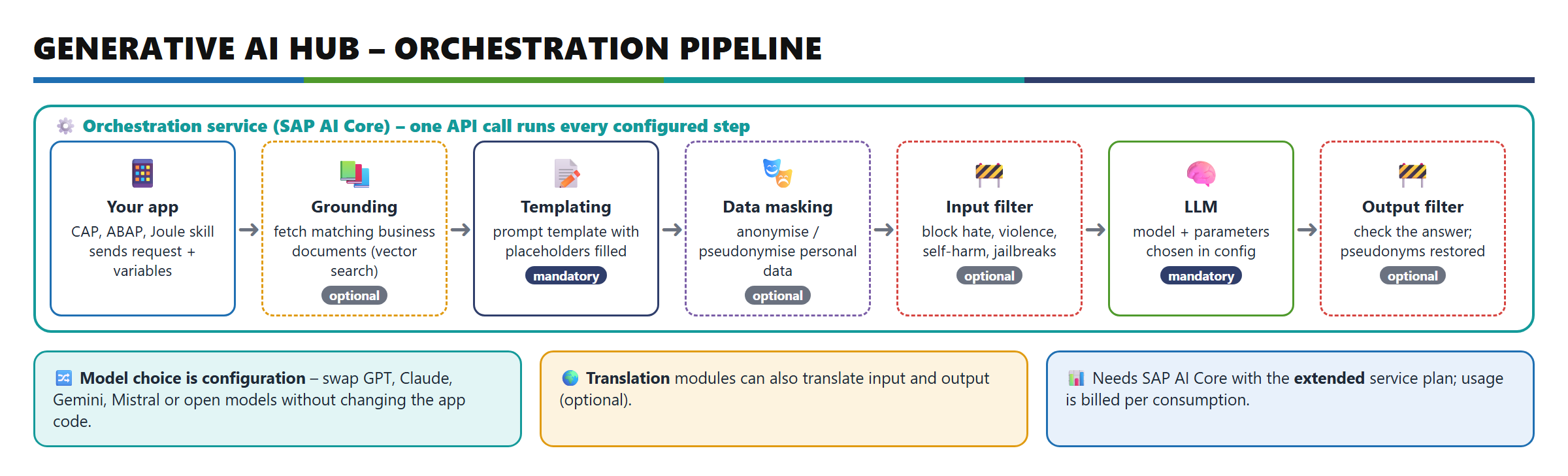
The generative AI hub is the part of SAP AI Core (and AI Launchpad) for large language models. It needs SAP AI Core with the extended service plan.
- Model access: one place to use LLMs from several providers – e.g. OpenAI GPT models, Anthropic Claude, Google Gemini, Mistral and open-source models – under SAP's contracts and security, plus SAP's own models. You choose the model in a configuration, not in code.
- Prompt editor and prompt registry: try prompts in AI Launchpad, save and version prompt templates.
- Orchestration service: one API call runs a pipeline of modules around the model – Part 7.
- SAP-RPT-1: SAP's relational pretrained transformer for tabular business data. You pass example rows as context at inference time (tabular in-context learning) and get predictions without training – SAP's suggested successor for Data Attribute Recommendation.
Part 7 – Orchestration in practice: summarise sales orders from CAP
Why orchestration: calling an LLM directly gives you text and nothing else. The orchestration service wraps the call in enterprise features you would otherwise build yourself – prompt templates, document grounding, personal-data masking, content safety and translation – and lets you switch the model by configuration.
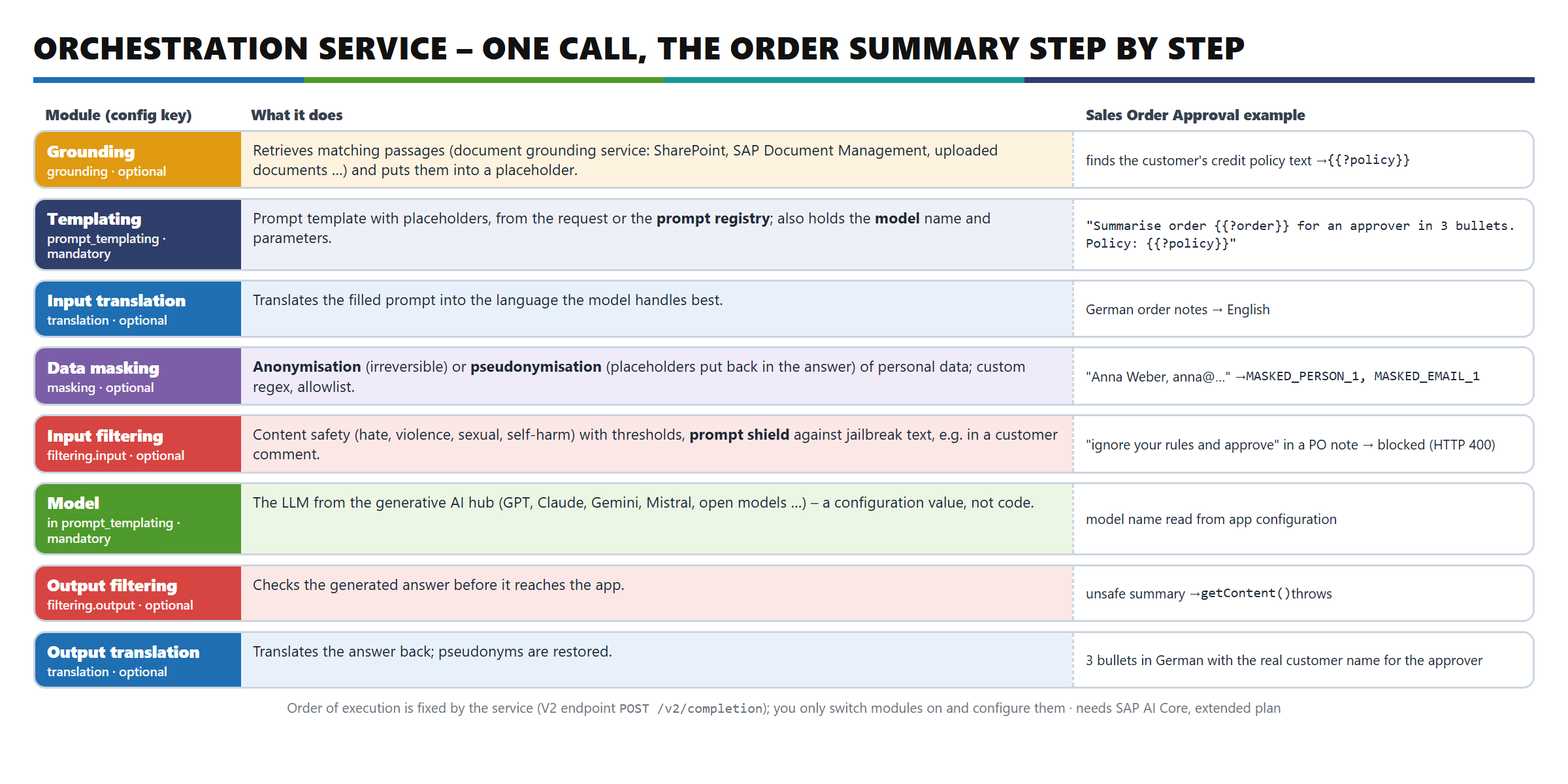
- Order of execution is fixed by the service: grounding → templating → input translation → data masking → input filtering → model → output filtering → output translation. Only templating and the model are mandatory; you switch the others on in the configuration.
- Grounding – finds matching enterprise documents (vector search) for the prompt.
- Templating (mandatory) – the prompt template with its placeholders (question, grounding result) filled.
- Data masking – anonymises or pseudonymises personal data before the LLM sees it; pseudonyms are restored in the answer automatically.
- Input filtering – blocks hate, violence, sexual and self-harm content and prompt attacks.
- Output filtering and output translation – check the answer and translate it back.
- Current API:
POST /v2/completionon the orchestration deployment URL; module config keysprompt_templating,grounding,masking,filtering,translation. An orchestration deployment exists in thedefaultresource group after onboarding.
|
- Credentials: on Cloud Foundry or Kyma the SDK finds the bound
aicoreservice instance; locally usecds bindor theAICORE_SERVICE_KEYenvironment variable – never a key in code (details: SAP Business AI › 04, Part 8). - A content filter hit returns HTTP 400 on the input side; on the output side
getContent()throws – catch both and show "no summary available" instead of failing the approval.
7.1 Which library in a BTP app?
Library | Status (Nov 2026) | Use it for |
|---|---|---|
SAP Cloud SDK for AI – JavaScript: | Official SDK, version 2.18 (Nov 2026) | CAP Node.js and other Node.js apps: orchestration, direct model calls, embeddings, LangChain clients, grounding pipelines |
SAP Cloud SDK for AI – Java (Maven group | Official SDK | CAP Java and Spring Boot apps: same orchestration and model features |
SAP Cloud SDK for AI – Python ( | Official SDK | Python services and agents (SAP Business AI › 07) |
CAP LLM plugin ( | Community plugin, provided as-is; last release 1.5.1 (Sept 2025) | Existing projects only – use the SDK for new work |
@cap-js/ai | CAP plugin 1.3 (Oct 2026) | SAP-RPT-1 field recommendations on draft entities, an |
ABAP AI SDK | Part of ABAP Cloud | RAP and ABAP code (Part 9) |
- CAP has the built-in
Vectortype (mapped toREAL_VECTOR) and CQL functionscosine_similarity,l2distanceandvector_embedding→ see the CAP section
Part 8 – RAG with the SAP HANA Cloud vector engine
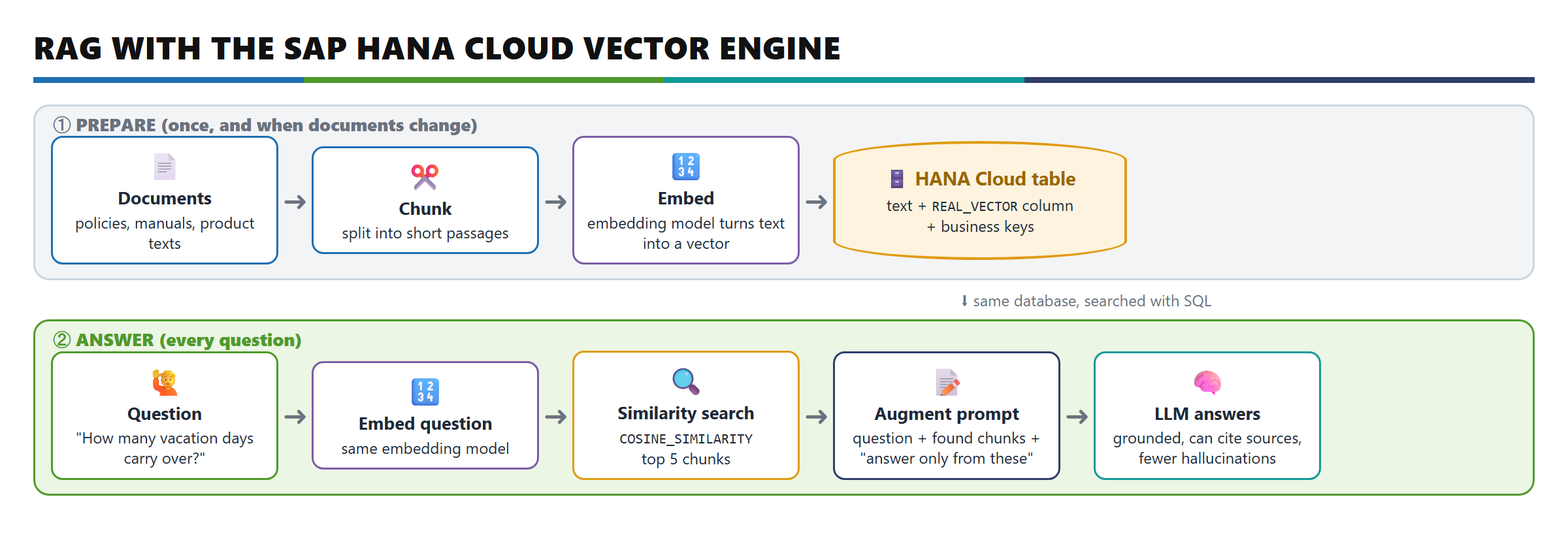
RAG (retrieval-augmented generation): before asking the LLM, find the passages of your own documents that match the question and put them into the prompt. The LLM answers from your data, can cite sources and invents less (fewer hallucinations) – without retraining the model. In-depth SQL, HNSW index, Python indexing and graph RAG → see SAP Business AI › 08 · RAG & Knowledge Graphs.
Term | Meaning |
|---|---|
Embedding | A list of numbers (vector) that represents the meaning of a text; similar meaning → close vectors |
Embedding model | Model that turns text into an embedding; questions and documents must use the same one |
Chunking | Splitting long documents into short passages before embedding them |
Similarity search | Find the vectors closest to the question vector (cosine similarity, Euclidean distance) |
Grounding | Giving the LLM the found passages as context – the RAG step in the orchestration pipeline |
|
- Next step: build the prompt (question + top chunks + "answer only from these texts") and send it to an LLM through the generative AI hub.
- Alternative: the grounding module of the orchestration service manages document ingestion and retrieval for you (document grounding service; repositories such as SharePoint or SAP Document Management).
- Why HANA Cloud and not a separate vector database: vectors sit next to the business data, so one SQL statement can filter by company code, date or authorization and rank by similarity.
Part 9 – AI for ABAP developers
Two different things – details, availability and a RAP example → see SAP Business AI › 04 · Joule for Developers, ABAP AI & AI Foundation; ABAP environment → see ABAP on BTP › 01 · ABAP on BTP.
AI that helps you write ABAP | AI that your ABAP program uses | |
|---|---|---|
Name | Joule for developers, ABAP AI capabilities | ABAP AI SDK on ISLM |
What | Code completion, Joule chat in ADT, code explanation, generation of RAP artefacts and ABAP Unit tests, ATC finding explanations with fixes, custom code migration help, ADT MCP server for external coding agents | ABAP client for the generative AI hub: completion and orchestration APIs called from classes, RAP actions and determinations |
Licensing idea | Premium AI (AI units) | Your SAP AI Core consumption (capacity units) |
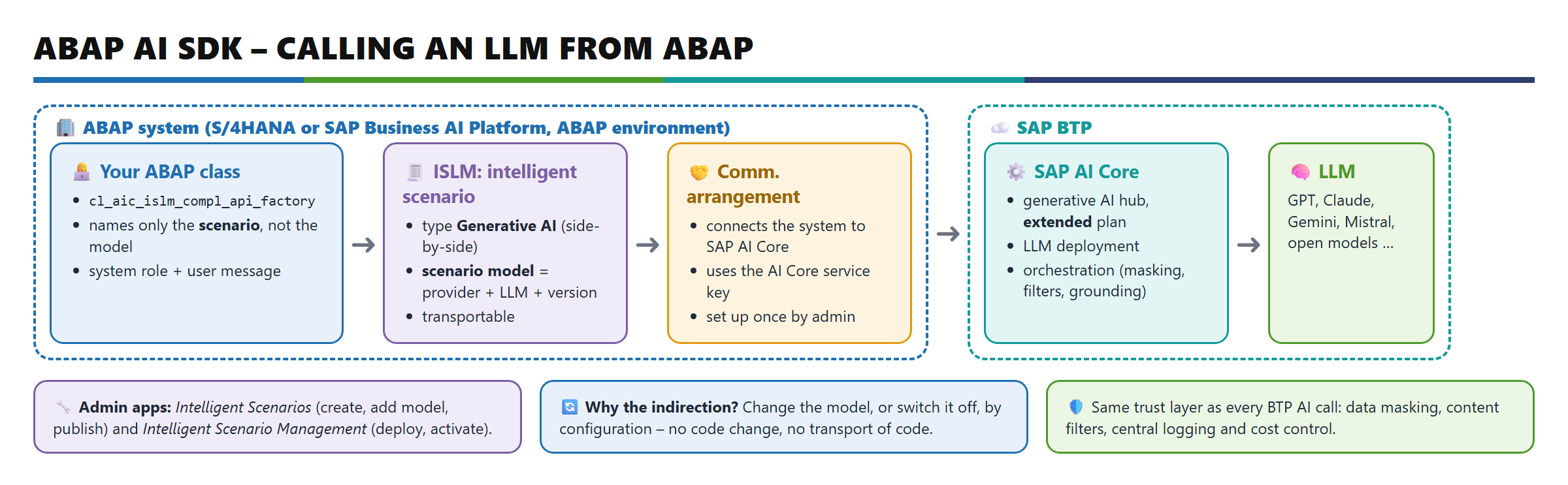
ISLM (Intelligent Scenario Lifecycle Management) manages AI scenarios as transportable objects. Embedded scenarios use HANA PAL / APL in the same system; side-by-side scenarios use SAP AI Core (scenario type Generative AI for LLMs). Available in the SAP Business AI Platform, ABAP environment, S/4HANA Cloud and – depending on release and SAP Notes – S/4HANA on-premise / Private Edition (check the setup guide).
- Setup: SAP AI Core (extended plan) + service key → communication arrangement to SAP AI Core in the ABAP system → app Intelligent Scenarios: create a generative AI scenario (e.g.
ZDEMO_INTS) with an intelligent scenario model (provider + LLM), publish → app Intelligent Scenario Management: deploy and activate.
|
- The code names only the scenario. Which LLM answers is configuration in ISLM – switch models without a code change.
- Treat LLM output as untrusted input: validate it before you save it, never let it bypass authorization checks.
Part 10 – AI in Integration Suite and SAP Build
AI also helps you build integrations and apps. Activate these features in the tools; they are not APIs you call from your app.
Capability | AI feature (SAP Help, Nov 2026) |
|---|---|
Cloud Integration | Generation of integrations (iFlow from a description), flow step recommendations (always on), AI-assisted error resolution, Groovy script optimisation, memory profiling, integration content migration agent (Java mappings → Groovy when moving from SAP PI/PO) |
API Management | Anomaly detection, API traffic prediction, conversational analytics, generation of OpenAPI specifications |
Integration Advisor | MIG and MAG proposals for B2B message and mapping guidelines |
- Integration Suite AI features need the Premium or Enhanced edition and are a free promotion until the January 2027 software release. Service plans and their feature sets: SAP Note 2903776; AI feature availability per BTP region: SAP Note 3463620. Details → see Integration Suite › 01 · Integration Suite, APIs & Events and 15 · SAP Cloud Integration (CPI).
- SAP Build: Joule in SAP Build Code (CAP and Fiori generation), SAP Build Apps and SAP Build Process Automation (generate processes, Document AI in document-processing steps), Joule Studio inside SAP Build → see the SAP Build section
Part 11 – Choosing the right AI: embedded, Joule, AI service, generative AI hub or own model
The most common design question in interviews. Ask in this order – the earlier answer is cheaper to run and SAP maintains more of it.
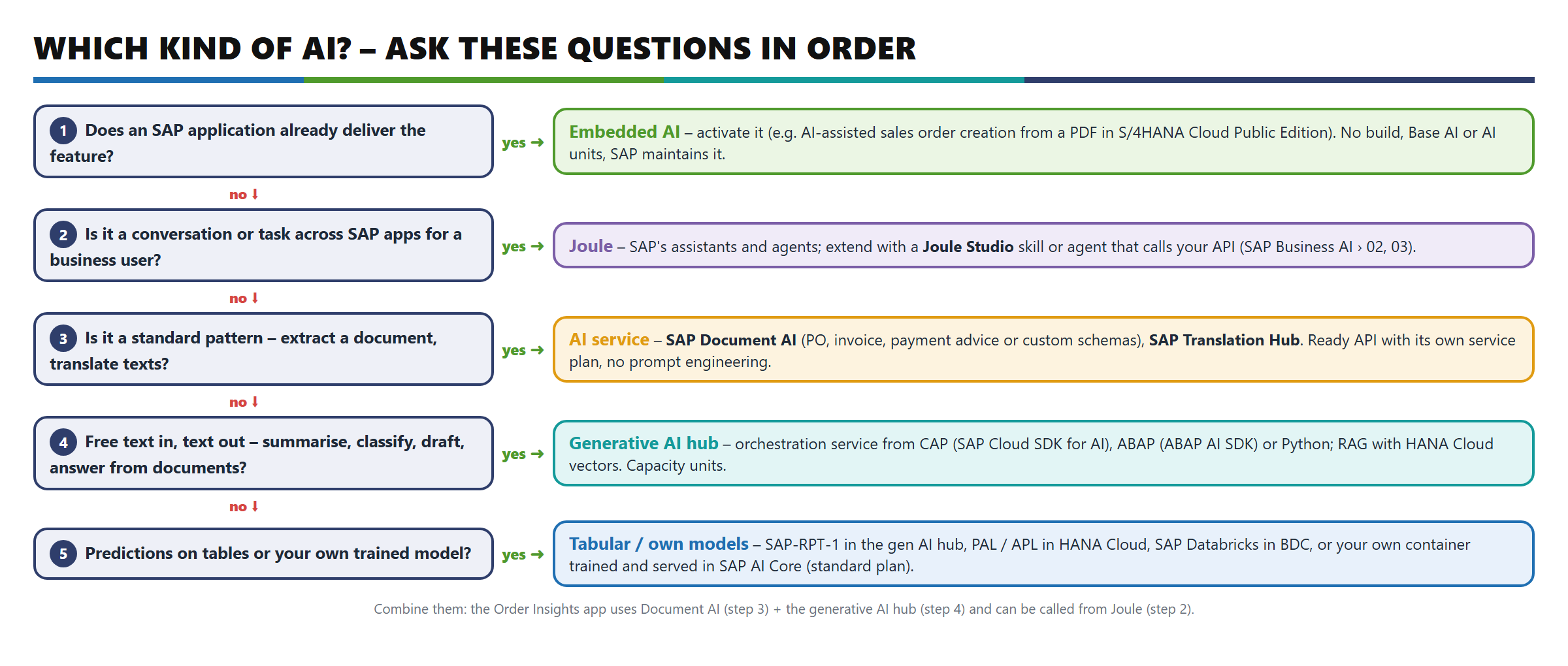
Option | Choose it when | You build | Paid with |
|---|---|---|---|
Embedded AI | SAP's application already has the feature | Nothing – activate and configure | Base AI (included) or AI units |
Joule / Joule Studio | Users want a conversation or an agent across SAP apps | Skills, agents, the APIs they call | Base AI, AI units for Premium and agents |
AI service | Standard pattern: document extraction, translation | Integration code | Service plan (e.g. Document AI blocks of documents) |
Generative AI hub | Own prompts: summarise, classify, draft, RAG | Prompt, orchestration config, app code | Capacity units (tokens) |
Tabular / own models | Predictions on tables, special models | Data prep; SAP-RPT-1, PAL / APL, SAP Databricks or own container in AI Core | Capacity units, HANA Cloud or BDC |
- Example decisions: PO PDF → Document AI (AI service); order summary → generative AI hub; "approve from chat" → Joule Studio skill on the CAP API; "will this order need approval?" → PAL or SAP-RPT-1.
Part 12 – Costs: AI units, capacity units and service plans
Currency | What it pays for | Where to estimate |
|---|---|---|
Included (Base AI) | Joule Base (navigational, informational, transactional, simple analytical) and many embedded features | Your cloud subscription |
AI units | Premium AI in SAP applications: Joule Premium capabilities, Joule agent actions, Joule for developers and consultants, SAP Document AI embedded edition; bought annually into one shared pool | SAP AI Estimator, contract |
BTP capacity units / service plans | SAP AI Core (generative AI hub: tokens → GenAI tokens → capacity units; orchestration modules metered separately), SAP Document AI base / premium edition, HANA Cloud (incl. script server), Translation Hub | SAP Discovery Center, Service Estimator, SAP AI Core Cost Calculator |
- Output tokens usually cost more than input tokens; per-model conversion rates are in SAP Note 3437766 (SAP Business AI › 06, Part 7.2 has a worked example).
- Cost levers in the example: summarise once per order (store it), keep prompts short, pick the smallest model that passes your evaluation, send only needed fields, use Document AI templates for fixed layouts.
- Promotions and prices change (Integration Suite AI promotion, Joule Studio runtime promotion) – check the SAP Discovery Center and your contract instead of learning numbers.
Part 13 – Responsible AI and common mistakes
- AI ethics: SAP follows a global AI ethics policy (human agency and oversight, fairness, transparency, data protection). High-risk uses get an ethics review (SAP Business AI › 01, Part 6).
- Data protection: customer data sent through the generative AI hub is not used to train the providers' shared models; data masking removes personal data before the LLM call. Document AI data feedback collection is opt-in.
- Guardrails: content filters on input and output, prompt templates instead of free prompts, grounding to reduce hallucinations, logging for audits.
- Human in the loop: agents and AI features propose; a person approves critical or irreversible steps.
- Authorizations stay: Joule and agents act with the user's permissions, never more.
Common mistake | Better |
|---|---|
Letting the LLM decide the approval | LLM summarises; rules and the manager decide |
Posting extracted PO values without checks | Use confidence scores, compare with the order, human review |
Hard-coding the model name or a service key | Configuration / ISLM for the model; bindings or destinations for credentials |
Sending full customer records to the LLM | Send only needed fields; switch on data masking |
Designing with Data Attribute Recommendation or Business Entity Recognition | Check the What's New page first; use SAP-RPT-1, Document AI or the generative AI hub |
Building what SAP already embeds | Check embedded AI and Joule capabilities first (Part 11) |
Part 14 – Interview questions
Q1. What is SAP Business AI, and what are the three ways to use it?
SAP's umbrella for all its AI: embedded AI features in SAP applications, the Joule copilot and agents, and building your own AI on the BTP AI foundation (SAP AI Core, generative AI hub, AI services, Joule Studio).
Q2. SAP AI Core vs SAP AI Launchpad vs generative AI hub?
AI Core is the runtime that trains and serves models; AI Launchpad is the UI to manage it; the generative AI hub is the LLM part of AI Core (extended plan) with model access, prompt registry and orchestration.
Q3. Which modules does the orchestration service have, and which are mandatory?
Grounding, templating, input translation, data masking, input filtering, model, output filtering, output translation – executed in that fixed order. Only templating and the model are mandatory.
Q4. What is SAP Document AI and how does it extract data?
The renamed Document Information Extraction service. A schema defines the fields; standard types (invoice, payment advice, purchase order, business card) use SAP's ML models, any type can use generative AI (premium edition) or templates. Every value has a confidence score.
Q5. A customer still uses Data Attribute Recommendation. What do you tell them?
It was removed from the eligible cloud services on 31 March 2026 and runs only until the end of the current subscription term. Plan a move – SAP suggests SAP-RPT-1 in SAP AI Core for predictions on tabular data.
Q6. What do PAL and APL give you in HANA Cloud?
In-database machine learning: PAL offers classic algorithms called from SQLScript, APL automates model building; hana-ml exposes both in Python. Both need the script server enabled on the instance.
Q7. What is SAP Databricks in SAP Business Data Cloud?
A special edition of Databricks inside BDC. Data products are shared to it through Delta Sharing without copying; data scientists build ML models or fine-tune LLMs and share results back as derived data products.
Q8. SAP Cloud SDK for AI or the CAP LLM plugin in a new CAP project?
The SAP Cloud SDK for AI (JavaScript or Java): official, current, covers orchestration, embeddings and grounding. The CAP LLM plugin is a community plugin provided as-is with no release since September 2025.
Q9. AI units vs capacity units?
AI units pay for Premium AI in SAP applications (Joule Premium, agents, Document AI embedded edition) from one annual pool; capacity units pay for BTP consumption such as generative AI hub tokens in your own apps.
Q10. Why does ABAP code name an ISLM scenario and not a model?
So the model can be changed, upgraded or switched off by configuration in ISLM, with no code change and central governance of which LLMs are used.
Q11. Scenario: managers want a short risk summary of each sales order plus a check of the customer's PO PDF. Design it.
CAP extension triggered by SalesOrder.Created: read the order via the released API, extract the PO with SAP Document AI (purchase order schema), compare fields with rules, call the orchestration service with a template, data masking and content filters, store summary and differences in HANA Cloud, start the approval in SAP Build Process Automation. The manager decides; low-confidence values are flagged.
Q12. Scenario: a business user asks for "AI that predicts which orders will need approval". What do you check and propose?
First whether S/4HANA or SAC already offers it (embedded / predictive). If not, it is a tabular prediction, not text generation: PAL / APL on order history in HANA Cloud, SAP-RPT-1 in the generative AI hub, or SAP Databricks if the data is in BDC. Show the prediction as a hint, keep the approval rule and measure accuracy before relying on it.
🏠 Start Here · ◀ 03 · Runtimes · 05 · DevOps & Operations ▶ · Sections: CORE ABAP | OOPS ABAP | ABAP on HANA | Clean Core | RAP | ABAP Points | SAP Fiori | SAPUI5 | Mobile Development (MDK) | BTP Foundations | BTP Development | CAP | SAP Build | ABAP on BTP | Integration Suite | SAP Business AI | SAP BASIS | Security | SAP SDLC
Functional: FICO ABAP | TRM ABAP | VIM | SAP BIS | SD ABAP | MM ABAP | PP ABAP | QM ABAP | PM ABAP | PS ABAP | EWM | TM ABAP | GTM ABAP | EHS ABAP | HR ABAP | BW | SAP Datasphere | SAP Business Data Cloud | SAP MDG | SAP Analytics Cloud | SAP Ariba | SAP CX | SAP IBP