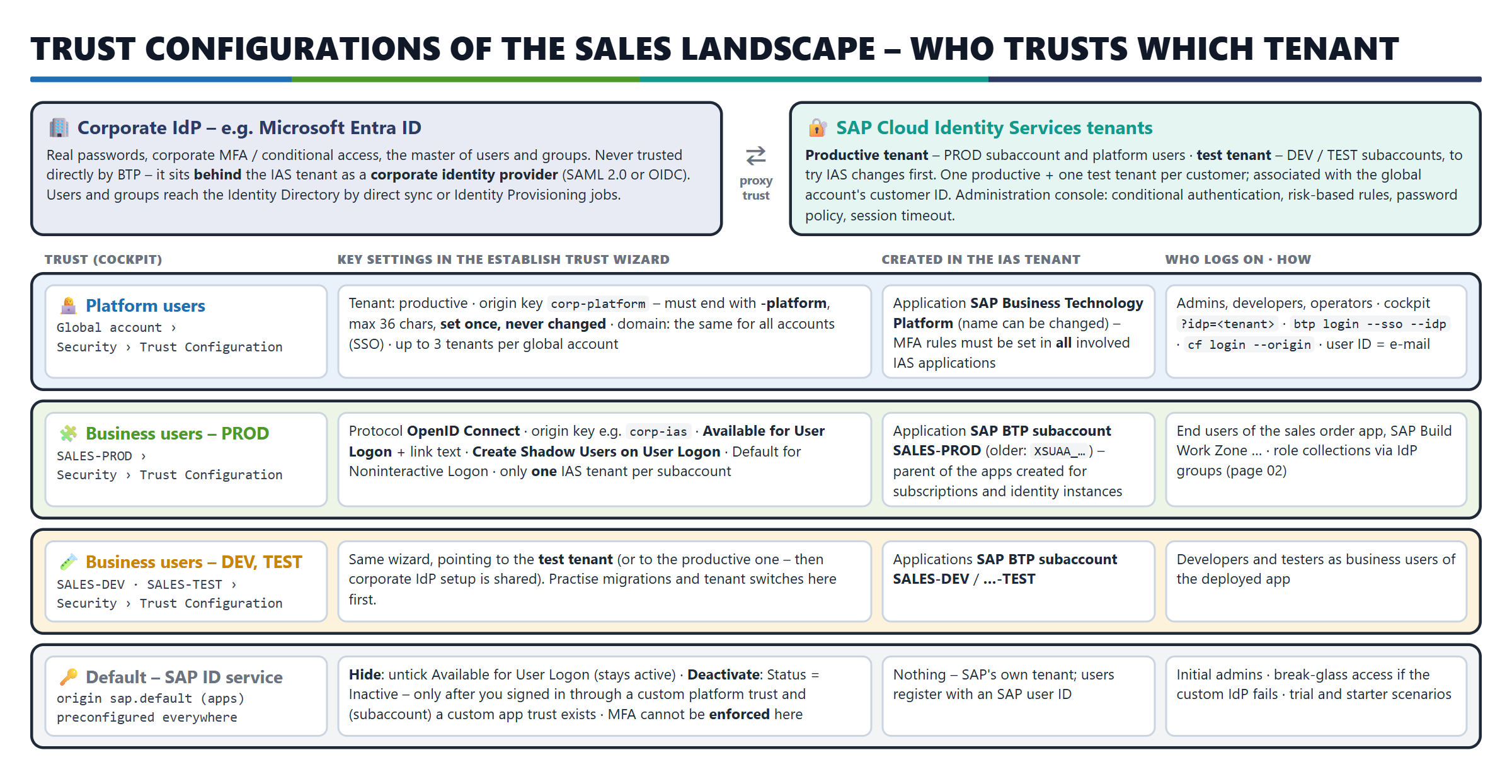
Every security control on SAP BTP starts with one question: who is this user, and who vouched for them? On BTP the answer is a trust configuration – the global account trusts an identity provider for platform users (administrators, developers, operators), and each subaccount trusts one for business users (the people using the apps). SAP's recommendation is the same for both: connect your own tenant of SAP Cloud Identity Services and let it proxy log-ons to the corporate identity provider. This page is the administrator and security-architect view: getting and organising tenants, establishing trust in the cockpit, btp CLI and Terraform, corporate IdP federation and single sign-on, MFA and risk-based authentication, and the user lifecycle with Identity Provisioning. Running example: the global account with the subaccounts SALES-DEV, SALES-TEST and SALES-PROD hosting the sales order app on BTP. The basics – platform vs business users, what IAS, IPS and XSUAA are, OAuth 2.0, JWT, xs-security.json and the app router – are on BTP Foundations › 03 and 04; role collections, group mappings and AMS policies on page 02. Facts as of November 2026.
Part 1 – The identity architecture of a BTP landscape
Why it matters: identity is the outer wall. If anyone can log on with a weak password, or a leaver keeps their account, the best role design (page 02) and network setup (page 03) do not help. On BTP identity is not configured once – there are several independent trust points, and each must be set up, hardened and monitored.
1.1 The trust points you administer
Trust point | Users | Configured in | Default | Recommended |
|---|---|---|---|---|
Global account – platform trust | Platform users at global account, directory and subaccount level, Cloud Foundry orgs and spaces | Global account › Security › Trust Configuration (Custom Platform Identity Providers) | SAP ID service | Productive SAP Cloud Identity Services tenant; origin key ending -platform |
Subaccount – application trust | Business users of apps and subscriptions in the subaccount | Subaccount › Security › Trust Configuration | SAP ID service (origin | One SAP Cloud Identity Services tenant over OpenID Connect; default IdP hidden or inactive |
Kyma runtime | Users of the Kubernetes cluster (kubectl, dashboard) | Separate Kyma configuration | Kyma's own setting | Configure Kyma to use the same SAP Cloud Identity Services tenant (see BTP Admin › 02) |
SAP SaaS (S/4HANA Cloud, SuccessFactors …) | Business users of the SaaS product | The tenant selected at provisioning (SAP for Me) | The customer's default tenant | The same productive tenant as the BTP subaccounts, for SSO |
A user on BTP is always user identifier + identity provider. For global accounts, directories, multi-environment subaccounts and Cloud Foundry the identifier is the e-mail address and the IdP is named by its origin key. The same e-mail from SAP ID service and from your corporate tenant are two different users with possibly different authorizations – the first source of confusion in every audit.
1.2 SAP Cloud Identity Services – the admin's map
Service | What the admin does with it | Taught where |
|---|---|---|
Identity Authentication | Log-on pages, SSO over SAML 2.0 and OpenID Connect, proxy to corporate IdPs, conditional authentication, risk-based authentication and 2FA, password policies, session timeout | Parts 3–6 |
Identity Directory | The tenant's user and group store (SCIM 2.0 API, custom schemas); generates the Global User ID that SAP applications use to correlate a user across products | Part 7 |
Identity Provisioning | Reads users and groups from source systems and writes them to target systems (full / delta read, real-time); deprovisions leavers | Part 7 |
Authorization Management | Authorization policies for IAS-based apps, assigned to users (page 02) | Page 02 |
Administration console |
| Part 2 |
The SAP Authorization and Trust Management service (XSUAA) stays the OAuth server of each subaccount: it trusts the IAS tenant, keeps a shadow user per logged-on user and turns role collections into scopes (BTP Foundations › 04).
Part 2 – SAP Cloud Identity Services tenants: getting, licensing and administering them
2.1 Do you already have a tenant?
Check before you order: the SAP Cloud Identity Services – Tenants application ( https://iamtenants.accounts.cloud.sap/) or the Public Cloud Systems card in SAP for Me lists your tenants, which one is the Default tenant and its administrators. Most customers already have one through an SAP SaaS product. SAP strongly recommends a single productive tenant for all SAP cloud solutions – that is what gives out-of-the-box SSO between them.
2.2 Ways to get a tenant
Route | What you get | Notes |
|---|---|---|
Bundle with an SAP cloud solution | One productive and one test tenant per customer, preconfigured for that solution | A further bundled product reuses the existing tenant; URLs arrive in a welcome e-mail |
Self-service in the BTP cockpit | Productive or test tenant (plan | Products running in customer-managed subaccounts mostly do not create a tenant automatically – request it here (exceptions, e.g. SAP Cloud ALM, are provisioned by SAP) |
Additional tenant (plan | One extra tenant per subaccount | Needs a global account on CPEA or Pay-As-You-Go and an existing default tenant; adds no logon requests – licensed logons are shared across tenants |
SAP for Me – Portfolio & Products or Systems & Provisioning | Tenant created during provisioning of SAP-managed applications | Only if no tenant is yet bound to the customer ID |
Trial tenant | One per BTP trial global account | Up to 50 users; no Cloud Connector, no Invitation API, no e-mail template customisation |
Self-service in the cockpit: in the subaccount open Entitlements and add the service Cloud Identity Services with plan default (Application) (with directory entitlement management, assign it to the directory first). Then Services › Service Marketplace › Cloud Identity Services › Create, plan default, Cloud Service Type TEST or PRODUCTIVE. Each plan needs its own subaccount – for the second tenant type repeat the steps in another subaccount of the same region. Activate the administrator account from the e-mail you receive. A new tenant is only created if none of that type is already bound to your customer ID, regardless of region.
2.3 Licensing, tenant types and region
- Licensing (as of November 2026): Identity Authentication, Identity Provisioning, Identity Directory and XSUAA are commercially included for SAP cloud solutions and applications running on SAP BTP. Logons from SAP cloud or on-premise solutions are free; every successful authentication from a third-party application is charged, whatever the protocol.
- Productive vs test: technically and functionally identical – the type is only a label for structuring the landscape and cannot be changed later. Some SAP test instances can only trust test tenants.
- Region: SAP publishes a mapping from each Cloud Foundry region to the IAS data centre (e.g. eu10 → Germany (Frankfurt)). With an EU Access contract choose a tenant located in Europe. A tenant can be migrated to another region by an incident on component BC-IAM-IDS – planned downtime, and AMS policies must be configured again.
- Customer ID: BTP only offers tenants associated with the customer ID(s) of the global account. A tenant of another customer ID can be shared ("Reuse SAP Cloud Identity Services Tenants for Different Customer IDs").
2.4 Tenant administrators
The administration console has its own role model – separate from BTP role collections. Review it like any other privileged access (BTP Security › 05):
Administrator role | Allows |
|---|---|
Manage Tenant Configuration | Tenant settings (risk-based authentication, session timeout, blocking and deletion …) and assigning administrator roles – including to oneself; the most critical role |
Manage Applications | Applications and their authorization policies, e.g. the BTP subaccount applications |
Manage Corporate Identity Providers | Corporate IdP configuration, identity federation, forwarding of SSO requests |
Manage Users / Read Users | Create, import, export users / read and export users (console and SCIM API) |
Manage Groups | Groups – and therefore the groups that drive BTP role collections (page 02) |
Manage Identity Provisioning | Identity Provisioning configuration (grants IPS_ADMIN) |
The administrator list also contains the SAP BTP system, which by default holds the authorization to set up trust with the tenant. Keep at least two named human tenant administrators so that a leaver cannot lock the tenant.
Part 3 – Trust for business users in a subaccount
3.1 Establish trust (OpenID Connect)
Prerequisites: Subaccount Administrator, a tenant associated with the customer ID. In SALES-PROD:
Step | Cockpit | What to decide |
|---|---|---|
1 | Security › Trust Configuration › Establish Trust | The wizard lists the tenants of your customer ID – choose the productive one |
2 | Name, description, origin key | Max 36 characters: letters, digits, |
3 | Domain | The tenant domain (custom domain or |
4 | Available for User Logon + link text | Shown on the logon page; untick it to keep a trust active but invisible |
5 | Create Shadow Users on User Logon | On: any authenticated user gets a shadow user. Off: only users an admin (or Identity Provisioning) created may log on |
6 | Default for Noninteractive Logon | Which IdP CLIs and password-grant flows use (only for command-line logon) |
7 | Finish | BTP creates the OIDC application SAP BTP subaccount SALES-PROD in the tenant (older ones start with |
- Apps created later for subscriptions (e.g. SAP Build Work Zone) and for instances of the identity service become child applications of the subaccount application and inherit its subject name identifier, authentication configuration and branding.
- Only one SAP Cloud Identity Services tenant per subaccount with this method; it can be changed only while no IAS-based subscriptions exist.
- If the tenant already has a SAML trust in this subaccount you cannot add OIDC next to it – migrate (3.6).
- If the tenant's OIDC issuer changes, the trust breaks – open the trust configuration and choose Refresh.
3.2 The same with btp CLI and Terraform
|
|
Terraform is taught on BTP Admin › 03; for identity it means DEV, TEST and PROD get identical trust settings and drift is visible in the plan. The Identity Provider Management API (Business Accelerator Hub) does the same over REST.
3.3 The default identity provider: hide, deactivate or keep
Option | Effect | Prerequisite / use |
|---|---|---|
Hide – untick Available for User Logon | SAP ID service stays active but disappears from the logon page | A custom trust is active and available for logon. Good when some platform users still come from SAP ID service |
Deactivate – Status Inactive | Nobody can log on to apps of the subaccount with SAP ID service | You signed in through a custom platform trust, and a custom application trust exists. Target state for PROD |
Keep visible | Users must pick the right link | Only trial / starter scenarios; SAP ID service cannot enforce MFA – users can only switch it on for themselves |
3.4 Shadow users
XSUAA stores a shadow user (user name, e-mail, origin, role collection assignments) for every user who logs on – it is not a second password store, but it is personal data and an authorization object. In subaccounts created after 24 September 2020 automatic creation is switched off for SAP ID service. For the corporate trust decide deliberately:
- On – fits when access is governed by IdP groups mapped to role collections and IAS restricts who may reach the application (conditional authentication, "Allow Identity Authentication users only").
- Off – every user must exist before the first logon (created in Security › Users, usually when the first role collection is assigned, or by Identity Provisioning). Strongest control, more administration.
- Shadow users of leavers stay until deleted – include them in the deletion strategy (BTP Security › 04, recommendation BTP-UAA-0010 "remove users who haven't logged on for a long time").
3.5 Several identity providers in one subaccount
Preference | Approach |
|---|---|
Preferred | One trust to one IAS tenant; further IdPs (partners, a second Entra ID) are connected in IAS as corporate IdPs and selected by conditional authentication (Part 5) |
Feasible | Several trusts, but users get application URLs with |
Exceptional | Users choose on the logon page – then link texts must be understandable (BTP-UAA-0018) |
3.6 Attributes, token settings, migration and switching tenants
- Attributes: the subaccount application sends
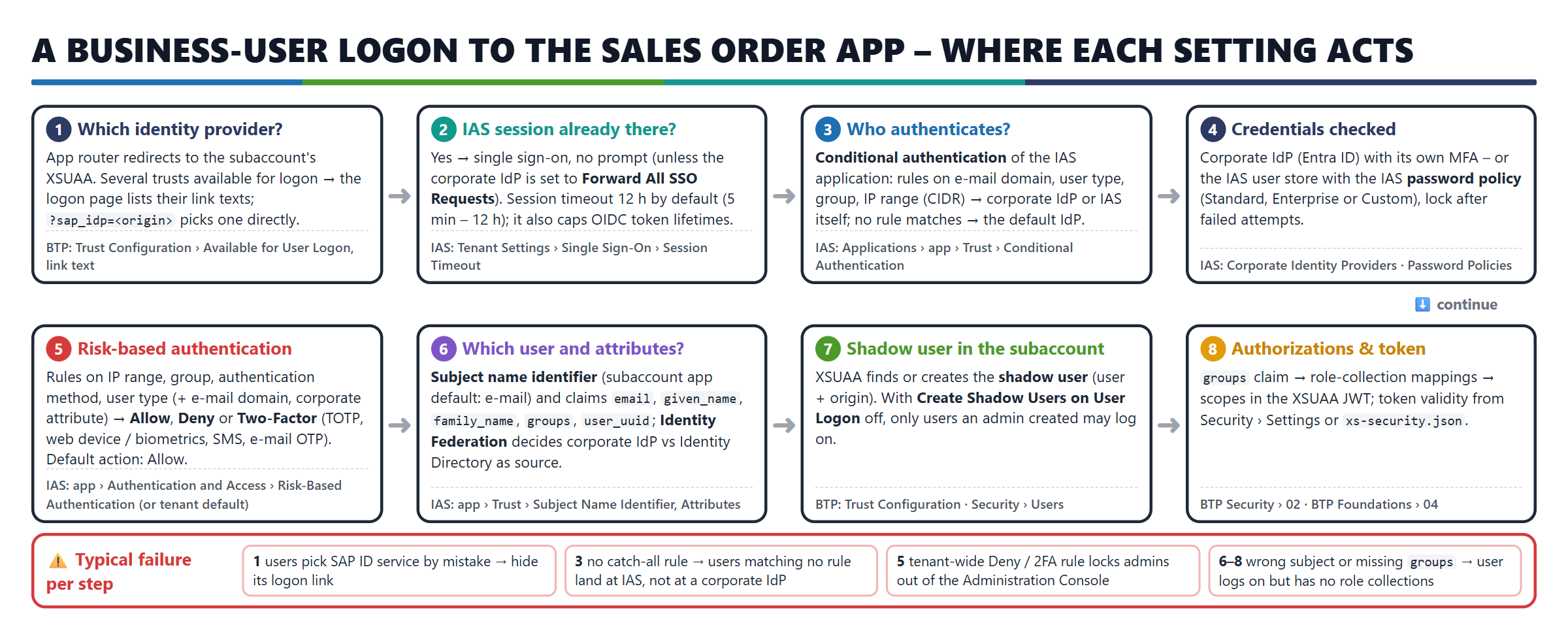
email,given_name,family_name,groupsanduser_uuid(Global User ID); the subject name identifier defaults to E-Mail. If the corporate IdP sends other names (e.g.sn), map them in the IAS application's Attributes (with identity federation on) or with enriched token claims / assertion attributes (federation off). Thegroupsclaim is what role collection mappings read (page 02). - Token validity: Security › Settings › Token Validity sets access and refresh token lifetimes for all XSUAA instances that do not override them in xs-security.json. SAP: as short as possible but not below 30 minutes (BTP-UAA-0005). The IAS session timeout caps IAS-issued token lifetimes (Part 5.3).
- Trusted Domains (Security › Settings) allow framing the XSUAA logon page from other domains – avoid; run apps under the same domain with the SAP Custom Domain service instead (BTP-UAA-0001).
- SAML → OIDC migration: some apps (SAP Build Work Zone, SAP Build Apps) need OIDC trust. Migrate the existing SAML trust in place (cockpit or
btp migrate security/trust, rollback withbtp restore security/trust) – user IDs, shadow users and role collection mappings are preserved. Expect downtime; practise in DEV / TEST first. - Switching to another tenant: follow "Safely Switch to Another OIDC Identity Provider" (SAP Note 3468982). Never delete and recreate a trust – deleting it deletes the subaccount's shadow users and their role collection assignments, and user-related data in applications can lose its link to the user.
Part 4 – Trust for platform users in the global account
Platform users hold the keys to the whole landscape, so they need corporate MFA and joiner/leaver control even more than business users. SAP: for a custom platform IdP, SAP Cloud Identity Services is mandatory (a corporate IdP can sit behind it).
4.1 Setup
Step | Detail |
|---|---|
Global account › Security › Trust Configuration › Establish Trust | Choose the productive tenant; up to three tenants per global account, several global accounts may share one tenant |
Origin key | Always ends with |
Domain | Use the same tenant domain for all BTP accounts and other apps of the tenant for SSO |
Result | IAS application SAP Business Technology Platform; the trust appears under Custom Platform Identity Providers with the cockpit link and the btp CLI tenant value |
Prerequisite | E-mail addresses in the IdP must be unique and correct – the e-mail is the platform user ID |
Then add the corporate platform users as members at global account, directory and subaccount level and as Cloud Foundry org and space members, choosing the custom IdP as origin (role collections and CF roles: page 02 and BTP Admin › 01–02). If the OIDC issuer of the tenant changes, the global account repairs the trust automatically after 24 hours – or choose Refresh at once.
4.2 How platform users log on
|
- Each user may have at most 10 parallel sessions per identity provider across cockpit and CLIs (each cockpit region counts as one).
- Non-interactive logon (scripts, technical users) uses the IdP set as default for noninteractive logon (
btp update security/settings). With a corporate IdP behind IAS this works only over OIDC trust and if the corporate IdP supports the password grant – prefer browser SSO for people and dedicated technical users for pipelines. - MFA for platform users must be configured in all IAS applications involved (or once in the corporate IdP). Tools that only have user and password fields accept password + TOTP typed together.
- Restrictions: dashboards of services not listed as supported, the SAP HANA Service dashboard and SAP Rapid Application Development by Mendix do not work with a custom platform IdP; the Cloud Connector connects with a one-time passcode instead of a password (see page 03).
- Deactivating SAP ID service for platform users requires that the administrator signed in through the custom platform trust. Many companies keep one or two named emergency admins in SAP ID service with MFA switched on – SAP documents the default IdP as a backup if the custom IdP fails. Monitor their use.
- Kyma has its own IdP configuration – set it to the same tenant.
Part 5 – Corporate IdP federation and single sign-on
5.1 IAS as proxy
In the proxy pattern BTP trusts only IAS; IAS trusts the corporate identity provider (SAML 2.0 or OpenID Connect – e.g. Microsoft Entra ID) and forwards the authentication. There is no direct trust between Entra ID and BTP, so adding or replacing a corporate IdP never touches the subaccounts. Configure it under Identity Providers › Corporate Identity Providers in the administration console, then select it per application. As an alternative for on-premise users, IAS can authenticate against an on-premise Microsoft Active Directory as corporate user store through the Cloud Connector.
5.2 Conditional authentication – who authenticates whom
Per application (Applications › app › Trust › Conditional Authentication) you choose either a corporate IdP as default, or Identity Authentication as default plus rules. Rules can be defined only when Identity Authentication is the default IdP.
- Conditions: e-mail domain, user type, user group, IP range (CIDR). Rules are evaluated by priority; the first match wins. No match → the default IdP.
- A rule with only an IP range at the top → no identifier prompt. Otherwise the user enters an identifier first; it is kept in a persistent cookie for 36 months and passed to the corporate IdP as
login_hint. - To send everyone to corporate IdPs, end the list with a catch-all rule
0.0.0.0/0, otherwise unmatched users authenticate at IAS. - For users already in IAS, logons by existing session, SPNEGO, remember-me or token are processed without evaluating the rules.
Rule (SALES-PROD application) | Authenticating IdP |
|---|---|
E-mail domain | Corporate IdP – Microsoft Entra ID |
E-mail domain of the logistics partner | Partner's IdP, configured as second corporate IdP |
Catch-all | Corporate IdP – nobody uses an IAS password |
5.3 Identity federation, SSO and session
Setting (corporate IdP › Identity Federation) | Default | Effect when switched on |
|---|---|---|
Use Identity Authentication user store | Off | Attributes, subject name identifier and default attributes come from the IAS user record instead of 1:1 from the corporate assertion – users must exist in IAS (provisioned, Part 7) |
Allow Identity Authentication users only | Off | Only users that exist in IAS may log on; can be narrowed to assigned groups or allowed e-mail domains – a second gate after the corporate IdP |
Apply Application Configurations | Off | After the corporate logon IAS still applies the application's risk-based authentication, terms of use, privacy policy and forms |
Forward All SSO Requests to Corporate IdP | Off | IAS does not reuse its session; every application triggers a new request to the corporate IdP (lets the corporate IdP enforce its policies per app) |
- Session timeout (Tenant Settings › Single Sign-On › Session Timeout): default 12 hours, configurable 5–59 minutes or 1–12 hours. For OIDC applications it is a hard upper bound for access and refresh token validity. SAP recommends roughly a working day – too short breaks token exchange, too long widens the window for a stolen session.
- Subject name identifier: per application, from the Identity Directory (User ID is the general default, E-Mail for BTP subaccount applications), from a corporate IdP attribute or an expression, with an optional fallback. Keep it identical to what the subaccount used before – a change creates new shadow users without authorizations.
- Single logout: for platform users, logging out of the cockpit ends the IAS session and other sessions of that tenant that support logout.
Part 6 – Strong authentication: MFA, risk-based authentication and password policies
6.1 Where MFA can be enforced
Users come from | Enforce MFA by |
|---|---|
Corporate IdP behind IAS | The corporate IdP's own MFA / conditional access – and optionally IAS risk-based rules with Apply Application Configurations |
IAS user store | IAS risk-based authentication (6.2) |
SAP ID service | Not possible – users can only activate it themselves; reason enough to move platform and business users to your tenant |
6.2 Risk-based authentication
Configured per application (Applications › app › Authentication and Access › Risk-Based Authentication) or as default for all applications (Tenant Settings › Authentication › Risk-Based Authentication, needs Manage Tenant Configuration). Rules are ordered by priority; the first match applies its action; if none matches, the Default Action applies – Allow out of the box.
Element | Values |
|---|---|
Conditions | IP range (CIDR), forwarded IP range (behind a proxy), group (cloud or on-premise), authentication method, user type, e-mail domain, corporate IdP attribute (needs Apply Application Configurations) |
Actions | Allow, Deny, Two-Factor Authentication with one or more methods |
2FA methods | TOTP (authenticator app), Web (device biometrics, USB / Bluetooth / NFC security keys), SMS (needs a separately purchased Sinch account), E-mail OTP (not recommended by SAP), RADIUS (beta) |
Behaviour | Changes take about 2 minutes; not applied to technical OIDC communication; tenant rules do not override an application that has its own rules |
Pitfall: the Administration Console is an application too. A tenant-wide Deny or 2FA rule you do not meet yourself locks you out after logout – test with a second admin session open. Enable backup channels so users who lose their TOTP device can still deactivate it.
SALES-PROD rule | Action |
|---|---|
Group | Two-Factor – TOTP or Web |
IP range of the corporate network | Allow |
Default action | Two-Factor – TOTP or Web |
6.3 Password policies (IAS user store only)
Policy | Rules (excerpt) |
|---|---|
Standard (default) | Min 8 characters from 3 of 4 groups; lock after 5 failed attempts for 1 hour; no forced password change |
Enterprise | As Standard plus minimum age 24 h, maximum age 6 months, history of 5, maximum unused period 6 months |
Custom (up to 3) | Configurable: e.g. 1–6 failed attempts, lock 1 h to unlimited (admin unlock), history 5–20, maximum age 1 month to unlimited; the admin must make it stronger than Standard |
When the corporate IdP authenticates, its password rules apply – an IAS password policy only matters for users without a corporate account (partners, technical users).
Part 7 – User lifecycle: Identity Directory, Identity Provisioning and leavers
7.1 Getting users and groups into the tenant
Method | Use |
|---|---|
Direct sync from the IAM solution | e.g. Microsoft Entra ID provisions users and groups to the Identity Directory with its own provisioning feature |
Identity Provisioning jobs | Source system (Entra ID, Active Directory, SAP SuccessFactors …) → Identity Directory → further targets |
Identity Directory SCIM API | Programmatic creation from your own IAM tooling |
Administration console / CSV import | Few users, partners, initial load |
SAP strongly recommends that users exist in the Identity Directory – Joule and SAP Task Center even require it, because they correlate users by the Global User ID.
7.2 Identity Provisioning essentials
Concept | Detail |
|---|---|
Source / target / proxy system | Source reads users and groups, target writes them, proxy exposes a system to an external IAM tool via a SCIM API. Defaults: max 20 productive source and 50 productive target systems (customer-managed) |
Jobs | Read (scheduled or manual) and Resync; simulate and validate before the first run |
Full vs delta read | Delta reads only new and changed entities and never deletes in the target – deletions happen only in a successful full read. Force periodic full reads with |
Transformations | JSON mappings decide which attributes and groups are copied (filter, rename, conditions) |
Real-time / central store-based provisioning | Changes in a supported source (e.g. SuccessFactors) or in application-specific groups are pushed at once, without a job |
BTP connector | Reads / writes | Needs |
|---|---|---|
SAP BTP XS Advanced UAA (Cloud Foundry) | Platform users and groups of a global account or directory; platform users, business users and groups of a subaccount (groups = role collections). One system per account | API credentials of the Authorization and Trust Management service ( |
SAP BTP Platform Members (Cloud Foundry) | Org and space members with their CF roles | Custom platform IdP trust, a CF provisioning user with Org Manager in each org |
SAP lists "synchronize the user data with a provisioning service" as recommendation BTP-UAA-0016. For the sales landscape: Entra ID groups → Identity Directory (direct sync) → groups claim → role collection mappings in SALES-PROD. No user is assigned by hand.
7.3 Joiners, movers, leavers
Event | What happens | Admin control |
|---|---|---|
Joiner | Account and groups created in Entra ID, synced to IAS; first logon creates the shadow user (or IPS creates it) | Group naming, auto-create shadow users decision |
Mover | Group change in Entra ID → new | Delta jobs, token lifetime – old rights live until the token expires |
Leaver | Corporate account disabled → no more authentication; IAS user deactivated or deleted by IPS (full read) | Delete BTP shadow users and platform members; remove CF org / space roles |
Inactive | IAS Blocking and Deletion (Tenant Settings) blocks and / or deletes users of chosen types after 14–2000 days of inactivity; deletion runs nightly 04:00 UTC; never-logged-on users after a 2–30 day grace period | Set for partner and customer users; corporate users follow the corporate IdP |
A single user can be stopped immediately by setting Status = Inactive in User Management – the logon then fails with "Sorry, we could not authenticate you". Periodic access reviews and the deletion of shadow users are covered on pages 04 and 05.
Part 8 – Running example: setup checklist and troubleshooting
8.1 Identity setup for the sales landscape
# | Task | Where |
|---|---|---|
1 | Confirm the productive and test tenants and their admins; name two tenant admins | Tenants app / SAP for Me, IAS Administrators |
2 | Connect Entra ID as corporate IdP in both tenants; sync users and groups | IAS Corporate Identity Providers; Entra provisioning or IPS |
3 | Global account platform trust, origin | Global account › Trust Configuration |
4 | OIDC trust SALES-DEV, SALES-TEST → test tenant; SALES-PROD → productive tenant (Terraform) | Subaccount › Trust Configuration |
5 | Conditional authentication with catch-all; MFA / risk-based rules for key users and admins | IAS application SAP BTP subaccount SALES-PROD |
6 | Check attributes ( | IAS app › Attributes; page 02 |
7 | Hide, then deactivate SAP ID service for business users in PROD; decide on emergency platform admins | Trust Configuration |
8 | Token validity, session timeout, blocking and deletion; document the decisions | Security › Settings; IAS Tenant Settings |
9 | Test: employee, partner, leaver, locked TOTP device; then audit (BTP-UAA-0008, 0015) | Page 05 |
8.2 Troubleshooting
Symptom | Likely cause | Fix |
|---|---|---|
Logon works, but the app says "not authorized" | No role collection: | Check the user in Security › Users (origin, groups); IAS app Attributes |
Logon fails although the password is right | Create Shadow Users is off and no shadow user exists | Create the user (cockpit, CLI, IPS) or switch auto-create on |
All logons to a trust fail after an IAS change | OIDC issuer changed | Trust Configuration › Refresh |
"Sorry, but you are currently not authorized for access" | Risk-based rule Deny (or e-mail OTP template missing) | Review rule order and default action |
User sees two accounts / lost authorizations after a change | Subject name identifier or origin key changed – new shadow user | Restore the old identifier; never recreate trusts |
Platform user cannot open a service dashboard | Dashboard does not support custom platform IdPs | Use a supported tool or the default IdP for that task |
Too many sessions error | More than 10 parallel sessions per user and IdP | Log out of old CLI and cockpit sessions |
Part 9 – Interview questions
Q1. Why does SAP recommend putting SAP Cloud Identity Services between BTP and the corporate IdP?
BTP then trusts one stable IdP over OIDC, while IAS acts as proxy to Entra ID or any other SAML / OIDC IdP. Corporate IdPs can be added or replaced without touching subaccounts, conditional authentication can route different user groups, IAS adds risk-based 2FA, the Identity Directory gives a Global User ID, and the same tenant provides SSO across all SAP cloud products. Several apps (SAP Build Work Zone, SAP Build Apps) require OIDC trust to IAS anyway.
Q2. What is the difference between the trust in the global account and in a subaccount?
The global account trust is for platform users – cockpit, btp CLI, cf CLI, members at all account levels and CF orgs / spaces; its origin key ends with -platform and can never be changed. The subaccount trust is for business users of the apps and subscriptions in that subaccount; it creates an OIDC application per subaccount in IAS. Kyma has its own configuration.
Q3. What is a shadow user and why does the Create Shadow Users setting matter?
The XSUAA record of a user (identifier + origin) that holds role collection assignments and feeds the token. With automatic creation on, every authenticated user of the IdP gets one at first logon; with it off only users created by an admin or provisioning can log on. Deleting a trust deletes its shadow users and assignments – which is why trusts are migrated, not recreated.
Q4. How do you remove SAP ID service from a productive subaccount safely?
Establish the custom trust and test it; hide the default IdP's logon link first (it stays active); make sure administrators sign in through a custom platform trust; then set the default trust to Inactive (cockpit or btp update security/trust sap.default --status inactive). Decide whether to keep named emergency platform admins in SAP ID service with MFA, and monitor them.
Q5. Employees use Entra ID, partners have no corporate account. How do you design the log-on?
One trust from the subaccount to IAS. In the IAS application set Identity Authentication as default and add conditional authentication rules: employee e-mail domain → Entra ID corporate IdP; partners authenticate at IAS with an IAS password policy and risk-based 2FA (or with their own IdP added as second corporate IdP). Partner users get blocking and deletion for inactivity.
Q6. How do you enforce MFA for BTP administrators?
Use a custom platform IdP (SAP Cloud Identity Services tenant) instead of SAP ID service, where MFA cannot be enforced. Enforce it in the corporate IdP's conditional access, or with IAS risk-based authentication in every IAS application involved (the SAP Business Technology Platform application and any Neo applications). Admins then use btp login --sso and cf login --sso; scripted tools accept password plus TOTP.
Q7. What can go wrong with tenant-wide risk-based authentication?
The rules also apply to the Administration Console. A Deny or 2FA default that the administrator does not satisfy locks them out after logout. Test with a second session open, keep a second admin, enable backup channels for TOTP, and remember changes take about two minutes and are not applied to technical OIDC communication.
Q8. A company used SAML trust to IAS for years and now needs SAP Build Work Zone. What do you do?
Migrate the SAML trust in place to OpenID Connect (cockpit or btp migrate security/trust, rollback with btp restore security/trust). Before: collect user data, make sure IAS trusts the corporate IdP. After: configure the new IAS application with the same subject name identifier and attributes, then test. Practise in DEV and TEST; expect downtime. Do not delete and recreate the trust.
Q9. How do leavers lose access to BTP?
Primarily at the source: the corporate account is disabled, so the user cannot authenticate, and Identity Provisioning removes the user and groups from IAS in a full read (delta reads never delete). Existing tokens stay valid until they expire, so token validity matters. Afterwards shadow users, platform memberships and CF roles must be deleted – they are personal data and show up in access reviews.
Q10. What is the difference between the Identity Directory and Identity Provisioning?
The Identity Directory is the persistence layer – the tenant's users and groups, custom schemas, the SCIM API and the Global User ID. Identity Provisioning is the engine that moves users and groups between systems: sources, targets, proxies, jobs with full or delta read, transformations, real-time provisioning. A typical chain is Entra ID → Identity Directory → BTP or S/4HANA Cloud.
Q11. Which settings decide how long a logged-on user keeps access?
The IAS session timeout (default 12 h, 5 min – 12 h), which also caps IAS-issued token lifetimes; the XSUAA access and refresh token validity (Security › Settings or xs-security.json, SAP: short but not below 30 minutes); the corporate IdP's session; and Forward All SSO Requests, which forces a new corporate authentication per app.
Q12. As an architect, how many IAS tenants does a BTP landscape need?
As few as possible: one productive tenant shared by all SAP cloud products and the productive subaccounts (SSO, one Global User ID), plus the test tenant for non-productive subaccounts to try IAS changes first. Additional tenants only for data residency or regional needs, or separate SuccessFactors instances – they can break out-of-the-box SSO. Platform users can use up to three tenants per global account but normally use the productive one.
🏠 Start Here · 02 · Authorizations ▶ · Sections: CORE ABAP | OOPS ABAP | ABAP on HANA | Clean Core | RAP | ABAP Points | SAP Fiori | SAPUI5 | Mobile Development (MDK) | BTP Foundations | BTP Admin | BTP Security | BTP Development | CAP | SAP Build | ABAP on BTP | Integration Suite | SAP Business AI | SAP BASIS | Security | SAP SDLC
Functional: FICO ABAP | TRM ABAP | VIM | SAP BIS | SD ABAP | MM ABAP | PP ABAP | QM ABAP | PM ABAP | PS ABAP | EWM | TM ABAP | GTM ABAP | EHS ABAP | HR ABAP | BW | SAP Datasphere | SAP Business Data Cloud | SAP MDG | SAP Analytics Cloud | SAP Ariba | SAP CX | SAP IBP