Page 01 decided who a user is; this page decides what that user may do. On SAP BTP the administrator's unit of authorization is the role collection: platform administrators get SAP's default role collections at global account, directory and subaccount level, business users get role collections built from the roles of the applications in the subaccount. Applications that use SAP Cloud Identity Services instead of XSUAA are authorized with authorization policies of the Authorization Management Service (AMS). This page is the administrator and security-architect view: the default platform role collections and their critical content, building roles and role collections in the cockpit, btp CLI and Terraform, attribute-based restrictions, assignment to users, IdP groups and user attributes, AMS policies, and least privilege, reviews and audit. Running example: the global account with the subaccounts SALES-DEV, SALES-TEST and SALES-PROD hosting the sales order app on BTP. The developer side – scopes, role templates and the complete xs-security.json, JWT claims, CAP @restrict – is on BTP Foundations › 03 and 04; trust, shadow users and IdP setup on page 01. Facts as of November 2026.
Part 1 – The authorization model from the administrator's seat
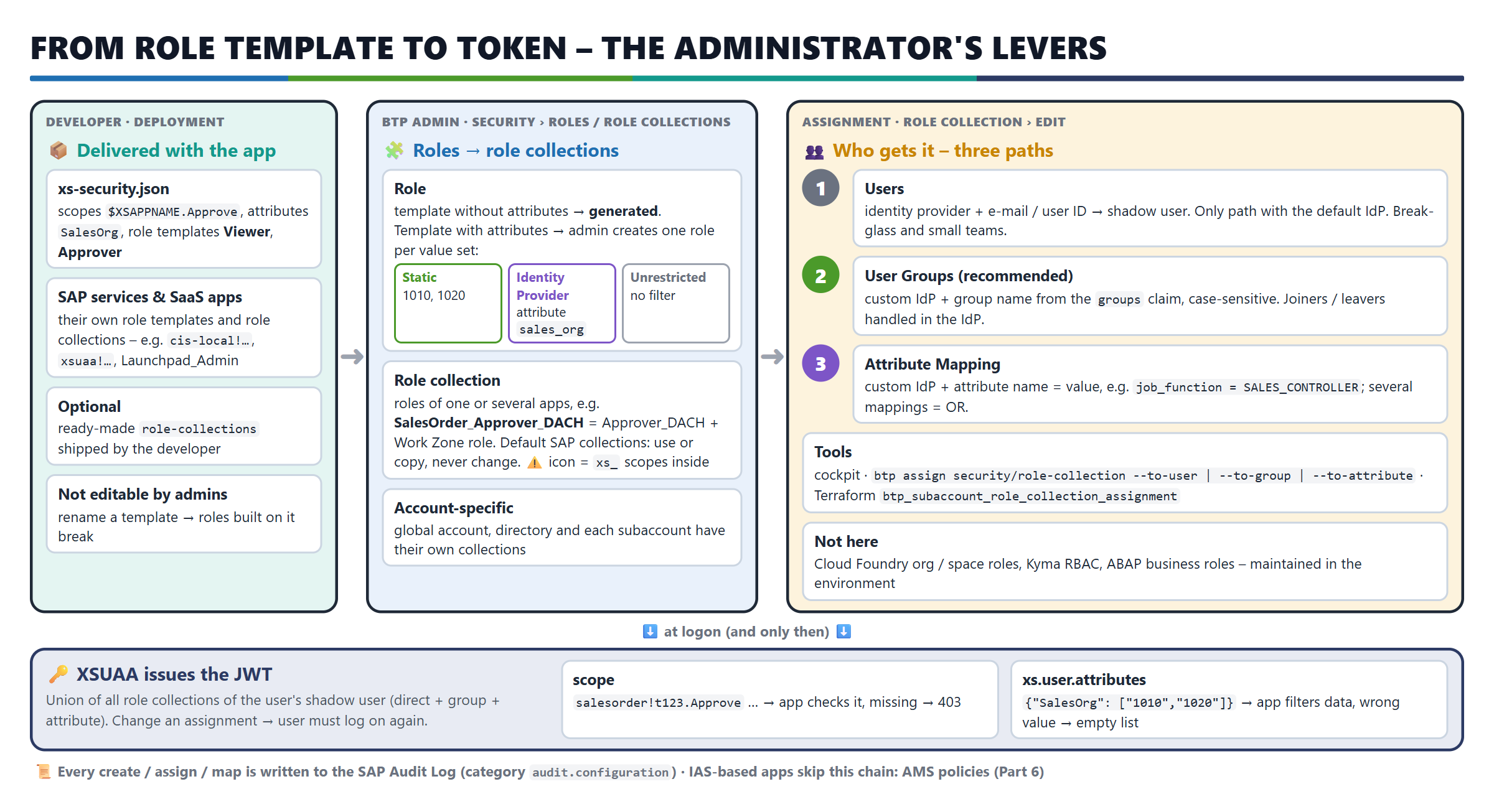
The developer ships scopes, attributes and role templates in xs-security.json (BTP Foundations › 04, Part 3). Everything after the deployment is administration: turning templates into roles, bundling roles into role collections and deciding who gets them. A user can only ever receive role collections – never a single role or scope.
Object | Who maintains it | Cockpit | btp CLI | Terraform resource |
|---|---|---|---|---|
Role template | Developer ( | Read-only, visible per application in Security › Roles | btp list security/app | – |
Role | Generated for templates without attributes; created by the admin for templates with attributes | Security › Roles › Create Role | btp create security/role | btp_subaccount_role |
Role collection | Admin (or shipped by the app / SAP) | Security › Role Collections › Create / Copy |
| btp_subaccount_role_collection |
Assignment | Admin | Role collection › Users, User Groups, Attribute Mapping | btp assign security/role-collection | btp_subaccount_role_collection_assignment |
- Role collections are account-specific. A role collection of the global account does not exist in the subaccounts, and vice versa – SALES-PROD has its own set, its own users and its own assignments. The same btp CLI commands work on all levels; choose the level with
btp targetor--global-account,--directory,--subaccount. Terraform has matchingbtp_globalaccount_*andbtp_directory_*resources. - Three authorization systems, not one. BTP role collections cover the account levels and the applications protected by XSUAA. Cloud Foundry org and space roles, Kyma (Kubernetes RBAC) roles and ABAP environment business roles are maintained in their environments – see BTP Admin › 02. IAS-based apps use AMS policies (Part 6).
- Neo subaccounts do not use role collections (legacy environment).
Part 2 – Default platform role collections and what is inside them
SAP BTP delivers administrator and viewer role collections for platform users. They can be used and copied, but not changed or deleted (the Delete icon is greyed out). Knowing which roles are inside matters, because several administrator collections contain the security role User and Role Administrator – whoever holds them can grant any authorization, including to themselves.
Role collection | Level | Main roles inside | What it allows |
|---|---|---|---|
Global Account Administrator | Global account | Global Account Admin, Global Account Usage Reporting Viewer, User and Role Administrator, Auditlog_Auditor, System Landscape Administrator | Subaccounts, entitlements, regions, trust, users and role collections of the global account |
Global Account Viewer | Global account | Global Account Viewer, Usage Reporting Viewer, Auditlog_Auditor, User and Role Auditor, System Landscape Viewer | Read the same information |
Directory Administrator / Directory Viewer | Directory (only with user management enabled) | Directory Admin or Directory Viewer, Directory Usage Reporting Viewer, User and Role Administrator / Auditor | Manage or read the directory and its subaccounts |
Subaccount Administrator | Subaccount | Subaccount Admin, Subaccount Service Administrator, Destination Administrator, Destination Fragment Administrator, Cloud Connector Administrator, Auditlog_Auditor, User and Role Administrator, Central Disaster Recovery Administrator | Everything in the subaccount, including trust and authorizations |
Subaccount Viewer | Subaccount | Subaccount Viewer, Subaccount Service Auditor, Destination Viewer, Destination Fragment Viewer, Cloud Connector Auditor, Auditlog_Auditor, User and Role Auditor | Read-only – but no service binding credentials |
Subaccount Service Administrator | Subaccount | Subaccount Service Administrator | Service Manager: service brokers, instances, bindings |
Destination Administrator | Subaccount | Destination Administrator | Destinations, certificates and subaccount trust in the Destination editor |
Cloud Connector Administrator | Subaccount | Cloud Connector Administrator | Operate the Cloud Connector tunnels of the subaccount |
Connectivity and Destination Administrator | Subaccount | Cloud Connector Administrator + Destination Administrator | Both of the above |
Destination Fragment Administrator | Subaccount | Destination Fragment Administrator | Destination fragments |
2.1 Things every BTP security admin must know about the defaults
- Global account admins are not automatically subaccount admins – but the cockpit offers them Add Me as Admin on a subaccount in the Account Explorer. Treat Global Account Administrator as admin of every subaccount. SAP lets you opt out of this feature with a support request (component BC-NEO-CIS-OPS).
- Subaccount Administrator = security administrator. Because it contains User and Role Administrator, it can change trust and assign any role collection. For operators who only need to run the subaccount, build a custom collection without that role (Part 3.3).
- Viewer is not credential viewer. To see service binding credentials a user needs a custom role collection with the Service Credentials Viewer role (application
service-manager!<suffix>) – grant it only where credentials may be read. - Directories come with Directory Administrator and Directory Viewer, available after user management is enabled on the directory (only one directory per path can have it); the administrator who enables it receives Directory Administrator. Keep custom role design at global account and subaccount level – the help portal states that custom role collections can't be created for directories.
- Roles to build your own: each default role comes from a role template of an SAP application – for example Global Account Admin (
GlobalAccount_Admin, applicationcis-central!<suffix>), Subaccount Admin (Subaccount_Admin,cis-local!<suffix>), User and Role Administrator / Auditor (xsuaa_admin/xsuaa_auditor,xsuaa!<suffix>), Cloud Connector Administrator (connectivity!<suffix>), Destination roles (destination-xsappname!<suffix>), Auditlog_Auditor (auditlog-management!<suffix>andauditlog-viewer-initial-content!<suffix>). The suffix differs per landscape – read it from Security › Roles orbtp list security/role. - Subscribed SaaS apps ship their own role collections, some with wide admin rights – for example Launchpad_Admin of SAP Build Work Zone, standard edition, or the Custom Domain Administrator of the Custom Domain service, which can weaken TLS settings. SAP's security recommendations name both as admin-only collections.
- Environment roles (Cloud Foundry Org Manager, Space Developer …, Kyma
cluster-admin, ABAP business roles) are not role collections; note that the CF Space Developer role can read service binding credentials – treat it as privileged in TEST and PROD (BTP Admin › 02).
Part 3 – Building roles and role collections
3.1 Roles
- Generated roles – for every role template that has no attributes, a role with the template's name exists automatically after the XSUAA instance is created or updated (subscriptions and SAP services the same). Nothing to do but bundle them.
- Admin-created roles – the cockpit creates roles only from templates with attributes: subaccount › Security › Roles › Create Role in the template's row › name and description › attribute values (Part 4) › role collections to add it to › review › Finish.
- A role belongs to one application (its
xsappnamewith suffix, e.g.salesorder!t123). Renaming or removing a role template inxs-security.jsonbreaks the roles and collections built on it – agree with developers that templates are only added, never renamed, once productive.
3.2 Role collections in the cockpit
- Subaccount (or global account) › Security › Role Collections › Create – or Copy an existing one: the copy takes all roles but no users or user groups.
- Open the collection › Edit › add roles: choose the application first, then its roles. A role collection may combine roles of several applications – e.g. the sales order app's Approver role plus the SAP Build Work Zone role that shows the tile.
- A warning icon marks role collections containing critical security authorizations – scopes prefixed
xs_(Part 7.1). Review them before every assignment. - Developers can also ship ready-made role collections in
xs-security.json(role-collections); admins then only assign them.
3.3 Design rules
Rule | Why / how |
|---|---|
One role collection per job, not per app or per person | "Sales order approver DACH", not "Anna's roles" – collections are reused for every new joiner and mapped to one IdP group |
Separate business and platform collections | A business user never needs cockpit roles; platform admins don't need business data |
A naming convention with scope and stage | e.g. |
Custom operator collection without User and Role Administrator | Subaccount Admin + Subaccount Service Administrator + Destination Administrator + Cloud Connector Administrator roles: runs the subaccount, cannot grant authorizations |
Separate security admin collection | User and Role Administrator + Auditlog_Auditor roles for the few people who manage trust and authorizations |
Same collection names in DEV, TEST and PROD | Created by Terraform from one module – stages differ only in assignments and attribute values |
Describe every collection | The description is what reviewers see – state purpose and owner |
3.4 The same with btp CLI and Terraform
The Approver role of the sales order app has the attribute SalesOrg. In SALES-PROD a role restricted to sales organizations 1010 and 1020 is created, bundled and mapped to an IdP group:
|
|
- Manage the roles of a collection either with
btp_subaccount_role_collection(whole role list) or withbtp_subaccount_role_collection_base+btp_subaccount_role_collection_role(one role per resource) – never both on the same collection, or the plans flap. - Since provider version 1.26.0 the assignment resource reads current assignments from the subaccount: the Terraform user needs read access there (e.g. Subaccount Viewer, which contains User and Role Auditor); global account role collections don't grant it.
- The btp CLI creates a shadow user with the first direct assignment to a user; pass
--create-user-if-missing falseto suppress it. Assigning an existing entry again returns OK, so scripts can be re-run. Automation in general: BTP Admin › 03.
3.5 Limits of SAP Authorization and Trust Management
Artifact | Upper limit |
|---|---|
Roles created by administrators per subaccount (generated roles not counted) | 2,500 |
Role collections created by administrators per subaccount | 5,000 |
User attribute mappings defined in a subaccount | 5,000 |
SAML identity providers per subaccount | 50 |
Custom identity providers for platform users per global account | 3 |
Per | 50 / 250 / 500 / 500 / 250 |
Part 4 – Attributes: instance-based restrictions
A purely functional role grants access to all data of a type in the subaccount. If the role template has attribute references, each role made from it restricts the user to a subset – the attribute values reach the app in the JWT claim xs.user.attributes and the app filters on them (CAP: where: 'salesOrg = $user.SalesOrg', BTP Foundations › 04). Such roles cannot be generated – the admin creates one per needed value set.
Attribute source | Value comes from | Use it when | Example role |
|---|---|---|---|
Static | Values entered in the role (press Enter after each value or the role cannot be saved) | A small, stable set of values; a role per value set | Approver_DACH: SalesOrg = 1010, 1020 |
Identity Provider | A SAML assertion / OIDC token attribute of the user, referenced by its exact name | Values differ per user and are mastered in HR / the directory | Approver_ByIdP: SalesOrg from IdP attribute |
Unrestricted | No value needed | The role should behave as if the attribute did not exist – central teams | Approver_All |
- IdP attributes – exact names. For SAP Cloud Identity Services, the attribute name is the one configured in the administration console under Applications & Resources › Applications › the subaccount application › Trust › Attributes (e.g. a custom or corporate attribute sent as
sales_org). Names are case-sensitive; check them before creating the role (page 01, Part 3.6). - One IdP-sourced role can replace many static roles: one role, one collection, one group mapping – the value set moves to the identity system and follows joiners and movers automatically.
- Test each attribute role with a user who has the attribute, one without it and one with an unexpected value – instance filters fail silently (empty lists), not with a 403.
- SAP's direction: the BTP documentation recommends implementing new instance-based authorizations with SAP Cloud Identity Services – Authorization Management (Part 6); the XSUAA attribute concept stays relevant for existing apps and for apps that ship role templates with attributes.
Part 5 – Assigning role collections: users, IdP groups and user attributes
How users receive role collections depends on the trust configuration. With the default identity provider (SAP ID service) only individual users can be assigned. With a custom trust – normally the company's SAP Cloud Identity Services tenant (page 01) – role collections can also be mapped to user groups and to other user attributes of the identity provider.
Path | Cockpit (role collection › Edit) | Best for | Watch out |
|---|---|---|---|
Direct user | Users section: identity provider + user ID / e-mail | Break-glass admins, small teams, the default IdP | Creates a shadow user; a typo in the e-mail gives a user who never logs on; does not follow leavers |
IdP group | User Groups section: identity provider + group name | All business users and most platform users | The group must arrive in the |
User attribute | Attribute Mapping: identity provider + attribute name + value | Region, cost center, job function | Several mappings on one collection are combined with OR; exact, case-sensitive names and values |
- Group names for SAP Cloud Identity Services are in the administration console under Users & Authorizations › User Groups; the subaccount application must send
groups(page 01). Groups reach IAS from the corporate IdP or through Identity Provisioning – SAP recommends synchronizing users with the leading identity management system via Identity Provisioning (BTP-UAA-0016). - Joiner / mover / leaver with group mappings needs no BTP admin action: HR or IT changes the group, the next logon brings the new role collections. Scopes are copied into the token at logon – after any change the user must log on again or get a new token (BTP Foundations › 04).
- Platform users follow the same pattern at global account level: with a custom IdP for platform users (up to 3 per global account, page 01) its groups can be mapped to Global Account, Directory or Subaccount collections. If the same IAS tenant serves platform and business users, a mapping is stored once per tenant and applies to both user types.
- Shadow users: every assignment or mapping works on the subaccount's shadow user of a given identity provider (origin). Whether shadow users are created at logon or only by an admin is a trust setting – page 01, Part 3.4.
|
Part 6 – Authorization Management Service: policies for IAS-based apps
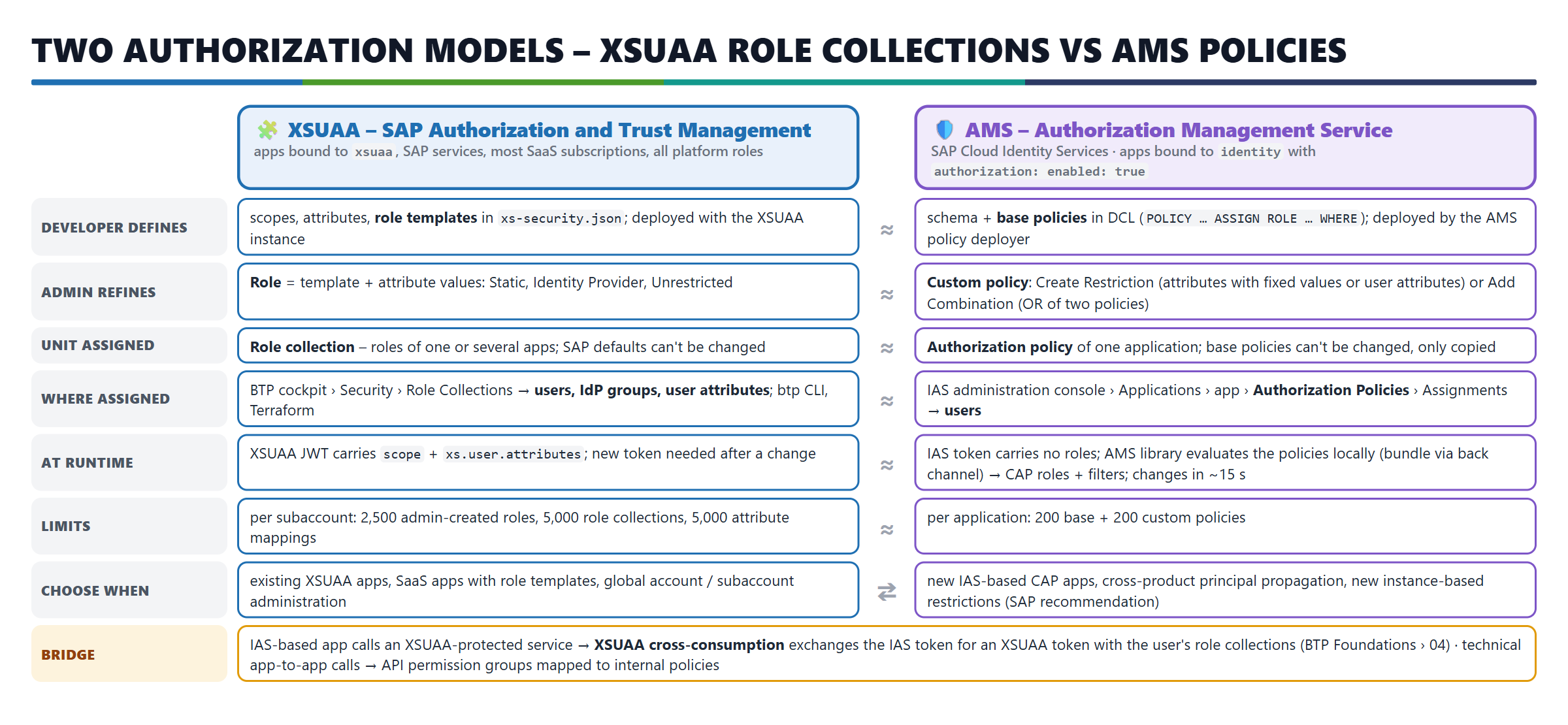
Applications that authenticate with SAP Cloud Identity Services (service identity, plan application) receive an IAS token that carries no XSUAA scopes and no role collections. Their authorizations come from authorization policies of the Authorization Management Service (AMS), part of SAP Cloud Identity Services. Policies are administered in the IAS administration console, not in the BTP cockpit.
6.1 Developer and administrator tasks
Task | Who | Tool |
|---|---|---|
Define authorization policies (DCL: rules, resources, conditions, attributes, schema, packages) | Developer | Development environment – CAP: |
Deploy policies with the application (AMS policy deployer task in the MTA) | Developer / pipeline | Deployment |
Create custom policies, change rules and restrictions | Administrator | Administration console |
Assign policies to users | Administrator | Administration console |
Delete custom policies | Administrator | Administration console |
AMS is switched on for the application through the authorization property of the identity service instance; the developer delivers a schema and base policies in the Data Control Language (DCL):
|
6.2 Administering policies in the IAS administration console
- Prerequisites: the application supports AMS (its application in the console has an Authorization Policies tab), and the IAS administrator has the authorizations Manage Applications and Manage Groups (configuring policies also lists Read Users). The policy tab appears in the application the subscription or the identity service instance created.
- Base policies come with the application (package name defined by the app); they cannot be changed or deleted in the console, only copied. Custom policies are created by administrators in the console and can be edited and deleted. Policies a customer deploys itself show the package Customer Package (column Package). Limit: 200 base and 200 custom policies per application.
- Create a custom policy: Applications & Resources › Applications › app › Authorization Policies › Create › Create Restriction (start from base policies, add restrictions on attributes with fixed values or user attributes, add
USErules) or Add Combination (OR combination of the rules of two policies; the new policy has no assignments). - Assign: choose the policy › Assignments › Add › select users. The Rules tab shows what the policy grants – review it before assigning.
- A custom restriction written in DCL looks like this – the console's Create Restriction produces the equivalent:
POLICY OrderManagerDACH { USE cap.OrderManager RESTRICT SalesOrg IN ('1010', '1020'); }. - Runtime: the policies are delivered to the application over a back channel (authorization bundle) and evaluated locally by the AMS client library – for CAP the AMS plugin turns assigned policies into CAP roles plus filters. Assignment changes usually take up to 15 seconds to propagate (caching). Optionally the functional part of policies can be written into the token;
WHEREconditions never are. - Technical communication between IAS-based apps is authorized through App-to-App integration: the consumer gets API permission groups, which the provider maps to internal policies – not through user policy assignments.
- Separate topic, same console: policy-based authorizations for IAS administrators themselves (Tenant Settings › General › Policy-Based Authorizations) give fine-grained admin rights for users, groups, applications, policies and provisioning – useful to separate the BTP group owners from tenant admins (page 01, Part 2.4).
6.3 XSUAA role collections or AMS policies?
Situation | Model |
|---|---|
Existing apps bound to XSUAA, SAP services and many SaaS subscriptions, all platform roles | Role collections – no change needed |
New CAP app with IAS authentication; principal propagation across SAP cloud products | AMS policies – IAS tokens carry no roles |
IAS-based app that must call an XSUAA-protected service | Both: XSUAA cross-consumption exchanges the IAS token for an XSUAA token with the user's role collections (BTP Foundations › 04, Part 3.4) |
New instance-based restrictions | SAP recommends AMS over XSUAA attributes |
Part 7 – Least privilege, access reviews and audit
7.1 Critical security authorizations
Scopes prefixed xs_ are critical security authorizations. They are in the User and Role Administrator / Auditor roles and can also appear in custom role collections. The cockpit marks such collections with a warning icon.
Scope | Grants |
|---|---|
| Read / manage authorizations (roles, role collections, assignments) |
| Read / manage users |
| Read / manage trust configurations |
| Read / manage API credentials for the REST APIs of SAP Authorization and Trust Management |
7.2 Least-privilege rules for platform access
- Developers get access to development subaccounts and environments; only the platform engineering team or Center of Expertise gets access to test and production (SAP BTP best practices).
- Few holders of Global Account Administrator and of any collection with User and Role Administrator; named persons, MFA enforced through the platform IdP (page 01); at least two, so nobody is locked out.
- Day-to-day operators use the custom operator collection (Part 3.3); auditors get the Viewer collections, which include Auditlog_Auditor and User and Role Auditor.
- API credentials for the XSUAA REST APIs (created with the btp CLI, read-only or read-write) are admin-level access – check regularly who manages them; don't use the deprecated
apiaccessplan (BTP-UAA-0022).
7.3 Access reviews – what to check and where
Check | Where / how | SAP recommendation |
|---|---|---|
Who holds critical collections (User and Role Administrator inside) | Security › Role Collections › collection › Users and User Groups; | BTP-UAA-0017 |
Inactive users and users who never logged on | Security › Users: filter Hasn't Logged On (7 / 30 / 180 / 365 days or a date); user overview shows "User has never logged on"; delete (cannot be undone) | BTP-UAA-0010 |
Full assignment list for the reviewer | Security › Users › Export › Export All Users with Role Collections (CSV: user, IdP, names, e-mail, last updated, last login, role collections) | – |
One user's authorizations | Security › Users › user › role collections → roles; | – |
Group-based access | Collection › User Groups / Attribute Mapping in BTP plus group membership in IAS or the corporate IdP – BTP shows the mapping, not the members | BTP-UAA-0016 |
Personal data of leavers | Delete shadow users as part of a data deletion strategy | BTP-UAA-0011 |
Admins of the IAS tenant and of AMS policies | IAS administration console › Administrators; Authorization Policies › Assignments | page 01 |
7.4 Audit log
- SAP Authorization and Trust Management writes every change to roles, role collections and assignments to the SAP Audit Log service – category
audit.configuration, e.g. tablexsrolecollections(collection created),xs_rolecollection2user(direct user assignment),xsrolecollection2samlattribute(group / attribute mapping),xsrolecollection2role(role added), with timestamp, origin key and role collection name. Trust changes appear as object typeIdentityProvider. - Retention is 90 days – download and archive regularly or forward to the corporate SIEM (BTP-UAA-0012, BTP-UAA-0013). Audit log viewer and retrieval: page 04; monitoring and response: page 05.
7.5 Troubleshooting authorizations
Symptom | Likely cause | Fix |
|---|---|---|
403 right after the role collection was assigned | Old token – scopes are fixed at logon | Log off and on (or wait for a new token) |
Group mapping has no effect | IdP does not send | Check the IAS application's attributes and the token's |
Approver sees an empty list | Attribute role: IdP attribute name wrong or user has no value | Compare with the IAS attribute name; test with Unrestricted |
Assigned user never gets access | Shadow user created with a typo or for another origin | Security › Users: user never logged on → delete and assign again with the right IdP |
Admin cannot deploy to Cloud Foundry | Role collections don't grant CF roles | Space Developer in the space (BTP Admin › 02) |
Subaccount Viewer cannot see binding credentials | By design | Custom collection with Service Credentials Viewer – only if justified |
IAS-based app ignores a role collection | The app uses AMS | Assign the policy in the IAS console |
Part 8 – Running example: the authorization design of the sales landscape
Global account with SALES-DEV, SALES-TEST and SALES-PROD; SALES-DEV and SALES-TEST trust the test IAS tenant, SALES-PROD the productive one (page 01); groups mastered in Entra ID and synchronized to IAS. All custom role collections are created by Terraform with the same names in every subaccount; assignments differ per stage.
Persona (IdP group) | Global account | SALES-DEV | SALES-TEST | SALES-PROD |
|---|---|---|---|---|
Platform CoE (BTP_COE) | Global Account Administrator (2–3 named users) | Subaccount Administrator | Subaccount Administrator | Subaccount Administrator |
Security team (BTP_SECURITY) | Global Account Viewer | SALES_Security_Admin | SALES_Security_Admin | SALES_Security_Admin |
Operations (SALES_OPS) | – | SALES_Subaccount_Operator | SALES_Subaccount_Operator | SALES_Subaccount_Operator |
Developers (SALES_DEVS) | – | Subaccount Viewer + CF Space Developer | Subaccount Viewer | – |
Auditors (BTP_AUDIT) | Global Account Viewer | Subaccount Viewer | Subaccount Viewer | Subaccount Viewer |
Order clerks (SALES_ORDER_VIEWERS) | – | SalesOrder_Viewer | SalesOrder_Viewer | SalesOrder_Viewer |
Approvers DACH (SALES_APPROVERS_DACH) | – | SalesOrder_Approver_DACH | SalesOrder_Approver_DACH | SalesOrder_Approver_DACH |
Break-glass | – | – | – | Subaccount Administrator, 2 users assigned directly, MFA |
- Only break-glass users are assigned directly; everything else is a group mapping – leavers lose access when they leave the group.
- Quarterly: export users with role collections from SALES-PROD, check BTP-UAA-0017 / 0010 items, compare group members in IAS with the owners' lists, archive the audit log.
- A future IAS-based CAP extension of the app would get AMS policies OrderViewer / OrderManager instead of new role collections, assigned in the productive IAS tenant.
Part 9 – Interview questions
Q1. What is the difference between a role template, a role and a role collection?
The developer defines role templates (scopes plus attribute references) in xs-security.json. A role is an instance of a template: generated automatically when the template has no attributes, created by the admin with concrete attribute values otherwise. A role collection bundles roles, possibly from several applications, and is the only thing assigned to users, groups or attributes.
Q2. Which default role collections exist and which of them are critical?
Global Account Administrator / Viewer, Directory Administrator / Viewer, Subaccount Administrator / Viewer, plus Subaccount Service Administrator, Destination Administrator, Destination Fragment Administrator, Cloud Connector Administrator and Connectivity and Destination Administrator. The administrator collections of global account, directory and subaccount contain User and Role Administrator, so their holders can grant any authorization – SAP recommends regularly checking who has it (BTP-UAA-0017).
Q3. A global account administrator says they cannot see a subaccount's data. Is that a problem?
Global account admins don't automatically have subaccount authorizations, because role collections are account-specific. But they can use Add Me as Admin in the Account Explorer, so they must be treated as potential subaccount admins. The feature can be disabled by an opt-out request to SAP.
Q4. How do you give an operator full control of a subaccount except authorization management?
Default collections cannot be changed, so build a custom role collection with the Subaccount Admin, Subaccount Service Administrator, Destination Administrator and Cloud Connector Administrator roles but without User and Role Administrator, and map it to the operators' IdP group.
Q5. What are the three attribute sources of a role?
Static (values stored in the role), Identity Provider (value read from a named SAML / OIDC attribute of the user, case-sensitive) and Unrestricted (behaves as if the attribute did not exist). The values reach the app in xs.user.attributes; the app filters data with them.
Q6. Why map role collections to IdP groups instead of users?
Access then follows the identity lifecycle: joiners, movers and leavers are handled by changing group membership in the corporate directory, no BTP admin step is needed, reviews happen in one place and no orphaned direct assignments remain. Group mapping requires a custom trust such as SAP Cloud Identity Services; the default IdP supports only user assignments.
Q7. A user was added to the right group but still gets 403. What do you check?
That the user logged on again (scopes are fixed at token issue); that the IAS application sends the groups attribute; that the mapping uses the right identity provider and the exact, case-sensitive group name; that the user logs on with that identity provider and not SAP ID service; and that the role collection really contains the needed role.
Q8. What is AMS and when do you need it instead of role collections?
The Authorization Management Service of SAP Cloud Identity Services. IAS tokens carry no XSUAA scopes, so IAS-based apps get their authorizations from policies: developers deploy base policies in DCL, administrators create custom policies (restrictions or combinations) and assign them to users in the IAS administration console, and the AMS library evaluates them in the app. SAP also recommends AMS for new instance-based authorizations.
Q9. How do you automate role collections across DEV, TEST and PROD?
With the Terraform provider for SAP BTP: btp_subaccount_role for attribute roles, btp_subaccount_role_collection for the bundle and btp_subaccount_role_collection_assignment for user, group or attribute assignments, one module per stage with different values. Alternatively the btp CLI (create security/role-collection, add security/role, assign security/role-collection).
Q10. How do you run an access review of a productive subaccount?
Export all users with role collections, list holders of collections containing User and Role Administrator, filter users who haven't logged on for 180 or 365 days, compare group mappings with group members in IAS / the corporate IdP, review IAS admins and AMS assignments, remove what is not justified and archive the audit log entries of category audit.configuration as evidence.
Q11. As an architect, how do you design authorizations for a new BTP landscape?
Custom IdP for platform and business users; job-based role collections with a naming convention, created by Terraform identically in all stages; group mappings only, direct assignments only for break-glass users; separate operator and security-admin collections; developers only in DEV; IdP-sourced attributes or AMS policies for data restrictions; quarterly reviews against SAP's security recommendations and audit log forwarding to the SIEM.
🏠 Start Here · ◀ 01 · Identity & trust · 03 · Connectivity security ▶ · Sections: CORE ABAP | OOPS ABAP | ABAP on HANA | Clean Core | RAP | ABAP Points | SAP Fiori | SAPUI5 | Mobile Development (MDK) | BTP Foundations | BTP Admin | BTP Security | BTP Development | CAP | SAP Build | ABAP on BTP | Integration Suite | SAP Business AI | SAP BASIS | Security | SAP SDLC
Functional: FICO ABAP | TRM ABAP | VIM | SAP BIS | SD ABAP | MM ABAP | PP ABAP | QM ABAP | PM ABAP | PS ABAP | EWM | TM ABAP | GTM ABAP | EHS ABAP | HR ABAP | BW | SAP Datasphere | SAP Business Data Cloud | SAP MDG | SAP Analytics Cloud | SAP Ariba | SAP CX | SAP IBP