Pages 01–04 teach each security building block of SAP BTP on its own: identity, authorizations, connectivity and platform security. This page puts them together into one hardening baseline you can check a subaccount against. It explains SAP's own checklist – the SAP BTP Security Recommendations with their stable IDs such as BTP-UAA-0008 – and lists the settings whose defaults you must know. It then covers the typical misconfigurations and the threats behind them, periodic access and certificate reviews, security monitoring and an incident response runbook. Running example: one global account with dev / test / prod subaccounts that host the sales order app on BTP (CAP service, app router, destination through the Cloud Connector to S/4HANA). Recommendation IDs, priorities and defaults are as of November 2026. SAP updates the list continuously, so always check the current version.
Part 1 – SAP BTP Security Recommendations: SAP's official checklist
SAP BTP Security Recommendations is a separate guide on help.sap.com (SAP BTP › Security Recommendations). It is one large, filterable table that collects the recommended secure configuration of SAP BTP services in one place. Each service's own documentation also has a "Security Recommendations for …" page. That page shows the same entries grouped by role: account administrators, developers and platform-as-a-service operators. Neo-environment services have a separate list. SAP states that, under the shared responsibility model, you decide whether and how far each recommendation applies to your landscape. SAP provides the list without warranty, and it can change.
Column | Meaning |
|---|---|
Component | Service or component the setting belongs to (e.g. Authorization and Trust Management Service, Identity Authentication, Cloud Connector) |
Priority | Critical – exposes the system to significant risk or threatens system reliability · Recommended – improves security and significantly reduces the attack surface · Advanced – raises the standard further or covers organisation-specific requirements |
Secure Operations Map | SAP's reference model for security areas, e.g. Authentication & Single Sign-On, User & Identity Management, Roles & Authorizations, Security Hardening, Security Monitoring & Forensics, Client Security, Data Privacy & Protection, Security Governance |
Title | Short name of the topic, e.g. "User Lifecycle", "Rotate Secrets" |
Default Setting or Behavior | What the service does if you change nothing – the most important column for an administrator (Part 3) |
Recommendation | What SAP recommends you configure |
Configuration steps / More information | Link to the help page that explains how to do it |
Last Update | Date of the last significant change of the entry |
Index | Stable unique ID: |
1.1 Index codes you will meet most often
Code | Component | Code | Component |
|---|---|---|---|
UAA | SAP Authorization and Trust Management service (XSUAA) | SCC | Cloud Connector |
IAS | Identity Authentication | DES | SAP Destination service |
IPS | Identity Provisioning | AUD | SAP Audit Log |
CRS | SAP Credential Store | DOM | Custom Domain service |
APR | Application Router | HTM | HTML5 Application Repository service |
ABA | ABAP environment | HDB | SAP HANA Cloud, SAP HANA database |
MTA | Multitarget Applications for Cloud Foundry | KMS | Key Management Service |
- Size as of November 2026: about 310 recommendations for 60 components – 71 Critical, 189 Recommended, 50 Advanced. Components without security-relevant settings have a single
…-0000entry "No Recommendations" (for exampleBTP-CPT-0000for the SAP BTP cockpit). - Filter and share views with URL parameters on the help page:
seclist(whole table),seclist-service,seclist-priority,seclist-som,seclist-topic,seclist-last_update,seclist-index– for example all critical Cloud Connector entries with?seclist-service=Cloud%20Connector&seclist-priority=Critical. You can also download the table.
1.2 How to work with the list
SAP Learning (course "Architecting Security for SAP Business Technology Platform") describes a simple loop that also works as an audit method:
- 1 Inventory – list every component you use, have installed or have provisioned in each subaccount (services, Cloud Connector, app router, IdP tenants).
- 2 Review – read all recommendations of these components, starting with Critical.
- 3 Decide – implement, or document a risk-accepted exception, based on your requirements and the priority. Keep the decision per Index ID (a simple register: ID, subaccount, status, owner, date).
- 4 Re-review regularly – new Index values show new or removed recommendations, and a newer Last Update date shows that an entry changed since your last review.
1.3 Automated checks with SAP Cloud ALM
SAP BTP pushes the configuration status of supported components to SAP Cloud ALM. The Configuration & Security Analysis application in SAP Cloud ALM then shows which components are configured in line with the recommendations. It requires a SAP Cloud ALM subscription (setup: BTP Admin › 04). Coverage is growing component by component: not every component and not every recommendation can be monitored automatically, so you still check the rest manually. Example: BTP-HDB-0001 (DBADMIN user) has been pushed to SAP Cloud ALM since release 2025.37.
Part 2 – The hardening checklist: controls from pages 01–04 in one place
One line per control, with the SAP recommendation ID where one exists and the page that teaches the "how". Work through it per subaccount, prod first. Dev and test need the same identity and authorization controls, because they often hold copies of real data and trust the same IdP.
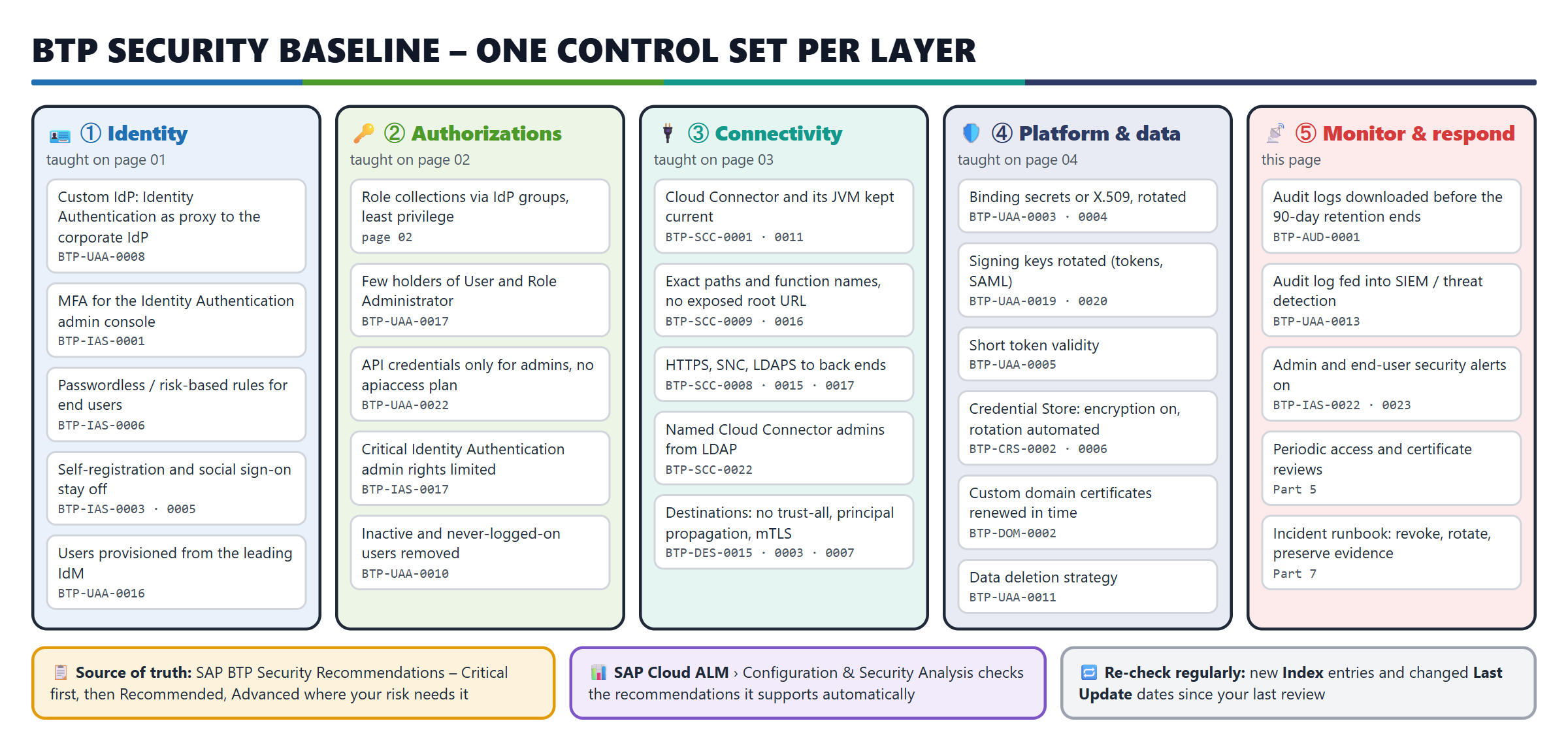
2.1 Identity and authentication (page 01)
Control | SAP ID | Priority |
|---|---|---|
Trust SAP Cloud Identity Services – Identity Authentication as custom IdP, as proxy to the corporate IdP; don't use the default identity provider for productive business users | BTP-UAA-0008 | Critical |
Multifactor authentication for the Identity Authentication administration console | BTP-IAS-0001 | Critical |
Keep self-registration and social sign-on disabled (value internal) |
| Critical |
Passwordless logon for end users (risk-based rule without user name and password); if passwords are needed, the Enterprise password policy |
| Advanced · Recommended |
Group-based authentication policies (IP range, group, authentication method) | BTP-IAS-0026 | Advanced |
Synchronise users from the leading identity management system with Identity Provisioning |
| Advanced |
Check trust to custom IdPs and their certificates regularly | BTP-UAA-0015 | Recommended |
Understandable logon link for business users; hide the default IdP used by platform users | BTP-UAA-0018 | Advanced |
Corporate domain, mail server and branding for Identity Authentication (anti-phishing) |
| Advanced |
2.2 Authorizations (page 02)
Control | SAP ID | Priority |
|---|---|---|
Role collections assigned through IdP groups, least privilege, separate admin and business access | page 02 | – |
Regularly check who has the User and Role Administrator role | BTP-UAA-0017 | Recommended |
Only administrators manage API credentials of the Authorization and Trust Management service; don't use the deprecated apiaccess plan | BTP-UAA-0022 | Recommended |
Limit the critical Identity Authentication admin rights Manage Corporate Identity Providers, Manage Tenant Configuration, Manage Users | BTP-IAS-0017 | Recommended |
At least two Identity Provisioning tenant administrators | BTP-IPS-0008 | Recommended |
Remove users who haven't logged on for a long time or never logged on | BTP-UAA-0010 | Recommended |
ABAP environment: own administrator and developer business roles in production instead of | BTP-ABA-0007 | Critical |
2.3 Connectivity (page 03)
Control | SAP ID | Priority |
|---|---|---|
Keep the Cloud Connector on a current version and patch its Java VM |
| Critical |
Access control: exact URL paths, be cautious with "all sub-paths", no exposed root URLs; exact RFC function names instead of broad prefixes |
| Critical · Recommended |
HTTPS to back ends, SNC for RFC, LDAPS for LDAP |
| Critical |
Limit the trusted root CAs and cipher suites |
| Critical · Advanced |
Named administrators from your LDAP instead of the single default Administrator | BTP-SCC-0022 | Recommended |
Traces only when needed (four-eyes principle), audit logging stays on, e-mail alerts at least for certificates |
| Recommended |
Virtual host names hide the physical host names | BTP-SCC-0014 | Advanced |
Destinations: TLS 1.2 or higher, never "trust all" server certificates, principal propagation for interactive on-premise calls, X.509 client certificate (mTLS) instead of client secret |
| Critical · Recommended |
2.4 Platform, credentials and data (page 04)
Control | SAP ID | Priority |
|---|---|---|
XSUAA: binding secrets or X.509 instead of a single instance secret; rotate secrets periodically |
| Critical · Recommended |
Automate re-binding to cope with X.509 certificate lifetimes | BTP-UAA-0014 | Recommended |
Rotate the signing keys of access tokens and of SAML messages |
| Recommended |
Keep token validity as short as possible (but not under 30 minutes) | BTP-UAA-0005 | Recommended |
SAP Credential Store: never disable payload encryption in production, restrict bindings to a namespace, automate rotation, use mTLS / OAuth instead of basic authentication |
| Critical · Recommended |
Custom domains: renew server certificates on time, trust only needed client CAs, keep default TLS settings |
| Critical · Advanced · Recommended |
Archive audit logs before the 90-day retention ends; integrate them with your event management |
| Recommended · Advanced |
Data deletion strategy for personal data | BTP-UAA-0011 | Recommended |
2.5 Applications and runtimes (BTP Foundations › 04, BTP Development)
Control | SAP ID | Priority |
|---|---|---|
App router: every route protected with authentication type xsuaa or ias; none only for public content |
| Critical · Recommended |
App router from a trusted repository (npm / Docker Hub), https endpoints only, least-privilege access to its environment |
| Critical |
Only the needed HTTP methods per route; session timeout aligned with the authorization service |
| Recommended |
|
| Recommended |
No credentials or other secrets in public cross-MTA configurations | BTP-MTA-0002 | Critical |
Keep SAP client libraries in your code up to date | BTP-UAA-0021 | Recommended |
SAP HANA Cloud: deactivate | BTP-HDB-0001 | Critical |
Kyma: follow Kubernetes Pod Security Recommendations (see page 04) | – | – |
Part 3 – Defaults you must know
Most hardening work starts with one question: what does the platform do if I change nothing? The "Default Setting or Behavior" column answers it. Some defaults are already secure – keep them and check that nobody weakens them. Others need action.
Setting | Default (as of Nov 2026) | What to do | SAP ID |
|---|---|---|---|
Identity provider of a new subaccount | SAP default identity provider – no control over password, MFA or user lifecycle | Custom IdP (Identity Authentication as proxy) | BTP-UAA-0008 |
XSUAA access / refresh token validity | 12 hours / 7 days | Shorten where possible, not under 30 minutes | BTP-UAA-0005 |
XSUAA secrets | Separate secret per binding; instances created before 2024-11-12 use one instance secret | Migrate old instances, rotate by unbind / rebind | BTP-UAA-0003 |
XSUAA service-managed X.509 secrets | Expire after 7 days | Automate re-binding | BTP-UAA-0014 |
Automatic rotation of token signing keys | On by default for subaccounts created after 19 January 2026 | Enable for older subaccounts after testing (not with HANA Cloud principal propagation via Cloud Connector) | BTP-UAA-0019 |
Identity Authentication admin console | User name and password | Enforce MFA | BTP-IAS-0001 |
Self-registration / social sign-on | Disabled (internal) | Keep disabled |
|
Identity Authentication alert e-mails | Admins get no mails about critical changes; end-user security alerts off | Enable both |
|
SAP Audit Log retention | 90 days free (longer only with the | Download and archive regularly | BTP-AUD-0001 |
Credential Store binding / service key credentials | Expire after 60 days | Rotate before expiry, automate | BTP-CRS-0006 |
Credential Store payload encryption | On | Never switch off in production | BTP-CRS-0002 |
Cloud Connector administrator | One Administrator user in a file-based store | Named users from LDAP | BTP-SCC-0022 |
Cloud Connector trusted root CAs | Trusts all root CAs | Restrict the list | BTP-SCC-0018 |
Cloud Connector audit log / traces | Audit log on; CPIC and payload trace off | Keep it that way |
|
HTTP destination TLS version | TLS 1.2 | Don't use older versions | BTP-DES-0001 |
Custom domain server certificates | No automatic renewal | Watch expiry warnings, renew in time | BTP-DOM-0002 |
App router session timeout | 15 minutes | Set | BTP-APR-0013 |
SAP HANA Cloud | Active after database creation | Use it only to create admin users, then deactivate | BTP-HDB-0001 |
- Global Account Administrator users don't automatically become administrators of every subaccount, but they can grant themselves administrator access (you can opt out of this). Count them as privileged for every subaccount in your access reviews.
Part 4 – Common misconfigurations and the threats behind them
Every threat in this table is described in SAP's recommendations themselves. Each one maps to a concrete setting you can check. Use the table as a threat model for a BTP landscape: who could get in, what they could reach, and which setting stops them.
Threat | Typical misconfiguration | Countermeasure |
|---|---|---|
Account takeover through phishing or password reuse | Business and platform users in the default IdP, no MFA, an SAP-owned logon URL users can't recognise | Custom IdP with MFA or passwordless logon; corporate domain and branding ( |
Leaked client secret or service key (Git, chat, screenshot, CI log) | Instance secret shared by all bindings, keys that never expire, keys created "for a test" and never deleted | Binding secrets or X.509, periodic rotation, delete unused keys ( |
Stolen access token | Long token validity | Short validity ( |
Forged tokens after a signing key leak | Signing keys never rotated | Automatic signing key rotation ( |
Privilege creep and orphaned users | Subaccount Administrator for developers in prod, leavers still assigned, shadow users with typos | Group-based assignment, reviews, inactive-user clean-up ( |
Lateral movement into on-premise systems | Cloud Connector mapping to | Exact paths and function names ( |
Man-in-the-middle | "Trust all" server certificates in destinations or Identity Provisioning, | Certificate validation, TLS, SNC, LDAPS ( |
Open redirect / token leakage | Wildcards in | Specific URIs ( |
Clickjacking | Login page or apps allowed to be framed by many domains | Only needed iFrame domains ( |
Anonymous access to back ends | Route with authentication type none that forwards to a destination with technical credentials | Authenticate every route; least-privilege technical user if none is unavoidable ( |
Sensitive data in logs and traces | Cloud Connector payload trace or Identity Provisioning traces left on | Traces only when needed, four-eyes principle ( |
Secrets in deployment artefacts | Credentials in public cross-MTA provides sections or in HTML5 app files | Keep secrets in bindings or the Credential Store ( |
Known vulnerabilities in customer-managed parts | Old Cloud Connector, JVM, app router package, client libraries | Patch process ( |
Fake accounts and bots | Self-registration or social sign-on enabled without need | Keep disabled; CAPTCHA and domain blocklist if required ( |
Lost evidence | Nobody exports audit logs | Archive and SIEM ( |
Outage from expired certificates (availability) | No owner for certificate expiry | Alerts and automation ( |
- Admin vs business users: most of the high-impact threats target platform users (global account, subaccount, Cloud Foundry org and space roles, Identity Authentication admins, Cloud Connector admins). They can change trust, create keys and open tunnels, so harden and review them first.
Part 5 – Periodic access, credential and certificate reviews
SAP's recommendations say "regularly" or "periodically" but rarely give a fixed interval. The intervals below are a suggested schedule. Set your own in the security policy, and let the hard limits drive it: audit logs disappear after 90 days, and certificates and keys expire on their own schedule.
Review | Suggested cadence | What you check | Where / SAP ID |
|---|---|---|---|
Privileged access | Monthly for prod | Holders of Global Account Administrator and Subaccount Administrator (which contains the roles User and Role Administrator, Cloud Connector Administrator, Destination Administrator) and of custom role collections with these roles; Cloud Foundry Org Manager / Space Manager / Space Developer in prod | Cockpit › Security › Users; btp CLI; |
IdP and tenant admins | Quarterly | Identity Authentication critical admin rights, Identity Provisioning admins, Cloud Connector users |
|
Business access recertification | Quarterly or half-yearly | Group → role collection mappings still correct; owners confirm members in the IdP | Page 02; corporate IdM |
Inactive users | Monthly | Users who haven't logged on for 180 / 365 days or never logged on | Cockpit filter "Hasn't Logged On"; |
Credentials | Monthly inventory, rotation per lifetime | Service keys and bindings (age, owner, still used?), API credentials, Credential Store entries |
|
Certificates and keys | Monthly expiry check | Custom domain, IdP trust, SAML signing, Cloud Connector, Identity Provisioning certificates |
|
Audit log export | Continuously or at least monthly | Export job ran without gaps | BTP-AUD-0001 |
Recommendation list | Quarterly | New Index entries and changed Last Update dates | Part 1.2 |
5.1 Access review in the cockpit
- Users and their role collections: subaccount (or global account) › Security › Users → search for a user → the overview shows all role collection assignments; drill down to the roles.
- Inactive users: same list, filter Hasn't Logged On (Last 7 / 30 / 180 / 365 days or a date). The Last Logon column shows the last logon, and the user overview says "User has never logged on" for shadow users that were never used. Deleting a user can't be undone.
- Role collection view: Security › Role Collections → open a critical collection and check its users and its user-group / attribute mappings. Group mappings are the real access path when users come from Identity Authentication.
5.2 Access review with the btp CLI
The same checks are scriptable, so you can run them for dev, test and prod and keep the output as audit evidence. Commands from the btp CLI command reference (automation in general: BTP Admin › 03):
|
--of-idptakes the origin key of the trust configuration. Without it, the commands use the default IdP (sap.default).- Cloud Foundry roles are reviewed separately (
cf org-users <org>,cf space-users <org> <space>), because they are not role collections.
Part 6 – Security monitoring
Monitoring has two jobs. Configuration monitoring finds drift from the baseline (a trust that was changed, a destination set to trust all). Activity monitoring finds suspicious behaviour (an admin assigning themselves a role collection at night, a burst of failed logons). On BTP, most security evidence ends up in the SAP Audit Log service. The service itself is taught on page 04; this part covers what to watch and where to send it.
Source | What it records | How you get it |
|---|---|---|
SAP Audit Log service (Cloud Foundry) | Audit events written by platform services on your behalf in four categories: | SAP Audit Log Viewer (500 records per request, download) or the audit log retrieval API (service |
SAP Authorization and Trust Management service events (in the audit log) | Trust to identity providers created / changed / deleted, role collections created or changed, users and groups assigned, service instances and bindings | Audit log, category |
Identity Authentication | Admin changes, logons; admin and end-user alert e-mails ( | Audit log (90 days, |
Cloud Connector | Configuration changes and security-relevant activity (audit log on by default) | Cloud Connector administration UI; e-mail alerts ( |
Cloud Foundry | App and space events (push, restage, bind, env change) | cf events <app> |
SAP Cloud ALM | Configuration status against the security recommendations | Configuration & Security Analysis (Part 1.3) |
6.1 What to alert on
- Trust configuration created, changed or deleted, or an IdP certificate replaced (
BTP-UAA-0015). - Assignments to critical role collections, especially self-assignment and assignments outside change windows.
- New service keys or API credentials in prod; new destinations with authentication changes or trust-all.
- Multiple failed logons, logons from unexpected locations, new administrators in Identity Authentication.
- Cloud Connector access-control changes (new system mapping or resource), traces switched on.
- Certificates close to expiry (operational alerting with SAP Alert Notification service: BTP Admin › 04).
6.2 Getting audit logs out: SIEM and threat detection
SAP recommends archiving audit logs regularly and integrating them with your corporate event management (BTP-AUD-0001, BTP-UAA-0013). The standard pattern is a small job (CI/CD pipeline, Automation Pilot or the SIEM's own collector) that calls the retrieval API for each subaccount:
|
- Without a time filter the API returns the last 30 days. Results come in pages of 500 records – follow the
handlereturned in thePagingresponse header. Times are UTC. Rate limits apply per token and region (HTTP 429). - SAP recommends re-creating
auditlog-managementbindings and service keys at least every 90 days. Treat the exporter's key like any other privileged credential. - Global account audit logs have their own retrieval API and their own viewer entry in the Account Explorer. Export both levels.
- SAP Enterprise Threat Detection (also available as cloud edition) analyses SAP BTP logs for patterns such as unauthorised access or misuse of service credentials and forwards findings to a SIEM / SOAR platform. Third-party SIEMs (for example Microsoft Sentinel) offer SAP BTP connectors that read the same audit log API.
Part 7 – Incident response
Under the shared responsibility model, SAP runs incident response for the infrastructure, the platform services and the runtimes it operates. You handle everything you configure: users and role collections, trust, credentials, destinations, the Cloud Connector and your applications. Your runbook follows the usual incident lifecycle, but every step uses BTP tools.
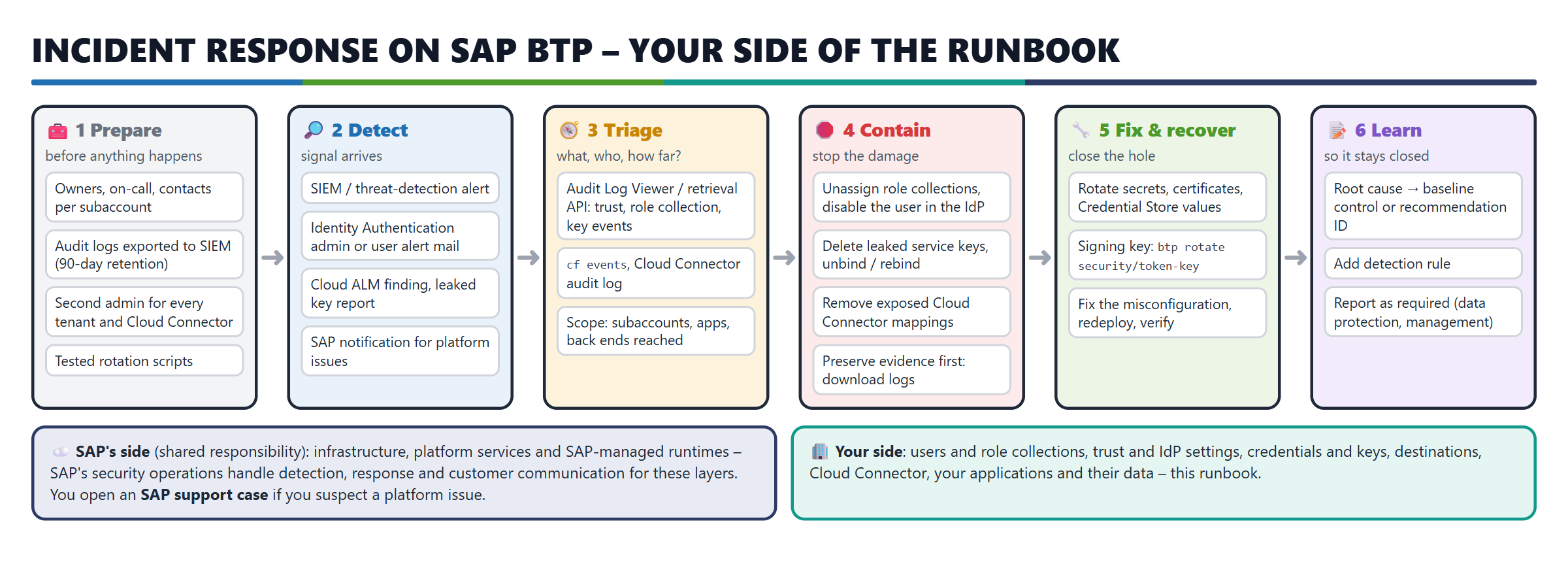
Phase | BTP actions |
|---|---|
Prepare | Named owners and on-call per subaccount; audit log export running (Part 6.2); at least two administrators for Identity Authentication, Identity Provisioning and the Cloud Connector so a lockout or a compromised admin doesn't block you; rotation scripts tested in dev |
Detect | SIEM / threat-detection alert, Identity Authentication alert e-mail, Cloud ALM finding, a secret found in a repository, or an SAP notification |
Triage | Who did what, when, from where: Audit Log Viewer or retrieval API (trust, role collection and binding events), |
Contain | Download the relevant audit logs first (90-day retention). Then: unassign role collections and disable the user in the corporate IdP / Identity Authentication; delete leaked service keys; unbind and rebind apps to get new binding secrets; remove or narrow Cloud Connector mappings; disable the destination |
Fix and recover | Rotate secrets, X.509 credentials and Credential Store values; rotate the token signing key; fix the misconfiguration that allowed the incident; redeploy and verify; check that nothing new (keys, users, trust) was created during the incident |
Learn | Root cause → which baseline control or recommendation ID was missing; add a detection rule; report as your data protection obligations require; update the runbook |
7.1 Playbook: leaked XSUAA client secret of the sales order app
|
- Unbind / rebind is SAP's documented way to rotate an XSUAA binding secret. Create replacement service keys before deleting old ones if other consumers use them.
- The access tokens issued with the leaked secret stay valid until they expire (default 12 hours). That is why token validity (
BTP-UAA-0005) and the signing-key rotation matter in an incident.
7.2 Playbook: compromised administrator
- Disable the user in the corporate IdP (stops new logons through the proxy) and unassign all role collections in every subaccount and the global account (
btp unassign security/role-collection). - Review in the audit log everything that user changed: trusts, role collection assignments, new users, service keys, API credentials, destinations. Reverse each change and rotate every credential the user could read.
- If the user was an Identity Authentication or Cloud Connector administrator, check those tenants' own logs and admin lists too.
- Suspected problems on SAP's side of the platform: open an SAP support case and keep your own evidence.
Part 8 – Worked example: hardening review of the sales order app landscape
A security architect reviews the global account before go-live of the sales order app. Findings, the SAP reference and the fix – the kind of table that goes into a go-live checklist:
# | Finding | SAP ID | Fix |
|---|---|---|---|
1 | Prod subaccount still lets business users log on through the default IdP | BTP-UAA-0008 | Trust to Identity Authentication (proxy to corporate IdP), hide default IdP for business users (page 01) |
2 | Five developers hold Subaccount Administrator in prod | BTP-UAA-0017 | Two named admins via an IdP group; developers get viewer access only (page 02) |
3 | Cloud Connector maps | BTP-SCC-0009 | Expose only |
4 | Destination to S/4HANA uses BasicAuthentication with a shared user | BTP-DES-0003 | PrincipalPropagation for the interactive app; least-privilege technical user only for background jobs (page 03) |
5 | XSUAA instance from 2024 uses one instance secret, service key in a wiki page |
| Migrate to binding secrets / X.509, delete the key, rotate (Part 7.1) |
6 | App router has a public route | BTP-APR-0004 | Authentication type xsuaa; public only for the logout page |
7 | Nobody exports audit logs | BTP-AUD-0001 | Daily export job to the SIEM for global account and all three subaccounts |
8 | Identity Authentication admin console without MFA | BTP-IAS-0001 | Enforce MFA for admins |
9 | Custom domain certificate expires in three weeks, no owner | BTP-DOM-0002 | Owner named, renewal planned, expiry alert |
10 | Dev and test subaccounts trust a test IdP that also contains real users | BTP-UAA-0015 | Separate IdP tenants per landscape tier, regular trust check |
- The architect records each item by Index ID with owner and due date. The register becomes the input for the next quarterly re-review against the recommendation list (Part 1.2) and for SAP Cloud ALM Configuration & Security Analysis.
Part 9 – Interview questions
Q1. What are the SAP BTP Security Recommendations and how are they structured?
A table on help.sap.com that lists, per service or component, the security-relevant setting, its default behaviour, SAP's recommendation, a link to the configuration steps, a priority (Critical, Recommended, Advanced), a Secure Operations Map area, a last-update date and a stable Index ID such as BTP-UAA-0008. Each service's documentation shows the same entries by role. Under shared responsibility the customer decides which apply.
Q2. How do you use the recommendations in a real project?
Inventory the components used in each subaccount, review their recommendations starting with Critical, decide and document implementation or risk acceptance per Index ID, and re-review regularly using new Index entries and changed Last Update dates. Automate what you can with SAP Cloud ALM Configuration & Security Analysis and check the rest manually.
Q3. Name five critical hardening steps for a new production subaccount.
Custom IdP via Identity Authentication instead of the default IdP (BTP-UAA-0008); MFA for administrators (BTP-IAS-0001); least-privilege role collections through IdP groups with few administrators; Cloud Connector exposing only exact paths over HTTPS/SNC (BTP-SCC-0009, -0008, -0015); binding secrets or X.509 with rotation and audit log export to a SIEM (BTP-UAA-0003, BTP-AUD-0001).
Q4. Why does SAP recommend not using the default identity provider in production?
With the default IdP the customer has no control over password and authentication policies, MFA or the user lifecycle. Identity Authentication as a proxy to the corporate IdP lets you enforce your own policies, single sign-on and joiner-mover-leaver processes across the landscape.
Q5. How long are audit logs kept on BTP and what follows from that?
The SAP Audit Log service in the Cloud Foundry environment keeps them for 90 days free of charge. If you need them longer – for compliance or for an investigation that starts late – export them regularly through the audit log retrieval API (or download them from the viewer) into your own archive or SIEM, for the global account and every subaccount. A longer retention inside BTP is possible only with the premium plan and a support ticket, paid per GB (page 04); SAP's recommendation BTP-AUD-0001 still describes the 90 days as fixed, so most companies archive anyway.
Q6. What do you look for in a periodic access review on BTP?
Holders of critical role collections (Global Account Administrator, Subaccount Administrator and any custom collection containing roles such as User and Role Administrator, Cloud Connector Administrator or Destination Administrator), Cloud Foundry org and space roles, group-to-role-collection mappings, Identity Authentication and Cloud Connector admins, and inactive or never-used shadow users (cockpit filter Hasn't Logged On). Evidence can be produced with btp get security/role-collection --show-user-assignments.
Q7. A client secret of a production app was pushed to a public Git repository. What do you do?
Export the audit logs for the period first. Then rotate: unbind and rebind the app to get a new binding secret, delete the leaked service key, and rotate the signing key if you suspect broader compromise. Remember that tokens already issued stay valid until expiry. Check the audit log for what the client did, fix the root cause (secret scanning, X.509 credentials), and report as required.
Q8. Which Cloud Connector settings are the most security-critical?
A current Cloud Connector version and patched JVM, access control with exact URL paths and RFC function names (no root URL with all sub-paths), HTTPS/SNC/LDAPS to back ends, a restricted list of trusted root CAs, named LDAP administrators instead of the default Administrator, audit logging on, and traces off except under the four-eyes principle.
Q9. How do you detect security-relevant changes on BTP?
Stream the audit logs (global account and subaccounts) to a SIEM or SAP Enterprise Threat Detection and alert on trust changes, assignments to critical role collections, new service keys or API credentials, destination changes and failed-logon bursts. Add Identity Authentication alert e-mails, Cloud Connector alerts, and SAP Cloud ALM Configuration & Security Analysis for configuration drift.
Q10. Where does SAP's responsibility end in a BTP security incident?
SAP is responsible for the infrastructure, platform services and runtimes it operates, and handles incidents there. The customer is responsible for its configuration and content: users and role collections, trust, credentials, destinations, the Cloud Connector, applications and their data. A compromised admin account or leaked key is the customer's incident; suspected platform issues go to SAP through a support case.
Q11. Which defaults on BTP are already secure, and which must you change?
Secure by default: self-registration and social sign-on off, TLS 1.2 for destinations, Credential Store payload encryption on, Cloud Connector audit log on and traces off, per-binding XSUAA secrets for new instances, and automatic signing key rotation for new subaccounts. To change: the default IdP, password logon without MFA for the Identity Authentication admin console, the single Cloud Connector Administrator, trust in all root CAs, the 90-day audit log retention without export, and long-lived credentials of older instances.
Q12. Scenario: the auditor asks you to prove least privilege for the production subaccount. What do you deliver?
A scripted export (btp CLI) of all role collections with their user assignments and IdP group mappings, the IdP group memberships confirmed by the business owners, the list of inactive users removed, the service keys and API credentials with owner and age, audit log extracts showing assignment changes in the period, and the recommendation register with status per Index ID.
🏠 Start Here · ◀ 04 · Platform security · 06 · Interview Questions ▶ · Sections: CORE ABAP | OOPS ABAP | ABAP on HANA | Clean Core | RAP | ABAP Points | SAP Fiori | SAPUI5 | Mobile Development (MDK) | BTP Foundations | BTP Admin | BTP Security | BTP Development | CAP | SAP Build | ABAP on BTP | Integration Suite | SAP Business AI | SAP BASIS | Security | SAP SDLC
Functional: FICO ABAP | TRM ABAP | VIM | SAP BIS | SD ABAP | MM ABAP | PP ABAP | QM ABAP | PM ABAP | PS ABAP | EWM | TM ABAP | GTM ABAP | EHS ABAP | HR ABAP | BW | SAP Datasphere | SAP Business Data Cloud | SAP MDG | SAP Analytics Cloud | SAP Ariba | SAP CX | SAP IBP