Identity (page 01), authorizations (page 02) and connections (page 03) decide who gets in and how. This page covers what the platform gives you to prove, protect and keep compliant everything that runs inside: the shared responsibility split between you and SAP, the SAP Audit Log service (what it records, retention, the viewer, the retrieval and write APIs, SIEM export), SAP Credential Store for secrets, signing keys, X.509 credentials and customer-managed keys with SAP Key Management Service, data protection and privacy duties on BTP, the SAP Malware Scanning service, network controls, and where to get compliance reports from the SAP Trust Center. Running example: the global account with the subaccounts SALES-DEV, SALES-TEST and SALES-PROD hosting the sales order app on BTP. The service basics (what Credential Store and Audit Log are, bindings and service keys) are on BTP Foundations › 03, OAuth / XSUAA credentials on BTP Foundations › 04, the audit log retrieval call in a DevOps pipeline on BTP Development › 05; SAP's security recommendations as a checklist, SIEM monitoring and incident response are on page 05. Facts as of November 2026.
Part 1 – Shared responsibility: what SAP secures and what you secure
Why it matters: BTP is platform-as-a-service. SAP runs the data centres, runtimes and services, but the applications, data, users and configuration are yours. Auditors, data protection officers and security architects always start with the question "who is responsible for this control?" – SAP documents the answer as the shared responsibility model in the SAP BTP Administrator's Guide (valid for the multi-cloud foundation; Neo differs in details).
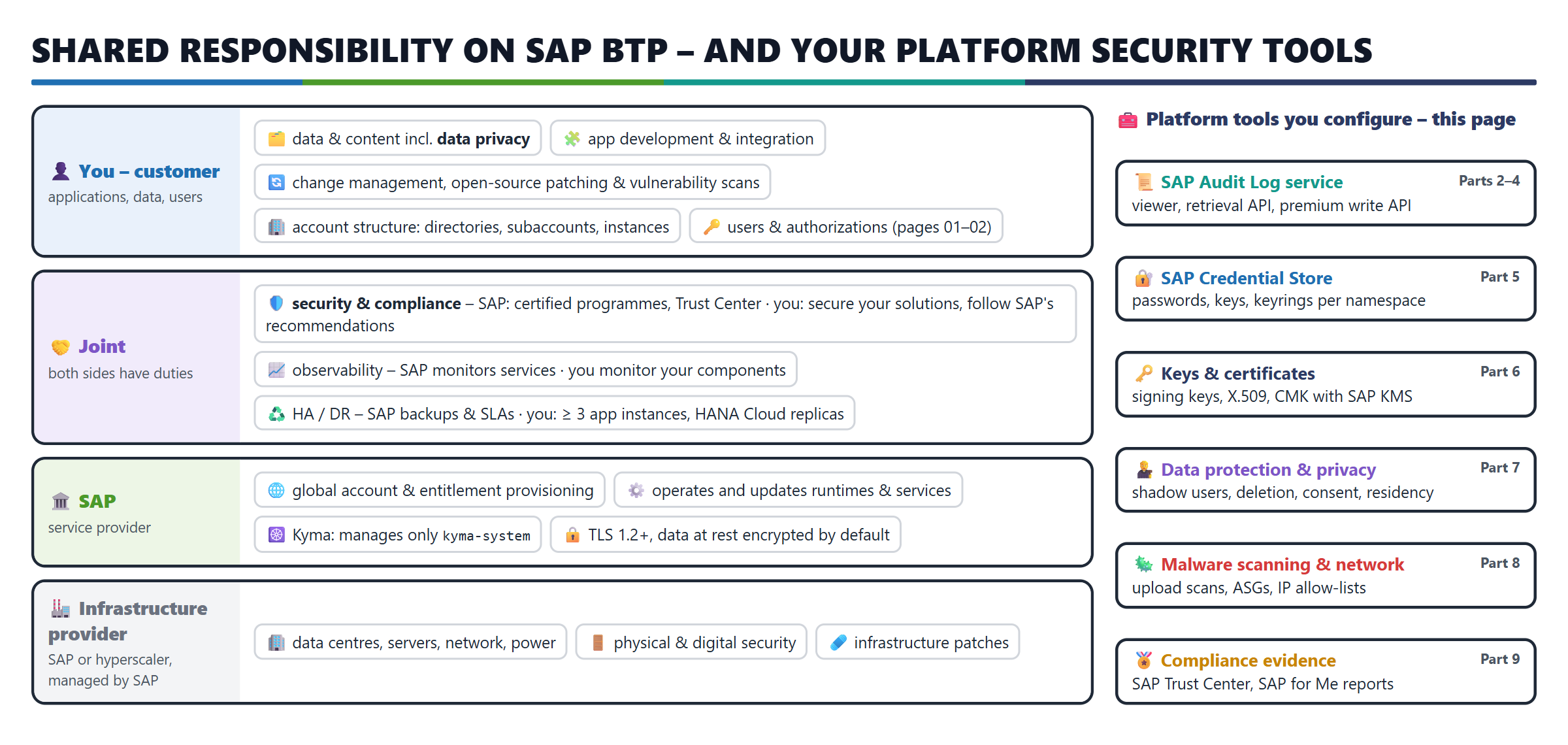
Who | Responsible for | What that means for the security team |
|---|---|---|
You (customer) | Data and content incl. data privacy; application development and integration; change management and operations (incl. keeping open-source components updated and scanning them for vulnerabilities); account structure (directories, subaccounts, service instances); users and authorizations | Classify data, decide what is audit-logged, protect secrets, review access (pages 01–02), patch your code and images |
Joint | Security and compliance (SAP: certified security programmes and Trust Center documentation; you: security of your solutions, following SAP's security recommendations); observability (SAP monitors its services, you monitor your components and open incidents); HA / DR (SAP backups and SLAs; you run apps with at least three instances where applicable and configure SAP HANA Cloud replicas) | Map SAP's recommendations to your landscape (page 05); collect evidence from SAP (Part 9) and from your own controls |
SAP | Provisioning the global account and entitlements (initial global account administrator); delivering, operating and updating runtimes and services; on Kyma only the | Your Kyma cluster contents outside |
Infrastructure provider (SAP or hyperscaler) | Data centres, servers, network, power, physical and digital security, infrastructure patches – SAP manages the hyperscaler relationship | You never contract or interact with the hyperscaler directly for BTP |
- Defaults you get without doing anything: encrypted transport with TLS 1.2 or higher (TLS 1.0 / 1.1 are not supported), data at rest encrypted by default in SAP cloud solutions, platform audit events written to the SAP Audit Log service and kept 90 days free of charge.
- Things that stay your job even on PaaS: audit logging inside custom applications ("SAP BTP does not provide audit logging functions for custom developments"), secrets in your code, personal data in free-text fields, malware in uploaded files, and keeping logs longer than the platform does.
- On Cloud Foundry you must ask SAP before running penetration or performance tests (BTP Admin › 02).
Part 2 – SAP Audit Log service: what is recorded, plans and retention
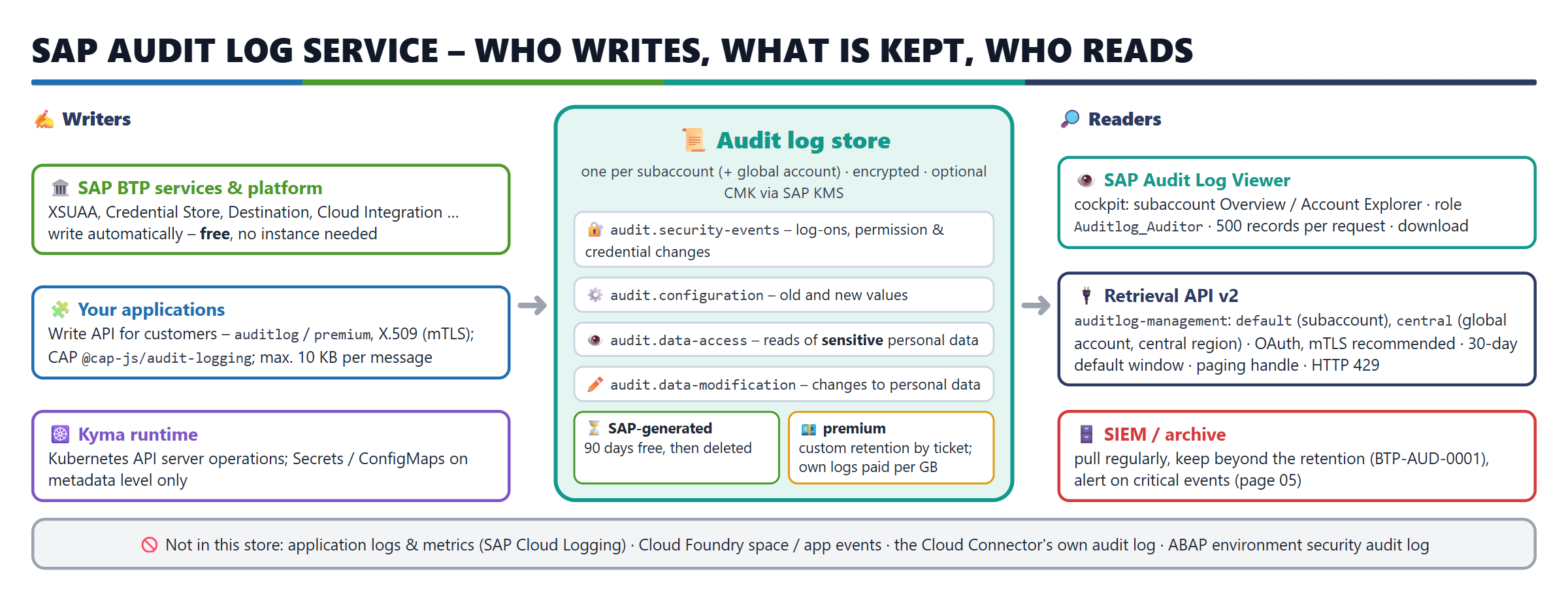
Audit logs are security-relevant chronological records that serve as documentary evidence: who did what, when, to which object or person. They are not application logs (what did the code do – SAP Cloud Logging, BTP Admin › 04) and not activity logs such as Cloud Foundry space events. The SAP Audit Log service stores audit logs written by SAP BTP services when actions are taken on your account or data – and, with the premium plan, audit logs written by your own applications.
2.1 The four audit categories
Category | Records | Typical events |
|---|---|---|
audit.security-events | Events that may affect system security | Successful and failed log-on / log-off, changes to access control permissions, changes to credentials, sensitive configuration changes |
audit.configuration | Configuration changes with old and new value (only the changed parts) | Service instance create / delete, bind / unbind, software update, other configuration changes |
audit.data-access | Read access to sensitive personal data – who read which attribute of which data subject in which object | Reading bank account or credit card data, health data, racial or ethnic origin, political opinions, religion, trade-union membership, genetic or biometric data |
audit.data-modification | Changes to personal data (create, change, delete) | Changing an address, e-mail or phone number of a customer |
Read access is logged only for sensitive personal data; changes are logged for all personal data. The same categories appear as filters in the viewer and the retrieval API.
2.2 Plans: who writes, who reads, who pays
Service · plan | Purpose | Cost |
|---|---|---|
Platform default (no instance needed) | SAP BTP services and SAP applications write their audit data for your subaccount automatically | Free, 90 days retention |
| Retrieval API for one subaccount (Cloud Foundry environment) | Free |
| Retrieval API for audit logs written on behalf of the global account; entitled to a subaccount in the central region | Free |
| Write API for customers (your own apps) and a configurable retention period for SAP-generated data | Consumption-based, priced per GB stored – see SAP Discovery Center |
2.3 Retention
Data | Default | Longer retention | On subaccount deletion |
|---|---|---|---|
SAP-generated (platform services) | 90 days, free; then deleted automatically | Entitle and create | Data older than 90 days deleted; the last 90 days kept free for audit purposes |
Customer-generated (your apps, premium only) | No free period – 90 days by default once premium is enabled, every day is paid per GB | Same support ticket | Deleted immediately |
- Retention is configured per subaccount; a custom retention on global account level is not available.
- Pitfall: deleting the premium service instance does not stop storage charges and does not delete stored data – revoke the custom retention by ticket (data older than 90 days is then removed) or delete the subaccount.
- SAP's security recommendation BTP-AUD-0001 (last updated in 2022, before the premium plan) still states the practical rule: download audit logs regularly and keep them in a central audit log system of your choice. Most other BTP services' recommendations (e.g. BTP-CRS-0010 for Credential Store) point to it.
Part 3 – Reading audit logs: viewer, retrieval API and SIEM export
3.1 SAP Audit Log Viewer in the cockpit
- Subaccount: open the SAP Audit Log Viewer from the subaccount Overview page or the subaccount Actions menu in the Account Explorer. Global account: open it in the header of the Account Explorer.
- Access comes from the role Auditlog_Auditor (two roles of that name: application
auditlog-management= read access,auditlog-viewer-initial-content= view) – contained in the default role collections Subaccount Administrator, Subaccount Viewer, Global Account Administrator and Global Account Viewer. For an auditor who must not administer anything, build a dedicated role collection with only these roles (page 02). - The viewer shows 500 records per request (choose a shorter time frame for more), lets you pick one or more of the four categories, filter the loaded chunk, open record details and download the selected time frame. Default columns: User, Time, Message, Category.
3.2 Retrieval API – subaccount and global account
For anything systematic (SIEM, archive, monthly evidence) use the Audit Log Retrieval API v2. SAP strongly recommends mTLS: create the auditlog-management instance with X.509 credentials and keep service keys short-lived. You need the Space Developer role in the space. Example for SALES-PROD:
|
Rule | Value / behaviour |
|---|---|
Default time window | 30 days back if |
Paging | Large results are split; the |
Category filter | Comma-separated list; not supported with custom retention periods or Sovereign cloud (HTTP 501 |
Rate limit | 4 requests/s per token and tenant (burst 20) on e.g. CF-EU11, CF-EU30, CF-US20, CF-JP10; 8/s (burst 40) on CF-EU10, CF-EU20, CF-US10, CF-US30; HTTP 429 when exceeded |
Token | Valid 1 hour; grants access to the audit logs of the subaccount on that landscape |
Latency | Logs are not immediately retrievable after they are written – plan an overlap in the collector's time windows |
Self-auditing | Every retrieval attempt is itself logged ( |
3.3 Global account audit logs
- Audit logs written on behalf of the global account are retrieved in the central region – Europe (Frankfurt) eu10, unless the global account is in China (Shanghai) or Government Cloud (US) – through
auditlog-managementplan central, entitled under Entitlements › Entity Assignments by a global account administrator. - Every Space Developer of that subaccount can use the instance. SAP therefore recommends a dedicated subaccount in the central region containing only users allowed to read global account audit logs (running example: SEC-AUDIT).
- Customer-managed keys are not supported for audit logs on global account level.
3.4 Kyma, the SAP for Me viewer and what is not in the Audit Log service
- Kyma runtime audits configuration changes of the runtime and Kubernetes API server operations (create / update / patch / delete; Secrets, ConfigMaps and TokenReviews on metadata level only, no payload). With the provisioning parameter Audit Log Access (
auditLogAccess) Kyma stores read credentials in the Secretauditlog-read-credentialsin namespacekyma-system; you then call the Retrieval API v2 with them. Enabling it is irreversible.
|
- SAP Audit Log Viewer service in SAP for Me (as of November 2026) is a separate, central viewer provisioned through SAP for Me: asynchronous audit log requests filtered by date, event type and user, export, and a Search API, with log-on through SAP Cloud Identity Services – check in its documentation which SAP solutions feed it.
- Not in the SAP Audit Log service: application logs and metrics (SAP Cloud Logging, BTP Admin › 04), Cloud Foundry space events and
audit.app.*app events (BTP Admin › 02), the Cloud Connector's own audit log on its host (page 03), and audit logs of an ABAP environment system (its own security audit log apps).
3.5 SIEM export – design
Decision | Recommendation |
|---|---|
Pull or push | Export works by pull – a collector (SIEM connector or a small scheduled job) polls the retrieval API |
One instance per subaccount | Each subaccount has its own audit store: SALES-DEV, -TEST, -PROD each need an |
Polling interval | Short enough to stay far inside the 90-day retention and the 30-day default window; overlapping windows + de-duplication by message ID because of the ingestion delay |
Credentials | X.509 service keys with short validity, rotated automatically; collector identity has no other rights |
Use cases on top | Alerts on role collection changes, trust changes, failed log-ons, data-access spikes – page 05 (security monitoring and incident response) |
Part 4 – Writing your own audit logs: premium plan, write API and CAP
If the sales order app shows customers' bank details or lets a clerk change addresses, the app must write data-access and data-modification records – the platform cannot know what your entities mean. This needs the premium plan (Write API for Customers).
4.1 Set-up
- Entitle the subaccount with service auditlog, plan premium (subaccount Entitlements › Configure Entitlements), then create the instance with a unique
xsappnameper subaccount and X.509 authentication (the premium plan uses mTLS). - The write API for customers is available only in listed regions (e.g. Europe (Frankfurt), Europe (Frankfurt, EU Access), US East (VA), Japan (Tokyo), Singapore – full list in the docs); for other regions contact the service owner.
|
4.2 The write API
Aspect | Detail |
|---|---|
Endpoints |
|
Authentication | JWT from the XSUAA cert URL with the binding's client certificate, sent as |
Message fields you fill |
|
Limits | Message larger than 10 KB → HTTP 413; per-tenant rate limit → 429; global rate limit → 503 |
Rotation | Certificates expire with the binding validity – rebind ( |
4.3 CAP: annotate instead of coding
- The plugin
@cap-js/audit-logging(Java:cds-feature-auditlog-v2) writes personal-data events automatically from@PersonalDataannotations:EntitySemantics(DataSubject,DataSubjectDetails,Other),FieldSemantics: 'DataSubjectID',IsPotentiallyPersonal(changes logged) andIsPotentiallySensitive(reads logged too) – details on CAP › 12. - In production the out-of-the-box flow needs the paid SAP Audit Log service for customers (= premium); alternatively you implement your own audit log store.
- Architect decision for the sales order app: annotate
creditCardNo/ bank data as sensitive, addresses as personal; security events (failed approvals, admin actions) as customsecurity-events. Do not log the personal data values of reads – the record identifies subject, object and attribute.
Part 5 – SAP Credential Store: administering application secrets
BTP Foundations › 03 explains why secrets belong in SAP Credential Store (passwords, keys, keyrings behind a REST API). This Part is the administrator's view: plans and limits, access design, rotation, encryption, backup and monitoring. Available in the Cloud Foundry and Kyma environments; one service instance per space.
5.1 Plans and limits
Plan | API calls/s | Bindings | Namespaces | Credentials | Total size | Notes |
|---|---|---|---|---|---|---|
standard | 25 | 100 | 10,000 | 100,000 | 100 MB | CPEA accounts (consumption-based) |
free | 3 | 3 | 10 | 10 | 0.1 MB | Productive accounts; upgrade to standard possible |
trial | 3 | 3 | 10 | 10 | 0.1 MB | Trial accounts |
proxy | shared | shared | shared | shared | shared | Shares a standard instance with other spaces / subaccounts; all proxies together stay within the standard limits |
Size limits per credential: password value 4,096 characters, key and keyring value 32 KB, name 255 characters, metadata 10,000 characters. Namespaces: up to 100 characters. Plan changes: trial → free / standard and free → standard only (cf update-service <instance> -p standard).
5.2 Securing an instance
Control | How | Recommendation |
|---|---|---|
Authentication type |
| BTP-CRS-0007: use |
Payload encryption | Requests and responses JWE-encrypted on top of TLS; on by default | BTP-CRS-0002 (critical): never disable it in production |
Namespace permissions | Binding / service key parameter | BTP-CRS-0003: limit every binding to its namespace |
Access control lists | A binding joins a | For shared instances with several consumers |
Binding validity | New bindings and service keys expire after 60 days by default (changeable in Settings › Binding Validity); a binding about to expire can be extended once by 3 days | BTP-CRS-0006 (critical): rotate before expiry and automate it – e.g. new binding per blue-green deployment |
Customer-managed key |
| When policy requires own keys (Part 6.3) |
|
5.3 Keyrings for local encryption
- Data that is neither a password nor a key (e.g. scanned documents) cannot be stored in Credential Store. Encrypt it locally with a data encryption key (DEK) and store the DEK encrypted next to the data; the DEK is encrypted by a keyring = key encryption key (KEK) in Credential Store (DEK Encryption API).
- Keyrings are generated by the service and not exportable; new versions are created automatically every 30–365 days (configurable) – the latest version encrypts, older versions only decrypt; a keyring can be deleted only after being disabled for at least 7 days.
5.4 Backup, replication and monitoring
Topic | Behaviour |
|---|---|
Accidental deletion | Restore from backup is not self-service: ticket on |
Region disaster | Recovery from a remote backup in another region when SAP declares a disaster (ticket on |
Alerts | Integration with SAP Alert Notification service: bindings about to expire, number of bindings / credentials, requests per day, storage used (BTP Admin › 04) |
Audit | Instance, binding and credential operations are written to the SAP Audit Log service (90 days – archive them, BTP-CRS-0010) |
Personal data | Credential Store is a technical service not intended for personal data; on account termination applications must delete their credentials (API: delete all credentials in a namespace) |
Part 6 – Keys and certificates: signing keys, X.509 credentials and customer-managed keys
6.1 Signing keys of access tokens
Every XSUAA access token is signed; services verify the signature. Periodic rotation of the signing key limits the damage of a leaked key.
- Automatic rotation (recommended): subaccount › Security › Settings › tab Signing Keys › Enable, or
btp update security/settings --rotate-signing-key-automatically TRUE. The first rotation starts immediately; the new key is active after 48 hours. Enabled by default for subaccounts created after 19 January 2026. - Restriction: automatic rotation is not possible with SAP HANA Cloud with principal propagation via a Cloud Connector below version 2.19.0 – disable it there, or upgrade the Cloud Connector (page 03).
- Test in SALES-DEV / SALES-TEST first: apps or libraries that cache verification keys too long break when the new key becomes active.
- Manual rotation: at most two signing keys per subaccount; wait for tokens signed with the old key to expire (default access token lifetime 12 hours) before deleting it – the service enforces a minimum 12-hour delay unless
--forceis used (emergencies only).
|
6.2 X.509 credentials and service secrets
Topic | Fact | Admin action |
|---|---|---|
XSUAA secret types |
| Remove old instance-secret bindings; allow |
Revocation | XSUAA does not check certificate revocation – a still-valid certificate is accepted until its binding or service key is deleted | Incident playbook: delete the binding / key, not only the certificate |
Own PKI | Self-managed certificates must be issued by a CA trusted by XSUAA (DigiCert Global Root G2 / Global Root CA, SAP Global Root CA, Entrust Root CA – G2 …); with | Coordinate with the corporate PKI team |
Service-generated certificates | Malware Scanning mTLS bindings: 364 days; Credential Store mTLS bindings: max. 365 days; audit log keys: validity you choose | Track expiry dates; rotate by rebinding (blue-green) |
Custom domains | Optional TLS 1.3 for your applications via SAP Custom Domain Manager; cockpit and SAP Cloud Identity Services stay on TLS 1.2 | Server certificates for custom domains are managed there |
6.3 Customer-managed keys: SAP Key Management Service
Data at rest is always encrypted with keys SAP manages. Customer-managed keys (CMK) let you replace that key with one you control. If you revoke or disable the key, the data becomes unreadable for SAP and anyone else – including backups, which SAP can restore only in encrypted form.
Term | Meaning |
|---|---|
SAP Key Management Service (SAP KMS) | SAP's CMK service across SAP cloud solutions; a configuration layer (an SAP KMS tenant provisioned through SAP for Me, usually one per compliance region) and a runtime layer deployed by SAP per region / IaaS. A new product – not a rebrand of the SAP Data Custodian KMS |
BYOK / HYOK | Bring Your Own Key = import key material into SAP KMS; Hold Your Own Key = register a key that stays in your own key store (e.g. AWS KMS or Fortanix DSM) as the top (L1) key of the keychain |
Keychain | Tree of keys (envelope encryption): your L1 key encrypts the L2 / L3 keys used by the services |
CSEK | Customer-specific encryption key generated and managed by SAP – no action needed |
Scope | Data at rest only; encryption in transit stays with the SAP solution |
BTP service | CMK option (as of November 2026) |
|---|---|
SAP HANA Cloud, PostgreSQL (hyperscaler option), Object Store | SAP KMS |
ABAP environment | SAP KMS integration per subaccount; plans |
SAP Credential Store | SAP KMS or SAP Data Custodian KMS |
SAP Audit Log service | SAP KMS for the customer's global audit log tenant (GTID), assigned in SAP for Me; the key region must match the audit log region; not for global-account-level logs. A disabled CMK makes logs unretrievable while new logs are still stored (asymmetric encryption) |
SAP Cloud Identity Services | SAP KMS (assigned through SAP for Me) |
SAP HTML5 Application Repository ( | SAP Data Custodian KMS: |
- Architect view: CMK is a disruptive control (SAP's own wording). Use it when regulation, internal policy or an exit strategy (crypto-shredding) requires it, define who may disable keys (four-eyes approvals in SAP KMS), and test the revoke / restore path in a non-productive subaccount first.
Part 7 – Data protection and privacy on SAP BTP
SAP provides functions that support compliance with data protection law – it does not give legal advice, and most obligations (purpose, consent, retention rules) are decided by you. The BTP data protection documentation is written for the data protection officer and the account administrator.
Requirement | What BTP gives you | Your task |
|---|---|---|
Know where personal data is | Users: global account and platform users in the platform IdP or SAP Cloud Identity Services; business users in SAP Cloud Identity Services or your IdP; shadow users in each subaccount (and Cloud Foundry) | Record of processing; data classification of every app and service |
No uncontrolled personal data | – | Never put personal data in global account, directory, subaccount, org, space, database or tenant names or other free-text fields – it cannot be found or removed on a deletion request |
Log changes and reads | SAP Audit Log service; read access logging in the ABAP environment (log domains such as BANK, HEALTH, SSN; off by default) | Write data-access / data-modification records in your apps (Part 4) |
Personal data record / information | Members in the cockpit, shadow users via the User Management (SCIM) API, IAS information report | Answer data subject requests |
Deletion / erasure | Delete users in IAS; delete shadow users (cockpit Security › Users, filter Hasn't Logged On, or SCIM API); SAP BTP Data Retention Manager / SAP Data Privacy Integration for retention rules | Delete on all levels – a deleted subaccount user is re-created if the Cloud Foundry user logs on again |
Consent | Privacy policies and terms of use in SAP Cloud Identity Services | Configure them per application |
Data residency | Region choice per subaccount, regions marked EU Access | Choose the region when creating the subaccount (BTP Admin › 01) |
End of contract | Data deleted when accounts expire (trial accounts in Cloud Foundry after 365 days, productive ones by contract), except where SAP must retain it; backups exist for the backup cycle | Export what you must keep before termination; stop integrations that would push data back |
- Shadow user deletion: the cockpit recommends the Hasn't Logged On filter (e.g. 180 days) – long enough not to catch people on holiday or parental leave, short enough for your privacy policy. Deletion cannot be undone and removes direct role collection assignments; a re-created user gets a new ID.
- Logs are personal data too: user names and IPs in audit and application logs. Restrict who reads them (Auditlog_Auditor only for the security team), keep retention as short as law and audit allow, and never log tokens or passwords.
Part 8 – Malware scanning and network security
8.1 SAP Malware Scanning service
Scans business documents uploaded by your custom applications (Cloud Foundry and Kyma) for viruses and other malware, with ClamAV as the engine. The service is a central scanner: one instance per subaccount is enough, more instances do not add capacity.
Fact | Value |
|---|---|
Service · plan |
|
Call | POST the plain binary (not multipart, not URL-encoded) to |
Result | JSON with |
Limits | Max. file size 400 MB; max. 30 concurrent requests per subaccount; scan time-out 25 minutes |
Authentication | Basic or mTLS – binding parameter |
Data handling | Files are held in memory during the scan and then deleted |
|
Situation (SAP's FAQ) | What the app should do |
|---|---|
What to scan | Unstructured data from untrusted sources |
When | On upload; store the scan timestamp; rescan on download / processing if the last scan is older than 3 days (new signatures) |
Positive result | Delete the file and log the event (a |
Encrypted content |
|
Service unavailable on upload | Save the file with an initial timestamp so it is scanned at next use |
Service unavailable on download | Warn the user that the file could not be scanned; let them accept the risk or cancel |
Credential rotation | Blue-green: new app instance with a new binding, then remove the old one |
- Not the same thing: the Malware Scan stage of SAP Continuous Integration and Delivery scans your built archive (BTP Development › 05).
8.2 Network security controls
Layer | Control | Who configures |
|---|---|---|
Transport | HTTPS / TLS 1.2+ everywhere; TLS 1.3 optional for apps on custom domains | SAP; custom domains: you |
Cloud Foundry egress | Application security groups (space-scoped; defaults | SAP |
Your firewall allow-lists | Per region SAP publishes NAT IPs (egress – requests from Cloud Foundry apps) and LB IPs (ingress); add the connectivity IPs if you allow-list Cloud Connector or Destination service traffic | Your network team |
On-premise and private connectivity | Cloud Connector (outbound tunnel only), SAP Private Link service, principal propagation – page 03 | You |
Kyma | DDoS protection is the IaaS provider's default (Azure DDoS Protection Basic, AWS Shield Standard, Google Cloud standard network protection); a web application firewall cannot be configured in Kyma; Kubernetes control plane hardened along DISA STIGs | SAP / IaaS; workloads and network policies in your namespaces: you |
Application layer | App router with authentication, scope checks and CSRF protection (BTP Foundations › 04) | Developers |
Part 9 – Compliance: SAP Trust Center, certifications and audit reports
When the auditor asks "show me that the platform is secure", you do not audit SAP's data centres – you hand over SAP's independent reports and add evidence for your part of the shared responsibility model.
Report / certificate | What it proves | Notes (as of November 2026) |
|---|---|---|
ISO/IEC 27001, 27017, 27018 | Information security management system; cloud-specific controls; protection of personal data in public clouds | Certificates searchable on the SAP Trust Center |
ISO 22301, ISO 9001, ISO/IEC 42001 | Business continuity, quality management, AI management system | – |
SOC 1 (SSAE 18 / ISAE 3402) | Controls relevant to customers' financial reporting (IT general controls) | Targeted within 90 days after each period; SAP now issues SAP Central Cloud Services reports that replace the former SOC 1 SAP BTP report |
SOC 2 (ISAE 3000 / AT 101) | Security, availability, processing integrity, confidentiality, privacy | 12-month audit cycle; bridge letters cover the gap to the next report |
BSI C5 | German Cloud Computing Compliance Criteria Catalogue | SAP Central Cloud Services C5 Type 2 report 2026 (period 1 April 2025 – 31 March 2026) lists SAP BTP runtimes (Cloud Foundry, Kyma, Neo), the ABAP environment and many BTP services; under NDA |
Others | CSA STAR, PCI DSS, TISAX, IDW attestations | Scope per service – check the report |
- Where: the SAP Trust Center (sap.com › About › Trust Center) lists certificates and reports; existing customers download eligible documents on demand in SAP for Me (Portfolio & Products). Some reports are restricted and require an NDA.
- Scope check: a certificate helps only if your service and region are in its scope – read the scope appendix, not just the logo.
- Financial sector: SAP was designated a Critical ICT Third-Party Service Provider under the EU Digital Operational Resilience Act (DORA) by the European Supervisory Authorities on 17 November 2025.
- Your own evidence: audit log exports (Part 3), role collection reviews (page 02), Cloud Connector configuration (page 03), the security recommendations checklist and SAP Cloud ALM's configuration and security analysis (page 05).
Part 10 – Running example: platform security for SALES-PROD
The sales order app stores order attachments, calls an external credit agency with an API key, shows customers' bank details to credit managers and must pass an annual audit. The platform-security set-up:
# | Control | Configuration in the landscape | Part |
|---|---|---|---|
1 | Responsibility matrix | Shared responsibility table agreed with the security officer; Kyma not used, so no cluster hardening | 1 |
2 | Audit trail |
| 3 |
3 | Archive and SIEM | Collector polls every subaccount daily with overlapping windows; logs kept outside BTP for the audit period; alerts for role collection and trust changes | 3, page 05 |
4 | App audit logging |
| 4 |
5 | Secrets |
| 5 |
6 | Keys | Automatic signing key rotation tested in SALES-TEST first; CMK only if the data protection officer requires it | 6 |
7 | Privacy | No personal data in account or space names; quarterly shadow user clean-up with Hasn't Logged On; Auditlog_Auditor only for the security team | 7 |
8 | Uploads |
| 8 |
9 | Evidence | SOC 2 / C5 / ISO 27001 from SAP for Me + own exports and reviews | 9 |
Common mistakes
- Assuming the platform logs everything – custom apps write nothing to the Audit Log service unless you build it.
- Relying on the 90-day retention as the archive; or deleting the premium instance and expecting charges to stop.
- Giving auditors Subaccount Administrator just so they can open the audit log viewer.
- One Credential Store binding with access to every namespace;
basicauthentication; payload encryption switched off "for debugging". - Revoking a certificate in the PKI and assuming XSUAA rejects it – delete the binding instead.
- Enabling CMK in production without having tested the revoke and restore path.
Part 11 – Interview questions
Q1. Explain the shared responsibility model of SAP BTP.
SAP provisions the global account and entitlements and operates and updates the runtimes and services; the infrastructure provider (SAP or a hyperscaler, managed by SAP) runs the data centres. The customer owns data and content including privacy, application development and integration, change management and open-source patching, the account structure, users and authorizations. Security and compliance, observability and HA / DR are joint: SAP provides certified controls and Trust Center reports, the customer secures its solutions and follows SAP's security recommendations.
Q2. What does the SAP Audit Log service record and in which categories?
Security-relevant evidence written by BTP services for your subaccount – and by your own apps with the premium plan – in four categories: audit.security-events (log-ons, permission and credential changes), audit.configuration (old and new values of configuration changes), audit.data-access (reads of sensitive personal data) and audit.data-modification (changes to personal data).
Q3. The auditor needs one year of audit logs. BTP keeps 90 days. What are your options?
Either pull the logs regularly with the Audit Log Retrieval API into a central archive or SIEM – SAP's recommendation BTP-AUD-0001 – or entitle auditlog / premium and ask SAP by ticket on BC-CP-CF-SEC-AUDITLG for a longer retention, paid per GB. Most companies do the first anyway, because correlation and alerting happen in the SIEM.
Q4. How do you get audit logs of the whole landscape into a SIEM?
One auditlog-management instance (plan default) with X.509 credentials in each subaccount, plus the central plan in a dedicated subaccount of the central region for global-account events. A collector gets a token with the client certificate, polls /auditlog/v2/auditlogrecords with overlapping time windows, follows the paging handle, respects the rate limits and de-duplicates. Keys are short-lived and re-created at least every 90 days.
Q5. Your CAP app shows customers' bank data. What must you do for audit logging?
The platform cannot log it – SAP BTP does not provide audit logging for custom developments. Annotate the entities with @PersonalData (bank fields IsPotentiallySensitive so reads are logged), add @cap-js/audit-logging and bind an auditlog premium instance with X.509 credentials; check that the write API is available in the region and plan for per-GB cost.
Q6. How do you secure an SAP Credential Store instance in production?
Authentication mtls, oauth:mtls or oauth:key, never basic; keep payload encryption on; restrict every binding to its namespace with namespace_permissions (and ACL groups for shared instances); rotate bindings before their 60-day default expiry, automated through blue-green deployments; Alert Notification on expiring bindings; archive its audit events; optionally a customer-managed key.
Q7. What is a customer-managed key and what is the risk?
With SAP Key Management Service you replace the SAP-managed key for data at rest with your own key (BYOK import or HYOK registration in your own key store). If you disable or revoke it, nobody – not even SAP or a restore from backup – can read the data; an ABAP environment, for example, is stopped and can stay stopped only up to seven days. It enables crypto-shredding and exit strategies but needs strict key governance and a tested restore path.
Q8. How are token signing keys rotated and what can break?
Automatic rotation in Security › Settings › Signing Keys or btp update security/settings --rotate-signing-key-automatically TRUE; the new key becomes active after 48 hours (default for subaccounts created after 19 January 2026). It breaks consumers that cache keys and is not possible with SAP HANA Cloud principal propagation through a Cloud Connector older than 2.19.0. Test in a non-productive subaccount first.
Q9. An employee left. What data protection steps apply on BTP?
Deactivate or delete the user in SAP Cloud Identity Services or the corporate IdP, then delete the shadow users in every subaccount and at Cloud Foundry level – otherwise the user is re-created on the next log-on. Use the Hasn't Logged On filter for periodic clean-up. Remember personal data in audit and application logs and that the deletion cannot be undone.
Q10. How do you integrate malware scanning into an upload?
Bind malware-scanner / clamav with mTLS, POST the plain binary to the /scan endpoint, store the timestamp with the file and rescan on use if older than three days. On a positive result delete the file and log a security event; if the service is down, store the file unscanned and scan later, and warn users on download. Limits: 400 MB, 30 concurrent requests per subaccount, 25-minute time-out.
Q11. The customer's auditor asks for SOC 2 and ISO 27001 evidence for BTP. Where do you get it?
From the SAP Trust Center and, for existing customers, SAP for Me (Portfolio & Products), some reports only under NDA. Check that the services and regions you use are in scope – BTP is covered by the SAP Central Cloud Services SOC and C5 reports – use bridge letters between SOC periods, and add your own evidence for the customer side of the shared responsibility model.
Q12. Which network security controls exist on BTP and which can you configure?
TLS 1.2+ for all endpoints (TLS 1.3 optional on custom domains); Cloud Foundry application security groups that SAP manages and you can only read; published NAT and load-balancer IPs per region for your firewall allow-lists; Cloud Connector and SAP Private Link for private connectivity; in Kyma the IaaS default DDoS protection and your own network policies, but no configurable web application firewall.
🏠 Start Here · ◀ 03 · Connectivity security · 05 · Hardening & audit ▶ · Sections: CORE ABAP | OOPS ABAP | ABAP on HANA | Clean Core | RAP | ABAP Points | SAP Fiori | SAPUI5 | Mobile Development (MDK) | BTP Foundations | BTP Admin | BTP Security | BTP Development | CAP | SAP Build | ABAP on BTP | Integration Suite | SAP Business AI | SAP BASIS | Security | SAP SDLC
Functional: FICO ABAP | TRM ABAP | VIM | SAP BIS | SD ABAP | MM ABAP | PP ABAP | QM ABAP | PM ABAP | PS ABAP | EWM | TM ABAP | GTM ABAP | EHS ABAP | HR ABAP | BW | SAP Datasphere | SAP Business Data Cloud | SAP MDG | SAP Analytics Cloud | SAP Ariba | SAP CX | SAP IBP