One CDS model, many databases, two runtimes. This page explains how a CAP app moves from the laptop (SQLite in memory, mocked users) to production on SAP HANA Cloud with Cloud Foundry or Kyma, without changing a line of business code. It is the home of CAP profiles and configuration (cds.env), the database services (@cap-js/sqlite, @cap-js/hana, @cap-js/postgres), initial data and schema evolution, cds build / cds deploy, the cds add facets for production, and cds up. Running example: the Order Approval Portal (order-approval, requirement CR8). Platform basics are not repeated here: HDI containers and the full mta.yaml are on BTP Development › 06 · BTP Developer Hands-On (Parts 4–5), Cloud Foundry and Kyma internals on BTP Development › 03 · Runtimes, and native HANA objects on BTP Development › 02 · SAP HANA Cloud for Developers (Part 7).
Part 1 – Why: one model, every stage
Requirements on this page
ID | Requirement | How CAP solves it |
|---|---|---|
CR8 | Runs on SAP HANA Cloud in production, SQLite on the laptop | Profiles switch the database service; the CDS model is compiled to the right SQL dialect; |
CR8 | Deploy the portal to Cloud Foundry (and optionally Kyma) with authentication |
|
CR8 | Change the model after go-live without losing approval data | Schema evolution: HDI, |
Why it matters: in ABAP the database was always there, and transports moved your objects. In CAP you decide which database a stage uses, how the schema gets there and how the app finds its credentials. The good news: CAP is database-agnostic. Handlers use CQL (SELECT.from(...)), never SQL strings, so the same code runs on SQLite, HANA Cloud, PostgreSQL or H2 (Java). Only configuration changes.
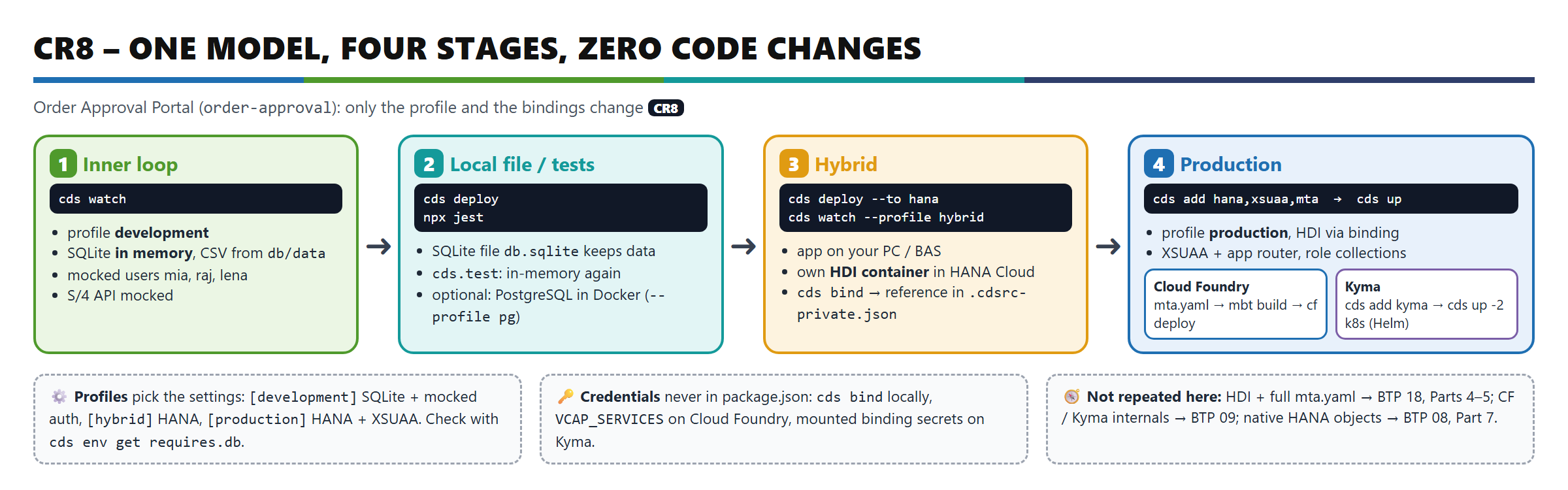
Stage | Command | Database | Users | Remote S/4 |
|---|---|---|---|---|
Inner loop | cds watch | SQLite in memory, filled from CSV | Mocked (package.json) | Mocked from CSV |
Hybrid | cds watch --profile hybrid | Your HDI container in HANA Cloud (via | Mocked or real XSUAA | Real destination |
Production |
| HDI container bound in | XSUAA / IAS via app router | Destination + Connectivity |
Interview tip: say "the code never changes between stages – only profiles and bindings do". That one sentence shows you understand CAP's development model.
Part 2 – Configuration and profiles: cds.env
All CAP settings end up in one merged object, cds.env. Several sources feed it; a source with higher order overrides a lower one. Think of it as the CAP equivalent of the ABAP system profile plus SM59, merged at start-up.
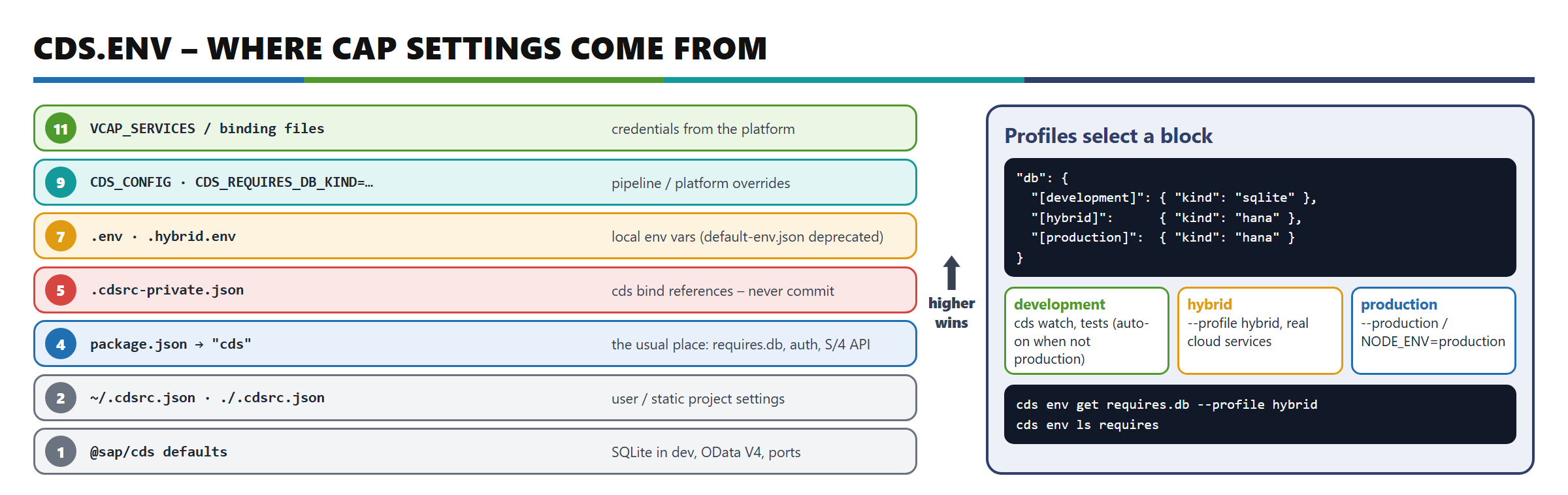
Order (low → high) | Source | Typical content |
|---|---|---|
1 |
| Default ports, SQLite in development, OData V4 |
2–3 |
| Static project settings |
4 |
| The usual place: |
5 | .cdsrc-private.json | Your personal bindings written by |
6–8 |
| Local environment variables |
9–10 |
| Overrides set by the platform or a pipeline |
11 | VCAP_SERVICES | Service bindings on Cloud Foundry (credentials) |
2.1 Profiles
Wrap settings in [<profile>] to use them only in that profile. The profile comes from --production, then --profile, then NODE_ENV, then CDS_ENV. If the profile is not production, the development profile is switched on automatically – that is why tests (Jest sets NODE_ENV=test) still get SQLite and mocked users.
|
- A string is shorthand for
kind:"[production]": { "db": "hana", "auth": "xsuaa" }means the same as the long form.cds env get requires.db --profile productionshows the result. - Own profiles are allowed:
cds watch --profile pg(PostgreSQL in Docker),cds run --profile my-test, orCDS_ENV=my-test.
|
2.2 Bindings: where the credentials come from
- Never put credentials into
package.json. In production CAP reads them from the platform:VCAP_SERVICESon Cloud Foundry; on Kyma, binding secrets mounted below the folder named bySERVICE_BINDING_ROOT(servicebinding.io and SAP BTP Service Operator bindings). - CAP matches a
cds.requiresentry to a binding by name / binding_name or tags, or by its kind (tags / label, e.g. hana, xsuaa), or an explicit vcap: { label | plan | name | tags } filter – needed when two instances of the same service are bound. - Locally,
cds bindstores only a *reference* (instance and key name) in.cdsrc-private.json; the credentials are fetched from Cloud Foundry (or Kubernetes) each time you start with--profile hybrid.cds bind --exec -- <cmd>runs any tool (tests, scripts) with a generatedVCAP_SERVICES.
|
Common mistakes: committing .cdsrc-private.json or a default-env.json with secrets; editing settings in the wrong profile and wondering why nothing changes (run cds env get); forgetting that a [production] block is ignored by cds watch.
Part 3 – The database services: SQLite, H2, HANA Cloud, PostgreSQL
CAP compiles the CDS model to the DDL of the target database and translates every CQL query at runtime. The database-specific part is a database service – an npm package in Node.js, a Maven feature in Java.
Database | Node.js package | Java | Use it for |
|---|---|---|---|
SQLite |
| SQLite JDBC (local tests) | Inner loop, unit tests, demos. Not for production (coarse locking) |
H2 | – | Default for local CAP Java | CAP Java inner loop |
SAP HANA Cloud |
| cds-feature-hana | Production default, HDI, vectors, multitenancy |
PostgreSQL | @cap-js/postgres | cds-feature-postgresql | Edge cases, e.g. PostgreSQL on SAP BTP, hyperscaler option. No multitenancy / extensibility yet |
3.1 SQLite for the inner loop
npm add -D @cap-js/sqlite– it configures an in-memory database for the development profile by itself. Everycds watchrestart deploys the model and loads the CSV files again: a fresh database in milliseconds.- Persistent file when you want data to survive restarts:
"db": { "kind": "sqlite", "credentials": { "url": "db.sqlite" } }, thencds deployto create or refresh it. - Since
@sap/cds10.1 the preset"db": "sqlite:memory"runs in memory in all profiles – only for special cases such as demo apps.
3.2 SAP HANA Cloud through HDI
|
- Your app never owns the whole HANA database: it gets an HDI container (schema + runtime and design-time users).
cds build --productionwrites.hdbtable,.hdbview,.hdbconstraint, CSV data and a deployerpackage.jsonintogen/db. Details: BTP Development › 06 · BTP Developer Hands-On, Part 4. - Native HANA objects (calculation views, procedures,
.hdbindex) go intodb/src; expose them with@cds.persistence.existsfacades – BTP Development › 02 · SAP HANA Cloud for Developers, Part 7. - The HANA Cloud instance must be running and must allow your space / IP range; trial and free-tier instances stop every night.
3.3 PostgreSQL
|
- On Cloud Foundry
cds build --productiongenerates a small deployer app (start scriptcds-deploy) that runs before the service, like the HDI deployer.
3.4 What stays the same
The CDS → SQL mapping (entity sap.capire.orderapproval.ApprovalRequests becomes table sap_capire_orderapproval_ApprovalRequests), the CQL in your handlers and the OData API. What differs: native functions, locking behaviour, case sensitivity of string comparisons and sort order. Always run your tests once against HANA Cloud (cds bind --exec -- npm test) before go-live.
|
Part 4 – Initial data and schema evolution
4.1 CSV files
- Put CSV files into
db/data/named<namespace>-<Entity>.csv, e.g.db/data/sap.capire.orderapproval-ApprovalRequests.csv; the header row lists element names (foreign keys ascustomer_ID).cds add datacreates empty files with the right headers for all entities. - Test-only data goes to
test/data/: loaded in development and tests, not meant for production. - Production rule: CSV is for configuration and code lists (RequestTypes CRED / DISC / PRIC, status texts N / A / R, currencies). HDI overwrites CSV-delivered rows on every deployment – never deliver data that users change.
|
4.2 Schema evolution: changing the model after go-live
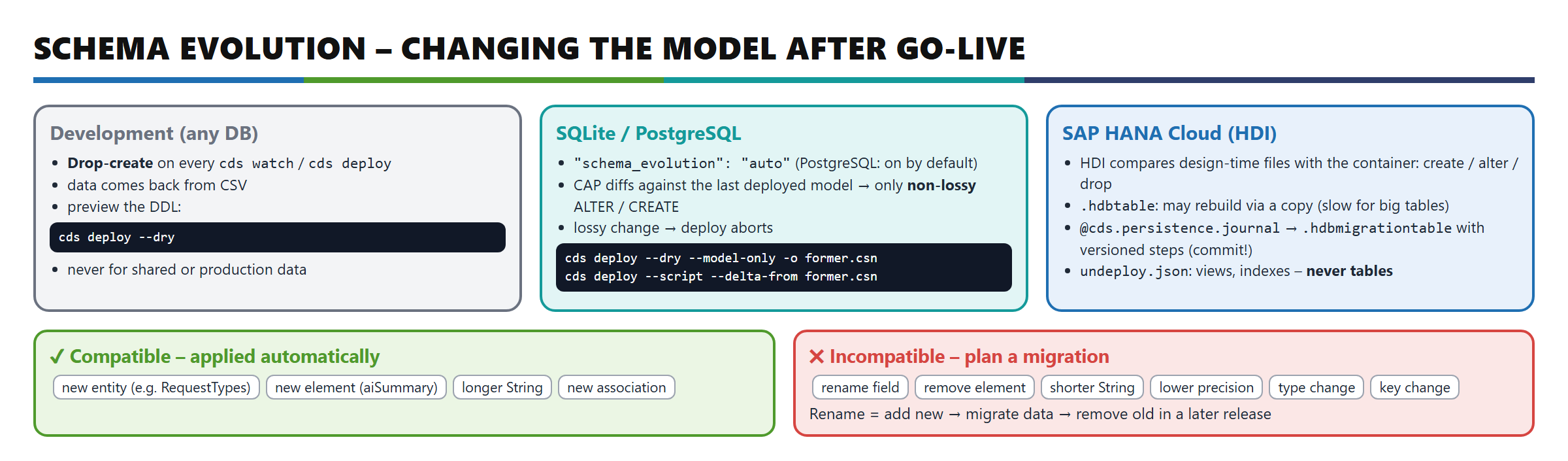
Database | How changes reach the schema | Watch out |
|---|---|---|
Development (any) | Drop-create on every | Data is lost – fine for the laptop only |
SQLite / PostgreSQL |
| Lossy changes abort |
SAP HANA Cloud (HDI) | HDI compares design-time files with the container and creates, alters or drops objects. | Big tables: |
CAP Java | Optionally Liquibase ( | Liquibase 4.x is Apache-2.0; 5.x uses FSL-1.1-ALv2 |
- Compatible: new entities, new elements, longer strings. Incompatible: renames, removing elements, shorter strings, lower precision, type changes, key changes. Rename = add the new field, migrate the data, remove the old one in a later release.
undeploy.jsonlists HDI artefacts that may be deleted (views, indexes, constraints, draft tables). Never list tables there – that deletes the data.
|
|
Part 5 – cds build and cds deploy
cds watch serves the sources directly. For the cloud you need deployable folders: that is what cds build produces. cds deploy is the shortcut that builds *and* puts the schema into a database.
Command | What it does | Output / effect |
|---|---|---|
cds build --production | Compiles the model for each target the project needs |
|
cds deploy | Deploys to the configured database of the current profile | SQLite file, PostgreSQL schema |
cds deploy --to hana | Build + create / find HDI container + HDI deploy | Your own container for hybrid testing, binding saved |
cds deploy --dry | Prints the DDL | Nothing changed |
--productionmatters: it uses the[production]profile, so the build creates HANA artefacts instead of SQLite DDL and leaves out test data.- Build tasks are detected automatically from the folders and the configured database; adjust them in
cds.build.tasksonly when you need something special. - Never commit
gen/– it is a build result like a.mtar.
Part 6 – Preparing for production with cds add
cds add <facet> adds dependencies, configuration and deployment descriptors for one feature. It is merge-friendly: running it again, or adding another facet later, updates the existing files (package.json, mta.yaml, the Helm chart) instead of overwriting your edits.
|
Facet | Adds | Page |
|---|---|---|
| Database service, profile config, deployer | this page |
| Auth config, | 07 · Authorization & Security |
| Cloud Foundry descriptors (MTA preferred) | this page |
| Helm chart in | this page, Part 8 |
| UI hosting and routing | 06 · Fiori Elements & Draft |
| BTP services for remote APIs | 09 · Remote Services |
| Messaging services | 10 · Messaging & Events |
| MTX sidecar, SaaS registry | 11 · Multitenancy |
| Plugins + service bindings | 12 · Testing, Plugins |
| ESLint, TypeScript types, CI/CD config | 12 · Testing, Plugins |
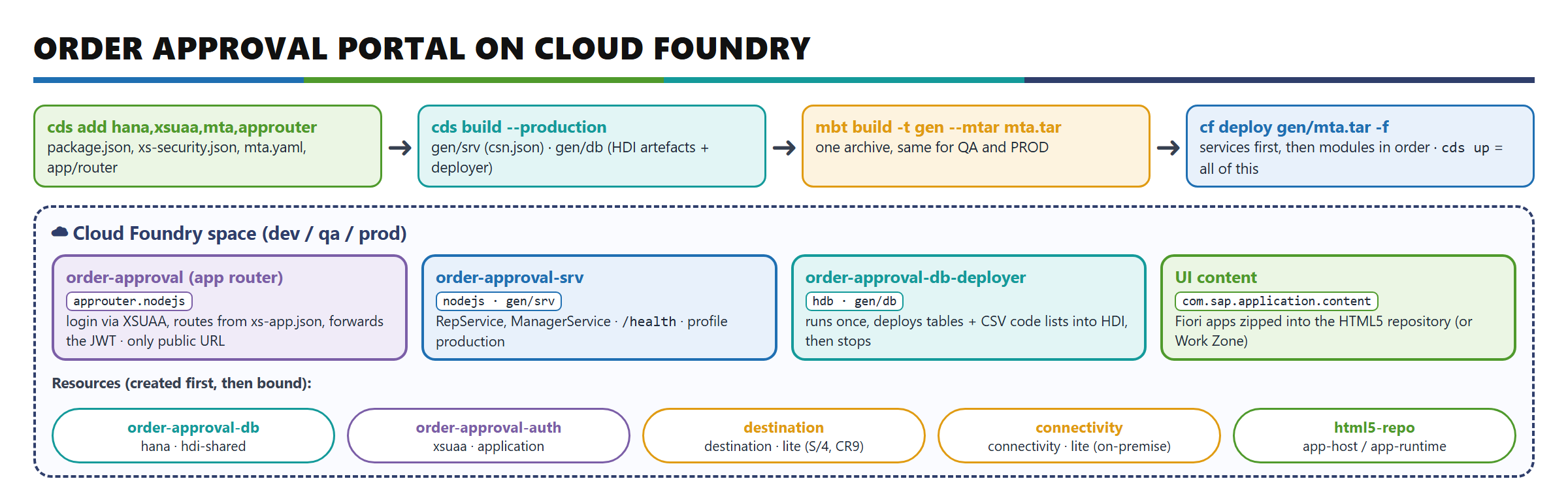
The generated mta.yaml for order-approval has the modules order-approval-srv (type nodejs, path gen/srv), order-approval-db-deployer (type hdb, path gen/db) and the app router, plus the resources order-approval-db (hana / hdi-shared) and order-approval-auth (xsuaa / application). A complete annotated mta.yaml, requires / provides, deployment order and extension descriptors are on BTP Development › 06 · BTP Developer Hands-On, Part 5.
Part 7 – Deploying to Cloud Foundry: cds up, mbt build, cf deploy
7.1 One-time prerequisites
|
- In the subaccount: a running SAP HANA Cloud instance, entitlements for
hdi-shared, XSUAAapplication, and the UI services you chose; a Cloud Foundry space where you are Space Developer.
7.2 Build and deploy
|
cds up is a convenience wrapper. Know what it runs, because pipelines and interviewers use the steps:
|
After deployment | How |
|---|---|
Open the app | The deploy log prints the app router URL – the only entry point; the CAP index page and Fiori preview are not served in the cloud |
Get access | Assign the role collections from |
Check health |
|
Read logs |
|
Update | Run |
Runtime details – buildpacks, routes, scaling, VCAP_SERVICES, zero-downtime – are on SAP BTP BTP Development › 03 · Runtimes, Parts 3–5. CI/CD (SAP Continuous Integration and Delivery, cds add pipeline) is on BTP Development** › 05 · DevOps, Operations & Observability.
Part 8 – Deploying to Kyma: cds add kyma and cds up -2 k8s
The same CAP project deploys to Kyma; only the descriptors differ: a Helm chart instead of mta.yaml, and container images instead of buildpack staging.
|
File | You set |
|---|---|
containerize.yaml |
|
chart/values.yaml |
|
helm … -f values-prod.yaml | Stage-specific values – the Kyma counterpart of an |
- Prerequisites: Kyma runtime + kubeconfig, Docker,
kubectl,helm,pack, HANA Cloud mapped to the namespace. - Everything else – the manual
pack/helmsteps,kubectltroubleshooting, APIRules, BTP Operator service instances – is explained with this very app on BTP Development › 03 · Runtimes, Part 8. Multitenant apps on Kyma can use the CAP Operator (@cap-js/cap-operator-plugin).
Cloud Foundry | Kyma | |
|---|---|---|
Descriptor |
| Helm chart ( |
Build |
|
|
Deploy |
|
|
Bindings | VCAP_SERVICES | Secrets from ServiceBindings, mounted as files |
Pick it when | Standard CAP apps, fastest path | Team already on Kubernetes, own containers / sidecars |
Part 9 – Environment configuration and troubleshooting
9.1 Configuration per landscape without rebuilding
- Same artefact everywhere: build one
.mtar(or one set of images) and add landscape-specific values at deploy time –.mtaext(cds up --overlay,cf deploy -e) or Helm values files. - Non-secret settings (destination name, feature switches, limits) become environment variables of the service module (
properties:inmta.yaml,env:invalues.yaml). CAP also mapsCDS_...variables intocds.env(CDS_REQUIRES_DB_KIND→requires.db.kind), but long service names make such variables hard to read – prefer a[production]block inpackage.jsonand keep only the value that really differs per landscape in the extension descriptor._separates path segments, so a service name with underscores (API_SALES_ORDER_SRV) cannot be set this way – useCDS_CONFIGwith JSON instead. - Test data in
test/datais loaded in development only (default[development]data foldersdb/dataandtest/data), so it stays out of the production build;gen/dbaftercds build --productionshows what will be deployed. - Secrets come only from bindings or the Destination service, never from
properties.
|
9.2 When the deployment fails
Symptom | Usual cause | Fix |
|---|---|---|
Deployer fails: "database not available" | HANA Cloud stopped or IP allowlist excludes CF | Start the instance in HANA Cloud Central, allow the region / space |
HDI error on a table change | Incompatible change (shorter type, NOT NULL on filled column) | Make the change compatible, or use |
Service crashes: | Profile not production, or HDI resource not bound | Check |
App works locally, 401 / 403 in the cloud | Role collections not assigned, or token not forwarded | Assign roles; app router destination with |
Health check fails after upgrade | Descriptor still checks | Use |
| One module failed |
|
Part 10 – Interview questions
Q1. How does a CAP app use SQLite locally and HANA Cloud in production without code changes?
Handlers use CQL, which the database service translates; the database is chosen by profiles in cds.requires.db ([development] → SQLite via @cap-js/sqlite, [production] → HANA via @cap-js/hana). cds build --production creates HDI artefacts; credentials come from the binding.
Q2. What is a CAP profile and how is it selected?
A named set of settings wrapped as [name] in the configuration. Selected by --production, --profile, NODE_ENV or CDS_ENV; when it is not production, development is also active. cds env get <path> --profile <p> shows the result.
Q3. What does cds bind do, and why is it better than a default-env.json?
It stores only a reference to a service instance and key in .cdsrc-private.json; credentials are fetched at start-up with --profile hybrid. No secrets on disk or in Git, and rotated keys work automatically. default-env.json is deprecated.
Q4. Explain HDI and what cds deploy --to hana does.
HDI gives each app an isolated container (schema + technical users) and deploys design-time artefacts into it. cds deploy --to hana builds the artefacts, creates an hdi-shared instance if none exists, deploys and saves the binding for hybrid testing.
Q5. How do you rename a field in production?
Not as a rename – that is incompatible. Add the new field, migrate the data (handler, script or .hdbmigrationtable step), switch the code, remove the old field later. For very large HANA tables use @cds.persistence.journal.
Q6. Why must tables never be listed in undeploy.json?
undeploy.json allows HDI to delete the listed artefacts. Deleting a table deletes its data; it is meant for views, indexes, constraints and draft tables that the model no longer generates.
Q7. What does cds up do?
For Cloud Foundry: installs UI dependencies, freezes the lock file, mbt build -t gen --mtar mta.tar, cf deploy gen/mta.tar -f. With -2 k8s: build, container images, push, helm upgrade --install and rollout checks on Kyma. --overlay adds an MTA extension descriptor.
Q8. When would you choose PostgreSQL instead of HANA Cloud for a CAP app?
When the customer already runs PostgreSQL on SAP BTP (hyperscaler option) and needs no HANA features. Limits: no CAP multitenancy / extensibility on PostgreSQL yet, no HANA vector embeddings function, no calculation views.
Q9. Which CSV data belongs in production and which does not?
Code lists and configuration (status texts, currencies) yes; transactional or user-maintained data never, because HDI overwrites CSV rows on each deployment. Test data goes to test/data.
Q10. Cloud Foundry or Kyma for the Order Approval Portal?
Cloud Foundry by default: cds add mta + cds up, buildpacks, no registry or cluster knowledge needed. Kyma when the company standard is Kubernetes or you need own containers; then cds add kyma + cds up -2 k8s. The CAP code stays identical.
Q11. Scenario: after go-live the portal starts, but every request fails with "no such table" in HANA. What do you check?
Did the hdb deployer module run and succeed (cf logs order-approval-db-deployer --recent)? Is the service module deployed after it (deployed-after) and bound to the same HDI resource? Was the build run with --production (otherwise SQLite artefacts)? Is the profile production in the cloud?
Q12. Scenario: production needs 2 instances and a different S/4 destination than QA, but the release manager wants one artefact. How?
Build one .mtar; keep stage differences in .mtaext files (instances, memory, destination name as a property) and deploy with cf deploy -e prod.mtaext or cds up --overlay prod.mtaext. On Kyma: a values-prod.yaml passed to Helm.
🏠 Start Here · ◀ 07 · Authorization · 09 · Remote Services ▶ · Sections: CORE ABAP | OOPS ABAP | ABAP on HANA | Clean Core | RAP | ABAP Points | SAP Fiori | SAPUI5 | Mobile Development (MDK) | BTP Foundations | BTP Development | CAP | SAP Build | ABAP on BTP | Integration Suite | SAP Business AI | SAP BASIS | Security | SAP SDLC
Functional: FICO ABAP | TRM ABAP | VIM | SAP BIS | SD ABAP | MM ABAP | PP ABAP | QM ABAP | PM ABAP | PS ABAP | EWM | TM ABAP | GTM ABAP | EHS ABAP | HR ABAP | BW | SAP Datasphere | SAP Business Data Cloud | SAP MDG | SAP Analytics Cloud | SAP Ariba | SAP CX | SAP IBP