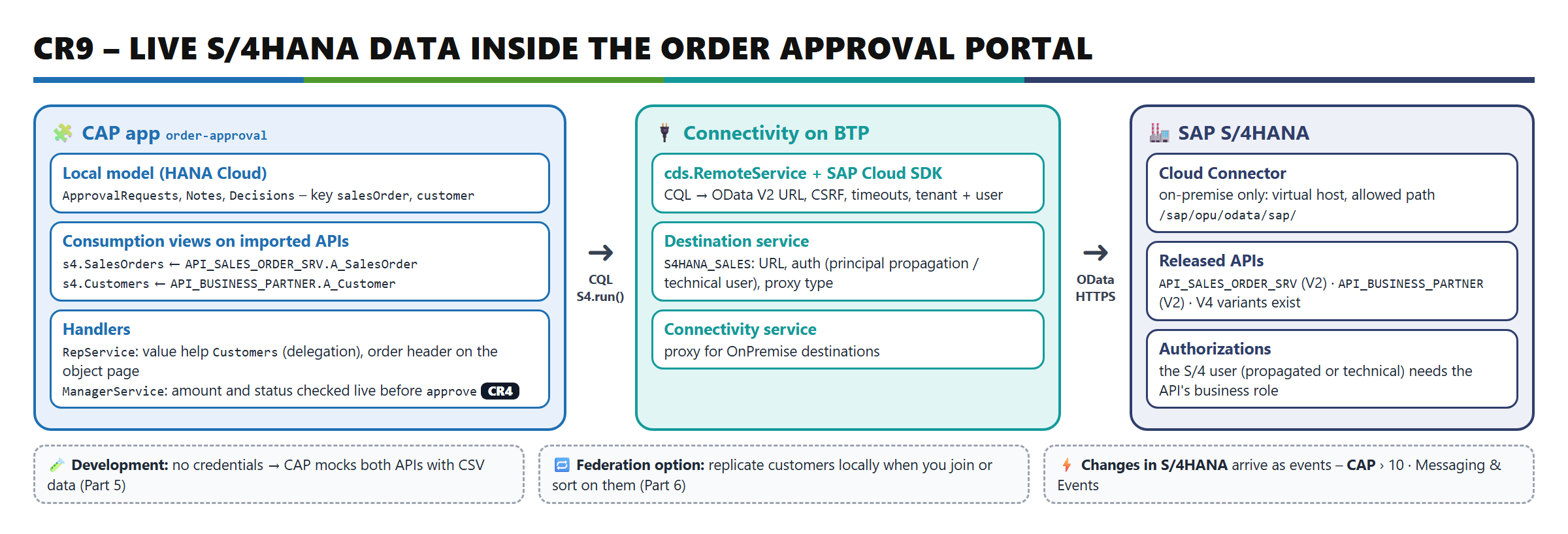
How the Order Approval Portal reads live sales orders and customers from SAP S/4HANA (CR9) – the CAP way. You import the released APIs as CDS models, define consumption views, query them with CQL as if they were local, run everything mocked on the laptop, and in production reach S/4HANA through the Destination and Connectivity services. The page also explains where the SAP Cloud SDK fits and how to handle errors, timeouts and writes. Events from S/4HANA are on page 10 (→ CAP › 10 · Messaging & Events); deployment of the bindings on page 08; trust, principal propagation and the Cloud Connector set-up in BTP Foundations › 03 and BTP Foundations › 04. Sources: capire ("CAP-level Service Integration", "Remote Services", "Inner Loop Development") and the SAP Help Portal.
Part 1 – Why remote services, and the Calesi idea
Requirements on this page
ID | Requirement | How this page solves it |
|---|---|---|
CR9 | Read live sales orders and customers from S/4HANA | Imported APIs |
CR4 (support) | Managers approve with one click – but only if the order still exists and the amount has not changed | Live check against S/4HANA inside the |
CR10 (support) | Approval requests are created from S/4HANA events | Remote read of order details in the event handler – page 10 |
Why: the portal stores only what S/4HANA does not know – approval requests, notes and decisions (CR1). Sales orders and customers stay in S/4HANA, the system of record. Copying them by hand or writing raw HTTP clients for every call is slow to build and hard to test. CAP's answer is CAP-level service integration (capire calls it the *Calesi* pattern): a remote API becomes a CAP service that you query with the same CQL as your own tables. CAP translates the query into OData, handles connectivity, user propagation and resilience, and mocks the remote service automatically while you develop.
Calesi principle (capire) | Meaning in the portal |
|---|---|
Remote services are proxied by CAP services |
|
Consumed in protocol-agnostic ways |
|
Mocked out of the box |
|
Varying implementations | Mock → sandbox → test system → production, same handler code |
Extensible through event handlers |
|
- ABAP view: this is the CAP counterpart of a service consumption model plus a custom entity in RAP (→ RAP section). The big difference: CAP gives you a working mock and the same query language for local and remote data.
Part 2 – Find and import the S/4HANA APIs
2.1 Pick a released API
Use only released APIs (A2X OData services) from SAP Business Accelerator Hub (api.sap.com) – they are stable across upgrades and fit the clean-core rules (→ Clean Core section). For the portal:
Need | API (OData V2) | Entity used |
|---|---|---|
Sales order header: customer, amount, currency, status, delivery block |
| A_SalesOrder |
Customer name for value help and display |
| A_Customer |
- OData V4 versions of many APIs exist (for example the Sales Order V4 service). The CAP code is the same; the
kindand the service path differ – take the exact path from the Hub. - Download the EDMX: Hub → product (S/4HANA Cloud Public Edition or on-premise) → APIs → the API → *API Specification* → *OData EDMX*. Alternatively save
…/$metadatafrom your own system, which also contains customer-specific extension fields.
2.2 Import
|
|
Source | Import |
|---|---|
OData V2 EDMX |
|
OData V4 EDMX |
|
OpenAPI (REST) |
|
AsyncAPI (events) |
|
RFC-enabled function modules |
|
SAP data products | cds import --data-product … |
Another CAP application | The provider exports its API as an npm package; the consumer runs |
- Reuse packages: when several projects consume the same S/4HANA APIs, import them once into a small npm package (capire's
@capire/s4sample does exactly this) andnpm addit everywhere.
Common mistakes
- Editing the generated
.cds/.csnby hand – the next import overwrites it. Put your changes into consumption views andextendstatements in your own files. - Importing a non-released (internal) OData service because it has more fields – it can change with any S/4HANA upgrade.
Part 3 – Configure the remote services per profile
The cds.requires entry tells CAP what the remote service is (kind and model) and, per profile, where it is. No URL, user or password belongs in the code or the repository.
|
Setting | Meaning |
|---|---|
No credentials (development) | CAP mocks the service (Part 5) |
destination | Name of a destination in the BTP subaccount: URL, authentication, proxy type |
path | Service root appended to the destination URL |
| Direct URL – only for sandboxes and tests; keep keys in |
| Fetch a CSRF token before changing requests (normal for S/4HANA OData V2) |
requestTimeout | Milliseconds to wait for the remote system (Node.js default 60 000) |
- The sandbox URL format above is an example – copy the exact sandbox URL and the API key header from the Hub's *Try Out* page.
- Profiles:
cds watch=development;cds watch --profile hybridorsandboxfor your own; deployed apps runproduction. Profiles are explained on → CAP › 08 · Databases & Deployment.
3.1 The same in CAP Java
|
- Java uses the same imported CDS model; the remote service name defaults to the YAML key. Java handlers and CQN: → CAP › 05 · CAP Java.
Part 4 – Consumption views and associations to remote entities
Why: A_SalesOrder has well over a hundred fields with S/4HANA names. A consumption view declares the few fields the portal needs, renames them into the portal's language and is the only thing the rest of the model uses. capire: *"Always use consumption views."*
|
|
- The full portal model (
Notes,Decisions, aspects) is on → CAP › 02 · CDS Modeling. Here only the links to S/4HANA matter. - Use unmanaged associations (
on …) to remote entities: the foreign key lives in your table. capire allows extending remote entities only with elements that need no change on the remote side – virtual or calculated elements and unmanaged associations (e.g. a back-link fromSalesOrderstoApprovalRequests). - Serve the views through your services:
RepServiceexposesCustomersas a read-only value help (→ CAP › 06 · Fiori Elements & Draft for@Common.ValueList).
|
Common mistakes
- OData does not support every projection feature on remote entities – for example flattening fields from associations (
airline.name as airline) works against CAP's own HCQL protocol but not against an S/4HANA OData service. Keep consumption views on OData APIs flat. - Two consumption views with the same name in different files – use your own namespace (
sap.capire.orderapproval.s4) to avoid clashes with the imported namespace.
Part 5 – Mocking and the inner loop
Why: S/4HANA systems are shared, slow to get access to, and full of data you may not use for tests. CAP lets the UI and logic teams start on day one with mocks and move step by step to the real system – with unchanged handler code.
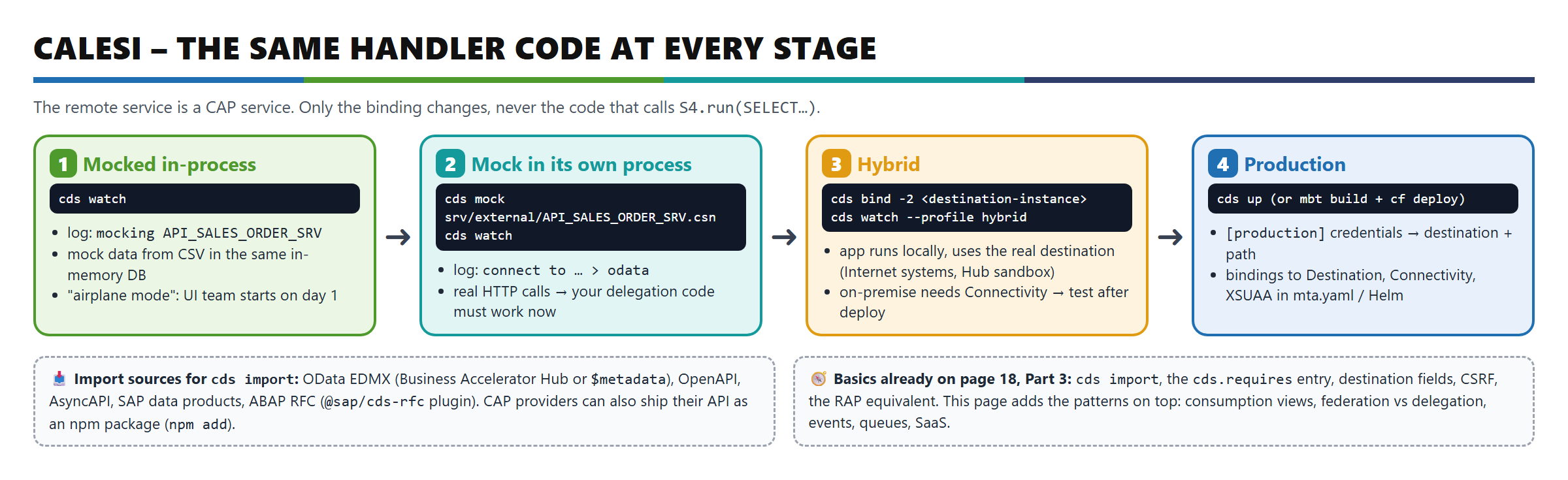
5.1 Stage 1 – mocked in-process
|
- Mock data: CSV files named after the remote entity, e.g.
srv/external/data/API_SALES_ORDER_SRV-A_SalesOrder.csvandsrv/external/data/API_BUSINESS_PARTNER-A_Customer.csv. Keep the order numbers consistent with yourApprovalRequeststest data. - The mock shares the in-memory database with your own entities, so even joins work – which hides problems (see stage 2).
5.2 Stage 2 – mock in its own process
|
- Now CAP sends real HTTP requests. Missing delegation handlers, joins across systems and N+1 calls show up here – exactly as they would in production. capire's term: *integration logic required*.
cds replagainst the mock is a quick way to try queries:await RepService.read('Customers').limit(3)and watch the translated OData request in the mock's log.
5.3 Stage 3 – hybrid and sandbox
- Sandbox: the Hub's sandbox gives read access to sample data with an API key (profile
sandboxabove). Good for checking field contents and paging. - Hybrid:
cds bindbinds the local app to real BTP service instances (for example the Destination service) andcds watch --profile hybriduses them. Works for destinations with proxy type Internet. On-premise destinations need the Connectivity proxy, which is reachable only from apps running on BTP – test that path after deployment.
Interview tip
"How do you develop against S/4HANA without a system?" – three answers in order: CAP's automatic mock with CSV data, cds mock in a separate process to test real HTTP, then the Business Accelerator Hub sandbox or a hybrid binding. Mention that the handler code never changes.
Part 6 – Querying remote services: delegation, mashups and federation
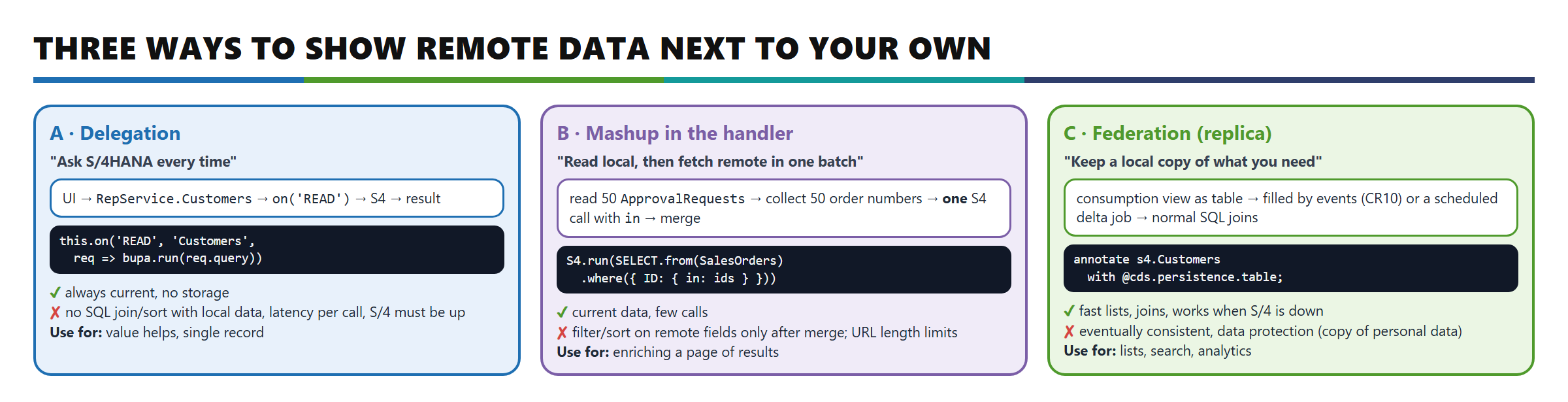
CAP's uniform API works for local and remote services: srv.run(query) for data, srv.send(request) for anything HTTP-like, srv.emit / srv.on for events (page 10). capire's advice: prefer run for data, emit for decoupling, and use send only when you need full flexibility.
6.1 Delegation – the value help
|
CAP translates the incoming query on RepService.Customers through the consumption view down to A_Customer: $select, $filter, $top, $orderby are mapped to the remote names, and the result is mapped back. capire calls this automatic query translation.
6.2 Mashup – enrich a page of local results
|
- Navigations and expands across systems (
where order.netAmount > 1000,$expand=order) cannot be pushed into one SQL statement. Without federation you split the query: read the remote IDs first, then query the local table within, or fetch nested data per page – capire shows both patterns.
6.3 Live check inside an action (CR4)
|
- Actions,
req.subjectandreq.rejectare explained on → CAP › 04 · Custom Logic in Node.js.
6.4 Federation – keep a local copy
|
|
- Then lists can join, sort and filter on customer names in SQL, and the portal keeps working when S/4HANA is down. The price: eventual consistency and a copy of personal data (retention and deletion rules apply – → CAP › 12 · Testing, Plugins, Observability & Performance for audit logging).
- capire's "CAP-level Data Federation" guide tags consumption views with
@federatedand lets a generic handler turn them into local replica tables; HANA virtual tables, synonyms and data products are listed there as further options.
Common mistakes
- Remote call inside
after('each')→ one HTTP call per row (N+1). Always batch within. - Defining a CDS view that joins a local table with a remote entity – the database cannot reach S/4HANA.
- Replicating everything "to be safe" – replicate only the fields you join or sort on.
Part 7 – Destinations and the path to an on-premise S/4HANA
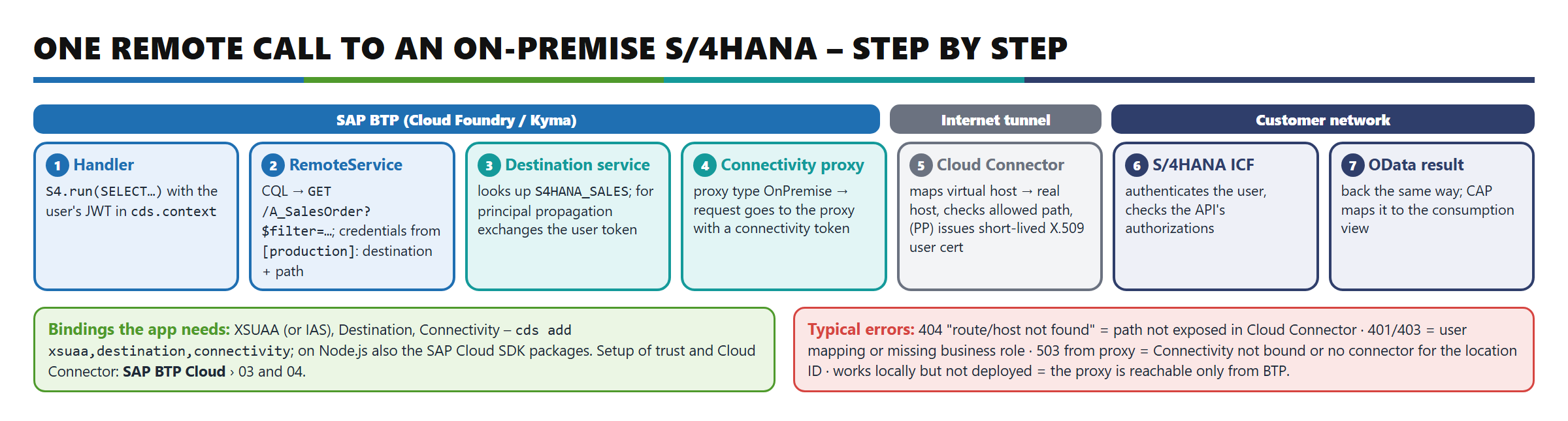
Why: in production the code names only a destination. Everything else – URL, authentication, network path – is configuration owned by the BTP subaccount administrator. This is how the same app can talk to S/4HANA Cloud, an on-premise system or (per tenant) the customer's own system (page 11).
Destination property | On-premise S/4HANA | S/4HANA Cloud |
|---|---|---|
Name / Type |
|
|
URL | virtual host from the Cloud Connector, e.g. | |
Proxy type | OnPremise | Internet |
Authentication | PrincipalPropagation or BasicAuthentication (technical user) | OAuth2SAMLBearerAssertion / OAuth2 client credentials / basic (communication user) – depends on the communication arrangement |
Additional properties |
| – |
7.1 Principal propagation or technical user?
Principal propagation | Technical user | |
|---|---|---|
Who S/4HANA sees | The real portal user ( | One communication / system user |
Authorization | S/4HANA checks the user's own roles – region and sales org restrictions apply | The portal must restrict data itself ( |
Audit | Changes logged under the real user | Changes logged under the technical user |
Effort | Trust BTP ↔ Cloud Connector ↔ S/4HANA, user mapping | Simple |
Background jobs / events | Not possible – there is no user | Required (event handlers run privileged) |
- Many projects use both: principal propagation for user requests (
S4HANA_SALES), a technical destination for event handlers and replication (S4HANA_SALES_TECH) – twocds.requiresentries on the same imported model, each with its owncredentials.destination.
7.2 Bindings
|
- Deployed app bound to XSUAA/IAS (user token), Destination (lookup) and Connectivity (proxy for OnPremise). The MTA and Helm details are on → CAP › 08 · Databases & Deployment.
Part 8 – SAP Cloud SDK and CAP remote services
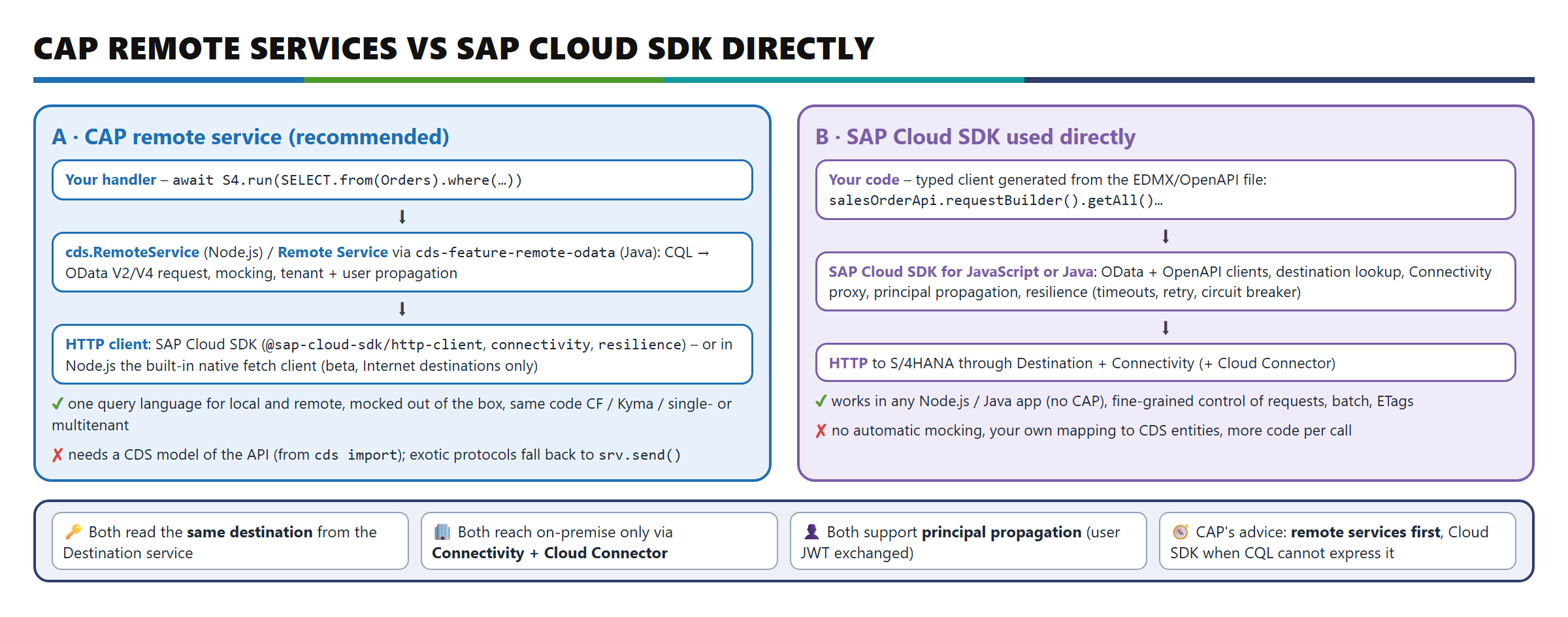
Why: "Do you use the SAP Cloud SDK?" is a frequent interview question. The precise answer: CAP remote services use the SAP Cloud SDK underneath for destinations, connectivity and resilience; you use the Cloud SDK directly only when CAP's query layer does not fit.
8.1 CAP Node.js
|
- If
@sap-cloud-sdk/http-clientis installed,cds.RemoteServiceuses it by default – full Destination service support including OnPremise destinations through Connectivity. - Recent CAP releases also have a native fetch client (beta) that resolves destinations without the Cloud SDK, but only for proxy type Internet and a few authentication types (
NoAuthentication,BasicAuthentication,OAuth2ClientCredentials). Settingcds.remote.native_fetchforces the choice. For the portal's on-premise case: install the Cloud SDK packages.
8.2 CAP Java
cds-feature-remote-odatabuilds on Cloud SDK destinations and propagates tenant and user from the request context. capire's "clear recommendation" is Remote Services over direct Cloud SDK use; for anything CQN cannot express, the Cloud SDK can be used natively in the same app.
8.3 When the SAP Cloud SDK directly is the right tool
Situation | Choice |
|---|---|
Queries and CRUD on an OData API inside CAP | CAP remote service – CQL, mock, same code everywhere |
A REST endpoint without a model (token endpoint, webhook) |
|
Node.js or Java app without CAP (plain Express, Spring Boot) | SAP Cloud SDK: typed clients generated from EDMX/OpenAPI, destinations, resilience |
Special OData handling (complex | Cloud SDK typed client in one CAP module, called from a handler |
Generative AI hub calls | SAP Cloud SDK for AI or the CAP AI plugin – → CAP › 13 · CAP and Generative AI |
|
Part 9 – Errors, timeouts and writes
Why: a remote system is slower and less reliable than your own database. Interviews often ask "What happens if S/4HANA is down?" – answer with timeouts, clear errors, caching or federation, and queued writes.
9.1 Handle remote errors
|
- CAP Node.js wraps a failed remote call in an error with
statusCode: 502and the sanitised remote error (status, message) ine.reason. Never forward raw back-end messages with internal details to the UI. requestTimeoutper service (Part 3) prevents hanging requests; the Cloud SDK resilience package adds retries and circuit breakers where you configure them.
9.2 Writes to S/4HANA
Pattern | When |
|---|---|
Direct | The user must see the result immediately (e.g. a validation answer from S/4HANA) |
Queued with | The write must happen reliably after commit and the user does not need the answer – e.g. removing the delivery block after approval. → CAP › 10 · Messaging & Events, Part 7 |
Event instead of a call | Other systems decide themselves what to do ( |
|
Common mistakes
- Calling S/4HANA directly inside a transaction that can still roll back – the remote change stays (phantom write). Queue it.
- Forgetting
csrf: true– S/4HANA OData V2 rejects changing requests with 403 "CSRF token validation failed". - Testing the on-premise path only on the laptop – the Connectivity proxy is reachable only from BTP.
Part 10 – Interview questions
Q1. How do you consume an S/4HANA OData API in CAP, step by step?
Find the released API on SAP Business Accelerator Hub, download the EDMX, cds import it (CDS model in srv/external, cds.requires entry with kind: odata-v2), write a consumption view with the needed fields, expose it in a service, add an on('READ') handler that delegates with remote.run(req.query), and configure a destination plus path in the [production] profile. In development CAP mocks it.
Q2. What is the Calesi pattern?
CAP-level service integration: remote services are represented as CAP services, consumed with the same protocol-agnostic APIs as local ones (run, send, emit, on), mocked out of the box, replaceable by other implementations and extensible with handlers – so developers stay at domain level.
Q3. Why define consumption views on imported APIs?
They declare exactly what you use, rename S/4HANA fields into your domain, isolate the rest of the model from API changes, reduce payloads, and are the basis for federation. Generated files stay untouched, so re-imports are safe.
Q4. Explain the mocking options.
In-process mock by cds watch with CSV data in the same in-memory database; cds mock <model> in a separate process so real HTTP is used and integration logic is tested; the Hub sandbox or a hybrid binding with cds bind for real data. Handler code is identical in all stages.
Q5. Delegation, mashup or federation – how do you decide?
Delegation for value helps and single records (always current). Mashup when enriching a page of local results with one batched remote call. Federation (local replica refreshed by events or a scheduled task) when you join, sort or filter on remote fields or need availability when S/4HANA is down. Never one remote call per row.
Q6. What is the role of the SAP Cloud SDK in a CAP app?
It is the HTTP and connectivity layer under CAP remote services: destination lookup, Connectivity proxy for on-premise, principal propagation, resilience. In Node.js CAP uses it when @sap-cloud-sdk/http-client is installed (a native fetch client exists for Internet destinations); in Java via cds-feature-remote-odata. Use it directly only for non-CAP apps or requests CQL cannot express.
Q7. Which BTP services does a CAP app need to call an on-premise S/4HANA?
XSUAA or IAS for the user token, the Destination service for URL and authentication, the Connectivity service as proxy, and a Cloud Connector in the customer network that exposes the virtual host and the OData path. Bind them with cds add xsuaa,destination,connectivity and the MTA.
Q8. Principal propagation or technical user?
Principal propagation when S/4HANA must check the real user's authorizations and log changes under that user; it needs trust and user mapping. A technical user for background work and event handlers, where no user exists; then the portal must enforce restrictions itself. Many apps use both.
Q9. Why does $expand from a local entity to a remote one not work automatically?
The database cannot join across systems, and CAP can push a query only to one target. You either replicate the remote data (federation), or split the query: read remote IDs or details in one batched call and merge in the handler.
Q10. Scenario: the manager list of 200 open requests takes 40 seconds since customer names were added. What do you check?
Most likely an N+1 pattern – one remote call per request in an after('each') handler. Fix by collecting customer IDs and reading them in one call with in, paging the list, or replicating customer names locally and joining in SQL. Check requestTimeout, and use telemetry to see the remote calls per request (page 12).
Q11. Scenario: everything works with cds watch, but after deployment every S/4HANA call fails with 503 or 404.
Locally the service was mocked or used an Internet destination. In BTP check: Connectivity service bound and the Cloud SDK packages installed (Node.js), destination name and proxy type OnPremise, Location ID, the Cloud Connector connected to this subaccount and exposing the virtual host and path /sap/opu/odata/sap/, and user mapping for principal propagation. Test with the destination check in the cockpit and the app logs.
🏠 Start Here · ◀ 08 · Deployment · 10 · Messaging ▶ · Sections: CORE ABAP | OOPS ABAP | ABAP on HANA | Clean Core | RAP | ABAP Points | SAP Fiori | SAPUI5 | Mobile Development (MDK) | BTP Foundations | BTP Development | CAP | SAP Build | ABAP on BTP | Integration Suite | SAP Business AI | SAP BASIS | Security | SAP SDLC
Functional: FICO ABAP | TRM ABAP | VIM | SAP BIS | SD ABAP | MM ABAP | PP ABAP | QM ABAP | PM ABAP | PS ABAP | EWM | TM ABAP | EHS ABAP | HR ABAP | BW | SAP MDG | SAP Analytics Cloud | SAP Ariba | SAP CX | SAP IBP