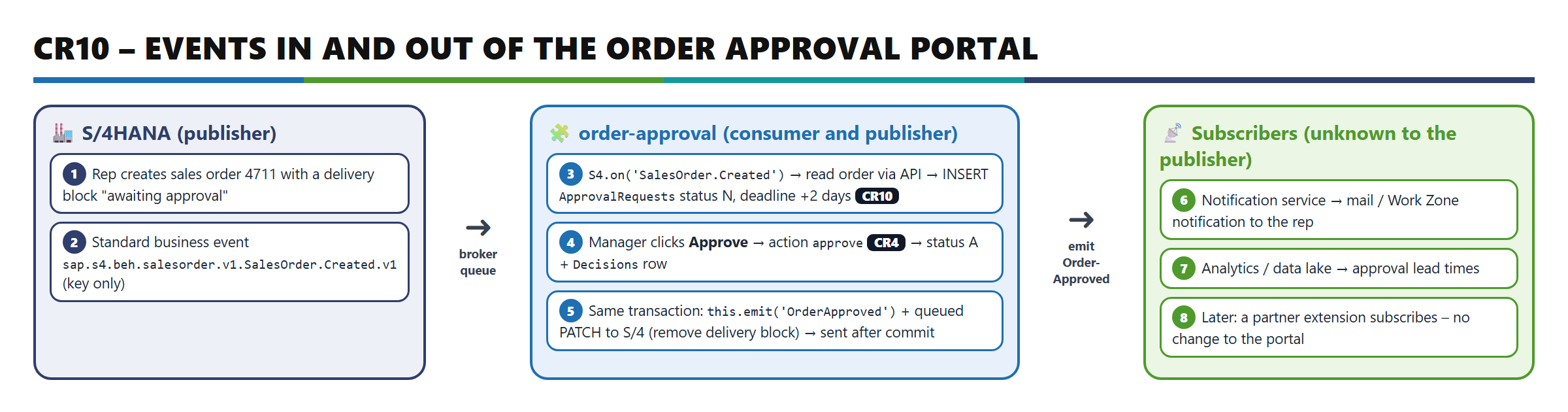
How the Order Approval Portal reacts to S/4HANA and tells the world about decisions (CR10): when S/4HANA raises SalesOrder.Created, the portal creates an approval request automatically; when a manager approves, the portal publishes OrderApproved. The page explains CAP's intrinsic events, messaging services and brokers on SAP BTP (SAP Cloud Application Event Hub, SAP Event Mesh, advanced event mesh), consuming S/4HANA business events, and CAP's transactional event queues (outbox, inbox, scheduled tasks). The general API vs event comparison and broker positioning are in Integration Suite › 01 · Integration Suite, APIs & Events; remote reads are on → CAP › 09 · Remote Services & Integration. Sources: capire ("Events and Messaging", "Transactional Event Queues", "Receiving Events from SAP S/4HANA Cloud") and the SAP Help Portal. Features marked Beta in capire are noted as such.
Part 1 – Why events, and the CR10 flow
Requirements on this page
ID | Requirement | How this page solves it |
|---|---|---|
CR10a | Create an approval request automatically when S/4HANA raises | Import the event, subscribe with |
CR10b | Publish | Declared event with |
CR10c | Never lose or invent a message when a transaction fails | Transactional event queues: outbox, inbox, dead letters (Part 7) |
CR4 (support) | Approve with one click | The action from → CAP › 04 · Custom Logic in Node.js emits the event |
Why: without events the portal would poll S/4HANA every minute ("any new orders?") and every consumer of approvals would have to call the portal. Events invert this: the publisher says once "sales order 4711 was created" or "order 4711 was approved" and does not know or wait for its subscribers. A broker stores the message until each subscriber has processed it – so a subscriber that is down for an hour simply catches up.
Synchronous call (page 09) | Event (this page) |
|---|---|
Portal asks S/4HANA and waits | S/4HANA announces; the portal reacts later |
Caller knows the provider's URL and API | Publisher and subscribers know only the topic |
Provider down → call fails | Subscriber down → message waits in its queue |
Use for: value help, checks before approve | Use for: "something happened" – created, approved |
- ABAP view: comparable to RAP business events (
raise entity eventin the RAP save sequence) and the event bindings of S/4HANA – → RAP section. In CAP the sameemitworks in one process, across processes and across brokers.
Part 2 – Events in CDS and in-process eventing
Every CAP service has a synchronous API (entities, actions) and an asynchronous API (events). Events are declared in CDS like types – typed payload, documented, visible to consumers.
|
|
- Emitters emit to themselves (
this.emit); receivers connect to the emitter and registeronhandlers. The emitter does not know whether there are zero, one or many receivers. - For events, all
onhandlers are called (listeners). For requests,onhandlers are interceptors – only the first is called unless it callsnext(). Handler phases: → CAP › 04 · Custom Logic. - In-process: if emitter and receiver run in the same server, the event is dispatched in memory – no broker needed. This is how you develop and unit-test event logic.
- CAP Java:
ManagerService.emit(OrderApprovedContext)with the generated context class, and@On(service = ManagerService_.CDS_NAME)on a method takingOrderApprovedContext– → CAP › 05 · CAP Java.
Part 3 – Messaging services: from one process to many
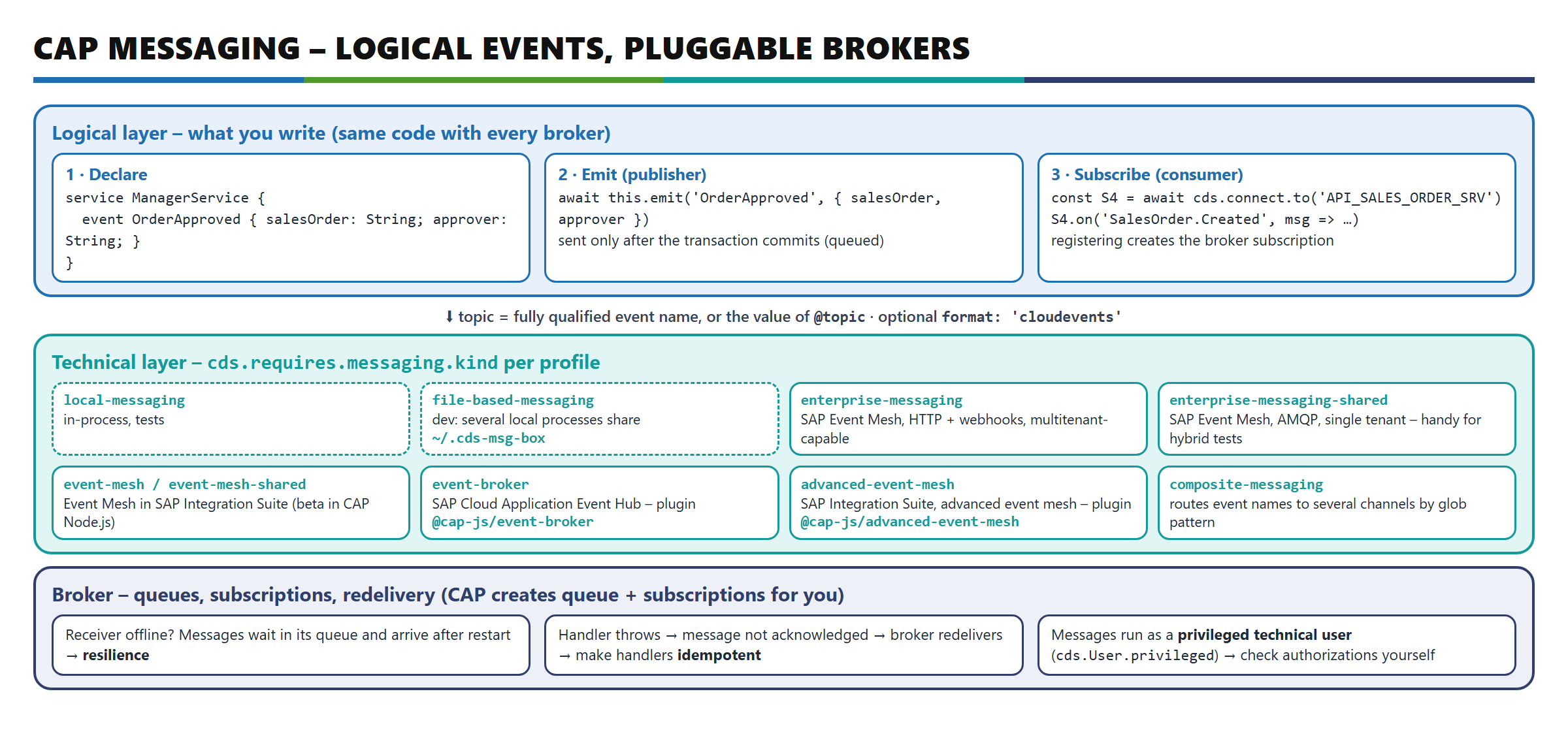
As soon as emitter and receiver run in different processes (the portal and an analytics app, or S/4HANA and the portal), a messaging service transports the events through a broker. Your code from Part 2 does not change – only configuration.
3.1 Configure per profile
|
- Once
cds.requires.messagingexists, all modeled events are sent through it, and every registeredonhandler for an event of another service creates a subscription at the broker. file-based-messagingwrites to~/.cds-msg-box: start the portal and a second app withcds watchin two terminals, stop the receiver, emit events, restart it – the messages arrive. That is the resilience of a broker, demonstrated on the laptop.
3.2 Messaging kinds
kind | Broker | Notes |
|---|---|---|
local-messaging | none (in-process) | Tests |
file-based-messaging | file | Development with several local processes |
enterprise-messaging | SAP Event Mesh | HTTP + webhooks; multitenancy-capable; production |
enterprise-messaging-shared | SAP Event Mesh | AMQP, single tenant; needs |
| Event Mesh in SAP Integration Suite | Beta in Node.js; |
event-broker | SAP Cloud Application Event Hub | Plugin |
advanced-event-mesh | SAP Integration Suite, advanced event mesh | Plugin |
redis-messaging | Redis PubSub | Beta; no queues – messages lost when a consumer is down; no tenant isolation |
composite-messaging | several of the above | Routes events to channels by glob pattern |
3.3 Topics, CloudEvents and channels
Declaration |
| Broker topic |
|
|---|---|---|---|
no | 'OrderApproved' | ManagerService.OrderApproved | 'ManagerService.OrderApproved' |
@topic: 'sap.capire.orderapproval.OrderApproved.v1' | 'OrderApproved' | sap.capire.orderapproval.OrderApproved.v1 | the topic string |
format: 'cloudevents'fills the CloudEvents header fields (type,source,id,time,specversion,datacontenttype) automatically; the event name becomestype.- Use a versioned, reverse-domain topic for events other teams consume (
….OrderApproved.v1) – it decouples the wire name from your service name and allows av2later.
|
3.4 Low-level messaging – only when needed
|
- You lose service-local event names, typed declarations and in-process testing – capire: *always prefer the conceptual-level API*.
Part 4 – Brokers on SAP BTP and how to wire them
Broker | When | CAP set-up |
|---|---|---|
SAP Cloud Application Event Hub | capire calls it the new default messaging offering on BTP; events between SAP cloud applications (S/4HANA Cloud, SuccessFactors …) and your apps |
|
SAP Event Mesh (standalone service) | Existing landscapes; topic/queue broker with namespaces | Built in, |
Event Mesh in SAP Integration Suite | Integration Suite customers, small to medium volume |
|
Advanced event mesh | High volume, many brokers across clouds and on-premise, event portal | Plugin |
Product positioning and licensing: Integration Suite › 01 · Integration Suite, APIs & Events. Below, the two set-ups you are most likely to meet.
4.1 SAP Event Mesh
|
- CAP creates the queue for the receiving app and the subscriptions from the registered
onhandlers. Setqueue.nameonly if you manage queues yourself. - If the instance enforces namespace rules, configure
publishPrefix/subscribePrefix("$namespace/") so CAP adds the instance namespace automatically. - Hybrid test:
kind: enterprise-messaging-shared,npm add @sap/xb-msg-amqp-v100, create a service key,cds bind -2 <instance>:<key>, thencds watch --profile hybrid– the local app talks to the cloud broker.
4.2 SAP Cloud Application Event Hub
|
- Event Hub delivers by HTTP to the app, so events cannot reach your laptop without a tunnel – use
local-messagingorfile-based-messagingfor local tests. - Subscriptions to S/4HANA Cloud events are configured in Event Hub (integration scenario "CAP application as a consumer" in the SAP Help Portal).
Part 5 – Consuming S/4HANA business events (CR10a)
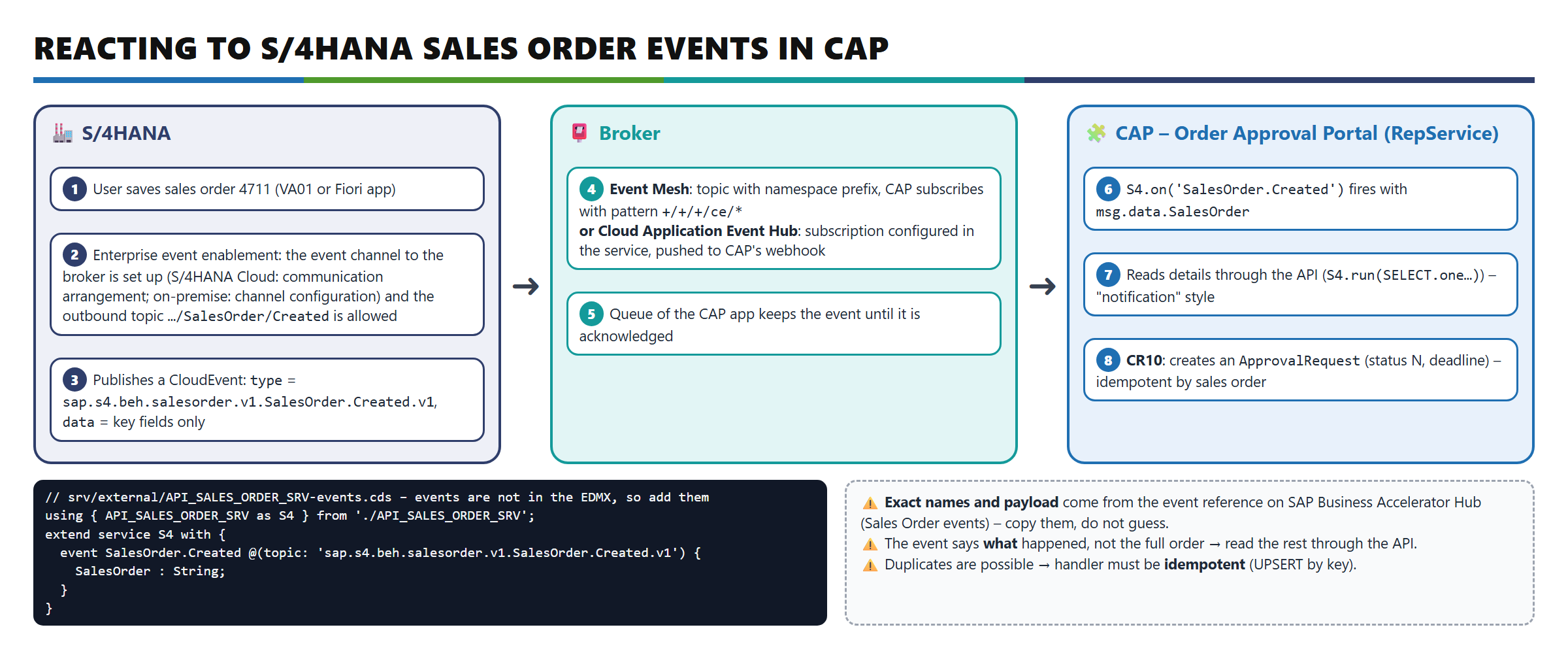
Why: reps create sales orders in S/4HANA as before. The portal must create the matching approval request within seconds, without polling. S/4HANA publishes standard business events through enterprise event enablement to SAP Event Mesh or SAP Cloud Application Event Hub.
5.1 Find the event
- SAP Business Accelerator Hub → S/4HANA → *Events* → Sales Order events → *View Event Reference* → schema of
data. Copy the exacttype, e.g.sap.s4.beh.salesorder.v1.SalesOrder.Created.v1(and…Changed.v1), and the payload fields. - S/4HANA events follow the notification style: the payload carries the key (
SalesOrder) and a few attributes, not the whole order. Details are read through the API – page 09.
5.2 Declare the events on the imported service
In S/4HANA the asynchronous API is separate from the OData API, so cds import of the EDMX contains no events. Add them yourself (or import an AsyncAPI file if one is available):
|
5.3 Configure the broker for S/4HANA topics
|
- The prefixes shown for Event Mesh are applied implicitly when
format: 'cloudevents'is used; they map S/4HANA's topic format to the event names you see on the Hub. CAP also replaces slashes in event names by dots and derives the CloudEventssourcefrompublishPrefix.
5.4 Implement the handler
|
- The handler runs as a privileged technical user (no end user), so the S/4HANA read needs a destination with a technical user, not principal propagation – page 09, Part 7.
- The deadline rule and status default also belong to CR3; in a larger app put them into one function used by both the UI path and the event path (→ CAP › 04 · Custom Logic).
5.5 Configure S/4HANA
- S/4HANA must be told to send these events to your broker instance: S/4HANA Cloud through a communication arrangement for enterprise eventing, on-premise through the channel configuration of enterprise event enablement plus an allowed outbound topic for the channel.
Common mistakes
- Guessing the topic name – one wrong character and no event ever arrives (no error either).
- Restricting Event Mesh subscription rules to the own namespace – S/4HANA topics are outside it.
- Assuming the event carries the whole order – read details via the API, or the payload changes when S/4HANA adds fields.
Part 6 – Publishing OrderApproved (CR10b)
Why: several systems want to know about approvals – a notification service, analytics, maybe a partner's extension next year. Calling each of them from the approve action would couple the portal to all of them. One event decouples it.
Design decision | Recommendation for OrderApproved |
|---|---|
Topic | Versioned and owned by you: |
Payload | Key fields plus the few attributes most consumers need (amount, approver); no personal data you do not have to share |
Format |
|
Timing | Emitted inside the action; sent after commit through the queue (Part 7) – no event for a rolled-back approval |
Changes | Add optional fields compatibly; breaking change → new topic |
Documentation | Declared in CDS; export AsyncAPI ( |
|
- Consumers in other CAP apps declare
ManagerService(or just the event) as a remote service and registeron('OrderApproved'); CAP creates their subscription automatically.
Part 7 – Transactional event queues: outbox, inbox and scheduled tasks (CR10c)
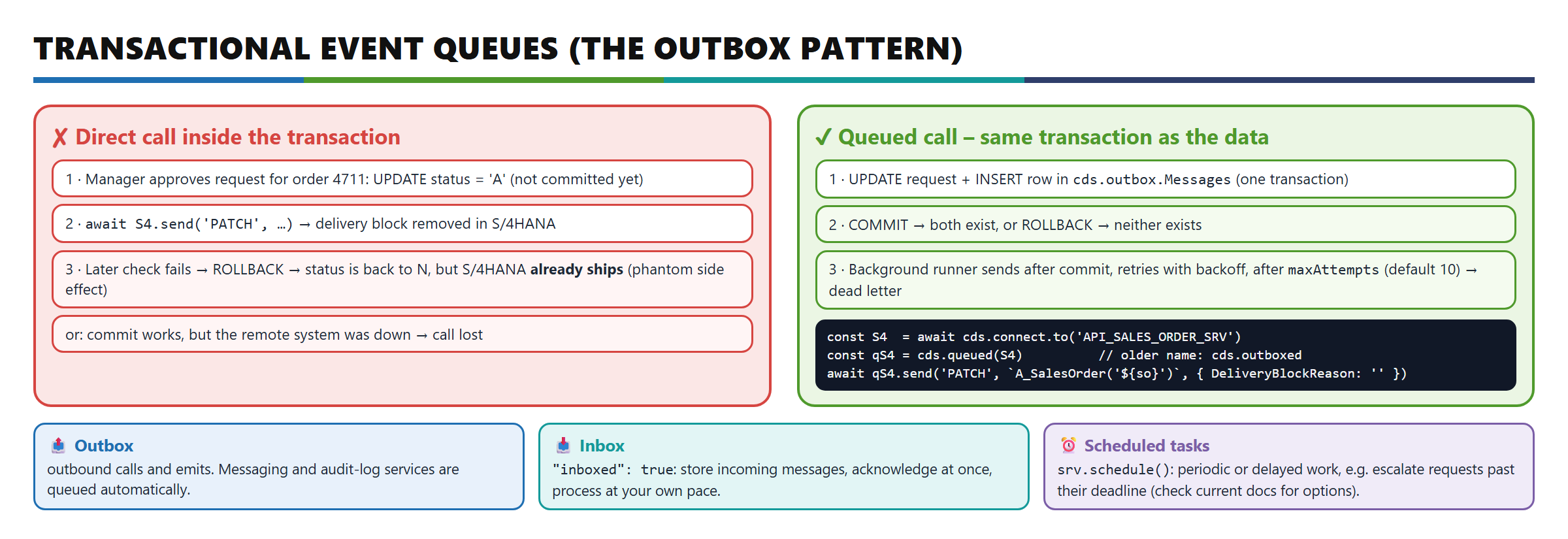
Why: a database transaction cannot include a broker or a remote system. If the approve action removes the delivery block in S/4HANA and then a later check rolls back the approval, S/4HANA has already released the order (phantom side effect). If the call is made after commit and S/4HANA is down, it is lost. CAP's transactional event queues – the *transactional outbox* pattern, generalised – write the follow-up work into the database in the same transaction as your data and dispatch it after commit, with retries.
7.1 Outbox
|
awaitis still needed: the message is written to the database within the current transaction.- A queued call returns when the message is stored – it gives you no remote result. If you must react, use the callbacks
'<event>/#succeeded'and'<event>/#failed'(alpha, Node.js only). - Queue a whole service by configuration (Node.js):
"API_SALES_ORDER_SRV": { "outboxed": true }. Fine for technical services; for business services prefercds.queuedper call, because some calls (like the live check before approve) must stay synchronous. - Messaging services and audit logging are queued automatically –
this.emit('OrderApproved')is already safe.cds.unqueued(srv)gives back the synchronous service. - CAP Java:
OutboxService.outboxed(service)on an@Autowired OutboxService; configuration undercds.outbox.services.
7.2 Inbox
|
- Incoming messages are stored and acknowledged immediately, then processed at a controlled rate – useful when 5 000
SalesOrder.Createdevents arrive after a mass upload. Failure handling moves from the broker into your app (retries, dead letters).
7.3 Scheduled tasks
|
srv.schedule(event, data)with.after('1h'),.every('10m')or a five-field cron string in Node.js (Java cron has six fields).srv.unschedule(name)removes it;.as(name)gives the same event several independent schedules. A named task runs only once across all app instances.
7.4 Configuration and dead letters
Item | Behaviour |
|---|---|
Storage | Table |
Default | Enabled; nothing to install |
Retries | Exponential backoff; |
Dead letter | After the last attempt the entry stays with its error – inspect |
Disable |
|
Multiple instances | Runners coordinate by locking, so each entry is processed by one instance |
- Monitoring dead letters and alerting: → CAP › 12 · Testing, Plugins, Observability & Performance.
Part 8 – Reliability rules for event handlers
Rule | Why | In the portal |
|---|---|---|
Be idempotent | Brokers deliver at least once; queues may redeliver after a crash | Check for an existing request by |
Do not rely on order | Created and Changed can overtake each other | On |
Check authorization yourself | Messages run as | Validate the sales org before creating a request |
Handle errors deliberately | An exception means "not acknowledged" → redelivery, possibly forever | Catch permanent errors (unknown order), log and return; let temporary ones throw or use the inbox |
Keep handlers short | Long processing blocks the queue and may exceed broker timeouts | Inbox or a scheduled task for heavy follow-up work |
Think multitenant | Each tenant needs its own messaging context |
|
Interview tip
When asked "How do you make event processing reliable?", list four things: transactional outbox for sending, idempotent receivers, a dead-letter strategy, and monitoring. Mention that CAP queues messaging automatically – it shows you know the framework, not just the theory.
Part 9 – Interview questions
Q1. How do you declare, emit and receive an event in CAP?
Declare it in the service with event OrderApproved { … } (optionally @topic). The emitter calls await this.emit('OrderApproved', data); a receiver connects to the emitting service and registers srv.on('OrderApproved', msg => …), reading msg.data. In one process this works in memory; across processes a messaging service transports it.
Q2. What changes when you move from local development to SAP Event Mesh?
Only configuration: cds.requires.messaging.kind per profile – file-based-messaging locally, enterprise-messaging-shared for hybrid tests, enterprise-messaging in production – plus the service binding in mta.yaml. CAP creates queues and subscriptions from the registered handlers.
Q3. Which brokers can CAP use on SAP BTP?
SAP Cloud Application Event Hub (event-broker, plugin @cap-js/event-broker), SAP Event Mesh (enterprise-messaging), Event Mesh in SAP Integration Suite (event-mesh, beta in Node.js), SAP Integration Suite advanced event mesh (plugin @cap-js/advanced-event-mesh), plus Redis and local or file-based messaging for tests. composite-messaging routes to several.
Q4. How do you consume S/4HANA business events?
Find the event type and payload on SAP Business Accelerator Hub, add an event declaration with that @topic to the imported API service, configure the broker (Event Mesh with CloudEvents format and the +/+/+/ce/ subscribe prefix, or Event Hub), configure S/4HANA to publish to that broker, and register S4.on('SalesOrder.Created'). Read details through the API because the event carries only the key.
Q5. What is the transactional outbox and how does CAP implement it?
Writing follow-up messages or remote calls into the database in the same transaction as the business data, and dispatching them after commit with retries. CAP's transactional event queues do this: cds.queued(srv) (older cds.outboxed) or outboxed: true, stored in cds.outbox.Messages, retried with backoff up to maxAttempts, then a dead letter. Messaging and audit log are queued by default.
Q6. What is the difference between pub/sub and event queues?
Pub/sub through a broker decouples services: publishers do not know subscribers. Event queues make work inside one service durable and asynchronous, with the database transaction as the unit of trust. They complement each other: the queue is the transactional bridge that makes publishing to the broker safe.
Q7. Why must event handlers be idempotent?
Brokers guarantee at-least-once delivery, and queues can redeliver after a crash between processing and acknowledgement. Handling the same message twice must not create two approval requests – check by business key or use UPSERT.
Q8. Which user runs a message handler, and what follows from that?
A privileged technical user (cds.User.privileged), because messages carry no end-user context. Any authorization check must be coded explicitly, and remote calls from the handler need a destination with a technical user, not principal propagation.
Q9. When would you use the inbox?
When bursts of messages arrive or processing is slow: messages are stored and acknowledged at once, then processed at a controlled rate, with retries and dead letters handled in the app instead of the broker.
Q10. Scenario: after a mass upload in S/4HANA, some approval requests exist twice and some are missing.
Duplicates: the handler is not idempotent – add a uniqueness check or constraint on salesOrder and skip existing ones. Missing: handler errors were thrown and messages ended as dead letters or were dropped by the broker after its retries; check the logs and cds.outbox.Messages (with inbox), handle permanent errors explicitly, enable the inbox to absorb bursts, and reprocess dead letters.
Q11. Scenario: managers report that some orders were released in S/4HANA although the approval shows 'New'.
The S/4HANA update was a direct call inside the approve transaction, which later rolled back (for example a failed validation or a concurrency conflict). Replace it with cds.queued(S4).send(...) so the call is stored with the status change and sent only after commit; make the remote update idempotent and monitor dead letters.
🏠 Start Here · ◀ 09 · Remote Services · 11 · Multitenancy & SaaS ▶ · Sections: CORE ABAP | OOPS ABAP | ABAP on HANA | Clean Core | RAP | ABAP Points | SAP Fiori | SAPUI5 | Mobile Development (MDK) | BTP Foundations | BTP Development | CAP | SAP Build | ABAP on BTP | Integration Suite | SAP Business AI | SAP BASIS | Security | SAP SDLC
Functional: FICO ABAP | TRM ABAP | VIM | SAP BIS | SD ABAP | MM ABAP | PP ABAP | QM ABAP | PM ABAP | PS ABAP | EWM | TM ABAP | GTM ABAP | EHS ABAP | HR ABAP | BW | SAP Datasphere | SAP Business Data Cloud | SAP MDG | SAP Analytics Cloud | SAP Ariba | SAP CX | SAP IBP