Everything you need to write a classic ABAP report: data types and data objects, internal tables, reading data, report events, selection screens, classical and interactive lists, control breaks, ALV and background jobs. Classic statements are still everywhere in brownfield systems, so they are taught here; the modern 7.40+ syntax is on ABAP on HANA › 03 ABAP New Syntax 7.4/7.5+ and is used in the new examples.
Part 1 – ABAP program basics
1.1 Program types
The program type is set in the program attributes. Only type 1 can be started directly (F8, SUBMIT, transaction code); all others are called from somewhere else.
Type | Name | Started how | Details |
|---|---|---|---|
1 | Executable program (report) | F8, SUBMIT, report transaction | Event driven, can run in background – this page |
M | Module pool | Dialog transaction code only | Screens + PBO/PAI modules – page 05 Dialog Programming |
F | Function group | CALL FUNCTION | Container for function modules – page 04 Modularization |
K | Class pool | Through its global class | One global class (SE24) – see the OOPS ABAP section |
J | Interface pool | – | One global interface |
I | Include | INCLUDE statement | Source code piece, not runnable alone – page 04 |
S | Subroutine pool | PERFORM … IN PROGRAM | FORM routines and local classes; FORMs are obsolete |
T | Type group (type pool) | TYPE-POOLS (obsolete since 7.02) | Global types and constants, e.g. SLIS – page 02 DDIC |
- "Report program", "print program" and "driver program" are informal names, not program types. A print (driver) program is a type 1 program that reads data and calls a form – see page 11 Forms.
- Editor shortcuts: Ctrl+S save, Ctrl+F2 syntax check, Ctrl+F3 activate, F8 execute, F3 back, Ctrl+F6 insert pattern (e.g. CALL FUNCTION), Shift+F1 pretty printer.
1.2 Data types
ABAP has three kinds of data types: elementary (predefined, single value), complex (structures and table types – built from other types, none are built in) and reference types (TYPE REF TO).
Type | Meaning | Length | Initial value | Notes |
|---|---|---|---|---|
C | Character (text) | 1–262,143 chars, default 1 | ' ' (blanks) | Fixed length, trailing blanks ignored |
N | Numeric text | default 1 | '0…0' | Digits only, no arithmetic meaning (postal code, IDs) |
D | Date YYYYMMDD | 8 | '00000000' | Date arithmetic in days |
T | Time HHMMSS | 6 | '000000' | Time arithmetic in seconds |
X | Byte (hexadecimal) | default 1 byte | X'00' | Raw bytes |
I | Integer (4 bytes) | 4 | 0 | Whole numbers ±2,147,483,647 – no decimals |
INT8 | Integer (8 bytes) | 8 | 0 | Large counters (7.50+) |
P | Packed decimal | 1–16 bytes, default 8 | 0 | Up to 14 decimals – use for amounts and quantities |
F | Binary floating point | 8 | 0 | ~16 digits, rounding errors – never for money |
DECFLOAT16/34 | Decimal floating point | 8 / 16 | 0 | Exact decimal arithmetic with large ranges |
STRING / XSTRING | Variable length text / bytes | dynamic | empty | Grows as needed |
UTCLONG | UTC time stamp | 8 | empty | 7.54+; replaces packed time stamps in new code |
- Integers do not hold decimals.
lv_i = '2.5'.(lv_i TYPE i) stores 3 (commercial rounding). Use P (or DECFLOAT) when you need decimals. - Numeric types: I, INT8, P, F, DECFLOAT. Character-like: C, N, D, T, STRING. Byte-like: X, XSTRING.
Reference types and data references
A reference variable holds the address of a data object (or object). There are no predefined reference types – you declare them with TYPE REF TO. They are used for dynamic programming: create data whose type is known only at runtime. Dereference with ->*.
|
1.3 Data objects: variables, constants, structures
A data object is a named piece of memory in a running program. Declarative keywords: DATA (variable), CONSTANTS (fixed value), TYPES (a type – no memory), PARAMETERS / SELECT-OPTIONS (screen fields + variables), TABLES (obsolete work area with a DDIC table's structure – today only for screen fields).
|
- TYPE vs LIKE:
TYPErefers to a type,LIKEto an existing data object. LIKE is not obsolete, does not copy data and costs no performance. OnlyLIKEwith DDIC tables in some old contexts is obsolete. - Structure = several fields grouped as one unit (one record). Work area = a structure variable (
DATA ls TYPE struc). Table type = the type of an internal table. Kinds of structures (flat, nested, deep,INCLUDE STRUCTURE) and global structures/table types in SE11: see page 02 DDIC. - Selecting fewer columns makes SELECT faster – not the use of structures. Structures just keep related fields together.
Important system fields (structure SY / SYST)
Field | Meaning |
|---|---|
SY-SUBRC | Return code of the last statement; 0 = success |
SY-TABIX | Current row index in |
SY-INDEX | Loop pass counter in |
SY-TFILL | Rows of an internal table after DESCRIBE TABLE – use |
SY-DBCNT | Rows processed by the last SQL statement |
| User, date, time (application server) |
| Current program / calling program |
| Current screen number / function code |
| List index (0 = basic list) / contents of the selected list line |
SY-BATCH | 'X' when running in background |
| Last message – page 04 |
1.4 Control structures
Construct | Syntax | Notes |
|---|---|---|
Condition |
| IFs can be nested |
Unconditional loop | DO [n TIMES] … ENDDO | SY-INDEX = pass number; leave with EXIT |
Conditional loop | WHILE cond … ENDWHILE | SY-INDEX = pass number |
Table loop | LOOP AT itab … ENDLOOP | SY-TABIX = current row; control breaks in Part 8 |
CONTINUE– skip the rest of this pass, go to the next one.EXIT– leave the current loop.CHECK cond– if the condition is false: inside a loop it ends the current pass, outside a loop it leaves the current processing block.- There is no FOR loop statement:
FORis an iteration expression insideVALUE,REDUCE,NEW– see ABAP on HANA › 03.
1.5 Field symbols
A field symbol is a placeholder that points to an existing data object – it stores no data of its own. After ASSIGN, every read or write through the field symbol works directly on the target. = assigns a value to the target; ASSIGN changes what it points to.
|
Part 2 – Internal tables
An internal table is a temporary table in program memory. It holds any number of rows of the same line type and disappears when the program ends. You fill it from the database, process it, and display it.
2.1 Table kinds
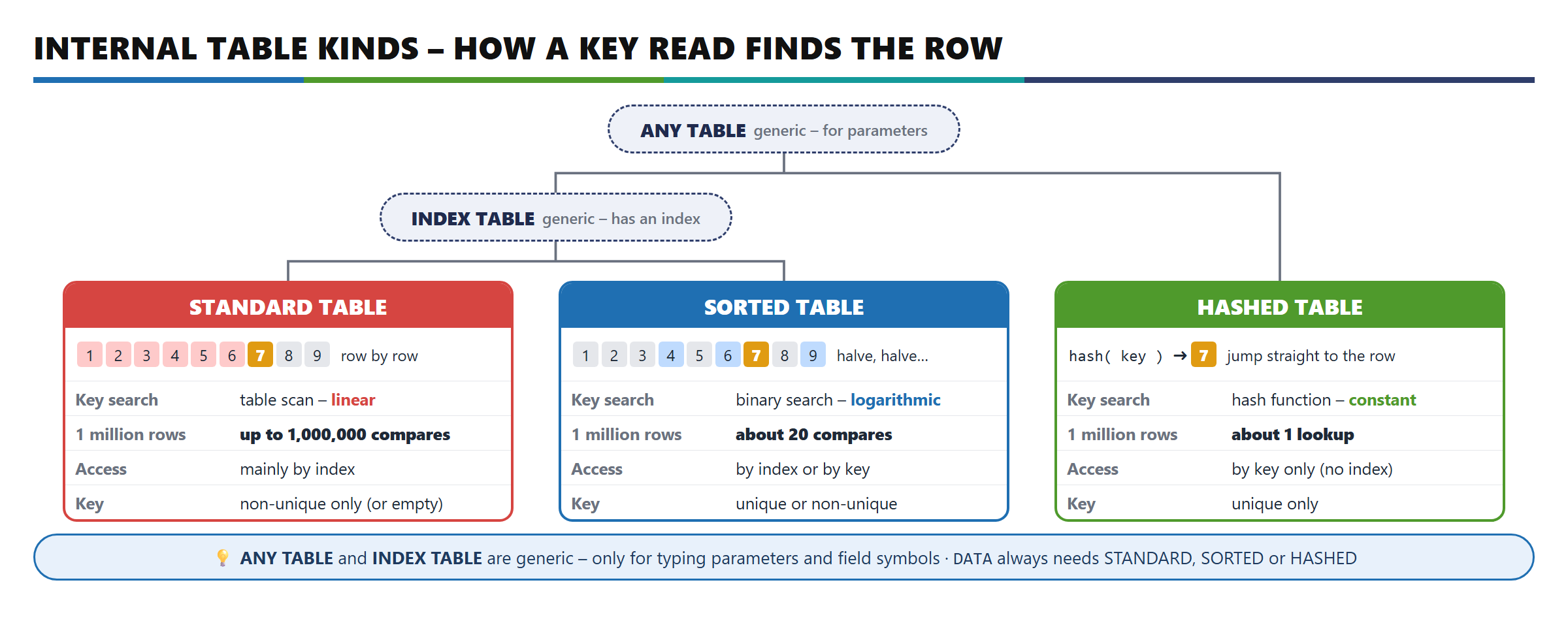
STANDARD | SORTED | HASHED | |
|---|---|---|---|
Key | Non-unique only (or empty) | Unique or non-unique | Unique only |
Access by | Mainly index | Index or key | Key only |
Key search cost | Linear (table scan) – slow | Logarithmic (binary search) | Constant (hash function) |
Filled with | APPEND / INSERT | INSERT (kept in key order) | INSERT |
Use when | Small tables, processed in order | Partial-key reads, ranges, LOOP … WHERE on key | Large tables, read by full key |
|
2.2 Operations
Single row | Several rows | |
|---|---|---|
Read | READ TABLE itab INTO wa WITH KEY k1 = v1 … kn = vn. READ TABLE itab INTO wa INDEX n. | LOOP AT itab INTO wa WHERE cond. … ENDLOOP. |
Insert | INSERT wa INTO TABLE itab. APPEND wa TO itab. | INSERT LINES OF itab1 INTO TABLE itab2. APPEND LINES OF itab1 TO itab2. |
Change |
MODIFY itab FROM wa INDEX n. | MODIFY itab FROM wa TRANSPORTING f1 f2 WHERE cond. |
Delete | DELETE TABLE itab FROM wa. DELETE TABLE itab WITH TABLE KEY k1 = v1 … kn = vn. | DELETE itab WHERE cond. DELETE ADJACENT DUPLICATES FROM itab COMPARING f. |
Statement | What it does – and the correct rules |
|---|---|
APPEND | Adds a row at the end. Index tables only (standard; sorted only if the order stays correct). |
INSERT |
|
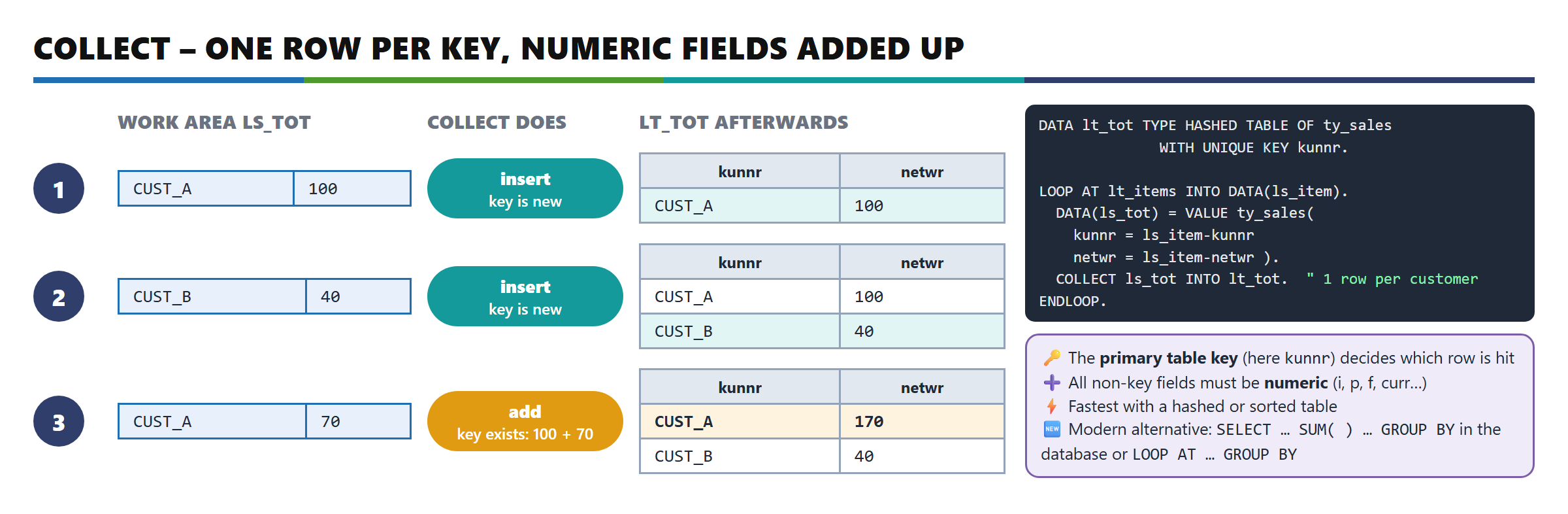
COLLECT | If no row with the same key exists, insert; otherwise add the numeric fields to the existing row. All non-key fields must be numeric. Best with sorted/hashed tables. |
SORT |
|
READ TABLE |
|
DESCRIBE TABLE |
|
|
|
Copy |
|
|
- SY-TABIX vs SY-INDEX: SY-TABIX = row number of the current internal-table row (LOOP AT, READ TABLE). SY-INDEX = pass counter of DO/WHILE loops.
- A table expression
itab[ … ]raisesCX_SY_ITAB_LINE_NOT_FOUNDif the row is missing – useOPTIONAL,DEFAULTorline_exists( ).
Legacy – header lines: DATA itab TYPE … WITH HEADER LINE / OCCURS n created a table and a work area with the same name (itab = header, itab[] = body). CLEAR itab then cleared only the header, REFRESH itab the body. Header lines are obsolete and forbidden in classes – always use a separate work area or field symbol, and CLEAR itab instead of REFRESH.
Part 3 – Reading data: joins, FOR ALL ENTRIES, performance
Typical report structure: declare types and data → selection screen → read data into internal tables (START-OF-SELECTION) → display. Read into a table in one statement and display from the table; don't WRITE inside a SELECT … ENDSELECT loop. ABAP SQL basics (SELECT, SELECT SINGLE, INTO TABLE, ABAP SQL vs native SQL, the database interface) are on page 02 DDIC, Part 14; the full modern syntax is on ABAP on HANA › 04 ABAP SQL. This part adds what reports need on top: several tables and speed.
|
3.1 Reading several tables
Technique | When | Rules |
|---|---|---|
INNER JOIN | Rows that have a partner in both tables | Preferred on HANA – one DB round trip |
LEFT OUTER JOIN | All rows of the left table, partner fields empty if no match | e.g. all customers, with or without orders |
FOR ALL ENTRIES (FAE) | Second table read for the keys in an internal table (driver) | Driver must not be empty (empty = no WHERE = reads all rows); select the full key (FAE removes duplicate result rows); same type/length in compared fields; remove duplicate driver keys first (performance) |
Nested SELECT / SELECT in LOOP | Never | One DB call per row – very slow |
|
- The old rule "INNER JOIN for 2–3 tables, FAE for more" is dated. On HANA use joins or CDS views (code pushdown); since 7.52 you can even
SELECT … FROM @itabor join an internal table. Details: ABAP on HANA › 04 ABAP SQL. - Database rules: no
SELECT *unless you need every field; list only the needed columns (their order does not matter on modern databases); full key →SELECT SINGLE; no nested SELECTs; prefer joins / views / CDS; check buffering for small customizing tables (page 02).
3.2 Internal table performance
- Avoid nested loops over two big tables (n × m passes). Use a sorted or hashed table (or secondary key) for the inner access, or READ … BINARY SEARCH on a sorted standard table.
- Never SORT inside a loop. Use field symbols / references instead of copying big rows.
- Parallel cursor – when a nested loop over header and item tables can't be avoided:
|
- Tools to find slow code: ST05 (SQL trace), SAT (runtime analysis), ATC/SCI checks – see ABAP on HANA › 02.
Part 4 – Report events
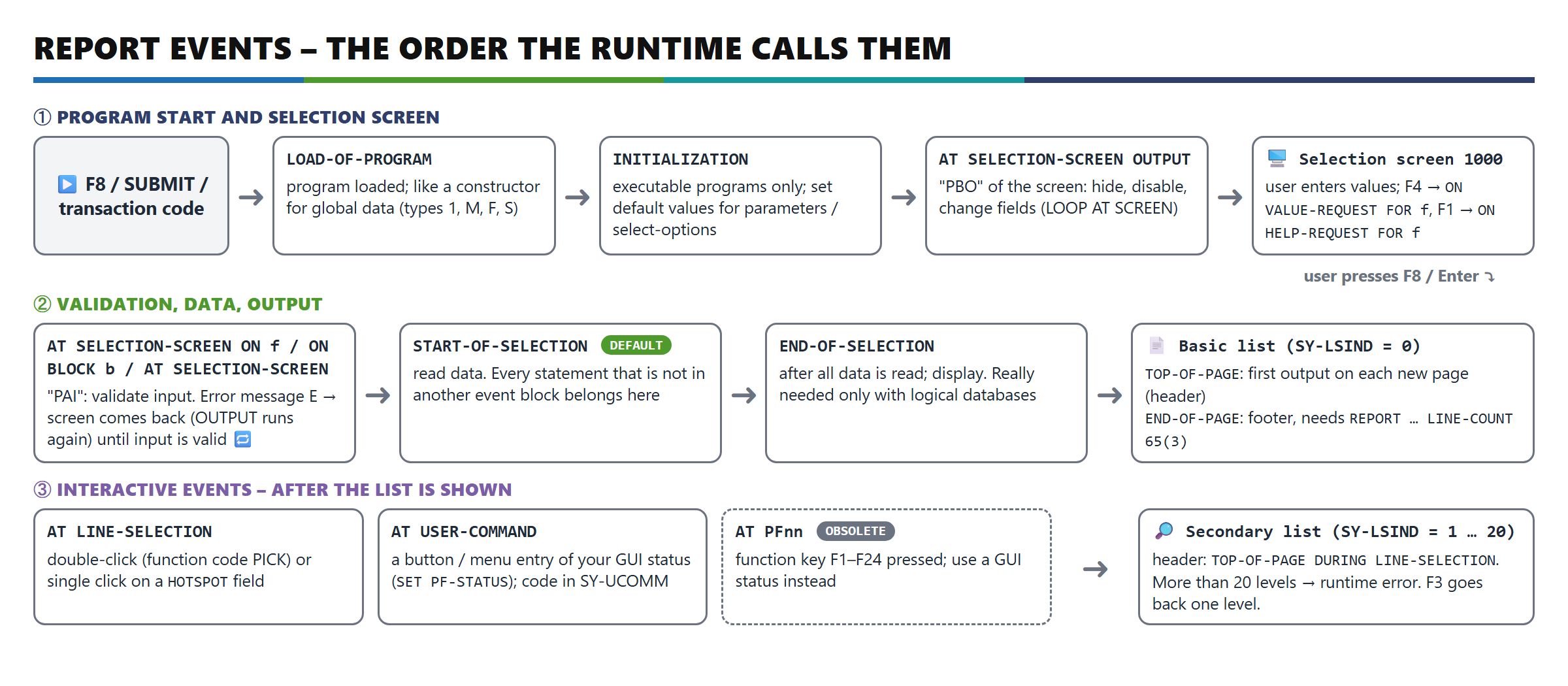
An executable program is event driven: the ABAP runtime calls its event blocks in a fixed order. Each event block starts with its keyword and ends at the next event keyword. You don't call events yourself.
Event | When it runs | Use it for |
|---|---|---|
LOAD-OF-PROGRAM | Once, when the program is loaded (types 1, M, F, S) | Initialise global data – like a class constructor |
INITIALIZATION | Type 1 only, before the selection screen is shown | Default values for parameters/select-options (e.g. dates) |
AT SELECTION-SCREEN OUTPUT | Before every display of the selection screen (its PBO) | Hide / disable fields (LOOP AT SCREEN) |
AT SELECTION-SCREEN ON VALUE-REQUEST FOR f | User presses F4 on f | Own value help |
AT SELECTION-SCREEN ON HELP-REQUEST FOR f | User presses F1 on f | Own documentation |
| After input, per field / block / group | Validation – after an E message only that field/block is ready for input |
AT SELECTION-SCREEN | After input, last selection-screen event (its PAI) | Cross-field validation – all fields ready for input again |
AT SELECTION-SCREEN ON EXIT-COMMAND | User chooses Back/Exit/Cancel | Clean-up before leaving |
START-OF-SELECTION | After the selection screen is processed | Read data. The default event |
END-OF-SELECTION | After START-OF-SELECTION (with logical DBs: after all data is read) | Display – optional without logical DBs |
TOP-OF-PAGE | First output statement on a new list page | Page header |
END-OF-PAGE | When a page is full | Footer – needs |
- The default event is START-OF-SELECTION, not LOAD-OF-PROGRAM. Every statement that is not inside an event block (or after a FORM/METHOD) belongs to START-OF-SELECTION.
- Order: F8 → LOAD-OF-PROGRAM → INITIALIZATION → AT SELECTION-SCREEN OUTPUT → screen shown → AT SELECTION-SCREEN ON … / AT SELECTION-SCREEN (repeat until valid) → START-OF-SELECTION → END-OF-SELECTION → basic list shown (TOP-OF-PAGE / END-OF-PAGE whenever a page starts / ends).
- Interactive events (Part 7): AT LINE-SELECTION, AT USER-COMMAND, AT PFnn (obsolete), TOP-OF-PAGE DURING LINE-SELECTION.
- Logical databases (
GET nodeevents,NODES) are obsolete but still appear in old HR and FI reports.
|
Part 5 – Selection screens
The selection screen is the input (filter) screen of a report. The standard selection screen 1000 is generated automatically as soon as you declare PARAMETERS or SELECT-OPTIONS outside a user-defined screen. User-defined selection screens have any other 4-digit number and are defined with SELECTION-SCREEN BEGIN OF SCREEN nnnn and shown with CALL SELECTION-SCREEN nnnn.
5.1 PARAMETERS and SELECT-OPTIONS
- One input value → PARAMETERS. Many values, intervals, exclusions → SELECT-OPTIONS. Names max 8 characters.
|
A SELECT-OPTION is a range table (an internal table with four columns) plus its screen fields. Use it in SQL with IN.
Column | Values | Example |
|---|---|---|
SIGN | I = include, E = exclude | I |
OPTION | EQ, NE, GT, GE, LT, LE, BT (between), NB, CP (pattern), NP | BT |
LOW | Single value or lower limit | 1000 |
HIGH | Upper limit (for BT / NB) | 1999 |
|
RANGESis not a UI element – it is an obsolete statement that declares a range table without any screen field. UseTYPE RANGE OF.
5.2 Layout: blocks, lines, buttons, tabs
|
- NAME identifies a screen element; the function code (
USER-COMMAND fc) identifies which button or tab was used. On selection screens read it fromsscrfields-ucomm(declareTABLES sscrfields.) – SY-UCOMM is not reliable there.
|
5.3 Changing the screen at runtime (MODIF ID + LOOP AT SCREEN)
|
5.4 Validation, F4 help and authority checks
- Validate in
AT SELECTION-SCREEN ON f(only f re-opens) orAT SELECTION-SCREEN(all fields). Error message type E keeps the user on the screen. Message types and their behaviour: page 04. - Own F4 help:
AT SELECTION-SCREEN ON VALUE-REQUEST FOR p_x+ function moduleF4IF_INT_TABLE_VALUE_REQUEST(example on page 05). DDIC search helps: page 02. - AUTHORITY-CHECK – every report that shows or changes business data must check authorizations (objects in SU21, proposals in SU24, failed checks analysed with SU53).
|
5.5 Text elements and variants
- Text elements (Goto → Text elements) are language-dependent texts shown in the user's logon language and translated with SE63:
- Selection texts – labels for parameters and select-options (or take them from the DDIC).
- Text symbols –
TEXT-001(3-character ID) for titles, comments and WRITE output; no hard-coded texts. - List headings – column and page headings for the standard page header.
- A variant is a saved set of selection-screen values. A screen can have many variants.
- Use in dialog: prefill fields, hide fields, protect fields, mark fields required.
- Use in background: a job step needs a variant to supply the selection values (Part 10).
- Selection variables make values dynamic, e.g. "today – 30" (date calculation) or a value from table TVARVC.
- Variants starting with
SAP&/CUS&are client-independent system variants, recorded on a transport request.
Part 6 – Classical reports (list output)
A classical report writes its output with WRITE into a list (the basic list). It is simple and still common for logs and quick tools; for user-facing reports use ALV (Part 9).
- Standard page heading – line 1: program title + page number, line 2: an underline. Remove it with
REPORT … NO STANDARD PAGE HEADING. LINE-SIZE n– characters per line;LINE-COUNT n(m)– lines per page, m of them reserved for END-OF-PAGE.
Statement | Effect |
|---|---|
WRITE / f | New line, then output. Options: position/length |
NEW-PAGE | Page break |
SKIP [n] | Blank line(s) |
| Horizontal line |
WRITE sy-vline | Vertical line (for grid-like lists) |
FORMAT COLOR n | Background colour 1–7 ( |
FORMAT INVERSE ON | Colour applied to the font instead of the background |
FORMAT INTENSIFIED ON/OFF | Brighter / normal shade |
FORMAT HOTSPOT ON | Single click triggers AT LINE-SELECTION |
- Record count after reading:
sy-dbcnt(rows from the last SQL statement) orlines( itab ). - Lists can be sent to the spool (print, background) and viewed in SP01.
Sending a list or PDF by e-mail (CL_BCS, CL_DOCUMENT_BCS, SOST) is explained on page 11 Forms.
Part 7 – Interactive reports and calling programs
In an interactive report the user clicks a line of the basic list and gets a secondary (detail) list. The basic list has index 0 (only one per program); secondary lists have SY-LSIND 1 to 20 – a 21st level causes a runtime error. F3 returns to the previous level.
Event | Triggered by |
|---|---|
AT LINE-SELECTION | Double-click (function code PICK) or single click on a HOTSPOT field |
AT USER-COMMAND | A function code from your own GUI status ( |
AT PFnn | Function key Fnn – obsolete (there is no event "AT PF-STATUS") |
TOP-OF-PAGE DURING LINE-SELECTION | Header of secondary lists |
7.1 Knowing which line was selected
- HIDE f – after writing a line, store the value of f for that line. When the user selects the line, the runtime restores f automatically. Works for flat global fields and structures (variables yes); not for internal tables or references.
- GET CURSOR FIELD f VALUE v – name of the field under the cursor (e.g. 'LS_ORD-VBELN') and its displayed value; lets you react only when a certain column was clicked.
- SY-LISEL – the whole selected line as text; reading it with offsets is fragile – prefer HIDE or GET CURSOR.
READ LINE/MODIFY LINEread or change list lines (e.g. checkboxes in a list).
|
7.2 Calling other programs and transactions
Statement | Effect |
|---|---|
SUBMIT zprog [VIA SELECTION-SCREEN] [WITH p = v] [WITH s IN r] [USING SELECTION-SET 'VAR'] | Start another report; the caller ends (without AND RETURN) |
SUBMIT zprog … AND RETURN | Start it in a new internal session and come back afterwards |
CALL TRANSACTION 'TC' [AND SKIP FIRST SCREEN] | Start a transaction and return; first screen filled from SAP memory (parameter IDs). Add |
LEAVE TO TRANSACTION 'TC' | Start a transaction; the current program ends, no return |
SET / GET PARAMETER ID 'PID' FIELD f | Write / read SAP memory (see below) |
7.3 Passing data between programs: ABAP memory and SAP memory
ABAP memory | SAP memory | |
|---|---|---|
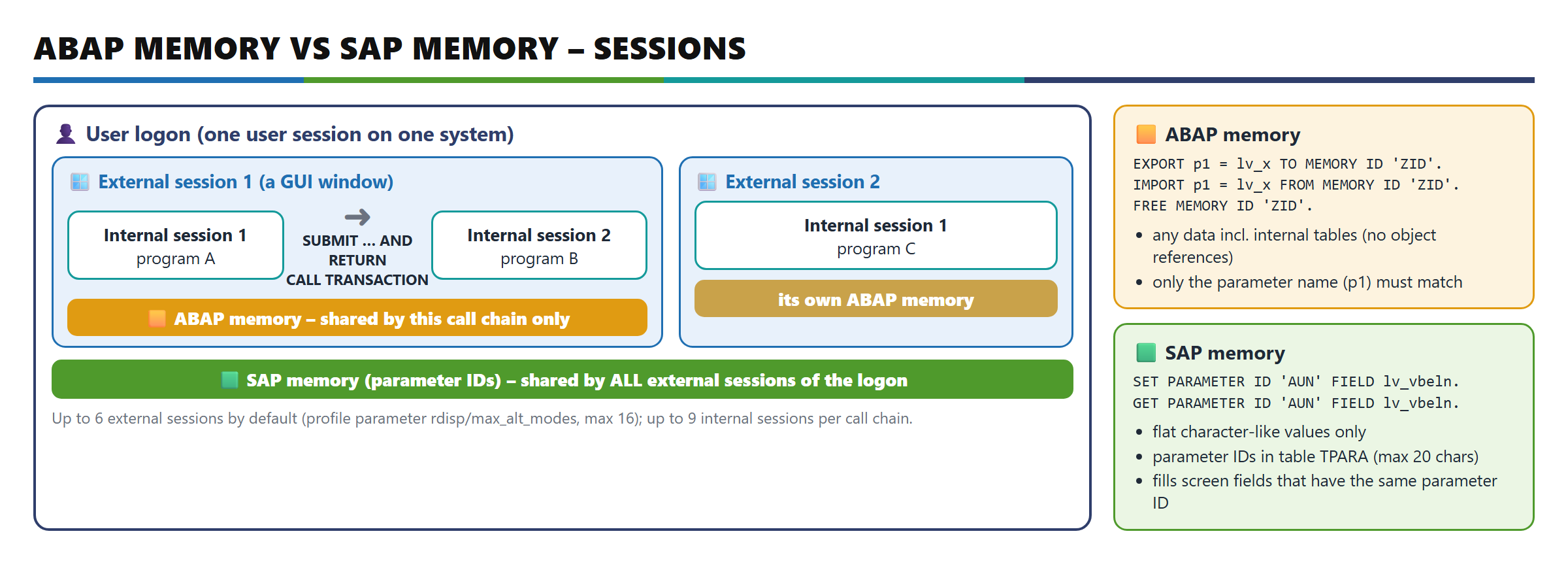
Scope | All internal sessions of one call chain (one window) | All external sessions of the user's logon |
Statements |
|
|
Data | Any data incl. internal tables (no object references) | Flat character-like values only |
Names | Only the parameter name in EXPORT/IMPORT must match | Parameter ID (table TPARA, max 20 chars, linked via data element) |
Typical use | Hand a table to a report called with SUBMIT … AND RETURN | Prefill screen fields, e.g. order number for VA03 |
|
- Shared memory objects (SHMA) and shared buffers (
EXPORT … TO SHARED BUFFER) exchange data across users on one application server – rarely needed in reports.
Part 8 – Control break statements
Control break statements (control level processing) react to group changes while you loop over a sorted internal table – headings per group, subtotals, grand totals. They are statements inside LOOP AT … ENDLOOP, not events, and they are not only for display.
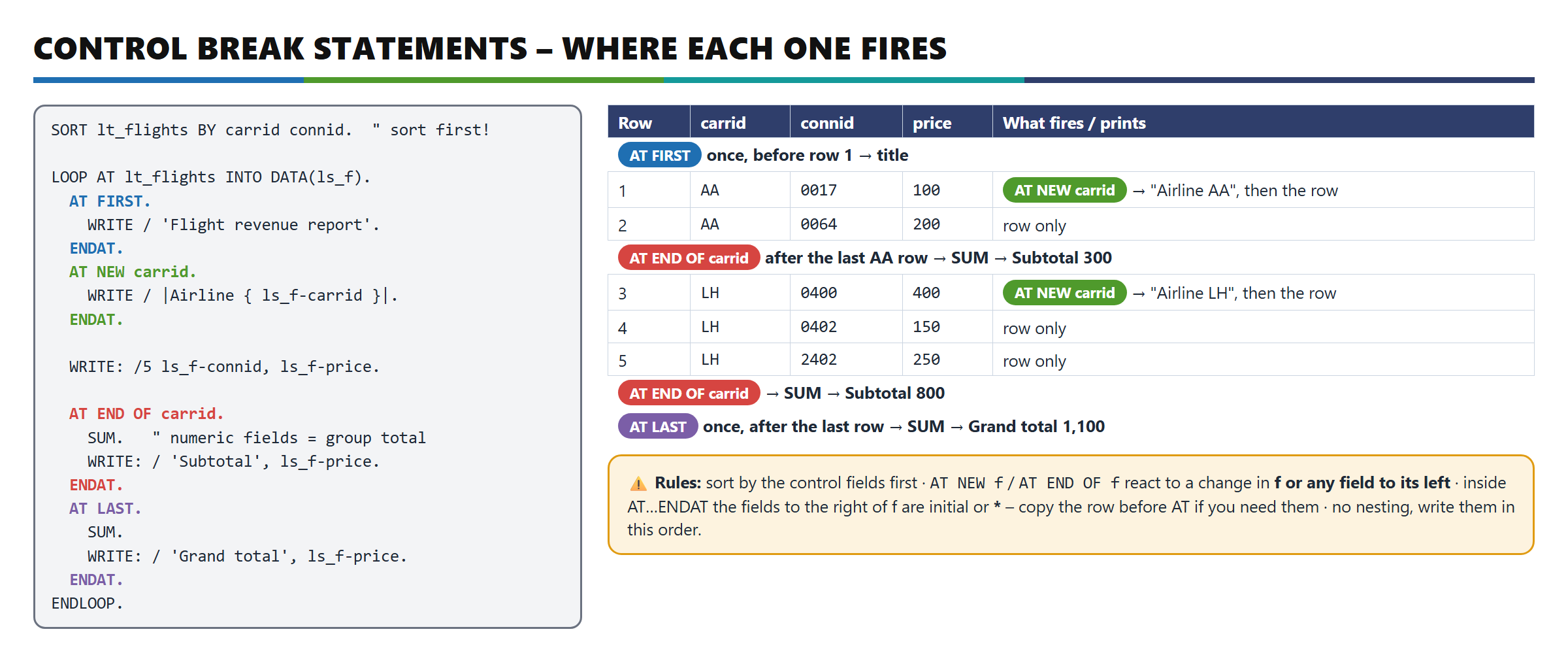
Statement | Runs | Typical use |
|---|---|---|
AT FIRST … ENDAT | Once, before the first row | Report title, initialisation |
AT NEW f … ENDAT | When f (or any field left of f) gets a new value – first row of a group | Group heading |
AT END OF f … ENDAT | Last row of a group |
|
AT LAST … ENDAT | Once, after the last row |
|
- Rules: sort by the control fields first; the control field order follows the table's column order (left to right); write the blocks in the order AT FIRST → AT NEW → row processing → AT END OF → AT LAST; don't nest them.
- Inside AT…ENDAT the fields to the right of the control field are initial (or
*). Save the row before the AT block if you need them. AvoidLOOP … WHEREwith control levels – group changes may be wrong. - Modern alternative:
LOOP AT … GROUP BYwith group-level processing – see ABAP on HANA › 03 Part 7.
Legacy – ON CHANGE OF: ON CHANGE OF f … ENDON is obsolete and is not a control level statement (it remembers the previous value even outside loops and ignores sorting). The old "items for one order" example built with ON CHANGE OF should be rewritten with AT NEW, a sorted table, the parallel cursor (Part 3.2) or GROUP BY.
Part 9 – ALV (SAP List Viewer)
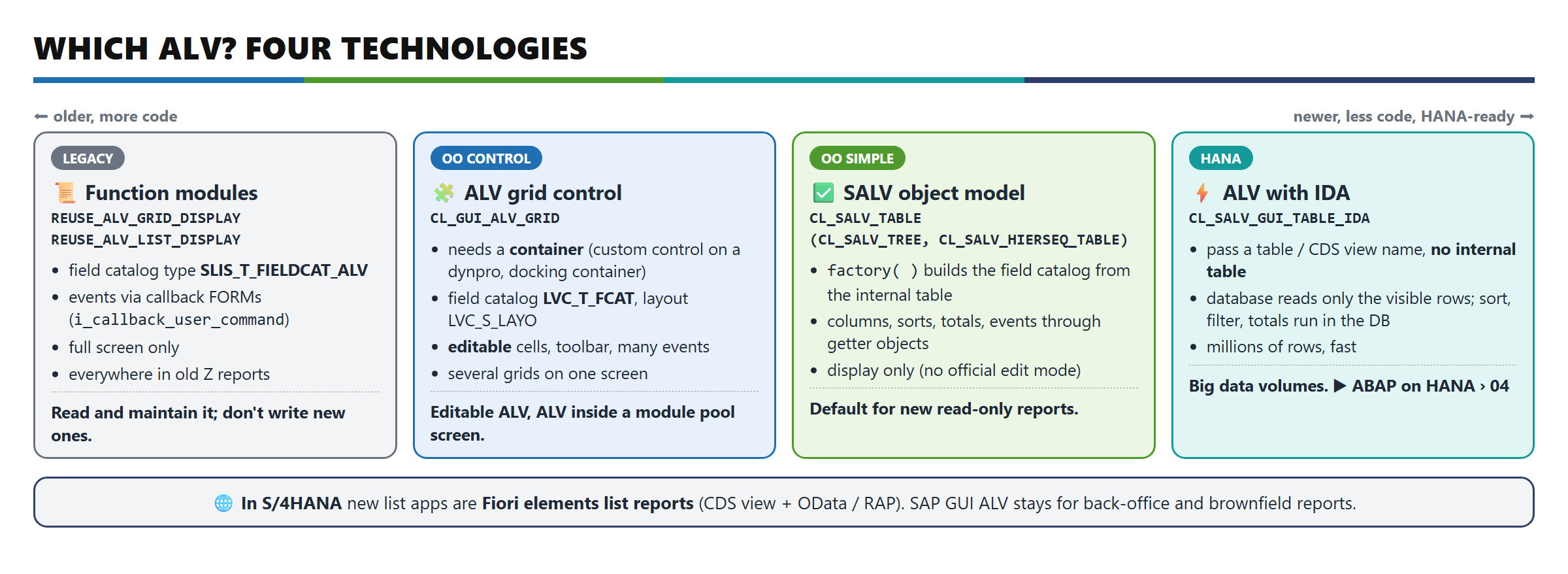
ALV (ABAP List Viewer, today SAP List Viewer) displays an internal table as an interactive grid: the user can sort, filter, total, change columns, export to Excel and save layouts – without extra code.
This part is the overview. In-depth ALV (field catalog and layout fields, all grid events, editable ALV, colours, trees, full examples): OOPS ABAP › 04 ALV Reporting.
ALV kind | Shows |
|---|---|
ALV list | One table as a list (simple, printable) – classic FM |
ALV grid | One table as a grid control: drag & drop, own toolbar buttons, editable cells – classic FM |
ALV tree | Hierarchical data as a tree (CL_SALV_TREE, CL_GUI_ALV_TREE) |
ALV block list | Several independent tables one below the other (REUSE_ALV_BLOCK_LIST_*) |
Hierarchical-sequential list | Two tables, two levels: header row + its item rows (CL_SALV_HIERSEQ_TABLE) |
- List vs grid: the grid has drag & drop, its own toolbar and edit mode; the list prints better. In background the grid is output as a list in the spool automatically.
9.1 Field catalog, layout, sort – the building blocks
The field catalog describes each output column (name, heading, position, colour, totals, hotspot, edit …). It is always needed – but it can be generated.
Way | How | Notes |
|---|---|---|
Automatic | REUSE FMs: | No control over columns (REUSE) |
Manual | Fill the field catalog table row by row | Full control, most code |
Semi-automatic | Generate with | MERGE works only from DDIC structures or old-style declarations |
Field (SLIS / LVC) | Meaning |
|---|---|
col_pos | Column position (otherwise order of rows in the catalog) |
| Column of the output table / name of the output table (REUSE) |
| Column headings short / medium / long |
emphasize | Column colour 'Cxyz': x = colour 1–7, y = intensified 0/1, z = inverse 0/1 |
key | Key column (blue, fixed when scrolling) |
do_sum | Total this column |
| Single-click link, editable, hidden, width |
- Sort table (SLIS_T_SORTINFO_ALV / LVC_T_SORT):
spos(sequence),fieldname,up/down,subtot= 'X' for subtotals (needsdo_sumon the amount column). - Layout structure (SLIS_LAYOUT_ALV / LVC_S_LAYO): zebra stripes, optimised column width (
colwidth_optimize/cwidth_opt), title, selection mode, box field. - Field catalog types differ:
SLIS_T_FIELDCAT_ALV(type group SLIS) for REUSE FMs,LVC_T_FCATfor CL_GUI_ALV_GRID; SALV hides the catalog behind column objects.
9.2 Legacy: REUSE_ALV_GRID_DISPLAY
Classic ALV function modules – found in most old Z reports. Events are handled through callback FORMs: the classical TOP-OF-PAGE / END-OF-PAGE events don't work in ALV. REUSE_ALV_EVENTS_GET returns the available events (how many depends on the list type).
|
- Own toolbar:
i_callback_pf_status_set+ a FORM that callsSET PF-STATUS(copy status STANDARD from program SAPLKKBL).
9.3 CL_SALV_TABLE – simple modern ALV
|
- Hotspot column: cast the column to
CL_SALV_COLUMN_TABLEand callset_cell_type( if_salv_c_cell_type=>hotspot ); handle eventlink_click. - Inside a screen:
factory( r_container = lo_container … )instead of full screen.
9.4 CL_GUI_ALV_GRID – grid control in a container
The grid control needs a container – usually a custom control area on a dynpro (page 05), or a docking container. Use it when cells must be editable, or when you need several ALVs on one screen.
|
- Useful events:
double_click,hotspot_click,toolbar(add buttons),user_command,data_changed(validate edited cells). Handlers are methods of a local class registered withSET HANDLER.
9.5 ALV with IDA and Fiori
CL_SALV_GUI_TABLE_IDAdisplays a DB table or CDS view without reading it into an internal table – for millions of rows on HANA. Full explanation and code: ABAP on HANA › 04 ABAP SQL, ADBC & ALV IDA.- In S/4HANA / clean core: new list apps are Fiori elements list reports on CDS views and OData/RAP (ABAP on HANA › 05 CDS Views, RAP section). SAP GUI ALV remains fine for back-office reports; prefer CL_SALV_TABLE or IDA over REUSE FMs.
Part 10 – Background jobs
Long-running reports run as background jobs in a background work process – no screen, no user interaction, output goes to the spool.
Transaction / statement | Use |
|---|---|
SM36 | Define a job: name, steps (program + variant), start condition (immediately, date/time, after event, after job, periodic) |
SM37 | Monitor jobs: scheduled → released → ready → active → finished / cancelled; job log, spool |
SP01 | Spool requests (list output) |
SY-BATCH | = 'X' when the program runs in background (skip dialogs, popups, GUI downloads) |
| Schedule a job from ABAP code |
|
- Messages in background go to the job log; type E/A messages cancel the job (page 04).
- Debugging a background job (JDBG, SM50): page 04 Modularization & Debugging.
- In S/4HANA / clean core: SM36/SM37 still work on-premise; ABAP Cloud uses application jobs (Fiori app Application Jobs, job catalog entries and templates).
Part 11 – Obsolete statements: quick reference
You will read these in old code and should recognise them in interviews – but don't write them.
Obsolete | Use instead |
|---|---|
| Separate work area / field symbol; |
|
|
REFRESH itab | CLEAR itab |
MOVE a TO b | b = a. |
RANGES r FOR f | DATA r TYPE RANGE OF … |
ON CHANGE OF … ENDON | AT NEW / AT END OF, LOOP AT … GROUP BY |
DESCRIBE TABLE itab LINES n | n = lines( itab ) |
| Table expressions |
|
|
AT PFnn | GUI status + AT USER-COMMAND |
| CL_SALV_TABLE, CL_GUI_ALV_GRID, ALV IDA |
TYPE-POOLS slis. | Not needed since 7.02 – type groups load automatically |
Logical databases, | Explicit SELECTs / CDS views |
Part 12 – Interview questions
What is the order of events in a report, and which one is the default?
LOAD-OF-PROGRAM → INITIALIZATION → AT SELECTION-SCREEN OUTPUT → (screen) → AT SELECTION-SCREEN ON … / AT SELECTION-SCREEN → START-OF-SELECTION → END-OF-SELECTION; TOP-OF-PAGE / END-OF-PAGE during list output; AT LINE-SELECTION / AT USER-COMMAND after the list is shown. The default event is START-OF-SELECTION.
What is the difference between INITIALIZATION and AT SELECTION-SCREEN OUTPUT?
INITIALIZATION runs once before the first display – set default values. AT SELECTION-SCREEN OUTPUT runs before every display (also after Enter or an error) – change screen attributes with LOOP AT SCREEN.
AT SELECTION-SCREEN vs AT SELECTION-SCREEN ON field?
Both validate input. After an E message in ON field only that field is ready for input; after an E message in AT SELECTION-SCREEN all fields are open again. ON BLOCK / ON RADIOBUTTON GROUP work the same per group.
PARAMETERS vs SELECT-OPTIONS? What is a range table?
PARAMETERS = one input field and variable. SELECT-OPTIONS = multiple values, intervals and exclusions; it creates a range table with SIGN, OPTION, LOW, HIGH, used with IN in SQL. An empty select-option selects everything. A range without screen field is TYPE RANGE OF (old: RANGES).
Standard, sorted and hashed tables – when do you use which?
Standard: index access, small tables, appending in order (linear key search). Sorted: always sorted by key, binary search, good for partial keys and LOOP … WHERE on the key. Hashed: unique key only, constant access time, best for big lookup tables read by the full key.
What is the difference between SY-TABIX and SY-INDEX?
SY-TABIX is the current row index of an internal table (LOOP AT, READ TABLE). SY-INDEX counts the passes of DO and WHILE loops.
What does COLLECT do? What is the default of SORT?
COLLECT inserts a row or, if a row with the same key exists, adds up its numeric fields. SORT without BY sorts ascending by the primary table key (standard key = all character-like fields); use SORT … BY and STABLE to be explicit.
What are the rules for FOR ALL ENTRIES?
Check the driver table is not empty (otherwise all rows are read), select the full key (duplicates are removed from the result), compare fields of the same type, and remove duplicate driver entries for speed. On HANA prefer a join or CDS view.
What are control break statements and what do you need to watch?
AT FIRST, AT NEW f, AT END OF f, AT LAST inside a LOOP. The table must be sorted by the control fields; AT NEW / AT END OF also react to changes in fields left of f; fields to the right are initial inside the block; SUM gives totals. ON CHANGE OF is obsolete and not a control level.
How do you pass data from the basic list to a secondary list?
HIDE stores field values per list line and restores them in AT LINE-SELECTION; GET CURSOR returns the clicked field and value; SY-LISEL holds the line text; SY-LSIND tells the list level (max 20).
ABAP memory vs SAP memory?
ABAP memory (EXPORT/IMPORT … MEMORY ID) is shared by the internal sessions of one call chain and holds any data incl. tables. SAP memory (SET/GET PARAMETER ID) is shared by all sessions of the user's logon, holds only flat character values and prefills screen fields.
Which ALV would you use today, and what is a field catalog?
CL_SALV_TABLE for read-only lists, CL_GUI_ALV_GRID (in a container) for editable grids, ALV with IDA for huge HANA tables; REUSE_ALV_* only in old code. The field catalog describes each column (name, heading, position, colour, totals, edit); it can be generated automatically, semi-automatically or built manually.
🏠 Start Here · ◀ 02 · Data Dictionary · 04 · Modularization & Debugging ▶ · Sections: CORE ABAP | OOPS ABAP | ABAP on HANA | Clean Core | RAP | ABAP Points | SAP Fiori | SAPUI5 | Mobile Development (MDK) | BTP Foundations | BTP Development | CAP | SAP Build | ABAP on BTP | Integration Suite | SAP Business AI | SAP BASIS | Security | SAP SDLC
Functional: FICO ABAP | TRM ABAP | VIM | SAP BIS | SD ABAP | MM ABAP | PP ABAP | QM ABAP | PM ABAP | PS ABAP | EWM | TM ABAP | EHS ABAP | HR ABAP | BW | SAP MDG | SAP Analytics Cloud | SAP Ariba | SAP CX | SAP IBP