How ABAP code is split into reusable units – includes, subroutines, function modules, macros and methods – plus the tools you use every day around them: messages, the debugger and testing. Subroutines are obsolete and macros are for exceptional cases only (not in ABAP Cloud), but both fill every brownfield system, so you must read them fluently; new code uses methods of classes (see the OOPS ABAP section).
Part 1 – What modularization is
Modularization = breaking a program into smaller, named blocks that each do one job.
- Cleaner, better structured and more readable code.
- No redundancy: write once, call many times (reuse).
- Easier maintenance and testing – a fix in one place works everywhere.
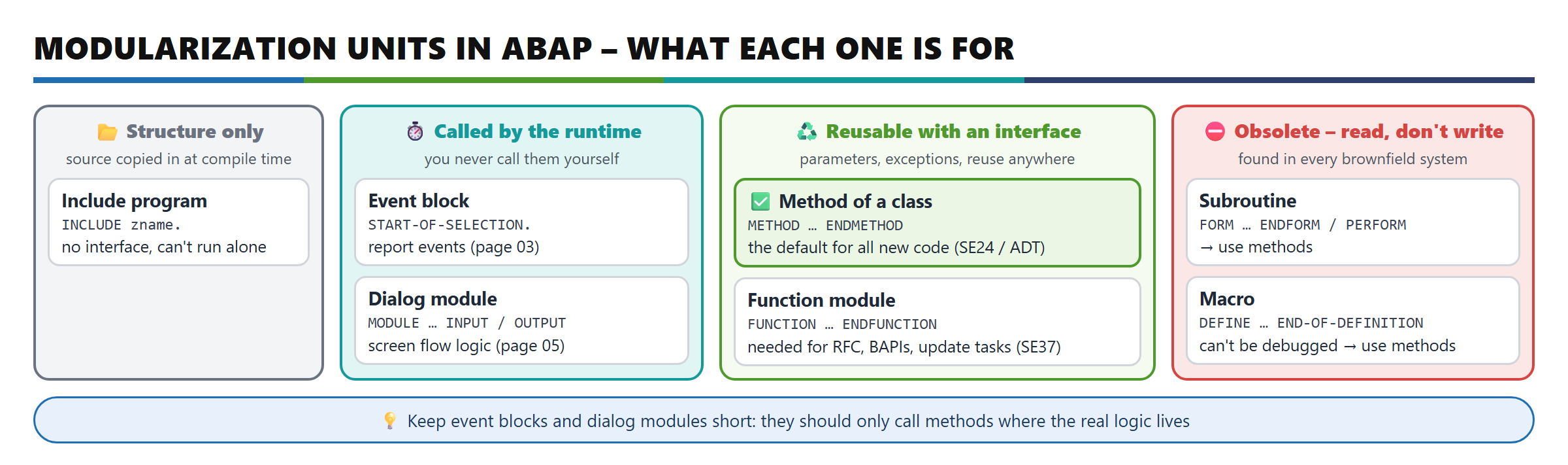
Unit | Defined with | Reusable from | Status |
|---|---|---|---|
Include program | Program type I, | Any program (source is copied in at compile time) | Current – structuring only |
Subroutine |
| Same program (or externally – avoid) | Obsolete – methods instead |
Function module | SE37, inside a function group | Any program, other systems (RFC) | Current for RFC, BAPIs, update tasks |
Macro | DEFINE … END-OF-DEFINITION | Same program only | Only in exceptional cases; not in ABAP Cloud |
Method |
| Local or global class (SE24 / ADT) | Recommended for new code |
Event block |
| Called by the runtime (page 03) | Current – keep them short, call methods |
Dialog module | MODULE … OUTPUT / INPUT | Called from screen flow logic (page 05) | Current for dynpros |
Part 2 – Include programs
An include (program type I) is a piece of source code that cannot run on its own. The INCLUDE statement copies its source into the main program at compile time. Includes only structure big programs – they are not a reuse mechanism with an interface.
- Created top-down (write
INCLUDE zname.and double-click) or bottom-up (create in SE38 with type I). - An include can contain other includes but never itself (no recursion). It is syntax-checked in the context of its main program.
- In SE80 (Repository Browser) the includes of a program are displayed as sub-nodes of the program.
- Use the naming the Workbench proposes. Report:
Z…_TOP(declarations),Z…_SEL(selection screen),Z…_F01(forms) /Z…_C01(local classes). Module pool:MZ…TOP / O01 / I01 / F01– page 05. Function group:L<fg>TOP / UXX / U01 … / F01 / O01 / I01– Part 4. INCLUDE zname IF FOUND.– no syntax error if the include doesn't exist.
|
Part 3 – Subroutines (FORM / PERFORM)
A subroutine is a block of statements defined once with FORM … ENDFORM and called any number of times with PERFORM. Obsolete for new development – SAP and Clean ABAP recommend methods – but found in almost every old report, user exit and print program.
|
- Formal parameters are declared in FORM (USING, CHANGING, TABLES); actual parameters are passed in PERFORM, by position (same sequence as in FORM).
- USING is meant for input, CHANGING for output – but this is only a convention: USING without VALUE is passed by reference, so changes do reach the caller.
- TABLES (pass an internal table, always by reference) and STRUCTURES (type a parameter with a structure) are obsolete – type the parameter with a table type and use USING/CHANGING.
3.1 Pass by reference, by value, by value and result
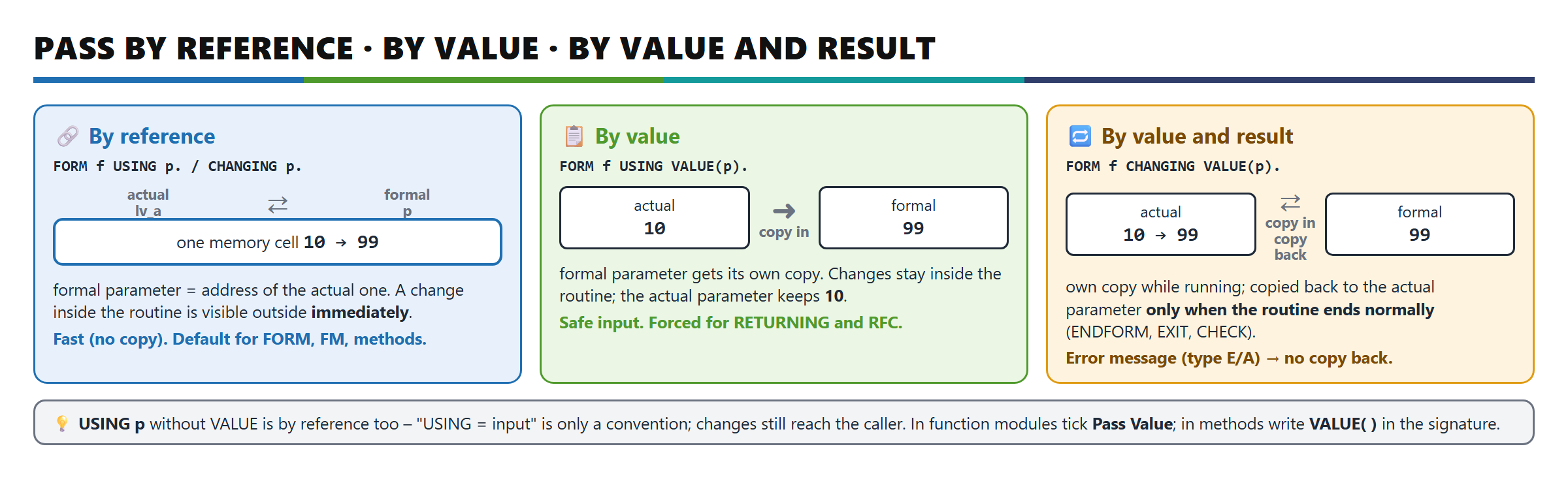
Kind | Syntax | Memory | Effect on the actual parameter |
|---|---|---|---|
By reference (default) |
| Shares the caller's memory (address passed) | Changes visible immediately – USING and CHANGING behave the same |
By value | USING VALUE(p) | Own copy | None – changes stay inside |
By value and result | CHANGING VALUE(p) | Own copy | Copied back when the FORM ends normally (ENDFORM, EXIT, CHECK); not after an error message |
|
3.2 Internal and external subroutines
- Internal – defined and called in the same program (normal case).
- External – defined in another program (report or subroutine pool, type S):
PERFORM sub IN PROGRAM zprog USING …or the old short formPERFORM sub(zprog) USING …. Fragile (no interface check) – use a function module or a class method instead. PERFORM … ON COMMITregisters a FORM to run at the next COMMIT WORK (Part 7).- In S/4HANA / clean core: FORMs are not allowed in ABAP Cloud. Write a local class with methods instead – same idea, real interfaces, testable with ABAP Unit.
Part 4 – Function groups and function modules
A function module (FM) is a procedure with a defined interface, stored centrally and callable from any ABAP program – and, if remote-enabled, from other SAP or non-SAP systems. FMs live in function groups (program type F) and are created in the Function Builder (SE37). SAP delivers thousands of them (standard FMs); you create your own (custom FMs, Z/Y names).
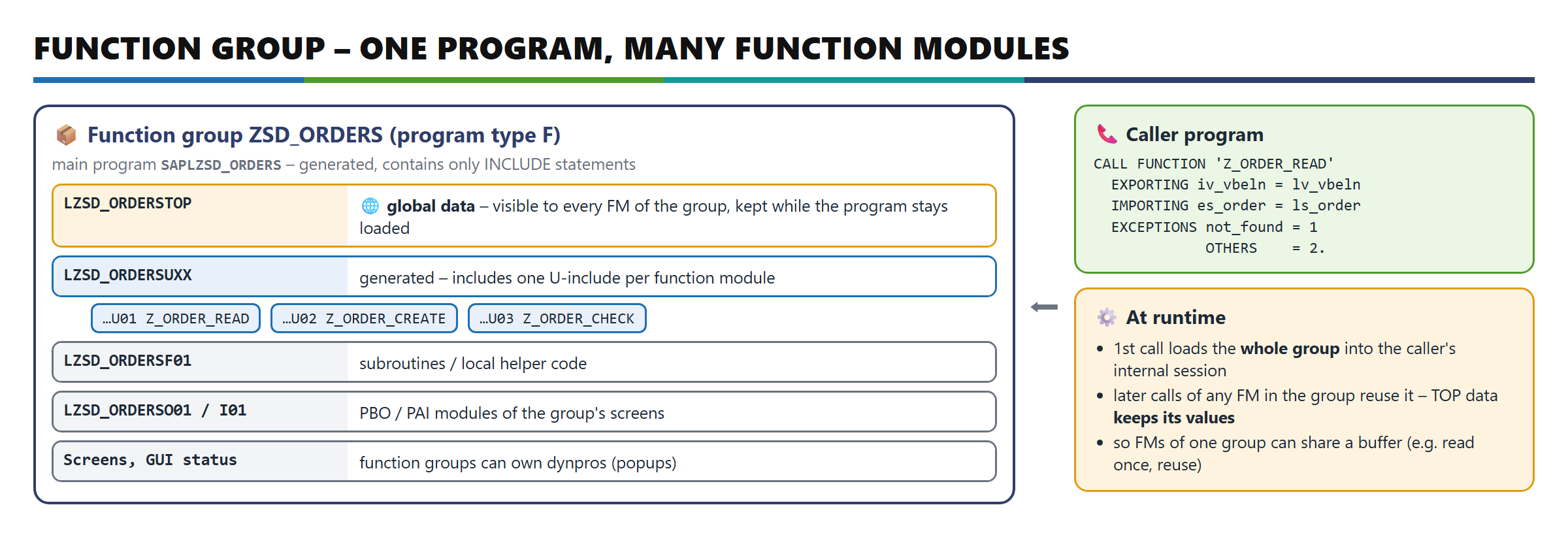
- Create the function group first (SE37 → Goto → Function groups → Create, or SE80), activate it, then create the FM in it.
- The whole group is loaded into the caller's internal session on the first call; global data in the TOP include keeps its values for later calls of any FM in the same group.
- Table TFDIR is the FM directory (FM name → function group program and include number).
4.1 The FM interface
Tab in SE37 | Meaning | Notes |
|---|---|---|
Import | Values from the caller into the FM | Optional + default value possible; passed by reference = cannot be changed in the FM (syntax error); with "Pass Value" only the local copy can be changed |
Export | Values from the FM back to the caller | Always optional for the caller |
Changing | In → changed → out | Optional + default possible |
Tables | Internal tables in and out | Obsolete – use a table type in Import/Export/Changing (still common in BAPIs/RFC) |
Exceptions | Error situations the caller can handle | Classic: caller maps them to SY-SUBRC values. Or class-based: tick "Exception classes" |
Source code | FUNCTION … ENDFUNCTION | SE37 shows the interface as a comment block; ADT shows it as code |
- Parameters are passed by reference unless you tick Pass Value. Remote-enabled FMs must use pass by value (except TABLES).
- Classic exceptions (
RAISE exc/MESSAGE … RAISING exc) and class-based exceptions (RAISING zcx_…) can't be mixed in one FM.
|
4.2 Calling a function module
Use the Pattern button (Ctrl+F6) in the editor to insert the call with all parameters. All mandatory import and changing parameters must be supplied. Note the direction is seen from the caller: you EXPORT to the FM's import parameters and IMPORT its export parameters.
|
- If an exception is raised and the caller did not list it (and has no
OTHERS), the program dumps.
4.3 Processing types and call variants
Processing type / call | What it means | More |
|---|---|---|
Normal function module | Called in the same system, synchronously | This page |
Remote-enabled module | Callable via RFC: | Page 07 Interfaces (sRFC, aRFC, tRFC, qRFC, BAPIs) |
Update module | Registered with | Part 7 and page 07 |
STARTING NEW TASK 'T1' | Asynchronous RFC – runs in parallel, result via callback | Page 07 |
IN BACKGROUND TASK | Transactional RFC – executed once at COMMIT WORK (monitor SM58) | Page 07 |
Subroutine | Function module | Method | |
|---|---|---|---|
Defined in | The program itself | Function group (SE37) | Class (local or SE24/ADT) |
Interface check | Weak (by position) | Yes (by name) | Yes (by name, typed) |
Callable remotely | No | Yes (RFC) | No (wrap in an RFC FM / OData) |
Exceptions | None (only messages) | Classic or class-based | Class-based |
Status | Obsolete | Current for RFC, BAPI, update | Recommended |
Part 5 – Macros (legacy)
A macro is a text template: DEFINE name. … END-OF-DEFINITION. At compile time every call line is replaced by the macro's statements, with the placeholders &1 … &9 filled from the call.
|
- The macro must be defined before the first call. A macro can call other macros but not itself.
- Debugging: a macro call executes as one step – you can't step through its lines. That, plus poor readability, is why SAP says to use macros only in exceptional cases and Clean ABAP says: don't use them (DEFINE is not allowed in ABAP Cloud). Their effect on compile time is negligible. Global macros in table TRMAC are obsolete.
- A macro that declares
DATA wa TYPE &1and runsSELECT SINGLEbreaks when called twice with the same type – the DATA statement is duplicated. Use a method with a generic parameter instead.
Part 6 – Methods (pointer)
Methods of classes are the modern modularization unit: IMPORTING / EXPORTING / CHANGING / RETURNING parameters, functional calls lv_x = lo_obj->get( ), class-based exceptions, and ABAP Unit tests. Classes, interfaces, inheritance and events are covered in the OOPS ABAP section.
|
Part 7 – LUW basics: COMMIT WORK and update tasks
A LUW (logical unit of work) is a group of changes that must succeed or fail together.
- Database LUW – the changes between two database commits. Every screen change (dialog step) triggers an implicit database commit, so one DB LUW can't span several screens.
- SAP LUW – one business transaction that may span several screens. Changes are only registered during the dialog (
CALL FUNCTION … IN UPDATE TASK,PERFORM … ON COMMIT) and executed together atCOMMIT WORKin one database LUW.ROLLBACK WORKdiscards them. - Lock the data first with the lock object's ENQUEUE FM (page 02 DDIC); update FMs release the locks.
- Failed updates: SM13 (update requests, "Express document" mail), runtime errors: ST22.
|
Part 8 – Messages
Messages tell the user about errors, warnings and success. They are maintained centrally in a message class (SE91) – up to 1,000 messages numbered 000–999, stored in table T100, translatable, with optional long texts. Placeholders & or &1 … &4 in the text are filled with WITH.
|
- System fields after a message:
SY-MSGID(class),SY-MSGTY(type),SY-MSGNO(number),SY-MSGV1…SY-MSGV4(placeholder values).
8.1 Message types – behaviour depends on the context
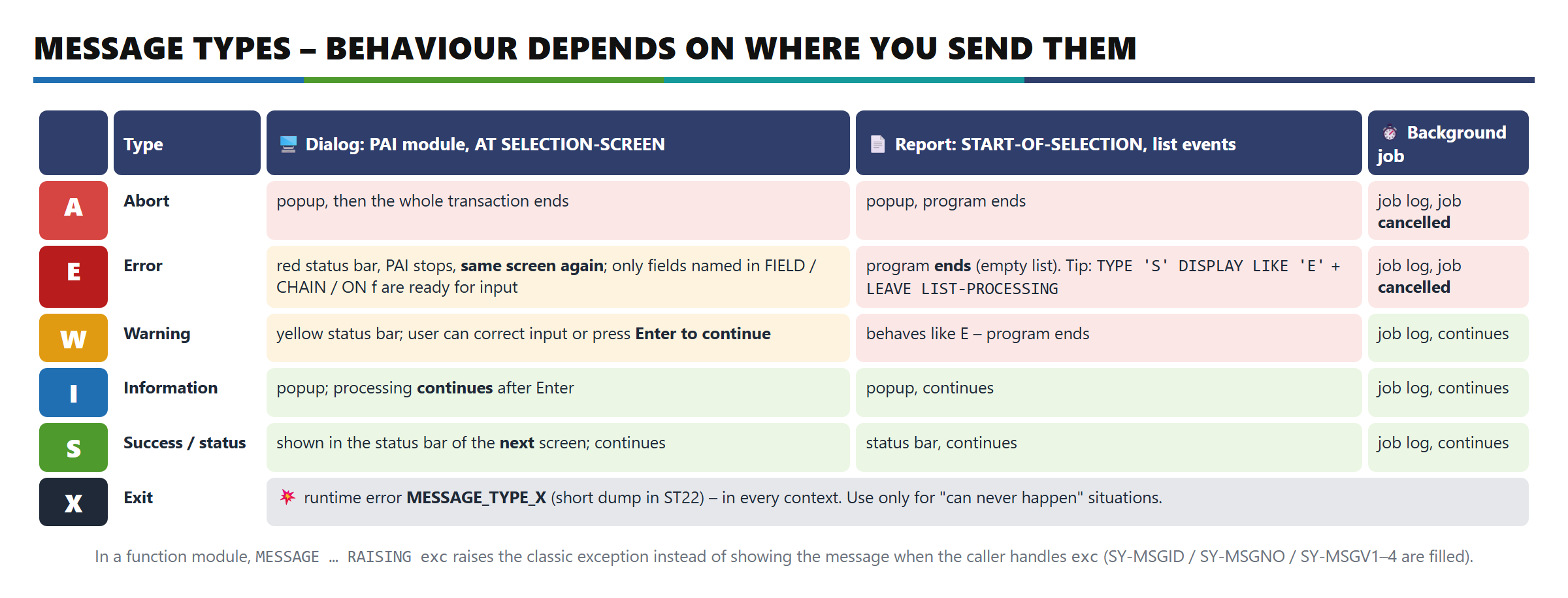
Type | Name | Short rule |
|---|---|---|
A | Abort | Popup, then the transaction / program ends |
E | Error | In PAI / AT SELECTION-SCREEN: stops processing, same screen again for correction. In START-OF-SELECTION or lists: program ends |
W | Warning | In PAI / AT SELECTION-SCREEN: user can correct or press Enter to continue. In START-OF-SELECTION or lists: like E |
I | Information | Popup, processing continues |
S | Success / status | Status bar of the next screen, processing continues |
X | Exit | Runtime error MESSAGE_TYPE_X (dump) |
- An E message terminates processing only outside dialog validation. In a PAI module or selection-screen event an E message is the normal way to force a correction (fields reopened via FIELD / CHAIN – page 05, or AT SELECTION-SCREEN ON f – page 03).
- In background jobs messages go to the job log; E and A cancel the job.
- For many messages (mass processing, interfaces) collect them in an application log (BAL function modules, viewed in SLG1) instead of stopping at the first one.
Part 9 – Debugging
The ABAP Debugger runs a program step by step so you can watch variables, tables and the call stack and find the cause of a bug. Today's standard is the new (two-process) debugger: it runs in its own window/session, has configurable desktops (variables, tables, objects, break/watchpoints, diff, scripts) and layer-aware debugging. The classic debugger (same process, older UI) is obsolete; switch in the editor under Utilities → Settings → ABAP Editor → Debugging. Eclipse ADT has its own debugger with the same concepts.
9.1 Stepping
Key | Action |
|---|---|
F5 | Single step – go into called FORMs, FMs, methods |
F6 | Execute – run the called unit completely, stop at the next line |
F7 | Return – finish the current unit and stop in the caller |
F8 | Continue – run to the next breakpoint or the end |
- Change a variable's value at runtime (pencil icon) – needs debug-change authorization; never in production without a reason, it is logged.
- "Step Size" button: step through expression-based code (inline expressions on one line) part by part.
9.2 Breakpoints and watchpoints
Kind | How to set | Valid for |
|---|---|---|
Debugger breakpoint | Inside the debugger (double-click the line) | This debugging session only ("Save" turns it into a session breakpoint) |
Session breakpoint | In the editor (Set/Delete breakpoint) | All external sessions of your current logon, until logoff |
External (user) breakpoint | In the editor, external breakpoint | All sessions of your user incl. HTTP (Fiori/OData) and RFC calls from other systems; 2 hours by default |
Static breakpoint |
| Every run (BREAK user: only for that user) – remove before transport |
Checkpoint group |
| Only when activated in SAAB – safe to transport |
Dynamic: /h | Type | Stops at the next ABAP statement processed |
Breakpoint at … | Debugger menu: at statement, FM, method, subroutine, exception, message | This session; also conditional breakpoints |
- Watchpoint – stops when a variable changes, or when a condition becomes true (e.g.
lv_total > 1000). Set in the debugger. - Figures such as 30 breakpoints or 9 watchpoints are limits of the classic debugger, not rules of the new debugger – don't quote them as fixed numbers.
9.3 Special situations
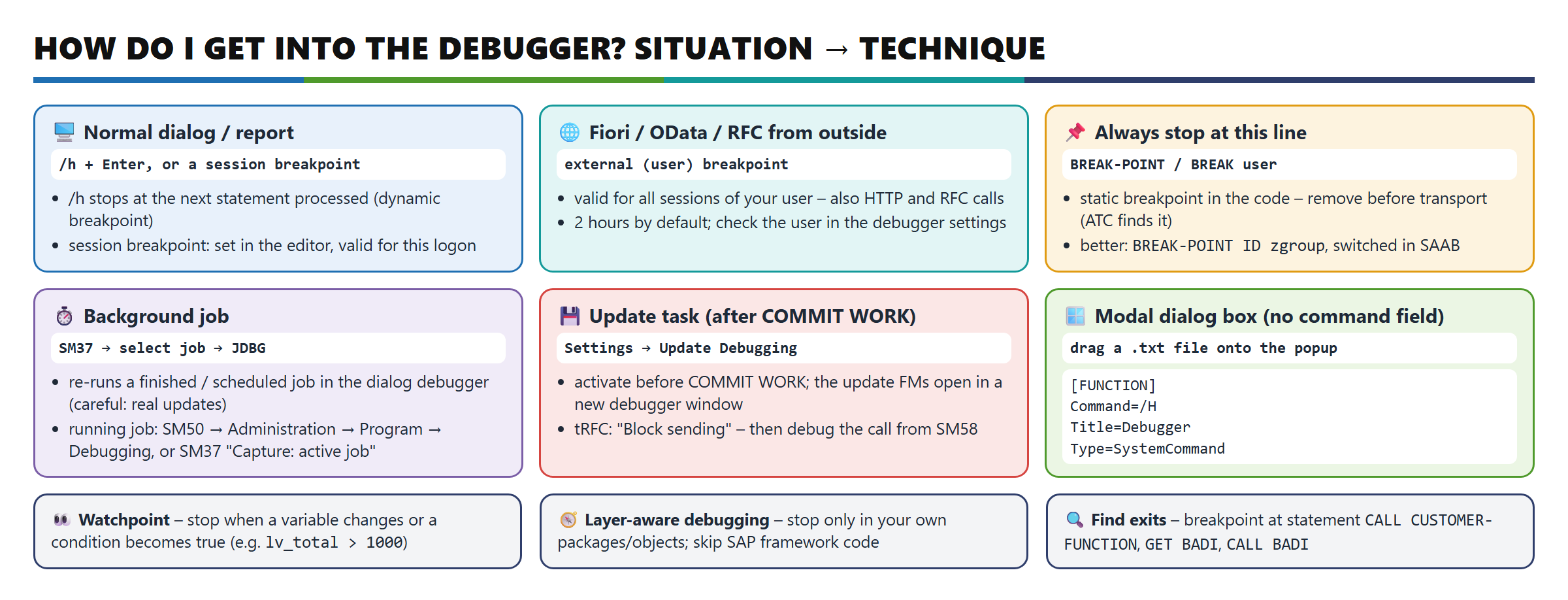
Situation | Technique |
|---|---|
Background job – finished or scheduled | SM37 → select the job → type JDBG in the command field: the job runs again in the dialog debugger (careful: it really updates data) |
Background job – running now | SM50 → select the work process → Administration → Program → Debugging; or SM37 → "Capture: active job" |
Update function modules (after COMMIT WORK) | In the debugger: Settings → Update Debugging before COMMIT WORK; the update task opens in a new debugger window |
tRFC calls | Setting "tRFC (In Background Task): Block Sending" – then debug the entry in SM58 |
Modal dialog box (no command field for /h) | Create a .txt file with the lines below and drag & drop it onto the popup |
Fiori / OData / RFC | External breakpoint for the user that executes the call |
Find user exits / BAdIs in a transaction | /h, then Breakpoint at statement |
|
- "Exclusive" in the debugger title means the work process is reserved for you (normal mode); it is not the same as update debugging.
9.4 Debugger settings
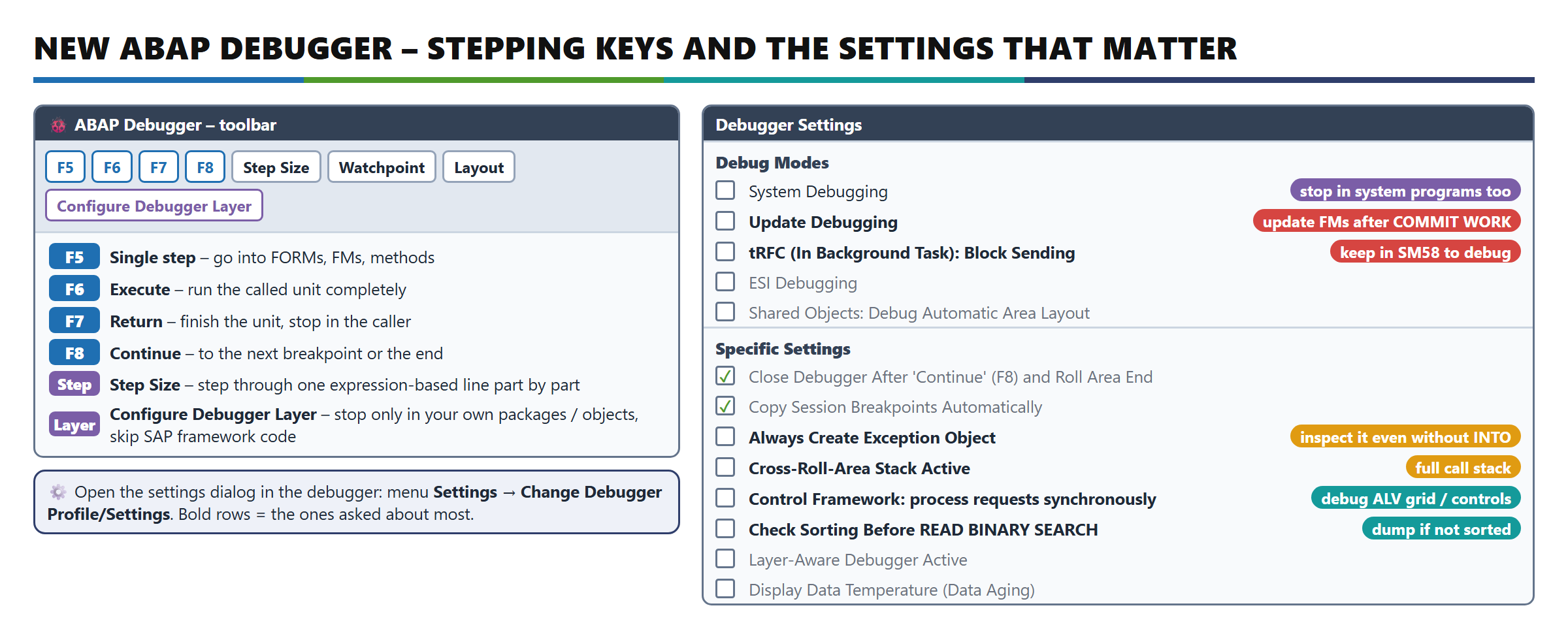
Setting / button | What it does |
|---|---|
System Debugging | Also stop in system programs (normally skipped) |
Update Debugging | Debug the update function modules that run after COMMIT WORK |
tRFC (In Background Task): Block Sending | Keep tRFC calls in SM58 so you can debug them from there |
Always Create Exception Object | Create the exception object even if the CATCH has no INTO – lets you inspect it |
Cross-Roll-Area Stack Active | Show the complete call stack across internal sessions, not only the current one |
Control Framework: process requests synchronously | Debug GUI controls (ALV grid, containers) without flush confusion |
Check Sorting Before READ BINARY SEARCH | Dump if the table is not sorted – finds wrong BINARY SEARCH results |
Configure Debugger Layer | Layer-aware debugging: stop only in your own packages/objects, skip SAP framework code – very useful for enhancements |
Step Size | Step through expression-based code part by part |
Other checkboxes in the dialog | ESI Debugging (Enterprise Services), Shared objects: debug automatic area layout, Close Debugger after Continue (F8) and roll area end, Copy Session Breakpoints Automatically, Display Data Temperature (Data Aging) |
- After a crash: ST22 shows the short dump with the error, the source line and the variable values; the "Debugger" button opens the state at the moment of the dump (only right after it happened).
Part 10 – Testing
Before handing over a development, test it with planned test cases:
- Positive – valid input, the normal flow works.
- Negative – invalid input is rejected with a clear message.
- No data – empty selection, empty tables, missing master data: no dump, sensible output.
- Also: authorizations (a user without them), big volumes (performance), background run.
ABAP Unit automates such tests in code: local test classes FOR TESTING inside the program or class, run with Ctrl+Shift+F10 (or as part of ATC). Test doubles (CL_ABAP_TESTDOUBLE, SQL / CDS test environment) replace database and dependencies. Details are in the OOPS ABAP section.
|
Part 11 – Interview questions
What modularization techniques are there in ABAP, and which do you use today?
Includes, subroutines, function modules, macros and methods (plus event blocks and dialog modules). New code: methods of classes; function modules where they are required (RFC, BAPIs, update tasks); includes only for structure. Subroutines are obsolete; macros only in exceptional cases (not in ABAP Cloud).
What is the difference between an include and a subroutine?
An include is copied into the program at compile time – no interface, no call, not runnable alone. A subroutine is called with PERFORM at runtime and has parameters.
Explain pass by reference, pass by value and pass by value and result.
By reference: the formal parameter uses the caller's memory, changes are visible at once (default). By value: a copy, the caller's value never changes. By value and result (CHANGING VALUE): a copy that is written back only when the routine ends normally – not after an error message.
Subroutine vs function module?
A FORM belongs to one program, has a weak positional interface and no exceptions. An FM is stored centrally in a function group, has a named interface with optional parameters and exceptions, can be remote-enabled or an update module, and can be called from any program.
What is a function group, and why does its TOP include matter?
The container (program type F, main program SAPL<fg>) for related FMs. The whole group is loaded once per internal session; global data in the TOP include is shared by all its FMs and keeps its values between calls – useful for buffers, a source of bugs if forgotten.
What are the parts of an FM interface? Which are obsolete?
Import, Export, Changing, Tables, Exceptions. TABLES is obsolete (use table types). Exports are always optional; imports and changings can be optional with defaults. Parameters are by reference unless Pass Value is ticked; RFC FMs must pass by value.
How are FM exceptions handled?
Classic: the FM raises with RAISE or MESSAGE … RAISING, the caller lists EXCEPTIONS name = n OTHERS = m and checks SY-SUBRC; an unhandled exception dumps. Class-based: RAISING zcx_… in the FM, TRY … CATCH at the caller. The two kinds can't be mixed in one FM.
Why should macros be avoided?
They are text replacement: hard to read, can't be stepped through in the debugger (one step), no type check of the call, not allowed in ABAP Cloud. Use a method.
What message types exist and how does E behave in different places?
A, E, W, I, S, X. E in PAI or AT SELECTION-SCREEN keeps the user on the screen to correct the input (fields reopened via FIELD/CHAIN/ON f); E in START-OF-SELECTION ends the program; in a background job E cancels the job. X always dumps.
What breakpoint types do you know?
Debugger breakpoints, session breakpoints (current logon), external/user breakpoints (all sessions of the user incl. HTTP and RFC, 2 hours), static BREAK-POINT / BREAK user, checkpoint groups (BREAK-POINT ID, SAAB), dynamic /h, plus breakpoints at statement / FM / method / exception and watchpoints.
How do you debug a background job, an update module and a popup?
Background job: SM37 + JDBG (finished/scheduled) or SM50 → Program → Debugging (running). Update module: switch on Update Debugging before COMMIT WORK. Popup: drag & drop a text file with Command=/H and Type=SystemCommand onto it.
How do you find a user exit or BAdI with the debugger?
Start the transaction with /h and set breakpoints at the statements CALL CUSTOMER-FUNCTION, GET BADI and CALL BADI (and method CL_EXITHANDLER=>GET_INSTANCE for classic BAdIs), then continue with F8 – every stop is a possible enhancement point (page 10).
🏠 Start Here · ◀ 03 · Report Programming & ALV · 05 · Dialog Programming ▶ · Sections: CORE ABAP | OOPS ABAP | ABAP on HANA | Clean Core | RAP | ABAP Points | SAP Fiori | SAPUI5 | Mobile Development (MDK) | BTP Foundations | BTP Development | CAP | SAP Build | ABAP on BTP | Integration Suite | SAP Business AI | SAP BASIS | Security | SAP SDLC
Functional: FICO ABAP | TRM ABAP | VIM | SAP BIS | SD ABAP | MM ABAP | PP ABAP | QM ABAP | PM ABAP | PS ABAP | EWM | TM ABAP | GTM ABAP | EHS ABAP | HR ABAP | BW | SAP Datasphere | SAP Business Data Cloud | SAP MDG | SAP Analytics Cloud | SAP Ariba | SAP CX | SAP IBP