How legacy data gets into SAP: file handling, BDC, Direct Input, LSMW, BAPI uploads and the S/4HANA Migration Cockpit. This is the C – Conversion object type of RICEFW. One running example – uploading bank master data (FI01) from a CSV file – is used for BDC and BAPI so you can compare them.
Related pages: page 07 Interfaces (RFC, BAPI details, IDoc), page 02 Data Dictionary (conversion routines such as CONVERSION_EXIT_ALPHA – a different thing that only shares the word "conversion"), ABAP on HANA › 02 Migration & Performance Tools (system conversion to S/4HANA).
Part 1 – Data migration basics
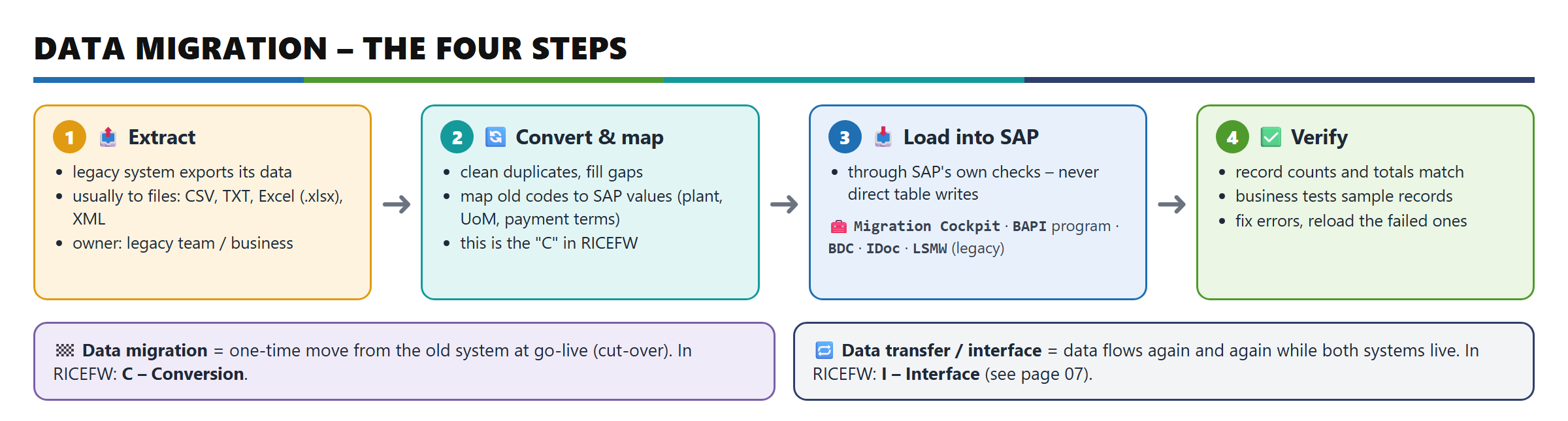
Term | Meaning |
|---|---|
Data migration | One-time move of data from an old system into SAP, usually at go-live (cut-over). RICEFW C – Conversion. |
Data transfer | Data is moved again and again from or to other systems while both keep running. This is an interface (RICEFW I, page 07). |
Legacy system | The old system that is being replaced or that feeds SAP. Usually non-SAP, but it can also be an older SAP system (e.g. ECC before a new S/4HANA implementation). |
Inbound | Data comes into SAP from another system (SAP or non-SAP). Every migration is inbound. |
Outbound | Data goes out of SAP to another system – SAP or non-SAP. |
The four steps
- 1 Extract – the legacy team exports the data into files (CSV, TXT, XLSX, XML).
- 2 Convert / map – clean the data and map old values to SAP values (plant, unit, payment terms).
- 3 Load – import into SAP with a tool that runs SAP's checks (see the table below).
- 4 Verify – compare counts and totals, business users test samples, reload the failed records.
Load techniques at a glance
Technique | How it loads | Status |
|---|---|---|
S/4HANA Migration Cockpit | Fiori app with predefined migration objects, staging tables or direct transfer | Standard for S/4HANA |
BAPI program | Your report reads the file and calls the released BAPI (no screens) | Recommended where a BAPI exists |
IDoc (inbound) | Data arrives as IDocs and is posted by the inbound function module (page 07) | Used for migration and interfaces |
BDC – call transaction / session | Replays the transaction screens with recorded field values | Classic; last resort in S/4HANA |
Direct Input | SAP-delivered programs write data after their own checks, no screens | Legacy |
LSMW | Workbench that maps a file and then uses BDC, Direct Input, BAPI or IDoc | Legacy, not recommended in S/4HANA |
Golden rule: never load SAP standard tables with INSERT/MODIFY from a program. It skips the validations, number ranges, change documents and the update logic, and leaves inconsistent data. MODIFY dbtab FROM TABLE itab is only acceptable for your own Z tables.
ALE (page 07) is not a migration tool in itself – it distributes IDocs between systems. BAPIs are not a migration tool either: they are APIs that migration tools and interfaces call.
Part 2 – File handling
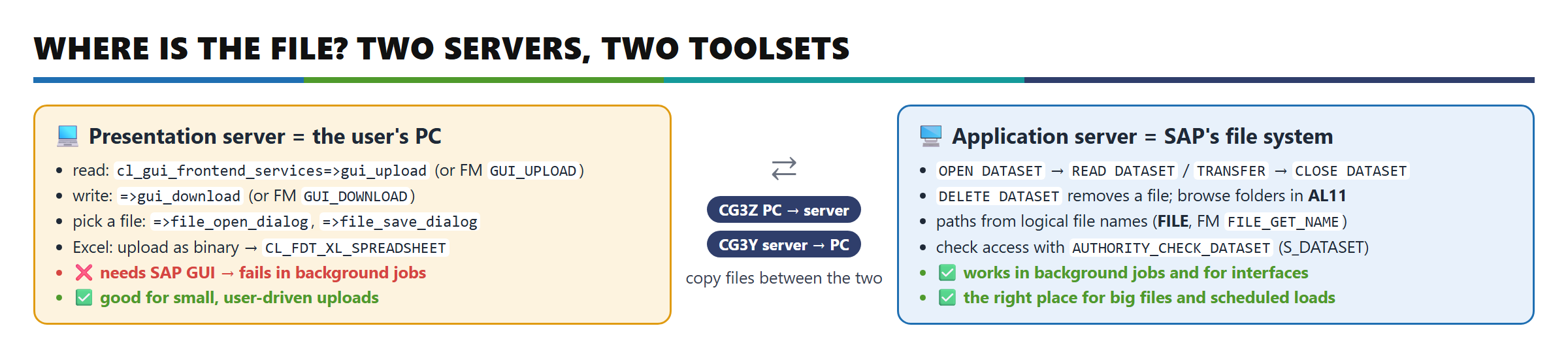
A file can sit on the presentation server (the user's PC, reached through SAP GUI) or on the application server (the SAP server's file system). Each side has its own tools.
2.1 Presentation server (PC)
Task | Class method (preferred) | Older function module |
|---|---|---|
Choose a file | cl_gui_frontend_services=>file_open_dialog | F4_FILENAME |
Choose a save location | cl_gui_frontend_services=>file_save_dialog | – |
Read a file | cl_gui_frontend_services=>gui_upload | GUI_UPLOAD |
Write a file | cl_gui_frontend_services=>gui_download | GUI_DOWNLOAD |
- Both need a running SAP GUI – they fail in background jobs. For scheduled loads, put the file on the application server.
filetype = 'ASC'reads text lines,'BIN'reads binary (needed for Excel).
Upload procedure (selection screen → file → internal table)
|
Next step: loop over gt_bank and post each record with a BAPI (Part 6) or a BDC (Part 3).
Excel files
- Legacy: FM
ALSM_EXCEL_TO_INTERNAL_TABLE– not released, needs Excel installed on the PC, cells are cut at 50 characters, no background. Still seen in old programs. - Better: read the .xlsx as binary and parse it with
CL_FDT_XL_SPREADSHEET(reads .xlsx – the Office Open XML format – not old .xls). Also used:TEXT_CONVERT_XLS_TO_SAP, the open-source library abap2xlsx (Apache-2.0), and in ABAP Cloud the releasedXCO_CP_XLSXAPI. - Simplest of all: ask for CSV – plain text, works on both servers and in background.
|
2.2 Application server
Files on the SAP server are handled with ABAP statements. Browse the folders in AL11.
Statement | Purpose |
|---|---|
OPEN DATASET f FOR access IN mode | Open (or create) a file |
READ DATASET f INTO line | Read one record; |
TRANSFER line TO f | Write one record |
CLOSE DATASET f | Close the file (always do it) |
DELETE DATASET f | Delete the file |
| Read / set the position and attributes of an open file |
Full syntax: OPEN DATASET dset FOR access IN mode [position] [os_additions] [error_handling].
Access | Behaviour |
|---|---|
FOR INPUT | Read. Pointer at the start. File missing → |
FOR OUTPUT | Write. Existing content is deleted; file created if missing. Reading also allowed. |
FOR APPENDING | Write at the end. File created if missing. |
FOR UPDATE | Change existing content. Pointer at the start. File missing → |
Mode (mandatory) | Use |
|---|---|
IN TEXT MODE ENCODING UTF-8 | DEFAULT | NON-UNICODE | Text lines; ENCODING is mandatory in text mode |
IN BINARY MODE | Bytes as they are (PDF, images, XLSX) |
| Format expected by old non-Unicode systems |
|
Paths and security
- Logical file names and paths (transaction FILE): define the physical folder once per system and resolve it in the program with FM
FILE_GET_NAME. No hard-coded paths, works the same in DEV/QAS/PRD. OPEN DATASETchecks authorization object S_DATASET itself (exceptionCX_SY_FILE_AUTHORITY). FMAUTHORITY_CHECK_DATASETchecks it beforehand; FMFILE_VALIDATE_NAMEchecks a user-entered path against a logical path – protection against directory traversal (../../).- CG3Z uploads a PC file to the application server, CG3Y downloads one – handy for testing.
- Code pages:
CL_ABAP_CODEPAGE=>CONVERT_TO( )/CONVERT_FROM( )convert string ↔ UTF-8 xstring; the newer released class isCL_ABAP_CONV_CODEPAGE. - Legacy:
CL_RSAN_UT_APPSERV_FILE_WRITE/CL_RSAN_UT_APPSERV_FILE_READERappear in older code – they are internal BW helper classes, not released. Use the DATASET statements.
File archiving
After a file is processed, move it to an archive folder on the application server and delete it from the inbound folder, so it is not loaded twice and can be found later. (This is file archiving – SAP data archiving with SARA and archiving objects is a different topic.)
Part 3 – BDC (Batch Data Communication)
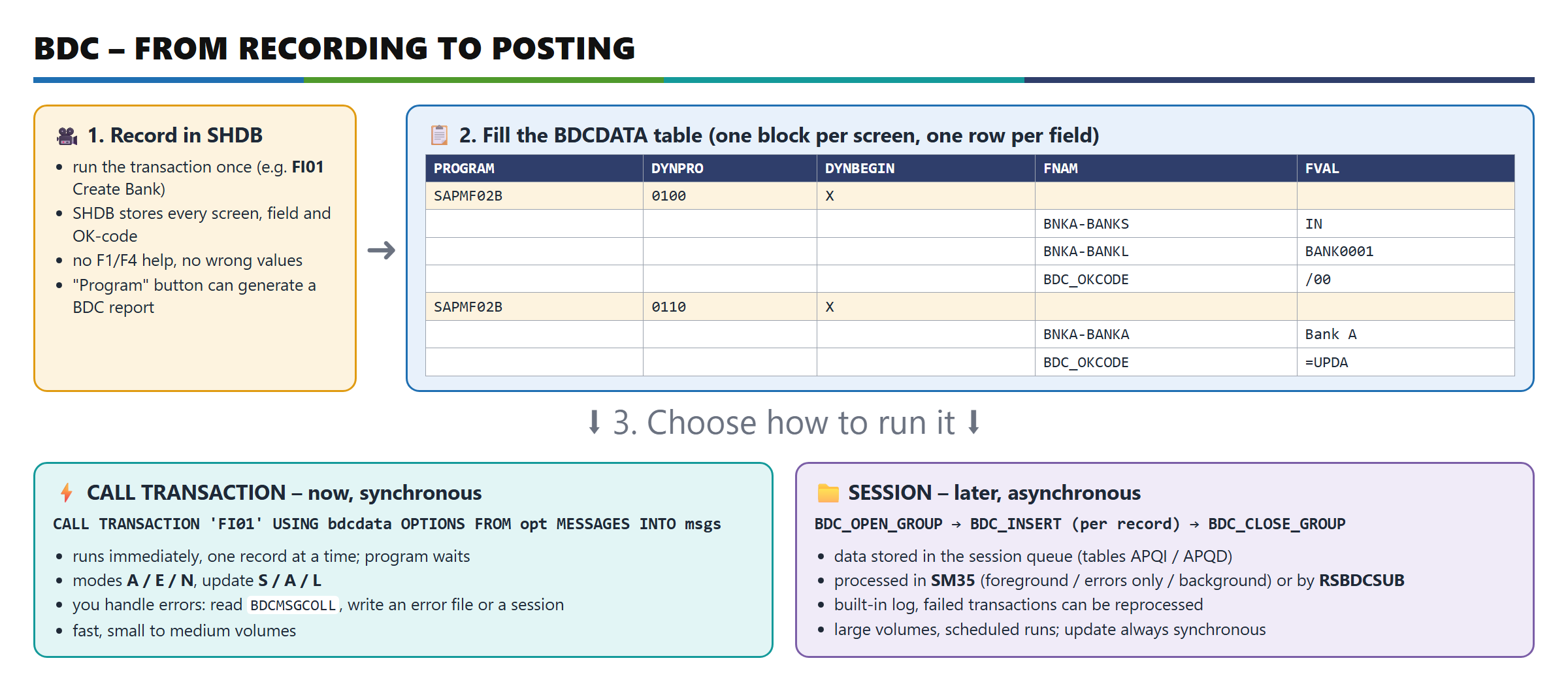
BDC loads data by replaying a transaction's screens with values from a file, exactly as a user would type them. Because the real screens run, all screen checks run too. It is an inbound technique – the target is always SAP.
There are three methods: Call Transaction and Session – together called batch input – and Direct Input (Part 4).
3.1 Recording with SHDB
- Transaction SHDB → New recording → enter the transaction code → run it once with sample values → save.
- The recording lists every screen (program + screen number) and every field you filled, plus the OK-codes.
- Don't press F1/F4 and don't enter wrong values while recording – everything is recorded.
- SHDB can generate a program or a function module from the recording – a good starting point.
3.2 The BDCDATA table
Field | Meaning |
|---|---|
PROGRAM | Module pool of the screen (e.g. |
DYNPRO | Screen number (e.g. |
DYNBEGIN | 'X' = this row starts a new screen |
FNAM | Field name (e.g. |
FVAL | Field value as text (max. 132 characters) |
Two tiny helper routines build the table: bdc_dynpro adds a screen row, bdc_field adds a field row.
3.3 Call Transaction method
Syntax: CALL TRANSACTION tcode USING bdcdata [MODE m] [UPDATE u] | [OPTIONS FROM ctu_params] MESSAGES INTO msgtab.
Processing mode (DISMODE) | Meaning |
|---|---|
A – all screens | Every screen is shown; the user presses Enter through it – for testing |
E – errors only | Screens are shown only when an error occurs |
N – no screens | Runs invisibly – normal for real loads and background jobs |
Update mode (UPDMODE) | Meaning |
|---|---|
A – asynchronous (default) | Like |
S – synchronous | Like |
L – local | The update runs in the same dialog work process, not in the update work process |
Better than MODE/UPDATE: pass a CTU_PARAMS structure with OPTIONS FROM. Fields: DISMODE, UPDMODE, DEFSIZE = 'X' (standard window size – table controls always show the same number of rows), RACOMMIT (don't end on COMMIT WORK), NOBINPT (sy-binpt stays space), NOBIEND (no batch-input mode after the data ends).
Messages come back in a table of type BDCMSGCOLL (MSGTYP, MSGID, MSGNR, MSGV1–MSGV4). Turn them into text with MESSAGE ID … INTO or FM FORMAT_MESSAGE. sy-subrc <> 0 means the transaction didn't finish.
- Synchronous processing: one transaction after the other, the program waits for each.
- No automatic error log – your program must collect errors (error file, ALV list, or put the failed records into a session so they can be corrected in SM35).
- Fast; good for small to medium volumes and for online uploads where the user sees the result at once.
3.4 Session method
The program does not post anything itself. It writes the BDCDATA of each record into a batch input session (stored in the database, tables APQI/APQD). The session is processed later in SM35 or in a background job with report RSBDCSUB. The file can come from the PC or the application server.
Function module | What it does |
|---|---|
BDC_OPEN_GROUP | Creates and opens the session. Parameters: CLIENT, GROUP (session name), USER (user for processing), KEEP = 'X' (keep after processing), HOLDDATE (not before this date). Only one session can be open at a time; a closed session cannot be reopened. |
BDC_INSERT | Adds one transaction: TCODE + DYNPROTAB (the complete BDCDATA for that record). |
BDC_CLOSE_GROUP | Closes the open session (no mandatory parameters). An unclosed session cannot be processed. |
|
- SM35 processing modes: Process/foreground, Display errors only, Background.
- Asynchronous processing: data is stored first and posted later; the update is always synchronous.
- Built-in log per session; failed transactions stay in the session and can be corrected and reprocessed.
3.5 Call Transaction vs Session
Point | Call Transaction | Session |
|---|---|---|
How | CALL TRANSACTION … USING … MESSAGES INTO |
|
When posted | Immediately, while the program runs (synchronous) | Later, when the session is processed (asynchronous) |
Error handling | Your program, via the BDCMSGCOLL table | Built in – session log, reprocess errors |
Processing modes | A, E, N | Foreground, display errors only, background |
Update modes | Asynchronous, synchronous, local | Synchronous only |
Log | No batch input log | Detailed log per session |
Speed / volume | Faster; small to medium volumes | Slower; large volumes, scheduled runs |
Don't confuse synchronous/asynchronous processing (does the program wait for each transaction – call transaction yes, session no) with the update mode (does the transaction wait for the database update).
3.6 Complete example – bank master upload with call transaction
|
Screen numbers and field names come from your SHDB recording – check them in your system.
3.7 Practical tips
- Table controls (item lists): the number of visible rows depends on the window size – set
DEFSIZE = 'X'and scroll with OK-code=P+, or use the screen's "insert line" function to always type into row 1. - Fields that are not on the screen in your recording (other views, other company code settings) make the BDC fail – record with exactly the data pattern you will load.
- Put failed records from call transaction into a session (BDC_INSERT) so users can correct them in SM35.
- In S/4HANA / clean core: many classic transactions changed or are replaced by Fiori apps (customer and vendor → Business Partner), so recordings break. Prefer the Migration Cockpit or a BAPI/API; BDC only when no API exists.
Part 4 – Direct Input (legacy – know it for interviews)
- SAP-delivered programs that post data without screens and without sessions – faster than batch input.
- They do check the data: they call function modules for the consistency checks before writing.
- Restart mechanism for errors: run them in background and manage/restart the runs in transaction BMV0.
- Examples:
RMDATIND(material master).RFBIBL00is the FI document batch-input program, which supports session, call transaction and direct input. SD direct input programs are rarely used. - In S/4HANA / clean core: not used for new projects – the Migration Cockpit covers these objects.
Part 5 – LSMW (legacy – know it for interviews)
LSMW (Legacy System Migration Workbench), transaction LSMW, is a migration tool (not part of the ABAP Workbench) that loads files with little or no coding. It was popular for master data in ECC.
Import methods
Method | What happens |
|---|---|
Standard batch / direct input | Uses SAP's predefined batch input or direct input programs (e.g. RMDATIND) |
Batch input recording | Uses your own SHDB-style recording – creates a batch input session |
BAPI | Calls a BAPI through its inbound IDoc (message type of the BAPI) – needs port and partner profile |
IDoc | Creates inbound IDocs of a standard message type – needs port and partner profile |
Structure: Project (can hold several subprojects) → Subproject (any number of objects) → Object (one business object, e.g. material master or customer master).
The LSMW steps
# | Step | What you do |
|---|---|---|
1 | Maintain object attributes | Choose the import method (batch input, recording, BAPI, IDoc) |
2 | Maintain source structures | Describe the file layout (header, items) |
3 | Maintain source fields | Fields of each source structure |
4 | Maintain structure relations | Link source structures to the SAP target structures |
5 | Maintain field mapping and conversion rules | Source field → target field, with rules |
6 | Maintain fixed values, translations, user-defined routines | Reusable values and value tables |
7 | Specify files | Where the input file is (PC or application server) |
8 | Assign files | Which file feeds which source structure |
9 | Read data | Read the file into LSMW |
10 | Display read data | Check what was read |
11 | Convert data | Apply the mapping and rules |
12 | Display converted data | Check the converted result |
13 | Create batch input session (or start IDoc / direct input processing) | Hand the data to SAP |
14 | Run batch input session | Post the data (SM35) and check the log |
- Transport: LSMW settings are not recorded automatically – generate a change request manually (Extras → Generate change request) or use Export/Import project.
- In S/4HANA / clean core: LSMW is "not recommended" (SAP Note 2287723) and doesn't work for many objects (e.g. customer/vendor are Business Partners now). Use the S/4HANA Migration Cockpit (Part 7).
Part 6 – BAPI-based upload
A BAPI is a released, remote-enabled function module of a business object (details on page 07). For uploads it is the best classic option: SAP's checks run, no screens are involved, and the interface stays stable across releases.
- Find the BAPI: transaction BAPI (BAPI Explorer), or SE37 search
BAPI_*, e.g.BAPI_BANK_CREATEfor FI01. - Always check the RETURN parameter (type BAPIRET2): any message of type 'E' or 'A' means failure.
- BAPIs never commit themselves: call
BAPI_TRANSACTION_COMMIT(withwait = 'X') after success andBAPI_TRANSACTION_ROLLBACKafter an error. Some BAPIs offer a TESTRUN flag for a simulation. - Change BAPIs pair each data structure with an X structure ('X' marks the fields to change).
- Try it first in SE37 – Function Module → Test → Test Sequences lets you run the BAPI and then BAPI_TRANSACTION_COMMIT in one LUW.
|
Many BAPIs return a table of messages instead (e.g. BAPI_SALESORDER_CREATEFROMDAT2): then check line_exists( lt_return[ type = 'E' ] ) OR line_exists( lt_return[ type = 'A' ] ).
Custom fields in a BAPI upload go through ExtensionIn (see page 07, BAPI extension).
Part 7 – S/4HANA Migration Cockpit (the modern standard)
The SAP S/4HANA Migration Cockpit is SAP's tool for loading legacy data into S/4HANA (on-premise, private and public cloud). It ships predefined migration objects (bank, customer/supplier as Business Partner, product, open items, fixed assets, purchase orders …) that post through SAP's own APIs.
- Fiori app "Migrate Your Data – Migration Cockpit". The old transaction LTMC is deprecated – use the app.
Two approaches
Approach | How the data gets in | Typical use |
|---|---|---|
Migrate data using staging tables | The cockpit generates a staging table per object. Fill it by uploading the XML/CSV templates in the app, or directly with an ETL tool (e.g. SAP Data Services) or your own program | Data from non-SAP legacy systems |
Migrate data directly from an SAP system | The cockpit reads the data from the SAP source system (e.g. ECC) over an RFC connection | New implementation coming from SAP ECC |
Steps in the app
- 1 Create a migration project (approach, source, mass transfer ID).
- 2 Select the migration objects (e.g. Bank, Customer, Product).
- 3 Fill the staging tables (template upload or tool) – or let the direct transfer select the data.
- 4 Prepare, then complete the mapping tasks – value mapping of old codes to new ones (e.g. old plant → new plant).
- 5 Simulate – runs all checks without saving; fix data and repeat.
- 6 Migrate – posts the data; check the messages, correct and reload the failed records.
Migration Object Modeler (LTMOM)
- Transaction LTMOM – change a predefined object (e.g. add your custom fields) or create your own migration object, typically based on a BAPI or function module, for data the standard objects don't cover.
- This is where ABAP developers usually work in a Migration Cockpit project – plus writing programs that fill staging tables and checking errors.
In S/4HANA / clean core: Migration Cockpit first; BAPI programs where no object exists; BDC and LSMW only in brownfield ECC systems.
Part 8 – Comparison and tool choice
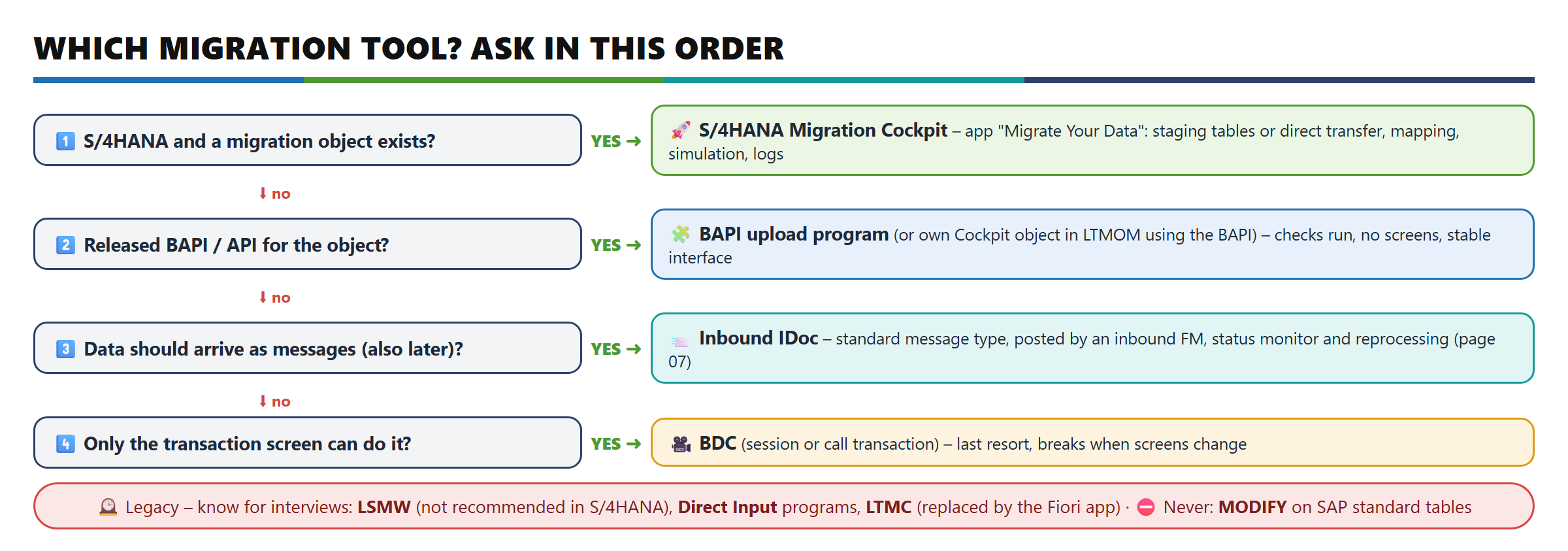
Tool | Screens? | SAP checks | Errors | Volume / speed | S/4HANA status |
|---|---|---|---|---|---|
Call Transaction | Yes (hidden in mode N) | Screen checks | Own code (BDCMSGCOLL) | Small–medium, fast | Last resort |
Session | Yes, later in SM35 | Screen checks | Session log, reprocess | Large, slower | Last resort |
Direct Input | No | FM checks | Log, restart (BMV0) | Large, fast | Legacy |
LSMW | Depends on method | Of the chosen method | Per method | Medium | Not recommended |
BAPI program | No | Full business checks | RETURN table | Large, fast | Recommended |
Inbound IDoc | No | Full business checks | Status records, BD87 | Large, can be parallel | Supported |
Migration Cockpit | No | Full business checks | Messages, simulate, reload | Large | Standard |
Part 9 – Interview questions
Q1. What is the difference between data migration and data transfer?
Migration is a one-time load from an old system at go-live (RICEFW Conversion). Transfer is a recurring exchange while both systems run (an Interface).
Q2. What are the BDC methods?
Three: Call Transaction and Session (together: batch input) and Direct Input. Call Transaction posts immediately; Session stores the data and posts it later in SM35; Direct Input writes without screens.
Q3. Call Transaction vs Session – when do you use which?
Call Transaction: small/medium volumes, immediate result, you code the error handling. Session: large or scheduled loads, built-in log and reprocessing, update always synchronous.
Q4. What are the processing and update modes of CALL TRANSACTION?
Processing: A all screens, E errors only, N no screens. Update: A asynchronous (default), S synchronous (waits – use when records depend on each other), L local.
Q5. What is CTU_PARAMS?
A structure passed with OPTIONS FROM: DISMODE, UPDMODE, DEFSIZE (fixed window size for table controls), RACOMMIT, NOBINPT, NOBIEND. It replaces MODE/UPDATE and gives more control.
Q6. How do you handle errors in Call Transaction?
Use MESSAGES INTO a BDCMSGCOLL table, check sy-subrc, turn E/A messages into text (MESSAGE … INTO or FORMAT_MESSAGE), log them, and optionally write failed records into a session for SM35.
Q7. What is BDCDATA and what are BDC_OKCODE and BDC_CURSOR?
The table of screens and field values: PROGRAM, DYNPRO, DYNBEGIN for a screen; FNAM, FVAL for fields. BDC_OKCODE holds the function code (Enter, Save), BDC_CURSOR the cursor position.
Q8. Can you use GUI_UPLOAD in a background job?
No – it needs SAP GUI. Read the file from the application server with OPEN/READ/CLOSE DATASET instead (logical file name from transaction FILE).
Q9. What are the access types and modes of OPEN DATASET?
Access: INPUT, OUTPUT, APPENDING, UPDATE. Mode: TEXT MODE (with mandatory ENCODING), BINARY MODE, LEGACY TEXT/BINARY MODE. READ DATASET returns sy-subrc 4 at end of file.
Q10. Why prefer a BAPI over BDC for uploads?
No dependency on screens, faster, stable released interface, structured RETURN messages, works in S/4HANA. Remember BAPI_TRANSACTION_COMMIT – BAPIs don't commit.
Q11. What are the LSMW steps and methods – and do you use LSMW in S/4HANA?
Methods: standard batch/direct input, recording, BAPI, IDoc. Steps: attributes, source structures and fields, relations, mapping, files, read, convert, create and run session. In S/4HANA it is not recommended.
Q12. What replaces LSMW in S/4HANA?
The S/4HANA Migration Cockpit (app "Migrate Your Data") with staging tables or direct transfer from an SAP system, predefined objects, mapping, simulation – and LTMOM for custom objects or fields.
🏠 Start Here · ◀ 05 · Dialog Programming · 07 · Interfaces ▶ · Sections: CORE ABAP | OOPS ABAP | ABAP on HANA | Clean Core | RAP | ABAP Points | SAP Fiori | SAPUI5 | Mobile Development (MDK) | BTP Foundations | BTP Development | CAP | SAP Build | ABAP on BTP | Integration Suite | SAP Business AI | SAP BASIS | Security | SAP SDLC
Functional: FICO ABAP | TRM ABAP | VIM | SAP BIS | SD ABAP | MM ABAP | PP ABAP | QM ABAP | PM ABAP | PS ABAP | EWM | TM ABAP | EHS ABAP | HR ABAP | BW | SAP MDG | SAP Analytics Cloud | SAP Ariba | SAP CX | SAP IBP