How SAP talks to other systems: RFC (call a function in another system), BAPI (released business APIs) and ALE/IDoc (asynchronous business documents), plus the update task / SAP LUW they rely on. This is the I – Interface object type of RICEFW.
Related pages: page 06 Data Migration (BDC, LSMW, BAPI uploads), page 04 Modularization (function modules), page 08 OData, page 09 Web Services, page 10 Enhancements (BAdIs and exits used in BAPI/IDoc extensions), page 12 Workflow (business objects in the BOR).
Part 1 – Interface basics
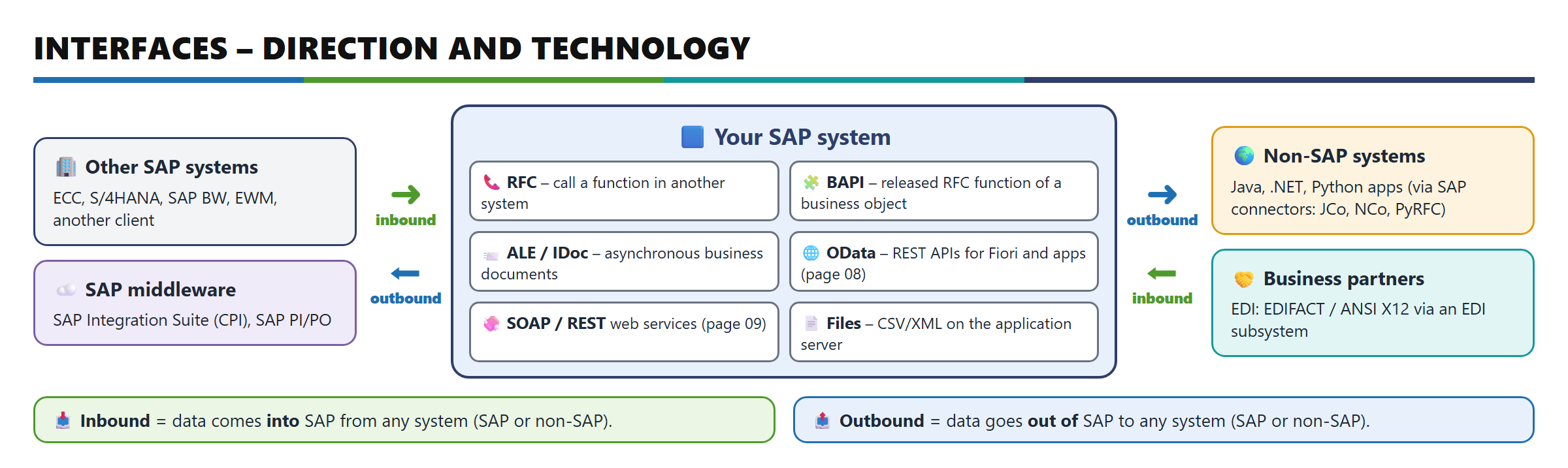
An interface exchanges data between SAP and another system on a regular basis, while both systems keep running. (A one-time load at go-live is a migration – page 06.)
Term | Meaning |
|---|---|
Inbound | Data comes into SAP from another system – SAP or non-SAP. |
Outbound | Data goes out of SAP to another system – SAP or non-SAP. |
Synchronous | The caller waits for the answer (sRFC, a BAPI call, an OData GET). Both systems must be up. |
Asynchronous | The caller sends and continues; the receiver processes later (tRFC/qRFC/bgRFC, IDoc). Survives a short outage of the receiver. |
Technology | Style | Typical use |
|---|---|---|
RFC | Sync or async function call | SAP ↔ SAP, SAP ↔ Java/.NET/Python programs |
BAPI | RFC function with a released business interface | Create/read business objects from outside |
ALE / IDoc | Asynchronous documents | Master data distribution, orders, invoices, EDI with partners |
OData | REST/HTTP, JSON | Fiori apps, mobile, cloud APIs – page 08 |
SOAP / REST web services | HTTP, XML/JSON | Partner and middleware integration – page 09 |
Files | Batch, CSV/XML on the application server | Simple nightly exchanges – page 06 Part 2 |
Part 2 – RFC (Remote Function Call)
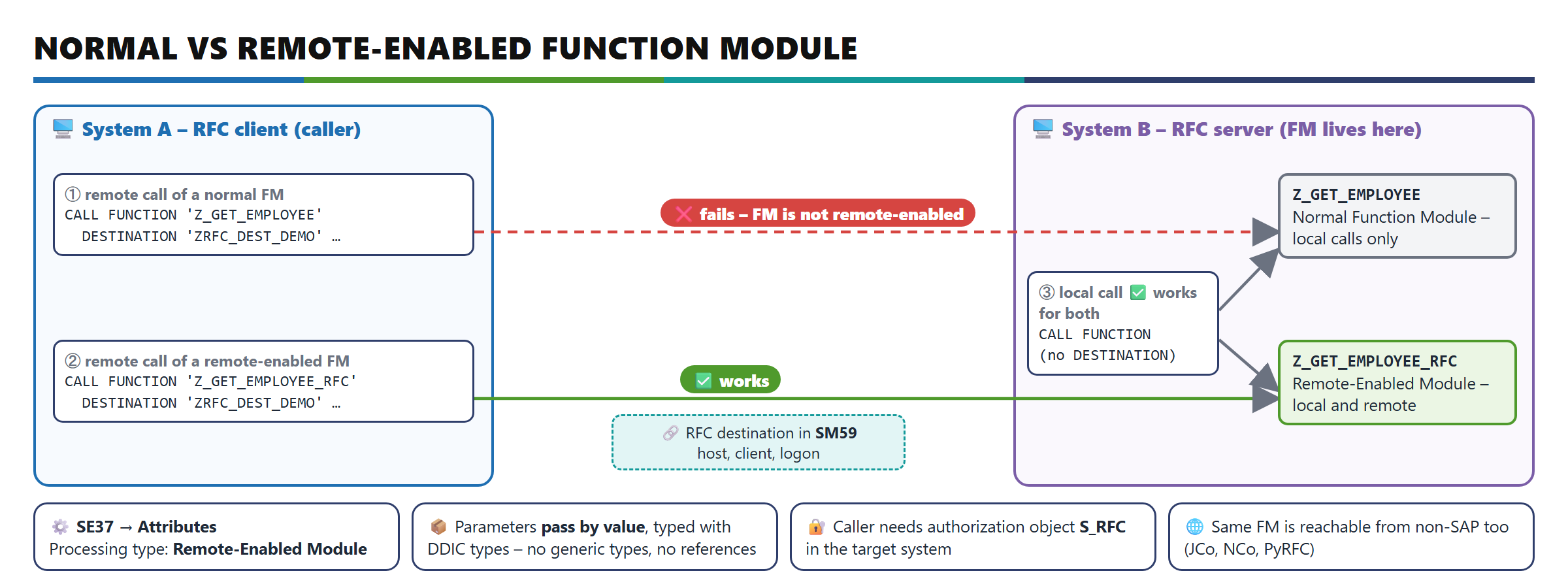
RFC extends CALL FUNCTION to a distributed environment: a program calls a function module that runs in another system (or another session of the same system). RFC is SAP's standard protocol for SAP ↔ SAP and SAP ↔ non-SAP communication – external programs use the SAP connectors (Java Connector JCo, .NET Connector NCo, NW RFC SDK, PyRFC).
- RFC server – the system where the function module exists and runs.
- RFC client – the system/program that calls it.
- The called function module must be remote-enabled (SE37 → Attributes → Processing type "Remote-Enabled Module"). A normal FM can only be called inside its own system:
2.1 RFC destinations (SM59)
The RFC destination holds the target's technical data: host, system number, client, logon method/user. Basis maintains it in SM59; it is stored in table RFCDES. The program only uses its name: CALL FUNCTION 'Z_GET_EMPLOYEE' DESTINATION 'ZRFC_DEST_DEMO' ….
SM59 type | Connection to |
|---|---|
3 | ABAP system (the usual SAP ↔ SAP RFC) |
T | TCP/IP – external program (e.g. a registered JCo/NCo server) |
G | HTTP connection to an external server (REST/SOAP calls) |
H | HTTP connection to an ABAP system |
L | Logical destination – refers to another destination |
I | Internal connection (same system) |
- Special destinations: NONE (run in the same system, new session), BACK (call back the caller – only inside an RFC call), SPACE (a normal local call).
- Trusted RFC (SMT1 / SMT2): the caller's user is passed on without a password.
- Security: authorization object S_RFC controls which function groups/FMs a user may call by RFC; UCON (Unified Connectivity) blocks RFMs that are not on the allowed list. Be careful with generic FMs such as
RFC_READ_TABLE– they bypass application authorization checks.
2.2 Building an RFC
Side | Steps |
|---|---|
RFC server | 1 Create a function group (SE80/SE37) · 2 Design the interface · 3 Create the FM as remote-enabled · 4 Test it in SE37 |
RFC client | 1 Basis collects the server's details (host, system ID, client, technical user) · 2 Basis creates the destination in SM59 (connection test) · 3 The developer writes the calling program |
- All parameters of a remote-enabled FM are pass by value (no references, no generic types).
- TABLES parameters are obsolete – use IMPORTING/EXPORTING with table types.
- No dialogs inside an RFM (no CALL SCREEN, no popups) – there may be no screen on the caller's side.
2.3 The RFC types – overview
There are five RFC types plus the callback. Three questions separate them: who waits (is the caller blocked?), when is the call sent (at once, or only at COMMIT WORK?) and how often is it executed (once or an error, or guaranteed exactly once, maybe in order?). The sections below explain each type with a picture, a real use case, code, error handling and monitoring.
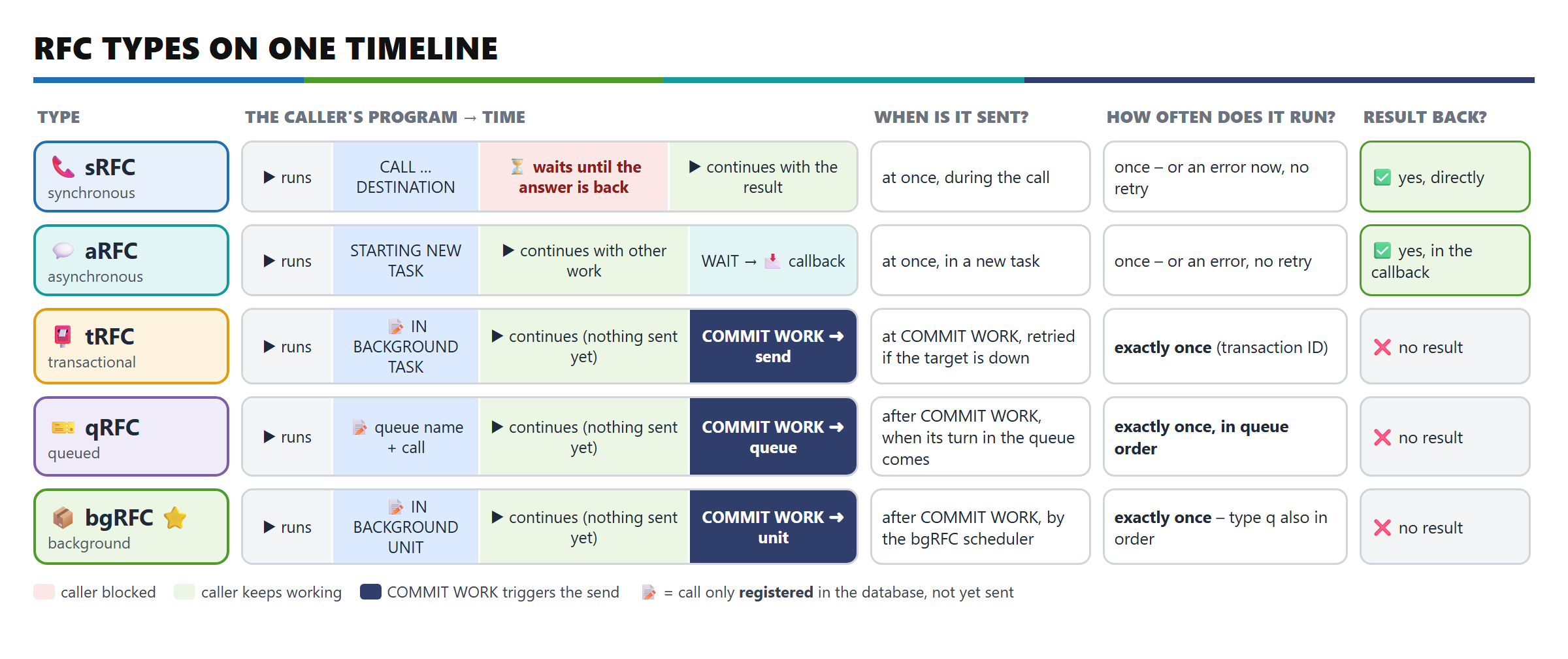
Type | Analogy | Statement | Caller | Guarantee | Monitor |
|---|---|---|---|---|---|
sRFC synchronous | Phone call | CALL FUNCTION … DESTINATION d | Waits for the result | Once or an error | – |
aRFC asynchronous | Text messages | … STARTING NEW TASK t [DESTINATION d] CALLING m ON END OF TASK | Continues; result in a callback | None | – |
tRFC transactional | Registered post |
| Continues; call sent at commit | Exactly once, no result | SM58 |
qRFC queued | Numbered tickets | tRFC + | Continues | Exactly once, in order | SMQ1 / SMQ2 |
bgRFC background | Parcel service |
| Continues | Exactly once (in order for type q) | SBGRFCMON |
bgRFC is SAP's recommended successor of tRFC and qRFC; LDQ (Local Data Queue) is its pull-based sibling (2.11). Section 2.10 helps you choose.
2.4 Synchronous RFC (sRFC) – the phone call
Idea: the caller dials, the other side answers, and the caller waits on the line until it has the answer. The calling program stops at CALL FUNCTION … DESTINATION, the remote function module runs, and the program continues only when the results (or an error) are back.
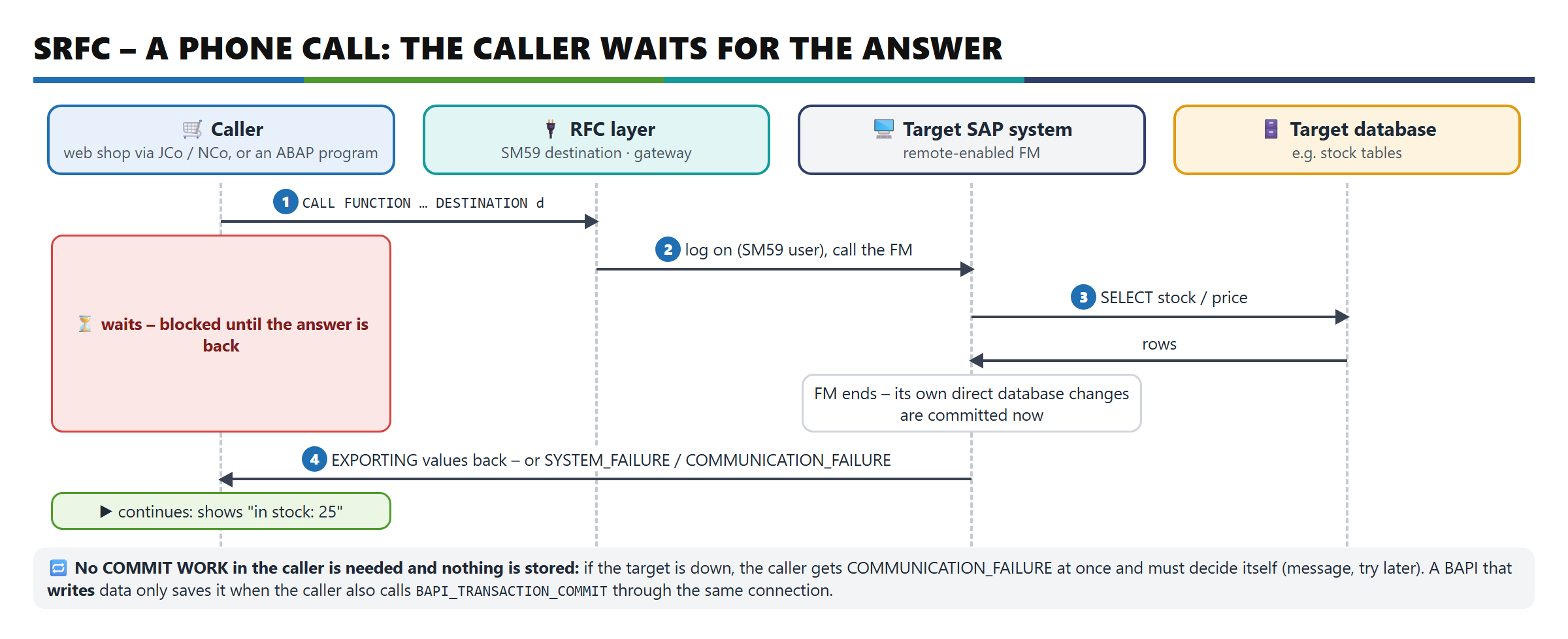
- Real use case: a web shop shows live price and stock. Its Java/.NET back end calls SAP through JCo/NCo, e.g.
BAPI_MATERIAL_AVAILABILITY, and shows "in stock" a moment later. SAP ↔ SAP example: a report reads employee data from the HR system (code below). - Commit: no
COMMIT WORKis needed to send. Direct database changes of the remote FM are committed when the call ends; a BAPI that writes data only saves it when the caller also callsBAPI_TRANSACTION_COMMITthrough the same destination (same open connection).
Code – synchronous RFC with exception handling
Every RFC can fail for technical reasons, so always handle the two standard exceptions SYSTEM_FAILURE (dump or error in the remote system) and COMMUNICATION_FAILURE (connection problem). The addition MESSAGE msg returns the error text.
|
Exception handling in three steps: declare the exception in the RFM's Exceptions tab → RAISE it at the right place → handle it in the client (sy-subrc). out->write( ) only works inside an ADT console class (IF_OO_ADT_CLASSRUN); in a report use WRITE.
- Errors and restart: nothing is stored, nothing is retried. The caller gets the exception at once and decides itself – show a message, or try again later. "Restart" simply means calling again.
- Monitoring: SM59 connection test of the destination, ST22 (dumps) and SM21 (system log) in the target, ST05 with RFC trace to see the calls.
- Pros/cons: simple and returns data at once · the caller is blocked, and the target must be up right now.
2.5 Asynchronous RFC (aRFC) – text messages
Idea: you send several text messages, carry on with your day and read the replies when they arrive. CALL FUNCTION … STARTING NEW TASK starts the function in a new session and returns at once; the result comes back later in a callback method. Many tasks can run at the same time.
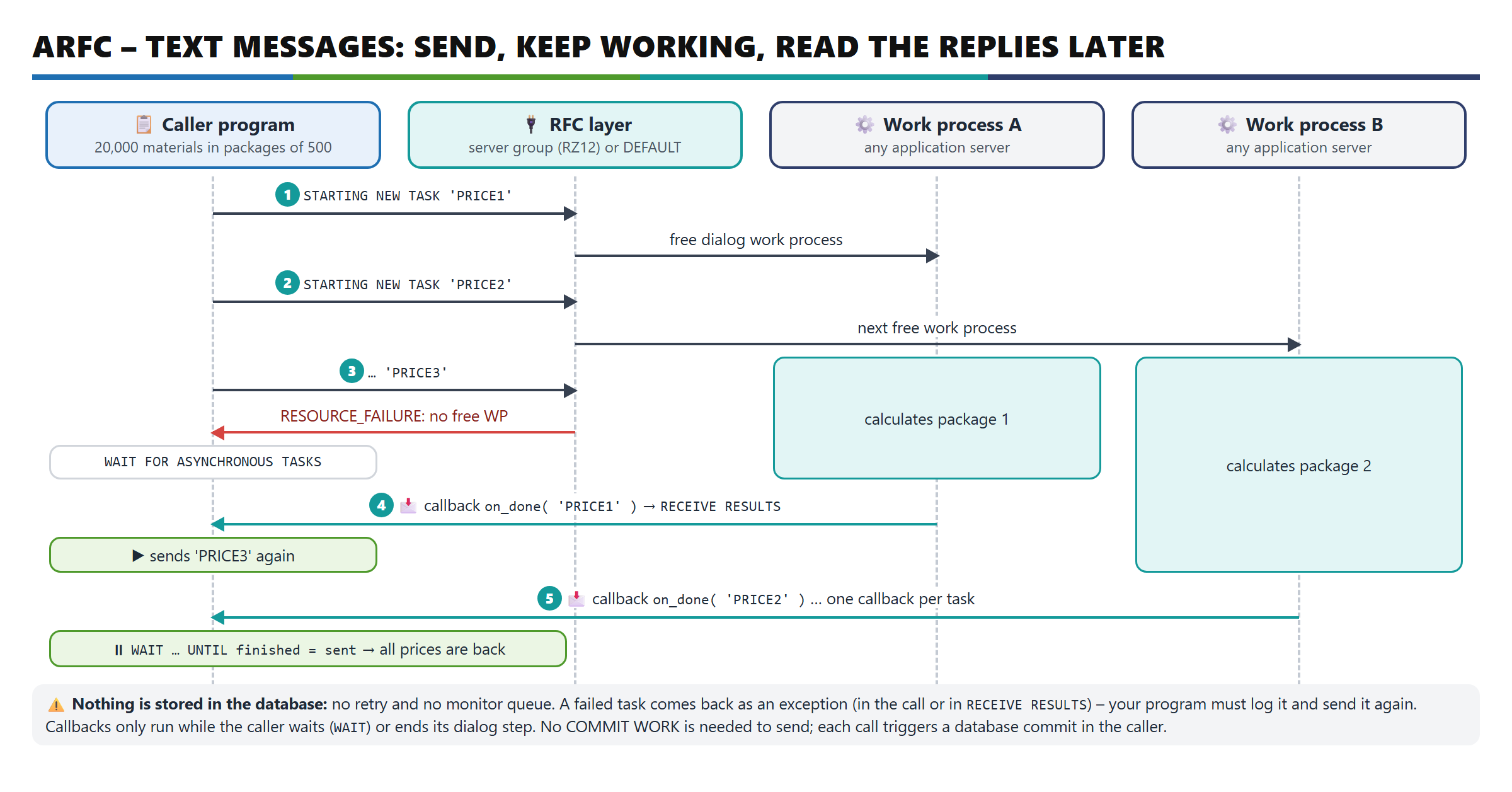
- Real use case: recalculating prices for 20,000 materials one by one takes hours. Split them into packages of 500 and start one task per package with
DESTINATION IN GROUP DEFAULT– the packages run in parallel dialog work processes on all application servers and the job finishes in minutes. Same pattern: calling two systems at once (credit check in one, stock check in another). - Commit: no
COMMIT WORKis needed to send; each aRFC call triggers a database commit in the caller.
Code – one task with a callback
|
- Results are only available after the callback ran –
WAIT FOR ASYNCHRONOUS TASKSbefore using them. Callbacks run only while the caller waits (WAIT) or when its dialog step ends. - Older form:
PERFORMING form ON END OF TASKwith a subroutine (works the same way).
Code – parallel processing with a server group
Parallel processing in your own system: DESTINATION IN GROUP DEFAULT (all application servers) or a server group from RZ12 spreads the tasks over free dialog work processes. Only with IN GROUP can the exception RESOURCE_FAILURE (no free work process) occur – with a named destination it is never raised.
|
- Errors and restart: nothing is stored in the database – no retry, no restart transaction. A failed task comes back as an exception (in the call or in
RECEIVE RESULTS); your program must log it and send it again. - Monitoring: SM50 (work processes of one server) and SM66 (all servers) while the tasks run, ST22 for dumps, RZ12 for the server group and its resource limits.
- Pros/cons: big speed-up through parallel work, results still come back · no delivery guarantee, and it can use up dialog work processes if the server group is not limited.
2.6 Callbacks – DESTINATION 'BACK'
Idea: during a phone call the other side asks, "Hold on – what is your customer number?" and you answer while the line is still open. Inside a function called by sRFC, the server can call a function back in the calling system with DESTINATION 'BACK'.
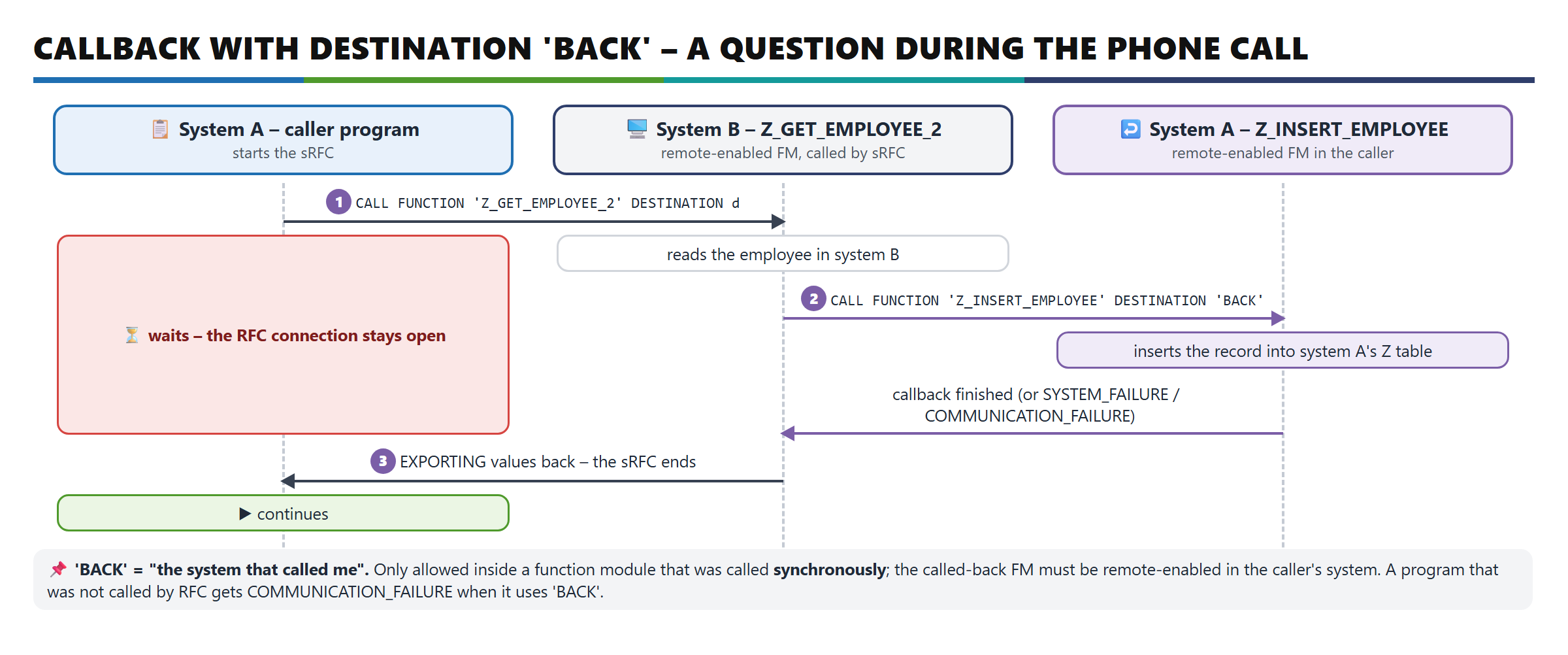
- Use case: the client calls
Z_GET_EMPLOYEE_2on the server, which reads the employee and callsZ_INSERT_EMPLOYEEback in the client to store a copy (or to write a log entry, or to fetch extra data that only the caller has) – all inside the same open call.
|
- Rules: 'BACK' is only allowed inside a function module that was called synchronously; the called-back FM must be remote-enabled in the calling system. A program that was not called by RFC gets
COMMUNICATION_FAILUREwhen it uses 'BACK'. - Errors, restart, monitoring: as for sRFC – the exceptions come back at once, nothing is stored.
- Pros/cons: two-way exchange in one call, no second destination needed · the caller stays blocked longer, and the logic becomes harder to follow.
2.7 Transactional RFC (tRFC) – registered post with tracking
Idea: at the post office counter your letter is recorded with a tracking number. If nobody is home, the postman tries again later; the letter is delivered exactly once, never twice – but you get no reply letter. In tRFC the call is first only registered in the database under a transaction ID (TID) and sent at COMMIT WORK; if the target is down, the system retries with the same TID.
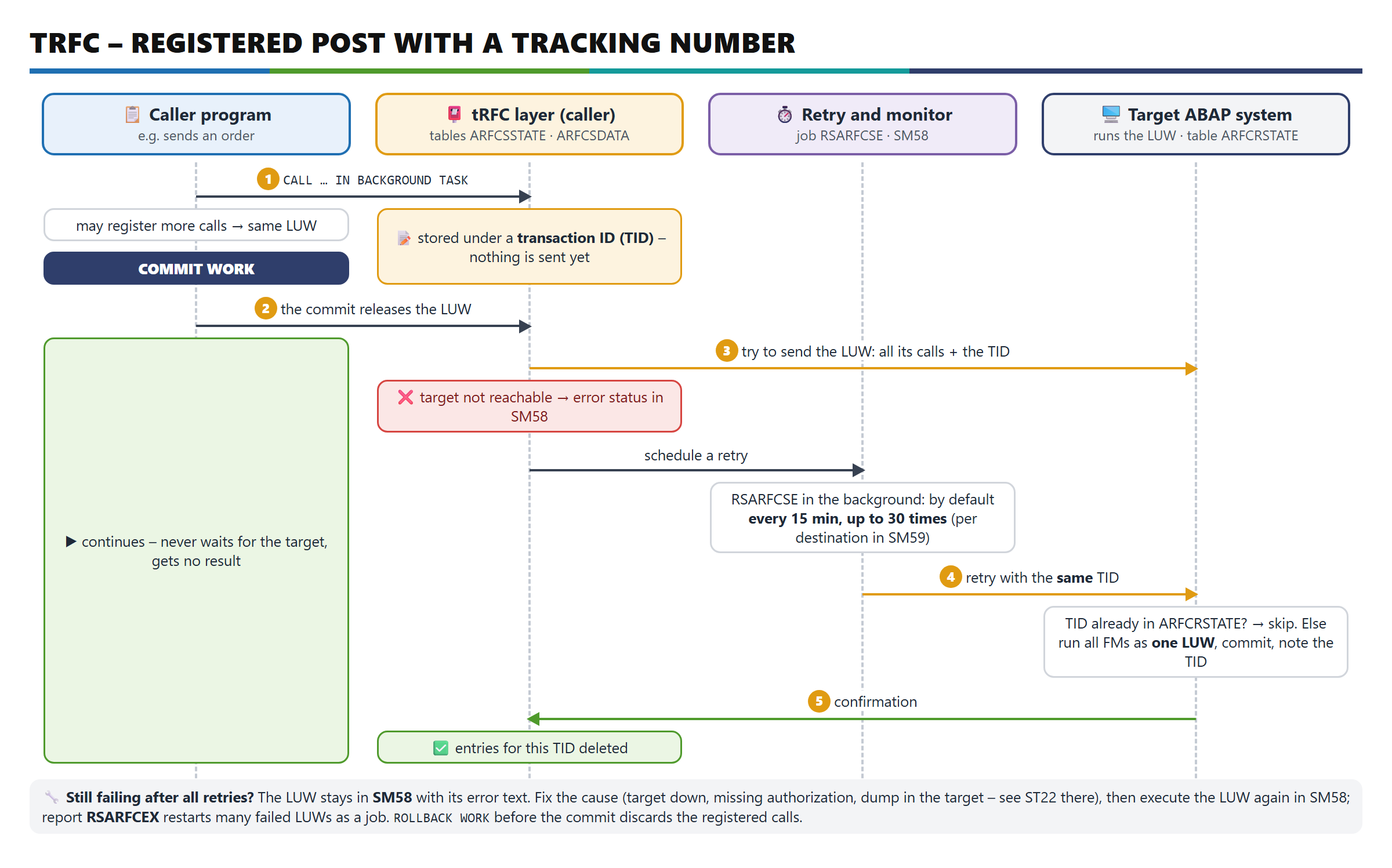
- Real use case: an SAP system sends each new sales order to an external warehouse system. The order must arrive exactly once – never lost when the warehouse is down for maintenance, never picked twice. ALE/IDoc uses the same technique: a tRFC port (Part 4) sends IDocs by tRFC.
Code
|
- 1 The call is only registered: FM name, destination and parameters are stored in the client's tables ARFCSSTATE / ARFCSDATA under a transaction ID (TID).
- 2 At
COMMIT WORKthe system sends all registered calls of this LUW – executed exactly once, in one LUW on the server, in the order they were registered.ROLLBACK WORKdiscards the registered calls. - 3 If the target is down, report RSARFCSE retries in the background – by default every 15 minutes, up to 30 times; the values can be changed per destination in SM59 (tRFC options).
- 4 The target remembers executed TIDs in table ARFCRSTATE, so a resent LUW is not posted twice. After the confirmation the sender deletes its entries.
- A tRFC call returns no results – only EXPORTING and TABLES parameters are passed; the caller is not waiting.
- With
AS SEPARATE UNITeach call gets its own TID and runs in its own RFC session. - Order: calls within one LUW run in registration order, but separate LUWs to the same destination have no guaranteed order – that is what qRFC adds.
Errors, restart and monitoring
- SM58 lists the LUWs that could not be delivered, with the error text (e.g. connection error, missing authorization, dump in the target). Fix the cause, then execute the LUW again in SM58.
- Report RSARFCEX restarts many failed LUWs at once – usually scheduled as a background job by Basis.
- Also useful: SM59 (connection test), ST22 and SM21 in the target system.
- Pros/cons: guaranteed exactly-once delivery that survives outages · no result, no order between LUWs, and failed LUWs need monitoring. SAP's ABAP documentation strongly recommends bgRFC instead of tRFC for new developments.
2.8 Queued RFC (qRFC) – numbered tickets at a counter
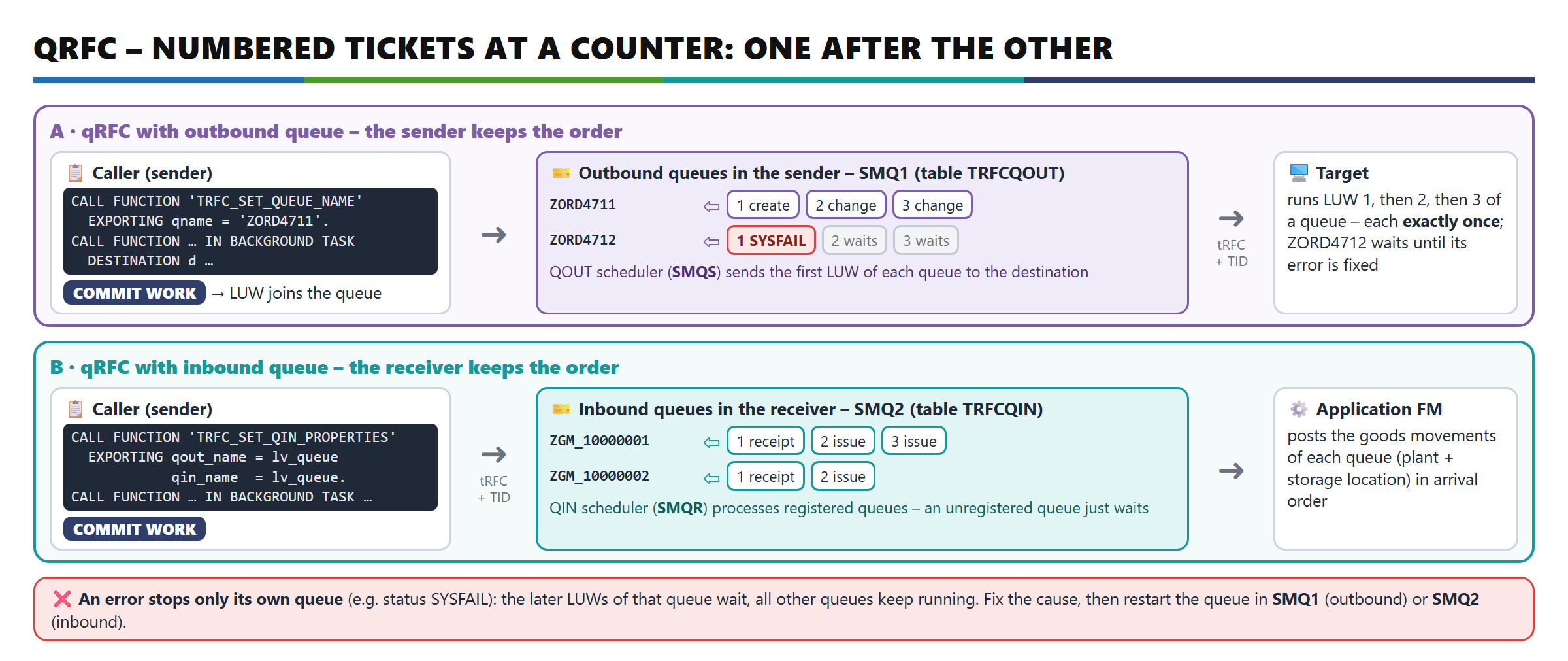
Idea: at a counter with numbered tickets, customer 2 is served only after customer 1. Other counters (other queues) work in parallel. If customer 1 has a problem, that counter stops until it is solved. qRFC is tRFC plus a queue name: all LUWs with the same queue name are executed exactly once in the order they were created.
Outbound queue | Inbound queue | |
|---|---|---|
Where is the queue? | In the sender | In the receiver |
Set by |
|
|
Monitor | SMQ1 (qRFC monitor for outbound queues) | SMQ2 (qRFC monitor for inbound queues) |
Scheduler | SMQS – QOUT scheduler, sends the LUWs to the destination | SMQR – QIN scheduler, processes the queues that are registered there |
Queue table | TRFCQOUT | TRFCQIN (plus TRFCQSTATE, TRFCQDATA) |
- Real use case (outbound): an order is created and changed twice within minutes; the warehouse system must never receive a change before the create. Queue name = order number, so the three calls of one order stay in sequence while different orders flow in parallel.
- Real use case (inbound): goods movements arrive for posting; queue per plant + storage location, so a goods issue is never posted before the receipt it depends on. SAP itself uses qRFC queues in many integrations – e.g. the SAP ERP ↔ SAP APO Core Interface (CIF), and SAP PI/PO keeps its messages in inbound queues (visible in SMQ2).
Code – outbound queue
|
Code – inbound queue
|
- Queue names: up to 24 characters, no lower case, no
*,&or%, not starting with a blank. Use your own prefix (e.g.ZORD) so your queues never clash with SAP's.
Errors, restart and monitoring
- A failed LUW stops its queue (status e.g. SYSFAIL): the later LUWs of that queue wait, all other queues keep running. Read the error in SMQ1/SMQ2, fix the cause, then restart (unlock) the queue there. Delete an LUW only when the business agrees – the later LUWs may depend on it.
- Queues that hang in status READY often point to scheduler problems: check SMQS (outbound) or SMQR (inbound – is the queue registered?).
- Pros/cons: exactly once and in order, while other queues run in parallel · one error blocks the whole queue, and qRFC needs more monitoring. SAP strongly recommends not using qRFC in new applications – use bgRFC type q.
2.9 Background RFC (bgRFC) – the modern way
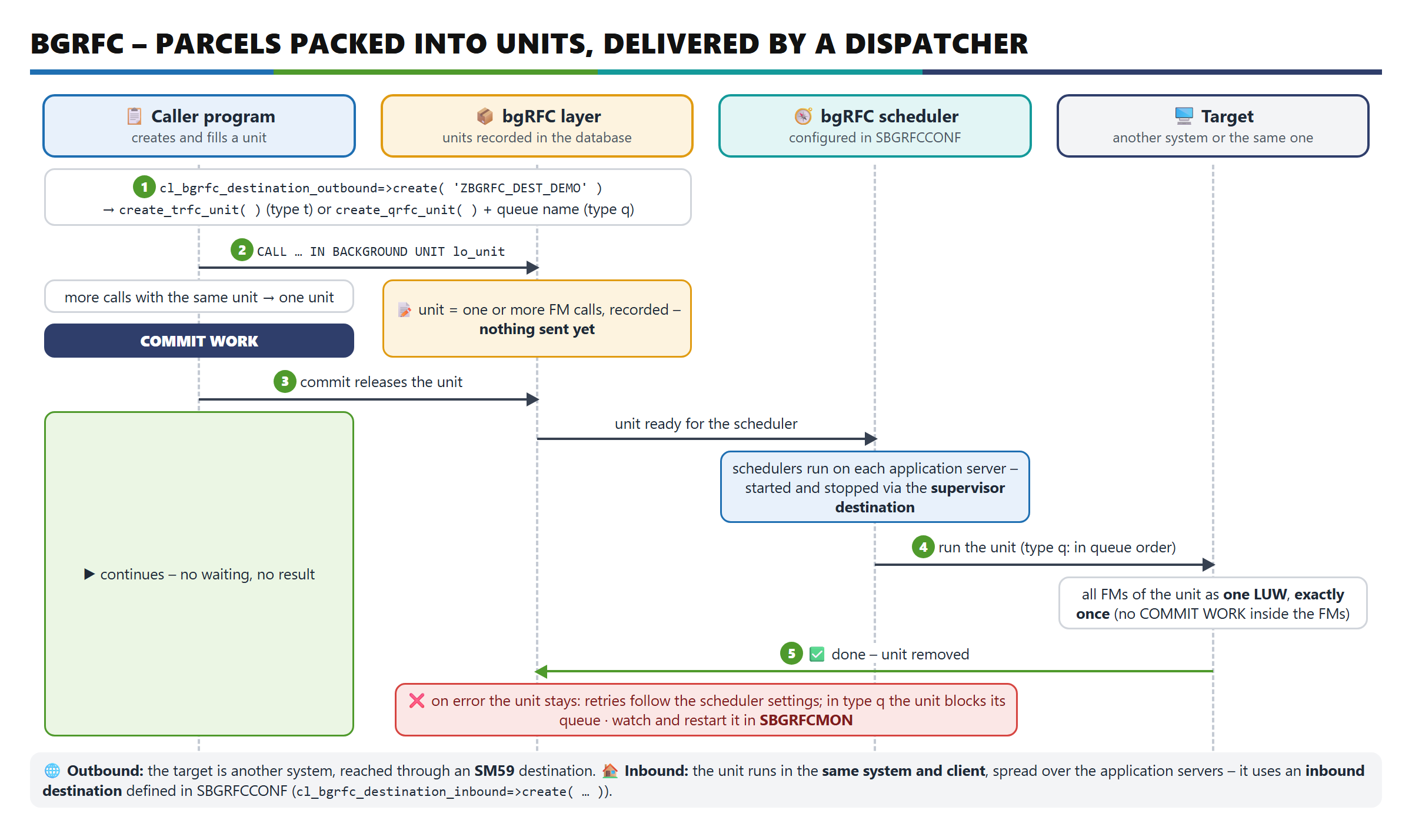
Idea: a modern parcel service. You pack one or more items into a parcel (unit) and hand it over; a dispatcher (the bgRFC scheduler) delivers it exactly once. Parcels with the same label (queue) are delivered in order. bgRFC records the calls in the database and the scheduler executes them later – it is SAP's enhanced successor of tRFC and qRFC.
Units – inbound and outbound
- A unit bundles one or more function module calls; it is transferred and executed as a whole, or it waits. The unit object implements interface
IF_BGRFC_UNITand knows the destination, the type and the queues. - Outbound – the unit is executed in another system; it is recorded in the calling system and sent through an SM59 destination.
- Inbound – the unit is executed in the same system and client, spread over the application servers. Use it to decouple heavy follow-up work from the user's transaction.
- Out-in – both combined: recorded in the sender and again in the receiver (more database load).
Type t and type q
Type t (transactional) | Type q (queued) | |
|---|---|---|
Guarantee | Exactly once, in any order | Exactly once, in the order of creation – per queue |
Create the unit | create_trfc_unit( ) |
|
Replaces | tRFC | qRFC |
Note | Independent units can run in parallel | A unit in several queues waits for all of them – a synchronization point between those queues |
Code
|
|
|
- As with tRFC, only EXPORTING and TABLES values are passed – no result comes back. The called FMs must be remote-enabled and must not execute
COMMIT WORKorROLLBACK WORK. - If the same LUW also registers update function modules (
IN UPDATE TASK), the bgRFC units run only after those updates.
Configuration – SBGRFCCONF and the RFC destination prerequisite
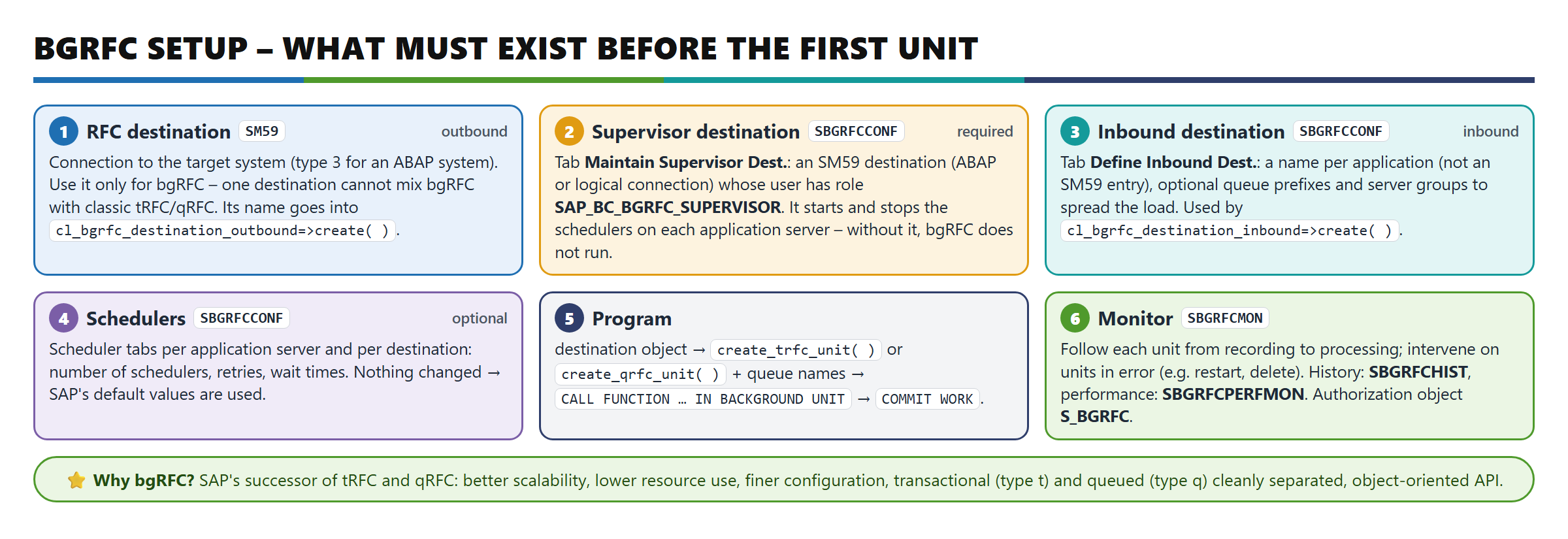
Object | Where | What it does |
|---|---|---|
RFC destination (outbound) | SM59 | Connection to the target, e.g. type 3 for an ABAP system. Its name is passed to |
Supervisor destination | SBGRFCCONF, tab Maintain Supervisor Dest. | Required – without it bgRFC does not run. An SM59 destination (ABAP or logical connection) whose user has role SAP_BC_BGRFC_SUPERVISOR; it starts and stops the schedulers on each application server |
Inbound destination | SBGRFCCONF, tab Define Inbound Dest. | Name used by |
Schedulers | SBGRFCCONF, scheduler tabs | Per application server and per destination: number of schedulers, retries, wait times. If nothing is changed, SAP's default values apply |
- Authorization object S_BGRFC protects the configuration and the intervention functions of the monitor.
Errors, restart and monitoring
- SBGRFCMON – the bgRFC monitor: follow every unit from recording to processing, see the error of a failed unit and intervene (e.g. restart or delete it; the exact functions depend on the release – check in your system).
- A failed unit stays recorded; the scheduler retries it according to the scheduler settings. In type q a failed unit blocks its queue, like in qRFC.
- SBGRFCHIST – history of processed units · SBGRFCPERFMON – performance monitor.
Why bgRFC replaces tRFC and qRFC
- SAP's documentation calls bgRFC the enhanced successor of tRFC and strongly recommends it instead of tRFC; for new applications it recommends not using qRFC.
- Advantages: better scalability and lower resource use, finer configuration (schedulers per server and destination), a clean split of transactional (type t) and queued (type q) processing, and an object-oriented ABAP API.
- Real use case: a new S/4HANA interface sends delivery confirmations to a warehouse system – instead of qRFC, it uses bgRFC type q with one queue per delivery. Inside one system, an inbound type t unit creates follow-up documents after the user's save, without making the user wait.
- In ABAP Cloud (SAP Business AI Platform, ABAP environment, S/4HANA Cloud, and on-premise from release 2023) the Background Processing Framework (bgPF,
CL_BGMC_PROCESS_FACTORY) gives an easy API on top of bgRFC – check its availability in your system. - Pros/cons: exactly once (and in order with type q), scalable, configurable, the recommended technique · needs the SBGRFCCONF setup first, returns no result, and one destination cannot be shared with classic tRFC/qRFC.
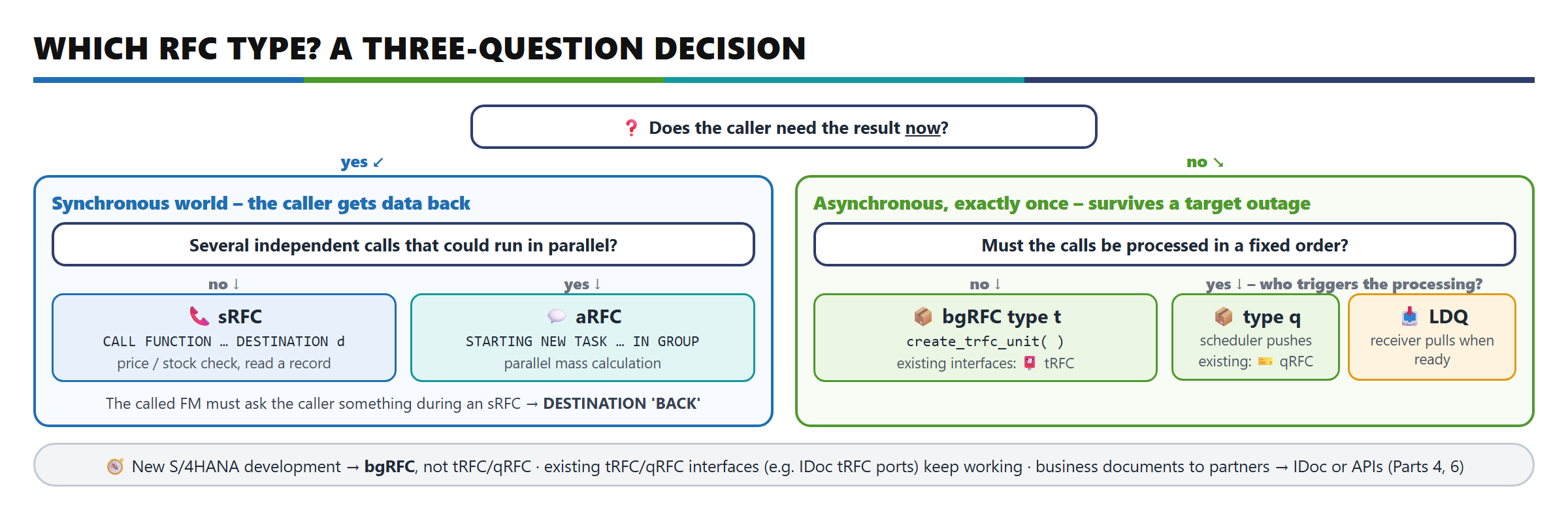
2.10 Choosing an RFC type
Type | Caller waits? | Delivery | Order | Result | Restart / monitor | Typical use |
|---|---|---|---|---|---|---|
sRFC | Yes | Once or an error | – | Yes | Call again · SM59, ST22 | Read data now: price, stock, master data |
aRFC | No | Once or an error | – | Yes, callback | Own logic · SM50/SM66 | Parallel processing, several systems at once |
BACK | Yes | As sRFC | – | Yes | As sRFC | Server asks the caller during an sRFC |
tRFC | No | Exactly once | No | No | SM58, RSARFCEX | Existing interfaces, IDoc tRFC ports |
qRFC | No | Exactly once | Per queue | No | SMQ1/SMQ2, SMQS/SMQR | Existing sequenced interfaces (CIF, PI) |
bgRFC | No | Exactly once | Type q: per queue | No | SBGRFCMON | All new asynchronous RFC |
2.11 Local Data Queue (LDQ)
LDQ is the pull variant of background communication: an application records data in a queue, and the receiver collects it itself when it is ready (pull principle), instead of a scheduler pushing it (bgRFC). Each queue is read exactly once, in the order of recording (first in, first out). LDQ replaces the old "qRFC No-Send" scenario. The API is object-oriented – CL_LDQ_APPLICATION is the factory for the LDQ writer and reader objects (e.g. CL_LDQ_READER); its methods need an explicit COMMIT WORK, except CONFIRM_QUEUE_UNITS, which commits implicitly. Monitor: SLDQMON. You rarely write LDQ code yourself – check in your system which applications use it.
Part 3 – BAPI (Business Application Programming Interface)
A BAPI is a remote-enabled function module that implements a method of a business object in the Business Object Repository (BOR), with a released, stable interface. Example: business object Bank (object type BUS1011), method Create → function module BAPI_BANK_CREATE, which writes table BNKA.
- For an ABAP developer a BAPI is an RFM you call with CALL FUNCTION; for a Java/.NET developer it is an API method of a business object, called through a connector.
- Every BAPI is an RFM, but not every RFM is a BAPI. Both can be called from SAP and non-SAP systems.
- Typical scenario: SAP is implemented at a company (Customer A); its business partners' Java or .NET applications create data in SAP by calling the BAPIs described in a technical specification (business object, method, parameters).
RFM (remote-enabled FM) | BAPI | |
|---|---|---|
What | Any function module marked remote-enabled | RFM that implements a BOR business object method |
Interface | Can change between releases | Released and kept stable by SAP |
Rules | Pass by value | Plus BAPI standards: RETURN, no commit, no dialog, BAPI* types |
Found in | SE37 | BAPI Explorer (transaction BAPI), BOR (SWO1) |
Callers | SAP and non-SAP | SAP and non-SAP |
3.1 Finding a BAPI
- Transaction BAPI (BAPI Explorer): browse by application area → business object → methods; shows the function module, documentation and test.
- From a transaction: 1 SE93 → main program of the transaction · 2 package of that program (SE38/SE80 → Attributes) · 3 business object types of that package (SE80 / SWO1).
- Example FI01 (Create Bank) → program SAPMF02B → object type BUS1011 Bank → methods Create
BAPI_BANK_CREATE, ChangeBAPI_BANK_CHANGE, GetListBAPI_BANK_GETLIST, GetDetailBAPI_BANK_GETDETAIL.
- Example FI01 (Create Bank) → program SAPMF02B → object type BUS1011 Bank → methods Create
- Or simply search SE37 for
BAPI_*<object>*.
BAPI | Transaction / object |
|---|---|
| FI01 – bank master |
BAPI_MATERIAL_SAVEDATA | MM01/MM02 – material master (create and change) |
BAPI_SALESORDER_CREATEFROMDAT2 | VA01 – sales order |
| ME21N/ME22N/ME23N – purchase order |
BAPI_EMPLCOMM_CREATE | PA30 – HR infotype 0105 (communication); PA38 is mass actions |
| End the LUW after BAPI calls |
3.2 Calling a standard BAPI correctly
- Check RETURN (BAPIRET2 structure or table): any message of type E or A = failure.
- BAPIs never commit. After success call
BAPI_TRANSACTION_COMMITwithwait = 'X', after an errorBAPI_TRANSACTION_ROLLBACK. Some BAPIs have a TESTRUN parameter for a simulation. - Change BAPIs pair each data structure with an X structure (CLIENTDATA + CLIENTDATAX, POITEM + POITEMX): 'X' marks the fields to change, so empty fields are not overwritten.
- Locks: most BAPIs lock internally. HR infotype BAPIs are an exception – call
BAPI_EMPLOYEE_ENQUEUEbefore andBAPI_EMPLOYEE_DEQUEUEafter. - Test in SE37: Function Module → Test → Test Sequences – run the BAPI and BAPI_TRANSACTION_COMMIT together.
|
3.3 Custom BAPI
Use case: SAP screens and a non-SAP application should both create records in a Z table through one API.
# | BAPI function module standard |
|---|---|
1 | Name |
2 | Remote-enabled |
3 | RETURN parameter of type BAPIRET2 (BAPIRET1, BAPIRETURN, BAPIRETURN1 are older types) |
4 | Parameters typed with dictionary structures/fields whose names start with |
5 | Pass by value |
6 | No |
7 | No dialogs: no MESSAGE to the screen, CALL SCREEN, SUBMIT or CALL TRANSACTION – errors go into RETURN |
8 | Transportable package and change request |
- Procedure: 1 create the FM following these standards and release it (SE37 → Function Module → Release) · 2 create a business object type in the Business Object Builder, SWO1 (letter O) and add the FM as an API method · 3 set the release status: Edit → Change release status → Object type → To implemented / To released (also for the method) · 4 check it in the BAPI Explorer (transaction BAPI).
- Modifying a standard BAPI: changing its parameters or code is a modification. SAP's way: create a subtype of the business object, redefine the inherited method there (often with a copied FM); the redefined BAPI exists only on the subtype. Example:
BAPI_COMPANYCODE_GETLIST. Prefer BAdIs and the extension parameters below. - Business object types, statuses (modeled/implemented/released) and SWO1 are also used by classic workflow – see page 12 Workflow.
- In S/4HANA / clean core: new custom APIs are built as RAP business objects exposed via OData (page 08, RAP › 11 · Files, Custom Entities & Integration), and SAP's released RAP BOs (via EML) and released APIs replace many BAPIs. Released BAPIs are still allowed; customer/vendor BAPIs are replaced by Business Partner APIs.
3.4 BAPI extension – ExtensionIn and ExtensionOut
Custom fields (appended to a standard table with .APPEND/.INCLUDE) can be passed through a standard BAPI using two table parameters of type BAPIPAREX:
- ExtensionIn – data goes into SAP: the caller passes values for custom fields (create/change BAPIs, e.g.
BAPI_SALESORDER_CREATEFROMDAT2,BAPI_PO_CREATE1). - ExtensionOut – data comes out of SAP: the BAPI returns custom field values (read BAPIs, e.g.
BAPI_PO_GETDETAIL1).
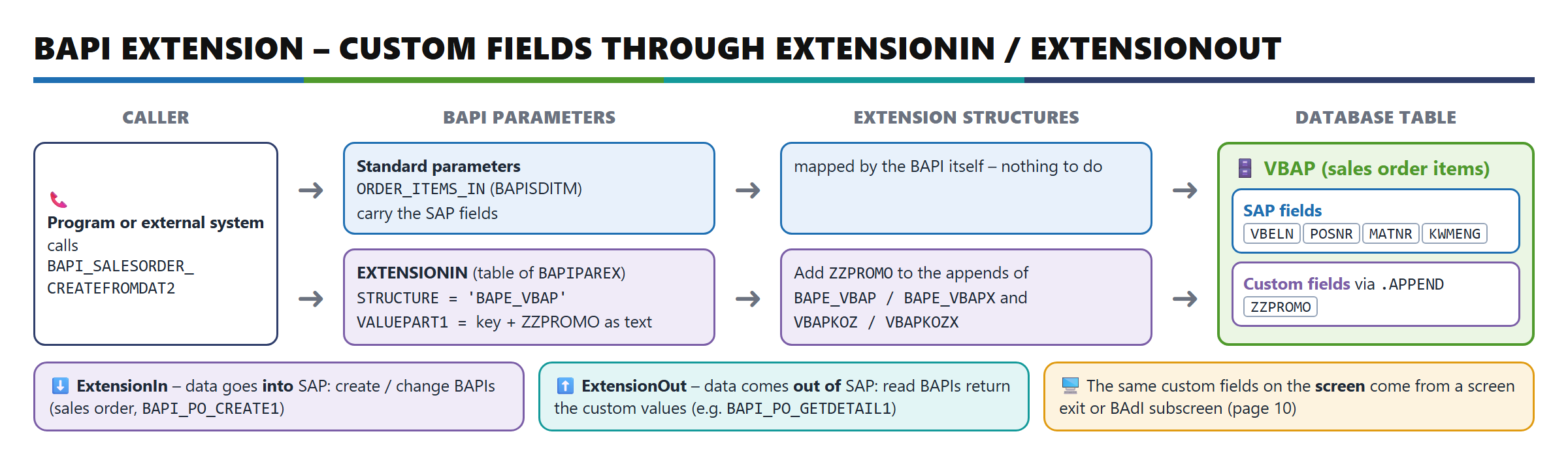
BAPIPAREX has STRUCTURE (name of the extension structure) and VALUEPART1–4 (the data as text). Add your fields to the BAPI's extension structures, e.g. BAPE_VBAP / BAPE_VBAPX (and VBAPKOZ / VBAPKOZX) for sales order items, BAPI_TE_MEPOITEM / BAPI_TE_MEPOITEMX for PO items. Where SAP doesn't move the data automatically, an extension BAdI does it.
|
This direct move only works for character-type fields; for other types use cl_abap_container_utilities=>fill_container_c. Screen fields for the same custom fields come from customer exits/BAdIs (page 10 Enhancements).
Part 4 – ALE and IDoc
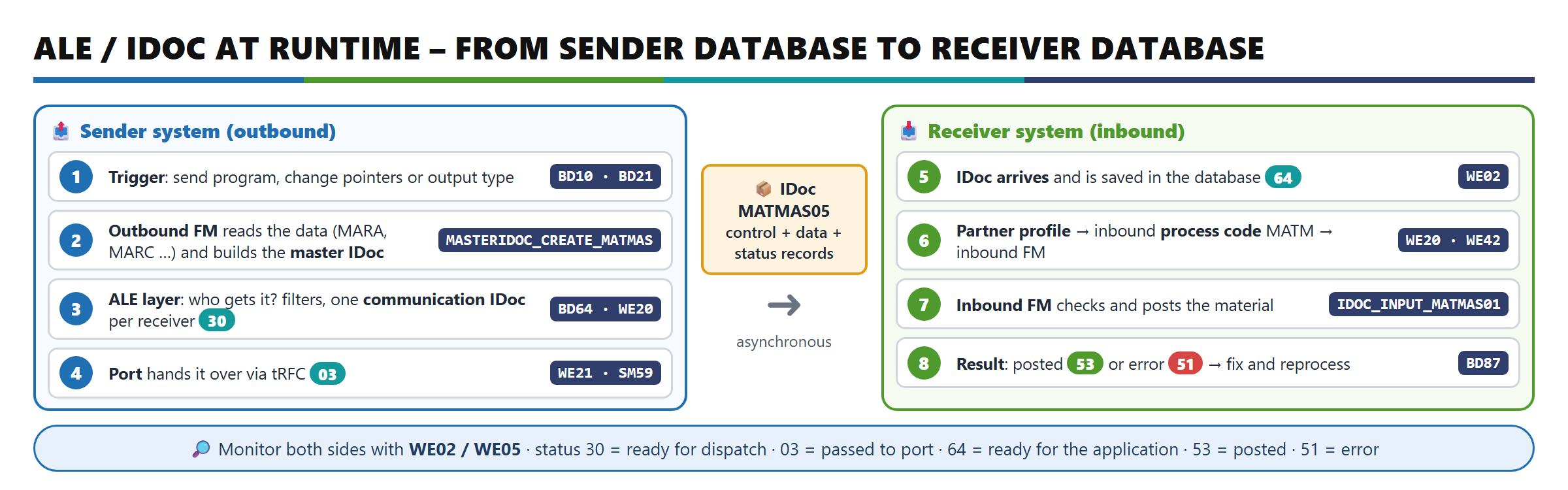
An IDoc (Intermediate Document) is a standard container that carries one business document – master data (material, customer, vendor: read often, changed rarely), transaction data (purchase order, sales order, invoice: created daily) or customer-specific data (Z tables) – from one system to another, asynchronously.
- ALE (Application Link Enabling) – SAP's framework to configure, create, distribute and post IDocs between systems, usually SAP ↔ SAP (directly or through middleware).
- EDI (Electronic Data Interchange) – exchange with business partners in standard formats (EDIFACT, ANSI X12). An EDI subsystem or middleware converts IDoc ↔ EDI format. Both ALE and EDI carry IDocs.
4.1 IDoc building blocks
Object | Meaning | Tcode |
|---|---|---|
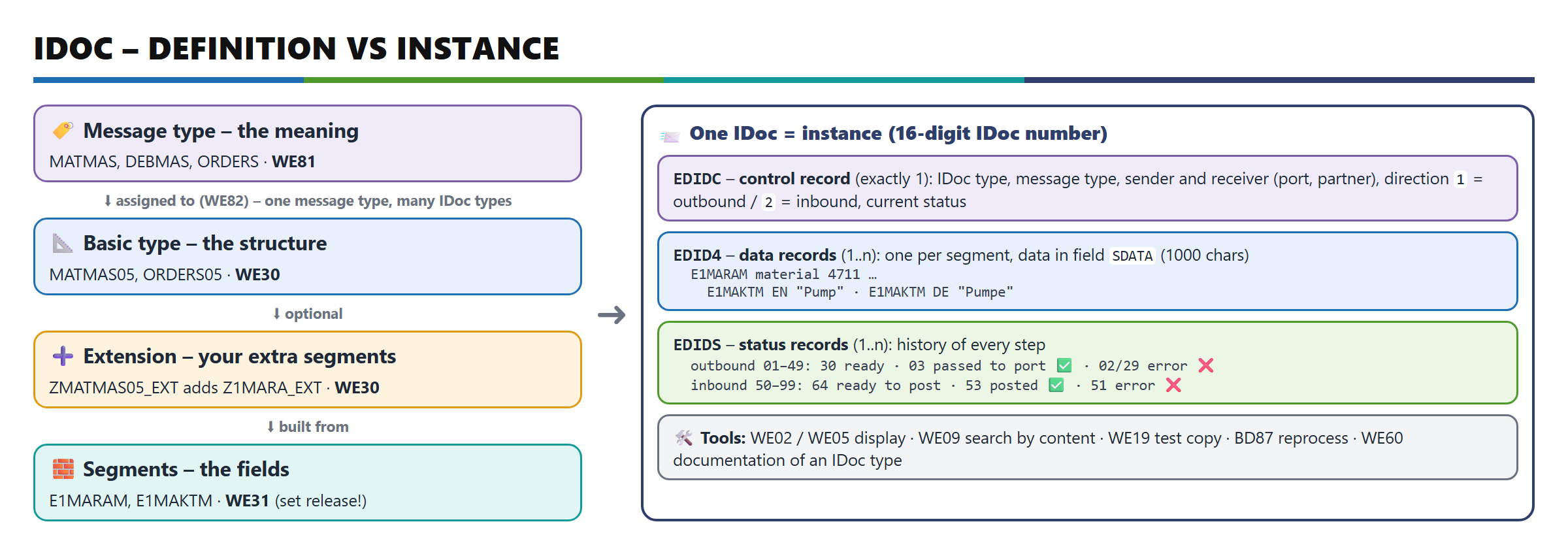
Message type | What the data means – MATMAS (material), DEBMAS (customer), CREMAS (vendor), ORDERS (purchase order), Z… for custom data. Table EDMSG (client-independent) | WE81 |
Basic type (IDoc type) | The structure: a tree of segments; design-time template. One message type can have several IDoc types (versions, e.g. MATMAS01 … MATMAS05, DEBMAS07, ORDERS05) | WE30 |
Extension | Adds custom segments to a basic type (custom Z basic types are also possible) | WE30 |
Segment | A group of fields (E1MARAM = general material data); set the release before use | WE31 |
Message type ↔ IDoc type | Assignment (incl. extension) | WE82 |
IDoc | One instance of an IDoc type, with a 16-digit IDoc number | WE02 |
Record | Table | Content |
|---|---|---|
Control record (one) | EDIDC | IDoc number, message and IDoc type, sender and receiver (partner, port), direction 1 = outbound / 2 = inbound, current status |
Data records (many) | EDID4 | One per segment; the segment data is in field SDATA (1000 characters). EDID2/EDID3 are from old releases |
Status records (many) | EDIDS | One per processing step or error – the IDoc's history |
4.2 Configuration objects
Object | Purpose | Tcode | Notes |
|---|---|---|---|
Logical system | Unique name of a sender/receiver client, e.g. | BD54 / SALE | Client-independent; tables TBDLS/TBDLST. Assigned to a client in SCC4 |
RFC destination | How to reach the receiver (host, client, logon) | SM59 | Table RFCDES |
Port | Technical channel to the receiver: tRFC (on top of an RFC destination; name generated, A000000001), File, XML HTTP | WE21 | Not a TCP port number. Table EDIPO (client-independent) |
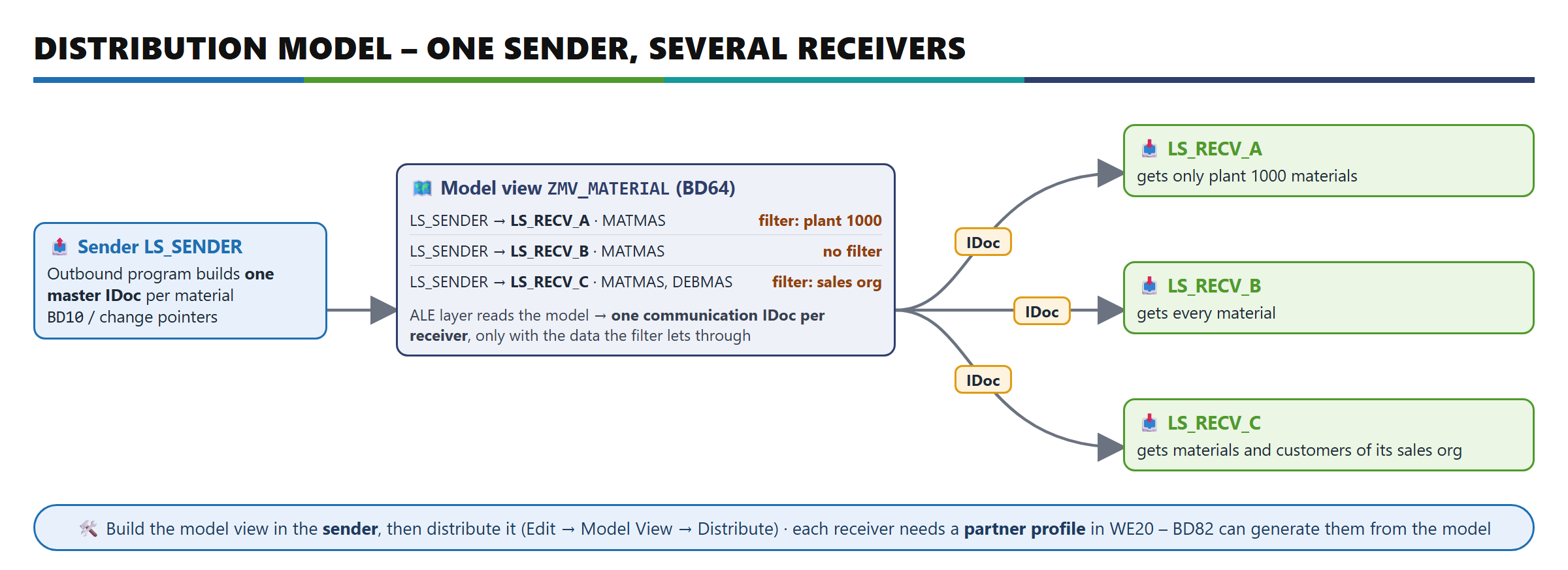
Distribution model (model view) | Who sends which message types to whom, with filters | BD64 / SALE | Created in the sender, then distributed (Edit → Model view → Distribute) |
Partner profile | Per partner logical system: outbound parameters (message type, port, IDoc type, collect/immediate) or inbound parameters (message type, process code) | WE20 | Client-dependent; tables EDPP1 (general), EDP13 (outbound), EDP21 (inbound). BD82 generates them from the model |
Inbound process code | Points to the inbound function module (or workflow) | WE42 | SAP's habit: first letters of the message type (MATM, DEBM, ORDE) – not a rule. Table TEDE2 |
Outbound process code | Points to the FM that creates the IDoc from message control output | WE41 | Used with output types (NACE), e.g. ORDERS from a purchase order. Table TEDE1 |
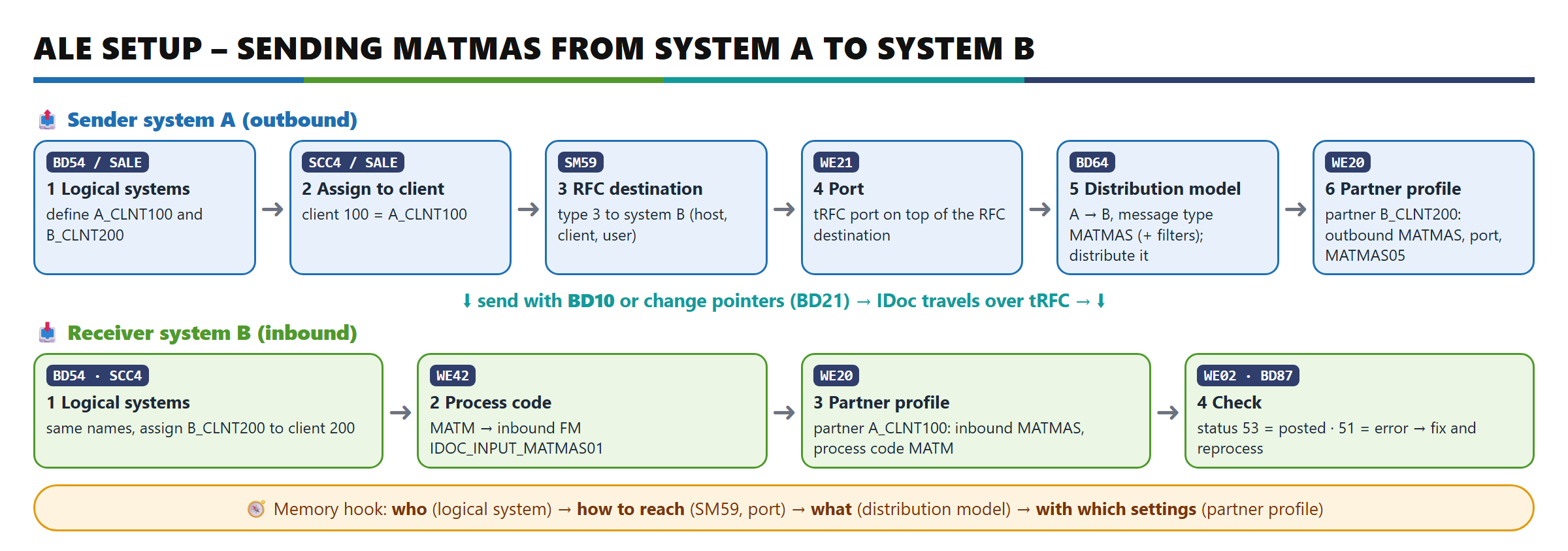
Practical: send material master from client 100 to client 200 (same server)
- 1 SALE/BD54: create logical systems for both clients · 2 SALE/SCC4: assign them to clients 100 and 200.
- 3 SM59: RFC destination to client 200 · 4 WE21: tRFC port using that destination.
- 5 BD64 (client 100): model view sender → receiver with message type MATMAS; distribute it – it then shows in BD64 of client 200.
- 6 WE20 (client 100): partner profile for the receiver logical system – outbound MATMAS, port, MATMAS05.
- 7 WE20 (client 200): partner profile for the sender logical system – inbound MATMAS, process code MATM.
- 8 BD10 (client 100): send a material · 9 WE02/WE05: outbound status 03 in 100, inbound status 53 in 200.
4.3 Outbound processing – how IDocs are created
Way | How | Tcodes |
|---|---|---|
Send program | Select objects and send them now | BD10 material, BD12 customer, BD14 vendor (BD11 = get material) |
Change pointers | Changes to master data are logged and turned into IDocs periodically | BD61 activate globally, BD50 per message type, BD52 relevant fields, BD21 create IDocs (report RBDMIDOC), table BDCP2 |
Message control | An output type of a document (PO, billing) with medium EDI/ALE creates the IDoc | NACE, outbound process code WE41 |
Own program | Build control + data records and call | – |
- Partner profile "Transfer IDoc immediately" vs "Collect IDocs" – collected IDocs wait in status 30 and are sent with WE14 (report RSEOUT00).
|
4.4 Inbound processing
- The IDoc arrives (status 50/64) → partner profile gives the process code → WE42 links it to the inbound function module (naming habit
IDOC_INPUT_<message type>, e.g.IDOC_INPUT_MATMAS01) → the FM posts the data and writes status 53 (posted) or 51 (error). - Partner profile "Trigger immediately" posts at once; "Trigger by background program" leaves the IDoc in status 64 for BD20 / report RBDAPP01 (scheduled job) – better for volume.
- For a custom inbound FM: WE57 assigns the FM to message type + IDoc type, BD51 registers the FM's input type (mass processing or not), WE42 creates the process code.
|
For standard objects the inbound FM calls a BAPI or the application's posting logic; a real FM also fills WORKFLOW_RESULT and RETURN_VARIABLES like the SAP template.
4.5 Creating a custom IDoc
Step | Tcode | Side |
|---|---|---|
1 Create the segment(s) and set release | WE31 | Both |
2 Create the basic type from the segments (and release it) | WE30 | Both |
3 Create the message type | WE81 | Both |
4 Assign message type to basic type | WE82 | Both |
5 Outbound program with MASTER_IDOC_DISTRIBUTE; model view and partner profile | SE38, BD64, WE20 | Sender |
6 Inbound FM; assign it (WE57), register it (BD51), process code (WE42), partner profile | SE37, WE57, BD51, WE42, WE20 | Receiver |
The segment/type definitions are needed in both systems (transport them).
4.6 IDoc extension
To send custom fields with a standard IDoc (e.g. MATMAS05) you extend it instead of copying it:
- 1 WE31: create segment
Z1MARA_EXTwith the custom fields. - 2 WE30: create extension
ZMATMAS05_EXTfor basic type MATMAS05, insert Z1MARA_EXT below its parent segment (E1MARAM). - 3 WE82: assign message type MATMAS + basic type MATMAS05 + extension ZMATMAS05_EXT.
- 4 WE20: enter the extension in the partner profile's outbound parameters.
- 5 Fill the segment in a user exit or BAdI of the outbound processing (for MATMAS e.g. customer exit
EXIT_SAPLMV01_002in enhancement MGV00001) and read it in the inbound exit/BAdI of the receiver.
4.7 Testing and monitoring
Tcode | Use |
|---|---|
WE02 / WE05 | Display IDocs / IDoc lists (both show any IDoc, whether EDI or ALE) |
WE09 | Search IDocs by field content |
WE19 | Test tool: copy an existing IDoc, edit it, run inbound/outbound processing (also in debug) |
BD87 | Status monitor: reprocess IDocs in error after fixing the cause |
WE14 / BD20 | Send collected outbound IDocs / post inbound IDocs in status 64 |
WE60 | Documentation of an IDoc type (all segments and fields) |
SM58 | tRFC errors when IDocs could not reach the receiver |
Status | Direction | Meaning |
|---|---|---|
01 | Outbound | IDoc created |
30 | Outbound | Ready for dispatch (collected – send with WE14) |
02 / 29 | Outbound | Error passing data to port / error in ALE service (e.g. partner profile) |
03 | Outbound | Data passed to port OK |
12 | Outbound | Dispatch OK |
50 | Inbound | IDoc added |
56 | Inbound | IDoc with errors added (e.g. no partner profile) |
64 | Inbound | Ready to be passed to the application (BD20) |
51 | Inbound | Application document not posted – error |
53 | Inbound | Application document posted – success |
68 | Both | Error – no further processing (deleted/flagged) |
Outbound statuses use codes below 50 (mostly 01–42), inbound statuses 50 and above (mostly 50–75).
In S/4HANA / clean core: IDocs remain fully supported and common (EDI, ALE with ECC/EWM). For new integrations SAP prefers released APIs (OData, SOAP) and business events, usually through SAP Integration Suite.
Part 5 – Update function modules and the SAP LUW
Interfaces and BAPIs depend on the SAP LUW: all changes of one business transaction are saved together or not at all. Function modules in general are on page 04 Modularization; this part covers the update task.
- A normal FM writes to the database at each INSERT/UPDATE/DELETE.
- An update FM (processing type "Update Module" in SE37) called with
IN UPDATE TASKis only registered; atCOMMIT WORKall registered calls run together in the update work process as one database LUW. If one fails, all are rolled back.
|
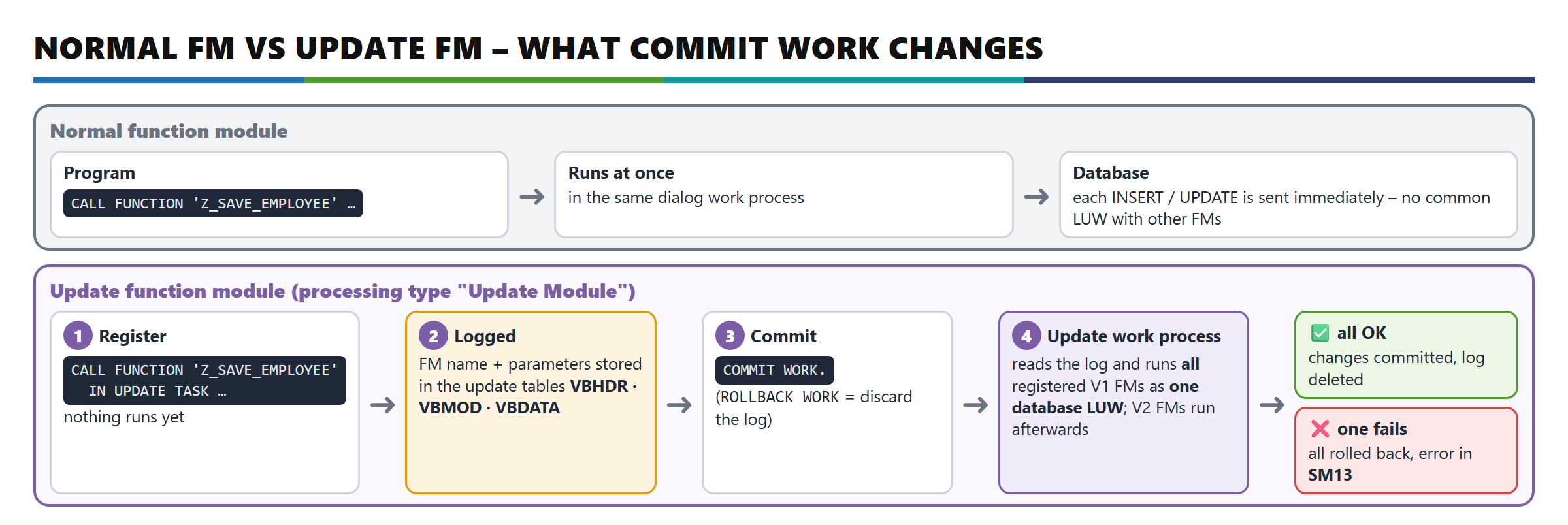
- Registered requests are stored in the update tables VBHDR, VBMOD, VBDATA (overview VBLOG, errors VBERROR) until the commit. Monitor and repeat failed updates in SM13.
SET UPDATE TASK LOCALruns the update FMs in the same dialog work process (used by BDC update mode L).PERFORM … ON COMMITruns a subroutine at commit time;ROLLBACK WORKdiscards all registered work.
Update type (SE37) | Priority | Meaning |
|---|---|---|
Start immediately | V1 | Time-critical; restartable in SM13 after an error |
Immediate start, no restart | V1 | Time-critical; cannot be restarted |
Start delayed | V2 | Less critical (statistics); runs after the V1 updates |
Collective run | V2 | Collected and executed later in one go by report RSM13005 |
SAP locks (ENQUEUE/DEQUEUE function modules of lock objects) protect data during the LUW – see page 02 Data Dictionary (lock objects).
Part 6 – OData, web services and middleware
- OData (REST/JSON over HTTP) – the protocol of Fiori apps and most S/4HANA APIs: see page 08 OData (SAP Gateway).
- SOAP and REST web services (SOAMANAGER, service consumers, ICF handlers): see page 09 Web Services.
- Middleware: SAP Integration Suite (Cloud Integration, formerly CPI) and SAP PI/PO route and map messages between SAP and other systems – IDocs, SOAP, REST, files. Third-party tools (MuleSoft, Boomi) play the same role.
Part 7 – Interview questions
Q1. What is the difference between inbound and outbound interfaces?
Inbound: data comes into SAP from any system. Outbound: data leaves SAP to any system – SAP or non-SAP.
Q2. What is RFC, and is it only for SAP-to-SAP?
A call of a remote-enabled function module in another system via an SM59 destination. No – non-SAP programs use RFC through JCo, NCo, the NW RFC SDK or PyRFC.
Q3. Explain the RFC types.
sRFC waits for the result; aRFC runs in parallel with a callback; tRFC is sent at COMMIT WORK, exactly once, no result (SM58); qRFC adds order via queues (SMQ1/SMQ2); bgRFC is the modern successor of tRFC/qRFC.
Q4. Which rules apply to a remote-enabled function module?
Remote-enabled attribute, pass by value, no generic types, no dialogs, handle SYSTEM_FAILURE and COMMUNICATION_FAILURE on the client side.
Q5. RFC vs BAPI?
A BAPI is an RFM that implements a method of a BOR business object, with a released stable interface, RETURN parameter and no commit. Every BAPI is an RFM, not every RFM is a BAPI; both serve SAP and non-SAP callers.
Q6. Why must you call BAPI_TRANSACTION_COMMIT?
BAPIs never commit, so several BAPI calls can form one LUW. Commit with wait = 'X' after checking RETURN; roll back if there is an E or A message.
Q7. What are ExtensionIn and ExtensionOut?
BAPIPAREX tables for custom fields: ExtensionIn passes custom field values into SAP (create/change), ExtensionOut returns them from SAP (read). Fields go into structures like BAPE_VBAP/BAPE_VBAPX.
Q8. Message type vs IDoc type vs extension?
Message type = meaning (MATMAS); IDoc (basic) type = structure of segments (MATMAS05); extension = extra custom segments added to a basic type. One message type can have several IDoc types.
Q9. What are the three record types of an IDoc?
Control record (EDIDC, one), data records (EDID4, one per segment, data in SDATA) and status records (EDIDS, processing history).
Q10. Which ALE configuration steps do you need?
Logical systems (BD54) and client assignment (SCC4), RFC destination (SM59), port (WE21), distribution model (BD64), partner profiles (WE20) in both systems, process code (WE42) on the receiver.
Q11. What are change pointers?
A log of master data changes that BD21 (RBDMIDOC) turns into IDocs. Activate with BD61 (global) and BD50 (per message type), choose fields in BD52; stored in BDCP2.
Q12. An inbound IDoc is in status 51 – what do you do?
Read the status message in WE02, fix the cause (master data, customizing, mapping), then reprocess in BD87; test fixes with WE19. Status 53 means posted.
Q13. How does tRFC guarantee "exactly once"?
The call is stored in the sender (ARFCSSTATE/ARFCSDATA) under a transaction ID and sent only after COMMIT WORK. If the target is down, RSARFCSE retries with the same TID; the target records executed TIDs in ARFCRSTATE and skips a TID it has already processed. After the confirmation the sender deletes its entries.
Q14. A tRFC or qRFC call is stuck – where do you look and what do you do?
tRFC: SM58 shows the LUW and its error; fix the cause and execute it again (RSARFCEX for many). qRFC: SMQ1 (outbound) or SMQ2 (inbound) – the failed LUW blocks only its own queue; fix it and restart the queue; check the schedulers in SMQS/SMQR. Also check SM59 (connection test) and ST22 in the target.
Q15. tRFC, qRFC or bgRFC for a new S/4HANA interface – and why?
bgRFC: SAP calls it the successor of tRFC and qRFC and recommends it for new developments. Type t when order does not matter, type q with a queue per business object when it does. It scales better, is configured in SBGRFCCONF and monitored in SBGRFCMON.
Q16. What must be set up before the first bgRFC call?
An SM59 destination for the target (outbound; not shared with classic tRFC/qRFC), a supervisor destination in SBGRFCCONF whose user has role SAP_BC_BGRFC_SUPERVISOR, an inbound destination in SBGRFCCONF for inbound units, optionally scheduler settings – then units appear in SBGRFCMON.
🏠 Start Here · ◀ 06 · Data Migration · 08 · OData ▶ · Sections: CORE ABAP | OOPS ABAP | ABAP on HANA | Clean Core | RAP | ABAP Points | SAP Fiori | SAPUI5 | Mobile Development (MDK) | BTP Foundations | BTP Development | CAP | SAP Build | ABAP on BTP | Integration Suite | SAP Business AI | SAP BASIS | Security | SAP SDLC
Functional: FICO ABAP | TRM ABAP | VIM | SAP BIS | SD ABAP | MM ABAP | PP ABAP | QM ABAP | PM ABAP | PS ABAP | EWM | TM ABAP | EHS ABAP | HR ABAP | BW | SAP MDG | SAP Analytics Cloud | SAP Ariba | SAP CX | SAP IBP