How SAP exposes business data to Fiori, mobile and other systems as OData services with SAP Gateway. The classic tool is the Service Builder (SEGW): you model entities, SEGW generates classes, and you code the CRUD-Q methods in ABAP. New S/4HANA development uses RAP (see the RAP section), but SEGW services are everywhere in existing systems and a favourite interview topic. Running example: a demo service ZJP_DEMO_SRV with entity set CarrierSet (table SCARR) and FlightSet (SPFLI).
Part 1 – REST and OData basics
1.1 APIs and web APIs
An API is a set of rules that lets two applications talk to each other (example: an app asks a weather API for today's forecast). The API is the contract between them; neither side needs to know how the other is built.
API style | Format | Notes |
|---|---|---|
SOAP | XML envelope | Strict contract (WSDL), WS-Security; common in older B2B integration (see page 09 Web Services) |
RPC (XML-RPC, JSON-RPC, SAP RFC) | XML / JSON / binary | Call a remote procedure by name |
WebSocket | usually JSON | Two-way, long-lived connection (push, chat) |
REST | JSON, XML … | Most popular style for web APIs; OData is built on REST |
- Remote API = called over any network. Web API = called over HTTP on the web. All web services are APIs, but not all APIs are web services.
1.2 REST – an architectural style
REST (Representational State Transfer) is an architectural style, not a protocol. The server holds resources; the client reads or changes their representations (JSON, XML) with HTTP methods. A service that follows the REST rules is called RESTful. HTTP itself is the stateless protocol underneath.
REST constraint | Meaning |
|---|---|
1. Client–server | Client and server are independent; the client only needs the URI of the resource |
2. Stateless | Every request carries all information it needs; the server keeps no session between requests |
3. Cacheable | Responses say whether they may be cached (e.g. static images, $metadata) |
4. Layered system | Proxies, load balancers, gateways can sit in between without client or server noticing |
5. Uniform interface | Resources identified by URIs; standard operations (GET/POST/PUT/PATCH/DELETE); self-describing messages; hypermedia links between resources |
6. Code on demand (optional) | Server may send executable code to the client (e.g. JavaScript for form validation). Not the same as OData function imports – those are custom server operations. |
Stateful vs stateless
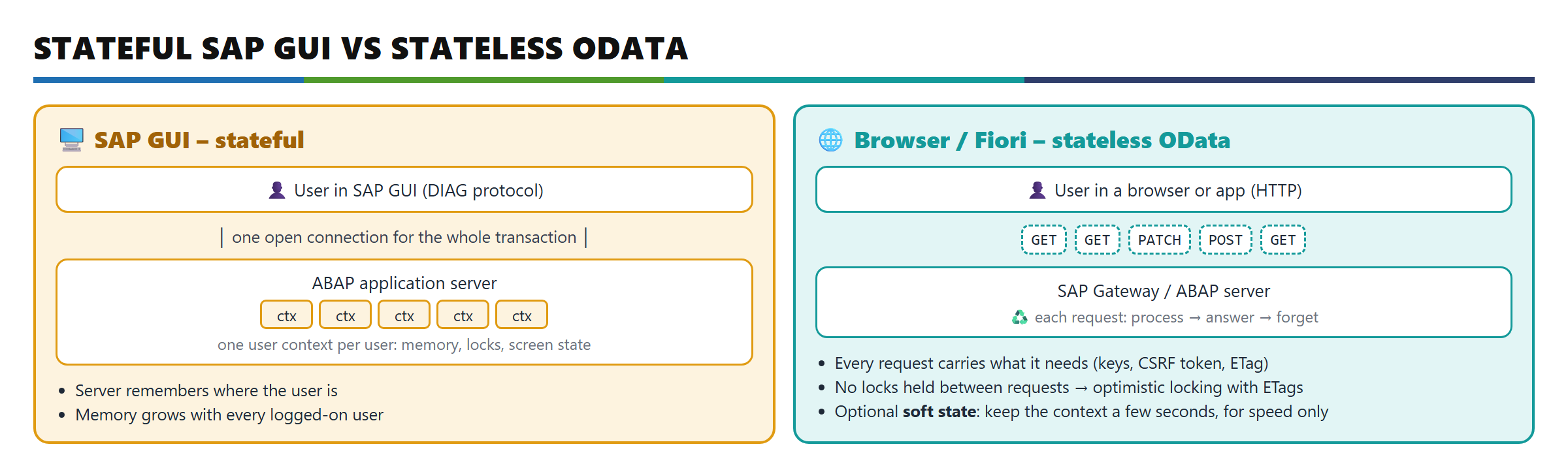
SAP GUI is stateful: each user holds a session (memory, locks) on the server for the whole transaction. OData is stateless: each HTTP request is processed and forgotten, so one server can handle huge numbers of users. (Gateway also has an optional soft state mode that keeps the session for a short time – for performance only.)
1.3 The parts of an HTTP request and response
- URI (Uniform Resource Identifier) names the resource. URI is the umbrella term: a URL says where it is (locator), a URN gives a permanent name – both are kinds of URI.
- Method: GET (read), POST (create / action), PUT (replace), PATCH (partial update), DELETE. GET, PUT and DELETE are idempotent (repeating them gives the same result); POST is not.
- Headers: Content-Type, Accept, Authorization, X-CSRF-Token, If-Match, sap-client …
- Body: the payload (JSON or XML) for POST/PUT/PATCH; the response body holds the representation.
- Status code in the response – the first digit tells the class:
Code | Meaning | Typical Gateway situation |
|---|---|---|
200 OK | Success with a body | GET entity / entity set |
201 Created | Entity created | POST → CREATE_ENTITY |
202 Accepted | Accepted, maybe not finished | V2: $batch response · V4: asynchronous processing |
204 No Content | Success, no body | PUT / PATCH / DELETE |
304 Not Modified | Unchanged since the ETag you sent | GET with If-None-Match |
400 Bad Request | Malformed URI, header or payload | Wrong $filter syntax, wrong key |
401 Unauthorized | Not logged on | Missing / wrong credentials |
403 Forbidden | Not allowed | Missing S_SERVICE authorization, CSRF token invalid, or service not activated on the hub ("No service found for namespace") |
404 Not Found | Resource does not exist | Entity with this key not found |
405 Method Not Allowed | Wrong method for this URI | PUT on an entity set |
412 Precondition Failed | If-Match ETag is outdated | Someone else changed the record |
428 Precondition Required | Must send If-Match | Entity has an ETag, request had none |
500 Internal Server Error | Unexpected error / dump | Unhandled exception in the DPC |
501 Not Implemented | Method not implemented | DPC_EXT method not redefined |
1xx = informational (e.g. 102 Processing), 3xx = redirect (301 Moved Permanently). The list is not exhaustive.
1.4 What OData adds to REST
OData (Open Data Protocol) is an open standard managed by OASIS; OData V4 is also an ISO/IEC standard (20802, 2016). It is both a data format (how entities are described and serialised) and a protocol (how they are read and changed via URIs and HTTP). SAP Gateway is the connector that translates ABAP objects (tables, BAPIs, CDS) into OData entities.
- Service document (
/ZJP_DEMO_SRV/) – lists all entity sets of the service. - Service metadata document (
/ZJP_DEMO_SRV/$metadata) – the full model: entity types, properties, keys, associations, navigation properties, entity sets, function imports. - Formats: V2 supports Atom (XML) and JSON (
$format=json); V4 is JSON only. Entity set and entity correspond to Atom/RSS feed and entry. - Standard operations CRUD-Q (create, read, update, delete, query) plus query options ($filter, $select, $expand …) that every client understands.
- Public sample service to practise URIs:
https://services.odata.org/V2/Northwind/Northwind.svc/(Customers, Employees, Orders, Order_Details).
Part 2 – SAP Gateway architecture and deployment
2.1 Why Gateway
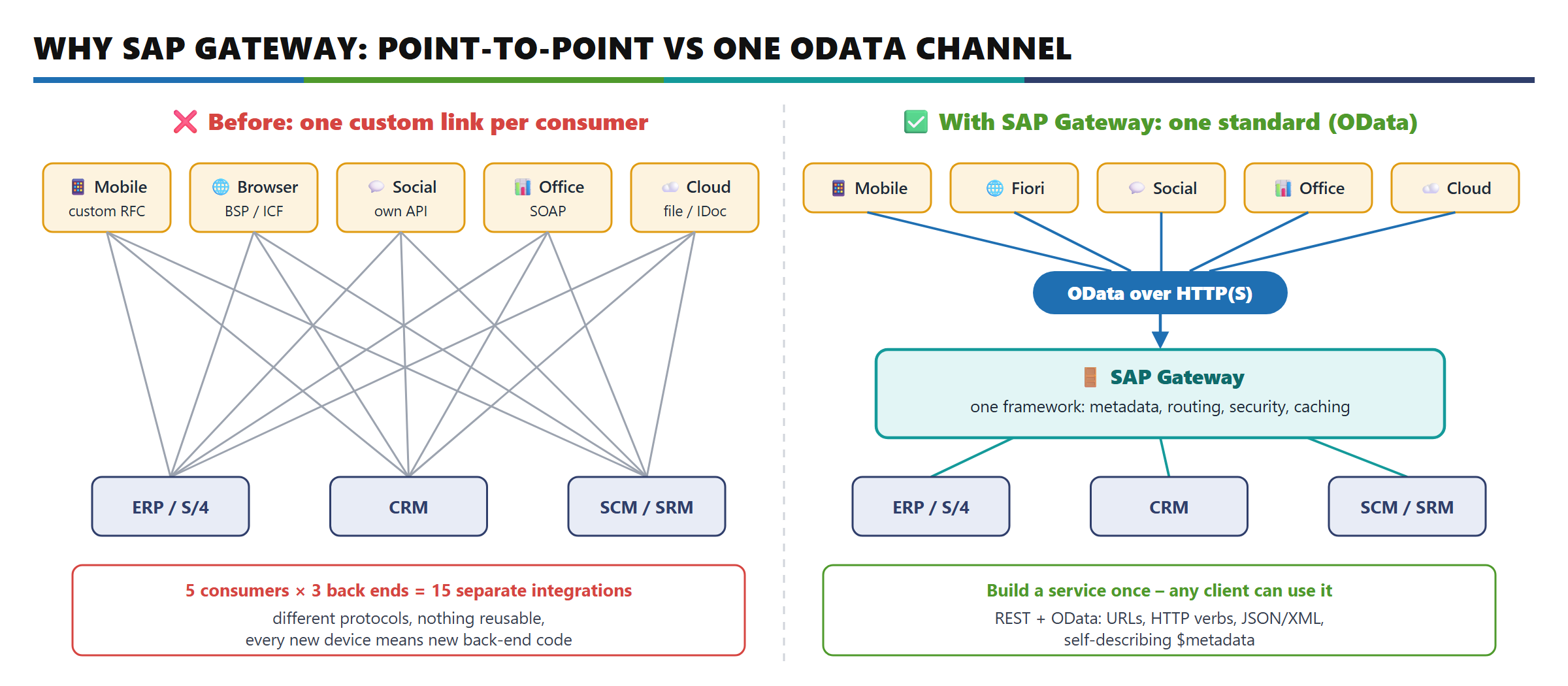
Before Gateway, every consumer (mobile app, portal, Office add-in) got its own custom integration (RFC, BSP, SOAP …). Nothing was reusable. Gateway gives one protocol – OData – so a service is built once and any device or platform can consume it.
2.2 Architecture
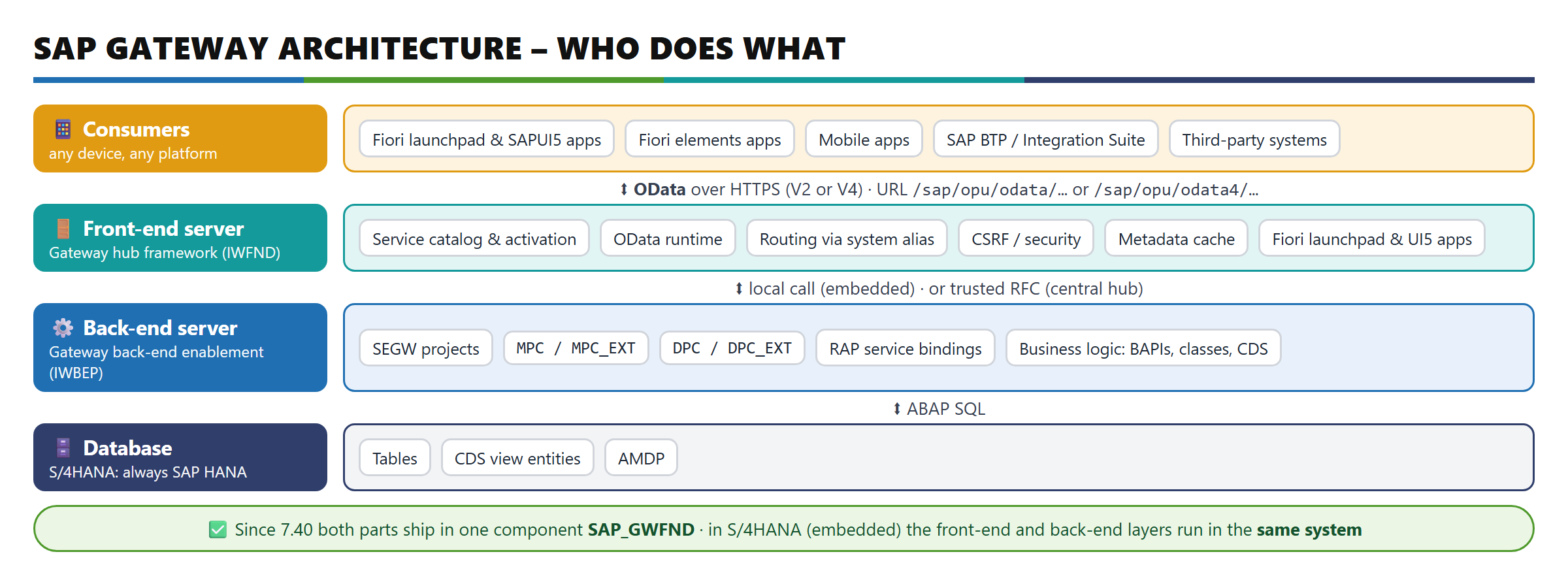
- Front-end server – SAP Gateway Hub Framework (IWFND): service catalog, activation, routing to back ends, system aliases, OData runtime, CSRF/security, caching. With Fiori it also hosts the launchpad and UI5 apps.
- Back-end server – Gateway Back-End Enablement (IWBEP): SEGW, the generated MPC/DPC classes, your business logic, access to tables/BAPIs/CDS on SAP HANA or any database.
2.3 Software components
Release | Front-end (hub) components | Back-end components |
|---|---|---|
7.00 – 7.31 (add-ons) | GW_CORE (OData libraries), IW_FND (runtime, metadata store, service registration). Optional: IW_PGW, IW_CNT (workflow), IW_SCS (Dynpro), IW_CBS (GenIL) | IW_BEP (development, generators for RFC, BOR, BW, F4 help), IW_HDB (HANA). Optional: IW_GIL (GenIL), IW_SPI (SPI) |
7.40 and later | SAP_GWFND – one component that contains front-end and back-end parts (former GW_CORE, IW_FND, IW_BEP). Optional add-ons remain separate: IW_FNDGC, IW_PGW, IW_SCS, IW_CNT, IW_CBS | Same SAP_GWFND (incl. RFC, BOR, BW, F4-help and CDS generators). IW_HDB is not part of it any more. Optional: IW_GIL, IW_SPI |
2.4 Deployment options – hub vs embedded
Option | How | Pros | Cons |
|---|---|---|---|
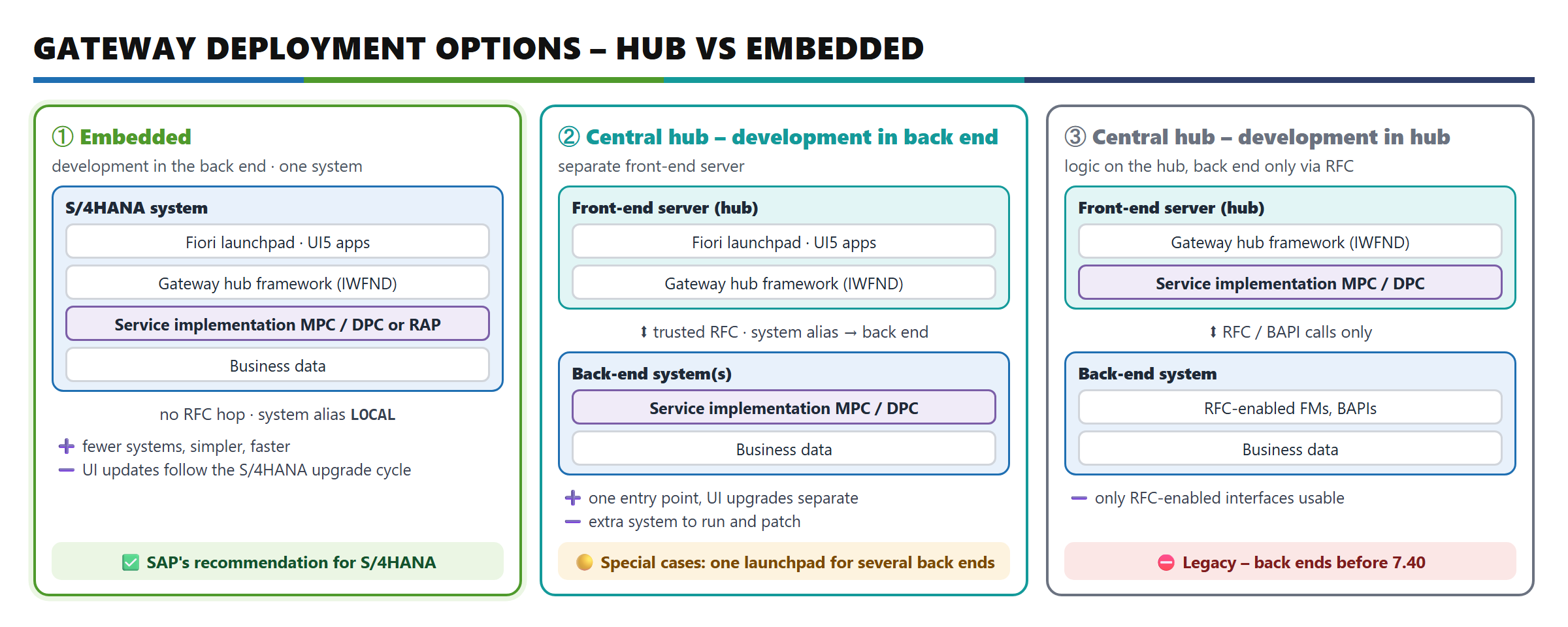
Central hub, development in back end | Gateway hub (Fiori front-end server) is a separate system; MPC/DPC live in the back end and are registered on the hub via RFC | Upgrade UI/Gateway without back-end downtime; one central entry for several back ends (multi-origin, routing, security in DMZ) | Extra server to run and patch |
Central hub, development in hub | Service implementation on the hub; it calls the back end via RFC | Back end needs no Gateway component (old releases before 7.40) | Only RFC-enabled interfaces usable; rare today |
Embedded | Hub framework and back-end enablement in the same system (S/4HANA) | Simple, fewer systems, no RFC hop, better performance | Harder to serve several back ends from one launchpad; UI upgrades follow the back-end system |
SAP's recommendation for S/4HANA (since 2020): embedded deployment of the Fiori front-end server. A central hub is now for special cases (e.g. one launchpad for many back-end systems). With a hub, the system alias (/IWFND/MAINT_SERVICE → System Aliases) tells the hub which back end serves the service; embedded uses the alias LOCAL.
Part 3 – The OData data model (EDM)
OData describes data with the Entity Data Model (EDM). Every artefact has a simple ABAP analogy:
EDM artefact | Meaning | ABAP analogy |
|---|---|---|
Property | One field with an EDM type (Edm.String, Edm.Int32, Edm.Decimal, Edm.DateTime …) | Component |
Entity type | Named structured type with a key | Structure type |
Entity | One instance of an entity type; read with GET, changed with PUT/PATCH | Work area |
Entity set | Collection of entities of one type (what you address in a URI) | Internal table |
Complex type | Keyless structure, only usable as a property or function result (e.g. Address) | Include structure |
Association | Relationship between two entity types with cardinality (1 : n) | Foreign key |
Association set | The same relationship between two entity sets | – |
Navigation property | Path from one entity to related ones, used in URIs ( | Join path |
Entity container | Holds all entity sets, association sets and function imports of a service | The service |
Function import | Custom operation beyond CRUD-Q (V2) | Method |
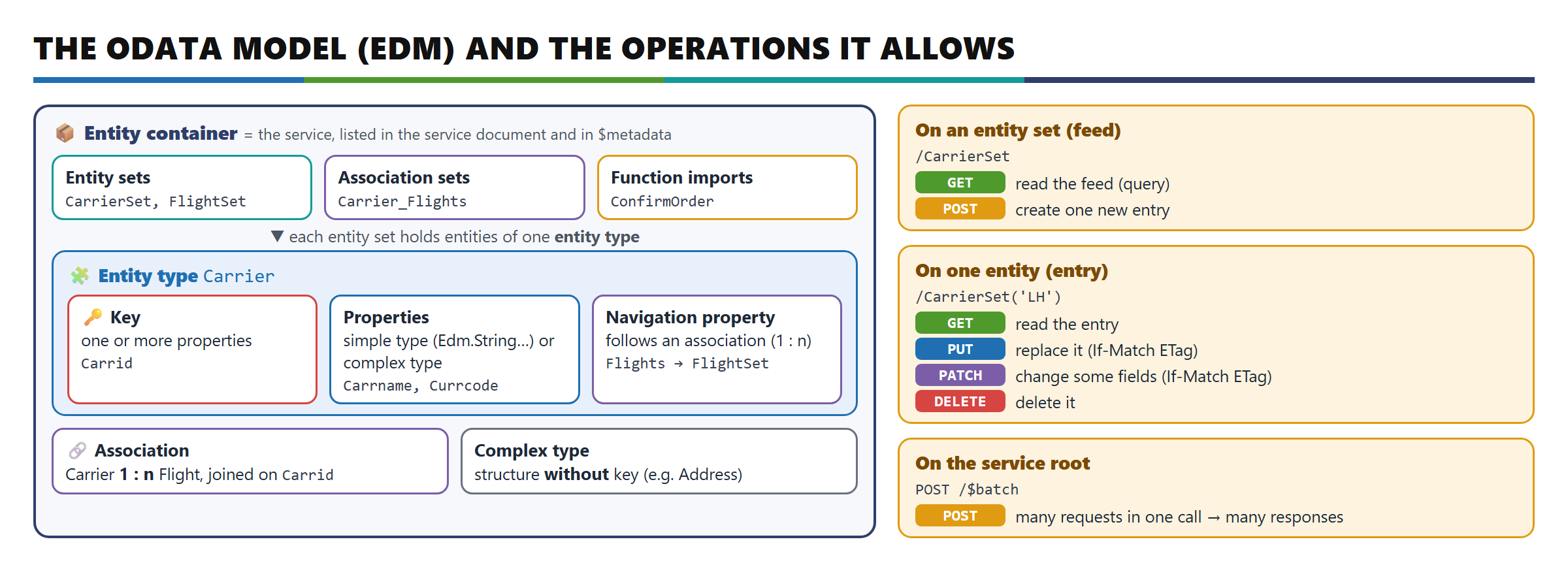
The yellow boxes show the operations: on an entity set GET (feed) and POST (create an entry); on an entity GET, PUT (with ETag), PATCH (partial, with ETag) and DELETE; and POST <service root>/$batch for many requests in one call.
How it looks in $metadata (Northwind)
|
In SEGW, creating an association between two entity types also creates the navigation property on the principal side and the association set.
Part 4 – Building a service in SEGW
4.1 Project types
- Service with SAP Annotations – the normal choice. Property flags such as creatable, updatable, sortable, filterable, label, unit; facets nullable, default, max length, fixed length, precision, scale; ABAP field name and type.
- Service with Vocabulary-Based Annotations – uses OData vocabularies uploaded into the Vocabulary Repository (the standard SAP annotations such as creatable / updatable are not available in this project type).
- Annotation Model for Referenced Service – adds (UI) annotations to an existing service without changing it.
4.2 Development phases
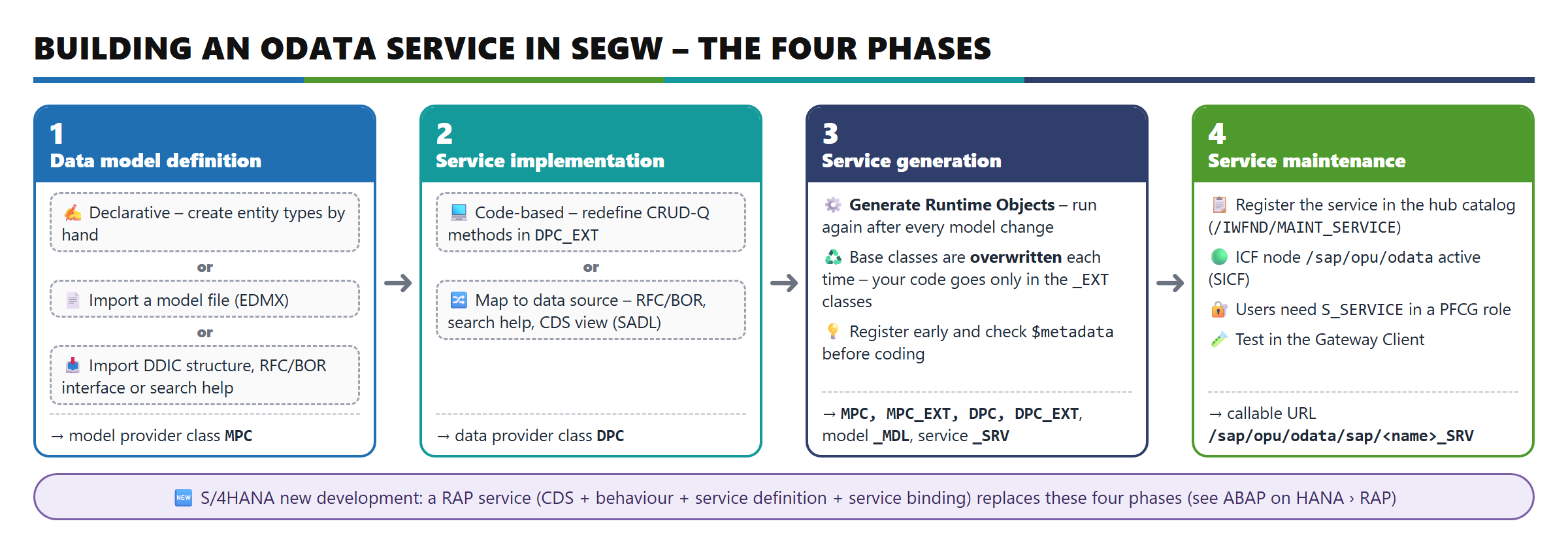
Phase | What you do |
|---|---|
1. Data model definition (→ MPC) | Entity types, properties, keys, entity sets, associations, navigation |
2. Service implementation (→ DPC) | Code the CRUD-Q methods in DPC_EXT or map them to a data source |
3. Service generation | Generate Runtime Objects – creates the classes and the registration |
4. Service maintenance | Register and activate the service on the hub, then test |
4.3 Defining the data model – three ways
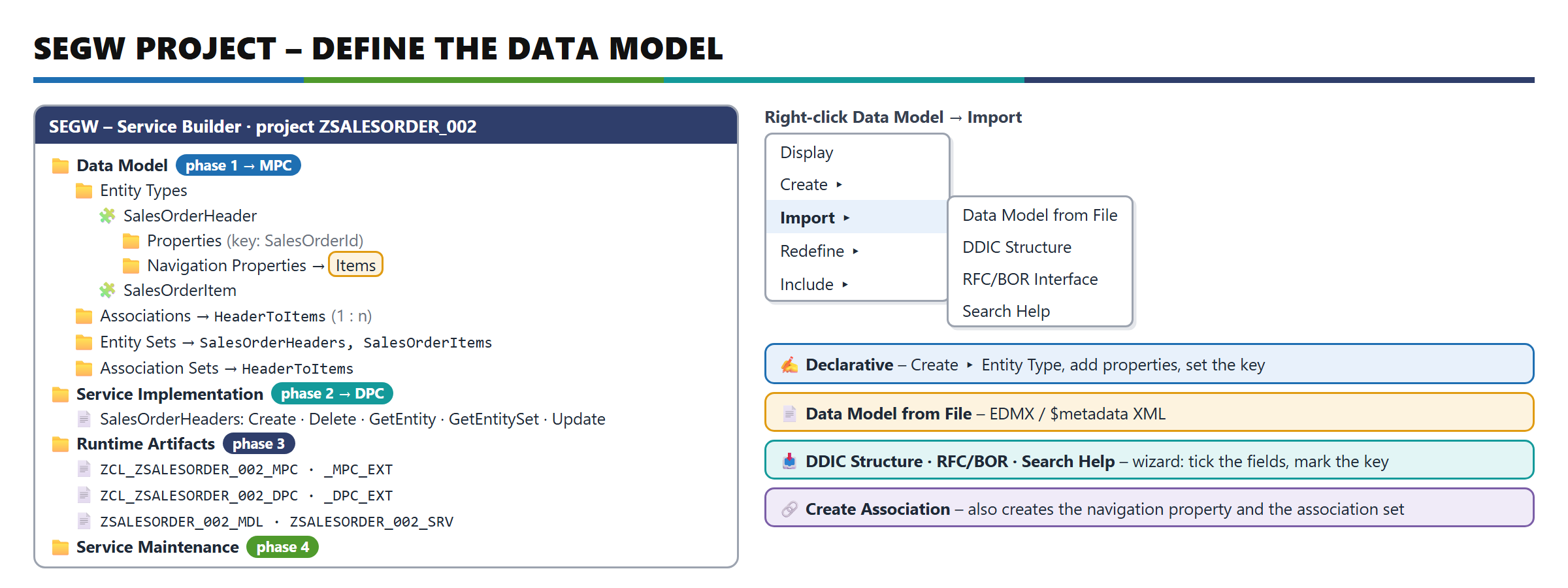
- Declarative: create entity types, properties, sets and associations by hand.
- Import a data model file (EDMX / metadata XML, e.g. designed in another tool).
- Import from the repository: Data Model → right-click → Import → DDIC Structure (tables, views, structures, also CDS SQL views), RFC/BOR Interface (parameters of a BAPI/FM), Search Help. Tick the fields you need and mark the key.
4.4 Step by step
- 1. SEGW → Create Project (name e.g.
ZJP_DEMO, package, project type). - 2. Define the data model (import DDIC structure SCARR → entity type
Carrier, entity setCarrierSet). - 3. Click Generate Runtime Objects (red/white wheel) – the stub classes are created.
- 4. Register the stub on the hub early and check
$metadata– catches model errors before you code. - 5. Implement the methods in DPC_EXT (Service Implementation → entity set → operation → Go to ABAP Workbench).
- 6. Test in the Gateway Client (/IWFND/GW_CLIENT).
4.5 Generated runtime artifacts
Artifact | Example name | Purpose | You edit it? |
|---|---|---|---|
MPC – model provider class | ZCL_ZJP_DEMO_MPC | Builds the metadata (method DEFINE); inherits | No – regenerated |
MPC_EXT | ZCL_ZJP_DEMO_MPC_EXT | Subclass: redefine DEFINE for deep structures, content type, extra annotations | Yes |
DPC – data provider class | ZCL_ZJP_DEMO_DPC | Empty CRUD-Q methods per entity set, implements | No – regenerated |
DPC_EXT | ZCL_ZJP_DEMO_DPC_EXT | Subclass: all your business logic (redefine methods) | Yes |
Model (registration) | ZJP_DEMO_MDL | Technical model name in the back end | No |
Service (registration) | ZJP_DEMO_SRV | Technical service name; the external name users call | No |
Rule: never put logic in the base classes – every regeneration overwrites them. Only the _EXT classes survive.
4.6 Service implementation – code-based or mapping
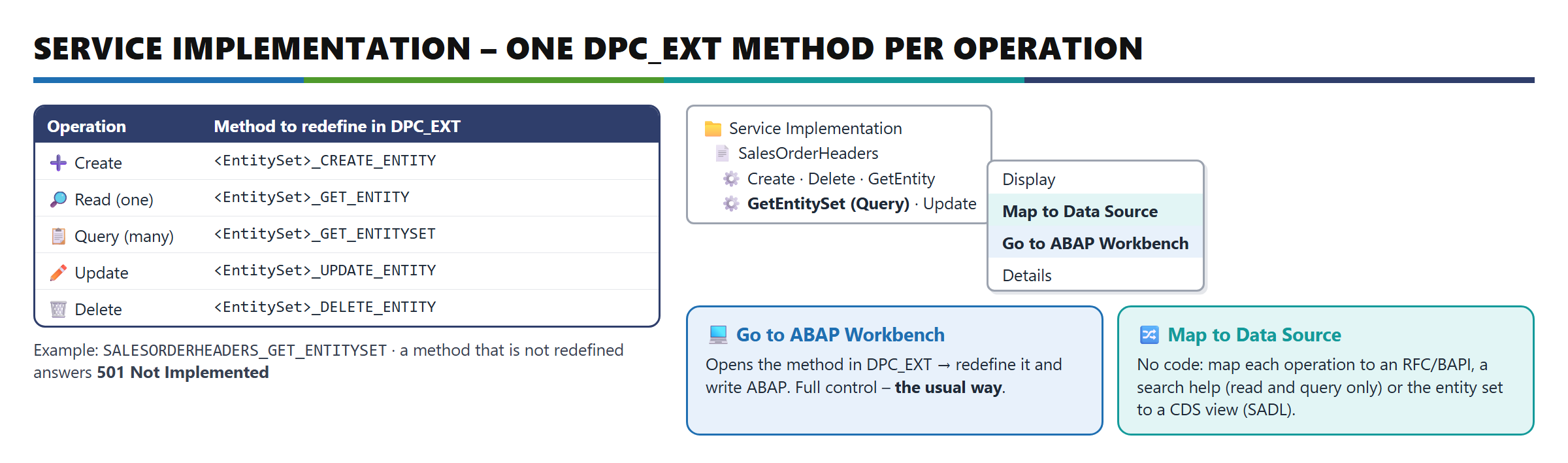
- Code-based: redefine
<EntitySet>_CREATE_ENTITY,_GET_ENTITY,_GET_ENTITYSET,_UPDATE_ENTITY,_DELETE_ENTITYin DPC_EXT. Full control – the usual way. - Map to Data Source (no code): map each operation to an RFC/BAPI (create, read, update, delete, query separately), to a search help (read and query only), or map the whole entity set to a CDS view (SADL – read and query generated, see Part 14).
4.7 Register and activate
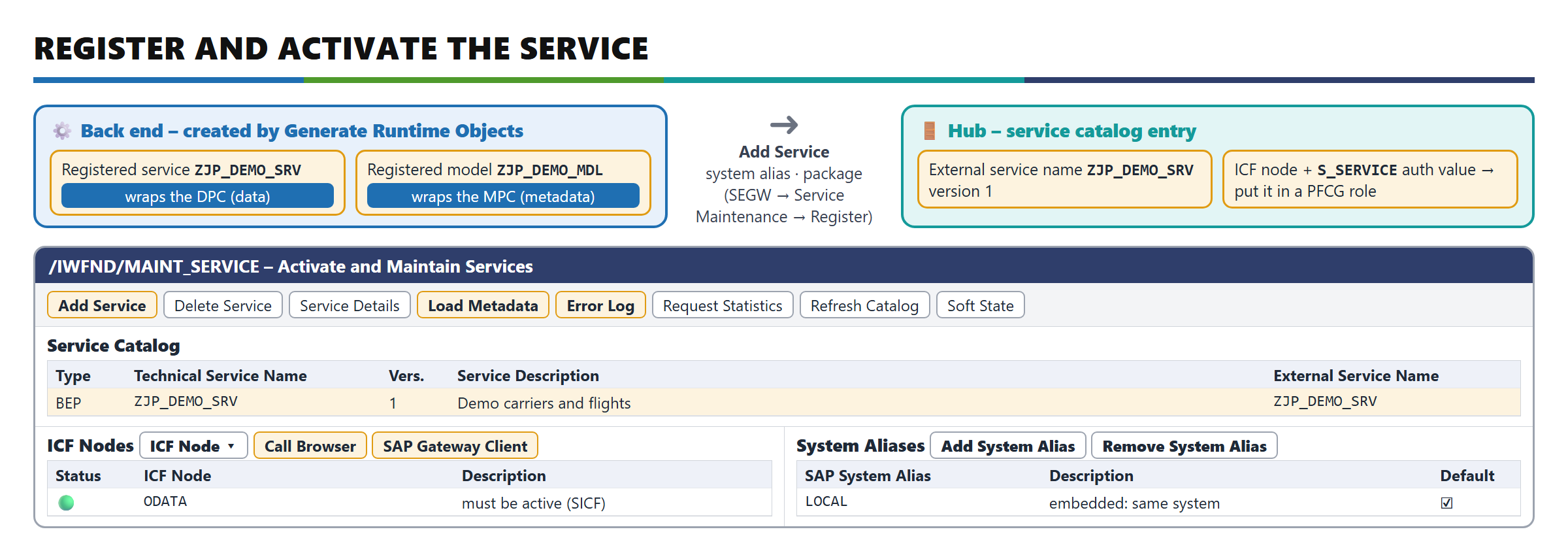
Generation registers the model (wraps the MPC) and the service (wraps the DPC) in the back end. To make it callable you activate it on the hub, which creates an entry in the service catalog and an ICF node: SEGW → Service Maintenance → system → Register, or directly in /IWFND/MAINT_SERVICE → Add Service (system alias, technical service name, package).
- /IWFND/MAINT_SERVICE: add / delete services, check the ICF node (must be green – SICF
/sap/opu/odata), maintain system aliases, load metadata, open Gateway Client or browser, error log, soft state. - SEGW Service Maintenance menu: Register (catalog entry), Maintain (jumps to /IWFND/MAINT_SERVICE), Gateway Client, Error Log.
- Users need authorization object S_SERVICE for the service (generated when you add it; put it in a PFCG role).
- Tip – which SEGW project belongs to a service? SE16 on view /IWBEP/I_SBD_GA, field TROBJ_NAME. Usually project = service name without
_SRV.
4.8 The URI and which method it calls
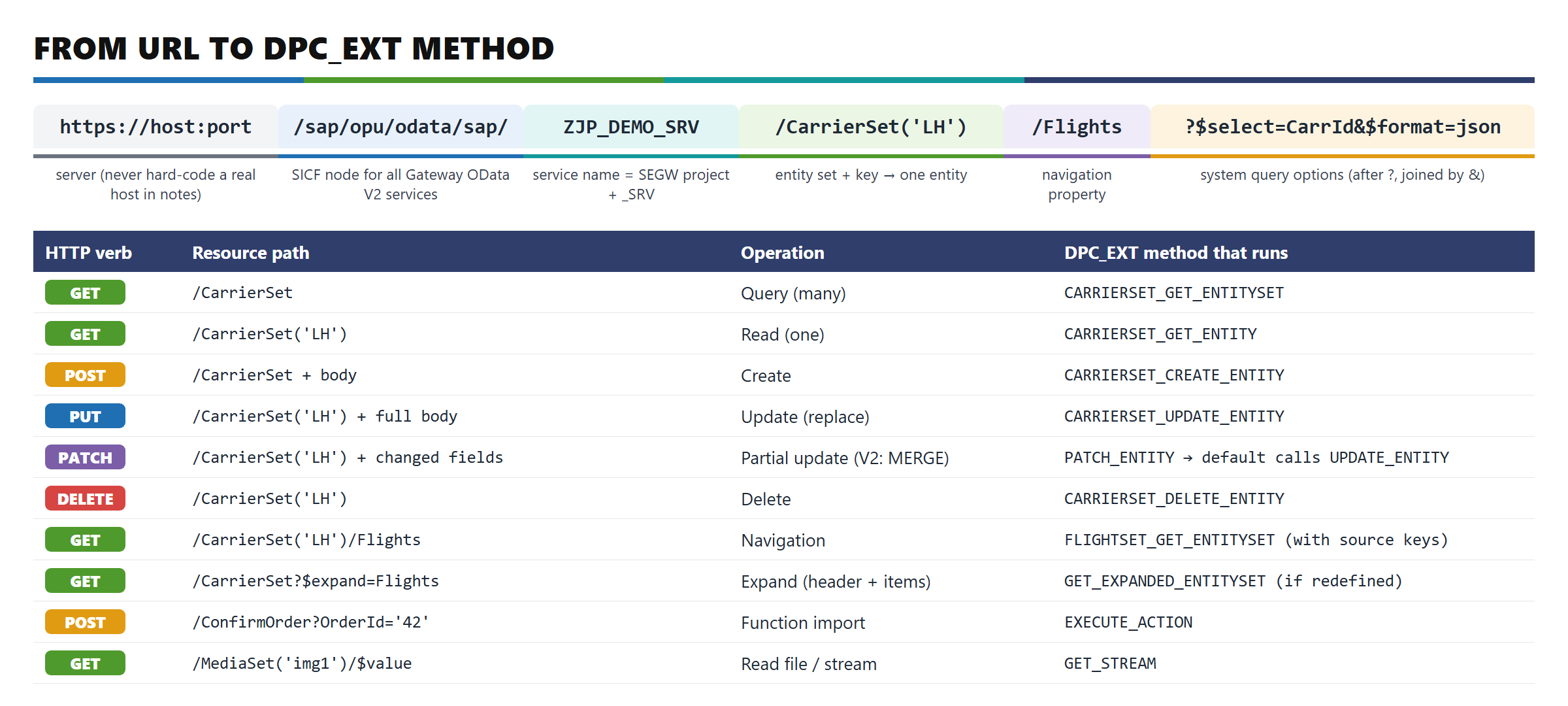
Pattern: https://<host>:<port>/sap/opu/odata/sap/<SERVICE>_SRV/<EntitySet>(<key>)?<options>. Add sap-client=100 to choose the client. Keys of string type need single quotes: CarrierSet('LH'); several keys: FlightSet(Carrid='LH',Connid='0400').
Part 5 – CRUD-Q methods
Read returns one entity (by key); query returns an entity set. Each method receives io_tech_request_context (keys, filters, paging …) and fills er_entity / et_entityset.
Query – GET /CarrierSet → CARRIERSET_GET_ENTITYSET
|
Read – GET /CarrierSet('LH') → CARRIERSET_GET_ENTITY
|
Create – POST /CarrierSet + body → CARRIERSET_CREATE_ENTITY
|
Update – PUT /CarrierSet('LH') → CARRIERSET_UPDATE_ENTITY
Same pattern as create: read_entry_data( ), then UPDATE scarr FROM @…; on success fill er_entity (the response is 204 No Content). PUT replaces the whole entity. For partial updates the client sends PATCH (V2 also MERGE); Gateway calls PATCH_ENTITY, whose default implementation reads the entity with GET_ENTITY, merges the changed fields and calls UPDATE_ENTITY.
Delete – DELETE /CarrierSet('LH') → CARRIERSET_DELETE_ENTITY
|
Reading the key with get_keys( ) and VALUE s_carr_id( lt_keys[ 1 ]-value ) also works, but get_converted_keys( ) is type-safe and handles several key fields.
Navigation – GET /CarrierSet('LH')/Flights → FLIGHTSET_GET_ENTITYSET
The target entity set's GET_ENTITYSET is called; ask the context where the call came from and read the source keys:
|
Summary – operation, HTTP method, ABAP
DPC_EXT method | HTTP | Typical ABAP |
|---|---|---|
CREATE_ENTITY | POST | INSERT / BAPI create |
GET_ENTITY | GET (one) | SELECT SINGLE |
GET_ENTITYSET | GET (many) | SELECT |
UPDATE_ENTITY / PATCH_ENTITY | PUT / PATCH (MERGE) | UPDATE / BAPI change |
DELETE_ENTITY | DELETE | DELETE / BAPI delete |
EXECUTE_ACTION (function import) | GET or POST | any logic (approve, release …) |
CREATE_STREAM / GET_STREAM / UPDATE_STREAM / DELETE_STREAM | POST / GET / PUT / DELETE | upload, download, replace, delete a file |
GET_EXPANDED_ENTITY / GET_EXPANDED_ENTITYSET | GET + $expand | header with its items in one call |
CREATE_DEEP_ENTITY | POST with nested items | deep insert (header + items) |
Part 6 – Query options
6.1 Handled by the framework (no code)
Option | Example | Effect |
|---|---|---|
$format | /SalesOrderHeaders?$format=json | JSON instead of Atom XML |
$select | ?$select=SalesOrder,SalesOrg,Vtweg | Only these properties in the response (you may still read all fields – check |
$count | /SalesOrderHeaders/$count | Number of entities – only on a collection, not on a single entity |
$links | /SalesOrderHeaders('4970')/$links/Items | Only the URIs of related entities (V2) |
$value | /SalesOrderHeaders('4970')/Bstnk/$value | Raw value of one property (or the media of a stream entity) |
$expand | ?$expand=Items | Works generically – but see Part 7 (N+1 problem) |
$metadata | /ZJP_DEMO_SRV/$metadata | Model document |
6.2 Need your code in GET_ENTITYSET
The framework parses them, but you must apply them – otherwise the client gets all rows unsorted: $filter, $orderby, $top, $skip, $inlinecount, $skiptoken, search. Best practice on HANA: push them into the SELECT (code pushdown, see ABAP on HANA › 01 HANA Fundamentals) instead of reading everything and filtering in ABAP. Helper class for in-memory cases: /IWBEP/CL_MGW_DATA_UTIL (methods filtering, orderby, paging).
$filter
URIs: ?$filter=Kunnr eq '1390', ?$filter=(Kunnr eq '1390' or Kunnr eq '1175') and Vtweg eq '10'. String literals use single quotes. Operators: eq, ne, gt, ge, lt, le, and, or, not, substringof('LH',Carrid) / startswith(...) (V2).
|
Generic alternative: get_osql_where_clause_convert( ) returns the whole $filter as an ABAP SQL WHERE string with ABAP field names, for WHERE (lv_where). It only works if the entity properties map 1 : 1 to the table fields. (The old IV_FILTER_STRING parameter is the legacy version of this.)
Free-text search – without SQL injection
Never build the WHERE clause by pasting the user's search string into SQL text – a classic SQL injection hole (' OR '1' = '1). Use host variables (bind parameters) instead; if you ever must build dynamic SQL from input, escape it with cl_abap_dyn_prg=>quote( ) / escape_quotes( ).
|
$orderby
?$orderby=Currency,CarrierID or ?$orderby=SalesOrder desc. Best: map to ORDER BY in the SELECT; for data already in an internal table use a dynamic SORT. (Older code uses the importing parameter IT_ORDER – the legacy equivalent of get_orderby( ), as IT_FILTER_SELECT_OPTIONS is for $filter.)
|
$top, $skip and $inlinecount (client-side paging)
?$skip=20&$top=10 = rows 21–30. $inlinecount=allpages (V2) asks for the total number of rows next to the page (V4: $count=true). Typical bugs to avoid: OFFSET … UP TO in the wrong order, no ORDER BY, and an in-memory variant that deletes the first row when no $skip is given. Correct version, paging pushed to the database:
|
In-memory alternative (data already read): /iwbep/cl_mgw_data_util=>paging( EXPORTING is_paging = is_paging CHANGING ct_data = et_entityset ) – keeps rows skip+1 … skip+top.
$skiptoken (server-side paging)
Client-side paging: the client decides the page with $skip/$top. Server-side paging: even if the client asks for everything, the server returns one page plus a next link (…/SalesOrderHeaders?$skiptoken=50) which the client follows. Example (it also works for small tables and produces a next link only when more rows exist):
|
Part 7 – $expand and deep insert
7.1 $expand and the N+1 problem
$expand returns related entities in one round trip: /SalesOrderHeaders?$expand=Items, several navigations ?$expand=Items,Partners. The framework handles it generically – but by calling the item query once per header:
Request | Generic $expand calls |
|---|---|
| HEADER_GET_ENTITYSET 1× + ITEMS_GET_ENTITYSET 100× (N+1 SELECTs) |
/SalesOrderHeaders('4970')?$expand=Items | HEADER_GET_ENTITY 1× + ITEMS_GET_ENTITYSET 1× |
For lists, redefine /IWBEP/IF_MGW_APPL_SRV_RUNTIME~GET_EXPANDED_ENTITYSET (one entity: GET_EXPANDED_ENTITY) and read headers and items with two SELECTs. Steps: (1) define a deep structure (header + item table whose component name equals the navigation property), usually in MPC_EXT; (2) fill it; (3) copy_data_to_ref( ) into er_entityset; (4) tell the framework which navigation you already filled.
|
7.2 Multi-level expand
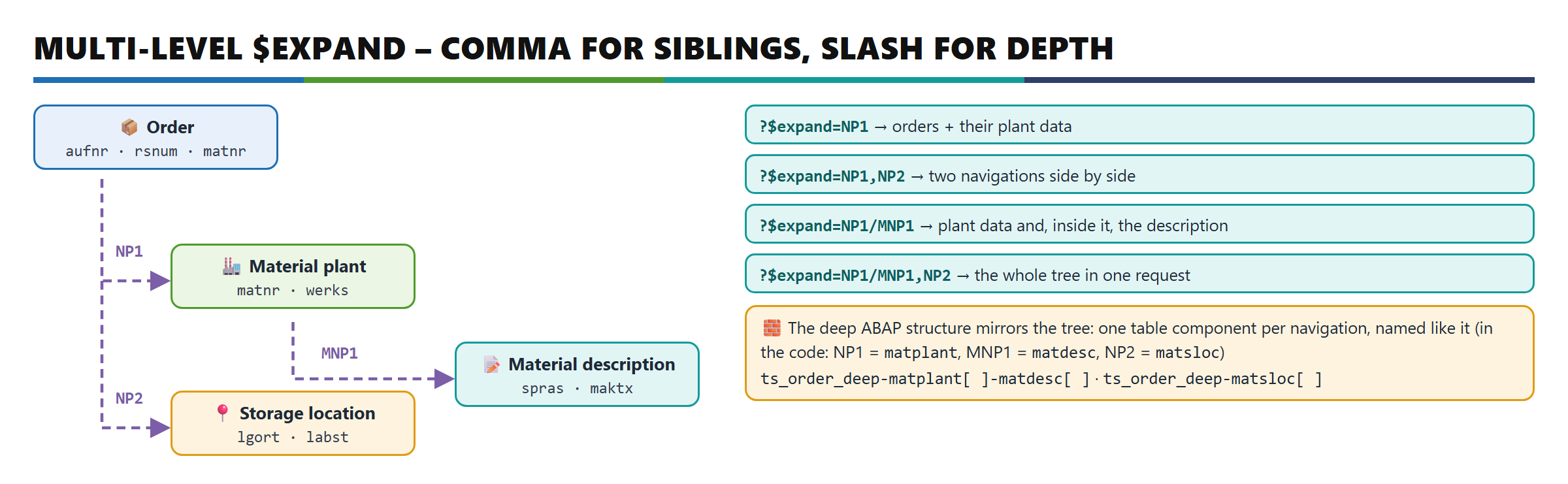
Separate navigations with a comma, go deeper with a slash: ?$expand=NP1/MNP1,NP2. The nested types must again use the navigation property names as component names:
|
7.3 Deep insert – create header and items in one POST
- 1. Create the deep structure and bind it in MPC_EXT → DEFINE:
|
- 2. Redefine CREATE_DEEP_ENTITY in DPC_EXT: read the payload into the deep structure, split it into header and item tables, post with a BAPI, put the results (new number) back,
copy_data_to_ref( )intoer_deep_entity.
|
- 3. Test: POST on the header entity set with the items inline – response 201 Created:
|
Part 8 – $batch and change sets
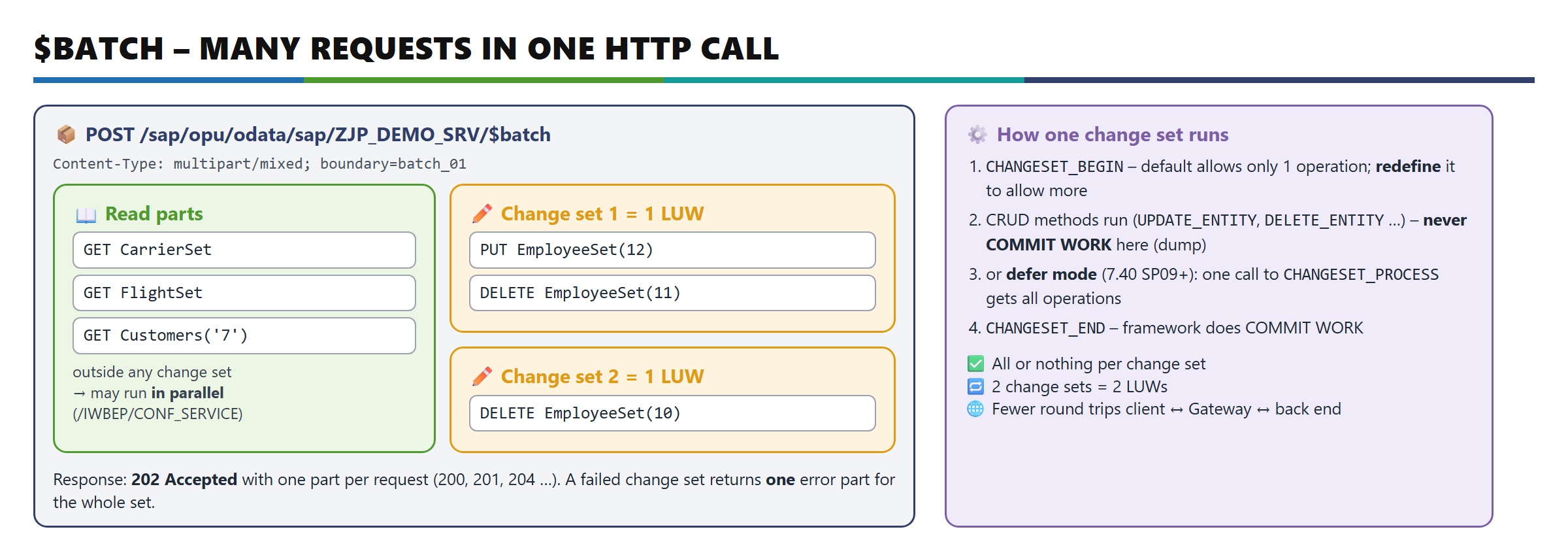
$batch packs several requests into one HTTP POST to /sap/opu/odata/sap/<service>/$batch (multipart MIME, each part with its own headers). Fiori apps use it all the time. Write operations are grouped in change sets: an unordered group of create/update/delete operations that is processed as one LUW – all or nothing. A read is never in a change set.
|
- Dates in V2 JSON look like
"StartDate": "\/Date(1609459200000)\/"(milliseconds since 1970); V4 uses ISO 8601 (2021-01-01).
Change-set rules
- No COMMIT WORK inside CREATE/UPDATE/DELETE_ENTITY – the request dumps and nothing is processed.
- If one operation fails, the whole change set fails and the response contains one error for it.
- Each change set = one LUW; two change sets = two LUWs. The response status (V2) is 202 with one part per request; in V4, 202 means asynchronous processing.
- CHANGESET_BEGIN is always called first. Its default allows only one operation per change set – redefine it to allow more. CHANGESET_END is called last; the framework does COMMIT WORK there.
- Defer mode (7.40 SP09+): set
cv_defer_mode = abap_truein CHANGESET_BEGIN. The framework then does not call the single CRUD methods; CHANGESET_PROCESS receives all operations at once (good for one BAPI call), still without commit.
|
Parallel processing
Read requests outside change sets can run in parallel (default on; switch per service in /IWBEP/CONF_SERVICE or /IWFND/MAINT_SERVICE → Service Implementation → Configuration). Example: 3 GET + 2 POST + 1 PUT + 1 DELETE run as one parallel block of 3 GETs, then each modifying request one after another. The configured maximum is ignored when few work processes are free. Parallelisation works only for local / single-back-end setups, not for multi-origin composition.
$expand vs $batch vs parallel calls
Operation | 2 calls | More than 2 calls |
|---|---|---|
Read with association | $expand or parallel calls | $expand |
Read without association | Parallel calls | $batch |
Update, several LUWs | Asynchronous parallel calls or $batch | $batch |
Update, one LUW | $batch (one change set) | $batch (one change set) |
Benefits of $batch: fewer client ↔ Gateway round trips (network time), one Gateway ↔ back-end round trip for single-LUW updates, less back-end CPU. Balance it against payload size. SAP's caution: consider not using $batch for many independent reads if parallelisation is off, because Gateway then processes the parts sequentially.
Part 9 – Function imports
A function import is a custom operation that does not fit CRUD-Q: approve / reject / release a sales order, confirm an order, check flight availability, count orders by status. (Function imports exist only in V2; V4 has actions and functions, and RAP uses actions – see RAP › 05 · Business Logic & Messages.)
- Definition in SEGW: name, return type kind (complex type, entity type, or none), return entity set, cardinality (0..1, 1, 0..n, 1..n), HTTP method, parameters (name, EDM type, length, precision).
- Method rule: GET must have no side effects (pure read); anything that changes data must be POST (and then needs a CSRF token).
- Naming: no HTTP verb in the name (
ProductsByRating, notGetProductsByRating). If you are inventing CreateX / UpdateX / DeleteX, X should probably be an entity type with normal CRUD. - URI:
/sap/opu/odata/sap/ZJP_DEMO_SRV/GetFlightNumbers?CarrierId='LH'(parameters as query options). - All function imports of a service run through one method,
/IWBEP/IF_MGW_APPL_SRV_RUNTIME~EXECUTE_ACTION– so CASE on the name. The result goes back througher_data.
|
Part 10 – Media and streams (files, PDF)
Images, PDFs, Excel, ZIP, audio, video and text files are transported as media entities. Steps:
- 1. In SEGW mark the entity type as Media (HasStream).
- 2. In MPC_EXT → DEFINE set the MIME-type property as content type.
- 3. Redefine the stream methods in DPC_EXT: CREATE_STREAM, GET_STREAM, UPDATE_STREAM, DELETE_STREAM. Inputs:
is_media_resource(MIME_TYPE, VALUE = xstring) andiv_slug(file name).
Operation | Request |
|---|---|
Upload (create) | POST |
Download (read) | GET |
Replace (update) | PUT |
Delete | DELETE |
|
Typical media scenarios
- Smart Form as PDF:
SSF_FUNCTION_MODULE_NAME→ call the generated FM with OTF output →CONVERT_OTFto PDF → return the xstring in GET_STREAM (MIME typeapplication/pdf). - Adobe Form as PDF:
FP_FUNCTION_MODULE_NAME→FP_JOB_OPEN(output parameters withgetpdf = 'X') → generated FM (/1BCDWB/SM…) →FP_JOB_CLOSE→ PDF fromfpformoutput-pdf→copy_data_to_ref( ). URI:<EntitySet>(Key1='V1',Key2='V2')/$value. - Upload a file to DMS: entity with Docu_Name, Docu_Number, Docu_Version, Docu_Type, Docu_Part; in CREATE_STREAM split the slug into name and extension, call
BAPI_DOCUMENT_CREATE2, return the document key. Test with POST + header SLUG =file.pdf.
Part 11 – Concurrency: ETag and CSRF token
11.1 Concurrency control
When two users change the same record at the same time, data can become inconsistent. The classic problems: lost update (the second save overwrites the first), dirty read (reading uncommitted data), non-repeatable read (the same read gives different results).
Approach | How it works | Fits OData? |
|---|---|---|
Pessimistic | Lock on read (ABAP: enqueue lock objects, ENQUEUE_/DEQUEUE_ FMs); others must wait. Safe, but slower; deadlocks possible | No – a lock cannot be held across stateless requests |
Optimistic | Read without lock; at save time check whether the data changed since it was read (timestamp / hash) and reject stale updates | Yes – this is what the ETag does |
Semi-optimistic | Mix: short locks only for selected critical resources | Special cases |
Rolling back all operations when one fails is a property of a transaction / LUW, not of optimistic locking.
11.2 ETag
- An ETag is a version stamp of an entity – usually the last-changed timestamp, sometimes a hash.
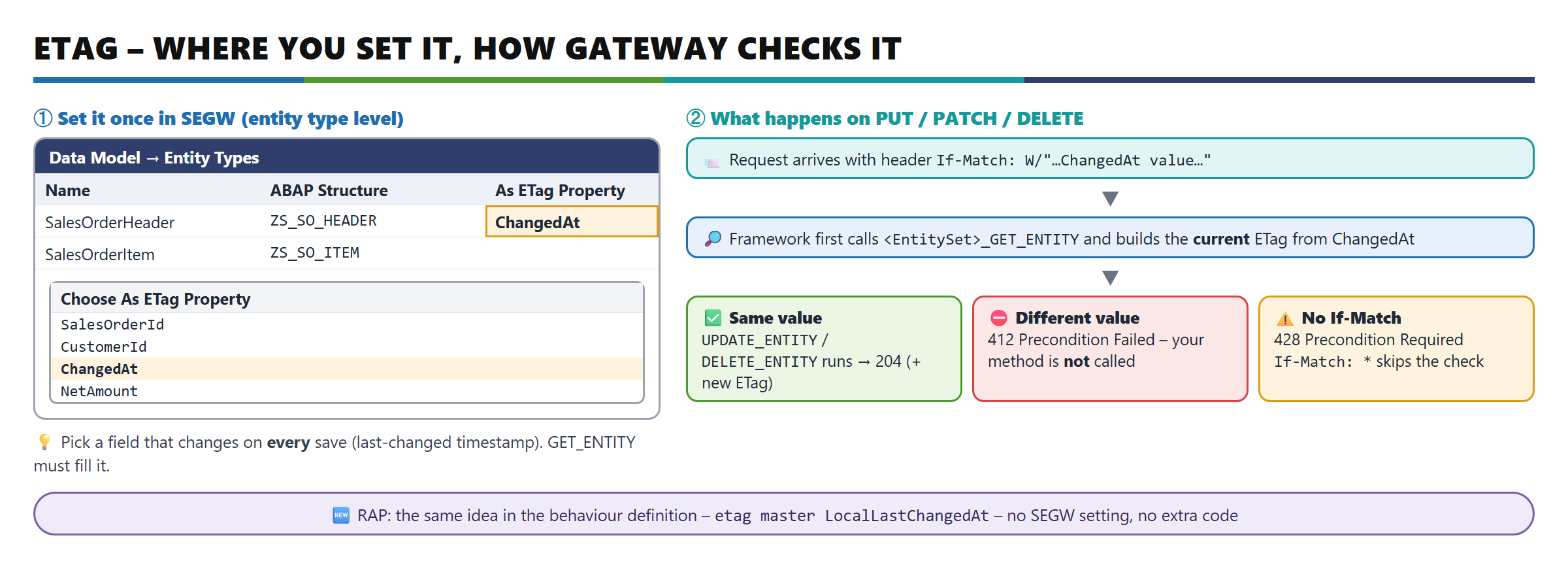
- Set it at entity type level in SEGW: column As ETag Property (e.g.
ChangedAt). - GET returns the ETag (response header and
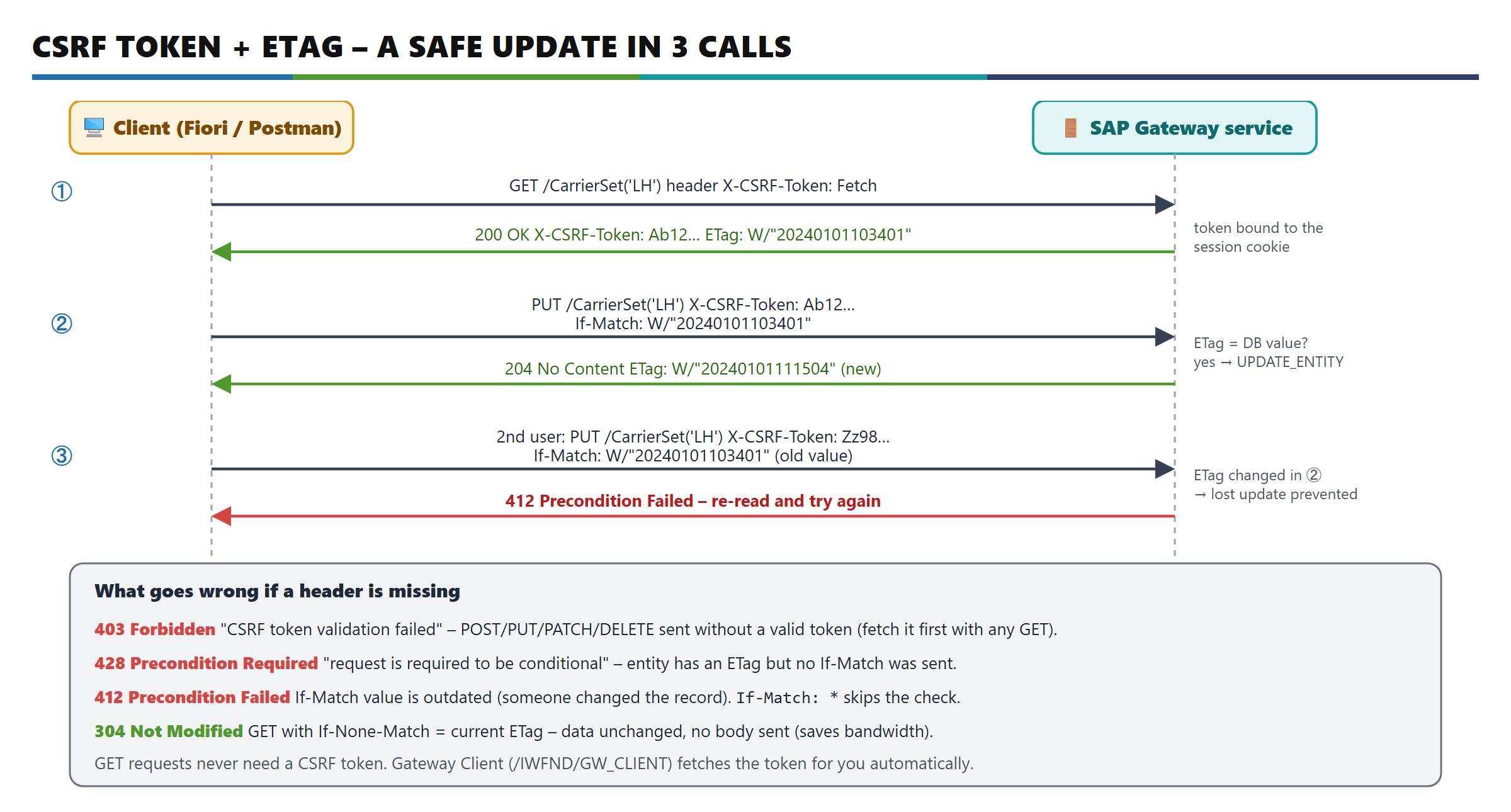
__metadata/etag). The client sends it back in If-Match on PUT/PATCH/DELETE. Before calling UPDATE_ENTITY the framework reads the current entity via GET_ENTITY and compares: equal → update runs; different → 412 Precondition Failed. - No If-Match on an ETag-enabled entity → 428 ("request is required to be conditional; try using the If-Match header").
If-Match: *skips the check. - Another message you may meet: "The Data Services Request could not be completed due to a conflict with the current state of the resource" (seen when If-Match was sent on a GET). Use If-Match only on PUT/PATCH/DELETE and If-None-Match on GET.
- Conditional read: GET with If-None-Match = current ETag → 304 Not Modified (no body); different → 200 with data and the new ETag.
11.3 CSRF token
Cross-Site Request Forgery: a malicious page makes the user's browser send a modifying request with the user's session cookie. Gateway therefore requires an X-CSRF-Token for every POST, PUT, PATCH, MERGE and DELETE (and for $batch):
- 1. Any GET (service document, $metadata or an entity) with header
X-CSRF-Token: Fetch→ the token comes back in the response header (bound to the session cookie). - 2. Send it in
X-CSRF-Token: <value>on the modifying request, with the same session cookie. - Missing or invalid token → 403 Forbidden, "CSRF token validation failed". GET requests never need it. UI5's ODataModel and the Gateway Client handle it automatically.
You do not have to implement GET_ENTITYSET to be able to POST. You only need some GET to fetch the CSRF token.
Part 12 – Errors, testing, tracing, cache
12.1 Raising errors and messages
Exception class | Use for |
|---|---|
/IWBEP/CX_MGW_BUSI_EXCEPTION | Business errors: not found, invalid input, BAPI returned an error (4xx) |
/IWBEP/CX_MGW_TECH_EXCEPTION | Technical errors: unexpected situation, system problems (500) |
Both inherit from /IWBEP/CX_MGW_BASE_EXCEPTION. Messages are collected in the message container (/IWBEP/IF_MESSAGE_CONTAINER): ADD_MESSAGE, ADD_MESSAGE_TEXT_ONLY, ADD_MESSAGES_FROM_BAPI, ADD_MESSAGE_FROM_BAPI, ADD_ERROR_DETAIL.
- Error in the response body (request fails): raise the exception with the container.
- Success/warning messages in the response header
sap-message(request succeeds): add them withiv_add_to_response_header = abap_true– Fiori shows them as toasts / message popover.
|
12.2 Testing and monitoring transactions
Transaction | Where | Purpose |
|---|---|---|
/IWFND/MAINT_SERVICE | Hub | Activate/maintain services, system aliases, ICF node, soft state |
/IWFND/GW_CLIENT | Hub | Gateway Client: send any request, save test cases, replay, CSRF handled |
/IWFND/ERROR_LOG | Hub | Error log with context, request/response data, replay, jump to ST22 and the back-end log |
/IWBEP/ERROR_LOG | Back end | Back-end error log, jump to the service implementation (DPC code) |
/IWFND/TRACES | Hub | Per user / URI prefix: error-log level, performance trace (V2 only), payload trace |
/IWFND/STATS | Hub | Request statistics (response times per service) |
/IWFND/CACHE_CLEANUP, /IWBEP/CACHE_CLEANUP | Hub / back end | Delete the metadata cache |
/IWBEP/CONF_SERVICE | Back end | Service configuration (e.g. $batch parallelisation) |
ST22, SAT, ST05 | Back end | Dumps; ABAP and SQL trace for slow DPC methods |
SICF | Both | ICF node |
The Gateway Client is opened from SEGW (Service Maintenance → system → SAP Gateway Client) or /IWFND/MAINT_SERVICE. It replays requests, stores test cases, handles SSO and the CSRF token for you. After a failed call, its Error Log button jumps straight to /IWFND/ERROR_LOG for that request.
- In an embedded deployment hub and back end are the same system, so both logs are there.
- Browser testing: append
?sap-ds-debug=true(readable debug view) andsap-statistics=true(timing header).
sap-statistics – where did the time go?
Value | Time spent in |
|---|---|
gwhub | Gateway framework on the hub |
gwrfcoh | RFC overhead hub ↔ back end (network) |
gwbe | Gateway framework in the back end |
gwapp | Your service implementation (DPC_EXT) |
gwnongw | Non-Gateway components (e.g. Excel conversion) |
gwappsum / gwbewait | Only for $batch parallelisation |
fw | gwhub + gwbe + gwrfcoh (framework total) |
gwtotal | fw + gwapp |
12.3 Cache cleanup
If model changes do not show up (new property missing in $metadata), clear the caches – carefully, it costs performance (SAP Note 2319491):
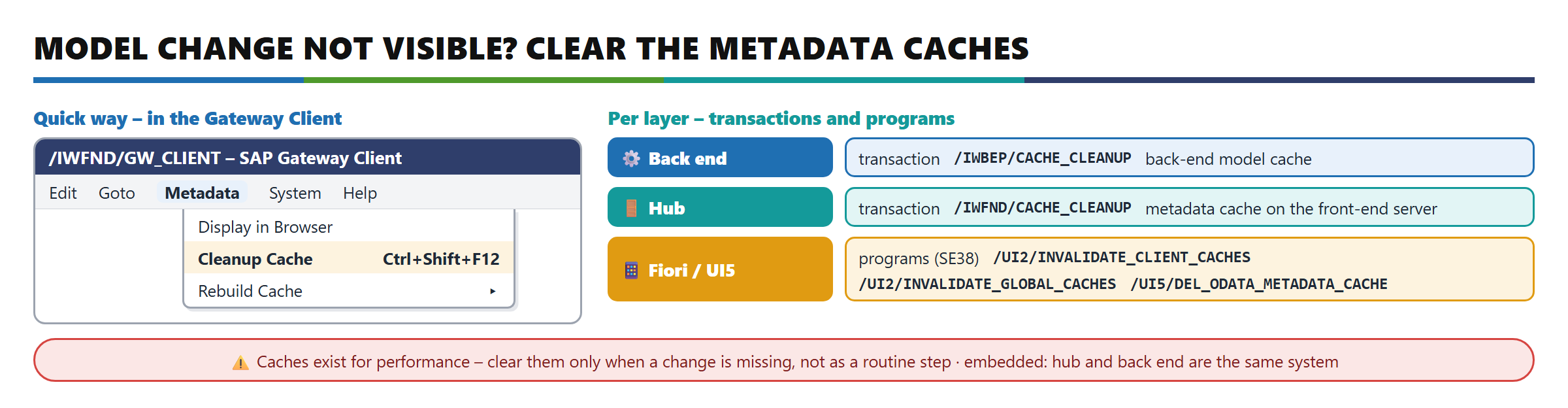
- Gateway Client → Metadata → Cleanup Cache (Ctrl+Shift+F12) or Rebuild Cache (current / all services).
- Transactions /IWFND/CACHE_CLEANUP (hub) and /IWBEP/CACHE_CLEANUP (back end); /UI2/CUST → SAP Fiori → Data Administration → Invalidate Caches.
- Programs /UI2/INVALIDATE_CLIENT_CACHES, /UI2/INVALIDATE_GLOBAL_CACHES, /UI5/DEL_ODATA_METADATA_CACHE.
12.4 Multi-origin services
One URI can read the same service from several back-end systems: add the segment parameter ;mo – /sap/opu/odata/sap/ZJP_DEMO_SRV;mo/CarrierSet. Each entity gets a property SAP__Origin with the system alias; filter on it: ?$filter=SAP__Origin eq 'ERP_EU'. Requests are processed per back end (no $batch parallelisation).
Part 13 – OData V2 vs V4
Most SEGW services are V2. RAP can publish both; V4 is the recommended version for new RAP UI services.
Topic | OData V2 | OData V4 |
|---|---|---|
Standard | Microsoft Open Specification | OASIS standard, ISO/IEC 20802 |
Formats | Atom XML and JSON | JSON only (metadata still XML / CSDL) |
Total count | $inlinecount=allpages | $count=true |
Search | SAP |
|
Custom operations | Function imports | Actions (change data, POST) and functions (read) |
Partial update | MERGE or PATCH | PATCH |
Links | $links | $ref |
$expand | Simple paths | Nested options: |
Aggregation | SAP annotations only |
|
SAP URL | /sap/opu/odata/sap/<SRV>/ | /sap/opu/odata4/sap/<binding>/srvd/sap/<srvd>/0001/ |
Build with | SEGW, RAP binding (V2) | RAP service binding (V4); SEGW V4 projects only code-based |
Part 14 – CDS-based exposure and the modern way (RAP)
Here OData meets ABAP on HANA: when the service reads a CDS view, the SADL (Service Adaptation Description Language) framework turns $filter, $orderby, $top/$skip and $search into SQL that runs in HANA – no paging or filter code in ABAP.
Way to build | Platform | OData | Status |
|---|---|---|---|
SEGW code-based (Parts 4–12) | All NetWeaver / S/4 releases | V2 (V4 code-based in newer releases) | Still supported; maintain existing services |
SEGW + CDS: Map to Data Source / Reference Data Source (SADL) | 7.40 SP05+ | V2 | Read via CDS, no coding; legacy for new development |
| 7.40 SP08 – 7.5x | V2 | Obsolete – not for view entities, not in ABAP Cloud |
ABAP Programming Model for Fiori (CDS + BOPF, draft from 7.51) | S/4 1610–1809 | V2 | Legacy – replaced by RAP |
RAP: service definition + service binding | 7.54+ (S/4HANA 1909+), ABAP environment | V2 and V4 | The modern way – see the RAP section |
(CAP – Cloud Application Programming Model) | SAP BTP (Node.js / Java) | V2 / V4 | Not ABAP; CDS models + JavaScript/Java handlers |
SEGW with a CDS view (no code)
- Map to Data Source: Data Model → Import → DDIC Structure (the CDS view's SQL view) → Service Implementation → entity set → Map to Data Source → type Business Entity,
CDS~ZCDS_VIEW→ generate, register, test. - Reference Data Source: Data Model → right-click → Reference → Data Source → choose the CDS view (and its associations). Entity types, sets and navigation are generated from the CDS model; read-only unless the CDS has a transactional BO behind it.
Legacy – @OData.publish (know it for interviews)
|
- Activation generates the service
<view>_CDS(MPC, DPC, registration). You still activate it in /IWFND/MAINT_SERVICE and test it in /IWFND/GW_CLIENT. - URIs:
/sap/opu/odata/sap/ZCDSODATA_CDS/$metadata,/ZCDSODATA(collection),/ZCDSODATA('18317')(single entity),/ZCDSODATA/$count(number of rows)./ZCDSODATA('18317')/$countis not valid – $count works only on collections. - With parameters (
with parameters p_vkorg : vkorg) two entity sets are generated:ZCDS_ODATA_PARAM(p_vkorg='1010')/Set(navigate via the parameters entity) andZCDS_ODATA_PARAMSet(p_vkorg='1010',sono='4343'). - Read-only unless combined with BOPF (
@ObjectModel.transactionalProcessingEnabled) – also obsolete.
Modern – RAP service binding (one-liner)
define service ZUI_SalesOrder { expose ZC_SalesOrder as SalesOrder; } + a service binding (OData V4 – UI or Web API) → Publish → Preview. No SEGW, no MPC/DPC, ETag/locking/draft/CSRF handled by the framework. Full details on RAP › 03 · Projection, UI, Access Control & Service; Fiori elements UI annotations (@UI.lineItem, @UI.selectionField) on ABAP on HANA › 05 CDS Views.
Security checklist for any service
AUTHORITY-CHECK(or CDS access control) inside the DPC methods – S_SERVICE only allows calling the service.- Never build dynamic SQL from $filter or search strings without escaping (Part 6).
- HTTPS only (STRUST), CSRF protection on (default), no technical users with broad roles for Fiori apps.
Part 15 – Consuming the service in SAPUI5
Fiori apps talk to the back end only through OData – never directly to CDS views, function modules or BAPIs. The UI5 ODataModel reads $metadata, binds controls to entity sets, handles CSRF tokens and groups requests into $batch automatically. Today most apps are Fiori elements (generated from annotations, built with SAP Fiori tools in Business Application Studio or VS Code).
|
|
growing="true" makes the table load pages with $skip/$top automatically.
Legacy UI5 code (recognise it, don't write it)
Old | Today |
|---|---|
|
|
| Component-based app with manifest.json, routing, |
data-sap-ui-xx-bindingSyntax="complex" |
|
Theme | sap_horizon |
Eclipse SAPUI5 tools + | SAP Business Application Studio / VS Code with Fiori tools and UI5 Tooling (proxy in ui5.yaml) |
Freestyle table for simple lists | Fiori elements List Report from annotations |
Part 16 – Interview questions
Q1. What is OData, and how is it different from plain REST?
REST is an architectural style. OData is a standardised REST protocol (OASIS, V4 also ISO) that adds a data model ($metadata), standard URI conventions, CRUD-Q semantics and query options ($filter, $expand …), so any client can use any service the same way.
Q2. What are MPC, DPC and the _EXT classes?
MPC defines the model (metadata), DPC provides the data (CRUD-Q methods). Both are regenerated by SEGW, so you redefine methods only in MPC_EXT (deep structures, content type) and DPC_EXT (business logic).
Q3. Which method runs for GET /CarrierSet, GET /CarrierSet('LH'), POST, PUT, PATCH, DELETE?
GET_ENTITYSET, GET_ENTITY, CREATE_ENTITY, UPDATE_ENTITY, PATCH_ENTITY (default → GET_ENTITY + UPDATE_ENTITY), DELETE_ENTITY. Function imports → EXECUTE_ACTION; $value on media → GET_STREAM.
Q4. Which query options need code, and how do you implement paging?
$filter, $orderby, $top, $skip, $inlinecount, $skiptoken and search. Read them from io_tech_request_context and push them into the SELECT (WHERE, ORDER BY, UP TO n ROWS OFFSET m). $skip/$top = client-side paging; $skiptoken = server-side paging with a next link.
Q5. $expand vs navigation – and why redefine GET_EXPANDED_ENTITYSET?
Navigation (/Header('1')/Items) returns only the related entities; $expand returns header and items together. Generic $expand calls the item query once per header (N+1); GET_EXPANDED_ENTITYSET reads all items in one SELECT and sets et_expanded_tech_clauses.
Q6. What is a deep insert?
One POST that creates a header with its items (nested JSON). Bind a deep structure in MPC_EXT DEFINE, redefine CREATE_DEEP_ENTITY, read the payload, post with a BAPI, return the result via copy_data_to_ref.
Q7. Explain $batch and change sets. Where is the COMMIT?
$batch sends many requests in one HTTP call. Write operations go into change sets; each change set is one LUW, all or nothing. Never commit in the CRUD methods – the framework commits in CHANGESET_END. Redefine CHANGESET_BEGIN to allow more than one operation; defer mode uses CHANGESET_PROCESS.
Q8. How does Gateway handle concurrent updates?
Optimistically with an ETag (e.g. ChangedAt marked as ETag property). GET returns it, the client sends it in If-Match; if the record changed meanwhile the update gets 412 Precondition Failed. Missing If-Match → 428. Enqueue locks don't fit stateless OData.
Q9. What is the CSRF token and when do you get 403?
A token fetched with X-CSRF-Token: Fetch on any GET and sent back on every modifying request. Without a valid token Gateway answers 403 "CSRF token validation failed". GET_ENTITYSET is not required for POST.
Q10. Hub vs embedded deployment – which does SAP recommend for S/4HANA?
Embedded (Fiori front-end server inside S/4HANA) is the recommendation since 2020: simpler, no RFC hop. A central hub is for special cases such as one launchpad over many back ends.
Q11. How do you raise errors, and where do you look when a call fails?
Business errors: /IWBEP/CX_MGW_BUSI_EXCEPTION, technical: /IWBEP/CX_MGW_TECH_EXCEPTION, both with the message container. Analyse in /IWFND/ERROR_LOG (hub), /IWBEP/ERROR_LOG (back end), ST22, /IWFND/TRACES, and replay in /IWFND/GW_CLIENT.
Q12. Three ways to expose a CDS view as OData – which is current?
(1) @OData.publish: true – obsolete; (2) SEGW Map to Data Source / Reference Data Source – legacy; (3) RAP service definition + service binding (V2/V4) – the current way. V2 vs V4: V4 is JSON-only, $count=true instead of $inlinecount, actions/functions instead of function imports.
🏠 Start Here · ◀ 07 · Interfaces · 09 · Web Services ▶ · Sections: CORE ABAP | OOPS ABAP | ABAP on HANA | Clean Core | RAP | ABAP Points | SAP Fiori | SAPUI5 | Mobile Development (MDK) | BTP Foundations | BTP Development | CAP | SAP Build | ABAP on BTP | Integration Suite | SAP Business AI | SAP BASIS | Security | SAP SDLC
Functional: FICO ABAP | TRM ABAP | VIM | SAP BIS | SD ABAP | MM ABAP | PP ABAP | QM ABAP | PM ABAP | PS ABAP | EWM | TM ABAP | GTM ABAP | EHS ABAP | HR ABAP | BW | SAP Datasphere | SAP Business Data Cloud | SAP MDG | SAP Analytics Cloud | SAP Ariba | SAP CX | SAP IBP