How an ABAP system offers and calls web services: SOAP services (service definition, SOAMANAGER, consumer proxies) and simple REST services through the Internet Communication Framework (ICF). OData – SAP's standard REST protocol for Fiori – has its own page (08 OData). Running example: a function module that counts the flight schedules of an airline (ZFM_XXX_SCHDLCOUNT, table SPFLI).
Part 1 – Web service basics
A web service is a set of open protocols and standards that lets applications exchange data over the network (HTTP), even if they are written in different languages and run on different platforms. The interface is described in a machine-readable format (XML for SOAP).
- WSDL – Web Services Description Language: an XML document that describes what a service offers – operations, input/output message types, protocol binding and the endpoint URL. It is the contract between provider and consumer.
- Service provider: the system that offers the service and its WSDL. Service consumer: usually an application that reads the WSDL and calls the service.
- Service registry: a directory where providers publish services and consumers find them.
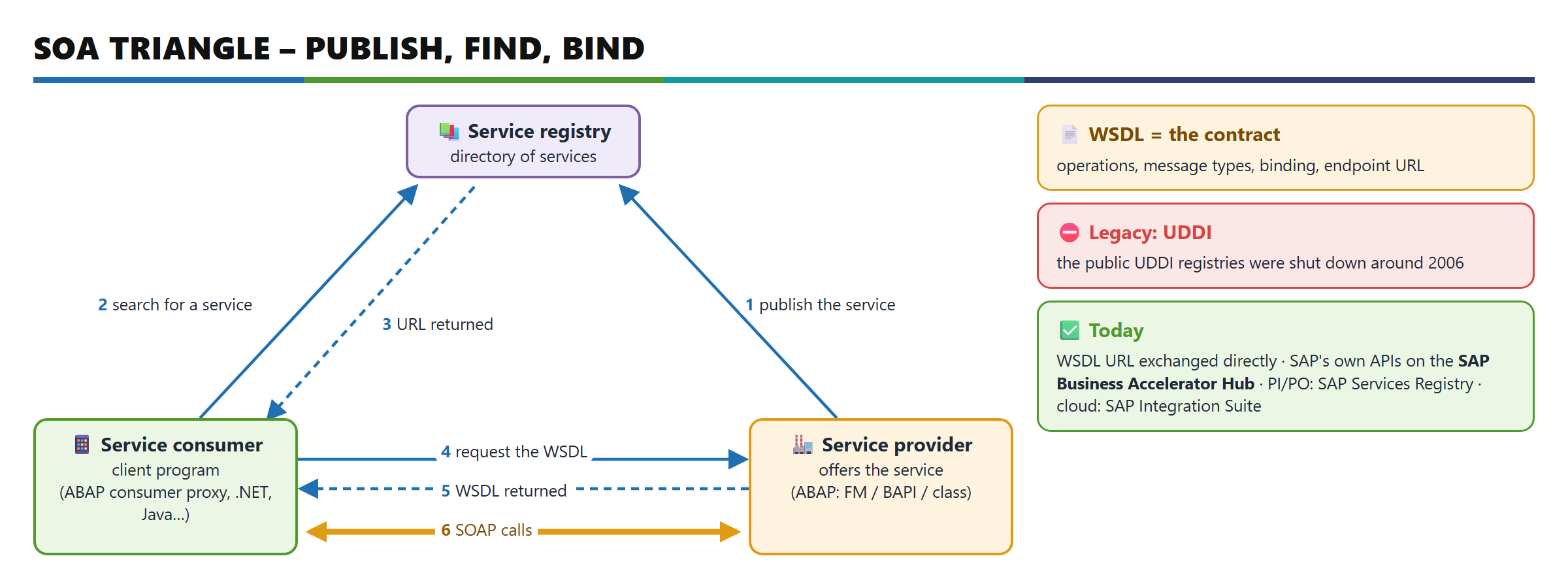
The classic SOA triangle: (1) the provider publishes its service, (2) the consumer searches the registry, (3) gets the URL, (4/5) requests and receives the WSDL, then calls the provider with SOAP messages.
Legacy – UDDI (know it for interviews)
UDDI (Universal Description, Discovery and Integration) was the XML standard for such registries. The public UDDI Business Registry – including SAP's node at uddi.sap.com – was shut down around 2006. In practice the WSDL URL is exchanged directly; in SAP landscapes services are found in the SAP Services Registry (PI/PO) or the SAP Business Accelerator Hub (api.sap.com) for SAP's own APIs.
Web services in AS ABAP
- AS ABAP has a standard architecture and tools (SE80, SOAMANAGER, SPROXY) to provide and consume web services.
- RFC-enabled function modules and BAPIs can be exposed as services with a wizard (inside-out).
- Used SAP ↔ SAP and SAP ↔ non-SAP (.NET, Java, cloud services).
- Two families: SOAP (a protocol with a strict contract) and REST (an architectural style; OData is the SAP flavour).
Part 2 – SOAP
SOAP (originally Simple Object Access Protocol; since SOAP 1.2 just a name) is an XML-based messaging protocol. Every message is an envelope with an optional header (security, addressing) and a body (the payload or a fault). It is independent of programming language and is usually sent over HTTP(S) POST. Security standards such as WS-Security (signatures, encryption) plug into the header.
|
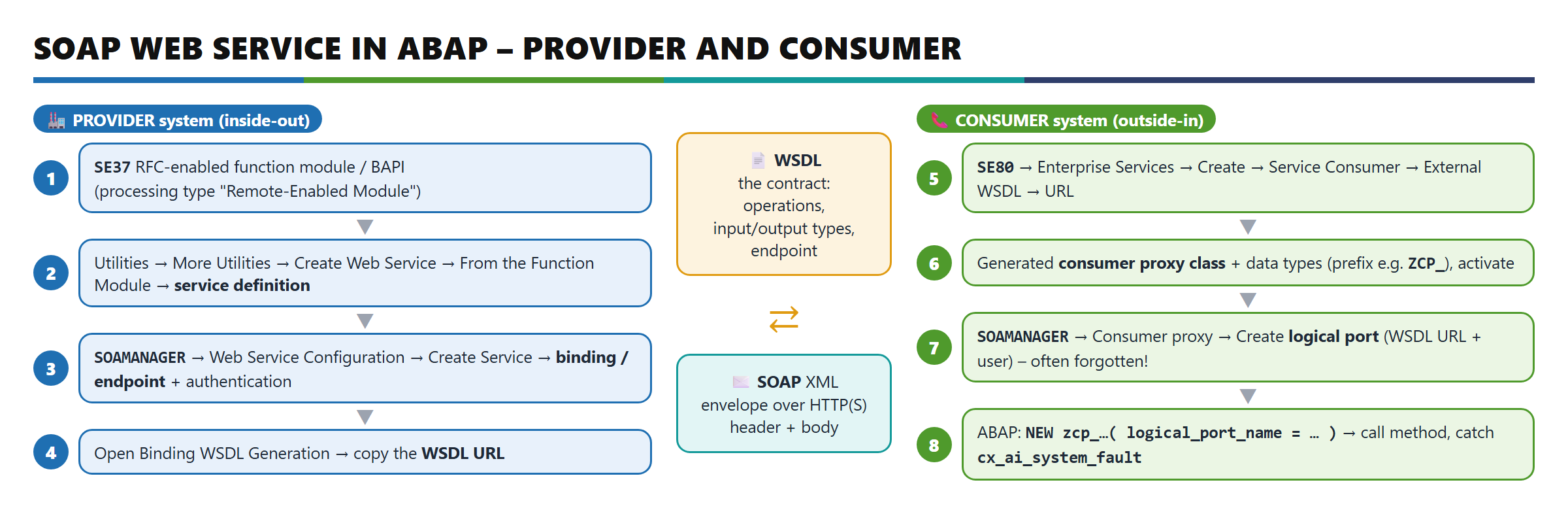
To use SOAP in ABAP you need two parts: a service definition on the provider side (returns an output for the given input) and a service consumer (consumer proxy) on the calling side.
Term | Meaning |
|---|---|
Inside-out | Start from existing ABAP (FM/BAPI/class) and generate the service definition + WSDL from it |
Outside-in | Start from a WSDL / ESR service interface and generate ABAP proxies from it (SPROXY / SE80) |
Service definition | Provider-side repository object describing the service (generated from the FM) |
Endpoint / binding | Runtime configuration in SOAMANAGER: URL, authentication, transport security |
Consumer proxy | Generated ABAP class + data types that build and send the SOAP message for you |
Logical port | Runtime configuration of a consumer proxy in SOAMANAGER: target URL, user, security |
Part 3 – SOAP provider: function module → service definition → SOAMANAGER
3.1 Create the function module (SE37)
Create the FM in a customer function group with processing type Remote-Enabled Module (RFC). RFC parameters must be passed by value. Activate it.
|
3.2 Create the service definition
- SE37 menu Utilities → More Utilities → Create Web Service → From the Function Module, or SE80 → Enterprise Services → Create → Service Provider → Existing ABAP Object (inside-out).
- Follow the wizard: name of the service definition (e.g.
ZSD_XXX_SCHDLCOUNT), the endpoint (FM), a security profile (e.g. basic authentication + SSL), package, transport. Activate.
3.3 Configure it in SOAMANAGER
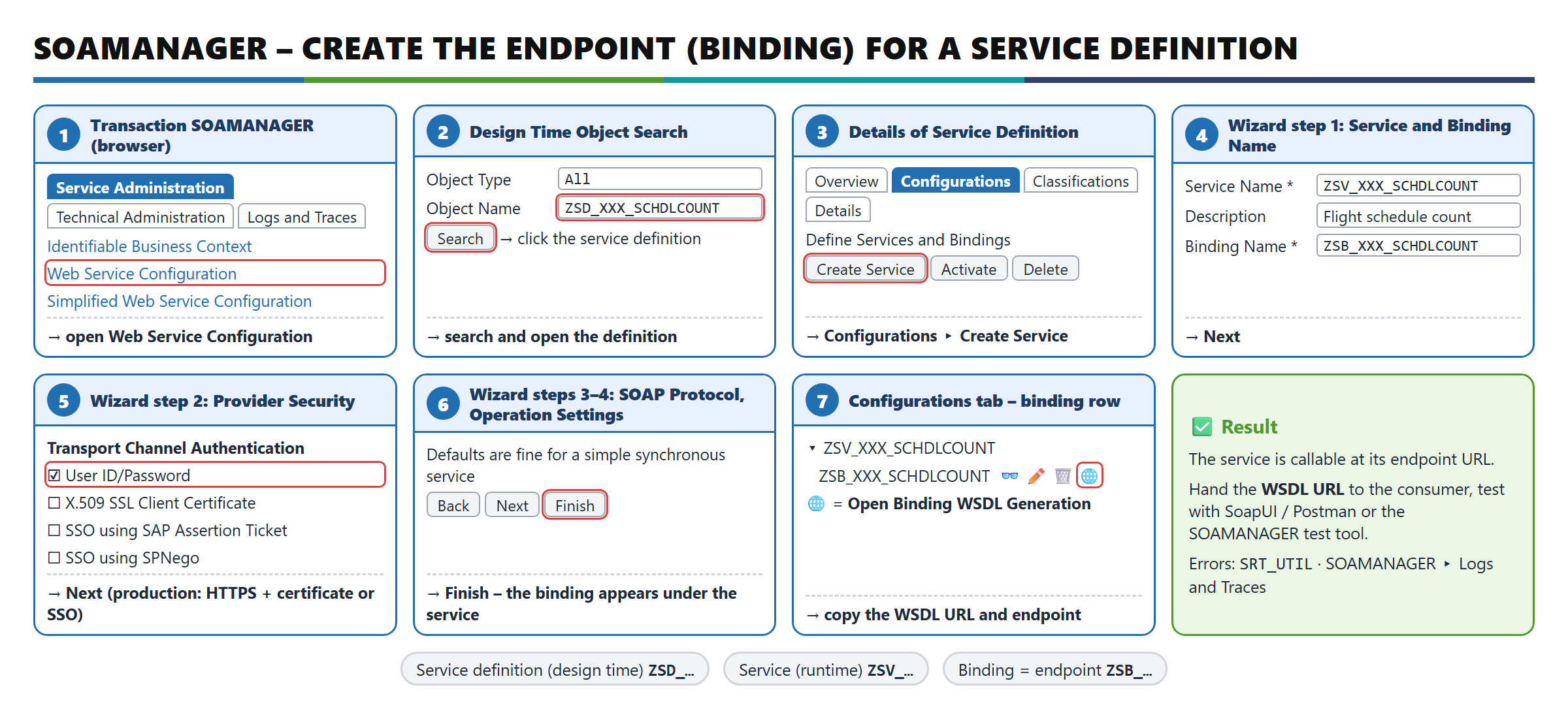
A service definition is only a design-time object. SOAMANAGER (opens in the browser) creates the runtime binding / endpoint that consumers call.
- 1. Tab Service Administration → Web Service Configuration.
- 2. Search for the service definition
ZSD_XXX_SCHDLCOUNTand open it. - 3. Tab Configurations → Create Service.
- 4. Enter the service name (
ZSV_XXX_SCHDLCOUNT), a description and the binding name (ZSB_XXX_SCHDLCOUNT) → Next. - 5. Provider security: under Transport Channel Authentication tick User ID/Password (basic authentication). Production: HTTPS + SSL client certificate or SSO where possible.
- 6. Next → Finish. The binding appears under the service.
- 7. On the binding row, click Open Binding WSDL Generation (4th icon) – it shows the WSDL URL and the endpoint. Give this URL to the consumer.
3.4 Test and monitor
- Test with the Web Service Navigator / Test icon in SOAMANAGER, or import the WSDL into SoapUI / Postman and send a request.
- SRT_UTIL – error log and traces for SOAP runtime calls; SRT_MONI – message monitor (asynchronous/reliable messaging); SOAMANAGER → Logs and Traces.
- Authorization: the calling user needs S_SERVICE for the service and the RFC authorizations (S_RFC) of the function group.
Part 4 – SOAP consumer: proxy → logical port → ABAP call
4.1 Generate the consumer proxy (SE80)
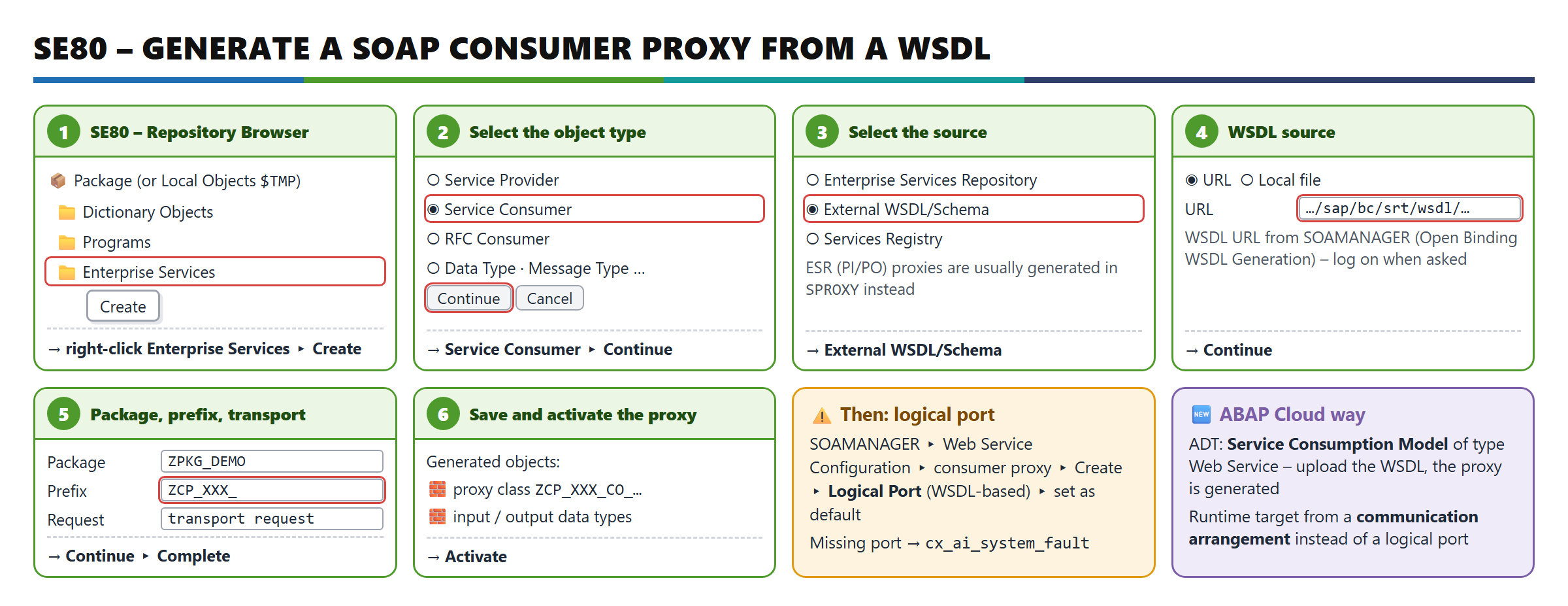
- 1. SE80 → Local Objects (or your package) → right-click Enterprise Services → Create.
- 2. In the wizard choose Service Consumer → Continue.
- 3. Choose External WSDL/Schema → data source URL → enter the WSDL URL from SOAMANAGER (log on – basic authentication is required).
- 4. Package (or Local Object) and a prefix such as
ZCP_XXX_so the generated objects are recognisable. - 5. Complete → save and activate the consumer proxy (class
ZCP_XXX_CO_…plus data types).
With PI/PO the WSDL usually comes from the Enterprise Services Repository; then the proxy is generated in SPROXY (outside-in) instead.
4.2 Create the logical port (SOAMANAGER)
A generated proxy cannot be called until it has a logical port: SOAMANAGER → Service Administration → Web Service Configuration → search the consumer proxy → Create → Logical Port (manual configuration or WSDL-based: WSDL URL + user/password) → set it as default → Save. Without it the call fails with cx_ai_system_fault ("no logical port").
4.3 Call the service in ABAP
|
The class, method and type names are generated from the WSDL – look them up in the proxy (SE80 / SPROXY). If logical_port_name is omitted, the default logical port is used.
Part 5 – REST services in ABAP
5.1 REST in one minute
REST (Representational State Transfer) is an architectural style: resources are addressed by URLs and changed with HTTP methods; data travels as JSON or XML; every request is stateless. Details and the six REST constraints are on page 08 OData, Part 1.
Method | Purpose | Idempotent? | Has body? |
|---|---|---|---|
GET | Read a resource | Yes | No |
POST | Create / trigger an action | No | Yes |
PUT | Replace a resource completely | Yes | Yes |
PATCH | Change some fields | Not guaranteed | Yes |
DELETE | Delete a resource | Yes | No |
A request = method + URL + headers + optional body; a response = status code + headers + body.
5.2 Why a plain REST service instead of OData?
- OData needs an entity model (entity types, keys, sets). For a small technical endpoint (a webhook, a file upload, a callback from a third-party system with its own JSON format) a plain ICF handler is simpler.
- You must then do yourself what Gateway gives for free: URL parsing, JSON mapping, paging, error format, CSRF protection, metadata/documentation.
- OData does not require GET_ENTITYSET to allow POST. A modifying OData request only needs an X-CSRF-Token, fetched by any GET (service document or $metadata) – see page 08 OData, Part 11.
5.3 Provider: ICF handler class
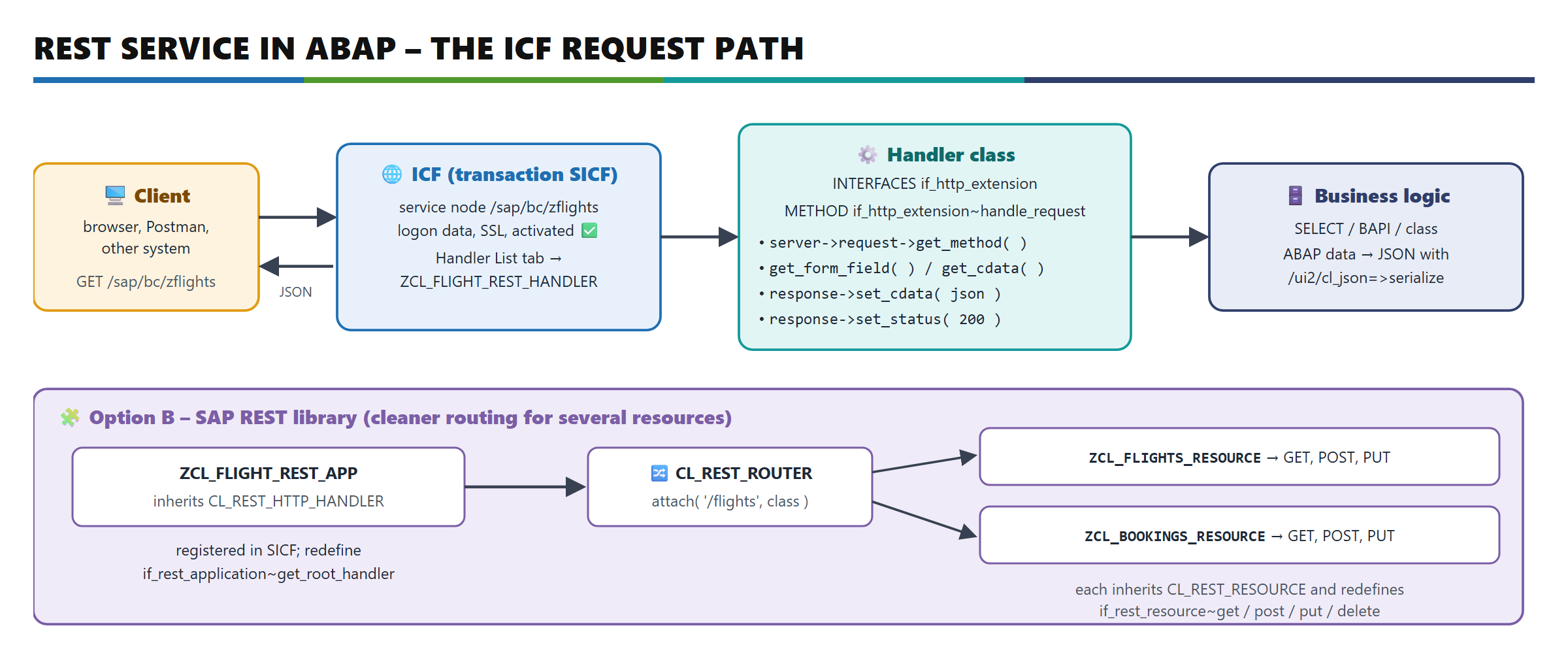
- 1. SE24: create class
ZCL_FLIGHT_REST_HANDLERand add interface IF_HTTP_EXTENSION (tab Interfaces). - 2. Implement method HANDLE_REQUEST: read method, parameters and body from
server->request, write status, content type and body toserver->response.
|
- 3. SICF (required – without it the class is never called): choose a path, e.g.
default_host/sap/bc/→ right-click → New Sub-Elementzflights→ description, Logon Data (standard SAP logon, or a fixed service user only if really needed) → tab Handler List: enterZCL_FLIGHT_REST_HANDLER→ save → right-click → Activate Service. - 4. Test:
https://<host>:<port>/sap/bc/zflights?carrid=LH&sap-client=100in the browser (GET) or Postman.
Option B – SAP REST library
For several resources, inherit the SICF handler from CL_REST_HTTP_HANDLER, redefine IF_REST_APPLICATION~GET_ROOT_HANDLER and attach URL templates to CL_REST_ROUTER (lo_router->attach( iv_template = '/flights' iv_handler_class = 'ZCL_FLIGHTS_RESOURCE' )). Each resource class inherits CL_REST_RESOURCE and redefines IF_REST_RESOURCE~GET / POST / PUT / DELETE.
JSON in ABAP
/ui2/cl_json=>serialize( )/deserialize( )– most used, options for camelCase and initial values.CALL TRANSFORMATION id SOURCE data = ls_data RESULT XML lo_writerwith anif_sxml_writerof type JSON – the built-in asJSON format.- ABAP Cloud:
xco_cp_json(released API) –/ui2/cl_json is also released there.
Security for your own REST services
- HTTPS only (certificates in STRUST), authentication in SICF logon data,
AUTHORITY-CHECKin the code. - CSRF: a browser-callable POST/PUT/DELETE endpoint needs CSRF protection. The REST library supports the same
X-CSRF-Token: Fetchhandshake as Gateway (CL_REST_HTTP_HANDLERhas a built-in check, methodHANDLE_CSRF_TOKEN); a plain IF_HTTP_EXTENSION handler does not protect you automatically. - Never build SQL from request parameters; validate all input.
5.4 Consumer: calling an external REST API from ABAP
Create an SM59 destination of type G (HTTP to external server: host, path prefix, SSL, logon) and use IF_HTTP_CLIENT:
|
cl_http_client=>create_by_url( )works too, but a destination keeps host and credentials out of the code.- ABAP Cloud (BTP, S/4HANA Cloud, clean core – see Clean Core › 01 Clean Core): use the released classes
cl_http_destination_provider(destination from a communication arrangement) andcl_web_http_client_manager=>create_by_http_destination( ), thenlo_client->execute( if_web_http_client=>get ).
Part 6 – SOAP vs REST vs OData
SOAP | Plain REST | OData (REST + rules) | |
|---|---|---|---|
Nature | Protocol (XML messaging) | Architectural style | Standardised REST protocol (OASIS / ISO) |
Payload | XML only | JSON, XML, anything | JSON (V2 also Atom XML) |
Contract | WSDL (strict) | None by default (OpenAPI optional) | $metadata (EDM model) |
Operations | Named operations | HTTP verbs on URLs | CRUD-Q + query options + actions |
Querying | Only what the operation offers | Whatever you code | $filter, $select, $expand, paging out of the box |
Security | WS-Security, SSL | SSL, OAuth, CSRF – you build it | SSL, OAuth, CSRF built into Gateway |
ABAP tools | SE80 / SPROXY, SOAMANAGER | SICF + IF_HTTP_EXTENSION / CL_REST_* | SEGW or RAP service binding |
Typical use | B2B, PI/PO, legacy SAP–SAP enterprise services, reliable messaging | Webhooks, small technical endpoints, calling external APIs | Fiori / UI5 apps, SAP APIs on api.sap.com, Web APIs |
Rule of thumb in S/4HANA: for new APIs and Fiori apps build OData with RAP (service binding: UI or Web API – see RAP › 03 and 11); use SOAP where partners or middleware require it; use a plain ICF REST handler only for special technical endpoints.
Part 7 – Interview questions
Q1. What is a web service, and what are WSDL and UDDI?
A standards-based interface for applications to exchange data over HTTP. WSDL is the XML contract (operations, messages, endpoint). UDDI was the registry standard for publishing/finding services – obsolete; the public registries were shut down around 2006.
Q2. SOAP vs REST?
SOAP is an XML protocol with a strict WSDL contract and WS-* standards. REST is an architectural style using URLs and HTTP verbs, usually with JSON – lighter and easier for web/mobile clients.
Q3. How do you expose a function module as a SOAP service?
RFC-enabled FM in SE37 → Utilities → More Utilities → Create Web Service → From the Function Module (service definition) → SOAMANAGER: Web Service Configuration → Create Service (binding, authentication) → copy the WSDL URL and test.
Q4. How do you consume a SOAP service in ABAP?
Generate a consumer proxy from the WSDL (SE80 Enterprise Services → Service Consumer, or SPROXY), create a logical port in SOAMANAGER, then instantiate the proxy class with the logical port and call its method, catching cx_ai_system_fault / cx_ai_application_fault.
Q5. Inside-out vs outside-in?
Inside-out: generate the service from existing ABAP (FM/BAPI). Outside-in: start from a WSDL or ESR interface and generate the ABAP proxy, then implement or call it.
Q6. What is a logical port and what happens without one?
The runtime configuration of a consumer proxy (endpoint URL, credentials, security) in SOAMANAGER. Without it the proxy call raises cx_ai_system_fault.
Q7. How do you build a REST service in ABAP without OData?
Class implementing IF_HTTP_EXTENSION, logic in HANDLE_REQUEST (method, form fields, body → JSON response and status), registered as handler of a service node in SICF and activated. For many resources use CL_REST_HTTP_HANDLER + CL_REST_ROUTER + CL_REST_RESOURCE.
Q8. How do you call an external REST API from ABAP?
SM59 destination type G + cl_http_client=>create_by_destination, set method and URI, send, receive, read status and body, deserialize the JSON. In ABAP Cloud: cl_http_destination_provider + cl_web_http_client_manager.
Q9. What is a CSRF token and when is it needed?
A token that proves a modifying request comes from the real client session. Fetch it with X-CSRF-Token: Fetch on a GET, send it on POST/PUT/PATCH/DELETE; missing → 403. GETs don't need it.
Q10. Where do you analyse failing SOAP calls?
SRT_UTIL (error log, traces), SRT_MONI (message monitor), SOAMANAGER Logs and Traces, ST22 for dumps, and a test with SoapUI / the WS Navigator.
Q11. When would you choose SOAP, plain REST or OData?
OData (RAP) for Fiori apps and new APIs; SOAP when a partner/middleware requires WSDL contracts or WS-Security; plain REST for small technical endpoints and when calling third-party JSON APIs.
🏠 Start Here · ◀ 08 · OData · 10 · Enhancements ▶ · Sections: CORE ABAP | OOPS ABAP | ABAP on HANA | Clean Core | RAP | ABAP Points | SAP Fiori | SAPUI5 | Mobile Development (MDK) | BTP Foundations | BTP Development | CAP | SAP Build | ABAP on BTP | Integration Suite | SAP Business AI | SAP BASIS | Security | SAP SDLC
Functional: FICO ABAP | TRM ABAP | VIM | SAP BIS | SD ABAP | MM ABAP | PP ABAP | QM ABAP | PM ABAP | PS ABAP | EWM | TM ABAP | GTM ABAP | EHS ABAP | HR ABAP | BW | SAP Datasphere | SAP Business Data Cloud | SAP MDG | SAP Analytics Cloud | SAP Ariba | SAP CX | SAP IBP