How to add your own logic, fields and menu entries to SAP standard without changing SAP's code: user exits, customer exits, BAdIs and the Enhancement Framework, plus FI validations and substitutions. Classic techniques are still asked in interviews and live in every brownfield system; the last part shows what replaces them in S/4HANA and clean core.
Part 1 – Enhancement vs modification
An enhancement plugs extra functionality into a standard SAP transaction at places SAP prepared, without disturbing the existing logic. Typical goals:
- Extra validations on standard fields (e.g. block a sales order without a customer PO number).
- Extra fields on a standard screen (in a subscreen area SAP left empty).
- Extra menu items with your own function.
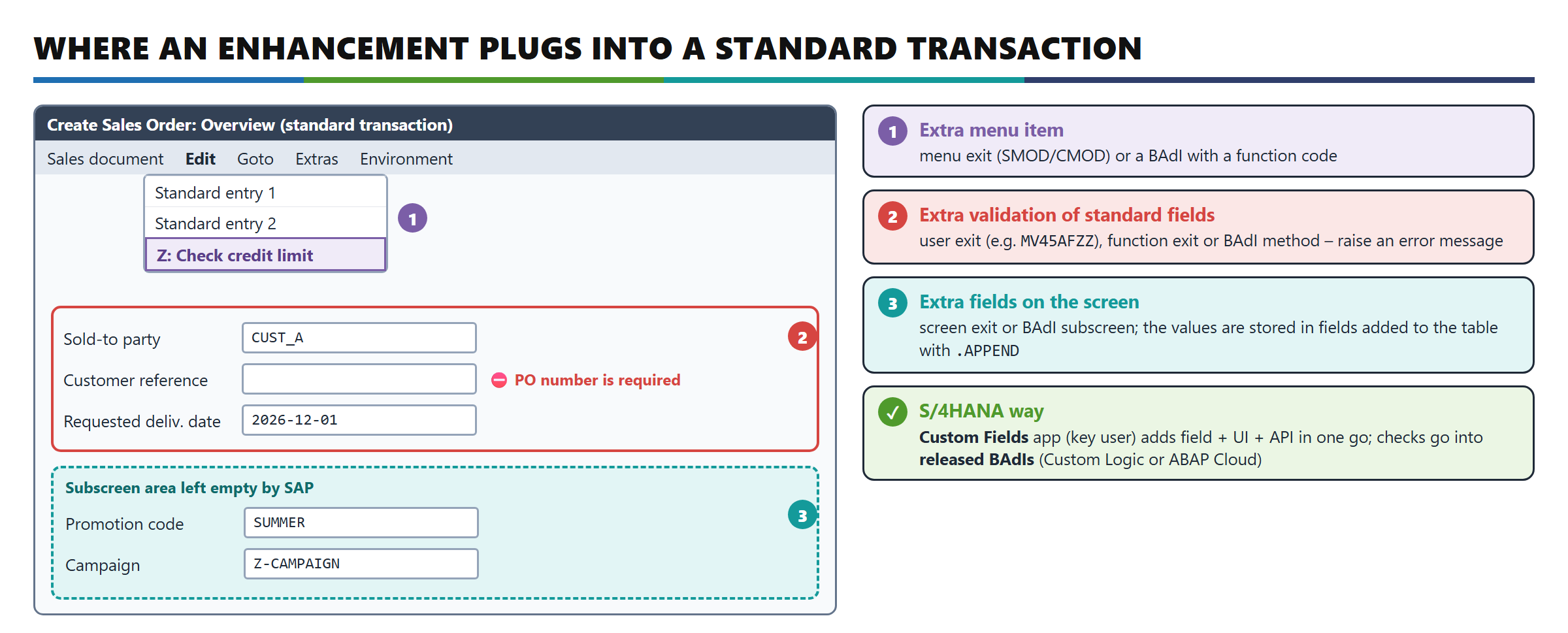
A modification changes SAP's own repository objects directly. It needs an access key (object key requested from SAP for Me and registered in SSCR) and must be checked again at every upgrade or support package.
Enhancement | Modification | |
|---|---|---|
What changes | Your own objects plugged in at SAP-defined hooks | SAP's source code, screens or DDIC objects |
Access key | Not needed (exception: classic user exits – see Part 3) | Needed per object (SSCR registration) |
Upgrade effort | Low – the hook stays, your code stays | High – compare and adjust every time |
Tools | SMOD/CMOD, SE18/SE19/SE20, SE80 | Modification Assistant in the editors, SE95 |
Clean core | Released BAdIs are fine; old exits are tolerated | Avoid – "dirty core" |
Upgrade tools you should know
Tcode | Purpose |
|---|---|
SPDD | Adjust modified DDIC objects (tables, data elements, domains) during an upgrade – runs first, before the new DDIC is activated |
SPAU | Adjust modified repository objects (programs, FMs, screens) after the upgrade: keep your change or reset to the SAP original |
SPAU_ENH | Adjust enhancement implementations that conflict with the new SAP version |
SE95 | Modification Browser – lists all modifications and enhancements in the system |
SSCR | Registration of developers and object keys for modifications |
Part 2 – Evolution and overview
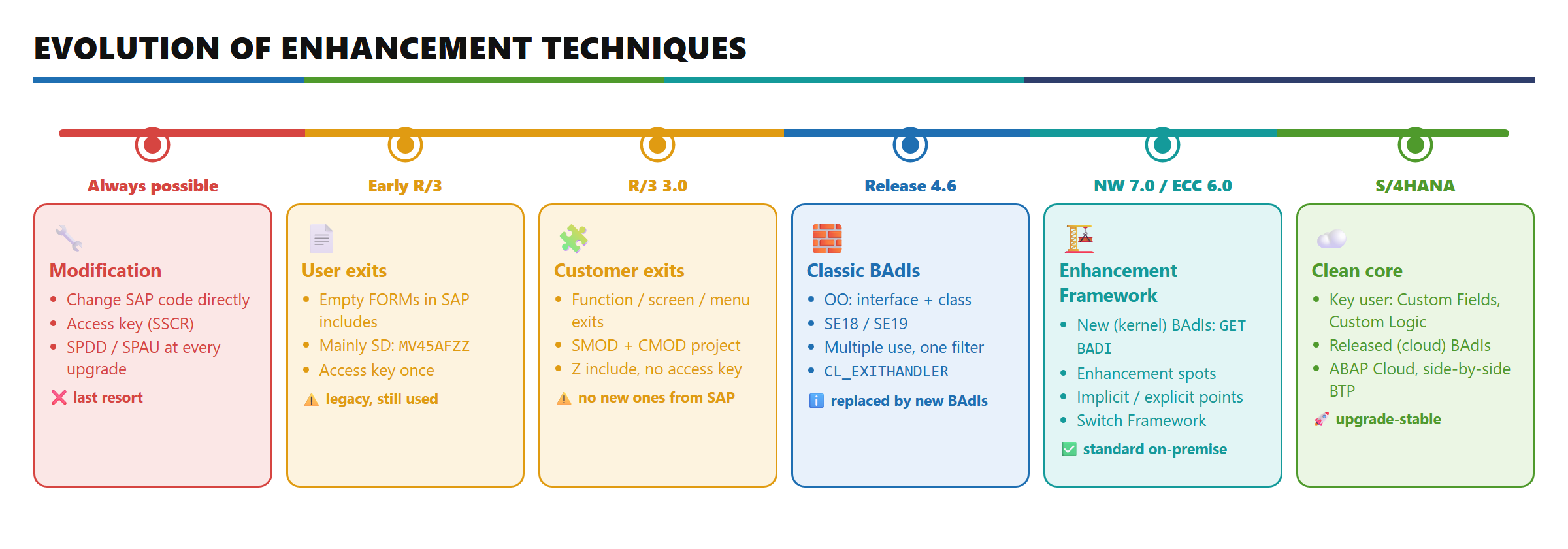
Classification of the techniques (user exits are found mainly in SD, not only there):
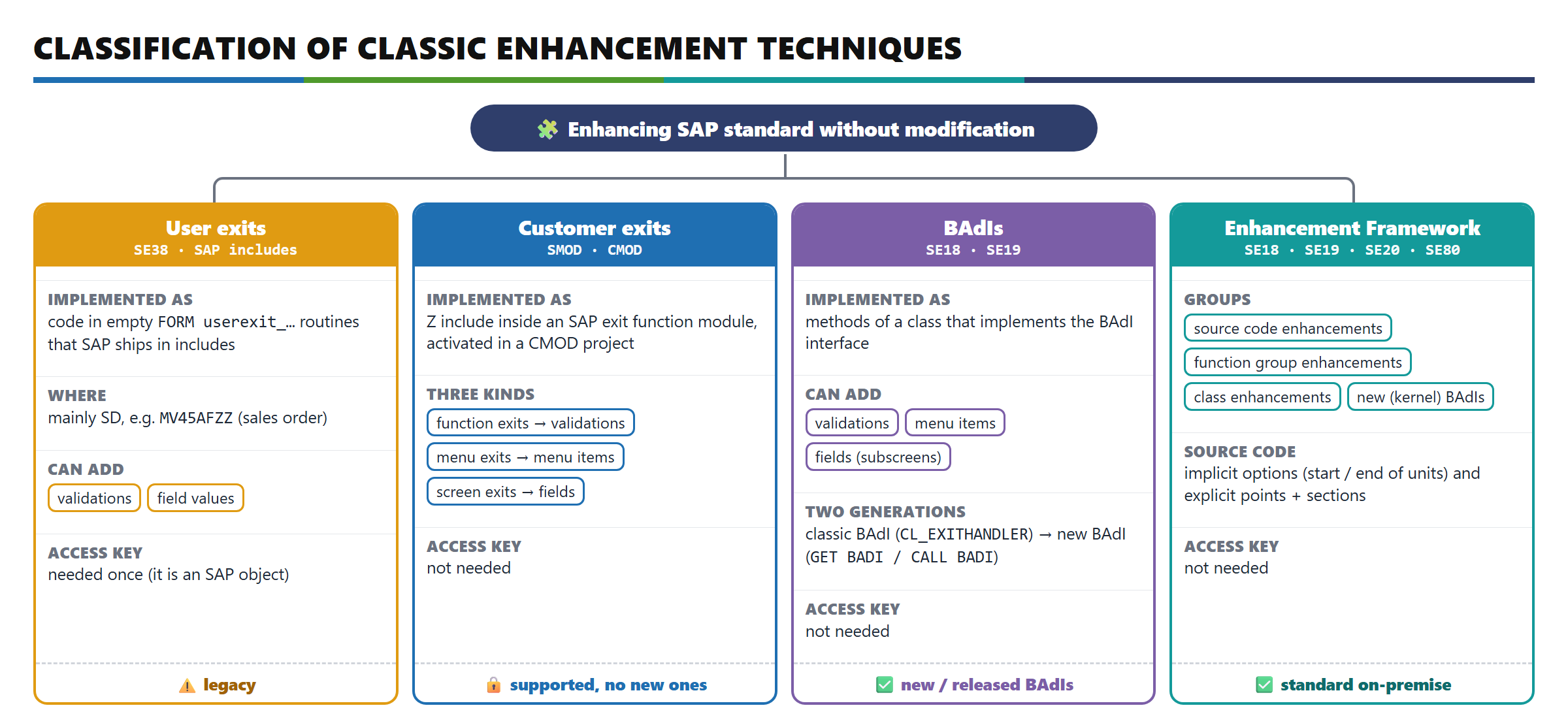
Technique | Tcodes | Implemented as | Typical use | Status |
|---|---|---|---|---|
User exits | SE38 (SAP include) | Empty | Validations, filling fields in SD | Legacy; needs access key once |
Customer exits | SMOD, CMOD | Z include inside an SAP exit function module | Function, screen, menu exits | Supported, no new ones |
Classic BAdIs | SE18, SE19 | Class implementing an | Validations, fields, menus | Replaced by new BAdIs |
Enhancement Framework | SE18, SE19, SE20, SE80 | New BAdIs, enhancement points/sections, class and FG enhancements | Everything above | Standard on-premise |
Key user / ABAP Cloud | Fiori apps, ADT | Custom Fields, Custom Logic, released BAdIs | S/4HANA extensions | Recommended |
Part 3 – User exits
User exits are empty subroutines that SAP placed in special includes, mainly in SD. You write your code inside the FORM. Because the include belongs to SAP, the first change needs the object key (technically a modification, but SAP planned it and SPAU keeps it).
Include | Area | Examples of forms |
|---|---|---|
MV45AFZZ | Sales order (VA01/VA02) |
|
MV50AFZ1 | Delivery (VL01N) | USEREXIT_SAVE_DOCUMENT_PREPARE |
RV60AFZZ | Billing (VF01) | USEREXIT_NUMBER_RANGE |
|
In S/4HANA / clean core: user exits still run in S/4HANA on-premise, but they are modifications of SAP includes – prefer a released BAdI or Custom Logic where one exists.
Part 4 – Customer exits (SMOD / CMOD)
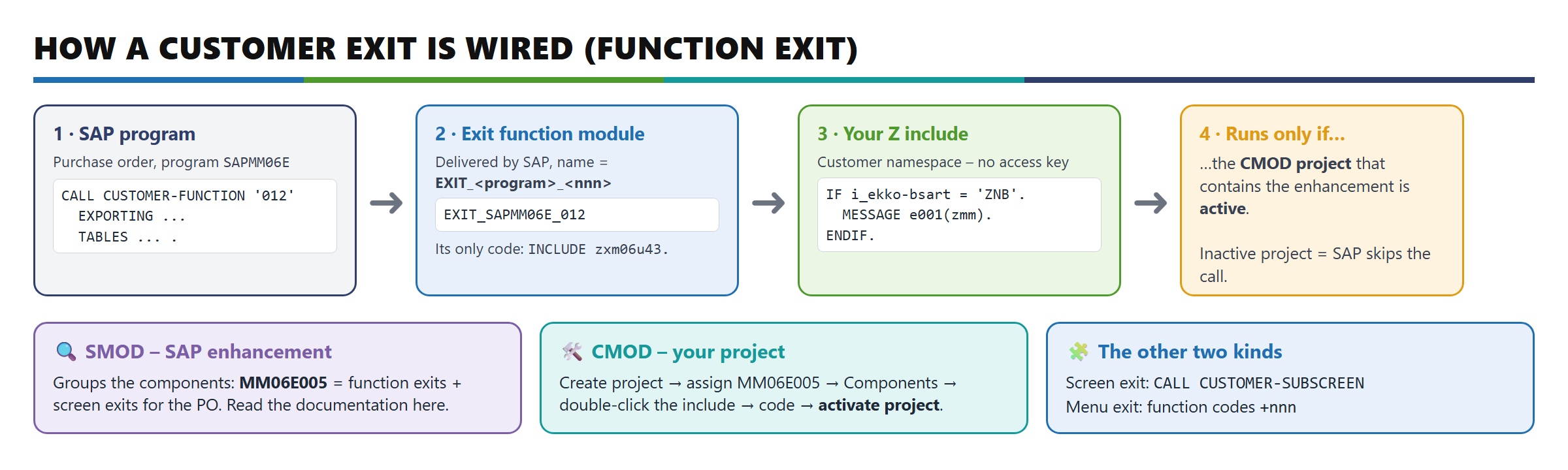
Customer exits are hooks SAP built into its programs that call objects in the customer namespace – no access key needed. SAP groups related exits into an enhancement (viewed in SMOD); you activate it in your own project (CMOD).
Type | Hook in SAP code | What you build | Purpose |
|---|---|---|---|
Function exit | CALL CUSTOMER-FUNCTION 'nnn' | Code in Z include | Validations, default values |
Screen exit | CALL CUSTOMER-SUBSCREEN area INCLUDING prog dynnr | Subscreen in program | Extra fields |
Menu exit | Menu entry with function code | Text of the entry + logic in a function exit | Extra menu items |
|
CMOD project – steps
- 1. SMOD: find the enhancement (e.g. MM06E005) and read its components and documentation.
- 2. CMOD: create a project (e.g. ZMM_PO), enter a short text.
- 3. Enhancement assignments: add MM06E005. An enhancement can be in only one project (single implementation).
- 4. Components: double-click the function exit → double-click the
INCLUDE zx…line → create the include, write the code, activate. - 5. For a screen exit: create the subscreen in the
SAPLX…program (SE51); first add the field to the table via an append structure or customer include (CI_…). - 6. Activate the project – an inactive project means SAP skips the call.
Table | Content |
|---|---|
MODSAP | SAP enhancements and their components (find the enhancement of an exit) |
MODACT | Which project contains which enhancement |
MODATTR | Project attributes (status active / inactive) |
Screen exit example – MP01 (approved manufacturer parts)
Every screen exit comes with two function exits: the PBO exit passes data to the subscreen, the PAI exit returns the user's input back to SAP.
Element | Value |
|---|---|
Calling program / screen | SAPLMBAH / 0120 |
Subscreen area | USER0001 |
Called program / subscreen | SAPLXAMP / 1000 |
Statement in SAP's flow logic | CALL CUSTOMER-SUBSCREEN user0001 INCLUDING 'SAPLXAMP' '1000'. |
Subscreens are explained in page 05 Dialog Programming (Module Pool).
Menu exit examples
- Transaction MC94: program SAPMMCP6, package MCP2, customer exit MCP20003.
- Transaction FBL3N: program RFITEMGL, package FREP – done with a BAdI instead: FI_ITEMS_MENUE01.
In S/4HANA / clean core: customer exits still work on-premise, but SAP adds no new ones and they are not released for ABAP Cloud – look for a released BAdI first.
Part 5 – BAdIs (Business Add-Ins)
A BAdI is an object-oriented hook: SAP defines an interface, you write a class that implements it, and SAP's code calls the methods. BAdIs came with release 4.6 (classic BAdIs); the new (kernel) BAdIs came with the Enhancement Framework in SAP NetWeaver 7.0 / ECC 6.0.
Term | Meaning |
|---|---|
Definition (SE18) | Interface + methods + settings (single/multiple use, filter). Standard BAdIs: defined and called by SAP, implemented by you |
Implementation (SE19) | Your class with the method code; active or inactive; transported on its own |
Single use | Exactly one active implementation (methods may return values) |
Multiple use | Any number of active implementations run one after another – order undefined |
Filter-dependent | Each implementation is assigned filter values (country, company code…); only the matching ones run |
Fallback class | New BAdIs only: default implementation, used when no active implementation matches |
5.1 Classic BAdIs (4.6 – NW 7.0)
- Interface
IF_EX_<badi>; SAP generates an adapter classCL_EX_<badi>that calls all active implementations. - Settings: "Within SAP" (SAP-internal only), "Multiple use", "Filter-dependent" (one filter type, a character data element).
- Called through
CL_EXITHANDLER=>GET_INSTANCE– the active implementations are read from the database at runtime.
|
5.2 New (kernel) BAdIs – enhancement spots
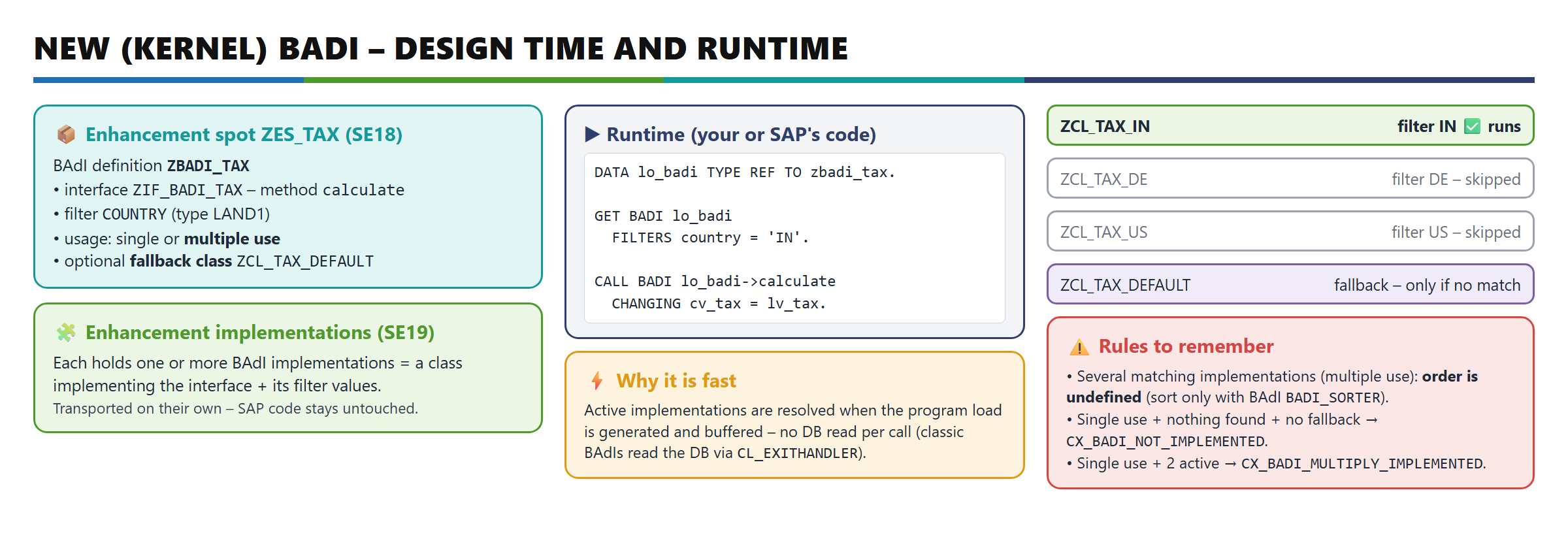
New BAdIs live in an enhancement spot (container of BAdI definitions and explicit enhancement points/sections). Implementations live in an enhancement implementation (container of BAdI implementations, source code plug-ins and function group / class enhancements). You don't have to implement every BAdI of a spot.
|
|
- A custom BAdI can be called from your own report or from inside another exit/BAdI implementation, e.g. in
IF_EX_CUSTOMER_ADD_DATA~CHECK_ALL_DATA– this lets several teams plug in without editing the same include. - Several active implementations of a multiple-use BAdI run in undefined order – never rely on it. If the order matters, sort them with the BAdI BADI_SORTER.
- Exceptions:
CX_BADI_NOT_IMPLEMENTED(single use, nothing found, no fallback),CX_BADI_MULTIPLY_IMPLEMENTED(single use, more than one active),CX_BADI_INITIAL_REFERENCE(CALL BADI without GET BADI).
5.3 Creating a custom BAdI – steps
- 1. SE18 (or SE80): create an enhancement spot, e.g. ZES_TAX.
- 2. In the spot create the BAdI: name, interface + methods, single/multiple use, optional filter (name and type) and fallback class.
- 3. SE19: create an enhancement implementation for the spot.
- 4. In it create a BAdI implementation (class) per variant, each with its filter values; activate.
- 5. Call it with
GET BADI/CALL BADIfrom a report or from a standard exit/BAdI.
5.4 Standard filter-dependent BAdI – extra tab in the customer master (ECC)
Transaction XD01, BAdI CUSTOMER_ADD_DATA_CS (screen enhancement, multiple use, filter CUST_SCGR = customer screen group, CHAR2).
- 1. Define the screen group in customer master customizing.
- 2. Implement
CHECK_ADD_ON_ACTIVEof BAdI CUSTOMER_ADD_DATA (return 'X' for your screen group). - 3. Implement
GET_TAXI_SCREENof CUSTOMER_ADD_DATA_CS – assign the subscreen program and subscreen per tab. - 4. Append the extra fields to KNA1.
- 5. Create the subscreen program and design the subscreens with the new fields.
In S/4HANA: XD01 redirects to the Business Partner (BP). Extra customer fields go into BP screens via BDT (BUPT customizing) and the CVI mapping BAdIs (e.g. CVI_CUSTOM_MAPPER).
5.5 Comparisons
Classic BAdI | New (kernel) BAdI |
|---|---|
Definition and implementations stored independently (SE18/SE19) | Definition in an enhancement spot, implementations in enhancement implementations |
One filter type – character data element only | Several filters; elementary types (c, n, string, integers…), DDIC-based or own |
|
|
No fallback class | Fallback class |
Since 4.6 | Since NW 7.0 / ECC 6.0; can be switched with the Switch Framework |
Customer exit | BAdI |
|---|---|
Procedural (FM + include) | Object-oriented (interface + class) |
Always single implementation (one project) | Single or multiple implementations |
You cannot create your own | You can create custom BAdIs and call them from exits or other BAdIs |
No default implementation | Fallback class (new BAdIs) |
No new ones from SAP; not released for ABAP Cloud | Released BAdIs are the ABAP Cloud extension points |
Part 6 – Enhancement Framework
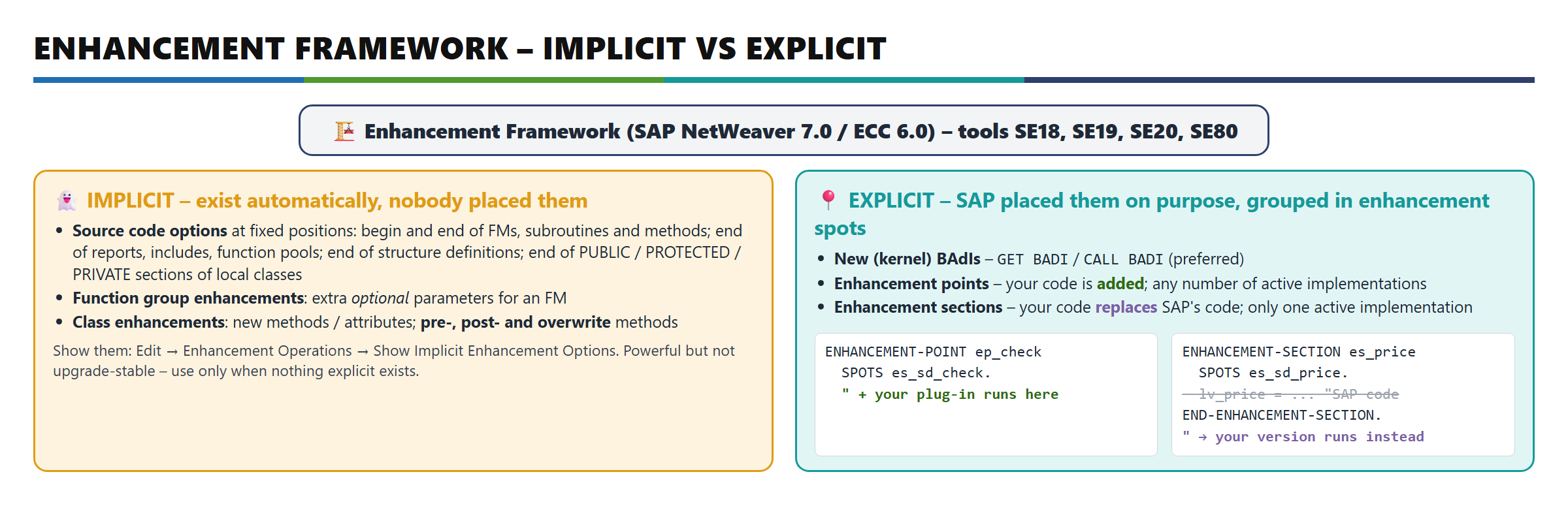
Introduced with SAP NetWeaver 7.0 (ECC 6.0). It unifies all modern techniques for enhancing repository objects (reports, includes, function groups, classes, Web Dynpro, structures) without modification.
Technology | What you can do |
|---|---|
Source code enhancements | Plug-in at an enhancement point runs in addition; plug-in for an enhancement section replaces the section's code |
Function group enhancements | Add optional parameters to an FM interface. Core Basis function groups are not enhanceable |
Class enhancements | New methods and attributes; pre-, post- and overwrite methods for existing ones |
New BAdIs | OO enhancement option fully integrated in the framework (Part 5) |
Web Dynpro enhancements | Change views, add nodes and methods of Web Dynpro components |
Implicit vs explicit
- Implicit enhancement options exist automatically – nobody placed them: begin and end of FMs, subroutines and methods; end of reports, includes and function pools; end of structure definitions; end of the PUBLIC / PROTECTED / PRIVATE sections of local classes. Show them in the editor with Edit → Enhancement Operations → Show Implicit Enhancement Options, then right-click → Create Implementation.
- Explicit enhancement options were placed by SAP (or the code owner) on purpose and grouped in an enhancement spot: statements
ENHANCEMENT-POINT/ENHANCEMENT-SECTIONand new BAdIs (GET BADI/CALL BADI).
Enhancement point | Enhancement section | |
|---|---|---|
Effect | Your code runs in addition at that line | SAP's code between |
Active implementations | Any number | Only one – a second active one is a conflict that needs a conflict-resolution enhancement |
Variants |
| Same |
|
- Related tools: SE20 (Enhancement Builder – spots and implementations), composite enhancement implementations (group several implementations), Switch Framework (SFW5, business functions switch enhancements on), SPAU_ENH after upgrades.
- Prefer explicit options and BAdIs. Implicit enhancements reach deep into SAP's code and are not upgrade-stable – a clean-core risk.
Part 7 – Finding exits and BAdIs; ANST
Method | Finds | How |
|---|---|---|
Package search | Customer exits | SE93 → main program → its package (SE38/SE80 attributes) → SMOD or SE84 (Enhancements → Customer exits) by package |
Source code search | Customer exits | Search the main program for |
Breakpoint in | Classic BAdIs only | Breakpoint in the method (or in |
Debugger breakpoint at statement | New BAdIs | Debugger → Breakpoints → Breakpoint at Statement; run the transaction |
SE84 / SE81 / SPRO | BAdIs, spots | Repository Info System → Enhancements; Application Hierarchy; IMG activities named "BAdI: …" |
Source search | Both BAdI kinds |
|
ST05 / SAT trace | BAdIs | Trace the transaction and look for BAdI tables / calls |
ANST – Automated Note Search Tool
Tcode ANST (ANST_SEARCH_TOOL). You record the transaction where a problem happens; ANST collects the SAP objects that ran and searches SAP Notes for exactly those objects. It also lists the custom code, modifications and enhancements that ran – a quick way to see which exits and BAdIs are implemented in a process when hunting a bug.
Part 8 – BAPI and IDoc extensions
- BAPI extension: custom fields travel through standard BAPIs in EXTENSIONIN / EXTENSIONOUT (type BAPIPAREX) after you append them to the BAPI_TE_* / BAPE_* structures – see page 07 Interfaces (RFC, BAPI, ALE/IDoc).
- IDoc extension: WE31 custom segment → WE30 extension of the basic type → WE82 link message type + basic type + extension → fill/read the segment in an exit or BAdI (e.g. MATMAS outbound EXIT_SAPLMV01_002) – details on page 07 Interfaces.
Part 9 – FI validations and substitutions
FI/CO's own rule-based way to check or change posting data without coding (an ABAP user exit is possible for complex rules). The posting program calls the rules at fixed callup points.
Term | Meaning | Example |
|---|---|---|
Application area | Area the rule belongs to, 2-character code | FI = Financial Accounting |
Callup point | Exact moment in the posting, 4-digit code | FI: 0001 document header, 0002 line item, 0003 complete document (mainly validations) |
Validation | Prerequisite + check; if the check is false a message (E/W/I) is raised – only valid data is posted | Company code ABC may only post to cost center XYZ |
Substitution | Prerequisite + new value for a field before posting (constant, field-to-field or user exit) | Company code ABC + cost center XYZ → payment method = X |
Order: when both are active at a callup point, the substitution runs first, then the validation – so substituted values are checked too. (Sources differ on this; test it in your system if a rule depends on it.)
Steps
- Validation – GGB0 (zero, not letter O): choose application area and callup point → Create validation (name, description, message class) → step: prerequisite (when to check) → check (what must be true) → message if the check fails → save → activate in OB28 per company code.
- Substitution – GGB1: choose application area and callup point → Create substitution (name, description) → step with prerequisite + substitution (field and value) → save → activate in OBBH per company code.
- Activation level in OB28/OBBH: 0 = inactive, 1 = active, 2 = active except in batch input.
Object | Validation | Substitution |
|---|---|---|
Maintain rules | GGB0 | GGB1 |
Activate for FI documents (per company code + callup point) | OB28 (table T001D) | OBBH (table T001Q) |
User-exit form pool (copy, then assign in GCX2, table T80D) | RGGBR000 → ZRGGBR000 | RGGBS000 → ZRGGBS000 |
Substitutable fields | – | Table GB01 (flag BEXCLUDE) |
|
- After changing exits or GB01, regenerate the rules with report RGUGBR00. Debug with a breakpoint in your
FORM u100. - The rules are called by the posting program itself; you never call them. (Internally FMs such as G_VSR_VALIDATION_CALL are used; check exact names in SE37 before quoting them.)
- Alternatives in code: business transaction events (BTE, tcode FIBF) and BAdIs on the accounting document.
In S/4HANA / clean core: GGB0/GGB1 still exist on-premise; newer releases and S/4HANA Cloud offer the Fiori app Manage Substitution and Validation Rules – the recommended way.
Part 10 – In S/4HANA / clean core
All classic techniques still run in S/4HANA on-premise, but new extensions should follow the clean core approach. Short version (details in Clean Core › 01 Clean Core):
Classic technique | Clean-core replacement |
|---|---|
Modification, implicit enhancement | Avoid; find a released BAdI or build side-by-side |
Append fields + screen exit | Key user app Custom Fields (adds the field to tables, UIs, CDS views, APIs) |
User exit / customer exit / classic BAdI with code | Released (cloud) BAdIs – in the key user app Custom Logic or in ADT with ABAP Cloud (developer extensibility) |
Z tables + Z reports | Custom CDS view entities and RAP business objects (RAP section) |
Heavy custom apps | Side-by-side on SAP BTP using released APIs and events |
- A released BAdI has a stable contract (C0) – SAP promises it keeps working after upgrades.
- Classic exits still matter: brownfield conversions bring them along, and you must read and maintain them.
Part 11 – Interview questions
1. What is the difference between an enhancement and a modification?
An enhancement adds your own objects at hooks SAP prepared (exits, BAdIs, enhancement options) – no access key, survives upgrades. A modification changes SAP's own code, needs an access key (SSCR) and has to be adjusted in SPDD/SPAU at every upgrade.
2. Name the enhancement techniques in historical order.
User exits (SD includes such as MV45AFZZ) → customer exits (SMOD/CMOD) → classic BAdIs (4.6) → Enhancement Framework with new BAdIs, enhancement points and sections (NW 7.0 / ECC 6.0) → key user extensibility and released BAdIs in S/4HANA.
3. User exit vs customer exit?
A user exit is an empty FORM in an SAP include (mainly SD) – changing it needs the object key once. A customer exit is a call to an SAP exit FM whose Z include you fill in a CMOD project – no access key, activated with the project.
4. How do you implement a customer exit?
Find the enhancement (SMOD), create a project in CMOD, assign the enhancement, open the component, create the ZX include, write the code, activate it and activate the project. One enhancement can belong to one project only.
5. How do you find the exits and BAdIs of a transaction?
Customer exits: main program → package → SMOD/SE84, or search for CALL CUSTOMER-FUNCTION. Classic BAdIs: breakpoint in CL_EXITHANDLER=>GET_INSTANCE. New BAdIs: debugger breakpoint at statement GET BADI / CALL BADI, or SE84 → Enhancements. ANST shows the enhancements that already run.
6. Classic BAdI vs new (kernel) BAdI?
Classic: SE18/SE19 objects, one character filter, CL_EXITHANDLER reads the DB at runtime, no fallback. New: defined in enhancement spots, several filters, GET BADI/CALL BADI resolved at load time (faster), fallback class, Switch Framework.
7. What are multiple use and filter-dependent BAdIs? In which order do implementations run?
Multiple use allows many active implementations; filter-dependent means each implementation has filter values and only matching ones run. The order of several implementations is undefined – sort with BADI_SORTER if it matters.
8. What is a fallback class?
A default implementation of a new BAdI, executed only when no active implementation exists for the filter value. Without it, a single-use BAdI with no implementation raises CX_BADI_NOT_IMPLEMENTED at GET BADI.
9. Enhancement point vs enhancement section? Implicit vs explicit?
A point adds code (any number of implementations); a section replaces SAP's code (one active implementation). Implicit options exist automatically at fixed positions (begin/end of FMs, methods, forms; end of includes, structures); explicit ones were placed by SAP with ENHANCEMENT-POINT/-SECTION or as BAdIs in a spot.
10. What are an enhancement spot and an enhancement implementation?
The spot is the container of BAdI definitions and explicit points/sections (provider side). The enhancement implementation is the container of your BAdI implementations and source plug-ins (consumer side) – transported separately from SAP's code.
11. Validation vs substitution in FI – tcodes and order?
A validation checks data (prerequisite + check + message, GGB0, activated in OB28); a substitution changes field values (prerequisite + substitution, GGB1, activated in OBBH). Both run at callup points (0001 header, 0002 line item, 0003 document); the substitution runs first. Complex rules use user exits in ZRGGBR000/ZRGGBS000 (GCX2).
12. How do you extend SAP in S/4HANA with a clean core?
Key user extensibility (Custom Fields, Custom Logic with released cloud BAdIs), developer extensibility with ABAP Cloud (released APIs, RAP, custom CDS), side-by-side on SAP BTP. Modifications and implicit enhancements are avoided; old exits are kept only where no released alternative exists.
🏠 Start Here · ◀ 09 · Web Services · 11 · Forms ▶ · Sections: CORE ABAP | OOPS ABAP | ABAP on HANA | Clean Core | RAP | ABAP Points | SAP Fiori | SAPUI5 | Mobile Development (MDK) | BTP Foundations | BTP Development | CAP | SAP Build | ABAP on BTP | Integration Suite | SAP Business AI | SAP BASIS | Security | SAP SDLC
Functional: FICO ABAP | TRM ABAP | VIM | SAP BIS | SD ABAP | MM ABAP | PP ABAP | QM ABAP | PM ABAP | PS ABAP | EWM | TM ABAP | EHS ABAP | HR ABAP | BW | SAP MDG | SAP Analytics Cloud | SAP Ariba | SAP CX | SAP IBP