SAP Business Workflow: how SAP routes work to the right people, from business objects and tasks to the Workflow Builder, containers, agents, events, deadlines and troubleshooting. One running example, a leave request, is used throughout. Classic workflow (SWDD) is still used in every brownfield system and in S/4HANA on-premise, so it is taught properly; Part 15 shows the S/4HANA replacements.
Part 1 – What workflow is (the 4 rights)
A workflow is a sequence of steps (tasks), run automatically or by people, that completes one business process: approvals, notifications, document handling. Users don't need to know what to do next or when; the workflow tells them.
The classic definition is the four rights: the right work goes to the right person (a user or the system) at the right time, in the right sequence.
- SAP Business Workflow is a cross-application engine inside the ABAP stack (component BC-BMT-WFM). It is not RPA (robots); SAP's cloud product for workflow + RPA is SAP Build Process Automation (Part 15).
- Workflow fits processes with:
- a fixed sequence of activities that recurs often (similar forms, similar decisions)
- several people or groups involved, and a lot of coordination between them
- a need to track who did what and when (audit trail, deadlines)
- Typical examples: leave approval, purchase requisition / purchase order release, supplier invoice approval, master data change approval.
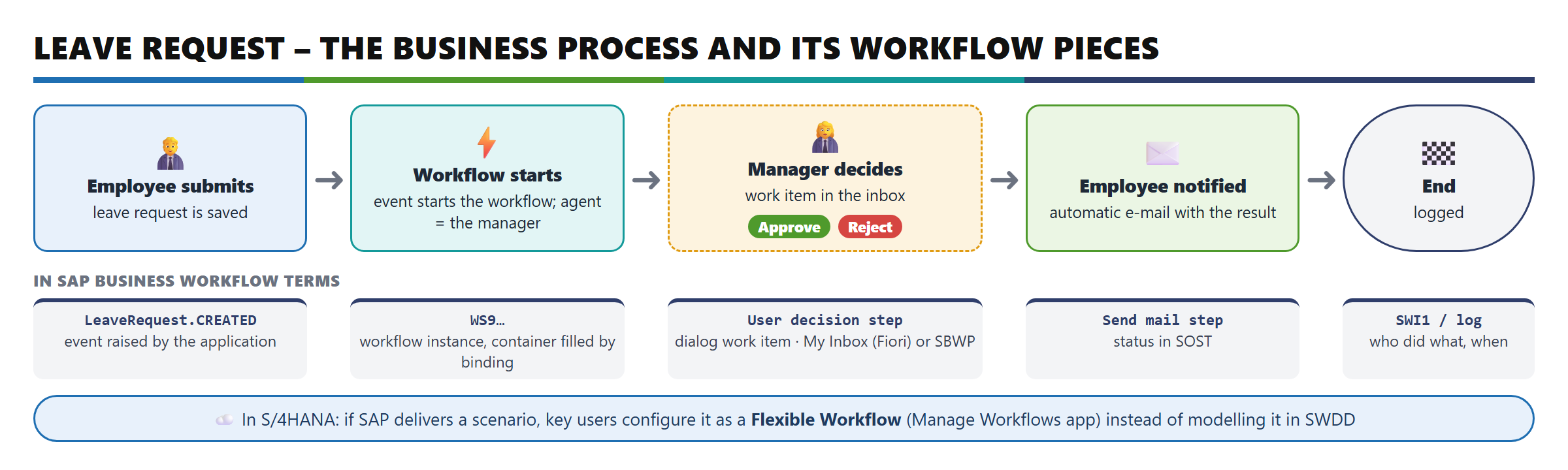
Basic terminology
Term | Meaning | Leave request example |
|---|---|---|
Workflow definition | The model: steps, rules and the path from start to end (built in SWDD) | WS90000001 "Approve leave" |
Workflow instance | One actual run of a workflow definition | Leave request of employee 4711 |
Task | A reusable activity, done by a person or the system (PFTC) | TS90000010 "Approve request" |
Step | A node in the workflow definition; an activity step calls a task | Step "Manager approves" |
Work item | The runtime instance of a step / task – what appears in the inbox | The approval item for the manager |
Agent | A person who processes work items | The manager |
Container | The data store of a workflow, task, method, rule or event | LeaveRequest, Approver |
Binding | Copying data from one container to another | Event object → workflow element |
Event | A signal that something happened to an object; can start or end work | LeaveRequest.CREATED |
The execution process
- 1. An event is raised (leave request created, invoice received).
- 2. The linked workflow starts and its container is filled from the event.
- 3. Each step creates a work item; agent determination decides who gets it.
- 4. The agent processes it in the inbox (approve, reject, other).
- 5. The workflow completes; it may raise another event.
- 6. Everything is logged: monitor in SWI1 / the workflow log.
Part 2 – Architecture and runtime flow
Workflow sits between the organization (who), the process (which steps, when) and the business objects (what work, as executable methods). ABAP programs raise events that start the process.
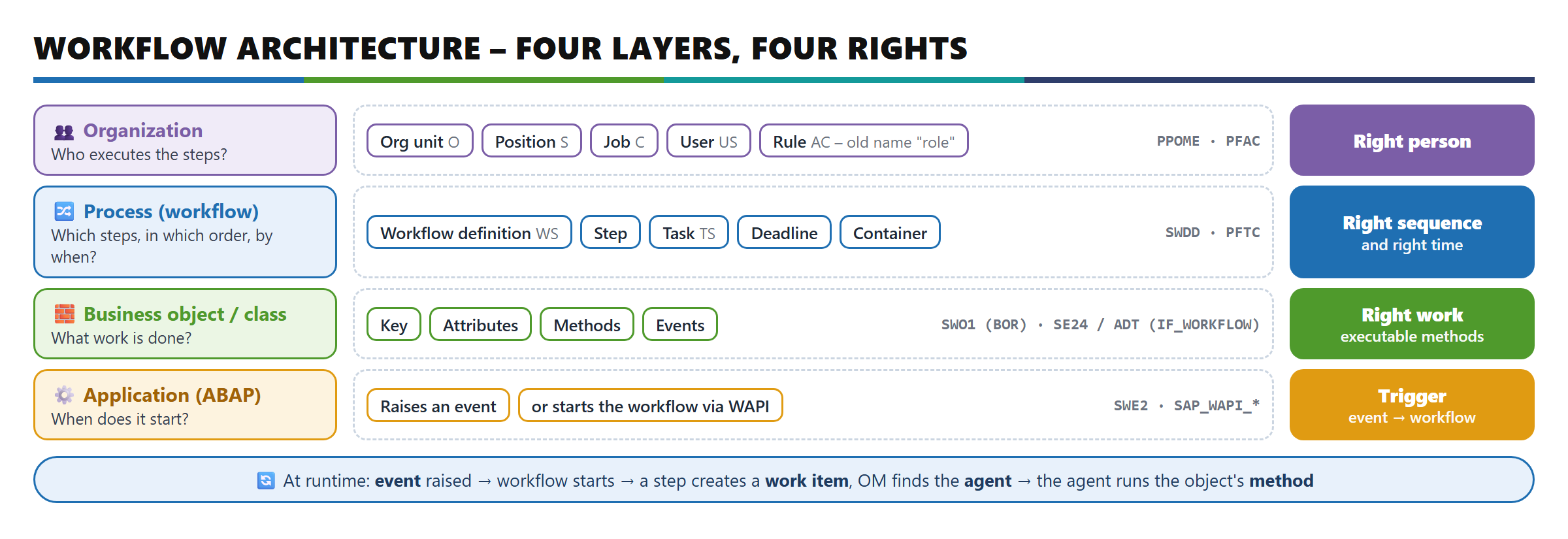
Layer | Question it answers | Contains | Tools |
|---|---|---|---|
Organization (HR OM) | Who executes the steps? (right person) | Org units, positions, jobs, users, rules | PPOME, PFAC |
Process (workflow) | Which steps, in which order, by when? (right sequence & time) | Workflow definition, steps, deadlines | SWDD |
Business objects / classes | What is done? (right work) | Attributes, methods, events of an object | SWO1, SE24 |
Application / ABAP | When does it start? | Raises events (or starts the workflow) | SWE2, WAPIs |
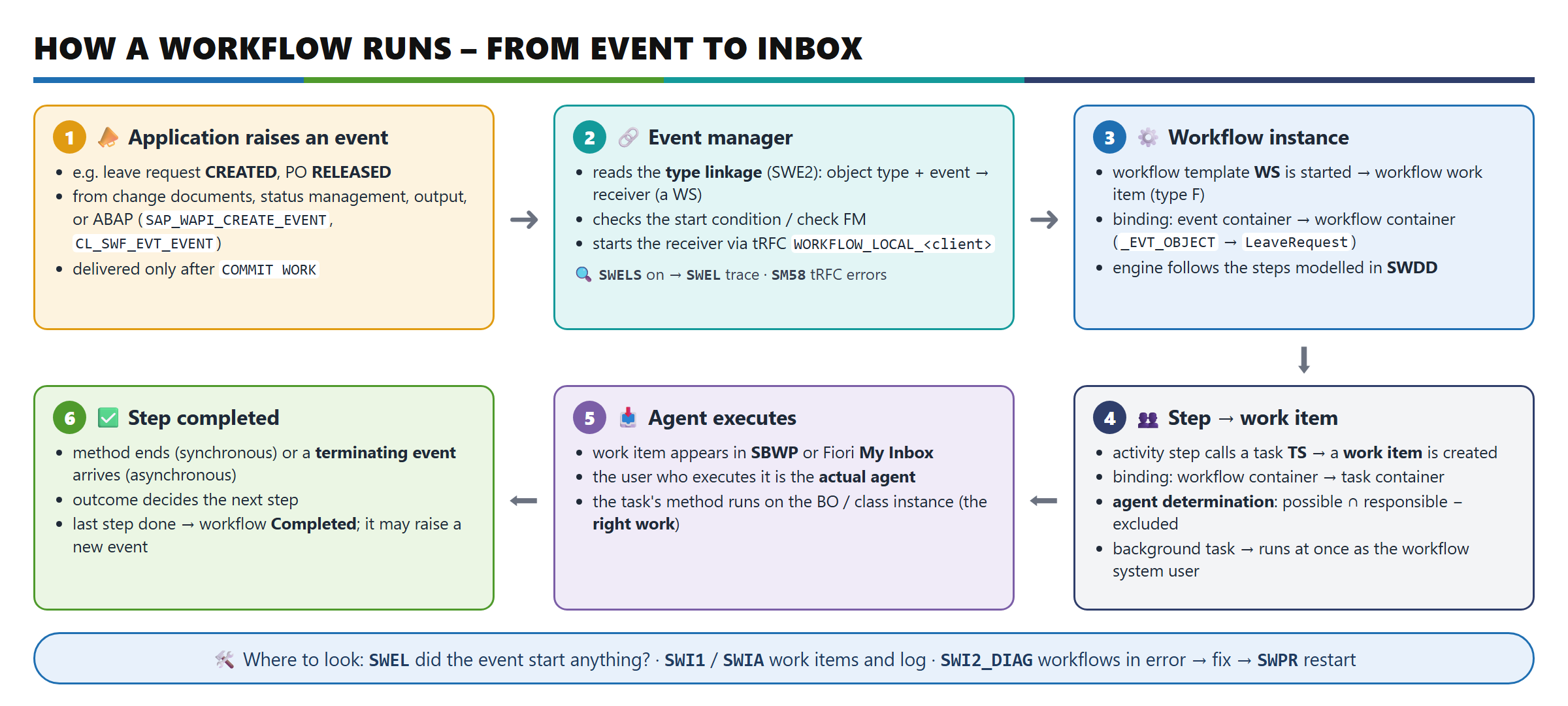
The same pieces at runtime – what happens from the moment an event is raised until the agent finishes:
Part 3 – Business objects (BOR)
A business object (BO) represents a real-world entity – vendor, customer, material, purchase order, sales order – as a collection of attributes, methods and events. It wraps the DDIC tables, the application code and the business documents behind one interface. The workflow only talks to the object, never to its tables. Business object types live in the Business Object Repository (BOR) and are maintained in SWO1.
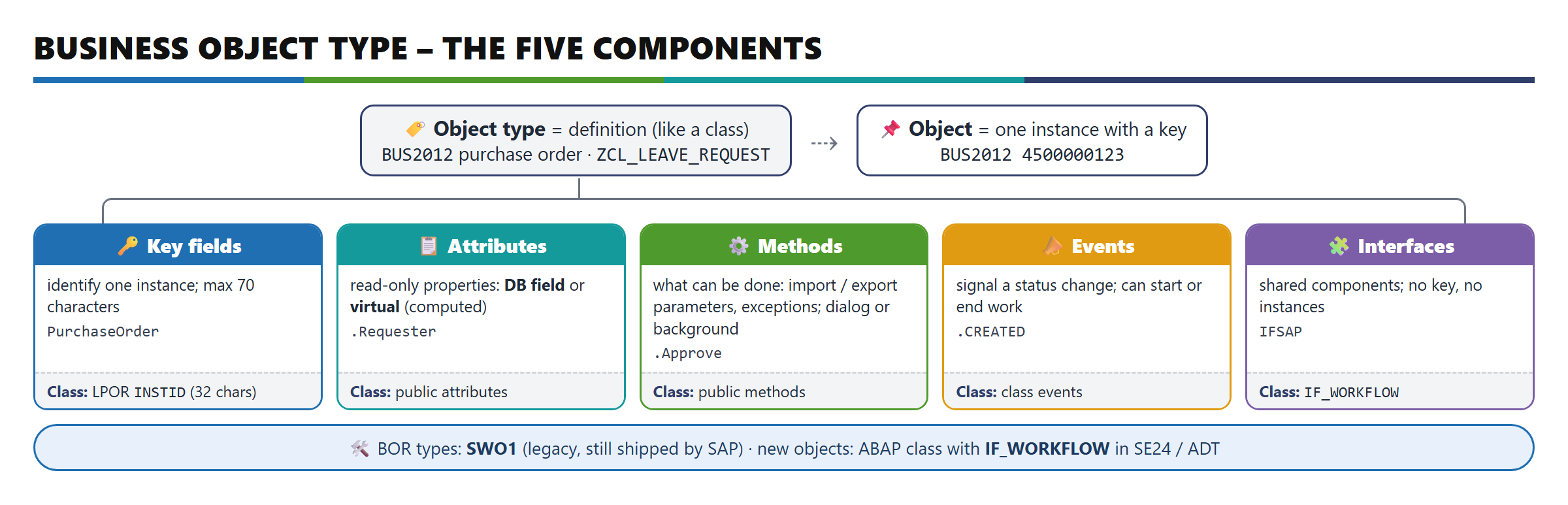
- Object type = the definition (like a class), e.g.
BUS2012purchase order,BUS2105purchase requisition,BUS2081supplier invoice. Object = one instance with a key (like an object of a class). - Outside view: users of a BO (workflow designers) call its methods without knowing the tables. Inside view: the developer who implements or extends it sees the code.
Properties of a BO type
Property | Meaning |
|---|---|
Object type (ID) | Internal identification, e.g. |
Object name | External name used by programs and external systems, e.g. |
Supertype | Parent type; all its components are inherited |
Name / Description | Descriptive name and short text |
Program | The ABAP program that holds the BO's implementation |
Application | Application component the type belongs to |
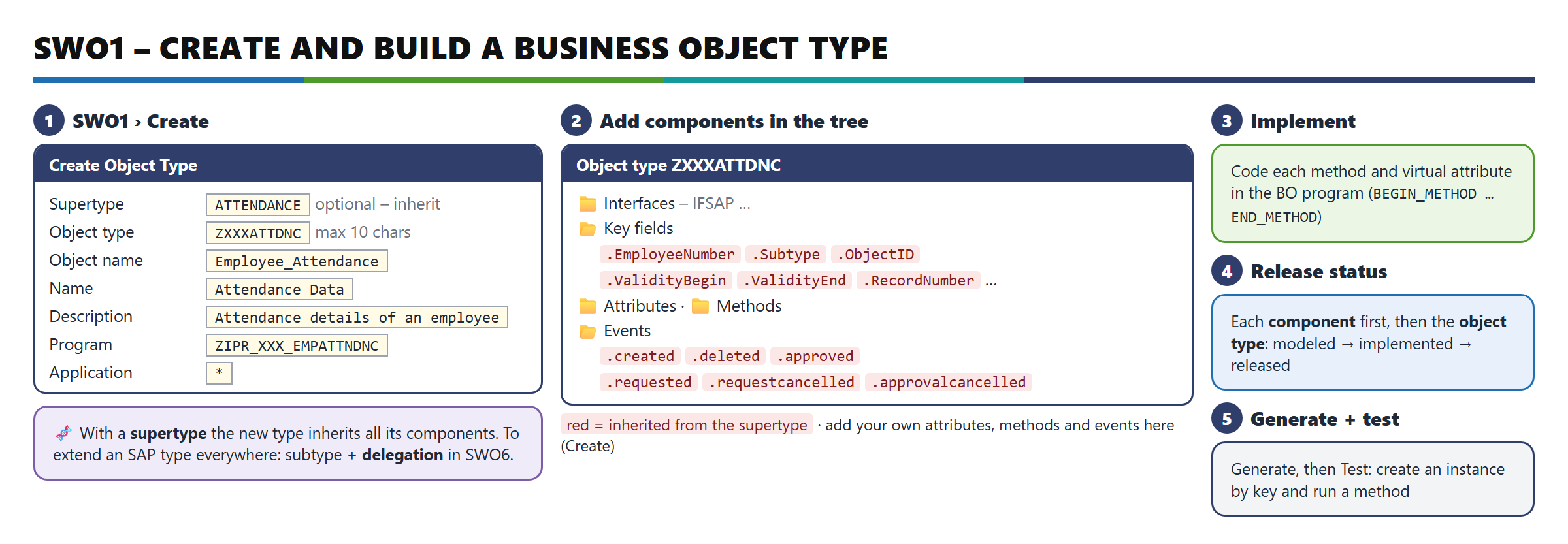
The five components
Component | What it is | Rules |
|---|---|---|
Key fields | One or more fields that identify one instance; refer to the application table key | Character-based; concatenated max 70 characters; set at creation, read-only from outside |
Attributes | Properties of the object, read-only from outside | Single- or multi-line; instance-dependent or static. DB field: read automatically from the table field linked to the key. Virtual: computed in the BO program ( |
Methods | Functions of the object (Display, Change, Approve, CreateDelivery…) | Instance-dependent or instance-independent (static); parameters (import/export, mandatory/optional, single/multi-line) and exceptions |
Events | Signal a status change (created, changed, released) | Can have parameters; the listeners are outside the BO (a workflow) |
Interfaces | Shared components inherited by object types | No key, no instances; a type can implement several (replaces multiple inheritance); interface methods can have an implementation and be redefined in the object type; |
Methods are classified in two independent ways:
- Dialog (runs in the agent's session, needs user input) vs background (runs as the workflow system user, no screen).
- Synchronous (returns result, export parameters and exceptions; the step finishes when the method returns) vs asynchronous (returns nothing to the step; the work item completes only when a terminating event arrives, e.g.
changedafter the user edited the document). - Implementation types: function module, transaction, dialog module, report, BAPI, or other – code between
BEGIN_METHODandEND_METHODin the BO program.
Release status
Set the status of each component first, then of the object type. Status has nothing to do with transport – BOR objects are transported with normal transport requests at any status.
Status | Meaning |
|---|---|
Modeled | Default after creation: only the definition/signature exists. Cannot be executed in a workflow |
Implemented | Code exists; usable in workflows and for testing (the builder warns) |
Released | Stable and supported for productive use |
Obsolete | Old functionality, possibly replaced; don't use it |
Delegation – extending an SAP object type
You may not change SAP's object types. Instead create a subtype, add your attributes, methods and events there, and delegate the supertype to it. Every use of the SAP type (tasks, events, workflows) then uses your subtype automatically, so SAP-delivered tasks see your extensions without being redefined.
- 1. SWO1: create a subtype (Supertype
BUS2012, object typeZBUS2012), add components, implement, set status. - 2. SWO6 (or SWO1 › Settings › Delegate): delegate
BUS2012→ZBUS2012. - 3. Keep using
BUS2012in tasks and linkages; at runtime the delegated subtype's code runs.
BOR programming: macros
BOR programs use macros from include <CNTN01> to work with objects and containers. A macro is compile-time text substitution, not an object-oriented feature:
|
- Macros can't be debugged step by step and hide logic; SAP discourages new ones – write methods instead (general modularization: see page 04 Modularization).
- The SWC_* container macros are still needed inside legacy BOR methods and rule function modules:
Macro | Purpose |
|---|---|
| Read / write a single-value container element |
| Read / write a multi-line container element |
SWC_CREATE_OBJECT | Create an object reference (wraps FM |
SWC_GET_PROPERTY | Read an attribute of an object reference |
| Frame of a method implementation in the BO program |
|
- Legacy BOR containers are internal tables of structure
SWCONT(ELEMENT = name, VALUE = value; a multi-line element is several rows with the same name). The modern runtime uses class-based containers (IF_SWF_IFS_PARAMETER_CONTAINER); WAPIs use tables ofSWR_CONT.
In S/4HANA / clean core: SAP still ships BOR types (BUS2012, BUS2105…) and they keep working, but BOR is in maintenance. Build new workflow objects as ABAP classes (Part 4).
Part 4 – Class-based workflow (IF_WORKFLOW)
Any ABAP class (SE24) can be used in workflow if it implements interface IF_WORKFLOW. It bundles two interfaces: BI_PERSISTENT (how the engine stores and rebuilds the instance) and BI_OBJECT (display behaviour). This is the recommended way for new development. Old documents call the engine the "SAP WebFlow Engine" – the same thing as SAP Business Workflow.
Method | Purpose |
|---|---|
| Rebuild an instance from its key (LPOR) when the engine needs it |
BI_PERSISTENT~LPOR | Return the instance key as structure |
BI_PERSISTENT~REFRESH | Reload buffered data |
BI_OBJECT~DEFAULT_ATTRIBUTE_VALUE | Text shown for the object (e.g. in the work item) |
BI_OBJECT~EXECUTE_DEFAULT_METHOD | Default action when a user clicks the object (usually display) |
BI_OBJECT~RELEASE | Free the instance |
- LPOR =
SIBFLPOR:CATID= 'CL',TYPEID= class name,INSTID= key. INSTID is only 32 characters (BOR keys allow 70) – a common pitfall when keys are long. - Public attributes act as workflow attributes, public methods as task methods (dialog or background is set in the task), public events as workflow events. Functional methods can be used in expressions; static utility classes suit background calculations.
|
BOR object type | ABAP class with IF_WORKFLOW | |
|---|---|---|
Tool | SWO1 (Business Object Builder) | SE24 / ADT |
Code style | Macros in a BO program | Normal ABAP OO, modern syntax, unit tests |
Key length | Up to 70 characters |
|
Extending SAP | Subtype + delegation (SWO6) | Inheritance or your own class |
Events raised by |
| CL_SWF_EVT_EVENT |
Status | Legacy, still used by SAP standard | Recommended for new development |
Part 5 – Tasks (PFTC)
A task is an activity done by a person (dialog) or the system (background): execute a report, approve leave, post an invoice. It points to one method of a BO type or class. Tasks are created in PFTC; at runtime each execution is a work item. A task group (TG) bundles logically related tasks, even across application components.
Type | Prefix | Kind | Client | Validity | Use |
|---|---|---|---|---|---|
Standard task | TS | Single-step | Cross-client | None | Always use |
Customer task | T | Single-step | Client-specific | Yes | Obsolete – compatibility only |
Workflow template | WS | Multi-step | Cross-client | None | Always use |
Workflow task | WF | Multi-step | Client-specific | Yes | Obsolete – compatibility only |
Task group | TG | Grouping | – | – | Group tasks for authorization / overview |
- Plan versions: a standard task (TS) is valid in all plan versions; a customer task (T) is plan-version-specific (and client-dependent).
- The system numbers tasks with an 8-digit ID after the prefix (TS90000010). The first three digits are the prefix number, maintained in SWU3 › Maintain prefix numbers (transaction OOW4); each system/client needs its own prefix so IDs never clash.
What you set in a task
- Object category (BOR object type or ABAP class), object type, method; background processing yes/no.
- Synchronous / asynchronous comes from the method; an asynchronous method needs a terminating event.
- Work item text with variables, e.g.
Approve leave &_WI_OBJECT_ID.REQUEST_ID&, plus a long description. - Task container and task → method binding.
- Agent assignment (possible agents): org objects, or classify it as a General task (Additional data › Agent assignment › Attributes) so every user is a possible agent.
- Flags: Confirm end of processing (the agent must confirm completion explicitly, status COMMITTED until then); Advance with dialog (in the workflow step: the next dialog step opens immediately for the same user).
An activity step that references a task becomes one of three work item kinds: a dialog work item (task with dialog; only these reach an inbox), a background work item (no dialog), or a workflow work item (the activity is a sub-workflow).
Part 6 – Workflow Builder (SWDD) and step types
The Workflow Builder (SWDD) creates, displays and changes multi-step workflows (WS). Everything, including the workflow container, is maintained there, in a graphical or a tree view.
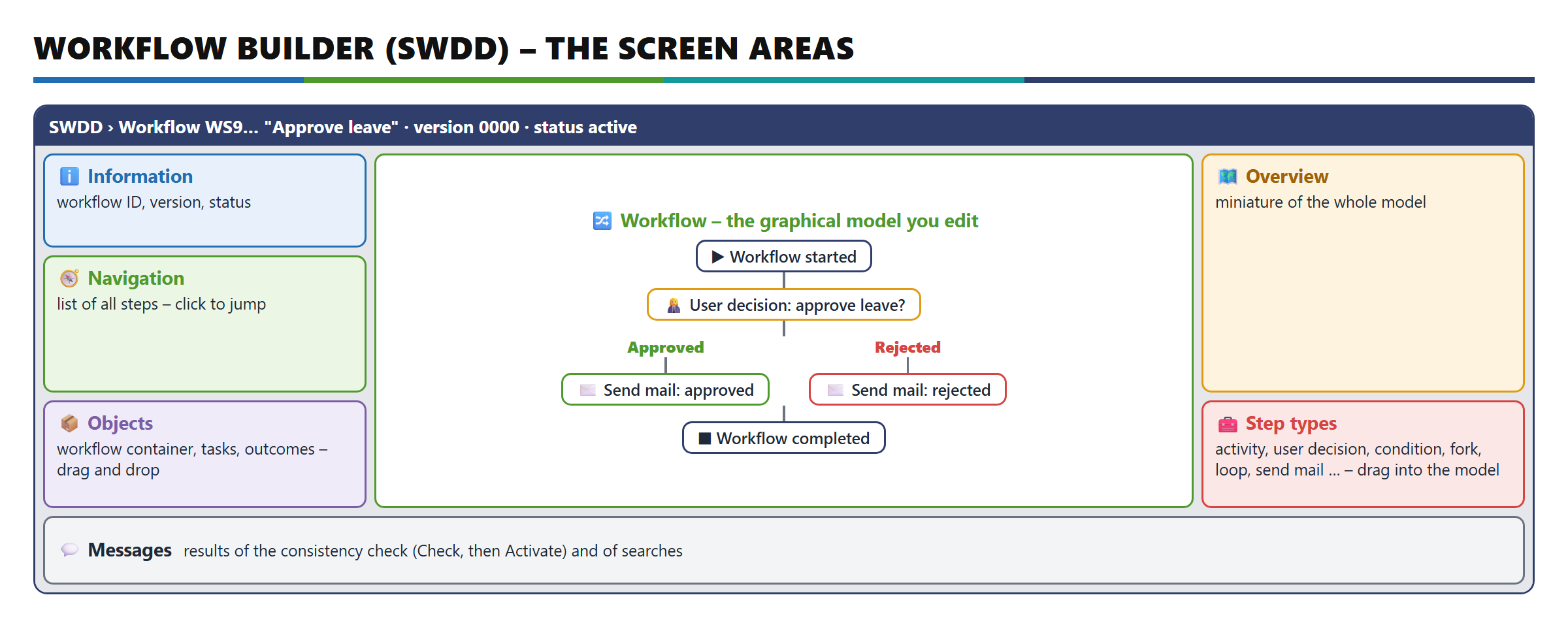
Area | Shows |
|---|---|
Information / Navigation | Workflow ID, version, status; list of steps to jump to |
Objects | Workflow container, tasks, documents, outcomes – drag and drop into steps |
Workflow | The graphical model you edit |
Overview / Step Types | Miniature of the whole model; the step types you can insert |
Messages | Results of the consistency check and search |
A step is the basic building block: it either executes a task or controls the flow. A step always sits inside a block together with its outcomes; at runtime a step becomes a work item.
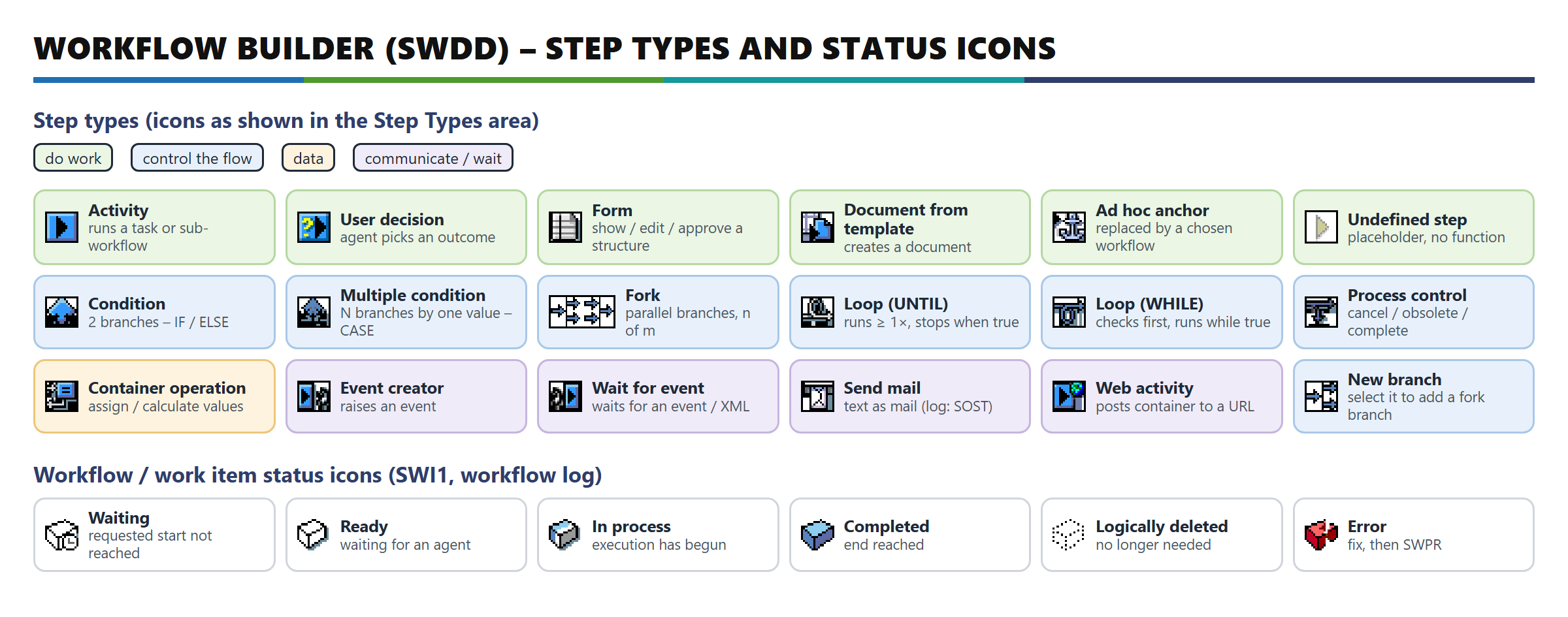
Step type | Runtime function | ABAP analogy / note |
|---|---|---|
Activity | Runs a task (TS) or a sub-workflow (WS) | A method call |
User decision | The agent picks one of several outcomes (with optional decision note) | Dialog with N buttons |
Condition | Two branches (true / false) from the container or object attributes | IF … ELSE … ENDIF |
Multiple condition | Several branches, chosen by the value of one container element; an "other values" branch catches the rest | CASE … WHEN … WHEN OTHERS |
Container operation | Assigns a value or calculates: |
|
Loop (UNTIL) | Body runs at least once, stops when the condition becomes true | DO … IF cond. EXIT. |
Loop (WHILE) | Condition checked first; body runs while it is true (maybe never) | WHILE cond. … ENDWHILE |
Fork | Parallel branches; ends after n of m branches (e.g. 2 of 3 approvers) or an end condition; open branches are then logically deleted | Parallel processing |
Process control | Cancel a work item, cancel a workflow, set a work item obsolete, complete a workflow, raise an exception |
|
Event creator | Raises an event (workflow → event container binding) | RAISE EVENT |
Wait for event | Work item completes only when the expected event (or XML document) arrives | Waits via an instance linkage |
Send mail | Sends the entered text to agents / addresses; status log in SOST, SAPconnect configuration in SCOT | – |
Form | Shows, edits or approves a structure-typed container element as a form | Simple screen |
Document from template | Creates a document from a template; the user can change it | – |
Web activity | Posts container elements to a URL (raw or as XML); can wait for a reply | HTTP call |
Ad hoc anchor | At runtime an authorized user picks a saved workflow whose steps replace the anchor | – |
Undefined step | Placeholder with no runtime function; always has an outcome | Empty statement |
A local workflow (block) groups steps that can be triggered as a unit inside the same workflow; a sub-workflow is a separate WS called by an activity step.
Inserting a step
To insert … | Select … |
|---|---|
After a step | The step's outcome in the right branch, then create the step |
Before a step | The step itself |
A new branch in a fork | The fork symbol ("new branch" icon) in front of the fork |
Into an empty model | Right-click the undefined step and choose a step type |
Building a workflow end to end
- 1. SWU3 – automatic workflow customizing: RFC destination
WORKFLOW_LOCAL_<client>, workflow system user, prefix numbers, background jobs. All lights green. - 2. Object – a BOR subtype (SWO1 + SWO6) or a class with IF_WORKFLOW (SE24), with methods and events; status Implemented/Released or class activated.
- 3. PFTC – standard task TS: object category, type, method, terminating events (if asynchronous), work item text, task → method binding, possible agents or general task.
- 4. SWDD – workflow template WS. Workflow container: an import element typed with the BO/class. Basic data › Start events: object type + event, binding
_EVT_OBJECT→ element, activate the linkage. - 5. Steps – activity (task TS) with workflow → task binding, agents, deadlines, outcomes; add user decisions, conditions, loops as needed.
- 6. Check, activate, save to a transport request.
- 7. Test – SWUS (with import data) or SWUE (fire the event); trace in SWEL; log in SWI1; inbox in SBWP or My Inbox.
Older solutions start a single-step task directly from a triggering event (PFTC › Triggering events tab). That still works but is legacy practice – use a WS with start events.
Part 7 – Containers and binding
A container holds all variables (container elements) of one workflow instance, task, method, rule or event – the persistent memory of the process. Values come from binding or from direct assignment (container operation).
Container | Container element | |
|---|---|---|
Definition | The structure of all variables of one instance | One variable inside it |
Scope | All data of one workflow / work item / event | One value (or one table if multi-line) |
Type | Not a type itself | Typed: DDIC type, BOR type or class |
Example | Leave request workflow container | Employee_Name, Leave_Start_Date, Approval_Status |
Purpose | Keeps the workflow's data for its whole life | Passes individual values between steps |
- Five container types: workflow, task, method, rule, event.
- Element properties: Import, Export, Mandatory, Multiline.
- Expressions reference elements and their attributes as
&ELEMENT.ATTRIBUTE&, e.g.&LeaveRequest.Requester&.
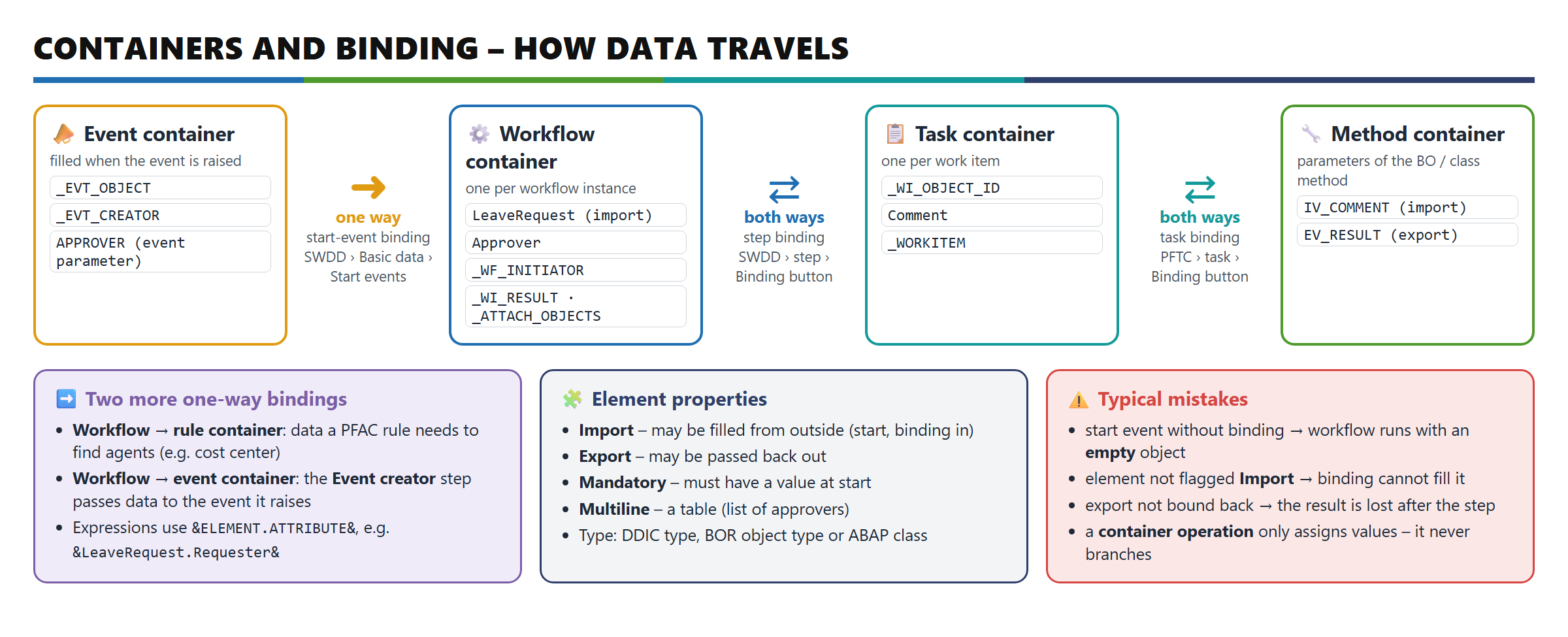
Binding | Direction | Maintained in |
|---|---|---|
Event → workflow | One way | SWDD › Basic data › Start events |
Workflow ⇄ task | Both ways | SWDD › step › Binding |
Task ⇄ method | Both ways | PFTC › Binding |
Workflow → rule | One way | Step agent assignment with a rule |
Workflow → event | One way | Event creator step |
System elements
Element | Content |
|---|---|
_WF_INITIATOR | User who started the workflow ( |
| Object that raised the event / user who raised it (event container) |
_WI_OBJECT_ID | Leading object of the work item (task container) |
_WORKITEM | The work item itself (task container) |
_WI_RESULT | Result of the step (e.g. the user decision) |
_ATTACH_OBJECTS | Attachments added by agents |
Programmatic access at runtime: SAP_WAPI_READ_CONTAINER and SAP_WAPI_WRITE_CONTAINER (Part 12).
Part 8 – Agents and organizational management
HR Organizational Management (OM) gives the right person: it maps departments, positions and people to workflow agents. Maintain the structure in PPOME (display PPOSE); PPOCW / PPOMW / PPOSW are the older transactions. PFOM / PFOS assign or display SAP org objects; PFSO shows a user's org environment.
OM object | Type | Example |
|---|---|---|
Organizational unit | O | Finance, HR, Sales |
Position | S | Manager Sales North (one person holds it) |
Job | C | General description, e.g. "Sales Manager"; describes many positions |
Person / user | P / US | The employee / the SAP user holding the position |
Task | TS / T | Tasks can be assigned to jobs or positions (possible agents) |
- In workflow, "role" is the old name of a rule (object type AC, PFAC) – not a PFCG authorization role and not an OM object.
Agent types
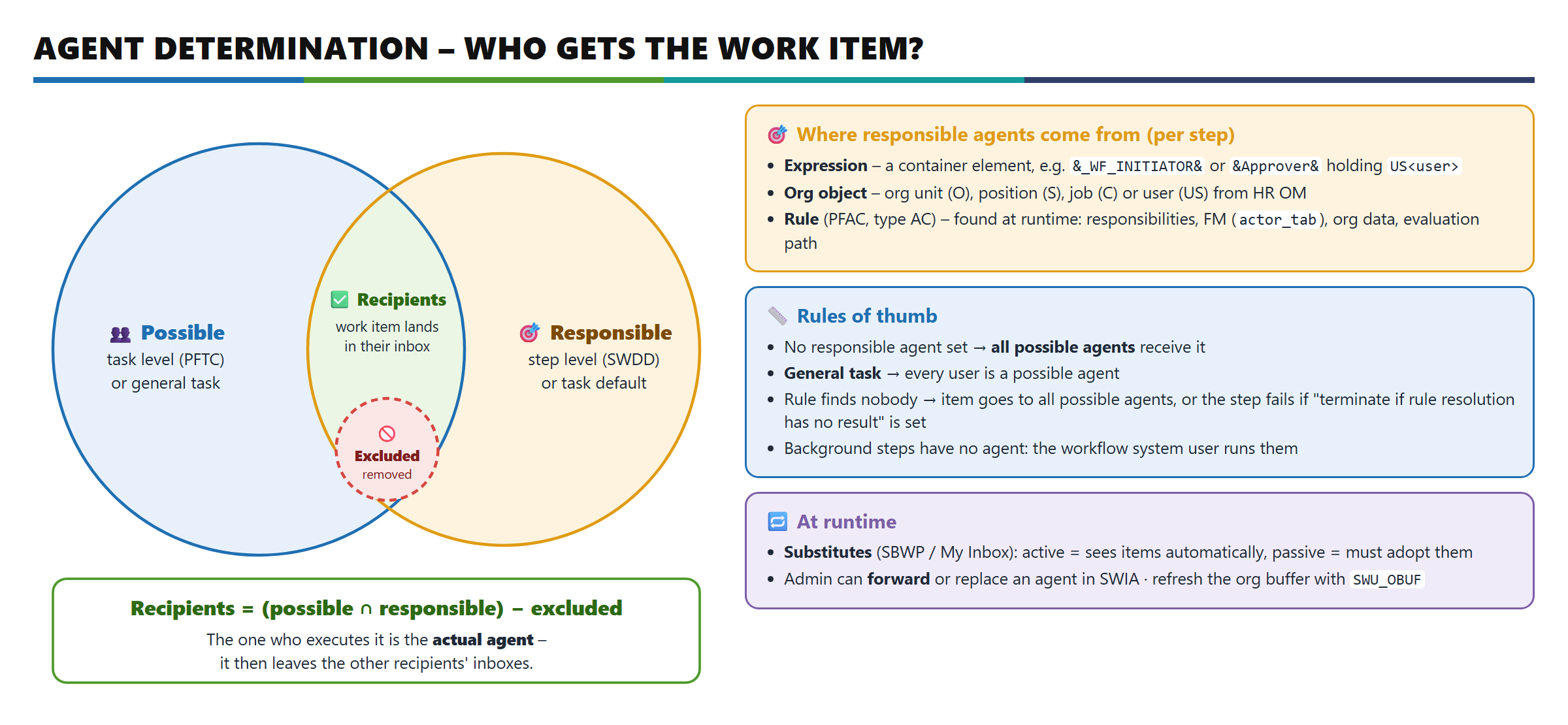
Agent | Defined in | Meaning |
|---|---|---|
Possible agents | Task (PFTC) | Who may execute the task at all (or everyone: general task) |
Responsible agents | Step (SWDD) or task default | Who should get this particular work item |
Excluded agents | Step | Who must not get it (e.g. the requester himself) |
Recipients | Calculated | (possible ∩ responsible) − excluded |
Actual agent | Runtime | The user who executes the work item |
Ways to determine responsible agents
- Static: a fixed org object (org unit, position, job, user) – simple, but breaks when people move.
- Expression: a container element, e.g.
&_WF_INITIATOR&or anApproverelement filled earlier. - Organizational: from OM, e.g. the requester's manager. Standard rule 00000168 (chief position) is the classic "manager of" rule.
- Rule (PFAC): business logic at runtime, e.g. a PO above a threshold goes to the department head. Rule types: responsibilities, function to be executed (FM), organizational data, evaluation path. SWDD and PFTC only reference a rule, with a workflow → rule binding.
A rule function module has a fixed interface. Example – find the approver of a cost center from a custom table:
|
- Test a rule with Simulate in PFAC. If it finds nobody, the item goes to all possible agents – unless the step flag Terminate if rule resolution has no result is set, then the workflow goes into error.
- Substitution (SBWP / My Inbox): active substitutes see the items automatically, passive ones must adopt the substitution first. Administrators can forward work items in SWIA.
- OM changes not visible? Refresh the org buffer with SWU_OBUF.
Part 9 – Events
An event announces that the status of an object changed – report generated, leave submitted, invoice posted. It is published to the system; any number of receivers can react.
Use | Effect | Linkage |
|---|---|---|
Triggering (start) event | Starts a workflow | Type linkage: SWE2 / SWETYPV (every object of the type) |
Terminating event | Completes a waiting work item (asynchronous method, wait step) | Instance linkage: SWE3 / SWEINST (only this object instance), created by the engine |
Type linkage (SWE2)
One entry = object category + object type + event → receiver. Normally created automatically when you activate a start event in SWDD; SWETYPV is a view on the same table.
- Receiver type / receiver FM: usually the workflow WS with FM
SWW_WI_CREATE_VIA_EVENT_IBF. - Start condition (SWB_COND, also in SWDD Start events) or a check FM: start only if, e.g., amount > 1000.
- Linkage activated flag; the event queue (SWEQADM, SWEQBROWSER) can buffer events to spread load.
- Events are delivered only after COMMIT WORK, normally by tRFC (asynchronously, destination
WORKFLOW_LOCAL_<client>, as the workflow system user). The relevant sync/async distinction is between methods (Part 3), not events.
How events are raised
- By the application, without code: change documents (SWEC), status management (BSVW), output / message control, Business Transaction Events, HR infotype events.
- By the workflow: an Event creator step.
- Manually for tests: SWUE – enter object type, key and event, execute.
- From ABAP – BOR object, recommended WAPI:
|
- From ABAP – class-based object:
|
Event trace (SWELS / SWEL)
Switch the trace on with SWELS (old: SWE4), reproduce, then read SWEL. Switch it off again in production; old entries are deleted with report RSWELOGD. Typical SWEL results:
SWEL text | Meaning / next check |
|---|---|
Receiver started correctly | Workflow started – continue in SWI1 |
No receiver entered | No active type linkage for this object type + event (SWE2, start events in SWDD) |
Check FM ended with exception | Start condition / check FM said "don't start" – usually intended |
Receiver could not be started / feedback error | Binding or workflow problem – look in SM58 and SWI1 |
Part 10 – Work items
A work item is the runtime instance of one step or task. Dialog work items reach the agent's inbox: SBWP (Business Workplace, SAP GUI), the Portal UWL, SAP Fiori My Inbox (F0862) or SAP Task Center.
Type | Key | Description | In inbox? |
|---|---|---|---|
Dialog work item | W | A step or single-step task that needs user dialog | Yes |
Missed deadline | D | Notification that a deadline was missed | Yes |
Work queue | A | Objects processed once and together in a limited time frame | Yes |
Workflow | F | Runtime presentation of a workflow or sub-workflow | No |
Block | X | Runtime presentation of a block | No |
Background | B | A step without dialog, run by the system | No |
Wait step | E | A wait-for-event step | No |
Web | R | A web activity | No |
Container anchor | C | Special EDI development; delete or archive regularly | No |
Statuses
Status of a workflow / sub-workflow (icons in kw04 above):
Status | Meaning |
|---|---|
Waiting | Scheduled; the requested start has not been reached yet |
Ready | Temporary interim status |
In process | Execution has begun |
Completed | The end has been reached |
Logically deleted | No longer needed: set by an administrator (only before Completed), by a process control step, or by a fork that has enough branches. Applied recursively to open dialog and workflow work items. Database changes or events already made are not rolled back – only logged |
Error | An error in workflow control – fix and restart (SWPR) |
Technical status of a dialog work item (field WI_STAT):
Status | Meaning |
|---|---|
WAITING | Requested start in the future |
READY | In the inbox of all recipients, nobody has taken it yet (a user decision stays here until processed) |
SELECTED | Reserved by one recipient – gone from the other inboxes |
STARTED | In process (the workflow work item is STARTED while its steps run) |
COMMITTED | Executed, waiting for "confirm end of processing" |
COMPLETED / CANCELLED | Finished / logically deleted |
ERROR | Error during execution |
CHECKED | In preparation (created, not yet released) |
Part 11 – Deadline monitoring (right time)
Deadlines make sure work items are processed in time. Each step has four deadline tabs; each deadline is a reference date/time (work item creation, workflow start, or a container element) plus an offset.
Deadline | Meaning | Typical use |
|---|---|---|
Requested start | Earliest time the work item is delivered | Delay delivery (e.g. a few minutes, or until a date) |
Latest start | Latest time processing may begin | Alert if nobody picked it up |
Requested end | When it should be completed | Reminder, e.g. after 5 of 7 days |
Latest end | Latest time to finish without breaching | Escalate to the supervisor |
- Action when missed: display text – a missed-deadline work item (type D) is sent to the recipients you name (e.g. the supervisor); modelled – an extra outcome branch where you model the escalation (forward, process control "set obsolete", send mail).
- Needs background job SWWDHEX (report RSWWDHEX), scheduled from SWU3. Without it no deadline fires.
- Report SWI2_DEAD lists work items with monitored deadlines; deadlines can be changed at runtime in SWIA or with FM
SWW_WI_DEADLINES_CHANGE.
Part 12 – Starting workflows and APIs
Way | How | Notes |
|---|---|---|
By event | Start event / type linkage (Part 9) | Normal productive way |
Manually (user) | SWUI – start workflows the user is a possible agent of | Workflow needs possible agents |
Manually (test) | SWUS – enter import container values and start | Developer test; SWUE fires the event instead |
From ABAP | SAP_WAPI_START_WORKFLOW | When there is no suitable event |
Only a possible agent of the workflow (or of a general task) can start it manually; a dialog task without possible agents can neither be started nor executed. SBWP is the inbox for processing work items, not the start transaction.
|
Workflow APIs (WAPIs)
Function module | Purpose |
|---|---|
SAP_WAPI_START_WORKFLOW | Start a workflow with a container |
SAP_WAPI_CREATE_EVENT | Raise a BOR event |
| Read / change a work item's container |
SAP_WAPI_WORKITEM_COMPLETE | Complete a work item |
SAP_WAPI_DECISION_COMPLETE | Complete a user decision with a chosen outcome |
SAP_WAPI_GET_WORKITEM_DETAIL | Read work item details |
SAP_WAPI_WORKITEMS_TO_OBJECT | All work items for an object |
SAP_WAPI_ADM_WORKFLOW_CANCEL | Cancel a workflow (administrator) |
Older internal FMs – prefer the WAPIs: SWW_WI_CONTAINER_READ (read a container), SWW_WI_DEADLINES_CHANGE (change deadlines), SWW_WI_ENABLE / SWW_WI_DISABLE (unlock / lock a work item for execution).
Part 13 – Monitoring and troubleshooting
Runtime customizing (SWU3)
- Creates logical RFC destination WORKFLOW_LOCAL_<client> (e.g. WORKFLOW_LOCAL_800): background steps and event delivery run through it as the workflow system user SAP_WFRT (older systems: WF-BATCH).
- Schedules the jobs: SWWDHEX deadlines, SWWERRE error monitoring (restarts failed tRFC calls), SWWCOND work item start/end conditions, SWWCLEAR clean-up of job logs, SWEQSRV event queue.
- Maintains prefix numbers and the default for general tasks. All lights must be green.
Checklist
Symptom | Check, in this order |
|---|---|
Workflow didn't start | SWELS on → repeat → SWEL. No receiver? → linkage active in SWE2 / start events. Check FM exception? → start condition. Receiver error? → SM58 (tRFC), binding, SWU3 green, event raised before COMMIT WORK? |
Workflow in error | SWI1 or SWI2_DIAG → open the log (technical view, container, messages) → fix the cause → SWPR restart after error, or complete manually in SWIA. After a system crash: SWPC |
No recipient / wrong recipient | SWI1 → work item → agents. Possible agents in PFTC (general task?), responsible agents in the step, rule simulation in PFAC, OM assignment, SWU_OBUF refresh |
Background step fails | ST22 dump, SM37 workflow jobs, SM58, user SAP_WFRT authorizations |
Deadline doesn't fire | Job SWWDHEX scheduled (SWU3)? SWI2_DEAD |
Mail not received | SOST send status, SCOT configuration |
Need deeper trace | SWU8 workflow trace on, SWU9 display, SWU10 delete; SWUD diagnosis wizard |
- Housekeeping: old work items are archived with archiving object WORKITEM; report RSWWWIDE deletes work items (test systems only). SWU_CONT_PERSISTENCE sets container storage (XML vs table).
Part 14 – Transaction codes
Group | T-code | Purpose |
|---|---|---|
Design | SWDD | Workflow Builder (WS) |
PFTC | Create / maintain tasks (TS, WS, TG) | |
SWO1 / SWO6 | Business Object Builder / delegation of object types | |
SE24 | Class Builder (IF_WORKFLOW classes) | |
PFAC | Create / maintain rules | |
SWDD_SCENARIO | Flexible workflow scenario definition (S/4HANA) | |
SWDM | Business Workflow Explorer (find workflows and tasks) | |
Runtime / inbox | SBWP | Business Workplace (inbox, substitutes); Fiori: My Inbox |
SWUI | Start workflows (end user) | |
SWUS | Test: start a workflow or task with import data | |
Events | SWE2 / SWETYPV | Type linkages (event → receiver) |
SWE3 / SWEINST | Instance linkages | |
SWUE | Generate (fire) an event | |
SWELS / SWEL | Event trace on/off / display event trace | |
SWEC | Link change documents to events | |
SWB_COND | Start conditions for linkages | |
SWEQADM / SWEQBROWSER | Event queue administration / browser | |
SWU0 | Event simulation (which receivers would start?) | |
Monitoring / admin | SWI1 | Selection report for work items (+ workflow log) |
SWI2_FREQ / SWI2_DURA | Work items per task / by processing duration | |
SWI2_DIAG | Workflows with errors | |
SWI2_DEAD | Work items with monitored deadlines | |
SWI5 / SWI6 | Workload analysis / workflows for an object | |
SWIA | Process work items as administrator (complete, forward, logically delete) | |
SWPR / SWPC | Restart after error / continue after system crash | |
SWU8 / SWU9 / SWU10 | Workflow trace on / display / delete | |
SWUD | Diagnosis tools | |
SOST / SM58 / SM37 | Mail send status / tRFC errors / jobs | |
SWU4–SWU7 | Consistency checks (standard tasks, customer tasks, workflow tasks, templates) | |
Customizing | SWU3 | Automatic workflow customizing (RFC destination, user, jobs, prefixes) |
OOW4 | Prefix numbers for tasks | |
SWNCONFIG / SWNADMIN | Extended notifications (e-mail about new work items) | |
SCOT | SAPconnect (mail configuration) | |
PPOME / PPOSE | Maintain / display org structure (older: PPOCW, PPOMW, PPOSW) | |
PFOM / PFOS / PFSO | Assign / display SAP org objects / org environment of a user | |
SWU_OBUF | Refresh the runtime (org) buffer |
- Rarely needed, from the old list: SWDA (alphanumeric builder, very old), SWDS (builder selection), SWDC_DEFINITION / SWDC_RUNTIME (builder admin data), SWDD_CONFIG (workflow configuration), SWI11 / SWI13 (tasks in workflows / task profile), SWL1 / SWLV (inbox columns / work item views), SWFVISU (UWL visualisation), SWU2 (RFC monitor), SWU_EWCD / SWU_EWLIS / SWU_BTE / SWUY (event creation wizards), SWXML (XML documents), SWED (change documents to object types), SWR_WEBSERVER, WF_HANDCUST, WF_EXTSRV, WFWS (web service handling).
Part 15 – In S/4HANA
- Classic workflow (SWDD, BOR or classes) is fully supported in S/4HANA on-premise and private cloud. SAP standard still ships BOR objects. New custom objects: classes with IF_WORKFLOW.
- Flexible Workflow: SAP-delivered workflow scenarios (purchase requisition, purchase order, supplier invoice, journal entry …) that key users configure in the Fiori Manage Workflows apps – start conditions, steps, recipients, deadlines – without SWDD modelling. It runs on the same engine. Developers extend it with BAdIs (custom conditions, custom agent determination; see page 10 Enhancements) or define scenarios in SWDD_SCENARIO. In S/4HANA Public Cloud it is the only approval-workflow option.
- My Inbox (Fiori app F0862) replaces SBWP for end users; SAP Task Center (BTP) gathers tasks from S/4HANA, SuccessFactors and Build Process Automation in one inbox. Admin tools stay SWIA / SWI1 / SWPR, plus Fiori workflow administration apps where available.
- SAP Build Process Automation (BTP): low-code workflows, forms, decisions and RPA bots – the successor of SAP Workflow Management and SAP Intelligent RPA. Use it side by side for cross-system or clean-core processes; it calls S/4HANA through released APIs (page 07 Interfaces, page 08 OData).
- Decision logic can be kept outside the workflow in BRF+ (see page 13 BRF+); RAP business objects raise business events instead of BOR events (RAP › 10 · Business Events & Event-Driven RAP).
In S/4HANA / clean core: configure a Flexible Workflow if SAP delivers a scenario; otherwise build a class-based SWDD workflow (on-premise / private cloud) or a side-by-side process in SAP Build Process Automation.
Part 16 – Interview questions
Q1. What is SAP Business Workflow and when do you use it?
An engine in the ABAP stack that routes the right work to the right person at the right time in the right sequence. Use it for recurring processes with several people, approvals and a need for tracking.
Q2. Task vs step vs work item?
A task (PFTC) is a reusable activity pointing to one method. A step is a node in a workflow definition; an activity step calls a task. A work item is the runtime instance of a step/task – what lands in the inbox.
Q3. TS vs WS, and standard vs customer task?
TS = single-step standard task, WS = multi-step workflow template; both cross-client without validity. Customer tasks (T) and workflow tasks (WF) are client-specific with validity periods and obsolete.
Q4. BOR object vs class-based workflow?
BOR: SWO1, macros, key up to 70 characters, delegation via SWO6, legacy. Class: SE24 with IF_WORKFLOW (BI_PERSISTENT + BI_OBJECT), normal ABAP OO, key INSTID up to 32 characters, recommended.
Q5. Synchronous vs asynchronous method?
Synchronous returns results and the step ends when the method returns. Asynchronous returns nothing to the step; the work item completes only when a terminating event arrives.
Q6. What is binding, and how is it different from a container operation?
Binding copies data between containers (event → workflow, workflow ⇄ task ⇄ method, workflow → rule). A container operation is a step that assigns or calculates values inside the workflow container.
Q7. Condition vs multiple condition? Loop UNTIL vs WHILE?
Condition = two branches (IF/ELSE). Multiple condition = N branches by the value of one element (CASE). UNTIL runs at least once and stops when true; WHILE checks first and runs while true.
Q8. Possible, responsible, excluded and actual agents?
Possible = may execute (task). Responsible = should get it (step). Excluded = must not get it. Recipients = (possible ∩ responsible) − excluded; the one who executes is the actual agent. No responsible agent → all possible agents; a general task makes everyone possible.
Q9. How do you trigger a workflow from ABAP?
Raise an event: SAP_WAPI_CREATE_EVENT (BOR) or CL_SWF_EVT_EVENT (class), then COMMIT WORK; the type linkage starts the workflow. Or start it directly with SAP_WAPI_START_WORKFLOW.
Q10. Type linkage vs instance linkage?
Type linkage (SWE2): every object of a type + event → receiver, used for start events. Instance linkage (SWE3/SWEINST): one specific object instance, created by the engine for terminating events and wait steps.
Q11. A workflow did not start – how do you analyse it?
SWELS on, repeat, SWEL: no receiver → activate the linkage; check FM exception → start condition; receiver error → SM58, binding, SWU3. If it started but failed: SWI1 / SWI2_DIAG, log, fix, SWPR.
Q12. What replaces classic workflow in S/4HANA?
Flexible Workflow (key users configure SAP scenarios in Manage Workflows; extend via BAdIs), My Inbox, and SAP Build Process Automation on BTP for side-by-side processes. Classic SWDD workflow remains supported on-premise.
🏠 Start Here · ◀ 11 · Forms · 13 · BRF+ ▶ · Sections: CORE ABAP | OOPS ABAP | ABAP on HANA | Clean Core | RAP | ABAP Points | SAP Fiori | SAPUI5 | Mobile Development (MDK) | BTP Foundations | BTP Development | CAP | SAP Build | ABAP on BTP | Integration Suite | SAP Business AI | SAP BASIS | Security | SAP SDLC
Functional: FICO ABAP | TRM ABAP | VIM | SAP BIS | SD ABAP | MM ABAP | PP ABAP | QM ABAP | PM ABAP | PS ABAP | EWM | TM ABAP | EHS ABAP | HR ABAP | BW | SAP MDG | SAP Analytics Cloud | SAP Ariba | SAP CX | SAP IBP